Inkjet and laser printers are the two classic choices for a home printer. They look similar but differ in cost, quality, speed and how well they cope with idle time. The right choice depends on what you print and how often. This guide compares them for home use.
Product details are based on listings and manufacturer information, not our own testing.
By the Reviewstook Editorial Team. Last updated: October 31, 2026.

The Short Answer
Choose a laser for mostly black-and-white documents, fast printing and low maintenance. Choose an inkjet if you want color, photos and creative projects at a lower purchase price. If you print a lot of color, consider an ink tank printer; see ink tank vs laser.
In this guide
Print Quality
Lasers produce sharp, smudge-resistant text. Inkjets produce richer color and better photos, particularly on photo paper.
Speed
Lasers print text pages faster. Inkjets can be slower, especially in high quality.
Cost to Buy and Cost to Run
Basic inkjets are cheaper to buy, but cartridge ink can be costly per page. Lasers cost more up front for color but monochrome lasers are inexpensive, and toner often costs less per page. Compare costs using how to calculate printer cost per page.
Idle Time and Reliability
Toner does not dry out, so lasers cope with weeks of inactivity. Inkjets can clog; see how to stop printer ink drying out.
Size and Noise
Lasers are often bigger and heavier. Compact monochrome lasers are an exception. Inkjets are more compact but can be noisier during printing.
Features
Both come as all-in-ones. Inkjet all-in-ones are common at lower prices. See what is an all-in-one printer.
Who Should Choose Which
- Students and homework: a monochrome laser for essays, or an ink tank printer for a mix.
- Photos and crafts: an inkjet. See photo printers and printers for crafters.
- Home office: a laser all-in-one or a document-feeder inkjet. See printers for work from home.
- Rare use: a laser to avoid clogs.
See best printers for home use, best laser printers and best inkjet printers.
How Much You Print Decides More Than Technology
Before comparing features, estimate your real printing habits. A printer that suits a household that prints a few pages a week may be a poor match for one that prints a stack of documents daily. Think in terms of volume, pattern and mix.
- Light, occasional use: a few pages a month, such as a boarding pass, a form or a recipe. Here, the risk is not running out of pages but letting a printer sit idle. A laser avoids drying problems, while an inkjet may need cleaning cycles that use ink.
- Moderate, regular use: school work, household paperwork and the odd photo. Either type can work, and the decision shifts to cost per page, color needs and convenience.
- Heavy use: frequent documents, home business paperwork or a large family. Look at the maker’s stated monthly duty guidance, the paper tray capacity and the availability of high-yield supplies. An ink tank or a laser is often more sensible than a small cartridge inkjet.
- Mixed color and text: if you print mostly text but occasionally want color, think about whether a color laser or an inkjet or ink tank model best fits the color share.
Keep a note for a month of what you print, how many pages and whether they are color or black and white. That record is more reliable than a guess, and it helps you work out the cost per page for each option. Remember also that printing habits change. A student heading to exams or a person starting a home business may need a different printer a year from now.
Consumables Compared: Cartridges, Tanks and Toner
The way each printer stores and uses ink or toner affects cost, convenience and waste. The differences are worth understanding before you buy.
Ink cartridges: small cartridges are common on low-priced inkjets. They are easy to replace, but run out quickly, and the cost per page can be high. Some printers use separate cartridges for each color, so you replace only the one that runs out, while others use combined cartridges. Check the product page for the cartridge types and yields.
Ink tanks: these printers have refillable reservoirs filled from bottles. They usually cost more at purchase but can be cheaper per page for frequent printing. Filling needs care to avoid spills, and you should use the ink the maker specifies.
Toner cartridges: laser printers use powder toner. A cartridge can last a long time, and toner does not dry out, which helps in households that print rarely. Color lasers use four cartridges, and the combined replacement cost can be significant.
- Check what comes in the box. Starter cartridges are often partly filled and run out sooner than full-size replacements.
- Look at the yield figures on the product page, and remember that they are measured under standard test conditions, so real use differs.
- Consider whether the maker offers a subscription program for ink or toner, and read the terms before joining.
- Some printers are designed to work with the maker’s own supplies. Check the listing and your own preferences before considering other options, as compatibility and warranty terms vary.
Also think about waste. Recycling programs for cartridges are often available from makers or retailers, and refillable systems can reduce the number of used cartridges.
Paper, Envelopes, Labels and Other Media
Home printing is not only plain paper. If you plan to print other materials, check that the printer supports them, because the two technologies handle media differently.
- Photo paper: inkjets are designed for it. Lasers can print on some glossy papers, but quality and compatibility vary, and some photo papers are not suitable for the heat of a laser.
- Envelopes: both can print them, but check the manual for supported sizes, the feed path and any need to flatten the envelope first.
- Labels: use sheets that are made for your printer type. Lasers need labels rated for the heat of the fuser, and using the wrong ones can cause jams or damage.
- Cardstock and thick paper: check the maximum weight in the specifications and the paper path. A straight rear path often handles thick media better.
- Double-sided printing: automatic duplex saves paper and effort. Look for it in the specifications if you print long documents.
- Document feeder and scanning: if you copy or scan stacks of pages, an automatic feeder helps. Check the capacity and whether it supports double-sided scanning.
Paper handling also affects reliability. Store paper flat in a dry place, because damp paper curls and jams. Fan the stack before loading, and do not overfill the tray. Match paper settings in the print dialog to what you loaded, so the printer applies the right amount of ink or heat.
Warm-Up, Power and Where You Will Put It
The setting for your printer matters as much as its specifications. Think about the space, the noise and the power it will use in a home environment.
- Size and placement: measure the shelf or desk, and leave room to open the lid, load paper and let the paper exit. Lasers are often deeper, while some inkjets are compact but need clearance for the scanner lid.
- Warm-up time: laser printers heat a fuser unit, which may add a short delay before the first page, especially after sleeping. Inkjets generally start printing quickly but may run a head cleaning cycle after being idle.
- Noise: printing, feeding paper and fan noise vary by model. If you work in a shared room or a bedroom, check user impressions about noise.
- Power use: check the standby and sleep modes, and consider switching the printer off when not in use, following the maker’s advice. Some inkjets prefer to be turned off using their own power button so the heads are capped properly.
- Ventilation: printers can release small amounts of particles or odors, especially when new. Place yours in a room with some airflow, not in a closed cupboard.
- Weight: some printers are heavy, so plan for lifting and for a sturdy surface.
Connectivity matters too. Check for wireless, USB and network support, and whether you can print from your phone or tablet. Keep the firmware updated, and change default passwords if the printer has a web page for settings.
Questions to Ask Before You Buy and Signs It Is Time to Replace
A short list of questions can steer you away from a poor match. Ask yourself the following, and look for the answers on the product page and in the manual.
- Do I print mostly text, or do I need good color and photos?
- How many pages do I print in a typical month, and how steady is that?
- What is the cost per page for black and for color, based on the yield and supply prices?
- What size and type of paper do I use, and does the printer support them?
- Do I need scanning, copying or a document feeder?
- How will the printer connect to my devices?
- What are the warranty terms, and where can it be serviced?
- Are there restrictions on the supplies that I can use?
After you own the printer, watch for signs that it is time to move on. Frequent jams that continue after cleaning the rollers, repeated head clogs that do not clear, faded or streaky output that persists with fresh supplies, error messages that return after resets, or noises that signal a worn part can all point to age. Compare the cost of repair with that of a replacement, and check whether supplies for your model are still sold. Recycle old printers through a take-back scheme rather than throwing them in the trash.
Quick Decision Guide by Household Type
Most buyers do not need a long technical comparison. They need a quick answer based on how they live. This guide matches common household patterns to the printer type that tends to suit them, with notes on where exceptions arise.
| Household | Often suits | Why |
|---|---|---|
| Student with essays and occasional posters | Inkjet or laser | Depends on color needs and volume |
| Family printing school forms | Laser for black text, inkjet for crafts | Mixed use leans on flexibility |
| Home office with steady documents | Laser | Built for regular text printing |
| Hobbyist with photos and cards | Inkjet | Works with photo and specialty papers |
| Rare printing, once in a while | Laser | Better at sitting idle |
These are tendencies. Individual models vary, and a good printer of either type beats a poor one of the other.
How Each Type Works, Briefly
An inkjet sprays tiny drops of liquid ink onto paper through a printhead. A laser printer uses a drum, toner powder and heat to fuse text and images onto the page. These different methods lead to different strengths in speed, detail, supplies and idle behavior.
Inkjet strengths
Good with color, photos and a wide range of papers. Many models are compact and affordable to buy.
Inkjet limits
Ink can dry in the nozzles if you print rarely, and supplies can add up with heavy printing.
Laser strengths
Crisp text, quick output and stable performance when idle. Toner cartridges often last for many pages.
Laser limits
Color laser models can be larger and costlier, and photo quality may not match inkjets on specialty paper.
Reading Page Yield and Running Costs
Page yield is the number of pages a cartridge is expected to print in standard tests. Divide the cartridge cost by the yield to get a rough per-page figure. Compare this across models to see how running costs differ. Remember that your own documents may use more or less coverage than the standard test, and color pages use more than text.
- Note the cost of each cartridge.
- Check the stated page yield for each.
- Estimate your monthly print volume.
- Add a margin for color and maintenance cycles.
Setup cartridges that come with a new printer usually yield less than standard replacements.
Size, Noise and Where It Will Live
Measure the shelf or desk first. Laser printers tend to be taller and deeper than small inkjets, and they warm up with a fan or a whirr. Inkjets are typically quieter during standby but make noise during printing and cleaning cycles. Place the printer where the noise will not disturb you, and allow room for paper trays and open covers.
- Check the footprint with trays extended.
- Leave space around vents.
- Consider the weight if you must lift it.
- Place it near an outlet and your router, if it uses Wi-Fi.
Features Worth Having
Look at duplex printing, a scanner with a document feeder, wireless connection and a mobile app. Check that the paper tray holds enough sheets for your needs. For shared households, user accounts and secure printing may be useful. Don’t pay for features you will not use, and check driver support for your computer.
Mistakes to Avoid
- Buying on purchase tag alone without looking at supply costs.
- Choosing an inkjet for rare use or a color laser for black text only.
- Ignoring the size and the noise.
- Assuming all cartridges fit all models.
- Forgetting to check support for your operating system.
Glossary for Printer Listings
- DPI: dots per inch, a measure of resolution.
- ADF: automatic document feeder for scanning multiple pages.
- Duplex: automatic printing on both sides of the page.
- Toner: the powder used in laser printers.
- Printhead: the part of an inkjet that places ink on paper.
Choose by Household Situation: A Decision Guide
Both printer types can serve a home well. The better fit depends on what you print and how often. Use the table as a prompt for your own thinking, and compare current details from the makers.
| Situation | Which type may fit |
|---|---|
| Mostly black text documents, printed often | A laser printer is often built for this |
| Photos, crafts and varied paper | An inkjet is usually the more flexible choice |
| Long gaps between print jobs | Laser toner tends to cope with idle time more easily |
| Small desk with little space | Check the footprint of each model, since sizes vary |
| Students with mixed needs | Consider how often you print color pages |
Running Costs and Upkeep Checklist
The purchase is only part of the story. Look at the ongoing items before you decide.
- Check what each model uses: ink cartridges, refillable tanks or toner.
- Find the page yield each maker states for replacement supplies.
- Look at whether replacement cartridges are sold separately for each color.
- Consider how often you will print, since idle inkjets may need cleaning cycles.
- Check how the printer connects and which apps it supports.
- Look for automatic two-sided printing if you use a lot of paper.
Laser printers heat parts inside, and inkjets run cleaning routines, so place either one in a well-ventilated spot and follow the manual for safe use. Keep paper dry, and let a laser cool before reaching inside to clear a jam.
Think about the whole household. If several people print from phones and laptops, wireless setup and an easy app matter as much as the print engine itself.


Ready to Buy? Start Here
If this guide helped you decide what to look for, these products are a place to start.
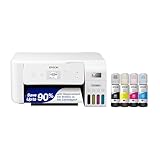

As an Amazon Associate we earn from qualifying purchases. Prices and availability are shown on Amazon.
The Decision in One Evening: A Household Audit
Every comparison in this article can be replaced, for your household, by one evening’s audit. Gather the evidence of your printing life: the last pack of paper you bought and how long it lasted, the last cartridge or toner change you can remember, the photographs on your phone you have meant to print, the documents waiting in a folder called ‘to print’. Paper consumption is volume, told honestly. The supply change you remember dates your real usage better than any estimate. The unprinted photographs measure your color intention; the waiting folder measures your document reality. Households that do this audit stop debating technologies in the abstract, because the audit answers the only questions that matter: how much, how often, in what color, with what gaps.
The gaps deserve their own line in the audit, because they are where inkjet and laser truly part. A household that prints something most days will never meet the inkjet’s one weakness. A household whose printer sleeps for a month between jobs will meet it repeatedly, and will describe the same machine a daily printer calls reliable as a temperamental nuisance. Count your longest ordinary gap — not the holiday exception, the ordinary rhythm — and weigh it heavily. For gaps measured in weeks, the laser’s indifference is worth real money and real peace. For rhythms measured in days, the inkjet’s color and economy are free to shine.
Finally, audit the people. A printer in a home serves everyone in it, and the right choice is the one the whole household’s work fits: the student’s essays, the partner’s forms, the children’s projects, the grandparent’s letters. A machine chosen for one person’s work and resented by everyone else’s is a compromise nobody voted for. The audit takes twenty minutes and a pencil. It is the highest-value step in this entire comparison, because every other section of this article is, in the end, an attempt to guess what your audit would say.
Room by Room: Where Each Technology Belongs
In a home office, the laser’s virtues compound: documents are the work, pace matters, output goes straight into files and envelopes dry and smudge-proof, and the machine’s long indifference between toner changes suits a room that exists for getting things done. The inkjet belongs in that office only when the work itself is visual — design, photography, teaching materials — and then it belongs there completely, because no laser prints a proof like an inkjet on the right paper.
In a family living space, the inkjet’s versatility usually wins the argument: homework in color, photographs for the wall, the occasional document, all from one modest machine that the children can be taught to use. The laser in a family room prints documents superbly and then watches the family’s color life happen elsewhere. In a student’s room, the audit usually crowns the small laser — essays, readings, deadlines, long quiet gaps — unless the course is an art, in which case the inkjet is not a printer but course equipment and should be bought as seriously.
In a small business run from home, the honest answer is often that the two technologies divide the work rather than contest it: laser for the invoices, labels and letters that are the business’s paperwork bloodstream; inkjet for the product photographs, packaging inserts and marketing color that are its face. Businesses that force one machine to do both jobs end up with a compromise that is slow at one and dull at the other. Homes are allowed the same clarity. The question is never which technology is better. It is which rooms, which jobs and which rhythms are yours.
The Five-Year Friendship Test
Project the purchase forward, because a printer is a five-year relationship disguised as a shopping decision. The inkjet asks, across those years, for regular use, occasional cleaning, ink bought in a rhythm and a home that prints color with genuine pleasure. The laser asks for a toner cartridge now and then, a drum eventually, and nothing else at all. Which set of requests sounds like your household’s idea of a fair arrangement? Owners who chose against their own nature spend five years in low-grade negotiation with a machine. Owners who chose with it forget the decision entirely, which is the hallmark of every good tool purchase ever made.
Life changes across five years, and the wise buyer leaves a door open. Children arrive and manufacture color printing; children leave and take it with them. A hobby ignites; a business winds down. Neither technology locks a household in — printers are replaced, and a household is allowed to switch sides when its life does. What the five-year test really asks is simpler: buy for the life you are living now and can see immediately ahead, maintain the machine with the light discipline its technology requests, and let the future make its own decision when it arrives, with better information than you have today. That is not indecision. That is how every durable household purchase is actually made.
Myths That Distort This Choice
Laser printers are only for offices. They were, once, when they were large, loud and dear. The modern home laser is a quiet box that prints documents beautifully and asks almost nothing; dismissing it for a home is dismissing the last decade of its development. The myth survives because the machines look businesslike, and businesslike reads as excessive at a kitchen table — until the household counts its idle weeks and its document volume and discovers the businesslike machine was the domestic one all along.
Inkjet printers are cheap to buy and ruinous to run. Some are; the category is not. The ruinous pattern belongs to a specific pairing — a bargain cartridge machine at high volume — and the ink tank exists precisely to break it. Judging all inkjets by that pairing is like judging all cars by the one with the drinking problem. Run the cost-per-page arithmetic for your volume and the myth dissolves into a number you can compare.
Laser print is waterproof and inkjet print is fragile. Toner is indeed fused plastic and shrugs off a splash that would trouble a dye ink print; but pigment inkjet inks are chosen for documents precisely because they resist water and highlighter well, and a photograph printed on proper paper is a durable object. The truthful version is narrower: know which ink your machine uses and what your pages must survive, and the choice makes itself.
You need color because you might. Might is the most expensive word in printer shopping. It buys color capability that sits unused while its nozzles quietly age, or a color laser’s four cartridges ageing in their slots. Buy for the printing you do, and let the rare might be served by a library, a friend or a print shop, whose color is always fresh because it is always working.
More Questions From Households Deciding
We print mostly black and white but want occasional color. What then?
Count the occasions honestly for a month. If color is a weekly reality, an inkjet — ideally a tank model — serves both masters well. If it is a monthly rarity, a monochrome laser for the ninety percent plus a service for the rest is the combination most such households end up happiest with. The worst answer is the color machine bought for the rarity and punished by the idleness between occasions.
Which is better for a home business just starting out?
Start with the technology your paperwork demands — usually a laser for documents, labels and letters — and add color capability when the business’s own output proves it needs it, rather than when you imagine it might. A young business’s scarcest resource is attention, and the laser’s low demands protect it. The business that begins with product photography as its core should reverse the advice entirely.
Does the choice affect scanning and copying?
Only through the models available in each technology, not through the printing itself. All-in-one versions exist on both sides, with similar scanners and feeders. Decide the scanner you need — feeder or flatbed only, and how often — as its own question, then find it in the technology your printing chose. Buyers who let the scanner tail wag the printing dog end up with the wrong engine under the right lid.
What if two adults in the home disagree?
Disagreement usually means the household has two printing lives, and the audit will show it: one person’s documents, the other’s photographs. Price the honest solutions in order — one machine that serves the larger volume with the smaller need outsourced; the versatile inkjet if color is real and regular; two modest machines if both lives are substantial. What does not work is alternating who wins, because the machine cannot alternate with you.
How long should we expect either to last?
Years, in both cases, when the workload matches the machine’s design and the maintenance matches its technology. Lasers commonly outlast inkjets in calendar terms because they age by pages rather than by time and neglect; inkjets in daily family service accumulate their own long records. The lifespan question is really the fit question wearing a watch: matched machines last, mismatched machines are replaced, and the difference is decided at purchase.
The Costs Nobody Lists: Space, Noise, Time and Temperament
Beyond ink and toner, the two technologies charge rent in different currencies. Space: a laser is typically the larger, heavier object, and it wants a permanent, ventilated home; an inkjet can be smaller and lighter, though the tank models reclaim some of that difference. Noise: a laser announces a job with a purposeful hum and a cooling fan; an inkjet chatters in small mechanical movements. In a shared room or a small flat, these are not trivialities — they are the daily texture of ownership, and a machine that irritates its room gets used reluctantly, maintained late and replaced early.
Time is the subtlest cost. A laser’s time is front-loaded in warm-up and then repaid in pace; an inkjet’s time is spent in the printing itself and, occasionally, in the maintenance conversation. A household printing long documents feels the inkjet’s pace weekly. A household printing single pages feels the laser’s warm-up barely at all, because the page still arrives quickly. Temperament completes the ledger. Some owners enjoy a machine that responds to care; others want an appliance that behaves like the refrigerator — present, cold, silent about its needs. There is no correct temperament, only an honest one, and the five-year friendship described earlier in this guide is largely a temperament match wearing technical clothes. Choose the machine whose demands you will meet cheerfully, because demands met cheerfully are the only maintenance plan that survives contact with real life.
A Short Story of Two Neighbours
Two neighbours bought printers in the same month. The first, a keen photographer with two children, chose a monochrome laser because a colleague praised its economy; within a term, the household was driving to a print shop for projects and photographs, the laser’s economy unspent on the documents it was bought for because the family simply did not produce many. The second, a freelance accountant who printed contracts daily, chose a colorful inkjet because the shop assistant called it versatile; within a year its idle weeks between clients had taught it to streak, and its owner had learned the price of versatility measured in cleaning cycles. Neither machine was bad. Both decisions were — made from other people’s lives instead of their own. They swapped printers the following spring, in the way of neighbours, and both machines have been boringly reliable ever since. This article exists so that your household can arrive at the swap’s outcome without performing the swap: audit your own printing, honour your own rhythm, and let the technologies go to the homes they were built for — one of which is yours.
If You Still Cannot Decide: The Tiebreakers in Order
Some households audit honestly and land exactly on the fence — moderate volume, some color, medium gaps. For them, tiebreakers exist, and they have an order. First, the idle test: if any ordinary month contains a gap of several weeks, step toward the laser, because idleness is the one force in this comparison that actively damages rather than merely inconveniences. Second, the photograph test: if printing photographs at home is a pleasure someone in the house will genuinely practise, step toward the inkjet, because outsourcing a practised pleasure is a false economy paid in joy. Third, the people test: if the machine must serve young children whose school life is color, step toward the inkjet; if it must serve a worker whose reputation travels on documents, step toward the laser. Fourth, the space test: measure the home the machine will actually get, lids and trays open, and eliminate whichever cannot live there gracefully. A fence-sitter who applies the four tests in order will fall, gently and correctly, to one side — and will discover what decided households already know: the right printer is not the one that wins the argument, but the one that fits the life so completely that the argument is never reopened.
What Changes If Your Printing Doubles Next Year
A useful stress test for any close decision is to double the volume in your imagination and watch which technology strains. Double a document household’s volume and the laser simply works more, its cost per page steady, its pace an asset; the inkjet in that house begins to show its pace and its supply rhythm as weekly concerns. Double a color household’s volume and the tank inkjet’s economics become overwhelming while a cartridge machine’s costs climb a cliff; the laser in that house watches the color work leave for a print shop at rising expense and rising inconvenience. The stress test reveals which regret you are more willing to own. Every purchase contains a small bet on the future’s shape; making the bet consciously, with both futures pictured, is the difference between a decision and a hope.
Apply the reverse test too, and halve the volume. Halved, the laser’s case barely changes — its costs are low at any volume and its indifference is volume-independent — while the cartridge inkjet’s economics improve and the tank’s premium takes longer to repay. Households whose printing is likely to shrink, as children leave or a project ends, should weigh the halved future as carefully as the doubled one. The technologies are not rivals in a race with one finish line. They are two different answers to the question of how a household’s paper life is shaped, and the shape — audited honestly, stress-tested in both directions, and matched to the people living it — is the whole of the decision. Make it from evidence, and either machine will reward you by disappearing into the background of a home that simply prints, without argument, whenever it needs to.
And if the audit, the tests and the tiebreakers still leave you torn, take comfort in the comparison’s best-kept secret: at the moderate volumes where the decision is hardest, it also matters least. A decent inkjet and a decent laser, each maintained as its kind requests, will both serve a moderate household well for years, and the difference between them across that time is smaller than the difference between a maintained machine and a neglected one of either type. Choose the one whose daily character appeals to you, set it up carefully, keep its supplies ahead of its needs, and spend the attention you saved on the documents, photographs and projects the printer was bought to produce. That is the real finish line of this comparison — not the right machine, but a household that has stopped thinking about machines altogether.
One practical footnote deserves the final word, because it decides more real purchases than any specification: buy the machine your household can get supplies for easily, at the moment of need, without a research project. A printer whose cartridge is stocked by the shop you already visit will be fed on time; a printer whose supplies require planning will, in a busy household, eventually be left hungry at the worst moment — and a hungry printer, of either technology, prints nothing at all. Check the supply shelf before you fall in love with a model, note the exact cartridge or toner number in your household records on the day the machine arrives, and keep one spare ahead once your rhythm is known. It is an unglamorous paragraph to end on, and that is rather the point: printing at home works when the unglamorous things are handled, and the households that handle them stop reading comparisons like this one — because for them, the question has already been answered by years of pages that simply appeared when they were needed.
Choose well, then — not by crowning a technology, but by describing your household so accurately that the correct machine is the only one left standing. That description is the work this article has tried to teach, and it is work no shop assistant, however honest, can do for you, because only you know the rhythm of your paper life. Do it once, do it honestly, and the printer you bring home will repay the effort every time it prints without being thought about at all.
Frequently Asked Questions
Which is better for home, inkjet or laser?
Laser for text and low upkeep, inkjet for color and photos.
Which is cheaper to run?
Monochrome lasers and ink tank printers usually are.
Do inkjets clog?
Yes, if not used regularly.
Can a laser print photos?
Color lasers can, but photo quality is better on an inkjet.
Is a laser printer better for students?
For essays and reading material, a monochrome laser is often practical because it prints text quickly and the toner lasts. If a student also needs color for projects or diagrams, an ink tank or color model may fit better. It depends on what the coursework requires.
Can I use a laser printer for labels and envelopes?
Often yes, but use media rated for laser printers, because the heat can melt unsuitable labels and damage the printer. Check the manual for supported sizes and feeding instructions.
Why does my inkjet use ink when I do not print?
Many inkjets run cleaning cycles to keep the heads clear, particularly after sitting idle or after being switched on. These cycles use a little ink. Printing regularly and switching the printer off with its own button can help.
Are laser printers bad for the environment or health?
Printers can release small particles, and good practice is to place them in a ventilated room and follow the maker's guidance. Many makers also offer recycling for toner and cartridges. Check the manual and local recycling options.
Do I need a color laser for occasional color?
Not necessarily. If color is rare, you might use a monochrome laser for everyday printing and a print shop or library for the occasional color job. Compare the supply cost of a color laser with how much color you really need.
How long do printers last?
It varies widely by model and use. Regular maintenance, using the right supplies and keeping the printer clean can extend its life. Replace it when repairs cost more than the value of a new unit or supplies are no longer available.
Bottom Line
Pick a laser for documents and low maintenance and an inkjet or ink tank printer for color and photos. See best printers for home use.
Related Reading
- 7 Best Wireless Printers for Home Use
- Best Paper for Inkjet and Laser Printers: What to Buy
- 6 Best Basic Printers for Home: Simple, Easy and Reliable
- 6 Best Brother Laser Printers for Home and Office
- 5 Best Color Laser Printers for Home Use
More Printer Guides
- Best Printers for Home Use
- Printer Ink vs Toner
- Printer Terms Explained
- Types of Printers Explained
- What Is an All-in-One Printer? Features and Who Needs One
- How to Calculate Printer Cost Per Page

