Disclosure: As an Amazon Associate, reviewstook.com earns from qualifying purchases. Links to Amazon on this page are affiliate links; they cost you nothing extra.
Ink tank and laser printers are the two types that usually cost the least per page. They get there in different ways, and each fits a different kind of printing. This guide compares them so you can pick by your own habits rather than by the price on the box.
Product details are based on listings and manufacturer information, not our own testing.
By the Reviewstook Editorial Team. Last updated: October 31, 2026.

The Short Answer
If you print color or photos regularly, an ink tank printer usually gives the lowest running cost. If you print mostly black-and-white text, or leave the printer unused for weeks, a monochrome laser is usually the better fit. If you print very little, a cheap cartridge printer can be the most economical overall.
In this guide
How Each One Works
An ink tank printer is an inkjet with refillable tanks. You pour ink from bottles into the tanks, so you replace ink rarely and pay less for each page. A laser printer fuses toner powder onto the page with heat. Toner does not dry out, which is why lasers cope well with long gaps between uses.
Running Cost
Work out cost per page for both: divide the price of the replacement ink or toner by its rated page yield. Here are made-up numbers purely to show the math: a 70-dollar set of ink bottles rated for 4,000 pages works out to about 1.75 cents a page; a 90-dollar toner rated for 1,200 pages works out to 7.5 cents a page. Real figures vary by model, so use the ones on the product page, and remember that rated yields assume a standard amount of ink or toner coverage. Our cost-per-page guide shows the full method.
Print Quality
Laser output is crisp on text and smudge-resistant. Ink tank printers print color and photos better, and many use dye or pigment inks suited to photo paper. A color laser sits in between but costs more to buy and to feed.
Reliability and Idle Time
Toner is dry, so lasers wake up and print even after months. Ink tank printers can clog if left idle for weeks, so print a test page now and then; see how to stop printer ink drying out.
Speed and Noise
Lasers print text pages quickly and often quietly. Inkjets and ink tank printers are slower with high-quality color and photos.
Upfront Price and Size
Ink tank printers cost more than basic cartridge printers. Monochrome lasers are often cheap and compact, while color lasers and laser all-in-ones are bigger and heavier. Check the dimensions before you order.
Features
Ink tank printers are commonly all-in-ones with scanning and copying. Monochrome lasers may be print-only, with laser all-in-ones available for scanning, copying and fax. See what is an all-in-one printer.

Who Should Pick Which
- Families who print school work, color pages and photos: an ink tank printer such as the Epson EcoTank ET-2850.
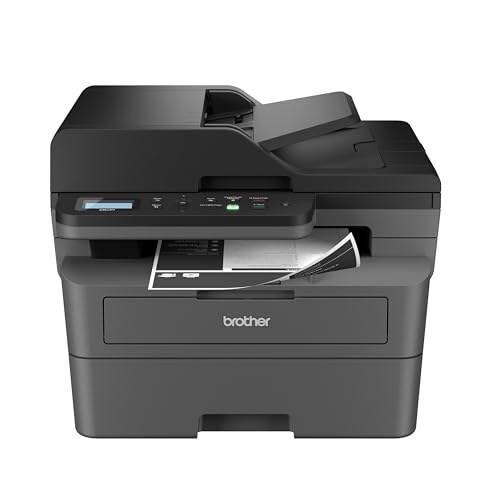
- Home offices that print black-and-white documents all day: a monochrome laser such as the Brother HL-L2350DW.
- People who print a few pages a month: a basic cartridge printer, because neither type pays back.
See our full guides to the best EcoTank printers and best laser printers.
Match the Printer to Your Monthly Volume
The cheapest printer is the one whose strengths line up with how much you actually print. Before comparing models, estimate your pages per month and split them into three groups: black-and-white text, color documents, and photos. Keep that tally for a few weeks if you are unsure, because most people guess too high.
If you print only a handful of pages a month, the extra purchase price of either type is hard to earn back. The savings from low-cost ink or toner build up through volume, so a light user may do better with a simple, inexpensive printer and a plan to replace cartridges when needed.
If you print a steady stream of text, a monochrome laser tends to suit you because toner pages are usually inexpensive and the printer is ready whenever you need it. If you print a mix with plenty of color, an ink tank printer tends to make more sense because the ink is sold in bottles rather than small cartridges.
Also think about spikes. A family that prints very little most of the year but a lot during school projects, or a home office that prints a big batch at month end, should look at the paper tray size and the print speed as well as the ink or toner cost. A printer that costs little per page but is slow or needs constant paper refills can still be frustrating in practice.
Write down your numbers first, then compare them with the page yields listed on each product page.
The Color Laser Middle Ground
Many buyers assume the choice is only between an ink tank printer and a monochrome laser. A color laser is a third option that deserves a fair look if you print color documents such as reports, flyers or presentations and you also want the dry toner and fast text output that lasers are known for.
The trade-offs are practical. Color lasers use several toner cartridges, usually one for each color, so you may be buying and replacing more than one consumable. They are generally larger and heavier than inkjets and ink tank printers, so measure your shelf or desk before ordering. Photo output on a laser is usually not the reason people choose one; if photos matter to you, an ink tank printer with photo-oriented ink is often the more natural fit.
When comparing, ask these questions:
- How many toner cartridges does it use, and are they sold separately?
- Does the listing give a page yield for each color, and what coverage does that yield assume?
- Is the printer a print-only model or an all-in-one with a scanner?
- Does it print on both sides automatically?
A color laser can be a sensible choice for a small office that wants reliable color pages without worrying about dried-out nozzles. It is less compelling for someone who mostly prints black-and-white text, where a monochrome laser does the same job at a lower purchase price, or for a household that wants to print photos.
Paper Handling and Everyday Convenience
Running cost gets most of the attention, but daily convenience decides whether you enjoy a printer. Paper handling is where models differ the most, and it is easy to overlook.
Start with the paper tray. A small tray means refilling often if you print long documents. Check the sheet capacity on the listing, and note whether the printer has a second source such as a rear feed for envelopes or photo paper. Thicker media, such as card stock, may need a straight paper path, so confirm that the manual supports what you plan to use.
Next, look at two-sided printing. Automatic duplex saves paper and is useful for school handouts and longer documents, but not every model includes it, and the listing may mention it only in the full specifications. If you need it, check before you buy rather than assuming.
If you scan or copy, decide whether an automatic document feeder matters. A feeder is helpful for multi-page paperwork; a flatbed alone is enough for the occasional single page. Our guide to all-in-one printers explains the difference in more detail.
Finally, consider connectivity. Wi-Fi, Ethernet and USB are all common, and phone printing depends on support for standards such as AirPrint or Mopria or on the maker’s app. Check the listing for the connection types you need, especially if several people share the device.
Care and Maintenance for Each Type
Both kinds of printer last longer with a little routine care, and the routine is different for each.
Ink tank printers. Fill each tank with the matching color only, and follow the manual for how to open and close the tank caps. Fill slowly over a protected surface, wipe up drips right away, and keep the bottles upright. Do not let any tank run fully dry, because air in the lines can cause print problems. If the printer will sit unused, print a short test page every couple of weeks so the print head does not dry out, and use the printer’s own cleaning routine only when a test page shows gaps, since each cleaning cycle uses ink.
Laser printers. Keep the vents clear and the printer on a flat, stable surface. Use paper that is stored flat and dry, because damp or curled paper is a common cause of jams. When a jam happens, follow the path shown in the manual and pull the sheet gently in the direction of paper travel. Avoid touching internal rollers or the drum with bare fingers. Replace toner when the print becomes faint or the printer warns you, and be aware that some printers also have separate drum parts that wear out on their own schedule; the manual lists what is consumable.
For either type, keep the firmware and driver up to date, and store spare supplies in a cool, dry place away from direct sunlight.
Questions to Ask Before You Buy
A short checklist can prevent most regrets. Work through it for each model on your list.
- What does a full set of replacement ink or toner cost, and what is its rated page yield? Divide one by the other and compare the results.
- Is the printer bundled with a full set of ink or toner, or only a starter set? Starter supplies are often smaller than replacements, so check what is included.
- Does the printer accept third-party supplies? Some models restrict them through firmware or may need specific supplies, so read the listing and the maker’s policy.
- Does it need an account or subscription to work? Some models require an app or online account for setup, so confirm what you are comfortable with.
- How big is it? Compare width, depth and height with your space, including room to open the lid and trays.
- What does the warranty cover? Read the terms on the product page.
Buy from a seller with a clear return window, and keep the box for the first couple of weeks. If the printer does not suit your habits, returning it early is cheaper than living with it. Treat any page yield on a listing as a rated figure, since real results depend on what you print.
Signs It Is Time to Replace Your Printer
A printer does not need replacing the first time it misbehaves. Many problems come from dirty heads, worn rollers, old drivers or a changed router, and are fixable. But some signs suggest a different printer would serve you better.
- Repairs or replacement parts would cost close to the price of a comparable new printer.
- Print quality stays poor after cleaning, alignment and fresh supplies.
- Paper jams happen often even with clean, dry paper and correctly loaded trays.
- The printer no longer works with your computer or phone after an operating system update, and the maker no longer offers a driver.
- Your printing habits have changed, for example from rare use to daily use, so the supplies now cost more than they should.
When you replace, use the same method as before: estimate your pages, compare cost per page from the listings, and pick the type that fits. Recycle the old unit through a local electronics or manufacturer take-back program rather than putting it in household waste, and check the maker’s website for options in your area.
Matching Each Technology to Your Print Habits
The better choice depends less on the technology and more on how you actually print. Think about a typical month in your home or office, then see which description fits you best. Both kinds are mature and widely sold, so you are choosing a fit, not avoiding a bad option.
| Your habit | Ink tank tends to suit you when | Laser tends to suit you when |
|---|---|---|
| Mostly text documents | You also want occasional color | You want sharp black text and speed |
| Photos and school projects | Color pictures are a regular need | Photos are rare and an outside lab handles them |
| Long gaps between jobs | You can run a small cleaning routine now and then | You want the printer ready after weeks idle |
| Large batches of pages | Pages are mixed color and mono | Pages are mostly black and white |
| Shared by a small team | Color is needed for charts and handouts | Speed and steady output matter most |
Look at the specifications on the product listing for the pages each refill or cartridge is listed to produce, and compare like with like. Makers measure yields by their own methods, so treat the numbers as a guide, not a promise.
Practical Questions to Settle Before Choosing
A few everyday details can matter more than headline claims. Ask yourself the following before you buy, and write the answers down so you can compare listings calmly.
- How many pages do you print in an ordinary month, and how many of them need color?
- Will the printer sit idle for long periods, such as over holidays or between semesters?
- Do you need to scan, copy or fax, and do you need a feeder for multi-page originals?
- Is there room for the machine, and can you lift it comfortably?
- Are you comfortable refilling bottles, or would you rather swap a sealed cartridge?
- Does the noise level of the machine matter where it will sit?
Check the paper types supported as well, especially if you print labels, envelopes or thick card. Laser machines use heat, so some media are unsuitable, while ink machines may smudge on certain finishes until the sheet dries. The maker’s guide for each model lists what works. If your answers point strongly to one side, choose it with confidence. If they split evenly, favor the one with the features you will use every week, such as wireless printing, duplex or a feeder.
One last tip: print a sample of your own typical document on whichever machine you can try, whether at a friend’s home, an office or a shop display. Your own pages reveal more than any brochure, because you know exactly how a good result should look for your work.
The Five-Year View: What Each Technology Costs You in Attention
Comparisons of ink tank and laser printers usually stop at money, but owners live with a second currency: attention. An ink tank printer asks for small, regular attention. It wants to be used, or at least exercised, so its nozzles stay clear; it wants its tank levels glanced at; it wants a cleaning cycle now and then, on your schedule rather than its own emergency timetable. A laser printer asks for almost no regular attention at all. It wants a toner cartridge eventually, a drum much later, and to be left alone in between. Households differ enormously in which currency they are richer in. A family that prints daily barely notices the ink tank’s requests, because using the printer is the maintenance. A household that prints monthly and travels often finds the laser’s indifference priceless, because the machine treats their absence as a rest rather than a risk.
This is why the same two printers can swap reputations between two homes. The ink tank that one owner calls effortless is the one whose nozzles clogged for another owner — not because the machines differed, but because the rhythms did. Before choosing, describe your household’s actual printing rhythm across a year, including the holidays, the quiet months and the bursts. Then choose the technology whose attention demands match that rhythm. Money can be calculated from a specification sheet; fit has to be observed from your own life.
There is also a difference in how the two technologies fail, and it is worth knowing before you own either. Ink tank problems announce themselves gradually — a color fading, lines appearing — and are usually recoverable with the maintenance routines the machine provides. Laser problems are rarer but more binary: a cartridge ends, a drum wears, a roller tires. Owners who like to nurse a machine back to health often prefer the inkjet’s gradualism; owners who want problems to be rare and decisively fixable prefer the laser’s pattern. Neither is better. They are different relationships with a machine, and choosing the relationship you prefer is a legitimate part of the decision.
Color: The Question That Splits the Comparison in Two
Half of this comparison dissolves once the color question is answered honestly. If your printing includes color as a regular need — schoolwork, photographs, charts that carry meaning in color, creative projects — the ink tank is the technology built for you, because its color costs are low enough to use color freely, and its color quality on the right paper reaches into photographic territory that no laser attempts. The color laser exists, and it prints business color respectably, but its consumables are four toner cartridges and its talents are documents, not images.
If your printing is monochrome in practice — documents, forms, letters, reading — the laser’s case becomes very strong, because you stop paying, in any currency, for a color capability you do not use. The honest test is your last hundred pages. Count how many needed color, not how many merely had it. Many households discover their color need is a dozen pages a year, and a dozen pages can be printed by a service while the other thousands are produced at home by a laser that never clogs, never fades and never asks for anything.
The trap is buying for the imagined household instead of the counted one: the ink tank bought for photographs that are never printed, or the monochrome laser bought by a family whose children arrive home weekly with color homework. Count first. The technologies are both excellent; they are excellent at different lives.
Worked Examples: Four Households, Four Verdicts
A family with three children prints worksheets nightly, projects weekly and photographs at birthdays and holidays. Their volume is high, their color is real, and their printing is daily enough that an ink tank never sits idle long enough to sulk. Verdict: ink tank, decisively — the running cost shapes their year, and the maintenance rhythm fits a household that is always printing something.
A consultant works from home, printing contracts, reports and travel documents in black and white, with intense weeks and empty ones. Color appears in a logo and the occasional chart, both tolerable in a print shop’s hands or in grayscale. Verdict: laser — the idle weeks punish an inkjet, the document volume rewards the laser’s pace, and the sharpness of laser text suits work that clients read.
A retired couple prints letters, puzzles, photographs of grandchildren and a community newsletter. Their volume is modest, their color is emotional rather than functional, and their schedule is irregular. This is the genuinely hard case. If photographs are the heart of it, an ink tank with a weekly discipline of printing something — the newsletter draft serves nicely — gives them color freedom and low costs. If the photographs would be just as welcome printed by a service, a small laser gives them a decade of indifference to maintenance. The deciding question is whether printing photographs at home is a pleasure they will actually practise.
A student prints essays and readings in bursts around deadlines, then nothing for weeks. Verdict: laser, for the same reason as the consultant — burst-and-idle is the laser’s native rhythm — unless the course is art, design or photography, in which case the work itself is color and the ink tank stops being a printer choice and becomes course equipment. The pattern across all four examples is the method itself: rhythm first, color second, volume third, and the technology chooses itself.
Environmental and Practical Considerations People Forget
The two technologies carry different physical footprints in a home. An ink tank printer’s consumable is liquid in bottles: compact to store, light to handle, and used almost entirely, since a tank system wastes little ink on packaging. Its waste stream across years is small — bottles and the occasional maintenance part. A laser’s consumables are larger objects: toner cartridges and drums that must be stored somewhere, carried home, and eventually returned or recycled through the maker’s programme. Neither footprint is a scandal, but a small flat with no storage feels the laser’s spares more, and a household that dislikes storing anything feels the ink tank’s bottles less.
Power and air deserve a mention. Laser printers draw a burst of power as they fuse toner and produce a faint warmth and smell during long runs that some people notice in a small room; they belong on a ventilated surface, not in a closed cupboard. Ink tank printers sip power and print quietly enough for a bedroom desk. In a studio flat or a child’s room, these lived details can outweigh specification-sheet differences that look decisive on paper.
There is also the question of what happens at the end of a long job. A laser produces dry pages that can be handled, stacked and filed immediately, which matters for documents that go straight into envelopes or folders. An inkjet’s pages benefit from a moment’s rest, particularly with heavy color coverage. For most households this is trivia; for a small business dispatching printed documents daily, it is workflow. The comparison, pursued honestly, keeps returning to the same place: not which technology is superior, but which one’s daily character matches the life it will be lived in.
More Questions Readers Ask About This Choice
Can I start with one technology and switch later?
Of course, and many households do: the family ink tank of the school years gives way to a laser when the children leave and the printing turns to documents, or a worker’s laser gains an ink tank companion when a photography hobby arrives. The useful habit is to buy for the next few years of your actual life rather than for a hypothetical decade, and to let the replacement, when its time comes, reflect the life you are living then.
Which is better for printing labels and envelopes?
Both handle them, with different cautions. Laser heat demands labels rated for laser use, because the wrong adhesive softens in the fuser; inkjets want labels that will not shed fibres into the paper path. For occasional labels, either serves. For a household or business printing labels weekly, choose by the media guidance of the specific model and test a sheet before a batch — advice that outranks the technology question entirely.
Does an ink tank printer smell or make a mess in normal use?
No. In normal use the ink lives sealed inside the machine, refills are a controlled bottle-to-tank process, and the prints emerge dry to the touch within moments. The messes of inkjet folklore belong to an earlier generation and to refilling done carelessly. A modern tank system is among the cleanest ways to own color printing.
Which technology handles being moved house better?
A laser travels with fewer anxieties: its toner is a dry powder sealed in cartridges, and the machine asks only for ordinary care in packing. An ink tank machine should be moved level and gently, following the maker’s guidance, because its ink is liquid and resident in the machine. For a household that moves rarely, this is a footnote; for students and renters who move yearly, it is a genuine point in the laser’s column.
If I print photographs only a few times a year, which should I choose?
Choose by your documents, and let the photographs be printed by a service on those few occasions, unless the photographs are the emotional centre of your printing. A few photographic sessions a year do not justify shaping the whole purchase around them — but a grandparent for whom those sessions are the point of owning a printer at all should ignore that advice and buy the ink tank with joy.
The Hybrid Households: When the Answer Is Both, or Neither
Some households conclude, correctly, that this comparison has no single winner for them because their printing is genuinely two different jobs. The home business that prints invoices daily and product photographs weekly is not confused; it is two users sharing an address. Such households often end up with a laser for the documents and an ink tank for the color, and the pairing is not extravagance but specialisation — each machine doing the work it is best at, each lasting longer for being spared the other’s duties. The cost of two modest machines, judged across years, can undercut the cost of one premium machine asked to be brilliant at everything and merely adequate at each.
Other households conclude the opposite: that their printing is so light and so mixed that no home machine is the right answer, and a combination of a library, a workplace printer and a print service covers their real needs. That conclusion deserves respect rather than rescue. Owning a printer is buying a capability with money, space and attention; a household that prints thirty pages a month of mixed material may be purchasing mostly the attention costs. The technologies compared in this article are for households whose volume makes ownership rational — and part of this guide’s job is to say so.
Between those poles sits the household that will own one machine and must simply choose its compromise. For them the tiebreakers, in order, are these. First, idle pattern: long quiet stretches favour the laser beyond all other arguments. Second, color reality: weekly genuine color favours the ink tank beyond all other arguments. Third, if neither dominates, volume: high volume favours whichever machine’s running costs you have calculated for your own page count, using the method this site’s cost-per-page guide teaches. Fourth, if volume is modest too, choose by the secondary job — scanning ambitions, photo hopes, label habits — because at modest volume the secondary job is where the machine will actually be loved or resented.
How Each Technology Ages Across Its Life
An ink tank printer’s life has a shape: a generous beginning, when the included ink seems endless; a long middle of cheap refills and routine use; and a later stage where the owner’s discipline decides the ending. Machines that were exercised weekly and cleaned judiciously print well for years. Machines that were left idle, then rescued with repeated deep cleanings, age early. The waste-ink system inside every inkjet also has a finite capacity, reached after a great many pages and cleanings, and its arrival is the natural horizon of a heavily used machine — a horizon measured in years for a household, and one the laser does not share in the same form.
A laser’s life is flatter: long plateaus of identical output, punctuated by consumable changes. Its ageing shows in moving parts — rollers that gradually lose their grip, producing the occasional misfeed that becomes a habit — and in the slow obsolescence of its connections rather than its engine. A laser’s print quality in year five is typically indistinguishable from year one, which is why old lasers accumulate in offices and workshops long after their contemporaries have been replaced.
Knowing these shapes helps a buyer price the decision honestly. The ink tank offers lower running costs in exchange for a life that rewards care; the laser offers a longer, flatter indifference in exchange for higher per-page costs on color and a larger consumable footprint. Households are not buying a specification. They are buying one of these two life stories, and the right purchase is the story whose middle chapters match the household’s own habits. Choose the story you will actually live, and either technology will feel, in retrospect, like the obviously correct answer — because for your household, it was.
A Final Decision Exercise You Can Do in Ten Minutes
Take a sheet of paper — printed, appropriately enough — and write down your last month of printing from memory: the jobs, the page counts you can estimate, which of them needed color, and which of them hurt when they went wrong. Then mark the gaps: the longest stretch in that month when nothing was printed at all. That single sheet now contains the whole decision. If the gaps are long and the color is scarce, you are holding a laser household’s portrait. If the color is weekly and the gaps are short, it is an ink tank household’s. If both patterns appear in force, you are one of the hybrid households described above, and your answer may honestly be both machines or a deliberate compromise chosen by the tiebreakers. If the sheet is nearly empty, it has told you the bravest answer of all: that your household may not need to buy either yet.
Now extend the exercise by one question: which of those jobs will still exist in three years? Children’s homework ends; a business’s invoices do not. A photography hobby deepens or dissolves. The household that answers this honestly buys the machine for the life it is entering rather than the life it is leaving, and that foresight — more than any specification in this comparison — is what makes owners describe their choice, years later, as obviously right. The technologies will both still be here, still improving, still arguing their cases. Your job is only to know your own household slightly better than the marketing knows it, and ten minutes with a sheet of paper is enough to do exactly that.
What to Do in the First Month With Either Machine
Whichever technology you choose, the first month sets the pattern of ownership. With an ink tank, establish the exercise habit immediately: a standing weekly moment when something prints, so the machine never learns idleness and neither do you. Learn where the nozzle check lives in the menu before you need it, and glance at the tanks whenever you pass, so a refill is always a planned errand. With a laser, learn the supply screens instead: where toner life is reported, what the machine counts as a warning, and which cartridge your model takes, noted somewhere you will find it in two years when the note matters.
With either, print your real work in the first week — the longest document, the fiddliest form, the photograph or chart that represents your color life — and judge the machine by that work while returning it is still painless. Keep the packaging until those tests pass. And write down, in the same household records that hold your supply notes, the date of purchase and the rhythm you bought for. When the machine eventually needs replacing, that small record turns the next decision from a research project into a comparison: did the rhythm change, and should the technology change with it? Ownership done this way is a loop that gets easier every time it turns, and it begins, as this whole comparison has argued, with knowing how your household actually prints.
The One Specification Both Sides Would Rather You Ignored
Buried in both technologies’ marketing is a number neither side emphasises: the duty cycle, and beneath it the smaller, honest figure — the recommended monthly volume. The headline duty cycle describes what a machine can survive in an exceptional month; the recommended volume describes what it can live on, month after month, for years. An ink tank or a laser run persistently above its recommended volume ages in fast-forward: rollers tire, maintenance arrives early, and the owner concludes the technology was unreliable when the truth is the workload was mis-sold, sometimes by the owner’s own optimism. Run persistently below it and nothing bad happens at all, which is why the practical advice is asymmetric: buy the machine whose recommended volume your busiest ordinary month fits inside comfortably, and treat the headline number as what it is — a ceiling for emergencies, not a target for Tuesdays. This single habit, applied to either technology, prevents more disappointment than any other in this guide, because most printer regret is not about ink or toner at all. It is about a good machine asked to live the wrong life, and that is a fate entirely within the buyer’s power to prevent.
Frequently Asked Questions
Is an ink tank printer cheaper than a laser?
For color and photos, usually yes. For black-and-white text, a monochrome laser is often cheaper over time, depending on the toner yield.
Which clogs less, ink tank or laser?
Lasers do not clog because toner is a dry powder. Ink tank printers can clog if left unused for weeks, so print a test page now and then.
Are lasers better for the office?
Often yes for text-heavy work: they are fast, quiet and their toner lasts. For color-heavy work an ink tank or color laser may fit better.
Can I refill toner?
Some people do, but it is messier and may affect warranty. Replacement cartridges are simpler.
How many pages do I need to print for an ink tank printer to make sense?
There is no single number, because it depends on the models and the ink or toner you compare. Work out cost per page for each, estimate your monthly pages, and see how long the higher purchase price takes to pay back. If you print very little, a simple cartridge printer may be the better value.
Do laser printers need to be left switched on?
No. Toner is a dry powder, so a laser printer can sit unused and still print when you need it. Many models have a sleep mode that wakes when a job arrives; check the manual for the details of your model.
Is a color laser a good alternative to an ink tank printer?
It can be if you print color documents and want dry toner and fast text output. Color lasers are usually larger and use several toner cartridges, and they are not the usual first choice for photos. Compare the yield for each color before deciding.
What should I do if an ink tank printer prints with streaks or gaps?
Run the printer's nozzle check and then its cleaning routine, following the manual. If streaks remain, repeat once or twice after a short rest, since each cycle uses ink. If it still does not improve, contact the maker's support.
Can I print photos on a laser printer?
A color laser can print photo-style pages, but photos are usually a stronger point for inkjet and ink tank printers using photo paper. If photo quality matters most to you, check the paper types listed for the model you are considering.
Does duplex printing matter when comparing the two types?
It matters for paper use and convenience, not for the type itself. Both ink tank and laser printers are sold with and without automatic two-sided printing, so check each listing.
Where should I place a laser printer or an ink tank printer?
Put either on a flat, stable surface with space around it for ventilation and for opening the covers and trays. Keep it away from direct sunlight, heaters and damp areas, and leave room to reach the ink tanks or toner.
Bottom Line
Match the type to what you print: ink tank for color and volume, monochrome laser for text and irregular use. Work out cost per page for the exact models you are comparing before you decide. See best printers for home use.
Related Reading
- 7 Best Wireless Printers for Home Use
- How to Refill an Ink Tank Printer (EcoTank and MegaTank)
- How to Check Printer Ink Levels on Windows, Mac and Phone
- Printer Says Out of Ink After a New Cartridge: What to Do
- 6 Best Brother Laser Printers for Home and Office
More Printer Guides
- Best Printers for Home Use
- Inkjet vs Laser Printer for Home Use
- Printer Ink vs Toner
- Printer Terms Explained
- Types of Printers Explained
- What Is an All-in-One Printer? Features and Who Needs One