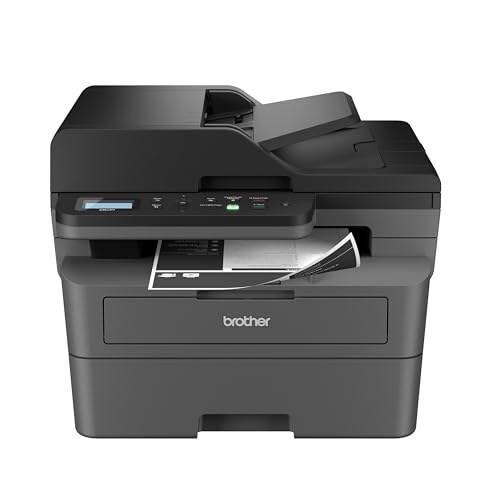
An ink tank printer swaps small cartridges for refillable tanks that you fill from bottles. The idea is fewer cartridge changes for people who print every week. Models differ a lot in tray size, duplex printing, document feeders and whether they scan at all.
The six printers below cover HP, Canon and Epson tank designs, from a compact print-only unit to a fax-capable office machine. Specs and page-yield figures come from each product’s listing page, and the yields are the makers’ own. We have not used these printers ourselves.
As an Amazon Associate we earn from qualifying purchases. Links below are affiliate links, and they do not change the product information we give.
What to Look For
| Feature | Why it matters |
|---|---|
| Functions | Print only or print, copy and scan, and whether a document feeder is included |
| Duplex | Automatic two-sided printing differs from manual or single-sided |
| Paper tray | A bigger tray means fewer refills of paper |
| Starter ink | Makers list yields as up to figures, and real use varies |
| Connectivity | Wi-Fi, USB and sometimes a wired network port |
In this guide
Specs at a Glance
| Printer | Functions and duplex | Tray and speed | Notes |
|---|---|---|---|
| HP Smart Tank 5003 | Print, copy, scan; manual duplex | 100 sheets; 10 ppm black, 5 ppm color per the listing | Maker lists up to 6,000 pages of starter ink |
| HP Smart Tank 6003 | Print, copy, scan; automatic duplex | 150 sheets; 12 ppm black | Maker lists up to 8,000 color or 6,000 black pages |
| HP Smart Tank 7603 | Print, copy, scan, fax; automatic duplex | 250 sheets; 15 ppm black, 9 ppm color | 35-sheet document feeder |
| Canon MegaTank G3270 | Print, copy, scan; single-sided | 100 sheets; 11 ppm black, 6 ppm color | 1.35 in LCD; maker lists up to 6,000 black or 7,700 color pages |
| Canon MAXIFY GX2020 | Print, copy, scan, fax; automatic duplex | 250 sheets; 15 ppm black, 10 ppm color | 35-sheet feeder; 2.7 in touchscreen; wired LAN |
| Epson EcoTank ET-1913 | Print-focused; no scanner listed | 100 sheets; 11 ppm black, 6 ppm color | 6.8 lb; maker lists up to 3,600 black or 6,500 color pages |
The 6 Best Ink Tank Printers

Top pickBest for a home desk with mixed printing
1. HP Smart Tank 5003 All-in-One Ink Tank Printer
A wireless print, copy and scan unit with a flatbed scanner, a 100-sheet tray, borderless printing and manual duplex through the driver. The listing shows 10 pages per minute in black and 5 in color, and it weighs 11.1 pounds.
Suits: a home desk with mixed printing. Strengths: a flatbed scanner and mobile printing. Weaknesses: duplex is manual and the tray is small. Skip it if you need a document feeder.

View HP Smart Tank 5003 All-in-One Ink Tank Printer on Amazon

Best for two-sided documents at home
2. HP Smart Tank 6003 All-in-One Ink Tank Printer
A print, copy and scan model with automatic duplex, a 150-sheet tray and a flatbed scanner. The listing gives 12 pages per minute in black and does not list a color speed, so check the maker’s page before you compare it with the others.
Suits: two-sided documents at home. Strengths: automatic duplex and a larger tray. Weaknesses: no color speed on the listing. Skip it if you want fax or a feeder.

View HP Smart Tank 6003 All-in-One Ink Tank Printer on Amazon

Best for a small office with paper to scan
3. HP Smart Tank 7603 All-in-One Ink Tank Printer
The most featured HP here: print, copy, scan and fax, a 35-sheet document feeder, automatic duplex and a 250-sheet tray. The listing shows 15 pages per minute in black and 9 in color, and the weight is 17 pounds.
Suits: a small office with paper to scan. Strengths: a feeder, fax and a large tray. Weaknesses: the largest HP in this list. Skip it if you only print occasionally.

View HP Smart Tank 7603 All-in-One Ink Tank Printer on Amazon

Best for a simple home printer
4. Canon MegaTank G3270 All-in-One Wireless Printer
A compact Canon with print, copy and scan, Wi-Fi and USB, a 1.35 inch LCD and borderless printing. The listing shows 11 pages per minute in black, 6 in color and single-sided printing only, with a 100-sheet tray.
Suits: a simple home printer. Strengths: a screen on the unit and a compact body. Weaknesses: no duplex and no feeder. Skip it if you print two-sided pages often.

View Canon MegaTank G3270 All-in-One Wireless Printer on Amazon

Best for a shared office desk
5. Canon MegaTank MAXIFY GX2020 All-in-One Printer
An office-oriented tank printer with print, copy, scan and fax, a 35-sheet feeder, automatic duplex, a 250-sheet tray, a 2.7 inch touchscreen and a wired network port. The listing shows 15 pages per minute in black and 10 in color, with a 3-year warranty.
Suits: a shared office desk. Strengths: a wired port, a feeder and a long warranty. Weaknesses: the maker’s starter yield is 3,000 pages each in black and color, lower than the HP figures. Skip it if you want the smallest printer.

View Canon MegaTank MAXIFY GX2020 All-in-One Printer on Amazon

Best for a printing-only home setup
6. Epson EcoTank ET-1913 Wireless Color Supertank Printer
A light 6.8 pound Wi-Fi tank printer with a 100-sheet tray and borderless printing. The listing shows 11 pages per minute in black and 6 in color, and it states up to 3,600 black or 6,500 color pages from the starter ink. No scanner appears in the listing.
Suits: a printing-only home setup. Strengths: a small, light body. Weaknesses: no scan or copy listed, and 1 year of warranty. Skip it if you need to scan documents.

View Epson EcoTank ET-1913 Wireless Color Supertank Printer on Amazon
Best Picks by Category
These labels group the picks by use case and price tier. They summarize listing data and are not hands-on test results.
- Highest listed rating (limited feedback): Epson EcoTank ET-1913 Wireless Color Supertank Printer — a budget-tier pick; check price on Amazon. This is not an independent product-quality award.
- Most reviewed: Canon MegaTank G3270 All-in-One Wireless Printer — check price on Amazon.
- Lowest price: Canon MegaTank G3270 All-in-One Wireless Printer — a budget-tier pick; check price on Amazon.
- Premium option: HP Smart Tank 7603 All-in-One Ink Tank Printer — check price on Amazon.
Price, Rating and Review Comparison
The table groups the picks by price tier. Prices change often, so confirm the current price on Amazon.
| Product | Price | Rating | Ratings | Price tier |
|---|---|---|---|---|
| Canon MegaTank G3270 All-in-One Wireless Printer | Check price on Amazon | — | — | Budget |
| Epson EcoTank ET-1913 Wireless Color Supertank Printer | Check price on Amazon | — | — | Budget |
| HP Smart Tank 5003 All-in-One Ink Tank Printer | Check price on Amazon | — | — | Budget |
| HP Smart Tank 6003 All-in-One Ink Tank Printer | Check price on Amazon | — | — | Mid-range |
| Canon MegaTank MAXIFY GX2020 All-in-One Printer | Check price on Amazon | — | — | Mid-range |
| HP Smart Tank 7603 All-in-One Ink Tank Printer | Check price on Amazon | — | — | Mid-range |
How Much Feedback Backs Each Rating
A high average from a handful of ratings is weaker evidence than a slightly lower average from thousands. Here is how the sample size looks for each pick.
- HP Smart Tank 5003 All-in-One Ink Tank Printer: a moderate sample of ratings.
- HP Smart Tank 6003 All-in-One Ink Tank Printer: a moderate sample of ratings.
- HP Smart Tank 7603 All-in-One Ink Tank Printer: a moderate sample of ratings.
- Canon MegaTank G3270 All-in-One Wireless Printer: a large sample of ratings.
- Canon MegaTank MAXIFY GX2020 All-in-One Printer: a moderate sample of ratings.
- Epson EcoTank ET-1913 Wireless Color Supertank Printer: a small sample of ratings.
Setup and Care
- Fill each tank from the matching bottle and stop at the fill line.
- Keep the printer level while you refill.
- Print a page now and then so the nozzles stay active.
- Store spare bottles upright and away from sun.
Mistakes to Avoid
- Treating the maker’s page yield as a promise for your documents.
- Buying a print-only model when you also need to scan.
- Overlooking manual duplex when you print two-sided pages daily.
- Forgetting the printer’s depth when you measure a shelf.
Ink Tank Printer FAQ
Which models here print two-sided automatically?
The HP Smart Tank 6003 and 7603 and the Canon GX2020 list automatic duplex. The HP 5003 lists manual duplex, and the Canon G3270 is single-sided.
Which ones have a document feeder?
The HP Smart Tank 7603 and the Canon GX2020, each with 35 sheets.
The Short Version
For a basic home unit, the HP 5003. For automatic duplex, the HP 6003. For fax and a feeder, the HP 7603. For a compact Canon with a screen, the G3270. For a shared office with a wired port, the GX2020. For print only, the Epson ET-1913.
How Ink Tank Printers Differ From Cartridge Models
A cartridge inkjet stores a small amount of ink in a plastic housing that you throw away and replace. An ink tank printer keeps larger reservoirs built into the machine, and you top them up from bottles. The mechanism that pushes ink to the print head is much the same in both cases. What changes is the packaging of the ink, and that packaging is where most of the cost difference comes from.
Because the tanks are part of the printer, the maker can sell ink in bulk bottles with far less plastic, a chip or electronics in fewer places and no cartridge to manufacture for every refill. Those savings are the reason tank printers usually cost more to buy and less to feed. How much less depends on how much you print, so the type is not automatically the right choice for every household.
| Type | Upfront cost | Cost per page | Best for |
|---|---|---|---|
| Ink tank | Higher | Low, once you refill from bottles | Steady weekly printing, school work, color documents |
| Cartridge inkjet | Lower | Higher, especially with small cartridges | Light printing, photos now and then |
| Laser | Moderate to high | Low for text, higher for color | Large amounts of text in black and white |
The table is a general guide, not a promise about any specific model. Always read the maker’s page-yield note, because it says how many pages the maker expects from a set of bottles under standard test conditions, which may not match your files.
Is a Tank Printer Right for the Way You Print?
The honest answer depends on volume and on how long the machine sits idle. Here are the situations where tank systems fit well, and the ones where they do not.
Students and families
Homework, forms, permission slips and the occasional poster add up faster than people expect. A family that prints a few dozen pages a week will recover the higher purchase price through cheaper ink over time. A printer with automatic two-sided printing, like several here, also cuts the paper bill. For this type of household, a mid-size tray and a flatbed scanner are usually enough.
Small business and home office
If you print invoices, labels, shipping documents and contracts, you will want a document feeder so a stack of pages can be copied or scanned without lifting the lid each time. A larger paper tray and a wired network port help if two or three people share the machine. The HP Smart Tank 7603 and Canon MAXIFY GX2020 in this guide each list a 35-sheet feeder, which is the sort of feature that matters in an office setting.
Occasional users
If you print a handful of pages a month, a tank printer may be more machine than you need. Ink in the print head can dry if the printer is left unused for weeks, and a tank system does not avoid that problem. If your use is light, a compact print-only unit or a laser can be a better fit. Consider what a tank printer saves you against what it costs on day one.
Crafters and photo hobbyists
Dye-based tank inks give strong color on glossy paper, but they can be more sensitive to moisture and light than pigment inks, which resist smearing on plain paper. Pigment-heavy systems are better for text, while dye leans toward photographs. Check whether the printer lists a separate black pigment ink, and read the maker’s note on paper types before you plan a project around a particular stock.
Features That Affect Daily Use
Specs on a listing can seem interchangeable, but a few of them change how pleasant the machine is to live with.
Paper handling
Tray size is the number of sheets the machine holds, and it decides how often you reload. A 100-sheet tray is fine for light use. If you print school packets or reports, a 250-sheet tray saves a lot of refilling. Look at whether the rear tray accepts photo paper, envelopes or heavier stock, and whether paper loads from the front or back, since a rear feed needs clear space behind the printer.
Duplex and speed
Automatic duplex flips the sheet and prints the second side without you touching it. Manual duplex asks you to take the pages out and put them back in the right orientation, which is easy to get wrong. Rated speeds are normally measured with simple pages in draft modes, so real documents print slower. Compare the listed numbers between models, but do not expect to reach them with photos or dense graphics.
Scanner and feeder
A flatbed glass scanner handles a book page, a receipt or a photograph. An automatic document feeder moves a stack of sheets through without help. Having both is the most flexible arrangement. A print-only model does not scan at all, so if you ever expect to digitize a document, check that the listing names a scanner and a copier.
Connectivity and control
Wi-Fi lets you print from phones and laptops anywhere in the home. USB is simple and stable for a single computer. A wired Ethernet port is more reliable for shared use and avoids dropped connections when a wireless network is crowded. Small LCD screens and touchscreens let you copy and check ink levels without a computer, and they make a real difference if the printer is shared between several people.
Account and ink rules
Some makers ask you to register the printer with an online account or to use their app for setup. Read the terms around software, subscriptions and firmware, as some programs limit what you can do with third-party ink or with offline use. Choose a machine whose rules you are comfortable with, because they apply for the whole life of the product.
Refilling, Ink Choices and the True Running Cost
Refilling a tank printer is not hard, but it rewards a little care. Most designs use bottles with keyed nozzles, so each color fits only one port. Squeeze gently, stop at the fill line and wipe up any drips with a paper towel right away. Ink stains on a desk or carpet are hard to remove, and a spilled bottle can reach the printer’s electronics.
Genuine and third-party ink
Genuine ink is matched to the print head, and using it keeps the warranty clear. Third-party ink is cheaper and many people use it without trouble, but quality varies, and some makers state that damage caused by non-original ink is not covered. If you decide to use it, buy from a seller with a clear return policy and keep the original bottles for the starter fill.
Working out your own cost per page
A simple method helps you avoid chasing marketing claims. Divide the price of a replacement ink set by the page yield stated by the maker, then add the price of paper. Do the same for a cartridge printer you are considering, using its replacement cartridges. Because yields are tested on standard pages, treat the answer as a comparison tool, not a bill you will receive. Photos and heavy color pages use more ink than the test, and plain text uses less.
Keeping the print head healthy
Run a test print on a schedule, even if you only need a page now and then. Keep the printer on a stable surface and avoid moving it with the tanks full, because tipping can force ink into the wrong places. Cap bottles tightly, store them upright and keep them out of strong sunlight and heat. If you ever see streaks, run the cleaning cycle once and check again before repeating it, since each cleaning uses ink.
Moving and traveling
If you plan to carry the printer between locations, read the maker’s instructions for transport. Many designs ask you to keep it level and to follow specific steps to lock the print head so ink does not leak. A heavy machine with a large tray is better kept in one place.
Questions to Ask Before You Order
- How many pages do I print in a typical month, and will that stay steady through the year?
- Do I need to scan or copy, and if so, single sheets on glass or whole stacks through a feeder?
- Do I print two-sided documents often enough that automatic duplex is worth having?
- Where will the printer sit, and is there room for the tray, the rear clearance and the lid when it opens?
- Will more than one person share it, and does the shared network call for a wired port?
- What does the warranty say about ink, and how long does it last?
If you can answer these six questions, the choice among the printers above usually narrows to one or two, and the rest of the decision comes down to size and budget.
Going Deeper: The Details That Decide How a Ink Tank Printer Works Out
Spec sheets and headline features only tell part of the story with any ink tank printer. The picks above were chosen against the criteria in the main guide, but once a ink tank printer is in daily use, a second layer of detail decides whether it stays convenient or becomes a chore. The points below dig into that second layer, so you can weigh the options in this guide against the way you actually work rather than against a generic checklist.
Real ink cost is about behaviour, not just bottle size
Tank printers promise low running costs, and they deliver when printing is regular. The hidden variable is you: a tank printer left idle for months can waste its advantage in cleaning cycles, while one used weekly sips ink. When comparing the picks, look at how each handles low-volume life, because the cheapest page in the guide belongs to the machine whose habits match your printing rhythm.
When you compare the picks in this guide on this point, look past the headline claim and ask how it behaves in the second month rather than the first day. Small differences here compound: a slightly better design choice saves a few minutes or avoids one recurring annoyance every single time you use the ink tank printer, and over a year that matters more than a feature you will only touch once. If two options look equal elsewhere, let this criterion break the tie.
Print head design decides the long game
Some tank printers use replaceable print heads; others treat the head as part of the machine’s life. Heads are what ink dries in, clogs in and eventually fails in, so this quiet specification decides whether a mid-life problem is a swap or a replacement printer. For a machine bought to serve for years, head replaceability is worth real money and rarely makes the headline features.
When you compare the picks in this guide on this point, look past the headline claim and ask how it behaves in the second month rather than the first day. Small differences here compound: a slightly better design choice saves a few minutes or avoids one recurring annoyance every single time you use the ink tank printer, and over a year that matters more than a feature you will only touch once. If two options look equal elsewhere, let this criterion break the tie.
Paper handling and photo ambitions
Tank printers span from plain document machines to serious photo printers, and the difference lives in paper paths and ink sets. If photographs matter, check the rear feed for thick media and the number of ink colours; if documents rule, a good front tray and honest duplex matter more. Buying photo capability you never use wastes money, but buying a document machine for photo work wastes more.
When you compare the picks in this guide on this point, look past the headline claim and ask how it behaves in the second month rather than the first day. Small differences here compound: a slightly better design choice saves a few minutes or avoids one recurring annoyance every single time you use the ink tank printer, and over a year that matters more than a feature you will only touch once. If two options look equal elsewhere, let this criterion break the tie.
Filling ergonomics and mess
You will refill this printer for years, so the bottle system matters: keyed nozzles that only fit the right tank, bottles that empty without squeezing and windows that show true levels all prevent the classic ink-stained disaster. Refills are rare events, but a bad one is memorable, and the designs in this guide differ more in filling manners than in anything else you will touch monthly.
When you compare the picks in this guide on this point, look past the headline claim and ask how it behaves in the second month rather than the first day. Small differences here compound: a slightly better design choice saves a few minutes or avoids one recurring annoyance every single time you use the ink tank printer, and over a year that matters more than a feature you will only touch once. If two options look equal elsewhere, let this criterion break the tie.
Planning Around Your Space, Routine and Budget of Attention
Place a tank printer where it will live permanently, because moving one with full tanks invites spills and airlocks. It wants a level surface, room above for the scanner lid if fitted, and light enough to read the ink windows honestly. A tank printer is a settle-down appliance; choose its home with that in mind.
Plan your printing rhythm as part of ownership. Tank printers reward households that print something most weeks, even a single page, because ink stays moving and heads stay clear. If your printing is seasonal, with long silent months, factor the cleaning cycles and the occasional clogged nozzle into your expectations, or consider whether a laser’s indifference to idleness suits you better.
Keep the ink set complete. A tank printer with one empty colour is a mono printer with opinions, and colours are cheapest bought as part of your normal supplies order rather than in a panic. Note the bottle codes in the printer’s drawer; tank systems are keyed by model family, and the wrong bottle is a mistake you only make once.
Which Setup Fits Your Situation?
The same ink tank printer can be the right answer in one home and the wrong one in another. These scenarios translate the criteria above into recognisable situations, so you can find the one closest to yours and borrow its conclusion.
The family printing schoolwork and photos
Your load is mixed and bursty: homework documents in the week, photographs at weekends, silence in the holidays. Choose the pick whose photo paper handling and ink set flatter the weekend work, and keep a weekly test page habit alive through the quiet months. The family’s real cost is not ink but the printer being ready when a project is due in the morning.
The home office with steady document volume
Regular moderate printing is the tank printer’s home turf. Duplex, a decent tray and low bottle costs compound into genuinely cheap pages over a year. Favour the model with the most replaceable parts and the calmest paper path, because at your volume the machine’s longevity, not its first-year ink bill, decides the economics.
The crafter printing on varied media
Card, labels and printable fabrics test a printer’s paper path more than its ink system. A straight rear feed is your core requirement, and test every new media in single sheets before committing a batch. Tank ink on unusual media behaves differently from cartridge ink in drying time, so patience between sheets is part of the craft setup.
First-Time Setup, Done Carefully
Set the printer up filled, level and connected before its first real job, and print the alignment and test pages the setup asks for rather than skipping to your own document. Fill tanks slowly with the correct keyed bottles, confirm the windows show sensible levels, and let the initial ink charge complete fully; interrupting the first charge is how air enters a system that then misbehaves for weeks.
Configure defaults while the manual is open: your usual paper, duplex preference, and quality settings for everyday work. Tank printers offer economy modes that genuinely suit drafts, and setting them as the default saves ink on the ninety percent of pages nobody frames. Save a separate named preset for photographs so quality is a choice, not an accident.
Record the starting ink levels and the date. A photograph of the full windows on day one gives you a reference for consumption that memory will otherwise invent. In a year, that photo answers whether your printing is as light as you claim and when bottles should join the shopping list.
A Care Routine That Keeps Performance Steady
Print regularly and treat long silence as the enemy. If the household will be away for weeks, a few pages printed by a house-sitter or a scheduled test page keeps heads happier than any storage ritual. When you return to an idle machine, run the built-in cleaning once and print a test pattern before concluding the head is damaged; patience revives most sleepy printers.
Use the maker’s ink, or at least understand the trade if you do not. Tank systems are tuned to their ink’s flow and drying behaviour, and mystery ink is the common thread in many clogged-head stories. The savings on a bottle are small beside the cost of a head, which is why the guide’s running-cost figures assume the ink the machine was designed around.
Keep paper dry and flat, because tank printers feed from trays that punish curled stock. Store the working ream in its wrapper, load reasonable quantities, and set the paper type honestly in the driver when you change stock. Half the jams blamed on tank printers are paper-storage confessions.
Troubleshooting: Working Through the Common Problems
Most problems with a ink tank printer announce themselves gradually and have ordinary causes. Work through these checks in order before assuming anything has failed outright; each one starts with the cheapest, most likely explanation.
Colours are missing or streaky after a quiet period
Run the nozzle check pattern first to see exactly which colours and segments are affected, then a standard cleaning cycle, then print a few ordinary pages. Most idle clogs clear within this patience. Reserve the deep cleaning for genuine need, because it consumes real ink; a printer bullied with daily deep cleans can drink its savings while its owner blames the ink prices.
The printer reports low ink while the tank looks fine
Tank printers estimate consumption in software and reconcile it with your refills, so the message may be bookkeeping rather than measurement. Confirm the physical window level, and follow the maker’s refill reset procedure exactly when you do refill, because a skipped reset confuses the estimates for months. Trust the window over the warning when they disagree, but investigate if they disagree wildly.
Prints smear or take ages to dry on special media
Check that the driver knows the media type, because ink laydown and drying pauses are set by that choice. On thick or glossy stock, one sheet at a time with a moment between sheets solves most smearing. If plain-paper prints also smear, suspect a paper batch that dislikes your ink or humidity in the room before suspecting the printer.
How the Leading Picks Compare in Daily Use
Readers often ask how the leading picks in this guide differ once the obvious differences are set aside. The HP Smart Tank All-in-One Ink Tank Printer earns its place at the top of the list through all-round balance: it is the option to start from if your needs are mixed and you want the fewest compromises. The Canon MegaTank All-in-One Wireless Printer suits a narrower, more specific set of demands, and it makes most sense when that speciality matches the job you described in the scenarios above. The Epson EcoTank Supertank Printer is the one to study closely if your priority is long-term running convenience, because its design choices favour steady day-to-day use over headline features.
None of that makes any of them the wrong choice in isolation. The honest way to choose is to rank your own criteria first, using the deep-dive section above, and then see which pick’s strengths line up with the top of your list. Where two picks tie, prefer the one whose routine care and consumables fit the habits you already have, because the best ink tank printer is the one you will actually look after properly.
More Questions, Answered
Are tank printers worth it for light printing?
Honestly, it depends on the pattern of the lightness. Light but regular printing, a few pages most weeks, suits a tank well and the ink savings accumulate quietly. Light and sporadic printing, nothing for two months then a burst, fights the technology, and the cleaning cycles tax exactly the savings you bought it for. Match the machine to the rhythm, not the annual page count.
How long does the ink in the tanks actually last?
In a busy household the supplied ink is famously long-lived, often well beyond cartridge habits, but the honest answer is that it lasts until your printing uses it, and your printing is the variable. The day-one photograph of the levels, compared monthly, gives your household’s true consumption rate within a season, which no review can predict for you.
Can a tank printer match a laser for text documents?
Modern tank machines produce text that satisfies most offices, but a laser’s text remains crisper, waterproof in a way ink is not, and indifferent to idle months. If documents are nearly everything and photographs nothing, the laser still has a case. The tank wins when colour, photos and running cost share the stage, which is most family and many office lives.
What happens if I put the wrong colour in a tank?
Modern keyed bottles make this genuinely hard, which is the point of their odd shapes. If it happens with a third-party bottle, stop, do not print, and follow the maker’s guidance; a contaminated tank can mean flushing the system. Prevention is the entire strategy: refill in good light, one colour at a time, with the bottle code checked against the tank label twice.
Thinking Long Term: The Second Year With Your Ink Tank Printer
The first month with a new ink tank printer is mostly about learning its habits, but the second year is where its true character shows. Parts that felt minor at purchase, such as a stiff control, a fiddly cover or a consumable that is oddly hard to source, become the texture of ownership. This is why the criteria in this guide lean so heavily on everyday behaviour rather than first impressions: a buying decision has to survive hundreds of ordinary uses, not one exciting unboxing.
Keep a light record as the months pass: what you replaced, what you cleaned, what surprised you. That record is worth more than any single review when the time comes to replace or supplement the ink tank printer, because it describes your usage rather than a stranger’s. Owners who keep even a few lines of notes make their second purchase in this category dramatically better than their first, and they waste far less money relearning lessons they already paid for once.
Getting More From What You Already Own
Before replacing a ink tank printer that seems disappointing, it is worth auditing the setup around it, because a surprising share of disappointment belongs to placement, settings and routine rather than to the product itself. Work through the basics in this guide once more, slowly, and change one thing at a time. Many owners discover that the performance they were about to pay for again was already in the house, hidden behind one wrong setting or one skipped maintenance habit.
There is also real value in mastering the mid-range option you own instead of chasing the premium one you do not. Skill and routine compound: a keeper who understands their equipment deeply, who has notes on what works in their own rooms and with their own habits, gets results that a casual owner of finer equipment often cannot match. Upgrade when a genuine limit is reached and you can name it precisely, not when frustration is merely general.
When to Repair, When to Replace
Every ink tank printer eventually presents the same question, and it helps to have principles ready before emotion and urgency get a vote. Repair when the fault is isolated, the part is available, and the rest of the unit is sound; a machine with one tired component and years of good structure is worth the fix. Replace when faults arrive in clusters, when the core of the product is what has aged, or when repair costs approach the price of a modern equivalent that would also be cheaper or kinder to run.
Sentiment complicates the maths, and so does familiarity, but downtime has a cost too, especially when other work or living things depend on the equipment. A calm rule used by many experienced owners: if you have repaired the same class of fault twice, the third occurrence is the product telling you its story. Listen early, budget honestly, and the replacement, when it comes, will feel like a decision rather than a defeat.
Teaching Someone Else to Use It Well
In most homes and small offices, a ink tank printer has more than one user, and its results quietly depend on the least careful of them. A few minutes spent showing a partner, a colleague or an older child the basics, how to load it, what to check, and what never to force, prevents the slow damage that mysterious hands cause. Write the essentials on a card kept with the equipment; memories differ, but the card is the same for everyone.
Shared equipment also benefits from a simple agreement about consumables and problems: who orders replacements, where the spare lives, and what to do when something behaves oddly. The goal is that a problem is reported the day it appears, while it is small, rather than worked around silently until it becomes the kind of failure that interrupts everyone’s week. Good equipment in a home with good habits outlasts premium equipment in a home without them, and the difference is rarely close.
Accessories and Add-Ons: What Actually Earns Its Place
Almost every ink tank printer attracts a small economy of accessories, and most of them solve problems you may never have. The disciplined approach is to live with the basic setup for a month and keep a note of every friction you actually meet; the accessory that answers a note on that list is a purchase, while everything else is decoration. This habit also reveals the opposite: sometimes the missing piece is not an accessory at all but a different routine, such as where the equipment lives or when it is used.
When you do add something, add one thing at a time and live with it for a while. Changing three variables at once makes it impossible to know which one helped, and accessories interact in surprising ways. The owners who get the most from their equipment tend to own surprisingly little of it beyond the core setup, but every piece they do own has a named job and a history of earning its shelf space.
FAQ
Are ink tank printers worth it for light printing?
Usually not by themselves. The higher purchase price is paid back through cheaper ink, which only helps if you print regularly. If you print a few pages a month, a laser or a basic inkjet may cost less overall, and idle ink can still dry in the print head.
Can I use third-party ink in a tank printer?
You can in most cases, but quality varies and some makers say damage from non-original ink is not covered by the warranty. If you try it, buy from a seller with clear returns and read your printer’s warranty terms first.
How often should I clean the print head on an ink tank printer?
Only when you see streaks or missing lines. Each cleaning cycle uses ink, so print a test page first and repeat the cycle once if needed. Printing a short page every week or two keeps the nozzles active and reduces how often you need to clean.
Do ink tank printers print good photos?
Many can print acceptable photos on photo paper, especially at borderless sizes, but results depend on the ink set and paper. If photos are a main use, check whether the printer has extra photo inks or a dedicated photo mode, and compare listed print resolution.
Why does my ink tank printer say low ink when the tank still has some?
Many printers estimate ink from page counts or sensors and warn you at a conservative level. Refill when the tank is near the lowest mark, not at the first alert, and never let a tank run fully dry, since air in the lines can affect printing.