Disclosure: As an Amazon Associate, reviewstook.com earns from qualifying purchases. Links to Amazon on this page are affiliate links; they cost you nothing extra.
Quick answer: Both are entry-level refillable-tank all-ins with up to two years of ink in the box. Epson quotes up to 4,500 black / 7,500 color pages per bottle set; Canon quotes up to 6,000 black / 7,700 color. Neither highlights duplex.
This comparison is built from the product listings and manufacturer information on Amazon, not our own testing. Confirm details on the product pages before you buy.
By the Reviewstook Editorial Team. Last updated: October 31, 2026.

At a Glance
| Feature | Epson EcoTank ET-2800 | Canon PIXMA G3270 |
|---|---|---|
| Type | Epson ink tank all-in-one | Canon MegaTank all-in-one |
| Ink in the box (listing) | Up to 2 years | Up to 2 years |
| Page yield claim | Up to 4,500 black / 7,500 color | Up to 6,000 black / 7,700 color |
| Scanner | Flatbed scan and copy | Print, copy and scan |
| Display | Not highlighted | 1.35-inch square LCD |
| Two-sided printing | Not mentioned | Single-sided |
In this guide
Key Differences
Yield claims
Canon quotes higher black and color figures. These are manufacturer claims under standard conditions.
Duplex
Neither listing highlights two-sided printing; Canon says single-sided.
Warranty note
Epson warns non-genuine ink may cause damage not covered by warranty.
Which Should You Choose?

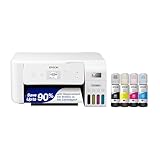
Choose the Epson EcoTank ET-2800 if
you prefer Epson’s EcoTank bottles and ecosystem.
Choose the Canon PIXMA G3270 if
you want the higher quoted page yields.
What the Differences Mean
A spec table shows what differs. This section explains why each difference matters.
Print technology
Lasers are quick and sharp for text; inkjets handle color and photos better; ink tank models cost less to run. Choose by what you print most. Here, Epson EcoTank ET-2800 lists “Epson ink tank all-in-one” while Canon PIXMA G3270 lists “Canon MegaTank all-in-one”.
Scan and copy features
A document feeder helps with multi-page jobs and duplex scanning saves time. If you rarely scan, a flatbed is enough. Here, Epson EcoTank ET-2800 lists “Flatbed scan and copy” while Canon PIXMA G3270 lists “Print, copy and scan”.
Duplex printing
Automatic duplex saves paper and flipping. Check whether it covers printing only or also copying. Here, Epson EcoTank ET-2800 lists “Not mentioned” while Canon PIXMA G3270 lists “Single-sided”.
Which Is Right for Which Buyer
- If you print rarely, a low-cost model with cheap or long-life ink or toner avoids waste from dried ink.
- If you print a lot, prioritize a low cost per page, such as an ink tank or laser model.
- If you need to scan or copy documents, check for a document feeder.
- If you print photos, check the number of inks and paper support.
Before You Buy: A Five-Point Check
- Confirm the exact model on the product page; similar names often hide different features.
- Check the cost of replacement ink or toner.
- Check the Wi-Fi band and mobile printing support.
- Check the size of the printer against your space.
- Check the return window and warranty.
This comparison is based on the Amazon listings and manufacturer information, not our own testing. Treat it as a way to narrow the choice, then confirm the details that matter to you.
Refilling the Ink Tanks
Both printers belong to the refillable-tank family, so the way you add ink is part of the ownership experience. Instead of snapping in a cartridge, you open a tank cover and pour or squeeze ink from a bottle into a marked reservoir. Each maker has its own bottle design and filling method, so check the manual for the steps and watch how the bottle tip fits the tank port before your first refill.
Do the refill on a flat surface with paper or a cloth underneath. Take your time, keep the bottle upright and fill only to the level the manual describes. Overfilling can leave ink where it should not be, and ink stains on fingers, clothes and counters are hard to remove. Many people keep a few paper towels and disposable gloves close by.
Match the bottle to the printer. The ink bottles are made for specific models, so verify the exact bottle type on the listing before buying spares. Colors are usually keyed to ports so you cannot easily mix them up, but check labels each time.
Finally, store spare bottles upright and in a cool place with the caps tight. Lay out a small plan for when you will top up, such as when a tank drops to a certain level, because running a tank fully dry can lead to air in the system and a lengthy recovery routine.
Ink Bottles and Running Costs
The big appeal of tank printers is that ink comes in bottles that cost less per page than typical cartridges. To compare these two fairly, look at the page yield each maker states for its bottles, and treat those figures as the maker’s estimates under standard test conditions rather than a promise. Your real usage, including how often you print and how much of each page is covered by ink, will change the result.
Work out a simple cost per page by dividing the price of a bottle set by the stated yield, and compare it between the two models. Remember that photos and heavy graphics use far more ink than text, so a person who prints mostly documents will see different numbers from one who prints images.
Consider also the starting stock. Tank printers often ship with initial bottles that are partly used to charge the system, so a first refill may come sooner than the stated yield suggests. Check the box contents and the listing for what is included.
Finally, think about the black ink type. Some models use a pigment black for text, which helps sharp, smudge-resistant documents, and dye colors for photos. Read the specifications to see which ink types each printer uses, and whether that matches your mix of documents and images.
Wireless Setup and Mobile Printing
Both printers are meant to be used wirelessly, so setup deserves a look. Expect to connect the printer to your home network through its control panel or a setup app, then install the driver on your computer or choose it in your phone’s print menu. Have your Wi-Fi name and password ready, and confirm your router band is supported by the printer, as some printers only connect to certain bands.
For phones and tablets, check which apps and built-in print services each printer supports. Many modern phones can print through a built-in system service without any app, while the maker’s own app may add scanning, ink level checks and settings. If you want to print from a particular device, check the listing or the maker’s support page for compatibility.
A wired option helps when Wi-Fi is unreliable. Check whether the printer includes a USB connection, because a cable is a simple fallback if the network drops or you move to a new router. Some models have no Ethernet port, so a USB cable or wireless connection is your only choice.
Finally, keep the firmware updated through the maker’s tools when prompted, and place the printer within good range of the router. Poor signal causes many of the dropped-job problems people blame on the printer itself.
Print Head Care and Clogs
Tank printers work best when used regularly. Ink that sits for weeks can dry in the nozzles, producing streaks or missing lines. Printing a small test page every week or two keeps ink moving and reduces the chance of a clog. If your printer sits idle for long stretches, plan for this habit.
When quality drops, start with the printer’s built-in nozzle check, then run a cleaning cycle if the pattern is broken. Cleaning uses ink, so do not run it over and over; the manual usually says how many cycles are sensible and when to wait between them. If several cycles do not help, consult the maker’s support guidance instead of repeating the routine.
Use only ink recommended for your model. Third-party ink may be cheaper but may differ in quality, and the maker’s warranty terms may treat damage caused by it differently, so read the warranty before deciding. This is a general caution, not a claim about any specific ink.
Keep the printer in a stable environment, away from direct sun, heaters and very dry air, and turn it off with the power button so the heads park properly. Pulling the plug while it is running can leave the head uncapped and more likely to dry out.
Paper Handling and Everyday Use
Day to day, paper handling affects satisfaction as much as ink. Check how much paper the tray holds, which paper sizes and weights are supported, and whether the output tray is sturdy. Loading too many sheets or using paper outside the supported range can cause jams and double feeding.
Think about where the printer will sit. A tank printer with an ink tank on the front or side needs clear space to see ink levels and access the refill ports. Measure your shelf or desk and allow room above for the scanner lid and behind for the paper tray to extend.
Consider the noise and speed, too. Home printers are not built for high volume, and printing speeds are stated under test conditions, so real performance depends on quality settings and the type of document. If you print many pages at once, check the stated paper capacity and think about whether the printer suits your volume.
Finally, check the warranty and support. Look at what each maker states on the listing about coverage and how to contact support, and note the terms in case you need them later.
Matching a Tank Printer to Your Household
Entry tank printers attract people who are tired of buying small cartridges, but the right model still depends on how you print. The Epson EcoTank ET-2800 and the Canon PIXMA G3270 sit in the same family of refillable machines, so the better question is which one suits the way you work at home. The table below turns that question into a set of everyday situations.
| Your situation | What to focus on |
|---|---|
| Occasional school and form printing | Easy wireless setup and a tidy refill routine |
| Weekly document batches | Paper tray capacity and how quickly pages feed |
| Photo prints for albums | Print quality on glossy media and borderless support |
| Shared family use | Phone printing and app reliability |
| Long gaps between jobs | How the maker advises keeping the print head healthy |
Neither machine is meant for an office with heavy daily volume. They shine in homes and small study spaces where output is steady but modest. Check the maker’s pages for the exact features each model includes, since regional versions sometimes differ in small ways.
A Short Glossary for Tank Printer Shoppers
Listings for these printers use vocabulary that can feel like a foreign language. A few plain definitions make comparing models much easier.
- Ink tank: a built-in reservoir that you fill from a bottle, instead of replacing a sealed cartridge.
- Page yield: the number of pages a bottle or set is claimed to produce, measured under a standard test method. Real results vary with what you print.
- Dye and pigment: two kinds of ink. Pigment tends to suit text, while dye often gives vivid photo color. Which inks each model uses is spelled out on the maker’s specification page.
- Borderless printing: photos that fill the whole sheet with no white margin.
- Automatic duplex: the printer turns the sheet itself to print on both sides. Manual duplex means you flip the pages by hand.
- Flatbed scanner: a glass bed where you place a document or photo to copy or scan it.
- Wi-Fi Direct: a link between your phone and the printer without going through a router.
Knowing these terms helps you notice when a listing is vague. If a page boasts about page yield but never mentions the test method, treat the number as a rough guide only.
Mistakes People Make With Their First Tank Printer
Switching from cartridges to bottles changes a few habits. These are the slips that cause the most trouble, and each is easy to avoid once you know about it.
Rushing the first fill. The initial ink setup is the most delicate step. Read the maker’s instructions before you open anything, fill each tank with its matching color, and give the printer time to finish its charging cycle.
Mixing up bottles. Bottle keys and tank labels are designed to keep colors in the right place. Match them carefully and work over a protected surface.
Letting the printer sit unused for weeks. Ink can dry in the nozzles. Print a small color page now and then, and follow the maker’s guidance for power and cleaning.
Ignoring paper settings. Selecting the wrong paper type in the print dialog is a common cause of smears and dull photos. Match the setting to the sheet you loaded.
Switching ink brands without checking. Using anything other than the ink the maker specifies may affect print quality and could affect your warranty terms. Read the warranty wording before making that choice.
Making Sense of the Listing Details
Retail pages for printers often bury the important facts under long bullet lists. Scan for the items that affect daily use first: connectivity options, paper sizes supported, whether the scanner is included and how many bottles come in the box. Then move on to the finer details.
Look at the dimensions and weight, since tank printers sit wider than many people expect. Measure your shelf or desk, and leave extra room above the scanner lid and behind the machine for cables. Check that the tank is positioned where you can see the ink levels, because easy visibility makes refilling less of a guessing game.
Next, read the warranty section carefully. Terms differ by region and by seller, and some require registration. If something is unclear, contact the maker’s support page instead of relying on a third-party summary. Finally, confirm which computer and phone software versions each model supports so that your computer and phone can talk to it from day one.
Setting Up for a Smooth First Week
A good first week sets the tone for the whole life of the printer. Choose a stable surface near an outlet and your router, unpack the machine slowly and remove every piece of shipping tape. Fill the tanks following the printed guide, then install the driver or app from the maker’s official support site.
Once the printer is ready, work through a short routine:
- Run the built-in alignment or nozzle check if the printer offers one.
- Print a plain text page to confirm black output is clean.
- Print a color test page to make sure no channel is missing.
- Try a quick scan or copy to confirm the flatbed is working.
- Send a job from your phone to check wireless printing.
If anything looks wrong, consult the troubleshooting section of the manual before attempting repairs yourself. Skipping that step is how small problems turn into bigger ones. With a little patience at the beginning, either printer can settle into a quiet, low-fuss role in your home.
The First Year With a Tank Printer: What Ownership Really Feels Like
Choosing between the Epson EcoTank ET-2800 and the Canon PIXMA G3270 is only the start of tank ownership. The ownership itself has a rhythm quite different from cartridge printing, and understanding that rhythm helps whichever model you pick. Instead of watching cartridges empty, you watch tank levels fall slowly through the front windows, top up from bottles before a big job, and think about ink in terms of seasons rather than emergencies. That shift is the real product being sold in this category. The printers compared here both offer it, so this section focuses on the shared habits that make the first year go well and the mistakes that make new tank owners doubt a system that is actually working as designed.
The first month is about calibration of expectations. Fill carefully, following the keyed bottle system and the manual, and keep the box and instructions until the printer has completed several ordinary weeks. Print your normal mix and resist judging running costs from the starter period alone, because the first bottles and the initial setup do not represent steady state. Note roughly how many pages you print in a typical month. That number, which most households have never counted, becomes the basis for every sensible decision later: when to order a bottle, whether your volume still fits an entry tank model, and whether a future problem is a change in the printer or a change in your printing.
Refill Discipline and Keeping Colours Honest
Refilling a tank is simple, and precisely because it is simple, people rush it. Work on a protected surface, confirm the colour before opening the bottle, fill slowly, and stop at the marked level rather than treating the line as a suggestion. Overfilling invites mess; mixing colours contaminates a tank in a way no setting can undo. If more than one person refills the printer, agree that the person who opens a new bottle finishes the job and notes the date. Half-finished refills by two people are how a tank ends up overfilled or a colour ends up in the wrong chamber despite every safeguard the makers built in.
Colour honesty matters in another way. Tank printers make colour printing feel inexpensive, which tempts households to print everything in colour at the highest quality. The ink may cope, but paper, time and readability still matter. Drafts in greyscale at a sensible quality setting still save wear and keep documents easy to read, while photographs and colour pieces deserve the correct paper and settings. Cheap-feeling ink is not free printing. It is an invitation to match the setting to the job without the old cartridge anxiety, and owners who keep that judgment get the best of the system: freedom without waste.
Preventing Clogs and Handling Quiet Periods
The tank printer’s known weakness is shared by both models in this comparison: ink systems that sit idle can develop clogged nozzles, and the fix consumes time and ink at the worst moment. The prevention is unglamorous. Print a small colour document regularly, keep the printer in a reasonably clean and temperate spot, and do not switch it off at the wall in a way that prevents any maintenance behaviour the maker designed in, unless the manual advises otherwise for long absences. If the printer will sit unused through a long holiday, follow the maker’s guidance for storage rather than inventing your own, and print a test on your return before the first important document.
When streaks or missing colours do appear, work through the built-in checks in order and give each step a chance before escalating. Repeated aggressive cleaning in a panic wastes ink and can mask the real cause, which is sometimes as plain as an empty tank, the wrong paper setting or a file problem. Print a test pattern, compare it with the examples in the manual, act on what it actually shows, and record what you did. Tank printers are long-term appliances. A short maintenance log, even a few dated notes on the computer, turns each small incident into knowledge instead of a recurring mystery.
Family and Shared-Home Use
In a family home, a tank printer often becomes shared infrastructure, and shared infrastructure needs light agreements. Decide who may refill, where bottles are stored away from small children and heat, and what the everyday default settings are. Teach everyone the one rule that protects the machine most: never force paper, never ignore a warning, and report a strange noise or a leak rather than printing through it. Keep a modest stock of everyday paper beside the printer and protect photo paper separately. These agreements sound domestic rather than technical, yet they are the difference between a printer that serves a household for years and one that is always mysteriously misbehaving when a particular person has used it.
Finally, revisit the comparison after a year with better questions than you could ask on day one. Not which printer won a specification table, but whether your volume grew, whether scanning and copying habits changed, and whether anyone in the home still thinks about ink at all. The promise of an entry tank printer is that ink stops being a recurring worry. Both printers in this comparison can deliver that promise when they are filled carefully, used regularly and maintained calmly. Choose the one whose details fit your space and habits, then give it the steady first year it needs to prove the category right.
Two Households, One Decision: Testing the Tank Choice Against Real Life
Follow the decision into two homes to see where it truly separates. The first is a home-schooling or homework-heavy household, printing worksheets, reading material and colour projects most days. Volume is steady, colour is frequent and running out of ink mid-week would be a genuine disruption. For this home, the tank category itself is the victory, and the choice between these two models should rest on handling details: how paper loads, how the control layout suits the adult who prints most, and how refills fit the space where the printer lives. Either machine will transform the ink conversation in that house from anxiety to arithmetic.
The second home prints in waves: a busy month of forms, projects and photographs, then quiet weeks while life happens elsewhere. Here the deciding factor is not yield at all. It is which printer’s care routine the household will actually keep during the quiet weeks, because clog prevention, not ink capacity, will determine whether the next busy month starts smoothly. A wave-printing household should choose the model whose test and maintenance steps they find clearest, set a recurring reminder for a small colour print, and treat that reminder as part of the purchase price. Tank printers forgive many things, but they do not forgive being forgotten.
What to Do in the First Weekend
Whichever model arrives, give its first weekend a small structure. Unbox and set up in its permanent place, not on a temporary table where settings will be learned in the wrong geography. Fill or prepare the ink exactly as the manual directs, connect every device that will print, and run one real job of each kind: a black document, a colour document, a scan and a copy. Keep the first good examples of each as your personal reference set. Later, when output changes, those references tell you instantly whether you are looking at a subtle drift or a dramatic fault, and they make any support conversation concrete.
Use the same weekend to set the household agreements from the previous section: who refills, where bottles live, what the everyday defaults are and where scans are saved. Write the printer’s exact bottle codes on a card kept with the spares. That card prevents the most expensive tank mistake, buying or using the wrong ink, and it helps any family member restock correctly without hunting through a listing. Small printers become reliable household infrastructure through exactly these unglamorous acts of documentation.
After the first month, revisit the choice once, briefly and without buyer’s remorse. Ask whether ink has stopped being a worry, whether the printer handled the household’s real mix, and whether the maintenance rhythm is being kept. If the answers are yes, stop comparing. The comparison has done its work, and the printer has become what a tank printer should be: a quiet utility in the corner, noticed only when someone wonders why printing stopped being a problem.
Print Quality on Tank Machines: Getting Documents and Photos Right
Tank printers are often bought for running costs and then judged, unfairly, on print quality settings nobody adjusted. Documents deserve a standard setting on decent everyday paper, with greyscale chosen for black work and draft reserved for internal proofs. Dense colour documents, school projects and presentations deserve the correct paper type selected in the driver, because the printer lays ink differently for different surfaces and a mismatch wastes the tank system’s generosity on a mediocre result. Photographs deserve photo paper and patience: let prints dry, judge them in daylight and remember that the image file’s quality sets the ceiling no printer can exceed.
When quality disappoints, diagnose in the order this guide has used throughout: paper first, settings second, maintenance third, supplies last. A surprising share of poor tank output is plain paper asked to do a photo’s job, or a photo setting asked to print on plain paper. The tank system removes the cost anxiety from experimenting, so run the small test prints that identify the right combination for each job type once, note the winning settings, and reuse them. Competence with a tank printer is mostly a short list of remembered combinations, and building that list in the first month pays for years.
Two Printers, One Standard of Success
Return, finally, to the standard both machines should be held to. Not the sharpest photograph either can produce under perfect conditions, and not the cheapest page either can claim under ideal coverage, but the ordinary week: documents that look right, scans that arrive, ink that never becomes a conversation and maintenance that happens on schedule rather than in crisis. Both the Epson and the Canon in this comparison can meet that standard in a real home. Choose the one whose handling suits your hands and habits, build the small systems around it, and the standard will be met so consistently that you will forget it was ever in doubt.
Edge Cases: Dorms, Rentals and Second Homes
Tank printers meet their hardest tests away from the settled family home, so consider three edge cases before the decision closes. In a student house, a tank printer is shared wealth and shared risk: everyone benefits from the ink economics, and everyone must respect the refill and maintenance agreements or the machine becomes a lesson in commons management. Put the agreements where the printer is, keep the bottle codes visible and let one person own the refill role each term. In a rental property or a home that may be left empty for stretches, the idle-period question dominates everything else, and the household must honestly decide who prints the small regular page during absences, or accept the maintenance session that follows each return.
In a second home, the pattern is bursty by definition: intense use during stays, silence between them. That pattern is the tank category’s known weakness and the cartridge category’s surprising strength, so a second-home buyer should weigh it without loyalty to the tank idea. The right printer is the one whose weakness your pattern avoids. For the settled, regularly printing household this comparison was written for, the tanks win on the evidence of the ink conversation alone. For irregular geography, let the calendar decide, and do not let a headline yield figure overrule the months your printer will actually spend alone.
One Standard, Applied at Home
Whichever way the edge cases fall for you, apply the article’s standard at home in the first month: ink unmentioned, output consistent, maintenance scheduled. Tank ownership succeeds quietly or not at all, and both printers compared here are capable of the quiet kind. The rest is the household’s rhythm, which no listing can sell and no review can install, only describe, recommend and, as this one has tried to do, make sound easier than the alternative.
The Tank Printer and the School Year: A Seasonal View
Household printing has a school-year heartbeat, and a tank printer experiences it differently from the cartridge machines it replaces. September brings the surge: forms, projects, reading material and the sudden discovery that every teacher communicates on paper. The tank absorbs the surge without a supply crisis, provided the levels were glanced at in August and the paper stock matches the ambition. The middle terms bring the steady rhythm the category loves, regular work that keeps nozzles healthy and ink anxiety absent. The examination season brings concentrated document printing where reliability at the first attempt matters more than any other virtue, and the summer brings the quiet that must be managed with the small regular print this guide keeps recommending.
Planning the printer’s year alongside the family’s year takes one short conversation each August and repays it in every term. Check levels, stock paper, print the test set, confirm the devices after any summer changes and remind whoever refills of the routine. Families who hold that conversation stop experiencing printer seasons as emergencies. The tank system, with its visible levels and generous capacity, is unusually well suited to seasonal planning, because everything it needs can be seen, counted and prepared in advance. Use that visibility. It is, in the end, the feature that separates a tank printer owned well from the same printer owned anxiously.
If You Only Remember Three Things About Tank Ownership
First, visibility is the system’s gift: levels you can see should become orders you place early, never emergencies you discover mid-job. Second, rhythm is the system’s requirement: a small colour print on a regular beat prevents the only failure mode that genuinely threatens these machines, and the beat must survive holidays, quiet months and changes of routine. Third, documentation is the system’s memory: bottle codes on a card, refills in a note, settings agreed and written where the household can find them. A tank printer owned with sight, rhythm and records delivers the category’s promise in full. Owned without them, the same printer becomes a large, expensive way to learn why the promise had conditions attached.
A Closing Note on Patience
Tank printers reward patience at two moments that decide their reputations. The first is setup day, when careful filling, complete connection of every device and one honest test of each function feel slow beside the excitement of a new machine. The second is the first quiet month, when nothing seems to be happening and the temptation is to declare the experiment finished. Both moments repay slowness completely. A tank printer set up patiently and kept on its rhythm through the quiet month becomes the appliance this category promises: present, sufficient and silent about ink for the first time in the household’s printing history.
That silence is the verdict to listen for. When a family stops discussing ink, stops planning print jobs around cartridge levels and stops keeping a mental list of what the printer cannot be trusted with, the comparison that produced the machine has been fully answered. Either printer in this article can earn that silence. The household’s patience is what pays for it.
Frequently Asked Questions
Which is cheaper to run?
Compare bottle prices and your mix of black and color pages.
Do they have a feeder?
Neither listing mentions one.
Is there a better entry tank printer?
See our EcoTank and MegaTank guides.
Which one costs less to run?
Compare the replacement ink or toner price and page yield on each product page.
Can either print from my phone?
Most current printers support AirPrint, Mopria or an app. Check each product page.
What if I choose the wrong one?
Check the return window on Amazon and keep the packaging while you test it.
How often should I top up the tanks?
Check the tank levels regularly and refill before a tank runs low, following the manual. Running a tank dry can introduce air and trigger a recovery routine.
Can I use cheaper third-party ink?
It is possible, but quality and warranty treatment can differ. Read the warranty terms and the printer maker's guidance before choosing non-maker ink.
How do I stop the print head from clogging?
Print a small test page every week or two and keep the printer in a stable environment. Always power it off with its button so the head parks correctly.
Do I need an app to print wirelessly?
Not always. Many phones can print through a built-in service, though the maker's app may add scanning and ink checks. Check compatibility for your device.
Are the starter bottles full-size?
Not necessarily. Starter ink is often partly used to prepare the system, so check the listing and manual to see what is included.
Is USB printing available?
Many models include a USB port as a fallback to Wi-Fi, but confirm on the specification list for each printer.
How should I approach the first refill on a tank printer?
Work on a protected surface, confirm the colour before opening the bottle, fill slowly to the marked level, and note the date. Rushing and overfilling cause most refill messes, not the bottle design.
What is the best protection against clogged nozzles?
Regular small colour prints, a clean temperate placement, and following the manual for long absences. Prevention uses far less ink and time than repeated cleaning cycles after a long idle stretch.
Does inexpensive tank ink mean I should print everything in colour?
No. Match the setting to the job: greyscale and sensible quality for drafts, correct paper and settings for photos and colour pieces. Tank ink removes cartridge anxiety, not the need for judgment.
Who should be allowed to refill a shared family printer?
Agree it in advance, store bottles safely away from children and heat, and have whoever opens a bottle finish and record the refill. Shared printers stay reliable when responsibilities are explicit.
Bottom Line
A close match: choose by bottle price and brand preference. See best EcoTank printers and best Canon MegaTank printers.
Related Reading
- Types of Printers Explained: Inkjet, Laser, Ink Tank and More
- 7 Best Wireless Printers for Home Use
- Epson EcoTank ET-2800 vs ET-2850: Which Should You Buy?
- Epson EcoTank ET-2850 vs Canon G3290: Which Tank Printer?
- Epson EcoTank ET-4800 vs Canon MegaTank G3290: Tank All-in-Ones
More Printer Guides
- Best Printers for Home Use
- Best All-in-One Printers
- How to Calculate Printer Cost Per Page
- Printer Terms Explained

