Disclosure: As an Amazon Associate, reviewstook.com earns from qualifying purchases. Links to Amazon on this page are affiliate links; they cost you nothing extra.
EcoTank is Epson’s line of refillable ink tank printers. Instead of small cartridges you pour ink from bottles into tanks, which is why these printers usually cost less per page than cartridge inkjets and suit people who print often.
This guide covers five EcoTank models, from entry-level to wide-format photo. It is built from published specifications and listings, not our own testing, so confirm details and ink-bottle costs on each product page.
New to printers? Start with our guide to the best printers for home use and how we pick printers.
By the Reviewstook Editorial Team. Last updated: October 31, 2026.

In this guide
Quick Picks
| Printer | Type | Best for |
|---|---|---|
| Epson EcoTank ET-2800 | Ink tank all-in-one | Entry-level ink tank printing |
| Epson EcoTank ET-2850 | Ink tank all-in-one | High-volume home printing at low running cost |
| Epson EcoTank ET-2900 | Ink tank all-in-one | A big ink supply included in the box |
| Epson EcoTank ET-4800 | Ink tank all-in-one with fax | Home offices that want tanks plus office features |
| Epson EcoTank Photo ET-8550 | Wide-format photo tank all-in-one | Large photo prints with tank economy |
5 Best Epson EcoTank Printers for Low Ink Cost

Top pickBest for light-to-moderate printing where ink cost matters
1. Epson EcoTank ET-2800
A simple entry model in Epson’s EcoTank range that prints, copies and scans over wireless.
Good for: Light-to-moderate printing where ink cost matters. Strengths: Refillable tanks and a basic feature set. Weaknesses: Fewer conveniences than higher-tier models; check duplex and feeder support. Skip it if you need an automatic document feeder.
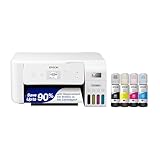
Best for families and students who print every week
2. Epson EcoTank ET-2850
A refillable ink tank all-in-one that prints, scans and copies over wireless.
Good for: Families and students who print every week. Strengths: Ink tanks usually bring a lower cost per page than cartridges. Weaknesses: Higher up-front price than a basic cartridge model, and inkjet nozzles can clog if left idle. Skip it if you print only a few pages a month.

Best for households that print regularly and want to buy ink rarely
3. Epson EcoTank ET-2900
A wireless ink tank all-in-one that the listing says comes with up to three years of ink.
Good for: Households that print regularly and want to buy ink rarely. Strengths: Refillable tanks and a large included ink supply. Weaknesses: Higher entry price than a cartridge printer, and the ink claim depends on how much you print. Skip it if you print rarely.


Best for home offices that scan and send documents
4. Epson EcoTank ET-4800
A wireless ink tank all-in-one that prints, copies, scans and faxes, per the listing.
Good for: Home offices that scan and send documents. Strengths: Tank economy with more office features than entry models. Weaknesses: Larger than entry tank models; confirm duplex and feeder details on the product page. Skip it if you do not need fax or office features.

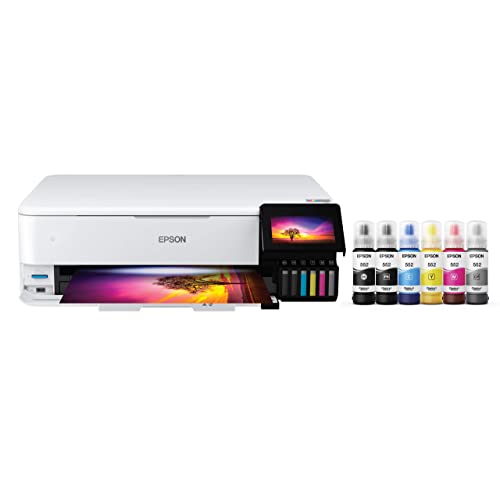
Best for photographers and crafters who print large photos regularly
5. Epson EcoTank Photo ET-8550
A wireless wide-format all-in-one tank printer aimed at photo printing.
Good for: Photographers and crafters who print large photos regularly. Strengths: Wide-format printing with refillable tanks. Weaknesses: Expensive and large for a home printer. Skip it if you mostly print documents.

How EcoTank Printers Work and When They Pay Off
The tank system
An EcoTank has built-in ink tanks that you fill from bottles. There are no cartridges, so you replace ink rarely, and ink bottles cost less per page than cartridge ink. See how to refill an ink tank printer.
A worked cost example
Here is the math in principle, without fixed figures. Compare the purchase price plus your annual page volume multiplied by the cost per page for a cartridge printer against the same calculation for a tank printer. At low volumes the lower purchase price can win, while at higher volumes the lower ink cost can offset the higher purchase price. Use the current figures from the product pages — check price on Amazon — and our cost-per-page guide to repeat the math for your models.
Setup and upkeep
Setup means filling the tanks and waiting for the printer to prime the ink. Print something regularly, because ink tank printers are inkjets and can clog if left idle.
Who should not buy one
If you print a few pages a month, the higher price will not pay back. A monochrome laser is a better fit for rare text printing.
Best Picks by Category
These picks are grouped by role below. They summarize listing information and are not hands-on test results — check price on Amazon for current details.
- Highest listed rating (limited feedback): Epson EcoTank ET-2900 — a mid-range option in this lineup; check price on Amazon. This is not an independent product-quality award.
- Most reviewed: Epson EcoTank ET-2800 — a mid-range entry-level option; check price on Amazon.
- Lowest price: Epson EcoTank ET-2850 — an entry-level option in this lineup; check price on Amazon.
- Premium option: Epson EcoTank Photo ET-8550 — a premium wide-format option; check price on Amazon.
Price, Rating and Review Comparison
The table lists the picks with their price tier. Check price on Amazon for the current listing details for each model.
| Product | Price | Rating | Ratings | Price tier |
|---|---|---|---|---|
| Epson EcoTank ET-2850 | Check price on Amazon | See listing | See listing | Mid-range |
| Epson EcoTank ET-2800 | Check price on Amazon | See listing | See listing | Mid-range |
| Epson EcoTank ET-2900 | Check price on Amazon | See listing | See listing | Mid-range |
| Epson EcoTank ET-4800 | Check price on Amazon | See listing | See listing | Premium |
| Epson EcoTank Photo ET-8550 | Check price on Amazon | See listing | See listing | Premium |
How Much Feedback Backs Each Rating
Listing details change over time, so check the current listing for each pick before you decide.
- Epson EcoTank ET-2800: entry model for light-to-moderate printing; check price on Amazon.
- Epson EcoTank ET-2850: suited to families and students who print every week; check price on Amazon.
- Epson EcoTank ET-2900: noted for a large included ink supply; check price on Amazon.
- Epson EcoTank ET-4800: adds fax and office features; check price on Amazon.
- Epson EcoTank Photo ET-8550: wide-format model for large photo prints; check price on Amazon.
How to Choose
Work out your pages per month
Tank printers pay back when you print regularly. If you print only a few pages a month, a cheaper cartridge printer can be better value.
Compare the bottle price, not just the printer
Check the cost of a replacement ink set and the page yield. That gives you the real cost per page.
Pick the features you will use
Duplex printing and an automatic document feeder are not on every EcoTank. Check them on the product page.
How We Chose These Products
We start from products sold on Amazon with a full product name and clear specifications, and we skip results that show only a brand name or a vague title. We then read the listing and any manufacturer information for each one and note the features that matter for printers: print technology, running costs, connectivity and size. We do not run our own lab tests, and this guide contains no hands-on measurements. Use it to build a shortlist, then check current prices, dimensions and return terms on the Amazon page before you buy.
Buying Guide: What to Check Before You Choose
Ink tank versus cartridge
Ink tank printers use refillable tanks and usually have a lower cost per page, with a higher purchase price. Cartridge printers are cheaper up front but ink can cost more over time. Check the page yield and the cost of refills.
Laser printers
Laser printers print text quickly and sharply and do not clog like inkjets. Color lasers cost more. Check the toner cost and the print speed.
Photo printing
Photo printers focus on color accuracy and paper handling. Check the number of inks, the paper sizes and the cost per print.
Quick Reference: Which Pick Suits Whom
- Epson EcoTank ET-2800: suits light-to-moderate printing where ink cost matters
- Epson EcoTank ET-2850: suits families and students who print every week
- Epson EcoTank ET-2900: suits households that print regularly and want to buy ink rarely
- Epson EcoTank ET-4800: suits home offices that scan and send documents
- Epson EcoTank Photo ET-8550: suits photographers and crafters who print large photos regularly
Common Mistakes to Avoid
- Judging a printer by its price without considering ink cost.
- Ignoring the starter cartridge size.
- Forgetting the paper types needed.
- Assuming all-in-ones are always better.
- Skipping the return window.
Setup and Care
- Install the maker’s app or driver.
- Connect to Wi-Fi.
- Run an alignment and nozzle check.
- Print regularly to avoid clogs.
How do you choose an Epson EcoTank printer for your home?
Choose by how much you print and what you print. Documents, school work, scanning and large photos each point to a different EcoTank.
The five models above share one idea, which is refillable tanks instead of small cartridges. They differ in features and size, so match those to your routine.
- Everyday home printing: the Epson EcoTank ET-2800 and ET-2850 cover printing, scanning and copying over wireless.
- Big starting ink supply: the Epson EcoTank ET-2900 is described in the listing as coming with a large included supply.
- Home office: the Epson EcoTank ET-4800 adds fax and more office features.
- Photos: the Epson EcoTank Photo ET-8550 is a wide-format model aimed at large prints.
Count how many pages your household prints in a typical month, including school assignments, forms and the occasional photo. If that number is high and steady, a tank printer fits well. If it is very low, the post already says a cheaper cartridge model or a monochrome laser can make more sense.
Think about where the printer will sit. Larger models need shelf or desk space, and the wide-format photo model is bigger than the entry models.
Ink tank printer vs cartridge printer: which costs less?
An ink tank printer usually costs less per page, while a cartridge printer usually costs less to buy. Which one saves money depends on how many pages you print over the life of the printer.
With a tank printer you pay more at the start and less for ink afterward. With a cartridge printer you pay less at the start and more each time you replace cartridges. The more you print, the more the lower ink cost matters.
The post gives a worked example in principle to show the idea. Use real figures from the product pages for your own comparison, and include the price of a replacement ink set and the page yield.
- Heavy or steady printing: tank printers tend to win over time.
- Occasional printing: the higher purchase price may never pay back.
- Mostly black text: a monochrome laser can be a good alternative, as the post notes.
- Color and photos: tank printers are usually cheaper to run than cartridge models.
There is also a convenience side. Tank printers need refilling occasionally, but you replace ink far less often than you would swap cartridges. If you dislike running out of ink at a bad moment, that is a real benefit.
What EcoTank features should you compare besides ink cost?
Compare the features you will use every week. Ink cost matters, but duplex printing, a document feeder, scanning and connectivity shape daily convenience.
The post notes that duplex printing and an automatic document feeder are not on every EcoTank, and that the Epson EcoTank ET-2800 does not suit you if you need a feeder. Check each product page before you decide.
- Automatic document feeder: useful if you scan or copy multi-page documents.
- Duplex printing: prints on both sides to save paper.
- Fax: only the home office model in this guide lists it, so skip it if you do not send faxes.
- Wireless setup: confirm that your router and devices work with the maker’s app.
- Paper sizes: check what the printer accepts, especially if you want to print photos.
- Size: measure the shelf or desk before you buy.
Do not pay for features you will not use. A simple model that suits your routine is better than a larger one packed with options you never touch.
If photos matter, remember that photo printing also depends on paper type and the ink set. Check the product page for the paper sizes and the types of prints the model supports.
Which Epson EcoTank should you buy?
Pick the model that matches your printing habits. The five options above each suit a different buyer.
- If you want a simple entry-level ink tank printer for light-to-moderate printing, go for the Epson EcoTank ET-2800. Remember that it has no automatic document feeder.
- If your family or students print every week, choose the Epson EcoTank ET-2850 for lower running costs than cartridges.
- If you want to buy ink rarely and like a big included supply, choose the Epson EcoTank ET-2900. Treat the ink claim as depending on how much you print.
- If you run a home office that scans and sends documents, choose the Epson EcoTank ET-4800.
- If you print large photos regularly, choose the Epson EcoTank Photo ET-8550, and plan for its size.
For most households that print often, the post suggests the ET-2850 or ET-2800 as a sensible starting point. Move to another model only when a specific need, such as fax, a big ink supply or wide photos, pushes you there.
Use the buttons above to open the listing for your pick and check the current details.
What to check before you buy an EcoTank printer
Check what ships in the box, what the replacement ink costs and what the return terms are. These three points prevent most surprises.
- Ink in the box: confirm whether bottles are included and how much printing they are said to cover.
- Replacement ink: look up the cost of a new set and the page yield so you can work out cost per page.
- Features: verify duplex, document feeder, scanning and fax on the product page.
- Connectivity: make sure the printer works with your phone, computer and wireless network.
- Size and weight: measure the space and think about how you will reach the tanks.
- Paper: check which paper types and sizes you need.
- Warranty and returns: read the terms on the listing and keep the return window in mind.
- Software and support: check what the maker says about drivers and the app for your system.
When you set up the printer, fill the tanks carefully and follow the manual. Print regularly afterward, because an ink tank printer is still an inkjet and can clog when left idle.
If you plan to use third-party ink, read the maker’s guidance first, because it can affect print quality and support.
Are EcoTank printers worth the extra cost, and who should skip them?
EcoTank printers are worth the higher price if you print regularly. They are a poor fit if you print only a few pages a month.
Is it worth paying more for a higher model? Only when you need what it adds. The office model adds fax and office features, and the photo model adds wide-format printing. If you only print school work and forms, an entry model covers it.
Be aware of the trade-offs.
- The purchase price is higher than a basic cartridge printer.
- Inkjet nozzles can clog if the printer sits unused for weeks.
- Some entry models lack a document feeder or other conveniences.
- The wide-format photo printer is large and costly for a home printer.
- The ink-supply claim on the ET-2900 depends on how much you print.
You might skip an EcoTank if you print very rarely, mainly print plain text, or want the lowest possible purchase price. A monochrome laser can be a better match for rare text printing.
Compare the picks above, check the current listing for features and what is included, then choose the one that fits how you will print.
EcoTank Ownership in Depth: Filling, Habits and Long-Term Care
The main sections of this guide cover what to buy and why. This section covers what ownership actually feels like once the EcoTank printer is on your desk: the habits, settings and small decisions that decide whether it delights you or nags at you. None of it requires technical skill. It requires only that you set the machine up around your real life once, thoughtfully, instead of rediscovering the same lessons one paper jam at a time.
Filling tanks without drama
Refilling is the EcoTank ritual, and it rewards a calm routine. Fill on a stable surface with the printer still, a sheet of scrap paper beneath the tank area, and the bottle for each colour matched carefully to its tank before any cap comes off. The keyed bottles on current systems make cross-filling hard, but attention is still cheaper than cleaning. Fill to the line rather than to the brim, because overfilled tanks can weep ink into places it does not belong, and wipe the area immediately if a drop escapes, since dried ink around the tank bay attracts dust and confusion later.
Top up before a tank runs dry rather than after. Air drawn into the lines when a tank empties is the cause of the missing colours and lengthy priming that owners blame on the printer. The transparent tanks are the gauge; a glance while printing anything long becomes habit within a month. Keep spare bottles stored upright, sealed and out of sunlight, and note that having the next set ready is what turns refilling from an interruption into a two-minute pause.
The EcoTank paradox: print more to spend less
Tank printers invert the usual economics. The ink is inexpensive per page, but the printer still needs to print regularly to keep its nozzles clear, and owners who bought one for very occasional printing sometimes meet the clogging they hoped to escape. The resolution is to use the machine freely: print the colouring pages, the recipes, the drafts and the photographs you would once have rationed, because regular, varied use is both the pleasure and the maintenance schedule of a tank printer. A household that prints most weeks will find the system close to effortless.
If your printing genuinely comes in rare bursts, build a tiny ritual around it: a colourful page when the printer wakes after a long sleep, a nozzle check before the important job, and patience if the first clean is needed. That is still a fair trade for ink that lasts through heavy seasons without a thought about cartridges, which is the bargain these printers offer and, for the right household, handsomely deliver.
Moving, storing and the long life of a tank printer
A tank printer’s one vulnerability is its ink, which lives in open reservoirs rather than sealed cartridges. Move the printer upright and level, exactly as the manual directs, and never tip it onto its side in a car boot, because ink will find its way out. Some models have a transport lock or specific preparation steps; find them in the manual before the move, not during it. For storage, leave ink in the system rather than attempting to empty it, keep the printer in a temperate, dry place, and print a test page on its return.
Over years, the consumable nobody mentions is the waste ink system, which collects the ink used in cleaning. Heavy cleaning habits fill it faster, which is another reason to prefer regular printing over repeated cleaning cycles. When the printer eventually reports that its service parts need attention, that message is planned maintenance, not a sudden death, and the maker’s support can explain the options for your model. Owners who know this in advance meet the message calmly.
How the Picks in This Guide Compare in Everyday Use
Specifications separate these machines on paper, but daily life separates them differently. The paragraphs below revisit each pick in this guide strictly in the role the guide itself assigns it, and set that role against the neighbouring picks, so you can feel the shape of the choice rather than just reading it. Read the pick that matches your situation first, then read its neighbours: the right decision usually becomes obvious in the contrast.
Epson EcoTank ET-2800 earns its place in this lineup as an ink tank all-in-one, picked for entry-level ink tank printing. In daily use, what that positioning really means is that its strengths arrive exactly where entry-level ink tank printing matters, and its compromises fall where that kind of user rarely looks. Readers comparing it with the neighbouring picks should start from their own habits rather than the headline features: the household or office that matches this description will find it quietly dependable, while someone whose printing looks very different will get more from a pick designed around their pattern instead.
Epson EcoTank ET-2800 is the Ink tank all-in-one option here, chosen for entry-level ink tank printing. Set beside the other picks, its character is defined by that role: it is the answer when entry-level ink tank printing is the priority, and it is not trying to be the answer to every other question in this guide. That focus is a virtue rather than a limitation. Printers that chase every strength tend to serve no one particularly well, whereas a model with a clear job, matched to the buyer who has that job, tends to be the one still earning praise years later.
Consider Epson EcoTank ET-2850 if your printing centres on high-volume home printing at low running cost. As an ink tank all-in-one it approaches the work differently from the alternatives around it, and the detailed review above sets out where that approach pays off. The honest skip case matters just as much: if high-volume home printing at low running cost is something you do rarely, this pick’s particular strengths will sit unused while its trade-offs remain, and another model in this guide will fit you better. Matching the pick to the pattern of use, rather than to the longest feature list, is the decision this whole guide is built around.
Within this guide, Epson EcoTank ET-2850 covers the high-volume home printing at low running cost ground. Its detailed section explains the specifics; the comparative point is that no other pick here occupies quite the same position. Where two picks seem to overlap, the difference usually shows up in daily rhythm rather than in specifications: how the machine suits the space it will live in, the people who will share it, and the mix of documents it will actually see. Choose on that rhythm, and the specification sheet becomes a confirmation rather than a gamble.
Epson EcoTank ET-2900 earns its place in this lineup as an ink tank all-in-one, picked for a big ink supply included in the box. In daily use, what that positioning really means is that its strengths arrive exactly where a big ink supply included in the box matters, and its compromises fall where that kind of user rarely looks. Readers comparing it with the neighbouring picks should start from their own habits rather than the headline features: the household or office that matches this description will find it quietly dependable, while someone whose printing looks very different will get more from a pick designed around their pattern instead.
Epson EcoTank ET-2900 is the Ink tank all-in-one option here, chosen for a big ink supply included in the box. Set beside the other picks, its character is defined by that role: it is the answer when a big ink supply included in the box is the priority, and it is not trying to be the answer to every other question in this guide. That focus is a virtue rather than a limitation. Printers that chase every strength tend to serve no one particularly well, whereas a model with a clear job, matched to the buyer who has that job, tends to be the one still earning praise years later.
Consider Epson EcoTank ET-4800 if your printing centres on home offices that want tanks plus office features. As an ink tank all-in-one with fax it approaches the work differently from the alternatives around it, and the detailed review above sets out where that approach pays off. The honest skip case matters just as much: if home offices that want tanks plus office features is something you do rarely, this pick’s particular strengths will sit unused while its trade-offs remain, and another model in this guide will fit you better. Matching the pick to the pattern of use, rather than to the longest feature list, is the decision this whole guide is built around.
Within this guide, Epson EcoTank ET-4800 covers the home offices that want tanks plus office features ground. Its detailed section explains the specifics; the comparative point is that no other pick here occupies quite the same position. Where two picks seem to overlap, the difference usually shows up in daily rhythm rather than in specifications: how the machine suits the space it will live in, the people who will share it, and the mix of documents it will actually see. Choose on that rhythm, and the specification sheet becomes a confirmation rather than a gamble.
Epson EcoTank Photo ET-8550 earns its place in this lineup as a wide-format photo tank all-in-one, picked for large photo prints with tank economy. In daily use, what that positioning really means is that its strengths arrive exactly where large photo prints with tank economy matters, and its compromises fall where that kind of user rarely looks. Readers comparing it with the neighbouring picks should start from their own habits rather than the headline features: the household or office that matches this description will find it quietly dependable, while someone whose printing looks very different will get more from a pick designed around their pattern instead.
Epson EcoTank Photo ET-8550 is the Wide-format photo tank all-in-one option here, chosen for large photo prints with tank economy. Set beside the other picks, its character is defined by that role: it is the answer when large photo prints with tank economy is the priority, and it is not trying to be the answer to every other question in this guide. That focus is a virtue rather than a limitation. Printers that chase every strength tend to serve no one particularly well, whereas a model with a clear job, matched to the buyer who has that job, tends to be the one still earning praise years later.
Setup, Workflow and Troubleshooting: The Rest of Ownership
Choosing the right EcoTank printer is half the task; the other half is the environment it works in and the routines around it. The topics below are the ones that generate most of the questions owners ask after the first month, whatever model they bought, and each one is cheaper to handle early than late.
Scanning workflow: naming, formats and finding files later
A scanner earns its keep in the filing system you build around it. Decide on a naming pattern before you scan your first archive box: date first, then a plain description, works well because files sort themselves in order and stay meaningful years later. Scan text documents as searchable PDFs where your software offers it, so you can find an invoice by a word inside it rather than by remembering what you called the file. Photographs and artwork deserve an image format and a higher resolution; contracts and letters do not, and scanning everything at maximum resolution just creates huge files that are slow to open, back up and send.
Scan in small, finished batches rather than one enormous session: check the first few pages of each batch on screen for skew, cut-off edges and pages fed together, because rescanning ten pages is easy and discovering a missing page after the originals are shredded is not. Keep a simple folder structure that mirrors your paper one, and back the folder up with the rest of your documents. The printer does the capturing; these habits do the organising, and the organising is what you will thank yourself for.
Printing from phones and tablets without the usual friction
Phones are where most casual printing starts now, and most phone printing failures are really network failures: the phone and the printer must be on the same network, and a phone that has roamed onto a guest network or a different band will not see the printer at all. If the printer vanishes from the share sheet, check the network name on both devices before anything else. Manufacturer apps add scanning, ink levels and maintenance tools, while the built-in print services on phones handle straightforward documents with less setup; using the built-in route for documents and the maker’s app for scans and settings is a combination many households settle on.
Remember that a phone screen hides layout problems. A document that looks fine on a small screen may print with margins cropped or text shrunk, so for anything formal, open the file on a computer, check the preview, and print from there. For photos, send the full-resolution file rather than a screenshot or a messaging-app copy, because those copies are compressed and the print will show it. When guests need to print, walking them through joining your network once is simpler and safer than leaving the printer in a direct-connect mode permanently.
Frequently Asked Questions
Are EcoTank printers worth it?
For regular printing, usually yes: the higher price is offset by lower ink costs. For rare printing the savings may never catch up.
Do EcoTank printers clog?
Like any inkjet, they can clog if left unused for weeks. Print a test page now and then.
Can I use third-party ink in an EcoTank?
Some people do, but it can affect print quality and may affect support. Check Epson’s guidance.
What are the best printers with the cheapest ink?
Refillable ink tank printers usually have the lowest cost per page. See also Canon MegaTank printers and how to calculate cost per page.
What are the best refillable and supertank printers?
EcoTank and MegaTank are refillable “supertank” printers. The list above covers the Epson models; for Canon see our MegaTank guide.
Which is cheaper to run, inkjet or laser?
Laser is usually cheaper per page for text, and ink tank printers are cheaper for color and photos.
How do I connect my printer to Wi-Fi?
Use the printer’s setup menu or the maker’s app. See our Wi-Fi guide.
Do I need genuine ink?
Not always, but some printers restrict third-party ink. Check the terms.
Which Epson EcoTank is best for home use?
For most households that print often, the Epson EcoTank ET-2850 or ET-2800 is a sensible starting point. They cover printing, scanning and copying over wireless. Choose another model only if you need a specific feature.
How often should I print to keep an EcoTank from clogging?
Print something regularly, because an ink tank printer is an inkjet and can clog if left idle for weeks. A short test page now and then is a common habit. Check the manual for the maker's own advice.
Does the Epson EcoTank ET-2800 have an automatic document feeder?
The post says to skip the ET-2800 if you need an automatic document feeder. Always confirm feeder and duplex support on the product page. If you scan multi-page documents often, compare the other models.
Is the Epson EcoTank ET-4800 worth it for a home office?
It can be if you scan, send documents and want fax. It is larger than the entry models and costs more to buy. If you do not need office features, a simpler model may be enough.
What is the Epson EcoTank Photo ET-8550 good for?
It is a wide-format tank printer aimed at photographers and crafters who print large photos regularly. It is large and expensive for a home printer. If you mostly print documents, a smaller model fits better.
How do I fill the ink tanks on an EcoTank?
You pour ink from the bottles into the matching tanks, following the steps in the manual. Fill each color carefully and let the printer prime afterward. The post also links a refill guide.
Is an ink tank printer better than a laser printer?
It depends on what you print. Laser is usually cheaper per page for text, while ink tank printers are cheaper for color and photos. Choose based on your mix of documents and images.
What should I check on the listing before buying?
Check the included ink, replacement ink cost, features such as duplex and a feeder, and the return terms. Make sure the exact model name matches the one you want.
How do I avoid air getting into the ink lines?
Keep every tank above its minimum line, and treat the low mark as the refill moment rather than a suggestion. Air enters when a tank runs dry and the printer keeps trying to print, so never push through missing colours hoping they return; stop, refill, and let the printer prime as it directs. After refilling, a nozzle check confirms the lines are full. That single discipline, refilling early, prevents nearly all air-related printing problems on tank models.
Can I mix ink brands in an EcoTank printer?
The safe answer is to use the ink the maker supplies for your model, which is formulated for its print head and covered by its guidance. Third-party inks vary in quality and, once mixed in a tank, cannot be unmixed if results disappoint. Because genuine tank ink is already inexpensive per page compared with cartridges, the savings from alternatives are smaller here than anywhere else in printing, while the risk sits in the one component you cannot replace cheaply. Most owners conclude the trade is not worth it.
Why is one colour missing even though the tank is full?
Work in order: confirm the tank for that colour is genuinely filled and its cap and the printer’s seals are seated, run a nozzle check to see the pattern, then run one cleaning cycle and check again. A colour that vanished after the tank ran low may need the priming routine the manual describes. If a single colour stays absent through those steps while others print, note exactly what you tried and contact the maker, because that record turns support from guesswork into diagnosis.
How should I prepare an EcoTank printer for a house move?
Read the manual’s transport section first, because models differ: some specify a lock, a mode or keeping the printer in a particular orientation. In general, keep the machine upright and level, secure the scanner lid and trays, protect it from knocks, and never lay it on its side or upside down with ink in the tanks. Carry it in the cabin rather than the boot if you can. On arrival, let it settle, reconnect, and run a test print and nozzle check before real work.
Bottom Line
For most households that print often, the Epson EcoTank ET-2850 or ET-2800 is the sensible starting point. Pick the ET-2900 if you want a big ink supply in the box, the ET-4800 for office features and the ET-8550 for large photos.
Related Reading
- Types of Printers Explained: Inkjet, Laser, Ink Tank and More
- 5 Best 11×17 Tabloid Printers for Home and Office
- 6 Best AirPrint Printers for iPhone, iPad and Mac
- 6 Best Basic Printers for Home: Simple, Easy and Reliable
- 6 Best Brother Laser Printers for Home and Office
More Printer Guides
- Best Printers for Home Use
- Best Laser Printers for Home and Home Office
- Best Wireless Laser Printers for Home and Small Office
- Best Wireless Printers for Home Use
- Best All-in-One Printers for Scanning and Printing
- Epson EcoTank ET-2800 vs ET-2850
- Is the Epson EcoTank ET-4800 worth it?
- Is the Epson EcoTank ET-2800 worth it?

