Disclosure: As an Amazon Associate, reviewstook.com earns from qualifying purchases. Links to Amazon on this page are affiliate links; they cost you nothing extra.
An 11×17 printer, also called a tabloid or wide-format printer, handles sheets twice the size of letter paper. It suits plans, spreadsheets, posters and flyers, but it takes a lot more space than a standard printer.
This guide covers five wide-format all-in-ones. It is built from published specifications and listings, not our own testing. Confirm maximum paper size, scanner size and ink costs on each product page.
New to printers? Start with our guide to the best printers for home use and how we pick printers.
By the Reviewstook Editorial Team. Last updated: October 31, 2026.

In this guide
Quick Picks
| Printer | Type | Best for |
|---|---|---|
| HP OfficeJet Pro 9730 | Wide-format all-in-one | 11×17 printing and scanning with a feeder |
| HP OfficeJet Pro 9720 | Wide-format all-in-one | HP’s wide-format option in the 9700 family |
| Epson WorkForce Pro WF-7840 | Wide-format all-in-one | Tabloid prints, copies and scans at home or in a small office |
| Epson WorkForce Pro WF-7820 | Wide-format all-in-one | Wide-format printing in the same Epson family |
| Epson WorkForce Pro WF-7310 | Wide-format all-in-one | A smaller entry to wide-format printing |
5 Best 11×17 Tabloid Printers for Home and Office

Top pickBest for small offices that print and scan tabloid documents
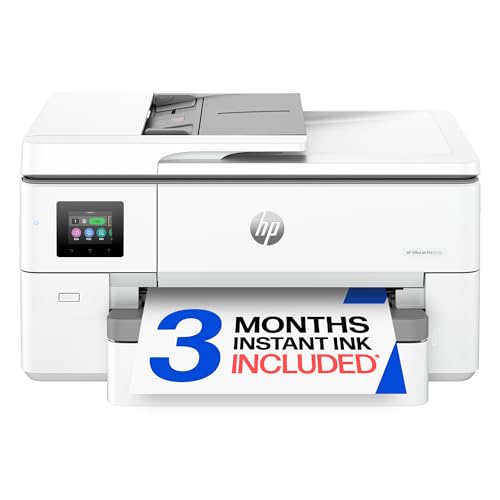
1. HP OfficeJet Pro 9730
A wireless wide-format all-in-one that, per the listing, prints and scans up to 11×17 inches with a document feeder and duplex.
Good for: Small offices that print and scan tabloid documents. Strengths: Wide-format print, copy, scan and fax with a feeder. Weaknesses: HP’s ink program and cartridge policy apply, and the body is large. Skip it if you print only letter-size pages.

Best for small offices that need occasional tabloid output
2. HP OfficeJet Pro 9720
A wireless color inkjet all-in-one from HP’s wide-format OfficeJet Pro line; confirm the differences from the 9730 on the product page.
Good for: Small offices that need occasional tabloid output. Strengths: Wide-format office features from HP. Weaknesses: HP’s ink program and a large body. Skip it if you print only letter-size pages.

Best for architects, designers and offices that print 11×17 sheets
3. Epson WorkForce Pro WF-7840
A wireless wide-format all-in-one inkjet that handles larger sheets than a standard printer.
Good for: Architects, designers and offices that print 11×17 sheets. Strengths: Wide-format print, copy and scan in one machine. Weaknesses: Large and heavy, and ink for big pages adds up. Skip it if you never print above letter size.


Best for offices that need occasional tabloid output
4. Epson WorkForce Pro WF-7820
A wireless wide-format all-in-one inkjet in the same family as the WF-7840; confirm the differences on the product pages.
Good for: Offices that need occasional tabloid output. Strengths: Wide-format all-in-one features from a known office line. Weaknesses: Large and heavy, and ink costs for big pages. Skip it if you never print above letter size.


Best for home offices that print the occasional tabloid sheet
5. Epson WorkForce Pro WF-7310
A wireless wide-format all-in-one inkjet from Epson’s WorkForce Pro range; confirm scanner size and features on the product page.
Good for: Home offices that print the occasional tabloid sheet. Strengths: Wide-format printing at a lower tier than the WF-7800 family. Weaknesses: Check which features it drops compared with the WF-7840. Skip it if you need the fastest or most capable model.

Buying an 11×17 (Tabloid) Printer
Print size versus scan size
Some printers print 11×17 but scan only letter or legal. Check both numbers on the product page.
Size and weight
Wide-format printers are big and heavy. Measure the desk or shelf and check the weight.
Ink cost
Big pages use more ink. Look at the price and yield of high-capacity cartridges.
Alternatives
For occasional large prints, a print shop may cost less. For posters and flyers, see printers for posters and flyers.
Best Picks by Category
These labels group the picks by role and price tier. They are not hands-on test results.
- Top rated: Epson WorkForce Pro WF-7840 — check price on Amazon.
- Most reviewed: Epson WorkForce Pro WF-7820 — check price on Amazon.
- Lowest price: Epson WorkForce Pro WF-7820 — check price on Amazon.
- Premium option: HP OfficeJet Pro 9730 — check price on Amazon.
Price, Rating and Review Comparison
The table lists the picks with their price tier. Prices change often, so confirm the current price on Amazon.
| Product | Price | Rating | Ratings | Price tier |
|---|---|---|---|---|
| Epson WorkForce Pro WF-7820 | Check price on Amazon | See listing | See listing | Budget |
| Epson WorkForce Pro WF-7840 | Check price on Amazon | See listing | See listing | Budget |
| Epson WorkForce Pro WF-7310 | Check price on Amazon | See listing | See listing | Mid-range |
| HP OfficeJet Pro 9730 | Check price on Amazon | See listing | See listing | Premium |
| HP OfficeJet Pro 9720 | Check price on Amazon | See listing | See listing | Premium |
How Much Feedback Backs Each Rating
Check the listing for each pick to see the current feedback behind it before you decide.
- HP OfficeJet Pro 9730: Check the listing on Amazon for the current feedback.
- HP OfficeJet Pro 9720: Check the listing on Amazon for the current feedback.
- Epson WorkForce Pro WF-7840: Check the listing on Amazon for the current feedback.
- Epson WorkForce Pro WF-7820: Check the listing on Amazon for the current feedback.
- Epson WorkForce Pro WF-7310: Check the listing on Amazon for the current feedback.
How to Choose
Check print and scan size
Some wide-format printers print 11×17 but only scan letter or legal. Check the scanner size on the product page.
Measure your space
Wide-format printers are large and heavy. Measure the desk or shelf first.
Compare ink cost
Large pages use more ink. Look at the price and yield of high-capacity cartridges.
How We Chose These Products
We start from products sold on Amazon with a full product name and clear specifications, and we skip results that show only a brand name or a vague title. We then read the listing and any manufacturer information for each one and note the features that matter for printers: print technology, running costs, connectivity and size. We do not run our own lab tests, and this guide contains no hands-on measurements. Use it to build a shortlist, then check current prices, dimensions and return terms on the Amazon page before you buy.
Buying Guide: What to Check Before You Choose
Ink tank versus cartridge
Ink tank printers use refillable tanks and usually have a lower cost per page, with a higher purchase price. Cartridge printers are cheaper up front but ink can cost more over time. Check the page yield and the cost of refills.
Laser printers
Laser printers print text quickly and sharply and do not clog like inkjets. Color lasers cost more. Check the toner cost and the print speed.
Photo printing
Photo printers focus on color accuracy and paper handling. Check the number of inks, the paper sizes and the cost per print.
Quick Reference: Which Pick Suits Whom
- HP OfficeJet Pro 9730: suits small offices that print and scan tabloid documents
- HP OfficeJet Pro 9720: suits small offices that need occasional tabloid output
- Epson WorkForce Pro WF-7840: suits architects, designers and offices that print 11×17 sheets
- Epson WorkForce Pro WF-7820: suits offices that need occasional tabloid output
- Epson WorkForce Pro WF-7310: suits home offices that print the occasional tabloid sheet
Common Mistakes to Avoid
- Judging a printer by its price without considering ink cost.
- Ignoring the starter cartridge size.
- Forgetting the paper types needed.
- Assuming all-in-ones are always better.
- Skipping the return window.
Setup and Care
- Install the maker’s app or driver.
- Connect to Wi-Fi.
- Run an alignment and nozzle check.
- Print regularly to avoid clogs.
What Tabloid Means, and Who Really Needs It
Tabloid, ledger and 11 by 17 inches all name the same sheet size, which is twice the area of a letter page. Printers that can handle it are wide-format models, and they differ from standard printers in more ways than paper width. They are heavier, often have more paper trays, and tend to use ink systems built for office volume.
Ask whether you print this size often enough to justify the machine. Many people who think they need a tabloid printer print a few large sheets a year. For them, a print shop or office store is cheaper than owning a bulky printer. The case for buying is strongest in situations like these:
- Architects, builders and designers who proof plans, floor layouts and drawings at a usable scale.
- Teachers and organizers who make posters, calendars, bulletin boards and maps.
- Small business owners who print menus, spreadsheets, schedules and flyers in-house.
- Anyone who works with wide spreadsheets and wants to see a whole sheet on a single page instead of splitting it.
Be careful about borderless printing. Some wide-format printers print 11 by 17 with a margin, and a true edge-to-edge tabloid print needs a printer that supports it. Read the listing for the exact wording.
Wide-Format Inkjet Versus Wide-Format Laser
All five picks in this guide are inkjet all-in-ones from HP and Epson. That is typical for the price range: wide-format laser printers exist but cost much more and are bulkier. Here is how the two compare.
| Factor | Wide-format inkjet | Wide-format laser |
|---|---|---|
| Purchase price | Lower | Higher |
| Color and graphics | Good for charts, maps and graphics | Strong for text, with color models costing more |
| Idle behavior | Needs occasional use so print heads do not clog | Toner stays usable when idle |
| Size and weight | Large | Usually larger still |
| Running cost | Depends on ink yield; large pages use more ink | Often lower per page for text |
For most home and small-office users, inkjet is the practical entry point to tabloid printing. If you print mostly text in volume, it is worth shopping specifically for a larger laser model, though that falls outside this guide.
Features That Separate Wide-Format Models
Several details decide how well a tabloid printer fits into daily work.
Paper trays and paper paths
Check how many trays there are and what sizes each takes. Some printers have one large tray that holds both letter and tabloid paper, while others dedicate a second tray to larger sheets. Having letter and tabloid loaded at the same time saves swapping paper for every job. A rear or bypass slot helps with heavier stock like card.
Document feeder and scanner
The HP OfficeJet Pro 9730 is listed with a document feeder, which speeds up multipage copying and scanning. A flatbed scanner that handles only letter or legal size cannot copy a tabloid page in one pass, which matches the post’s earlier note about print size versus scan size. Decide whether you need to scan large sheets, and check the specifications.
Duplex printing
Automatic two-sided printing is handy for letter-sized work and saves paper. On tabloid sheets, check whether duplex works for the larger size, because some models limit it.
Fax and office features
The HP 9730 listing mentions fax. Fax is rarely used today, but some offices still need it for legal or medical paperwork. If you do not, ignore it and prioritize paper handling and ink cost.
Planning for the Space and Setup
A wide-format printer needs room on more than one side. Measure the width and depth, and add space behind for the cables and in front for the output tray, which often extends when printing tabloid sheets. Check the weight too. A heavy machine on a flimsy shelf or a wobbly desk can shake during printing, and moving it takes two hands.
Set the printer on a solid, level surface, away from direct sunlight and heat vents. Keep a few inches clear on each side for ventilation. If the printer sits in a shared space, think about noise, because large inkjets cycle their mechanisms loudly during startup and cleaning.
When setting up, use the maker’s app or the printer’s control panel to connect to Wi-Fi, and consider a wired Ethernet connection if the printer has a port, since a stable connection avoids interrupted large print jobs. Install the drivers for your operating system, then print a test page and a nozzle check to confirm the colors are clean.
Ink Costs and How to Control Them
Large pages consume more ink, so running costs deserve attention before purchase.
- Look at the page yield of the standard and high-capacity cartridges, and compare cost per page. High-capacity cartridges usually give a lower cost per page.
- Check whether the printer uses individual color cartridges or a combined unit. Individual cartridges let you replace only the color that runs out.
- Print in draft or standard quality for internal documents. Save the highest quality for presentations and client work.
- Print duplicates in batches instead of single copies, which reduces the number of cleaning cycles the printer runs.
- Read the ink program terms. The post notes that HP’s ink program and cartridge policy apply to the HP models, and similar conditions can exist for other brands. A subscription may lower per-page costs for steady users but ties you to the program.
Inkjets also benefit from regular use. Print something weekly, even a short test page, to keep the heads moving and reduce the risk of clogs that waste ink during cleaning.
Choosing Between the HP and Epson Families
Both brands appear twice or more in this guide, and the choice often comes down to ecosystem and policy. HP’s wide-format OfficeJet Pro models, such as the 9730 and 9720, are tied to HP’s app, ink program and cartridge rules. Epson’s WorkForce Pro models, such as the WF-7840, WF-7820 and WF-7310, use their own cartridges and software. The WF-7310 is described as a smaller entry to wide-format printing, so check what it leaves out compared with the WF-7840 before choosing it for heavier work.
Compare the ink prices for each family’s cartridges, the stated paper capacity and the scanner size. If two models look alike on paper, the one with cheaper, higher-yield ink usually wins over the life of the printer. Finally, read the return policy so that you have time to test a tabloid print, a scan and a Wi-Fi connection before the window closes.
Mistakes That Waste Money on Wide-Format Printers
- Buying for the rare big job. If a poster or plan appears twice a year, outsourcing it costs less than the printer, its ink and the desk space it occupies.
- Ignoring scanner size. A printer that prints tabloid but scans only letter or legal forces you to scan large sheets in pieces or take them elsewhere.
- Printing at the wrong scale. Check that the application is set to tabloid and 100 percent, not fit to page, when you need true dimensions for plans and drawings.
- Using ordinary paper for everything. Thin office paper can show through on heavy graphics. Heavier or coated paper gives better results for posters and presentations, so confirm the weights the printer accepts.
- Leaving the machine unplugged between jobs. Cutting power can interrupt maintenance cycles, so use the printer’s standby mode unless the manual says otherwise.
A little planning before purchase avoids most of these problems, and it keeps the printer a useful tool rather than a large item gathering dust in a corner.
It also pays to think about where finished pages will go. Tabloid prints need a flat surface to dry and a folder or tube that keeps them from creasing. If you plan to fold large sheets into letter-size packets, test how the fold line handles heavy ink coverage, and let prints rest briefly before stacking them.
What People Actually Print at 11×17
The case for a tabloid printer is easiest to understand through the jobs that fill one. Small businesses print menus, price lists, posters and in-store signs that need to be read from a distance a letter sheet cannot manage. Teachers and lecturers print charts, timelines and classroom displays. Architects, engineers, contractors and keen amateurs print drawings and plans at a scale where details stop being a squint. Crafters print patterns, templates and layouts. Real-estate and event work runs on larger flyers and schedules. And ordinary households discover a quieter set of uses: family calendars you can actually write on, sheet music that sits open properly, spreadsheets that finally fit their columns, and children’s artwork reproduced at the size it was made.
Run your own last year against that list honestly. A wide-format printer earns its desk space when the large jobs recur — monthly at least, ideally weekly — because its costs are not only financial. It is a physically big machine, it wants a permanent home rather than a cupboard, and its paper is another size to store. The buyer with two large jobs a year is better served by a print shop and a good standard printer. The buyer with two large jobs a week will wonder how they managed without one, and will find, as owners consistently report, that the large capability starts attracting uses the household had not predicted: the poster for the school play, the plan for the garden, the table plan for the wedding. Capability creates its own demand, which is an argument for buying when the recurring core is real and letting the extras arrive as a bonus.
Print Size, Scan Size and the Specification That Traps Buyers
The single most misread specification in this category is the difference between printing at 11×17 and scanning at 11×17. Several machines print tabloid but scan only up to legal or letter size on their flatbeds, and some offer larger scanning through their document feeders but not on the glass. For a buyer whose wide work is output — posters out, plans out — print size alone may be enough. For a buyer whose work flows the other way — large originals that must be copied, scanned or archived — the scan size is the specification that decides whether the machine does the job at all.
Read the specifications for your exact workflow. If you copy large documents, ask about copy size. If you scan drawings to archive them, ask about the flatbed’s maximum and the feeder’s, and whether the feeder accepts the weight and condition of your originals; a feeder that wants flat, clean sheets is no use for a fragile plan that has lived in a tube. The picks in this list divide along exactly these lines, and the differences between the HP OfficeJet Pro models and the Epson WorkForce Pro models are most meaningful when read as answers to the question: which direction does your large paper travel?
A related trap is borderless printing, which some models offer at full tabloid size and others only at smaller sizes, and duplex printing, which on wide machines may be limited by paper size. Posters and artwork often want borderless; long plan sets want duplex. Neither desire is exotic, but both must be checked against the specific model rather than assumed from the category, because wide-format machines vary more than standard ones in exactly these corners of their specification sheets.
Setting Up a Wide-Format Printer in a Real Room
Measure twice, because these machines are large in every direction and larger still in operation. The footprint on the specification sheet is the closed box; the working machine has trays extended for tabloid sheets, output landing space in front, and a scanner lid that opens upward through a surprising amount of air. Place it on a surface that can take its weight without flexing, with the rear accessible if the model offers a rear path for thick media, and with storage nearby for two sizes of paper that must both stay flat.
Paper storage is the unglamorous half of wide-format ownership. Tabloid sheets stored leaning, rolled or under weight arrive at the printer pre-curled, and pre-curled wide sheets are the leading cause of the feed problems owners blame on these machines. Keep large paper flat, in its packaging, in the same room as the printer so it shares the room’s conditions. Load only what a job needs plus a sensible margin, and return the rest to flat storage rather than leaving the tray full for weeks.
During setup, print the calibration and alignment pages the machine requests, then print three tests: a full-size document with fine lines, a full-size image with smooth gradients, and a standard letter page. The first tests the machine’s reason for existing; the second exposes any alignment issue at the size where it matters; the third confirms the machine will still behave as the household’s everyday printer, because for most owners a wide-format machine is not a second printer — it is the printer, and its letter-size manners matter daily.
HP OfficeJet Pro or Epson WorkForce Pro: Reading the Rivalry
The five picks divide into two families, and the families have temperaments. HP’s OfficeJet Pro 9730 and 9720 approach wide-format as an extension of the modern office all-in-one: polished connectivity, an interface occasional users find immediately legible, and a design that assumes the machine serves a mixed diet of documents, copies and graphics in a small office or busy home. The difference between the two HP models is one of degree — features and handling refinements that matter to heavier users — rather than of kind, so a buyer choosing between them should count their weekly volume and their scanning ambitions and let those counts decide.
Epson’s WorkForce Pro WF-7840, WF-7820 and WF-7310 approach wide-format from the document-production side, with the stamina and paper handling of machines built to produce. The WF-7840 sits at the top of that idea, the WF-7820 serves the same office with slightly leaner ambitions, and the WF-7310 strips the concept toward printing itself for buyers whose wide work is output and whose scanning needs are modest or handled elsewhere. Choosing within the Epson trio is again a counting exercise: pages per week, scans per week, and whether the feeder will be a daily tool or an ornament.
Choosing between the families is subtler and more personal. Handle the controls if you can; read the software’s reputation for your computer; consider which maker’s ink system and cartridge arrangements suit your volume. Both families print tabloid documents that will satisfy any small business, and both produce graphics that look professional at reading distance. The wrong choice between them is rarely a disaster. The wrong choice is buying any of them for a workload that does not exist — or buying a standard printer and paying a print shop monthly for the wide work that does.
Running Costs and Ink Discipline at Large Sizes
Wide pages use more ink than narrow ones for the simple reason that there is more page, and coverage matters more than size: a tabloid plan of fine lines sips ink, while a tabloid poster of solid color drinks it. Owners who print graphics-heavy wide work should think in terms of coverage habits — draft proofs at reduced quality on cheap paper, final prints once the design is settled — because the expensive way to design a poster is at full size and full quality on the good sheets. Every wide-format owner develops this two-stage workflow eventually; the frugal ones adopt it in the first month.
Keep the machine exercised. Wide inkjets that sit idle suffer the same nozzle drying as any inkjet, with the added irony that their owners often print in project bursts — exactly the pattern that invites trouble. A small weekly job, even a letter-size page with some color, keeps the system healthy between projects. When output shows banding — the horizontal striping that is the wide-format signature fault — run the alignment and nozzle routines before anything else, because banding at large sizes is far more often a maintenance state than a mechanical failure.
Finally, buy paper in the sizes you actually use and resist the bargain bundle of sizes you do not. Wide paper bought wrong is not a saving; it is storage consumed and a temptation to force unsuitable media through an expensive machine. The economics of wide-format ownership reward the same virtues as the economics of all printing, only larger: honest volume estimates, supplies bought ahead, and a machine whose capabilities match the work so well that it is used constantly and maintained almost without thinking.
Designing Documents That Deserve the Larger Page
A bigger page is not automatically a better document, and the owners who get the most from these printers learn a few layout lessons quickly. The first is that white space scales too: a letter design stretched to tabloid looks empty rather than grand, so enlarge the content’s ambition — bigger type for distance reading, more breathing room around elements, images given the size they were denied on the small page. A poster is read from metres away, a plan is read from above a desk, a menu is read across a counter; designing for the actual reading distance is what separates professional wide output from merely big output.
The second lesson is resolution discipline. An image that looked fine filling a letter page may soften when it fills a tabloid sheet, because the same pixels are spread across four times the area. For photographs and graphics that matter, start from the largest original file you have, and proof at full size before committing to a run. The third lesson is proofing itself: print one, live with it for an hour pinned where it will live, and read it at the distance its audience will. Errors of scale — type too small to read from the doorway, a chart whose lines vanish — are invisible on a screen zoomed to fit and obvious on the wall.
Software settings carry their own lesson. Work in the document at the final size rather than designing small and scaling up at print time, because scaling at the printer is where margins surprise you and fine lines change weight. Set the paper size in the application and in the driver to the same tabloid sheet, and check the preview’s page count: a wide document that the driver believes is letter size will tile itself across several sheets with cheerful obedience, producing a jigsaw where a poster was intended.
More Questions Wide-Format Buyers Ask
Can these printers replace my standard printer entirely?
For most owners, yes, and that is how they are usually bought. Every pick here prints letter and legal sizes as a daily routine, scans and copies, and connects like any modern all-in-one. The wide capability is an addition to a complete printer, not a specialisation that compromises the ordinary work — provided you have the space, because the machine’s size is the one everyday cost that never goes away.
What paper should I keep in stock?
Your everyday letter paper, a tabloid supply of good plain paper for documents and plans, and a small stock of heavier or coated sheets for the posters and presentations that deserve them. Buy the large sizes in modest quantities until your real usage declares itself; wide paper keeps well stored flat, but it also accumulates, and a shelf of unused specialty sizes is a common wide-format regret.
Why do my large prints show faint horizontal bands?
Banding is the classic wide-inkjet symptom, and its causes are mundane: nozzles partially blocked after idle time, alignment drifted, or a paper-type setting that does not match the loaded sheet, so ink is laid for a different surface. Run the nozzle check and alignment routines, confirm the setting, and print a test. Banding that survives proper maintenance on the correct setting is worth the maker’s support line; banding before maintenance is attempted is usually just the machine asking for its routine.
Is it worth printing plans at home instead of at a print shop?
When plans are a weekly tool — revised, marked up, reprinted — home printing wins on time and iteration rather than on any single sheet’s cost. The print shop still wins for occasional, very large or presentation-grade work beyond tabloid size. Many owners use both deliberately: the home machine for the working documents, the shop for the rare showpiece, and no apology owed to either.
How do I store finished large prints?
Flat, if you possibly can, in a portfolio, a wide drawer or between boards; rolled in a tube if space demands it, with the understanding that rolled prints need time under weight to lie flat again. Keep them away from direct sun and damp, and let fresh inkjet prints rest before stacking them, because a stack of new posters can offset onto each other. Large prints are more physical than small ones in every way — making them, moving them and keeping them — and respecting that physicality is the final skill of wide-format ownership.
Step back, finally, and notice what a wide-format printer changes in a home or a small business: it changes which documents are possible. The chart that was always squinted at becomes a wall reference. The family calendar becomes a planning tool instead of a formality. The small business stops apologising for its signs. Those changes do not appear on a specification sheet, and they are the reason owners of these machines so rarely go back to letter-only printing. Buy one for real recurring work, set it up with room to breathe, feed it flat paper and honest settings, and it will quietly enlarge what your household or your business can put on a wall, a desk or a table — which was the point of the larger page all along.
Sharing a Wide-Format Printer With a Team or a Family
In a small office, a wide-format machine becomes shared infrastructure, and shared infrastructure needs light governance. Agree on who orders the large paper and the ink, because wide supplies run out at the dramatic moment — mid-poster, before an event — rather than gradually. Agree on a proofing norm: designs get one draft on plain paper before they earn the good sheets, a rule that saves more money than any purchasing decision. And agree on the queue’s etiquette, because a long plan set and a one-page urgent letter will meet in that queue, and the person with the letter should not need to negotiate with a machine. Most wide printers let a waiting job be managed at the control panel; a team that knows how to pause, reorder or cancel politely owns a calmer office.
In a family, the governance is gentler but real. Children discover that the printer can make posters, and the discovery is delightful right up to the moment the ink runs dry before something important. The household rule that works is the same proofing norm in family dress: draft first, good paper for the final, and a shared understanding that the big sheets are a resource everyone replaces together. None of this diminishes the fun. It is what keeps the machine supplied, working and welcome — a tool the whole household reaches for, rather than a source of small resentments about who used the last of everything.
Wide-format printing is generous by nature; a little structure is what lets it stay that way. And that, in the end, is the summary of this whole category: a larger page, honestly needed, bought with open eyes about size and scanning, fed flat paper and correct settings, and shared under simple rules, becomes one of the most satisfying tools a home or small business owns. The five machines in this list each deliver that experience with a slightly different temperament. Choose the temperament that matches your work, and the larger page will do the rest.
One More Test Before You Commit: The Month-Long Paper Diary
If you are still undecided, borrow a technique from people who buy equipment well: keep a paper diary for a month. Every time you print something and wish it were larger — every spreadsheet squeezed, every chart shrunk, every poster sent away — note it. Every time you send a wide job to a print shop, note what it was for. At the end of the month, count. A handful of wishes is a preference, and preferences can be served by the print shop. A steady stream is a workload, and workloads justify machines. The diary also tells you the second-order facts that decide between the five picks here: whether your wide work is mostly documents or mostly graphics, whether you ever need to scan at size, and whether the large jobs arrive singly or in sets. No review, including this one, can know those facts about your life. A month of honest notes can, and a machine bought on evidence rather than enthusiasm is a machine that is still earning its considerable space years after the enthusiasm would have faded.
Frequently Asked Questions
Do I need a wide-format printer?
Only if you print 11×17 regularly. For occasional use, a print shop is cheaper.
Can an 11×17 printer also print letter size?
Yes. They handle standard sizes as well.
Are wide-format printers expensive to run?
Ink for larger pages adds up. Check the cost per page.
Which is cheaper to run, inkjet or laser?
Laser is usually cheaper per page for text, and ink tank printers are cheaper for color and photos.
How do I connect my printer to Wi-Fi?
Use the printer’s setup menu or the maker’s app. See our Wi-Fi guide.
Do I need genuine ink?
Not always, but some printers restrict third-party ink. Check the terms.
Can an 11×17 printer print on regular letter paper?
Yes. Wide-format printers handle letter, legal and other standard sizes as well as tabloid. Some have separate trays for each size, so you can keep both loaded. Check the tray setup and the supported paper list on the product page before you buy.
What is the difference between tabloid and ledger paper?
They are the same size, 11 by 17 inches. The names reflect how the sheet is oriented. Tabloid usually refers to portrait use, such as newspapers, while ledger refers to landscape use, such as accounting sheets. Printer listings use the terms interchangeably.
Do I need a special printer driver for wide-format paper?
Usually the standard driver from the maker covers it. Install the driver for your operating system, then choose the 11×17 or tabloid size in the print dialog. If a document prints scaled down, check that the page size in the application matches the paper setting.
Is it cheaper to print 11×17 at home or at a print shop?
For occasional prints, a print shop is typically cheaper once you count the printer price, ink and space. Home printing wins when you print large sheets often, need quick turnaround, or handle private documents. Estimate your monthly page count before deciding.
How do I keep a wide-format inkjet from clogging?
Print something at least weekly, keep the printer powered on or in its standby mode so it can run maintenance, use the maker’s cartridges, and store paper flat. If streaks appear, run the head-cleaning cycle from the printer menu and then print a nozzle check.
Bottom Line
For a wide-format all-in-one with a feeder, the HP OfficeJet Pro 9730 is the headline pick. The Epson WorkForce Pro WF-7840 and WF-7820 are the alternatives if you prefer Epson, and the WF-7310 is the entry option.
Related Reading
- Types of Printers Explained: Inkjet, Laser, Ink Tank and More
- 7 Best Wireless Printers for Home Use
- 6 Best AirPrint Printers for iPhone, iPad and Mac
- 7 Best All-in-One Printers for Scanning and Printing
- 6 Best Basic Printers for Home: Simple, Easy and Reliable
More Printer Guides
- Best Printers for Home Use
- Best Large-Format Printers for Canvas and Art Prints
- Best Label Printers for Shipping and Small Business
- Best Wireless Photo Printers for Home Use
- Best Portable Photo Printers for Your Phone
- Best Printers for Crafters and Cardstock

