Disclosure: As an Amazon Associate, reviewstook.com earns from qualifying purchases. Links to Amazon on this page are affiliate links; they cost you nothing extra.
Quick answer: Both are entry-level Epson ink tank all-in-ones that print, copy and scan over Wi-Fi. The ET-2850 is the one whose listing highlights automatic two-sided printing, while the ET-2800 listing does not mention it.
This comparison is built from the product listings and manufacturer information on Amazon, not our own testing. Confirm details on the product pages before you buy.
By the Reviewstook Editorial Team. Last updated: October 31, 2026.

At a Glance
| Feature | Epson EcoTank ET-2800 | Epson EcoTank ET-2850 |
|---|---|---|
| Type | Wireless ink tank all-in-one | Wireless ink tank all-in-one |
| Scan and copy | Flatbed scan and copy | Built-in scanner and copier |
| Auto two-sided printing | Not mentioned in the listing | Yes, per the listing |
| Ink in the box | Up to 2 years, per the listing | Up to 2 years, per the listing |
| Page yield claim (listing) | Up to 4,500 black / 7,500 color per bottle set | Up to 7,500 black / 6,000 color on replacement ink |
| Ink system | Refillable tanks | Refillable EcoFit bottles |
In this guide
Key Differences
Two-sided printing
The ET-2850 listing mentions automatic two-sided printing. If you print long documents, that saves paper and time.
Page yield claims
The two listings quote different page yield figures. These are manufacturer claims measured under standard conditions, so compare them with your own printing habits rather than trusting one number.
Color
The ET-2800 listing is for a black printer and the ET-2850 for a white one. Confirm the color you are ordering.
Which Should You Choose?

Choose the Epson EcoTank ET-2800 if
you want the simplest, usually lower-priced entry to refillable ink and you do not need automatic two-sided printing.
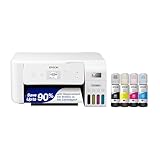
Choose the Epson EcoTank ET-2850 if
you print longer documents and want automatic two-sided printing and a slightly more featured model.
What the Differences Mean
A spec table shows what differs. This section explains why each difference matters.
Scan and copy features
A document feeder helps with multi-page jobs and duplex scanning saves time. If you rarely scan, a flatbed is enough. Here, Epson EcoTank ET-2800 lists “Flatbed scan and copy” while Epson EcoTank ET-2850 lists “Built-in scanner and copier”.
Duplex printing
Automatic duplex saves paper and flipping. Check whether it covers printing only or also copying. Here, Epson EcoTank ET-2800 lists “Not mentioned in the listing” while Epson EcoTank ET-2850 lists “Yes, per the listing”.
Ink and running costs
Ink or toner is where the money goes. Compare the cost per page, the starter cartridge size and whether third-party ink is accepted. Here, Epson EcoTank ET-2800 lists “Refillable tanks” while Epson EcoTank ET-2850 lists “Refillable EcoFit bottles”.
Which Is Right for Which Buyer
- If you print rarely, a low-cost model with cheap or long-life ink or toner avoids waste from dried ink.
- If you print a lot, prioritize a low cost per page, such as an ink tank or laser model.
- If you need to scan or copy documents, check for a document feeder.
- If you print photos, check the number of inks and paper support.
Before You Buy: A Five-Point Check
- Confirm the exact model on the product page; similar names often hide different features.
- Check the cost of replacement ink or toner.
- Check the Wi-Fi band and mobile printing support.
- Check the size of the printer against your space.
- Check the return window and warranty.
This comparison is based on the Amazon listings and manufacturer information, not our own testing. Treat it as a way to narrow the choice, then confirm the details that matter to you.
How Refillable Ink Tanks Work
Both printers in this comparison are listed as ink tank models, which differ from cartridge printers in a basic way. Instead of swapping a sealed cartridge, you pour ink from a bottle into a tank built into the printer. The idea is that the bottles cost less per page than cartridges, and refills are less frequent.
Understanding the process helps you decide whether it suits you. During setup, you fill each tank from the matching bottle, then let the printer run an initial charging process. Follow the setup sheet and manual carefully, because the order of steps matters and the printer may take several minutes to prepare. Later refills are simple: check the tank levels through the visible window, and top up before a tank runs low.
Ink bottles are designed to fit particular tanks, and the listing for the ET-2850 mentions a bottle system called EcoFit while the ET-2800 listing describes refillable tanks. Use the bottles named in the manual for your model, and do not assume bottles from a different line fit. Check the replacement ink product page for compatibility with your exact model number before buying.
Ink tank printers suit people who print regularly and want to avoid frequent cartridge swaps. If you print only a few pages a year, the advantage is smaller, and the care required to keep the print head clear still applies. Think about your habits, and decide whether the refill process is something you are comfortable with.
Making Sense of Page Yield Claims
The two listings quote different page yield figures, and it is easy to read too much into them. A page yield is a manufacturer’s estimate of how many pages a set of ink should produce under a defined test method. It is useful for comparing products when the same method is used, but it is not a promise of what you will get.
Several factors change real results. Pages with large areas of colour use more ink than text pages. Photos use far more than documents. Frequent short print jobs can trigger cleaning cycles, which use ink that never reaches the paper. Print quality settings also play a part, with higher-quality modes generally using more ink.
When comparing the two models, read the footnotes of each listing to see what the figures refer to. The ET-2800 and ET-2850 listings describe the claims in different terms, with one quoting a figure per bottle set and the other quoting a figure on replacement ink. Because the wording differs, do not treat the numbers as directly equal. Look at the manufacturer’s explanation of how the figures were measured.
A practical approach is to estimate your own use. Count how many pages you print in a typical month, note how many are colour, and compare that with the stated yields. Then check the price of replacement bottles, and work out a rough cost per page. The cost per page guide in the related reading is a useful method for this.
First Setup and the Ink Included in the Box
Both listings say the printer ships with up to two years of ink, based on the maker’s assumptions. That is a helpful feature, because you will not need to buy ink straight away. It also means setup is the one time you handle every bottle, so it is worth doing carefully.
Start by choosing a good location. Place the printer on a stable, level surface with space around it, since you need access to the tanks and the scanner lid. Keep it away from direct sunlight and heat. Leave space behind the printer if the paper path or output tray requires it, and check the manual for clearance.
Lay a sheet of paper or a cloth on the work surface before filling, because ink can stain. Open each bottle only when you are ready to pour, and follow the manual’s instructions for which bottle matches which tank. Stop when the tank is full, and do not overfill. Wipe up any drops immediately.
After filling, let the printer complete its start-up process without interruption. Then print the alignment or test page the manual suggests, and connect to Wi-Fi using the printer’s setup steps or the maker’s app. Keep spare bottles upright and sealed, and store them in a cool place away from children and pets. Note the date of your first fill, so you can track how fast the ink is used.
Two-Sided Printing and Paper Habits
The main feature difference in the listings is automatic two-sided printing, which the ET-2850 listing mentions and the ET-2800 listing does not. How much that matters depends on your paper use and your patience.
If you often print long documents, such as reports, course notes or manuals, automatic duplex saves paper and time. It also produces tidier results, since the printer handles page order and orientation. Check the manual for the paper sizes and types supported in duplex mode, as there are often restrictions.
Without automatic duplex, you can still print on both sides manually. Many drivers offer an option to print odd pages first, then ask you to flip the stack and feed it back for the even pages. It works, but it takes a little practice, and mistakes with orientation are common at first. Try it on a short document to learn how your printer handles the paper.
Whichever you choose, a few paper habits help. Store paper flat in a dry place, fan the stack before loading to reduce sticking, and set the paper type in the print dialog to match what is in the tray. Using the wrong type setting can cause smudging or poor quality. If you print photos, use paper made for that purpose and check the manual for recommended settings.
Long-Term Care and Signs of Trouble
An ink tank printer rewards regular care. Because the tanks hold a lot of ink, the print head is the part most likely to need attention, especially if the printer is used rarely. A few habits keep it healthy.
Print something every week or two, even a short page with colour elements. This keeps ink moving through the nozzles. Turn the printer off with its power button so it can park the print head correctly. Do not move the printer while it is tilted, and follow the manual’s instructions for transport, as ink can leak if the printer is handled roughly.
Watch the ink levels through the tank windows, and refill before a tank runs dry. Running a tank empty can cause air to enter the system and may lead to printing problems. Use the ink named for your model, and check the maker’s warranty information for what it says about other inks.
If quality drops, with streaks or missing colours, run a nozzle check and then a cleaning cycle from the printer’s maintenance menu. Cleaning uses ink, so avoid repeating it many times. If several cycles do not help, consult the manual or contact support.
Consider replacing or repairing the printer if jams are frequent, the paper feed fails, or cleaning no longer restores quality. Check your warranty and the maker’s support options before deciding.
Ink Tank Printer Terms Explained
Refillable tank printers use language that differs from traditional cartridge models. Here is a quick glossary.
- Ink tank: a refillable reservoir built into the printer that is filled from bottles.
- All-in-one: a device that prints, copies and scans.
- Duplex: printing on both sides of a sheet, either automatically or by hand.
- Page yield: the maker’s estimate of how many pages a set of ink can print under test conditions.
- Printhead: the component that sprays ink onto the page.
- Flatbed scanner: a glass surface where you place documents to copy or scan.
- Wireless setup: connecting the printer to your home network.
Check the maker’s own specification page to see what each term means for the model you are considering.
Which Situation Fits Which Printer
| Your situation | What to weigh | Where to look |
|---|---|---|
| Homework and household documents | Simple setup and low upkeep | Setup guide and ink information |
| Frequent two-sided printing | Automatic duplex support | Specification list |
| Small home office | Reliable connectivity and paper capacity | Connectivity and tray details |
| Occasional use | Ink that does not dry out quickly | Maintenance advice in the manual |
| Shared household | Mobile printing and easy network setup | App information |
Think about the one feature you will use weekly, and let that guide your choice.
A Pre-Purchase Check
- Decide whether two-sided printing matters to you and how often you would use it.
- Measure the space where the printer will sit, including room to open the scanner lid and paper tray.
- Check your home network and the way you will connect, such as wireless or USB.
- Look at the ink bottle type and where the maker recommends buying them.
- Read about how the tanks are filled and the care needed.
- Check the support and warranty information.
- Think about the paper types and sizes you will use.
This quick list removes uncertainty and helps you compare the two models more clearly.
Reading the Listing Closely
Look at the specifications for supported paper sizes, tray capacity and print speed, and treat speed figures as the maker’s estimates. Check the scanner resolution if you plan to scan photos, and see whether the printer offers an automatic document feeder. Read about what is included in the box, such as the first ink bottles and cables.
Read the maker’s notes on yields carefully. Yield figures are produced under set conditions, and your real results depend on your documents, settings and printing habits.
Setup, Ink Handling and Following the Manual
Follow the maker’s setup instructions closely, especially when filling the tanks for the first time. Fill each tank with the correct color, and keep bottles upright to avoid spills. Use the surfaces and protective measures the manual recommends, such as paper under the printer while you work.
Ink can stain clothing and surfaces, so keep it away from children and pets. If you notice leaks, error codes or print quality problems, check the manual first and then contact the maker’s support. Do not open parts that the manual does not tell you to open.
Planning the Desk or Shelf Space
Printers need more room than their footprint suggests. Leave space above for the scanner lid, in front for the output tray and behind for paper feeding and cables. Place the printer on a sturdy, level surface at a comfortable height, near a power outlet and within range of your wireless signal.
Think about where you will keep paper and ink bottles. A nearby drawer or box keeps supplies together, and an upright bottle storage spot reduces spills. If you share the printer with a family, put a short instruction sheet beside it so everyone loads paper and handles ink the same way.
Keep the printer away from heat sources, damp areas and direct sunlight, which can affect both the paper and the machine.
Habits That Keep an Ink Tank Printer Healthy
Print a page from time to time, even when you do not have anything urgent, so the ink keeps moving through the printhead. Keep the printer in a stable room, away from direct sun and drafts, and turn it off using the power button instead of unplugging it. Follow the maker’s guidance on moving the printer, and keep it level.
Living With Either EcoTank: The First Ninety Days
Whichever of these two printers you choose, the first ninety days teach the same lessons, and knowing them in advance makes the difference between the models feel smaller and the ownership feel better. The first lesson is that a tank printer rewards a routine: a glance at the levels when you collect a print, a small color page every week or two so every channel stays exercised, and a refill treated as a calm, scheduled task rather than an emergency. The second lesson is that setup choices echo for years. Where the printer lives, how it joins the network, and whether everyone in the household knows how to load paper and clear a jam will matter more by month three than any specification that separated the two models on the day you bought one of them.
The difference that does survive the first ninety days is the one this comparison is built around: two-sided printing. Owners who chose the model with automatic two-sided printing discover how often they use it once it costs no effort: reports, drafts, school documents and household paperwork quietly halve their paper use, and the habit forms because the machine does the work. Owners of the model without it discover the manual workaround, printing the odd pages, turning the stack and printing the even pages, and most find it perfectly workable for occasional documents and mildly annoying for long ones. Neither group is wrong; they simply bought the version of daily life they predicted. If your ninety days will contain many multi-page documents, believe that prediction in the direction of the duplex model. If your printing is mostly single pages, photographs and short forms, the simpler model will never make you feel its absence.
Paper, Photographs and the Work Each Model Actually Does
Both printers share the tank system, so both share its character in color work: photographs and graphics printed steadily, with ink that costs little enough that experimentation stops feeling expensive. That shared character changes what households print. Children projects get reprinted without negotiation, a photograph gets a second copy for a grandparent, a chart gets printed in color because color is the point. The model choice does not change any of that, and buyers agonizing over the pair should remember that the experience they are choosing between is ninety percent identical. The remaining ten percent, duplex, fax-adjacent features and the small conveniences the comparison above sets out, should be weighed against your own document habits rather than against an abstract idea of the better printer. Printers are bought for documents; let your documents vote.
The Decision, Stated as Three Honest Questions
First, how many pages in a typical month leave your printer printed on both sides in your intentions, not your hopes? If the honest answer is a stack, the automatic duplex model repays its difference every single month. Second, where will the printer sit, and does that place suit a machine that will be refilled, loaded and occasionally opened by everyone in the house? Both models ask the same of their space, so a bad answer is an argument about placement, not about the pair. Third, how long do you keep printers? Tank printers are long-life machines, and a difference paid once is spread across years of refills, which argues for buying the version whose features match your habits rather than the version that merely costs less this week. Answer those three questions with your real life, and the recommendation in this comparison will usually confirm what your answers already decided.
Running Costs Over the Life of the Printer, Without the Guesswork
The economic argument for both of these printers is the tank, and it deserves to be understood in terms of behavior rather than in terms of headline yield claims. A page yield figure is a laboratory average produced under standard conditions, useful for comparing models on the same basis and useless as a promise about your household. Your real cost per page will be set by what you print: pages of dense text, pages with a single photograph, draft pages, cleaning cycles and the occasional spoiled sheet all draw on the same tanks at different rates. What the tank system guarantees is not a number but a structure: refills are bottles rather than cartridges, the ink in the machine is visible, and the cost of a refill is spread across a large amount of printing. Owners who thrive with tank printers share one habit: they stop thinking about ink as a precious substance rationed page by page, and start treating it as a household supply, checked monthly and replenished calmly, like paper.
That change in mindset is worth more than the arithmetic, because it changes what the printer is for. Documents get printed when printing helps, rather than hoarded on screens. Children work gets color. Drafts get printed and marked up by hand. The printer becomes a tool again instead of a meter running. Against that background, the price difference between the two models in this comparison should be judged by the feature difference, principally the two-sided printing discussed above, and not by imagined differences in ink economy, since both machines drink from the same kind of tank at the same kind of rate. Buy the duplex if your documents call for it; otherwise save the difference and spend it, if you spend it at all, on the paper and the spare bottles that a well-run tank household keeps in reserve.
Refills, Mess and the Reality of Bottles
New tank owners worry about refilling, and the worry is larger than the task. Modern bottle systems are designed to make the common errors difficult: the bottle meets the tank in a controlled way, the fill is visible as it rises, and the whole job takes minutes a few times a year. The disciplines that matter are the ones the refill guide in this series describes: refill before a tank runs dry, keep the machine level, check the bottle color twice, and let the printer settle afterward. Owners who follow them describe refilling the way they describe changing a light bulb, as a non-event. Owners who run tanks dry, move the printer carelessly or refill in a midnight panic are the ones with stories. The model choice in this comparison does not change the refill experience in any material way, which is one more reason to decide the pair on documents and duplex rather than on the tank, since the tank is the shared foundation both machines stand on.
Setup Day: Getting Either Printer Right the First Time
Set aside an unhurried hour for setup, because the choices made in that hour govern years. Place the printer where it will live permanently, on a stable surface with room to open, load and refill, and within honest reach of a healthy network signal. Complete the first fill and the initial preparation exactly as the manual directs, without interrupting the process, and join the printer to the network before installing it on any computer or phone, so every device discovers the same, settled machine. Print the test pages, then print one real document from each device the household uses, including a phone, and fix the small problems while they are still setup problems rather than deadline problems. Write the printer name, the refill bottle type and the date of setup on a note kept with the spare paper. That note, five minutes of writing, is the manual your household will actually read.
Finish setup day by printing something enjoyable: a photograph, a color page, a document you have been meaning to have on paper. A printer whose first day ends with a successful, satisfying print becomes part of the household immediately, while one whose first day ends with settings menus stays a project. Both models in this comparison can give you that first day. The comparison above exists to make sure the machine on the desk is the one whose particular strengths match the documents that will follow it home.
Two Households, Two Right Answers
The Family That Prints School and Life Admin
Consider a household whose printer produces reading logs, worksheets, permission slips, the occasional photograph for a project and a steady trickle of forms. Most of those pages are single sheets or short sets, and the two-sided question rarely arises because the documents themselves are short. For this household the simpler model is not a compromise; it is the correct tool, and the money saved can sit in the paper and bottle reserve instead. What this household should not economize on is placement and routine: the printer where the family actually works, the levels glanced at weekly, the spare bottle bought before the busy term begins. Their verdict on either printer, a year later, will be written by those habits, and both models would earn the same review.
The Home Office That Prints Documents All Day
Now consider the household where one adult works from home and prints reports, contracts and reading packets several times a week, often long, often needed on both sides to be filed, carried or posted. Here the calculation inverts completely. Manual two-sided printing is not a minor inconvenience at this volume; it is a recurring tax of attention, a stack to be turned correctly, a sequence to be restarted when the phone rings halfway through. The automatic duplex model removes that tax on every job, and over a year of working weeks it repays its difference in the only currency that matters to a busy office, uninterrupted time. This household should also weigh the small operational differences set out in the comparison with more care, because at their volume small frictions compound, while the family above will never print enough pages to meet them.
What Neither Printer Changes, and Why That Is Reassuring
It is worth stating plainly what this choice does not decide. Both printers need the same paper discipline, the same network care, the same occasional nozzle attention that every inkjet asks for, and the same honesty about placement near the people who use them. Both will disappoint an owner who expects a tank printer to behave like a laser for text speed, and both will delight an owner who wants color printing without cartridge anxiety. The comparison format can make a pair of products sound like a fork in the road; in truth these two are neighboring houses on the same street, and the street is a good one. Choose by your documents, set the machine up once and well, keep the bottles in reserve and the levels in view, and the EcoTank you bring home will become the kind of appliance that is mentioned only when it is praised, usually by a visitor who still pays for cartridges and cannot believe how rarely you think about ink.
A Final Check Before Ordering Either Model
Read the listing for the exact model name, letter by letter, because tank printer ranges are full of near-identical names whose features differ in exactly the ways this article discusses. Confirm the delivery contents against the maker description, confirm the return terms while the purchase is still theoretical, and measure the shelf or desk the printer will occupy, including the room needed to open it and to stand at it with a bottle in hand. If the printer is a gift or a purchase for another household, ask the duplex question about their documents, not yours. Then order once, set up once, and let the comparison close behind you. The best printer decision is the one that disappears into reliable service, and either of these machines, honestly matched to its home, will do exactly that.
How to Read Owner Opinions About This Pair Without Being Misled
Anyone researching these two printers will meet strong opinions, and a little method helps in weighing them. Notice first what the opinionated owner actually prints, because praise and complaints about a tank printer are usually reports about a workload rather than about a machine. The owner who prints photographs weekly and the owner who prints a boarding pass monthly own the same printer in name only. Notice second whether a complaint describes the printer or its situation: a machine blamed for wireless dropouts in a house with a struggling network, or for clogged nozzles after a summer of disuse, is reporting its environment. Notice third how long the owner has lived with the machine. First-week opinions measure setup; first-year opinions measure the machine. Weight the long ones accordingly.
Apply the same method to praise, including the praise implied by this comparison. The tank system earns its reputation in households that print regularly and refill calmly, and it earns its criticisms in households that print rarely and expect the machine to wait patiently without attention. Neither verdict is transferable without the habit that produced it. Your task as a buyer is not to find the printer with the best opinions but to find the overlap between what the satisfied owners do and what your household will actually do. If your habits resemble theirs, their experience is evidence. If not, it is entertainment. Decide the pair on that basis, on your documents, on the duplex question and on the placement you can offer, and you will have used the opinions of strangers the way they should be used: as a mirror for your own printing life, held up at the moment of choosing and then put away.
The Tie-Breaker Most Buyers Actually Need
If the questions in this article have left the pair level, use the tie-breaker that reflects how printers are really lived with: imagine the busiest printing week of your year, in detail. The week of the school project, the house move, the tax deadline, the new job. Walk that week through each machine. Where does the simpler model ask you to stand and turn pages while the other model simply finishes the job? Where does either machine ask anything of you at all besides paper and the occasional glance at a tank? For most households the honest walk-through produces a small but definite answer, because busy weeks are when features stop being brochure items and become time. Buy for that week, within reason, and the quiet weeks will look after themselves. And if the walk-through produces no difference at all, accept the verdict happily: the pair is genuinely level for your life, the simpler purchase is the rational one, and the energy saved by deciding can go into the setup care that will matter far more than the choice ever could.
After the Purchase: The Habits That Make Either Choice Look Wise
Six months after the box is recycled, nobody remembers the comparison; they remember whether the printer is simply there, ready, every time. That outcome is manufactured by four small habits, and they are the same for both models. Keep the printer in its permanent place and resist moving it casually, because tank printers prefer a settled life. Keep one full set of refill bottles in reserve, bought when the current set is opened rather than when a tank is empty, so a refill is never waiting on a delivery. Print something in color every week or two even in text-heavy months, because the color channels you ignore are the ones that will ask for cleaning later. And keep the household informed: everyone who prints should know how to load paper, how to read the levels and what a warning message means, so the machine is maintained by the household rather than by one person memory. Owners who build those four habits write the satisfied reviews that future buyers will read about both of these printers. Owners who skip them write the other kind, about whichever model happened to be on the desk. Choose well, by all means, using everything in this comparison; then make the choice look wise, which is the part that was always in your hands.
There is one more quiet test worth running before the decision hardens, and it takes place away from any screen. Stand at the place the printer will live and act out its ordinary week: reaching it with an armful of paper, opening it with a bottle in hand, collecting a long document while holding a phone conversation, letting a child use it under supervision. If the space makes any of those small scenes awkward, fix the space or reconsider the placement before the machine arrives, because placement friction is paid daily while feature differences are paid only in the specific jobs that use them. Both EcoTank models in this comparison deserve a fair home: level, reachable, ventilated and near the people who print. Give the winner that home and the comparison will have done its work completely, from the first specification to the last ordinary Tuesday when the printer is used three times and thought about not at all.
Decide, then commit to the decision fully. A tank printer chosen after this much honest thought deserves better than second-guessing at the first refill or the first slow wireless morning. Set it up carefully, build the four habits, and judge it at the end of a full season of real documents rather than at the end of its first week. That patience, more than any single feature separating these two models, is what turns a good purchase into a quietly excellent one.
Frequently Asked Questions
Is the ET-2850 better than the ET-2800?
It adds automatic two-sided printing per the listing. For simple printing both work.
Do both include ink?
Both listings say up to two years of ink is included, based on the maker’s assumptions.
Can I use third-party ink?
Epson recommends genuine ink and says non-genuine ink may cause damage not covered by the warranty.
Which one costs less to run?
Compare the replacement ink or toner price and page yield on each product page.
Can either print from my phone?
Most current printers support AirPrint, Mopria or an app. Check each product page.
What if I choose the wrong one?
Check the return window on Amazon and keep the packaging while you test it.
How do I refill an ink tank printer?
Follow the manual: open the tank cover, match each bottle to its tank, pour until the tank is full without overfilling, and wipe up any drops. Do this on a protected surface because ink can stain.
Is a page yield a guarantee?
No. It is the maker's estimate under a defined test method, and your results depend on what you print, how often and at what quality setting.
Can I print two-sided on the ET-2800?
The listing does not mention automatic two-sided printing, but many drivers offer manual double-sided printing. Check the manual for how your printer handles it.
What happens if I let a tank run empty?
Running a tank dry can cause printing problems and may let air into the system. Refill before the ink gets low, and check the manual for what to do if it happens.
How often should I print to keep the print head healthy?
Printing a short page with colour every week or two helps keep ink moving. Check the manual for the maker's guidance.
Should I move the printer after filling the tanks?
Follow the manual's transport instructions, and avoid tilting it, because ink can leak if it is handled roughly.
Are ink tank printers good for occasional use?
They can work, but the advantage is greatest for regular printing. If you print rarely, keep up the light maintenance habits to avoid clogged nozzles.
Bottom Line
Choose the ET-2850 if two-sided printing matters, and the ET-2800 if you want the simplest tank printer. See our best EcoTank printers.
Related Reading
- Types of Printers Explained: Inkjet, Laser, Ink Tank and More
- 7 Best Wireless Printers for Home Use
- Epson EcoTank ET-2800 vs Canon PIXMA G3270
- Epson EcoTank ET-2850 vs Canon G3290: Which Tank Printer?
- Epson EcoTank ET-2850 vs ET-2900: Which Entry Tank Printer?
More Printer Guides
- Best Printers for Home Use
- Best All-in-One Printers
- How to Calculate Printer Cost Per Page
- Printer Terms Explained
- Is the Epson EcoTank ET-2850 Worth Buying?
Related Guides
- Epson EcoTank ET-2850 vs Canon G3290: Which Tank Printer?
- Epson EcoTank ET-2850 vs ET-2900: Which Entry Tank Printer?
- Is the Epson EcoTank ET-2850 Worth Buying? Listing-Based Review
- Is the Epson EcoTank ET-2800 Worth Buying? Listing-Based Review
- Epson EcoTank ET-2800 vs Canon PIXMA G3270: Entry Tank Printers

