Disclosure: As an Amazon Associate, reviewstook.com earns from qualifying purchases. Links to Amazon on this page are affiliate links; they cost you nothing extra.
Inkjets are the most flexible home printers: they handle color, photos and documents in a small body. The trade-off is ink, which can cost more than the printer itself.
These six inkjet printers cover ink tank and cartridge designs. We built the list from published specifications, not our own testing.
New to printers? Start with our guide to the best printers for home use, then come back here for the details.

In this guide
Quick Picks
| Printer | Type | Best for |
|---|---|---|
| Epson EcoTank ET-2850 | Ink tank all-in-one | High-volume home printing at low running cost |
| Canon PIXMA G3270 | Ink tank all-in-one | Budget-minded ink tank printing |
| HP OfficeJet Pro 9125 | Color inkjet all-in-one | Home offices that scan multi-page documents |
| Brother Work Smart 1360 | Color inkjet all-in-one | Compact everyday color printing |
| Epson Expression Home XP-4250 | Color inkjet all-in-one | Budget home inkjet |
| Brother INKvestment MFC-J4335DW | Color inkjet all-in-one | Small office inkjet with high-yield ink |
6 Best Inkjet Printers for Home Use
Top pickBest for families and students who print every week
1. Epson EcoTank ET-2850
A refillable ink tank all-in-one that prints, scans and copies over wireless. The tanks replace small cartridges, which is the whole appeal.
Good for: Families and students who print every week. Strengths: Ink tanks usually bring a lower cost per page than cartridges. Weaknesses: Higher up-front price than a basic cartridge model, and inkjet nozzles can clog if left idle. Skip it if you print only a few pages a month.
Best for households that print often but want to avoid cartridges
2. Canon PIXMA G3270
A refillable ink tank all-in-one from Canon’s MegaTank line.
Good for: Households that print often but want to avoid cartridges. Strengths: Refillable tanks tend to lower cost per page. Weaknesses: Bigger than a cartridge printer and higher entry price. Skip it if you print very little.
Best for remote workers who scan contracts and receipts
3. HP OfficeJet Pro 9125
A color inkjet all-in-one built around a document feeder and two-sided printing.
Good for: Remote workers who scan contracts and receipts. Strengths: Automatic duplex printing and a feeder speed up longer jobs. Weaknesses: Tied to the manufacturer’s ink program; check the cartridge policy first. Skip it if you print rarely or want third-party ink.

4. Brother Work Smart 1360
A compact color inkjet all-in-one that prints, scans and copies, from Brother’s Work Smart line.
Good for: Households that want occasional color without a bulky machine. Strengths: Small size and a basic, easy feature set. Weaknesses: Cartridge refills add up if volume grows. Skip it if you need a document feeder; check the product page.

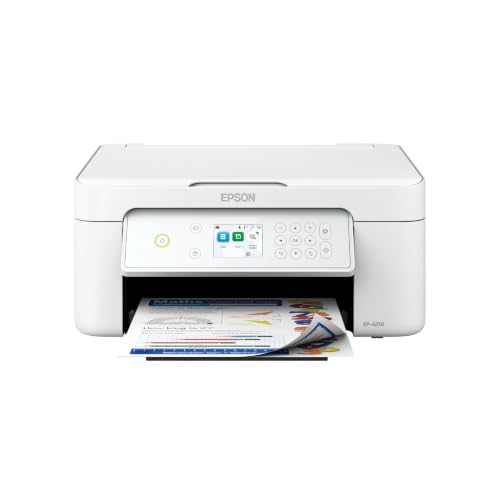
Best for light home use
5. Epson Expression Home XP-4250
A budget wireless color inkjet all-in-one from Epson.
Good for: Light home use. Strengths: Low entry price and basic features. Weaknesses: Cartridge running cost is high for frequent printing. Skip it if you print more than occasionally.

Best for home offices that want inkjet versatility with fewer refills
6. Brother INKvestment MFC-J4335DW
A color inkjet all-in-one designed around larger-capacity ink cartridges.
Good for: Home offices that want inkjet versatility with fewer refills. Strengths: High-yield cartridge option. Weaknesses: Bulkier than compact inkjets. Skip it if you only print occasionally.

Inkjet Printers Explained
Cartridge or tank
Cartridge inkjets use small replaceable ink cartridges and are cheap to buy. Ink tank inkjets use refillable tanks and are cheaper per page. Pick by how much you print. See ink tank vs laser printer.
Where the printhead lives
In some printers the printhead is built into the cartridge, so you replace it with each cartridge. In others it is part of the printer. A printer-fixed head can clog and be harder to replace, while cartridge heads cost more to replace but are fresh each time.
Dye and pigment inks
Dye inks give vivid color and suit photos. Pigment inks resist water and fading better and suit documents and art paper. Some printers use both.
Paper matters
Inkjet results depend on the paper. Plain paper works for documents; coated photo paper gives better color. See the best paper for printers.
Keep it healthy
Print a little every week or two to keep nozzles clear. See how to stop ink drying out and how to clean a printhead.
Best Picks by Category
These labels come from the Amazon listings for each pick. They summarize listing data and are not hands-on test results.
- Top rated: Epson EcoTank ET-2850 — check price on Amazon.
- Most reviewed: Epson EcoTank ET-2850 — check price on Amazon.
- Lowest price: Brother INKvestment MFC-J4335DW — check price on Amazon.
- Premium option: HP OfficeJet Pro 9125 — check price on Amazon.
Price, Rating and Review Comparison
The table lists each pick with its price tier. Prices change often, so confirm the current price on Amazon.
| Product | Price | Rating | Ratings | Price tier |
|---|---|---|---|---|
| Brother INKvestment MFC-J4335DW | Check price on Amazon | See listing | See listing | Budget |
| Brother Work Smart 1360 | Check price on Amazon | See listing | See listing | Budget |
| Epson Expression Home XP-4250 | Check price on Amazon | See listing | See listing | Budget |
| Epson EcoTank ET-2850 | Check price on Amazon | See listing | See listing | Mid-range |
| Canon PIXMA G3270 | Check price on Amazon | See listing | See listing | Mid-range |
| HP OfficeJet Pro 9125 | Check price on Amazon | See listing | See listing | Mid-range |
How Much Feedback Backs Each Rating
A high average from a handful of ratings is weaker evidence than a slightly lower average from thousands. Check the current Amazon listing for each pick to see its latest rating and review count.
- Epson EcoTank ET-2850: check the current rating and reviews on its Amazon listing.
- Canon PIXMA G3270: check the current rating and reviews on its Amazon listing.
- HP OfficeJet Pro 9125: check the current rating and reviews on its Amazon listing.
- Brother Work Smart 1360: check the current rating and reviews on its Amazon listing.
- Epson Expression Home XP-4250: check the current rating and reviews on its Amazon listing.
- Brother INKvestment MFC-J4335DW: check the current rating and reviews on its Amazon listing.
How to Choose
Ink tank or cartridges?
Ink tank models cost more up front and less per page. Cartridge models are cheaper to buy and more expensive to feed.
Print regularly
Inkjet nozzles can clog if the printer sits for weeks. Print a test page every couple of weeks.
Read the ink policy
Some brands restrict third-party ink. Check before you buy.
How We Chose These Products
We start from products sold on Amazon with a full product name and clear specifications, and we skip results that show only a brand name or a vague title. We then read the listing and any manufacturer information for each one and note the features that matter for printers: print technology, running costs, connectivity and size. We do not run our own lab tests, and this guide contains no hands-on measurements. Use it to build a shortlist, then check current prices, dimensions and return terms on the Amazon page before you buy.
Buying Guide: What to Check Before You Choose
Ink tank versus cartridge
Ink tank printers use refillable tanks and usually have a lower cost per page, with a higher purchase price. Cartridge printers are cheaper up front but ink can cost more over time. Check the page yield and the cost of refills.
Laser printers
Laser printers print text quickly and sharply and do not clog like inkjets. Color lasers cost more. Check the toner cost and the print speed.
Photo printing
Photo printers focus on color accuracy and paper handling. Check the number of inks, the paper sizes and the cost per print.
Quick Reference: Which Pick Suits Whom
- Epson EcoTank ET-2850: suits families and students who print every week
- Canon PIXMA G3270: suits households that print often but want to avoid cartridges
- HP OfficeJet Pro 9125: suits remote workers who scan contracts and receipts
- Brother Work Smart 1360: suits households that want occasional color without a bulky machine
- Epson Expression Home XP-4250: suits light home use
- Brother INKvestment MFC-J4335DW: suits home offices that want inkjet versatility with fewer refills
Common Mistakes to Avoid
- Judging a printer by its price without considering ink cost.
- Ignoring the starter cartridge size.
- Forgetting the paper types needed.
- Assuming all-in-ones are always better.
- Skipping the return window.
Setup and Care
- Install the maker’s app or driver.
- Connect to Wi-Fi.
- Run an alignment and nozzle check.
- Print regularly to avoid clogs.
What to Check Before You Buy
- Check ink type and cost.
- Look at photo quality.
- Compare wireless support.
- Check duplex and ADF.
- Consider ink tank models.
How do you choose the best inkjet printer for home use?
Choose an inkjet printer by how much you print, what you print and how much running cost you can accept. The purchase price is only the start, because ink is the bigger cost over the life of the machine.
Begin with your monthly volume. A household that prints every week benefits from a design that lowers cost per page, while a household that prints a few pages a month benefits from a low entry price. Be honest about which one describes you.
Next, list the jobs the printer must do:
- Documents and homework: sharp text on plain paper, and ideally automatic two-sided printing.
- Photos: good color on coated paper, and support for the paper sizes you use.
- Scanning and copying: an all-in-one body, with a document feeder if you scan multi-page papers.
- Wireless printing: support for printing from phones and laptops without a cable.
Then think about space. Ink tank and high-yield designs can be bulkier than compact cartridge models, so measure the shelf or desk before you order. Check the paper tray capacity as well, since a small tray means frequent refills of paper.
Finally, read the ink policy. Some makers restrict third-party ink, and some tie supplies to an account or program. A printer that suits you today should still suit you when the first cartridges run out.
Ink tank or cartridge inkjet: which is better value?
An ink tank inkjet is usually better value if you print often, and a cartridge inkjet is usually better value if you print rarely. The break-even point depends on your volume rather than on the brand.
Ink tank printers, such as the Epson EcoTank ET-2850 and the Canon PIXMA G3270 in this guide, use refillable tanks. They usually cost more at purchase and less per page afterward. Because refills come in bottles, you refill the tank rather than replacing a cartridge.
Cartridge printers, such as the Brother Work Smart 1360 and the Epson Expression Home XP-4250, cost less up front. Their cartridges hold less ink, so frequent printers may buy replacements often.
The Brother INKvestment MFC-J4335DW sits in between. It is a cartridge design built around larger-capacity cartridges, which suits home offices that want fewer refills without moving to a tank.
A few points help you compare fairly:
- Check what ink comes with the printer, since starter supplies can be smaller than full refills.
- Look at how many pages a refill or cartridge is rated for on the listing.
- Estimate your yearly printing, then compare the ink cost over that period, not only the printer cost.
- Remember that unused ink can dry in cartridges, which wastes money for light users.
If you are close to the line, a tank design is a safer long-term choice for a busy household, and a cartridge design is a safer choice for a quiet one.
Which inkjet printer should you buy?
Pick the printer that matches your main use, since each of the six here is built for a different type of household. Use the list below to find yours.
- If you print every week and want a low cost per page, go for the Epson EcoTank ET-2850. It suits families and students.
- If you want an ink tank design from another maker, choose the Canon PIXMA G3270, which is built for households that print often and want to avoid cartridges.
- If you work from home and scan contracts and receipts, choose the HP OfficeJet Pro 9125. Its document feeder and two-sided printing help with longer jobs, but check the ink policy first.
- If you want compact color printing without a bulky machine, go for the Brother Work Smart 1360. It suits occasional color use.
- If you print lightly and want a low entry cost, choose the Epson Expression Home XP-4250. Expect cartridge costs to add up if your volume grows.
- If you run a small home office and want fewer refills, choose the Brother INKvestment MFC-J4335DW, which is designed around larger-capacity ink.
If you cannot decide between two, ask which cost worries you more. If it is the running cost, lean toward an ink tank model. If it is the upfront cost, lean toward a cartridge model, and plan to print regularly to keep the nozzles clear.
Whichever you choose, confirm the exact model on the listing. Similar names can refer to different versions, and what is included in the box can vary.
What to check before buying an inkjet printer
Check the features you will use daily before you check the extras. A printer that misses one essential feature is harder to live with than one that lacks ten nice-to-haves.
- Size and placement: measure your space, including room to open the lid and paper tray.
- Connectivity: confirm wireless support and compatibility with your phone, tablet or computer.
- Two-sided printing: see whether it is automatic or manual if you print many pages.
- Document feeder: check for one if you scan stacks of paper.
- Paper handling: look at the tray size and the paper sizes it supports.
- Ink supply: note the cartridge or bottle type, what comes in the box and how refills are sold.
- Ink policy: check whether the maker restricts third-party ink or requires an account.
- Warranty and returns: read the terms on the listing, the return window and who the seller is.
- Software and drivers: make sure your computer system is supported.
When the printer arrives, set it up and test it during the return window. Install the maker’s app or driver, connect it to Wi-Fi, run an alignment and a nozzle check, then print a color page and a text page. If you see streaks or missing colors, run the cleaning cycle once and test again.
Keep the box until you are sure about the purchase. Printers are bulky, and returns are easier when the packing is intact.
How do you keep an inkjet printer working well over time?
Keep an inkjet printer healthy by using it regularly, using suitable paper and following the maker’s care steps. Most inkjet problems trace back to dried ink or the wrong paper settings.
Print a short color page every week or two, so ink keeps moving through the nozzles. If the printer will sit idle for a long period, check the maker’s manual for any storage advice. Leaving it plugged in and switched off with the printer’s own power button usually lets it cap the printhead correctly.
Paper choice affects results as much as the printer. Match the paper type in the print settings to the paper in the tray, because coated photo paper and plain paper need different amounts of ink. Store paper flat and dry so it does not curl.
Simple habits that help:
- Run a nozzle check when you notice faint lines or missing colors.
- Use the cleaning cycle only when needed, since it consumes ink.
- Keep the printer on a stable surface away from heat and direct sun.
- Wipe dust from the outside and the scanner glass with a soft, dry cloth.
- Install firmware and driver updates from the maker’s official site.
For tank models, refill carefully and stop at the fill line, and keep bottles upright. Wipe up any drips straight away. For cartridge models, replace cartridges as soon as the printer asks and avoid leaving an empty cartridge in place for long.
Know the signs that a replacement may be due: repeated paper jams, print quality that cleaning no longer fixes, or repair costs that approach the price of a new machine. At that point, compare current models rather than repair a printer that keeps failing.
Is an inkjet printer worth it? Downsides and who should skip it
An inkjet printer is worth it if you want color, photos and flexibility in one machine. It is less worth it if you print mostly black text in large amounts, where a laser printer may suit you better.
The downsides are worth stating plainly:
- Ink can cost a lot: over time ink may cost more than the printer, especially on cartridge models.
- Nozzles can clog: if the printer sits unused for weeks, the ink can dry, and cleaning cycles use ink.
- Entry price versus running cost: ink tank models cost more up front, and cheap models can cost more to feed.
- Size: tank and high-yield models can be bulkier.
- Ink restrictions: some makers limit which ink works.
Is it worth paying more? It can be, if you print often, because a higher purchase price on a tank model can be offset by lower ink costs. If you print rarely, the extra cost may never be recovered.
Who should skip an inkjet? People who print mainly text in large amounts, and who rarely need color, may prefer a laser printer. People who print only a handful of pages a year might skip owning a printer and use a print shop instead.
If an inkjet still fits, compare the picks above, check the current listing for size and what is included, then choose the one that fits how much you print.
Inkjet Ownership in Depth: Nozzles, Ink and Honest Trade-offs
The main sections of this guide cover what to buy and why. This section covers what ownership actually feels like once the inkjet printer is on your desk: the habits, settings and small decisions that decide whether it delights you or nags at you. None of it requires technical skill. It requires only that you set the machine up around your real life once, thoughtfully, instead of rediscovering the same lessons one paper jam at a time.
The print head is the printer: treat it that way
Everything an inkjet does well or badly passes through its print head, a component that fires droplets through nozzles finer than hair. Ink left sitting in those nozzles dries at the openings, which is why irregular use is the inkjet’s natural enemy. The countermeasures are simple and mostly free: print something small in colour every week or two, switch the printer off with its own button so the head parks over its protective cap, and keep the machine in a room that is neither hot nor dusty. Households that follow those three habits routinely go years without a serious clog.
When a clog does appear, resist the urge to run cleaning after cleaning. Print a nozzle check, run one cleaning, print the check again, and stop to let the machine rest if it improves even slightly; time and fresh ink often finish what repeated cleaning cannot, and every cycle pours ink into the waste system. Persistent single-colour gaps after a rest are the point where the manual and the maker’s support earn their keep.
Dye, pigment and why two black inks exist
Inkjet inks come in two broad families. Dye inks dissolve colour into the liquid, soak into paper fibres and produce vivid colour that suits photographs and graphics. Pigment inks carry solid particles that sit on the surface, resist water and fading better, and make sharper, more durable text. Many printers use pigment black for documents and dye colours for images, and some carry both kinds of black, switching depending on the paper and job. Knowing which your model uses explains its behaviour: marvellous photos with text that smudges when wet, or bulletproof documents with slightly restrained colour, are chemistry, not faults.
This also explains paper sensitivity. Dye ink on cheap, absorbent paper spreads and looks fuzzy; the same printer on smoother paper looks sharp. Pigment ink on the wrong glossy stock can sit on the surface and rub. Matching ink, paper and driver setting is the whole craft of inkjet printing, and most quality complaints dissolve once the three agree.
Realistic inkjet speeds and quality settings
The speed figures on inkjet boxes are measured in draft modes you may never use, so judge an inkjet by how it handles your real jobs: a few pages of text, a boarding pass, a school project, a photo. Draft is genuinely useful for internal pages and saves ink as well as time. Standard is the right home for almost everything. Best quality slows the carriage, lays ink more carefully and should be reserved for final photos and presentation pages, because using it for everything wastes ink and time without visible benefit on plain paper.
Borderless photo printing, where offered, is slower still and uses extra ink beyond the edges to guarantee no white border. Use it deliberately for prints you will frame or give away, and use standard margins for proofs. An inkjet rewards this kind of intentional setting choice more than any other printer type, because its quality range between fastest and finest is so wide.
How the Picks in This Guide Compare in Everyday Use
Specifications separate these machines on paper, but daily life separates them differently. The paragraphs below revisit each pick in this guide strictly in the role the guide itself assigns it, and set that role against the neighbouring picks, so you can feel the shape of the choice rather than just reading it. Read the pick that matches your situation first, then read its neighbours: the right decision usually becomes obvious in the contrast.
Epson EcoTank ET-2850 earns its place in this lineup as an ink tank all-in-one, picked for high-volume home printing at low running cost. In daily use, what that positioning really means is that its strengths arrive exactly where high-volume home printing at low running cost matters, and its compromises fall where that kind of user rarely looks. Readers comparing it with the neighbouring picks should start from their own habits rather than the headline features: the household or office that matches this description will find it quietly dependable, while someone whose printing looks very different will get more from a pick designed around their pattern instead.
Epson EcoTank ET-2850 is the Ink tank all-in-one option here, chosen for high-volume home printing at low running cost. Set beside the other picks, its character is defined by that role: it is the answer when high-volume home printing at low running cost is the priority, and it is not trying to be the answer to every other question in this guide. That focus is a virtue rather than a limitation. Printers that chase every strength tend to serve no one particularly well, whereas a model with a clear job, matched to the buyer who has that job, tends to be the one still earning praise years later.
Consider Canon PIXMA G3270 if your printing centres on budget-minded ink tank printing. As an ink tank all-in-one it approaches the work differently from the alternatives around it, and the detailed review above sets out where that approach pays off. The honest skip case matters just as much: if budget-minded ink tank printing is something you do rarely, this pick’s particular strengths will sit unused while its trade-offs remain, and another model in this guide will fit you better. Matching the pick to the pattern of use, rather than to the longest feature list, is the decision this whole guide is built around.
Within this guide, Canon PIXMA G3270 covers the budget-minded ink tank printing ground. Its detailed section explains the specifics; the comparative point is that no other pick here occupies quite the same position. Where two picks seem to overlap, the difference usually shows up in daily rhythm rather than in specifications: how the machine suits the space it will live in, the people who will share it, and the mix of documents it will actually see. Choose on that rhythm, and the specification sheet becomes a confirmation rather than a gamble.
HP OfficeJet Pro 9125 earns its place in this lineup as a color inkjet all-in-one, picked for home offices that scan multi-page documents. In daily use, what that positioning really means is that its strengths arrive exactly where home offices that scan multi-page documents matters, and its compromises fall where that kind of user rarely looks. Readers comparing it with the neighbouring picks should start from their own habits rather than the headline features: the household or office that matches this description will find it quietly dependable, while someone whose printing looks very different will get more from a pick designed around their pattern instead.
HP OfficeJet Pro 9125 is the Color inkjet all-in-one option here, chosen for home offices that scan multi-page documents. Set beside the other picks, its character is defined by that role: it is the answer when home offices that scan multi-page documents is the priority, and it is not trying to be the answer to every other question in this guide. That focus is a virtue rather than a limitation. Printers that chase every strength tend to serve no one particularly well, whereas a model with a clear job, matched to the buyer who has that job, tends to be the one still earning praise years later.
Consider Brother Work Smart 1360 if your printing centres on compact everyday color printing. As a color inkjet all-in-one it approaches the work differently from the alternatives around it, and the detailed review above sets out where that approach pays off. The honest skip case matters just as much: if compact everyday color printing is something you do rarely, this pick’s particular strengths will sit unused while its trade-offs remain, and another model in this guide will fit you better. Matching the pick to the pattern of use, rather than to the longest feature list, is the decision this whole guide is built around.
Within this guide, Brother Work Smart 1360 covers the compact everyday color printing ground. Its detailed section explains the specifics; the comparative point is that no other pick here occupies quite the same position. Where two picks seem to overlap, the difference usually shows up in daily rhythm rather than in specifications: how the machine suits the space it will live in, the people who will share it, and the mix of documents it will actually see. Choose on that rhythm, and the specification sheet becomes a confirmation rather than a gamble.
Epson Expression Home XP-4250 earns its place in this lineup as a color inkjet all-in-one, picked for budget home inkjet. In daily use, what that positioning really means is that its strengths arrive exactly where budget home inkjet matters, and its compromises fall where that kind of user rarely looks. Readers comparing it with the neighbouring picks should start from their own habits rather than the headline features: the household or office that matches this description will find it quietly dependable, while someone whose printing looks very different will get more from a pick designed around their pattern instead.
Epson Expression Home XP-4250 is the Color inkjet all-in-one option here, chosen for budget home inkjet. Set beside the other picks, its character is defined by that role: it is the answer when budget home inkjet is the priority, and it is not trying to be the answer to every other question in this guide. That focus is a virtue rather than a limitation. Printers that chase every strength tend to serve no one particularly well, whereas a model with a clear job, matched to the buyer who has that job, tends to be the one still earning praise years later.
Consider Brother INKvestment MFC-J4335DW if your printing centres on small office inkjet with high-yield ink. As a color inkjet all-in-one it approaches the work differently from the alternatives around it, and the detailed review above sets out where that approach pays off. The honest skip case matters just as much: if small office inkjet with high-yield ink is something you do rarely, this pick’s particular strengths will sit unused while its trade-offs remain, and another model in this guide will fit you better. Matching the pick to the pattern of use, rather than to the longest feature list, is the decision this whole guide is built around.
Within this guide, Brother INKvestment MFC-J4335DW covers the small office inkjet with high-yield ink ground. Its detailed section explains the specifics; the comparative point is that no other pick here occupies quite the same position. Where two picks seem to overlap, the difference usually shows up in daily rhythm rather than in specifications: how the machine suits the space it will live in, the people who will share it, and the mix of documents it will actually see. Choose on that rhythm, and the specification sheet becomes a confirmation rather than a gamble.
Setup, Workflow and Troubleshooting: The Rest of Ownership
Choosing the right inkjet printer is half the task; the other half is the environment it works in and the routines around it. The topics below are the ones that generate most of the questions owners ask after the first month, whatever model they bought, and each one is cheaper to handle early than late.
Placement, ventilation and a stable connection
Where a printer lives has more effect on reliability than most buyers expect. Put it on a flat, stable surface with clearance on every side: paper needs room to feed and exit without bending, output trays need to extend fully, and the vents that shed heat from the fuser or print engine should never be blocked by books or fabric. Keep the machine away from radiators, sunny windows and steamy rooms, because heat and humidity curl paper and thicken the dust that ends up on rollers and scanner glass.
Placement is also a network decision. A printer at the far edge of your Wi-Fi coverage will drop jobs, stall halfway through large files and disappear from phones even though it works fine when tested next to the router. If the printer has to live in a weak-signal corner, a wired Ethernet connection where available, or moving it one room closer to the router, usually fixes more problems than any amount of reinstalling drivers. Finally, leave enough slack in the power lead that the printer is never dragged by its cable when the desk moves, and plug it directly into a wall outlet rather than a switched strip that other people turn off without thinking.
Frequently Asked Questions
Are inkjets good for photos?
Generally yes, especially models with extra photo inks.
Why does my inkjet clog?
Dried ink in the nozzles. Regular use and a cleaning cycle usually fix it.
Are ink tank printers better than cartridge printers?
For regular printing, often yes. For rare printing, a cheap cartridge model can be better value.
What are the best inkjet printers for home use?
For regular printing, an ink tank inkjet like the Epson EcoTank ET-2850 costs least per page. For occasional use, a compact cartridge inkjet is enough. See inkjet vs laser for home.
Which is cheaper to run, inkjet or laser?
Laser is usually cheaper per page for text, and ink tank printers are cheaper for color and photos.
How do I connect my printer to Wi-Fi?
Use the printer’s setup menu or the maker’s app. See our Wi-Fi guide.
Do I need genuine ink?
Not always, but some printers restrict third-party ink. Check the terms.
Does ink dry out?
If unused, it can clog.
Inkjet vs laser?
Inkjet for photos and laser for text.
What is the best type of inkjet printer for home use?
For regular printing, an ink tank inkjet is usually the best fit because it lowers cost per page. For occasional use, a compact cartridge inkjet is enough. Choose by how much you print and what you need to scan.
How often should I use an inkjet printer?
Printing a small page every week or two helps keep the nozzles clear. Long gaps let ink dry and can cause clogs. Check the maker's guidance for your model.
Do inkjet printers waste ink on cleaning?
Yes, cleaning cycles use some ink, so run them only when print quality drops. Printing regularly reduces the need for cleaning. Avoid repeating the cycle many times in a row.
Can an inkjet printer print on photo paper?
Yes, most inkjet printers can print on coated photo paper, and results depend on the paper and settings. Check the supported paper sizes and types on the listing. Select the matching paper type in the print settings.
Is an all-in-one inkjet better than a single-function printer?
An all-in-one is better if you also want to scan and copy, and it saves space compared with separate machines. A single-function printer can be simpler. Choose by the tasks you do.
What does automatic duplex printing mean?
Duplex printing means the printer prints on both sides of the paper without you flipping it. It saves paper and time on longer documents. Check that the model offers automatic duplex and not manual duplex.
Why are my inkjet prints streaky?
Streaks usually point to clogged nozzles, low ink or the wrong paper setting. Run a nozzle check, then a cleaning cycle if needed. If the problem remains, check the ink levels and the paper type.
Do I need a document feeder on a home printer?
You need one only if you scan or copy multi-page papers often. For single photos or pages, the glass is enough. Check the listing, since not every all-in-one has a feeder.
How often should I print to keep an inkjet healthy?
A small colour print every week or two is enough for most models: enough to exercise every nozzle without wasting meaningful ink. A colourful test page or a family photo both work. If you know the printer will sit idle for a long stretch, print a full-colour page just before the gap and another as soon as you return, and run a nozzle check before the first important job.
Why do my prints have thin white lines through them?
Regular thin lines, called banding, usually mean one or more nozzles are blocked or the head needs alignment. Run the nozzle check to confirm, clean once if nozzles are missing, and run the alignment utility, which exists precisely to correct the spacing that causes lines. Also check that the paper type setting matches the paper loaded, because the wrong setting changes how the paper advances and can mimic a head fault.
Is it normal for an inkjet to make noises when I am not printing?
Occasional quiet maintenance sounds are normal: the printer may wake to move the head, check nozzles or prepare itself, especially after being switched on or left idle for a long period. What is not normal is loud grinding, repeated slamming of the carriage or constant activity. Those deserve a check for obstructions, paper scraps and correctly seated cartridges, following the manual, before assuming a mechanical failure.
Can I leave an inkjet printer switched on all the time?
Most home inkjets are designed to sleep rather than be switched off, waking for jobs and for brief self-maintenance, and that pattern suits typical households. The important exception is switching off at the wall or a power strip, which prevents the head parking properly and can cause clogs. Use the printer’s own power control, let it sleep between jobs, and avoid unplugging it as a daily habit.
Bottom Line
Print often and want low running costs? The Epson EcoTank ET-2850 or Canon PIXMA G3270 are the ink tank choices. Print rarely? A compact cartridge model such as the Brother Work Smart 1360 is enough.
Related Reading
- Types of Printers Explained: Inkjet, Laser, Ink Tank and More
- 7 Best Wireless Printers for Home Use
- 4 Best Heat Transfer Paper for Inkjet Printers (T-Shirts, 2026)
- 5 Best 11×17 Tabloid Printers for Home and Office
- 6 Best AirPrint Printers for iPhone, iPad and Mac
More Printer Guides
- Best Printers for Home Use
- Best Paper for Inkjet and Laser Printers
- Best Photo Paper for Inkjet Printers
- Best Printable Vinyl Sticker Paper for Inkjet Printers
- Best Toner Cartridges for Laser Printers
- Best Waterslide Decal Paper for Inkjet Printers
Related Guides
- 6 Best Photo Paper for Inkjet Printers: Glossy and Matte (2026)
- Best Paper for Inkjet and Laser Printers: What to Buy (2026)
- 4 Best Heat Transfer Paper for Inkjet Printers (T-Shirts, 2026)
- 4 Best Waterslide Decal Paper for Inkjet Printers (2026)
- 4 Best Printable Vinyl Sticker Paper for Inkjet Printers (2026)

