Where to buy
Check the latest price, availability and delivery on Amazon. Orders are placed on Amazon. We may earn a commission from qualifying purchases.
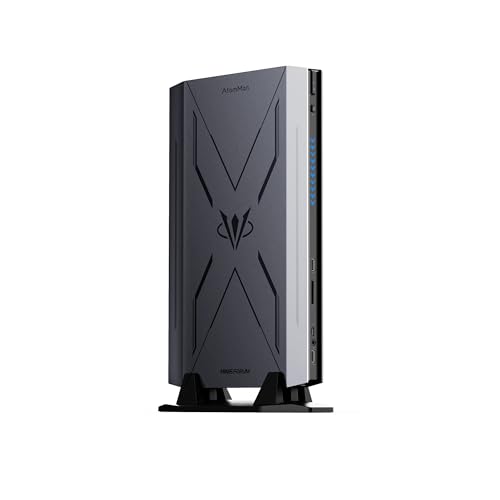
- Best overall barebones kit: AtomMan G7 Pro Barebone, Core i9-14900HX, RTX 5070 Laptop GPU — Check on Amazon
- AtomMan G7 Ti, Core i9-14900HX, RTX 4070 Laptop GPU (140W) — Check on Amazon
- Intel NUC 13 Extreme Kit NUC13RNGi9, Core i9-13900K, PCIe x16 slot — Check on Amazon
- AtomMan G7 Pt, Ryzen 9 7945HX, Radeon RX 7600M XT — Check on Amazon
See 2 more Amazon options
- MINISFORUM MS-A2 Barebone, Ryzen 9 9955HX, dual 10G SFP+ — Check on Amazon
- MINISFORUM MS-01 Barebone, Core i9-13900H, dual 10G SFP+ — Check on Amazon
Read the full guide ↓
Disclosure: As an Amazon Associate, reviewstook.com earns from qualifying purchases. Links to Amazon on this page are affiliate links; they cost you nothing extra. Listing details such as price and availability change often, so check the current Amazon listing before you buy.
If this is your first barebones mini PC, start with the one fact that surprises almost every first-time buyer: the price on the box is not the price of a working computer. A “barebones” kit is a small PC case with the processor, graphics and motherboard already inside — and three deliberate gaps. There is no memory, no storage drive and no operating system. You buy those separately, slot two of them in with a screwdriver, install the third from a USB stick, and only then do you have a PC. That is not a scam and it is not a defect; it is the entire point of the format, and for people who already own the missing parts it can be a bargain. But it does mean every kit in this guide gets priced twice below: the kit as listed, and the completed total — kit plus memory, plus a storage drive, plus an operating system. The second number is the honest one, and it is the one to hold against your $3,000.
The second surprise is better news: no barebones mini PC kit on Amazon legitimately costs anywhere near $3,000. We checked the flagship kits across the whole category, and even the most expensive verified one — Intel’s NUC 13 Extreme Kit — sits well below that ceiling as a premium-tier kit — check price on Amazon. The strongest gaming kits, Minisforum’s AtomMan G7 Pro and G7 Ti, sit in the premium tier as barebones. Between the usual premium tier and the top of this budget, verified Amazon listings show an empty band: nothing lives there except marketplace sellers marking lower-tier kits up to fantasy prices, and finished, ready-to-run machines wearing the word “barebone” in their titles where it does not belong. A barebones kit listed at a luxury-level price is not a luxury model; it is a markup, and the tier guidance below will let you recognise one on sight.
One more piece of timing before the picks, because it changes the maths for every beginner: memory prices have spiked. The laptop-style memory sticks these kits take — 32GB DDR5 kits — have become notably expensive on Amazon. Memory alone, in other words, currently costs far more than buyers used to expect for that part. That single fact flips the oldest rule in this category (“barebone always works out cheaper”) upside down for at least one pick below, and each review explains the trade-off rather than asserting it. The good news: a $3,000 budget, spent with your eyes open, buys the best this small category makes — the newest gaming kit, a 16-core AMD gaming kit, a desktop-class kit with a graphics-card slot, and two mini-workstation kits — with money left over for the parts that finish the job. Every term that matters is translated in plain English in the next section, so if words like SO-DIMM and NVMe mean nothing to you yet, read on: by the quick picks, they will.
Barebones, Translated: The Six Terms That Decide Everything
- Barebones. A PC sold as a starting kit rather than a finished machine. The case, motherboard, processor (CPU), graphics (GPU) and power supply are included; memory, storage and the operating system are not. Think of it as a car sold without wheels or fuel — a fair deal if you already own wheels, a strange one if you assumed it drove away.
- RAM (memory), and what a SO-DIMM is. RAM is the computer’s short-term working space — the desk, not the filing cabinet. In mini PCs it comes on small sticks called SO-DIMMs, the same size used in laptops. Every kit in this guide takes DDR5 SO-DIMMs. Two warnings hide in that sentence: desktop PCs use larger DIMM sticks that physically do not fit, and older DDR4 laptop memory does not fit either. All six picks here need DDR5 laptop memory, at speeds between DDR5-5200 and DDR5-5600 depending on the kit.
- Storage: M.2, NVMe and 2.5-inch drives. Storage is where your files and games permanently live. Modern mini PCs use M.2 drives — slim sticks about the size of a piece of chewing gum — and the fast kind speak a protocol called NVMe. Older 2.5-inch drives (small flat boxes) exist too, but no pick below needs one — all six take M.2 sticks, and two also accept a server-style format called U.2. For a first build, “one M.2 NVMe stick, 1TB or 2TB” is the whole decision.
- Operating system (OS), and licensing. The OS is Windows or Linux — the software that turns hardware into a computer you can use. No kit in this guide includes Windows. Your three honest options: buy a retail Windows licence, reuse a retail licence you already own if its terms allow transfer, or install Linux, which is free and genuinely good on the AMD kit below. Decide before checkout — the first-boot screen is a bad place to improvise it, and suspiciously cheap marketplace licence keys are a bad place to solve it.
- Integrated vs discrete graphics. Integrated graphics are built into the processor and share its memory — fine for desktops, video and light games. A discrete GPU is a separate graphics chip with its own memory (VRAM), and it is what makes serious gaming possible. Three picks below have discrete graphics; two have integrated only and are workstations, not gaming machines, unless you add a card; one has a slot and leaves the choice to you.
- Soldered. Permanently attached at the factory. In five of the six picks, the CPU and GPU are soldered — they can never be replaced or upgraded. Memory and storage are the only parts you can change later, plus an add-in card in the three kits with a slot. Buy the processor and graphics you actually want, because in a mini PC they are a lifetime decision.
In this guide
Quick Picks
Short on time, or comparing several options at once? Each row below names a buyer type and the kit that suits it, with price-check and completion guidance.
| Buyer type | Pick | Price | Why it stands out | Link |
|---|---|---|---|---|
| Best overall | AtomMan G7 Pro Barebone (i9-14900HX, RTX 5070 Laptop) | Check price on Amazon | Newest graphics chip in any barebone mini PC, DLSS 4 generation | Check on Amazon |
| Best proven gaming kit | AtomMan G7 Ti (i9-14900HX, RTX 4070 Laptop 140W) | Check price on Amazon | Full-power 140W mobile 4070, reviewed and well documented | Check on Amazon |
| Best expandable kit | Intel NUC 13 Extreme Kit NUC13RNGi9 (i9-13900K) | Check price on Amazon | Desktop processor and a real slot for a graphics card you choose | Check on Amazon |
| Best AMD gaming kit | AtomMan G7 Pt (Ryzen 9 7945HX, RX 7600M XT) | Check price on Amazon | 16 cores, AMD Advantage certified, most accessible gaming-graphics kit here | Check on Amazon |
| Best workstation CPU | MINISFORUM MS-A2 Barebone (Ryzen 9 9955HX) | Check price on Amazon | Newest processor generation, dual 10G networking — but read its completion warning | Check on Amazon |
| Best homelab value | MINISFORUM MS-01 Barebone (Core i9-13900H) | Check price on Amazon | Dual 10G networking, the proven home-server node, most accessible kit here | Check on Amazon |
How These Picks Were Chosen
Three filters, applied in order. The first is the barebone filter, applied more strictly than Amazon’s own search results: a kit only qualifies if it genuinely arrives without some combination of memory, storage and operating system for you to supply. Finished mini PCs that appear in barebone searches — there are many, because sellers stuff keywords into titles — were excluded however good they are; ready-to-run machines have their own guides, including Best Mini PC Under $3000 and Best Mini Gaming PC Under $3000. Several kits below are sold on a single Amazon page in both barebone and finished (“configured”) versions, and where that is true the review names it and tells you exactly which version to select, because clicking the wrong option tile is the most common beginner mistake in this category.
The second filter is verification. Every product code (ASIN) below was confirmed against a real Amazon listing — its title, specification table or listing record — so check price on Amazon for the current figure before you buy. One respected kit failed this filter on purpose: Zotac’s Magnus One barebone, a genuinely good kit with a desktop graphics card, could not be pinned to a verifiable Amazon US listing in this session — it shows up on Amazon UK and in other stores — so it is named here as an also-consider rather than linked on a guess.
The third filter is total-cost honesty, and it is the one this beginners’ guide leans on hardest. Each review finishes the build on paper before recommending anything: the kit, plus a 32GB DDR5 SO-DIMM memory kit — check price on Amazon, because the memory shortage is the defining fact of this buying season — plus a 1–2TB NVMe drive and an operating system. Where the finished total makes the barebone worse value than the same machine sold ready-made — and right now, for one pick, it clearly does — the review says so in plain words and tells you to buy the finished version instead. A beginners’ guide that only ever recommends the thing in its title is an advertisement, not a guide.
One honesty note about method: we did not use these kits ourselves. We read the makers’ listings, specification pages and independent reviews, and compared the things that are fixed forever at purchase — processor and graphics silicon, memory type and slot count, storage slots, expansion, networking and cooling.
The 6 Best Barebones Mini PCs for Beginners Under $3,000
AtomMan G7 Pro Barebone — Core i9-14900HX, RTX 5070 Laptop GPU
Who it suits: The beginner who wants the newest graphics technology a barebones mini PC has ever shipped with, and who either already owns DDR5 laptop memory and an M.2 drive or is happy to shop for them separately.
The G7 Pro is the current flagship of barebone gaming mini PCs, and the easiest way to picture it is as a powerful gaming laptop with the screen and keyboard removed on purpose — what remains is the fast part. Inside are a 24-core Intel Core i9-14900HX processor (8 performance cores plus 16 efficiency cores, up to 5.8GHz) and an NVIDIA GeForce RTX 5070 Laptop GPU with 8GB of its own graphics memory, kept cool by six heat pipes and two fans. Amazon’s own listing title for this exact kit says “Barebone Version Without Storage/OS,” and it confirms the RTX 5070, the 8GB of graphics memory, the DDR5 memory type and the processor; Minisforum’s regional listings describe the package the same way: no operating system, no memory, no storage. What you add: two DDR5 SO-DIMM memory slots accept up to 96GB, and two M.2 2280 drive slots accept up to 8TB of storage between them. Around the back and sides are HDMI 2.1 and USB4 ports, WiFi 7 and Bluetooth 5.4 — a complete, current connection set. What the newest graphics generation buys you over the model below is mostly features rather than raw speed: DLSS 4 with multi frame generation, a technology that uses AI to insert extra frames and make motion look smoother on a 1080p or 1440p screen. One honest caveat about that feature, because marketing will not give it to you: frame generation multiplies frames that already exist, so it polishes a healthy frame rate — it does not rescue a game that is already struggling.
Now the money, shown the way every review in this guide shows it. This is a premium-tier barebone from Minisforum — check price on Amazon for the kit, and check the finished 32GB/1TB version on the same listing family before you decide. Add a 32GB DDR5 SO-DIMM kit, plus a 1–2TB NVMe drive and an operating system, and your finished machine still sits well inside a $3,000 budget. Compare that honestly with the finished version: at today’s shortage pricing for memory, buying it ready-made can be the more sensible route to the identical computer, and the barebone only wins if you already own the memory and drive, or catch memory on a better week. One ordering caution, carried from the research: some marketplace mirrors of this product describe a finished 32GB/1TB unit rather than the barebone, so confirm the barebone version on the listing before you pay.
- RTX 5070 Laptop GPU with 8GB of graphics memory — the newest graphics generation in any barebone mini PC.
- 24-core processor and room for up to 96GB of memory across two slots.
- Two M.2 drive slots (up to 8TB total), HDMI 2.1, USB4, WiFi 7 — nothing important missing.
Honest limitation: The graphics chip is the laptop RTX 5070 with 8GB of memory, not the bigger desktop card of the same name, and 8GB is the first ceiling you will meet in texture-heavy games at 1440p; the processor and graphics are soldered and can never be upgraded; and at current memory prices the finished version may cost less than completing this kit yourself.
Choose it if you want the longest feature runway and are completing it with parts you own or find well-priced. Skip it if you need more graphics-memory headroom than 8GB — nothing in this guide offers more — or if the finished version is available at an attractive price — check price on Amazon — which makes the barebone the expensive way to buy the same machine.

AtomMan G7 Ti — Core i9-14900HX, RTX 4070 Laptop GPU (140W)
Who it suits: The beginner who would rather buy the reviewed, known quantity than the newest badge — and who wants the strongest proven version of its graphics chip in a mini PC case.
Where the G7 Pro is the flagship on paper, the G7 Ti is the flagship with a service record. It pairs the same 24-core Core i9-14900HX processor with an RTX 4070 Laptop GPU running at a full 140 watts of graphics power — the maximum setting for that chip. That number matters more than it might look: laptop graphics chips are sold at very different power limits under the same name, and a 100-watt RTX 4070 is a measurably slower card than a 140-watt one, so “full power” is a real specification, not a slogan. Independent reviews of the finished version (Notebookcheck among them) confirm the 140W figure, the two DDR5-5600 memory slots up to 96GB, the two PCIe 4.0 M.2 drive slots, WiFi 7, and a slim chassis roughly the size of a games console, designed to stand upright beside or behind a monitor. Those same reviews describe the machine, fairly, as a gaming laptop without a screen — which is the right mental model for a beginner. Everything inside is laptop silicon chosen to run cool in a small box; judged against gaming laptops it is strong, and judged against a desktop RTX 4070 with 12GB of graphics memory, it gives back some memory and performance, as every pick here does.
On price, this is a premium-tier kit — check price on Amazon for the barebone, and check the finished 32GB/1TB version on the same page before you order. One caution deserves bold type, because it is the single easiest mistake a beginner can make in this whole guide: this kit is sold on a shared Amazon listing whose options include finished versions, and the product code captured for this guide belongs to that listing family — confirm the option selector says Barebone (no RAM, no SSD, no OS) before you order, because the same page will happily sell you a complete machine at a different price, or a barebone when you wanted the complete machine. Completed with 32GB of DDR5 and a storage drive and operating system, the G7 Ti finishes in a similar overall tier to the equivalent G7 Pro build. That near-tie is the real decision between them: a proven full-power 4070 with DLSS 3, or the newer 5070 with DLSS 4, at almost identical finished money.
- RTX 4070 Laptop GPU at the full 140W — the strongest verified version of that chip in a mini PC.
- Same 24-core processor, two memory slots (up to 96GB DDR5-5600) and two drive slots as the flagship.
- Reviewed extensively in finished form, so its cooling, noise and behaviour are documented rather than guessed.
Honest limitation: The 4070 is also an 8GB graphics chip and a generation behind on frame generation (DLSS 3, not 4); the shared listing’s option tiles are a genuine ordering trap; and the chassis is console-sized, not palm-sized — it will not hide behind a monitor.
Choose it if you value the known quantity and the full-power GPU, and you will double-check the option selector at checkout. Skip it if the G7 Pro finishes at the same total — the newer graphics features are the better long-term hold — or if your space demands a box that disappears behind a screen.

Intel NUC 13 Extreme Kit NUC13RNGi9 — Core i9-13900K, PCIe x16
Who it suits: The beginner who is really a builder at heart: someone who wants a desktop-class processor and the freedom to choose — and later swap — a real desktop graphics card, in the smallest case that allows it.
The NUC 13 Extreme belongs to a different species from the other five picks, and it also sits at the premium end of the whole category. Inside its roughly 14-litre case — small by tower standards, enormous by mini-PC standards — sits a desktop Core i9-13900K in a socket: 24 cores, 32 threads, up to 5.8GHz, and the only processor in this guide that can physically be removed and replaced. Around it are two DDR5 SO-DIMM slots (up to 64GB), three M.2 drive slots, WiFi 6E, dual Thunderbolt ports, and the feature no other pick can match: a full PCIe 5.0 x16 slot — the long connector a desktop graphics card plugs into — that accepts a dual-slot card up to about 12 inches long, powered by a built-in 750W power supply. In plain terms, this is the one kit where the graphics card is your decision instead of the maker’s — a freedom that cuts both ways. Check price on Amazon for the current listing. Two seller cautions, stated plainly: the Amazon listing is sold by a third-party seller (named WEELIAO in the research) rather than by Intel or ASUS, which inherited the NUC line; and the listing’s own text contains an odd note about the processor having been changed from an original i5-13600K. Treat that note as what it is — a sign to buy carefully, check the exact unit the day it arrives, and prefer return terms you trust.
Now the total-cost picture that makes this pick unique: it is the only one whose finished total can genuinely approach this guide’s budget once you add everything it leaves out. Start with the premium-tier kit — check price on Amazon — plus 32GB of DDR5 SO-DIMM, plus a drive and an operating system, and you are already spending substantially before any graphics card at all — running on the processor’s built-in graphics, which are fine for a desktop and hopeless for gaming. Add a sensible mid-range desktop graphics card and the total climbs further; add a high-end one and you can blow through the budget entirely, at which point a conventional small-form-factor desktop build honestly does the same job for less. The NUC makes sense in exactly two scenarios: you already own a suitable graphics card (then it is the strongest kit here by a distance), or you specifically want this upgradeable, socketed, slot-equipped platform and accept that the graphics card is a second, separate purchase. Bought as a shortcut to a cheap complete gaming PC, it is the most expensive mistake in this guide.
- Socketed desktop i9-13900K — the only replaceable processor in this guide, and the strongest.
- A real PCIe x16 slot and a 750W internal power supply: bring almost any dual-slot graphics card up to ~12 inches.
- Three M.2 drive slots, dual Thunderbolt, WiFi 6E — expansion no sealed mini PC comes close to.
Honest limitation: It ships with no graphics worth gaming on, no memory, no storage and no OS; it is a 14-litre box wearing a mini-PC badge; and current Amazon supply runs through third-party sellers whose listing text you should read twice.
Choose it if you already own a graphics card, or want the one kit here that can take a new graphics card in three years’ time. Skip it if your $3,000 has to include the graphics card and leave change — the G7 Pro completes for substantially less overall — or if “mini” genuinely means small to you.

AtomMan G7 Pt — Ryzen 9 7945HX, Radeon RX 7600M XT
Who it suits: The beginner who wants a real gaming-graphics kit for the least money in this guide — the all-AMD buyer, the Linux-curious, and anyone unwilling to give up a flagship-class processor to get the price down.
The G7 Pt (launched originally as the HX200G) holds a genuine first: it is the world’s first AMD Advantage-certified mini PC, a badge AMD awards to machines that meet its design standard, and the hardware earns it. The Ryzen 9 7945HX is a desktop-replacement processor in the fullest sense — 16 Zen 4 cores, 32 threads, up to 5.4GHz — paired with a discrete Radeon RX 7600M XT graphics chip: RDNA 3 architecture, 8GB of its own memory, running at up to 120W per review specifications. Memory and storage follow the family pattern with one upgrade: two DDR5 SO-DIMM slots up to 96GB (running at DDR5-5200), and one PCIe 5.0 M.2 slot plus one PCIe 4.0 slot — a faster storage pairing than either Intel gaming kit above offers — all in a roughly 2.6-litre tower that is the most compact graphics-equipped case in this guide. Review consensus on the finished version is consistent: convincing 1080p gaming at high settings, selected 1440p with sensible settings and FSR upscaling (AMD’s equivalent of DLSS), and processor performance that embarrasses most desktops. What it does not have is NVIDIA’s ecosystem: no DLSS, no CUDA for the software that uses it, and ray tracing — the realistic lighting technique — that trails the green team’s at this tier. FSR is good and improving, but the feature gap is a fact, not a preference, and a beginner deserves to hear it before choosing a side.
The value is where this kit shines brightest. The barebone sits in the mid-range tier on Minisforum’s own store and as a premium-leaning option in review coverage — check price on Amazon for the current figure — while the finished 32GB/1TB version is also available on Amazon US. The Amazon link in this guide belongs to that listing family, so apply the same option-selector discipline as the G7 Ti: confirm you are buying the barebone version. Completed — 32GB of DDR5 plus a storage drive and an operating system — a G7 Pt is the most accessible finished discrete-graphics machine in this guide. The honest question flips around: the finished version can undercut the completed barebone entirely while memory is expensive, and it arrives with one warranty covering the whole machine instead of separate warranties on a kit and your parts. Buy the barebone when you already own DDR5 SO-DIMMs and an NVMe drive; buy it finished when you do not. The hardware underneath is the same either way, and it is excellent.
- 16-core Ryzen 9 7945HX — the joint-strongest processor in this guide, in the smallest graphics-equipped case.
- Discrete RX 7600M XT with 8GB — real gaming graphics, with a fast PCIe 5.0 drive slot beside it.
- The most accessible route to a finished discrete-graphics mini PC in this guide.
Honest limitation: No DLSS or CUDA, ray tracing a tier behind the NVIDIA picks, the same 8GB graphics-memory ceiling as everything else here, and a shared listing where the barebone and finished versions must not be confused at checkout.
Choose it if you lean AMD, run or want to try Linux, or want the most processor per dollar with honest 1080p gaming. Skip it if your favourite games lean on DLSS or ray tracing, or if the finished version is attractively priced — check price on Amazon — and you own no parts — take the finished machine and skip the screwdriver entirely.

MINISFORUM MS-A2 Barebone — Ryzen 9 9955HX, Dual 10G SFP+
Who it suits: The beginner whose “PC” is really a home server, a virtualisation host or a workstation — someone who needs the strongest mini-PC processor platform on sale and understands exactly what a barebone does and does not include.
Set the gaming kits aside and the MS-A2 is the most modern platform in this guide. Its Ryzen 9 9955HX is a Zen 5 processor — 16 cores, 32 threads, up to 5.4GHz — a full generation newer than everything else here, soldered into a 1.8-litre workstation case with two DDR5 SO-DIMM slots (up to 96GB DDR5-5600), three M.2 slots that also accept the longer 22110 size and server-style U.2 drives, two 10-gigabit SFP+ network ports on an Intel X710 controller, two 2.5-gigabit ports, WiFi 6E, and a physical PCIe x16 slot wired for eight lanes that takes a low-profile, single-slot card — a small graphics card, a faster network card, a storage controller. In plain English: this is a tiny machine built to move data and run many programs at once, the kind homelab builders treat as infrastructure. The Amazon barebone listing for this exact kit sits in the mid-range to premium tier — check price on Amazon. Its integrated graphics are a Radeon 610M, which is a display adapter, not a gaming chip: this machine draws desktops and transcodes video, and if gaming matters you are adding a low-profile card to the slot or looking at the AtomMan picks instead. Judged as what it is — a virtualisation node, a compile and render box, a network services host — nothing in its tier matches this processor and this networking together.
And now the paragraph in this review that matters most to your wallet: at November 2026 memory prices, do not complete this barebone from scratch. Here is the comparison: the barebone kit — check price on Amazon — plus a 32GB DDR5-5600 SO-DIMM kit at current shortage pricing already approaches the cost of the same MS-A2 sold finished, with 32GB and a 1TB drive already inside, before you have bought any storage at all. In a memory shortage the barebone discount can disappear: you can pay finished-machine money and still owe a drive and an operating system. The barebone is the right buy in exactly two situations — you already own DDR5 SO-DIMMs and storage (then this platform is superb value as a barebone), or memory prices fall back to earth. Otherwise, buy the finished MS-A2 and spend the difference on the low-profile graphics card or the 10-gigabit switch. This is the clearest example in the guide of why every pick is priced finished, not by its kit sticker.
- Ryzen 9 9955HX — the only Zen 5 processor in this guide, 16 cores in 1.8 litres.
- Dual 10G SFP+ (Intel X710), dual 2.5G, three M.2/U.2-capable drive slots, PCIe slot for expansion.
- Check price on Amazon for the barebone — an excellent platform if you already own the memory.
Honest limitation: The Radeon 610M integrated graphics are not for gaming; the processor is soldered; and at current memory prices the completed barebone can cost more than the finished machine — check both prices on Amazon before you decide.
Choose it if you are building a homelab or workstation with DDR5 SO-DIMMs already in hand, or if memory prices have come back down by the time you read this. Skip it if you are starting from zero parts today — buy the finished version — or if gaming is the point, because this box needs a slot card before it can play.

MINISFORUM MS-01 Barebone — Core i9-13900H, Dual 10G SFP+
Who it suits: The beginner building a home server who wants the proven, documented, community-tested version of the mini-workstation idea — for less money than its successor.
The MS-01 is the machine that defined this subcategory, and two years of homelab use have made it the safest pair of hands in the guide. The barebone in this listing carries a Core i9-13900H — 14 cores, 20 threads — in the same 1.8-litre case pattern as its successor: two DDR5 SO-DIMM slots, three drive slots (M.2 2280/22110 plus U.2), two 10-gigabit SFP+ ports, two 2.5-gigabit LAN ports, dual USB4 ports, and a PCIe slot that the listing itself notes supports low-profile discrete graphics cards such as an RTX 3050. Check price on Amazon for the current barebone price. Against the MS-A2 above, the trade is stated openly: an older Intel platform with two fewer cores and a generation’s efficiency deficit, in exchange for a lower-tier kit price and the deepest pool of community documentation, firmware history and known-good setups in the category — Proxmox clusters, Ceph storage nodes, router builds; this machine has public recipes for all of them, which for a beginner is worth real value, because every problem you might hit has already been solved by someone who wrote it down. Its integrated Iris Xe graphics handle displays and Quick Sync video transcoding — genuinely useful in a media server — but, like the MS-A2, this is not a gaming machine until a low-profile card goes into the slot.
Completion cost, same rules as the rest of the guide: the kit — check price on Amazon — plus 32GB of DDR5 SO-DIMM at current shortage pricing, plus storage and an operating system, adds up substantially — and the same warning applies in milder form, because finished MS-01s are often priced in a way that makes the from-scratch barebone a convenience rather than a saving. Where the MS-01 barebone wins without argument is the classic homelab pattern: you have SO-DIMMs and NVMe drives in a drawer from the last build, and the barebone turns them into a dual-10G node with a flagship-class processor. It is also the pick for beginners who distrust first-generation anything: every quirk this machine has is already documented by someone who met it before you.
- Four network ports in total — dual 10G SFP+ alongside dual 2.5G LAN — the template the homelab category follows.
- PCIe slot for a low-profile graphics or storage card; three drive slots including U.2.
- The most accessible kit in this guide — check price on Amazon — backed by the deepest community knowledge base here.
Honest limitation: A 2023-era processor platform — two cores down and a generation behind the MS-A2 — with integrated graphics only until you add a slot card, and the same memory-shortage completion caveat as its successor.
Choose it if proven matters more to you than newest, and your cluster or server will be built from parts already on hand. Skip it if this is a single do-everything machine bought from zero — the MS-A2 finished, or one of the gaming kits, will serve you better.
Comparison Table
| Kit | CPU / GPU | Price | Completing the kit | Link |
|---|---|---|---|---|
| AtomMan G7 Pro Barebone | i9-14900HX / RTX 5070 Laptop 8GB | Check price on Amazon | Premium tier once completed | Check on Amazon |
| AtomMan G7 Ti | i9-14900HX / RTX 4070 Laptop 8GB (140W) | Check price on Amazon | Premium tier once completed | Check on Amazon |
| Intel NUC 13 Extreme Kit | i9-13900K desktop / bring your own GPU | Check price on Amazon | Premium tier before GPU; graphics card extra | Check on Amazon |
| AtomMan G7 Pt | Ryzen 9 7945HX / RX 7600M XT 8GB | Check price on Amazon | Mid-range tier once completed | Check on Amazon |
| MINISFORUM MS-A2 Barebone | Ryzen 9 9955HX / Radeon 610M | Check price on Amazon | Mid-range to premium tier; compare finished version | Check on Amazon |
| MINISFORUM MS-01 Barebone | Core i9-13900H / Iris Xe | Check price on Amazon | Mid-range tier once completed | Check on Amazon |
Your First Build, Step by Step
A barebones build is closer to assembling flat-pack furniture than to “building a PC” as hobbyists mean it: two parts slot in, a handful of screws, and software does the rest. Here is the whole first evening, in order.
- Order everything in one week. Kit, a DDR5 SO-DIMM memory kit (check the speed your kit wants — DDR5-5200 to DDR5-5600 across this guide), one M.2 NVMe drive, and your OS decision made. Ordering together means all the return windows overlap if something is wrong.
- Prepare before the boxes land. You need a small Phillips screwdriver, a clean table, a bowl for screws, and a USB stick turned into an OS installer using another computer (free tools from Microsoft or any Linux distribution do this). Download the kit maker’s driver package too.
- Verify the delivery before you open anything sealed. Does the box match the version you ordered — barebone, not configured, or the reverse? Do the processor and graphics on the label match the listing? Photograph anything that looks off; this is your evidence if it has to go back.
- Open the case and fit the drive first. The M.2 stick slides into its slot at a shallow angle and is held by one small screw. Then the memory: each SO-DIMM pushes into its slot at an angle and clicks flat under two clips. Both parts only fit one way — if something needs force, it is in wrong, so stop and reseat it.
- Close up, connect, and do the first-boot checks. Power, monitor, keyboard, mouse. On first start, enter the setup screen (the manual names the key) and confirm three things: the memory size matches what you installed, the drive appears by name, and the processor and graphics names match what you paid for. If the machine refuses to start, the classic fix is to try one memory stick at a time.
- Install the OS from the USB stick, then update everything. Windows or Linux setup is mostly clicking “next”; afterwards, run updates and install the maker’s drivers. Check the fans spin, the WiFi connects, and every port you plan to use works.
- Keep every box for a week. A build that fails has three suspects — kit, memory, drive — possibly from three sellers. Packaging and order records are how you send the right one back.
What the Kit Price Leaves Out
The completion guidance in the reviews already covers memory, a drive and the operating system — check price on Amazon for each part. What they do not include, because they are yours rather than the kit’s: a monitor, keyboard and mouse if you do not already own them; the USB stick for the installer; a screwdriver (most households and many kit boxes already have the small Phillips you need); and, for the two Minisforum workstations, the 10-gigabit switch and SFP+ cables or modules that make their fast networking usable. None of that belongs inside a kit’s price — but all of it belongs in your budget: a from-nothing desk costs the completed figure plus whatever of that list you still need.
How to Choose a Barebones Mini PC Under $3,000
- Price the finished machine, never the kit. Add kit + memory at today’s prices — check price on Amazon — + drive + OS before comparing anything. Any comparison that ignores the substantial current cost of memory is fiction.
- Always check the finished version of the same machine. If the configured price is at or below your completed total — true right now for the MS-A2 and arguably the G7 Pt — buy configured and let one warranty cover the whole box.
- Decide graphics first; it decides everything else. Soldered-graphics kits (both AtomMan gaming models, the MS workstations’ integrated chips) fix your graphics forever. Slot kits (NUC, MS-A2, MS-01) let you add a card but cannot game until you do.
- Read graphics memory, not graphics names. Every discrete GPU here carries 8GB. Enough for 1080p high and upscaled 1440p today; the first wall you will hit tomorrow.
- Match the memory exactly. All six picks take DDR5 SO-DIMMs — laptop memory. Desktop sticks and DDR4 fit nothing in this guide.
- Mind the option selector on shared listings. Check the style name, price and “no RAM/SSD/OS” wording on the exact variant sitting in your cart.
- Treat any kit priced far above its usual tier as a markup. A premium-level listing for a mid-range kit is a reseller testing your urgency.
- Spend the leftover on purpose. A $3,000 budget here is a surplus, not a target: the remainder buys the monitor, the second drive, the 10G switch — or stays in your pocket.
Upgrades, in Plain Terms
Memory: yes, up to 96GB on most picks (64GB on the NUC) — that is the point of the slots. Storage: yes, and most picks have a spare slot waiting. Processor: no, everywhere except the NUC, whose socketed desktop chip can be swapped. Graphics: no on the soldered gaming kits; yes on the NUC via its full-size slot; “a small one” on the MS-A2 and MS-01, whose slots take low-profile cards. Operating system: any time — it is software, and changing it costs nothing but an evening. Everything else about the machine is what you bought, forever, which is why the reviews grade the fixed parts hardest.
Common Buying Mistakes
- Setting a kit price beside a complete PC’s price. A barebone kit and a finished machine at a higher sticker price can be the same computer once completion is counted; the completed total is the only comparison that tells the truth.
- Budgeting yesterday’s memory prices. Planning for inexpensive 32GB DDR5 in the current shortage underfunds the build substantially.
- Clicking the wrong version on a shared listing, then discovering at unboxing that the box has no memory — or that you paid for memory you already owned.
- Reading “RTX 5070” or “RTX 4070” on a mini PC as the desktop card. They are 8GB laptop GPUs — excellent in context, but different products from the 12GB desktop versions.
- Paying a marketplace markup in the empty band. Any kit in this guide listed at a luxury-level price well above its usual tier is wearing a reseller premium, not a higher specification.
- Buying the NUC 13 Extreme as a “cheap gaming PC.” It contains no gaming graphics; the card is a second, large purchase that can carry the total past $3,000.
- Forgetting the operating system until the first-boot screen asks for one — then paying panic prices or trusting a suspiciously cheap licence key.
- Throwing the packaging away on day one, before the second week proves the build stable.
Final Recommendation
- Most beginners with a $3,000 budget: AtomMan G7 Pro Barebone — a premium-tier kit that completes well inside the budget, with room left over.
- Proven gaming over new badges: AtomMan G7 Ti.
- Already own a graphics card: Intel NUC 13 Extreme Kit NUC13RNGi9.
- AMD, Linux and value: AtomMan G7 Pt.
- Homelab and workstation builders: MINISFORUM MS-A2 — finished, unless you own the memory; MS-01 if proven beats new.
Our top two for a first build are the G7 Pro, the strongest complete-it-yourself gaming platform the category currently sells, and the G7 Pt, which delivers most of the experience for hundreds less on a processor that will outlive its graphics chip. The NUC 13 Extreme is the connoisseur’s pick, and the only kit here that can grow a new graphics card later — buy it with open eyes about sellers and totals. The two Minisforum workstations are infrastructure rather than gaming machines, and the MS-A2 carries this guide’s clearest instruction: at today’s memory prices, buy it finished. Whichever kit you choose, do the completed-total sum before checkout, confirm the exact version on the listing, and let the rest of the $3,000 stay unspent. For the same kits graded without the beginner framing, see Best Barebones Mini PC Under $3000; readers on tighter kit budgets should see Best Barebones Mini PC For Beginners Under $1500 and Best Barebones Mini PC For Beginners Under $2500; and those who would rather skip the screwdriver entirely can start with Best Mini Gaming PC For Beginners Under $3000.
Frequently Asked Questions
What does “barebones” actually leave out — and what does completing one cost?
Memory, storage and the operating system. At current prices the completion is dominated by memory — check price on Amazon for 32GB DDR5 SO-DIMM kits — plus a 1–2TB NVMe drive and an operating system. Budget substantially on top of any DDR5 kit in this guide, and check the finished version of the same machine before you commit.
Is there really no barebones mini PC near the top of this budget?
None we could verify on Amazon. The most expensive verified kit here, Intel’s NUC 13 Extreme, sits in the premium tier — check price on Amazon — and the flagship gaming kits sit in a similar premium tier. Listings above that range for kits in this category are third-party markups of the same hardware, or finished machines using “barebone” as a keyword. Treat the band as empty and price accordingly.
How hard is the build, honestly, for a first-timer?
Two parts slot in — the drive with one screw, the memory with two clips — and neither can be forced in the wrong way without obvious resistance. The genuinely fiddly parts are the small case screws and the software setup afterwards, and the step-by-step above covers both. If you can assemble flat-pack furniture and follow a setup wizard, you can complete any kit in this guide in an evening.
Why would anyone buy barebone when the finished version can be cheaper?
Three honest reasons: you already own compatible memory and storage (the classic homelab drawer), you want a configuration no finished version offers — 96GB of memory, a particular drive — or memory prices have fallen back and the old arithmetic returns. Outside those cases, especially during a shortage, finished is frequently the rational buy.
Are the graphics chips in these kits the same as desktop RTX 4070 and 5070 cards?
No. They are the laptop chips of the same names, with 8GB of graphics memory against the desktop cards’ 12GB, at laptop power limits — the G7 Ti’s full 140W 4070 is the exception that proves the rule. In practice that means strong 1080p gaming and 1440p with upscaling help, rather than desktop-class 4K.
Can I upgrade these kits later?
Memory and storage, yes — swapping those is the whole point of a barebone. Processor and graphics, no, in every pick except the NUC 13 Extreme, whose socketed desktop processor and full-size slot make it the only genuinely re-configurable platform here. The MS-A2 and MS-01 sit between: soldered processors, but a slot for a low-profile graphics or other card.
Which kit is best for a first homelab or home server?
The MS-A2 if you are buying finished or own DDR5 memory — newest cores, dual 10G networking, three drive slots — and the MS-01 if you are building from parts on hand and value two years of community documentation. Neither games without help: plan a low-profile slot card if the node must also play.
- Best Barebones Mini PC Under $3000
- Best Barebones Mini PC Under $2500
- Best Barebones Mini PC Under $1500
- Best Barebones Mini PC For Beginners Under $2500
- Best Barebones Mini PC For Beginners Under $1500
- Best Barebones Mini PC For 1440p Gaming Under $3000
- Best Barebones Mini PC For Small Spaces Under $3000
- Best Barebones Mini PC For Streaming Under $3000
- Best Mini PC Under $3000
- Best Mini Gaming PC Under $3000


