Where to buy
Check the latest price, availability and delivery on Amazon. Orders are placed on Amazon. We may earn a commission from qualifying purchases.
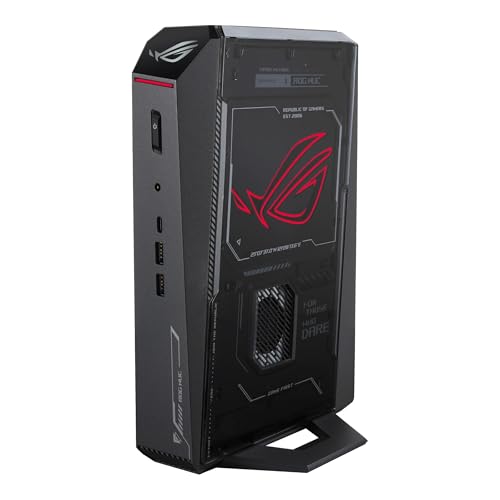
- Best overall mini gaming PC: ASUS ROG NUC (2025), Core Ultra 9 275HX, RTX 5070 Laptop GPU, 32GB, 1TB — Check on Amazon
- Cooler Master NR2 Pro, Ryzen 7 9800X3D, desktop RTX 5070 Ti 16GB, 32GB, 2TB — Check on Amazon
- MINISFORUM AtomMan G7 Pro, Core i9-14900HX, RTX 5070 Laptop GPU — Check on Amazon
- MINISFORUM AtomMan G7 Ti, Core i9-14900HX, RTX 4070 Laptop GPU 140W, 32GB, 1TB — Check on Amazon
See 2 more Amazon options
- HP OMEN 16L TG03, Core i7-14700F, desktop RTX 5060 Ti 16GB, 32GB, 2TB — Check on Amazon
- MINISFORUM AtomMan G7 Pt, Ryzen 9 7945HX, RX 7600M XT, 32GB, 1TB — Check on Amazon
Read the full guide ↓
Disclosure: As an Amazon Associate, reviewstook.com earns from qualifying purchases. Links to Amazon on this page are affiliate links; they cost you nothing extra. Listing details such as price and availability change often, so check the current Amazon listing before you buy.
If this is your first gaming PC, start with the sentence nobody selling mini PCs wants to say out loud: $3,000 is the top of this category, and even the top cannot buy what the same money buys in a normal tower. No small box with a desktop RTX 5080 exists near this budget: the one true small-form-factor desktop-5080 machine that could be verified, Zotac’s Magnus One Ultra at about 11.5 liters, sits well above this budget — check the current price on Amazon. The strongest version of the flagship pick below, an ROG NUC with an RTX 5080 Laptop GPU, also sits above this budget. Complete RTX 5090 systems sit well above this budget as well. Meanwhile, full-size towers carrying a genuine desktop RTX 5080 can fall within reach of this budget on deal — check the current price on Amazon. In a mini, a large share of your money buys the smallness itself. That is a fair trade when smallness is what you want — it is only a bad one when you pay it by accident.
So this guide explains every technical word in plain English, with a glossary below, before the reviews. One lesson matters more than all the others, so here it is early: when a mini PC says “RTX 5070 Laptop GPU,” the word Laptop is part of the product’s name, not a footnote. It is a chip built for laptops, with laptop power limits and 8GB of graphics memory, where the desktop card with the same number carries 12GB. Four of the six machines below use laptop chips, and they are good machines — as long as you know that is what you are buying. Below you will find a step-by-step first-evening walkthrough, a list of what else you will spend on, and the checks to run in week one, while returns are still easy. And one honest spoiler: most beginners should buy the G7 Ti pick below, keep a large share of the budget for a monitor and games, and never think about this page again.
In this guide
Quick Picks
Short on time? Each row names a buyer type and the machine that suits it, with a link to the listing.
| Buyer type | Pick | Why it stands out | Link |
|---|---|---|---|
| Best overall mini gaming PC | ASUS ROG NUC (2025), RTX 5070 Laptop GPU | The flagship in the smallest box: about 3 liters, a 24-core processor, sold by ASUS itself | Check on Amazon |
| Best desktop graphics in a small box | Cooler Master NR2 Pro, desktop RTX 5070 Ti | A genuine desktop 5070 Ti with 16GB in an 18.25-liter mini-ITX case — no laptop chip | Check on Amazon |
| Best value flagship mini | MINISFORUM AtomMan G7 Pro, RTX 5070 Laptop GPU | The flagship’s graphics class for notably less, in its ready-to-use version — check price on Amazon | Check on Amazon |
| Best under $1,500 | MINISFORUM AtomMan G7 Ti, RTX 4070 Laptop GPU | The full-power 140W version of its chip in about 2.55 liters, in its ready-to-use version — check price on Amazon | Check on Amazon |
| Best desktop-GPU value | HP OMEN 16L TG03, desktop RTX 5060 Ti 16GB | 16 liters, a real desktop card with 16GB, positioned in the lower part of this budget — check price on Amazon | Check on Amazon |
| Best for CPU-heavy work and play | MINISFORUM AtomMan G7 Pt, RX 7600M XT | A 16-core Ryzen 9 in about 2.5 liters, in its ready-to-use version at the value end of this guide — check price on Amazon | Check on Amazon |
How These Picks Were Chosen
The budget was treated as the ceiling for a finished computer — one you can unbox, plug in and play on. Every pick is a real Amazon listing positioned at, or regularly within, the $3,000 budget in the United States. Prices change often, so check the current price on Amazon before you buy rather than relying on any fixed figure.
Three of the six listings need a warning that runs through the whole guide. Some Amazon listings are families: one page, several versions of the machine, chosen from a style menu. On the Minisforum pages, ready-to-use and barebone versions (a barebone arrives without memory, storage or Windows) share one page. For those picks, the review focuses on the ready-to-use version, describes the cost of completing a barebone in qualitative terms where it matters, and tells you which version to confirm before ordering. Nowhere here is a barebone version presented as a finished PC.
We did not use these machines ourselves. The picks come from the makers’ listings and specification pages and independent coverage, comparing what decides a mini purchase: size in liters, exactly which graphics chip is inside and how much power it may use, memory and storage and whether either can grow, cooling, and who sells it. One test was applied to every pick: read the graphics chip’s full name, including “Laptop” or “M,” and judge the machine against what the same money buys in a tower. The difference is the size premium: never hidden below, only explained.
The Words on the Box, in Plain English
Thirteen terms explain nearly everything on these listings. Skim them now and the reviews will read like ordinary sentences.
- Graphics card (GPU): the part that draws your games — the single most important part in a gaming PC, and where most of your money goes.
- Laptop GPU: a graphics chip designed for laptops, squeezed into a small desktop box. It shares a name with a bigger desktop card but runs on less power and is slower: “RTX 5070 Laptop GPU” and “RTX 5070” are different products.
- VRAM (graphics memory): memory living on the graphics chip, holding the game’s pictures. More is better at higher resolutions: the laptop chips here carry 8GB, the two desktop cards 16GB — one reason the desktop picks may age better.
- Processor (CPU): the part that thinks: it runs the game itself, Windows and everything else. Its “cores” are parallel workers — more cores help heavy work and multitasking more than most games.
- RAM (memory): the computer’s working desk space, separate from storage. 32GB is comfortable for gaming plus open apps, and in these minis it can often grow later.
- SSD (storage): the drive games are installed on. 1TB sounds large and fills faster than beginners expect; 2TB is breathing room.
- Barebone: a box sold without RAM, an SSD or Windows — you buy and fit those yourself. Plainly for this set: the G7 Pro’s Amazon listing is literally titled as a barebone version, and the G7 Ti and G7 Pt pages mix barebone and ready-to-use versions under one listing. The other three picks arrive complete.
- Configured (ready-to-use): the opposite of barebone: memory, storage and Windows already fitted. This is the version a beginner should buy — and on the Minisforum pages, a style you must actively select and confirm.
- Soldered: attached permanently at the factory; it can never be removed or upgraded. Plainly for this set: the graphics chips in the four small minis (the ROG NUC and the three Minisforum machines) are soldered — the graphics you buy is the graphics you keep.
- SO-DIMM: the small laptop-style memory sticks these minis use — when a review says RAM can grow to 96GB, this is the slot it grows in.
- Refresh rate (Hz): how many times per second a monitor redraws the picture. A fast monitor left at its default often shows only 60 — the walkthrough includes the one-minute fix.
- Upscaling (DLSS / FSR): software that draws the game at a lower resolution and rebuilds it to look higher. It is how laptop chips deliver smooth 1440p play, and every pick here leans on it.
- Renewed: second-hand equipment refurbished and resold. Plainly for this set: none of the six picks is renewed — all are sold new. What varies is who is selling and which version is selected.
The 6 Best Mini Gaming PCs Under $3,000
ASUS ROG NUC (2025) — Core Ultra 9 275HX, RTX 5070 Laptop GPU, 32GB, 1TB
Who it suits: The beginner who wants the best version of the mini idea itself — the smallest serious gaming box from a famous brand, bought from the maker’s own shop, small enough to disappear behind a monitor.
Think of this as the ceiling of the small-PC world, and be clear about what the ceiling looks like. The box measures roughly 11.1 × 7.4 × 2.2 inches — about three liters, the footprint of a hardback book standing upright. Inside are a 24-core Core Ultra 9 275HX processor, an RTX 5070 Laptop GPU with 8GB of graphics memory, 32GB of fast DDR5-6400 RAM and a 1TB SSD, kept cool by three fans and powered by an external adapter you will also need to house. Its connections are the best in this guide — two Thunderbolt 4 ports, a full row of USB, Ethernet and five display outputs in total — so it doubles as a tidy desk hub. For gaming, the honest description: the laptop 5070 is a strong chip for high settings at 1440p, with upscaling helping in modern games. It is not a 4K chip, nor the equal of the 12GB desktop card sharing its name — but at three liters, nothing else verified for this guide gets closer to desktop pace.
The buying rule for this pick is the strictest in the guide, and it is about the seller, not the machine. Buy it from ASUS itself — check price on Amazon — rather than from a third-party seller on the same listing. Other sellers on the very same listing have been recorded asking substantially more for the identical box. So: buy it sold by ASUS at a price in line with ASUS’s own offer, or do not buy it from this listing at all. If the 1TB drive worries you — a growing library should — consider the 2TB version instead and check the current price on Amazon. Owners’ reports on this machine are genuinely split — happy owners alongside units that arrived dead or failed early. That is not a reason to avoid it; it is a reason to buy from the maker’s storefront and use it hard in its first week, as the walkthrough describes.
- About 3 liters — the smallest box in this guide with hardware this strong inside.
- A 24-core processor and DDR5-6400 memory: nothing except the graphics chip is a compromise.
- Two Thunderbolt 4 ports and five display outputs — the best connections of any pick.
Honest limitation: The graphics chip is a laptop part with 8GB of memory, soldered in place — it is the machine’s permanent graphics ceiling — and third-party sellers on this listing have been seen asking substantially over ASUS’s own price.
Choose it if the three-liter size is the whole point and you will buy it from ASUS — check price on Amazon. Skip it if the listing in front of you is a marked-up third-party offer, or if graphics power for the money matters more than size — the NR2 Pro below carries a desktop card in a similar part of the budget.

Cooler Master NR2 Pro — Ryzen 7 9800X3D, Desktop RTX 5070 Ti 16GB, 32GB, 2TB
Who it suits: The beginner whose first question is “how well will it play games?” and whose second is “will it fit?” — and who likes that a PC can be upgraded and repaired like an ordinary computer — because this one can.
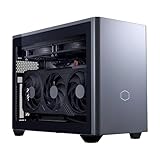
This machine takes the opposite approach to the ROG NUC in almost every respect. It is built in Cooler Master’s NR200P Max case, which at 18.25 liters is honestly the large end of “mini” — a small desktop, not a hide-it-away box. Inside sit a Ryzen 7 9800X3D processor and the important part: a genuine desktop GeForce RTX 5070 Ti with 16GB of graphics memory, made by Gigabyte. No translation needed for tower buyers. This card plays games at native 1440p at high refresh rates and reaches into 4K with upscaling, and it carries twice the graphics memory of the laptop chip in the flagship pick. The supporting parts are equally grown-up: 32GB of DDR5-6000 RAM, a roomy 2TB drive, a named 850W SFX Gold power supply, a custom 280mm liquid radiator, and a standard Gigabyte mini-ITX motherboard. Every component is an ordinary retail part that can later be replaced, upgraded or moved to a new case — no other pick in this guide can say that.
Its price is a waiting game, and pretending otherwise would be dishonest. This system’s price moves widely, and at the top of that swing it can sit over this budget entirely — check the current price on Amazon. The rule is printed on the pick: buy it when it sits in its deal band in the upper part of this budget, and walk away at its peak. Two ownership notes from coverage of this exact system are worth knowing in advance: its fan noise is described as reasonable rather than silent — high-end hardware working hard in 18 liters is audible, and no machine at this power level is a library PC — and there are isolated reports of a front USB-C port dead on arrival and a graphics-card riser cable that needed reseating after shipping. Both are five-minute first-evening checks, covered in the walkthrough.
- A real desktop RTX 5070 Ti with 16GB — the strongest graphics in this guide, with no laptop asterisk.
- 9800X3D processor, 32GB of RAM, 2TB of storage and a named 850W power supply: nothing underneath is undersized.
- Built entirely from standard parts — the only pick here a beginner can grow into instead of out of.
Honest limitation: At 18.25 liters it is six times the ROG NUC’s volume, and its price swings widely; at the top of that swing it is neither within budget nor good value — check price on Amazon.
Choose it if graphics power comes first and your space can take 18 liters. Skip it if the current price on Amazon is near its peak — wait for the deal band — or if the machine truly has to vanish onto a desk corner or behind a monitor.
MINISFORUM AtomMan G7 Pro — Core i9-14900HX, RTX 5070 Laptop GPU
Who it suits: The beginner who wants the flagship’s kind of graphics for far less money, and who is willing to do one careful check on the listing before ordering — because this pick rewards careful buyers and punishes hasty ones.
The G7 Pro is the value argument against the ROG NUC. Its Core i9-14900HX is a 24-core laptop flagship processor, its graphics are the same class of chip as the flagship’s — an RTX 5070 Laptop GPU with 8GB — and the ready-to-use 32GB/1TB version sits notably below the ASUS flagship in this budget for the same graphics class in a similarly tiny box — check price on Amazon. The engineering around the chip is thorough: six heat pipes and two fans, two memory slots that can grow to 96GB, two SSD slots, HDMI 2.1, USB4 and WiFi 7. That memory growth deserves attention, because it is the one real upgrade path any true mini here offers: the graphics chip is soldered and permanent, as in every mini in this guide, but memory and storage can grow with you.
Now the discipline this listing demands, in the plainest possible words. The Amazon listing for this machine is titled as the barebone version — without storage or an operating system — while some copies of the same listing elsewhere describe a ready-to-use unit. The barebone sits lower in the tier than the ready-to-use version. These are two different products sharing one listing family, and the gap between them is not pocket change: finishing a barebone means a 32GB laptop-memory kit — a substantial extra cost during the late-2026 memory shortage — plus an SSD and a Windows licence. Added up, the “cheaper” barebone can cost more than the ready-to-use version — ready-to-use is the rational buy unless you already own the parts. Before ordering, confirm on the live listing that the version selected includes memory, an SSD and Windows, and price the machine you are actually getting.
- The flagship’s graphics class in ready-to-use form, positioned well below the flagship in this budget — check price on Amazon.
- Memory expandable to 96GB across two slots — rare growing room in a true mini.
- Six heat pipes and dual fans: cooling built for a laptop flagship chip working at full stretch.
Honest limitation: The Amazon listing mixes barebone and ready-to-use versions under one family, and completing the barebone at current memory prices erases its apparent saving; support comes from a specialist maker, not a global brand.
Choose it if you want flagship-mini graphics for mid-tier money and will verify the ready-to-use version before checkout. Skip it if you need the machine to arrive completely unambiguous with a big brand behind it — that certainty is what the ROG NUC’s premium buys.

MINISFORUM AtomMan G7 Ti — Core i9-14900HX, RTX 4070 Laptop GPU (140W), 32GB, 1TB
Who it suits: Most beginners reading this guide, honestly: someone who wants a genuinely fast mini, suspects the top of the budget is poor value, and would rather keep a large share of the budget for the monitor and games.
The G7 Ti was the flagship of Minisforum’s G7 line before the Pro arrived, and at its position in this budget, it is the sweet spot of this whole guide. Its graphics chip is an RTX 4070 Laptop GPU run at its full 140W power limit. That wattage matters more than it looks: laptop chips are sold across a wide power range, and a 140W 4070 is the chip complete, not the weakened variant fitted to thin laptops. It carries 8GB of graphics memory, and with the same 24-core i9-14900HX processor as its newer sibling it is an honest high-settings 1440p machine with upscaling, in a box of about 2.55 liters. Check the current price on Amazon for the ready-to-use 32GB/1TB version. Barebone versions sit lower in the tier, but the G7 Pro’s completion warning applies in full — ready-to-use is again the sensible purchase. Two memory slots up to 96GB and two SSD slots give it the same growing room as its sibling.
What you give up against the two picks above it is one generation: the 4070 Laptop chip is a step behind the 5070 Laptop in efficiency and features, and a clear step behind the NR2 Pro’s desktop 5070 Ti in speed and memory. What you get back is a large saving against the ROG NUC flagship — and a machine that, for the large majority of players and games, delivers the same experience at the same settings on the same monitor. This pick proves the guide’s closing argument: the last stretch of mini budget buys the least performance, and the curve bends right here. The shared-listing caution applies to this pick too — its page belongs to a family that mixes barebone and ready-to-use versions, so confirm the 32GB/1TB ready-to-use version is the one in your cart.
- An RTX 4070 Laptop GPU at its full 140W — the chip complete, not a cut-down variant.
- Ready-to-use 32GB/1TB positioned under half the budget: flagship-mini pace for notably less — check price on Amazon.
- About 2.55 liters, with memory and storage both expandable after purchase.
Honest limitation: A generation behind the 5070 machines, with the same 8GB graphics-memory ceiling and a soldered graphics chip; the listing family mixes barebone and ready-to-use versions.
Choose it if you want more gaming per dollar than any other pick here. Skip it if current-generation features are the point, or you want a desktop card — look at the G7 Pro and the NR2 Pro instead.

HP OMEN 16L TG03 — Core i7-14700F, Desktop RTX 5060 Ti 16GB, 32GB, 2TB
Who it suits: The beginner who wants a real desktop graphics card and a big brand’s support in the smallest case a mainstream maker sells — and who will shop the version carefully, because this pick has a trap built into its own range.
The OMEN 16L is exactly what the name says: a 16-liter desktop. Inside is the thing no true mini in this guide can offer in this part of the budget — a desktop GeForce RTX 5060 Ti with 16GB of graphics memory. That memory figure is the headline, and here is why in plain terms: at 1440p, 16GB is the difference between a card that holds its settings as games grow and an 8GB card that starts trading away picture quality within a couple of years. It is why this machine, with a humbler-sounding graphics number than the laptop 5070s above it, may age better than either for gaming. The version documented here pairs the card with a Core i7-14700F processor, 32GB of RAM and a 2TB SSD. Independent coverage of Amazon’s OMEN 16L range positions the 5060 Ti 16GB builds in the lower part of this budget, which makes this the cheapest route in the guide to a desktop card with a full memory complement. The family spans a wide range — check the current price on Amazon for the exact version before ordering.
Two cautions come with this pick, and both concern how Amazon sells it rather than how HP builds it. First, the version trap: the OMEN 16L is also sold with an 8GB version of the 5060 Ti — a materially weaker card for the years ahead — sometimes at a deceptively small discount. The 16GB in the name is the entire reason for this pick; if the listing in front of you says 8GB, it is a different machine wearing this one’s name. Second, the seller question: coverage of Amazon’s OMEN 16L bundles notes that some units are opened and upgraded by resellers before sale, with the upgraded memory and SSD covered by the seller’s warranty rather than HP’s. A factory-sealed HP unit and a bundle a reseller has opened and upgraded are not the same purchase. Check who is selling, what they changed, and whose warranty covers which parts — if the answers are murky, a factory version is the better buy. One setup fact belongs in this review because beginners trip on it: the processor’s name ends in F, which means it has no graphics of its own, so the monitor cable must go into the graphics card’s sockets — the motherboard’s sockets will show you a black screen. The walkthrough below repeats it at the right moment.
- Desktop RTX 5060 Ti with 16GB — memory headroom no 8GB laptop chip here can match.
- A 16-liter case from a household-name maker, with that maker’s support behind the parts it fitted.
- Positioned in the lower part of this budget — the cheapest route here to a genuine desktop card; check price on Amazon.
Honest limitation: It is a small desktop, not a mini — it will not hide behind a monitor — and Amazon’s range mixes 8GB-card versions and reseller-upgraded bundles with split warranties.
Choose it if a desktop card and 16GB of memory outrank the last word in smallness. Skip it if the footprint must be truly mini, or the listing’s seller and version cannot be verified as factory HP with the 16GB card.

MINISFORUM AtomMan G7 Pt — Ryzen 9 7945HX, RX 7600M XT, 32GB, 1TB
Who it suits: The beginner whose computer also has a day job — compiling, rendering, virtual machines, heavy multitasking — and who wants a desktop-class 16-core processor in a box the size of a paperback, with gaming as the second shift.
The G7 Pt turns the usual mini formula upside down: instead of a modest processor hiding behind a gaming badge, it puts a Ryzen 9 7945HX — sixteen cores from AMD’s desktop-replacement class — into about two and a half liters, as the first AMD Advantage-certified mini PC. The graphics are a Radeon RX 7600M XT — and the M means mobile. It is an 8GB laptop graphics chip rated up to 120W — capable at 1080p and at entry-level 1440p with upscaling — and it is not the desktop RX 7600 XT, which carries twice the memory. On those terms the balance makes sense for its buyer: the processor is the strongest in this guide for sustained heavy work, the graphics handle mainstream gaming at the resolutions their memory supports, and the platform around them — two memory slots up to 96GB, one very fast PCIe 5.0 SSD slot and one PCIe 4.0 slot — is built to be kept and expanded for years.
Its position in the budget completes the argument. The ready-to-use 32GB/1TB version sits at the value end of this guide — the lowest-positioned pick here — check price on Amazon; Minisforum’s own store also lists the same version, and the barebone sits lower still (subject to this guide’s standing completion warning: ready-to-use is the buy). At roughly a third of the budget, the G7 Pt is the clearest proof that $3,000 is not a price the mini category can honestly absorb: this machine plus a good 1440p monitor, a mechanical keyboard and a year of games can cost less than the flagship pick alone — and for a buyer whose work is processor-heavy, it may simply be the best machine here at any position in this budget. The listing-family caution applies as it does to its G7 siblings: confirm the ready-to-use version on the live listing before ordering.
- 16-core Ryzen 9 7945HX — the strongest sustained heavy-work processor in this guide.
- Ready-to-use 32GB/1TB at the value end of this guide — the lowest-positioned pick here by a wide margin; check price on Amazon.
- A very fast PCIe 5.0 storage slot and a 96GB memory ceiling: a platform with years of headroom.
Honest limitation: The RX 7600M XT is a mobile 8GB graphics chip — the weakest graphics in this guide — so this is a processor-first machine, and 4K or high-refresh 1440p gaming is beyond it.
Choose it if your work is processor-heavy and your gaming is mainstream. Skip it if gaming comes first — all five other picks carry stronger graphics for it.

Comparison Table
| Product | Graphics (named in full) | Size | Best use | Link |
|---|---|---|---|---|
| ASUS ROG NUC (2025) | RTX 5070 Laptop GPU, 8GB | ~3L | The flagship true mini, bought from ASUS itself | Check on Amazon |
| Cooler Master NR2 Pro | Desktop RTX 5070 Ti, 16GB | 18.25L | Desktop graphics and real upgrades in mini-ITX form | Check on Amazon |
| MINISFORUM AtomMan G7 Pro | RTX 5070 Laptop GPU, 8GB | Tiny desktop footprint | Flagship-mini graphics for notably less — check price on Amazon | Check on Amazon |
| MINISFORUM AtomMan G7 Ti | RTX 4070 Laptop GPU, 8GB, 140W | ~2.55L | The value sweet spot under $1,500 | Check on Amazon |
| HP OMEN 16L TG03 | Desktop RTX 5060 Ti, 16GB | 16L | Desktop card and memory headroom, big-brand support | Check on Amazon |
| MINISFORUM AtomMan G7 Pt | RX 7600M XT (mobile), 8GB | ~2.5L | 16-core processor power for work-first buyers | Check on Amazon |
Your First Evening: Setup, Step by Step
None of this is difficult, and the order matters more than any single step. Budget an unhurried hour, plus update time.
- Placement first. Decide where the machine lives before you plug anything in. Every pick here cools itself with fans and needs open air around it — a desk, a shelf, behind a monitor — never sealed inside a closed TV cabinet, where small fans suffocate and the machine slows itself to survive. And remember the sizes: the four small minis hide almost anywhere, but the NR2 Pro (18.25 liters) and the OMEN (16 liters) are small desktops needing real desk or floor space.
- Power. Connect the power supply and switch on at the wall. The small minis use external power adapters — the ROG NUC’s is a substantial 330W brick — and that brick is part of the footprint: give it a ventilated spot on the floor or desk, not buried in a cable box. A first boot can be slow; judge nothing yet.
- Monitor into the graphics card’s ports — not the motherboard’s. On the four small minis, every display socket on the box is the right one — plug in and go. On the NR2 Pro, use the row of sockets belonging to the graphics card, low on the back panel, not the motherboard’s sockets higher up. On the HP OMEN 16L the rule is absolute: its processor’s name ends in F, which means it has no graphics of its own, so the motherboard’s display sockets are dead — plug into them and you will stare at a black screen and conclude the PC is broken — it is not; the cable is simply in the wrong hole.
- Peripherals and wired internet. Plug in keyboard and mouse. Then, if you possibly can, connect an Ethernet cable for the first evening, even if the machine will live on Wi-Fi afterwards: the next step’s updates are large, and a cable makes them faster and far less likely to stall.
- Windows Update, then the graphics driver. Work through Windows’ first-run questions, then open Settings → Windows Update and run it, restart, and run it again — new machines typically need several rounds. Afterwards, install the graphics maker’s own driver app (NVIDIA’s for the GeForce picks, AMD’s for the G7 Pt) and let it bring the driver current. If a Minisforum machine boots to a bare setup screen instead of Windows, stop: you have been sent the barebone version, and that is a returns conversation, not a setup step.
- Set the monitor’s real refresh rate. Windows often leaves a fast monitor running at 60Hz, quietly throwing away the smoothness you paid for. Go to Settings → System → Display → Advanced display and choose the highest refresh rate your monitor offers. One minute, once, forever.
- Verify that what arrived is what you ordered. Check the model number on the box against your order. Open Task Manager → Performance → GPU and confirm the graphics name and memory: the OMEN must say 16GB, not 8GB; the Minisforum machines must show the memory and storage of the ready-to-use version, with Windows installed. On the NR2 Pro, plug something into the front USB-C port and play a game for twenty minutes — coverage of this system recorded one dead front port and one graphics riser cable loosened by shipping, and both are first-week discoveries. On the ROG NUC, simply use it hard for a few evenings. Anything wrong found now is a painless return; found in month three, it is a warranty claim.
- Install a game store. Last, install the store you will buy from — Steam is the usual first — sign in, and download one game you own or a free one. Set it to use the machine’s full graphics hardware, start at 1440p or 1080p with upscaling on for the laptop-chip picks, and play. You are done.
What Else You Will Spend
The PC is not the whole purchase, and beginners deserve the rest of the list up front. A monitor comes first — before a fancy keyboard, before anything decorative. These machines are built for 1440p play, so a 1440p monitor is the partner that makes sense; pairing a flagship mini with an old 1080p screen is the most common way this budget gets wasted. Treat monitor and peripherals as their own shopping trip.
Two catches are priced as what they are: a machine plus a fix, never folded into a pick’s price. The first is the barebone trap. If you choose a barebone version of a Minisforum machine, the completion basket is real money: a 32GB laptop-memory kit is a substantial extra cost during the late-2026 memory shortage, plus an SSD and a Windows licence on top. Considered honestly, machine-plus-parts is why the ready-to-use versions win for beginners. The second is storage growth: the 1TB picks (the ROG NUC and the Minisforum machines) fill quickly with modern game installs, and a second or larger SSD later is a normal, planned expense — every Minisforum pick has a second slot waiting. A keyboard, mouse and headset are the remaining ordinary costs — every pick assumes you own them or budget for them separately.
Upgrades, in Plain Terms
Here is the sentence that should shape which pick you buy: in the four small minis, the graphics chip is soldered, and a graphics upgrade does not exist — not expensive, not difficult, nonexistent. What can grow in the Minisforum machines is memory (to 96GB, in the slots the glossary described) and storage (a second SSD). The ROG NUC is bought as a finished configuration. The OMEN 16L is a desktop, but its listing documents no power-supply specification to promise against, so no graphics-swap promise is made for it here either: treat its card as the card you keep.
There is exactly one exception, and it is much of what its price buys. The NR2 Pro is assembled from standard parts around a named 850W SFX Gold power supply in a standard mini-ITX case, so a graphics-card swap in the future is a normal weekend job with ordinary parts — the only pick in this guide for which that promise can honestly be made. If upgrading the graphics in three years is part of your plan, your shortlist is one machine long — the biggest box here. That is not a flaw in the minis; it is the definition of their trade.
How to Choose a Mini Gaming PC Under $3,000
- Decide what “mini” means before you look at prices. These six picks run from 2.5 to 18.25 liters — one word, “mini,” covering a sevenfold difference. Measure your space: a three-liter box hides behind a monitor; a 16-to-18-liter case is a small desktop that sits on the desk, in view. Buy the volume you measured, not the adjective.
- Read the graphics badge like a lawyer. “Laptop GPU” or an M in the name means a mobile chip: tighter power limits than the desktop card, and often less memory — 8GB against the desktop 5070’s 12GB, 8GB against the desktop 7600 XT’s 16GB. Judge each mini by the chip’s full name and its wattage; the number alone will mislead you.
- Treat 8GB of graphics memory as a planning decision. Five of these six machines carry 8GB. At 1080p and much of 1440p that works today with sensible settings; it is the first specification that will age. If you keep machines for five years, the two 16GB desktop-card picks deserve more weight in your decision than their graphics numbers alone would earn.
- Price the machine you are actually getting. On shared Minisforum listings, barebone and ready-to-use versions sit under one family. A barebone needs memory, storage and an operating system; a 32GB laptop-memory kit alone is a substantial extra cost. Add the completion cost before comparing anything — check price on Amazon for the version you are actually getting.
- Buy the seller, not just the listing. The flagship is sold by ASUS itself, yet third parties on the same page have been recorded asking substantially more — check the current price on Amazon and who is selling it. OMEN bundles may be reseller-upgraded with split warranties. In this category, the seller and the version are part of the specification.
- Plan for heat and noise honestly. Small fans working hard are audible, and every pick here needs open air rather than a closed cabinet.
- Keep the change. The evidence gathered for this guide says the mini curve flattens early — the G7 Ti delivers most of what the flagship does. Unless that last increment of size or silicon is exactly what you came for, the share of the budget you do not spend will do more work in a monitor, peripherals and games than inside the box.
Common Buying Mistakes
- Seeing “RTX 5070” on a mini and valuing it like the desktop card. The laptop chip runs on mobile power limits with 8GB; the desktop card carries 12GB. The number matches; the product does not.
- Paying a third-party markup on the flagship listing — third-party sellers on the ROG NUC listing have been recorded asking substantially over ASUS’s own price. At that kind of markup you are not buying a premium product; you are volunteering to fund a pricing error — check price on Amazon and buy from ASUS itself.
- Ordering a barebone version from a shared listing and discovering the memory, SSD and operating system are your problem — with a 32GB memory kit a substantial extra cost, the “cheaper” version is often the dearer machine.
- Saving a little by taking the OMEN 16L with the 8GB card — and surrendering the 16GB that was the whole reason for choosing it.
- Plugging the monitor into the motherboard’s sockets on the OMEN — its F-suffix processor has no graphics, so the screen stays black — or into the motherboard row on the NR2 Pro, and concluding the new PC is faulty.
- Blowing the entire $3,000 on the box and leaving a flagship mini plugged into a tired 1080p monitor. The half of the budget you keep back is what buys the display the machine deserves.
- Assuming a mini can be upgraded later the way a tower can. In every true mini here the graphics are soldered in; memory and storage are all that can grow. Buy graphics you intend to keep.
- Sealing a two-liter machine in a closed TV cabinet and blaming the hardware for slowing down. Small fans need open air more, not less.
- Skipping the first-week checks on a category with divided owner reports. A unit that arrives dead or fails early is only an easy return if you discover it while the window is open.
Final Recommendation
- Most buyers reading this guide: MINISFORUM AtomMan G7 Ti — most of the flagship experience for notably less, leaving a large share of the budget for everything around it; check price on Amazon.
- The flagship true mini — from ASUS itself, and only on those terms: ASUS ROG NUC (2025).
- Desktop graphics, no tower: Cooler Master NR2 Pro — buy it in its deal band.
- Same graphics class as the flagship, less money: MINISFORUM AtomMan G7 Pro, ready-to-use version confirmed.
- Desktop card, 16GB, big-brand support: HP OMEN 16L TG03, factory version.
- Processor-first workers who game: MINISFORUM AtomMan G7 Pt.
Our two headline picks are the G7 Ti — it captures most of what this category offers for under half the ceiling — and the ROG NUC, which for a buyer who truly needs the smallest serious gaming box from a major maker has no verified equal, so long as it is bought from ASUS itself without a third-party markup beyond it — check the current price on Amazon. Together they frame the whole decision. Value in this market peaks early; the flagship is a luxury, to be bought deliberately, with your eyes open about the laptop silicon inside. Beginners who conclude the flagship money is better spent lower should see Best Mini Gaming PC Under $1500; those learning at a gentler price should see Best Mini Gaming PC For Beginners Under $1500; and those who decide size was negotiable after all should see what the same money does in a tower in Best Gaming PC Under $3000. Confirm the version and seller on the live listing, run the first-week checks, and check the live price before ordering.
Frequently Asked Questions
Can I get a mini gaming PC with an RTX 5080 or 5090 for under $3,000?
No — and this is verified, not assumed. The ROG NUC’s RTX 5080 Laptop GPU version sits above this budget; the one verified small-form-factor desktop-5080 machine, Zotac’s Magnus One Ultra, sits well above this budget; complete RTX 5090 systems sit well above this budget as well. At $3,000, that class of graphics lives only in towers — check the current price on Amazon for any tower you consider.
What do I actually give up with a “Laptop GPU”?
A laptop GPU is a chip built for laptops: it is allowed less power than the desktop card sharing its name and, in this generation, it carries less memory — 8GB in the RTX 5070 Laptop GPU against the desktop 5070’s 12GB, and 8GB in the RX 7600M XT against the desktop 7600 XT’s 16GB. In practice these machines are strong 1440p performers in modern titles with upscaling switched on. What they are not is a match for the desktop cards they are named after, and they should never be priced as though they were.
Should I buy a barebone version and finish it myself?
Only if you already own the parts. Barebone versions of the G7 machines exclude memory, storage and an operating system, and during the late-2026 memory shortage a 32GB laptop-memory kit is a substantial extra cost — before an SSD and a Windows licence. On that basis the ready-to-use G7 Ti and G7 Pro versions are the sensible buy rather than completing the barebones yourself — check the current price on Amazon. If component prices fall, or your parts drawer is already full, the balance can reverse — check live prices before you decide.
Can I upgrade a mini gaming PC later?
Memory and storage, yes — the Minisforum machines take up to 96GB across two slots and carry two SSD slots. Graphics, no: in every true mini in this guide the graphics chip is soldered to the board and is the machine’s permanent ceiling. The exception is the NR2 Pro, which is built from standard mini-ITX parts around a replaceable desktop card and a named 850W power supply — that upgradability is much of what its size and price buy.
Is $3,000 a sensible budget for a first mini gaming PC?
For most beginners, no — and the guide’s picks are the evidence. Value in this category peaks in the lower and middle parts of this budget. The G7 Pt, the G7 Ti and the G7 Pro cover the realistic spread — check price on Amazon for each; the flagship ROG NUC buys polish and a badge rather than a new tier of speed. Spend up to $3,000 only when the flagship itself is the object — otherwise the difference does more good in the monitor and peripherals you will use with the machine.
How loud is a three-liter gaming PC?
You will hear it under load — budget for that expectation rather than a silent one. The larger picks move more air, more slowly — coverage of the NR2 Pro calls its noise reasonable rather than silent — and the true minis do best with open air and a little distance from the listener.
At this budget, should I just buy a tower instead?
By naming the thing you are actually buying. If the answer is graphics performance, the tower wins at every price in this guide, and not narrowly — desktop 5080 systems can fall within this budget — check the current price on Amazon. If it is the space, the tidy desk, the ability to carry the machine or mount it away — the mini is the product, its premium is the price of that product, and it is best paid at this guide’s value end. The only real mistake is paying that premium by accident, believing it bought performance.


