Where to buy
Check the latest price, availability and delivery on Amazon. Orders are placed on Amazon. We may earn a commission from qualifying purchases.
- Best overall mini gaming PC: ASUS ROG NUC (2025), Core Ultra 9 275HX, RTX 5070 Laptop GPU, 32GB, 1TB — Check on Amazon
- Cooler Master NR2 Pro, Ryzen 7 9800X3D, desktop RTX 5070 Ti 16GB, 32GB, 2TB — Check on Amazon
- MINISFORUM AtomMan G7 Pro, Core i9-14900HX, RTX 5070 Laptop GPU — Check on Amazon
- MINISFORUM AtomMan G7 Ti, Core i9-14900HX, RTX 4070 Laptop GPU 140W, 32GB, 1TB — Check on Amazon
See 2 more Amazon options
- HP OMEN 16L TG03, Core i7-14700F, desktop RTX 5060 Ti 16GB, 32GB, 2TB — Check on Amazon
- MINISFORUM AtomMan G7 Pt, Ryzen 9 7945HX, RX 7600M XT, 32GB, 1TB — Check on Amazon
Read the full guide ↓
Disclosure: As an Amazon Associate, reviewstook.com earns from qualifying purchases. Links to Amazon on this page are affiliate links; they cost you nothing extra. Listing details such as price and availability change often, so check the current Amazon listing before you buy.
Three thousand dollars is flagship money, and the first thing a mini PC buyer has to hear is what it does not buy in a small box. There is no mini gaming PC with a desktop RTX 5080 anywhere near this budget: the one true small-form-factor desktop-5080 machine we could verify, Zotac’s Magnus One Ultra at about 11.5 liters, sits well above this budget. The strongest configuration of the flagship mini in this guide, ASUS’s ROG NUC with an RTX 5080 Laptop GPU, also sits above this budget — over budget before you add a monitor. And there is no RTX 5090 system of any shape near $3,000; complete 5090 systems sit well above this budget. Meanwhile, full-size towers with a genuine desktop RTX 5080 have appeared within this budget on deal. That is the honest shape of this category at $3,000: towers spend the money on graphics silicon, minis spend a large share of it on the absence of size.
What the money does buy, spent well, is the top of the real mini market: a three-liter flagship with a laptop-class RTX 5070, mini-ITX builds carrying a genuine desktop RTX 5070 Ti, and a run of two-and-a-half-liter machines with full-power laptop GPUs that cost half the budget and leave the rest for a monitor, a desk and games. Every GPU in this guide is named exactly as its maker names it — Laptop GPU means the mobile part, with mobile power limits and, in the 5070’s case, 8GB of memory — because the single most expensive misunderstanding in this category is paying desktop money for a badge that quietly belongs to a laptop chip. Below are the quick picks, detailed reviews of all six machines, a comparison table, the verified ceiling of the category, the size premium priced pick by pick, a buying checklist, the mistakes that waste money at this tier, and the questions mini buyers ask before they commit.
In this guide
Quick Picks
Short on time, or comparing several options at once? Each row below names a buyer type and the machine that suits it, with a link to the listing.
| Buyer type | Pick | Why it stands out | Link |
|---|---|---|---|
| Best overall mini gaming PC | ASUS ROG NUC (2025), RTX 5070 Laptop GPU | The flagship true mini: about 3 liters, 24-core CPU, sold by ASUS itself | Check on Amazon |
| Best desktop graphics in a small box | Cooler Master NR2 Pro, desktop RTX 5070 Ti | A real desktop 5070 Ti 16GB in an 18.25-liter mini-ITX case | Check on Amazon |
| Best value flagship mini | MINISFORUM AtomMan G7 Pro, RTX 5070 Laptop GPU | The same laptop GPU class as the ROG NUC at a lower tier, configured — check price on Amazon | Check on Amazon |
| Best under $1,500 | MINISFORUM AtomMan G7 Ti, RTX 4070 Laptop GPU | Full 140W laptop 4070 in about 2.55 liters, in complete configured form — check price on Amazon | Check on Amazon |
| Best desktop-GPU value | HP OMEN 16L TG03, desktop RTX 5060 Ti 16GB | 16 liters, a genuine desktop card with 16GB, positioned in the lower part of this budget — check price on Amazon | Check on Amazon |
| Best for CPU-heavy work and play | MINISFORUM AtomMan G7 Pt, RX 7600M XT | 16-core Ryzen 9 7945HX in about 2.5 liters, configured as the lowest-positioned pick in this guide — check price on Amazon | Check on Amazon |
How These Picks Were Chosen
The budget was applied as a ceiling for a complete, working machine: every pick below is a real Amazon listing positioned at or regularly within $3,000 in the United States — check the current price on Amazon before you buy, because listing prices change often. Two picks are sold on Amazon under listing families that mix barebone and configured versions; for those, the review describes the configured version, describes the barebone completion honestly, and tells you exactly which style to confirm before ordering. A barebone listing is never presented as a finished PC anywhere in this guide.
We did not use these machines ourselves. We read the maker listings, specification pages and independent coverage, and compared the things that decide a mini purchase: chassis volume in liters, GPU identity and power class, memory capacity and whether it can be changed later, storage, cooling design, and who actually sells and supports the unit. “Mini” was enforced as a published size wherever the maker states one — the largest machine here is an 18.25-liter mini-ITX build, included deliberately and labeled as the boundary of the category, because it is the smallest verified route to a desktop RTX 5070 Ti. Anything bigger is a tower and has its own guides.
One filter sat on top of all of that, and it is the theme of this guide: the GPU badge test. In mini PCs, the graphics chip is almost always a laptop part, and laptop parts share names with desktop cards they do not match. An RTX 5070 Laptop GPU is an 8GB mobile chip; a desktop RTX 5070 is a 12GB card. An RX 7600M XT is a mobile chip with 8GB; the desktop RX 7600 XT carries 16GB. Every review below names the part in full, states its memory, and compares the machine against what the same budget buys in a tower — so the size premium is never hidden from you, only explained.
The 6 Best Mini Gaming PCs Under $3,000
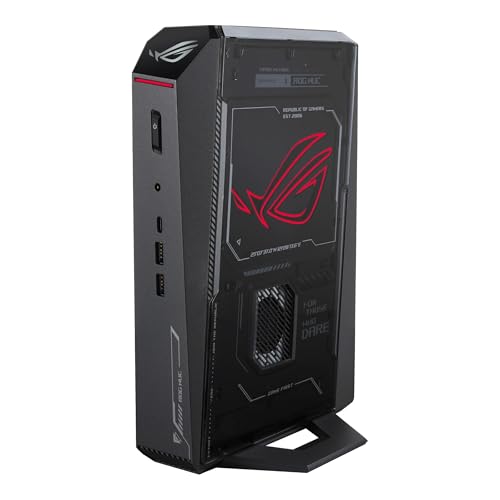
ASUS ROG NUC (2025) — Core Ultra 9 275HX, RTX 5070 Laptop GPU, 32GB, 1TB
Who it suits: Buyers who want the flagship version of the mini idea itself — the smallest serious gaming box from a major brand, bought from the maker’s own storefront, with the desk footprint of a hardback book.
This is the ceiling of the true-mini category, and it is worth being precise about what that ceiling is. Inside a chassis of roughly 11.1 × 7.4 × 2.2 inches — about three liters — ASUS fits a 24-core Core Ultra 9 275HX, an RTX 5070 Laptop GPU with 8GB of GDDR7, 32GB of DDR5-6400 and a 1TB NVMe drive, cooled by a triple-fan system and fed by an external power adapter. The port selection is the best in this guide: dual Thunderbolt 4, a full row of USB, dual HDMI plus DisplayPort, and Ethernet — five display outputs in total, which makes it a genuine workstation-grade hub as well as a games machine. As a 1440p gaming proposition the honest description is this: the laptop 5070 is a strong high-settings 1440p chip with DLSS doing real work in modern titles, and it is not a 4K-native part and not the equal of the 12GB desktop card that shares its name. At three liters, nothing else verified for this guide comes closer to desktop pace.
Seller discipline matters more here than for any other pick. This configuration is positioned near the top of this budget when bought from ASUS, and Notebookcheck’s launch coverage recorded it orderable on Amazon US from ASUS. Third-party sellers on the same listing have been recorded asking well over that positioning for the identical box — check the current price on Amazon and check who is selling it. So the rule is absolute: buy it from ASUS’s storefront, or do not buy it from this listing at all. A 2TB version sits a step above this configuration in the range, and is worth considering — check price on Amazon — if the 1TB drive worries you — and it should give a large library pause, because 1TB disappears quickly at modern install sizes. Owner sentiment in roundup coverage is genuinely divided, with praise for good units alongside reports of dead-on-arrival and failing ones; that is an argument for buying from the maker’s storefront with a clean return window, and for stress-testing the machine in its first week rather than shelving it.
- About 3 liters — the smallest chassis in this guide with this much hardware inside.
- 24-core Ultra 9 275HX and DDR5-6400: CPU and memory are not the compromise here.
- Dual Thunderbolt 4 and five display outputs — the best connectivity of any pick.
Honest limitation: The GPU is a laptop part with 8GB of memory, soldered in place — it is the machine’s permanent graphics ceiling — and third-party offers on this listing have been seen marked up well over the ASUS storefront positioning.
Choose it if the three-liter footprint is the point and you will buy from ASUS — check the current price on Amazon first. Skip it if the listing in front of you is a marked-up third-party offer, or if graphics power for the budget outranks size — the NR2 Pro below carries a desktop card in a comparable tier.

Cooler Master NR2 Pro — Ryzen 7 9800X3D, Desktop RTX 5070 Ti 16GB, 32GB, 2TB
Who it suits: Gamers who want mini-ITX dimensions without the laptop-GPU compromise — the buyer whose first question is graphics power and whose second is whether it fits the shelf.
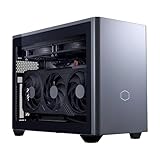
Everything the ROG NUC cannot be, this machine is. The NR2 Pro is built in Cooler Master’s NR200P Max case — 18.25 liters, which we state plainly is the large end of “mini” — around a Gigabyte B850I AORUS PRO mini-ITX board, a Ryzen 7 9800X3D, and a genuine desktop GeForce RTX 5070 Ti with 16GB of memory. That last fact is the whole argument: this is the only class of graphics in this guide that a tower buyer would recognize without translation, a card that plays at native 1440p at high refresh and reaches into 4K with upscaling, with twice the memory of the laptop 5070 in the flagship pick. The supporting cast is equally un-mini in the good way: 32GB of DDR5-6000, a 2TB Gen4 drive, an 850W SFX Gold power supply, a custom 280mm radiator, and standard parts throughout — every component in this box is a retail part you could replace, upgrade or move to a new case, which no other pick here can claim.
This is a deal-watch pick, and the review would be dishonest if it pretended otherwise. Its listing position swings widely — within this budget in deal periods and over this budget at its peak. The buy rule is therefore printed on the pick: it belongs in this guide in its deal band, and not at its peak — check the current price on Amazon before you buy. Roundup coverage of this exact system adds two ownership notes worth knowing before rather than after: fan noise described as reasonable rather than silent — 18 liters of high-end hardware under load is audible, and no mini at this power level is a library machine — and isolated reports of a front USB-C port dead on arrival and a GPU riser cable needing reseating after shipping. Both are first-week checks, and both are the ordinary tax of a dense mini-ITX build rather than a verdict on this model.
- A real desktop RTX 5070 Ti 16GB — the strongest graphics in this guide, with no mobile asterisk.
- 9800X3D, DDR5-6000, 2TB storage and an 850W SFX Gold PSU: no supporting part is undersized.
- Built entirely from standard retail parts — the only pick here with a true upgrade path.
Honest limitation: At 18.25 liters it is six times the ROG NUC’s volume, its listing position swings widely, and at the top of that swing it is neither in budget nor good value.
Choose it if graphics power leads and 18 liters still fits your space. Skip it if the current price on Amazon is near its peak — wait for the deal band — or if the box must genuinely disappear onto a desk corner or behind a monitor.
MINISFORUM AtomMan G7 Pro — Core i9-14900HX, RTX 5070 Laptop GPU
Who it suits: Buyers who want the ROG NUC’s graphics class at a substantially lower tier, and who are comfortable buying from a specialist mini-PC maker rather than a household name.
The G7 Pro is the value argument against the flagship. Its Core i9-14900HX is a 24-core laptop flagship chip, its graphics are the same class of part as the ROG NUC’s — an RTX 5070 Laptop GPU with 8GB — and Minisforum positioned the configured 32GB/1TB version well below the ASUS flagship, in the middle part of this budget, for a machine of the same graphics class and a similarly tiny footprint — check price on Amazon. The hardware around the chip is a specialist’s checklist: six heat pipes with dual fans, two DDR5 SO-DIMM slots expandable to 96GB, two M.2 2280 slots, HDMI 2.1, USB4 and WiFi 7. The memory expansion deserves emphasis, because it is the one meaningful upgrade path any of the true minis here offer: the GPU is soldered and permanent, as in every mini in this guide, but RAM and storage can grow with you in a way the flagship’s fixed configuration cannot match at its tier.
Now the discipline this listing demands, stated as plainly as the sibling guides state it: the Amazon listing for this ASIN is titled as the barebone version — without storage or operating system — while some marketplace mirrors of the same ASIN describe a configured unit. Those are two different products sharing a listing family, and the difference is not small: completing a barebone at recent memory prices means a 32GB DDR5 SO-DIMM kit — check the current price on Amazon, because kits were elevated during the late-2026 memory shortage — plus an SSD and an operating system. On that basis the configured version is the rational buy, and the barebone only wins for someone who already owns the parts. Confirm the configured style — RAM, SSD and OS present — on the live listing before ordering, and check the price of the machine you are actually getting.
- Same laptop-5070 graphics class as the flagship pick, configured in the middle part of this budget — check price on Amazon.
- RAM expandable to 96GB across two SO-DIMM slots — rare headroom in a true mini.
- Six heat pipes and dual fans: cooling engineered for a sustained laptop-flagship load.
Honest limitation: The Amazon listing mixes barebone and configured styles under one family, and the barebone’s completion cost at current memory prices erases its apparent saving; support is a specialist maker’s, not a global brand’s.
Choose it if you want flagship-mini graphics at a mid-tier position and will verify the configured style before checkout. Skip it if you need the machine to arrive unambiguous and fully supported — that is what the ROG NUC’s premium buys.

MINISFORUM AtomMan G7 Ti — Core i9-14900HX, RTX 4070 Laptop GPU (140W), 32GB, 1TB
Who it suits: The buyer this guide is quietly written for — someone who wants a genuinely fast mini for gaming, suspects the top of the budget is poor value, and would rather keep a large share of the budget for the rest of the setup.
The G7 Ti is the previous flagship of Minisforum’s G7 line, and at its current tier positioning it is the sweet spot of this entire guide. The graphics are an RTX 4070 Laptop GPU run at its full 140W power limit — that wattage figure matters, because laptop GPUs are sold across a wide power range and a 140W 4070 is the complete version of the chip, not the throttled variant found in thin laptops. It carries 8GB of GDDR6, and paired with the same 24-core i9-14900HX as its newer sibling it is an honest high-settings 1440p machine with DLSS, in a chassis of about 2.55 liters. The configured 32GB/1TB version sits well within this budget — check price on Amazon — and barebone versions sit lower still, though the same completion-cost warning from the G7 Pro review applies, and at current DDR5 prices the configured unit is again the sensible purchase. Two SO-DIMM slots to 96GB and two PCIe 4.0 M.2 slots give it the same memory-and-storage growth path as its sibling.
What you give up against the two picks above it is a generation: the 4070 Laptop is a step behind the 5070 Laptop in efficiency and features, and a clear step behind the NR2 Pro’s desktop 5070 Ti in raw pace and memory. What you get back is a substantial saving against the ROG NUC’s tier and a machine that is, for the large majority of players and the large majority of games, the same experience at the same settings on the same monitor. This is the pick that makes the guide’s closing argument concrete: in the mini category, the last stretch of budget buys the least performance, and the G7 Ti is where the curve bends. The shared-listing caution applies here too — this ASIN belongs to a listing family that mixes barebone and configured styles, so confirm the 32GB/1TB configuration is the one in your cart.
- Full-power 140W RTX 4070 Laptop GPU — the complete version of the chip, not a cut-down variant.
- Configured 32GB/1TB well within budget: flagship-mini pace in the lower-middle part of the range — check price on Amazon.
- About 2.55 liters, with RAM and storage both expandable after purchase.
Honest limitation: A generation behind the 5070 machines, with the same 8GB memory ceiling and a soldered GPU; the listing family mixes barebone and configured styles.
Choose it if you want the best mini gaming experience per dollar in this guide. Skip it if you specifically want current-generation features, or a desktop card — your picks are the G7 Pro and the NR2 Pro.

HP OMEN 16L TG03 — Core i7-14700F, Desktop RTX 5060 Ti 16GB, 32GB, 2TB
Who it suits: Buyers who want a real desktop graphics card and a big brand’s support, in the smallest chassis a mainstream maker sells — and who are willing to shop the configuration carefully.
The OMEN 16L is exactly what its name says: a 16-liter desktop, and inside it sits the thing no true mini in this guide can offer at this tier — a desktop GeForce RTX 5060 Ti with 16GB of memory. The memory figure is the headline: at 1440p, 16GB is the difference between a card that holds its settings as games grow and an 8GB card that starts trading texture quality within a couple of years, and it is why this machine, with a nominally humbler GPU number than the laptop 5070s above, may age better than either for gaming. The configuration documented here pairs it with a Core i7-14700F, 32GB of DDR5 and a 2TB SSD. Independent roundup coverage of Amazon’s OMEN 16L range positions the 5060 Ti 16GB builds in the lower part of this budget, which makes this a value route in the guide to a desktop card with a full memory complement — check the current price on Amazon for this exact configuration before ordering, because the family spans a wide range.
Two cautions define this pick, and both are about how Amazon sells it. First, the configuration trap: the OMEN 16L is also sold with the 8GB version of the 5060 Ti, a materially weaker card for longevity, sometimes at a deceptively small discount. The 16GB in the title is the entire point of the pick; if the listing in front of you says 8GB, it is a different machine wearing this one’s name. Second, the seller question: coverage of Amazon’s OMEN 16L bundles notes that some units are opened and upgraded by resellers, with the upgraded RAM and SSD covered by the seller’s warranty rather than HP’s. A factory-sealed HP unit and a reseller-upgraded bundle are different purchases at the same tier. Check who is selling, what they changed, and whose warranty covers which parts — and if the answers are murky, a slightly dearer factory configuration is the better buy.
- Desktop RTX 5060 Ti with 16GB — the memory headroom no 8GB laptop GPU here can match.
- 16 liters from a mainstream brand, with brand support behind the unmodified parts.
- Its position in the lower part of this budget makes it the value route to a genuine desktop card — check price on Amazon.
Honest limitation: It is a small desktop, not a mini — it will not hide behind a monitor — and Amazon’s range mixes 8GB-card variants and reseller-upgraded bundles with split warranties.
Choose it if a desktop card and 16GB matter more than the last word in smallness. Skip it if the footprint must be truly mini, or the listing’s seller and configuration cannot be verified as factory HP with the 16GB card.

MINISFORUM AtomMan G7 Pt — Ryzen 9 7945HX, RX 7600M XT, 32GB, 1TB
Who it suits: Players who also do CPU-heavy work — compiling, rendering, virtual machines, heavy multitasking — and want a 16-core desktop-class processor in a box the size of a paperback.
The G7 Pt inverts the usual mini formula: instead of a modest processor behind a gaming badge, it puts a Ryzen 9 7945HX — sixteen Zen 4 cores, a chip from AMD’s desktop-replacement class — into about two and a half liters, as the first AMD Advantage-certified mini PC. The graphics are a Radeon RX 7600M XT, and the naming rule of this guide applies in full: the M means mobile. This is an 8GB laptop GPU rated up to 120W, a capable 1080p and entry-1440p part with upscaling — it is not the desktop RX 7600 XT, which carries twice the memory. Judged on those honest terms, the machine’s balance makes sense for its buyer: the CPU is the strongest in this guide for sustained multi-core work, the GPU handles mainstream gaming at the resolutions its memory supports, and the platform around them — two DDR5 SO-DIMM slots to 96GB, one PCIe 5.0 and one PCIe 4.0 M.2 slot — is built to be kept and upgraded around the edges for years.
Its tier completes the argument. The configured 32GB/1TB version is the lowest-positioned pick in this guide — check price on Amazon — with Minisforum’s own store positioning the same configuration a step above it and the barebone lower still (subject to the completion-cost warning that runs through this guide: at current DDR5 prices, configured is the buy). Well within the budget, the G7 Pt is the clearest demonstration that $3,000 is not a sum the mini category can honestly absorb: this machine plus a good 1440p monitor, a mechanical keyboard and a year of games sits below the flagship pick alone in overall outlay, and for a buyer whose work is CPU-bound it may simply be the best machine here in any tier. The listing-family caution applies as it does to its G7 siblings — confirm the configured style on the live listing.
- 16-core Ryzen 9 7945HX — the strongest sustained multi-core CPU in this guide.
- Configured 32GB/1TB as the lowest-positioned pick here by a wide margin — check price on Amazon.
- PCIe 5.0 storage slot and 96GB RAM ceiling: a platform with years of headroom.
Honest limitation: The RX 7600M XT is a mobile 8GB GPU — the weakest graphics in this guide — so this is a CPU-first machine, and 4K or high-refresh 1440p gaming is beyond it.
Choose it if your work is CPU-heavy and your gaming is mainstream. Skip it if gaming is the priority — every other pick here has stronger graphics for the purpose.

Comparison Table
| Product | Graphics (named in full) | Size | Best use | Link |
|---|---|---|---|---|
| ASUS ROG NUC (2025) | RTX 5070 Laptop GPU, 8GB | ~3L | The flagship true mini, bought from ASUS’s storefront | Check on Amazon |
| Cooler Master NR2 Pro | Desktop RTX 5070 Ti, 16GB | 18.25L | Desktop graphics and upgrades in mini-ITX form | Check on Amazon |
| MINISFORUM AtomMan G7 Pro | RTX 5070 Laptop GPU, 8GB | Tiny desktop footprint | Flagship-mini graphics at a lower tier — check price on Amazon | Check on Amazon |
| MINISFORUM AtomMan G7 Ti | RTX 4070 Laptop GPU, 8GB, 140W | ~2.55L | The value sweet spot well within budget | Check on Amazon |
| HP OMEN 16L TG03 | Desktop RTX 5060 Ti, 16GB | 16L | Desktop card and memory headroom, big-brand support | Check on Amazon |
| MINISFORUM AtomMan G7 Pt | RX 7600M XT (mobile), 8GB | ~2.5L | 16-core CPU power for work-first buyers | Check on Amazon |
How to Choose a Mini Gaming PC Under $3,000
- Decide what “mini” means before you look at prices. The picks here span 2.5 to 18.25 liters — a sevenfold difference wearing one word. Measure the actual space: a three-liter box hides behind a monitor or mounts to its back; a 16-to-18-liter case is a small desktop that sits on the desk and is seen. Buy the volume you measured, not the adjective.
- Read the GPU badge like a lawyer. “Laptop GPU” or an M in the name means a mobile chip: fewer cores or tighter power limits than the desktop card of the same name, and often less memory — 8GB against the desktop 5070’s 12GB, 8GB against the desktop 7600 XT’s 16GB. Judge every mini by the full part name and its wattage, never by the number alone.
- Treat 8GB of graphics memory as a planning constraint. Five of these six machines carry 8GB. At 1080p and much of 1440p that is workable today with sensible settings; it is the first specification that will age. If you keep machines for five years, the two 16GB desktop-card picks deserve a weight in your decision that their GPU numbers alone would not earn.
- Check the price of the machine you are actually getting. On shared Minisforum listings, barebone and configured versions sit under one family. A barebone needs RAM, storage and an operating system; at recent prices a 32GB DDR5 SO-DIMM kit alone is a significant extra — check the current price on Amazon. Add the completion cost before comparing anything.
- Buy the seller, not just the listing. The flagship pick is sold by ASUS on its listing and has been recorded marked up by third parties on the same page — check the current price on Amazon and who is selling it. OMEN bundles may be reseller-upgraded with split warranties. In this category the seller and the configuration are part of the specification.
- Plan for heat and noise honestly. Two to three liters dissipating a flagship laptop chip is a solved problem — solved with fans that you will hear under load. Read the cooling description, expect audible fans in the true minis at full tilt, and give any of them open air rather than a closed cabinet.
- Keep the change. The verified evidence of this guide is that the mini curve flattens early: a value-tier machine such as the G7 Ti delivers most of the flagship’s experience — check price on Amazon. Unless the last increment of size or silicon is the specific thing you are buying, the unspent share of the budget earns more in a monitor, peripherals and games than in the box.
The Ceiling: What $3,000 Cannot Buy in a Mini PC
Every budget guide in this series has a ceiling, and this one is unusually sharp, so it deserves its own section rather than a footnote. Above the picks in this guide, the verified landscape is this: the ROG NUC’s own RTX 5080 Laptop GPU configuration sits above this budget. The one true small-form-factor machine with a desktop RTX 5080 that research could verify, Zotac’s Magnus One Ultra at about 11.5 liters, sits well above this budget. Desktop RTX 5090 systems sit well above this budget complete. In other words, the entire flagship-GPU tier — the silicon that $3,000 buys in tower form, where desktop 5080 systems have appeared within this budget on deal — simply does not exist in mini form at this budget, at any level of patience or deal-hunting.
The practical consequence is a fork, and it is better faced before ordering than after. If the graphics tier is what you actually want, the honest purchase at $3,000 is a tower, and this guide’s role is to tell you so. If the size is what you actually want — the machine that disappears, travels, or fits a room a tower cannot — then the mini market’s real flagship tier is the one covered in this guide, and the correct move is to buy its best value rather than its highest tier: the category tops out early, and everything past the value tier is refinement, brand and the last liter, not a new class of performance.
The Size Premium, Pick by Pick
Since the premium is unavoidable in this category, it should at least be itemized. The ROG NUC, positioned near the top of this budget, charges the steepest premium in the guide: a budget that elsewhere buys a desktop RTX 5080 tower on deal instead buys a laptop 5070 with 8GB — you are paying a substantial premium over the G7 Pro’s configured tier for the ASUS badge, the three-liter chassis at its most polished, and the maker’s storefront and support — check the current price on Amazon. The NR2 Pro inverts the formula: in its deal band, its premium over an equivalent tower is the smallest here, because the graphics are a genuine desktop card — you pay for the mini-ITX packaging, the custom loop and the assembly, not for a lesser chip. The G7 Pro, configured in the middle part of this budget, positions its premium against towers with desktop cards in a similar range and answers with 96GB of RAM headroom in a fraction of the volume. The OMEN 16L charges almost no premium at all — its position in the lower part of this budget is tower-tier positioning for tower parts — and in exchange gives up the “mini” claim almost entirely at 16 liters. And the G7 Ti and G7 Pt, positioned well within this budget, barely charge a premium worth the name: they sit like the mid-range machines they are, which is precisely why they anchor this guide’s recommendation.
Common Buying Mistakes
- Reading “RTX 5070” on a mini and pricing it against the desktop card. The laptop part has 8GB and mobile power limits; the desktop card has 12GB. Same number, different product.
- Paying a third-party markup on the flagship listing — the ROG NUC recorded marked up well above its ASUS storefront positioning. At that level it is not a premium product; it is a pricing error you are volunteering for — check the current price on Amazon and the seller before you buy.
- Ordering a barebone style from a shared listing and discovering the RAM, SSD and operating system are your problem — with a 32GB DDR5 kit as a significant extra on top, the “cheaper” version is often the dearer machine — check the current price on Amazon for the kit as well.
- Buying the 8GB variant of the OMEN 16L’s graphics card for a small saving, and giving up the 16GB that was the entire reason for the pick.
- Spending the whole $3,000 on the box and pairing a flagship mini with a tired 1080p monitor. The unspent half of this budget buys the display the machine deserves.
- Assuming a mini can be upgraded like a tower later. In every true mini here the GPU is soldered; RAM and storage are the whole upgrade path. Buy the graphics you intend to keep.
- Sealing a two-liter machine in a closed TV cabinet and blaming the hardware for thermal throttling. Small fans need open air more, not less.
- Skipping the first-week stress test on a category with divided owner reports. Dead-on-arrival and early-failure units are a returns-window problem only if you find them inside it.
Final Recommendation
- Most buyers reading this guide: MINISFORUM AtomMan G7 Ti — flagship-mini experience well within budget, with a large share of the budget left for the setup around it — check price on Amazon.
- The true-mini flagship, from ASUS’s storefront only: ASUS ROG NUC (2025).
- Desktop graphics without a tower: Cooler Master NR2 Pro, bought in its deal band — check the current price on Amazon.
- Same graphics class as the flagship, less money: MINISFORUM AtomMan G7 Pro, configured style confirmed.
- Desktop card, 16GB, big-brand support: HP OMEN 16L TG03, factory configuration.
- CPU-first workers who game: MINISFORUM AtomMan G7 Pt.
Our top two for this budget are the G7 Ti, because it captures most of what this category offers at under half the ceiling, and the ROG NUC, because for the buyer whose requirement is genuinely the smallest serious gaming box from a major maker, it has no verified equal — provided it is bought from ASUS’s storefront without a third-party markup — check the current price on Amazon. Between them they frame the whole decision: the mini market’s value peaks early, and its flagship is a luxury purchase to be made deliberately, deliberately, with open eyes about the laptop silicon inside. Buyers who conclude the flagship money is better spent lower should see Best Mini Gaming PC Under $1500, and those who conclude the size was negotiable after all should see what the same money does in a tower in Best Gaming PC Under $3000. Confirm the exact configuration and seller on the live listing, stress-test in the first week, and check the current price on Amazon before you order.
Frequently Asked Questions
Is there a mini gaming PC with an RTX 5080 or 5090 under $3,000?
No — and this is verified, not assumed. The ROG NUC’s RTX 5080 Laptop GPU configuration sits above this budget; the one verified small-form-factor desktop-5080 machine, Zotac’s Magnus One Ultra, sits well above this budget; complete RTX 5090 systems also sit well above this budget. At $3,000, flagship desktop graphics exist only in towers, where desktop 5080 systems have appeared within this budget on deal.
What does “Laptop GPU” actually cost me in performance?
A laptop GPU is a mobile chip: it runs at lower power than the desktop card of the same name and, in this generation, carries less memory — the RTX 5070 Laptop GPU has 8GB against the desktop 5070’s 12GB, and the RX 7600M XT has 8GB against the desktop 7600 XT’s 16GB. In practice the machines here are strong 1440p performers with upscaling in modern titles; what they are not is the equal of the same-named desktop cards, and they should never be judged as if they were.
Should I buy the barebone version and complete it myself?
Only if you already own the parts. Barebone versions of the G7 machines exclude RAM, storage and an operating system, and during the late-2026 memory shortage a 32GB DDR5 SO-DIMM kit was a significant extra — check the current price on Amazon — before an SSD and a Windows licence. On that basis the configured versions, positioned well within this budget in complete form, are the sensible buy over completing the barebones. The balance reverses if memory prices fall or your parts drawer is full; check the current prices on Amazon before deciding.
Can I upgrade a mini gaming PC later?
RAM and storage, yes — the Minisforum machines take up to 96GB across two SO-DIMM slots and carry two M.2 slots. Graphics, no: in every true mini in this guide the GPU is soldered to the board and is the machine’s permanent ceiling. The exception is the NR2 Pro, which is built from standard mini-ITX parts around a replaceable desktop card — that upgradability is a large part of what its size and tier buy.
Is $3,000 a sensible budget for a mini gaming PC at all?
For most buyers, no — and the guide’s picks are the evidence. The category’s value peaks in the lower and middle parts of this budget: the G7 Pt as the lowest-positioned pick, the G7 Ti well within budget and the G7 Pro in the middle part of the range cover the realistic range of mini gaming performance, and the flagship near the top of the budget buys refinement and brand rather than a new tier — check price on Amazon for each pick. Spend to $3,000 only if the specific flagship is the object — or put the remaining share of the budget into the monitor and peripherals the machine will be used with.
How loud is a three-liter gaming PC?
Audible under load, and you should budget for that expectation rather than a silent one. Dissipating a flagship laptop chip from two to three liters requires small fans spinning fast; makers solve the heat, not the physics. The larger picks move more air more slowly — roundup coverage of the NR2 Pro describes its noise as reasonable rather than silent — and the true minis are at their best given open air and a little distance from the listener.
Mini PC or tower at this budget — how do I decide?
By naming the thing you are actually buying. If it is graphics performance, the tower wins at every tier in this guide and it is not close: desktop 5080 systems have appeared within this budget. If it is the space, the silence of a tidy desk, the ability to carry the machine or mount it away — the mini is the product, and its premium is the price of that product, best paid at the value end of this guide. The mistake is only ever paying the premium by accident, under the impression it bought performance.


