
Where to buy
Check the latest price, availability and delivery on Amazon. Orders are placed on Amazon. We may earn a commission from qualifying purchases.
- Best overall under $400: KAMRUI AM08PRO Mini Gaming PC, Ryzen 7 7735HS, 32GB DDR5, 512GB SSD — Check on Amazon
- Beelink EQR6 Pro Mini PC, Ryzen 7 7735HS, 24GB DDR5, 1TB SSD — Check on Amazon
- KAMRUI Mini PC, Ryzen 7 7735HS, 16GB LPDDR5, 512GB SSD — Check on Amazon
- FIREBAT A6 Mini Gaming PC, Ryzen 7 7735HS, 16GB LPDDR5, 512GB SSD — Check on Amazon
See 2 more Amazon options
- GMKtec NucBox M6 Mini PC, Ryzen 5 6600H, 16GB DDR5, 512GB SSD — Check on Amazon
- Beelink SER5 MAX Mini PC, Ryzen 7 5800H, 16GB DDR4, 500GB SSD — Check on Amazon
Read the full guide ↓
Disclosure: As an Amazon Associate, reviewstook.com earns from qualifying purchases. Links to Amazon on this page are affiliate links; they cost you nothing extra. Listing details such as price and availability change often, so check the current Amazon listing before you buy.
Start with the sentence most guides in this category will not print: there is no true native-1440p gaming PC for under $400. Not a slow one, not a compromised one — none. A PC that renders modern games at 2560×1440, at settings worth looking at, needs a discrete graphics card in the class of an RTX 4060 or RX 7600, and the cheapest new prebuilt machines built around cards like that sell for roughly twice this budget. Even the step below — an RTX 3050 tower — sits well above this budget in the listings we checked. This budget does not buy the graphics hardware 1440p demands, and any listing, video or guide that tells you otherwise is selling you a monitor resolution and calling it a frame rate. A 1440p monitor displaying a game rendered at 720p is not 1440p gaming; it is upscaling with better marketing.
So what does this budget honestly buy, and why is this guide still worth reading? It buys the strongest integrated graphics AMD has ever put in a cheap PC: the Radeon 680M inside the Ryzen 7 7735HS, a chip that genuinely plays games. Esports titles run well at 1080p. Older AAA games run at 1080p on low-to-medium settings. Modern AAA games run at a reduced render resolution — 720p to 900p internally — with FSR upscaling sending the picture to your 1440p screen, where it looks respectable from a normal viewing distance. If you already own a 1440p monitor, or plan to buy one for work and want to game on it in the evenings, that is a real and usable experience — as long as you buy it with open eyes. Every pick below is a real Amazon listing built on that honest basis: five mini PCs with Radeon 680M or 660M graphics, and one older Vega-based machine for buyers whose games are older still. Below are the quick picks, detailed reviews of all six, a comparison table, a frank section on what 1440p actually requires and what it costs, the settings strategy that makes these machines work on a 1440p screen, the mistakes that waste money in this category, and the questions buyers ask before they commit.
In this guide
Quick Picks
Short on time, or comparing several options at once? Each row below names a buyer type and the product that suits it, with a link to the listing. Every pick shares the same honest ceiling: 1080p-class gaming, upscaled to a 1440p display where needed.
| Buyer type | Pick | Why it stands out | Link |
|---|---|---|---|
| Best overall under $400 | KAMRUI AM08PRO, Ryzen 7 7735HS, 32GB DDR5, 512GB SSD | Radeon 680M with socketed dual-channel DDR5 you can upgrade to 64GB | Check on Amazon |
| Best for a quiet desk | Beelink EQR6 Pro, Ryzen 7 7735HS, 24GB DDR5, 1TB SSD | Built-in power supply, dual LAN, and the most storage in this guide | Check on Amazon |
| Best simple plug-and-play | KAMRUI Mini PC, Ryzen 7 7735HS, 16GB LPDDR5, 512GB SSD | The same 680M graphics in the plainest, easiest box here | Check on Amazon |
| Best power modes | FIREBAT A6, Ryzen 7 7735HS, 16GB LPDDR5, 512GB SSD | A full 54W performance mode that lets the 680M stretch | Check on Amazon |
| Best value under budget | GMKtec NucBox M6, Ryzen 5 6600H, 16GB DDR5, 512GB SSD | Radeon 660M, dual 2.5G LAN and USB4 for well under the ceiling | Check on Amazon |
| Best for older games | Beelink SER5 MAX, Ryzen 7 5800H, 16GB DDR4, 500GB SSD | Eight Zen 3 cores and upgradeable DDR4 at a budget-tier entry point here | Check on Amazon |
How These Picks Were Chosen
The budget was applied as a hard ceiling: every product below is a real Amazon listing in this budget tier in the United States. Mini PC prices move with coupons more than almost any other category on Amazon, so check price on Amazon before you judge any pick; the reviews describe each machine’s tier positioning so you can judge its value before you buy.
We did not use these products ourselves. We read the maker listings, specification pages, manuals and independent reviews, and compared the things that decide gaming performance on integrated graphics: the graphics chip itself (Radeon 680M, 660M or the older Vega 8), the memory configuration behind it, the power limit the maker allows, and the storage and ports around it. That memory point matters more here than in any tower guide. An integrated GPU has no video memory of its own; it borrows system RAM, so dual-channel socketed memory feeds it properly and a single soldered channel starves it — independent testing of one pick below measured a 20 to 35 percent graphics penalty in demanding games from exactly that compromise. Where a pick carries that flaw, the review says so in plain terms and factors it into the recommendation.
Two honesty filters sat on top of all of that. The first excluded every tower on Amazon wearing “gaming PC” in its title while carrying no discrete graphics card at all, or a years-old entry card dressed in RGB lighting — at this budget those machines are consistently worse at games than the 680M mini PCs below, and their upgrade paths are usually a low-wattage power supply away from useless. The second excluded anything whose only route under $400 was a coupon stack targeted at individual accounts; a price has to be one a normal buyer can plausibly get. What survived is a short, truthful list: the strongest integrated graphics available at the price, in the boxes that feed them best.
The 6 Best PCs for a 1440p Monitor Under $400
KAMRUI AM08PRO Mini Gaming PC, Ryzen 7 7735HS, 32GB DDR5, 512GB SSD
Who it suits: The buyer who wants the strongest honest gaming performance this budget can produce — and a machine that can still be upgraded when the next budget arrives.
The AM08PRO gets the fundamentals right in the one place this category usually gets them wrong: memory. Inside its small tower case sit two SO-DIMM slots holding 32GB of DDR5-4800 in dual channel, expandable to 64GB. Because the Radeon 680M graphics — 12 compute units at 2200MHz, built into the Ryzen 7 7735HS — borrow their bandwidth from system memory, that dual-channel socketed setup is worth real frames: it is the configuration the 680M was designed around, and it is why this machine, rather than a cheaper soldered rival, tops the guide. The processor itself is an eight-core, sixteen-thread Zen 3+ chip boosting to 4.75GHz, which is more CPU than any game this graphics tier can feed will ever ask for. Storage is a 512GB M.2 PCIe 4.0 SSD with room to add a second drive up to 2TB, and the case offers three switchable performance modes — silent, auto and performance — so the same box can whisper through a film and spin up for a game. Display output covers two HDMI ports and a USB-C, driving up to three 4K screens; for this guide’s purpose, one 1440p monitor is effortless. WiFi 6, Bluetooth 5.2 and a 2.5-gigabit LAN port round out a spec sheet with no embarrassing holes.
Set expectations the way the independent reviews do: this class of machine plays 2D games beautifully, esports titles smoothly, older AAA games at 1080p on sensible settings, and current AAA games at reduced render resolutions with FSR doing the upscale to your 1440p panel. Check price on Amazon for the current listing. It is the rare pick that is both the best and among the most accessibly positioned serious options in this budget tier. The upgrade path is the closing argument: when 32GB stops being enough, or a second SSD beckons, you open the case rather than replacing the computer — a courtesy the soldered machines below do not extend.
- Radeon 680M fed by dual-channel, socketed DDR5 — the fastest honest graphics setup under $400.
- RAM expandable to 64GB and a second SSD slot, so the machine grows instead of expiring.
- Three performance modes, triple-display output, WiFi 6 and 2.5G LAN in a desk-friendly tower.
Honest limitation: It is still integrated graphics. No setting inside this box produces native 1440p in modern AAA games, and the brand’s support and warranty are a step below the big OEMs if something goes wrong.
Choose it if you want the best frames this budget can honestly deliver, with an upgrade path. Skip it if your games list is mostly current AAA titles you refuse to run below native resolution — save for a discrete-GPU machine instead.

Beelink EQR6 Pro Mini PC, Ryzen 7 7735HS, 24GB DDR5, 1TB SSD
Who it suits: Buyers who want the same 680M gaming core in the quietest, tidiest box here — the machine for a shared room, a bedroom desk or a living-room TV corner.
Beelink builds the EQR6 Pro around the same Ryzen 7 7735HS and Radeon 680M as the pick above, then makes a series of grown-up decisions around it. The power supply is built into the chassis, so there is no laptop-style brick trailing across the desk — a small thing that improves every day you own it. Memory is 24GB of DDR5 across two 12GB modules, dual channel as the 680M requires, and expandable to 64GB if you later swap the pair. Storage is the most generous in this guide at 1TB on a PCIe 4.0 SSD, with a second M.2 slot taking total capacity far beyond what a games library at this tier will need. Two HDMI ports drive dual 4K@60 displays, dual LAN ports let the box double as a home server or soft router when it is not gaming, and Beelink rates the cooling at around 32 decibels in its testing — treat that as a maker figure, but the EQR line’s reputation for quiet running is consistent across independent reviews. WiFi 6 and Bluetooth 5.2 are on board, along with Wake-on-LAN and auto power-on for the home-lab crowd.
The gaming story is the family story: esports at 1080p without drama, older games at 1080p on low-to-medium, modern games rendered lower and upscaled by FSR onto your 1440p screen. Check price on Amazon for the current listing — it lands in this budget tier while giving you double the storage of most rivals. For a machine that will spend as many hours as a quiet everyday PC as it will as a games box, that balance is exactly right.
- Built-in power supply and quiet-first cooling — the tidiest desk presence in this guide.
- 1TB PCIe 4.0 SSD as standard, with a second M.2 slot and dual LAN for server side-jobs.
- 24GB dual-channel DDR5 feeds the 680M properly and can be swapped up to 64GB later.
Honest limitation: The 24GB configuration is a slightly awkward middle size, and Beelink’s quoted noise figure is a maker claim rather than an independent measurement — expect quiet, not silent, under a gaming load.
Choose it if the PC will live where people sleep, talk or watch TV, and you value storage and calm. Skip it if every last frame matters more than noise — the AM08PRO’s performance mode is the gamer-first tuning.

KAMRUI Mini PC, Ryzen 7 7735HS, 16GB LPDDR5, 512GB SSD
Who it suits: The plug-and-play buyer — someone who wants 680M gaming with nothing to configure, nothing to upgrade and nothing to think about after the first evening.
This is the plain KAMRUI mini PC rather than the gaming-tower AM08PRO above, and its appeal is subtraction. The same Ryzen 7 7735HS with Radeon 680M graphics sits in a smaller, simpler box with 16GB of LPDDR5 memory and a 512GB SSD, triple-display output, WiFi 6, Bluetooth 5.2 and a 2.5-gigabit LAN port. Check price on Amazon for the current listing — it lives right at the ceiling of this guide, and what you get for that money is the full 680M experience with the least possible fuss. Sixteen gigabytes is enough memory for the games this graphics tier plays, the SSD is big enough for a rotating handful of large titles alongside a back catalogue of smaller ones, and the whole setup is a power cable, an HDMI or DisplayPort lead and a monitor.
The trade is written on the spec sheet: LPDDR5 in a machine like this is soldered to the board. Sixteen gigabytes is what you will have on the day it is retired, and if a memory chip ever fails, the repair is a replacement machine rather than a replacement stick. The bandwidth, at least, is proper dual-channel-class LPDDR5, so the 680M is fed far better than in single-channel designs — this is the simple box done correctly, not the simple box done cheaply. Buy it as a finished appliance and it is a good one; buy it as the start of a hobby and you will outgrow it, which is what the AM08PRO above exists for.
- The full Radeon 680M experience in the simplest box here — unbox, plug in, play.
- Triple-display output and 2.5G LAN, features cheaper mini PCs routinely skip.
- Check price on Amazon — this pick sits in the upper part of this budget tier.
Honest limitation: The 16GB of memory is soldered and can never be upgraded, and 512GB fills quickly if your library leans toward hundred-gigabyte installs.
Choose it if you want a finished, warranty-and-done gaming appliance for a 1440p monitor. Skip it if you like the idea of upgrading RAM or adding drives later — that is the AM08PRO or the EQR6 Pro.
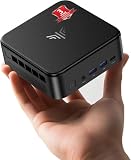
FIREBAT A6 Mini Gaming PC, Ryzen 7 7735HS, 16GB LPDDR5, 512GB SSD
Who it suits: Buyers drawn to a gaming-styled mini PC with a proper high-power mode — who mostly play esports and older titles, where this machine’s one real flaw barely shows.
The A6 makes its pitch on power, literally: its Ryzen 7 7735HS is allowed up to 54W, the generous end of what this chip is ever given, and a chip fed more watts holds its boost clocks — and its Radeon 680M graphics clocks — longer under a gaming load. Around that sit 16GB of LPDDR5 memory, a 512GB PCIe SSD, USB-C, WiFi 6, Bluetooth 5.2 and a 2.5-gigabit LAN port, in a chassis styled for gamers rather than offices. Independent testing found the esports experience exactly as it should be — Counter-Strike 2 at low settings ran at a very playable 75 to 110 frames per second in the reviewer’s hands — and as a demanding-work, media and emulation box the A6 is thoroughly well rounded, with dual M.2 slots under the lid for storage growth. Check price on Amazon — it sits right at this guide’s ceiling.
Now the flaw, because this guide’s job is to name it: the A6’s 16GB of LPDDR5 is soldered and, in the configuration reviewers examined, operates in a way that restricts the 680M’s memory bandwidth — the same testing measured graphics performance cut by roughly 20 to 35 percent in advanced 3D games compared with a dual-channel machine. In esports and older titles you will rarely feel it; in the newest games, which are exactly where every frame is already scarce, you will. That is why a machine with the joint-best chip in this guide sits fourth in it. Bought with that knowledge — as an esports, indie and back-catalogue box with a strong power budget — it is a satisfying little PC. Bought expecting it to match the AM08PRO in a modern AAA title, it will disappoint you for reasons that were knowable in advance.
- A full 54W performance envelope lets the 7735HS and its 680M hold boost clocks longer.
- Dual M.2 PCIe 4.0 slots give storage a growth path most soldered-memory rivals lack.
- Reviewer-verified esports performance, with CS2 at low settings in the 75–110 fps range.
Honest limitation: Soldered, bandwidth-restricted memory costs the 680M a measured 20–35% in demanding 3D games, and the RAM can never be upgraded or replaced.
Choose it if your library is esports, indie and older AAA, and you like the gaming styling and 54W mode. Skip it if modern AAA games are the point — the dual-channel machines above will serve you measurably better.
GMKtec NucBox M6 Mini PC, Ryzen 5 6600H, 16GB DDR5, 512GB SSD
Who it suits: The value hunter — a buyer who would rather keep part of the budget for the 1440p monitor, a bigger SSD later, or simply in the bank.
The M6 steps one rung down AMD’s ladder and charges you far less for the drop. Its Ryzen 5 6600H is a six-core, twelve-thread Zen 3+ chip boosting to 4.5GHz, paired with Radeon 660M graphics — six compute units at 1900MHz, roughly half the graphics hardware of the 680M machines above. What keeps it in this guide rather than a cheaper one is everything around that chip: 16GB of DDR5 in real dual-channel SO-DIMM slots, a 512GB SSD with a second slot beside it, dual 2.5-gigabit LAN ports, WiFi 6E, a USB4 port that opens the door to fast external storage and docks, dual-fan cooling, and Windows 11 Pro preinstalled. Check price on Amazon for the current listing. As a budget-tier pick, it is the one here that most often leaves part of the budget unspent.
Price the graphics drop honestly. The 660M plays esports titles at 1080p on low settings, handles older and indie games comfortably, and will run modern AAA games only at genuinely low render resolutions with FSR — on a 1440p screen that upscale is doing heavy work, and you will see it. Where the M6 shines is as the second machine, the student machine, the emulation and media box with a gaming sideline: a proper little computer with proper networking and upgradeable memory, bought at a price that forgives its graphics tier. If gaming is a sideline rather than the headline, this is the smartest spend in the guide.
- A budget-tier value pick — the one that leaves real room in the budget for the monitor or a future SSD.
- Socketed dual-channel DDR5, dual SSD slots, dual 2.5G LAN and USB4: connectivity the 680M boxes envy.
- Six Zen 3+ cores are ample for the games its 660M graphics can actually run.
Honest limitation: The Radeon 660M is about half a 680M; modern games mean 720p-class rendering and visible upscaling on a 1440p panel.
Choose it if gaming shares the machine with work, media or emulation, and value leads the decision. Skip it if games come first — the jump to a 680M pick above is the best upgrade step in this guide.

Beelink SER5 MAX Mini PC, Ryzen 7 5800H, 16GB DDR4, 500GB SSD
Who it suits: The back-catalogue gamer — someone whose Steam library leans toward the classics, indies and esports of the last decade, and who wants eight fast CPU cores for everything else the PC will do.
The SER5 MAX is the previous generation’s champion, and its staying power is easy to explain. The Ryzen 7 5800H is an eight-core, sixteen-thread Zen 3 processor boosting to 4.4GHz with a 54W ceiling — as a general-purpose CPU it remains genuinely quick, and it shrugs off multitasking, office work, media serving and emulation without breaking stride. Memory is 16GB of DDR4-3200 across two SO-DIMM slots, expandable to 64GB, and storage is a 500GB NVMe SSD with room to grow toward 2TB. Three displays run at 4K@60 across HDMI, DisplayPort and USB-C, and WiFi 6, Bluetooth 5.2 and Wake-on-LAN are all present. Check price on Amazon for the current listing — as a budget-tier pick, it offers an accessible entry point to a serious mini PC in this guide.
The compromise is the graphics generation. The 5800H’s integrated Radeon graphics are the older Vega design — eight cores at 2000MHz — a clear step behind the RDNA 2-based 680M in the picks above, and two steps behind in the newest games’ favorite features. Esports at 1080p low: yes, comfortably. AAA games from the mid-2010s: yes, with settings chosen sensibly. Anything current: render resolution drops toward 720p and FSR carries the picture to your 1440p screen in a way you will notice. Buy this machine for the library you already own and the work you already do, at a price that acknowledges its age, and it is a bargain with years left in it. Buy it hoping to keep up with new releases and the 680M picks above exist precisely for you.
- Eight Zen 3 cores at a 54W ceiling — the strongest general-purpose CPU per dollar in this guide.
- Socketed DDR4 expandable to 64GB and triple 4K@60 display support.
- A mature, well-documented platform with a deep pool of owner knowledge and BIOS support.
Honest limitation: Vega-generation integrated graphics are a full generation behind the 680M picks; current games are a 720p-and-upscale experience.
Choose it if your games are older, your budget is firm, and the PC works for a living between sessions. Skip it if you buy new games at launch — spend the extra on a 7735HS machine.

Comparison Table
| Product | Graphics | Best use | Link |
|---|---|---|---|
| KAMRUI AM08PRO, 7735HS, 32GB DDR5, 512GB | Radeon 680M, dual-channel DDR5 | Best overall gaming performance and upgrade path under $400 | Check on Amazon |
| Beelink EQR6 Pro, 7735HS, 24GB DDR5, 1TB | Radeon 680M, dual-channel DDR5 | Quiet desks, big libraries, dual-LAN side jobs | Check on Amazon |
| KAMRUI Mini PC, 7735HS, 16GB LPDDR5, 512GB | Radeon 680M, soldered LPDDR5 | Simple plug-and-play gaming on a 1440p monitor | Check on Amazon |
| FIREBAT A6, 7735HS, 16GB LPDDR5, 512GB | Radeon 680M, bandwidth-restricted RAM | Esports and older games, with a 54W performance mode | Check on Amazon |
| GMKtec NucBox M6, 6600H, 16GB DDR5, 512GB | Radeon 660M, dual-channel DDR5 | Value, networking and USB4, with gaming as a sideline | Check on Amazon |
| Beelink SER5 MAX, 5800H, 16GB DDR4, 500GB | Radeon Vega 8, dual-channel DDR4 | Older games and heavy everyday computing on a tight budget | Check on Amazon |
How to Choose a PC for a 1440p Monitor Under $400
- Buy the graphics chip, not the brand or the box. At this budget the ranking is written by silicon: Radeon 680M first, 660M second, Vega-generation graphics third. Everything else — case styling, RGB, the word “gaming” in the title — is decoration. Two machines with the same chip differ by memory and power; two machines with different chips differ by a generation.
- Interrogate the memory configuration. Integrated graphics borrow system RAM for both capacity and bandwidth. Socketed dual-channel DDR5 is the full-performance setup; soldered LPDDR5 in dual channel is acceptable; anything single-channel or bandwidth-restricted costs a fifth to a third of your frames in demanding games. The listing rarely advertises this — the reviews and teardowns tell you, which is why this guide names it pick by pick.
- Check the power limit. The same 7735HS can be capped anywhere from laptop-conservative to a full 54W. Higher sustained watts mean higher sustained graphics clocks in long sessions. A machine with a named performance mode is telling you something real; a machine that never mentions power is usually telling you something too.
- Decide whether you are buying an appliance or a platform. Soldered memory and a single SSD slot make a finished appliance: cheaper, simpler, done. SO-DIMM slots and a spare M.2 bay make a platform you can grow to 64GB and several terabytes. Neither is wrong; buying one while expecting the other is.
- Count your storage in games, not gigabytes. A 512GB SSD holds the operating system plus roughly four to six modern large installs. If your library rotates, fine; if it accumulates, either start with 1TB or confirm the second slot exists before the first sale ends.
- Match the ports to the monitor you actually own. Every pick here drives a 1440p display over HDMI or DisplayPort without adapters, and most drive two or three screens for work. If your monitor is 1440p at a high refresh rate, confirm the port version supports it — integrated graphics will not feed 144Hz in games regardless, but desktop smoothness is worth having.
- Price-watch before you pay the ceiling. Mini PC pricing on Amazon swings with coupons on the same listing within a month. Check price on Amazon for each model before you buy; paying the first price you see for any of them is a choice, not a necessity.
- Plan the upgrade you will actually make. On these machines there is no graphics card slot and never will be. The honest growth paths are RAM and storage on the socketed picks, and a full replacement machine later for everyone. A buyer who accepts that now will be happier than one who discovers it in two years.
What 1440p Actually Requires — and What It Costs
It is worth putting real numbers on the gap, because the gap is the whole story of this category. Native 2560×1440 has 78 percent more pixels than 1920×1080. Rendering a modern game there, at medium-to-high settings and a smooth frame rate, is the workload that discrete cards like the RTX 4060 and RX 7600 were built for, and complete new PCs around those cards sit in a much higher budget tier. The evidence is sitting in the listings we checked for this guide: the cheapest RTX 3050 prebuilt — a card a full class below proper 1440p hardware — sits well above this budget, and the strongest integrated-graphics mini PC we found, a Radeon 780M machine, also sits well above this tier and still plays its games at 1080p with upscaling. There is no undiscovered exception at this budget. There is a compromise at this budget, and it is a good one if you choose it knowingly.
The compromise has a name: render low, display high. Your game renders internally at 720p, 900p or 1080p, and upscaling — AMD’s FSR in most titles, or simple resolution scaling where FSR is absent — reconstructs the picture to fill your 1440p screen. At 1080p-to-1440p the result is genuinely close to native for most players at normal viewing distances. At 720p-to-1440p the softness is visible if you look for it, and easy to ignore if you are playing. Esports titles sidestep the whole question: they run at or near native 1440p on a 680M at low settings because their engines are light, which is why competitive players are the happiest customers in this entire category. Judge this budget by the games you actually play, and it either fits or it does not — no spec sheet can answer that for you.
Making a 1440p Monitor Work on a $400 PC: The Settings That Matter
Bought any pick in this guide? These are the settings that decide whether it feels like a gaming PC or a mistake. First, in every game that offers it, turn on FSR and set it to Quality or Balanced with the display resolution at 2560×1440; that pairing is the entire strategy of this budget in one menu. Second, spend your settings budget in the right order: textures can often stay at medium because they cost memory more than speed, while shadows, volumetric effects and reflections are the expensive dials — turn those down first and the picture keeps most of its character. Third, cap your frame rate at a number the machine can hold — a locked 40 or 60 feels smoother than a rate swinging between 35 and 70 — and if your monitor supports variable refresh, enable it, because it was invented for exactly this class of hardware.
Two machine-level habits matter as much as any menu. Keep the memory in its full dual-channel configuration and never “upgrade” a socketed pick by swapping a matched pair for a single larger stick; on integrated graphics that trade quietly deletes a chunk of the performance you paid for. And give the little box air: mini PCs throttle when their vents are buried in a monitor stand or a cabinet, so a clear few inches around the case is free performance. Do these things and a mini PC in this budget tier on a 1440p screen is a coherent, enjoyable setup for esports, indies, older AAA and upscaled modern titles — which, stated plainly one more time, is all it ever claimed to be.
Common Buying Mistakes
- Believing a listing that pairs “1440p gaming PC” with integrated graphics and no mention of upscaling. The monitor’s resolution is not the game’s render resolution, and sellers know the difference even when the title pretends not to.
- Buying an RGB tower with no discrete graphics card — or a many-generations-old one — because it looks like a gaming PC. At this budget the 680M mini PCs in this guide outplay those towers while using a fifth of the desk.
- Ignoring the memory configuration and paying 680M money for a single-channel machine that performs like a cheaper chip.
- Paying the first price you see in the most coupon-driven category on Amazon. Check price on Amazon, wait for a dip, or use the saving to step up a tier.
- Filling a 512GB SSD in the first month and discovering the pick you chose has no second slot. Count your library before you count your savings.
- Expecting a graphics upgrade later. There is no slot. The upgradeable parts are RAM and storage, and on soldered models, not even those.
- Judging the machine on a launch-week AAA title at native 1440p, then returning a PC that was never built for that job. Match the test to the tier.
- Spending the whole budget on the PC when the plan also needs the 1440p monitor. The NucBox M6 exists in this guide precisely so the monitor budget survives.
Final Recommendation
- Most buyers: KAMRUI AM08PRO, Ryzen 7 7735HS, 32GB DDR5.
- Quiet rooms and big libraries: Beelink EQR6 Pro, 24GB DDR5, 1TB SSD.
- Set-it-and-forget-it simplicity: KAMRUI Mini PC, 7735HS, 16GB LPDDR5.
- Esports-first, gaming-styled: FIREBAT A6, with its memory caveat understood.
- Tightest total budget, monitor included: GMKtec NucBox M6.
- Older libraries, everyday workhorse: Beelink SER5 MAX.
Our top two under $400 are the KAMRUI AM08PRO, because its socketed dual-channel DDR5 lets the Radeon 680M perform at its full honest level and leaves the machine upgradeable, and the Beelink EQR6 Pro, because it wraps the same graphics in the quietest, best-storaged box here. Between them they cover the two shapes this search really takes once the 1440p myth is set aside: the best frames the budget can buy, and the best all-round computer the budget can buy. Buyers who can stretch should look at Best 1440p Gaming PC Under $500 next, where discrete graphics start to enter the conversation, and the genuinely native-1440p tier begins at Best 1440p Gaming PC Under $700. If your monitor is still a 1080p panel, save money with confidence using Best 1080p Gaming PC Under $400 — every pick in this guide is more than that job requires. Check price on Amazon before you order, and set FSR to Quality on day one.
Frequently Asked Questions
Can a PC under $400 really play games at 1440p?
At native 1440p, only light ones: esports titles, indies and older games at low-to-medium settings on the Radeon 680M picks. Modern AAA games at this budget are rendered at 720p to 1080p and upscaled to your 1440p screen with FSR — a good-looking, playable compromise, but not native 1440p, and this guide will not pretend otherwise. A genuinely native-1440p new PC starts in a much higher budget tier.
What budget do I actually need for native 1440p gaming?
Plan on a substantially higher budget than this guide’s ceiling for a new prebuilt with a discrete graphics card in the RTX 4060 or RX 7600 class, 16GB of RAM and a modern six-core processor. The listings checked for this guide back that up: even an RTX 3050 tower — a step below true 1440p hardware — sits well above this budget, and 780M integrated machines in a higher tier still game at 1080p with upscaling.
Is the Radeon 680M good enough for gaming?
For the right games, yes — it is the strongest integrated graphics ever sold at this price. Esports titles run well at 1080p and often at 1440p low settings, older AAA games run at 1080p on low-to-medium, and current games run at reduced render resolutions with FSR. Its two conditions are memory and honesty: feed it dual-channel RAM, and do not ask it to be a discrete graphics card.
Why does RAM configuration matter so much on these mini PCs?
Because the integrated GPU has no memory of its own. It shares system RAM for its frame buffer and reads it constantly, so bandwidth is performance. Dual-channel memory roughly doubles the supply versus a single channel, and independent testing of one pick in this guide measured a 20 to 35 percent graphics penalty from a bandwidth-restricted soldered configuration. It is the single most important spec after the graphics chip itself.
Can I upgrade one of these PCs with a graphics card later?
No. None of the picks in this guide has a PCIe slot or the power supply for a discrete card, and external GPU docks over USB4 cost more than the PC while delivering a fraction of a card’s performance. The real upgrades are RAM and storage on the socketed models — the AM08PRO, EQR6 Pro, NucBox M6 and SER5 MAX. Treat any of these as a complete machine with a memory-and-storage growth path, not as a graphics project.
Mini PC or a cheap tower at this budget?
At this budget, the mini PC wins for gaming, which surprises people. The towers sold at this price typically carry no discrete card or a very old one, weak power supplies and loud cooling, while the mini PCs here carry the 680M — the best graphics available at the price in any shape of box. The tower’s traditional advantage, upgradability, mostly evaporates at this tier because the power supply cannot feed a meaningful graphics card anyway.
Will these PCs work as everyday computers too?
Completely — arguably that is their home turf. Every pick runs an eight- or six-core Ryzen processor with 16GB or more of memory and a fast SSD, which is more than office work, browsing, media, light photo editing and home-server duties ask for. The gaming ceiling in this guide is a graphics ceiling, not a computing one; as daily machines, all six will feel quick for years.

