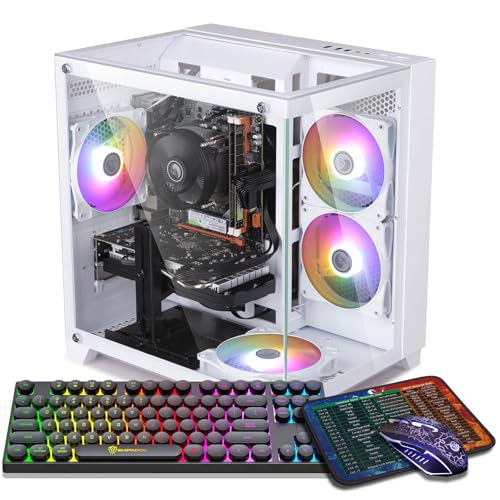
Where to buy
Check the latest price, availability and delivery on Amazon. Orders are placed on Amazon. We may earn a commission from qualifying purchases.
- Best overall for 1440p: ZER-LON Gaming PC, Ryzen 5 5500, RTX 4060 8GB — Check on Amazon
- STGAubron Gaming PC, Ryzen 5 5500, RTX 3060 12GB — Check on Amazon
- LXZ Gaming PC, Ryzen 5 5500, RTX 3050 8GB, 32GB RAM — Check on Amazon
- ZOTAC MEK Gaming PC, Ryzen 5 5500, RTX 3050 — Check on Amazon
See 2 more Amazon options
- STGAubron Gaming PC, Ryzen 5 5500, RTX 3050 6GB, 1TB SSD, White — Check on Amazon
- WIWB Gaming PC, Ryzen 5 5500, RTX 3050 8GB, 512GB SSD — Check on Amazon
Read the full guide ↓
Disclosure: As an Amazon Associate, reviewstook.com earns from qualifying purchases. Links to Amazon on this page are affiliate links; they cost you nothing extra. Listing details such as price and availability change often, so check the current Amazon listing before you buy.
Seven hundred dollars is the most argued-about budget in PC gaming, and 1440p is the reason. A 2560×1440 monitor pushes about 78 percent more pixels than a 1080p one, and at this price the graphics cards on offer were mostly designed with 1080p in mind. So let us say the quiet part first, because every pick below depends on it: under $700, 1440p is real, but it is 1440p with help. The help has names — DLSS and FSR upscaling, which render the game at a lower internal resolution and reconstruct the 1440p image, and, on the one RTX 4060 machine in this guide, DLSS 3 Frame Generation on top of that. With those tools switched on, esports titles run at genuinely high frame rates at 1440p, and modern single-player games run at a smooth 60 frames per second at medium-to-high settings. With them switched off, at native 1440p ultra, most of these machines will remind you what they cost. That is not a failure of the budget; it is the honest shape of it, and this guide is organized around getting the most real 1440p out of every dollar rather than pretending the compromise does not exist.
The second honesty note is about price, and it matters more in this category than in almost any other we cover. Prebuilt gaming PC prices move a lot — the same tower can shift by hundreds of dollars in different months as graphics card and memory costs swing. Every machine below is a real Amazon listing positioned in this budget class, but listings in this category also move above the line at times, so check the price on Amazon before you buy. Read this guide as a buy-at-or-under-$700 list: if a listing is sitting above the line on the day you shop, the correct move is to wait for the dip, choose the pick that is under the line that day, or step up to the $800 tier in Best 1440p Gaming PC Under $800 rather than overpaying for a $700-class machine. What $700 should buy, when the price is right, is consistent across all six picks: a six-core Ryzen 5 5500 processor, a discrete NVIDIA graphics card with at least 6GB of video memory, 16GB of system RAM (32GB in one case), fast NVMe solid-state storage, Wi-Fi, and Windows 11 installed. Below are the quick picks, detailed reviews of all six machines, a comparison table, a plain-language explanation of what 1440p actually demands from a graphics card, the mistakes that waste money at this tier, and the questions buyers ask before their first 1440p monitor arrives.
In this guide
Quick Picks
Short on time, or comparing several options at once? Each row below names a buyer type and the machine that suits it, with a link to the listing.
| Buyer type | Pick | Why it stands out | Link |
|---|---|---|---|
| Best overall for 1440p | ZER-LON Gaming PC, Ryzen 5 5500, RTX 4060 8GB | The only DLSS 3 Frame Generation card in this guide | Check on Amazon |
| Best for texture-heavy games | STGAubron Gaming PC, Ryzen 5 5500, RTX 3060 12GB | 12GB of VRAM — half again what the 8GB cards offer | Check on Amazon |
| Best for multitasking and streaming | LXZ Gaming PC, Ryzen 5 5500, RTX 3050 8GB, 32GB RAM | 32GB of system RAM, double every other pick here | Check on Amazon |
| Best build quality | ZOTAC MEK Gaming PC, Ryzen 5 5500, RTX 3050 | A named-brand builder and a 650W 80+ Gold power supply | Check on Amazon |
| Best storage for the money | STGAubron Gaming PC, Ryzen 5 5500, RTX 3050 6GB, White | A full 1TB SSD behind an entry-level card | Check on Amazon |
| Best budget floor | WIWB Gaming PC, Ryzen 5 5500, RTX 3050 8GB | The 8GB version of the RTX 3050 in the cheapest frame | Check on Amazon |
How These Picks Were Chosen
The budget was applied as a ceiling for this guide. Every product below is a real Amazon.com listing that we verified directly — brand, processor, graphics card, memory, storage and model number all come from the listing itself. Gaming PC prices in this class move a lot, so check the price on Amazon for the current listing before you buy. The live listing is the only price that counts, and the first step of the buying advice in this guide is to check it.
We did not use these machines ourselves. We read the maker listings and specification data and compared the parts that decide 1440p performance, in the order they decide it: graphics card first, video memory second, processor third, then system memory, storage and the power supply that has to feed an upgrade later. That ordering produced a clear hierarchy in this guide. The RTX 4060 sits on top because it is a generation newer, supports DLSS 3 Frame Generation, and is the only card here we would call a native-1440p card at sensible settings. The RTX 3060 follows on the strength of its 12GB of VRAM, which matters more at 1440p than raw benchmark charts suggest. The RTX 3050 machines — in both its 8GB and 6GB forms — are included with their role stated plainly: they are 1080p cards that can drive a 1440p monitor well in esports and lighter games and respectably in heavier ones with upscaling, and they earn their places on price, memory, storage or build quality rather than on 1440p muscle.
Three filters sat on top of the specs. The first is the discrete-graphics filter: no integrated-graphics machines, however modern their processors, because a Ryzen chip doing its own graphics work is not a 1440p gaming PC at any setting worth using. The second is the platform filter: every pick uses the Ryzen 5 5500, a six-core, twelve-thread AM4 processor boosting to 4.2GHz. That consistency is deliberate — at 1440p the graphics card does the heavy lifting, the 5500 is enough processor for every card in this guide, and a shared platform makes the comparison between picks honest: what differs is the graphics card, the memory, the storage and the builder. The third filter is completeness: Windows 11 installed, Wi-Fi built in, and a tower you can open and upgrade, because the realistic ownership story at this budget is a better graphics card in two or three years, and a sealed or proprietary box breaks that story.
The 6 Best 1440p Gaming PCs Under $700
ZER-LON Gaming PC, Ryzen 5 5500, RTX 4060 8GB, 16GB RAM, 1TB NVMe SSD
Who it suits: The buyer who actually means it about 1440p — who owns or is buying a 1440p monitor for modern single-player games, not just esports, and wants the strongest graphics card this budget can reach.
The graphics card is the whole argument, so start there. The GeForce RTX 4060 is a generation ahead of every other card in this guide, and two of its advantages are exactly the ones 1440p at this budget needs. The first is efficiency: it delivers its performance at low power, which keeps a modest tower cool and quiet. The second is DLSS 3 with Frame Generation. Ordinary upscaling renders at a lower resolution and reconstructs the image; Frame Generation goes further and inserts AI-generated frames between rendered ones in supported games, which can lift a 45-frame-per-second 1440p experience into the 70s and 80s where it feels like a different machine. It is not magic — it adds a little latency, and it only exists in games that support it — but at this budget it is the single most valuable feature a graphics card can carry, and no other pick in this guide has it. Around the card, the machine is the standard platform done completely: a Ryzen 5 5500 running to 4.2GHz, 16GB of DDR4, a full 1TB NVMe SSD rather than the 512GB compromise, Wi-Fi, Windows 11 Home, and four RGB fans in a white tower (model AOV4060).
The honest cautions belong to the card and the price, in that order. The RTX 4060 has 8GB of VRAM, and at 1440p that is a working limit, not a formality: most games are fine at high textures, but the heaviest recent releases will ask you to choose medium textures or lean on DLSS — which, to be fair, is exactly the trade this whole guide is built on. And the price is the volatile one in this guide. That makes this the reach pick: the best machine here when it sits inside this budget, and a machine to wait on when it does not — check the price on Amazon before you decide. Set the rule before you shop — at or under $700, buy it ahead of everything else in this guide; above that, the STGAubron below or the $800 tier is the rational move.
- RTX 4060 8GB — the newest and fastest card in this guide, with DLSS 3 Frame Generation.
- Full 1TB NVMe SSD and 16GB DDR4 on the shared Ryzen 5 5500 platform.
- Low-power card keeps the tower cool and leaves the power supply an easy job.
Honest limitation: 8GB of VRAM caps texture settings in the heaviest 1440p titles, and this model’s price can move above this budget — it is a pick to buy when it sits inside the line, not one to chase above it.
Choose it if your price check shows it at or under $700 and 1440p single-player gaming is the priority. Skip it if it is sitting well above this budget today and you need a machine this week — that money buys the next tier up, not this one.

STGAubron Gaming PC, Ryzen 5 5500, RTX 3060 12GB, 16GB RAM, 1TB SSD
Who it suits: Players whose games are texture-hungry — open-world titles, modded games, flight and racing sims — and who would rather have memory headroom than the newest badge on the graphics card.
This machine’s case for second place is a single number: 12. The RTX 3060 in this STGAubron build carries 12GB of GDDR6 video memory, half again as much as the 8GB cards around it, and at 1440p VRAM is the resource that runs out first and complains loudest when it does. A game that exceeds its VRAM does not slow down gracefully; it stutters, streams textures in late, and pops scenery into view. The 3060’s raw speed sits a step behind the RTX 4060 above, and it tops out at DLSS 2 upscaling rather than Frame Generation — but its 12GB buffer means high textures stay on the table at 1440p in games where the 8GB cards are already negotiating. For a certain kind of library — the big open worlds, the heavily modded installs, the sims with enormous scenery — that trade is the right one, and it is a trade no benchmark headline will make for you. The rest of the build is generous for the class: the same Ryzen 5 5500, 16GB of DDR4, a 1TB SSD, Wi-Fi 6 and Bluetooth 5.2 (the best wireless spec in this guide), four RGB fans, a bundled RGB keyboard and mouse, Windows 11 Home, and a stated one-year warranty (model ABR1722).
The cautions are about the card’s age and the seller’s tier. The RTX 3060 is a 2021 design; it will not get newer DLSS features, and its ray tracing at 1440p is a sometimes-food — usable in lighter implementations, best switched off in heavy ones. STGAubron is a value-tier Amazon builder rather than a boutique name, so do the value-tier homework: photograph the unboxing, confirm the card in the tower is the 12GB model the listing promises, and run the machine hard inside the return window. On price, check the price on Amazon — this pick lives right at this guide’s border, which is precisely where a patient buyer wins. At $700 or under, its VRAM makes it the connoisseur’s pick of the six.
- RTX 3060 with 12GB of VRAM — the most graphics memory in this guide by a wide margin.
- Wi-Fi 6, Bluetooth 5.2, 1TB SSD and bundled keyboard and mouse.
- DLSS 2 upscaling for 1440p, with texture headroom the 8GB cards cannot match.
Honest limitation: An older card with no Frame Generation and modest ray tracing, from a value-tier builder whose homework — verify the parts on arrival — is part of the deal.
Choose it if you play open-world, modded or sim titles and texture quality matters more to you than the newest features. Skip it if your library is mostly competitive shooters, where the RTX 4060’s speed and Frame Generation count for more than VRAM.

LXZ Gaming PC, Ryzen 5 5500, RTX 3050 8GB, 32GB RAM, 1TB NVMe SSD
Who it suits: The multitasker — the player who games with Discord, a browser full of tabs, a stream or recording running, and maybe a second monitor of everything else, all at the same time.
Every other machine in this guide ships with 16GB of system RAM, which is the correct amount for gaming alone. This LXZ build ships with 32GB, and that changes what the machine is for. Sixteen gigabytes runs the game; thirty-two runs the game, the stream encode’s supporting cast, the browser, the voice chat, the recording buffer and the game launcher arguing with the other game launcher, without the operating system quietly swapping to disk in the background and stuttering your frame rate at the worst moment. If you stream, record highlights, or simply never close anything, this is the pick whose spec sheet was written for you. The graphics card is the 8GB version of the RTX 3050 — hold that thought for one paragraph — paired with the Ryzen 5 5500, a 1TB NVMe SSD and Windows 11 in a white tower.
Now the thought, stated as plainly as this guide states it everywhere: the RTX 3050 is a 1080p card. In this guide it earns its place as the budget route onto a 1440p monitor — esports and lighter games run genuinely well at 1440p, and heavier games run at 1440p output with DLSS upscaling from a lower render resolution, at medium settings. What it will not do is native 1440p at high settings in demanding modern games, and no honest guide should let the words “1440p gaming PC” imply otherwise at this price. There is also a listing-discipline point specific to this seller: LXZ sells several configurations under similar titles, including other processors and cards, so confirm on the listing itself that the configuration in your cart is the Ryzen 5 5500, RTX 3050 8GB, 32GB, 1TB one — the details page for this ASIN mixes variant information. That makes this 32GB configuration a strong value play in this budget class — check the price on Amazon before you buy. Buy it for the RAM and its position in this tier, with your eyes open about the card.
- 32GB of DDR4 — double every other pick, and the streaming/multitasking headroom that buys.
- RTX 3050 in its stronger 8GB form, with DLSS upscaling for 1440p output.
- 1TB NVMe SSD on the standard Ryzen 5 5500 platform, in a white tower.
Honest limitation: The RTX 3050 is a 1080p-class card — at 1440p it lives on upscaling and medium settings — and this seller’s listings mix configurations, so verify the exact spec before checkout.
Choose it if you stream, record or multitask heavily and your games are esports and mainstream titles. Skip it if demanding single-player games at 1440p are the point — that is the RTX 4060’s job, above.

ZOTAC MEK Gaming PC, Ryzen 5 5500, RTX 3050, 16GB RAM, 500GB NVMe SSD
Who it suits: The risk-averse buyer — the one purchasing for a teenager, a first PC, or a household where “send it back and argue with a marketplace seller” is not an acceptable ownership plan.
ZOTAC is the name in this guide you can also find on graphics cards sold worldwide, and this MEK tower (model MEK3050A5500BG0A) is what a real manufacturer’s version of the budget formula looks like. The core is familiar — Ryzen 5 5500 to 4.2GHz, RTX 3050 graphics, 16GB of DDR4, Windows 11 Home — but two specification lines separate it from the marketplace builds around it. The first is the power supply: a 650W 80+ Gold unit, named in the listing, where most rivals in this class say nothing about the PSU at all. A Gold-rated supply from a known program runs cooler, wastes less electricity, and — the point that matters in year three — has the headroom and the build quality to survive the graphics card upgrade this whole budget class is designed around. The second is Wi-Fi 6E, the best wireless standard in this guide. When a listing tells you its power supply’s efficiency rating and its Wi-Fi generation, it is telling you how the rest of the machine was specced, too.
The trade is storage and the same card ceiling as the other 3050 machines. The SSD is 500GB — half the 1TB drives elsewhere here — and in an era of 100GB-plus game installs that means a curated library of four or five big titles, or an inexpensive second drive later (an easy fit in a standard tower, and the Gold PSU will not notice it). The RTX 3050 itself carries the guide’s standing caveat: a 1080p card that handles 1440p through DLSS and sensible settings, strongest in esports and lighter games. On price, check the price on Amazon — this is another listing to buy when it sits at or under $700, and one whose brand backing makes it worth waiting for inside this budget. If the tower is a gift, or a first machine for someone who will not troubleshoot it, the premium in confidence is the product.
- 650W 80+ Gold power supply, specified in the listing — rare and valuable at this price.
- Wi-Fi 6E and a global brand’s warranty and support channel behind the tower.
- The standard, proven formula: Ryzen 5 5500, RTX 3050, 16GB DDR4, Windows 11.
Honest limitation: The 500GB SSD is the smallest in this guide alongside one other pick, and the RTX 3050 is a 1080p-class card — you are paying for build quality and backing, not extra frames.
Choose it if reliability, a named power supply and brand support matter more than storage or the last frame per second. Skip it if your library is huge and unmanaged — start with a 1TB pick and add discipline later.

STGAubron Gaming PC, Ryzen 5 5500, RTX 3050 6GB, 16GB RAM, 1TB SSD, White
Who it suits: The value hunter with a big library and a 1440p monitor already on the desk — someone who would rather have room for every game they own than the last word in graphics settings.
Read this build as an allocation exercise. STGAubron spends less on the graphics card — the RTX 3050 in its 6GB form — and more on everything around it: the Ryzen 5 5500, 16GB of DDR4, and a full 1TB SSD, in a white tower with six RGB fans, Wi-Fi 6, Bluetooth 5.0, and a bundled RGB keyboard and mouse. For a certain buyer that allocation is exactly right. Storage is the tax every gamer pays weekly; a 1TB drive holds the library without the uninstall shuffle, and a complete-in-the-box machine with peripherals included is a genuine one-purchase setup. Its position in this budget class supports the value story: check the price on Amazon, as this is one of the picks that can plausibly be found under the line without a major sale event.
And then, the graphics card, with the guide’s full honesty applied. The 6GB RTX 3050 is the weakest card here, and 6GB of VRAM is the tightest constraint in the guide: at 1440p, texture settings in demanding games must come down to medium or low, DLSS is not optional but structural, and some heavy recent releases are simply 1080p games on this machine whatever the monitor says. What it does well is the lighter half of gaming — esports titles, older AAA, indie and strategy games at 1440p are all genuinely enjoyable — and it does it in a complete, roomy, good-looking tower. The upgrade path is the closing argument: the AM4 platform and a standard case mean a future graphics card transforms this machine, and any saving against the RTX 4060 pick can help fund that future card. Buy it as a well-founded starting point, not as a finished 1440p rig, and it will not disappoint you.
- 1TB SSD, keyboard and mouse included — the most complete box in this guide.
- Positioned in this budget tier, regularly near the $700 line — check the price on Amazon.
- Six RGB fans, Wi-Fi 6 and Bluetooth 5.0 in a white tower.
Honest limitation: The 6GB RTX 3050 is the guide’s floor for graphics — 1440p here means upscaled, medium settings, and the heaviest new games belong at 1080p.
Choose it if library size, completeness and price lead your list, with a GPU upgrade planned down the road. Skip it if you want to buy once and not upgrade — the RTX 4060 pick is that machine.

WIWB Gaming PC, Ryzen 5 5500, RTX 3050 8GB, 16GB RAM, 512GB SSD
Who it suits: The buyer at the very floor of the budget — someone stepping up from a console or an old laptop, who wants onto a 1440p monitor now and expects to grow the machine over time.
This WIWB build (model wwr5go) makes one decision very well: given a limited graphics budget, it buys the right version of the card. The RTX 3050 came in two forms, and the 8GB one in this machine is meaningfully the better buy at 1440p than the 6GB version above — more VRAM for textures, the same DLSS upscaling to lean on, and a longer useful life before memory becomes the binding constraint. Around it: the Ryzen 5 5500 every pick in this guide shares, 16GB of DDR4 at 3200MHz as the listing specifies, a 512GB SSD, and Windows 11, sold by WIWB Direct and shipped from Amazon, with the listing noting a Prime-member price — which makes the live-price check doubly important, since the number you see may depend on membership.
The compromises are the visible ones. The 512GB drive is the joint-smallest here; plan on a focused library or a second drive. The seller is a small Amazon brand, so the same arrival homework applies as with the other value builders: verify the card and memory against the listing on day one, stress the machine inside the return window, and keep the packaging until the second week. And the RTX 3050’s standing caveat applies in full: at 1440p this is an upscaling machine for medium settings and a strong esports machine, not a native-1440p ultra machine. What you get for accepting that is the lowest-cost route in this guide to a real discrete-graphics tower on a modern, upgradeable platform — a machine whose second graphics card, bought in a future sale, will make it unrecognizable. As a first step into PC gaming at 1440p resolutions, that is a rational place to stand.
- The 8GB RTX 3050 — the better of the two 3050 variants for 1440p textures.
- 16GB of DDR4 3200 and the shared Ryzen 5 5500 platform, ready to upgrade.
- Shipped from Amazon with a Prime-member price noted on the listing.
Honest limitation: A 512GB SSD and a small-seller badge: storage discipline and arrival checks are part of the purchase, and 1440p performance is upscaling-based.
Choose it if the budget is firm, the monitor is already 1440p, and you are happy to grow the machine later. Skip it if you can stretch to the ZER-LON on sale — the RTX 4060 is a different class of 1440p experience.

Comparison Table
| Product | Graphics card | RAM / Storage | Best use | Link |
|---|---|---|---|---|
| ZER-LON Gaming PC, RTX 4060 | RTX 4060 8GB, DLSS 3 Frame Generation | 16GB / 1TB NVMe | The most real 1440p under $700 | Check on Amazon |
| STGAubron Gaming PC, RTX 3060 | RTX 3060 12GB, DLSS 2 | 16GB / 1TB SSD | Texture-heavy and open-world games | Check on Amazon |
| LXZ Gaming PC, RTX 3050 8GB | RTX 3050 8GB, DLSS 2 | 32GB / 1TB NVMe | Streaming and heavy multitasking | Check on Amazon |
| ZOTAC MEK Gaming PC, RTX 3050 | RTX 3050, DLSS 2 | 16GB / 500GB NVMe | Build quality and brand backing | Check on Amazon |
| STGAubron Gaming PC, RTX 3050 6GB | RTX 3050 6GB, DLSS 2 | 16GB / 1TB SSD | Big library, complete box, low price | Check on Amazon |
| WIWB Gaming PC, RTX 3050 8GB | RTX 3050 8GB, DLSS 2 | 16GB / 512GB SSD | The budget floor with the better 3050 | Check on Amazon |
How to Choose a 1440p Gaming PC Under $700
- Shop the graphics card, not the processor. At 1440p the GPU does the overwhelming share of the work. Every pick here uses the same Ryzen 5 5500 because it is enough; the differences that will decide your experience are the card, its VRAM and its upscaling features, in that order.
- Learn the VRAM ladder before you compare prices. At 1440p, 12GB (the RTX 3060 here) holds high textures comfortably, 8GB (RTX 4060, RTX 3050 8GB) is workable with occasional texture compromises in the heaviest games, and 6GB (RTX 3050 6GB) means medium textures as a default. A cheaper machine with less VRAM is not the same machine for less.
- Treat upscaling as a feature you are buying, because you are. DLSS Quality at 1440p renders internally at 1707×960 and reconstructs — on the RTX 4060 and 3060 it looks close to native in motion and buys roughly a third more performance. DLSS 3 Frame Generation, exclusive to the RTX 4060 in this guide, goes further in supported games. Budget 1440p without upscaling is a contradiction; choose the machine whose upscaling you prefer.
- Apply the live-price rule. Prices in this class swing by hundreds of dollars. A pick in this guide is a $700 pick when its listing is at or under $700 on the day you buy — and not before. If your first choice is sitting high, buy the pick that is under the line, wait, or honestly re-budget to the $800 tier instead of overpaying.
- Decide what your games actually are. Esports, strategy, indie and older AAA titles: any pick here will please you at 1440p. Current AAA single-player games: the RTX 4060, or the RTX 3060 for texture-heavy worlds. One library, one answer — do not buy for the library you imagine.
- Count storage in game installs, not gigabytes. A 1TB drive holds a working library; 500–512GB holds four or five large modern titles plus Windows. If you play two games deeply, small storage is fine. If you graze twenty, it will tax you weekly — pick a 1TB machine or budget a second drive.
- Ask about the power supply, even when the listing does not say. The PSU decides whether your year-three graphics card upgrade is a ten-minute job or a rebuild. The ZOTAC’s specified 650W 80+ Gold unit is the standard to compare against; with unspecified supplies, assume the upgrade ceiling is lower until you open the case and read the label.
- Verify on arrival, inside the return window. Open the machine, confirm the graphics card model and VRAM, the RAM amount and the drive size against the listing, then run your most demanding game for an evening. Value-tier builders are a fair trade at this price, and the verification is your half of it.
- Confirm the exact configuration in the cart. Several sellers in this class list families of similar machines under near-identical titles, with different cards, processors and drives a click apart. The title on the checkout page, not the search result, is the machine you are buying.
- Keep the monitor honest. A 1440p 144Hz monitor is a wonderful thing with these machines in esports and a 60–90Hz experience in heavy AAA games. If you have not bought the monitor yet, a high-refresh 1440p panel still makes sense — it will outlive this PC and serve the next one — but set today’s expectations by the card, not the panel.
What 1440p Actually Demands — and What Upscaling Changes
Resolution math is unforgiving, so do it once, plainly. A 1080p frame is 2.07 million pixels. A 1440p frame is 3.69 million — 78 percent more work for the graphics card on every single frame, before settings, effects or ray tracing enter the conversation. A card that delivers a comfortable 90 frames per second at 1080p delivers roughly 50 at native 1440p on the same settings, which is why this entire price class is a negotiation between resolution, settings and frame rate rather than a simple purchase. Every machine in this guide can drive a 1440p monitor; the question each buyer is really answering is which corner of that triangle they care about most.
Upscaling is what makes the negotiation livable, and at this budget it should be understood as core technology rather than a cheat. DLSS and FSR render the game at a lower internal resolution — DLSS Quality at 1440p output renders at 1707×960 — and use temporal data and, in NVIDIA’s case, AI models to reconstruct a 1440p image that in motion is remarkably close to native. The performance returned is roughly the difference between the two resolutions, which is another way of saying upscaling hands you back most of that 78 percent. Frame Generation, on the RTX 4060, adds synthesized frames on top, lifting perceived smoothness further at a small latency cost that matters in competitive play and barely registers in single-player games. The practical settings recipe for this whole guide follows: 1440p output, DLSS or FSR on Quality, textures as high as your VRAM allows, shadows and volumetrics a notch down, ray tracing off except on the RTX 4060 in lighter titles. Set a machine up that way and $700 buys a genuinely good-looking, smooth 1440p experience. Demand native ultra instead and the same $700 buys a slideshow with excellent textures.
VRAM deserves its own paragraph because it is the spec this budget stresses hardest and the one marketing mentions least. Video memory holds textures and frame data, and its demand grows with resolution. When a game runs out, performance does not decline politely — it stutters as assets stream. That is why the RTX 3060’s 12GB earns it second place here despite an older design, why the 8GB cards are the guide’s working standard, and why the 6GB card’s review tells you to lower textures before you lower anything else. If two machines in this guide are priced alike on the day you shop, and one has more VRAM, the VRAM is the tiebreak — at 1440p it ages better than any other number on the box.
Common Buying Mistakes
- Believing “1440p gaming PC” on a listing means native 1440p at high settings. At $700 it means 1440p output with upscaling and tuned settings — a good experience, honestly described, and a disappointment if you bought the other one in your head.
- Paying above the line for a machine that only belongs in this guide on sale. A $700-class tower bought well above the line is the worst purchase in the category: next-tier money for this-tier hardware.
- Comparing processors and ignoring graphics cards. A faster CPU behind a weaker GPU loses at 1440p every time; the card and its VRAM are the machine.
- Buying integrated graphics by accident. Listings that name a processor but no discrete card — or hide a “G” or “GT” suffix doing the graphics work — are office PCs in gaming clothes, and no setting makes them 1440p gaming machines.
- Ignoring which RTX 3050 you are getting. The 8GB and 6GB versions share a name and differ where 1440p cares most. Check the VRAM figure in the listing, not just the card name.
- Letting a big SSD or 32GB of RAM substitute for graphics performance. Storage and memory are cheap to upgrade later; the graphics card is the expensive decision. Buy GPU first, fix the rest in future sales.
- Skipping the arrival check. Wrong card variants, single-stick RAM and smaller drives all happen in this class, and all of them are free to fix inside the return window and expensive outside it.
- Turning ray tracing on first and judging the machine by the result. At this budget, ray tracing is a garnish for the RTX 4060 in lighter games, not a baseline feature — judge these PCs on rasterized performance with upscaling, which is how they will actually be played.
- Forgetting the upgrade question. A proprietary case, an unnamed 300W power supply or a soldered-down platform turns a cheap PC into a dead end. Every pick here is a standard tower for a reason.
Final Recommendation
- Most buyers, when the price is right: ZER-LON Gaming PC, RTX 4060.
- Open-world, modded and texture-heavy libraries: STGAubron Gaming PC, RTX 3060 12GB.
- Streamers and relentless multitaskers: LXZ Gaming PC, 32GB RAM.
- Gifts, first PCs and the risk-averse: ZOTAC MEK Gaming PC.
- Big libraries on a firm budget: STGAubron Gaming PC, RTX 3050 6GB, 1TB.
- The lowest-cost start in PC gaming: WIWB Gaming PC, RTX 3050 8GB.
Our top two at this budget are the ZER-LON, for the only graphics card here that treats 1440p as its home resolution — with DLSS 3 Frame Generation as the tiebreaker no rival answers — and the STGAubron RTX 3060 machine, whose 12GB of VRAM will still be holding high textures when the 8GB cards have started negotiating. Between them they cover the two honest shapes of this search: the newest features, or the most memory. If you stream or live with forty things open, the LXZ’s 32GB of RAM is a quality-of-life upgrade no graphics setting can imitate; if the machine is for someone else, the ZOTAC’s named Gold power supply and brand backing are worth real money; and the two budget STGAubron and WIWB builds are rational starting points as long as they are bought as starting points. Buyers whose live prices refuse to cooperate should compare Best 1440p Gaming PC Under $500 below and Best 1440p Gaming PC Under $800 above before forcing this tier, and anyone speccing a first setup from scratch can cross-check against Best Gaming PC Under $700. Check the live price, confirm the configuration in the cart, verify the parts on arrival — at $700, that discipline is worth as much as any component in the box.
Frequently Asked Questions
Can a PC under $700 really game at 1440p?
Yes — with the definition this guide uses from the first paragraph. Esports and lighter games run at native 1440p at high frame rates on the stronger picks here. Demanding modern games run at 1440p output with DLSS or FSR upscaling, medium-to-high settings, and textures set by your VRAM — a smooth, good-looking 60 frames per second experience on the RTX 4060 and RTX 3060 machines. What $700 does not buy is native 1440p at ultra settings in the heaviest current titles; that experience starts several hundred dollars higher.
RTX 4060 with 8GB or RTX 3060 with 12GB — which is better at 1440p?
It depends on your library, which is why both lead this guide. The RTX 4060 is the faster, newer card, uses far less power, and adds DLSS 3 Frame Generation — the better choice for most players and most games. The RTX 3060’s 12GB of VRAM holds higher textures in open-world, modded and simulation titles where 8GB runs out. If your games are varied and current, take the 4060; if they are specifically the texture-heavy kind, take the memory.
Is the RTX 3050 a 1440p card?
Not natively, and this guide does not pretend otherwise. The RTX 3050 — 8GB or 6GB — is a 1080p card that can drive a 1440p monitor well in esports, strategy, indie and older games, and acceptably in heavier games with DLSS upscaling and medium settings. The 3050 machines are in this guide because they are the budget route onto a 1440p screen and a sound upgrade platform, with their limits stated in their reviews. If native 1440p in modern AAA games is your requirement, the RTX 4060 pick or a higher budget is the honest answer.
Why does every pick use the same Ryzen 5 5500 processor?
Because at 1440p the graphics card is the bottleneck, and the six-core Ryzen 5 5500 (boosting to 4.2GHz) is enough processor for every card in this guide — spending more on the CPU would mean spending less on the GPU, which is the wrong trade at this resolution. The shared platform also keeps the comparison clean: what separates these machines is the card, the memory, the storage and the builder, and those are the differences your money should be choosing between.
How much VRAM do I need for 1440p?
Eight gigabytes is the working minimum for a good experience across most of today’s library with sensible texture settings. Twelve gigabytes — the RTX 3060 in this guide — removes the texture question in almost everything and is the safer long-term holding. Six gigabytes plays at 1440p with textures turned down and upscaling on, and will age fastest. Whatever you buy, when a game stutters at 1440p, lower texture quality first; it is the setting that spends VRAM.
Should I buy one of these or build my own for $700?
Building buys component choice — a named power supply, a specific motherboard, a card bought separately — and can edge a prebuilt on parts quality if you catch sales. It costs you an afternoon, the troubleshooting is yours, and Windows and Wi-Fi are separate line items that prebuilts include. At this budget the two routes land close together; the prebuilts in this guide are for buyers who value the warranty, the return window and playing this week. Whichever route you take, the graphics-card-first logic in this guide applies unchanged.
What is the first upgrade I should plan for?
The graphics card, in almost every case — it is the component that defines 1440p performance, and these standard AM4 towers accept a future card the way they were designed to. The exceptions: owners of the 500–512GB machines may feel a second SSD sooner, and 16GB machines that grow into streaming will want the RAM the LXZ already has. Check your power supply’s wattage and rating before the card upgrade, and buy the card in a sale — the same discipline that should have bought the PC.


