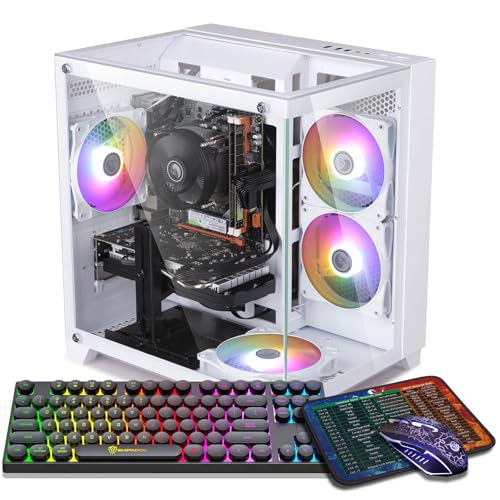
Where to buy
Check the latest price, availability and delivery on Amazon. Orders are placed on Amazon. We may earn a commission from qualifying purchases.
- Best overall for streaming: ZER-LON Gaming PC, Ryzen 5 5500, RTX 4060 8GB — Check on Amazon
- STGAubron Gaming PC, Ryzen 5 5500, RTX 3060 12GB — Check on Amazon
- LXZ Gaming PC, Ryzen 5 5500, RTX 3050 8GB, 32GB RAM — Check on Amazon
- ZOTAC MEK Gaming PC, Ryzen 5 5500, RTX 3050 — Check on Amazon
See 2 more Amazon options
- STGAubron Gaming PC, Ryzen 5 5500, RTX 3050 6GB, 1TB SSD, White — Check on Amazon
- WIWB Gaming PC, Ryzen 5 5500, RTX 3050 8GB, 512GB SSD — Check on Amazon
Read the full guide ↓
Disclosure: As an Amazon Associate, reviewstook.com earns from qualifying purchases. Links to Amazon on this page are affiliate links; they cost you nothing extra. Listing details such as price and availability change often, so check the current Amazon listing before you buy.
A streaming PC does two jobs at once, and they are not the job most gaming PC guides grade. The first is the one on your own screen: playing the game, in this guide at 1440p. The second is invisible to you and obvious to everyone watching: compressing that gameplay into a video stream, in real time, without stuttering the game or turning fast motion into soup at the bitrate the platform allows. The component that decides the second job is not the card’s gaming muscle — it is a small, dedicated block of silicon called the encoder, and at this budget its story has a twist most buyers never hear. Five of the six machines below carry NVIDIA’s Ampere-generation NVENC encoder, and because NVENC is a fixed hardware block rather than something that scales with the price of the card, the cheapest pick here broadcasts with exactly the same encoder quality as the RTX 3060 machine costing far more. The sixth — the RTX 4060 build at the top — carries the newer Ada-generation encoder and is the only pick that can encode AV1, the codec the platforms are slowly moving toward. Everything below is graded in that order: encoder first, then the memory that lets a game, OBS, alert sources and a voice call run simultaneously, then storage — because a streamer who records locally burns disk space at a rate a pure gamer never sees.
Two definitions before the picks, because confusing them is the most expensive beginner mistake in this category. Playing at 1440p and broadcasting at 1440p are different numbers, and on a $700 machine they should stay different. You play at 1440p on your monitor; your stream should leave the house at 1080p60, or at 936p for fast-motion games, because Twitch’s standard ingest sits around 6,000 kbps and a 1440p broadcast at that bitrate looks worse than a clean 1080p one. YouTube accepts higher bitrates, carries 1440p streams and takes AV1 today — one reason the RTX 4060 pick leads this guide — but the honest default for this price class is: render the game for yourself at 1440p, encode the broadcast at 1080p60, and let the encoder hardware, not your CPU, do that work. The budget discipline from our base guide carries over unchanged: every pick is a real listing selected for this under-$700 guide, but listings move in and out of this tier, so check the price on Amazon before you buy. Read this as a buy-at-or-under-$700 list — if a listing sits above the line on the day you shop, wait for the dip, buy the pick under the line that day, or compare Best 1440p Gaming PC For Streaming Under $800.
In this guide
Quick Picks
Short on time, or comparing several options at once? Each row below names a streaming buyer type and the machine that suits it, with a link to the listing.
| Buyer type | Pick | Why it stands out | Link |
|---|---|---|---|
| Best overall for streaming | ZER-LON Gaming PC, Ryzen 5 5500, RTX 4060 8GB | The only AV1 encoder in this guide, plus DLSS 3 Frame Generation for the game | Check on Amazon |
| Best for playing at 1440p while streaming | STGAubron Gaming PC, Ryzen 5 5500, RTX 3060 12GB | 12GB of VRAM — the most headroom for game textures plus OBS compositing | Check on Amazon |
| Best for simultaneous load | LXZ Gaming PC, Ryzen 5 5500, RTX 3050 8GB, 32GB RAM | 32GB of system RAM, double every other pick, for OBS, alerts and browser sources | Check on Amazon |
| Best upgrade platform | ZOTAC MEK Gaming PC, Ryzen 5 5500, RTX 3050 | A named 650W 80+ Gold power supply, ready for a future AV1-class card | Check on Amazon |
| Best broadcast quality per dollar | STGAubron Gaming PC, Ryzen 5 5500, RTX 3050 6GB, White | The same Ampere NVENC as the 3060 pick, with a 1TB drive, at a budget-friendly tier | Check on Amazon |
| Best budget floor | WIWB Gaming PC, Ryzen 5 5500, RTX 3050 8GB | The 8GB 3050 and the same Ampere encoder in the cheapest frame | Check on Amazon |
How These Picks Were Chosen
The six machines are the same six verified in our base guide to Best 1440p Gaming PC Under $700 — real Amazon.com listings whose details come from the listings themselves, selected for this under-$700 guide. Check the price on Amazon for the current listing, because that is the only price that counts. What changes here is not the hardware but the grading: each machine has been re-scored for the streaming job.
We did not use these machines ourselves. The grading runs in this order. First, the encoder: which NVENC generation the card carries and which codecs it can produce, because that silicon — not the card’s gaming tier — sets the ceiling on your broadcast quality at a fixed bitrate. Second, simultaneous-load capacity: streaming is never one program, it is a game plus OBS plus browser-based alerts and overlays plus voice chat plus a recording buffer, so RAM and VRAM are graded as headroom for the whole stack. Third, storage, graded as recording hours rather than gigabytes, with the arithmetic shown later. Fourth, the game itself — because a stream of a stuttering game is a stuttering stream, the base guide’s playing grades stand: the RTX 4060 is the only card here we call a native-1440p card at sensible settings, the RTX 3060 follows on VRAM, and the RTX 3050 machines are 1080p-class cards that play respectably at 1440p output with DLSS upscaling and tuned settings.
One platform fact shapes everything below: all six picks share the Ryzen 5 5500, a six-core, twelve-thread AM4 processor. It is a non-G Ryzen, with no integrated graphics at all — so no Quick Sync encoder exists on any machine here. Your encoding choices on every pick are exactly two: the NVIDIA hardware encoder, or x264 software encoding on the same six cores your game is using. That is not a close contest, and the next section explains why.
The Encoder Is the Streaming Spec
NVENC is a separate, fixed-function block on the graphics card whose only job is turning rendered frames into compressed video. It does not borrow the card’s gaming cores in any meaningful way, which is why a game can run at full speed while the encoder works beside it — and why the encoder’s generation matters more to a streamer than the difference between an RTX 3050 and an RTX 3060. Within one generation, the block is the block: the 3050 and the 3060 here carry the same Ampere-generation NVENC, producing H.264 and HEVC encodes of the same quality at the same bitrate. The 3060 is the far stronger gaming card; as broadcast hardware, it ties with the 3050s. That inverts normal buying logic — a streamer on a firm budget can buy the cheaper card and lose nothing on the encoding side, as long as the game itself still runs well.
The RTX 4060 is the exception that proves the rule. Its Ada-generation NVENC is a genuine step: a somewhat better H.264 encode at the same bitrate, and — the headline — AV1 encoding, which no Ampere card can produce at any price. AV1 matters in two places today. YouTube accepts AV1 live ingest now, and an AV1 stream keeps visibly more detail in fast motion than the same stream in H.264. Twitch is the slower story: its standard ingest remains H.264 at around 6,000 kbps, with AV1 arriving through its Enhanced Broadcasting programme rather than as a universal switch — so on Twitch today, the 4060’s advantage is its better H.264, not a codec revolution. State it plainly: AV1 encode is RTX 40-series territory, exactly one machine here lives in that territory, and the other five will broadcast in H.264 for their working lives. For a Twitch-first streamer that is a smaller loss than it sounds; for a YouTube-first streamer it is the strongest reason to stretch to the top pick.
The fallback, x264 software encoding, deserves its reputation — as a fallback. Given spare cores, x264 at slower presets can match or beat hardware encoding. These machines have no spare cores: the 5500’s six are already running the game, and x264 at veryfast is the realistic ceiling while gaming on the same chip. Every dropped thread shows up twice, as encoding lag in OBS and as a stutter in the game. OBS’s statistics view separates the two failure modes — rendering lag (the scene could not be composited in time) from encoding lag (the encoder could not keep up) — and at this budget nearly every encoding-lag problem traces back to choosing x264 or overloading the GPU’s render side. The rule follows: NVENC always. Finally, the unglamorous rule that outranks every spec in this section: stream on a wired Ethernet connection. Every pick includes Wi-Fi, and every pick should still be plugged in. Upload over Wi-Fi drops frames in bursts no encoder setting can repair, and “my stream stutters” tickets in this price class are network problems wearing an encoder costume more often than not.
The 6 Best 1440p Gaming PCs for Streaming Under $700
ZER-LON Gaming PC, Ryzen 5 5500, RTX 4060 8GB, 16GB RAM, 1TB NVMe SSD
Who it suits: The streamer who wants the best broadcast this budget can produce — especially anyone streaming to YouTube, recording locally at high quality, or planning to keep the machine for years while the platforms finish moving to AV1.
Start with the encoder, because here it is genuinely the headline. The RTX 4060’s Ada-generation NVENC is the only encoder here that produces AV1, and it is also the best H.264 encoder in the guide for the Twitch-bound majority. Pair that with the card’s gaming side — the strongest in this guide, the only one we call a native-1440p card at sensible settings, with DLSS 3 Frame Generation in supported games lifting the frame rate your viewers ultimately watch — and this ZER-LON build (model AOV4060) is the only pick that upgrades both halves of the streaming job at once. The pattern this tier makes practical is worth naming: stream at 1080p60 around 6,000 kbps while recording a separate, high-bitrate local copy for editing, and the hardware encoder handles the broadcast without asking the 5500’s six cores to join in. Around the card: 16GB of DDR4, the working floor for a game-plus-OBS stack, a full 1TB NVMe SSD for the recording habit, Wi-Fi, Windows 11 Home, and four RGB fans in a white tower.
The cautions are the base guide’s, unsoftened. The RTX 4060’s 8GB of VRAM is a working limit at 1440p: the game, OBS’s compositing and any GPU-accelerated browser sources all draw on the same pool, and in the heaviest recent releases you will choose medium textures or lean on DLSS to keep the stack comfortable. And its position in this tier is the volatile one here — it moves in and out of the under-$700 frame, with its in-budget appearances often arriving in sale periods, so check the price on Amazon. The rule stands: at or under $700, buy it ahead of everything else here; above that line, wait or step up a tier.
- Ada-generation NVENC with AV1 encode — the only future-proof encoder in this guide.
- The strongest gaming card here, with DLSS 3 Frame Generation in supported titles.
- 1TB NVMe SSD — the recording headroom the streaming job actually consumes.
Honest limitation: 8GB of VRAM is shared between the game and the OBS stack at 1440p, and this model’s price spends real time above $700 — it is a buy-on-the-dip pick, not an everyday-$700 pick.
Choose it if your price check shows it at or under $700 and your stream’s quality ceiling matters more than anything else in the setup. Skip it if it is sitting well above the budget line today and you stream this week — the Ampere picks below broadcast in H.264 nearly as well for far less.

STGAubron Gaming PC, Ryzen 5 5500, RTX 3060 12GB, 16GB RAM, 1TB SSD
Who it suits: The streamer whose games are the texture-heavy kind — open worlds, modded installs, big sims — played at 1440p on the same machine that encodes the broadcast.
Here is the encoder fact applied to a real purchase: this STGAubron’s RTX 3060 carries the same Ampere NVENC as the RTX 3050 machines below it, so its broadcast at 6,000 kbps is the equal of theirs — H.264 and HEVC, no AV1, full stop. What the extra money over a 3050 pick buys is entirely on the playing side, and for a streamer playing at 1440p it buys the right thing: 12GB of VRAM. A single-PC stream draws on that pool three ways at once — the game’s textures, OBS’s compositing, and any GPU-accelerated sources — and 12GB is the only buffer here that never has to negotiate between them. High textures stay on in games where the 8GB cards are already compromising, which viewers see as a sharper, more stable image before the encoder ever touches it. The rest of the build suits the job: the shared Ryzen 5 5500, 16GB of DDR4, a 1TB SSD, Wi-Fi 6 and Bluetooth 5.2 (the best wireless spec here, though the wired rule still applies), four RGB fans, a bundled RGB keyboard and mouse — which quietly reduces the starter-kit bill below — Windows 11 Home, and a stated one-year warranty (model ABR1722).
The cautions mirror the base guide. The RTX 3060 is a 2021 design: DLSS 2 upscaling rather than Frame Generation, modest ray tracing best left off in heavy games, and no path to AV1. STGAubron is a value-tier builder, so do the arrival homework: photograph the unboxing, confirm the card in the tower is the 12GB model promised, and run a full stream session inside the return window. On price, check the price on Amazon — it lives at this guide’s border, which is where a patient buyer wins.
- 12GB of VRAM — the only pick where game textures and OBS compositing never compete.
- The same Ampere NVENC broadcast quality as every Ampere pick, with a stronger game beneath it.
- The guide’s best wireless spec (Wi-Fi 6, Bluetooth 5.2), a 1TB SSD, and peripherals in the box.
Honest limitation: No AV1 encode and no Frame Generation — the encoder is last generation’s, and the premium here buys playing headroom, not broadcast headroom.
Choose it if you play open-world, modded or sim titles at 1440p and stream them from the same machine. Skip it if your library is competitive shooters at lower settings — there, VRAM is not your constraint, and the cheaper picks broadcast identically.

LXZ Gaming PC, Ryzen 5 5500, RTX 3050 8GB, 32GB RAM, 1TB NVMe SSD
Who it suits: The streamer whose broadcast is a production — animated alerts, multiple browser sources, a VTuber rig or a busy overlay stack — running alongside the game on one machine.
Every other pick here ships with 16GB of system RAM. This LXZ build ships with 32GB, and streaming is where that difference stops being a luxury. Sixteen gigabytes runs the game and a lean OBS scene. Thirty-two runs the game, OBS, the browser sources behind your alerts and tickers (each a small browser instance with its own appetite), Discord, the chat client, the recording buffer and the launcher arguing with the other launcher — without the operating system paging to disk mid-stream and stuttering both the game and the broadcast. If your stream’s personality lives in its overlays, this is the pick whose spec sheet was written for you. The encoder is the familiar Ampere NVENC — the same broadcast quality as the 3060 pick above — on the 8GB version of the RTX 3050, with the Ryzen 5 5500 and a 1TB NVMe SSD in a white tower.
Now the playing side, with the base guide’s honesty at full size: the RTX 3050 is a 1080p-class card. On your own monitor it plays esports and lighter games genuinely well at 1440p, and heavier games at 1440p output with DLSS upscaling at medium settings — which, for the broadcast, is often invisible, because your stream leaves at 1080p60 anyway and a clean upscaled image encodes beautifully. What it will not do is native 1440p at high settings in demanding modern games. One listing-discipline point is specific to this seller: LXZ sells several configurations under similar titles, and the details page for this ASIN mixes variant information — confirm that the configuration in your cart is the Ryzen 5 5500, RTX 3050 8GB, 32GB, 1TB one before you pay. No price is claimed for this 32GB build here, so check the price on Amazon — the live listing is the whole story. Buy it for the RAM, with your eyes open about the card.
- 32GB of DDR4 — double every other pick, and the simultaneous-load headroom streaming actually uses.
- The same Ampere NVENC as the 3060 pick; the broadcast does not know the card is a 3050.
- 1TB of NVMe storage for the recording habit, in a white tower.
Honest limitation: The RTX 3050 is a 1080p-class card — at 1440p your own view lives on upscaling and medium settings — and this seller’s listings mix configurations, so verify the exact spec before checkout.
Choose it if your stream runs heavy overlays, alerts and browser sources, or you record and edit on the same machine. Skip it if your scene is a plain game capture and your games are demanding — that money belongs in the RTX 4060’s card, not in RAM you will not fill.

ZOTAC MEK Gaming PC, Ryzen 5 5500, RTX 3050, 16GB RAM, 500GB NVMe SSD
Who it suits: The streamer buying for the long term — who wants the trustworthy build today and the cleanest possible path to an AV1-class graphics card in a couple of years.
ZOTAC builds graphics cards sold all over the world, and this MEK tower (model MEK3050A5500BG0A) applies that manufacturer’s discipline to the budget formula. For streaming today, its encoder is the same Ampere NVENC as the other 3050 machines and the 3060 — H.264 and HEVC, broadcast quality identical to the rest of the Ampere field. Its distinctive streaming asset is not today’s encode but tomorrow’s: the listing names a 650W 80+ Gold power supply, where most rivals say nothing about the PSU at all. That is what turns a future graphics card upgrade — the one that would bring AV1 encoding into this tower — into a drop-in job instead of a rebuild around an unknown supply. Add Wi-Fi 6E (the wired rule still applies on stream nights), the shared Ryzen 5 5500, 16GB of DDR4 and Windows 11 Home, and this is the pick bought with year three in mind. One discipline note carried from the base guide: the listing material does not headline this RTX 3050’s VRAM figure, so this guide does not state one — confirm it on the live listing if that number matters to you.
The trade is storage, and streaming makes it sharper than gaming does. The SSD is 500GB — half the 1TB drives elsewhere here — and the recording arithmetic later in this guide is unforgiving: after Windows and a few large games, it holds roughly ten hours of high-quality local recording before the delete-or-archive shuffle begins. Live-only streamers will never notice; record-everything streamers will feel it within a month. The mitigations are a disciplined archive habit or an inexpensive second drive later, which the standard tower accepts easily. On price, check the price on Amazon — this model also appears through marketplace sellers at higher tiers, so the standing rule applies, and the brand backing makes it worth waiting until it sits within this guide’s budget frame.
- 650W 80+ Gold power supply, specified in the listing — the future AV1 card upgrade is already prepared for.
- The same Ampere NVENC broadcast as the rest of the Ampere field, from a global brand.
- Wi-Fi 6E and a manufacturer’s warranty and support channel behind the tower.
Honest limitation: The 500GB SSD is the tightest recording budget in this guide, and today’s encoder is the same Ampere block as the cheapest picks — you are paying for build quality and the upgrade path, not a better stream tonight.
Choose it if reliability and a planned GPU upgrade matter more than storage, and your recording habit is light or disciplined. Skip it if you record every session at high bitrate — start with a 1TB pick and keep the archive.

STGAubron Gaming PC, Ryzen 5 5500, RTX 3050 6GB, 16GB RAM, 1TB SSD, White
Who it suits: The value-first streamer — the new channel that needs a complete, working broadcast setup for the least money, and would rather spend the savings on a microphone.
This is the pick that proves the encoder section’s point. Its RTX 3050 in 6GB form carries the same Ampere NVENC as the RTX 3060 machine above — so at Twitch’s roughly 6,000 kbps, its broadcast is, encoder for encoder, the equal of a pick that costs considerably more. What the low price spends down is the playing side and the memory around the stream, and this review will not blur that: 6GB of VRAM is the tightest constraint in the guide. At 1440p on your own monitor, textures in demanding games come down to medium or low, DLSS is structural rather than optional, and OBS’s compositing draws from the same small pool — keep the scene lean and the setup works; pile on animated overlays and the LXZ above is the honest answer. Around that constraint, the allocation is generous where streaming feels it daily: a full 1TB SSD, the Ryzen 5 5500, 16GB of DDR4, six RGB fans, Wi-Fi 6 and Bluetooth 5.0 in a white tower, and a bundled keyboard and mouse that trims the starter-kit bill. Its value positioning makes it one of the picks here that can plausibly be found under the line without a major sale event — check the price on Amazon to confirm it on the day you shop.
Buy it as what it is — the cheapest complete route to a genuinely competent H.264 broadcast, in a standard, upgradeable tower — and it will not disappoint. The AM4 platform means the future graphics card that transforms its gaming side also upgrades its encoder, and buying at this tier leaves room in the overall setup budget for a future upgrade. What it is not is a finished high-end rig: your own 1440p view is an upscaled, medium-settings one, and the heaviest new releases are 1080p games on this machine whatever the monitor says. For esports, older AAA, indie and strategy titles — the backbone of many real channels — that trade is rational, and the broadcast gives away nothing.
- The same Ampere NVENC as the 3060 pick — broadcast quality per dollar is the best in this guide.
- 1TB SSD, keyboard and mouse included — the most complete streaming box here.
- A budget-tier position in this guide, with regular appearances near the line — check price on Amazon.
Honest limitation: 6GB of VRAM is the guide’s floor — your own 1440p view means upscaled medium settings and a lean OBS scene, and the heaviest new games belong at 1080p.
Choose it if the channel is new, the budget is firm, and a microphone matters more than your own texture settings. Skip it if your scene is overlay-heavy or your games are current AAA at 1440p — that is the LXZ’s RAM or the ZER-LON’s card, above.

WIWB Gaming PC, Ryzen 5 5500, RTX 3050 8GB, 16GB RAM, 512GB SSD
Who it suits: The buyer at the very floor of the budget — stepping up from a console or an old laptop, starting a first channel, and expecting to grow the machine over time.
This WIWB build (model wwr5go) makes the same smart decision the base guide credited, and streaming rewards it twice. Given a limited graphics budget, it buys the 8GB version of the RTX 3050 rather than the 6GB — and while its Ampere NVENC is identical to every other Ampere pick’s (the broadcast, once again, is the equal of the 3060 machine’s), the extra 2GB of VRAM serves the side your viewers indirectly see: your game at 1440p output holds better textures and steadier frame pacing with OBS compositing alongside, so fewer stutters propagate into the encode. Around it: the shared Ryzen 5 5500, 16GB of DDR4 at 3200MHz as the listing specifies, a 512GB SSD, and Windows 11, sold by WIWB Direct and shipped from Amazon, with the listing noting a Prime-member price — which makes checking the price on Amazon doubly important, since what you see may depend on membership. This guide makes no price claim for it at all; the live listing is the whole story.
The compromises are the visible ones. The 512GB drive is the joint-smallest here, and for a streamer it is a recording budget before it is a game library: stream live and archive selectively, or add a second drive early — the arithmetic section below shows the hours. The seller is a small Amazon brand, so the arrival homework applies in full: verify the card and memory on day one, run a complete test stream inside the return window, and keep the packaging until the second week. And the 3050’s standing caveat applies: your own view at 1440p is upscaling and medium settings, strongest in esports and lighter games. What you get is the lowest-cost route in this guide to a real discrete-graphics streaming tower — one whose second graphics card upgrades its game and its encoder in a single swap.
- The 8GB RTX 3050 — the better 3050 for holding a game and an OBS scene at 1440p.
- The same Ampere NVENC broadcast as every Ampere pick, at the budget floor.
- DDR4 3200 memory in a standard, upgradeable AM4 tower.
Honest limitation: A 512GB SSD and a small-seller badge: recording discipline and arrival checks are part of the purchase, and pricing is live-listing only — check the price on Amazon.
Choose it if the budget is firm, the channel is just starting, and you are happy to grow the machine later. Skip it if you record everything at high bitrate — the 1TB picks exist precisely for that habit.

Comparison Table
| Product | Encoder | RAM / Storage | Best streaming use | Link |
|---|---|---|---|---|
| ZER-LON Gaming PC, RTX 4060 | Ada NVENC — H.264, HEVC, AV1 | 16GB / 1TB NVMe | The best broadcast under $700, and the only AV1 encode | Check on Amazon |
| STGAubron Gaming PC, RTX 3060 | Ampere NVENC — H.264, HEVC | 16GB / 1TB SSD | Playing texture-heavy games at 1440p while streaming | Check on Amazon |
| LXZ Gaming PC, RTX 3050 8GB | Ampere NVENC — H.264, HEVC | 32GB / 1TB NVMe | Overlay-heavy scenes and heavy simultaneous load | Check on Amazon |
| ZOTAC MEK Gaming PC, RTX 3050 | Ampere NVENC — H.264, HEVC | 16GB / 500GB NVMe | Build quality and the cleanest future encoder upgrade | Check on Amazon |
| STGAubron Gaming PC, RTX 3050 6GB | Ampere NVENC — H.264, HEVC | 16GB / 1TB SSD | A complete broadcast setup at a budget-friendly tier | Check on Amazon |
| WIWB Gaming PC, RTX 3050 8GB | Ampere NVENC — H.264, HEVC | 16GB / 512GB SSD | The budget floor with the better 3050 | Check on Amazon |
How to Choose a 1440p Gaming PC for Streaming Under $700
- Grade the encoder generation before the gaming tier. Your viewers never see your card’s benchmark score; they see its encoder’s output at a fixed bitrate. Here that means one question first — Ada NVENC with AV1 (the RTX 4060 pick) or Ampere NVENC in H.264/HEVC (everyone else) — and only then the gaming questions.
- Remember that NVENC does not scale with card price. The RTX 3050 and RTX 3060 here share the same Ampere encoder block. If your games run well on a cheaper card, its broadcast is the expensive card’s equal. Spend the difference on what does scale: RAM, storage and a microphone.
- Never plan to encode with x264 on these machines. Every pick’s Ryzen 5 5500 has no integrated graphics, so there is no Quick Sync safety net, and its six cores belong to the game. x264 at veryfast while gaming on the same chip buys encoding lag and game stutter in one transaction. NVENC is not the preference at this budget; it is the design.
- Separate your playing resolution from your broadcast resolution. Play at 1440p; broadcast at 1080p60, or 936p for fast-motion titles, at around 6,000 kbps on Twitch. A 1440p stream at Twitch bitrates looks worse than the 1080p one it replaces. YouTube is the exception: higher bitrates, 1440p ingest and AV1 today.
- Count RAM as stream capacity, not a gaming spec. Sixteen gigabytes is the floor for game plus OBS plus chat. If your scene carries animated alerts, several browser sources or a VTuber rig, the 32GB pick is the difference between a stable broadcast and the operating system paging mid-stream.
- Watch VRAM as a shared pool. The game, OBS compositing and GPU-accelerated sources all draw on the same video memory. At 1440p, 12GB never thinks about it, 8GB works with texture discipline, and 6GB demands a lean scene too.
- Plug in the cable. Every pick has Wi-Fi, and none of them should stream on it. Run Ethernet to the desk before your first broadcast; upload jitter over wireless is the most common cause of dropped frames in this price class and the cheapest to eliminate.
- Apply the live-price rule. A pick in this guide is a $700 pick when its listing is at or under $700 on the day you buy. If your first choice is sitting high, buy the pick that is under the line, wait for the dip, or re-budget honestly — buying this-tier hardware at next-tier money is the worst purchase in the category.
- Confirm the exact configuration in the cart. Several sellers here list families of similar machines under near-identical titles, with different cards, memory and drives a click apart — the LXZ listing family mixes variant information on its own details page. The title on the checkout page is the machine you are buying.
- Test-stream inside the return window. Run a full session — game, scene, alerts, recording — for an evening, and watch OBS’s statistics for rendering lag versus encoding lag so you know which side any problem lives on. Fixes are free inside the window and expensive outside it.
Recording Storage: The Arithmetic Streamers Forget
Live-only streamers can skip this section; everyone who records should do this math before choosing between the 1TB and 500GB picks. A local recording at a quality worth editing — 40 to 50 megabits per second — consumes roughly 18 to 22 gigabytes per hour, call it about 20. Even a stream-quality recording at 6,000 kbps takes about 2.7 gigabytes per hour. Set that against the drives here, after Windows and a realistic game library have taken their share. A 1TB pick leaves on the order of 600 to 700 gigabytes: roughly thirty hours of high-quality recording, a comfortable month before archiving becomes a chore. The 500 and 512GB picks leave perhaps 200 gigabytes: around ten hours, which a daily streamer burns through in under two weeks. Neither number is a defect — the smaller drives belong to live-first streamers and the disciplined — but buying a 500GB machine with a record-everything habit is a mismatch no setting can fix afterwards. Decide which streamer you are before the drive decides for you.
What $700 Does Not Include: The Broadcast Kit
Every pick in this guide is the tower — in two cases (both STGAubron picks) with a keyboard and mouse in the box — and nothing else a stream actually needs. Budget the rest separately; none of it is included with any pick. The microphone comes first: viewers forgive a soft picture long before they forgive bad audio, and a serviceable USB microphone sits in the budget tier for streaming gear. A webcam, if your format uses one, is a similar budget-tier add-on. A second monitor keeps chat and OBS visible without alt-tabbing out of the game, and a simple camera light is a modest add-on as well. A capture card belongs on this list only if you intend to stream a console through the PC; a PC-only streamer should not buy one at all. Altogether, allow a separate budget beyond the tower — which is exactly why the cheaper Ampere picks are rational streaming purchases: their encoder is the same one, and the savings land where viewers can actually hear them. Readers speccing the whole room from scratch can also cross-check Best Streaming PC Under $700.
Common Buying Mistakes
- Buying the card’s gaming tier and assuming the stream improves with it. Within the Ampere generation the encoder is identical from the RTX 3050 to the RTX 3060 — the upgrade buys your own view, not your viewers’.
- Broadcasting at 1440p because the monitor is 1440p. At Twitch’s roughly 6,000 kbps, a 1440p output smears fast motion that a 1080p60 or 936p output keeps clean. Play high, broadcast sensible.
- Choosing x264 because a forum called NVENC soft. On a shared six-core processor that is also running the game, x264 at veryfast is the softer option in practice — and it taxes the game for the privilege.
- Streaming over Wi-Fi because the tower has a good wireless spec. Upload jitter drops frames in bursts no encoder can repair. The cable is the cheapest stream-quality upgrade in this entire guide.
- Spending the whole budget on the tower and streaming through an old headset microphone. Audio is the first thing viewers judge; the kit is a separate budget line, and the microphone is its first item.
- Buying a capture card for a PC-only stream. It solves a console problem. PC gameplay is captured in software, free, at full quality.
- Filling a 500GB drive with recordings and discovering it mid-session. Do the storage arithmetic first — about 20 gigabytes per hour at editing quality — and match the drive to the habit.
- Piling animated overlays and browser sources onto a 16GB, 6GB-VRAM machine. Simultaneous load is a real spec; if the production is the point, the 32GB pick exists for it.
- Overpaying for a sale-dependent pick. Several machines here belong in a $700 guide only at their dipped prices; buying one at its everyday high is next-tier money spent on this-tier hardware, for streamers exactly as for gamers.
- Skipping the test stream until the first real broadcast. Rendering lag and encoding lag have different cures, and OBS’s statistics view tells them apart — learn which one you have while the return window is still open.
Final Recommendation
- Most streamers, when the price is right: ZER-LON Gaming PC, RTX 4060 — the only AV1 encoder and the best H.264 encoder in the guide.
- Texture-heavy games played and streamed at 1440p: STGAubron Gaming PC, RTX 3060 12GB.
- Overlay-heavy scenes and relentless multitasking: LXZ Gaming PC, 32GB RAM.
- Long-term buyers planning an encoder upgrade: ZOTAC MEK Gaming PC.
- New channels on a firm budget: STGAubron Gaming PC, RTX 3050 6GB, 1TB.
- The lowest-cost start in streaming: WIWB Gaming PC, RTX 3050 8GB.
The streaming lens rearranges this guide’s podium in one important way: it compresses it. Because the Ampere machines share one encoder design, the broadcast-quality gap between the budget-tier STGAubron 3050 and the STGAubron 3060 above it is, on the encoding side, zero — the money between them buys your own 1440p experience, VRAM headroom and texture settings, all of which matter and none of which your viewers can name. The genuine step is the ZER-LON’s Ada encoder: better H.264 today, AV1 for YouTube today and for wherever Twitch’s Enhanced Broadcasting takes the platform next. So the rational shapes of this purchase are two. Either buy the encoder step and the best game in one tower — the ZER-LON, at or under $700 — or buy any Ampere pick that fits your playing and recording habits, and put the savings into the microphone, the second monitor and the cable, where a new channel’s audience will actually perceive them. Buyers whose live prices refuse to cooperate should compare Best 1440p Gaming PC For Streaming Under $500 below and Best 1440p Gaming PC For Streaming Under $800 above before forcing this tier, and anyone whose games come before their channel can cross-check the playing-first grades in Best 1440p Gaming PC Under $700. Check the live price, confirm the configuration in the cart, plug in the Ethernet cable, and test-stream inside the return window.
Frequently Asked Questions
Can a PC under $700 really stream and play at 1440p at the same time?
Yes, with the split this guide is built on: you play at 1440p on your monitor and broadcast at 1080p60 (or 936p for fast-motion games) at around 6,000 kbps. The hardware encoder does the broadcast work without taxing the processor, so the game keeps its frame rate. Esports and lighter games play at native 1440p on the stronger picks; heavier games play at 1440p output with DLSS upscaling and tuned settings. What $700 does not buy is broadcasting in native 1440p at high bitrate while playing at ultra settings — a higher tier’s job, and on Twitch a platform limit as much as a hardware one.
Is the RTX 3050’s stream really as good as the RTX 3060’s?
The encode itself, yes. Both cards carry the same Ampere-generation NVENC block, so at the same bitrate and codec their H.264 output is the same quality. What the RTX 3060 buys is everything around the encode: a stronger game at 1440p, and 12GB of VRAM so textures, OBS compositing and sources never compete. If your games run well on the 3050, your viewers will not see a difference; if they are the texture-heavy kind, you will feel it on your own screen first.
Do I need AV1 encoding to start streaming?
No. Twitch’s standard ingest is H.264 today, and every pick here produces a good H.264 stream. AV1 matters most for YouTube, which accepts it now and rewards it at a given bitrate, and as future-proofing while Twitch rolls AV1 through Enhanced Broadcasting. It is the strongest argument for the RTX 4060 pick — a reason to prefer it at the right price, not a reason to delay starting a channel on an Ampere machine.
Should I use x264 or NVENC on these PCs?
NVENC, on every pick, without exception for a single-PC setup. All six machines use the Ryzen 5 5500, which has no integrated graphics — so there is no Quick Sync alternative — and its six cores are already occupied by your game. x264 at veryfast while gaming on the same chip trades game stutter for encoding quality and usually ends with less of both. Keep x264 for a dedicated second machine, which is a different budget.
Why does every pick use the same Ryzen 5 5500 processor — is it enough for streaming?
It is enough precisely because of the encoding choice above. With NVENC carrying the broadcast, the processor’s streaming duties are the game, OBS’s scene management and your background apps — work the six-core 5500 handles across every pick here. The shared platform also keeps the comparison honest: what separates these machines is the encoder generation, the VRAM, the RAM and the storage — the differences a streamer’s money should choose between.
How much storage does a streamer actually need?
More than a gamer, if you record. A high-quality local recording at 40–50 Mbps consumes roughly 20 gigabytes per hour, so a 1TB drive holds on the order of thirty hours of recordings alongside a game library, while the 500–512GB picks hold around ten. Live-only streamers can ignore the question; record-everything streamers should start with a 1TB pick or plan a second drive early. A stream-quality recording is far lighter — about 2.7 gigabytes per hour — if you only need an archive rather than edit-ready footage.
What else do I need to buy besides the PC?
A microphone first, then a webcam if your format uses one, ideally a second monitor for chat and OBS, a basic light, and an Ethernet cable — the cheapest item here and the one that prevents the most dropped frames. A capture card is only for streaming a console through the PC. Allow a separate budget beyond the tower for this budget-tier streaming gear; two picks include a keyboard and mouse, and none includes a monitor.


