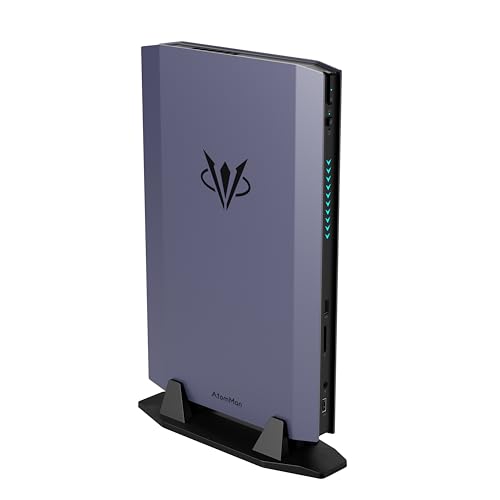
Where to buy
Check the latest price, availability and delivery on Amazon. Orders are placed on Amazon. We may earn a commission from qualifying purchases.
- Best overall mini gaming PC: AtomMan G7 Ti Mini PC, Core i9-14900HX, RTX 4070 Laptop, 32GB DDR5, 1TB SSD — Check on Amazon
- AtomMan G7 Pt Mini PC, Ryzen 9 7945HX, RX 7600M XT, 32GB DDR5, 1TB SSD — Check on Amazon
- AtomMan G1 Pro Mini PC, Ryzen 9 8945HX, Desktop RTX 5060, 32GB DDR5, 1TB SSD — Check on Amazon
- Beelink SER9 Pro Mini PC, Ryzen AI 9 HX 370, Radeon 890M, 32GB LPDDR5X, 1TB SSD — Check on Amazon
See 2 more Amazon options
- GMKtec EVO-X1 Mini PC, Ryzen AI 9 HX 370, Radeon 890M, 32GB LPDDR5X, 1TB SSD, OCuLink — Check on Amazon
- ASUS NUC 14 Performance Barebone Kit, Core Ultra 7 155H, RTX 4060 Laptop, No RAM/SSD/OS — Check on Amazon
Read the full guide ↓
Disclosure: As an Amazon Associate, reviewstook.com earns from qualifying purchases. Links to Amazon on this page are affiliate links; they cost you nothing extra. Listing details such as price and availability change often, so check the current Amazon listing before you buy.
Buying your first gaming PC is confusing enough without the mini PC category’s favourite trick, so let us disarm it in the first paragraph: when a small computer advertises an “RTX 4070”, it is almost never the desktop graphics card you have seen in tower builds. It is the laptop edition of that chip — smaller, thriftier, and slower — and the same quiet substitution applies to nearly every famous name in this guide. We therefore print each graphics chip’s full name, laptop or otherwise, every single time it appears. The second thing a beginner deserves up front is the comparison most roundups hide. A tower bought within this same budget can carry a desktop RTX 4070 SUPER — a Skytech Omega built that way, with 32GB of memory and a 1TB drive, sits in this band on Amazon — and no machine below gets near it for raw gaming speed. What these six sell is not raw speed alone. It is smallness: the largest measures 3.8 liters, the smallest 0.82, and each one sips power from a laptop-style brick, perches behind a monitor or on a shelf, and keeps a bedroom quiet. You are swapping frames for liters. This guide’s job is to make sure you do it knowingly, at the right price, on the right machine.
Because the audience is beginners, the layout adds teaching to the usual template. A plain-English glossary follows the quick picks and translates every term the listings will throw at you. Later you will find a numbered first-evening walkthrough, a section listing what else you will still have to buy, and an upgrades section that states without varnish which of these PCs can grow and which are finished products the day they arrive. Two warnings deserve previewing here. One of the six is not a computer at all but a barebone kit — no memory, no storage, no Windows — included solely for readers who already own those parts, and labelled a kit wherever it shows up. Prices change often during the current memory shortage, so check the current price on Amazon before you buy: two picks qualify for this budget only on days when their live price falls inside it.
In this guide
Quick Picks
Short on time, or comparing several options at once? Each row below names a buyer type and the machine that suits it, with a link to the listing.
| Buyer type | Pick | Why it stands out | Link |
|---|---|---|---|
| Best overall | AtomMan G7 Ti | Full-power RTX 4070 Laptop in about 2.55 liters — check price on Amazon | Check on Amazon |
| Best value with a discrete GPU | AtomMan G7 Pt | 16-core Ryzen 9 and RX 7600M XT, sitting lower in this budget band — check price on Amazon | Check on Amazon |
| Best desktop GPU in a mini — deal only | AtomMan G1 Pro | A real desktop RTX 5060 in 3.8 liters; buy only when its live price falls within budget — check price on Amazon | Check on Amazon |
| Best integrated graphics, smallest box | Beelink SER9 Pro | Radeon 890M in 0.82 liters, in the lower half of this budget band — check price on Amazon | Check on Amazon |
| Best eGPU upgrade path | GMKtec EVO-X1 | Radeon 890M today, a real OCuLink port for a desktop card later | Check on Amazon |
| Best for parts owners | ASUS NUC 14 Performance Barebone | RTX 4060 Laptop kit from a major brand; you supply RAM, SSD and OS | Check on Amazon |
The Words on the Box, in Plain English
Mini PC listings are written in a dialect designed to impress rather than explain. Here is every term you need for the six machines in this guide, translated.
- GPU (graphics card / graphics chip). The part that draws your games; its strength decides your settings and screen resolution more than any other single part.
- Laptop GPU vs desktop GPU. One name, two different chips. An “RTX 4070” inside a mini or laptop is the Laptop edition — NVIDIA’s own published specification gives it 4,608 cores and 8GB of memory, where the desktop card carries 5,888 cores and 12GB. The laptop chip is genuinely good; it simply is not the card the short name makes you picture, so this guide never lets the short name stand alone.
- VRAM. The graphics chip’s private memory, where game textures live. Every separate graphics chip here holds 8GB — the figure that will feel old first.
- Integrated graphics (iGPU). A small graphics processor built into the main processor, borrowing the computer’s ordinary memory instead of owning any. Weak versions run office screens; the strongest here, AMD’s Radeon 890M, honestly plays games at 1080p in lighter titles. Two picks below rely on it alone — a deliberate trade for size, but one to choose with open eyes.
- Watts (the GPU’s power limit). Identical laptop GPUs are sold at different wattages, and wattage is speed: a 4070 Laptop fed 140W and one fed 80W share a name and little else.
- Socketed memory (SO-DIMM). Memory on small removable sticks, laptop-style. Socketed means you can add more later with a screwdriver and ten minutes. The two AtomMan machines with separate graphics are socketed and can grow to 96GB.
- Soldered. Fixed to the board at the factory, for good. Soldered memory can never be added to or swapped — the capacity on the listing is the capacity for life. On an integrated-graphics PC the stakes double, because the graphics drink from that same pool. The Beelink and GMKtec picks are soldered, and their reviews say so every time it matters.
- Barebone. A kit rather than a computer: box, processor and graphics are present, but memory, storage and Windows are missing, and the machine does nothing until you buy and fit them. Exactly one pick here is a barebone — the ASUS kit — and the G7 Ti and G7 Pt listings also hide cheaper barebone versions behind the same product page, the most common ordering mistake in this category. The walkthrough below teaches the check that catches it.
- Renewed. A used, refurbished machine resold with a short guarantee. For the record, none of the six picks in this guide is renewed: all six are sold new — five as complete computers, one as a new kit.
- SSD (M.2 / NVMe). The storage drive, a small stick inside the machine holding Windows and your games. Two slots beat one, because dropping in a second drive later is the easiest upgrade any machine here offers.
- Refresh rate (Hz). How many times per second your monitor redraws. A 144Hz screen can show twice the motion of a 60Hz one — but only after you switch it to its real rate in Windows, because most monitors idle at 60Hz out of the box and quietly waste the money you spent.
- Upscaling (DLSS and FSR). The game is drawn at a lower resolution and software rebuilds the picture to fill your screen, trading a little sharpness for a lot of speed. NVIDIA’s version, DLSS, runs only on NVIDIA chips; AMD’s FSR is what the AMD machines here use.
- OCuLink and eGPU. An eGPU is a desktop graphics card in an external dock, lending its power to a small PC. OCuLink is the cable standard that connects such a dock while losing the least performance on the way. One pick below has the port; the dock, its power supply and the card are three separate purchases, broken down openly further down.
How These Picks Were Chosen
The budget was enforced the way a first-time buyer feels it: what does a machine I can switch on and play actually cost? A complete computer needed to sit within this guide’s $1,500 budget in the precise configuration named — check the current price on Amazon. That rule created two conditional picks, and both wear their conditions openly. The AtomMan G1 Pro usually sits above this budget; it earns its place only when promotions pull its live price down into the band, so its review tells you to buy only while it sits within budget instead of pretending otherwise. The ASUS entry is the guide’s single barebone, retained because readers holding spare memory and a drive can finish it without buying those parts again — while its own review shows the same kit completed with new parts ending up well above this budget.
Nobody here has these machines on a desk. The picks rest on maker listings and specification pages, on independent reviews, and on comparing graphics hardware by the chip makers’ published core counts, memory sizes and power ceilings rather than by the badge on the box. The AtomMan G7 Pro pairs an RTX 5070 Laptop with flagship billing, yet its barebone alone sits near the top of this budget band before any parts are added and complete versions sit above the band, leaving no honest route into this guide; it is named here as the ceiling. The Strix Halo minis built around AMD’s Ryzen AI Max+ 395 sit out of reach too — since the shortage pushed them upward, even the most accessible 64GB examples on Amazon sit well above this budget. And no mini carrying a desktop RTX 4070 SUPER exists within this budget anywhere we could verify; that card at this level lives in towers, which is why the tower comparison keeps interrupting this guide.
The 6 Best Mini Gaming PCs Under $1,500, Explained for First-Time Buyers
AtomMan G7 Ti Mini PC — Core i9-14900HX, RTX 4070 Laptop, 32GB DDR5, 1TB SSD
Who it suits: A beginner who wants the strongest gaming mini this budget buys, with no apologies attached — for a desk with no floor space, a TV cabinet, or a setup that travels.
The processor is Intel’s Core i9-14900HX, a 24-core chip from the summit of the laptop range — more processor than games alone demand, so it will not be the part that dates this machine. The graphics are the real story, and the real story is a wattage: the RTX 4070 Laptop inside is permitted its full 140W ceiling, which separates this box from slim machines wearing the same GPU name at half the power and a fraction of the pace. Reviewers place full-power 4070 Laptop hardware near the desktop RTX 4060 Ti class, aimed at 1440p — inside a vertical chassis of roughly 2.55 liters. Around it: 32GB of memory on two removable sticks (up to 96GB), two drive slots, Wi-Fi 7, and silent and performance modes. Complete at 32GB/1TB it sits near the top of this budget band — check price on Amazon; a barebone flavour in the same listing family, sitting lower in the band, suits only readers who already own memory and a drive.
The limitation is the one this guide opened with. The card is the RTX 4070 Laptop: 4,608 cores and 8GB of graphics memory on NVIDIA’s own figures, against the desktop 4070’s 5,888 cores and 12GB — and the desktop 4070 SUPER in the same-money tower is quicker again. Eight gigabytes is the wall this machine will eventually meet, and because the graphics are built into the board, no upgrade will ever move it. Power arrives through an external brick.
- The strong edition of the 4070 Laptop — full 140W — inside roughly 2.55 liters.
- Memory you can add to later: two slots, up to 96GB, plus a spare drive bay.
- A 24-core flagship processor, Wi-Fi 7, and quiet/performance modes.
Honest limitation: For all the flagship talk, the graphics are the laptop chip — 8GB of memory, performance a class below the desktop namesake, and permanently unchangeable.
Choose it if small is non-negotiable and you want the quickest true mini this budget reaches. Skip it if your sights are set on 4K, heavy texture mods, or a PC you can rebuild piece by piece.

AtomMan G7 Pt Mini PC — Ryzen 9 7945HX, RX 7600M XT, 32GB DDR5, 1TB SSD
Who it suits: A beginner who reads the small print, wants a genuine separate graphics chip alongside the strongest processor in this guide, and is content with AMD’s graphics — and AMD’s feature set — instead of NVIDIA’s.
If the G7 Ti is the performance pick, this is the arithmetic pick. Its Ryzen 9 7945HX brings sixteen full-performance cores — a defensible claim to the finest processor in this guide — and its graphics are a Radeon RX 7600M XT allowed 120W, the full-strength edition of its chip rather than a throttled one. The formula mirrors the pricier machine: 32GB of memory on sticks that can rise to 96GB, support for the fastest current storage standard, switchable power modes, and a chassis near two and a half liters; it was also the first mini PC certified under AMD’s Advantage programme. The complete 32GB/1TB version sits noticeably lower in this budget band than the G7 Ti — check the current price on Amazon — for a machine that plays 1080p games at high settings and reaches 1440p screens with upscaling’s help. For a first PC, sitting lower in the band leaves more of the budget for the monitor this guide keeps insisting you allow for.
One paragraph of name discipline matters here more than anywhere. The RX 7600M XT is a mobile chip; the M is load-bearing, not decorative. It carries 8GB of graphics memory. The desktop RX 7600 XT is a separate card with double that, and anyone cross-shopping desktop builds will meet it and assume this mini contains it. It does not. What you get is a capable 1080p-and-upscaling GPU whose upscaling is AMD’s FSR rather than NVIDIA’s DLSS, and whose ray tracing is present but modest, as it is across AMD’s mobile range.
- Sixteen full-performance cores — the heavyweight processor of this guide.
- A 120W mobile Radeon with memory on sticks to 96GB and room for the fastest drives.
- Complete machines sitting lower in the band than the top pick — check price on Amazon.
Honest limitation: The graphics are an 8GB laptop chip trading on a name it shares with a 16GB desktop card — and your upscaling is FSR, with ray tracing a minor feature.
Choose it if you want the most complete machine sitting lower in this band and your library is a 1080p one. Skip it if your favourite games are built around DLSS or heavy ray tracing, or 8GB of graphics memory already feels tight.

AtomMan G1 Pro Mini PC — Ryzen 9 8945HX, Desktop RTX 5060, 32GB DDR5, 1TB SSD
Who it suits: A beginner who has absorbed the warnings above, refuses laptop graphics on principle, and wants the one machine here built around a genuine desktop graphics card — plus the patience to buy it only when a promotion drags its price into this budget.
Every other graphics chip in this guide is a laptop part or an integrated one; this machine is the exception. Inside its 3.8-liter enclosure — the largest here, at the border where “mini” shades into small-form-factor — lives an actual desktop RTX 5060: a low-profile Gigabyte card drawing 145W, seated in a real full-size slot, with the same silicon and the same 8GB of GDDR7 as the card sold for towers. A Ryzen 9 8945HX, 32GB of memory and a 1TB drive keep it company, and it is the only pick whose power supply (350W) is built into the box instead of dangling from a brick. Two findings from hands-on coverage belong in any honest summary: the machine ships in an 80W gaming mode that withholds about a fifth of its performance until you change a setting — the walkthrough below promotes that change to a first-evening task — and although the card occupies a standard slot, its slim, low shape means a future swap is unrealistic.
Then comes the price, which is not a footnote but the entire condition of this pick. On an ordinary day this machine sits above this guide’s budget, and only promotional periods pull its live price down into the band — check the current price on Amazon. Read that condition twice: at the price you will most often encounter, this is not an under-$1,500 computer at all — it becomes one only during promotions. Bought while its live price sits within budget it is a distinctive, legitimate choice. Bought above the band, you have paid flagship money for a desktop 5060 while the G7 Ti above delivers a faster laptop GPU: the classic beginner error of paying for the single specification you understood. Set a price alert and wait for the promotion.
- The guide’s only desktop graphics card, slot-mounted and full-fat at 145W.
- No brick: the 350W supply lives inside, alongside Wi-Fi 7, 5GbE and Windows 11 Pro.
- Flagship-class Ryzen 9 power behind the card, with 32GB fitted.
Honest limitation: On an ordinary day this machine sits above the entire budget — check price on Amazon and buy only when it falls inside the band — and its slim card offers no realistic upgrade path despite the standard slot.
Choose it if the live listing in front of you sits within this budget and desktop silicon is your line in the sand. Skip it if the tag has floated back up, because then the G7 Ti outruns it and the G7 Pt undercuts it.

Beelink SER9 Pro Mini PC — Ryzen AI 9 HX 370, Radeon 890M, 32GB LPDDR5X, 1TB SSD
Who it suits: A beginner whose space is the whole point — the PC must disappear behind a monitor, ride in a bag, or sit on a shelf — and whose games are the sort that thrive on strong integrated graphics.
Let the size land first: 0.82 liters, a paperback slab weighing 780 grams, small enough to mount behind the screen it drives. There is no separate graphics card inside; the pictures come from the Radeon 890M built into its Ryzen AI 9 HX 370 processor, and the 890M sits at the summit of integrated graphics — sixteen graphics cores of AMD’s newest design, a chip class widely placed alongside entry-level discrete cards of a few years back. What that means in a beginner’s library: esports titles, indies, emulation and older releases at 1080p, played properly rather than endured. Its position in the band is unusually friendly — it sits in the lower half of this budget on Amazon, even while the shortage pushes small machines upward — so on most days it leaves plenty of this guide’s ceiling unused — check price on Amazon. One shopping warning is not optional, because the product name has been stretched: cheaper “SER9 Pro” listings exist built on a different processor, the Ryzen 7 H 255, whose Radeon 780M graphics are a clear step down. The pick in this guide is strictly the HX 370 version with the 890M, and the walkthrough below includes the About-screen check that confirms you received it. The Best Mini Gaming PC For Small Spaces Under $1500 guide covers the mounting side of this machine in full.
The limitation is one word: soldered. The 32GB of memory is fixed to the board for life, and because the graphics borrow from that same pool, the ceiling applies twice — to the system and to its pictures at once. A 64GB configuration exists, but it is a decision for the day of purchase, not a later project. There is no OCuLink socket, so no external dock will ever lend this box a desktop card; the storage drive is its only growing room. Judge the SER9 Pro as the machine it will still be in three years, because that is precisely what it will be.
- The smallest serious gaming mini money buys — 0.82 liters, 780 grams.
- The finest integrated graphics on sale, with USB4, 2.5-gigabit networking and Windows 11 Pro.
- Sits in the lower half of this budget band — check price on Amazon.
Honest limitation: Memory soldered at purchase, graphics integrated rather than separate, and no OCuLink — the day-one specification is the lifetime specification.
Choose it if your library is esports, indie and older games, and invisibility is the feature you are buying. Skip it if new releases at high settings are the point, or you want any graphics upgrade path at all.
GMKtec EVO-X1 Mini PC — Ryzen AI 9 HX 370, Radeon 890M, 32GB LPDDR5X, 1TB SSD, OCuLink
Who it suits: A beginner who thinks in stages — content with strong integrated graphics today, and keen on one honest, wired route to desktop graphics next year without replacing the computer.
On the specification sheet this is the SER9 Pro’s twin: the same HX 370 processor, the same Radeon 890M graphics, the same 32GB of soldered memory and a 1TB drive, plus two drive slots and a pair of wired network ports. A single socket justifies its separate place here. The EVO-X1 has OCuLink — the direct connection that lets an external dock hand graphics duty to a full desktop card while losing far less in the cable than the USB4 links most minis rely on. Bought alone, this is a top-class integrated mini sitting in the lower half of this budget band on Amazon — check price on Amazon. Bought as a platform, it is the first half of a two-stage gaming PC: play on the 890M now, and the day a game finally defeats it, add the dock and card and keep the same small box.
The costs of that story are printed here, because beginners deserve the invoice before the dream. The memory is soldered too — a dock can upgrade your graphics one day, but your memory ceiling is set at purchase, exactly as on the Beelink. And the dock itself is not the upgrade; it is one line on a bill. Docks of the common DEG1 type arrive without a power supply, so a supply joins the list, followed by the desktop card itself — a new desktop RTX 4060 is the natural class of card to allow for. Add that invoice to the EVO-X1 and the two-stage machine ends up at tower level overall: tower money, spent deliberately on keeping the computer small and buying it in stages. One practical note: OCuLink is a raw connector, not a friendly plug — you seat the dock on the desk and leave it there.
- A genuine graphics escape hatch: OCuLink, almost unheard of on integrated minis.
- The SER9 Pro’s silicon with extras — twin network ports and a second drive slot.
- Sits low in this budget band, making it an accessible route into this guide’s top iGPU class — check price on Amazon.
Honest limitation: The memory ceiling is soldered shut, and the celebrated upgrade path is a substantial second purchase waiting in your future.
Choose it if buying in stages suits your wallet and you truly will add the dock one day. Skip it if you know you will not — the Beelink is smaller, and the G7 Pt already owns a separate graphics chip.

ASUS NUC 14 Performance Barebone Kit — Core Ultra 7 155H, RTX 4060 Laptop, No RAM/SSD/OS
Who it suits: A beginner in one specific situation — you already own laptop-style DDR5 memory sticks and an NVMe drive, perhaps left over from a laptop upgrade or an earlier mini — and you want a big brand’s warranty and support behind your small gaming PC.
Read this pick’s name twice: it is a kit. The box holds a chassis of roughly two and a half liters, an Intel Core Ultra 7 155H processor, and an RTX 4060 Laptop graphics chip that ASUS’s specification runs at up to its full 140W. There is no memory inside, no storage drive, and no Windows. What the kit returns for that homework is the one thing the specialist mini brands cannot offer: it comes from ASUS’s ROG NUC line, carrying a global brand’s warranty, manuals and resale value, in the smallest separate-graphics package the big brands sell. Check price on Amazon for the kit, and judge it as a kit. If the memory and drive are already sitting in your drawer, the kit becomes a complete RTX 4060 Laptop gaming mini without any further parts bill — the strongest brand-backed route in this guide, and the reason it is here.
Now the completion maths, because at current shortage-era memory pricing it is brutal, and it is this pick’s entire limitation. A 32GB DDR5 memory kit of the laptop kind this machine accepts is itself a major purchase during the shortage. Add a drive and a Windows license to the kit and the finished computer lands well beyond this guide’s budget, for graphics a clear step below the G7 Ti’s. The arithmetic closes only two ways: catch the kit at an unusually low point in the band and complete it modestly, or let the parts cost you nothing because you already own them. Everyone else is better served by every complete machine above this one.
- Full-power RTX 4060 Laptop graphics in about 2.5 liters, wearing an ASUS badge.
- Kit-only pricing can look appealing — remarkable value when the missing parts cost you nothing; check price on Amazon.
- Manuals, warranty and resale strength the mini specialists cannot match.
Honest limitation: As delivered it cannot even boot — memory, storage and Windows are all on you, and bought new they push the true total well past this budget.
Choose it if your parts drawer already holds DDR5 sticks and a drive, or the kit is sitting unusually low in the band — check price on Amazon. Skip it if you are starting from an empty drawer — complete machines above cost less and play better.

Comparison Table: All Six at a Glance
| Pick | Graphics | Graphics memory | Memory | Storage | Price | The catch in one line |
|---|---|---|---|---|---|---|
| AtomMan G7 Ti | RTX 4070 Laptop, 140W | 8GB GDDR6 | 32GB DDR5, socketed to 96GB | 1TB, two slots | Check price on Amazon | Laptop chip, not the desktop card; external brick |
| AtomMan G7 Pt | RX 7600M XT, 120W | 8GB GDDR6 | 32GB DDR5, socketed to 96GB | 1TB, PCIe 5.0 support | Check price on Amazon | Mobile chip despite the desktop-sounding name; 300W brick |
| AtomMan G1 Pro | Desktop RTX 5060, low-profile | 8GB GDDR7 | 32GB DDR5 | 1TB | Check price on Amazon — buy only within budget | Qualifies only on promotion; ships in an 80W mode |
| Beelink SER9 Pro | Radeon 890M, integrated | Shared | 32GB LPDDR5X, soldered | 1TB, one slot | Check price on Amazon | Memory fixed for life; weaker H 255 namesake listings exist |
| GMKtec EVO-X1 | Radeon 890M, integrated | Shared | 32GB LPDDR5X, soldered | 1TB, two slots | Check price on Amazon | The graphics upgrade means a dock, a power supply and a card later |
| ASUS NUC 14 Performance Kit | RTX 4060 Laptop, 140W | 8GB GDDR6 | None fitted — barebone | None fitted | Check price on Amazon (kit only) | Nothing works until you add memory, a drive and Windows |
Read the catch column as part of the price, because it is. The kit’s row can look the most accessible and is the only one that cannot play a game as delivered; the G1 Pro’s row is the only one whose live price must be caught on the right day.
Your First Evening: Setup, Step by Step
Every complete machine in this guide can become a gaming PC in a single evening. Work through these steps in order; the two beginners most often skip — the refresh-rate switch and the configuration check — are precisely the two that silently cost performance or money.
- Placement first. Give the mini moving air: on the desk, on a shelf, or mounted behind the monitor where the maker supplies a bracket.
- Power. Connect the power brick (on the G1 Pro, the cable for its built-in supply) and locate the power button before you need it. ASUS kit owners start one step earlier: fit the memory sticks and drive you already own, following ASUS’s manual, then begin here.
- The monitor cable — and the famous trap that does not apply here. Plug the display cable into the mini’s video outputs. Tower PCs have a notorious beginner trap: certain processors carry no built-in graphics at all (their names end in F), so the wrong socket means a black screen. No processor in this guide is one of those — every chip here has integrated graphics, so no socket will leave you staring at darkness. The quieter cousin of that trap still applies on the machines with separate graphics: confirm Windows is actually using the strong chip for games. After setup, open Settings, then System, Display, Graphics, and set your game to the high-performance GPU — or check in the NVIDIA or AMD app that the RTX or Radeon card, not the integrated graphics, is doing the work.
- Peripherals and a wired connection. Keyboard and mouse, and — for setup night at least — a network cable run straight to the router if you can manage it. The next step’s downloads are large, and wired internet finishes them far faster without dropping halfway.
- Windows Update, then the graphics driver. Run Windows Update, restart, and repeat until it stops offering anything. Then update the graphics driver through NVIDIA’s or AMD’s own app; the factory driver is rarely current, and game performance fixes ship in drivers, not in Windows.
- Set the monitor’s real refresh rate. In Settings, under System, Display, Advanced display, pick the highest refresh rate your monitor offers. Screens almost never default to it. Pay for a 144Hz panel and skip this step, and you will game at 60Hz indefinitely without knowing what you lost.
- Verify what actually arrived. Check the delivered machine against your order, model by model. On the AtomMan listings, confirm the style in the box is the complete 32GB/1TB configuration rather than the cheaper barebone version sold on the same page. On the Beelink, open Settings, System, About and confirm the processor reads HX 370 — not the weaker H 255 hiding under the same product name. On the G1 Pro, find the gaming-mode setting and switch it out of the 80W mode it ships in, which holds back roughly a fifth of its performance. Ten minutes here is the cheapest insurance in this guide.
- Install one game store and one game. Steam is the usual starting point. Install a single game you know well, play for twenty minutes, and listen: fans audible across the room, heat pouring from one vent, or stutter in a game that should run smoothly are all return-window information.
What Else You Will Spend
The machine is not the whole purchase, and a beginner’s budget should meet the rest of the bill now rather than at checkout. First and largest: a monitor, if you do not already own one worth gaming on. These minis assume a screen exists — several are designed to hide behind one — so if your current display is an ageing office panel, the monitor is the first extra to fund, ahead of any accessory. Beyond that, the honest extras are the catches attached to individual picks, and this guide’s rule is that a catch is always counted as the machine plus its fix, never folded quietly into the machine’s price. The ASUS kit is the extreme case: machine plus memory, plus a drive, plus Windows, with its review showing the completed machine ending up well above this budget at current part pricing instead of letting the kit-only figure stand alone. The EVO-X1’s future is the staged case — machine now, then dock, dock power supply and desktop card later — itemised in its review as a two-stage total at tower level overall. The SER9 Pro’s catch cannot be fixed later at all: if 32GB of soldered memory worries you, the remedy is choosing the 64GB configuration at purchase, a day-one decision rather than a year-two upgrade. Everything else — controller, headset, nicer keyboard — is optional and can wait for a sale.
Upgrades, in Plain Terms
Here is the sentence this whole category hopes you will skim: we promise a graphics-card swap for none of the six machines in this guide. In a mini, the graphics are almost always part of the main board. The G7 Ti, G7 Pt and ASUS kit carry laptop graphics chips fixed to their boards; the SER9 Pro and EVO-X1 draw their pictures with graphics built into the processor itself. The G1 Pro looks like the exception — its desktop RTX 5060 sits in a real slot — but the card is a slim, low-profile shape made for this chassis, and hands-on coverage is clear that a future swap is not realistic. No machine here pairs a standard case with a named, published power supply of the kind that turns a tower swap into a promise, so this guide makes the promise nowhere. What can grow is more modest. Memory: the G7 Ti and G7 Pt accept removable sticks up to 96GB; the other four are fixed at what you buy. Storage: nearly every machine here has a second drive slot or an accessible one, and adding a drive is the one upgrade a beginner can attempt with confidence. Graphics, by the side door: exactly one pick, the EVO-X1, can hand its graphics work to a desktop card in an external dock through its OCuLink port — a genuine path, spelled out in full in its review.
How to Choose a Mini Gaming PC Under $1,500
- Start with the honest question: is small a need or a taste? Frames and liters trade directly against each other at this money. A PC that will live in one spot for years, where size is merely a preference, belongs in a tower — the comparison section below does that maths in the open. A mini earns its premium when space, noise or travel genuinely bite.
- Never buy a graphics name; buy a specification. “RTX 4070” on a mini means the Laptop GPU — 4,608 cores and 8GB next to the desktop card’s 5,888 and 12GB. “7600M XT” means a mobile chip, not the 16GB desktop 7600 XT. The badge is a surname; the spec sheet is the person.
- Demand the wattage. One laptop GPU at 140W and the same name at 80W behave like different products. The G7 Ti, G7 Pt and ROG NUC publish full-power figures, which is itself a signal; a listing that will not state wattage is also sending one.
- Settle the memory question before checkout. Removable sticks, as in the two discrete-graphics AtomMan machines, let the PC reach 96GB one day. Soldered memory, as in both 890M machines, is quick and frugal but final — and on an integrated-graphics machine it doubles as your graphics memory, so buy the bigger capacity if you buy soldered.
- Match the graphics to the library you actually own. The 890M pair shine at esports, indies, emulation and older big games at 1080p. Fresh releases at high settings want the separate-graphics machines, and a 1440p screen as your home resolution wants the G7 Ti’s full-power 4070 Laptop — the Best Mini Gaming PC For 1440p Gaming Under $1500 guide works through that case in full.
- Total the whole purchase, not the headline. A kit needs memory, storage and an operating system. An eGPU plan needs a dock, a supply for the dock, and a card. A deal-only machine needs patience. The complete figure is the only one your budget cares about.
- Confirm the exact configuration behind the price. One product page commonly hosts complete machines, barebone kits and several memory sizes side by side. Each pick in this guide belongs to a named configuration; make sure the style selected at checkout is that configuration, and check the current price on Amazon for that exact style.
What $1,500 Buys in a Tower — the Comparison This Guide Owes You
Most mini PC guides skip this section because the numbers embarrass the category. A Skytech Omega tower — Ryzen 7 7700X, a desktop RTX 4070 SUPER with 12GB of memory, 32GB of DDR5, a 1TB drive and a published 750W Gold power supply — sits inside this same budget band on Amazon, alongside the G7 Ti, with a graphics card that outclasses every chip here on cores, memory and power budget. On raw performance it is not close, and never will be.
The mini’s case is argued in its own currency. The Omega occupies tens of liters and goes nowhere; the biggest machine here is 3.8 liters, and the SER9 Pro is 0.82 liters and 780 grams, vanishing behind its monitor on a laptop adapter. A mini rides in a backpack, sits on a TV console without impersonating office equipment, shares a bedroom quietly, and sips metered dorm power. The error is never buying a mini at $1,500. The error is buying one by accident, believing its GPU names promised what they promise in towers. Buy small deliberately, exchange rate in view, and every machine in this guide is a defensible purchase.
Common Buying Mistakes
- Buying the name instead of the chip. “RTX 4070” inside a mini is the Laptop edition — fewer cores, less memory, lower power than the desktop card.
- Ordering the barebone style by accident. The same listing page sells complete machines and empty kits side by side, and the kit’s tile is the cheaper one your eye lands on. Check the selected style says 32GB and 1TB before you pay — the walkthrough’s verification step exists because this mistake is so common.
- Assuming memory can be added later. On the two 890M machines it cannot — soldered is forever, and it caps the graphics as well as the system. If a soldered machine is your pick, choose its capacity as a lifetime decision.
- Judging the ASUS kit by its headline price. The kit figure buys a box that cannot boot. Completed with new parts at current pricing it becomes the most expensive route in this guide, ending well above budget, unless the parts are already yours.
- Leaving the setup defaults untouched. A monitor left at 60Hz and a G1 Pro left in its 80W shipping mode both give away performance you already paid for.
- Parking the mini in a closed cabinet. Small PCs cool themselves through their cases and the air around them. Seal one in a cupboard and it will slow itself down to survive — quietly, so you may never realise why games feel worse than the reviews promised.
Final Recommendation
Start where this guide started: if small is a taste rather than a need, buy the tower — the Best Gaming PC Under $1500 guide covers that money properly, and no mini in this list will apologise for losing that comparison. If small is a genuine need, the default answer is the AtomMan G7 Ti: the full-power RTX 4070 Laptop is the strongest verified graphics in a true mini in this budget band, its memory can grow to 96GB, and nothing about it requires a condition, a promotion or a parts drawer. The value answer is the G7 Pt, sitting lower in the band, with the guide’s best processor and honest AMD graphics. Choose the SER9 Pro when disappearing is the feature, the EVO-X1 when you think in stages, the G1 Pro only on a day its live price sits within this budget, and the ASUS kit only when its missing parts are already in your drawer. Readers torn between this shape and a slightly larger one should compare the Best Compact Gaming PC Under $1500 shortlist, and anyone whose budget softens should look down a tier at the Best Mini Gaming PC Under $1200 guide before stretching up.
Frequently Asked Questions
I have never owned a gaming PC. Is a mini a sensible first one?
Yes — provided the size is a real need: a small desk, a shared room, a TV cabinet, a PC that travels. A mini asks less of a beginner than a tower build does: nothing to assemble (the one kit in this guide aside), one box, one brick, and a first evening the walkthrough above covers end to end. Where size is not a genuine need, a prebuilt tower is the wiser first PC — faster for the same money, and far easier to upgrade later.
What does “RTX 4070” mean in a mini PC?
It means the Laptop edition of the chip. NVIDIA’s published specification lists 4,608 CUDA cores and 8GB of GDDR6 for it, against the desktop RTX 4070’s 5,888 cores and 12GB of GDDR6X. Fed its full 140W, as the G7 Ti feeds it, reviewers place it around the desktop RTX 4060 Ti class and aim it at 1440p; starved of watts in thinner machines, it falls short of that.
Can these mini PCs play games at 1440p?
The separate-graphics machines can, within the expectations their chips set. The full-power 4070 Laptop in the G7 Ti is this guide’s 1440p pick; the 7600M XT and desktop 5060 machines manage 1440p with upscaling’s help in heavier titles; the 890M pair are 1080p computers that can upscale their way onto a 1440p screen. None of the six is a 4K gaming PC, and a listing describing any mini in this budget band as one deserves a slow, sceptical read.
Why is there no Ryzen AI Max+ 395 (Radeon 8060S) mini in this guide?
Price, not performance. The 8060S is the mightiest integrated graphics AMD makes, but the shortage repriced its machines beyond this guide’s reach: in-stock 64GB AI Max+ 395 minis on Amazon sit well above this budget. Within this $1,500 budget the strongest integrated graphics actually on sale is the Radeon 890M inside the SER9 Pro and EVO-X1.
What about the AtomMan G7 Pro with the RTX 5070 Laptop?
It is the category’s flagship, and no honest accounting fits it here: the barebone version alone sits near the top of this budget band before memory, storage and an operating system enter the bill, and configured versions sit above the band. Should its configured price ever drop within the $1,500 budget, it would take the G7 Ti’s place at the top of this list.
Can I upgrade a mini gaming PC later?
Storage, nearly always — most machines here offer a second M.2 slot or an accessible one. Memory, only where it rides on sticks: the G7 Ti and G7 Pt climb to 96GB that way, while the SER9 Pro and EVO-X1 are soldered at whatever capacity you chose at checkout. Graphics, effectively never, since the GPU is part of the board — with a single exception: the EVO-X1’s OCuLink port lets an external dock and a desktop card take over graphics duty, with the itemised extra purchases this guide spells out.
Is the barebone ROG NUC a cheaper way to get a gaming mini?
Only when the parts it lacks already belong to you. Check the current price on Amazon for the kit, yet remember a 32GB DDR5 SO-DIMM kit alone is a major purchase during the shortage, so a from-scratch completion lands well above this budget — a costlier route than the complete G7 Pt, for a weaker GPU.
- Best Mini Gaming PC Under $1500
- Best Mini Gaming PC Under $1200
- Best Mini Gaming PC Under $2500
- Best Mini Gaming PC For Small Spaces Under $1500
- Best Mini Gaming PC For Streaming Under $1500
- Best Mini Gaming PC For 1440p Gaming Under $1500
- Best Compact Gaming PC Under $1500
- Best Small Form Factor Gaming PC Under $1500
- Best Mini PC Under $1500
- Best Barebones Mini PC Under $1500
- Best Prebuilt Gaming PC Under $1500
- Best Gaming PC Under $1500


