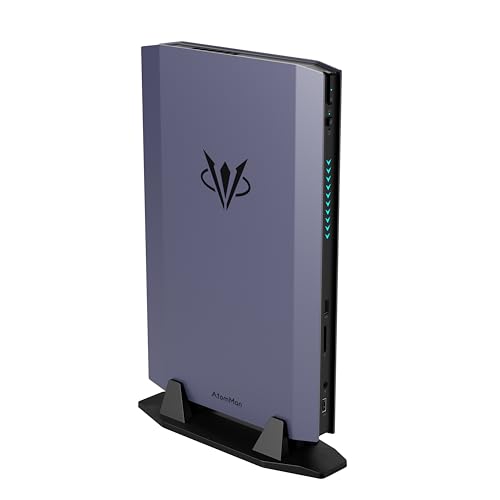
Where to buy
Check the latest price, availability and delivery on Amazon. Orders are placed on Amazon. We may earn a commission from qualifying purchases.
- Best overall compact gaming PC: AtomMan G7 Ti Mini PC, Core i9-14900HX, RTX 4070 Laptop, 32GB DDR5, 1TB SSD — Check on Amazon
- AtomMan G7 Pt Mini PC, Ryzen 9 7945HX, RX 7600M XT, 32GB DDR5, 1TB SSD — Check on Amazon
- MINISFORUM AtomMan G1 Pro, Ryzen 9 8945HX, Desktop RTX 5060, 32GB DDR5, 1TB SSD — Check on Amazon
- ASUS NUC 14 Performance Barebone (ROG NUC), Core Ultra 7 155H, RTX 4060 Laptop, Kit — Check on Amazon
See 2 more Amazon options
- Skytech Blaze4 Mini Gaming PC, Ryzen 7 5700, RTX 4060 Ti, 16GB DDR4, 1TB SSD — Check on Amazon
- HP OMEN 16L Gaming Desktop, Ryzen 7 8700F, RTX 5060, 1TB SSD (seller-upgraded listing) — Check on Amazon
Read the full guide ↓
Disclosure: As an Amazon Associate, reviewstook.com earns from qualifying purchases. Links to Amazon on this page are affiliate links; they cost you nothing extra. Listing details such as price and availability change often, so check the current Amazon listing before you buy.
Fifteen hundred dollars is a serious gaming budget, and in a full-size tower it buys a genuinely fast machine. In a compact case it buys a compromise — the only question is which compromise, and whether the seller is honest about it. That is the whole subject of this guide, because “compact” at this price is not one category but two wearing the same label. The first is the mini PC: a two-and-a-half-liter box built from laptop silicon, with a mobile GPU soldered to the board and a power brick on the floor. The second is the small desktop: a mini tower or slim console-style case holding a real desktop graphics card you could, in principle, unplug and replace. Both fit under a TV or in the corner of a desk. They game very differently, they age very differently, and listings blur the line between them on purpose — most often by printing “RTX 4070” in large type and “Laptop GPU” nowhere at all.
So here is the fact to hold onto before any pick below: an RTX 4070 Laptop GPU is not a desktop RTX 4070. The laptop chip has roughly a fifth fewer cores (4,608 against 5,888), 8GB of memory against the desktop card’s 12GB, and a power ceiling of about 140W against 200W. At its full 140W it performs in the region of a desktop RTX 4060 Ti — a good 1440p card, but a full class below the desktop 4070 its name suggests. Every mini PC in this guide uses laptop silicon, and every review names it as such. The three desktop-GPU machines here use real desktop cards, and the reviews name what that costs in size. The related fact, stated once and plainly: there is no compact prebuilt with a desktop RTX 4070 SUPER reliably selling under $1,500 — that card lives in full towers at this money, and any small-box listing implying otherwise deserves a slow read of its specification table.
What $1,500 genuinely buys in a small box, verified against real Amazon listings, is this: a full-power RTX 4070 Laptop mini PC with 32GB of RAM positioned near the top of this budget tier — check price on Amazon; an AMD mini PC with a 120W mobile GPU positioned lower in the tier — check price on Amazon; a 3.8-liter mini PC containing an actual desktop RTX 5060 — when it falls within this budget; a big-brand barebone kit that looks like a lower-cost entry until you add the memory it needs; the smallest true desktop tower in the guide, positioned well below the top of this tier; and a 16-liter brand-name tower whose linked Amazon listing is a seller-upgraded configuration that needs careful reading. Below are the quick picks, detailed reviews of all six, a comparison table, a plain-terms explanation of the laptop-versus-desktop GPU gap, a section on the thermal ceiling that governs every small case, the mistakes that waste money in this category, and the questions compact-PC buyers ask most. If your constraint is the room rather than the budget, also see Best Compact Gaming PC For Small Spaces Under $1500.
In this guide
Quick Picks
Short on time, or comparing several options at once? Each row below names a buyer type and the product that suits it, with a link to the listing.
| Buyer type | Pick | Why it stands out | Link |
|---|---|---|---|
| Best overall compact | AtomMan G7 Ti Mini PC (RTX 4070 Laptop) | The fastest verified mini at this budget — full 140W mobile GPU in about 2.5 liters | Check on Amazon |
| Best value mini PC | AtomMan G7 Pt Mini PC (RX 7600M XT) | A 16-core desktop-class CPU and 120W mobile GPU positioned toward the lower end of this tier — check price on Amazon | Check on Amazon |
| Best true desktop GPU in a mini | MINISFORUM AtomMan G1 Pro (Desktop RTX 5060) | A real desktop card at full 145W in 3.8 liters — only when priced at or under $1,500 | Check on Amazon |
| Best kit from a big brand | ASUS NUC 14 Performance Barebone (ROG NUC) | ASUS engineering in a kit positioned below the complete machines — before the parts it still needs; check price on Amazon | Check on Amazon |
| Best upgrade path | Skytech Blaze4 Mini (RTX 4060 Ti) | A desktop GPU, a named 650W Gold PSU and standard parts in the smallest true tower here | Check on Amazon |
| Best big-brand compact tower | HP OMEN 16L (RTX 5060) | HP’s 16-liter case and a desktop RTX 5060 — via a seller-upgraded listing to read carefully | Check on Amazon |
How These Picks Were Chosen
The budget was applied as a ceiling on the complete, working machine: every product below is a real Amazon listing included for this budget tier, and for linked picks you should check price on Amazon to confirm it still sits within the $1,500 budget when you shop. Two picks need that care more than most, and both are flagged in their reviews rather than quietly included: the G1 Pro spends most of its life positioned above this budget and only qualifies when it falls within it, and the ASUS NUC is a barebone whose kit excludes the memory, storage and operating system it needs to switch on. Its review works through that completion question in full, because a kit that finishes over budget is not under $1,500 in any sense that matters.
We did not use these products ourselves. We read the maker listings, specification pages and independent reviews, and compared GPU silicon and wattage, CPU, memory, storage, case volume and upgrade paths, favoring listings that publish their numbers in full. Three compact-specific filters sat on top of that. The first is the silicon filter: the GPU’s actual identity — laptop or desktop chip, and at what wattage — had to be establishable from the listing or the maker’s specification, because a mobile GPU’s performance swings widely with its power limit and a low-wattage variant is effectively a different, slower product wearing the same name. The second is the thermal filter: a small case is a promise about sustained performance, not peak performance, so cooling design, fan count and power modes were weighed for every pick, and the section on thermal ceilings below explains what to expect from each class. The third is the exit filter: what can be changed later. In the mini PCs the answer is memory and storage only — the GPU and CPU are soldered for life — while the two towers take replacement graphics cards, and that difference compounds over years of ownership.
Two tempting machines were left out on the evidence. Minisforum’s AtomMan G7 Pro, with the newer RTX 5070 Laptop GPU, is the obvious flagship of this class, but its configured version sits above the whole budget, so it appears in this guide only as the ceiling it is. And the previous holder of the “fastest integrated graphics” title, AMD’s Ryzen AI Max+ 395 mini PCs, has been repriced by the current memory shortage to well above this budget on Amazon; whatever those machines were at launch, they are not sub-$1,500 gaming PCs today, and no pick below pretends otherwise.
The 6 Best Compact Gaming PCs Under $1,500
AtomMan G7 Ti Mini PC — Core i9-14900HX, RTX 4070 Laptop, 32GB DDR5, 1TB SSD
Who it suits: Buyers who want the most gaming performance that fits in a shoebox — a living-room or small-desk machine that plays at 1440p today, from the strongest laptop silicon this budget verifies.
Start with the correction this whole guide is built around, applied to its own top pick: the G7 Ti’s graphics are an RTX 4070 Laptop GPU — 4,608 cores and 8GB of GDDR6, not the desktop card’s 5,888 cores and 12GB. What rescues the machine is that Minisforum runs that chip at its full 140W power limit, the highest NVIDIA allows for it, where independent reviews place its gaming performance around desktop RTX 4060 Ti territory: strong 1080p at high settings, and 1440p that is genuinely playable with DLSS doing its share. Around it sits hardware no laptop in this tier matches: a Core i9-14900HX with 24 cores, 32GB of DDR5 in two SO-DIMM slots that accept up to 96GB, a 1TB SSD with a second M.2 slot free, Wi-Fi 7, HDMI 2.1 and USB4 outputs, all in a chassis of roughly two and a half liters with dual-fan cooling and selectable silent and performance modes. For the configured 32GB/1TB version, check price on Amazon — it is positioned near the top of this budget tier.
The ownership terms are the mini-PC terms, and they are permanent. The CPU and GPU are soldered: the graphics this machine has on delivery day are the graphics it retires with, and when they stop being enough, the upgrade is a new machine. Memory and storage are the only doors left open. Thermals follow the class rule — 140W of GPU plus a 24-core HX processor in 2.5 liters means the fans are audible under sustained load in performance mode, and silent mode buys quiet with performance. None of that makes the G7 Ti a bad buy; it makes it a buy with a known lifespan, and its position near the top of this tier reflects that. Judged as a three-to-four-year 1440p appliance that takes no desk space at all, it is the strongest verified compact gaming PC under $1,500.
- The full-power 140W version of the RTX 4070 Laptop GPU — the fastest mobile silicon verified at this budget.
- A 24-core Core i9-14900HX and 32GB of DDR5, with memory and a second SSD slot still upgradeable.
- Roughly 2.5 liters, Wi-Fi 7, HDMI 2.1 and USB4 — it disappears next to a TV or monitor.
Honest limitation: The “RTX 4070” in the name is the laptop chip — around desktop 4060 Ti class, with 8GB of VRAM — and it is soldered, so the GPU can never be upgraded.
Choose it if you want maximum performance per liter and accept a fixed lifespan. Skip it if you plan to upgrade the graphics card in two years — that buyer needs the Blaze4 Mini or OMEN below.

AtomMan G7 Pt Mini PC — Ryzen 9 7945HX, RX 7600M XT, 32GB DDR5, 1TB SSD
Who it suits: Value hunters who game mainly at 1080p, and anyone who wants desktop-class CPU power — rendering, compiling, heavy multitasking — in the same small box.
The G7 Pt is the G7 Ti’s AMD sibling and the value pick of this guide: the configured 32GB/1TB version is positioned lower in this tier than the Ti — check price on Amazon — which is a large part of its appeal. The CPU is arguably the better one for mixed work — a Ryzen 9 7945HX with 16 full desktop-class Zen 4 cores — and the graphics are a Radeon RX 7600M XT, again a laptop GPU and again named as such: 8GB of GDDR6 run at a healthy 120W. That combination is a strong 1080p machine outright and a selective 1440p one, using FSR upscaling in demanding titles and native resolution in lighter ones. The hardware around it mirrors the Ti: DDR5 SO-DIMM slots to 96GB, PCIe 5.0 NVMe support, dual-fan cooling, in the same roughly two-and-a-half-liter class of chassis. It was also the first mini PC certified under AMD’s Advantage program, which shows in the sensible power modes — 65W and 85W CPU settings that let you trade a little speed for a quieter room.
The trade against the Ti is real and should be chosen knowingly. The 7600M XT is a class below the 140W 4070 Laptop in raw speed, its ray tracing is weaker still, and AMD’s upscaling, while good, is supported in fewer games than DLSS — in a title built around NVIDIA’s features, the gap widens beyond the hardware difference. The 300W external power brick is also the largest in this guide, a small irony for a machine bought to be unobtrusive. And the mini-PC permanence applies in full: soldered GPU, memory and storage the only upgrades. What you get for accepting all of that is one of the strongest value positions in this guide for a genuinely capable gaming mini — a machine positioned well below the top pick in this tier that, at a 1080p monitor, most players would struggle to tell apart from the top pick in the games they actually play.
- Positioned toward the lower end of this tier configured — a strong value route to a discrete-GPU gaming mini; check price on Amazon.
- Ryzen 9 7945HX: 16 full Zen 4 cores, the strongest work CPU here alongside the G7 Ti.
- The RX 7600M XT runs at a full 120W, with 65W/85W modes for quieter running.
Honest limitation: A 1080p-first GPU — 1440p means upscaling and settings discipline — with weaker ray tracing than the NVIDIA picks and a bulky 300W power brick.
Choose it if your monitor is 1080p, or your budget is shared with games and peripherals. Skip it if 1440p high-refresh is the goal — that is the G7 Ti’s job, in the G7 Ti’s higher position in this tier.

MINISFORUM AtomMan G1 Pro — Ryzen 9 8945HX, Desktop RTX 5060, 32GB DDR5, 1TB SSD
Who it suits: Buyers who refuse laptop silicon on principle — who want a genuine desktop graphics card in a mini PC, and who are patient enough to buy it only when it falls within this budget.
The G1 Pro is the exception that proves this guide’s rule, because its graphics are the real thing: a desktop GeForce RTX 5060 — a low-profile Gigabyte card, running at a full 145W, seated in an actual PCIe x16 slot — inside a 3.8-liter chassis. There is no translation layer with this pick. The RTX 5060 desktop card is the RTX 5060 desktop card: 8GB of GDDR7, DLSS 4 support, performance that reviewers found good for triple-digit frame rates at 1080p and solid 1440p with upscaling. Around it: a 16-core Ryzen 9 8945HX, 32GB of DDR5, a 1TB PCIe 4.0 SSD, a 350W internal power supply — no brick on the floor — plus Wi-Fi 7 and 5-gigabit Ethernet. It is, on paper and in reviews, the most desktop-like mini PC in this guide, and the only one under four liters whose GPU is a card rather than a chip.
Now its position in this tier, which is why this pick carries the loudest condition in the guide. At its everyday positioning the G1 Pro sits above this budget, and only promotional periods bring it within reach. In other words: at its everyday positioning it does not belong in an under-$1,500 guide at all, and it is included for one reason — it is the only true-desktop-GPU mini in this guide that can fall within this budget, and when it does — check the current price on Amazon — it is arguably the best buy here. Two ownership notes complete the picture. The machine ships in an 80W gaming mode that leaves a fifth of its performance behind a manual toggle — switch it on day one. And while the GPU is technically a card in a slot, it is a low-profile card in a 3.8-liter case: treat replacement as theoretically possible and practically unlikely, because almost nothing faster is made in that shape.
- A genuine desktop RTX 5060 at full 145W — no laptop-GPU translation needed.
- Internal 350W power supply, 5GbE and Wi-Fi 7 in a 3.8-liter case.
- 32GB of DDR5 and a 16-core HX processor as standard.
Honest limitation: It is normally positioned above this budget — this is a buy-only-at-$1,500-or-less pick, so check price on Amazon before treating it as an option — and the low-profile GPU is not a realistic future upgrade.
Choose it if you catch it at or under $1,500 and want desktop silicon in mini form. Skip it if the listing sits above this budget when you shop; in that case the G7 Ti is the stronger in-budget mini and the towers below are the better in-budget fit.

ASUS NUC 14 Performance Barebone (ROG NUC) — Core Ultra 7 155H, RTX 4060 Laptop, Kit
Who it suits: Buyers who trust ASUS engineering over the mini-PC brands, who already own DDR5 SO-DIMMs and an SSD — or who are happy to finish a kit themselves and want the receipt to prove it was worth it.
This is the ROG NUC in its barebone form, sold on Amazon as the NUC 14 Performance: a roughly 2.5-liter ASUS chassis with a Core Ultra 7 155H and an RTX 4060 Laptop GPU — at up to the full 140W in ASUS’s specification, which matters, because a full-power mobile 4060 is a credible 1080p card and a cut-down one is not. What the box does not contain is the rest of a computer: no memory, no storage, no operating system. The kit listing on its own is the interesting part — check price on Amazon — because as a bare kit it sits below every complete mini in this guide, which is why it earns a place here, if the cost of completing it cooperates.
So work through what completing it takes, because that is the review. A 32GB DDR5 SO-DIMM kit — the sensible fit for this machine — is a major added cost in the middle of the current memory shortage; add a 1TB NVMe SSD and a Windows licence and the completed machine can end up costing more overall than the G7 Pt costs complete, for a slower GPU, and can push past this budget altogether. When the kit itself is positioned at the low end of its range the completed build becomes more competitive, but not a rout. The conclusion writes itself: this pick wins when you already own the memory and drive (the upgrade-cycle buyer ASUS designed it for), or when the kit is positioned low. Bought cold with every part to add at shortage-era costs, it can be the most expensive way in this guide to own a mobile RTX 4060. ASUS’s build quality, toolless chassis access and three-year-class brand support are real; they are just not a substitute for doing that completion check.
- The kit on its own is the lowest entry point in this guide — check price on Amazon, then add the parts it still needs.
- Full-power mobile RTX 4060 in a 2.5-liter ASUS chassis with toolless access.
- You choose the memory and storage — the only pick that lets you spec your own.
Honest limitation: It is a barebone: once memory is added the completed machine can exceed $1,500 and still trail the G7 Pt, and the mobile GPU is soldered once built.
Choose it if you have DDR5 SO-DIMMs and an SSD on the shelf, or the kit is positioned low in its range. Skip it if you are buying every part new today — buy the G7 Pt complete instead.

Skytech Blaze4 Mini Gaming PC — Ryzen 7 5700, RTX 4060 Ti, 16GB DDR4, 1TB SSD
Who it suits: Buyers who want desktop parts and a future — the smallest true tower in this guide, for gamers who intend to swap the graphics card in a few years rather than replace the whole machine.
Everything the mini PCs ask you to give up, the Blaze4 Mini gives back, and its position in this tier is the surprise of this guide: it sits well below the minis in this budget — check price on Amazon — as a desktop RTX 4060 Ti machine, leaving headroom in the budget for a monitor or a second drive. The GPU is a real desktop RTX 4060 Ti with 8GB: faster than any laptop chip in this guide at the same name game, happy at 1080p ultra and credible at 1440p with DLSS. The supporting cast is named where rivals leave blanks — a 650W Gold power supply, enough for the next card up the range — and the whole machine is built from standard parts: the GPU unplugs, the memory swaps, the storage expands. As the smallest tower here it is still several times the volume of the minis, and that volume is exactly what it spends on airflow and options. This is the pick for a desk that has a corner, rather than a shelf that has a gap. Shoppers aiming it at a 1440p monitor should also see Best Compact Gaming PC For 1440p Gaming Under $1500.
The honest cost is the platform’s age. The Ryzen 7 5700 is an eight-core chip on the AM4 platform with DDR4 memory — perfectly adequate behind a 4060 Ti today, but a dead end: there is no meaningful CPU upgrade path that does not also mean a new motherboard and memory, and the 16GB of DDR4 fitted is the minimum this guide is comfortable recommending rather than a luxury. In other words, the upgrade this machine promises is real but specific — graphics card, storage, memory capacity — while the mini PCs promise none and the G1 Pro promises one it cannot really keep. Buy the Blaze4 Mini as a 4060 Ti tower with a GPU swap in its future and it is the best-value machine here by a wide margin; buy it expecting to grow the whole platform and you will be disappointed in year three.
- A desktop RTX 4060 Ti and a named 650W Gold PSU — the strongest upgrade foundation in this guide.
- Positioned below every mini here in this tier — check price on Amazon.
- Standard parts throughout: GPU, memory and storage all replaceable with a screwdriver.
Honest limitation: The AM4/DDR4 platform is a dead end for CPU upgrades, and 16GB of memory is a floor, not a target — its lower position in this tier versus the minis is what leaves room in the budget for fixing that.
Choose it if a mini tower fits your space and you value a GPU swap over liters saved. Skip it if the machine must live on a shelf or behind a TV — that is what the AtomMan boxes are for.

HP OMEN 16L Gaming Desktop — Ryzen 7 8700F, RTX 5060 (Seller-Upgraded Listing)
Who it suits: Buyers who want a big brand’s case, cooling and support behind a current-generation desktop GPU — and who will read a marketplace listing the way it deserves to be read.
The OMEN 16L is HP’s answer to the compact question from the tower side: a 16-liter chassis — small beside a mid-tower, a wardrobe beside the minis — holding standard desktop parts, including a desktop GeForce RTX 5060 with 8GB of GDDR7. The configuration that makes it a sub-$1,500 pick is the one linked here: a seller-upgraded version of the Ryzen 7 8700F / RTX 5060 model, fitted with 64GB of memory — far more RAM than gaming needs, fitted because the seller’s business is fitting it — so check price on Amazon for that exact configuration. HP’s own factory configurations of the same case exist on Amazon under separate listings, including a Core Ultra 5 225F build with the same RTX 5060, so consider this pick a recommendation of the 16L formula at or under $1,500, with the linked listing the example of it, not the only door in.
Because the linked listing is seller-upgraded, its review carries the marketplace warnings in full. A reseller has opened the machine to fit that memory: the upgraded parts carry the seller’s one-year warranty while the rest keeps HP’s, which is a support conversation split in two if anything fails. Verify the exact style, specification and seller on the live page before ordering — listings in this family span several configurations in different positions in the tier, and the configuration described above is the one linked here. Two hardware notes, briefly: the Ryzen 7 8700F is a capable eight-core chip but a laptop-derived design with half the cache of HP’s desktop-class alternatives, and a 16-liter brand tower’s cooling and power supply are built for this GPU class — a future jump to a much hotter card is not what the case is for. Within those lines, this is the lowest-risk way to buy current-generation desktop graphics in a compact case from a company with a service network.
- A desktop RTX 5060 with GDDR7 and DLSS 4 in a genuinely compact 16-liter brand-name case.
- The linked seller-upgraded configuration is fitted with 64GB of memory — check price on Amazon for that exact style.
- HP’s fit, finish and support network behind the parts the seller did not touch.
Honest limitation: The linked listing is a reseller-upgraded unit — split warranty, and the exact style must be verified live — while the case and PSU cap future GPU upgrades at this class.
Choose it if you want HP’s small tower and current-gen desktop graphics under $1,500, from whichever verified listing is live. Skip it if split warranties bother you — the Blaze4 Mini is a single-seller machine with a bigger PSU.

Comparison Table
| Product | Size class | Graphics | Best use | Link |
|---|---|---|---|---|
| AtomMan G7 Ti Mini PC | Mini PC, ~2.5L | RTX 4070 Laptop, 140W, 8GB | Fastest compact gaming, 1440p with DLSS | Check on Amazon |
| AtomMan G7 Pt Mini PC | Mini PC, ~2.5L | RX 7600M XT, 120W, 8GB | 1080p value and heavy CPU work | Check on Amazon |
| MINISFORUM AtomMan G1 Pro | Mini PC, 3.8L | Desktop RTX 5060, 145W, 8GB | True desktop GPU in mini form, on promo | Check on Amazon |
| ASUS NUC 14 Performance Barebone | Mini PC kit, ~2.5L | RTX 4060 Laptop, up to 140W, 8GB | Kit builders and parts owners | Check on Amazon |
| Skytech Blaze4 Mini | Mini tower | Desktop RTX 4060 Ti, 8GB | Value in this tier and future GPU swaps | Check on Amazon |
| HP OMEN 16L | Compact tower, 16L | Desktop RTX 5060, 8GB | Big-brand compact tower, current-gen GPU | Check on Amazon |
How to Choose a Compact Gaming PC Under $1,500
- Decide which kind of compact you mean. A mini PC (under 4 liters, laptop silicon, power brick) and a small tower (desktop parts, internal PSU) are different products that happen to share a shelf. Choose the class first; every comparison after that gets easier.
- Read the GPU’s surname. “Laptop GPU” or “Mobile” in the specification — or its absence from a listing that should state it — tells you which chip you are actually buying. Then check its wattage: the same mobile GPU at 45W and at 140W are effectively different products.
- Consider the whole machine, not just the box. Barebone kits, machines with 512GB of storage you will immediately outgrow, and picks that need a memory upgrade on arrival all have a second receipt attached. Add it before comparing against complete machines.
- Treat 32GB of memory as this tier’s standard. At $1,500, 16GB is a compromise to note, not a feature — two of this guide’s picks ship with 32GB as standard, and the towers’ lower position in this tier partly leaves room in the budget for the upgrade on the ones that do not.
- Ask what the second M.2 slot is doing. In mini PCs, storage is one of only two upgrades that exist. A free slot doubles the machine’s useful life; a single occupied slot ends it early.
- Match the machine to the monitor you own. A 1080p screen makes the G7 Pt the smart buy and the G7 Ti a luxury. A 1440p high-refresh screen reverses that — and makes the desktop cards’ extra memory bandwidth worth their size.
- Count the power supply as a component. An internal PSU with a published wattage (650W Gold in the Blaze4 Mini, 350W in the G1 Pro) is information. An unnamed brick or an unpublished figure is a question to ask the listing before money moves.
- Plan the exit before the entrance. If you expect to upgrade the GPU in three years, only the towers qualify, and only within their PSU and clearance limits. If you expect to replace the machine whole, the minis’ soldered silicon costs you nothing.
- Verify the exact style on shared listings. Mini-PC listings mix barebone and configured variants, and tower listings mix factory and seller-upgraded configurations, under one page. What you saw belongs to a specific style; confirm yours before checkout, and check price on Amazon for that style.
Laptop GPU vs Desktop GPU: The Gap, in Plain Terms
Every compact guide owes its readers this section, because the naming is designed to blur it. NVIDIA sells two different chips under the RTX 4070 name. The desktop card carries 5,888 CUDA cores, 12GB of GDDR6X memory and a 200W power budget. The laptop GPU carries 4,608 cores, 8GB of GDDR6 and a power budget that varies by machine from as low as 35W to a maximum of 140W. Those are not tuning differences; they are different products, and in games the full-power laptop chip lands roughly where a desktop RTX 4060 Ti lands — a tier down — while a low-power version of the same laptop chip falls further still. AMD’s naming is more honest: the RX 7600M XT’s M declares it mobile, and at 120W in the G7 Pt it performs as a strong 1080p card. The rule for reading any compact listing follows: the GPU’s name is the beginning of the specification, and its form (laptop or desktop) and wattage are the rest of it. A listing that will not tell you both has told you something.
None of this makes laptop silicon a scam — it makes it a trade, and often the right one. The mobile chips in the G7 Ti and G7 Pt deliver their performance in two and a half liters, at a total system power draw a desktop tower cannot approach, in machines that mount behind a monitor. What they cannot do is be upgraded, and their 8GB of memory is the specification most likely to age first as games grow. The desktop cards in the G1 Pro, Blaze4 Mini and OMEN 16L invert the trade: full silicon, honest wattage, a card that can be replaced — paid for in liters, every day, whether you game or not. This guide’s position is simply that you should make that trade with both sides clear: the mini PCs’ reviews state their GPU class in their first paragraph, and the towers’ reviews state their size just as early.
The Thermal Ceiling Is the Real Specification
A compact PC’s benchmark numbers are recorded in the first minutes of a game; its thermal ceiling is what you own for the fourth hour. Small enclosures move little air, so every machine in this guide manages heat by some combination of fan speed, power limits and clock discipline — and the differences are worth understanding before you buy. The mini PCs make it explicit: the G7 Ti offers silent and performance modes (quiet costs frames), the G7 Pt offers 65W and 85W CPU modes, and the G1 Pro arrives in an 80W mode that withholds about a fifth of its performance until you switch it over — a setting worth more than any other in its software. Sustained loads in a 2.5-liter box also mean fan noise is a specification, not a surprise: under a TV at viewing distance it fades; on a desk beside your ear, in performance mode, it does not.
The towers play a different game. A mini tower’s volume is mostly air, and air is cooling: the Blaze4 Mini’s desktop card holds its clocks indefinitely at noise levels the minis cannot match, and that consistency — not a higher peak — is the real performance argument for size. The OMEN 16L sits between the classes: more air than a mini, less than a tower built for hot components, which is why its sensible ceiling is the GPU class it ships with. The buying rule that falls out of all of this: in compact PCs, sustained performance is the product and peak performance is the advertisement. Choose the machine whose ceiling, not whose burst, matches the games you play — and budget a first evening to set its power mode, because in this category the fastest setting is rarely the default.
Common Buying Mistakes
- Reading “RTX 4070” on a mini PC listing and comparing it directly against desktop 4070 towers. It is the laptop chip — around a desktop 4060 Ti — and the comparison changes completely once that is clear.
- Comparing a barebone kit against complete machines on the kit alone. The ASUS NUC in this guide looks like the lowest entry point until memory joins the total; work through the completion cost first, every time.
- Assuming a GPU in a slot is a GPU you can upgrade. The G1 Pro’s low-profile card has almost no faster successors in its shape, and the OMEN’s case and PSU cap its class — only the Blaze4 Mini offers the swap buyers usually imagine.
- Ignoring the power mode your machine ships in. The G1 Pro leaves a fifth of its performance behind an 80W default; the minis’ silent modes do similar work. Ten minutes in the settings is the cheapest upgrade in this guide.
- Buying 16GB of memory at this budget and calling it done. At $1,500 the standard is 32GB; if the pick you love ships with 16GB, budget for the second stick or the replacement kit as part of the purchase.
- Trusting a shared listing’s headline positioning. Barebone and configured styles, factory and seller-upgraded configurations, sit under single pages throughout this category — the listing position belongs to a style, and the style must be confirmed at checkout.
- Putting a performance-mode mini PC on the desk beside your monitor and discovering its fans. Small boxes are quiet at idle and audible at work; place them for the load state, not the idle one — or choose a tower.
- Paying the mini-PC premium for a machine that will never move. If the PC will sit in one tower-sized space for five years, the Blaze4 Mini’s standard parts deliver more performance and more future from a lower position in this tier; liters you never use are not a feature.
Final Recommendation
- Most compact buyers: AtomMan G7 Ti Mini PC.
- 1080p value: AtomMan G7 Pt Mini PC.
- Desktop GPU in a mini, on promo only: MINISFORUM AtomMan G1 Pro.
- Kit builders with parts on hand: ASUS NUC 14 Performance Barebone.
- Upgrade path and value: Skytech Blaze4 Mini.
- Big-brand compact tower: HP OMEN 16L.
Our top two for compact buyers at this budget are the AtomMan G7 Ti, for the most performance per liter within this budget, and the Skytech Blaze4 Mini, for strong value in this tier with a future attached. Between them they frame the category’s real choice: the smallest machine that plays at 1440p now, or the smallest machine that can be made to play at whatever comes next. The G7 Pt is the pick we would hand a 1080p gamer without a second thought; the G1 Pro is the pick to watch for when it falls within this budget; the ASUS NUC rewards the parts drawer and punishes the parts shopper; and the OMEN 16L is the cautious buyer’s current-generation tower, provided its listing is read as carefully as its review insists. Buyers whose rooms are the binding constraint should start from Best Compact Gaming PC Under $1200 for the tier below, and those whose budget is firm but whose space is flexible should compare against Best Gaming PC Under $1500 before deciding the liters are worth it. Check price on Amazon and confirm the exact style before you order — in this category, that homework is the whole difference between a compact PC and a small disappointment.
Frequently Asked Questions
Is an RTX 4070 Laptop GPU the same as a desktop RTX 4070?
No — they are different chips sharing a name. The laptop GPU has 4,608 cores and 8GB of memory against the desktop card’s 5,888 cores and 12GB, and runs at up to 140W against 200W. At full power it performs around desktop RTX 4060 Ti level: very capable at 1440p with DLSS, but a full class below the desktop card. Every listing for a mini PC in this guide uses the laptop chip, and the reviews say so in their first paragraphs.
Why is there no compact PC with a desktop RTX 4070 SUPER under $1,500?
Because that card in a prebuilt lives in full-size towers at this budget — the systems in our 1440p research with 4070 SUPER graphics were standard towers that only reach this $1,500 budget on sale. Small cases add cost rather than removing it, so the compact version of that specification sits above the budget. The closest honest answers under $1,500 are the full-power RTX 4070 Laptop in the G7 Ti and the desktop RTX 5060 in the G1 Pro and OMEN 16L.
Can I upgrade the graphics card in a compact gaming PC later?
In the mini PCs, no — the GPU is soldered, and memory and storage are the only upgrades that exist. In the G1 Pro, the card is technically replaceable but low-profile, with almost nothing faster made in that shape. In the OMEN 16L, upgrades are capped by the case and power supply at around the class fitted. Only the Blaze4 Mini offers the straightforward swap most buyers picture, backed by a named 650W Gold PSU.
Is the ASUS NUC barebone actually cheaper than the complete mini PCs?
Only sometimes. The kit on its own sits below the complete machines — check price on Amazon — but it needs memory, storage and an operating system: once a 32GB DDR5 SO-DIMM kit and the other missing parts are added, the completed machine can exceed this budget and cost more overall than the complete G7 Pt. It wins when you already own the parts, or catch the kit positioned low in its range. The kit alone is the beginning of a barebone’s total cost, never the whole of it.
Mini PC or small tower for a living-room TV?
For a TV, the mini PC is the natural fit: two and a half liters mounts or shelves invisibly, sips power, and the G7 Ti and G7 Pt both drive a 4K television’s 1080p and 1440p gaming happily — with fan noise the one consideration at close seating distances. Choose the small tower instead if the TV setup is permanent and you want the upgrade path, accepting that a mini tower needs a real home in the furniture rather than a gap in it.
How much memory and storage should a compact gaming PC have at $1,500?
Our floor for this budget is 32GB of memory and 1TB of storage, and four of the six picks meet it as configured. The exceptions declare themselves: the Blaze4 Mini’s 16GB is reflected in its lower position in this tier, leaving room in the budget for the upgrade, and the ASUS NUC takes whatever you fit — which should be 32GB and 1TB, budgeted before you compare the kit against complete machines.
- Best Compact Gaming PC Under $1500
- Best Compact Gaming PC Under $1200
- Best Compact Gaming PC Under $2500
- Best Compact Gaming PC For Small Spaces Under $1500
- Best Compact Gaming PC For 1440p Gaming Under $1500
- Best Compact Gaming PC For Streaming Under $1500
- Best Compact Gaming PC For Beginners Under $1500
- Best Small Form Factor Gaming PC Under $1500
- Best Mini Gaming PC Under $1500
- Best Gaming PC Under $1500
- Best Prebuilt Gaming PC Under $1500
- Best Barebones Mini PC Under $1500


