Where to buy
Check the latest price, availability and delivery on Amazon. Orders are placed on Amazon. We may earn a commission from qualifying purchases.
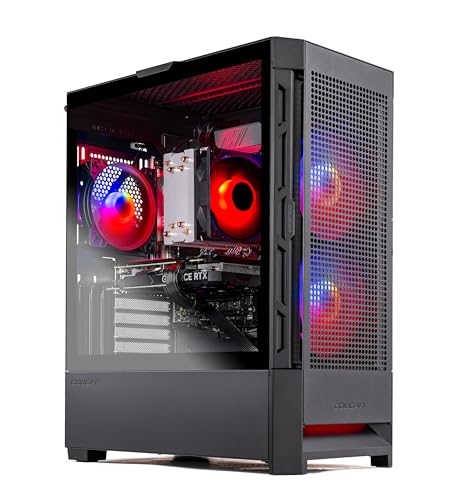
- Best overall: Skytech Blaze4 Mini, Ryzen 7 5700, RTX 4060 Ti, 16GB DDR4, 1TB SSD — Check on Amazon
- Minisforum AtomMan G7 Pt, Ryzen 9 7945HX, RX 7600M XT, 32GB, 1TB — Check on Amazon
- Beelink SER9 Pro, Ryzen AI 9 HX 370, Radeon 890M, 32GB, 1TB — Check on Amazon
- Minisforum UM890 Pro, Ryzen 9 8945HS, Radeon 780M, 32GB, 1TB — Check on Amazon
- GMKtec NucBox K8 Plus Barebone, Ryzen 7 8845HS, No RAM/SSD/OS — Check on Amazon
- HP OMEN 16L, Core i7-14700F, RTX 4060, 32GB (Amazon bundle listing) — Check on Amazon
Read the full guide ↓
Disclosure: As an Amazon Associate, reviewstook.com earns from qualifying purchases. Links to Amazon on this page are affiliate links; they cost you nothing extra. Listing details such as price and availability change often, so check the current Amazon listing before you buy.
“Compact” is the least regulated word in PC marketing. There is no standard behind it, no certification, no maximum size — a brand can print it on a 44-liter tower and a 0.8-liter mini PC in the same week, and both listings will use the same lifestyle photo of a tidy desk. So this guide does the one thing the listings hope you will not: it multiplies the dimensions out. Every pick below carries its stated measurements and the volume they produce, from the Beelink SER9 Pro at roughly 0.82 liters to the HP OMEN 16L, whose name is literally its volume. The surprise waiting in the middle of the list is the Skytech Blaze4 Mini, the strongest gaming machine here — Amazon’s own stated item dimensions for it are 15.2 × 9.1 × 19.3 inches, which is a small mid-tower wearing a “Mini” badge. It earns its place anyway, because at this budget the honest trade is this: true small-form-factor machines use laptop silicon that can never be upgraded, and the one standard-parts tower here is compact in name only.
That trade shapes everything below. The genuinely small picks — the AtomMan G7 Pt with a discrete mobile GPU in a console-sized 2.7-liter body, the sub-liter SER9 Pro and UM890 Pro, the barebone K8 Plus — deliver their size by soldering the expensive parts down. The two towers deliver upgradability by giving the liters back. And the fashionable middle path, a mini PC plus an OCuLink eGPU dock, is priced out in full further down, because the dock is the cheap part: once the graphics card and the power supply the dock does not include are added, a from-scratch OCuLink build does not fit within this guide’s budget in late 2026. Check the live price on Amazon for each pick before you buy, in a market where a memory shortage has been pushing mini PC prices around significantly between months.
In this guide
Quick Picks
Short on time, or comparing several options at once? Each row below names a buyer type and the product that suits it, with a link to the listing.
| Buyer type | Pick | Why it stands out | Link |
|---|---|---|---|
| Best overall | Skytech Blaze4 Mini, RTX 4060 Ti | Desktop GPU and standard parts — check price on Amazon — but “Mini” is a name, not a measurement | Check on Amazon |
| Best true compact with a discrete GPU | Minisforum AtomMan G7 Pt | RX 7600M XT inside a ~2.7-liter console-style body smaller than a PS5 Slim | Check on Amazon |
| Smallest footprint | Beelink SER9 Pro | Strongest integrated graphics you can buy, in 0.82 liters | Check on Amazon |
| Best upgradeable mini PC | Minisforum UM890 Pro | Socketed RAM, dual SSD slots and a native OCuLink port in 1.1 liters | Check on Amazon |
| Best OCuLink starting point | GMKtec NucBox K8 Plus Barebone | A barebone with no RAM, SSD or OS — check price on Amazon — the eGPU host for people who already own parts | Check on Amazon |
| Best big-brand option (deal-watch) | HP OMEN 16L | An honestly named 16 liters with HP warranty — buy only at or under this guide’s budget | Check on Amazon |
How These Picks Were Chosen
Size was the first filter, and it was applied with arithmetic rather than adjectives. A pick had to publish real dimensions, and the volume in this guide is those dimensions multiplied out — length × width × height, converted to liters. Anything whose own stated measurements landed it in ordinary mid-tower territory was either excluded or, in the Blaze4 Mini’s case, included with the discrepancy stated plainly rather than smoothed over, because its price and parts make it the machine many “compact” shoppers will actually buy.
We did not use these products ourselves. We read the maker listings, specification pages and independent reviews, and compared stated dimensions, GPU classes and memory types, favoring listings that publish their numbers in full. Check the live price on Amazon for each pick before you buy, because prices change often between deal events. Two picks in this guide habitually sell above this guide’s budget between deal events; both are labeled deal-only, because pretending a temporary sale price is a regular price is how buyers overpay.
Graphics honesty needed its own rule at this size. Small machines use mobile silicon, and mobile silicon borrows desktop names: the RX 7600M XT in the G7 Pt is a laptop GPU with 8GB of memory, not the 16GB desktop card a similar name suggests, and the integrated Radeon 890M and 780M are the strongest integrated graphics AMD sells — which still places them at 1080p with modest settings, not at the level of any discrete card here. Finally, expansion claims were priced, not repeated: where a pick’s appeal is an OCuLink port, the review adds the dock, the power supply and the graphics card to the invoice before calling anything a bargain.
The 6 Best Compact Gaming PCs Under $1,200
Skytech Blaze4 Mini — Ryzen 7 5700, GeForce RTX 4060 Ti 8GB, 16GB DDR4, 1TB SSD
Who it suits: Gamers whose space problem is a desk corner rather than a shelf — who want desktop performance and desktop upgradability, and are willing to discover what “Mini” actually measures.
Start with the confession, because it is the most useful fact in this review: Amazon’s stated item dimensions for the Blaze4 Mini are 15.2 × 9.1 × 19.3 inches. However you arrange those axes, that is a small mid-tower — several times the volume of everything else in this guide, taller than the 16-liter HP below is in any dimension. If your constraint is a TV stand shelf or the space behind a monitor, stop here and scroll to the mini PCs. What the size buys, though, is the only conventional gaming PC in this guide: a Ryzen 7 5700, a desktop GeForce RTX 4060 Ti with 8GB, 16GB of DDR4-3200, a 1TB NVMe SSD and a 650W Gold power supply, assembled from standard parts. Check the live price on Amazon for this configuration, which on a good day can make it the most affordable route in this guide to a desktop 4060 Ti by a wide margin.
The ownership story is the mirror image of the mini PCs’. The case takes standard graphics cards at standard lengths, so the GPU ceiling that permanently caps the G7 Pt and SER9 simply does not exist here; the power supply is a standard 650W unit rather than a laptop brick; storage and memory slots follow desktop rules, and full-size fans make it the quiet way to run this class of hardware. The honest costs are the platform and the paperwork. The Ryzen 7 5700 sits on AMD’s AM4 socket with DDR4 memory: a mature, end-of-line platform whose upgrade path is a new motherboard, not a drop-in chip. And Skytech, like most system integrators at this price, reserves the right to vary component brands between builds — the contracted specs (GPU model, memory, storage, PSU wattage) are what you are buying, not a specific card maker.
- Desktop RTX 4060 Ti performance — check price on Amazon — the value outlier of this guide.
- Standard parts throughout: full-length GPU swaps, a standard 650W Gold PSU, desktop storage and memory rules.
- Tower airflow is the quiet cooling option here — no small-fan tax.
Honest limitation: The name. By its own listing’s dimensions this is a small mid-tower, not a small-form-factor PC, and the AM4/DDR4 platform underneath it is at the end of its line.
Choose it if your space limit is measured in feet of desk rather than liters, and you want the GPU upgrade path only a tower offers. Skip it if the machine must fit a shelf, a cabinet or the back of a monitor — that is what the rest of this guide is for.

Minisforum AtomMan G7 Pt — Ryzen 9 7945HX, Radeon RX 7600M XT, 32GB, 1TB
Who it suits: Living-room and small-desk gamers who want a real discrete GPU in a box that sits beside the TV like a console — and who accept that the GPU is the one the machine dies with.
This is the pick that makes the guide’s argument for it. The G7 Pt packs a 16-core Ryzen 9 7945HX — a flagship laptop processor with desktop-class multi-core muscle — and a discrete Radeon RX 7600M XT running at up to 120W into a vertical body measuring about 269 × 155 × 64 mm without its stand: roughly 2.7 liters, smaller in every dimension than a PlayStation 5 Slim, as reviewers who measured both were quick to note. Minisforum markets the machine as a 3.8-liter vertical body on its stand. Around the silicon sit two DDR5 SO-DIMM slots good for up to 96GB and two M.2 slots, one of them PCIe 5.0 — so memory and storage, the two things owners actually outgrow, remain upgradeable. Check the live price on Amazon for the configured 32GB/1TB version, and check Minisforum’s own store as well for promotional pricing; treat anything at or under this guide’s budget as the buy zone and anything above it as the walk-away line.
Now the two taxes, stated plainly. The first is the GPU’s name: the RX 7600M XT is a mobile part with 8GB of GDDR6, closer in spirit to a desktop RX 7600 than to the 16GB desktop 7600 XT its badge evokes, and it is soldered — as is the CPU. Reviewers place its gaming at strong 1080p and selective 1440p with sensible settings and upscaling, which is exactly the honest summary; there is no DLSS, because there is no NVIDIA silicon, so FSR does the upscaling work. The second tax is physical: a 300W external power brick (the better part of a kilogram on its own) that has to live somewhere, and cooling that reviewers found clearly audible in the 85W performance mode — the 65W balanced mode is the one to live with on a desk, at a small performance cost. Heat in a 2.7-liter box is not a defect; it is the design.
- A discrete GPU and a 16-core CPU in ~2.7 liters — the only pick that is both truly compact and truly discrete.
- RAM (to 96GB) and dual M.2 storage stay upgradeable, unlike the soldered graphics.
- The 32GB/1TB configuration is a premium option in this guide — check price on Amazon.
Honest limitation: The RX 7600M XT is a soldered mobile GPU with 8GB — it will never be upgraded or swapped, and the 300W brick plus performance-mode fan noise are permanent features of the design.
Choose it if you want one small box by the TV that games properly at 1080p today and takes more RAM and storage tomorrow. Skip it if you plan GPU upgrades, want NVIDIA features, or are noise-sensitive in performance mode.

Beelink SER9 Pro — Ryzen AI 9 HX 370, Radeon 890M, 32GB, 1TB
Who it suits: Desk minimalists and monitor-arm mounters who want the smallest possible box — and whose games live comfortably at 1080p with modest settings.
The SER9 Pro is the smallest machine in this guide by a factor of three: 135.5 × 135.5 × 44.7 mm, roughly 0.82 liters, in a machined aluminum shell that reviewers consistently describe as the most premium-feeling chassis in its class. Inside is AMD’s Ryzen AI 9 HX 370 — twelve Zen 5 cores — driving the Radeon 890M, the strongest integrated graphics AMD puts in a mini PC, fed by 32GB of fast LPDDR5X memory and a 1TB SSD. For gaming that translates to the top of the integrated class: esports titles run happily, and current AAA games are playable at 1080p at low-to-medium settings with FSR upscaling doing honest work. It is also, by reviewer consensus, a relatively quiet machine under load — the larger, slower fan that its taller-than-usual mini PC body allows is exactly the right trade at this size. Pricing needs care: check the live price on Amazon for the 32GB/1TB configuration, because the 2026 memory shortage has pushed some listings above this guide’s budget. The rule for this pick is simple: at or under the budget it is a considered buy; above that, the value case belongs to the discrete-GPU picks above it.
The permanence is the price of the size. The LPDDR5X memory is soldered — 32GB is not a starting point, it is the machine’s lifetime allocation, and the 64GB variant is a separate, pricier purchase decision made on day one. There is no OCuLink port, so the eGPU escape hatch that rescues the two Minisforum picks below does not exist here: the 890M’s ceiling is the machine’s ceiling, forever. Storage is the one open door, and even it deserves a check — Beelink’s listing copy and independent teardowns have disagreed about whether a second M.2 slot is present, so confirm against the live listing if a second drive matters to you. None of this makes the SER9 Pro a bad purchase; it makes it a finished one — a complete, quiet, sub-liter appliance whose spec is fixed at checkout.
- 0.82 liters — VESA-mount it behind a monitor and the PC effectively disappears.
- Radeon 890M is the strongest integrated graphics available in a mini PC, with a 12-core Zen 5 CPU behind it.
- Reviewers rate it relatively quiet under load, rare at this size.
Honest limitation: Soldered RAM and no OCuLink port mean the graphics and memory you buy are the graphics and memory you keep — and crisis-era listings have crossed above this guide’s budget, so the buy only works at or under the budget.
Choose it if the footprint is the whole point and your library suits integrated graphics. Skip it if you want any form of graphics upgrade path, ever — that is the UM890 Pro or the K8 Plus below.
Minisforum UM890 Pro — Ryzen 9 8945HS, Radeon 780M, 32GB, 1TB
Who it suits: Buyers who want a mini PC that behaves like a small desktop underneath — socketed memory, two SSD slots, every port — and who may add an external GPU later.
If the SER9 Pro is the appliance, the UM890 Pro is the toolkit. Its chassis measures about 130 × 127 × 66.6 mm — roughly 1.1 liters, a touch taller than most mini PCs — and inside, almost nothing is soldered down: two DDR5 SO-DIMM slots accept up to 96GB, two M.2 2280 slots take storage, and the port selection is the best in this guide, with dual USB4, dual 2.5-gigabit Ethernet and a native OCuLink port for an external GPU. The Ryzen 9 8945HS and its Radeon 780M graphics are a step below the SER9’s newer silicon — the 780M is a 1080p low-to-medium-settings part with upscaling — but the cooling is a step above: Notebookcheck’s review praised the UM890 Pro’s whisper-quiet cooling, and at 709 grams for the bare unit it VESA-mounts behind a monitor without argument.
The problem is what the memory shortage has done to its price. Check the live price on Amazon for the complete 32GB/1TB listing before you buy, because its price has moved significantly. At a lower price this is the thinking person’s pick of the guide. At a higher price you are paying within sight of the AtomMan G7 Pt’s discrete GPU for integrated graphics, and the honest advice flips: buy it on a dip, or accept that the premium is for the ports and the sockets rather than the frame rates. What rescues the value case at either price is the OCuLink port — the UM890 Pro is the only complete, ready-to-run machine here that can take a desktop graphics card later through a dock, turning today’s compromise into a staged purchase. Just read the OCuLink section below before budgeting that stage, because the dock is not the expensive part.
- Socketed DDR5 to 96GB and dual M.2 slots — the upgradeable mini PC in a soldered field.
- Native OCuLink, dual USB4 and dual 2.5GbE: the best connectivity in this guide.
- Review-praised quiet cooling; VESA bracket suits behind-monitor mounting.
Honest limitation: The Radeon 780M is integrated graphics with a hard 1080p ceiling, and the listing’s recent price sits far above where it has sold before — at the top of its range, this is a machine to wait on, not to chase.
Choose it if you value upgradability, ports and quiet over raw graphics, or you are staging toward an OCuLink setup from a complete machine. Skip it if the live price is near its highs and gaming is the priority — the G7 Pt’s discrete GPU is the better spend.

GMKtec NucBox K8 Plus Barebone — Ryzen 7 8845HS, No RAM, SSD or OS
Who it suits: Parts owners and staged builders — anyone with DDR5 SO-DIMMs, an NVMe drive or a desktop GPU already in a drawer — who want the cheapest honest route into an OCuLink gaming setup.
Read the listing title the way a lawyer would: this K8 Plus is the barebone, which means the barebone price — check price on Amazon — buys a Ryzen 7 8845HS processor with Radeon 780M graphics, an empty pair of DDR5 SO-DIMM slots (up to 96GB), two empty M.2 PCIe 4.0 slots, and no Windows license. The chassis is about 132 × 127 × 58 mm by the maker’s stated dimensions, roughly a liter, and the connectivity is the reason it exists in this guide: a native OCuLink port wired at PCIe 4.0 x4, dual USB4, dual 2.5-gigabit Ethernet and quad display outputs. As a host for an external GPU, nothing complete at this money matches it; the UM890 Pro above is its finished-goods rival, with the same port and a higher invoice.
What it costs to finish is where this review earns its keep, because late-2026 memory prices have inverted the usual barebone logic. A documented completion of a comparable barebone — 32GB of DDR5 and a 1TB SSD bought new during the shortage — brought the all-in total to a substantial sum: the memory kit, not the computer, is now the expensive half of the build. If the parts are already in your drawer, the same completion costs you nothing and this is the best-value pick in the guide by a wide margin. The eGPU stage must be priced with the same honesty: check the live price on Amazon for a Minisforum DEG1 dock, it includes no power supply, and check the live price for a new desktop RTX 4060 as well — so a from-scratch OCuLink build on this host lands comfortably over this guide’s budget. It fits within the budget only when the graphics card (and ideally the PSU) is hardware you already own.
- The most affordable native-OCuLink host with this port selection on Amazon — check price on Amazon.
- Two SO-DIMM and two M.2 slots: nothing about the completion is soldered or final.
- Dual USB4 and dual 2.5GbE make it a credible workstation when it is not gaming.
Honest limitation: It is not a computer you can use on delivery day. At current memory prices, completing it with new parts costs roughly as much as buying the finished version — the saving exists only for people who already own the parts, and the full eGPU build exceeds this budget from scratch.
Choose it if you have DDR5, an SSD or a spare desktop GPU waiting, and you think in stages. Skip it if you are buying everything new — buy the UM890 Pro complete, or the Blaze4 Mini, instead.

HP OMEN 16L — Core i7-14700F, GeForce RTX 4060, 32GB (Amazon Bundle Listing)
Who it suits: Buyers who want a big brand’s warranty, support and return policy in the smallest tower HP sells — and who are willing to wait for a sale to make it fit this guide’s budget.
Credit where it is due: the OMEN 16L is the most honestly named product in this guide. HP’s stated dimensions are 337 × 155 × 308 mm, which multiply out to almost exactly 16 liters — the name is the measurement. Inside that space sits a proper small tower rather than a mini PC: the Amazon bundle listing identified for this guide pairs a Core i7-14700F with a desktop GeForce RTX 4060 and 32GB of DDR5, and HP’s line offers up to an RTX 4060 Ti, with standard tower virtues — a real internal power supply, room to work, and cooling that does not have to scream. Sixteen liters is compact only in the company of 30-to-45-liter gaming towers, and this guide will not pretend otherwise; against the mini PCs above, the OMEN is a wardrobe. Against the Blaze4 Mini, though, it is genuinely the smaller, tidier box, and it comes with the thing boutique brands cannot match: HP’s warranty, support network and painless returns.
The catch is the price, and it is not a small one. Check the live price on Amazon for the bundle listing, and check HP’s own store pricing for the line’s mid-range configurations as well — the line’s entry configurations sit in a lower tier, while mid-range builds sit in a premium tier. OMEN 16L builds do appear in sale coverage, which is why this pick is in the guide at all: at or under this guide’s budget it is arguably the most sensible purchase here for a non-technical buyer. Above the budget it is simply over budget, and the Blaze4 Mini gives you a faster GPU class for less. Treat this as a deal-watch listing — set the alert, check the exact configuration in the title before ordering (some HP configurations ship a single 16GB memory stick, which leaves performance on the table until a second is added), and walk away from any price above this guide’s budget.
- The name is the volume: an honest 16 liters, the smallest tower in HP’s gaming line.
- Desktop RTX 4060 and 32GB in the bundle configuration, with big-brand warranty and returns.
- Sale pricing can bring this pick within budget — check price on Amazon to see if a sale is live.
Honest limitation: At its usual premium pricing this pick is over the budget it appears in. It belongs on a watchlist, not in a cart, until a sale brings it within this guide’s budget — and 16 liters is “compact” only next to full-size towers.
Choose it if a sale is live at or under this guide’s budget and you value warranty and support over raw specification. Skip it if the live price is well above budget — the Blaze4 Mini is faster for less, today.

Comparison Table
| Product | Stated size / volume | Graphics | Best use | Link |
|---|---|---|---|---|
| Skytech Blaze4 Mini | 15.2 × 9.1 × 19.3 in (listing) — small mid-tower | Desktop RTX 4060 Ti 8GB | Performance and upgrades, where liters are not the constraint | Check on Amazon |
| Minisforum AtomMan G7 Pt | 269 × 155 × 64 mm body — ~2.7L | RX 7600M XT 8GB (mobile, discrete) | Console-sized living-room gaming with a real GPU | Check on Amazon |
| Beelink SER9 Pro | 135.5 × 135.5 × 44.7 mm — ~0.82L | Radeon 890M (integrated) | The smallest desk footprint; 1080p integrated gaming | Check on Amazon |
| Minisforum UM890 Pro | 130 × 127 × 66.6 mm — ~1.1L | Radeon 780M (integrated) + OCuLink | Upgradeable mini PC; staged eGPU route | Check on Amazon |
| GMKtec NucBox K8 Plus Barebone | ~132 × 127 × 58 mm — ~1.0L | Radeon 780M (integrated) + OCuLink | Cheapest eGPU host, for parts owners | Check on Amazon |
| HP OMEN 16L | 337 × 155 × 308 mm — ~16L | Desktop RTX 4060 8GB | Big-brand small tower, bought on sale | Check on Amazon |
How to Choose a Compact Gaming PC Under $1,200
- Do the multiplication yourself. Liters = length × width × height in centimeters, divided by 1,000. Under about 5 liters is true small-form-factor; 5–20 liters is a small tower; anything above that is a mid-tower in a costume, whatever the product name says — this guide contains a “Mini” whose listing dimensions describe the biggest box here.
- Pick your graphics religion first. Internal discrete GPU (towers, the G7 Pt), integrated graphics now (SER9, UM890), or integrated now plus OCuLink later (UM890, K8 Plus). Each is a legitimate answer; confusing one for another is how money gets wasted.
- Price the whole path, not the first box. A barebone’s invoice is the kit plus memory, storage and an OS. An eGPU plan’s invoice is the host plus dock, power supply and card. If the total breaks the budget, the plan — not the arithmetic — is what needs to change.
- Ask what is soldered. On the SER9 Pro, memory is permanent and graphics are permanent. On the G7 Pt, CPU and GPU are permanent but RAM and SSDs are not. On the UM890 Pro and K8 Plus, almost nothing is. Permanence is not a flaw — it is a fact to price in.
- Read mobile GPU names suspiciously. An “M” or “Laptop” suffix means a different, slower part than the desktop card the name resembles, often with half the memory. The RX 7600M XT’s 8GB is the honest figure; the desktop card it echoes carries 16GB.
- Budget the brick. Mini PCs run on external power supplies that take desk or floor space and add a cable run; the G7 Pt’s 300W brick weighs nearly a kilogram. The tidy-desk photos never show it. Towers keep the PSU inside, which is part of what their liters are for.
- Match the box to the furniture honestly. A TV-stand shelf needs height clearance for the machine and air above it; a monitor’s VESA mount needs a bracket and a machine under about 1.5 liters; a desk corner needs nothing but honesty about how much desk you have.
- Use the live price, not the list price, as your patience line. Several picks here swing significantly between sales. Check the live price on Amazon before you buy, know what the listing usually does, and buy the dip rather than the day you happened to shop.
The OCuLink Total, Itemized
OCuLink is the most interesting idea in small PCs right now: a PCIe 4.0 x4 cable connection that lets a mini PC drive a full desktop graphics card in an external dock, at a few percent of performance cost against an internal slot. It is also the idea most often sold with an incomplete invoice, so here is the complete one, built on this guide’s K8 Plus barebone — check its live price on Amazon. The dock: a Minisforum DEG1 — check price on Amazon. The power supply: the dock includes none, so an ATX or SFX unit of your own joins the list. The graphics card: a new desktop RTX 4060 — check price on Amazon. And if the host is a barebone, memory and storage come first — at late-2026 prices, a documented 32GB-plus-1TB completion of a comparable kit adds a substantial cost on its own. Add the column honestly and a from-scratch OCuLink gaming build lands well over this guide’s budget — a fine machine, and not one that fits this budget.
Where the route does fit this budget is as a second act. Own the desktop card already — from a retired tower, say — and the maths collapse to the host plus the dock, with the mini PC’s own integrated graphics covering the months in between. Own nothing and want the endpoint today, and the tower picks at the top of this guide reach it for less, in a bigger box, with the card inside. That is the whole of the OCuLink bargain within this budget: it rewards what is already in your drawer, and it punishes pretending the drawer is full. One mechanical note: OCuLink is not hot-pluggable — connecting or disconnecting the dock is a shutdown event, every time.
Heat and Noise: The Small-Box Tax
Every liter you remove from a PC is paid for in fan speed. A tower moves air with large fans turning slowly; a 1-liter mini PC moves it with small fans turning fast, and pitch is what the ear notices. The picks manage that tax differently. The UM890 Pro spends its extra height — it is the tallest mini PC here — on a cooling system reviewers singled out as whisper-quiet. The SER9 Pro’s aluminum shell and restrained power limits keep it, in reviewer language, relatively quiet under load. The G7 Pt gives you the choice explicitly: a 65W balanced mode for the desk, an 85W performance mode reviewers found clearly audible. None of these is broken; all of them are physics, and the buying skill is matching the mode to the room — a box beside a TV lives by different rules than one under a monitor at elbow distance.
Placement matters as much as product. A mini PC in a closed TV cabinet will heat-soak its own exhaust and throttle on a long session; the same machine on an open shelf, or VESA-mounted behind a monitor with air around it, will not. Leave clearance on the sides the maker vents through, and treat any listing photo showing a gaming mini PC inside a sealed cubby as a photograph, not a recommendation. If you are also comparing against fanless designs, see Best Fanless Mini PC Under $1200 — silence is available at this budget, but it is bought with gaming performance.
Common Buying Mistakes
- Trusting “mini” or “compact” in a product name instead of multiplying the stated dimensions — the most expensive mistake in this category, and the easiest to avoid.
- Comparing a barebone’s price against complete PCs. The K8 Plus barebone and the Blaze4 Mini are not separated by value alone; they are separated by memory, storage, an OS license and a desktop GPU.
- Budgeting an eGPU dock and forgetting the power supply it does not include — and the card. The dock is only one part of a from-scratch OCuLink build’s true cost.
- Assuming OCuLink is hot-pluggable like USB. It is a PCIe connection: shutdown to connect or disconnect, or risk the crash that teaches the lesson.
- Buying the smaller soldered-memory configuration to save money. On machines like the SER9 Pro, the memory decision is permanent; the saving is once, the ceiling is forever.
- Paying a shortage premium without checking the live price. A listing priced well above where it has sold before is not a price to accept; it is a patience test.
- Sealing a gaming mini PC inside a TV cabinet and blaming the machine for throttling. Small boxes need their exhaust back, un-recycled.
- Expecting a mobile GPU to perform like the desktop card its name resembles — the badge is shared, the silicon is not.
Final Recommendation
- Most buyers with a desk corner: Skytech Blaze4 Mini.
- True compact, discrete GPU, living room: Minisforum AtomMan G7 Pt.
- Smallest footprint, quiet desk: Beelink SER9 Pro.
- Upgradability and ports in a mini PC: Minisforum UM890 Pro.
- Parts owners staging an eGPU build: GMKtec NucBox K8 Plus Barebone.
- Big-brand buyers with patience: HP OMEN 16L, on sale only.
Our top two split cleanly on what “compact” means to you. If it means a machine that takes less room than the tower you have — with desktop graphics, desktop upgradability and the best price-to-performance here — the Blaze4 Mini — check price on Amazon — is the buy, and its name is the only dishonest thing about it. If compact means the machine disappears — into a TV stand, behind a monitor, into 3 liters or fewer — the AtomMan G7 Pt is the one pick that shrinks the box without shrinking the graphics to integrated level. The mini PC routes reward the patient and the parts-rich: UM890 Pro on a dip, K8 Plus with a full drawer, SER9 Pro when the footprint is the entire point. Shoppers who can stretch should compare Best Compact Gaming PC Under $1500, those working the other direction should start with Best Compact Gaming PC Under $800, and anyone whose real constraint is the room rather than the desk should read Best Compact Gaming PC For Small Spaces Under $1200 next. Measure the space, multiply the dimensions, price the whole path — and check the live price before you order.
Frequently Asked Questions
What actually counts as a compact gaming PC?
There is no official definition, which is the problem this guide exists to solve. Our working lines: under about 5 liters is true small-form-factor, 5–20 liters is a small tower, and above that you are shopping for a mid-tower whatever the listing calls it. Decide your line before you shop, in liters, and hold every listing to it.
Is integrated graphics enough for gaming at this budget?
For esports titles, older games and 1080p at low-to-medium settings with upscaling, yes — the Radeon 890M in the SER9 Pro is the strongest integrated graphics available, and the 780M machines are a step behind it. For current AAA games at high settings, no integrated GPU in any mini PC is enough, and no listing copy changes that. That is what the G7 Pt’s discrete GPU and the towers’ desktop cards are for.
What does an OCuLink eGPU setup really cost, all-in?
From scratch, in late 2026, it lands well over this guide’s budget — a host, memory and storage to complete it, a dock, a power supply the dock leaves out, and a desktop card, each with its own live price to check on Amazon. If you already own the graphics card, the same capability costs far less, in host and dock alone. Anyone quoting you just the dock’s price is showing you only one part of the invoice.
Can I upgrade the graphics card in these machines later?
In the Blaze4 Mini, yes — it takes standard desktop cards. In the OMEN 16L, within the limits of its case and power supply. In the G7 Pt and SER9 Pro, never: the graphics are soldered. In the UM890 Pro and K8 Plus, not internally — but their OCuLink ports allow a desktop card in an external dock, which is an upgrade of capability rather than of the machine.
Why are the small PCs in this guide sometimes more expensive than the tower?
Because miniaturization is a feature with a cost, and because a memory shortage has inflated mini PC prices specifically — several listings here have sold for less than their recent prices. You pay the compact premium for the liters you save. If you do not need the liters saved, the tower is the rational buy, and this guide says so at the top of its own list.
Will a mini PC fit behind my monitor or in a TV stand?
The UM890 Pro and K8 Plus ship with or support VESA mounting and sit near a liter in volume — behind a monitor is their natural habitat. The SER9 Pro is smaller still. A TV stand shelf suits the G7 Pt, provided the shelf is open enough to exhaust into the room. None of them belongs in a sealed cabinet, and the towers belong on or under a desk, not in furniture.
Should I buy the HP OMEN 16L above this guide’s budget?
No. At a price above this guide’s budget it is over budget and slower, GPU for GPU, than a tower that costs less. The OMEN earns its place here for the day a sale takes it within this guide’s budget, at which point its warranty, support and honest 16 liters make it the sensible mainstream buy. Until then, it is a watchlist item.
- Best Compact Gaming PC Under $1200
- Best Compact Gaming PC Under $800
- Best Compact Gaming PC Under $1500
- Best Compact Gaming PC For Small Spaces Under $1200
- Best Small Form Factor Gaming PC Under $1200
- Best Mini Gaming PC Under $1200
- Best Mini PC Under $1200
- Best Gaming PC For Small Spaces Under $1200
- Best Barebones Mini PC Under $1200
- Best Prebuilt Gaming PC Under $1200
- Best Gaming PC Under $1200
- Best Compact Gaming PC For Beginners Under $1200
- Best Compact Gaming PC For Streaming Under $1200


