Where to buy
Check the latest price, availability and delivery on Amazon. Orders are placed on Amazon. We may earn a commission from qualifying purchases.
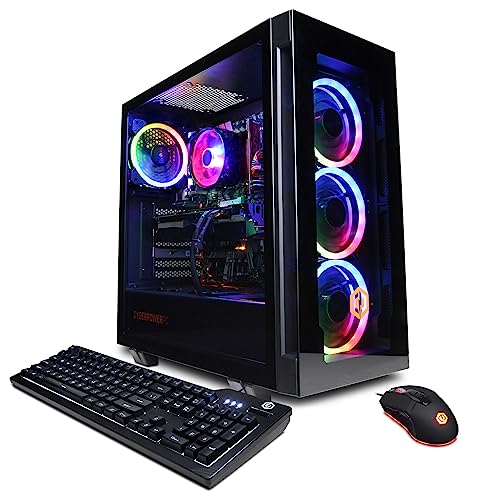
- Best overall: CyberPowerPC Gamer Xtreme VR (GXiVR8040A14), RTX 4060 Ti 16GB — Check on Amazon
- Thermaltake LCGS Quartz i1460, RTX 5060 — Check on Amazon
- iBUYPOWER Scale (SCA5N46T01), Ryzen 5 7600, RTX 4060 Ti — Check on Amazon
- Skytech Blaze4 Mini, RTX 4060 Ti — Check on Amazon
See 2 more Amazon options
- CyberPowerPC Gamer Master (GMA2900A), Ryzen 7 8700F, RTX 4060 Ti — Check on Amazon
- Skytech Archangel, RTX 4060, 32GB RAM and 2TB SSD — Check on Amazon
Read the full guide ↓
Disclosure: As an Amazon Associate, reviewstook.com earns from qualifying purchases. Links to Amazon on this page are affiliate links; they cost you nothing extra. Listing details such as price and availability change often, so check the current Amazon listing before you buy.
Start with the sentence most guides in this category avoid: at $1,200, a gaming PC is a tower. Not a mini PC, not a console-sized box that disappears behind a monitor, not something that mounts to the back of a screen. Every machine in this guide is a full tower-class case with a graphics card that needs air moving through it, a power supply inside the chassis, and a bundle of cables leaving the back. If your space problem is “there is physically no room for a tower anywhere in this room,” this budget cannot solve it with a gaming machine, and the honest detour is a genuinely small machine from a lower tier — see Best Mini Gaming PC Under $1200 and Best Small Form Factor Gaming PC Under $1200 for the form factors that actually shrink. What this guide does instead is the job that remains once the tower is accepted: grading six $1,200 towers by how they install. Where the case can honestly live. How much air it needs around it. Where its power cord and display cables have to travel. How much heat it pushes into a small room. And how much of your limited space gets eaten not by the box, but by everything the box drags with it.
That grading matters more in a small room than a large one, because a tower’s real footprint is never the case alone. It is the case plus the breathing room on the sides where the intakes sit, plus the clearance behind it where the exhaust leaves and the cables bend, plus the floor or desk area the power strip claims, plus the working room you will need the first time you open the side panel to add a drive or a stick of memory. In a spare bedroom or a studio corner, those margins are the difference between a setup that feels deliberate and one that feels like storage. One warning belongs up front, because a name in this guide invites the mistake: the Skytech Blaze4 carries the word “Mini” in its model name, and the verified material behind this guide documents no case dimensions for it at all. Treat “Mini” as a label, not a measurement — measure the live listing’s stated dimensions against your spot before you count on it being smaller than the other towers here, because on the evidence available to us, it is a tower like the rest. Below: the quick picks, an explanation of how the installation grading works, six reviews written from the room’s point of view rather than the spec sheet’s, a comparison table, the five-step measuring routine to run before any order, the placement mistakes that suffocate towers in small rooms, and the questions cramped buyers actually ask.
In this guide
Quick Picks
Short on time, or comparing several options at once? Each row below names a buyer type and the machine that suits it, with a link to the listing.
| Buyer type | Pick | Why it stands out | Link |
|---|---|---|---|
| Best overall | CyberPowerPC Gamer Xtreme VR (GXiVR8040A14) | RTX 4060 Ti with 16GB of VRAM — the tower you install once and leave alone for years | Check on Amazon |
| Best current-generation card | Thermaltake LCGS Quartz i1460 | RTX 5060 in a glass-sided case built to be looked at — the desk-display pick | Check on Amazon |
| Best upgrade path | iBUYPOWER Scale (SCA5N46T01) | AM5 platform with a planned first opening — budget the side-panel access it will need | Check on Amazon |
| Best value | Skytech Blaze4 Mini | RTX 4060 Ti — check price on Amazon; a tower despite the name, so measure it like one | Check on Amazon |
| Best eight-core AM5 alternative | CyberPowerPC Gamer Master (GMA2900A) | Ryzen 7 8700F on a B650 board — one display route only, so the cable plan is simple and strict | Check on Amazon |
| Best for big game libraries | Skytech Archangel | 32GB of RAM and a 2TB SSD — the fewest add-on boxes and external drives in the field | Check on Amazon |
How These Picks Were Chosen
The six machines here are the verified set from our main guide to Best Gaming PC Under $1200 — real Amazon listings in this tier. Check price on Amazon for each listing before you buy, as listing prices change. What changes in this guide is the grading. A specification sheet tells you what a PC can compute; an installation grade tells you what it costs the room. So each machine below was re-scored on five things that have nothing to do with frame rates. First, form-factor class: all six are tower-class cases, and they are graded as towers — floor beside the desk, or desk surface if yours can spare it — never as the compact machines their marketing occasionally gestures at. Second, the air jacket: a tower breathes through its front or side intakes and exhales at the rear and top, so the installed footprint includes open air on those faces, and any placement that seals the case into a closed cabinet is refused outright for all six. Third, the power supply’s address: every pick here has an internal supply, which means there is no external brick to house — the supply’s address is simply a wall socket or power strip within the cord’s reach, positioned so the rear exhaust is not blowing straight into a wall. Fourth, the cable drop: power, display, network and peripherals all leave the back panel, and the bend radius and run of those cables add real depth behind the case that a tape measure held against the chassis alone will miss. Fifth, service access: a small-space install that cannot be opened without moving furniture is a future problem scheduled in advance, so each review notes what opening that particular machine is likely to involve.
One discipline needs stating plainly, because it shapes every review below: the verified research behind this guide documents no case dimensions, no weights, no VESA mounts and no noise figures for any of these six machines. We have not invented any. Where a dimension decides a purchase — and in a small space it often does — the review tells you to take the figure from the live listing and run it through the measuring routine in the How to Choose section, rather than trusting a number we could not verify. What we grade is class, layout and documented hardware: which machines publish their power supply wattage, which include peripherals in the box, which ship a configuration you will want to open on the first weekend, and which arrive finished enough to be installed once and left alone. In a small room, those documented facts separate the towers more honestly than a guessed litre count ever could.
The 6 Best Gaming PCs for Small Spaces Under $1,200
CyberPowerPC Gamer Xtreme VR (GXiVR8040A14) — i7-13700F, RTX 4060 Ti 16GB
Who it suits: The small-space buyer who wants to install a tower exactly once — place it, cable it, and not think about the inside of the case again for years.
Judged as furniture, this machine’s argument is that it asks for nothing after installation day. Inside the tower sit an Intel Core i7-13700F, the 16GB version of the RTX 4060 Ti, 16GB of DDR5 memory and a 1TB PCIe Gen4 NVMe SSD on a B760 board, with Wi-Fi and Windows 11 Home. The 16GB graphics card is the space-relevant specification, even though it sounds like a performance one: the extra video memory is what keeps textures at high settings at 1440p as games grow, which means the most common reason to open a mid-life gaming PC — the card starting to feel short of memory — is the reason this build postpones longest. In a room where sliding the tower out and opening it means moving a chair, a plant and a power strip, a machine that defers its first opening the longest is worth real money. The processor leans the same way: the i7-13700F is more CPU than the card needs for gaming alone, so streaming, recording and background work never become the errand that forces an upgrade either.
The installation itself is standard tower discipline with one documented detail worth planning around: the listing’s verified specification gives the card one HDMI and two DisplayPort outputs, so the cable drop behind this case can carry up to three display cables if your desk grows a second or third screen — route them as one bundle from day one rather than adding them as spaghetti later. The power supply is internal, so its address is a socket within cord reach; the listing does not publish the supply’s wattage in the verified material, which matters for a future card swap rather than for placement. Placement rules are the class rules: floor beside the desk or a sturdy desk end, open air at the intakes, exhaust room behind, and never inside a closed cabinet — the heat this class of machine pushes out under load will turn a sealed cupboard into an oven and the PC into a very quiet, very warm paperweight. Check price on Amazon before you order, and confirm the live listing still fits this tier before you commit the spot to it. One verification belongs in the arrival routine: the listing leaves its exact RAM stick configuration unclear, so check on the live listing whether the 16GB arrives as one stick or two — if it is one, a matched second stick is a small, planned first opening rather than a surprise.
- 16GB of VRAM defers the mid-life graphics opening longer than any pick here.
- One HDMI and two DisplayPort outputs documented — plan one tidy three-cable bundle.
- Nothing in the configuration asks for an early upgrade or an external add-on.
Honest limitation: It is a full tower-class install with no documented dimensions in the verified material — take the case measurements from the live listing, run the five-step routine before ordering, and check price on Amazon.
Choose it if your spot can house one tower properly ventilated and you want the longest gap before anyone opens it. Skip it if the live listing does not fit your budget when you check price on Amazon and the purchase is urgent — the Quartz below is the alternative to compare.

Thermaltake LCGS Quartz i1460 — i5-14400F, RTX 5060
Who it suits: The buyer whose small space is also a visible space — a studio or a bedroom desk where the PC will be looked at daily, and who would rather give the tower a deliberate place on display than hide it badly.
Most small-space advice treats the PC as an embarrassment to be tucked away. The Quartz is the pick for the opposite strategy. Thermaltake’s business is cases and cooling, and this LCGS build wears a glass-sided case: the machine is designed to be seen, with the components on show through the panel. In a small room, a tower you place deliberately — on the desk end or a low stand, glass side facing the room — reads as part of the setup. A tower shoved into a corner behind a curtain of cables reads as clutter, and worse, usually breathes badly. The hardware inside supports the long tenancy that a display placement implies: an Intel Core i5-14400F, a GeForce RTX 5060 — the current graphics generation, rendering natively at 1440p at high settings, with the newer architecture’s upscaling and frame generation as reserve — 16GB of DDR4-3600 memory, a 1TB NVMe SSD, Wi-Fi and Windows 11. Check price on Amazon for the current listing before you buy.
The placement grading has two specifics. First, a glass panel wants a small standoff from the wall on its side and a placement where it will not be knocked by a chair or a vacuum cleaner; give it the same respect you would give a monitor. Second, the honest platform note: the i5-14400F sits on Intel’s finished LGA1700 socket with DDR4 memory, so no next-generation processor will ever drop into this board — the upgrade this machine will actually get is a graphics card swap, and the published 600W 80 Plus Gold power supply is exactly the documentation that makes that swap plannable. For the installation, a published wattage is a quiet gift: you can check a future card’s requirements against a number instead of opening the case to read a label. Airflow follows the class rules — intakes fed with open room air, rear exhaust not buried against a wall, closed cabinets refused — with the addition that a case built by a cooling company at least starts from sensible fan layout. What you are buying is the current-generation card at an everyday price, in the one case in this guide that improves a small room by being visible in it.
- Glass-sided case from a case-and-cooling maker — the desk-display installation.
- Published 600W 80 Plus Gold supply: a future card swap can be planned on paper.
- Current-generation card in this tier — check price on Amazon.
Honest limitation: The LGA1700/DDR4 platform is finished, so the processor is the one it retires with; and a glass panel is a placement commitment — it needs a spot where it is neither starved of air nor exposed to knocks.
Choose it if the tower will live in view and you want to buy once at a fair price. Skip it if the machine must hide in a tight floor corner — the glass buys you nothing there, and the AM5 picks below offer a longer platform life for hidden installs.

iBUYPOWER Scale (SCA5N46T01) — Ryzen 5 7600, RTX 4060 Ti
Who it suits: The planner — a buyer with a small room and a long horizon, who accepts one scheduled opening of the case in exchange for the only platform here that is still growing.
The Scale’s space story is about timing your intrusions. The specification is an argument for the future: a Ryzen 5 7600 on AMD’s AM5 socket, an RTX 4060 Ti 8GB, 16GB of DDR5 memory, a 1TB NVMe SSD, Wi-Fi, Windows 11 Home, and a keyboard and mouse in the box. AM5 is the one socket in this guide with future processors still committed to it, and the DDR5 carries forward when one arrives — so this tower’s big service days are upgrades you choose, years apart, rather than limitations you discover. Check price on Amazon before you buy, and let the measuring routine decide when you order. The bundled keyboard and mouse are a small-space footnote that matters: they arrive in the same box, so there is no second peripheral purchase to house, and their cables join the drop behind the desk on day one.
The scheduled intrusion is printed in the listing’s own specification: the 16GB of memory ships as a single stick, 16×1. A lone stick runs the memory in single-channel mode, which costs real performance in processor-sensitive moments until a matched second 16GB DDR5-5200 stick joins it. Read through the installation lens, that flaw becomes a planning instruction: when you run the five-step routine for this machine, reserve the service access for that first-weekend job — a spot where the side panel can come off and the tower can be reached without dismantling the desk. Do the stick at installation time, while the cables are still being routed, and the Scale becomes a 32GB dual-channel machine that may not need opening again until a processor swap years later. Every other placement rule is class standard: internal supply, so a socket within cord reach is its address; open air at the intakes; exhaust clearance behind; no sealed cabinets. Judged as delivered it is a very good PC with one deliberate corner cut; judged as an installation, it is the pick that lets a small room plan its disturbances instead of suffering them.
- AM5 platform — service days are chosen upgrades, years apart, not forced fixes.
- Positioned in this tier — check price on Amazon.
- Keyboard and mouse included — no extra peripheral boxes to find room for.
Honest limitation: The single RAM stick means the case gets opened early — if your only possible spot makes opening the machine a furniture-moving event, either do the upgrade before final placement or choose a pick that arrives finished.
Choose it if you keep PCs for years and can give the tower working room for one planned upgrade. Skip it if the installation must be sealed-and-forgotten from day one — the picks above and below arrive complete.

Skytech Blaze4 Mini — Ryzen 7 5700, RTX 4060 Ti
Who it suits: The value hunter in a small room — a buyer who puts value in this tier first, and who will measure the case from the listing instead of trusting the word in its name.
This review exists in a small-spaces guide under a flag, and the flag is the name. “Mini” suggests a machine that tucks onto a shelf or rides behind a monitor; the verified material behind this guide documents no dimensions for the Blaze4 Mini at all, and everything else about it — a Ryzen 7 5700, an RTX 4060 Ti 8GB, 16GB of DDR4-3200 memory, a 1TB SSD, a published 650W Gold power supply, Wi-Fi and Windows 11 — describes a standard tower build. So the honest installation grade is the tower grade: budget a tower’s footprint, a tower’s air jacket and a tower’s cable drop, take the case’s actual measurements from the live listing, and if those measurements turn out kinder than its siblings’, enjoy the bonus. What must not happen is the purchase being planned around a console-sized box that exists only in the model name. With that discipline observed, the machine underneath is the value case in this guide: an RTX 4060 Ti build positioned as this tier’s value pick — check price on Amazon. In a small room, any room left in the budget is space money: it can fund the monitor arm that clears the desk or the shorter desk that fits the alcove.
The rest of the installation profile is uncomplicated. The internal 650W Gold supply publishes its wattage, so the graphics card swap that is this machine’s only real upgrade path — the AM4 platform underneath is finished, and no processor future is being sold here — can be planned without opening the case to read a label; leave the usual service access for that one future job. Skytech’s listing notes the graphics card brand may vary: the GPU model and its 8GB are the contracted specification, the board partner is not, and the arrival check in the five-step routine is where you confirm the card in the box is the card in the title. Placement follows the class rules without exception — open air at the intakes, exhaust room at the rear, and a hard refusal of closed cabinets, because a tower’s cooling does not care that the cabinet was the only spot left. Check price on Amazon before you order, and compare it with the Scale above, which is the everyday alternative in this tier.
- RTX 4060 Ti value pick in this tier — check price on Amazon.
- Published 650W Gold supply makes the one future card swap plannable on paper.
- Eight-core Ryzen 7 5700 is more than sufficient for 1440p gaming.
Honest limitation: “Mini” is a name, not a measurement — no case dimensions are documented in the verified material, so plan a full tower installation and verify the listing’s figures yourself; and the AM4/DDR4 platform is finished.
Choose it if value in this tier is the priority and you will measure before you commit the spot. Skip it if your space plan depends on the case being genuinely small — nothing verified supports that, and the SFF guides linked in this article cover machines that are.

CyberPowerPC Gamer Master (GMA2900A) — Ryzen 7 8700F, RTX 4060 Ti
Who it suits: The multitasker in a compact setup — streaming, voice chat and a browser’s worth of tabs running beside the game — who wants the AM5 platform with eight cores from day one.
The Gamer Master answers the same platform question as the Scale with more processor: a Ryzen 7 8700F on a B650 board, an RTX 4060 Ti 8GB, 16GB of DDR5 and a 1TB PCIe Gen4 SSD, with Wi-Fi and Windows 11 Home. At 1440p the extra cores will not outrun the Scale’s six in most games — the graphics card limits both — so the eight cores earn their place around the game rather than in it, which in a small multi-use room is often the honest workload: this is the desk that is also the stream desk and the work desk. Check price on Amazon for this listing — it is an eight-core AM5 tower in the same tier as the Scale. As an installation it is tower-class in every respect — internal power supply with a socket for an address, open air at the intakes, exhaust clearance behind, closed cabinets refused — and it adds one cable-drop rule that is stricter than its siblings’, for a reason printed in the processor’s name.
The 8700F has no integrated graphics. The F is the tell, and its one practical consequence lands squarely in the cable plan: there is no motherboard display output worth using, because there is no processor graphics behind it. Every screen this machine ever drives hangs off the graphics card’s ports, full stop — which makes the cable drop simple to plan and unforgiving of the classic mistake of plugging the monitor into the motherboard and wondering why the picture is missing or the performance is wrong. It also means that on the one day the graphics card has a problem, there is no fallback output for troubleshooting; file that under known trade-offs, and it is the second reason the arrival verification matters for this pick. The first reason is the model family: CyberPowerPC sells several near-identically named Gamer Master configurations, and the family now includes RTX 5060 Ti variants under different model suffixes at higher prices, so the verify-on-arrival step must confirm the machine in the box is this one — 8700F, 4060 Ti, B650 — before the cables are dressed and the spot is declared finished. Confirm it, and the Gamer Master is the fuller version of the Scale’s argument, installed the same way and opened on the same chosen schedule.
- Eight AM5 cores for the stream-and-tabs workload a small multi-use desk actually runs.
- One display route — the graphics card — makes the cable plan simple and strict.
- Positioned in this tier — check price on Amazon.
Honest limitation: No integrated graphics means no fallback display output if the card ever fails, so the monitor-into-the-card rule is absolute; and the model family has similar siblings, so the exact configuration must be verified on the listing and again on arrival.
Choose it if your small desk works as hard around the game as in it. Skip it if pure gaming value per dollar is the only metric — the Scale undercuts it with the same card, socket and installation footprint.

Skytech Archangel — i5-14400F, RTX 4060, 32GB RAM, 2TB SSD
Who it suits: The library-rich buyer in a small room — hundreds of gigabytes of installed games, and no shelf space, desk space or patience for the external drives and upgrade errands the rest of the tier eventually demands.
Every other machine in this guide spends its budget the same way and leaves the same two debts: memory you may want to double and storage you will certainly fill. In a large room those debts are errands. In a small one they are objects — an external drive living permanently on the desk, its cable in the drop, its little footprint competing with the keyboard — or they are afternoons spent sliding the tower out to add an internal drive. The Archangel is the deliberate exception, and its space case is subtraction. Skytech pairs an Intel Core i5-14400F with a plain RTX 4060, then doubles the field: 32GB of DDR5-5600 memory where rivals ship 16, and a 2TB SSD where rivals ship 1TB, on a published 650W Gold power supply with Wi-Fi and Windows 11. Installed, that is the whole story told in one sentence: this is the pick least likely to ever grow an accessory. No external drive on the desk. No RAM errand in year one. The tower goes into its spot, the cables get dressed once, and the room is finished.
The trade is stated as plainly here as in our main guide, because a small room does not soften it: the RTX 4060 is a full step below the 4060 Ti and 5060 cards above — a superb 1080p card, and a 1440p card with settings negotiated rather than maxed. If your screen is 1440p and your settings are not negotiable, that trade runs the wrong way no matter how tidy the installation is; take the 16GB CyberPowerPC at the top of this guide and accept the future SSD errand. If your screen is 1080p, or your 1440p settings are pragmatic, the Archangel’s arithmetic is the daily experience of the machine: a real library installed at once, nothing rotated, nothing external. Check price on Amazon before you buy: the doubled memory and storage are specifications the rest of the tier only reaches after upgrade errands. The platform is LGA1700 — finished, like the Quartz’s — with the published 650W Gold supply keeping the one likely upgrade, a graphics card swap, plannable without opening the case to read a label. Placement is the class standard: open air, exhaust room, no sealed cabinets, and the quiet satisfaction of a setup with nothing left to add.
- 2TB SSD — a real game library installed at once, with no external drive colonising the desk.
- 32GB of DDR5-5600 — double the field, so the RAM opening never has to happen.
- Capacity-focused value in this tier — check price on Amazon.
Honest limitation: The RTX 4060 negotiates 1440p rather than owning it, and the LGA1700 platform is finished — you are trading a graphics step for the fewest lifetime intrusions, so make the trade with the right monitor in mind.
Choose it if storage and memory are your lived constraints and your resolution is 1080p or pragmatic 1440p. Skip it if native 1440p at high settings is the point of the purchase — that is what the top of this guide is for, in the same tower footprint.

Comparison Table
| Product | Form-factor class | Power supply | Installation note | Link |
|---|---|---|---|---|
| CyberPowerPC Gamer Xtreme VR (GXiVR8040A14) | Tower — dimensions not documented; measure the listing | Internal, wattage unpublished | Install once: 16GB VRAM defers the first opening longest — check price on Amazon | Check on Amazon |
| Thermaltake LCGS Quartz i1460 | Tower, glass-sided — built to be displayed | Internal, 600W 80 Plus Gold (published) | Desk-display placement with a standoff from the wall; current-generation card at an everyday price | Check on Amazon |
| iBUYPOWER Scale (SCA5N46T01) | Tower — dimensions not documented; measure the listing | Internal, wattage unpublished | One planned opening for the second RAM stick — reserve the service access for it | Check on Amazon |
| Skytech Blaze4 Mini | Tower — “Mini” is a name, not a measurement | Internal, 650W Gold (published) | Strong GPU value in this tier — check price on Amazon; plan a full tower installation | Check on Amazon |
| CyberPowerPC Gamer Master (GMA2900A) | Tower — dimensions not documented; measure the listing | Internal, wattage unpublished | Monitor into the graphics card only — no integrated graphics fallback exists | Check on Amazon |
| Skytech Archangel | Tower — dimensions not documented; measure the listing | Internal, 650W Gold (published) | Fewest add-ons in the field: 32GB RAM and 2TB storage mean nothing external to house | Check on Amazon |
How to Choose: The Five-Step Measure-Before-You-Buy Routine
Every pick in this guide is a tower, and the verified research documents no case dimensions for any of them — which makes this routine the most important section in the article. Run it in order, with the live listing of your chosen machine open, before any order is placed.
- Step 1 — Measure the spot. Take the case dimensions from the live listing — height, width, depth, in the orientation the case will actually stand — and measure the exact place it will live: the floor bay beside the desk, the desk surface, the shelf. Write both sets of numbers down. If the listing’s figures leave less room than the steps below demand, the spot fails now, on paper, rather than on delivery day. Never substitute the model name for a measurement: the Blaze4 Mini’s name is the standing warning.
- Step 2 — Reserve the ventilation clearance. A tower is installed with its air jacket on. Leave open air at the intake faces — front and side on most cases — and a clear path behind and above for the exhaust. If the only available spot is a closed cabinet, a sealed TV-stand cubby or a cupboard with a door, that spot is refused for every machine in this guide: pick a different spot, or pick a different class of computer from Best Compact Gaming PC Under $1200. Heat that cannot leave will throttle the machine and shorten its life, quietly and permanently.
- Step 3 — Give the power supply an address. All six picks carry their supply inside the case, so there is no external brick to house — the address question is simpler and still worth asking: is there a wall socket or a power strip within the cord’s comfortable reach of the spot, placed so the strip is not buried behind the case where the exhaust blows on it? If the socket is across the room, solve it now with a properly rated strip along the wall — never with the cord stretched across a walkway, and never by pushing the tower against the wall to gain inches, which spends the Step 2 clearance to buy Step 3 reach.
- Step 4 — Walk the cable drop. Stand at the spot and trace every cable’s journey: power in, display cable or cables out to the monitor, Ethernet if you run wired, keyboard, mouse, headset. Cables leave the back panel and bend before they fall, so the installed depth of a tower is the case depth plus the bend — measure the spot with that bend included, especially for desk-against-wall setups. Two pick-specific rules belong here: on the Gamer Master, every display cable goes to the graphics card, because its 8700F has no integrated graphics and the motherboard ports give you nothing; and on the Gamer Xtreme VR, the documented one HDMI and two DisplayPort outputs mean a multi-monitor drop should be bundled as one run from the start.
- Step 5 — Then order, and verify on arrival. When the machine arrives, check the delivered configuration against the model number before the spot is declared finished: graphics card model and memory, RAM capacity — and, on the Scale, the single stick you are about to pair, and on the Gamer Xtreme VR, the stick configuration its listing leaves unclear. Confirm the Gamer Master is the 8700F/4060 Ti/B650 configuration and not a similarly named sibling, and on the Blaze4 Mini confirm the card in the box matches the title, since Skytech notes the brand may vary. Measure the delivered case against the listing’s figures while the return window is open. Verification takes ten minutes on day one and is nearly impossible to retrofit once the cables are dressed.
Common Small-Space Buying Mistakes
- Trusting the word “Mini” in a model name. No dimensions are documented for the Blaze4 Mini in the verified research; plan a tower, measure the listing, and treat anything kinder as a bonus.
- Sealing a tower into a closed cabinet or cubby. Every machine here cools with room air; a door in front of the intakes converts the cabinet into an oven and the PC into a throttled, short-lived one.
- Measuring the case and forgetting the cables. The installed depth is the chassis plus the bend of the power and display cables behind it — the difference is exactly the width of the gap most desks do not have.
- Pushing the rear exhaust flat against a wall to win floor space. You are spending the machine’s cooling to buy a few centimetres; the heat has nowhere to go but back into the case.
- Placing the tower where it can never be opened. A side panel that cannot come off without moving furniture turns a five-minute RAM or SSD job into a half-day project — and on the Scale, that job is scheduled from day one.
- Plugging the monitor into the motherboard on a machine with no integrated graphics. On the Gamer Master’s 8700F there is no processor graphics at all; the card’s ports are the only picture the machine can make.
- Letting a big library colonise the desk. If your storage plan is an external drive living permanently beside the keyboard, the Archangel’s 2TB internal SSD is the tidier answer at the same footprint.
- Spending the whole $1,200 on the tower when the room itself needs the money. Leave room in the budget for the monitor arm, the smaller desk or the shelving that makes a small setup work.
Final Recommendation
- Most small-space buyers: CyberPowerPC Gamer Xtreme VR (GXiVR8040A14) — install it once; check price on Amazon.
- The tower will be seen: Thermaltake LCGS Quartz i1460 — the glass-sided desk display.
- Five-year planners: iBUYPOWER Scale, with service access reserved for the second RAM stick.
- Value hunters: Skytech Blaze4 Mini — check price on Amazon, and measure it like a tower, because it is one.
- Streamers and multitaskers: CyberPowerPC Gamer Master (GMA2900A), with the cable drop planned around the card’s ports only.
- Big libraries, small desks: Skytech Archangel — nothing external to house.
Our top two for the buyer behind this search are the CyberPowerPC Gamer Xtreme VR, for the 16GB card that keeps the case closed the longest, and the Thermaltake Quartz, for the current-generation card in the one case here that earns its place in view. Between them they cover the two shapes a tower takes in a small room: the one you install and forget, and the one you place on purpose. If your horizon is five years, the Scale plus its planned RAM stick is the connoisseur’s version of the same money; if your library is the thing colonising your desk, the Archangel removes the colony. Buyers whose rooms cannot take a tower at all should step down a form factor with Best Gaming PC For Small Spaces Under $800 or up a budget with Best Gaming PC For Small Spaces Under $1500, and anyone still deciding whether the tower itself is right will find the full performance picture in Best Gaming PC Under $1200. Run the five steps, check price on Amazon for your pick, and the machine that arrives will fit the room you actually have.
Frequently Asked Questions
Is a $1,200 gaming PC really too big for a small room?
It is a tower, and that is the honest unit to plan in. None of the six machines here is a mini PC, none mounts behind a monitor, and the verified research documents no dimensions for any of them — so “too big” is a question only your tape measure and the live listing’s figures can answer. What this guide can promise is that a tower installed with its air jacket, cable bend and service access planned will live comfortably in most small rooms; a tower bought on the hope that it is smaller than it is will not.
Can I put one of these PCs inside a TV stand or cabinet?
Not with the door closed, and not in a sealed cubby at all. Every pick here cools itself with room air drawn through its intakes and pushed out of its exhausts; enclosing the case traps that heat around it until the machine slows itself down to survive. An open-backed, open-fronted stand bay with real clearance is a different matter — run it through Step 2 of the routine — but a closed cabinet is refused for all six, without exception.
How much space behind the PC do the cables actually need?
More than the case depth suggests. Power and display cables exit the rear panel and bend before they drop, so the installed depth is the chassis plus that bend, plus working room for your hand when you re-seat a connector. Measure the spot with the bend included, and on multi-monitor setups — the Gamer Xtreme VR documents one HDMI and two DisplayPort outputs — bundle the run so the drop stays one tidy fall instead of three competing ones.
Does the Blaze4 Mini actually save space?
Nothing verified says so. The name suggests a compact case, but no dimensions for it appear in the verified research behind this guide, and its specification — a Ryzen 7 5700, an RTX 4060 Ti, a published 650W Gold supply — is a standard tower build. Take its measurements from the live listing and run the five-step routine; if they are kinder than its siblings’, that is a bonus, but plan the tower installation either way. For machines that are verifiably small, see Best Mini PC Under $1200.
Which of these needs the least room around it after installation?
They are all tower-class, so the air jacket is the same discipline for each — but the Archangel asks the least of the room around the case: its 32GB of memory and 2TB SSD mean no external drive on the desk and no early upgrade opening, and its published 650W Gold supply keeps even the eventual card swap plannable. The Scale is the opposite shape: the same tower footprint, plus one planned opening for its second RAM stick, which the spot has to make possible.
Where should the power strip live in a small setup?
Within the power cord’s comfortable reach of the case, along the wall or under the desk’s rear edge — reachable for its switch, but not buried directly behind the tower’s exhaust, and never positioned by pushing the case flat against the wall to reach it. All six machines carry internal supplies, so there is no separate brick to find a home for; the strip and the cable drop are the whole power geography of the installation.
What if there is genuinely no room for a tower?
Then this budget tier is the wrong tool, and saying so is the point of the honesty in this guide. Smaller gaming form factors live at other price points and in other guides: Best Gaming PC For Beginners Under $1200 covers the ownership side of this same tier, while the small form factor and mini PC guides linked throughout this article cover machines whose size is their specification rather than their name. Measure first, and let the room — not the listing — have the final word.
- Best Gaming PC Under $1200
- Best Gaming PC Under $800
- Best Gaming PC Under $1500
- Best Gaming PC For Beginners Under $1200
- Best Gaming PC For Streaming Under $1200
- Best Gaming PC For 1440p Gaming Under $1200
- Best 1440p Gaming PC Under $1200
- Best Budget Gaming PC Under $1200
- Best Prebuilt Gaming PC Under $1200


