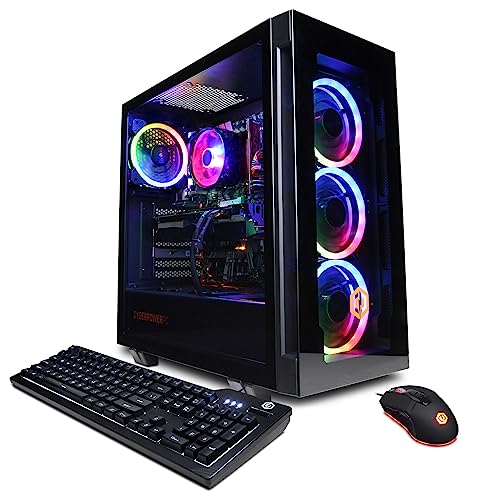
Where to buy
Check the latest price, availability and delivery on Amazon. Orders are placed on Amazon. We may earn a commission from qualifying purchases.
- Best overall: CyberPowerPC Gamer Xtreme VR (GXiVR8040A14), RTX 4060 Ti 16GB — Check on Amazon
- Thermaltake LCGS Quartz i1460, RTX 5060 — Check on Amazon
- iBUYPOWER Scale (SCA5N46T01), Ryzen 5 7600, RTX 4060 Ti — Check on Amazon
- Skytech Blaze4 Mini, RTX 4060 Ti — Check on Amazon
See 2 more Amazon options
- CyberPowerPC Gamer Master (GMA2900A), Ryzen 7 8700F, RTX 4060 Ti — Check on Amazon
- Skytech Archangel, RTX 4060, 32GB RAM and 2TB SSD — Check on Amazon
Read the full guide ↓
Disclosure: As an Amazon Associate, reviewstook.com earns from qualifying purchases. Links to Amazon on this page are affiliate links; they cost you nothing extra. Listing details such as price and availability change often, so check the current Amazon listing before you buy.
If this is your first gaming PC, $1,200 is a genuinely good place to start — and that is not something we can say about every budget in this category. Cheaper tiers ask a beginner to learn a set of compromises along with the machine: settings that need lowering before the first game feels right, upscaling doing quiet work the listing never mentioned, memory that runs out a year in. At $1,200 the compromises mostly leave the room. Every machine here is built around a graphics card — the RTX 4060 Ti or the RTX 5060 — that renders games at 1440p, the sharp resolution of a good modern gaming monitor, at high settings, without tricks. You will still have things to learn — but what you learn here is how to own a computer, not how to apologise for one.
Two honest notes before the picks, because beginners deserve them up front. First, this is not a 4K budget: the cards that render 4K natively at high settings live in machines several hundred dollars above this ceiling, and any $1,200 listing calling itself a 4K PC is describing upscaling or lowered settings. Second, prices at this level move, and two of the six machines below drift above this ceiling between sales — so check the live price on Amazon before you buy, and treat anything above $1,200 as a different purchase. If you want one name to start with, it is the CyberPowerPC Gamer Xtreme VR at the top of this guide, bought at or under $1,200, for the 16GB graphics card that settles the memory question for years. If you would rather not watch prices at all, the Thermaltake Quartz sits under the ceiling every day. Below are the quick picks, a plain-English glossary, detailed reviews of all six machines, a comparison table, a step-by-step plan for your first evening, the extra costs nobody puts on the product page, upgrades in plain terms, the mistakes first-time buyers make, and the questions they ask us most.
In this guide
Quick Picks
Short on time, or comparing several options at once? Each row below names a buyer type and the machine that suits it, with a link to the listing.
| Buyer type | Pick | Why it stands out | Link |
|---|---|---|---|
| Best overall | CyberPowerPC Gamer Xtreme VR (GXiVR8040A14) | RTX 4060 Ti with 16GB of graphics memory — the pick that ages best at 1440p | Check on Amazon |
| Best buy-it-today pick | Thermaltake LCGS Quartz i1460 | Current-generation RTX 5060 at an everyday price under the ceiling — no sale-watching | Check on Amazon |
| Best upgrade path | iBUYPOWER Scale (SCA5N46T01) | A living AM5 platform that stays comfortably inside the budget | Check on Amazon |
| Best value on sale | Skytech Blaze4 Mini | The same 4060 Ti class — buy it when its price dips, not at its everyday level | Check on Amazon |
| Best for streaming and multitasking | CyberPowerPC Gamer Master (GMA2900A) | Eight cores on the same living AM5 platform, for streamers and multitaskers | Check on Amazon |
| Best for big game libraries | Skytech Archangel | Double the memory and double the storage of the field — nothing to delete, ever | Check on Amazon |
How These Picks Were Chosen
The budget was applied the way a beginner experiences it: to the whole machine, as one purchase, with nothing essential left to buy before the first game runs. Every PC below is a real Amazon listing that sells at or regularly within $1,200. Prices here move between deal events, so this guide prints no fixed figure — check the live price on Amazon, and where a pick only makes sense inside this budget, the review says so.
We did not benchmark these systems ourselves. We read the maker listings and specification pages and compared the parts that decide a gaming PC’s life: the graphics card and how much memory it carries, the processor platform underneath it, how the RAM is configured, the storage, and the power supply where the listing publishes one. The graphics card does most of the work at this budget, so the ladder matters. The RTX 4060 Ti comes in two versions that share a name and a speed but not a future: the 8GB card is fast today and memory-limited tomorrow, while the 16GB card renders at the same pace now and keeps its texture headroom as games grow heavier. The RTX 5060 is the newer design at the same performance address, with the current generation of upscaling and frame generation. A step below all three sits the plain RTX 4060; the single machine here built on it justifies itself with doubled memory and storage instead of card speed. Performance is described by tier and resolution throughout, rather than with frame-rate figures we did not measure.
Two filters sat on top of the specifications. The first is the platform filter: a gaming PC is a five-year purchase, so the socket under the processor decides what the machine can become. Two of these PCs sit on AMD’s AM5 platform, which still has future processors coming to it; the rest sit on finished platforms whose value has to be argued on price, card or capacity — and their reviews argue it that way. The second is the memory-configuration filter: a listing that ships its RAM as a single stick, or leaves the configuration vague, gets called on it in the review, because how memory is installed changes how the machine performs, and a beginner should never discover that by accident.
The Words on the Listing, in Plain English
Every term below appears on the product pages for these six machines; none of them is complicated once somebody translates it once. One fact first, because it shapes several definitions: all six picks in this guide are sold new and complete — none is renewed, none is a barebone kit you finish yourself, and nothing in any of them is soldered down. Their memory and storage sit in standard slots you can change later.
- Graphics card (GPU). The part that draws the game. At this budget it matters more than everything else combined. Every pick here has a proper separate card — none is relying on the weak graphics built into a processor.
- VRAM (graphics memory). The card’s own private memory, measured in gigabytes, where textures live while you play. The RTX 4060 Ti exists in 8GB and 16GB versions that are equally fast today; at 1440p over several years, the 16GB version runs out of room much later.
- Processor (CPU). The part that runs the game itself — physics, menus, the operating system, everything that is not drawing. Six or eight cores is plenty for gaming; more cores help streaming and multitasking, not game speed.
- RAM (system memory). The PC’s working desk space, separate from the card’s VRAM. Sixteen gigabytes is the working standard at this price; 32GB is comfort. What matters just as much is the next term.
- Single-channel vs dual-channel. RAM works in pairs of slots. Sixteen gigabytes delivered as two 8GB sticks runs in dual-channel mode at full memory speed; the same 16GB as one stick runs single-channel and costs real performance until a second stick is added. One pick below ships a single stick on purpose-priced terms — its review plans the fix.
- SSD (storage). Where games live permanently. 1TB holds a working library; 2TB holds a big one. All six picks use fast NVMe SSDs, so capacity — not loading speed — is the difference.
- Resolution (1080p, 1440p, 4K). How many pixels the screen shows: 1920×1080, 2560×1440, 3840×2160. Higher looks sharper and demands more from the card. This tier honestly owns 1440p; 4K belongs to a more expensive one.
- Refresh rate (Hz). How many times per second the monitor can show a new picture — 60, 144, 165 and up. A fast card feeding a 60Hz screen is wasted headroom; the walkthrough below includes the one-minute step that makes a high-refresh monitor run at its rated speed.
- DLSS and upscaling. A feature on NVIDIA’s RTX cards that renders the game at a lower internal resolution and rebuilds the picture intelligently. The honest numbers: at a 1440p output, DLSS Quality renders about 1707×960 internally and Performance about 1280×720; at a 4K output, Quality renders about 2560×1440 and Performance about 1920×1080. On these cards it is headroom for future games — they already render 1440p natively.
- Frame generation. A feature that synthesises extra frames between the ones the card truly renders, smoothing motion in games that support it. It does not make the game respond faster — your inputs are still read on the rendered frames — so value it as polish, not performance.
- Power supply (PSU). The box inside the PC that feeds everything electricity, measured in watts. It decides whether a future graphics card swap is a simple job or a rebuild. Where a listing publishes a wattage, the review says so; where it does not, we claim none.
- Platform / socket (AM5, LGA1700, AM4). The mounting standard under the processor, which decides whether future processors can drop into the same board. AM5 is alive — new AMD processors are still coming for it. LGA1700 and AM4 are finished: excellent today, but their upgrade that matters becomes the graphics card.
- Prebuilt. A complete PC assembled by a company and sold ready to run — which is what all six picks are. You unbox it, plug in a monitor, and follow the walkthrough further down this page.
The 6 Best Gaming PCs for Beginners Under $1,200
CyberPowerPC Gamer Xtreme VR (GXiVR8040A14) — i7-13700F, RTX 4060 Ti 16GB
Who it suits: The first-time buyer who wants the fewest possible decisions later — the machine whose graphics memory is settled on day one, so no setting needs negotiating as games grow over the coming years.
Start with the part beginners most often misread, because this machine exists to correct it. Two graphics cards can share the name RTX 4060 Ti and differ in the one specification that decides how they age: memory. This Gamer Xtreme VR carries the 16GB version. It renders no faster than the 8GB card today — the chip is identical — and that is precisely the point. What the extra memory buys is room for the high and ultra texture settings at 1440p that newer games increasingly treat 8GB as barely enough for. When a card runs out of that room, the symptoms confuse a new owner — stutter in busy scenes, textures dropping to a muddy low detail on their own. The 16GB card postpones that day by years. Around it sit an Intel Core i7-13700F — more processor than gaming alone needs, leaving genuine spare capacity for streaming, recording and background apps — plus 16GB of DDR5 memory, a 1TB PCIe Gen4 NVMe SSD, Wi-Fi and Windows 11 Home.
The conditions are two. The price moves: this listing swings between deal pricing and a higher everyday level, so the rule is absolute — check the price on Amazon and buy it only at or under $1,200; if the live price sits above that line, either wait for the deal to return or take the Thermaltake below, which lives under the ceiling full-time. And the listing leaves one detail less clear than it should: whether the 16GB of RAM arrives as one stick or two. Check the live listing before ordering; if it arrives as a single stick, a matched second stick later is the cheapest meaningful upgrade in this guide. One more fact for setup night: the processor’s F suffix means it has no graphics of its own, so the monitor cable must go into the graphics card’s ports, never the motherboard’s — the walkthrough below covers it.
- RTX 4060 Ti with 16GB of VRAM — the tier’s texture headroom, bought once and forgotten.
- i7-13700F leaves real spare capacity for streaming and background work.
- DDR5 memory and a Gen4 NVMe SSD — no previous-generation parts anywhere.
Honest limitation: The price straddles the budget — deal pricing brings it inside, the regular listing pushes it out — so it is only a $1,200 pick while the deal is live; and the RAM stick configuration should be confirmed on the listing before you order.
Choose it if you play at 1440p and intend to keep this PC for four or more years. Skip it if the live price sits above $1,200 and the machine is needed this week — the Quartz below covers the same tier at an everyday price.

Thermaltake LCGS Quartz i1460 — i5-14400F, RTX 5060
Who it suits: The beginner who wants to buy once, at a fair price, today — with the newest graphics generation inside and no sale calendar to learn.
The Quartz is the calmest purchase in this guide. Thermaltake builds it around an Intel Core i5-14400F and a GeForce RTX 5060, with 16GB of DDR4-3600 memory, a 1TB NVMe SSD, a published 600W 80 Plus Gold power supply, Wi-Fi and Windows 11. The RTX 5060 sits at the same performance address as the 4060 Ti cards around it — native 1440p at high settings is its home — and adds the current generation of DLSS upscaling and multi frame generation. Generated frames smooth the picture in games that support them, but they are synthesised, and they do not reduce input latency — your aim still feels the rendered frames underneath. Valued as polish on a card that already renders 1440p natively, it is a genuine plus. The pricing is the other half of the calm: it sits under the ceiling as an everyday matter — check the price on Amazon, no sale required. Under the ceiling is where this machine lives, every week of the year.
The trade is underneath. The i5-14400F rides Intel’s LGA1700 socket with DDR4 memory — a finished platform, meaning no future processor generation drops into this board and the RAM does not carry forward. Thermaltake spent the money on the graphics card and power supply instead: the 600W Gold unit leaves honest room for a midrange card swap years from now, which is the upgrade this machine will actually get. The F suffix also means no built-in graphics, so the walkthrough’s monitor-into-the-card rule applies to this pick in full. What you are buying is the best current-generation rendering under $1,200 with the least shopping effort attached.
- RTX 5060 — the current graphics generation, native 1440p at high settings.
- Pricing that stays under the ceiling as an everyday matter — no sale-watching needed.
- 600W 80 Plus Gold power supply, published in the specification — room for a later card swap.
Honest limitation: The LGA1700/DDR4 platform is finished, so the future upgrade path is a graphics card swap only; and frame generation should be valued as smoothness in supported games, not as raw speed.
Choose it if you want to buy once at a fair price and play at 1440p now. Skip it if a multi-year processor upgrade path matters more than the newest card — the two AM5 picks below are built for exactly that.

iBUYPOWER Scale (SCA5N46T01) — Ryzen 5 7600, RTX 4060 Ti
Who it suits: The beginner willing to learn one small upgrade — adding a single stick of RAM — in exchange for the only platform here still growing, at a price that never leaves the budget.
The Scale’s specification reads like a lesson in where the future lives. A Ryzen 5 7600 sits on AMD’s AM5 socket — the one platform here AMD has publicly committed to keep supplying with new processors — alongside an RTX 4060 Ti 8GB, 16GB of DDR5 memory, a 1TB NVMe SSD, Wi-Fi, Windows 11 Home, and a keyboard and mouse in the box, under a one-year warranty. The 7600 is thoroughly sufficient for a 4060 Ti at 1440p, where the card does the heavy lifting, and years from now this board accepts a newer processor while the DDR5 carries forward — a second life none of the finished platforms here can offer. The pricing removes the other beginner headache: this machine lives beneath the budget as an everyday matter, not just on deal days. No timing, no asterisk on the price — check the price on Amazon and it sits inside the tier.
The asterisk is in the memory instead, printed in the listing’s own specification: the 16GB arrives as a single stick, 16×1. One stick runs the memory single-channel, which costs real performance in the processor-sensitive moments — the dips that decide whether a game feels smooth — until a second stick joins it. Here is why this guide still recommends the machine to beginners: the fix is the friendliest first upgrade that exists. A matched 16GB DDR5-5200 stick, five minutes, and one side panel turn the Scale into a 32GB dual-channel PC better equipped than most of this tier — and the purchase should be budgeted from the start, budgeted as the machine plus that stick, never discovered later as a surprise. One setup mercy: unlike the F-suffix picks, the 7600 has basic built-in graphics, so a wrong port on night one gives a slow picture rather than a black screen.
- AM5 socket — alone in this guide in still having future processors on the way.
- Everyday pricing that stays inside the budget.
- Keyboard and mouse included; one-year manufacturer warranty.
Honest limitation: The 16GB of RAM ships as a single stick, so the machine runs single-channel until you add a second — plan that small purchase from day one rather than discovering it later.
Choose it if you keep PCs for years and like the idea of one easy upgrade now and a processor swap someday. Skip it if opening the case is something you will simply never do — the single stick then stays single-channel for good, and the picks above arrive finished.

Skytech Blaze4 Mini — Ryzen 7 5700, RTX 4060 Ti
Who it suits: The patient beginner — someone with a machine or console to play on today, who can wait for this listing’s price to visit the bottom of its range, where it becomes the best graphics card per dollar in the tier and leaves money over for the monitor.
Strip the Blaze4 Mini down to its transaction and it is a simple one: an RTX 4060 Ti 8GB, a Ryzen 7 5700 with eight cores, 16GB of DDR4-3200 memory, a 1TB SSD, a published 650W Gold power supply, Wi-Fi and Windows 11 Home — and a price history that swings like a gate. At the bottom of that swing, this is not merely the best value in the guide; it undercuts machines a full tier down while out-rendering them, and leaves a real share of the budget unspent — which, for a beginner still shopping for a screen, is headroom a proper 1440p monitor needs. At its everyday level it remains a legitimate machine for this tier, just not a remarkable one. The whole review reduces to one discipline: check the price on Amazon, and buy the dip, not the everyday listing. Set the alert, buy the dip, feel no urgency in between.
The compromises are the platform’s age, stated openly. The Ryzen 7 5700 sits on AM4 with DDR4 memory — the previous AMD generation, finished as a platform — so the upgrade story here is a graphics card swap into that published 650W supply and nothing beyond it. Two listing details deserve a beginner’s attention. The word “Mini” in the name is doing marketing work: check the case dimensions printed on the listing against your desk rather than picturing a console-sized box. And Skytech notes the graphics card brand may vary — you are buying the RTX 4060 Ti model and its 8GB, not a specific board maker’s version. The 5700 does carry basic built-in graphics, so a first-night cable mistake gives a slow picture to learn from rather than a black screen. None of it dents the core proposition at the right price.
- RTX 4060 Ti at its dip — the tier’s best GPU-per-dollar at its low, with monitor money left over.
- Published 650W Gold power supply leaves honest room for a future card swap.
- The eight-core Ryzen 7 5700 is comfortably more processor than 1440p gaming asks for.
Honest limitation: Its value lives entirely in the dip: at its everyday level it is ordinary, and the AM4/DDR4 platform is finished — buy the low or leave it.
Choose it if waiting for the low is an option and you want the most card for the least money. Skip it if the purchase is happening today at whatever price is showing — the Scale and the Quartz are the everyday-value picks.

CyberPowerPC Gamer Master (GMA2900A) — Ryzen 7 8700F, RTX 4060 Ti
Who it suits: The beginner who likes the Scale’s living-platform logic but will stream, record, or keep a crowd of programs open while they play — and wants the eight-core version of that argument today.
The Gamer Master answers the same platform question as the Scale with more processor. A Ryzen 7 8700F — eight cores on AMD’s AM5 socket, on a B650 board — pairs with an RTX 4060 Ti 8GB, 16GB of DDR5 and a 1TB PCIe Gen4 SSD, with Wi-Fi and Windows 11 Home. At 1440p the extra cores will not outrun the Scale’s six in most games, because the graphics card is the limit for both; where the 8700F earns its keep is everything around the game — the stream running, the voice chat, the browser’s worth of tabs, the clip software quietly recording — and in how a heavier processor ages across the years you will own this PC. Check the price on Amazon: at its proper level it sits honestly inside this tier, while third-party sellers sometimes ask considerably more — and at that price it is an eight-core AM5 machine for Scale money.
Two honest notes, both about verification rather than flaws. The 8700F has no integrated graphics — the F in its name is the tell — which matters exactly once in a PC’s life: the day something goes wrong and you want any picture at all to troubleshoot with. With a healthy card you will never notice, but it makes the walkthrough’s monitor-into-the-card step absolute for this pick: plug into the motherboard’s ports and the screen stays black, because there is nothing behind them. Second, CyberPowerPC sells several near-identically named Gamer Master configurations, and this model family has drifted before — newer variants under similar names ship different graphics cards at higher prices. Before ordering, confirm on the live listing that the machine in the cart is this one: model GMA2900A, Ryzen 7 8700F, RTX 4060 Ti, B650 board. The walkthrough’s verification step turns that check into a two-minute habit on delivery day as well.
- Eight-core Ryzen 7 8700F on AM5/B650 — the living platform plus cores for streaming.
- Amazon pricing that keeps it honestly inside the tier.
- DDR5 memory and a Gen4 SSD — no previous-generation parts.
Honest limitation: With no integrated graphics there is no fallback picture if the card ever fails, and the model family includes similar siblings — verify the exact configuration on the listing before you order.
Choose it if you stream, multitask, or simply want the fuller processor on the living platform. Skip it if gaming value per dollar is your only measure — the Scale matches its card and socket for less.

Skytech Archangel — i5-14400F, RTX 4060, 32GB RAM, 2TB SSD
Who it suits: The beginner whose problem is not frame rates but full drives — a big library of installed games, and no interest in the delete-to-install ritual smaller machines impose within a year.
Every other pick here spends its money the same way — card first, capacity second. The Archangel is the deliberate exception, because for a real class of buyer the arithmetic runs the other way. Skytech pairs an Intel Core i5-14400F with a plain RTX 4060, then doubles the field — 32GB of DDR5-5600 memory where the rivals ship 16, and a 2TB SSD where they ship 1TB — on a published 650W Gold power supply, with Wi-Fi and Windows 11 Home. The RTX 4060 is a step below the 4060 Ti and 5060 cards above it, and this review will not pretend otherwise: it is a superb 1080p card and a 1440p card with settings negotiated rather than maxed, leaning on DLSS upscaling for the heaviest titles. What the Archangel argues is that its owner will never think about storage, never close programs to free memory, and never meet the loading-screen tax of a nearly full drive. For the library-rich beginner, that is not a consolation prize; it is the daily experience of the machine.
The price discipline mirrors the Blaze4 Mini’s: it rewards a patient buyer — at its low it is a capacity bargain, and even near the ceiling the 32GB and 2TB are specifications the rest of the tier charges upgrade money to reach later. Check the price on Amazon and buy at the lower end of its range. The LGA1700 platform is finished, like the Quartz’s, with the same graphics-swap-only future. The i5-14400F’s F suffix means no built-in graphics, so the monitor-into-the-card rule applies in full. Read the choice cleanly: if your screen is 1080p, or your settings are pragmatic at 1440p, the Archangel trades a graphics step you may never miss for double the memory and storage you will use constantly. If your settings are not negotiable, the trade runs the wrong way — take the 16GB CyberPowerPC at the top of this guide.
- 32GB of DDR5-5600 — double the memory of every other pick here, so nothing needs closing.
- A 2TB SSD — your whole library installed at once instead of rotated.
- At its low, the capacity version of this tier becomes a bargain.
Honest limitation: The RTX 4060 sits a full step under this guide’s 4060 Ti/5060 cards — superb at 1080p, a negotiation at native 1440p — on a finished LGA1700 platform.
Choose it if full drives and closed programs are your daily friction, and your screen is 1080p or your 1440p settings are pragmatic. Skip it if native 1440p at high settings is the whole point — the top of this guide exists for that.

Comparison Table
| Product | Graphics card | Platform | Best use | Link |
|---|---|---|---|---|
| CyberPowerPC Gamer Xtreme VR (GXiVR8040A14) | RTX 4060 Ti 16GB | Intel LGA1700, DDR5 | The set-and-forget 1440p pick — buy at or under $1,200 | Check on Amazon |
| Thermaltake LCGS Quartz i1460 | RTX 5060 8GB | Intel LGA1700, DDR4 | Newest card at an everyday price, no sale-watching | Check on Amazon |
| iBUYPOWER Scale (SCA5N46T01) | RTX 4060 Ti 8GB | AMD AM5, DDR5 | The living platform — add a second RAM stick | Check on Amazon |
| Skytech Blaze4 Mini | RTX 4060 Ti 8GB | AMD AM4, DDR4 | Best card per dollar when its price dips | Check on Amazon |
| CyberPowerPC Gamer Master (GMA2900A) | RTX 4060 Ti 8GB | AMD AM5, DDR5 | Eight living-platform cores for streamers | Check on Amazon |
| Skytech Archangel | RTX 4060 8GB | Intel LGA1700, DDR5 | 32GB RAM and 2TB storage for big libraries | Check on Amazon |
Your First Evening: Setup, Step by Step
Every pick in this guide arrives as a complete, working computer — nothing to assemble before it runs. What follows is the whole of the first evening, in order, and it takes most people under an hour. Do the steps in sequence; step 3 is the one that catches almost every first-time buyer.
- Placement. Put the tower where air can move around it — on or under the desk with open space at the front and back, never sealed inside a closed cabinet while it runs. Leave the vents unblocked, and keep the packaging until step 7 is done, in case anything needs returning.
- Power. Connect the power cable from the PC’s rear socket to the wall or a surge protector, then find the small rocker switch beside that socket and switch it on — a PC that seems dead on arrival is very often just this switch, still off from shipping. The front power button does nothing until the rear switch is on.
- The monitor goes into the graphics card — not the motherboard. On the back of the PC there are two clusters of display ports: a vertical group on the motherboard panel, and a horizontal row lower down, on the graphics card itself. Plug the monitor into the card’s row. This matters most on four of the six picks — the Gamer Xtreme VR, the Thermaltake Quartz, the Gamer Master and the Skytech Archangel all use processors with an F in the name, and F means no built-in graphics at all: plug into the motherboard there and the screen stays black, with no fallback picture to rescue you. On the iBUYPOWER Scale and the Blaze4 Mini the processor does have basic graphics, so a wrong plug gives you a picture — a slow one drawn by the wrong hardware while the card you paid for sits idle. Either way, the card’s ports are the only correct answer.
- Peripherals and a wired connection. Plug in the keyboard and mouse (the iBUYPOWER Scale includes both in the box; the other picks assume your own). All six machines have Wi-Fi, and it is fine for setup — but run an Ethernet cable from the router if you can, at least for tonight. The downloads in the next step are large, and wired is also the better permanent choice for online games.
- Windows Update, then the graphics driver. Let Windows finish its first-run setup, then open Settings → Windows Update and run it until it offers nothing more — restart when asked and check again, because updates arrive in waves. Then get the graphics driver from NVIDIA’s own site or its app rather than relying on whatever shipped: the driver is the software that lets games use the card properly, and a current one is worth real performance and stability. This is the longest step of the evening and the one most worth not skipping.
- Set the monitor’s real refresh rate. A 144Hz monitor plugged into a new PC usually starts life running at 60Hz until somebody tells Windows otherwise — the most common beginner disappointment, and a one-minute fix. Open Settings → System → Display → Advanced display, and set the refresh rate to the highest your monitor offers. If the high numbers are missing entirely, you are probably plugged into the wrong ports — go back to step 3.
- Verify that the machine you received is the machine you ordered. Open Task Manager (Ctrl+Shift+Esc), look at the Performance tab, and read what it reports: the processor name, the graphics card name, the memory total. Compare them against the model number on your order — GXiVR8040A14, SCA5N46T01, GMA2900A and the rest are printed in each review above for exactly this purpose. Builders sell families of near-identical names, and this two-minute check, done inside the return window, is how you know the right one arrived. Scale owners: this is also where you confirm the memory shows as a single stick, as documented.
- Install a game store and one game. Install Steam — and the Epic Games Store or the Xbox app if your library lives there — sign in, and install one game you know well. Play it for twenty minutes. You are not benchmarking; you are confirming the whole chain works — card, driver, monitor rate, sound — while everything is still new enough to return or troubleshoot calmly. After that, the hard part of owning a first PC is done.
What Else You Will Spend: The Costs Off the Product Page
The tower is most of the money, but it is not all of it, and a beginner’s budget should meet the rest on paper rather than at the checkout. The biggest item is the monitor, and it comes first for a reason: the cards in this guide render 1440p natively, so a 1440p monitor — ideally a high-refresh one — is the screen they were bought for, and feeding them into an old 1080p 60Hz display wastes the headroom you paid for. If the budget has to bend somewhere, bend it at the tower, not the screen: the Blaze4 Mini bought at its dip plus a proper 1440p monitor is a better total purchase than a top-of-budget tower attached to a tired panel. We quote no monitor prices here; treat the monitor as a planned line in the budget, not an afterthought.
After the screen, the honest list is short. A keyboard and mouse, unless you bought the iBUYPOWER Scale, which includes both in the box. A headset or speakers, since none of these machines makes sound on its own. An Ethernet cable if your router is within reach — the cheapest performance upgrade in PC gaming. And then the catches that belong to specific picks, planned as the machine plus its fix: the Scale’s matched second RAM stick, which turns it into a 32GB dual-channel machine; a possible matched stick for the Gamer Xtreme VR if yours arrives with its 16GB in a single slot, which the listing leaves unclear; and, for the Archangel, nothing at all — its 32GB and 2TB are the fix already bought. None of these fixes belongs inside a pick’s headline price, and none is quoted here, because their prices move; what matters is that they are in your plan.
Upgrades, in Plain Terms
Someday you may want this PC to do more, and the beginner question is simple: what can actually be changed? In all six machines the easy answers are the same — memory and storage sit in standard slots, so adding a second SSD or more RAM is ordinary work, and nothing in any pick is soldered down. The interesting answer is the graphics card, because a card swap is the upgrade that gives a PC a second life, and whether it is simple depends on the power supply feeding it. A swap is only a one-part job when the PSU has the wattage and connectors for the bigger card.
So the promises in this guide are made pick by pick, and only where the verified research documents a named power supply in a standard case. The Thermaltake Quartz (published 600W Gold), the Skytech Blaze4 Mini (published 650W Gold) and the Skytech Archangel (published 650W Gold) each have the documented headroom for a future midrange card swap — for those three, a GPU upgrade later is a realistic plan. For the two CyberPowerPC machines and the iBUYPOWER Scale, the listings do not publish a PSU wattage, so no swap promise is made here: if you buy one of them, read the label on the power supply inside the case when the machine arrives, and let that number — not optimism — decide what card it can feed later. Processors are the other half: the Scale and Gamer Master sit on AM5, so a future processor swap is a genuine option; on the finished LGA1700 and AM4 platforms, the graphics card is the upgrade and the processor is the one you keep.
How to Choose a Gaming PC Under $1,200
- Decide whether you will watch prices. The Gamer Xtreme VR is the best machine here at or under $1,200 and an ordinary one above that line; the Blaze4 Mini is a bargain at its dip and unremarkable at its everyday price. If watching prices sounds like homework, the Quartz and the Scale hold their value every day.
- Match the card to the monitor you actually own. A 1440p screen wants the 4060 Ti class or the RTX 5060 rendering natively; a 1080p screen is served by everything here. Buying card for a display you do not have is this tier’s most common waste.
- Read the graphics memory, not just the card name. RTX 4060 Ti exists in 8GB and 16GB versions at the same speed. At 1440p over years of ownership the 16GB version is the safer buy, and only the specification — never the headline — tells you which one is inside.
- Pick your platform deliberately. AM5 (the Scale, the Gamer Master) buys future processors. Finished platforms should pay you back in card, capacity or price — and in this guide each one does, in a different currency. If a finished-platform machine offered none of those, the AM5 picks would win by default.
- Check how the RAM is installed, not just how much there is. Sixteen gigabytes as two sticks is a finished specification; as one stick it is a planned first upgrade. Either can be right — the Scale is a value pick because its stick is cheap to add — but buy knowingly and budget the fix.
- Count cores for the work around the game. Six cores game perfectly well. Eight cores — the Gamer Master’s 8700F, the Blaze4 Mini’s 5700 — earn their keep when streaming, recording and open tabs share the machine.
Common Buying Mistakes
- Plugging the monitor into the motherboard’s ports. On the four F-suffix picks here the screen stays black; on the other two you get a slow picture from the wrong hardware. The card’s ports, always.
- Believing a $1,200 PC is a 4K machine. True 4K at high settings starts in machines several hundred dollars up; at this price, “4K” on a listing means upscaling or settings turned down.
- Paying the everyday price for a deal-priced listing. The Gamer Xtreme VR and the Blaze4 Mini are each two different purchases depending on the day — at their deal pricing they are bargains; at their everyday pricing they are not.
- Assuming 16GB of RAM is 16GB of RAM. A single stick runs single-channel and costs performance until its pair arrives.
- Forgetting to set the monitor’s refresh rate, then concluding the new PC feels no faster than the old one. It is a one-minute setting, and step 6 of the walkthrough covers it.
- Ordering the wrong sibling: the Gamer Master and Gamer Xtreme names each cover several different machines, and only one apiece is reviewed here.
- Spending the whole budget on the tower and nothing on the screen or the one planned fix a pick needs. The best setup inside this budget is sometimes a tower from lower in the tier and the monitor it deserved.
Final Recommendation
- Most beginners at 1440p: CyberPowerPC Gamer Xtreme VR (GXiVR8040A14) — at or under $1,200.
- Buying today, no sale-watching: Thermaltake LCGS Quartz i1460.
- Willing to learn one small upgrade: iBUYPOWER Scale, plus its second RAM stick.
- Patient, and still shopping for a monitor: Skytech Blaze4 Mini, at its low.
- Streaming or heavy multitasking: CyberPowerPC Gamer Master (GMA2900A).
- Big libraries on a 1080p screen: Skytech Archangel.
Our top two for the first-time buyer behind this search are the CyberPowerPC Gamer Xtreme VR, for the 16GB card that removes the memory question from your first four years of ownership, and the Thermaltake Quartz, for the current-generation card at a price that needs no timing at all. Between them they cover the two shapes a first purchase takes: the deal worth a short wait, and the fair price worth paying today. For the five-year planner willing to learn one small upgrade, the Scale plus its second stick is the connoisseur’s cut of the same money; if your budget must also cover the monitor, the Blaze4 Mini on its dip funds both. Beginners working to a tighter ceiling should also see Best Gaming PC For Beginners Under $800 and Best Gaming PC For Beginners Under $700, and those ready to step past this tier will find the next class of card in Best Gaming PC Under $1500. Check the live price on Amazon against this guide’s $1,200 ceiling, confirm the model number in the cart, follow the walkthrough in order — and the machine that arrives will be the machine this guide described.
Frequently Asked Questions
Is $1,200 a good budget for a first gaming PC?
Yes — arguably the best starting point in the category. It is the first budget where the graphics card renders 1440p natively at high settings, so a beginner learns to own a PC rather than to manage its compromises. Cheaper tiers are legitimate, but each adds a caveat to learn alongside the machine; this tier’s caveats are mostly about prices and platforms, which this guide handles for you.
What should I do first when the PC arrives?
Follow the walkthrough in this guide in order: placement with room to breathe, the rear power switch on, the monitor plugged into the graphics card’s ports — never the motherboard’s — then Windows Update, the current NVIDIA driver, and the monitor’s refresh-rate setting. Finish by checking Task Manager’s Performance tab against the model number you ordered.
Why does it matter which ports the monitor plugs into?
Because a PC has two possible sources of picture and only one is the graphics card you paid for. Four picks here use F-suffix processors with no built-in graphics at all, so the motherboard’s ports output nothing and the screen stays black. The other two have a weak built-in fallback that produces a slow picture. The card’s own ports — the horizontal row lower on the back — are always right.
RTX 4060 Ti 8GB or 16GB — does the memory actually matter?
At 1080p, rarely. At 1440p over a multi-year ownership, yes: the two cards render at the same speed today, but the 8GB card reaches its texture ceiling sooner, and the symptom is stutter and textures dropping to lower detail on their own. When the 16GB version sits near the same money — as it does in this guide, on deal — it is the safer buy for a 1440p screen.
Is the RTX 5060 better than the RTX 4060 Ti?
Both render 1440p natively at high settings, and neither runs away from the other in raw speed. The 5060 is the newer design with the current generation of upscaling and frame generation; the 4060 Ti counters with a 16GB version the 5060 lacks. Take the 5060 for the newest features at an everyday price, and the 16GB 4060 Ti when memory headroom is the priority.
How much RAM and storage does a first gaming PC need?
Sixteen gigabytes is the working standard and every pick here meets it — as two sticks, or as one stick with a cheap, planned second, as with the Scale. The Archangel’s 32GB is comfort, not necessity, for gaming alone. For storage, treat 1TB as the floor; 2TB earns its premium fast when your library is large, since modern games routinely take a tenth of a 1TB drive apiece.
Why doesn’t this guide print one fixed price per PC?
Because prices in this tier swing between deal events, and any printed number would be stale most of the time you read it. So each review describes pricing in words instead — deal-priced or everyday, inside the budget or straddling it — and leaves the number to the live listing. Check the price on Amazon before you buy; our job is to say which picks are worth their asking price, and which only make sense on a dip. If you are cross-shopping the wider category, the sibling angles are covered in Best Gaming PC For Streaming Under $1200, Best Gaming PC For Small Spaces Under $1200 and Best Gaming PC For 1440p Gaming Under $1200.
- Best Gaming PC Under $1200
- Best Gaming PC Under $800
- Best Gaming PC Under $1500
- Best Gaming PC For Beginners Under $1500
- Best Gaming PC For Streaming Under $1200
- Best Gaming PC For Small Spaces Under $1200
- Best Gaming PC For 1440p Gaming Under $1200
- Best 1440p Gaming PC Under $1200
- Best Budget Gaming PC Under $1200
- Best Prebuilt Gaming PC Under $1200


