Where to buy
Check the latest price, availability and delivery on Amazon. Orders are placed on Amazon. We may earn a commission from qualifying purchases.
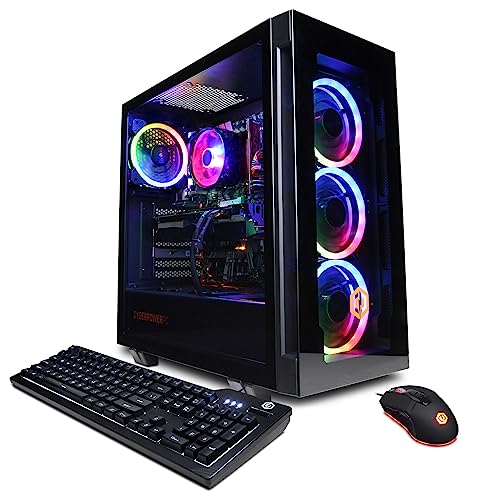
- Best for 1440p: CyberPowerPC Gamer Xtreme VR (GXiVR8040A14), RTX 4060 Ti 16GB — Check on Amazon
- Thermaltake LCGS Quartz i1460, RTX 5060 — Check on Amazon
- iBUYPOWER Scale (SCA5N46T01), Ryzen 5 7600, RTX 4060 Ti — Check on Amazon
- Skytech Blaze4 Mini, RTX 4060 Ti — Check on Amazon
See 2 more Amazon options
- CyberPowerPC Gamer Master (GMA2900A), Ryzen 7 8700F, RTX 4060 Ti — Check on Amazon
- Skytech Archangel, RTX 4060, 32GB RAM and 2TB SSD — Check on Amazon
Read the full guide ↓
Disclosure: As an Amazon Associate, reviewstook.com earns from qualifying purchases. Links to Amazon on this page are affiliate links; they cost you nothing extra. Listing details such as price and availability change often, so check the current Amazon listing before you buy.
Before any of these machines can be graded, one confusion has to be cleared away, because the whole category trades on it. Rendering and displaying are two separate events. Rendering is the resolution your graphics card actually computes, frame by frame, pixel by pixel. Displaying is merely the resolution of the screen those frames arrive on. A 1440p monitor presents 2560×1440 whether the PC feeding it computed all 3.7 million of those pixels or computed 2.1 million at 1080p and let an upscaler invent the difference — the panel cannot tell you which one you bought, but your eyes, given a side-by-side, usually can. So when a listing advertises a “1440p gaming PC,” it is describing the display it expects you to own. This guide grades the render instead. And at this budget the render genuinely clears the bar: the RTX 4060 Ti and RTX 5060 machines below compute full 2560×1440 frames, at high settings, across the great majority of today’s games, with no upscaler required to reach the resolution printed on the box. That native baseline — not a stretched 1080p picture, not a counter inflated by generated frames — is what separates this tier from the one beneath it, and it is what your $1,200 is actually for.
The promise has an edge, and the edge is 4K. Nothing in this guide is a native 4K machine, because the card class that computes 3840×2160 at high settings starts well above this ceiling; any $1,200 listing implying otherwise is describing upscaling or lowered settings. Within the tier, upscaling and frame generation still matter — as reserves. DLSS steps in for the heaviest titles and for the later years of ownership, when games have grown and the card has not, and frame generation polishes motion on top of a render that was already honest. Graded on that basis the six machines separate cleanly: five carry cards that treat native 1440p as their ordinary mode, and one — the capacity pick closing the guide — renders a step lower and is graded as such, in the open. Every pick is a real Amazon listing that sells at or regularly within $1,200, and where a machine only visits the budget on deal days, its review says so beside the praise and tells you to check the current price on Amazon before ordering. Begin with the CyberPowerPC Gamer Xtreme VR if you want the 16GB card that settles the texture question outright, or the Thermaltake Quartz if you want the current generation at a price that asks for no timing. What follows: the quick picks, a section fixing in numbers what “rendered at 1440p” means, full reviews of all six, a comparison table, a monitor-pairing section, the mistakes that burn money in this tier, and the questions buyers ask before ordering.
In this guide
Quick Picks
In a hurry, or weighing several listings side by side? The table below matches a kind of buyer to the machine built for them.
| Buyer type | Pick | Why it stands out | Link |
|---|---|---|---|
| Best for 1440p | CyberPowerPC Gamer Xtreme VR (GXiVR8040A14) | RTX 4060 Ti with 16GB of VRAM — native 1440p with the texture headroom to keep it | Check on Amazon |
| Best current-generation card | Thermaltake LCGS Quartz i1460 | RTX 5060 rendering natively at 1440p at an everyday position inside the budget — check price on Amazon | Check on Amazon |
| Best upgrade path | iBUYPOWER Scale (SCA5N46T01) | AM5 platform and a native-1440p card, positioned comfortably inside the budget — check price on Amazon | Check on Amazon |
| Best value on sale | Skytech Blaze4 Mini | RTX 4060 Ti that sits at the value end of the tier when on sale — a native-1440p card at a 1080p-tier position — check price on Amazon | Check on Amazon |
| Best eight-core AM5 alternative | CyberPowerPC Gamer Master (GMA2900A) | Ryzen 7 8700F on a B650 board, positioned in the middle of the tier — check price on Amazon | Check on Amazon |
| Best for big game libraries | Skytech Archangel | 32GB of RAM and a 2TB SSD — with the honest note that its card negotiates 1440p rather than owning it | Check on Amazon |
How These Picks Were Chosen
The $1,200 ceiling was applied to the complete machine, shipping configuration and all. Each PC below is a genuine Amazon listing positioned at, or regularly returning to, a position inside the budget in the United States; because listing prices change often, this guide does not print fixed product prices — check the current price on Amazon before you buy. Two machines here can drift above the budget between promotions, and both reviews say so outright: the recommendation holds only while the current price on Amazon sits inside the budget. A PC that only makes sense when its price seldom sits inside the budget is not an answer to the search that brought you here.
No system in this guide was benchmarked by us. The grading rests on maker listings and specification pages, weighed on the components that decide how a machine renders and how long it keeps rendering well: the graphics card and the size of its memory, the processor platform beneath it, how the RAM is configured, the storage, and the power supply wherever the listing publishes one. Since the question behind this keyword is a resolution question, the card ladder comes first. NVIDIA sells the RTX 4060 Ti in two memory sizes that perform identically today and age very differently: 8GB is adequate now and tight later, while 16GB costs the same speed nothing and buys texture room for the years when games assume more — and textures are the one thing an upscaler cannot reconstruct, which makes memory capacity a 1440p specification in its own right. The RTX 5060 matches that performance address with a newer architecture and the latest upscaling and frame-generation toolkit. A step down sits the plain RTX 4060, and the single machine built on it is graded for exactly what it is — a first-rate 1080p renderer whose 1440p output is negotiated title by title. Throughout, performance is described as a class of settings at a class of screen, never as frame-rate numbers nobody here measured.
Two further filters shaped the list. Platform longevity is one: a gaming PC is bought for years, so the socket under the processor counts. Half of these machines sit on platforms with processors still to come; half sit on finished platforms, and those reviews make the case on price and specification rather than pretending the socket has a future it lacks. The other filter is memory honesty: a listing that ships one RAM stick, or declines to say how its memory is arranged, is called on it in its review — dual-channel memory feeds the processor that feeds the card, so it belongs to the render you paid for, not to the fine print.
Rendered at 1440p, Displayed at 1440p: The Distinction This Guide Grades
The arithmetic first. A 1440p frame holds 2560×1440 pixels — roughly 3.7 million. A 1080p frame holds 1920×1080 — roughly 2.1 million. Computing a frame natively at 1440p therefore demands about 78 percent more work from the graphics card than computing it at 1080p, every single frame, and that gap is the real subject of this guide. When a PC is said to “play at 1440p,” one of three things is happening behind the panel. In the first, the card computes all 3.7 million pixels and the monitor shows them one-for-one: native 1440p, the only version of the claim this guide prints without qualification. In the second, the card computes fewer pixels and an upscaler rebuilds the remainder — DLSS, on the NVIDIA cards here, renders internally at a reduced resolution and reconstructs a 1440p image using motion vectors and AI inference. In the third, the card renders at 1080p and the game or the monitor simply stretches the result to fill the screen, with no reconstruction at all — the softest outcome, and the one most often hiding behind a “1440p ready” badge on cheaper machines.
Upscaling is graded here with its numbers attached. Producing a 1440p image, DLSS at Quality renders internally at roughly 1707×960 — about 44 percent of the panel’s pixel count — and reconstructs the rest; at Performance it renders near 1280×720, about a quarter of the pixels, and rebuilds from there. None of this is sleight of hand: Quality output in motion is genuinely close to native, and in a demanding title it can be the difference between keeping high settings and surrendering them. What matters is the direction the technology faces. On the cards leading this guide, DLSS is a reserve — spent on the hardest games and the later years, while the native render carries ordinary play. On a card one tier down, DLSS is the admission fee, and switching it off collapses the resolution claim with it. Frame generation obeys the same logic. It synthesizes extra frames between the rendered ones, raising the displayed count and smoothing perceived motion in titles that support it; it does not quicken your inputs, which are still sampled on the rendered frames, and it is absent entirely from games without support. The Quartz’s RTX 5060 carries its newest form, multi frame generation, and this guide values it the same way: polish laid over an honest render, never a substitute for one.
A final distinction is the one that decides the top of this guide. Upscalers rebuild pixels; they do not rebuild textures. A game’s textures load into graphics memory at whatever fullness the settings demand, independent of render resolution, and when that memory is exhausted the failure mode is not a gentle slowdown — it is stutter, and textures visibly dropping to lower detail. Across four or five years at 1440p, then, the 8GB and 16GB versions of the same card diverge: identical speed on day one, very different comfort once games start treating 8GB as a floor. Hence the ordering principle used throughout — pick the card whose native tier matches your monitor, give it the memory to hold that tier, and let upscaling do the job it is actually for on this hardware: keeping the machine comfortable in year four, not getting it through the door in year one.
The 6 Best Gaming PCs for 1440p Gaming Under $1,200
CyberPowerPC Gamer Xtreme VR (GXiVR8040A14) — i7-13700F, RTX 4060 Ti 16GB
Who it suits: The 1440p buyer planning a long ownership, who would rather settle the graphics card’s memory on the day of purchase than renegotiate it with every major release.
Every other card in this guide renders at 1440p with a memory-shaped asterisk attached. This one renders without it. Inside the Gamer Xtreme VR, an Intel Core i7-13700F drives the 16GB edition of the RTX 4060 Ti, backed by 16GB of DDR5 and a 1TB PCIe Gen4 NVMe SSD on a B760 board, with Wi-Fi and Windows 11 Home. Frame for frame the 16GB card is no quicker than the 8GB version — the underlying silicon is identical — and a buyer who stops at that sentence misses what the machine is for. The doubled memory is a texture budget. At native 1440p, textures load at full intent no matter what an upscaler is doing with the pixel count, and the games now treating 8GB as a minimum rather than a target are precisely the games a long-term owner will be playing in year three. Where the 8GB card begins quietly trading texture detail for stability, this one holds high and ultra. At 1080p the advantage shrinks to a footnote; at the resolution this guide grades, held over the life of the PC, it is the gap between a native render that ages gracefully and one that starts petitioning for settings cuts. The i7-13700F, for its part, is more processor than gaming alone asks of it — a useful direction for an imbalance, since it leaves real headroom for streaming, recording and the background clutter of a modern desk. The card’s documented outputs, one HDMI and two DisplayPort, cover a high-refresh 1440p panel with connections to spare.
The praise comes with its conditions attached. Pricing on this listing moves, so check the current price on Amazon before you buy: the recommendation carries a rule — buy only while the current price sits at or below the $1,200 budget ceiling, and if the live figure sits above that line, either wait or take the Quartz below, which tends to sit comfortably under the ceiling. The listing is also vaguer than it should be about how its 16GB of system memory is arranged, so check on the live page whether it arrives as a pair of sticks; if it is a lone stick, a matched partner is the cheapest meaningful upgrade anywhere in this guide, since single-channel memory starves the processor feeding the card. When its current price sits inside the budget, though, nothing else here answers the search as completely: the tier’s strongest memory position, a processor with years of slack, DDR5 underneath, and a native 1440p render with the texture room to remain native. For the buyer who typed this keyword wanting one machine that is simply right, this is that machine.
- The 16GB RTX 4060 Ti — texture headroom for the tier, settled in a single purchase.
- Native 1440p at high settings, with DLSS kept in reserve rather than spent on admission.
- An i7-13700F that leaves genuine capacity for streaming and background work.
Honest limitation: Its price can straddle the budget, sitting above the ceiling outside deal periods, so it is a pick for this budget only while the current price on Amazon sits inside it; the RAM stick arrangement also needs confirming on the listing before you order.
Choose it if a 1440p monitor is on your desk and the PC is a four-year purchase. Skip it if the live price has climbed past $1,200 and the machine is needed this week — the Quartz delivers the same tier at an everyday figure.

Thermaltake LCGS Quartz i1460 — i5-14400F, RTX 5060
Who it suits: Anyone who wants this graphics generation’s card, a fair price on an ordinary Tuesday, and no part in watching sale calendars to buy a computer.
If the CyberPowerPC is the tier’s deal, the Quartz is its present tense. Thermaltake’s LCGS line assembles an Intel Core i5-14400F and a GeForce RTX 5060 with 16GB of DDR4-3600 memory, a 1TB NVMe SSD, a 600W 80 Plus Gold power supply, Wi-Fi and Windows 11. Judged the way this guide judges — as a renderer — the RTX 5060 occupies the same ground as the 4060 Ti cards flanking it: 2560×1440 computed natively, at high settings, is its home resolution, and no upscaler is needed to live there. The newer architecture layers its toolkit over that baseline: the latest DLSS generation for titles that ask for it, and multi frame generation, which this guide values with its limits stated — the counter climbs and motion smooths in supported games, but the extra frames are synthesized, unsupported titles get none of it, and input latency is untouched, because your aim still rides on the frames actually rendered. The specification to watch across a long ownership is the card’s 8GB of memory: at 1440p, textures will lean on it sooner than on the 16GB card above, and this machine will reach for DLSS earlier in its life. The trade is made in daylight, and its position in the tier pays for it — the Quartz tends to sit comfortably inside the budget and carries the calmest price behaviour in the guide, so check the current price on Amazon. Living under the ceiling is simply its habit.
The second trade is the platform beneath the card. An LGA1700 board with DDR4 memory is a finished platform: no future processor generation will drop into it, and the RAM will not carry forward to whatever replaces it. Thermaltake spent the money on the graphics card and the power supply instead, and at this money the allocation defends itself — a properly specified 600W Gold unit leaves honest room for the midrange card swap that is realistically this machine’s future. What the Quartz offers, then, is the strongest current-generation rendering under $1,200 with no price-watching attached, housed in a glass-sided case from a company whose trade is cases and cooling. If “on sale” plays no role in how you buy, start here.
- An RTX 5060 that renders 1440p natively at high settings — this generation’s card.
- Pricing that tends to stay comfortably inside the budget — check price on Amazon.
- A 600W 80 Plus Gold power supply, published in the specification where it belongs.
Honest limitation: The LGA1700 and DDR4 platform is finished, so the only upgrade path is a graphics card swap; the 8GB frame buffer will lean on DLSS earlier than the 16GB pick; and frame generation is smoothness in supported titles, not performance.
Choose it if you want to buy once, fairly, and be rendering at 1440p today. Skip it if a processor upgrade path spanning years outranks the current-generation card — that is what the two AM5 machines below exist for.

iBUYPOWER Scale (SCA5N46T01) — Ryzen 5 7600, RTX 4060 Ti
Who it suits: The five-year thinker — a buyer who prefers a living platform with one known, inexpensive fix over the final and fastest edition of a finished one.
The Scale’s specification is best read as an argument about time. A Ryzen 5 7600 sits on AMD’s AM5 socket beside an RTX 4060 Ti 8GB, 16GB of DDR5, a 1TB NVMe SSD, Wi-Fi and Windows 11 Home, with a keyboard and mouse in the box. The card is a true native-1440p renderer, and at that resolution the graphics card shoulders the load, which makes the six-core 7600 an entirely sufficient partner. AM5, meanwhile, is the sole socket in this guide with a publicly committed future: processors not yet released will fit this board, and the DDR5 carries forward when one does, leaving the machine a single processor swap from a second life in the years when today’s native render needs reinforcement. Its position inside the budget completes the argument — it sits comfortably in the middle of the tier rather than pressing against the ceiling, so check the current price on Amazon, with no timing game required.
One asterisk survives, and the listing prints it in its own title: the memory is a single 16GB stick, arranged 16×1. Run alone, one stick confines memory to single-channel mode, and the cost lands in processor-sensitive moments — the frame-time lows that decide whether a 1440p game feels smooth — until a second stick arrives. Budget for a matched 16GB DDR5-5200 stick as part of the purchase from the outset and the defect converts into the best first upgrade in the guide: a small outlay and a few minutes produce a 32GB dual-channel machine better equipped than most of the tier. The card’s 8GB buffer is the slower-moving watch item, shared with every 8GB pick here — textures will press it in later years, and DLSS Quality, rendering near 1707×960 and reconstructing upward, is the planned response when they do. As delivered, the Scale is a very good PC with one deliberate corner cut; viewed as a platform plus a stick of RAM, it is the shrewdest long-term purchase under $1,200.
- AM5 — the one socket here that still has unreleased processors ahead of it.
- A position comfortably inside the budget, without needing a sale to qualify — check price on Amazon.
- Keyboard and mouse in the box, and a one-year manufacturer warranty behind it.
Honest limitation: The single memory stick means single-channel operation until you add its partner — budget that small purchase from the start instead of meeting it later in the frame-time lows.
Choose it if your PCs stay with you for years and the upgrade path is the point. Skip it if the case will never be opened — an unadded stick leaves the compromise in place, and the machines above arrive complete.

Skytech Blaze4 Mini — Ryzen 7 5700, RTX 4060 Ti
Who it suits: The patient hunter — someone with a working PC today who can let this listing’s price wander down to the bottom of its range, where the transaction turns exceptional.
Reduced to its essentials, the Blaze4 Mini is an RTX 4060 Ti 8GB, a Ryzen 7 5700, 16GB of DDR4, a 1TB SSD, a 650W Gold power supply, Wi-Fi and Windows 11, attached to a position in the tier that swings like a gate — at the value end when on sale, and nearer the middle of the tier the rest of the time. Consider what its sale position buys: a card rendering natively at 1440p, positioned where the tier below is still negotiating with upscalers to reach the resolution at all. When on sale the machine undercuts PCs a full tier down while out-rendering them, and it can leave meaningful room in the budget unspent — which, as the monitor section below argues, is exactly where the money works hardest, because a native-1440p render feeding an ageing 1080p panel is performance nobody ever sees. Away from a sale the same machine is a legitimate but unremarkable member of the tier. The review therefore collapses into a discipline: check the current price on Amazon, treat this as a pick to watch rather than one to pay on sight, buy the dip, and feel no urgency in the intervals.
The compromises are the platform’s age, and they are stated rather than buried. The Ryzen 7 5700 rides AM4 with DDR4 — AMD’s previous generation, complete as a platform — so the upgrade story is a graphics swap into the 650W supply and nothing beyond. The card’s 8GB carries the same long-horizon texture watch as the guide’s other 8GB picks. The word “Mini” in the name performs marketing rather than measurement, so check the case dimensions on the listing against your space instead of imagining a console-sized box. Skytech also notes the graphics card’s brand may vary: the GPU model and its memory are the contracted specification, the board partner is not. At the right price none of this dents the proposition — when on sale, no machine here delivers a native-1440p card at a lower position in the tier, and any room left in the budget can fund the monitor, the second SSD, or the RAM kit the rest of the tier forces you to choose among.
- An RTX 4060 Ti at the value end of the tier when on sale — check price on Amazon.
- A 650W Gold power supply with honest room for a later card swap.
- An eight-core Ryzen 7 5700, comfortably more than 1440p gaming requires of a processor.
Honest limitation: The price is effectively the product — ordinary when it sits nearer the middle of the tier, and riding a finished AM4/DDR4 platform — so the pick only sings on the dip; check the current price on Amazon.
Choose it if waiting is available to you and maximum card for minimum money is the goal. Skip it if the purchase happens today at whatever figure is showing — the Scale and the Quartz earn their keep every day of the week.

CyberPowerPC Gamer Master (GMA2900A) — Ryzen 7 8700F, RTX 4060 Ti
Who it suits: Buyers persuaded by the Scale’s AM5 logic who want eight cores immediately — streamers, multitaskers, and anyone whose machine works while it plays.
The Gamer Master answers the same platform question as the Scale, with the emphasis moved to the processor. Its Ryzen 7 8700F puts eight cores on AM5, on a B650 board, alongside an RTX 4060 Ti 8GB, 16GB of DDR5 and a 1TB PCIe Gen4 SSD, with Wi-Fi and Windows 11 Home. At 1440p those extra cores will not outpace the Scale’s six in most games — the graphics card limits both machines, and the card here is the same native-1440p renderer — so the 8700F earns its money around the game instead: the stream encode, the voice chat, the thicket of browser tabs, the clip software, and the slower ageing that a heavier processor enjoys years out. Check the current price on Amazon before you buy, and take care with third-party sellers, who can position it considerably higher; bought from Amazon at its usual position in the tier, it is an eight-core AM5 machine for Scale money.
Two cautions ride along. The F in 8700F marks the absence of integrated graphics, which matters on exactly one day of a PC’s life — the day the graphics card falters and a picture on screen would help you diagnose it. It also converts a setup rule from advisory to absolute: the display cable belongs in the graphics card’s ports, because this machine’s motherboard ports show nothing whatsoever. Separately, CyberPowerPC sells a family of near-identically named Gamer Master configurations, newer members of which pair a different card with a higher price, so confirm on the live listing that the unit in your cart is this one — 8700F, 4060 Ti, B650 — before paying. With those logged, the Gamer Master is the pick for the buyer who followed the Scale’s reasoning, nodded, and wanted the fuller processor now rather than as a future project.
- An eight-core Ryzen 7 8700F on AM5 and B650 — platform future, plus cores for streaming.
- A position in the middle of the tier that keeps it honestly inside the budget — check price on Amazon.
- DDR5 memory and a Gen4 SSD — nothing carried over from the previous generation’s parts bin.
Honest limitation: No integrated graphics means no fallback display output should the card ever fail — the monitor plugs into the card, full stop — and the model family’s similar siblings make verifying the exact configuration a condition of the recommendation.
Choose it if streaming, multitasking, or simply wanting the eight-core edition of the AM5 argument describes you. Skip it if gaming value per dollar is the sole metric — the Scale matches its card and socket for less.

Skytech Archangel — i5-14400F, RTX 4060, 32GB RAM, 2TB SSD
Who it suits: The library-rich buyer — hundreds of gigabytes of installed games, a shelf of launchers, and no remaining patience for deleting one title to make room for another.
This is the single review where the render grading cuts against the pick, and the cut is printed at full size. Skytech pairs an Intel Core i5-14400F with a plain RTX 4060, then doubles everything around it: 32GB of DDR5-5600 where rivals ship 16, and a 2TB SSD where rivals ship 1TB, over a 650W Gold power supply with Wi-Fi and Windows 11. The RTX 4060 sits a step below the 4060 Ti and 5060 cards above, and at 1440p that step is decisive: the 4060 is a superb renderer at its native 1080p, while at 2560×1440 it negotiates — lighter titles at medium-to-high settings rendered natively, demanding ones handled the honest way, by rendering lower and letting DLSS rebuild the panel’s resolution. That workflow is respectable and widely used; it is also not the thing this keyword asks for, and a buyer whose purpose is native 1440p should not purchase this machine to pursue it.
The Archangel’s counter-argument is about the days between the benchmarks. At 1080p, and at pragmatically set 1440p, its owners never think about storage, never close a game to free memory, and never pay the loading tax of a nearly full drive. Its price behaviour echoes the Blaze4’s discipline — check the current price on Amazon: when it sits at the lower end of its range the capacity is a bargain, and even near the top of the tier the doubled memory and storage are specifications the rest of the tier charges upgrade money to reach. The LGA1700 platform is finished, as the Quartz’s is, leaving a graphics swap as the future — which happens to be the very upgrade that would one day turn this into a native-1440p machine, with the memory and storage already waiting. Read the exchange plainly: a 1080p screen, or a pragmatic hand with 1440p settings, trades a graphics step for capacity used daily; a non-negotiable 1440p screen at high settings should take the 16GB CyberPowerPC at the head of this guide and add an SSD when the library demands one.
- 32GB of DDR5-5600 — twice the system memory of every rival in this guide.
- A 2TB SSD that holds a real library installed at once, rather than in rotation.
- Capacity that becomes this tier’s bargain edition when it sits at the lower end of its range — check price on Amazon.
Honest limitation: The RTX 4060 stands a full step below the 4060 Ti and 5060 cards here — native at 1080p, a negotiation of settings and upscaling at 1440p — and the LGA1700 platform is finished.
Choose it if memory and storage are the constraints you actually live with, at 1080p or pragmatic 1440p. Skip it if native 1440p at high settings is the purpose of the purchase — the head of this guide is where that purpose is served.

Comparison Table
| Product | Graphics card | 1440p verdict | Best use | Link |
|---|---|---|---|---|
| CyberPowerPC Gamer Xtreme VR (GXiVR8040A14) | RTX 4060 Ti 16GB | Native, with the texture headroom to stay native | 1440p built to last — buy at or under $1,200 | Check on Amazon |
| Thermaltake LCGS Quartz i1460 | RTX 5060 8GB | Native at high settings; newest upscaling toolkit | Current-generation card at an everyday price | Check on Amazon |
| iBUYPOWER Scale (SCA5N46T01) | RTX 4060 Ti 8GB | Native; add the second RAM stick to protect the lows | The upgrade path — AM5 with years of processors ahead | Check on Amazon |
| Skytech Blaze4 Mini | RTX 4060 Ti 8GB | Native — the same render as the picks above it | Best GPU per dollar when its price dips | Check on Amazon |
| CyberPowerPC Gamer Master (GMA2900A) | RTX 4060 Ti 8GB | Native, with eight cores around the game | Streamers and multitaskers on AM5 | Check on Amazon |
| Skytech Archangel | RTX 4060 8GB | Negotiated — native in lighter titles, DLSS in demanding ones | 32GB RAM and 2TB storage for big libraries | Check on Amazon |
Pairing the Monitor: The Other Half of a 1440p PC
A native-1440p render exists only if a 1440p panel is there to display it, which makes the monitor the second half of this purchase rather than an accessory to it. For every card in this guide the sweet spot is a 27-inch 1440p screen. At that diagonal, 2560×1440 lands near 109 pixels per inch — text stays crisp with no scaling, games show the render’s full benefit, and the panel is large enough for the resolution to register as an upgrade instead of a line in a specification table. Stretch the same pixels across 32 inches and some of the sharpness is handed back; compress them into the rare 24-inch 1440p panel and they are packed tighter than most buyers can use. Twenty-seven inches is where this resolution and this card class meet on proper terms, and it is the size to buy when the monitor shares this budget.
Refresh rate deserves the same candour as resolution. The cards leading this guide feed a 144Hz-class 1440p panel well: lighter and competitive titles render natively at a pace that uses the refresh, while heavier ones rely on adaptive sync — look for G-Sync Compatible or FreeSync support, which lets the panel track the card’s output instead of tearing or stuttering when it varies — to remain smooth below the maximum. What this class does not feed is a 240Hz 1440p panel; that premium purchases refresh the render seldom reaches beyond the lightest esports titles, and the money serves better spent on panel quality or held for a second SSD. The opposite waste is keeping an old 60Hz 1440p office screen, where frames arrive faster than the display can present them. The pairing rule reduces to this: a 144Hz-class adaptive-sync panel for the 4060 Ti and 5060 picks, and the same panel bought once for the Archangel, accepting that its render will occupy the range’s lower half more often. Connect by DisplayPort where the monitor offers it — the connection that carries this resolution at full refresh without negotiation — run the cable to the graphics card’s ports rather than the motherboard’s, and on the first evening open the Windows display settings and set the refresh rate to the figure on the box, because panels ship defaulted to 60Hz often enough to make that thirty-second check the cheapest upgrade in the entire guide. Finally, the outright refusal, stated once: pair nothing here with a 4K monitor for gaming. Fed by this card class, a 4K panel turns every game into an upscaling exercise — even DLSS Performance reconstructs its 4K image from a render of roughly 1920×1080 — and a native 1440p picture on a matched panel beats a reconstructed 4K picture on an oversized one, for less money, every time.
How to Choose a Gaming PC for 1440p Under $1,200
- Grade the render, not the display claim. Any PC can be plugged into a 1440p monitor. The question is what resolution the card computes at — native 2560×1440, or a lower render reconstructed upward. The first four picks here render natively; the guide says plainly where one does not.
- Read the VRAM, not just the card name. Two versions of the RTX 4060 Ti share a name and a speed while differing in memory — 8GB against 16GB. Upscaling reconstructs pixels but not textures, so at 1440p over several years the 16GB version is the safer ownership — the name on the box will not tell you which one is inside; the specification will.
- Know what DLSS is doing before you value it. At 1440p output, DLSS Quality renders near 1707×960 internally and Performance near 1280×720. On this tier’s cards that is a reserve for heavy titles and later years. If a cheaper machine needs those settings to reach 1440p at all, its honest tier is 1080p.
- Value frame generation as presentation. Generated frames smooth motion in supported games; they do not lower input latency and they do not exist in unsupported ones. Never let a frame-generation claim substitute for a native render in a listing’s pitch.
- Choose your platform currency. What AM5 purchases is future processors; a finished platform has to repay you in card, memory or money instead. Offer none of those three and the finished machine loses to the AM5 picks by default.
- Check the RAM configuration, not just the capacity. Sixteen gigabytes as two sticks is a finished specification; as one stick it is a first upgrade that protects the frame-time lows. Either can be the right buy — the Scale is this guide’s value pick partly because its stick is cheap to fix — but buy it knowingly.
- Respect the budget ceiling. Between deal events, prebuilt pricing in this tier moves a lot. Some picks qualify as machines for this budget only when their current price sits inside it, and their reviews say so — check the current price on Amazon, and if it sits above the ceiling, the same name is a worse purchase.
- Budget the panel with the PC. If the 1440p monitor is not already on the desk, the Blaze4 Mini when on sale plus a 27-inch panel beats a tower at the top of the budget feeding an old 1080p screen — the render and the display are one decision, and the cheaper sibling tiers in Best Gaming PC For 1440p Gaming Under $800 show where the negotiation starts if the total has to shrink.
Common Buying Mistakes
- Reading “1440p ready” on a listing as “renders at 1440p.” It usually means a 1440p monitor can be attached. Ask what the card computes, not what the panel shows.
- Pairing a PC from this tier with a 4K monitor. Every title becomes an upscaling exercise, and a native 1440p picture on a matched panel looks better for less money.
- Paying a 240Hz premium this card class cannot feed — or keeping a 60Hz panel that cannot show what the card renders. Panel and render are a single purchase.
- Counting generated frames as performance. They smooth supported games’ motion; they neither cut input latency nor appear in unsupported titles.
- Choosing the 8GB card while the 16GB edition sits in the same tier at a deal price — identical speed today, and the texture gap is the one that widens.
- Paying full, everyday positioning when a pick’s bargain exists only on sale. On sale the Blaze4 Mini is a steal; away from a sale it is merely a computer — check the current price on Amazon.
- Blaming the graphics card for frame-time stutters caused by a single RAM stick — a memory-channel problem carrying a cheap fix.
- Leaving the monitor at its 60Hz shipping default, or cabled to the motherboard — on the Gamer Master, whose processor has no integrated graphics, the second of those is a black screen rather than a slow one.
- Ordering a near-identically named sibling by mistake — the Gamer Master and Gamer Xtreme families each contain several machines that are not the ones reviewed here.
Final Recommendation
- Most 1440p buyers: CyberPowerPC Gamer Xtreme VR (GXiVR8040A14) — at or under $1,200.
- Buying today, no sale-watching: Thermaltake LCGS Quartz i1460.
- Five-year planners: iBUYPOWER Scale, plus a second RAM stick.
- Patient value hunters: Skytech Blaze4 Mini, at its low — and the savings toward the panel.
- Streamers and multitaskers: CyberPowerPC Gamer Master (GMA2900A).
- Big libraries, 1080p screens: Skytech Archangel.
Two machines head our advice for the buyer behind this search: the CyberPowerPC Gamer Xtreme VR, whose 16GB card keeps the native render comfortable for the machine’s whole life, and the Thermaltake Quartz, whose current-generation card comes at a price requiring no timing. Together they cover the purchase’s two shapes — the deal worth a short wait, and the fair figure paid today. A five-year horizon and a willingness to open the case make the Scale plus a RAM stick the connoisseur’s version of the same money; a budget that must also stretch to the monitor makes the Blaze4 Mini on its dip the honest route to funding both halves of a 1440p setup. Tighter ceilings are served by Best Gaming PC Under $800, the next card class up lives in Best Gaming PC Under $1500, and the resolution-first grading used here continues in Best Gaming PC For 1440p Gaming Under $1500. Check the current price on Amazon and confirm it sits inside the budget, confirm the configuration sitting in the cart, cable the panel to the card, set its true refresh rate — and the machine that arrives will render exactly what this guide said it renders.
Frequently Asked Questions
Is DLSS Quality at 1440p actually rendering at 1440p?
It is not — and the distinction is the one this guide is built on. DLSS Quality aimed at a 1440p panel renders internally near 1707×960 and reconstructs the remainder; Performance renders near 1280×720. The displayed picture is 1440p, and at Quality a very convincing one, but the computation is not native. The leading picks here render natively and hold DLSS in reserve; a machine that needs DLSS simply to reach the resolution belongs a tier down.
Can a gaming PC under $1,200 play at 4K?
Not natively at high settings — the card class that does starts in machines well beyond this budget. This tier can drive a 4K display through upscaling and adjusted settings, yet even DLSS Performance at 4K output rebuilds from a render of roughly 1920×1080, so the picture on screen is a well-dressed 1080p-class render. Save toward the tier that computes 4K if 4K is the goal; buy this tier if 1440p is, because 1440p is what it owns.
What monitor should I pair with a 1440p gaming PC under $1,200?
A 27-inch 1440p panel with adaptive sync and a 144Hz-class refresh rate. The size puts the resolution at its sharpest without scaling, the refresh matches what these cards honestly feed, and adaptive sync keeps motion smooth when a demanding title renders below the panel’s ceiling. Connect it by DisplayPort into the graphics card’s ports, and set the refresh rate in Windows on day one — panels frequently arrive defaulted to 60Hz. Decline 240Hz premiums, and decline 4K panels, for this card class.
RTX 4060 Ti 8GB or 16GB — does the memory actually matter at 1440p?
Across a long ownership, yes. The two cards render at identical speed today, but textures load at the settings’ full intent whatever the render resolution or upscaler is doing, so the 8GB card meets its texture ceiling earlier — announced by stutter and textures dropping in detail rather than by any graceful slowdown. At 1080p the gap seldom shows; at native 1440p over several years it is the difference that widens, which is why the 16GB edition leads this guide whenever its current price on Amazon sits inside the budget.
Is the RTX 5060 better than the RTX 4060 Ti for 1440p?
They occupy the same ground: both compute 1440p natively at high settings, and neither escapes the other in raw rendering. The 5060 is the newer architecture, carrying the current DLSS generation and multi frame generation; the 4060 Ti answers with a 16GB edition the 5060 lacks. Take the 5060 for the newest features at an everyday price, the 16GB 4060 Ti for texture headroom.
Should I buy an AM5 machine or save money on a finished platform?
Either can be defended, and this guide stocks both. AM5 — the Scale and the Gamer Master — purchases the option of a later processor swap and DDR5 that carries forward, which is how a native-1440p machine gets reinforced in year four. A finished platform earns its place when its price pays for the limitation, through a discounted card, a newer GPU generation, or doubled memory and storage. The error is paying living-platform money for a finished one.
Why doesn’t this guide print fixed prices?
Because prebuilt pricing in this tier changes often between deal events, and any single printed figure would go stale quickly. Each review therefore describes a pick’s position in the tier — at the value end, in the middle, or pressing against the ceiling — and tells you to check the current price on Amazon, especially where a pick only qualifies for this budget while its current price sits inside it. The live listing has the final word; the guide’s work is telling you beforehand how to judge it.
- Best Gaming PC Under $1200
- Best Gaming PC Under $800
- Best Gaming PC Under $1500
- Best Gaming PC For Beginners Under $1200
- Best Gaming PC For Streaming Under $1200
- Best Gaming PC For Small Spaces Under $1200
- Best 1440p Gaming PC Under $1200
- Best Budget Gaming PC Under $1200
- Best Prebuilt Gaming PC Under $1200


