Where to buy
Check the latest price, availability and delivery on Amazon. Orders are placed on Amazon. We may earn a commission from qualifying purchases.
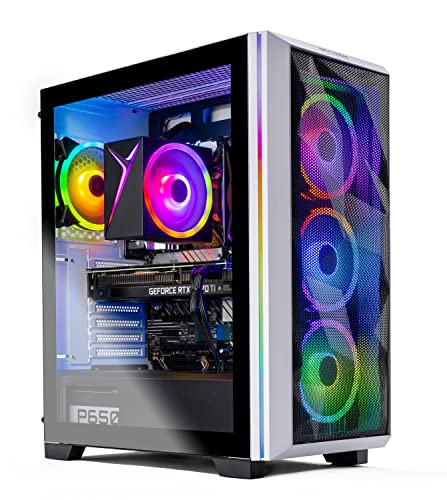
- Best overall for 1440p: Skytech Chronos Gaming PC, Ryzen 7 5700X, RTX 4070 Ti 12GB — Check on Amazon
- HOENGAGER Gaming PC, Intel Core i7-12700F, RTX 4070 12GB, 32GB DDR4 — Check on Amazon
- CYBERPOWERPC Gamer Xtreme VR, Intel Core i7-13700F, RTX 4060 Ti 16GB — Check on Amazon
- CYBERPOWERPC Gamer Master, AMD Ryzen 7 8700F, RTX 4060 Ti 8GB — Check on Amazon
See 2 more Amazon options
- iBUYPOWER Scale, AMD Ryzen 5 7600, RTX 4060 Ti 8GB — Check on Amazon
- Skytech Shiva Gaming PC, AMD Ryzen 5 5600X, RTX 4060 Ti 8GB, White — Check on Amazon
Read the full guide ↓
Disclosure: As an Amazon Associate, reviewstook.com earns from qualifying purchases. Links to Amazon on this page are affiliate links; they cost you nothing extra. Listing details such as price and availability change often, so check the current Amazon listing before you buy.
Twelve hundred dollars is the budget where 1440p stops being a compromise and becomes the plan. Below this tier, a gaming PC for a 2560×1440 monitor is usually an exercise in settings management: textures turned down before they turn ugly, ray tracing admired in screenshots and disabled in practice, a high-refresh panel fed at half its refresh rate. At $1,200 the picture changes, because this is the first budget where the graphics cards that were actually designed for 1440p appear in prebuilt systems — not every day, and not at every seller, but regularly enough that a patient buyer can catch them. In this guide that means, at the top end, an RTX 4070 Ti with 12GB of VRAM; below it, an RTX 4070 with the same 12GB; and below that, the RTX 4060 Ti in both its 16GB and 8GB forms. Those are three genuinely different levels of 1440p performance wearing similar price tags, and telling them apart is most of what this guide is for.
The honesty note matters more at this budget than at most, because prebuilt gaming PC prices move violently. Every system below is a real Amazon listing that belongs in this budget class — in several cases availability at this level depends on the moment you shop, and where that is the case the review says so plainly. A guide at this budget that quietly recommends a machine well above the ceiling would be useless, so the rule here is simple: check price on Amazon for the current listing, and if the live price is far above this budget, the correct move is to wait, set an alert, or buy a pick that is currently in range — not to stretch. What $1,200 buys, bought well, is a PC that runs modern games at 1440p on high settings today and feeds a 144Hz or 165Hz monitor properly in esports and lighter titles. Below are the quick picks, detailed reviews of all six systems, a comparison table, a buying checklist focused on GPU tiers, the mistakes that waste money at this level, and the questions 1440p buyers ask most.
In this guide
Quick Picks
Short on time, or comparing several options at once? Each row below names a buyer type and the system that suits it, with a link to the listing.
| Buyer type | Pick | Why it stands out | Link |
|---|---|---|---|
| Best overall for 1440p | Skytech Chronos, Ryzen 7 5700X, RTX 4070 Ti 12GB | The strongest GPU in this guide — check price on Amazon | Check on Amazon |
| Best RTX 4070 value with 32GB RAM | HOENGAGER Gaming PC, i7-12700F, RTX 4070 12GB | 4070-class graphics plus double the RAM of most rivals | Check on Amazon |
| Best for VRAM headroom | CYBERPOWERPC Gamer Xtreme VR, i7-13700F, RTX 4060 Ti 16GB | 16GB of VRAM — the most future-proof 4060 Ti configuration | Check on Amazon |
| Best modern AMD platform | CYBERPOWERPC Gamer Master, Ryzen 7 8700F, RTX 4060 Ti 8GB | 8-core AM5 chip and DDR5 on a modern platform | Check on Amazon |
| Best price stability | iBUYPOWER Scale, Ryzen 5 7600, RTX 4060 Ti 8GB | A current-platform pick — check price on Amazon | Check on Amazon |
| Best white build | Skytech Shiva, Ryzen 5 5600X, RTX 4060 Ti 8GB | A white 4060 Ti system — check price on Amazon for any live coupon | Check on Amazon |
How These Picks Were Chosen
The budget was applied as a ceiling: every system below is a real Amazon listing that belongs in this price class in the United States, documented in the sources file that accompanies this guide. Where availability in this budget depends on a deal or a coupon rather than everyday pricing, the review says so plainly rather than presenting it as a promise. Gaming PCs are among the most price-volatile categories in this entire series of guides, so check price on Amazon and treat the live listing as the referee.
We did not use these PCs ourselves. We read the maker listings and specification pages and compared the parts that decide 1440p performance, in the order they decide it. First and overwhelmingly, the graphics card: its tier, and its VRAM. An RTX 4070 Ti and an RTX 4060 Ti 8GB can sit in near-identical cases at near-identical prices, and they are not near-identical products — the 4070 Ti is designed for 1440p at high refresh and even reaches into 4K, the 4070 sits a step below as a high-settings 1440p card, the 4060 Ti 16GB matches the 8GB card’s raw speed while doubling its memory for texture-heavy games and longer life, and the 4060 Ti 8GB earns its place through DLSS and sensible settings rather than brute force. Second, the CPU platform: a current socket — AMD AM5 or a recent Intel generation — with DDR5 and an upgrade future, versus the mature AM4 and DDR4 platforms, which perform well today and cost less but end where they are. Third, the supporting parts: 16GB of RAM as a floor and 32GB as a genuine advantage, a 1TB NVMe SSD as the standard, a power supply with wattage and certification stated, and cooling that matches the parts.
Two filters sat on top of that. The first is the 1440p filter itself: systems whose graphics cards are really 1080p parts in a tall case were excluded, however attractive their RGB or their price, because this search is made by someone who owns or is buying a 1440p monitor and deserves hardware matched to it. The second is the honesty filter: several listings note that the exact graphics card brand may vary, which is normal for system integrators and is stated in the reviews rather than smoothed over, and headline frame-rate claims in listings are treated as marketing — this guide describes each GPU tier in qualitative, defensible terms instead of repeating numbers no one measured for this article.
The 6 Best 1440p Gaming PCs Under $1,200
Skytech Chronos Gaming PC — Ryzen 7 5700X, RTX 4070 Ti 12GB
Who it suits: The buyer who wants the most 1440p performance this budget can physically contain — high settings, high refresh, ray tracing left on — and is willing to buy at the right moment rather than on a random day.
The graphics card is the whole argument, so start there. The RTX 4070 Ti, with 12GB of GDDR6X memory, is not a card that needs excuses at 2560×1440: it was built for exactly this resolution at high refresh rates, with headroom above it. In a guide where most picks ask you to think about which settings to trim, this one asks a different question — how much of your monitor’s 165Hz or 180Hz you would like to use in demanding games, with DLSS and frame generation available on top of already-strong native performance. Around it, Skytech builds a balanced system: an AMD Ryzen 7 5700X, an 8-core processor at 3.4 GHz with boost to 4.6 GHz, a 1TB NVMe SSD, 16GB of DDR4 RAM at 3200, a 750W Gold power supply — the wattage and certification both stated, which is rarer than it should be — 802.11ac Wi-Fi and Windows 11 Home, in the Chronos case under model number ST-CHRONOS-0638-W-AM.
Now the price, which is where this pick lives or dies. Read that honestly: this system only belongs in this guide when it is in this budget range, and it often sits well above it. When it is in range it is, by a wide margin, the best 1440p purchase in this guide, because you are buying a GPU tier normally found in higher-tier systems; when it is well above the ceiling it does not belong here at all. So the advice is mechanical: check price on Amazon — if the live listing is at or near this budget, consider buying before the price walks away; if it is well above, do not stretch — take a pick below that is currently in range and let an alert watch this one. The platform caveat is the other half of the honesty: the 5700X is an AM4 chip and the memory is DDR4, so the CPU upgrade path ends with this generation — a fair trade for a buyer who replaces whole systems, and a reason for piece-by-piece upgraders to choose the AM5 picks below.
- RTX 4070 Ti 12GB — a full tier above everything else here; true high-refresh 1440p with headroom.
- 750W Gold PSU, stated in the listing — proper support for the card, with upgrade room.
- The single best buy in this guide when it is in this budget range — check price on Amazon.
Honest limitation: This pick is only in budget at the right moment, not as an everyday certainty, and the AM4/DDR4 platform has no CPU upgrade path beyond its generation.
Choose it if the listing is currently in this budget range — check price on Amazon — and raw 1440p performance is your priority. Skip it if the live price has drifted well above the ceiling, or you specifically want a current platform to upgrade over time.

HOENGAGER Gaming PC — Intel Core i7-12700F, RTX 4070 12GB, 32GB DDR4
Who it suits: Buyers who want 4070-class 1440p performance with the multitasking headroom most prebuilts at this price skip — streamers, creators, and anyone who games with a second screen full of open work.
One tier down from the Chronos, and still squarely a 1440p machine: the GeForce RTX 4070 carries the same 12GB of VRAM as the Ti above it, and at 2560×1440 it is a high-settings card in its own right — the step between the two shows up at the highest refresh rates and the heaviest ray tracing, not in whether modern games run well. What makes this particular system interesting at the price is everything around the card. The processor is Intel’s Core i7-12700F, a 12-core Alder Lake chip (eight performance cores plus four efficiency cores) that remains a strong gaming and productivity CPU. The memory is 32GB of DDR4 at 3200MHz — double what most systems in this guide ship with, and the difference is not theoretical if you stream, edit video, run a browser with forty tabs behind the game, or play the simulation and strategy titles that eat RAM. Storage is a 1TB M.2 PCIe SSD, cooling includes a 240mm AIO liquid cooler, and the specification is rounded out with 802.11ac Wi-Fi and Bluetooth, HDMI and DisplayPort outputs, a tempered-glass RGB case, and Windows 11 Pro rather than Home.
The caveats are about the seller and the platform rather than the parts. HOENGAGER is a smaller integrator than the big US system builders, and its listing is thinner: it does not publish a power supply wattage in the material we could verify, and support runs through the seller rather than a large domestic service network — for some buyers that is an acceptable trade for the specification, for others it is a reason to pay the same money to CyberPowerPC or Skytech. For pricing, check price on Amazon: the system belongs on a shortlist for this budget when its live listing sits at or under the ceiling, which RTX 4070 systems with 32GB of RAM periodically do, and it should be passed over without regret when the live price is above it. The platform, like the Chronos, is a mature one — DDR4 memory and a 12th-generation Intel socket — so judge it as a complete, finished machine to be used as built, which is precisely what its specification is good at.
- RTX 4070 12GB — genuine high-settings 1440p, one tier below the Chronos and well above the 4060 Ti systems.
- 32GB of DDR4 RAM — double the guide’s typical fit, and the right call for streaming and creator work.
- 240mm AIO liquid cooling and Windows 11 Pro included.
Honest limitation: A smaller seller with a thinner listing — no PSU wattage published in the verified material — and a DDR4 platform; buy it only when the live price is at or under this budget — check price on Amazon.
Choose it if you want 4070 performance plus 32GB of RAM for streaming or creative work alongside gaming. Skip it if you prefer a large integrator’s support network, or the live listing is priced above the ceiling.

CYBERPOWERPC Gamer Xtreme VR — Intel Core i7-13700F, RTX 4060 Ti 16GB (GXiVR8040A14)
Who it suits: The long-term planner — the buyer who knows VRAM is where mid-range cards age first, and would rather have 16GB of it than a slightly faster card with half the memory.
This is the most interesting specification decision in the guide. The RTX 4060 Ti comes in two forms that share a name and a core but not a future: the 8GB version reviewed three times below, and this 16GB version. At today’s settings their raw speed is close. The difference appears exactly where 1440p buyers live: texture quality. At 2560×1440, ultra texture packs and poorly optimised console ports can push past 8GB of VRAM, and when a card runs out, the symptoms are ugly — stutter, pop-in, textures that resolve late or never. Sixteen gigabytes does not make this card faster; it makes it age slower, and for a buyer planning to keep a PC for four or five years, that is often the smarter purchase. CyberPowerPC pairs the card with an Intel Core i7-13700F — a 16-core Raptor Lake processor (eight performance plus eight efficiency cores) that is frankly more CPU than a 4060 Ti needs for gaming, a pleasant direction for an imbalance to run, since it leaves the system strong for streaming, editing and a future graphics card upgrade. The rest is current-platform equipment: 16GB of DDR5, a 1TB PCIe Gen4 NVMe SSD, Wi-Fi, and Windows 11 Home, under model number GXiVR8040A14.
Pricing needs the same honesty as the Chronos, in a milder dose. This system crosses this guide’s ceiling in both directions depending on when you shop, and the buy signal is simply the live listing: check price on Amazon — at or under this budget it is the thinking buyer’s pick of the 4060 Ti systems, and above that the 8GB systems below deliver most of the same frame rates for less. One specification to verify on the live listing before ordering is the memory configuration: this class of system has shipped in the past with a single 16GB stick, which leaves performance on the table until a second is added, and the listing’s current configuration is the one that counts. CyberPowerPC’s scale is the other quiet advantage here — a large US integrator with a real warranty operation behind the machine, which matters more at this budget than at lower budgets.
- RTX 4060 Ti 16GB — double the VRAM of the 8GB card; the texture-headroom pick for a long ownership run.
- Core i7-13700F, 16 cores — CPU power well beyond the GPU’s needs, ready for a future card upgrade.
- DDR5 memory and a Gen4 NVMe SSD on a current Intel platform.
Honest limitation: The price straddles the ceiling, and the 16GB card is no faster than the 8GB today; you are paying for longevity, not frames.
Choose it if you keep PCs for years, play texture-heavy AAA games at 1440p, and catch it at or under this budget. Skip it if it is sitting well above the ceiling when you shop and you upgrade often — the 8GB systems below will serve a shorter ownership run just as well.

CYBERPOWERPC Gamer Master — AMD Ryzen 7 8700F, RTX 4060 Ti 8GB (GMA2900A)
Who it suits: Buyers who want the newest AMD platform in this guide — an 8-core AM5 processor and DDR5 — with a proven 1440p card, in this budget class.
If the Gamer Xtreme above is the VRAM pick, this is the platform pick. The Ryzen 7 8700F is an 8-core AM5 processor running at 4.1 GHz, built on AMD’s current socket — which means the motherboard in this machine accepts the newer generations of Ryzen processors, and its DDR5 memory is the current standard rather than the outgoing one. For a buyer who thinks in upgrade steps — a faster CPU in three years, a second memory stick or a larger kit, a next-generation graphics card dropped into the same case — this is the foundation in the guide that supports the plan. The graphics card is the RTX 4060 Ti in its 8GB form: at 1440p it is a high-settings card in most games with DLSS doing honest work in the heaviest ones, and an esports card without qualification, where titles like Counter-Strike 2, Valorant and Apex Legends will run at the high frame rates a 144Hz-plus 1440p monitor exists for. The supporting specification is the guide’s standard done properly: 16GB of DDR5, a 1TB PCIe Gen4 NVMe SSD, Wi-Fi, Windows 11 Home, on the AMD B650 chipset under model number GMA2900A.
Pricing is genuinely two-sided, so here it is whole. Sold by Amazon in this budget range, it is one of the best-balanced buys here; sold by a marketplace seller at a markup, it is not. Check price on Amazon and check who the seller is as carefully as the price. The 8GB caveat from the review above applies in full — at 1440p you will occasionally meet a game where texture settings must come down a notch, and that is the honest cost of the 8GB card at any price. What you get in exchange, in this system, is the newest platform in the guide and, when it is in range through Amazon, headroom in the budget for the monitor this whole search is about.
- Ryzen 7 8700F on AM5 with DDR5 — the most upgradeable foundation in this guide.
- RTX 4060 Ti 8GB — high-settings 1440p with DLSS, and esports frame rates without compromise.
- Real headroom under the ceiling is possible when Amazon is the seller — check price on Amazon.
Honest limitation: 8GB of VRAM is the card’s ceiling at 1440p textures, and marketplace sellers have listed this system far above its Amazon prices — seller and price both need checking.
Choose it if you want a current AMD platform to upgrade over time and find it in range through Amazon. Skip it if texture-maxed AAA gaming is your main use — that is the 16GB system above — or the only listings are marked-up third-party ones.

iBUYPOWER Scale — AMD Ryzen 5 7600, RTX 4060 Ti 8GB (SCA5N46T01)
Who it suits: The buyer who is tired of deal-hunting disclaimers and wants a pick in this budget class, with headroom left over.
After two picks whose prices swing across the ceiling, the Scale is a relief to write about: it is the pick most consistently associated with this budget class — check price on Amazon for the current listing. The machine that money buys is a sensible, current-platform 1440p system: an AMD Ryzen 5 7600, a 6-core AM5 processor boosting to 5.1 GHz that is a well-judged match for its graphics card; the RTX 4060 Ti 8GB, delivering the same high-settings-with-DLSS 1440p and high-refresh esports performance described above; a 1TB NVMe SSD; Wi-Fi; Windows 11 Home; and iBUYPOWER’s Scale mesh case with RGB fans, a tower air cooler, and a gaming keyboard and mouse in the box, under model number SCA5N46T01. The Ryzen 7600 also carries a quiet bonus the F-suffixed chips in this guide lack: integrated graphics, which makes troubleshooting a GPU problem someday a five-minute job instead of a blind one.
The honest limitation is printed in iBUYPOWER’s own title, to the company’s credit: the 16GB of DDR5-5200 memory is a single stick, listed as 16×1. A single stick runs in single-channel mode, and that costs real performance — in CPU-sensitive games the difference is measurable, occasionally significant. The fix is neither expensive nor difficult: a second matching 16GB DDR5-5200 stick is one of the more affordable upgrades in PC gaming, takes minutes to fit, and this system can leave headroom in the budget to do it and remain in this budget class all-in. Budget for that stick from day one and the Scale becomes what it should have been from the factory — a balanced AM5 system with dual-channel 32GB, bought at the most predictable price in this guide.
- A budget-class pick on a current platform — check price on Amazon for the current listing.
- Ryzen 5 7600 on AM5 with DDR5 — a current platform, plus integrated graphics for easy troubleshooting.
- Keyboard and mouse included, and enough budget headroom to fix its one flaw and still stay in this budget class.
Honest limitation: The 16GB of RAM ships as a single stick (16×1), so it runs single-channel until you add a second stick — plan that cheap upgrade into the purchase.
Choose it if you want a current platform in this budget class and are happy fitting one memory stick. Skip it if you will never open the case for any reason — buy a dual-channel system instead — or you want more than 4060 Ti-class graphics.

Skytech Shiva Gaming PC — AMD Ryzen 5 5600X, RTX 4060 Ti 8GB, White
Who it suits: Buyers building a white setup, and value hunters who will clip a coupon to get a 4060 Ti system in this budget class.
Most gaming PCs at every price are black boxes with coloured light inside; the Shiva is the pick for the desk that is not. Skytech builds this system in a white case with the specification that matters intact: an AMD Ryzen 5 5600X, a 6-core processor at 3.7 GHz that has powered a generation of well-regarded gaming builds; the RTX 4060 Ti 8GB, with the 1440p behaviour this guide has described — high settings with DLSS in demanding games, very high frame rates in esports titles; a 1TB NVMe SSD; 16GB of DDR4 RAM at 3200; a 600W Gold power supply, with the wattage and certification both stated in the listing; 802.11ac Wi-Fi; and Windows 11 Home, under model number ST-SHIVA2-0763-W-AM. It is the same essential recipe as the guide’s other 4060 Ti systems, executed on the previous AMD platform and finished in the colour half the market forgets to offer.
Pricing for this system can depend on a coupon. Coupon mechanics matter — the headline price may not reflect a coupon, with the real total appearing only after the coupon is applied in the cart — so check price on Amazon, check the final number at checkout, and treat anything above this budget as a pass. The platform caveat is the familiar AM4 one: the 5600X and DDR4 perform well today and have no upgrade path beyond their generation, so this is a buy-it-finished machine. Within that understanding it is a coherent one — a known CPU, a known card, a properly specified power supply and a case colour you cannot get from the other five picks — and when a coupon brings it into this budget it can be an affordable route here to a genuine 1440p system from a large US integrator.
- A genuine white build — the only non-black option in this guide, with no specification penalty for the colour.
- 600W Gold PSU stated in the listing, and a proven 5600X plus 4060 Ti pairing.
- Coupon-dependent pricing — check price on Amazon to see if a coupon brings it into this budget.
Honest limitation: In-budget pricing may depend on a coupon, and the AM4/DDR4 platform is finished, with no CPU upgrade path.
Choose it if you want a white setup, or a coupon brings it into this budget when you shop. Skip it if no coupon is live and the price sits above this budget, or you want an upgradeable platform — the AM5 systems above are yours.

Comparison Table
| Product | GPU / VRAM | CPU / Platform | RAM / Storage | Best use | Link |
|---|---|---|---|---|---|
| Skytech Chronos | RTX 4070 Ti / 12GB | Ryzen 7 5700X / AM4 | 16GB DDR4 / 1TB NVMe | Maximum 1440p performance in this budget | Check on Amazon |
| HOENGAGER Gaming PC | RTX 4070 / 12GB | Core i7-12700F / DDR4 | 32GB DDR4 / 1TB SSD | 4070 performance plus streaming and creator RAM | Check on Amazon |
| CYBERPOWERPC Gamer Xtreme VR | RTX 4060 Ti / 16GB | Core i7-13700F / DDR5 | 16GB DDR5 / 1TB Gen4 NVMe | VRAM headroom for long-term 1440p ownership | Check on Amazon |
| CYBERPOWERPC Gamer Master | RTX 4060 Ti / 8GB | Ryzen 7 8700F / AM5 | 16GB DDR5 / 1TB Gen4 NVMe | Newest AMD platform in this guide | Check on Amazon |
| iBUYPOWER Scale | RTX 4060 Ti / 8GB | Ryzen 5 7600 / AM5 | 16GB DDR5 (1 stick) / 1TB NVMe | Current platform — check price on Amazon | Check on Amazon |
| Skytech Shiva | RTX 4060 Ti / 8GB | Ryzen 5 5600X / AM4 | 16GB DDR4 / 1TB NVMe | White build, coupon-dependent pricing | Check on Amazon |
How to Choose a 1440p Gaming PC Under $1,200
- Buy the GPU tier first, and know the ladder. At this budget the ladder is: RTX 4070 Ti, then RTX 4070, then RTX 4060 Ti. Each step down is a real step — in settings, in refresh rate, in how long the card stays comfortable at 1440p. A system that spends its money on a liquid cooler, a fish-tank case and a 4060 Ti instead of a plain case and a 4070 has decorated the wrong priority.
- Count VRAM as carefully as you count the tier. Twelve gigabytes is the comfortable figure for 1440p in this guide, 16GB is the longevity pick, and 8GB is workable with occasional texture compromises. Two cards with the same name and different memory — the 4060 Ti 8GB and 16GB — are a settings-today versus headroom-tomorrow decision, not a speed decision.
- Match the card to your monitor’s refresh rate, not just its resolution. A 1440p 60Hz panel is fed well by any system here. A 1440p 165Hz or 240Hz panel is the reason the 4070 Ti and 4070 exist in this guide: esports titles will use the refresh on any pick, but demanding games at high refresh are what the top two tiers are for.
- Decide your platform philosophy before you buy. AM5 and current Intel systems with DDR5 can grow: new CPUs on the same socket, cheap memory additions, a future graphics card. AM4 and DDR4 systems in this guide — the Chronos and the Shiva — trade that future for a stronger or cheaper specification today. Neither answer is wrong; buying one while expecting the other is the mistake.
- Check the RAM configuration, not just the capacity. Sixteen gigabytes in two sticks runs dual-channel and performs as it should. Sixteen gigabytes in one stick — as the iBUYPOWER Scale ships — leaves performance behind until a second stick is fitted. The listing title or specification table will tell you; look for 16×1 versus 8×2 or 16×2.
- Demand a stated power supply. A listing that names wattage and an 80 Plus certification — the Chronos at 750W Gold, the Shiva at 600W Gold — is telling you something good about the whole build. A listing silent on the PSU is asking you to trust the part whose failure can take the rest with it, and to leave no room for a future graphics card.
- Treat 1TB of NVMe storage as the floor. Every system in this guide meets it, and at modern game sizes — several popular titles exceed 100GB each — it fills faster than buyers expect. A 500GB system at this price is a compromise with no compensating virtue; a second SSD later is, by contrast, the easiest upgrade there is.
- Check the live listing, not an old price. This category’s prices swing widely. Set a price alert, check whether Amazon or a third-party seller is the vendor, and remember that coupons may only appear in the cart. Patience can be the largest single saving available to you.
- Keep the whole setup in the budget. A 1440p PC implies a 1440p monitor, and if you do not own one yet, systems that leave headroom — such as the Scale or the Gamer Master when they are in range through Amazon — may serve you better than a ceiling-priced system and no screen to do it justice.
Common Buying Mistakes
- Paying well above this budget for a deal-dependent system. The Chronos only belongs here when it is in range; buyers who do not check the live price fund the difference.
- Choosing by case, cooling or included peripherals over GPU tier. RGB is cheap; graphics cards are not, and the tier decides your next four years of settings menus.
- Assuming two cards with the same name are the same card. The RTX 4060 Ti exists with 8GB and 16GB of VRAM, and at 1440p that difference will matter before the system is old.
- Ignoring the RAM configuration and discovering single-channel memory after the fact — or paying a premium for 32GB in a pure gaming build where the money belonged in the graphics card.
- Buying an end-of-platform system while planning piecemeal CPU upgrades, or a current platform at a weaker GPU tier while planning never to upgrade anything. Match the machine to the actual plan.
- Forgetting the monitor in the maths: a PC in this budget driving an old 1080p screen, or a ceiling-priced PC leaving nothing for the 1440p display it was bought for.
- Trusting a marketplace seller’s markup as the real price. Several systems here wear four-figure premiums from third-party sellers that Amazon’s own pricing contradicts; check the seller on the listing.
- Reading listing frame-rate claims as measurements. Integrators’ “runs everything at ultra” copy is marketing; judge by GPU tier and VRAM, which cannot be inflated by adjectives.
- Skipping the coupon. In this category a meaningful part of the real price sometimes exists only as a clip-on coupon or a cart discount, as with the Shiva.
Final Recommendation
- Most buyers, at the right price: Skytech Chronos, Ryzen 7 5700X, RTX 4070 Ti.
- 4070 performance with 32GB RAM: HOENGAGER Gaming PC, i7-12700F, RTX 4070.
- Long ownership and texture-heavy games: CYBERPOWERPC Gamer Xtreme VR, RTX 4060 Ti 16GB.
- Newest platform with upgrade plans: CYBERPOWERPC Gamer Master, Ryzen 7 8700F.
- Stable price, no deal-hunting: iBUYPOWER Scale, Ryzen 5 7600.
- White setups and coupon hunters: Skytech Shiva, Ryzen 5 5600X, White.
Our top two at this budget are the Skytech Chronos, for the buyer who catches it in this budget range and takes home a GPU tier nothing else here can match, and the iBUYPOWER Scale, for the buyer who would rather have a current AM5 platform in this budget class, with headroom for a second memory stick and a game or two. Between them they cover the two shapes this search usually takes: maximum performance at the ceiling, bought patiently, or balanced performance under it, bought today. If you stream or create, the HOENGAGER’s 4070 and 32GB combination is the specialist pick; if you keep systems for five years, the 16GB Gamer Xtreme is the one whose specification ages slowest; and if your desk is white, the Shiva was built for you. Buyers working to a tighter budget should also see Best 1440p Gaming PC Under $800, those who can stretch should compare Best 1440p Gaming PC Under $1500, and anyone still choosing a resolution can start with Best 1080p Gaming PC Under $1200. Check price on Amazon, confirm the seller and the memory configuration, and then enjoy the resolution this budget was always meant for.
Frequently Asked Questions
Is $1,200 really the sweet spot for a 1440p gaming PC?
It is the first budget where the graphics cards designed for 1440p appear in prebuilt systems: the RTX 4070 and 4070 Ti when they are in range, and the RTX 4060 Ti as a mid-range option. Below this tier you are generally buying a strong 1080p card and asking it to stretch; at this budget, bought well, you are buying hardware matched to the resolution, with high settings and high refresh both realistically available.
RTX 4070 Ti, RTX 4070 or RTX 4060 Ti — which should I choose?
Choose by monitor and by patience. The 4070 Ti is the strongest and the one to buy if its price is at its low and your monitor is 165Hz or faster. The 4070 is the high-settings choice, especially paired with 32GB of RAM for streaming or creative work. The 4060 Ti is the value choice: excellent with DLSS and sensible settings, and in 16GB form the best long-term bet of the three per dollar. All three are genuine 1440p cards; they differ in headroom, not in legitimacy.
Does VRAM really matter at 1440p — is 8GB enough?
Today, mostly yes, with exceptions that are growing. Esports and well-optimised games run happily in 8GB at 1440p, while the largest AAA releases with ultra texture packs can exceed it, showing stutter or soft textures when they do. That is why this guide includes a 16GB 4060 Ti and two 12GB cards: if you play the biggest releases and keep PCs for years, treat 12GB or more as the comfortable figure; if your library is lighter, 8GB with an occasional texture setting turned down is a fair trade for a lower price.
Should I buy an AM4 system like the Chronos, or an AM5 system like the Scale?
Buy AM4 for performance per dollar today and AM5 for options tomorrow. The Chronos spends its money on a stronger graphics card mounted on a finished platform; the Scale and Gamer Master spend theirs on a current socket that accepts future processors and DDR5 memory. If you replace a whole PC every four or five years, the AM4 trade is sound. If you upgrade a part at a time, buy the platform that lets you.
Why do prices in this guide vary so much for the same system?
Because prebuilt gaming PC pricing genuinely moves that much: deal events, coupons, stock cycles and third-party sellers all move a single listing widely, which is why this guide does not pretend a single static price exists. Check price on Amazon — the live listing is always the referee and tells you whether today’s price is in this budget range.
Is 16GB of RAM enough, or do I need 32GB?
For gaming alone at 1440p, 16GB in dual-channel remains the sensible standard, and every system here meets it — though the Scale’s single stick should be paired with a second as its first upgrade. Thirty-two gigabytes earns its place if you stream, edit video, work in large creative projects, or play heavily modded and simulation titles. The HOENGAGER includes it as standard; for the other systems it is an inexpensive later upgrade on both the DDR4 and DDR5 platforms.
Can these PCs handle a 240Hz 1440p monitor, or VR?
In esports and lighter titles, yes — high frame rates at 1440p are exactly what these GPU tiers produce in games like Counter-Strike 2, Valorant and Apex Legends, and a 240Hz panel will be fed properly there. In demanding AAA games, expect high-settings frame rates in the range a 144Hz or 165Hz panel uses fully, with DLSS and frame generation extending them further. For VR, the 4070 Ti and 4070 systems are the comfortable picks, and the 4060 Ti systems — the CyberPowerPC is literally sold as a VR series — handle mainstream headsets well at sensible settings.


