Where to buy
Check the latest price, availability and delivery on Amazon. Orders are placed on Amazon. We may earn a commission from qualifying purchases.
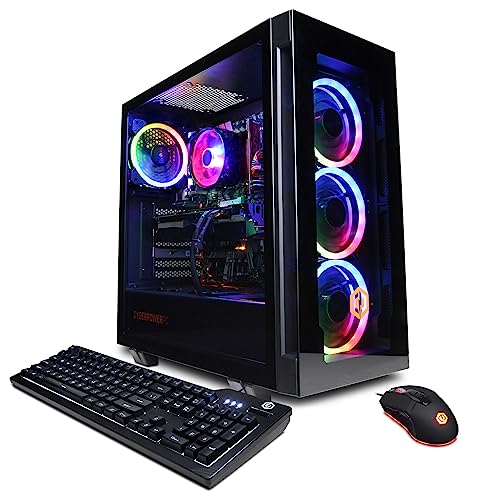
- Best overall: CyberPowerPC Gamer Xtreme VR (GXiVR8040A14), RTX 4060 Ti 16GB — Check on Amazon
- Thermaltake LCGS Quartz i1460, RTX 5060 — Check on Amazon
- iBUYPOWER Scale (SCA5N46T01), Ryzen 5 7600, RTX 4060 Ti — Check on Amazon
- Skytech Blaze4 Mini, RTX 4060 Ti — Check on Amazon
See 2 more Amazon options
- CyberPowerPC Gamer Master (GMA2900A), Ryzen 7 8700F, RTX 4060 Ti — Check on Amazon
- Skytech Archangel, RTX 4060, 32GB RAM and 2TB SSD — Check on Amazon
Read the full guide ↓
Disclosure: As an Amazon Associate, reviewstook.com earns from qualifying purchases. Links to Amazon on this page are affiliate links; they cost you nothing extra. Listing details such as price and availability change often, so check the current Amazon listing before you buy.
Twelve hundred dollars is the budget where a gaming PC stops apologizing. Below it, every guide in this category is a negotiation — integrated graphics dressed up as gaming, last-generation cards, resolutions quietly lowered. At $1,200 the negotiation ends, because this is the tier where the RTX 4060 Ti and the RTX 5060 live, and those cards change what the money honestly buys: native 1440p. That phrase deserves a definition before it does any selling. Native 1440p means the game is actually rendered at 2560×1440 — every pixel on your monitor computed by the graphics card at that resolution, at high settings, in the great majority of current games. It is not a 1080p image stretched or reconstructed upward by an upscaler, and it is not a frame counter padded by generated frames. Upscaling and frame generation exist on every card in this guide and they are genuinely useful, but they are headroom and polish on top of a native baseline, not a substitute for it — and a card that needs them to reach 1440p at all is a 1080p card wearing a costume. The machines below clear the native bar. That is the whole reason this tier exists.
The honesty note is the mirror image of that promise: $1,200 is not a 4K tier. Native 4K at high settings asks for a class of graphics card — and a power supply, and a cooling budget — that sits well above this ceiling, and any listing implying otherwise is describing upscaled 4K or lowered settings. What $1,200 buys instead is the sweet spot most gamers actually play at: a 1440p monitor driven properly, high-refresh 1080p as an effortless fallback, and enough video memory headroom in the best picks here that the machine is still comfortable in three years. For most buyers we would start with the CyberPowerPC Gamer Xtreme VR at the top of this guide for its 16GB graphics card, or the Thermaltake Quartz for the current-generation card at an everyday price. Below are the quick picks, detailed reviews of all six machines, a comparison table, a plain-English section on what native 1440p does and does not mean, the platform decision that matters more than the processor badge, the mistakes that waste money at this tier, and the questions buyers ask before ordering.
In this guide
Quick Picks
Short on time, or comparing several options at once? Each row below names a buyer type and the machine that suits it, with a link to the listing.
| Buyer type | Pick | Why it stands out | Link |
|---|---|---|---|
| Best overall | CyberPowerPC Gamer Xtreme VR (GXiVR8040A14) | RTX 4060 Ti with 16GB of VRAM — the 1440p longevity pick | Check on Amazon |
| Best current-generation card | Thermaltake LCGS Quartz i1460 | RTX 5060 at an everyday price in this tier, no sale-watching required | Check on Amazon |
| Best upgrade path | iBUYPOWER Scale (SCA5N46T01) | AM5 platform, positioned comfortably in the middle of this tier | Check on Amazon |
| Best value on sale | Skytech Blaze4 Mini | RTX 4060 Ti at its best when its price dips — check the current price on Amazon | Check on Amazon |
| Best eight-core AM5 alternative | CyberPowerPC Gamer Master (GMA2900A) | Ryzen 7 8700F on a B650 board, positioned within this tier | Check on Amazon |
| Best for big game libraries | Skytech Archangel | 32GB of RAM and a 2TB SSD — double the memory and storage of the field | Check on Amazon |
How These Picks Were Chosen
The budget was applied as a ceiling for the whole machine: every PC below is a real Amazon listing positioned in this tier in the United States, and because listing prices change often, each review tells you to check the current price on Amazon before you buy rather than printing a number that would go stale. Some picks in this guide can drift outside the tier between sales, and their reviews say so in plain terms. A machine that only makes sense at a price position it rarely reaches does not answer the search you actually made.
We did not benchmark these systems ourselves. We read the maker listings and specification pages and compared the parts that decide a gaming PC’s life: the graphics card and its memory, the processor platform underneath it, the RAM configuration, the storage, and the power supply where the listing publishes one. At this budget the graphics card does most of the work, so the guide is organized around a simple ladder. The RTX 4060 Ti comes in two versions that share a name and a speed but not a future: the 8GB card is fast today and memory-limited tomorrow, while the 16GB card renders at the same pace now and keeps its texture headroom as games grow. The RTX 5060 is the newer architecture at the same performance address, with the current generation of upscaling and frame generation. The plain RTX 4060 sits a step below all three, and the one machine here built on it earns its place with memory and storage instead. Performance is described by tier and by resolution throughout — what class of settings at what screen — rather than with frame-rate figures we did not measure.
Two filters sat on top of the specifications. The first is the platform filter: a gaming PC is a five-year purchase, so the socket under the processor matters. Three of these machines sit on platforms with a genuine upgrade path ahead of them; three sit on finished platforms whose value has to be argued on price, and their reviews argue it that way rather than pretending otherwise. The second is the honesty filter on memory: a listing that ships a single RAM stick, or that leaves its memory configuration vague, gets called on it in the review, because dual-channel memory is not a detail at 1440p — it is part of the performance you paid for.
The 6 Best Gaming PCs Under $1,200
CyberPowerPC Gamer Xtreme VR (GXiVR8040A14) — i7-13700F, RTX 4060 Ti 16GB
Who it suits: The 1440p buyer who intends to keep the machine for years and wants the graphics card’s memory settled on day one rather than negotiated with every new release.
The headline is the memory. This Gamer Xtreme VR pairs an Intel Core i7-13700F with the 16GB version of the RTX 4060 Ti, 16GB of DDR5 memory and a 1TB PCIe Gen4 NVMe SSD on a B760 board, with Wi-Fi and Windows 11 Home. The 16GB card renders no faster than its 8GB sibling today — the silicon is the same — and that is exactly the point buyers miss. What the extra memory buys is texture headroom: the ability to keep textures at high and ultra settings at 1440p in the games that have started treating 8GB as a floor rather than a target, without the stutter and muddy-texture compromises that arrive when a card runs out of room. At 1080p the difference is a footnote. At native 1440p, over a four- or five-year ownership, it is the difference between a machine that ages gracefully and one that starts asking for settings cuts in year two. The i7-13700F is more processor than this graphics card needs for gaming alone, which is a fine direction for an imbalance to lean: it leaves genuine capacity for streaming, recording and the background load of a modern desk.
The conditions deserve stating as plainly as the praise. This listing’s price moves, so check the current price on Amazon before you order: if it has drifted outside this tier when you look, wait or choose the Quartz below, which is positioned more steadily within the tier. The listing also leaves its exact RAM stick configuration less clear than we would like, so confirm on the live listing whether the 16GB arrives as two sticks; if it is a single stick, a matched second stick is the cheapest first upgrade in this entire guide. When its current price sits within this tier, though, this is the most complete answer to the search: the strongest memory position in the tier, a processor with years of headroom, and DDR5 underneath. For the generic buyer who typed this keyword and wants one machine to be right, this is the one.
- RTX 4060 Ti with 16GB of VRAM — the tier’s texture headroom, bought once.
- i7-13700F leaves real capacity for streaming and background work.
- DDR5 memory and a Gen4 NVMe SSD — no last-generation parts bin compromises.
Honest limitation: Its price can drift outside this tier, so confirm on the live listing that it sits within your budget before ordering; and the RAM stick configuration should be confirmed on the listing before ordering.
Choose it if you play at 1440p and plan to keep the PC for four-plus years. Skip it if its current price has moved outside this tier and you need a machine this week — the Quartz below is the steadier-positioned alternative in the same tier.

Thermaltake LCGS Quartz i1460 — i5-14400F, RTX 5060
Who it suits: Buyers who want the current graphics generation, an honest everyday price, and no interest in timing a sale calendar to buy a computer.
The Quartz is the present tense of this tier. Thermaltake’s LCGS line builds it around an Intel Core i5-14400F and a GeForce RTX 5060, with 16GB of DDR4-3600 memory, a 1TB NVMe SSD, a 600W 80 Plus Gold power supply, Wi-Fi and Windows 11. The RTX 5060 sits at the same performance address as the 4060 Ti cards around it — native 1440p at high settings is its home resolution — and brings the newer architecture’s toolkit: the current generation of DLSS upscaling and multi frame generation. That last feature deserves the honest framing this guide applies everywhere: frame generation raises the number your frame counter displays and smooths motion in supported titles, but the frames are synthesized, it works only in games that support it, and it does not reduce input latency — your aim feels the rendered frames, not the generated ones. Judged as a renderer rather than a counter, the 5060 is a proper 1440p card, and the Quartz is positioned calmly within this tier — check the current price on Amazon, but this is not a pick that depends on catching a sale to make sense.
The trade is the platform. The i5-14400F rides on Intel’s LGA1700 socket with DDR4 memory — a finished platform, in the sense that the next processor generation will not drop into this board and the RAM will not carry forward. Thermaltake has spent the money on the graphics card and the power supply instead, and for this tier that is a defensible allocation: the 600W Gold unit is properly specified for this build and leaves room for a midrange card swap later, which is the upgrade this machine will actually get. What you are buying is the best current-generation rendering available under $1,200 without watching prices, in a glass-sided case from a maker whose business is cases and cooling. If the words “on sale” are not part of your buying plan, this is your pick.
- RTX 5060 — current-generation card, native 1440p at high settings.
- Positioned within this tier at an everyday price — check the current price on Amazon.
- 600W 80 Plus Gold power supply, published in the specification.
Honest limitation: The LGA1700/DDR4 platform is finished — no next-generation processor drops in later, so the upgrade path is a graphics card swap only; and frame generation should be valued as smoothness in supported games, not as raw performance.
Choose it if you want to buy once at a fair everyday price and play at 1440p now. Skip it if a multi-year processor upgrade path matters more to you than the current-generation card — the two AM5 picks below are built for that.

iBUYPOWER Scale (SCA5N46T01) — Ryzen 5 7600, RTX 4060 Ti
Who it suits: The buyer thinking in five-year terms — the one who would rather own a living platform with a known first upgrade than the last, fastest version of a finished one.
The Scale is the platform pick, and its specification reads like an argument: a Ryzen 5 7600 on AMD’s AM5 socket, an RTX 4060 Ti 8GB, 16GB of DDR5 memory, a 1TB NVMe SSD, Wi-Fi, Windows 11 Home, and a keyboard and mouse in the box. AM5 is the only socket in this guide with a future AMD has publicly committed to — processors not yet released will drop into this board, and the DDR5 memory carries forward when they do. The Ryzen 5 7600 is a thoroughly sufficient gaming processor for a 4060 Ti at 1440p, where the graphics card does the heavy lifting, and the pairing leaves the machine one processor swap away from a second life years from now. Its positioning within this tier is the other half of the argument: it sits comfortably in the middle of the tier rather than clinging to the ceiling, so there is no deal timing to worry about — just check the current price on Amazon before you order.
There is one asterisk, and it is printed in the listing’s own title: the 16GB of memory is a single stick, 16×1. A lone stick runs the memory in single-channel mode, which costs real performance in processor-sensitive moments — the lows that decide whether a game feels smooth — until a second stick joins it. Plan on adding a matched 16GB DDR5-5200 stick as part of this purchase and the flaw becomes the guide’s best first upgrade: that small, inexpensive addition and five minutes turn the Scale into a 32GB dual-channel machine that is better equipped than most of this tier. Judged as delivered, it is a very good PC with one deliberate corner cut; judged as a platform plus a stick of RAM, it is the smartest long-term buy under $1,200.
- AM5 socket — the only platform here with future processors still coming to it.
- Positioned comfortably within this tier — check the current price on Amazon.
- Keyboard and mouse included; one-year manufacturer warranty.
Honest limitation: The 16GB of RAM ships as a single stick, so the machine runs single-channel until you add a second — plan that small purchase from the start rather than discovering it later.
Choose it if you keep PCs for years and value the upgrade path. Skip it if you will never open the case — the single-stick compromise then stays a compromise, and the picks above arrive complete.

Skytech Blaze4 Mini — Ryzen 7 5700, RTX 4060 Ti
Who it suits: The patient value hunter — a buyer with a working machine today who can wait for this listing’s price to visit the bottom of its range, where it becomes the best graphics card per dollar in the tier.
Strip the Blaze4 Mini down to its transaction and it is a simple one: an RTX 4060 Ti 8GB, a Ryzen 7 5700, 16GB of DDR4 memory, a 1TB SSD, a 650W Gold power supply, Wi-Fi and Windows 11 — and a price position that swings like a gate. When its price dips within the tier, this is not merely the best value in this guide; it undercuts machines a full tier down while out-rendering them, and it leaves meaningful room in the budget for the 1440p monitor the card deserves. When it sits higher in the tier it is still a legitimate machine in this class, simply a less remarkable one. The entire review therefore reduces to a discipline: check the current price on Amazon, and buy it when its position in the tier is at the favourable end rather than on sight. Watch for the dip, and feel no urgency in between.
The compromises are the platform’s age, stated openly. The Ryzen 7 5700 sits on AM4 with DDR4 memory — the previous AMD generation, finished as a platform, so the upgrade story here is a graphics card swap into the 650W supply and nothing beyond it. The “Mini” in the name is also doing some marketing work; check the case dimensions on the listing against your space rather than picturing a console-sized box. And Skytech’s listing notes the graphics card brand may vary — the GPU model and its 8GB are the contracted specification, the board partner is not. None of that dents the core proposition when its price dips: at that point no other machine in this guide puts a 4060 Ti in your hands for less, and the room it leaves in the budget can cover the monitor, the second SSD, or the RAM kit the rest of the tier makes you choose between.
- RTX 4060 Ti — the tier’s best value when its price dips; check the current price on Amazon.
- 650W Gold power supply leaves honest room for a future card swap.
- Eight-core Ryzen 7 5700 is more than sufficient for 1440p gaming.
Honest limitation: Its appeal depends heavily on where its price sits within the tier — when it is not dipping it is ordinary, and the AM4/DDR4 platform is finished, so buy it on the dip or not at all.
Choose it if you can wait for the low and want maximum card for minimum money. Skip it if you are buying today and its current price position is not favourable — the Scale and the Quartz hold their value every day of the week.

CyberPowerPC Gamer Master (GMA2900A) — Ryzen 7 8700F, RTX 4060 Ti
Who it suits: Buyers who like the Scale’s AM5 logic but want eight cores today — streamers, multitaskers and anyone whose PC works while it plays.
The Gamer Master is CyberPowerPC’s answer to the same platform question, answered with more processor. A Ryzen 7 8700F — eight cores on the AM5 socket, on a B650 board — pairs with an RTX 4060 Ti 8GB, 16GB of DDR5 and a 1TB PCIe Gen4 SSD, with Wi-Fi and Windows 11 Home. At 1440p the extra cores will not outrun the Scale’s six in most games, because the graphics card is the limit for both; where the 8700F earns its keep is everything around the game — the stream encode, the voice chat, the browser’s worth of tabs, the clip software — and in the years-later scenario where a heavier processor ages out more slowly. Check the current price on Amazon before you order, and confirm it is the Amazon listing for this exact configuration rather than a higher-priced marketplace variant; positioned within this tier, it is an eight-core AM5 machine for Scale money.
Two honest notes. The 8700F has no integrated graphics — the F is the tell — which matters exactly once in a PC’s life: the day the graphics card has a problem and you want a picture on the screen to troubleshoot with. With a healthy card you will never notice; file it under known trade-offs, not flaws. And because CyberPowerPC sells several near-identically named Gamer Master configurations, confirm on the live listing that the machine in the cart is this one — 8700F, 4060 Ti, B650 — rather than a sibling wearing a similar title. Those cautions logged, the Gamer Master is the pick for the buyer who read the Scale’s review, nodded at the platform logic, and wanted the fuller processor now instead of as a later upgrade.
- Eight-core Ryzen 7 8700F on AM5/B650 — platform future plus cores for streaming.
- Positioned within this tier — check the current price on Amazon.
- DDR5 and a Gen4 SSD — no previous-generation parts.
Honest limitation: No integrated graphics, so there is no fallback display output if the card ever fails; and the model family has similar siblings, so verify the exact configuration on the listing before ordering.
Choose it if you stream, multitask or simply want the eight-core version of the AM5 argument. Skip it if pure gaming value per dollar is the only metric — the Scale undercuts it with the same card and socket.

Skytech Archangel — i5-14400F, RTX 4060, 32GB RAM, 2TB SSD
Who it suits: The buyer whose library is the bottleneck — hundreds of gigabytes of installed games, a dozen launchers, and no patience for the delete-to-download ritual.
Every other machine in this guide spends its budget the same way: graphics card first, capacity later. The Archangel is the deliberate exception, and it exists because for a real class of buyer the arithmetic is different. Skytech pairs an Intel Core i5-14400F with a plain RTX 4060, then doubles the field: 32GB of DDR5-5600 memory where rivals ship 16, and a 2TB SSD where rivals ship 1TB, on a 650W Gold power supply with Wi-Fi and Windows 11. The RTX 4060 is a step below the 4060 Ti and 5060 cards above — it is a superb 1080p card and a 1440p card with the settings negotiated rather than maxed — and this review will not pretend otherwise. What the Archangel argues is that at 1080p, and at sensibly set 1440p, its owners will never once think about storage, never close a game to free memory, and never meet the loading-screen tax of a nearly full drive. For the library-rich buyer, that is not a consolation prize; it is the actual daily experience of the machine.
Its positioning mirrors the Blaze4’s in one way: when its price dips within the tier it is a capacity bargain, and even toward the top of the tier the 32GB and 2TB are specifications the rest of the tier charges upgrade money to reach. Check the current price on Amazon before you order. The platform is LGA1700, finished like the Quartz’s, with the same graphics-swap-only future. Read the choice cleanly: if your screen is 1080p or your settings are pragmatic, the Archangel trades a graphics step you may never miss for double the memory and storage you will use every day. If your screen is 1440p and your settings are not negotiable, that trade runs the wrong way — take the 16GB CyberPowerPC at the top of this guide and buy a second SSD when the library demands it.
- 32GB of DDR5-5600 — double the memory of every other pick here.
- 2TB SSD — a real game library installed at once, not rotated.
- When its price dips, the doubled capacity makes it the bargain version of this tier — check the current price on Amazon.
Honest limitation: The RTX 4060 is a full step below the 4060 Ti/5060 cards in this guide — excellent at 1080p, a settings negotiation at native 1440p — and the LGA1700 platform is finished.
Choose it if storage and memory are your lived constraints and your resolution is 1080p or pragmatic 1440p. Skip it if native 1440p at high settings is the point of the purchase — that is what the top of this guide is for.

Comparison Table
| Product | Graphics card | Platform | Best use | Link |
|---|---|---|---|---|
| CyberPowerPC Gamer Xtreme VR (GXiVR8040A14) | RTX 4060 Ti 16GB | Intel LGA1700, DDR5 | Native 1440p built to last — check the current price on Amazon | Check on Amazon |
| Thermaltake LCGS Quartz i1460 | RTX 5060 8GB | Intel LGA1700, DDR4 | Current-generation card at an everyday price | Check on Amazon |
| iBUYPOWER Scale (SCA5N46T01) | RTX 4060 Ti 8GB | AMD AM5, DDR5 | The upgrade path — add a second RAM stick | Check on Amazon |
| Skytech Blaze4 Mini | RTX 4060 Ti 8GB | AMD AM4, DDR4 | Best GPU per dollar when its price dips | Check on Amazon |
| CyberPowerPC Gamer Master (GMA2900A) | RTX 4060 Ti 8GB | AMD AM5, DDR5 | Eight AM5 cores for streamers and multitaskers | Check on Amazon |
| Skytech Archangel | RTX 4060 8GB | Intel LGA1700, DDR5 | 32GB RAM and 2TB storage for big libraries | Check on Amazon |
What “Native 1440p” Actually Means — and What It Does Not
Resolution language is where gaming PC marketing does its quietest work, so this guide uses one definition throughout. A PC plays at native 1440p when the game engine renders each frame at 2560×1440 and the monitor displays that render directly. Every card at the top of this guide — the 4060 Ti in both memory sizes and the RTX 5060 — does this at high settings in the great majority of current games, and that native baseline is what your $1,200 is buying. Two technologies orbit that baseline and are worth understanding precisely, because listings blur them on purpose. Upscaling renders the game lower — say at 1080p’s pixel count — and reconstructs a 1440p image with AI assistance. Modern upscaling is good, sometimes remarkably good, and it is a legitimate way to trade a little image softness for a lot of speed. But a machine that reaches 1440p only by upscaling is a 1080p machine with a clever exit, and its native tier is the honest one to name. Frame generation goes further and synthesizes whole frames between rendered ones. It smooths motion and flatters counters; it does not make the game respond faster, because your inputs are still sampled on the rendered frames, and it exists only in supported titles.
The practical reading for this budget: buy the card whose native tier is your monitor’s resolution, then treat upscaling and frame generation as the reserve that keeps the machine comfortable in year three and four, when games have grown heavier and the card has not. That is also why the 16GB card tops this guide — memory is the reserve that cannot be synthesized. And it is why this guide states plainly, here and in the FAQ, that native 4K is not in this tier at any setting worth wanting: the cards that render 4K natively at high settings live in machines well above this ceiling, and a $1,200 PC advertised as a 4K machine is describing upscaling, lowered settings, or optimism. A 1440p monitor driven natively looks better than a 4K monitor fed a reconstructed image and a prayer. Spend accordingly.
The Platform Question: The Decision Underneath the Processor Badge
Two buyers can purchase the same graphics card in this tier and own very different futures, because the socket under the processor decides what the machine can become. Three platforms appear in this guide. AMD’s AM5, under the Scale and the Gamer Master, is the living one: AMD has committed to releasing new processors for it, the DDR5 memory carries forward, and a mid-life processor swap is a real plan rather than a hope. Intel’s LGA1700, under the CyberPowerPC 16GB, the Quartz and the Archangel, is finished — excellent processors exist for it and both Intel picks here use them well, but the board’s next processor is the same generation’s, and the upgrade that matters becomes the graphics card. AMD’s AM4, under the Blaze4 Mini, is the finished previous generation: a vast, cheap, proven ecosystem whose only remaining argument is price — which, when its price dips, it makes very well.
None of this makes a finished platform a bad purchase; it makes it a priced one. The correct question is not “is this socket current?” but “am I being paid for its age?” The Blaze4 Mini pays you in a discounted card. The Quartz pays you in the newest graphics architecture. The 16GB CyberPowerPC pays you in memory headroom. The AM5 machines ask a small premium in patience — a RAM stick to add, cores you may not need yet — and repay it in options. Decide which currency you prefer before you decide which listing you like, because at $1,200 the platform is the one choice the checkout page will not let you revise later.
How to Choose a Gaming PC Under $1,200
- Match the card to the monitor, natively. A 1440p monitor wants a 4060 Ti-class or RTX 5060 card rendering at its own resolution; a 1080p high-refresh monitor is served by every machine here. Buying card for a screen you do not own is the tier’s most common waste.
- Read the VRAM, not just the card name. The RTX 4060 Ti exists in 8GB and 16GB versions at similar speeds. At 1440p over several years, the 16GB version is the safer ownership — the name on the box will not tell you which one is inside; the specification will.
- Choose your platform currency. AM5 buys future processors; finished platforms should pay you back in card, memory or price. If a finished-platform machine offers none of those discounts, the AM5 picks win by default.
- Check the RAM configuration, not just the capacity. Sixteen gigabytes as two sticks is a finished specification; as one stick it is a first upgrade. Either can be the right buy — the Scale is this guide’s value pick precisely because its stick is cheap to fix — but buy it knowingly.
- Check the current price before you commit. Prebuilt prices in this tier swing widely between deal events. Some picks here only make sense when their price sits favourably within the tier. A machine whose price has drifted well outside that position is a different, worse purchase wearing the same name.
- Confirm the exact configuration in the cart. Builders sell families of near-identical model names, and listings note where a component brand may vary. The GPU model, its memory, the RAM and the SSD are the contract; verify them on the live listing before paying.
- Count the power supply. A published wattage with an 80 Plus rating — 600W to 650W Gold across this guide — is the difference between a future graphics swap and a future rebuild. Listings that hide the PSU are telling you something.
- Budget the whole desk. If the 1440p monitor is not already on it, the Blaze4 Mini when its price dips, plus a monitor, can beat a top-of-tier tower feeding an old 1080p screen. The best PC in this tier is sometimes a lower-tier PC and the display it deserved.
Common Buying Mistakes
- Believing a $1,200 PC is a 4K machine. Native 4K at high settings sits in a higher tier altogether; what is sold as 4K in this tier is upscaling or lowered settings.
- Buying the 8GB card when the 16GB version sits in the same tier at a deal price — the speed is identical today and the memory gap is the one that widens.
- Paying a high-in-tier price for a dip-priced listing. The Blaze4 Mini when its price dips and when it sits high in the tier is two different purchases; only one of them is a bargain.
- Judging frame generation as performance. Generated frames smooth the picture in supported games; they do not lower input latency and they do not exist in unsupported ones.
- Ignoring a single-stick RAM configuration until the stutters start — then blaming the graphics card for a memory-channel problem with an inexpensive fix.
- Choosing a finished platform at a living platform’s price, with no discount in card, memory or money to show for it.
- Ordering a similarly named sibling configuration by mistake — the Gamer Master and Gamer Xtreme families each contain several machines that are not the ones reviewed here.
- Spending the whole $1,200 on the tower while the monitor stays a decade old. The card’s native tier and the screen’s native resolution are one decision, not two.
Final Recommendation
- Most buyers at 1440p: CyberPowerPC Gamer Xtreme VR (GXiVR8040A14) — when its current price sits within this tier; check the price on Amazon.
- Buying today, no sale-watching: Thermaltake LCGS Quartz i1460.
- Five-year planners: iBUYPOWER Scale, plus a second RAM stick.
- Patient value hunters: Skytech Blaze4 Mini, at its low.
- Streamers and multitaskers: CyberPowerPC Gamer Master (GMA2900A).
- Big libraries, 1080p screens: Skytech Archangel.
Our top two for the buyer behind this search are the CyberPowerPC Gamer Xtreme VR, for the 16GB card that settles the 1440p memory question for the life of the machine, and the Thermaltake Quartz, for the current-generation card at a price that needs no timing. Between them they cover the two shapes this purchase takes: the deal you wait a short while for, and the fair price you pay today. If your horizon is five years and your hands are willing, the Scale plus a RAM stick is the connoisseur’s version of the same money; if your budget must also cover the monitor, the Blaze4 Mini on its dip is the honest way to fund both. Buyers working to a tighter ceiling should also see Best Gaming PC Under $800, and those ready to step past this tier will find the next class of card in Best Gaming PC Under $1500. Check the current price on Amazon against this tier, confirm the configuration in the cart, and the machine that arrives will be the machine this guide described.
Frequently Asked Questions
Is $1,200 enough for a gaming PC that plays at 1440p?
Yes — natively, which is the version of the claim that matters. The RTX 4060 Ti and RTX 5060 cards in this guide render games at 2560×1440 at high settings in the great majority of current titles, without needing upscaling to get there. Upscaling and frame generation then serve as reserve capacity for heavier future games rather than as the price of admission.
Can a gaming PC under $1,200 play at 4K?
Not natively at high settings — that card class sits in machines well above this budget tier. A PC in this tier can drive a 4K display with upscaling and adjusted settings, and for slower-paced games that can look perfectly pleasant, but if native 4K is the goal, the honest move is to save toward the tier that renders it rather than buy this one on a promise. Our dedicated guide to Best Gaming PC For 1440p Gaming Under $1200 covers the resolution this budget actually owns.
RTX 4060 Ti 8GB or 16GB — does the memory actually matter?
At 1080p, rarely. At 1440p over a multi-year ownership, yes: the two cards render at the same speed today, but the 8GB card reaches its texture ceiling sooner, and the symptom is not a graceful slowdown — it is stutter and textures dropping to lower detail. If the 16GB version is positioned close to the 8GB version within this tier, it is the safer buy for a 1440p screen.
Is the RTX 5060 better than the RTX 4060 Ti?
They live at the same address: both are native-1440p cards at high settings, and neither runs away from the other in raw rendering. The 5060 is the newer architecture with the current generation of upscaling and frame generation; the 4060 Ti counters with a 16GB version the 5060 does not have. Choose the 5060 for the newest features at an everyday price, the 16GB 4060 Ti for memory headroom.
Should I buy an AM5 machine or save money on a finished platform?
Both are defensible, and this guide contains each. AM5 — the Scale and the Gamer Master — buys the option of a future processor swap and DDR5 that carries forward. A finished platform is the right buy when its price pays you for the limitation: a discounted card, a newer GPU generation, or doubled memory and storage. What you should not do is pay full living-platform money for a finished one.
How much RAM and storage does a $1,200 gaming PC need?
Sixteen gigabytes is the working standard and every pick here meets it — as two sticks, or as one stick with a cheap, planned second. Thirty-two gigabytes, as in the Archangel, is comfort rather than necessity for gaming alone. For storage, 1TB is the floor this tier should accept; 2TB earns its premium quickly if your installed library is large, because modern games routinely claim a tenth of a 1TB drive each.
Why does this guide tell me to check the price on Amazon instead of printing one?
Because prebuilt prices in this tier move widely between deal events, and a single printed price would be wrong most of the time you read it. Each review therefore describes where a pick sits within the tier — favourably, steadily, or only when its price dips — and leaves the number itself to the live listing. The live listing is the final word; this guide’s job is to tell you what position within the tier makes a pick worth buying before you pay.
- Best Gaming PC Under $1200
- Best Gaming PC Under $800
- Best Gaming PC Under $1500
- Best Gaming PC For Beginners Under $1200
- Best Gaming PC For Streaming Under $1200
- Best Gaming PC For Small Spaces Under $1200
- Best 1440p Gaming PC Under $1200
- Best Budget Gaming PC Under $1200
- Best Prebuilt Gaming PC Under $1200


