Where to buy
Check the latest price, availability and delivery on Amazon. Orders are placed on Amazon. We may earn a commission from qualifying purchases.
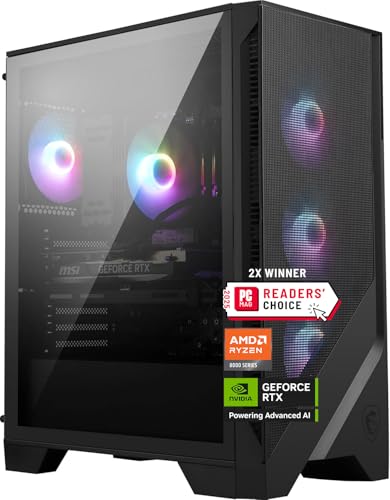
- Best overall: MSI Codex Z2 Gaming Desktop, Ryzen 7 8700F, RTX 5070, 32GB DDR5, 2TB SSD — Check on Amazon
- Skytech Omega Gaming PC, Ryzen 7 7800X3D, RTX 4070 Super, 32GB DDR5, 1TB NVMe — Check on Amazon
- iBUYPOWER Slate 8 MESH Gaming PC, Intel Core i7-14700F, RTX 4070 Super, 2TB NVMe — Check on Amazon
- Thermaltake LCGS View i4770 Gaming Desktop, Intel Core i7-14700KF, RTX 4070, 32GB DDR5 — Check on Amazon
See 2 more Amazon options
- Skytech Omega Gaming PC, Ryzen 7 7700X, RTX 4070 Super, 32GB DDR5, 1TB NVMe, White — Check on Amazon
- ASUS ROG Strix G15DS Gaming Desktop, Ryzen 7 7700X, RTX 4070, 16GB DDR5, 1TB SSD — Check on Amazon
Read the full guide ↓
Disclosure: As an Amazon Associate, reviewstook.com earns from qualifying purchases. Links to Amazon on this page are affiliate links; they cost you nothing extra. Listing details such as price and availability change often, so check the current Amazon listing before you buy.
Fifteen hundred dollars is the budget where 1440p stops being a compromise you manage and becomes a resolution you simply play at. At $1,200 — the tier below this one — a good prebuilt can hold 1440p high settings in most games, but you feel the edges: ray tracing gets switched off or dialled down, the graphics card is a step behind the newest generation, memory stops at 16GB more often than it should, and a 1TB drive fills up within a few months of modern game installs. At $1,500 the specification sheet changes character. The graphics cards here are the RTX 5070 and the RTX 4070 Super — the two cards that were effectively designed for this resolution — backed in most of these machines by 32GB of DDR5 memory, faster eight-core and twenty-core processors, and in two cases a full 2TB of NVMe storage. This is the tier where 1440p ultra settings, high-refresh monitors and ray tracing stop competing with each other for the same frame budget.
The honesty note for this tier is about checking the live listing, and it matters more here than at any cheaper budget. Prebuilt gaming PCs at this level do not sit still: several listings in this guide move in and out of this budget over the course of the year, and sit within it most reliably during sales, clearances and seasonal events. Every pick below is a real Amazon listing positioned in this tier, so check the current price on Amazon before you decide. The rule of this guide is strict: a pick only belongs in your cart when the live listing in front of you sits at or under this budget. If the listing has drifted above the tier, the correct move is to wait or step down to the $1,200 tier — not to stretch well past the budget for a machine this guide placed inside it. Below are the quick picks, detailed reviews of all six machines, a comparison table, a buying checklist for the premium 1440p tier, a frank section on where the step up from the $1,200 tier stops paying you back, the mistakes that waste money at this level, and the questions buyers ask before spending this much on a prebuilt.
In this guide
Quick Picks
Short on time, or comparing several options at once? Each row below names a buyer type and the machine that suits it, with a link to the listing.
| Buyer type | Pick | Why it stands out | Link |
|---|---|---|---|
| Best overall | MSI Codex Z2, Ryzen 7 8700F, RTX 5070 | Newest-generation GPU plus 32GB RAM and 2TB SSD in one box | Check on Amazon |
| Best for high-refresh 1440p | Skytech Omega, Ryzen 7 7800X3D, RTX 4070 Super | The benchmark gaming CPU of its generation, paired with a 4070 Super | Check on Amazon |
| Best storage and creator lean | iBUYPOWER Slate 8 MESH, i7-14700F, RTX 4070 Super | 2TB NVMe and a 20-core Intel CPU at exactly this budget | Check on Amazon |
| Best Intel all-rounder | Thermaltake LCGS View i4770, i7-14700KF, RTX 4070 | Unlocked 20-core CPU and fast 5600MT/s DDR5 from a cooling brand | Check on Amazon |
| Best value | Skytech Omega, Ryzen 7 7700X, RTX 4070 Super, White | Same 4070 Super and 32GB specification as its sibling, positioned at the value end of the tier — check price on Amazon | Check on Amazon |
| Best big-brand support | ASUS ROG Strix G15DS, Ryzen 7 7700X, RTX 4070 | ASUS engineering and support network, with a carry-handle chassis | Check on Amazon |
How These Picks Were Chosen
The budget was applied the way a careful buyer would apply it: every machine below is a real Amazon listing, sold in the United States, positioned in this tier — check the current price on Amazon for the listing in front of you, because prebuilt pricing at this level moves often and no figure printed in a guide can stay current for long. A machine that does not genuinely belong in this budget was excluded, however good it might be; so were several famous-name systems whose RTX 4070 Super configurations turned out to live well above this tier.
We did not use these machines ourselves. We read the maker listings and specification pages, and compared the parts that decide 1440p performance: graphics card first, then processor, memory capacity and speed, storage capacity, power supply and cooling. At this budget the graphics-card bar was set deliberately high. A premium 1440p machine in 2026 should carry an RTX 5070, an RTX 4070 Super or — where the rest of the specification compensates — an RTX 4070; anything a clear step below that belongs in a cheaper guide, and you will find those guides linked at the end of this one. Memory was judged just as firmly: 32GB of DDR5 is the correct specification at $1,500, and the two picks that ship with 16GB are included for specific strengths — storage in one case, brand support in the other — with the shortfall named plainly in their reviews and weighed openly in the recommendation.
Two filters specific to this tier sat on top of all of that. The first is the diminishing-returns filter: $1,500 is $300 more than the tier below, so each pick had to show where the extra money went — a newer or faster graphics card, double the memory, double the storage, or a materially stronger processor — rather than the same parts in a more expensive case. The second is the upgrade filter: a machine at this price should be a platform, not a dead end, so standard cases, accessible memory slots and room for a second drive counted in a pick’s favour, and listings that hide their power-supply specification were marked down for it, because the PSU is what decides whether a future graphics card is a swap or a rebuild.
The 6 Best 1440p Gaming PCs Under $1,500
MSI Codex Z2 Gaming Desktop, Ryzen 7 8700F, RTX 5070, 32GB DDR5, 2TB SSD
Who it suits: Buyers who want the newest graphics generation and the fullest specification sheet in this guide — 32GB of memory and 2TB of storage included, not added later.
The Codex Z2 leads this guide because it is the only machine here built around NVIDIA’s current-generation RTX 5070, a Blackwell-architecture card with 12GB of GDDR7 memory and DLSS 4 support. At 1440p that combination is exactly on brief: ultra settings in current releases, ray tracing that stays switched on, and frame generation to feed a high-refresh monitor when a game’s native frame rate needs help. Around the card, MSI has specified the machine the way this guide keeps asking builders to: an eight-core, sixteen-thread Ryzen 7 8700F that boosts to 5.0 GHz per MSI’s listing, 32GB of DDR5 memory, and a 2TB NVMe SSD — the storage capacity that means a modern library of 100GB-plus installs lives on fast storage instead of being shuffled on and off an external drive. Cooling is an ARGB air cooler with four system fans, three intake and one exhaust, and Windows 11 Home is preinstalled.
The live listing is the thing to check before anything else. Current-generation prebuilts like this one move in and out of this budget, and that is why this pick carries an instruction rather than just a recommendation: check the current price on Amazon, buy it when the live listing sits at or under this budget, and walk away without regret when it does not. Two smaller honest notes: the listing does not publish the power supply’s wattage, which matters if you plan a future graphics-card upgrade, so check the live listing’s specification table; and the 8700F, while a strong gaming chip, is a step below the 7800X3D in the next pick for purely CPU-limited high-refresh play. Neither dents its position here. On specification alone — newest graphics card, full memory capacity and the larger drive in one box — nothing else in this guide is as complete.
- RTX 5070 with GDDR7 and DLSS 4 — the newest GPU generation in this guide.
- 32GB DDR5 and a 2TB NVMe SSD as standard — the two capacities this tier should ship with.
- Four-fan airflow layout and MSI’s own case, motherboard ecosystem and support.
Honest limitation: This listing moves in and out of the tier, so check the current price on Amazon before deciding — it is a buy-at-the-right-moment machine, and its PSU wattage is not published in the listing.
Choose it if you want the longest-lived graphics card and the fullest spec sheet, and you are willing to time the purchase. Skip it if you need to buy today and the live listing has drifted above budget — take the iBUYPOWER below instead.

Skytech Omega Gaming PC, Ryzen 7 7800X3D, RTX 4070 Super, 32GB DDR5, 1TB NVMe
Who it suits: High-refresh players — the 1440p 165Hz and 240Hz monitor crowd — whose frame rates are decided as much by the processor as by the graphics card.
Every other machine in this guide pairs its graphics card with a strong general-purpose processor. This one pairs an RTX 4070 Super with the Ryzen 7 7800X3D, the chip whose stacked 3D V-Cache made it the benchmark gaming processor of its generation — the CPU other gaming CPUs were measured against, and one that still earns that reputation in CPU-limited titles: competitive shooters, simulation games, large-strategy titles and any game where the frame rate is set by the processor feeding the card rather than the card itself. For a player whose monitor runs at 165Hz or faster, that is not a luxury distinction; it is the difference between the monitor being fed and being wasted. The rest of the specification is the correct supporting cast: the 4070 Super’s 12GB of GDDR6X with DLSS 3 and frame generation for ultra-settings 1440p, 32GB of DDR5 RGB memory, a 1TB Gen4 NVMe SSD, a 750W Gold power supply — a published PSU specification, which not every maker in this guide manages — and Windows 11 Home, in Skytech’s white Omega case.
This machine sits at the upper end of the tier — check the current price on Amazon before you decide. That positioning frames the honest question this review has to answer: is the X3D worth its place at the top of the budget when its own sibling, further down this guide, offers the same graphics card positioned lower in the tier? For most players, honestly, no — and that sibling is our value pick for a reason. The X3D earns its premium in a specific pattern of play: high-refresh competitive and simulation titles, played for years, on a fast monitor. If that sentence describes your desk, this is the strongest gaming-first machine here. If your gaming is single-player and graphics-led, the same graphics performance is available elsewhere in this guide positioned more modestly, and the difference is better spent on the monitor itself.
- Ryzen 7 7800X3D — the defining gaming CPU of its generation, here under budget.
- RTX 4070 Super 12GB: ultra-settings 1440p with DLSS 3 frame generation.
- Published 750W Gold PSU and 32GB DDR5 — the specification details done properly.
Honest limitation: It sits at the upper end of this tier, its storage is 1TB rather than 2TB, and the X3D premium buys little in GPU-bound single-player games.
Choose it if you own or are buying a 165Hz-plus 1440p monitor and play CPU-demanding titles. Skip it if your gaming is story-led and graphics-bound — the 7700X Omega below delivers the same graphics card positioned lower in the tier.

iBUYPOWER Slate 8 MESH Gaming PC, Intel Core i7-14700F, RTX 4070 Super, 2TB NVMe
Who it suits: Buyers who split their desk time between gaming and heavier work — streaming, video editing, rendering — and who never want to think about storage space.
The Slate 8 MESH is the storage and workhorse pick of this guide. Its headline pairing is an Intel Core i7-14700F — a twenty-core processor, eight performance cores plus twelve efficiency cores — with an RTX 4070 Super 12GB, which is the same premium 1440p graphics card as the two Skytech machines. What separates it is everything around that pairing: a 2TB NVMe SSD, double the storage of most of this guide, in a mesh-fronted case with RGB fans and a tower air cooler, with Wi-Fi, Windows 11 Home and a gaming keyboard and mouse in the box. For a streamer, the 14700F’s efficiency cores are genuinely useful — encoding, chat, capture and the game itself stop competing for the same threads — and for anyone who edits video or works in 3D tools between sessions, this is the most capable work CPU in the guide alongside the Thermaltake’s. Check the current price on Amazon before ordering, as availability at this tier changes often.
The honest limitation is printed in its own specification: memory is 16GB of DDR5-5200, supplied as two 8GB sticks. At this budget, 32GB is the specification this guide treats as correct — modern games plus a browser, Discord and capture software can crowd 16GB, and both memory slots being occupied means upgrading later replaces the kit rather than adding to it. The fair reading is a trade, stated openly: iBUYPOWER has spent the money on double storage and a twenty-core processor instead of double memory. If your workload is storage-hungry and work-leaning, that trade can be the right one — and a 32GB DDR5 kit is a cheaper, easier later upgrade than the 2TB drive would have been. But a pure gamer comparing spec sheets should know the two Omegas and the MSI give them 32GB today, and this machine asks them to value the drive and the cores more.
- 2TB NVMe SSD — double the storage of most picks in this guide.
- Twenty-core i7-14700F: the multitasking and content-creation strength of this guide.
- RTX 4070 Super 12GB, mesh airflow case, keyboard and mouse included.
Honest limitation: 16GB of RAM in two 8GB sticks, where this tier should ship 32GB — budget for a memory kit if you stream or multitask heavily.
Choose it if storage and work performance matter as much as frame rates, or you want the work-and-storage balance of this tier in one box. Skip it if you are a pure gamer who will never use the extra cores — the 32GB machines serve you better out of the box.

Thermaltake LCGS View i4770 Gaming Desktop, Intel Core i7-14700KF, RTX 4070, 32GB DDR5
Who it suits: Buyers who want an Intel machine with nothing held back on the supporting specification — the fastest memory in this guide and an unlocked processor — from a maker whose day job is cooling and cases.
Thermaltake approaches a prebuilt from the opposite direction to most of this guide: it is a case and cooling company first, and the LCGS View i4770 reads like it. The specification pairs an Intel Core i7-14700KF — the unlocked, twenty-core version of the 14700 family, 3.4 GHz base per the listing — with an RTX 4070 12GB GDDR6X, 32GB of DDR5 at 5600MT/s, which is the fastest memory speed published by any pick here, and a 1TB NVMe M.2 SSD, with Wi-Fi and Windows 11. The KF processor deserves a sentence of its own: the K suffix means the chip is unlocked for overclocking, which most prebuilt buyers will never use — but it also means this is the full-fat version of the silicon rather than a locked-down variant, and for buyers who do tune, stream or run heavy background workloads, the 14700KF’s eight performance cores are the strongest work-and-play combination in the guide. At 1440p the plain RTX 4070, one step below the Super cards elsewhere here, still holds ultra settings in the great majority of current games with DLSS quality mode doing its quiet work.
The live listing is this pick’s defining caveat: this machine moves in and out of the tier, so check the current price on Amazon before you decide. Read plainly, that means it belongs in this guide only when the live listing sits within this budget. So the recommendation comes with the same discipline as the MSI at the top of this guide: the specification is right, the brand’s cooling pedigree is a real comfort in a glass-sided case, and the moment to buy is when the live listing sits within the budget — not when it has drifted above it. Buyers who need an Intel machine this week, without waiting for the right moment in the tier, will get a more straightforward route from the iBUYPOWER above.
- Unlocked i7-14700KF — twenty cores, the strongest Intel work-and-play CPU here.
- 32GB of DDR5 at 5600MT/s: the fastest published memory specification in this guide.
- Built by a case and cooling specialist — the thermal side of the design is the brand’s home ground.
Honest limitation: The graphics card is the plain RTX 4070 rather than the Super, and the live listing often sits above this budget — check the current price on Amazon and only buy when it sits within the tier.
Choose it if you prefer Intel, value fast memory and a cooling-led brand, and can wait for the live listing to sit within budget. Skip it if the live listing is sitting well above this budget — at that point it belongs to a different guide entirely.

Skytech Omega Gaming PC, Ryzen 7 7700X, RTX 4070 Super, 32GB DDR5, 1TB NVMe, White
Who it suits: Value hunters who want the premium graphics card and the full 32GB specification, and would rather keep the change than pay for a halo processor.
This is the same white Omega case and the same RTX 4070 Super as the 7800X3D machine above, with one deliberate substitution: a Ryzen 7 7700X — eight cores, 4.5 GHz base and 5.4 GHz boost per Skytech’s listing — in place of the X3D. Everything else that matters carries over: 32GB of DDR5 RGB memory, a 1TB Gen4 NVMe SSD, a 750W Gold power supply, Wi-Fi and Windows 11 Home. Within this tier it is positioned at the value end — check price on Amazon for the current listing — for a machine that gives up nothing on the graphics card, nothing on memory and nothing on the power supply. In GPU-bound games, which is most single-player gaming at 1440p, the frame-rate difference between this processor and its X3D sibling is small; the 7700X is a fast gaming chip by any honest measure, and at 1440p the graphics card is usually the part doing the deciding.
That is why this machine, and not a more exotic one, is the value pick: it is the most direct value route in this guide to the specification that actually defines the tier — 4070 Super, 32GB, Gen4 storage, a named Gold PSU. The honest limitations are the ones it shares with its sibling and one of its own. Storage is 1TB, so a large library will eventually mean adding a second drive — the case and platform make that a simple job. The white case is a taste decision some buyers will love and others will not, and it shows dust more readily than black. And like every listing here, its live price moves within the tier, so check the current price on Amazon and judge the listing in front of you against the budget, as this guide keeps insisting — positioned at the value end of the tier, it remains the smartest spend in the guide for graphics-led gaming.
- Positioned at the value end of this tier — check price on Amazon for the current listing.
- Same RTX 4070 Super, 32GB DDR5 and 750W Gold PSU as the X3D version.
- Ryzen 7 7700X at 5.4 GHz boost: more gaming CPU than 1440p usually asks for.
Honest limitation: 1TB of storage, a white case that will not suit every desk, and a live listing that moves within the tier — check the current price on Amazon before deciding.
Choose it if you want the tier’s defining specification without paying for a halo processor, and your gaming is mostly single-player and graphics-led. Skip it if you play CPU-limited competitive or simulation titles at very high refresh rates — that is precisely the gap the X3D version charges for.
ASUS ROG Strix G15DS Gaming Desktop, Ryzen 7 7700X, RTX 4070, 16GB DDR5, 1TB SSD
Who it suits: Buyers who put a premium on the badge and the backup behind it — ASUS engineering, ASUS support channels and a machine designed to be carried, shown off and kept for years.
The ROG Strix G15DS is the big-brand entry in this guide, and its design shows a different set of priorities. The specification is built around a Ryzen 7 7700X and an ASUS Dual-fan RTX 4070 12GB, with 1TB of PCIe SSD storage and Windows 11 Home. Around those parts, ASUS has done the things a large manufacturer does well: a multi-zone chassis that separates the processor and graphics card from the power supply and storage for cooler running, widened vents on all sides, Aura Sync RGB behind a glass side panel, a built-in carry handle rated by ASUS for up to 20 kilograms — a genuinely useful thing for students and anyone who moves their machine between home, dorm and events — and even a headphone hook in the chassis design. It is sold on Amazon, at times through Amazon marketplace sellers — check price on Amazon, and check who the seller is on the live listing and that the warranty terms are the ones you expect, before ordering.
The limitation is the mirror image of the iBUYPOWER’s: where that machine shorted memory to fund storage, this one ships 16GB of DDR5 — and at the slower 4800 speed, the slowest memory specification in this guide — as its standard configuration. For gaming alone today, 16GB still works; the honest problem is trajectory. Games, launchers, browsers and capture tools are not getting lighter, every other serious pick in this guide ships 32GB, and a buyer keeping this machine for four or five years should treat a memory upgrade as a planned cost rather than a possibility. Weighed fairly, then: you are paying this budget for ASUS design, thermals and support, and accepting the weakest memory specification here as the trade for the badge. Buyers who value exactly those things will find that a rational trade. Buyers counting frames and gigabytes above all else will not, and this guide’s value pick exists for them.
- ASUS ROG design: multi-zone airflow chassis, glass panel and Aura Sync lighting.
- Built-in carry handle and headphone hook — small engineering touches no rival here matches.
- The support network and resale strength of the biggest brand name in this guide.
Honest limitation: 16GB of DDR5-4800 is the weakest memory specification in this guide, and it has been sold via Amazon marketplace sellers rather than Amazon itself at times — verify the seller and warranty on the live listing, and check the current price on Amazon.
Choose it if brand support, thermals and design matter more to you than specification above all else, and you will upgrade the memory in time. Skip it if you want 32GB in the box at this price — four other picks in this guide include it.

Comparison Table
| Product | Graphics card | Processor | Memory / Storage | Best use | Link |
|---|---|---|---|---|---|
| MSI Codex Z2 | RTX 5070 12GB GDDR7 | Ryzen 7 8700F | 32GB DDR5 / 2TB SSD | Newest GPU, fullest spec sheet | Check on Amazon |
| Skytech Omega (7800X3D) | RTX 4070 Super 12GB | Ryzen 7 7800X3D | 32GB DDR5 / 1TB SSD | High-refresh and CPU-limited gaming | Check on Amazon |
| iBUYPOWER Slate 8 MESH | RTX 4070 Super 12GB | Intel Core i7-14700F | 16GB DDR5 / 2TB SSD | Storage, streaming and work | Check on Amazon |
| Thermaltake LCGS View i4770 | RTX 4070 12GB | Intel Core i7-14700KF | 32GB DDR5-5600 / 1TB SSD | Intel all-rounder, fast memory | Check on Amazon |
| Skytech Omega (7700X) | RTX 4070 Super 12GB | Ryzen 7 7700X | 32GB DDR5 / 1TB SSD | Best value 4070 Super build | Check on Amazon |
| ASUS ROG Strix G15DS | RTX 4070 12GB | Ryzen 7 7700X | 16GB DDR5-4800 / 1TB SSD | Brand support and design | Check on Amazon |
How to Choose a 1440p Gaming PC Under $1,500
- Start with the graphics card, and hold the line. At this budget the card should be an RTX 5070 or RTX 4070 Super; an RTX 4070 is acceptable only when the rest of the specification compensates. A machine at $1,500 with a card from the tier below is a $1,200 machine wearing a premium price tag.
- Treat the live price as part of the specification. Prebuilts at this level move in and out of the tier, and several spend much of the year above it. Check the current price on Amazon for every pick you consider: if the listing in front of you sits well above this budget, you are not looking at this guide’s recommendation any more; wait for the right moment or buy the tier below.
- Make 32GB your memory standard. It is the correct capacity for a machine expected to serve four or five years. Accept 16GB only for a specific compensating strength — double storage, a stronger processor, brand support — and factor the eventual upgrade into the decision.
- Match the processor to your games, not to benchmarks in general. GPU-bound single-player gaming is served well by any strong eight-core chip here. High-refresh competitive play, simulation and strategy reward the 7800X3D specifically. Streaming and creation reward core count — the twenty-core Intel machines.
- Count storage in game installs, not gigabytes. A 1TB drive holds roughly eight to ten modern AAA installs once Windows and launchers take their share. If your library is large or you record gameplay, the 2TB machines in this guide save you a near-term upgrade.
- Ask what the power supply is before you buy. A published wattage and an 80 Plus rating — like the 750W Gold units in the Skytech picks — tell you a future graphics card is a swap. A listing that hides the PSU is asking you to gamble on the single most upgrade-critical part.
- Check the memory configuration, not just the capacity. Two sticks in a dual-channel layout is correct. A 16GB machine built from two 8GB sticks, like the iBUYPOWER here, means an upgrade replaces the whole kit; one built from a single stick would be worse still. The listing’s specification table will tell you.
- Pair the machine with the monitor honestly. These PCs exist to feed 1440p displays at 144Hz and above. On a 1080p or 60Hz screen, most of what this budget buys is invisible — spend the difference on the display first, or step down a tier and buy both properly.
- Verify the seller as well as the spec. At this tier the same model can be sold by Amazon, by the manufacturer or by a marketplace seller, with different delivery and warranty handling. The ASUS pick in this guide has been sold through marketplace sellers at times; read the live listing’s seller line before paying.
- Keep the packaging and test everything in the first week. Run your most demanding game, check temperatures and noise under load, confirm the memory and drive match the listing, and register the warranty. A prebuilt’s return window is the cheapest quality control you will ever get — use it while it is open.
What the Step Up to $1,500 Actually Buys — and Where It Stops Paying
Shoppers reasonably ask whether the jump from the $1,200 tier is real, because $300 is a monitor-sized amount of money. At this step, it is real — but it is also the last step where it is fully real, and both halves of that sentence matter. What the extra $300 genuinely buys, comparing this guide with the tier below, is a graphics-card generation or half-generation: the RTX 5070 and 4070 Super in place of the cards that merely manage 1440p, which converts directly into ultra settings held without negotiation, ray tracing that stays on, and frame generation headroom for high-refresh panels. It buys memory done properly — 32GB as the norm rather than the exception — and it buys processor choice: the freedom to pick a 7800X3D for frame rates or a twenty-core Intel for work, instead of accepting whatever chip the cheaper build happened to include. It buys, in two cases here, double the storage. Those are specification-sheet differences you can point to, and they are worth the money to a buyer who will use them.
Where the step stops paying is equally specific, and this guide’s own picks demonstrate it. The gap between the two Skytech Omegas is the cleanest example in this guide: a 7700X and a 7800X3D sit behind the identical graphics card, at different positions in the tier, and in GPU-bound games that processor premium buys almost nothing you can see — it only converts into frames in CPU-limited titles at high refresh rates. The same logic caps the whole tier. A $1,500 machine will not make a 60Hz monitor faster, will not make a well-optimised game prettier than its ultra preset, and will not outlast a $1,200 machine by years — it will outlast it by settings. Spend the step up on the graphics card, the memory and the storage, in that order; be sceptical of any premium charged for the processor alone unless your games are the specific kind that cash it in; and if your total budget for machine plus monitor is fixed, a $1,200 PC with a good 1440p 165Hz display is a better gaming purchase than a $1,500 PC behind an old 1080p screen. That is the honest shape of diminishing returns at this tier, and it is why the tier above this one — $2,500 — is a guide for enthusiasts rather than a recommendation for everyone.
1440p Settings Reality: Ultra, Ray Tracing and Refresh Rates
A word about what “1440p gaming” actually demands, because the phrase covers three different workloads and the right machine depends on which one is yours. The first is 1440p at 60 to 100 frames per second in single-player games at high-to-ultra settings — the workload most buyers mean. Every machine in this guide handles it, including the plain RTX 4070 picks, with DLSS quality mode providing headroom in the heaviest releases and ray tracing usable at sensible levels rather than as a screenshot mode. The second workload is 1440p high-refresh: 165Hz and above in competitive and fast-paced titles, where frame rates are often limited by the processor and by memory behaviour as much as by the card. That is the 7800X3D Omega’s home ground, and the reason a CPU can legitimately be a headline feature in a gaming PC at this price. The third is 1440p with everything turned on — ultra ray tracing, no upscaling compromises — which remains the most demanding mainstream workload there is; here the RTX 5070’s newer architecture and DLSS 4 frame generation give the MSI a real, if not unlimited, edge, and even it will ask for judgment in the heaviest path-traced titles.
Two habits will get more from any of these machines than a specification upgrade would. The first is using upscaling as it is meant to be used: at 1440p, DLSS quality mode is close to visually free and buys a large block of frame rate — refusing it on principle is paying for performance and then declining to collect it. The second is matching settings to the screen in front of you: texture quality is mostly a memory question, and with 12GB of VRAM these cards hold ultra textures at 1440p comfortably, while shadows, reflections and ray-tracing levels are where frame rates are actually negotiated. Set textures by your card’s memory, set effects by your monitor’s refresh rate, and every machine in this guide will feel like the premium purchase it is.
Common Buying Mistakes
- Paying the drifted price. Several machines in this guide spend much of the year well above this budget. Buying one at that level because it appeared in an under-$1,500 guide is the single most costly mistake at this tier — check the current price on Amazon, every time.
- Paying a processor premium for GPU-bound gaming. A halo CPU behind the same graphics card adds little in single-player titles; the two Omegas in this guide exist to make that comparison visible before you spend it.
- Accepting 16GB of memory without noticing. At $1,500, 32GB is the standard to expect. If a pick ships 16GB, it should be a deliberate trade you chose — not a surprise you discover in Task Manager.
- Ignoring the memory configuration. Two 8GB sticks occupy both slots in some machines, making the 32GB upgrade a full replacement. Read the specification table, not the headline capacity.
- Buying for a monitor you do not own. A premium 1440p machine behind a 1080p 60Hz display wastes most of its advantage. Budget for the panel as part of the same purchase decision.
- Skipping the power-supply question. An unpublished PSU specification is a risk you accept about the most upgrade-critical component in the case. Prefer listings that name wattage and efficiency rating.
- Assuming the seller is Amazon. The same model can be listed by Amazon, the maker or a marketplace seller with different warranty handling. At $1,500, that line of the listing deserves the ten seconds it takes to read.
- Filling a 1TB drive in the first month and blaming the machine. Modern installs are enormous; if your library is big, choose a 2TB pick now rather than performing storage triage later.
- Judging the machine on its loudest fan curve out of the box. Check for a quiet or balanced profile in the maker’s software before concluding a prebuilt is noisy — most ship set to perform, not to whisper.
Final Recommendation
- Most buyers: MSI Codex Z2, Ryzen 7 8700F, RTX 5070.
- High-refresh and competitive players: Skytech Omega, Ryzen 7 7800X3D, RTX 4070 Super.
- Best value: Skytech Omega, Ryzen 7 7700X, RTX 4070 Super, White.
- Storage, streaming and work: iBUYPOWER Slate 8 MESH, i7-14700F, RTX 4070 Super, 2TB.
- Intel loyalists who can time a sale: Thermaltake LCGS View i4770, i7-14700KF, RTX 4070.
- Brand support first: ASUS ROG Strix G15DS, Ryzen 7 7700X, RTX 4070.
Our top two at this budget are the MSI Codex Z2, for the newest graphics card and the only specification sheet here with nothing left to upgrade on day one, and the Skytech Omega in its 7700X form, for delivering the tier’s defining graphics card and full 32GB specification positioned at the value end of the guide. Between them they cover the two shapes this search usually takes: the buyer who wants the longest-lived machine, and the buyer who wants the smartest spend. The 7800X3D Omega is the specialist’s upgrade for high-refresh play; the iBUYPOWER is the working machine with storage to spare; the Thermaltake rewards a patient Intel buyer; and the ASUS serves the buyer for whom the badge and the backup are part of the product. Shoppers working to a tighter budget should also see Best 1440p Gaming PC Under $1200, and those whose desk splits between play and broadcast can compare Best 1440p Gaming PC For Streaming Under $1500. Whatever you choose: confirm the graphics card, count the memory, check the power supply is published, verify the seller — and check the current price on Amazon to confirm the live listing sits at or under this budget before the guide’s promise applies to the listing in front of you.
Frequently Asked Questions
Is $1,500 enough for a proper 1440p gaming PC?
Yes — it is the budget where 1440p stops requiring compromises. Machines at this level with an RTX 5070 or RTX 4070 Super hold ultra settings at 1440p in most current games, keep ray tracing usable, and feed high-refresh monitors, especially with DLSS quality mode and frame generation doing their part. What $1,500 does not buy is carefree native-resolution path tracing in the heaviest titles — that remains the tier above’s territory.
Why do some of these PCs sit above this budget when I click through?
Because prebuilt pricing at this tier moves constantly, and several of these listings spend much of the year well above this budget. Each pick in this guide is positioned in this tier on Amazon — check the current price on Amazon for the listing in front of you. Treat this budget as a condition of the recommendation: if the live listing is far above it, wait for the right moment or consider the $1,200 tier rather than overpaying.
RTX 5070 or RTX 4070 Super — which should I choose?
They are close in raw 1440p performance, which is why both headline this guide. The RTX 5070 in the MSI is the newer Blackwell card with GDDR7 memory and DLSS 4, and it arrives here with 32GB of RAM and 2TB of storage — the better long-term package. The 4070 Super machines answer with their own strengths: the 7800X3D’s unmatched gaming CPU, the iBUYPOWER’s twenty cores and 2TB drive, and the 7700X Omega’s value positioning in the tier. Choose by the whole machine, not the card alone.
Is 32GB of RAM really necessary for gaming?
For a single game running alone, 16GB still works today. The case for 32GB is everything around the game — browser, Discord, launchers, capture software — plus the direction games are travelling and the four-to-five-year life a $1,500 machine should have. That is why this guide treats 32GB as the tier’s standard, and names the two 16GB picks’ shortfall openly rather than hiding it.
7800X3D or a stronger graphics card — where does the money work harder?
For most players, the graphics card. At 1440p, single-player gaming is usually limited by the GPU, and the two Omegas in this guide — same card, different processors, positioned apart in the tier — show how small that CPU gap can be. The exception is real: high-refresh competitive, simulation and strategy titles can be CPU-limited, and for those players the 7800X3D is the single most effective upgrade in this guide.
Should I buy a prebuilt at this price or build my own?
Building your own can still edge a prebuilt on parts choice, and it lets you specify the power supply and motherboard exactly. The prebuilt case at $1,500 is time, a single warranty covering the whole machine, Windows included, and — when these listings sit within this budget — positioning that DIY parts shopping can struggle to match. If you enjoy building, build. If you want to be playing this weekend with one throat to choke if anything fails, this guide’s format is the rational one.
How long will a $1,500 1440p PC stay relevant?
Realistically four to five years of high-settings 1440p play, with settings gradually negotiated down in the final years and upscaling extending the machine’s useful life. The picks most likely to age gracefully are the ones with 32GB of memory, 2TB of storage and a published, adequately rated power supply — the parts that decide whether a mid-life graphics-card swap is an afternoon’s work or a second purchase.
- Best 1440p Gaming PC Under $1200
- Best 1440p Gaming PC Under $2500
- Best 1440p Gaming PC For Streaming Under $1500
- Best 1440p Gaming PC For Beginners Under $1500
- Best 1440p Gaming PC For Small Spaces Under $1500
- Best Gaming PC Under $1500
- Best 4K Gaming PC Under $1500
- Best Prebuilt Gaming PC Under $1500


