Where to buy
Check the latest price, availability and delivery on Amazon. Orders are placed on Amazon. We may earn a commission from qualifying purchases.
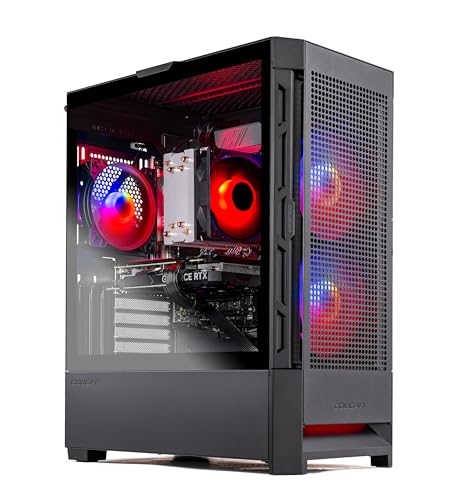
- Best overall: Skytech Blaze4 Mini, Ryzen 7 5700, RTX 4060 Ti, 16GB DDR4, 1TB SSD — Check on Amazon
- Minisforum AtomMan G7 Pt, Ryzen 9 7945HX, RX 7600M XT, 32GB, 1TB — Check on Amazon
- Beelink SER9 Pro, Ryzen AI 9 HX 370, Radeon 890M, 32GB, 1TB — Check on Amazon
- Minisforum UM890 Pro, Ryzen 9 8945HS, Radeon 780M, 32GB, 1TB — Check on Amazon
- GMKtec NucBox K8 Plus Barebone, Ryzen 7 8845HS, No RAM/SSD/OS — Check on Amazon
- HP OMEN 16L, Core i7-14700F, RTX 4060, 32GB (Amazon bundle listing) — Check on Amazon
Read the full guide ↓
Disclosure: As an Amazon Associate, reviewstook.com earns from qualifying purchases. Links to Amazon on this page are affiliate links; they cost you nothing extra. Listing details such as price and availability change often, so check the current Amazon listing before you buy.
If this is your first gaming PC, start with a warning: “compact” is the slipperiest word in computer shopping. Nothing regulates it — no standard, no maximum size — so a brand can stamp it on a box smaller than a paperback and on a tower the size of a suitcase in the same week, over the same photo of a tidy, empty desk. This beginner’s guide therefore does the one thing listings hope you won’t: it takes every machine’s measurements from its own listing, multiplies them out, and tells you the real size in liters before it tells you anything else. The six machines below run from about 0.82 liters — genuinely tiny — to a 16-liter tower whose name turns out to be nothing more than its volume, with one surprise in the middle: the strongest gaming machine here wears a “Mini” badge on a box that its own listing dimensions describe as a small mid-tower.
So what does $1,200 honestly buy in a compact gaming PC? One of two different things. The first is a small tower with a real, replaceable desktop graphics card inside: proper gaming power and parts you can swap later, in a box that is “compact” only next to bigger towers. The second is a true mini PC that can hide behind your monitor, built from laptop parts that are mostly soldered in place forever. Those split further — one carries a real (laptop) graphics chip, two rely on the graphics built into the processor, and one arrives as an empty shell you must finish yourself. Each is the right answer for somebody; they are simply different purchases wearing the same label. Check the price on Amazon for each pick before you decide, because in the current memory shortage, listing prices move often.
The Jargon, Translated
Every term below appears in the listings for these six machines. Learn these twelve and you can read any PC listing on Amazon without a translator.
- GPU (graphics card) vs integrated graphics. The GPU draws your games. A discrete GPU is a separate card or chip bought for that job alone — fast, and the biggest single factor in how well a PC games. Integrated graphics are a small graphics section built into the processor, borrowing the machine’s memory — fine for light and older games, a hard ceiling for demanding new ones. Three picks here have discrete GPUs; two run on integrated graphics; one barebone adds a port for a card later.
- VRAM. The graphics chip’s own private memory, where a game keeps the pictures it is drawing. More VRAM allows prettier textures. It is a different number from the PC’s main memory — integrated graphics have none of their own and borrow from main memory instead.
- CPU (processor). The machine’s general-purpose brain: it runs the game world, Windows and everything that is not drawing pictures. Cores are its parallel work lanes. A strong CPU with weak graphics still games badly — for games, the GPU matters more, which surprises most first-time buyers.
- RAM (memory). The PC’s short-term workspace, measured in gigabytes (GB). 16GB is today’s gaming minimum; 32GB is comfortable. Watch for the word soldered: soldered memory is fixed at the factory and can never be upgraded. Socketed memory sits in slots and can be swapped later.
- SSD (storage). Where your games and Windows live permanently. 1TB (one terabyte) holds a handful of big modern games. A 512GB drive fills faster than new buyers expect.
- Resolution. How many dots make up the picture: 1920 × 1080 (“1080p”), 2560 × 1440 (“1440p”) or 3840 × 2160 (“4K”). More dots means a sharper picture and far more work for the GPU. Every pick here is aimed at 1080p; asking any of them for 4K gaming is asking for a slideshow.
- Refresh rate (Hz). How many times per second your monitor redraws the picture. A 60Hz screen shows at most 60 pictures a second however fast the PC is. Gamers buy 144Hz monitors to see more — but Windows often leaves a new monitor at 60Hz until you change one setting, which the setup walkthrough below covers.
- Upscaling and frame generation. Tricks that let a PC draw a game at a lower resolution, then intelligently stretch it to fill the screen (upscaling — NVIDIA calls it DLSS, AMD calls it FSR), or insert extra in-between pictures so motion looks smoother (frame generation). They are how small PCs punch above their weight. Note the brand split: DLSS needs an NVIDIA card; AMD machines use FSR. The boost is real, but it is not a free upgrade to a bigger GPU.
- PSU (power supply). The part feeding electricity to everything else, measured in watts. In a tower it is a box inside the case, and its wattage decides whether a future graphics card upgrade is possible. Mini PCs instead use an external power brick, like an oversized laptop charger — fine, but it needs floor or desk space the product photos never show.
- Prebuilt. A finished PC, assembled with Windows installed, ready to use out of the box. Five of the six picks are prebuilts.
- Barebone. A half-finished PC: case, processor and ports are present, but memory, storage and Windows are missing — you buy and install them yourself. One pick below is a barebone. Its price looks wonderfully low until you add the missing parts, so never compare it directly with a finished PC’s price.
- Renewed / refurbished. A used machine that has been checked, cleaned and resold, usually with a shorter warranty. To state it plainly: none of the six picks in this guide is renewed — all six are sold new. You will meet the word in other listings, though; its discount comes with older parts and less warranty, so it is rarely the saving it first looks like.
In this guide
Quick Picks
Short on time, or comparing several options at once? Each row below names a buyer type and the product that suits it, with a link to the listing.
| Buyer type | Pick | Why it stands out | Link |
|---|---|---|---|
| Best overall | Skytech Blaze4 Mini, RTX 4060 Ti | A real desktop graphics card and parts you can upgrade — check price on Amazon — just know “Mini” is a name, not a measurement | Check on Amazon |
| Best truly small with a real GPU | Minisforum AtomMan G7 Pt | A discrete laptop graphics chip inside a console-sized ~2.7-liter box | Check on Amazon |
| Smallest of all | Beelink SER9 Pro | The strongest integrated graphics you can buy, in 0.82 liters — the PC can vanish behind your monitor | Check on Amazon |
| Best mini PC you can still upgrade | Minisforum UM890 Pro | Memory in slots (not soldered), two SSD slots and a port for an external graphics card later | Check on Amazon |
| Cheapest start — parts owners only | GMKtec NucBox K8 Plus Barebone | A budget-tier starting point — check price on Amazon — but that buys an empty shell: no memory, no storage, no Windows | Check on Amazon |
| Best big brand (only on sale) | HP OMEN 16L | HP’s warranty and support in its smallest gaming tower — buy only at or under $1,200 | Check on Amazon |
How These Picks Were Chosen
Size came first, and it was checked with arithmetic instead of adjectives. To appear here a machine had to publish real dimensions, and the volume quoted is those dimensions multiplied together. Ordinary big towers were left out — with one deliberate exception. The Blaze4 Mini’s own listing dimensions describe a small mid-tower rather than a mini PC, and it is included with that fact stated at the top of its review instead of smoothed over, because its price and parts make it the machine many first-time “compact” shoppers will end up buying.
We did not use these products ourselves. We read the makers’ listings, specification pages and independent reviews, comparing dimensions, graphics classes and memory types, and preferring listings that publish their full numbers. Because prices move often in a shortage market, check the price on Amazon for each pick before you decide. Two picks here can sit above this guide’s $1,200 budget between sales events; both are labelled deal-only.
Graphics claims got a beginner-proof rule: laptop parts borrow desktop names, so every graphics chip is described as what it actually is. The RX 7600M XT in one pick is a laptop GPU with 8GB of memory, not the 16GB desktop card its name resembles. The Radeon 890M and 780M are the strongest integrated graphics AMD makes — and “strongest integrated” still means 1080p at modest settings, below every discrete card here.
The 6 Best Compact Gaming PCs Under $1,200 for Beginners
Skytech Blaze4 Mini — Ryzen 7 5700, GeForce RTX 4060 Ti 8GB, 16GB DDR4, 1TB SSD
Who it suits: A first-time buyer whose space problem is a corner of a desk rather than a shelf — you want the strongest gaming performance here and parts you can upgrade later, in a bigger box than the name promises.
Begin with the honest bit: Amazon’s stated item dimensions for the Blaze4 Mini are 15.2 × 9.1 × 19.3 inches, and it weighs a little over 32 pounds. That is a small mid-tower — several times the volume of every mini PC below, and not something that hides behind a monitor. What those dimensions buy is the only ordinary gaming PC in this guide: a Ryzen 7 5700, a desktop GeForce RTX 4060 Ti with 8GB of VRAM, 16GB of memory, a 1TB SSD and a 650W Gold-rated power supply, all standard parts any shop can service. Check the price on Amazon for the current listing before you buy.
For a beginner, the ownership story is the friendly one: everything inside is standard, so the graphics card can be replaced years from now, memory and storage follow ordinary desktop rules, and big case fans make it the quiet way to run this hardware. Two honest costs. First, the platform: the Ryzen 7 5700 sits on AMD’s older AM4 socket with DDR4 memory, at the end of its line — a much newer processor one day means a new motherboard too. Second, Skytech may fit different brands of the same parts between builds; you are guaranteed the specification, not a particular maker’s logo.
- Desktop RTX 4060 Ti performance — check price on Amazon — a strong-value standout of this guide.
- Standard parts throughout: every major component can be upgraded or replaced later.
- Named 650W Gold power supply — real headroom for a future graphics card swap.
Honest limitation: The name. By its own listing’s dimensions this is a small mid-tower, not a mini PC, and the AM4/DDR4 platform underneath is at the end of its line.
Choose it if your space limit is measured in feet of desk and you want a tower’s upgrade path. Skip it if the PC has to live on a shelf, in a cabinet or behind a monitor — the mini PCs below exist for that.

Minisforum AtomMan G7 Pt — Ryzen 9 7945HX, Radeon RX 7600M XT, 32GB, 1TB
Who it suits: Living-room and small-desk beginners who want a real graphics chip in a console-like box by the TV — and who accept that the graphics chip it arrives with is the one it keeps for life.
This pick proves a genuinely small PC can still game properly. Inside a vertical body measuring about 269 × 155 × 64 mm without its stand — roughly 2.7 liters, and smaller in every dimension than a PlayStation 5 Slim — sit a 16-core Ryzen 9 7945HX processor (a flagship laptop chip) and a discrete Radeon RX 7600M XT graphics chip with 8GB of its own memory. Minisforum describes the machine as a 3.8-liter body on its stand. Memory and storage sit in slots rather than being soldered — up to 96GB of RAM and two SSD slots — so the two things owners most often outgrow can still be upgraded. For the configured 32GB/1TB version, check the price on Amazon. Treat anything at or under $1,200 as the buy zone for this guide.
Two beginner taxes. The first is the graphics chip’s name: the RX 7600M XT is a laptop part with 8GB of memory — closer to the desktop RX 7600 than to the 16GB desktop card its badge suggests — and it is soldered in, as is the processor. Reviewers place its gaming at strong 1080p and selective 1440p with sensible settings; upscaling is AMD’s FSR, not NVIDIA’s DLSS, because there is no NVIDIA chip inside. The second tax is physical: a 300W power brick weighing the better part of a kilogram, and an 85W performance mode reviewers found clearly audible, next to a 65W balanced mode that suits a desk. Heat in a 2.7-liter box is the design, not a fault.
- A discrete graphics chip and a 16-core processor in about 2.7 liters — the only pick that is both truly compact and truly discrete.
- Memory (up to 96GB) and both SSD slots stay upgradeable, even though the graphics never can be.
- The 32GB/1TB configuration is the one to look for — check its price on Amazon.
Honest limitation: The RX 7600M XT is a soldered laptop GPU with 8GB — it will never be upgraded or replaced, and the heavy power brick plus performance-mode fan noise are permanent features.
Choose it if you want one small box by the TV that games properly at 1080p today and takes more memory and storage tomorrow. Skip it if you plan to upgrade the graphics later, specifically want NVIDIA features, or are very noise-sensitive.

Beelink SER9 Pro — Ryzen AI 9 HX 370, Radeon 890M, 32GB, 1TB
Who it suits: Desk minimalists who want the smallest possible box, and whose games are esports, older and indie titles played at 1080p with modest settings.
The SER9 Pro is the smallest machine in this guide by a factor of three: 135.5 × 135.5 × 44.7 mm, roughly 0.82 liters, in a metal shell reviewers consistently describe as the most premium-feeling in its class. It can mount behind a monitor and effectively disappear. Inside, a twelve-core Ryzen AI 9 HX 370 processor drives Radeon 890M graphics — the strongest integrated graphics AMD puts in a mini PC — helped by 32GB of fast memory and a 1TB SSD. This is the top of the integrated class: esports and older games run happily, current big-budget games are playable at 1080p at low-to-medium settings with FSR upscaling helping out, and reviewers rate it relatively quiet under load — rare at this size. Pricing needs a firm rule: check the price on Amazon for the 32GB/1TB version, because shortage-era listings can cross above this budget. At or under $1,200 it is a considered buy; above that, the discrete-graphics picks above it make more sense.
The catch is permanence, and beginners should hear it clearly. The memory is soldered: 32GB is the machine’s lifetime supply, not a starting point — if you might ever want 64GB, that is a different, pricier version chosen on day one. There is no OCuLink port (the socket two picks below use for an external graphics card), so the 890M’s ceiling is this machine’s ceiling, forever. Storage is the one open door, and even it carries a warning: Beelink’s listing copy and independent teardowns disagree about whether a second SSD slot is inside, so check the live listing if a second drive matters to you. None of this makes the SER9 Pro a bad buy; it makes it a finished one, fixed at checkout.
- 0.82 liters — mount it behind a monitor and the PC effectively disappears from your desk.
- Radeon 890M is the strongest integrated graphics available in a mini PC, with a modern 12-core processor behind it.
- Reviewers rate it relatively quiet under load, which is unusual in something this small.
Honest limitation: Soldered memory and no external-graphics port mean the graphics and memory you buy are what you keep — and shortage-era listings have crossed above this budget, so the buy only works at or under $1,200.
Choose it if the tiny footprint is the whole point and your game library suits integrated graphics. Skip it if you want any kind of graphics upgrade path, ever — that is the UM890 Pro or the K8 Plus below.
Minisforum UM890 Pro — Ryzen 9 8945HS, Radeon 780M, 32GB, 1TB
Who it suits: Beginners who like the mini PC idea but hate permanence — you want memory and storage in slots, every port you might need, and a possible route to a real graphics card later.
If the SER9 Pro is a sealed appliance, the UM890 Pro is the toolkit version of the same idea. The box measures about 130 × 127 × 66.6 mm — roughly 1.1 liters, a little taller than most mini PCs — and at 709 grams it mounts behind a monitor without argument. Inside, almost nothing is soldered down: two memory slots accept up to 96GB, two SSD slots take storage, and the connections are the best in this guide — two USB4 ports, two 2.5-gigabit Ethernet ports, and a native OCuLink port, the special socket that lets a mini PC drive a desktop graphics card in an external dock. The Ryzen 9 8945HS and its Radeon 780M integrated graphics are a step behind the SER9 Pro’s newer silicon — the 780M is a 1080p, low-to-medium-settings part with upscaling — but reviewers singled out its whisper-quiet cooling, which matters when the PC lives at elbow distance.
The complication is price, because the memory shortage has been unkind to this listing, so check the price on Amazon before you decide. When it sits comfortably inside this guide’s budget, this is the thinking person’s pick of the guide. When it climbs toward the top of that budget, you are paying nearly AtomMan G7 Pt money for integrated graphics, and the advice flips — wait for a sale, or accept that the premium buys ports and upgrade slots rather than frame rates. What rescues the value case is the OCuLink port: the only complete, ready-to-use machine here that can take a desktop graphics card later. Price that stage honestly first — the dock alone is the cheap part, as the K8 Plus review spells out.
- Memory in slots up to 96GB and two SSD slots — the upgradeable mini PC in a mostly soldered field.
- Native OCuLink port, dual USB4 and dual fast Ethernet: the best connectivity in this guide.
- Review-praised quiet cooling, and a VESA bracket for behind-monitor mounting.
Honest limitation: The Radeon 780M is integrated graphics with a firm 1080p ceiling, and its price can climb toward the top of this guide’s budget — when it does, this is a machine to wait on, not chase.
Choose it if you value upgradability, ports and quiet over raw graphics power, or like the idea of an external graphics card later. Skip it if the live price on Amazon is near the top of this budget and gaming is the priority — the G7 Pt’s discrete GPU is the better spend that day.

GMKtec NucBox K8 Plus Barebone — Ryzen 7 8845HS, No RAM, SSD or OS
Who it suits: The beginner with a head start — you already own spare DDR5 laptop memory or an SSD, or have a confident friend who will help you finish the build. If neither is true, read this review as a warning label and buy a finished machine instead.
Read this listing’s title the way a lawyer would. This K8 Plus is the barebone version, and the shell — check its price on Amazon — buys you a Ryzen 7 8845HS processor with Radeon 780M integrated graphics, two empty memory slots, two empty SSD slots, and no Windows license. It will not switch on and play games the day it arrives — it cannot, because the parts that hold your games and your operating system are not in the box. One more listing trap, aimed exactly at beginners: the title says “Without RAM/SSD/OS,” yet a specification field elsewhere on the page mentions Windows 11 Pro. Believe the title — the barebone has no operating system, and that contradiction is a known quirk of this listing family. The box itself is about 132 × 127 × 58 mm by the maker’s stated dimensions — roughly a liter — and its connections are excellent: a native OCuLink port, dual USB4, dual 2.5-gigabit Ethernet and outputs for four displays.
So what does finishing it cost? Today’s memory prices have flipped the usual barebone logic: completing a comparable barebone with 32GB of memory and a 1TB SSD bought new during the shortage makes the parts a major share of the total cost — check the current price on Amazon for the shell and for each part before you commit. The parts, not the computer, are now the expensive half. If those parts are already in your drawer, finishing adds little and this becomes a strong-value pick in the guide. The external-graphics stage needs the same honesty: a Minisforum DEG1 dock does not include a power supply, and you still need a desktop graphics card on top of it — so a from-scratch OCuLink setup is comfortably over this budget. It fits this budget only when the card (and ideally a power supply) is hardware you already own. And OCuLink is not hot-pluggable like USB: disconnecting the dock means shutting down first, every time.
- A budget-tier route to this port selection and an OCuLink socket — check price on Amazon.
- Two memory slots and two SSD slots: nothing about the finished machine is soldered or final.
- Dual USB4 and dual fast Ethernet make it a capable workstation when it is not gaming.
Honest limitation: It is not a usable computer on delivery day. At current memory prices, completing it with new parts costs about as much as buying the finished version — the saving exists only for people who already own the parts, and the full external-graphics build exceeds this budget from scratch.
Choose it if you have memory, an SSD or a spare desktop graphics card waiting, and someone to help with a first build. Skip it if this is your first PC and you are buying everything new — the UM890 Pro above is this idea finished, and the Blaze4 Mini is the performance finished.

HP OMEN 16L — Core i7-14700F, GeForce RTX 4060, 32GB (Amazon Bundle Listing)
Who it suits: Beginners who want a famous brand’s warranty, support line and easy returns behind their first gaming PC — and who are patient enough to wait for a sale to make it a $1,200 purchase.
Start with a small delight: this is the rare product whose name tells the truth. HP publishes dimensions of 337 × 155 × 308 mm for the OMEN 16L, and multiplying those together lands within a rounding error of sixteen liters — the badge on the front is a measurement, not a metaphor. Inside sits a proper small tower rather than a mini PC: the Amazon bundle listing pairs a Core i7-14700F with a desktop GeForce RTX 4060 and 32GB of memory, with the usual tower comforts — a real internal power supply, room to work inside, and cooling that never has to strain. Sixteen liters counts as compact only beside the 30-to-45-liter towers that dominate gaming; next to the mini PCs above, the OMEN is a wardrobe. Against the Blaze4 Mini, though, it is genuinely the smaller, tidier box, and it comes with the one thing smaller brands cannot match: HP’s warranty, support network and painless returns — worth real money to a nervous first-time buyer.
The problem is purely the number on the listing. Check the price on Amazon for this bundle listing before you consider it, and check HP’s own store for its mid-range configurations as well; entry-level configurations in the range are a different, lower tier. This pick is here as a sale-watching option: at or under $1,200 it is arguably the most sensible purchase in the guide for a non-technical buyer; above that budget it is over budget, and the Blaze4 Mini gives you a faster graphics card for less. Treat it as a watchlist item — set a price alert, and when a sale lands, read the exact configuration in the title before ordering, because some HP configurations ship a single 16GB memory stick, which leaves performance on the table until a second is added.
- Sixteen honest liters — HP’s smallest gaming tower, with the volume printed in the name.
- Desktop RTX 4060 and 32GB of memory in this bundle listing, backed by HP’s warranty and returns.
- Watch for a sale that brings it inside this guide’s budget — that is what turns it into a buy.
Honest limitation: Above this guide’s budget, this machine costs more than the budget on this page allows. It is a sale-watching pick: worth your money at $1,200 or less, and not before — and sixteen liters only counts as small when the comparison is a full-size tower.
Choose it if a sale is live at or under $1,200 and you value warranty and support over the last drop of specification. Skip it if the price on Amazon is sitting above this budget — the Blaze4 Mini is the stronger-value choice today.

Comparison Table
| Product | Stated size / volume | Graphics | Best use | Link |
|---|---|---|---|---|
| Skytech Blaze4 Mini | 15.2 × 9.1 × 19.3 in (listing) — small mid-tower | Desktop RTX 4060 Ti 8GB | Performance and upgrades, where liters are not the constraint | Check on Amazon |
| Minisforum AtomMan G7 Pt | 269 × 155 × 64 mm body — ~2.7L | RX 7600M XT 8GB (laptop, discrete) | Console-sized living-room gaming with a real GPU | Check on Amazon |
| Beelink SER9 Pro | 135.5 × 135.5 × 44.7 mm — ~0.82L | Radeon 890M (integrated) | The smallest desk footprint; 1080p integrated gaming | Check on Amazon |
| Minisforum UM890 Pro | 130 × 127 × 66.6 mm — ~1.1L | Radeon 780M (integrated) + OCuLink port | Upgradeable mini PC; external GPU possible later | Check on Amazon |
| GMKtec NucBox K8 Plus Barebone | ~132 × 127 × 58 mm — ~1.0L | Radeon 780M (integrated) + OCuLink port | Cheapest external-GPU host — for parts owners only | Check on Amazon |
| HP OMEN 16L | 337 × 155 × 308 mm — ~16L | Desktop RTX 4060 8GB | Big-brand small tower, bought on sale | Check on Amazon |
Your First Evening: Setting Up, Step by Step
Every finished pick in this guide can be running its first game within the hour, with no tools and no experience.
- Step 1 — Unbox and check the model number. Match the model number on the box against the one in the listing you ordered (the Blaze4 Mini’s, for example, is ST-BLAZE4MINI-1266-B-AM). Listings sell lookalike configurations under near-identical names, and the model number — not the product name — is the machine you actually paid for. If it is wrong, stop here; a return is painless now and a headache later. On the tower picks, also remove any protective packing foam inside the case before switching on.
- Step 2 — Power. Towers (Blaze4 Mini, OMEN 16L) plug straight into the wall and have a small switch on the back near the socket — flip it on, or the front button will appear to do nothing. Mini PCs use their external power brick: brick into the wall, its cable into the back of the box. The G7 Pt’s brick is big — give it floor space, not a drawer.
- Step 3 — The monitor cable goes into the graphics card. This is the classic first-PC mistake. If your PC has a discrete graphics card (Blaze4 Mini, OMEN 16L, AtomMan G7 Pt), the monitor cable must plug into the card’s sockets. On the two towers those sockets sit low at the back, in a horizontal row — that is the card. The sockets higher up, near the USB ports, belong to the motherboard. Use those and your expensive card sits idle — or you get no picture at all, since the processors in the Blaze4 Mini and OMEN have no integrated graphics to fall back on. On the three mini PCs there is no separate card to find: plug into the box’s HDMI or USB4 socket and you are done.
- Step 4 — First switch-on, updates and drivers. Windows will walk you through its own setup; let it. Then run Windows Update (Settings → Windows Update) until it stops offering new items, restarting when asked. Graphics drivers are the one extra: owners of the two NVIDIA towers should install NVIDIA’s app and let it fetch the current driver; the AMD machines are covered by Windows Update and AMD’s own software.
- Step 5 — Set your monitor’s real refresh rate. A gaming monitor fresh out of its box usually runs at 60Hz in Windows whatever its packaging promised. Go to Settings → System → Display → Advanced display, and pick the highest refresh rate offered. Until you do this, a 144Hz monitor is a 60Hz monitor.
- Step 6 — Verify what actually arrived. Open Settings → System → About and compare the processor name and installed memory against the listing; open Task Manager → Performance to see the graphics card’s name and your storage size. Check three things: the right graphics (a discrete card should appear by name), the right amount of memory (32GB means 32GB — and on the OMEN, whether it arrived as one stick or two), and the right drive size. Anything that disagrees gets photographed and raised with the seller inside the return window, not lived with.
- Step 7 — Install a game store and start sensibly. Install Steam (or the store your games live on), download something you already own, and begin at 1080p. On the discrete-graphics picks you can raise settings from there; on the integrated-graphics mini PCs, switch on FSR upscaling in the game’s display settings and let it help.
What Else You Will Spend
The prices in this guide buy the computer only — no pick here includes a screen, and none of the extras below is folded into any pick’s price. Budget for them separately, in this order.
- A monitor, first and above all. None of these machines is usable without one, and the right partner for every pick here is a 1080p monitor — ideally a high-refresh one (144Hz class) for the discrete-graphics picks. A 1440p screen is a reasonable luxury on the stronger picks; a 4K screen is money spent on dots none of these PCs can game on. A TV you already own will do while you save.
- Keyboard and mouse. Some bundles include basic ones and some boxes include none — check the “what’s in the box” line of the exact listing before assuming. A basic set is all a beginner needs.
- Possibly, a second SSD later. Modern games are large, and a 1TB drive fills faster than new owners expect. On every pick here except the SER9 Pro, adding storage later is a normal, planned step.
- For the K8 Plus only: the missing parts. Memory, an SSD and a Windows license are not “extras” for the barebone — they are the rest of the computer, and at current prices they add a substantial cost on top of the shell, as its review spells out.
Upgrades, in Plain Terms
“Can I upgrade it later?” is the right beginner question, and the answer differs for every pick — so it is answered per machine, using only what each maker documents.
- Skytech Blaze4 Mini: the most upgradeable machine here. Its power supply is a named 650W Gold unit and the case follows standard desktop rules, so a bigger graphics card later is a genuine plan; memory and storage upgrade the ordinary way. The one wall: a much newer processor generation will eventually mean a new motherboard — the AM4 platform is at the end of its line.
- HP OMEN 16L: storage and memory are straightforward, and a graphics card swap is possible within the limits of its case and power supply — HP does not headline a wattage figure for this configuration the way Skytech does, so treat any future swap as a “read the power supply label first” job, not a promised one. If your OMEN arrived with a single 16GB stick, adding the second is the cheapest performance you will ever buy.
- Minisforum AtomMan G7 Pt: memory can grow to 96GB and both SSD slots can be filled or enlarged. The processor and graphics chip are soldered — they are never coming out. What you can upgrade is room, not speed.
- Minisforum UM890 Pro: memory to 96GB and two SSD slots, as with the G7 Pt — plus the one graphics route no other complete mini PC here offers: an external desktop graphics card in a dock on its OCuLink port — a real upgrade of capability, priced honestly in the K8 Plus review.
- Beelink SER9 Pro: storage is the only door, and even that deserves a check against the live listing, because sources disagree about whether a second SSD slot is fitted. Memory is soldered and permanent; graphics are integrated and permanent. Buy this one for what it is, not for what it might become.
- GMKtec NucBox K8 Plus Barebone: everything is an upgrade because everything starts empty — memory to 96GB, two SSD slots, and the same OCuLink external-graphics route as the UM890 Pro. Nothing is soldered, which is its appeal to parts owners — and why it is work, not a purchase, for a beginner.
How to Choose a Compact Gaming PC Under $1,200
- Work out the size yourself. Multiply the three stated dimensions in centimeters and divide by a thousand: that is the volume in liters. Under about 5 liters is a true mini PC; 5–20 liters is a small tower; above that is a mid-tower in a costume, whatever the product name says
- Decide your graphics answer first. A discrete card inside (the two towers, the G7 Pt), integrated graphics now (SER9 Pro, UM890 Pro), or integrated now with an external-card port for later (UM890 Pro, K8 Plus). All three are legitimate. Confusing one for another is how money gets wasted.
- Price the whole journey, not the first step. A barebone’s real price is the shell plus memory, storage and Windows. An external-graphics plan’s real price is the host plus dock, power supply and card. Add the full column before you admire the starting figure.
- Ask what is soldered. On the SER9 Pro, memory and graphics are fixed for life. On the G7 Pt, the processor and graphics are fixed but memory and storage are not. The UM890 Pro and K8 Plus sit at the other end of the scale: practically nothing inside them is permanent.
- Read laptop GPU names suspiciously. A name with an “M” in it, or the word “Laptop,” is a different, slower part than the desktop card it resembles, often with half the memory. The RX 7600M XT’s honest figure is 8GB; the desktop card it echoes carries 16GB.
- Budget a home for the power brick. Mini PCs run on external bricks that take floor or desk space and add a cable; the G7 Pt’s 300W brick weighs nearly a kilogram. The tidy-desk photos never show it.
- Match the box to the furniture honestly. A TV-stand shelf needs an open back and air above the machine; a monitor’s VESA mount suits a box around a liter or so; a desk corner needs only honesty about how much desk you have.
- Let sales set your patience line. Several picks here move in and out of this budget between sales, so check the price on Amazon and buy on a sale rather than on the day you happened to shop.
Common Buying Mistakes
- Trusting “mini” or “compact” in a product name instead of multiplying the stated dimensions — the most expensive beginner mistake in this category, and the easiest to avoid.
- Comparing a barebone’s price against finished PCs. The K8 Plus barebone and the Blaze4 Mini are not separated by value alone; they are separated by memory, storage, a Windows license and a desktop graphics card.
- Plugging the monitor into the motherboard’s sockets on a tower and concluding the PC is slow — the graphics card was never connected. The card’s sockets are the low, horizontal row at the back.
- Budgeting for an external-graphics dock and forgetting the power supply it does not include — and the card itself. The dock is only one part of a from-scratch setup’s true cost.
- Assuming OCuLink works like USB and unplugging it while the PC is on. It is a PCIe connection: shut down to connect or disconnect, or risk the crash that teaches the lesson.
- Buying the cheaper soldered-memory configuration to save money. On a machine like the SER9 Pro the memory decision is permanent — the saving happens once, the ceiling lasts forever.
- Paying shortage prices without checking the current listing first. Check the price on Amazon — a listing near the top of this budget may simply be charging you for your impatience.
- Sealing a gaming mini PC inside a TV cabinet and blaming the machine when it slows down on long sessions. Small boxes need their exhaust back, un-recycled.
- Expecting a laptop GPU to perform like the desktop card its name resembles — the badge is shared, the silicon is not.
Final Recommendation
- Most beginners with a desk corner: Skytech Blaze4 Mini.
- True compact with a real GPU, living room: Minisforum AtomMan G7 Pt.
- Smallest footprint, quiet desk: Beelink SER9 Pro.
- Upgradability and ports in a mini PC: Minisforum UM890 Pro.
- Parts owners staging an external-GPU build: GMKtec NucBox K8 Plus Barebone.
- Big-brand buyers with patience: HP OMEN 16L, on sale only.
The top two picks answer two different questions. If yours is “a machine that takes less room than the tower I might otherwise buy” — with desktop graphics, desktop upgradability and the best price-to-performance here — the Blaze4 Mini — check its price on Amazon — is the buy, and its name is the only dishonest thing about it. If yours is “the machine disappears” — into a TV stand, behind a monitor, into 3 liters or fewer — the AtomMan G7 Pt is the one pick that shrinks the box without shrinking the graphics down to integrated level. The mini PC routes reward the patient and the parts-rich: the UM890 Pro on a dip, the K8 Plus with a full drawer, the SER9 Pro when the footprint is the entire point. If your budget can stretch, compare Best Compact Gaming PC Under $1500 next; if it needs to shrink, start from Best Compact Gaming PC Under $800; and if the room itself is the constraint, Best Compact Gaming PC For Small Spaces Under $1200 is the guide written for you. Measure the shelf, do the multiplication, cost the whole journey — then check today’s price.
Frequently Asked Questions
What actually counts as a compact gaming PC?
Nobody officially defines it — there is no standard a listing has to meet before it can use the word. Our working lines: under about 5 liters is a true mini PC, 5–20 liters is a small tower, and above that you are shopping for a mid-tower whatever the listing calls it. Pick your own line, in liters, before you open a single listing, and judge every product against it.
I’m a complete beginner. Which of these should I actually buy?
For most first-time buyers, the Blaze4 Mini — it is a normal PC in a modest box, with the strongest graphics here and parts any shop can service. If the PC must live by a TV or behind a monitor, the AtomMan G7 Pt. The one pick a beginner buying everything new should not start with is the K8 Plus barebone: it is a project, not a computer, until you add memory, storage and Windows.
Is integrated graphics enough for gaming?
For esports titles, older games and 1080p at low-to-medium settings with upscaling switched on, yes — the Radeon 890M in the SER9 Pro is the strongest integrated graphics available, and the 780M machines sit a step behind it. For current big-budget games at high settings, no integrated graphics in any mini PC is enough. That is what the G7 Pt’s discrete chip and the towers’ desktop cards are for.
Why does the monitor cable’s socket matter so much?
Because a PC with a graphics card has two sets of display sockets, and only one set is connected to the card. Plug into the motherboard’s sockets on the Blaze4 Mini or OMEN 16L and the card you paid for sits idle — on those two machines the processor has no graphics of its own to fall back on, so you may get a black screen instead of a picture. The card’s sockets are the low, horizontal row at the back of the tower.
What does an external graphics card (OCuLink) setup really cost, all-in?
From scratch, a complete OCuLink setup sits comfortably over this guide’s budget: you need the host, memory and storage to complete it, a dock, a power supply the dock leaves out, and a desktop graphics card — check the price on Amazon for each part and add them up before you commit. Already own the card? Then a host plus dock buys the same capability for far less, and the dock turns out to be only one part of the real total.
Can I upgrade the graphics card in these machines later?
In the Blaze4 Mini, yes — it takes standard desktop cards, and its named 650W Gold power supply gives a future swap real headroom. The OMEN 16L accepts one too, within its case and power supply limits. In the G7 Pt and SER9 Pro, never — the graphics are soldered or integrated, permanently. In the UM890 Pro and K8 Plus, not inside the box, but their OCuLink ports allow a desktop card in an external dock: an upgrade of capability rather than of the machine itself.
Why are the small PCs sometimes more expensive than the tower?
Because shrinking a PC is a feature with a cost, and because a memory shortage has inflated mini PC prices specifically — several listings here move up and down sharply between sales. You are paying for the liters you save. If saving them is not something you need, the tower is simply the smarter purchase.
Should I buy the HP OMEN 16L above this guide’s budget?
No. Above this guide’s budget it breaks the limit on this page and gives you a slower graphics card than another tower in this same list. Its case rests on the day a sale pulls it to $1,200 or below, when HP’s warranty, support and honest sizing make it the low-stress mainstream choice. Until that day, it is a watchlist entry, not a purchase — check the price on Amazon before you buy.
- Best Compact Gaming PC Under $1200
- Best Compact Gaming PC Under $800
- Best Compact Gaming PC Under $1500
- Best Compact Gaming PC For Small Spaces Under $1200
- Best Small Form Factor Gaming PC Under $1200
- Best Mini Gaming PC Under $1200
- Best Mini PC Under $1200
- Best Gaming PC For Small Spaces Under $1200
- Best Barebones Mini PC Under $1200
- Best Prebuilt Gaming PC Under $1200
- Best Gaming PC Under $1200
- Best Compact Gaming PC For Streaming Under $1200


