Where to buy
Check the latest price, availability and delivery on Amazon. Orders are placed on Amazon. We may earn a commission from qualifying purchases.
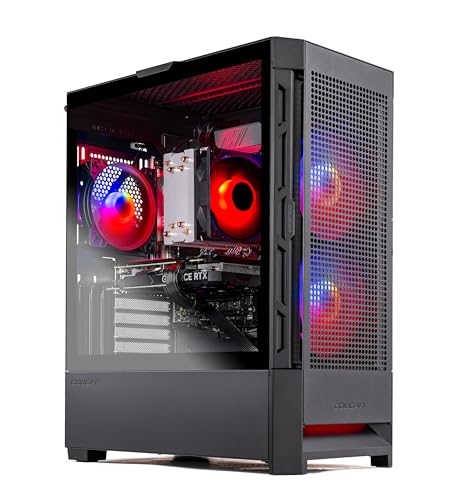
- Best overall: Skytech Blaze4 Mini, Ryzen 7 5700, RTX 4060 Ti, 16GB DDR4, 1TB SSD — Check on Amazon
- Minisforum AtomMan G7 Pt, Ryzen 9 7945HX, RX 7600M XT, 32GB, 1TB — Check on Amazon
- Beelink SER9 Pro, Ryzen AI 9 HX 370, Radeon 890M, 32GB, 1TB — Check on Amazon
- Minisforum UM890 Pro, Ryzen 9 8945HS, Radeon 780M, 32GB, 1TB — Check on Amazon
- GMKtec NucBox K8 Plus Barebone, Ryzen 7 8845HS, No RAM/SSD/OS — Check on Amazon
- HP OMEN 16L, Core i7-14700F, RTX 4060, 32GB (Amazon bundle listing) — Check on Amazon
Read the full guide ↓
Disclosure: As an Amazon Associate, reviewstook.com earns from qualifying purchases. Links to Amazon on this page are affiliate links; they cost you nothing extra. Listing details such as price and availability change often, so check the current Amazon listing before you buy.
A small space does not grade a PC the way a spec sheet does. It grades the installation: the shelf depth the case actually consumes once cables bend out of its back, the power brick that needs a home of its own, the hot air that has to leave the furniture instead of recirculating inside it, and the sound a small fan makes in a small room. So this guide takes the six verified compact machines from our main $1,200 research and re-scores each of them as furniture first and a computer second.
The spread is wider than the word “compact” suggests. At one end, the Beelink SER9 Pro occupies about 0.82 liters and can vanish behind a monitor entirely. At the other, the Skytech Blaze4 Mini — the strongest gaming machine in this set — carries listing dimensions of 15.2 × 9.1 × 19.3 inches, which makes it a small mid-tower that happens to have “Mini” in its name; it is graded here as exactly that, and it still earns a place, because some small spaces are a spare desk corner rather than a shelf, and a tower that fits the corner beats a mini PC that fits the shelf but cannot play the games. Between those poles sit a console-shaped Minisforum with a discrete GPU and a 300W brick to hide, two roughly one-liter mini PCs that mount behind screens, a barebone that asks you to finish it, and HP’s honestly named 16-liter tower. Check the live price on Amazon for each pick before you buy, in a market where a memory shortage has been moving mini PC prices noticeably between months.
In this guide
Quick Picks
Short on time, or comparing several options at once? Each row below names a space first and the product that suits it, with a link to the listing.
| Your space | Pick | Why it stands out | Link |
|---|---|---|---|
| A desk corner, not a shelf | Skytech Blaze4 Mini, RTX 4060 Ti | Desktop GPU and standard parts — check price on Amazon — but measure it as the small mid-tower its listing dimensions describe | Check on Amazon |
| Beside the TV, console-style | Minisforum AtomMan G7 Pt | Discrete RX 7600M XT in a ~2.7-liter vertical body — plus a 300W brick that also needs a home | Check on Amazon |
| Behind the monitor, invisible | Beelink SER9 Pro | 0.82 liters of machined aluminum; the strongest integrated graphics in the set | Check on Amazon |
| Behind the monitor, upgradeable | Minisforum UM890 Pro | ~1.1 liters, VESA mount, socketed RAM and dual SSD slots behind the screen | Check on Amazon |
| A staged build in ~1 liter | GMKtec NucBox K8 Plus Barebone | A barebone with no RAM, SSD or OS — check price on Amazon — the small OCuLink host for people who already own parts | Check on Amazon |
| A small tower with a warranty (deal-watch) | HP OMEN 16L | An honestly named 16 liters with HP support — buy only at or under $1,200 | Check on Amazon |
How These Picks Were Chosen
The six machines are the verified set from the base guide, and every ASIN and specification is reused from that research unchanged. What changed is the grading. Each pick was re-scored on the five things a small space actually charges for: the form-factor class the documented dimensions put it in; whether it can mount out of sight, and only where the base research documents a mount; where its power supply lives — inside the case, or in an external brick that takes its own shelf space and cable run; how its cables leave the box and how much depth that drop adds behind it; and how its cooling behaves in furniture, because a machine that runs cool on an open bench can still throttle inside a TV stand.
The dimension discipline is strict, and it is worth stating plainly. Where the base research documents a measurement — the SER9 Pro’s 135.5 × 135.5 × 44.7 mm, the UM890 Pro’s roughly 1.1 liters, the OMEN’s 337 × 155 × 308 mm — this guide uses it and says where it came from. Where the base research does not document a figure — a front-versus-rear port split for most picks, a noise rating in decibels for any of them — this guide claims none, grades by class and by the reviewer language the base recorded, and sends you to the live listing’s specification table for the exact number. A small-spaces guide that invents the measurements it exists to check would be worse than useless.
Two honesty rules from the base carry over untouched. Prices change constantly, so check the live price on Amazon before you buy: two picks can sit above the $1,200 budget between deal events, and both keep their deal-only framing here, because a machine that only fits the budget on sale day only fits your room on sale day too. And graphics claims stay in their classes — the RX 7600M XT is a mobile GPU with 8GB, the Radeon 890M and 780M are integrated graphics with a 1080p ceiling, and no placement trick changes what the silicon is.
The 6 Best Compact Gaming PCs for Small Spaces Under $1,200
Skytech Blaze4 Mini — Ryzen 7 5700, GeForce RTX 4060 Ti 8GB, 16GB DDR4, 1TB SSD
Who it suits: Small-space gamers whose constraint is a desk corner or a floor patch beside a desk — people with room for one honest tower footprint, who want the strongest graphics in this guide and a machine they can open up later.
Grade the name last and the tape measure first. Amazon’s stated item dimensions for the Blaze4 Mini line are 15.2 × 9.1 × 19.3 inches, with an item weight in the 32-to-34-pound range — several times the volume of every other pick here, and taller in its longest dimension than the 16-liter HP further down. In placement terms that means: it does not go on a TV-stand shelf, it does not go behind a monitor, and it does not go inside a cabinet. It goes where a small tower goes — on the desk if the desk is deep, under it if the floor is clear — and the space it needs is the case depth plus the bend radius of the cables leaving its rear panel, plus open air above and behind for exhaust. That is still a modest installation, and it is the only one in this guide that comes with a desktop GeForce RTX 4060 Ti, a Ryzen 7 5700, 16GB of DDR4-3200, a 1TB NVMe SSD and a 650W Gold power supply inside the box. Check the live price on Amazon for this configuration before you buy.
The placement virtues are the tower virtues. The power supply is internal, so there is no brick hunting for a second home and no extra cable run across the desk. Full-size fans moving tower volumes of air are the quiet way to cool this class of hardware — no small-fan tax, no performance mode you have to apologize for in a quiet room. Standard parts mean the machine’s footprint is also its final footprint: a future GPU swap happens inside the same case, on the same patch of desk, which is a genuinely underrated small-space feature. The costs are the platform and the paperwork. The Ryzen 7 5700 sits on AMD’s end-of-line AM4 socket with DDR4 memory, so the CPU upgrade path is a new motherboard rather than a drop-in chip. And Skytech reserves the right to vary component brands between builds — the contracted specifications are what you are buying, not a particular card maker.
- The only desktop GPU in the guide — check price on Amazon — the performance outlier, bought with floor or desk-corner space instead of shelf space.
- Internal 650W Gold PSU: no brick to place, no second cable run, nothing extra living behind the desk.
- Standard parts throughout, so every future upgrade happens inside the footprint you already gave it.
Honest limitation: By its own listing’s dimensions this is a small mid-tower, not a small-form-factor PC. If your space problem is measured in liters, this pick does not solve it — it changes the subject.
Choose it if your small space has one tower-sized corner and you want the graphics and the upgrade path that only a tower offers. Skip it if the machine must live on a shelf, in a stand or behind a screen — the five picks below exist for exactly those rooms.

Minisforum AtomMan G7 Pt — Ryzen 9 7945HX, Radeon RX 7600M XT, 32GB, 1TB
Who it suits: Living-room gamers and small-desk players who want a genuine discrete GPU in a console-shaped box that stands beside the TV — and who have a plan for the brick.
The body is the easy part. Without its stand, the G7 Pt measures about 269 × 155 × 64 mm — roughly 2.7 liters, smaller in every dimension than a PlayStation 5 Slim according to reviewers who measured both — and with the stand fitted, the maker markets it as a 3.8-liter vertical body. That is a TV-stand footprint: it stands upright in the slot a console would take, vents into open room air, and asks for nothing behind the screen. Inside are a 16-core Ryzen 9 7945HX and a discrete Radeon RX 7600M XT running at up to 120W, with two DDR5 SO-DIMM slots good for up to 96GB and two M.2 slots — one PCIe 5.0 — so memory and storage stay upgradeable even though the silicon does not. For the configured 32GB/1TB version, check the live price on Amazon before you buy; at or under the $1,200 budget is the buy zone, and anything above that budget is the walk-away line. The maker’s own store is another place to compare the same configuration.
The installation has two hidden line items. The first is the power supply: a 300W external brick weighing the better part of a kilogram on its own (874 g in the base research), which needs a ventilated home of its own — on the stand shelf behind the machine, not wadded into the cable tangle, and not under a cushion of dust. Budget its footprint when you measure the shelf, because the 2.7-liter headline does not include it. The second is heat behavior. Reviewers found the 85W performance mode clearly audible; the 65W balanced mode is the one to live with at desk distance, at a small performance cost, and in a small room that trade is usually worth making. The graphics honesty from the base stands: the RX 7600M XT is a mobile part with 8GB of memory — closer to a desktop RX 7600 than to the 16GB desktop card its badge echoes — it is soldered, there is no DLSS because there is no NVIDIA silicon, and FSR does the upscaling work. Reviewers place it at strong 1080p and selective 1440p with sensible settings.
- A discrete GPU and a 16-core CPU in a ~2.7-liter console-style body — the only pick that is both truly compact and truly discrete.
- Stands vertically in a TV-stand slot and vents into the room, not into furniture.
- RAM (to 96GB) and dual M.2 storage stay upgradeable, so its footprint never has to grow.
Honest limitation: The 300W brick is a second object to place and keep ventilated, the performance mode is audible in a small room, and the soldered mobile GPU is the one the machine keeps for life.
Choose it if your space is a TV stand or a shallow desk and you want real discrete graphics without a tower. Skip it if there is nowhere sensible for the brick to live, or if you are noise-sensitive and would end up resenting the performance mode.

Beelink SER9 Pro — Ryzen AI 9 HX 370, Radeon 890M, 32GB, 1TB
Who it suits: Desk minimalists whose ideal PC occupies no visible space at all — mounted behind the monitor, out of sight — and whose games live comfortably at 1080p with modest settings.
This is the smallest installation in the guide, and it is not close. The SER9 Pro measures 135.5 × 135.5 × 44.7 mm — roughly 0.82 liters — in a machined aluminum shell reviewers consistently describe as the most premium-feeling chassis in its class. At that size the placement options change category: it sits on a sliver of desk, it tucks onto a shelf that would reject every other pick here, and mounted behind a monitor it effectively deletes the PC from the room, leaving only the cable drop down the monitor arm to plan. Inside, a twelve-core Ryzen AI 9 HX 370 drives the Radeon 890M, the strongest integrated graphics AMD puts in a mini PC, fed by 32GB of fast LPDDR5X memory and a 1TB SSD. Reviewer consensus also makes it a relatively quiet machine under load — the larger, slower fan its slightly taller mini PC body allows is the right trade in a small room, where the PC is rarely more than an arm’s length from your ears.
The price of disappearance is permanence, plus one pricing rule. The LPDDR5X memory is soldered: 32GB is not a starting allocation, it is the machine’s lifetime supply, and the 64GB variant is a separate day-one decision. There is no OCuLink port, so the external-GPU escape hatch that rescues the two Minisforum picks below does not exist — the 890M’s ceiling, which means esports happily and current AAA titles at 1080p low-to-medium settings with FSR upscaling, is the machine’s ceiling forever. Storage is the one open door, and even it carries a documented disagreement: Beelink’s listing copy and independent teardowns have differed over whether a second M.2 slot is present, so check the live listing if a second drive is part of your plan. Pricing needs the same care, especially while shortage-era listings fluctuate — check the live price on Amazon before you buy. The rule is simple: at or under the $1,200 budget it is a considered buy; above that, the discrete-GPU picks make the better case.
- 0.82 liters — behind a monitor, the PC leaves the room entirely; on a desk, it takes less space than the keyboard’s wrist rest.
- Radeon 890M is the strongest integrated graphics in a mini PC, with a 12-core Zen 5 CPU behind it.
- Relatively quiet under load by reviewer consensus — the small-room quality that matters after the footprint.
Honest limitation: Soldered RAM and no OCuLink port mean the graphics and memory you buy are the graphics and memory you keep, and shortage-era listings can cross above this guide’s budget — the buy only works at or under $1,200.
Choose it if the footprint is the entire point and your library suits integrated graphics. Skip it if you want any graphics upgrade path at all — that is the UM890 Pro or the K8 Plus below.
Minisforum UM890 Pro — Ryzen 9 8945HS, Radeon 780M, 32GB, 1TB
Who it suits: Buyers who want the behind-the-monitor installation without the appliance permanence — a mini PC with sockets, slots and ports that can grow without ever growing in size.
The chassis measures about 130 × 127 × 66.6 mm by the maker’s manual — roughly 1.1 liters; one independent review measured the body slightly slimmer and weighed the bare unit at 709 grams. At that weight and size it VESA-mounts behind a monitor without argument, and the mount is documented in the base research rather than assumed. What makes it the interesting behind-screen pick is what is inside the liter: two DDR5 SO-DIMM slots accepting up to 96GB, two M.2 2280 slots, dual USB4, dual 2.5-gigabit Ethernet, Wi-Fi 6E and a native OCuLink port. Every one of those is a space feature in disguise — the second Ethernet run, the dock cable, the storage that lives inside the box instead of in a USB enclosure on the desk. Cooling is the other quiet virtue: Notebookcheck’s review praised this machine’s whisper-quiet cooling, and behind a monitor at desk distance, quiet is placement quality. The Ryzen 9 8945HS and its Radeon 780M are a step below the SER9 Pro’s newer silicon — a 1080p low-to-medium-settings part with upscaling — and that is the honest graphics ceiling of the box itself.
The complication is that its price fluctuates. Check the live price on Amazon for the complete 32GB/1TB listing before you buy. When it sits comfortably within the budget, this is the thinking person’s pick of the guide. When the live price climbs within sight of the G7 Pt’s discrete GPU, you are paying a premium for integrated graphics, and the advice flips: wait for a better live price, or accept that the premium is for the ports, the sockets and the mount rather than the frame rates. The OCuLink port is what keeps the value case alive at either price — it is the only complete, ready-to-run machine here that can take a desktop graphics card later through a dock, turning the purchase into stages. Read the OCuLink section below before budgeting that stage, though, because in a small space the dock is not just a cost — it is a second installation, with its own box, its own power supply and its own cable.
- VESA-mounts behind a monitor at 709 g, with socketed DDR5 to 96GB and dual M.2 slots — growth that never costs desk space.
- Native OCuLink, dual USB4 and dual 2.5GbE: the best connectivity in this guide, all of it behind the screen.
- Review-praised whisper-quiet cooling — the right acoustic profile for a machine living at elbow distance.
Honest limitation: The Radeon 780M is integrated graphics with a hard 1080p ceiling, and its live price fluctuates — check price on Amazon, and when it sits at the top of its range, wait rather than chasing it.
Choose it if you want the invisible installation plus upgradability, ports and quiet — or you are staging toward an OCuLink setup from a complete machine. Skip it if the live price is near its highs and gaming is the priority; the G7 Pt’s discrete GPU is the better spend that day.

GMKtec NucBox K8 Plus Barebone — Ryzen 7 8845HS, No RAM, SSD or OS
Who it suits: Parts owners and staged builders — anyone with DDR5 SO-DIMMs, an NVMe drive or a desktop GPU already in a drawer — who want the smallest honest starting point for an OCuLink setup.
As a physical object, this is close to the ideal small-space host: about 132 × 127 × 58 mm by the maker’s stated dimensions, roughly a liter, with VESA mounting supported, so the finished machine can live behind a monitor and occupy no desk at all. The connectivity is why it exists in this guide — a native OCuLink port wired at PCIe 4.0 x4, dual USB4, dual 2.5-gigabit Ethernet on Intel i226-V controllers, and quad display outputs. Those four display outputs deserve a small-space translation: they are four cables leaving one liter of computer, and a multi-monitor setup built on this box lives or dies on how that cable drop is routed. Inside are two empty DDR5 SO-DIMM slots (up to 96GB) and two empty M.2 PCIe 4.0 slots. Empty is the operative word: the listing is the barebone, and its Amazon listing price — check price on Amazon before you buy — buys the Ryzen 7 8845HS, its Radeon 780M graphics, and no memory, no storage and no Windows license. One listing quirk from the base research is worth knowing before you order: the listing’s title says “Without RAM/SSD/OS” while a specification field elsewhere on the page has described Windows 11 Pro — treat the title as the truth and budget for an OS.
What finishing it costs is where current memory pricing inverts the usual barebone logic. Completing a comparable barebone — 32GB of DDR5 and a 1TB SSD bought new during the memory shortage — can make the all-in cost rival a complete mini PC: the memory kit, not the computer, can be the expensive half of the build. If the parts are already in your drawer, the same completion adds no new parts cost and this becomes a strong-value pick in the guide. The eGPU stage must be costed — and placed — with the same honesty: a Minisforum DEG1 dock is sold on Amazon, it includes no power supply, and a new desktop graphics card is a further major purchase, so a from-scratch OCuLink build on this host can land comfortably over the $1,200 budget. It fits the budget only when the graphics card, and ideally the PSU, is hardware you already own. And remember that the dock stage also doubles the installation: a second box, a second power supply, and a shutdown every time you connect or disconnect, because OCuLink is not hot-pluggable.
- A budget-tier native-OCuLink host with this port selection — check price on Amazon — in about a liter that mounts out of sight.
- Both memory slots and both M.2 slots are sockets, so no part of the completion is soldered shut.
- Dual USB4 and dual 2.5GbE make it a credible small workstation on the days it is not gaming.
Honest limitation: On delivery day it is a chassis, not a computer. Completing it with new parts at current memory prices costs roughly what the finished version costs — the saving exists only for people who already own the parts — and the full eGPU build exceeds this budget from scratch.
Choose it if a drawer at home already holds the DDR5, the SSD or the spare GPU, and staged buying suits you. Skip it if you are buying everything new — the UM890 Pro complete, or the Blaze4 Mini, reaches a working machine faster and cheaper.

HP OMEN 16L — Core i7-14700F, GeForce RTX 4060, 32GB (Amazon Bundle Listing)
Who it suits: Buyers whose small space is a proper desk setup rather than a shelf — who want a big brand’s warranty and returns in the smallest tower HP sells, and who can wait for a sale to make it a $1,200 purchase.
Start with the rare pleasure of an honest product name. HP’s stated dimensions for the OMEN 16L are 337 × 155 × 308 mm, which multiply out to almost exactly 16 liters — the name is the measurement. In placement terms, 16 liters is a small tower: it lives on a deep desk or under one, vents like a tower, and keeps its power supply inside the case, so the installation is one box and one cable run with nothing else to hide. Against the 30-to-45-liter towers that fill most gaming lineups, that is genuinely compact. Against the mini PCs above, it is a wardrobe, and this guide will not pretend otherwise — if your constraint is a TV-stand shelf or the back of a monitor, this pick was never in your search. What the liters buy is the mainstream ownership package: the Amazon bundle listing tracked for this guide pairs a Core i7-14700F with a desktop GeForce RTX 4060 and 32GB of DDR5, HP’s line offers configurations up to an RTX 4060 Ti, and behind it all sit HP’s warranty, support network and painless returns — the things boutique brands cannot match and the things that matter most to a non-technical buyer.
Then there is the price, which is a real catch. Check the live price on Amazon for the bundle listing before you buy, and compare HP’s own store for mid-range configurations of the line; entry configurations sit in a lower tier, while the configuration tracked here can sit above the budget. Sale coverage has shown OMEN 16L builds within the budget, which is why this pick is in the guide at all: at or under $1,200 it is arguably the most sensible purchase here for a buyer who values support over specification. Above the $1,200 budget it is simply over budget, and the Blaze4 Mini gives you a faster GPU class — check its live price on Amazon as well. Treat the OMEN as a deal-watch listing. Set the alert, and when a sale lands, check the exact configuration in the title before ordering — some HP configurations ship a single 16GB memory stick, which leaves performance on the table until a second stick is added — then measure your desk depth against the 337 mm case before the box arrives, not after.
- The name is the volume: an honest 16 liters, the smallest tower in HP’s gaming line, with an internal PSU and one clean cable run.
- The tracked bundle pairs a desktop RTX 4060 with 32GB of memory, and HP’s warranty and returns stand behind it.
- It has surfaced in sale coverage within the budget — proof that the price this pick needs does occur.
Honest limitation: When its live price sits above the budget it appears in, this pick belongs on a watchlist, not in a cart, until a sale brings it to $1,200 or below — and 16 liters is compact only in the company of full-size towers.
Choose it if a sale has it at or under $1,200 and you would rather have HP’s support than a longer spec sheet. Skip it while its live price sits above the budget — that week, check the Blaze4 Mini’s live price on Amazon instead.

Comparison Table
| Product | Documented size / volume | Where it lives | Graphics | Link |
|---|---|---|---|---|
| Skytech Blaze4 Mini | 15.2 × 9.1 × 19.3 in (listing) — small mid-tower | Desk corner or under-desk floor; internal PSU, no brick | Desktop RTX 4060 Ti 8GB | Check on Amazon |
| Minisforum AtomMan G7 Pt | 269 × 155 × 64 mm body — ~2.7L (3.8L marketed, on stand) | TV stand, console-style; 300W brick needs its own ventilated spot | RX 7600M XT 8GB (mobile, discrete) | Check on Amazon |
| Beelink SER9 Pro | 135.5 × 135.5 × 44.7 mm — ~0.82L | Behind the monitor or a sliver of desk | Radeon 890M (integrated) | Check on Amazon |
| Minisforum UM890 Pro | 130 × 127 × 66.6 mm — ~1.1L, 709 g | VESA-mounted behind the monitor | Radeon 780M (integrated) + OCuLink | Check on Amazon |
| GMKtec NucBox K8 Plus Barebone | ~132 × 127 × 58 mm — ~1.0L | VESA-mounted; plan the four-display cable drop | Radeon 780M (integrated) + OCuLink | Check on Amazon |
| HP OMEN 16L | 337 × 155 × 308 mm — ~16L | Deep desk or under-desk; internal PSU, no brick | Desktop RTX 4060 8GB | Check on Amazon |
The Space Around the Box
The case dimensions are only the first term of the installation. The second is the power brick. The two towers keep their power supply inside the case; the four mini PCs run on external adapters, and the G7 Pt’s is the extreme case — a 300W brick at 874 grams, roughly the size of a paperback novel, that gets warm in use and therefore needs air around it, not a drawer. When you measure a shelf for a mini PC, measure two objects: the computer, and the brick, which lives wherever its cable lets it — usually behind or beside the machine, adding depth the headline dimensions never mentioned. The tidy-desk photographs that sell this category crop the brick out of frame. Your room will not.
The third term is the cable drop. Every connection leaves the back or sides of the box and bends, and a bent cable needs room: a machine pushed flush against a wall or the back of a shelf is a machine whose cables are being folded at angles they dislike, and whose exhaust is blowing into a surface inches away. Behind a monitor, the drop is short and kind — display, power and one network run falling together down the arm or the desk’s rear edge — which is why the VESA-mounted picks grade so well here. Across a room it is the opposite: the K8 Plus can drive four displays, but four display cables plus power plus Ethernet is a harness that has to be planned, clipped and routed, or it becomes the most visible object in the space. Wireless helps where the base documents it — the UM890 Pro’s Wi-Fi 6E can delete the Ethernet run entirely if your router cooperates.
The fourth term is heat, and furniture is where heat goes to be misunderstood. A tower moves air with large fans turning slowly and exhausts it into the room; a one-liter mini PC moves it with small fans turning fast, and in a sealed TV cabinet it rebreathes its own exhaust until it throttles — the machine is not broken, the placement is. The picks manage the tax differently: the UM890 Pro spends its slightly taller body on cooling reviewers called whisper-quiet, the SER9 Pro’s aluminum shell and restrained power limits keep it relatively quiet under load, and the G7 Pt makes you choose between a 65W balanced mode for the desk and an 85W performance mode reviewers found clearly audible. No decibel figure is published for any of them in the base research, and none is invented here — grade by class instead: big fan, slow, quiet; small fan, fast, present. If silence itself is the requirement, fanless designs exist at this budget — see Best Fanless Mini PC Under $1200 — bought, as ever, with gaming performance.
How to Choose: Measure Before You Buy
Work through these five steps in order, with a tape measure, before any money moves. The order is the point: each step can veto a pick the previous step approved.
- Step 1 — Measure the spot. Shelf depth and height, desk depth, the gap behind the monitor, the floor patch beside the desk. Write the numbers down in centimeters and convert every candidate: liters are length × width × height in centimeters divided by 1,000. Under about 5 liters is true small-form-factor; 5 to 20 is a small tower; above that is a mid-tower in a costume, whatever the name says — this set contains a “Mini” whose listing dimensions describe its biggest box.
- Step 2 — Reserve the ventilation clearance. Whatever spot you measured, subtract the air. A gaming machine needs open room on the sides it vents through and space above or behind for exhaust to escape into the room; a sealed cabinet fails every pick in this guide, and a shelf that fits the case exactly fits the case plus a throttle. If the spot cannot give a pick its air, the pick is not smaller than your space — your space is smaller than the pick.
- Step 3 — Give the brick an address. Towers (Blaze4 Mini, OMEN 16L) skip this step; their power supplies are internal. For the mini PCs, decide where the external adapter will live: on a ventilated surface, reachable, not buried in cable tangle and not resting on soft furnishings. The G7 Pt’s 300W brick is the test case — if you cannot point at its home on your shelf, the console-style plan is not finished.
- Step 4 — Walk the cable drop. Count what leaves the box: power, display cables (one for most setups, up to four on the K8 Plus), Ethernet unless you are relying on documented Wi-Fi, and peripherals. Follow each cable’s route from port to destination with your eyes and check the bend room behind the case and the path down the desk. Behind-monitor mounts win this step by design; cross-room runs lose it unless you plan the harness.
- Step 5 — Then order. Only now does price enter: check the live price on Amazon against the rules in the reviews above — the SER9 Pro and OMEN 16L only at or under the $1,200 budget, the UM890 Pro only when its live price still makes the value case against the discrete-GPU picks, the K8 Plus only with its completion cost added. Measure twice, check the live price once, then order.
The OCuLink Option, Placed Honestly
Two picks — the UM890 Pro and the K8 Plus — carry an OCuLink port: a PCIe 4.0 x4 cable connection that lets a mini PC drive a full desktop graphics card in an external dock. In space terms it is a second installation, and small-space buyers should budget it as one: the dock is a box, the power supply the dock does not include is another box, the desktop card stands in the dock on your desk or shelf, and a cable joins the two machines. The one-liter PC has not stayed one liter; it has become a two-piece system whose total footprint rivals a small tower’s — with better separation, admittedly, since the dock can live on a different shelf from the host.
The money tells the same story. Built from the K8 Plus, a from-scratch setup adds a Minisforum DEG1 dock, a power supply of your own, a new desktop graphics card, and — because the host is a barebone — memory and storage first for a 32GB-plus-1TB completion. Added together, those parts can push the honest total over this guide’s $1,200 budget. Where it fits is as a second act: own the desktop card already, and the remaining cost is mainly the host and the dock, with the mini PC’s integrated graphics covering the months in between. Readers weighing that route against a single small box should also compare Best Mini Gaming PC For Small Spaces Under $1200 and Best Small Form Factor Gaming PC For Small Spaces Under $1200, and remember the mechanical rule: OCuLink is not hot-pluggable, so connecting or disconnecting the dock is a shutdown, every time.
Common Buying Mistakes
- Measuring the case and forgetting the installation — the brick, the cable bend, and the air the exhaust needs are all part of the footprint, and in a small room they are often the bigger part.
- Trusting “mini” or “compact” in a product name instead of multiplying the stated dimensions. The most expensive mistake in this category is also the easiest to avoid: this guide’s performance pick is a small mid-tower wearing a Mini badge, by its own listing’s numbers.
- Blaming the machine for throttling after sealing it inside a TV cabinet. In closed furniture a small box rebreathes its own exhaust; give it an open shelf, an open-backed stand, or the back of the monitor — never a sealed cubby.
- Pushing a mini PC flush against the wall to “save space,” folding its cables at hard angles and blocking the rear exhaust. The two centimeters you saved cost airflow and cable life.
- Comparing a barebone’s sticker against complete PCs, as if the two were the same kind of purchase. The gap between the K8 Plus barebone and the Blaze4 Mini complete tower is not margin — it is the memory, storage, OS license and desktop GPU the barebone leaves out. Check the live price on Amazon for both before comparing them.
- Budgeting an eGPU dock and forgetting the power supply it does not include, the card — and the second footprint the whole dock assembly takes up in the room.
- Assuming OCuLink is hot-pluggable like USB. It is a PCIe connection: shut down to connect or disconnect, or learn the lesson from the crash.
- Buying the smaller soldered-memory configuration to save money. On machines like the SER9 Pro the memory decision is permanent; the saving happens once, the ceiling lasts forever.
- Paying whatever a shortage-era listing asks without checking the live price on Amazon first and comparing it with the other picks in this guide — a fluctuating listing can be testing your patience rather than offering fair value.
- Reading a mobile GPU’s badge as a promise of desktop performance. The name is shared with the desktop card; the silicon underneath it is a different, slower part.
Final Recommendation
- Desk corner, best performance: Skytech Blaze4 Mini.
- TV stand, discrete GPU: Minisforum AtomMan G7 Pt.
- Invisible behind the monitor: Beelink SER9 Pro.
- Behind the monitor, upgradeable: Minisforum UM890 Pro.
- Parts owners staging an eGPU build: GMKtec NucBox K8 Plus Barebone.
- Big-brand buyers with patience: HP OMEN 16L, on sale only.
Our top two split on what your small space actually is. If it is a room with one tower-sized corner, the Skytech Blaze4 Mini — check its live price on Amazon — is the buy: the strongest graphics here, an internal power supply, standard parts, and an installation that never has to grow. If the space is a shelf or the back of a monitor, the Minisforum AtomMan G7 Pt is the one pick that shrinks the box to console size without shrinking the graphics to integrated level — just give its brick a ventilated home and live in the balanced mode at desk distance. The behind-screen routes divide by temperament: the SER9 Pro for buyers who want the machine to disappear and stay finished, the UM890 Pro for buyers who want it to disappear and stay upgradeable, bought when its live price on Amazon makes the value case. The K8 Plus rewards a full parts drawer; the OMEN rewards a sale alert. Buyers whose space is tighter still should look at Best Mini PC For Small Spaces Under $1200, those whose constraint is really the desk itself at Best Gaming PC For Small Spaces Under $1200, and everyone should measure the spot, reserve the air, place the brick, walk the cables — then check the live price and order.
Frequently Asked Questions
Which of these actually fits behind a monitor?
Three, by the base research’s documented mounts: the UM890 Pro and the K8 Plus support VESA mounting at around a liter each, and the SER9 Pro — at 0.82 liters, the smallest machine here — is the behind-the-screen pick for buyers who want the PC to disappear entirely. The G7 Pt is a stand-up console-style box for a TV stand, and the two towers do not mount at all. Check the live listing for the specific configuration’s bracket details before ordering.
Can I put a mini gaming PC inside a TV cabinet?
Not a closed one. Every gaming machine in this guide exhausts hot air that has to reach the room; inside sealed furniture it recirculates, temperatures climb and the machine throttles to protect itself. An open-backed stand shelf is fine for the G7 Pt and the mini PCs; a sealed cubby is fine for none of them. The product photos showing otherwise are photographs, not recommendations.
Where does the power brick go?
On a ventilated surface of its own, near the machine, reachable enough to unplug. The G7 Pt’s 300W brick is the one to plan around — it weighs 874 grams and runs warm, so it wants open air on the stand shelf rather than a drawer or a cable pile. The two towers skip the question entirely: their power supplies are internal, which is part of what their extra liters are for.
How much room do the cables really add?
Enough to matter in a small room. A case cannot sit flush to a wall: power and display cables bend out of the back and need their radius, and the exhaust needs somewhere to go. Plan the installed depth as case depth plus the cable drop, keep the drop short by mounting behind the monitor where you can, and count the cables before you buy — a four-display setup on the K8 Plus is a harness that needs a route, not an afterthought.
Is the Blaze4 Mini actually small?
No — and this guide keeps it anyway, labeled. Its listing dimensions of 15.2 × 9.1 × 19.3 inches describe a small mid-tower. It belongs in a small-spaces guide only for readers whose constraint is a desk corner rather than a shelf, because — check its live price on Amazon — it delivers a desktop RTX 4060 Ti that no genuinely small machine here can match. If your space is measured in liters, skip it and start with the G7 Pt or the SER9 Pro.
Should I buy the HP OMEN 16L above the $1,200 budget?
No. Above this guide’s $1,200 budget it is over budget and slower, GPU for GPU, than a tower in a lower tier. The OMEN earns its place for the day a sale takes it to $1,200 or below — sale coverage has shown it within the budget — at which point its warranty, support and honest 16 liters make it the sensible mainstream buy. Until then it is a watchlist item; check the Blaze4 Mini’s live price on Amazon instead.
- Best Compact Gaming PC Under $1200
- Best Compact Gaming PC Under $800
- Best Compact Gaming PC Under $1500
- Best Mini PC Under $1200
- Best Small Form Factor Gaming PC Under $1200
- Best Gaming PC For Small Spaces Under $1200
- Best Barebones Mini PC For Small Spaces Under $1200
- Best Compact Gaming PC For Beginners Under $1200
- Best Compact Gaming PC For Streaming Under $1200


