Where to buy
Check the latest price, availability and delivery on Amazon. Orders are placed on Amazon. We may earn a commission from qualifying purchases.
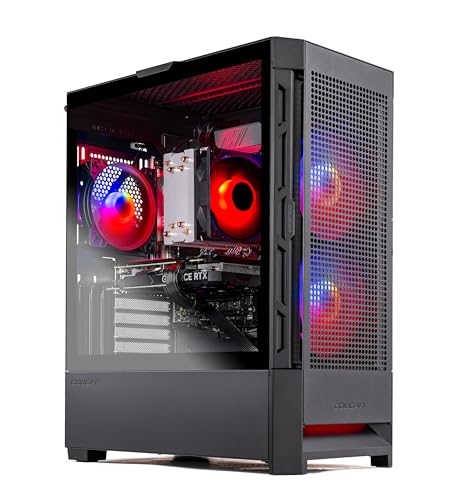
- Best overall for streaming: Skytech Blaze4 Mini, Ryzen 7 5700, RTX 4060 Ti, 16GB DDR4, 1TB SSD — Check on Amazon
- Minisforum AtomMan G7 Pt, Ryzen 9 7945HX, RX 7600M XT, 32GB, 1TB — Check on Amazon
- Beelink SER9 Pro, Ryzen AI 9 HX 370, Radeon 890M, 32GB, 1TB — Check on Amazon
- Minisforum UM890 Pro, Ryzen 9 8945HS, Radeon 780M, 32GB, 1TB — Check on Amazon
- GMKtec NucBox K8 Plus Barebone, Ryzen 7 8845HS, No RAM/SSD/OS — Check on Amazon
- HP OMEN 16L, Core i7-14700F, RTX 4060, 32GB (Amazon bundle listing) — Check on Amazon
Read the full guide below.
Disclosure: As an Amazon Associate, reviewstook.com earns from qualifying purchases. Links to Amazon on this page are affiliate links; they cost you nothing extra. Listing details such as price and availability change often, so check the current Amazon listing before you buy.
A streaming PC has two jobs that fight each other: render the game, and encode the broadcast. In a full-size tower you can throw money at both. In a compact PC the fight happens inside a shared power budget, a shared cooling system and — on the integrated-graphics machines — a single piece of silicon that has to draw the game and compress the stream at the same time. So this guide grades the encoder first and the game second. The honest headline is a strange one: every graphics chip in this set can encode AV1 on paper, which sounds like a tie. It is not. The two desktop NVIDIA cards carry a dedicated NVENC block that produces the cleanest H.264 — the codec Twitch actually runs on — while the AMD picks encode through VCN hardware that is visibly softer at Twitch’s bitrate ceiling, and the integrated picks share their encoder with the graphics rendering the game. Same checkbox, three different broadcasts.
The workflow being graded is defined now, so the reviews can be judged against it. The target is a one-machine setup: game, OBS, a browser full of chat and dashboards, and a local recording, all on one compact box, sent out at 1080p60. On Twitch that means roughly 6,000 kbps CBR with two-second keyframes — the platform’s practical ceiling, and the bitrate at which weak encoders get exposed. On YouTube the same machines can push higher bitrates, 1440p output and AV1 live, which forgives the AMD encoders considerably. Talk, desktop and console-through-a-capture-card streaming is the lighter tier, and every pick here — once the barebone is completed — clears it. What no pick here does is make a bad internet connection irrelevant: the wired-Ethernet rule in the OBS section below is not optional garnish.
The six picks are the six from our compact guide, re-ranked by broadcast merit rather than gaming merit, and the re-ranking changes less than you might expect — because the machine that games best here also encodes best. The Skytech Blaze4 Mini pairs a desktop RTX 4060 Ti with pricing that has typically sat comfortably within this guide’s budget — check price on Amazon to confirm the current listing; its catch is that Amazon’s own stated dimensions make it a small mid-tower, not a mini PC. The AtomMan G7 Pt is the true compact with a discrete GPU and a 16-core CPU. The SER9 Pro and UM890 Pro stream from integrated graphics with very different upgrade stories. The K8 Plus is a barebone that streams nothing until you finish building it, graded below on what finishing it honestly costs. And the HP OMEN 16L is a second NVENC tower that usually sits above this guide’s budget: it belongs in this guide only on the days a sale pulls it within the $1,200 budget. Check the current price on Amazon before counting on it, in a market the memory shortage keeps moving.
In this guide
Quick Picks
Short on time, or comparing several options at once? Each row below names a streaming buyer type and the product that suits it, with a link to the listing.
| Buyer type | Pick | Why it stands out for streaming | Link |
|---|---|---|---|
| Best overall for streaming | Skytech Blaze4 Mini, RTX 4060 Ti | Desktop NVENC + AV1 and standard parts, typically within budget — check price on Amazon — but “Mini” is a name, not a measurement | Check on Amazon |
| Best CPU headroom in a true compact | Minisforum AtomMan G7 Pt | 16-core CPU and a discrete RDNA3 GPU with AV1 encode in a ~2.7-liter console-style body | Check on Amazon |
| Smallest stream box | Beelink SER9 Pro | 0.82 liters, quiet, with RDNA3 VCN + AV1 — a talk/desktop/capture specialist | Check on Amazon |
| Best upgradeable mini streamer | Minisforum UM890 Pro | AV1-capable VCN now, dual 2.5GbE, and an OCuLink port for a desktop card later | Check on Amazon |
| Best staged build for parts owners | GMKtec NucBox K8 Plus Barebone | A barebone starting point with no RAM, SSD or OS — check price on Amazon — the stream build starts in your parts drawer | Check on Amazon |
| Best big-brand option (deal-watch) | HP OMEN 16L | Desktop RTX 4060 NVENC and a 20-core CPU — buy only when it checks within the $1,200 budget | Check on Amazon |
How These Picks Were Chosen
The encoder was the first filter, and it was graded from documented silicon, not from listing adjectives. The two NVIDIA towers encode through NVENC: a dedicated block on the RTX 4060 Ti and RTX 4060 that handles H.264 for Twitch and AV1 for YouTube and local recording, and that keeps working at full quality while the graphics cores are busy playing the game. One caution is printed here so it cannot be missed in the reviews: each of those cards carries a single NVENC block, and this guide never claims a dual-encoder setup for them. The AMD machines encode through VCN. The G7 Pt’s RX 7600M XT, the SER9 Pro’s Radeon 890M and the 780M in the UM890 Pro and K8 Plus are all RDNA3-generation parts, so all of them encode AV1 as well as H.264 — but AMD’s encoder is softer than NVENC at Twitch’s roughly 6,000 kbps ceiling, and on the integrated picks the encoder shares one chip with the graphics rendering your game.
The second filter was simultaneous load, because a stream is never just a game. Every pick was judged on the full stack — game plus OBS plus browser plus a local recording — against its CPU core count, its memory capacity and configuration, and its storage. That is why a 16GB machine is graded harder here than it was in the gaming guide, why the OMEN’s memory-stick configuration earns a warning, and why the two 2.5-gigabit Ethernet ports on the Minisforum minis count as streaming features rather than spec-sheet decoration. The third filter was the compact set itself: these are the six verified picks from our Best Compact Gaming PC Under $1200 guide, with the same ASINs and the same deal rules, re-examined under broadcast load. Check the current price on Amazon for each pick, and the two picks that habitually sell above the $1,200 budget — the OMEN, and the SER9 Pro during shortage-era listings — keep their buy-only-within-the-$1,200-budget framing here, undiluted.
The 6 Best Compact Gaming PCs for Streaming Under $1,200
Skytech Blaze4 Mini — Ryzen 7 5700, GeForce RTX 4060 Ti 8GB, 16GB DDR4, 1TB SSD
Who it suits: Streamers who want the strongest one-machine broadcast this budget can buy — desktop encoder, desktop graphics, desktop upgrade path — and whose “compact” constraint is a desk corner rather than a shelf.
The Blaze4 Mini wins this guide for the same reason it won the gaming one, plus one more. The extra reason is the encoder: the desktop RTX 4060 Ti carries NVIDIA’s NVENC hardware, a dedicated block that encodes H.264 for Twitch and AV1 for YouTube or local recording without borrowing anything from the cores rendering your game. Of the six machines here, this and the HP below are the only two whose encoder is fully independent of the gameplay silicon and tuned for the codec Twitch viewers actually receive — at roughly 6,000 kbps, NVENC’s H.264 is visibly cleaner than the AMD alternative on fast motion and fine detail. The gaming side needs no re-litigating: this configuration has typically been positioned in the lower part of this guide’s budget range — check price on Amazon for the current listing — with a Ryzen 7 5700, 16GB of DDR4-3200, a 1TB NVMe SSD and a standard 650W Gold power supply in a case built from ordinary desktop parts.
The streaming caveats are real but fixable. Sixteen gigabytes of memory is the tightest allocation in this set for a game-plus-OBS-plus-browser stack; it works, but it is the first upgrade to make, and the standard-parts case makes it a cheap one. The Ryzen 7 5700 is an eight-core chip with no integrated graphics, so there is no second hardware encoder hiding in the CPU and no software-encoding powerhouse either — x264 is a talk-and-desktop fallback here, not a plan; fortunately NVENC means it never needs to be the plan. The platform underneath is AM4 with DDR4, mature and end-of-line. And the size confession from the gaming guide stands untouched: Amazon’s stated item dimensions for this model are 15.2 × 9.1 × 19.3 inches, a small mid-tower wearing a Mini badge. Skytech also varies component brands between builds, so the contracted specs — GPU model, memory, storage, PSU wattage — are what you are buying.
- Desktop NVENC with AV1: the cleanest Twitch H.264 in this guide, plus YouTube AV1, — check price on Amazon.
- Standard parts throughout — memory, storage and GPU all upgrade on desktop rules when the stream outgrows them.
- Tower cooling is the quiet way to run a long broadcast; no small-fan tax at streaming distance from a microphone.
Honest limitation: The name. By its own listing’s dimensions this is a small mid-tower, not a small-form-factor PC — and its 16GB of memory is the first thing a serious streaming stack will want more of.
Choose it if the broadcast quality is the priority and your space limit is measured in feet of desk. Skip it if the machine must disappear behind a monitor or into a TV stand — that is what the rest of this guide is for.

Minisforum AtomMan G7 Pt — Ryzen 9 7945HX, Radeon RX 7600M XT, 32GB, 1TB
Who it suits: Living-room streamers who want a console-sized box by the TV that can genuinely game and broadcast at once — and who stream to YouTube, or record heavily, where this machine’s encoder plays to its strength.
The G7 Pt is the only truly compact machine here with a discrete GPU, and its streaming profile splits cleanly by platform. Its RX 7600M XT is an RDNA3 part, so its VCN encoder covers H.264 and AV1: on YouTube, where higher bitrates and AV1 live streaming are available, this is a fully modern broadcast machine. On Twitch, the same encoder is the honest weakness — AMD’s H.264 at roughly 6,000 kbps is visibly softer than NVENC on high-motion scenes, and no setting in OBS fully closes that gap. What the G7 Pt has that nothing else this size offers is CPU insurance: the 16-core Ryzen 9 7945HX is the strongest processor in this guide, so the game, OBS’s scene composition, a browser stack and a high-quality local recording can all run with cores to spare, and x264 at sensible presets is a genuine fallback rather than a hope. The configured 32GB/1TB version is typically positioned in the upper part of this guide’s budget range — check the current price on Amazon; treat the $1,200 budget as the buy ceiling and any pricing above it as the walk-away line.
The physical taxes from the gaming guide follow it into the studio. The GPU is a soldered mobile part with 8GB — closer to a desktop RX 7600 than to the 16GB desktop 7600 XT its badge evokes — and there is no DLSS, because there is no NVIDIA silicon; FSR does the upscaling. The 300W external power brick, the better part of a kilogram, needs a home beside the TV. And reviewers found the cooling clearly audible in the 85W performance mode, which matters more to a streamer than to a gamer: fan noise a meter from a microphone is a production problem, so the 65W balanced mode is the streaming mode, at a small performance cost. Memory and storage, at least, stay upgradeable — two SO-DIMM slots to 96GB and two M.2 slots — which is more future than the other soldered picks offer.
- A discrete RDNA3 GPU with AV1 encode and a 16-core CPU in ~2.7 liters — the strongest simultaneous-load headroom of any true compact here.
- YouTube-first streamers lose nothing: AV1 and higher bitrates suit VCN far better than Twitch’s ceiling does.
- Memory climbs to 96GB and both M.2 slots take bigger drives — the two upgrades a streaming stack actually asks for stay open.
Honest limitation: Twitch H.264 from VCN is visibly softer than NVENC at the platform’s bitrate ceiling, and the performance mode is loud enough to reach a microphone — the balanced mode is the one you will actually stream in.
Choose it if you stream mainly to YouTube, record a lot, or want one small box by the TV that does everything at once. Skip it if Twitch is your platform and broadcast sharpness is the whole point — that is the Blaze4 Mini’s NVENC, in a bigger box.

Beelink SER9 Pro — Ryzen AI 9 HX 370, Radeon 890M, 32GB, 1TB
Who it suits: Talk, desktop and console-capture streamers who want the smallest, quietest box on the desk — and PC-game streamers whose library lives at settings integrated graphics can honestly carry.
Grade this machine by the right workflow and it is excellent. The SER9 Pro’s Radeon 890M is RDNA3-generation integrated graphics, so its VCN encoder handles H.264 and AV1 — and when the content is a face camera, a desktop, a console fed through a capture card, or a light game, the encoder is barely sharing anything at all, and the broadcast is clean. It is also, by reviewer consensus, a relatively quiet machine under load, and at 135.5 × 135.5 × 44.7 mm — roughly 0.82 liters — it VESA-mounts behind a monitor and removes itself from the shot entirely. The 12-core Zen 5 processor behind the graphics gives OBS, the browser stack and a recording plenty of CPU, and it makes x264 a credible fallback for talk content. Pricing needs the discipline the gaming guide imposed: the 32GB/1TB configuration sits in the upper part of this guide’s budget range, and shortage-era listings have pushed it above budget. Check the current price on Amazon — when it checks within the $1,200 budget it is a considered buy; above that, walk away.
The ceiling is structural. When the content is a demanding PC game, one chip is rendering the game and encoding the stream simultaneously, and both jobs queue for the same silicon and the same memory: the honest outcome is 1080p game streams at the low-to-medium settings the 890M games at, or dropping the stream to 720p60 for heavier titles — respectable, and a different product from the discrete picks above. The 32GB of LPDDR5X is soldered, so the memory feeding that shared workload is a lifetime allocation, not a starting point. There is no OCuLink port, so no external GPU ever rescues the arrangement. And storage deserves a pre-purchase check: Beelink’s listing copy and independent teardowns have disagreed about whether a second M.2 slot exists, which matters if local recordings are your archive — confirm against the live listing before ordering.
- 0.82 liters and relatively quiet under load — the stream box that disappears behind the monitor.
- RDNA3 VCN with AV1 encode; talk, desktop and capture-card workflows barely tax it.
- A 12-core Zen 5 CPU keeps OBS, chat and recording comfortable, with x264 as a talk-content fallback.
Honest limitation: One chip renders and encodes at once, so demanding PC games stream at integrated-graphics settings — and soldered RAM plus no OCuLink means that arrangement can never be upgraded, only replaced.
Choose it if your stream is talk, desktop, console capture or light PC games, and the footprint is the point. Skip it if you stream current AAA PC games as your main content — that needs a discrete encoder that is not sharing the game.
Minisforum UM890 Pro — Ryzen 9 8945HS, Radeon 780M, 32GB, 1TB
Who it suits: Streamers who want a mini PC that starts as a competent talk/desktop/light-game broadcast box and keeps a real growth path — more memory, more storage, and eventually a desktop graphics card on a dock.
The UM890 Pro’s streaming story is a staged one. Today, its Radeon 780M is an RDNA3 integrated part, so its VCN encoder covers H.264 and AV1, and the same shared-silicon honesty as the SER9 Pro applies: talk, desktop, console capture and light games stream cleanly at 1080p60, while demanding PC games share one chip between rendering and encoding and land at integrated settings or a 720p60 output. Within that tier it is the best-equipped machine here — the 32GB of memory is socketed rather than soldered (two SO-DIMM slots, up to 96GB), there are two M.2 slots for a dedicated recording drive, and the dual 2.5-gigabit Ethernet ports are the best wired networking in this guide, which is the connection a stream actually leaves on. Notebookcheck praised its whisper-quiet cooling, and at about 130 × 127 × 66.6 mm — roughly 1.1 liters, 709 grams — it VESA-mounts behind a monitor without argument.
Tomorrow is the differentiator: the native OCuLink port. It is the only complete, ready-to-run machine here that can take a desktop graphics card later through a dock — at which point the broadcast gains a dedicated NVENC-class encoder and the integrated chip retires to desktop duty. Price that stage honestly before counting on it, using the gaming guide’s arithmetic: a Minisforum DEG1 dock is an additional purchase, it includes no power supply, and a new desktop graphics card is a further major purchase on top, so the dock stage is a substantial additional investment, not a small add-on — and OCuLink is not hot-pluggable, so connecting it is a shutdown event. The purchase price needs the same honesty: the complete 32GB/1TB listing is typically positioned in the middle of this guide’s budget range, though recent listings have pushed it toward the top of the range — check the current price on Amazon. When it sits in its usual mid-range position, this is the thinking streamer’s pick; when it climbs toward the top of the budget, you are paying discrete-GPU money for integrated graphics, and the advice flips to waiting for a dip.
- RDNA3 VCN with AV1 encode today; the only complete mini here with an OCuLink route to a dedicated desktop encoder later.
- Socketed RAM to 96GB, dual M.2 slots and dual 2.5GbE — the streaming-support spec is the best in this guide.
- Review-praised quiet cooling; VESA bracket suits behind-monitor mounting.
Honest limitation: Until the dock stage, this is integrated graphics with a hard 1080p ceiling — and when its listing climbs well above its usual mid-range position in the budget, it is a machine to wait on, not to chase.
Choose it if you value the staged path, the ports and the quiet over raw graphics today. Skip it if gaming comes first and the listing is near its recent highs — at that money the G7 Pt’s discrete GPU is where the budget belongs.

GMKtec NucBox K8 Plus Barebone — Ryzen 7 8845HS, No RAM, SSD or OS
Who it suits: Parts owners and staged builders who want the cheapest honest route into this guide’s streaming tier — and who understand that on delivery day, this pick streams nothing at all.
Start with the grading rule the brief for this pick demands: a barebone is judged on its documented completion paths and what they cost. As shipped, the K8 Plus — check price on Amazon for the current barebone listing — is a Ryzen 7 8845HS with Radeon 780M graphics, two empty DDR5 SO-DIMM slots, two empty M.2 PCIe 4.0 slots and no Windows license, in a chassis of about 132 × 127 × 58 mm by the maker’s stated dimensions. Read the listing title the way a lawyer would: the title says “Without RAM/SSD/OS,” while a spec field on the same listing mentions Windows 11 Pro. Believe the title. The completion maths, from the gaming guide’s research, are the review: a documented completion of a comparable barebone with 32GB of DDR5 and a 1TB SSD bought new at shortage-era prices brought the all-in total to finished-machine territory — the memory kit, not the computer, is now the expensive half. If the parts are already in your drawer, the same completion adds no further parts cost and this becomes the best-value pick in the guide by a wide margin.
What the completed machine is, in streaming terms, is an UM890-class broadcaster with a better invoice: the 780M’s RDNA3 VCN encodes H.264 and AV1, the eight Zen 4 cores run the OBS stack with x264 as a talk-tier fallback, dual 2.5-gigabit Ethernet handles the wired rule, and two M.2 slots mean a dedicated recording drive from day one. The native OCuLink port (PCIe 4.0 x4, not hot-pluggable) keeps the same docked-desktop-card future as the UM890 Pro — considered with the same honesty: the dock is an additional purchase with no power supply included, a desktop card is a further major purchase, and a from-scratch OCuLink build lands comfortably over this guide’s budget all-in. Quad display outputs and dual USB4 round out a connectivity set nothing complete at this money matches. The failure mode to avoid is purely administrative: ordering the barebone by mistake when you wanted the finished machine, or ordering it without the parts budget to finish it.
- Positioned at the low end of this guide’s budget range — check price on Amazon — no other native-OCuLink host with this connectivity sits lower in the range on Amazon.
- Completed, it streams like the UM890 Pro: RDNA3 VCN with AV1, dual 2.5GbE, dual M.2 for recordings.
- Every completion part is socketed — two SO-DIMM slots, two M.2 slots, nothing soldered shut.
Honest limitation: Nothing about it works out of the box — it is a starting point, not a stream PC. With memory and storage bought new at today’s prices, finishing it costs about what the completed version costs, so the bargain only exists for owners of the parts; the full eGPU build, from scratch, overshoots this budget entirely.
Choose it if a drawer already holds your DDR5, your SSD or a spare desktop card, and staged buying suits you. Skip it if every part would be a new purchase — the finished UM890 Pro, or the Blaze4 Mini, is the honest buy instead.

HP OMEN 16L — Core i7-14700F, GeForce RTX 4060, 32GB (Amazon Bundle Listing)
Who it suits: Streamers who want the Blaze4 Mini’s NVENC recipe with a stronger CPU and a big brand’s warranty behind it — and who are willing to wait for the sale that brings it within the $1,200 budget.
On streaming merit alone, this is the second-best broadcast box in the guide. The desktop GeForce RTX 4060 carries the same NVENC hardware family as the winner — dedicated H.264 for Twitch, AV1 for YouTube and recording, fully independent of the gameplay rendering — and behind it sits a Core i7-14700F with twenty cores, the second-strongest simultaneous-load CPU here, which keeps OBS, a browser stack and a local recording comfortable and makes x264 a real fallback rather than a courtesy mention. The chip is an F-suffix part with no integrated graphics, so NVENC is the only hardware encoder in the box; fortunately it is the right one. The machine itself is the most honestly named product in the guide: HP’s stated dimensions, 337 × 155 × 308 mm, multiply out to almost exactly 16 liters, with a real internal power supply and tower cooling that does not have to work hard on a long broadcast. HP’s warranty, support network and painless returns are the part boutique brands cannot match.
Then the price ruins it — most days. The Amazon bundle listing usually sits above this guide’s budget, and HP’s own store pricing for mid-range configurations of the line ran higher still in our checks. OMEN 16L builds have appeared in sale coverage within this budget, which is why this pick exists here at all: when it checks within the $1,200 budget it is arguably the most sensible purchase in the guide for a non-technical buyer. Above the budget the pick breaks this guide’s own ceiling, and the Blaze4 Mini out-guns it for less money besides. One configuration check is mandatory before ordering, and it is a streaming check, not a paperwork one: some HP configurations ship a single 16GB memory stick, and a lone stick in a 32GB-advertised bundle — or a 16GB total in single-channel — leaves exactly the memory bandwidth a game-plus-OBS stack feels first. Verify the delivered configuration on arrival, inside the return window. Treat this listing as a watchlist item with an alert set, and walk away from any price above the budget.
- Desktop NVENC with AV1 and a 20-core CPU: the strongest big-brand streaming combination here.
- The name is the volume: an honest 16 liters, the smallest tower in HP’s gaming line, with warranty and returns to match.
- Sale coverage has caught it within this budget — proof the price this pick needs does happen, on a rhythm worth waiting for.
Honest limitation: Its usual pricing puts this pick outside the budget on its own page. Until a sale pulls it within the $1,200 budget it is a watchlist entry rather than a purchase — and whenever you do buy, the memory configuration needs checking the day it arrives.
Choose it if the current price on Amazon has dropped within the $1,200 budget and warranty and support matter more to you than the last increment of specification. Skip it if the listing is sitting at its usual highs — on those days the Blaze4 Mini is the faster machine for less money.

Comparison Table
| Product | Stated size / volume | Encoder | Best streaming use | Link |
|---|---|---|---|---|
| Skytech Blaze4 Mini | 15.2 × 9.1 × 19.3 in (listing) — small mid-tower | NVENC (Ada) — H.264 + AV1, dedicated | One-machine game streaming at 1080p60; cleanest Twitch picture here | Check on Amazon |
| Minisforum AtomMan G7 Pt | 269 × 155 × 64 mm body — ~2.7L | VCN (RDNA3) — H.264 + AV1, discrete GPU | YouTube and recording-first streaming with 16-core headroom | Check on Amazon |
| Beelink SER9 Pro | 135.5 × 135.5 × 44.7 mm — ~0.82L | VCN (RDNA3) — H.264 + AV1, shared with graphics | Talk, desktop and console-capture streaming; light PC games | Check on Amazon |
| Minisforum UM890 Pro | 130 × 127 × 66.6 mm — ~1.1L | VCN (RDNA3) — H.264 + AV1, shared; OCuLink path to a desktop encoder | Staged streaming: integrated now, docked desktop card later | Check on Amazon |
| GMKtec NucBox K8 Plus Barebone | ~132 × 127 × 58 mm — ~1.0L | VCN (RDNA3) — H.264 + AV1, after completion | Parts owners building the cheapest staged stream box | Check on Amazon |
| HP OMEN 16L | 337 × 155 × 308 mm — ~16L | NVENC (Ada) — H.264 + AV1, dedicated | Big-brand NVENC streaming, bought on sale only | Check on Amazon |
How to Choose a Compact Streaming PC Under $1,200
- Pick your platform before your PC. Twitch runs on H.264 at roughly 6,000 kbps, where NVENC is visibly cleaner; YouTube allows higher bitrates and AV1, where the AMD picks close most of the gap. The same machine is a different purchase depending on where the broadcast goes.
- Separate the encoder from the game, if you can. A dedicated NVENC block encodes without touching the rendering budget. An integrated VCN encoder shares one chip with the game — fine for talk, desktop, capture and light titles, a compromise for demanding PC games.
- Count the whole stack, not the game. Game plus OBS plus browser plus recording is the real workload. Sixteen gigabytes is the floor, not the target; core count is what keeps the stack smooth while the encoder works.
- Wire it, whatever you buy. Every pick here has a proper Ethernet port, and the two Minisforum minis have two at 2.5-gigabit speed. A stream leaves on the wire or it stutters on Wi-Fi; there is no third option worth paying for.
- Give recordings their own space. Local recordings at streaming quality consume gigabytes per hour. A second M.2 slot — fitted on the UM890 Pro and the completed K8 Plus — is a streaming feature, and the SER9 Pro’s disputed second slot is worth verifying before you rely on it.
- Price the whole path, not the first box. The sticker on a barebone is only the opening line of its bill — memory, storage and an operating system follow it. An OCuLink plan bills the same way: host, then dock, then the power supply the dock leaves out, then the card. Add the full column before judging any of it cheap.
- Use the listing’s usual position in the budget range, not its headline asking price, as your patience line. The OMEN usually sits above this budget and only occasionally drops within it on sale; the UM890 Pro usually sits in the middle of the range and sometimes climbs toward the top. Know what the listing usually does, check the current price on Amazon, and buy the dip rather than the day you happened to shop.
- Match the noise to the microphone. A box that is merely audible to a gamer can be unusable a meter from a mic. Balanced modes, tower cooling and behind-monitor mounting are production decisions, not comfort ones — compare the quiet-first options in Best Compact Gaming PC For Small Spaces Under $1200 if the PC shares a room with the recording.
Set Up OBS Once, Correctly
Every pick in this guide can run OBS well; most bad compact-PC streams are settings, not hardware. Start with the encoder. On the Blaze4 Mini and the OMEN, select the NVIDIA NVENC H.264 encoder for Twitch, and NVENC AV1 for YouTube live or for local recordings where your workflow accepts it. On the G7 Pt, SER9 Pro, UM890 Pro and the completed K8 Plus, select the AMD hardware encoder — H.264 for Twitch, AV1 for YouTube and recordings. Reserve x264 for what it is good at here: a fallback on the big-core machines (the G7 Pt’s sixteen cores, the OMEN’s twenty, the SER9’s twelve) when the content is talk or desktop and the GPU is busy elsewhere. Set the rate control to CBR — about 6,000 kbps for Twitch 1080p60, higher on YouTube where your upload honestly sustains it — with a two-second keyframe interval, which both platforms expect.
Then learn the three counters in OBS’s Stats dock, because each one names a different problem with a different fix. Rendering lag means the GPU is saturated: the game is taking the whole graphics budget and OBS cannot compose its scene — cap the game’s frame rate, lower its settings, or, on the integrated picks, accept a 720p60 output for heavy titles. Encoding lag means the encoder itself is overloaded: move to a faster encoder preset, drop the output resolution, or stop asking one shared chip to do a discrete chip’s job. Dropped frames (network) are not the PC’s fault at all: they are the connection — plug in the Ethernet cable, lower the bitrate until the drops stop, and never troubleshoot an encoder for a network problem. Finally, record locally at a higher quality than the stream — the recording is your archive and your clips — and put that recording folder on the second drive wherever a pick offers one.
What $1,200 Does Not Include
The prices in this guide buy the PC. A stream needs a small amount of kit around it, and the order matters more than the spend. Microphone first: viewers forgive a soft picture long before they forgive bad audio, and no pick in this guide ships with a microphone worth broadcasting on — your voice is the channel, so it gets the first money after the PC. Lighting second: a single decent light on your face does more for a face camera than any camera upgrade at this level. Webcam third, and only if your format uses one — many talk and game formats do not. A capture card is console-only: it exists to bring a console’s picture into the PC, and PC-game streamers should never buy one for their own gameplay — on the SER9 Pro, UM890 Pro and K8 Plus it is the accessory that turns an integrated-graphics box into a proper console streaming station. No accessory prices are quoted here, because the base research for this set documents none; cost the kit separately, and never let it be folded silently into a pick’s price when you compare.
Common Buying Mistakes
- Reading “AV1 support” as a tie. Every chip here encodes AV1; the Twitch broadcast still runs on H.264, where the encoders are not equal, and the integrated encoders share their chip with the game.
- Assuming a second NVENC block exists on a single RTX 4060-class card. It does not — plan stream-plus-record quality around one encoder, or record through it at settings it can sustain.
- Streaming over Wi-Fi because the desk looks tidier. Dropped network frames are the most common compact-stream failure, and the fix is a cable, not a setting.
- Ordering the K8 Plus barebone expecting a computer. It arrives with no memory, no storage and no operating system — and its listing’s spec field mentioning Windows does not change what the title says.
- Judging the OMEN bundle by its headline memory figure without checking the configuration — a single-stick setup taxes exactly the stack a streamer runs.
- Buying the capture card first and the microphone last. The kit order in this guide is the order viewers notice.
- Running the G7 Pt in its 85W performance mode beside a microphone, then blaming the mic for the fan noise in every recording.
- Paying a shortage premium without checking the listing’s usual position — the SER9 Pro above the $1,200 budget and the UM890 Pro near the top of the budget range are patience tests, not prices to chase.
Final Recommendation
- Most streamers, most platforms: Skytech Blaze4 Mini.
- YouTube-first and recording-heavy, in a true compact: Minisforum AtomMan G7 Pt.
- Talk, desktop and console-capture channels: Beelink SER9 Pro.
- Staged builders who will dock a desktop card later: Minisforum UM890 Pro.
- Parts owners starting from a drawer: GMKtec NucBox K8 Plus Barebone.
- Big-brand buyers with patience: HP OMEN 16L, on sale only.
Our top two split on platform and on size. If Twitch is home, the broadcast runs on H.264, and the cleanest H.264 under $1,200 comes from a dedicated NVENC block — which makes the Blaze4 Mini — check price on Amazon — the buy for most streamers, provided your desk can take the small mid-tower its name denies being. If your channel lives on YouTube, records everything, or has to fit beside a TV, the AtomMan G7 Pt trades a little Twitch sharpness for a discrete GPU and sixteen cores in 2.7 liters, and for that workflow it is the better machine. The mini PC routes reward the patient and the parts-rich: UM890 Pro on a dip, K8 Plus with a full drawer, SER9 Pro when the channel is talk and capture rather than AAA gameplay. Streamers weighing a purpose-built alternative should compare Best Streaming PC Under $1200, anyone deciding between a compact box and a conventional tower should read Best Gaming PC For Streaming Under $1200 before committing, and everyone should check the current price on Amazon before money moves.
Frequently Asked Questions
Can a compact PC really stream and game on one machine?
Yes — with the workload matched to the hardware. The two NVENC towers and the G7 Pt run a game, OBS, a browser stack and a recording at 1080p60 without drama. The integrated picks do the same for talk, desktop, console capture and light games; demanding PC titles on those machines mean integrated-graphics settings in the game, or a 720p60 stream. The encoder, not the badge, decides which sentence describes you.
If every chip here encodes AV1, why does the encoder still matter?
Because your viewers mostly do not watch AV1. Twitch’s standard broadcast is H.264 at roughly 6,000 kbps, and at that bitrate NVENC’s H.264 is visibly cleaner than AMD’s VCN on motion and fine detail. AV1 earns its keep on YouTube live and in local recordings. An AV1 checkbox is a feature; the H.264 quality at Twitch’s ceiling is the broadcast.
Do I need a capture card with one of these PCs?
Only if a console is part of the content. A capture card brings a console’s picture into the PC — it does nothing for games played on the PC itself. On the integrated picks it is actually the smartest accessory: the console does the heavy rendering, and the mini PC’s encoder handles a feed it can easily carry.
Why is wired Ethernet treated as non-negotiable?
Because the Stats dock does not lie: dropped frames from the network look like a weak PC to a viewer, and no encoder setting fixes them. Every pick here ships a real Ethernet port — two of them, at 2.5-gigabit speed, on the Minisforum minis. Run the cable, set CBR, and the most common streaming fault disappears.
Is the K8 Plus barebone a cheap way into streaming?
Only if you already own the parts. Completed with memory and storage bought new at current prices, a comparable barebone lands in finished-machine territory all-in. With DDR5 and an SSD already in a drawer, it is the best-value route in this guide. The one thing it never is: a computer on delivery day.
Should I buy the HP OMEN 16L for streaming when it is priced above this guide’s budget?
No. Its NVENC hardware is exactly right, but when it sits above this guide’s budget it is over the ceiling for this guide and the Blaze4 Mini gives you a faster GPU class for less. The OMEN earns its place for the day a sale takes it within the $1,200 budget — sale coverage has shown it dropping into this range — at which point its encoder, its twenty cores and HP’s warranty make it the sensible mainstream buy. Check the memory configuration on arrival whenever you do buy it.
How much storage does streaming actually need?
More than the game library alone suggests. Local recordings at streaming quality consume gigabytes per hour of broadcast, and they accumulate silently. A 1TB drive is workable with housekeeping; a second M.2 slot — standard on the UM890 Pro and the completed K8 Plus — is the comfortable answer, and it is why the SER9 Pro’s disputed second slot is worth confirming before you order.
- Best Compact Gaming PC Under $1200
- Best Compact Gaming PC Under $800
- Best Compact Gaming PC Under $1500
- Best Compact Gaming PC For Small Spaces Under $1200
- Best Compact Gaming PC For Beginners Under $1200
- Best Mini PC For Streaming Under $1200
- Best Mini Gaming PC For Streaming Under $1200
- Best Streaming PC Under $1200
- Best Gaming PC For Streaming Under $1200
- Best Small Form Factor Gaming PC For Streaming Under $1200
- Best Prebuilt Gaming PC For Streaming Under $1200
- Best Gaming PC Under $1200


