Where to buy
Check the latest price, availability and delivery on Amazon. Orders are placed on Amazon. We may earn a commission from qualifying purchases.
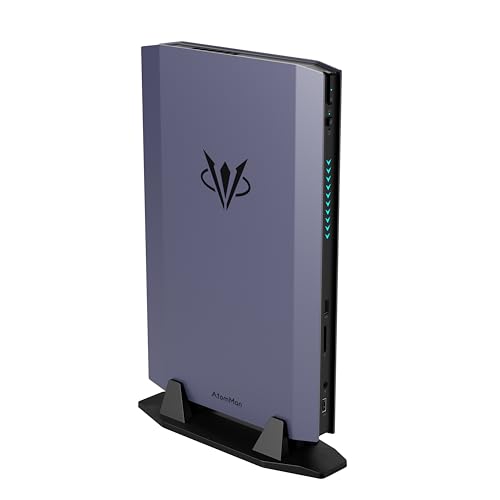
- Best overall compact gaming PC for 1440p: AtomMan G7 Ti Mini PC, Core i9-14900HX, RTX 4070 Laptop, 32GB DDR5, 1TB SSD — Check on Amazon
- Skytech Blaze4 Mini Gaming PC, Ryzen 7 5700, Desktop RTX 4060 Ti, 16GB DDR4, 1TB SSD — Check on Amazon
- MINISFORUM AtomMan G1 Pro, Ryzen 9 8945HX, Desktop RTX 5060, 32GB DDR5, 1TB SSD — Check on Amazon
- HP OMEN 16L Gaming Desktop, Ryzen 7 8700F, Desktop RTX 5060, 1TB SSD (seller-upgraded listing) — Check on Amazon
See 2 more Amazon options
- AtomMan G7 Pt Mini PC, Ryzen 9 7945HX, RX 7600M XT, 32GB DDR5, 1TB SSD — Check on Amazon
- ASUS NUC 14 Performance Barebone (ROG NUC), Core Ultra 7 155H, RTX 4060 Laptop, Kit — Check on Amazon
Read the full guide ↓
Disclosure: As an Amazon Associate, reviewstook.com earns from qualifying purchases. Links to Amazon on this page are affiliate links; they cost you nothing extra. Listing details such as price and availability change often, so check the current Amazon listing before you buy.
A 1440p monitor asks a graphics card to push about 78 percent more pixels than a 1080p one — 3.7 million against 2.1 million, every frame — and that single fact is what separates the compact PCs in this guide into two honest groups. In the first group, 1440p is the native working resolution: the game is actually rendered at 2560×1440, and upscaling exists as headroom for the heaviest scenes rather than as a lifeline. In the second group, 1440p is the output resolution only: the game renders at 1080p or below, an upscaler stretches it to fill the panel, and the picture is good — but it is not the same product, and a guide that grades both groups with the same words is selling you something. This guide grades them separately, pick by pick, because at $1,500 in a small case you can genuinely buy the first group, provided you read the silicon correctly.
Reading the silicon correctly starts with the naming trap this category is famous for. An RTX 4070 Laptop GPU is not a desktop RTX 4070. The laptop chip carries 4,608 cores and 8GB of memory against the desktop card’s 5,888 cores and 12GB, and runs at up to 140W against 200W. Run at that full 140W — as the top pick here is — it performs around desktop RTX 4060 Ti level, which is precisely the class of card 1440p gaming is built on: native rendering in most games, DLSS Quality where a title is heavy. So the headline of this guide is a genuinely good one. Four of the six picks below render games natively at 1440p. The honest footnotes are that two of them do it with laptop silicon whose name flatters it, that one of the desktop-card picks only belongs in this guide when its price drops, and that the two remaining picks — an AMD mini that treats 1440p selectively and a barebone kit — are 1080p-render machines wearing a 1440p output, included because their positions in this tier and their roles earn them a hearing with the grading stated plainly.
One more boundary, stated before the picks so nobody has to dig for it: there is no compact prebuilt with a desktop RTX 4070 SUPER reliably selling under $1,500. That card, in our research, lives in full-size towers at this money, and small cases add cost rather than removing it. What $1,500 does buy in compact form, verified against real Amazon listings, is a full-power RTX 4070 Laptop mini; a true desktop RTX 4060 Ti tower positioned toward the lower end of this tier; a 3.8-liter mini containing an actual desktop RTX 5060 when it sits inside this budget; a big-brand 16-liter tower with the same desktop 5060; an AMD mini in the lower part of the tier that splits its 1440p work between native rendering and FSR; and an ASUS barebone whose mobile 4060 renders at 1080p and upscales, whose true cost is the kit plus the parts it still needs, as its review works through in full — check price on Amazon for each pick before you buy. Below: the quick picks, six detailed reviews graded on their 1440p story first, a comparison table, a plain-terms section on what upscaling quality modes actually render, monitor-pairing advice, the mistakes that waste money at this resolution, and the questions 1440p buyers ask most. If the room is your real constraint, start instead from Best Compact Gaming PC For Small Spaces Under $1500; this guide assumes the monitor is.
In this guide
Quick Picks
Short on time, or comparing several options at once? Each row below names a buyer type and the product that suits it, with a link to the listing.
| Buyer type | Pick | Why it stands out | Link |
|---|---|---|---|
| Best overall for 1440p | AtomMan G7 Ti Mini PC (RTX 4070 Laptop) | Full 140W mobile GPU in about 2.5 liters — native 1440p rendering with DLSS headroom | Check on Amazon |
| Best 1440p value | Skytech Blaze4 Mini (Desktop RTX 4060 Ti) | A real desktop 1440p card and a named 650W Gold PSU, positioned toward the lower end of this tier — check price on Amazon | Check on Amazon |
| Best current-gen desktop GPU | MINISFORUM AtomMan G1 Pro (Desktop RTX 5060) | Desktop silicon and DLSS 4 in 3.8 liters — only when priced at or under $1,500 | Check on Amazon |
| Best big-brand 1440p tower | HP OMEN 16L (Desktop RTX 5060) | HP’s 16-liter case around a desktop RTX 5060 — via a seller-upgraded listing to read carefully | Check on Amazon |
| Best selective-1440p value mini | AtomMan G7 Pt Mini PC (RX 7600M XT) | Positioned in the lower part of this tier — check price on Amazon — native 1440p in lighter titles, FSR upscaling in heavy ones | Check on Amazon |
| Best kit for parts owners | ASUS NUC 14 Performance Barebone (ROG NUC) | ASUS engineering in kit form — check price on Amazon — a 1080p-render machine that upscales to the panel | Check on Amazon |
How These Picks Were Chosen
The grading order in this guide is the reverse of most compact-PC guides, deliberately. Size came last. What came first was the question the keyword asks: what does each machine actually do at 2560×1440? Every pick was graded on three resolution facts — whether its GPU renders natively at 1440p in modern games or renders lower and upscales; which upscaling technology its silicon supports, because DLSS and FSR differ in game support as much as in quality; and how much memory sits behind the rendering, because 1440p textures press on 8GB frame buffers in a way 1080p textures do not. Only after that did the compact questions — case volume, thermals, upgrade paths — get their say, and they do get a say: a machine that renders beautifully for ten minutes and then throttles in a sealed 2.5-liter box is not a 1440p machine in any sense a buyer can use.
The budget was applied as a ceiling on the complete, working machine. Every product below is a real Amazon listing positioned at or under $1,500, or one that can sit at or under it — check the current price on Amazon, because listing prices move. Two picks lean on that rule hard and are flagged in their reviews rather than quietly included: the G1 Pro is often positioned above this budget and qualifies only when it drops into this tier, and the ASUS NUC is a barebone whose kit price excludes the memory, storage and operating system it needs to switch on, so its review works through what completing it means for the budget. We did not use these products ourselves. We read the maker listings, specification pages and independent reviews, and compared GPU silicon and wattage, upscaling support, memory, storage, case volume and cooling, favoring listings that publish their numbers in full.
The exclusions say as much about this tier as the picks do. Minisforum’s AtomMan G7 Pro, with the newer RTX 5070 Laptop GPU, is the obvious flagship of the mini class, but its configured version sits above the whole budget, so it appears here only as the ceiling it is. AMD’s Ryzen AI Max+ 395 mini PCs, whose integrated graphics are genuinely strong, have been repriced by the current memory shortage to well above this tier on Amazon; they are not sub-$1,500 machines today whatever they were at launch. And the desktop RTX 4070 SUPER, the card a 1440p buyer would pick first in a tower, has no verified compact prebuilt under $1,500 at all — the systems in our wider 1440p research carrying it are full towers, compared in Best 1440p Gaming PC Under $1500. What remains is the honest shape of compact 1440p at $1,500: laptop silicon at full power, last-generation and current-generation desktop cards in small towers, and upscaling doing real but bounded work.
The 6 Best Compact Gaming PCs for 1440p Gaming Under $1,500
AtomMan G7 Ti Mini PC — Core i9-14900HX, RTX 4070 Laptop, 32GB DDR5, 1TB SSD
Who it suits: Buyers who want native 1440p rendering from a box the size of a hardback book — the strongest verified compact 1440p machine at this budget, with upscaling kept in reserve rather than spent on arrival.
The correction first, because this guide grades on it: the G7 Ti’s graphics are an RTX 4070 Laptop GPU — 4,608 cores, 8GB of GDDR6, not the desktop card’s 5,888 cores and 12GB. What makes it the top pick anyway is the wattage. Minisforum runs the chip at its full 140W ceiling, the highest NVIDIA allows, and at full power independent reviews place it around desktop RTX 4060 Ti territory — which is to say, squarely in the native-1440p class. Most modern games render at the panel’s full 2560×1440 on this machine; the heaviest titles ask for DLSS, and DLSS is where the laptop chip’s NVIDIA silicon earns its keep twice over, because the Quality mode — rendering internally at roughly 1707×960 and reconstructing to 1440p — looks close enough to native on a gaming monitor that many players run it permanently for the headroom, and frame generation is available in the titles that support it. Around the GPU: a 24-core Core i9-14900HX, 32GB of DDR5 in two SO-DIMM slots that accept up to 96GB, a 1TB SSD with a second M.2 slot free, Wi-Fi 7, HDMI 2.1 and USB4 outputs, in a chassis of roughly two and a half liters. For the configured 32GB/1TB version, check price on Amazon.
The terms are the mini-PC terms and they are permanent. CPU and GPU are soldered: the 1440p performance you buy is the 1440p performance the machine retires with, and the 8GB frame buffer is the specification most likely to pinch first as 1440p texture loads grow — the honest reason the DLSS headroom matters more here than the native rendering does. Thermals follow the class rule: 140W of GPU plus a 24-core HX processor in 2.5 liters means audible fans under sustained load in performance mode, and silent mode buys quiet with rendering speed — at 1440p, that trade is more visible than at 1080p, because the GPU has less slack to give. Judged as a three-to-four-year appliance that renders natively at 1440p today and upscales gracefully as games get heavier, taking no desk space at all, it is the strongest verified answer to this keyword under $1,500.
- Full-power 140W RTX 4070 Laptop GPU — native 1440p rendering in most games, DLSS Quality and frame generation in reserve.
- 24-core Core i9-14900HX and 32GB of DDR5, with memory and a second SSD slot still upgradeable.
- Roughly 2.5 liters with HDMI 2.1 and USB4 — it disappears beside the 1440p monitor it feeds.
Honest limitation: The “RTX 4070” is the laptop chip — around desktop 4060 Ti class with 8GB of VRAM — soldered for life, so its 1440p ceiling is fixed on delivery day.
Choose it if you want the most 1440p performance per liter and accept a fixed lifespan. Skip it if you intend to swap the graphics card when 1440p gets heavier — that buyer needs the Blaze4 Mini or OMEN below.

Skytech Blaze4 Mini Gaming PC — Ryzen 7 5700, Desktop RTX 4060 Ti, 16GB DDR4, 1TB SSD
Who it suits: Buyers who want the real desktop article — a genuine 1440p card, standard parts and a graphics upgrade in the machine’s future — and who have a desk corner rather than a shelf gap to put it in.
No translation is needed with this pick, and at 1440p that is worth more than it sounds. The Blaze4 Mini’s RTX 4060 Ti is the desktop card itself: the same silicon, the same 8GB, the reference point that the G7 Ti’s laptop chip is measured against. It renders natively at 1440p across the modern catalogue, with DLSS — super resolution and frame generation both — as headroom for the heaviest scenes, exactly the workload split this resolution rewards. Its position in this tier is the surprise of the guide: it sits toward the lower end of the band — check price on Amazon — which can leave room in the overall budget for the 1440p monitor itself or the memory upgrade discussed below. The supporting cast is named where rivals leave blanks — a 650W Gold power supply with room for the next card up the range — and the whole machine is standard parts: the GPU unplugs, the memory swaps, the storage expands. As the smallest true tower here it is still several times the minis’ volume, and it spends that volume on the two things 1440p sustained rendering wants most: airflow and options.
The honest cost is platform age, and at 1440p it shows in a specific place. The Ryzen 7 5700 is an eight-core AM4 chip on DDR4 — adequate behind a 4060 Ti today, but the platform is a dead end for CPU upgrades, and the 16GB of memory fitted is this guide’s floor rather than its standard: at 1440p, where the game, the operating system and a browser of guides share the same pool, 32GB is the comfortable figure, and the savings against the minis are partly there to fund reaching it. The upgrade this machine promises is real but specific — graphics card first, memory and storage alongside — while its CPU ceiling is set. Buy it as a desktop-4060-Ti tower whose card can be replaced when 1440p demands more, and it is the best-value machine in this guide by a wide margin.
- A genuine desktop RTX 4060 Ti — native 1440p rendering with DLSS super resolution and frame generation as headroom.
- Positioned toward the lower end of this tier — check price on Amazon — and it undercuts the minis in this guide.
- A named 650W Gold PSU and standard parts throughout — the only straightforward future GPU swap in the guide.
Honest limitation: The AM4/DDR4 platform is a CPU dead end, and 16GB of memory is a floor at 1440p, not a target — budget the upgrade into the value case.
Choose it if a mini tower fits your space and you value a replaceable card over liters saved. Skip it if the machine has to live on a shelf or behind a television — the AtomMan boxes exist for exactly that.

MINISFORUM AtomMan G1 Pro — Ryzen 9 8945HX, Desktop RTX 5060, 32GB DDR5, 1TB SSD
Who it suits: Buyers who want current-generation desktop silicon — and its newer upscaling — in a mini PC, and who are patient enough to buy only when the price behaves.
Like the Blaze4, the G1 Pro needs no translation: its graphics are a desktop GeForce RTX 5060, a low-profile Gigabyte card running at a full 145W in an actual PCIe x16 slot, inside a 3.8-liter chassis. At 1440p the current generation buys two things. The first is rendering: the desktop 5060 is a native-1440p card in the same honest sense as the 4060 Ti, playing the modern catalogue at the panel’s resolution with settings discipline in the heaviest titles. The second is the upscaler’s vintage. This card carries DLSS 4 support, the newest generation of NVIDIA’s reconstruction, so when a heavy scene does ask for help, the Quality mode’s internal render of roughly 1707×960 is rebuilt with the best tools any pick in this guide has — and its frame generation is the most capable here as well. Around it: a 16-core Ryzen 9 8945HX, 32GB of DDR5, a 1TB PCIe 4.0 SSD, a 350W internal power supply with no brick on the floor, Wi-Fi 7 and 5-gigabit Ethernet.
Now the price, which carries the loudest condition in this guide. The G1 Pro usually sits above this budget, and promotional periods are what bring it into this tier — check the current price on Amazon before treating it as an under-$1,500 pick at all. It is here because it is the only current-generation desktop-GPU mini that has verifiably visited this budget, and when it does, its DLSS 4 tooling makes it arguably the best 1440p buy on the page. Two ownership notes complete the picture. The machine ships in an 80W gaming mode that leaves about a fifth of its performance behind a manual toggle — at 1440p, where every frame of headroom is spent, switching it on day one matters more here than in any other guide. And the GPU, while technically a card in a slot, is a low-profile card in a 3.8-liter case: treat replacement as theoretically possible and practically unlikely, because almost nothing faster is made in that shape.
- A genuine desktop RTX 5060 at full 145W — native 1440p rendering, no laptop-GPU translation.
- DLSS 4 support: the newest upscaling and frame-generation tooling in this guide.
- Internal 350W power supply, 5GbE and Wi-Fi 7 in a 3.8-liter case, with 32GB of DDR5 fitted.
Honest limitation: It normally sits above this tier — a buy-only-at-$1,500-or-less pick; check price on Amazon — and the low-profile GPU is not a realistic future upgrade.
Choose it if you catch it at or under $1,500 and want current-gen desktop silicon in mini form. Skip it if the listing sits above this budget when you shop; in that case the G7 Ti offers stronger value for the tier and the Blaze4 Mini sits lower in the band.

HP OMEN 16L Gaming Desktop — Ryzen 7 8700F, RTX 5060 (Seller-Upgraded Listing)
Who it suits: Buyers who want a big brand’s case, cooling and support network behind current-generation desktop graphics at 1440p — and who will read a marketplace listing the way it deserves to be read.
The OMEN 16L answers the compact question from the tower side: a 16-liter chassis — small beside a mid-tower, a wardrobe beside the minis — holding standard desktop parts, including the same desktop GeForce RTX 5060 with 8GB of GDDR7 that powers the G1 Pro. Its 1440p story is therefore the same honest one: native rendering across the modern catalogue, DLSS 4 reconstruction and frame generation as headroom when a title turns heavy. The configuration that makes it a sub-$1,500 pick is the one we verified: a seller-upgraded version of the Ryzen 7 8700F / RTX 5060 model, with 64GB of memory fitted — check price on Amazon — far more RAM than 1440p gaming needs, fitted because fitting it is the seller’s business, and harmless headroom for the game-plus-browser-plus-everything load a gaming desk accumulates. HP’s own factory configurations of the same case exist on Amazon under separate listings, including a Core Ultra 5 225F build with the same RTX 5060, so read this pick as a recommendation of the 16L formula at or under $1,500, with the linked listing the verified example rather than the only door in.
Because the linked listing is seller-upgraded, its warnings stay in full. A reseller has opened the machine to fit that memory: the upgraded parts carry the seller’s one-year warranty while the rest keeps HP’s, splitting any future support conversation in two. Verify the exact style, specification and seller on the live page before ordering — this listing family spans several configurations at several prices, and the configuration described above is the one to match. Two hardware notes, briefly: the Ryzen 7 8700F is a capable eight-core chip but a laptop-derived design with half the cache of HP’s desktop-class alternatives — a footnote at 1440p, where the graphics card does the heavy work, rather than a disqualification — and a 16-liter brand tower’s cooling and power supply are built for this GPU class, so a future jump to a much hotter card is not what the case is for. Within those lines, this is the lowest-risk route to current-generation native 1440p in a compact case from a company with a service network.
- Current-generation desktop RTX 5060 graphics — GDDR7 memory, DLSS 4 — inside HP’s compact 16-liter case.
- The seller-upgraded configuration we verified has 64GB of memory fitted by the reseller — check price on Amazon.
- HP’s build quality and service network stand behind everything the seller left alone.
Honest limitation: The linked listing is a reseller-upgraded unit — split warranty, exact style to verify live — and the case and PSU cap future GPU upgrades at this class.
Choose it if you want HP’s small tower and current-gen native 1440p under $1,500, from whichever verified listing is live. Skip it if split warranties bother you — the Blaze4 Mini is a single-seller machine with a bigger PSU and the same rendering class.

AtomMan G7 Pt Mini PC — Ryzen 9 7945HX, RX 7600M XT, 32GB DDR5, 1TB SSD
Who it suits: Value hunters whose 1440p library leans lighter — esports, older titles, strategy and indie games — and who would rather stay in the lower part of this tier than buy rendering headroom they will not use.
The G7 Pt is where this guide’s two groups meet, and its review grades the split title by title rather than pretending it away. Its graphics are a Radeon RX 7600M XT — a laptop GPU, named as such — with 8GB of GDDR6 run at a healthy 120W. That is enough silicon to render natively at 1440p in lighter and older games, and in esports titles where the rendering load is modest by design. In demanding modern releases, the honest mode is FSR upscaling: the game renders below the panel’s resolution — Quality-mode FSR works from an internal render of roughly 1707×960, the same arithmetic as DLSS Quality — and reconstructs to 2560×1440. The picture is good and the performance is real; it is simply a different product from the native rendering the four picks above sell, and its position in the tier reflects it: the configured 32GB/1TB version sits in the lower part of this band on Amazon US — check price on Amazon — noticeably below the G7 Ti’s position in the tier. The CPU is arguably the best here for mixed work — a Ryzen 9 7945HX with 16 full desktop-class Zen 4 cores — and the hardware around it mirrors the Ti: DDR5 SO-DIMM slots to 96GB, PCIe 5.0 NVMe support, dual-fan cooling in the same roughly two-and-a-half-liter class, with 65W and 85W CPU power modes that trade a little speed for a quieter room.
The trade against the NVIDIA picks is wider at 1440p than at 1080p, and should be chosen knowingly. The 7600M XT is a class below the full-power 4070 Laptop in raw rendering, its ray tracing is weaker still, and FSR — while good — is supported in fewer games than DLSS, so in a title built around NVIDIA’s features the practical gap grows beyond the hardware gap: some games will offer this machine no quality upscaler at all, and native-or-nothing at 1440p is a hard bargain for a 120W mobile GPU. The 300W external power brick is also the largest in this guide, a small irony for a machine bought to be unobtrusive, and the mini-PC permanence applies in full — soldered GPU, memory and storage the only upgrades. What you get for accepting all of it is a discrete-GPU gaming mini positioned at the bottom of this tier in this guide, and a clear-eyed deal: if your 1440p library is the lighter half of the catalogue, this machine plays it natively and keeps you in the lower part of the tier; if it is the heavier half, the G7 Ti is the same box with the right silicon, positioned higher in the band.
- Positioned at the bottom of this tier configured — check price on Amazon — the lowest-positioned verified discrete-GPU mini in this guide.
- Native 1440p in lighter titles, FSR Quality upscaling in demanding ones — graded title by title, not blurred.
- A Ryzen 9 7945HX with 16 full Zen 4 cores — matched only by the G7 Ti as a work CPU in this guide.
Honest limitation: A selective-1440p GPU — heavy modern titles mean upscaling, FSR support is thinner than DLSS, and ray tracing is a demonstration rather than a feature.
Choose it if your 1440p library leans light, or your budget is shared with the monitor itself. Skip it if native 1440p in current AAA releases is the point — that is the G7 Ti’s job, with the G7 Ti positioned higher in the band.

ASUS NUC 14 Performance Barebone (ROG NUC) — Core Ultra 7 155H, RTX 4060 Laptop, Kit
Who it suits: Buyers who trust ASUS engineering over the mini-PC brands, already own DDR5 SO-DIMMs and an SSD — and whose 1440p plan honestly reads “render at 1080p, display at 1440p.”
This pick is graded in the second of the intro’s two groups, and its review does not blur the label: the ROG NUC barebone’s RTX 4060 Laptop GPU — at up to the full 140W in ASUS’s specification, which matters, because wattage is what separates a credible mobile 4060 from a cut-down one — is a 1080p-rendering chip. On a 1440p monitor its games render at 1920×1080 or at a DLSS internal resolution and are reconstructed to the panel. That is a legitimate way to game — DLSS Quality aimed at a 1440p output works from roughly 1707×960 internally, and even a Performance-mode render around 1280×720 upscaled to 1440p looks respectable on a television across a room — but it is not native 1440p, and buyers whose keyword intent is native rendering should stop at the four picks above. What the NUC offers instead is ASUS’s roughly 2.5-liter chassis with toolless access, a Core Ultra 7 155H, and a kit form that earns it a hearing — check price on Amazon for the kit. The box, however, contains no memory, no storage and no operating system — it is a kit, and what completing the kit means for the budget is the review.
So work through what completing it means. A 32GB DDR5 SO-DIMM kit — the sensible fit — is a substantial extra purchase in the current memory shortage; add a 1TB NVMe SSD and a Windows licence and the completed machine can move beyond this guide’s budget, for a machine that upscales to 1440p rather than rendering at it — and the G7 Pt is complete out of the box, for more resolution honesty. If the parts are already on your shelf the maths collapses in your favor entirely, because memory and storage you own cost nothing. The conclusion writes itself: this pick wins for the upgrade-cycle buyer ASUS designed it for, or when the kit itself sits favorably in the tier, as a beautifully built 1080p-render machine with a 1440p display attached. Bought cold, with every part to buy new, it is the route in this guide most likely to carry a completed machine beyond the budget while still not-quite rendering at 1440p.
- A kit positioned toward the lower end of this tier before parts — check price on Amazon.
- Full-power mobile RTX 4060 with DLSS upscaling in a 2.5-liter ASUS chassis with toolless access.
- Memory and storage are your choice entirely — no other pick here lets you spec them yourself.
Honest limitation: It renders at 1080p and upscales to the panel — not native 1440p — and at current memory prices the completed machine can exceed $1,500 anyway.
Choose it if DDR5 SO-DIMMs and an SSD are already sitting on your shelf, or the kit is sitting favorably in this tier. Skip it if native 1440p is the point, or you are buying every part new today — the G7 Pt is complete, positioned lower as a finished machine and more honest at the resolution.

Comparison Table
| Product | Size class | Graphics | 1440p story | Link |
|---|---|---|---|---|
| AtomMan G7 Ti Mini PC | Mini PC, ~2.5L | RTX 4070 Laptop, 140W, 8GB | Native rendering in most games; DLSS Quality + frame generation as headroom | Check on Amazon |
| Skytech Blaze4 Mini | Mini tower | Desktop RTX 4060 Ti, 8GB | Native rendering; DLSS headroom; card replaceable later | Check on Amazon |
| MINISFORUM AtomMan G1 Pro | Mini PC, 3.8L | Desktop RTX 5060, 145W, 8GB | Native rendering; DLSS 4 tooling — only when it sits in this tier | Check on Amazon |
| HP OMEN 16L | Compact tower, 16L | Desktop RTX 5060, 8GB | Native rendering; DLSS 4 tooling; seller-upgraded listing | Check on Amazon |
| AtomMan G7 Pt Mini PC | Mini PC, ~2.5L | RX 7600M XT, 120W, 8GB | Native in lighter titles; FSR upscaling in demanding ones | Check on Amazon |
| ASUS NUC 14 Performance Barebone | Mini PC kit, ~2.5L | RTX 4060 Laptop, up to 140W, 8GB | Renders at 1080p, DLSS-upscales to the panel; kit needs parts | Check on Amazon |
What “1440p” Actually Means: Native, Quality and Performance
Three numbers explain every claim in this guide, and they are worth learning before any listing’s marketing reaches you. Native 1440p means the GPU renders all 2560×1440 pixels — about 3.7 million of them — for every frame. Quality-mode upscaling, whether DLSS or FSR, renders at about two-thirds scale in each dimension, roughly 1707×960 — about 44 percent of the pixels — and reconstructs the rest from previous frames and motion data. Performance-mode upscaling renders at half scale, roughly 1280×720, about a quarter of the pixels, and reconstructs from there. The reconstruction is genuinely good: at Quality, on a monitor at normal viewing distance, most players cannot reliably tell the upscaled image from native in motion, which is why this guide treats DLSS or FSR Quality as a legitimate way to play at 1440p rather than a cheat. At Performance the softness is easier to find, fine detail shimmers more, and the honest description is “a 1440p output of a lower-resolution render” — fine across a living room, visible at a desk.
Two consequences follow for buyers. The first is about headroom: a machine that needs Performance mode on the day it arrives has nowhere left to go as games get heavier, while a machine that renders natively today owns both quality modes as its future. That asymmetry is the real difference between this guide’s two groups — not today’s picture, which can look similar, but the direction each machine can still move. The second is about support: an upscaler only exists where the game includes it. DLSS belongs to NVIDIA silicon — the G7 Ti, Blaze4 Mini, G1 Pro, OMEN 16L and the NUC’s mobile 4060 all carry it, with the desktop 5060 pair running its newest DLSS 4 generation — while the G7 Pt relies on FSR, which is good and improving but present in fewer titles. A game with no upscaler at all is a native-rendering test, full stop, and it is the test the second group’s machines are least equipped for. Buy the rendering first and the upscaling second, and the arithmetic in this section becomes a tool you own rather than a claim you believed.
Pairing the Monitor: Where the Rest of the Money Goes
A compact PC for 1440p gaming implies a monitor decision, and the natural match for every pick in this guide is a 1440p high-refresh panel — the resolution these machines are graded at, at a refresh rate their rendering can actually feed in the titles where high frame rates live. That pairing is not a consolation prize: a good 1440p panel is sharper than 1080p at desktop distances, kinder to GPU budgets than 4K by a factor of more than two in pixels, and the size at which this entire product class makes sense. Buyers upgrading from 1080p should also know the desktop itself improves — text, timelines and spreadsheets all gain from the panel even on the picks that upscale their games, because the Windows desktop is always rendered at the panel’s full resolution; only the game’s internal render is negotiable.
The 4K panel question deserves a plain answer, because it arrives in every buyer’s cart eventually. These machines can drive a 4K television or monitor, and for video and desktop work they will do it beautifully. For games, a 4K output means Quality-mode DLSS or FSR rendering internally at roughly 2560×1440 and Performance mode at roughly 1920×1080 — which is to say, a 4K panel turns this guide’s native-1440p machines into upscaling machines, and its upscaling machines into ones working from 1080p and below. If your screen is a 4K TV across a living room, that trade can still look excellent and the G7 Ti remains the pick. If your screen is a 4K monitor on a desk, you are buying pixels none of these machines render, and the honest advice is to spend the difference on the 1440p panel instead and let the PC budget stand. The monitor should be bought for the rendering you own, not the rendering the listing implied.
How to Choose a Compact Gaming PC for 1440p Under $1,500
- Ask the rendering question first. Native at 1440p, or rendered lower and upscaled? Both are legitimate products at different prices — the mistake is paying the native price for the upscaled product. Every review above answers the question in its first paragraphs.
- Read the GPU’s surname and wattage. “Laptop GPU” in the specification, and the wattage beside it, tell you which chip you are buying. A full-power 140W mobile GPU and a cut-down one wearing the same name are effectively different products at 1440p.
- Grade the upscaler as a feature with a catalogue. DLSS is supported in more games than FSR, and its newest generation rides on the desktop 5060 picks. If your library is built around titles with DLSS, that support gap is a performance gap.
- Buy headroom, not sufficiency. A machine that renders natively today owns Quality and Performance modes as its future. A machine that needs Performance mode today has already spent its future.
- Treat 32GB of memory as this tier’s standard. At 1440p the game, the system and everything else you run share one pool; 16GB is a compromise to price an upgrade against, not a feature.
- Watch the 8GB frame buffer honestly. Every pick here carries 8GB of graphics memory. At 1440p that is workable today with texture discipline in the heaviest titles, and it is the first specification that will age — another reason the native renderers, which can trade resolution for memory pressure via upscaling, hold up better.
- Price the whole machine, not the box. Barebone kits and deal-conditional picks have second receipts attached — memory in a shortage market, or a wait for the promotion that qualifies them. Factor in the extra parts, or wait for the right moment, before comparing.
- Plan the exit before the entrance. If you expect to replace the graphics card when 1440p gets heavier, only the Blaze4 Mini offers the straightforward swap; the minis are replaced whole, and the G1 Pro’s low-profile slot is a swap in theory only.
- Verify the exact style on shared listings. Mini-PC listings mix barebone and configured variants, and tower listings mix factory and seller-upgraded configurations, under one page. The price you saw belongs to one specific style — confirm that style is the one in your cart.
Common Buying Mistakes
- Seeing “RTX 4070” on a mini PC listing and pricing the machine against desktop 4070 towers. It is the laptop chip — around a desktop 4060 Ti — which is still a real 1440p product, but a different one at a different price.
- Believing “supports 4K output” means “renders games at 4K.” Every pick here outputs 4K to a display; none renders modern games natively at 4K, and on a 4K panel all of them become upscaling machines.
- Counting upscaling as free performance. Quality mode renders about 44 percent of the pixels and reconstructs the rest — legitimately good, and still a different claim from native rendering. Performance mode renders about a quarter. Know which one a review means.
- Comparing a barebone kit’s price against complete machines. The ASUS NUC can look like the lowest-positioned pick here until memory joins the receipt — and even completed, it upscales to 1440p rather than rendering at it.
- Treating every slotted GPU as an upgradeable GPU. The G1 Pro’s card is low-profile, with almost nothing faster manufactured in that shape, and the OMEN’s case and power supply hold it to its fitted class — the Blaze4 Mini is the only pick offering the swap most buyers picture.
- Ignoring the power mode your machine ships in. The G1 Pro leaves a fifth of its performance behind an 80W default, and at 1440p that fifth is exactly the headroom you paid for. A few minutes in the settings is the cheapest upgrade available anywhere in this guide.
- Buying the 4K monitor first. A 1440p high-refresh panel is the match for this entire class; the 4K panel spends your money on pixels these machines upscale into rather than render.
- Paying the native-1440p price for an upscaling machine because the listing said “1440p ready.” The rendering question — native, Quality or Performance — is the whole guide in one line. Ask it of every listing, including ours.
Final Recommendation
- Most 1440p buyers: AtomMan G7 Ti Mini PC.
- Native 1440p per dollar, with a future: Skytech Blaze4 Mini.
- Current-gen desktop GPU in a mini, on promo only: MINISFORUM AtomMan G1 Pro.
- Big-brand native 1440p: HP OMEN 16L.
- Selective 1440p on a budget: AtomMan G7 Pt Mini PC.
- Parts owners building a kit: ASUS NUC 14 Performance Barebone.
Our top two for 1440p buyers at this budget are the AtomMan G7 Ti, for native rendering at the panel’s resolution in two and a half liters, and the Skytech Blaze4 Mini, for the same native rendering from a true desktop card positioned toward the lower end of this tier — check price on Amazon. Between them they frame the resolution’s real choice in compact form: the smallest machine that renders at 1440p now, or the smallest machine that can be made to render at whatever 1440p becomes. The G1 Pro is the pick to set a price alert for — at or under $1,500 its DLSS 4 tooling is the best in the guide — and the OMEN 16L is the cautious buyer’s route to the same current-generation rendering, provided its listing is read as carefully as its review insists. The G7 Pt serves the lighter half of the 1440p catalogue honestly and from the lower part of the tier, and the ASUS NUC rewards the parts drawer while punishing the parts shopper. Buyers still deciding whether compact is the right shape at this resolution should compare against Best Gaming PC Under $1500 before deciding the liters are worth it, and those whose rooms bind harder than their monitors should start from Best Compact Gaming PC Under $1500. Check the current price on Amazon and the exact style before you order — at 1440p, the rendering question and the style question together are the whole difference between a compact 1440p PC and a small disappointment with a sharp desktop.
Frequently Asked Questions
Can a compact PC really game at 1440p, or is it all upscaling?
Both exist at this budget, which is why the guide grades them separately. Four of the six picks — the G7 Ti, Blaze4 Mini, G1 Pro and OMEN 16L — render modern games natively at 2560×1440, using upscaling as headroom for the heaviest scenes. The G7 Pt renders natively in lighter titles and upscales in demanding ones, and the ASUS NUC renders at 1080p and upscales to the panel. The listings rarely volunteer which group a machine belongs to; the reviews above answer it pick by pick.
Is DLSS Quality at 1440p as good as native 1440p?
Close enough that many players cannot reliably tell them apart in motion at normal viewing distances — and it is not native. Quality mode renders internally at roughly 1707×960, about 44 percent of the pixels, and reconstructs the rest from prior frames. Performance mode renders at roughly 1280×720 and is visibly softer at a desk. The practical rule: a machine that renders natively and offers Quality mode as headroom is a stronger 1440p product than one that needs Quality mode to reach the panel at all.
Is an RTX 4070 Laptop GPU the same as a desktop RTX 4070?
No — the name is shared, the chip is not. The laptop GPU carries 4,608 cores and 8GB of memory where the desktop card carries 5,888 cores and 12GB, and its power ceiling is 140W against the desktop card’s 200W. At full power it performs around desktop RTX 4060 Ti level, which is a genuine native-1440p class — but a full class below the desktop card its name suggests, and the price you should pay follows the chip, not the name.
Why is there no compact PC with a desktop RTX 4070 SUPER under $1,500?
Because, on verified Amazon listings, that card in a prebuilt lives in full-size towers at this money, and small cases add cost rather than removing it — so the compact version of that specification sits above the budget. The closest honest answers under $1,500 are the full-power RTX 4070 Laptop in the G7 Ti and the desktop RTX 5060 in the G1 Pro and OMEN 16L, all graded above.
Should I pair one of these PCs with a 4K monitor instead?
Only with your expectations set by the arithmetic. On a 4K panel, Quality-mode upscaling renders internally at roughly 2560×1440 and Performance mode at roughly 1920×1080 — so a 4K screen turns this guide’s native-1440p machines into upscaling machines. Across a living room on a television, that can look excellent. At a desk, a 1440p high-refresh panel is the honest match for every pick here, and the price difference is better kept in your pocket.
Is the ASUS NUC barebone a cheaper way to game at 1440p?
It is neither the lower-cost route when completed cold, nor a native-1440p machine. The kit is only the starting point — check price on Amazon — and with memory in the current shortage, plus storage and an operating system still to buy, a kit bought cold can complete beyond this budget, while its mobile RTX 4060 renders at 1080p and upscales to the panel. It wins when you already own the parts, or when the kit sits favorably in the tier, as a beautifully built upscaling machine — not as a shortcut to native 1440p.
- Best Compact Gaming PC Under $1500
- Best Compact Gaming PC Under $1200
- Best Compact Gaming PC Under $2500
- Best Compact Gaming PC For Small Spaces Under $1500
- Best Compact Gaming PC For Streaming Under $1500
- Best Compact Gaming PC For Beginners Under $1500
- Best Compact Gaming PC For 1440p Gaming Under $1200
- Best Compact Gaming PC For 1440p Gaming Under $2500
- Best 1440p Gaming PC Under $1500
- Best Small Form Factor Gaming PC Under $1500
- Best Mini Gaming PC Under $1500
- Best Gaming PC Under $1500
- Best Prebuilt Gaming PC Under $1500
- Best Barebones Mini PC Under $1500


