Where to buy
Check the latest price, availability and delivery on Amazon. Orders are placed on Amazon. We may earn a commission from qualifying purchases.
- Best overall compact gaming PC for 1440p: ASUS ROG G22CH, Core i7-13700KF, Desktop RTX 4070, 32GB DDR5, 1TB SSD — Check on Amazon
- ASUS ROG NUC (2025), Core Ultra 9 275HX, RTX 5070 Ti Mobile, 16GB DDR5, 1TB SSD — Check on Amazon
- Minisforum AtomMan G7 Pro, Core i9-14900HX, RTX 5070 Laptop GPU, 32GB DDR5, 1TB SSD — Check on Amazon
- ASUS ROG NUC 970, Core Ultra 9 185H, RTX 4070 Laptop GPU, 32GB DDR5, 1TB SSD — Check on Amazon
See 2 more Amazon options
- Minisforum AtomMan G7 Ti, Core i9-14900HX, RTX 4070 Laptop GPU, 32GB DDR5, 1TB SSD — Check on Amazon
- Minisforum AtomMan G1 Pro, Ryzen 9 8945HX, Desktop RTX 5060, 32GB DDR5, 1TB SSD — Check on Amazon
Read the full guide ↓
Disclosure: As an Amazon Associate, reviewstook.com earns from qualifying purchases. Links to Amazon on this page are affiliate links; they cost you nothing extra. Listing details such as price and availability change often, so check the current Amazon listing before you buy.
1440p is where gaming PCs earn their money in 2026. A 2560×1440 panel asks roughly 78% more of a graphics card than 1080p, and in return it delivers the sharpness most players actually notice — crisp text, clean edges, no vaseline smear — without the brutal hardware bill of native 4K. The good news for small-PC shoppers is that this is the first budget tier where “compact” and “native 1440p” stop being a contradiction. Every one of the six machines below renders modern games at native 1440p as its headline mode, with AI upscaling held in reserve as headroom rather than used as a crutch. Five years ago a sub-4-liter box that could do that did not exist at any price; today the strongest machine in this guide does it from a chassis of about 3 liters, and the weakest still does it honestly, with settings discipline, from a box smaller than a games console.
The catch is in the names, and this guide will not let it slide past you. In cases this small, most graphics cards are laptop parts wearing desktop names. An RTX 5070 Ti Mobile carries 12GB of memory where the desktop card carries 16GB, and it runs at a lower power limit; an RTX 4070 Laptop GPU, even at its full 140W, sits roughly a class below the desktop RTX 4070. That does not make these machines bad 1440p PCs — at 1440p, a full-wattage laptop GPU is a genuinely capable part — but it does mean the badge on the listing is not the whole specification. Each review below states plainly which kind of GPU you are getting, how much memory it carries, and what wattage it runs at, because at 1440p those three numbers decide your settings menu more than the model name does. One more boundary, stated up front: there is no RTX 5080 in a true small-form-factor PC under $2,500. The one genuine sub-4-liter 5080 machine sits well above this budget. What this budget buys is the tier below it — and at 1440p, that tier is enough.
In this guide
Quick Picks
Short on time, or comparing several options at once? Each row below names a buyer type and the product that suits it, with a link to the listing.
| Buyer type | Pick | Why it stands out | Link |
|---|---|---|---|
| Best overall for 1440p | ASUS ROG G22CH (DB779) | A real desktop RTX 4070 12GB driving native 1440p from a ~10-liter case | Check on Amazon |
| Most 1440p power per liter, on deal | ASUS ROG NUC (2025), RTX 5070 Ti Mobile | The strongest GPU in this guide, in ~3 liters; check price on Amazon — it fits the under-$2,500 budget only when discounted | Check on Amazon |
| Best value, current generation | Minisforum AtomMan G7 Pro | RTX 5070 Laptop GPU and DLSS 4, positioned notably below the ASUS equivalent — check price on Amazon | Check on Amazon |
| Smallest native-1440p PC | ASUS ROG NUC 970 | 2.5 liters with a full-power 140W RTX 4070 Laptop GPU | Check on Amazon |
| Best-reviewed 1440p slab | Minisforum AtomMan G7 Ti | Full-wattage 4070 Laptop performance that out-reviewed the ROG NUC 970 | Check on Amazon |
| Best upgradable 1440p mini PC | Minisforum AtomMan G1 Pro | A swappable desktop RTX 5060 in a real PCIe slot, in 3.8 liters | Check on Amazon |
How These Picks Were Chosen
The first filter was the resolution itself, applied strictly. A pick had to be a native-1440p machine: able to render current games at 2560×1440 with sensible settings as its normal mode of operation, not as a best-case screenshot. That is a harder test than it sounds, because 1440p is exactly where marketing language goes to hide — “1440p ready” on a listing can mean anything from native rendering to a 1080p render stretched over a 1440p output. Machines whose graphics hardware only makes sense as 1080p-render-plus-upscale were excluded, however good they are at that job; they have their own guides, starting with Best Compact Gaming PC Under $2500. What survived is the honest 1440p tier of the compact market: one desktop RTX 4070, one RTX 5070 Ti Mobile, two current- and last-generation laptop GPUs at serious wattages, and one swappable desktop RTX 5060.
The second filter was the graphics card, read the way a 1440p buyer must read it. Three things were recorded for every pick: whether the GPU is a desktop or laptop part, how much video memory it carries, and — where the maker or reviewers publish it — the wattage it is allowed to use. At 1440p these are not trivia. VRAM is the first ceiling the resolution hits, because 1440p texture loads are materially heavier than 1080p ones; wattage is the difference between a laptop GPU performing near its potential and the same chip throttled into the class below; and the desktop-versus-laptop distinction is worth roughly a full performance class by itself. We did not use these products ourselves; we read the maker listings and specification pages and the independent reviews that publish measurements — Notebookcheck, Digital Trends, Tom’s Guide, PC Gamer and others — and where a review exposed a catch the listing omits, such as a single memory stick in a dual-channel machine or a low-power mode left on by default, the catch appears in the review below.
The third filter was size, because the keyword says compact and the word is abused. Every pick has published dimensions from the maker or the listing, converted to liters by us (width × depth × height in centimeters, divided by 1,000), and anything over 20 liters was excluded. That removed the famous names in this price band: the desktop RTX 5070 Ti and 5080 prebuilts under $2,500 are 35- to 45-liter mid-towers, fine machines that belong in Best 1440p Gaming PC Under $2500 rather than here. Prices change often, so check the current price on Amazon for each pick before you buy — several of these machines move between sellers and seasons, one pick fits this budget only when discounted, and the Minisforum picks are best judged by their live Amazon listing rather than by the makers’ own channels, where pricing tends to run lower. The reviews note that wherever it matters.
The 6 Best Compact Gaming PCs for 1440p Gaming Under $2,500
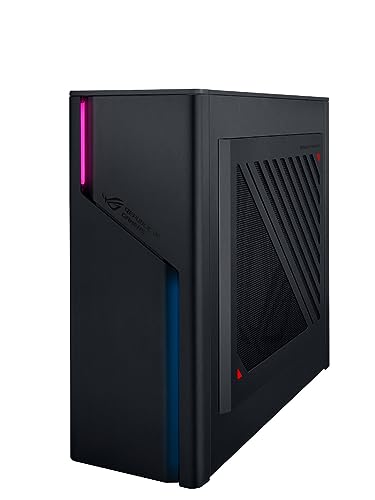
ASUS ROG G22CH (DB779) — Core i7-13700KF, Desktop RTX 4070, 32GB DDR5, 1TB SSD
Who it suits: 1440p players who want the full desktop version of the experience — a real desktop graphics card at desktop power — in a case a third the size of a normal tower.
Start with the only unambiguous GPU in this guide. The G22CH, at roughly 10 liters (ASUS publishes 11.5 × 32.3 × 28.7 cm), is the largest machine here, and inside it sits a proper desktop GeForce RTX 4070 DUAL card with 12GB of GDDR6X memory, driven by a 16-core Core i7-13700KF, 32GB of DDR5 and a 1TB PCIe 4.0 SSD, on a 600W 80+ Gold power supply. For 1440p that specification reads exactly right: the desktop 4070 renders modern games natively at 2560×1440 as its home resolution, its 12GB of memory is the comfortable amount for 1440p texture loads, and DLSS sits on top as pure headroom — engage Quality mode and the card renders internally at roughly 1707×960 while outputting a 1440p image that is very hard to tell from native, buying smoother performance in the heaviest titles without touching the settings menu. It is also the only pick here with a credible 4K side-claim: DLSS Quality at 4K output renders about 2560×1440 internally, squarely this card’s workload. Nothing about its performance depends on a mode being switched on or a wattage compromise being forgiven; it behaves like the desktop it is, in a wedge-shaped, RGB-lit case that includes a wired keyboard and mouse.
The limitations are ceilings, not flaws. Memory is laptop-style SO-DIMM in two slots, and ASUS rates the platform at 32GB maximum, so the fitted 32GB is also the final 32GB. The graphics card can be replaced in principle, but only by a card that fits the case and the 600W supply’s budget — in practice, dual-fan cards of the same class. The processor sits on Intel’s LGA1700 platform at the end of its road. Pricing requires attention rather than trust: check the current price on Amazon, and check the model number and the sold-by line every time, because reseller listings for lesser G22CH variants — a 13700F processor with 16GB of memory — can sit oddly close to the DB779. On this listing, the variant matters as much as the price. Judged on its hardware, this is the 1440p compact with the fewest asterisks: native rendering, desktop power, desktop memory capacity, console footprint.
- A genuine desktop RTX 4070 12GB — native 1440p with no mobile-GPU discount.
- DLSS as headroom, not necessity: Quality mode renders ~1707×960 internally for a near-native 1440p image.
- 600W 80+ Gold internal power supply — no external brick, real wattage headroom.
Honest limitation: Memory is capped at 32GB of SO-DIMM, the LGA1700 platform has no processor upgrade path, and GPU swaps are limited to cards that fit the case and the 600W budget.
Choose it if you want native 1440p from desktop parts and your space allows a ~10-liter box. Skip it if every liter matters — the mini PCs below are a third of its size.

ASUS ROG NUC (2025) — Core Ultra 9 275HX, RTX 5070 Ti Mobile, 16GB DDR5, 1TB SSD
Who it suits: Buyers who want the most 1440p performance that physically fits in about 3 liters, and who are willing to buy at the right moment rather than on any given day.
This is the strongest graphics hardware in the guide, and it is not close. The 2025 ROG NUC (model RNUC15JNK9X369AU) stands 282.4 × 187.7 × 56.5 mm — almost exactly 3 liters — and pairs Intel’s 24-core Core Ultra 9 275HX with an RTX 5070 Ti Mobile GPU carrying 12GB of GDDR7, cooled by three fans and dual vapor chambers. Translated into 1440p terms: native rendering at high settings is this machine’s default, high-refresh 1440p play is squarely on the table, and DLSS 4 with frame generation gives it a second gear the 40-series picks cannot match. It is also the most credible 4K-upscale machine here — point it at a 4K panel with DLSS Quality (an internal render of roughly 2560×1440) and it produces the kind of image that makes visitors ask what graphics card is in the tower they cannot see. The port selection is the best in the guide, with dual Thunderbolt 4, and the build is ASUS’s premium ROG line throughout.
Now grade the name honestly, because this guide grades every laptop GPU as a laptop GPU. The 5070 Ti Mobile is a mobile part: 12GB of memory against the desktop 5070 Ti’s 16GB, a lower power limit, and performance roughly a class below the desktop card of the same name. At 1440p that still leaves it the fastest GPU in this guide — but a buyer cross-shopping a desktop 5070 Ti tower in a similar tier should know the tower’s card is the stronger one, and that the difference being paid for here is the 3-liter chassis. Two catches complete the picture. The first is memory: this configuration ships with 16GB of system RAM, the minimum a machine in this tier should carry, and the first upgrade a serious buyer should budget for — the two SO-DIMM slots make it easy, but it should have been included. The second is price. Check price on Amazon before you buy: through ASUS’s own store the ROG NUC (2025) family sits above this budget, and the same chassis in RTX 5080 form sits higher still. This pick belongs in an under-$2,500 guide only while its discounted pricing holds. Buy it when the live listing fits this budget; at its usual shelf positioning it belongs to the under-$3,000 guide, and no amount of 1440p enthusiasm changes that.
- RTX 5070 Ti Mobile with 12GB GDDR7 — the strongest 1440p GPU in a ~3L chassis on Amazon.
- DLSS 4 with frame generation: the most upscaling headroom in this guide.
- 24-core Core Ultra 9 275HX and dual Thunderbolt 4 — a creator-grade CPU and port package.
Honest limitation: Only 16GB of RAM as shipped, the GPU is a mobile part a class below the desktop 5070 Ti and can never be upgraded, and it fits the under-$2,500 budget only when discounted — at its usual shelf positioning it is over budget.
Choose it if you catch it discounted within this budget and want maximum 1440p power per liter. Skip it if the live listing is back above this budget, or you refuse to upgrade the RAM yourself.

Minisforum AtomMan G7 Pro — Core i9-14900HX, RTX 5070 Laptop GPU, 32GB DDR5, 1TB SSD
Who it suits: Buyers who want the current GPU generation’s 1440p performance in a slim, upright mini PC, without paying the ROG badge premium.
The G7 Pro is Minisforum’s answer to the machine above: the same recipe — flagship laptop processor, laptop RTX GPU, ultra-thin vertical chassis standing on the desk like a hardback book — executed at a lower tier positioning. The processor is Intel’s Core i9-14900HX, 24 cores boosting to 5.8GHz. The graphics are an RTX 5070 Laptop GPU with 8GB of GDDR7, tested at around 115W. Grade that GPU the way this guide grades them all: it is a laptop part, roughly a class below a desktop RTX 5070, and its 115W limit is a healthy one for the class. At 1440p it is a genuine native-rendering machine for the great majority of current games, and DLSS 4 with frame generation extends it further — Quality mode’s internal render of about 1707×960 upscaled to the 1440p panel is this GPU’s natural comfort setting in the heaviest titles. The configured version carries 32GB of DDR5 and a 1TB SSD; memory grows to 96GB across two SO-DIMM slots, a second M.2 slot (one PCIe 5.0) waits empty, and connectivity is fully modern: Wi-Fi 7, USB4, HDMI 2.1. Check the current price on Amazon for the configured machine: Amazon pricing tends to run higher than Minisforum’s own direct channels, but this pick is positioned well inside this budget tier.
Two warnings from the review record matter specifically to a 1440p buyer. First, the 8GB of video memory is the ceiling that will age soonest at this resolution: 1440p texture loads are heavy, and the most demanding current titles already press against 8GB at ultra settings, which means this machine’s long-term 1440p settings are “high” rather than “ultra” — a fair trade in its tier, but one to make knowingly. Second, check two things before and after ordering. On the listing, confirm the style selector is set to the configured 32GB + 1TB version: the same listing sells a barebone style with no memory, no storage and no operating system, and buyers have mistaken it for the configured machine before. On arrival, check the memory configuration: reviewers found their test units shipped with a single 32GB stick, which runs memory in single-channel mode and leaves performance on the table until a matched second stick is added — the cheapest upgrade in this guide. The structural limits are the class’s usual ones: neither CPU nor GPU can ever be changed. What you are buying is the current generation’s 1440p power without the ROG premium, in a box that disappears behind a monitor.
- RTX 5070 Laptop GPU at ~115W with DLSS 4 — native 1440p for most current games.
- Configured version positioned as the value benchmark — the pick every other pick here is measured against; check price on Amazon.
- Two SO-DIMM slots to 96GB and a spare SSD slot — unusual headroom in a mini PC.
Honest limitation: 8GB of VRAM caps its 1440p ultra-settings future, review units shipped with single-channel memory, and the listing’s barebone style is a trap for anyone who does not read the style name.
Choose it if you want the newest GPU generation’s 1440p performance without the ROG premium. Skip it if you play the heaviest texture-rich titles at ultra settings, or need more than 8GB of VRAM headroom.

ASUS ROG NUC 970 — Core Ultra 9 185H, RTX 4070 Laptop GPU, 32GB DDR5, 1TB SSD
Who it suits: Buyers for whom size is the first specification — the smallest brand-name 1440p PC in this guide, at 2.5 liters, with its laptop GPU running at full wattage.
The NUC 970 (model RNUC14SRKU9189AUI) measures 270 × 180 × 50 mm — 2.5 liters, light enough to travel in a backpack — and the specification that matters for this guide is a single number: 140W. That is the full power limit for its RTX 4070 Laptop GPU, and it is why this little box performs like a good 4070 gaming laptop rather than a throttled mini PC. At 1440p, that means native rendering in the great majority of games, with DLSS Quality (internal render ~1707×960) as the smoothness reserve for the heaviest ones — the exact profile a 1440p buyer should want from a machine this size. Around the GPU: a Core Ultra 9 185H, 32GB of DDR5-5600 expandable to 64GB, a 1TB SSD, Thunderbolt 4, an SD card reader, a vertical stand in the box, and ASUS’s support ecosystem behind it. Check price on Amazon — it is the most portable route into honest 1440p gaming carrying a major brand’s badge.
The honest problem is arithmetic, and it has a name: the G7 Ti, two reviews below. That machine runs the same GPU class at the same 140W, matches or beats this one in independent testing, and is positioned notably lower through Minisforum’s channels — Digital Trends’ reviewer found the G7 Ti outclassed the NUC 970 outright. What the ASUS premium buys is the smaller chassis (2.5 liters against a larger slab), Thunderbolt, the brand’s support network and resale value. Whether that is worth the difference is a judgment about how much the last liter and the badge matter to you. Grade the GPU itself without illusions: it is a laptop part, a step below the desktop RTX 4070 in the G22CH, with 8GB of memory that will set its 1440p texture ceiling in the heaviest games. The platform is also the 2024 generation — the Core Ultra 9 185H is capable, but it gives up cores and clocks to the 14900HX machines here — and the GPU is soldered for life. Buy it for the size and the badge, when its live price fits this budget, and it earns its place; buy it at a premium while the G7 Ti is in stock and you have paid for the logo.
- The smallest chassis in this guide at 2.5 liters, with its stand in the box.
- Full-power 140W RTX 4070 Laptop GPU: native 1440p with no wattage compromise.
- Thunderbolt 4 and an SD reader, backed by ASUS support — the polished travel package.
Honest limitation: The G7 Ti matches its GPU class and wattage while positioned lower in this tier; you are paying for the final liter, the ports and the brand — and the GPU is soldered for life.
Choose it if the PC has to vanish into a backpack or behind a monitor and ASUS support matters to you. Skip it if 1440p performance for its tier is the priority — that is the G7 Pro and G7 Ti.

Minisforum AtomMan G7 Ti — Core i9-14900HX, RTX 4070 Laptop GPU, 32GB DDR5, 1TB SSD
Who it suits: Living-room and small-desk gamers who want a slim, upright box beside the TV or monitor — and the strongest reviewed 1440p performance of the RTX 4070 laptop-GPU class.
The G7 Ti takes a gaming laptop’s best hardware and removes the screen and keyboard: a 24-core Core i9-14900HX and an RTX 4070 Laptop GPU at its full 140W power limit, in a slim vertical slab about 80mm thick and 2.6kg in weight. Its review record is the strongest in this guide. Digital Trends scored it near-perfectly and found it outclassing the ROG NUC 970; Notebookcheck measured strong, sustained performance; Tom’s Guide calls it strong for 1080p and 1440p gaming while noting, correctly, that 4K is beyond it — a verdict this guide endorses exactly: at 1440p this is a native-rendering machine, and DLSS Quality (internal ~1707×960) is its headroom, not its lifeline. The configured style on the Amazon listing carries 32GB of DDR5-5600, expandable to 96GB, a 1TB SSD with a second M.2 slot free, Wi-Fi 7 and USB4. Check the current price on Amazon: Amazon’s price typically runs higher than Minisforum’s own direct channels, but in this tier it is the performance benchmark of the 4070 class, and it sits comfortably inside the under-$2,500 budget.
The catches are the ones its shape dictates. Cooling a 140W GPU and a 24-core HX processor inside a slim slab means small fans spinning fast, and under sustained load the result is audible in a quiet room in a way the 10-liter G22CH never is — on a TV stand across the room that is a footnote; on a desk beside your monitor it is a character trait. Ports are thin for the tier — reviewers counted just two USB-A — so budget for a hub from day one. The GPU’s 8GB of memory is the same 1440p texture ceiling noted on the G7 Pro — high settings are this machine’s long-term home, not ultra. And like the G7 Pro, the listing sells both configured and barebone styles: confirm the style name says 32GB + 1TB before ordering, because the barebone arrives without memory, storage or Windows. None of this displaces it. As a reviewed, measured, full-wattage native-1440p machine that stands upright in the space a hardback book would take, it is the pick the NUC 970 has to justify itself against.
- RTX 4070 Laptop GPU at the full 140W — the wattage throttled rivals do not get.
- The best independent review record in this guide, head-to-head wins over the ROG NUC 970 included.
- Room to grow: memory to 96GB and an empty second SSD slot, in a slab ~80mm thick.
Honest limitation: Fan noise under load is the price of the slim shape, two USB-A ports make a hub mandatory, and 8GB of VRAM caps its 1440p ultra-settings future.
Choose it if you want console-style placement and the best-reviewed 1440p performance for its tier in the 4070 class. Skip it if desk silence matters more than slimness, or if you would rather have the G7 Pro’s newer 50-series GPU.

Minisforum AtomMan G1 Pro — Ryzen 9 8945HX, Desktop RTX 5060, 32GB DDR5, 1TB SSD
Who it suits: Buyers who refuse to accept a soldered GPU — the one mini PC in this guide whose graphics card can be unplugged and replaced, built for a TV stand and a long life at 1440p.
On every other small machine in this guide, the GPU you buy is the GPU you retire with. The G1 Pro does not. Its 3.8-liter vertical chassis — measured by Tom’s Guide at 12.4 × 8.5 × 2.25 inches, smaller than a PS5 standing on its side — contains a genuine desktop graphics card: a low-profile GeForce RTX 5060 running at 145W, seated in a real PCIe x16 slot. Grade it plainly, as this guide grades every card: the desktop 5060 is a step below the 4070-class machines above it, and at 1440p it is the honest entry point rather than a flagship — native rendering in most current games at sensible settings, with DLSS 4 (Quality mode rendering ~1707×960 internally) doing real work in the heaviest titles, and frame generation on top. What no other pick here can say is that this verdict has an expiry date of your choosing: when a faster low-profile card exists in three years, this is the one sub-4-liter machine that can take it. Around the slot sit a 16-core Ryzen 9 8945HX (to 5.4GHz), 32GB of DDR5-5200 expandable to 96GB, a 1TB PCIe 4.0 SSD with a second M.2 slot, 5-gigabit Ethernet, Wi-Fi 7, and an internal 350W power supply — no laptop-style brick cluttering the floor. Check price on Amazon. Minisforum also sells a sibling configuration with a 16GB Radeon RX 9060 XT in the same chassis in a similar tier through its own channels, which VRAM-hungry buyers should know exists, though it is a separate listing and not linked here.
The review record adds three honest footnotes, and the first is an instruction: the machine ships in an 80W gaming mode that hides roughly a fifth of its performance behind a toggle in Minisforum’s software — switch it to full performance on day one, or you will benchmark a slower PC than you bought, a mistake that matters doubly at 1440p, where that fifth is the difference between native and upscaled. Second, under heavy load it gets loud, as 3.8 liters moving this much heat tends to; Tom’s Guide noted the noise as the machine’s main manners problem. Third, reviewers flagged that Minisforum’s control utility ships a system driver that Windows Defender identifies as vulnerable — a fixable software wart, but one to know about before setup, not after. Buy this machine for the chassis, the slot and the internal power supply — for the right to upgrade later — and on that basis it is a defensible purchase, as long as it is made with eyes open about the GPU class being bought today.
- A desktop graphics card you can actually swap, in a real PCIe x16 slot — no other pick this size offers one.
- A 350W power supply built inside — no brick on the floor, a console-clean install.
- Desktop RTX 5060 with DLSS 4: honest native-1440p entry, upgradable later.
Honest limitation: The RTX 5060 is a class below the 4070/5070 machines here, it ships in an 80W mode that hides a fifth of its performance until you switch it off, and it is loud under sustained load.
Choose it if a TV-stand footprint and a future GPU swap matter more than this year’s GPU class. Skip it if you want the most 1440p performance for its tier today — the G7 Pro and G7 Ti are faster in a similar tier.
Comparison Table
| Product | Size | Graphics | 1440p verdict | Link |
|---|---|---|---|---|
| ASUS ROG G22CH (DB779) | ~10.7 L | Desktop RTX 4070 12GB | Native 1440p, desktop power; DLSS as headroom | Check on Amazon |
| ASUS ROG NUC (2025) | ~3 L | RTX 5070 Ti Mobile 12GB | Strongest here; native 1440p high-refresh, DLSS 4 | Check on Amazon |
| Minisforum AtomMan G7 Pro | Slim slab, ~80mm thick class | RTX 5070 Laptop 8GB, ~115W | Native 1440p in most games; 8GB VRAM ceiling | Check on Amazon |
| ASUS ROG NUC 970 | 2.5 L | RTX 4070 Laptop 8GB, 140W | Native 1440p at full laptop wattage | Check on Amazon |
| Minisforum AtomMan G7 Ti | Slim slab, ~80mm thick, 2.6kg | RTX 4070 Laptop 8GB, 140W | Best-reviewed native 1440p in its class | Check on Amazon |
| Minisforum AtomMan G1 Pro | 3.8 L | Desktop RTX 5060 8GB, swappable | Honest 1440p entry; DLSS 4 works hardest here | Check on Amazon |
How to Choose a Compact Gaming PC for 1440p
- Decide what “1440p” must mean before you shop. Native rendering at 2560×1440, upscaling to a 1440p output, and merely displaying a 1440p desktop are three different products sold under one phrase. Every pick in this guide does the first as its normal mode. If a listing outside this guide cannot say which GPU and how much VRAM it carries, assume it means the third.
- Ask which GPU it really is. One GPU name covers three different products: the desktop card, the laptop chip at full wattage, and the laptop chip turned down. Look for the words “Laptop GPU” or “Mobile” and a wattage figure. An RTX 4070 Laptop at 140W, as in the NUC 970 and G7 Ti, is a strong 1440p part; the same chip at 80W is a class below it.
- Count VRAM for the resolution, not the badge. 1440p texture loads are heavier than 1080p ones. The 12GB cards here (G22CH, ROG NUC 2025) have the comfortable long-term margin; the 8GB cards are honest 1440p machines whose settings will settle at “high” rather than “ultra” in the heaviest titles as the years pass.
- Learn the upscaling math once. DLSS Quality upscaling to a 1440p output renders internally at about 1707×960 and reconstructs the rest — visually very close to native, and the right default in demanding games. Performance mode renders about 1280×720 internally; reserve it for the heaviest titles or the weakest card. Frame generation, available on every RTX pick here, smooths motion on top of either — it is a bonus, not a substitute for render resolution.
- Pair the monitor to the machine, not the dream. A 1440p high-refresh panel is the natural match for all six picks: every one of them can drive it natively, and the stronger ones can use its refresh headroom. A 4K panel is a viable pairing only for the top of this guide — the G22CH and the ROG NUC (2025) — and only with DLSS Quality expectations set: at 4K output, Quality renders internally at roughly 2560×1440 (Performance at about 1920×1080), which is precisely the workload these cards are good at. Do not pair the RTX 5060 or the 8GB laptop-GPU machines with a 4K panel and expect native rendering; that pairing belongs to a bigger budget, as Best 4K Gaming PC Under $2500 shows for the tower market.
- Check the memory as shipped, not as supported. A machine advertised as supporting 96GB may still ship with 16GB fitted, or with one stick running single-channel. Both configurations appear in this guide. At 1440p, where the GPU is already working hard, a memory bottleneck is performance you paid for and did not receive — the fix is cheap, but only if you know to make it.
- Read the style selector like a contract. On mini-PC listings, barebone and configured versions commonly sit side by side. Barebone means no memory, no storage, no Windows. The listing that caught your eye may be the empty one’s.
- Switch off the shipping power mode. Several compact PCs arrive in a reduced-power profile — the G1 Pro’s 80W default is the documented example, hiding about a fifth of the machine. At 1440p that fifth is often the margin between native rendering and upscaling, so the full-performance setting is a deliberate choice you make once, in the maker’s software.
- Budget the compact tax honestly. Per frame, small costs more: a tower with a desktop RTX 5070 Ti sits in a similar tier to the ROG NUC (2025) and renders 1440p faster. You are paying for liters removed. If your room turns out to have space for a tower after all, Best Gaming PC Under $2500 is the honest alternative.
- Plan the upgrade you will actually make. Five of these six machines keep their GPU for life. Memory and storage can grow on all six; if a graphics upgrade in three years matters, the choice narrows to the G1 Pro’s low-profile slot or the G22CH’s desktop bay.
Native, Upscaled, or Just Displayed: Reading a 1440p Claim
Because the phrase “1440p gaming PC” covers three different realities, it is worth fixing the vocabulary before money moves. Native 1440p means the GPU renders every frame at 2560×1440 — the sharpest image, the heaviest workload, and the standard this guide enforced. Upscaled 1440p means the GPU renders at a lower internal resolution and an AI algorithm — DLSS on every pick here — reconstructs a 1440p output; at Quality settings the internal render is about 1707×960 and the result is close enough to native that most players cannot separate them in motion, which is why upscaling is best understood as headroom: the reserve a native-capable machine spends in its hardest moments. The third reality, a machine that outputs a 1440p signal while rendering games at 1080p or below as its only mode, is a 1080p PC with a nice monitor setting, and no amount of listing language changes that.
The reason this guide can be relaxed about upscaling is that none of its picks depends on it. The desktop RTX 4070 and the RTX 5070 Ti Mobile treat DLSS Quality as a smoothness reserve. The 140W RTX 4070 Laptop machines use it the same way in their heaviest titles. Even the G1 Pro’s desktop RTX 5060 — the pick where DLSS works hardest — renders natively in most current games and upscales by choice, with DLSS 4 frame generation on top. The practical advice follows: buy the machine whose native rendering satisfies you, and let upscaling be the pleasant surprise. Below this tier, Best Compact Gaming PC For 1440p Gaming Under $1500 grades exactly this native-versus-upscaled line; above it, Best Compact Gaming PC For 1440p Gaming Under $3000 is where the laptop-GPU compromises start to disappear.
Common Buying Mistakes
- Believing “1440p ready” without asking native or upscaled. If the listing will not name the GPU, its memory and its wattage, it is selling the phrase, not the performance.
- Believing the badge: an RTX 5070 Ti is not always an RTX 5070 Ti. In a mini PC it is the Mobile version — 12GB instead of 16GB, a lower power limit, roughly a class down. Still the fastest GPU in this guide; not the same card as the tower version.
- Pairing an 8GB laptop-GPU machine with a 4K monitor and expecting native 4K. These are 1440p machines; at 4K they are upscaling machines, and on the weaker picks that bargain ends quickly.
- Ordering a Minisforum listing’s barebone style and finding no memory, storage or Windows in the box. The style name is the product.
- Leaving the shipping power mode on. A compact PC left in its 80W or “quiet” default can give away a fifth of the performance you paid for — at 1440p, often the native-rendering margin itself.
- Ignoring memory configuration. 16GB in a machine at the top of this budget, or a single stick in a dual-channel design, are both real configurations in this guide — check what ships, not what is supported.
- Trusting the word “compact” in a listing title. Many are 35–45 liter mid-towers. Multiply the published dimensions yourself before believing the adjective.
- Expecting a GPU upgrade that physics forbids. Soldered laptop GPUs do not come out; if a future upgrade matters, buy the machine built around a slot.
- Forgetting the hub. Two USB-A ports is a real specification in this category; a keyboard, mouse, headset and controller still need somewhere to go.
Final Recommendation
- Most buyers: ASUS ROG G22CH — a desktop RTX 4070 rendering native 1440p in a console-sized case, positioned well under budget — check price on Amazon.
- Maximum 1440p power per liter: ASUS ROG NUC (2025) with RTX 5070 Ti Mobile — but only when discounted within this budget; check price on Amazon.
- Best value, current generation: Minisforum AtomMan G7 Pro.
- Smallest native-1440p PC: ASUS ROG NUC 970.
- Best-reviewed 1440p slab: Minisforum AtomMan G7 Ti.
- The upgradable 1440p mini PC: Minisforum AtomMan G1 Pro.
Our top two are the G22CH and the G7 Pro, because they answer the 1440p question in its two honest forms: the ASUS renders it natively with a desktop card at desktop power, in the smallest case that can hold one, and the Minisforum renders it natively with the current GPU generation in a book-thin slab positioned as the value pick in this guide. The ROG NUC (2025) is the stronger machine than both and the worse buy at its usual shelf positioning — catch it discounted within this budget and it jumps the queue. Shoppers whose space allows a step up in size should also see Best Compact Gaming PC Under $3000, and those working with a smaller budget will find the same grading applied at Best Compact Gaming PC Under $1500. Whichever you choose: confirm the GPU is the kind you think it is, count its memory, check the memory configuration that ships, switch on the full power mode, pair it with a 1440p panel, and check the live price before you order.
Frequently Asked Questions
Can these compact PCs really play games at native 1440p?
Yes — that was this guide’s entry requirement. All six render modern games at native 2560×1440 as their normal mode; the differences are settings and headroom. The desktop RTX 4070 and RTX 5070 Ti Mobile hold high settings with room to spare, the 140W RTX 4070 Laptop machines are strong at high settings, and the 8GB cards will settle toward high rather than ultra in the heaviest titles as games grow.
Is a laptop GPU in a mini PC as fast as the desktop card with the same name?
No. The RTX 5070 Ti Mobile carries 12GB of memory against the desktop card’s 16GB and runs at a lower power limit; the RTX 4070 Laptop GPU trails the desktop 4070 by a similar margin — roughly a performance class. At their full 140W limits, as in the NUC 970 and G7 Ti, the laptop parts are strong native-1440p GPUs. They are simply not their desktop namesakes, and this guide labels every one of them.
Should I use DLSS at 1440p, or render natively?
Both, in that order. Buy for native rendering, then use DLSS Quality — an internal render of about 1707×960 reconstructed to 1440p — as headroom in the heaviest games, where it buys smoothness at a quality cost most players cannot see in motion. Performance mode (about 1280×720 internal) is a reserve for the hardest titles or the weakest card. Frame generation, supported across the RTX range here, smooths motion further but does not replace render resolution.
Can I pair one of these with a 4K monitor instead?
At the top of the guide, yes, with expectations set. The G22CH and the ROG NUC (2025) can drive a 4K panel through DLSS Quality, which at 4K output renders internally at roughly 2560×1440 — the workload both machines are built for. The 8GB laptop-GPU picks and the RTX 5060 machine are 1440p PCs; on a 4K panel they become upscaling-only machines with thin margins. A 1440p high-refresh panel is the pairing this guide recommends for all six.
Can I get an RTX 5080 in a compact PC under $2,500?
No — not a genuine small-form-factor one. ASUS’s ROG NUC (2025) in its top configuration is the compact RTX 5080 machine on Amazon, and it sits well above this budget. In this guide, compact under $2,500 tops out at the RTX 5070 Ti Mobile, and only while its discounted pricing holds — check price on Amazon.
Which of these can I upgrade later?
Memory and storage on all six. The graphics card on two of them: the G1 Pro accepts replacement low-profile desktop cards in its PCIe slot, and the G22CH can exchange its desktop card within the limits of its case and 600W supply. On the two ROG NUCs and the other two AtomMan machines, GPU and processor are soldered — what you buy is what you keep.
Are compact gaming PCs loud at 1440p?
Under sustained gaming load, louder than towers of the same power — small fans spin faster to move the same air, and 1440p loads the GPU hard. The slim machines here are all reviewer-noted as audible under load; the 10-liter G22CH is the quietest of the six. Placement helps: across a living room they fade into the game audio; on a desk at arm’s length, headphones are part of the compact-PC kit.
Which compact PC here is best for a TV and living room?
For a TV stand, the G1 Pro and G7 Ti are the natural fits — both stand vertically at console size, and the G1 Pro’s internal power supply makes its setup the cleanest. If the PC must hide completely, behind the TV or in a backpack between rooms, that is the NUC 970. More on fitting a PC into tight rooms: Best Compact Gaming PC For Small Spaces Under $2500.
- Best Compact Gaming PC Under $3000
- Best Compact Gaming PC Under $1500
- Best Compact Gaming PC For Small Spaces Under $2500
- Best Compact Gaming PC For Streaming Under $2500
- Best Small Form Factor Gaming PC Under $2500
- Best Mini Gaming PC Under $2500
- Best Compact Gaming PC For Beginners Under $2500
- Best Compact Gaming PC For 1440p Gaming Under $1500


