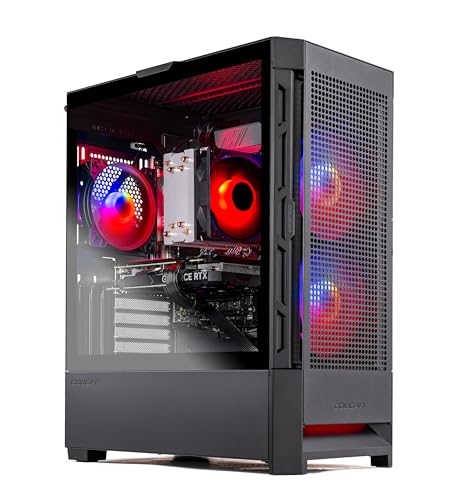
Where to buy
Check the latest price, availability and delivery on Amazon. Orders are placed on Amazon. We may earn a commission from qualifying purchases.
- Best for 1440p overall: Skytech Blaze4 Mini, Ryzen 7 5700, RTX 4060 Ti, 16GB DDR4, 1TB SSD — Check on Amazon
- Minisforum AtomMan G7 Pt, Ryzen 9 7945HX, RX 7600M XT, 32GB, 1TB — Check on Amazon
- HP OMEN 16L, Core i7-14700F, RTX 4060, 32GB (Amazon bundle listing) — Check on Amazon
- Beelink SER9 Pro, Ryzen AI 9 HX 370, Radeon 890M, 32GB, 1TB — Check on Amazon
- Minisforum UM890 Pro, Ryzen 9 8945HS, Radeon 780M, 32GB, 1TB — Check on Amazon
- GMKtec NucBox K8 Plus Barebone, Ryzen 7 8845HS, No RAM/SSD/OS — Check on Amazon
Read the full guide ↓
Disclosure: As an Amazon Associate, reviewstook.com earns from qualifying purchases. Links to Amazon on this page are affiliate links; they cost you nothing extra. Listing details such as price and availability change often, so check the current Amazon listing before you buy.
Every product in this guide can put a 2560×1440 picture on your monitor. That is true of all six picks, and nearly meaningless — because “1440p gaming” hides three different things. A game can be rendered at 1440p, pixel for pixel, by a graphics card doing the full work. It can be rendered at a lower resolution and reconstructed up to 1440p by DLSS or FSR, which looks close and costs far less. Or it can be rendered at 1080p and simply stretched onto a 1440p panel by the display — the softest picture of the three. Listings never tell you which a machine will actually do. This guide grades each pick on which one it honestly delivers, because at $1,200 in a compact case, the answer splits the list cleanly in two.
On one side sit three machines with discrete graphics: a small tower with a desktop RTX 4060 Ti, a console-sized mini PC with a discrete mobile Radeon, and HP’s small tower with a desktop RTX 4060. Those three render games natively at 1440p with sensible settings, and treat upscaling as headroom rather than life support. On the other side sit three machines on integrated graphics — the strongest integrated silicon AMD sells, in boxes as small as 0.82 liters. Those are 1080p-render machines: they play at 1080p, or upscale from around it, and the 1440p monitor in front of them is a sharp desktop and a promise to the future rather than a native gaming resolution today. Neither side is a trick; pretending they are the same product would be. Check the current price on Amazon before you buy, because a memory shortage has been swinging mini PC listings significantly between months.
In this guide
Quick Picks
Short on time, or comparing several options at once? Each row below names a buyer type and the product that suits it, with a link to the listing.
| Buyer type | Pick | Why it stands out | Link |
|---|---|---|---|
| Best for 1440p overall | Skytech Blaze4 Mini, RTX 4060 Ti | The only desktop 4060 Ti here — native 1440p rendering with DLSS as headroom — check price on Amazon; “Mini” is a name, not a measurement | Check on Amazon |
| Best true compact for 1440p | Minisforum AtomMan G7 Pt | A discrete RX 7600M XT in ~2.7 liters — native 1440p in lighter titles, FSR Quality for the rest | Check on Amazon |
| Best big-brand 1440p option (deal-watch) | HP OMEN 16L | Desktop RTX 4060 and DLSS in an honestly named 16 liters — buy only at or under $1,200 | Check on Amazon |
| Best integrated graphics | Beelink SER9 Pro | The Radeon 890M is the strongest iGPU in a mini PC — a 1080p-render machine that upscales cleanly to a 1440p panel | Check on Amazon |
| Best upgradeable mini PC | Minisforum UM890 Pro | Socketed RAM, dual SSD slots and an OCuLink port — today’s 1080p renderer with a real route to a desktop GPU later | Check on Amazon |
| Best starting point for builders | GMKtec NucBox K8 Plus Barebone | A barebone with no RAM, SSD or OS — graded on what it becomes once completed, not on the empty box; check price on Amazon | Check on Amazon |
How These Picks Were Chosen
The first filter was the same one this guide’s base research applied: a pick had to publish real dimensions, and its volume is those dimensions multiplied out. That is how a compact guide ends up containing a small mid-tower (the Blaze4 Mini, by its own listing’s measurements) and a 16-liter HP — both included with the discrepancy stated rather than smoothed over, because their graphics hardware is what 1440p shoppers at this budget will actually buy.
The second filter is the one this angle adds: render honesty. Each pick is graded by the resolution its graphics hardware actually renders at, taken from maker specifications and independent reviewer consensus — never from listing headlines, and never with per-game frame-rate figures, which vary too much by title and patch to print responsibly. Upscaling support is credited only where the silicon provides it: DLSS on the two NVIDIA desktop cards, FSR on the AMD machines, and nothing invented for anyone. Where a pick’s appeal is a future upgrade — an OCuLink port, a barebone’s empty slots — the review accounts for the whole path, dock, power supply, card and completion parts included, before calling anything a bargain.
We did not use these products ourselves. We read maker listings, specification pages and independent reviews, and compared stated dimensions, GPU classes, memory types and memory configurations. Prices change often, so use the Amazon links to check the current price on Amazon before you buy. Two picks here habitually sit above this guide’s $1,200 budget between deal events; both are labeled deal-only, because a temporary sale price presented as a permanent price is how buyers overpay.
Rendered, Upscaled, Displayed: The Three Meanings of 1440p
Start with the arithmetic. A 1440p frame holds 2560×1440 pixels — about 3.7 million of them. A 1080p frame holds about 2.1 million. Moving from 1080p to 1440p therefore asks the graphics hardware for roughly 78% more pixels per frame, which is why a machine that feels comfortable at 1080p can feel a full class slower the day a 1440p monitor arrives.
Native rendering means the GPU produces all 3.7 million pixels itself. It is the sharpest result and the most expensive in hardware, and at this budget it belongs to the three discrete-GPU picks — with settings discipline. Native 1440p at sensible settings is a different promise from native 1440p with every slider at maximum — a promise no pick in this guide makes.
Upscaling means the GPU renders fewer pixels and reconstructs the rest. The quality modes of DLSS and FSR, rendering to a 1440p output, work from an internal resolution of roughly 1707×960 — about 44% fewer pixels than native — and the reconstructed image is close enough to native that most players, in motion, cannot reliably separate them. The performance modes go further, rendering from roughly 1280×720, and there the softness becomes visible: performance modes are a tool for the heaviest games, not a default. This is why upscaling changes the grading rather than cheating it. A discrete card rendering natively and holding upscaling in reserve is a stronger 1440p machine than one that needs its quality mode to get by — and both play a different sport from the third category.
Displayed-only 1440p means the game renders at 1080p — or below — and the monitor stretches the result to fill its panel. The desktop looks wonderful, because the desktop really is rendered at 1440p; the game gains no such sharpness, because the information was never rendered. This is the honest description of what the integrated picks do with demanding games — and a 1440p monitor bought today is still not wasted on them. Text and desktop work use the full panel, lighter games render closer to native, and the panel outlives the PC: it is the display your next, stronger machine will want. Just do not buy one expecting tonight’s AAA games to render at 1440p on integrated graphics. They will not, on any brand’s silicon, at any mini PC price.
Two supporting facts shape the reviews below. The first is frame generation, available on the two NVIDIA desktop cards here: it inserts generated frames between rendered ones, raising the smoothness the monitor shows without reducing the cost of each real frame — a genuine comfort feature on top of a healthy baseline, and no substitute for one. The second is memory: every discrete pick here carries 8GB of graphics memory, and 1440p textures are where 8GB starts to need managing, so expect texture settings a notch below maximum in the heaviest current games. That is a settings adjustment, not a failure — but a guide that skipped it would be selling you the resolution and hiding its price.
The 6 Best Compact Gaming PCs for 1440p Gaming Under $1,200
Skytech Blaze4 Mini — Ryzen 7 5700, GeForce RTX 4060 Ti 8GB, 16GB DDR4, 1TB SSD
Who it suits: 1440p buyers whose real constraint is a desk corner rather than a shelf — who want the strongest rendering hardware this budget buys in a “compact” search, and can live with what the tape measure says.
The confession comes first, because it decides whether you should keep reading: Amazon’s stated item dimensions for the Blaze4 Mini are 15.2 × 9.1 × 19.3 inches. Arranged any way you like, that is a small mid-tower — several times the volume of the mini PCs below, and taller in one dimension than the 16-liter HP. If the machine must disappear behind a monitor, skip to the Minisforum picks. What those dimensions buy is the only unambiguous 1440p machine in this guide: a desktop GeForce RTX 4060 Ti with 8GB, driven by a Ryzen 7 5700, with 16GB of DDR4-3200, a 1TB NVMe SSD and a standard 650W Gold power supply. Check price on Amazon for this configuration — it sits at the value end of this guide for a desktop 4060 Ti, which makes it the most accessible route here to that card by a wide margin.
For 1440p specifically, the 4060 Ti is the right class of hardware in the right way. It renders natively at 2560×1440 with sensible settings across the current catalogue, and because it is an NVIDIA card, DLSS waits in reserve: drop to a quality-mode upscale — rendering internally around 1707×960 and reconstructing to the panel — and the heaviest games gain headroom without giving up the 1440p output, with DLSS frame generation on top for smoothness. The 8GB of graphics memory is the one ceiling to manage: in the most texture-hungry titles, expect textures a notch down at 1440p. The ownership story completes the case — standard parts throughout mean the graphics card can be swapped for a stronger one later, the only pick here whose native-1440p ceiling can rise without replacing the machine, and full-size tower fans run this hardware class more quietly than any small box manages.
- Desktop RTX 4060 Ti — check price on Amazon — with native 1440p rendering and DLSS held in reserve, not spent on survival.
- The only genuine GPU upgrade path in the guide: standard card lengths, a standard 650W Gold PSU, desktop storage and memory rules.
- Tower airflow is the quiet way to run this hardware class.
Honest limitation: The name. By its own listing’s dimensions this is a small mid-tower, not a small-form-factor PC — and its AM4/DDR4 platform is end-of-line, so a future CPU upgrade means a new motherboard, not a drop-in chip. Skytech also varies component brands between builds; the contracted specifications are what you are buying.
Choose it if native 1440p is the point and your space is measured in feet of desk. Skip it if your only spaces are a shelf, a cabinet or the sliver behind a monitor — the mini PCs below exist for exactly those.

Minisforum AtomMan G7 Pt — Ryzen 9 7945HX, Radeon RX 7600M XT, 32GB, 1TB
Who it suits: Living-room and small-desk gamers who want real 1440p capability from a box that sits beside the TV like a console — and who accept that its graphics are the ones it retires with.
This is the pick that proves the two halves of this guide can meet. Inside a vertical body measuring about 269 × 155 × 64 mm without its stand — roughly 2.7 liters, smaller in every dimension than a PlayStation 5 Slim — sit a 16-core Ryzen 9 7945HX and a discrete Radeon RX 7600M XT running at up to 120W. On its stand, Minisforum’s own marketing calls the body 3.8 liters. For the configured 32GB/1TB version, check price on Amazon — it sits in the upper part of this guide’s range, and Minisforum’s own store promotions are also worth comparing; anything at or under the $1,200 budget is the buy zone, and anything above it is the walk-away line. Memory and storage stay upgradeable around the soldered silicon: two DDR5 SO-DIMM slots good for up to 96GB, and two M.2 slots, one of them PCIe 5.0.
Its 1440p grading is the most nuanced in the guide, so here it is plainly. Reviewers place this machine at strong 1080p and selective 1440p, and “selective” is the operative word: lighter and mid-weight games render natively at 1440p, while the heaviest titles want FSR quality mode — rendering internally around 1707×960 and reconstructing — to stay comfortable. There is no DLSS, because there is no NVIDIA silicon; FSR does all the upscaling work, well enough that the practical gap to the tower above is smaller than the spec sheet suggests. Two cautions keep the grade honest. The RX 7600M XT is a mobile part with 8GB of memory — closer in spirit to a desktop RX 7600 than to the 16GB desktop 7600 XT its badge echoes — and 8GB at 1440p means texture discipline in the heaviest games, exactly as on the tower. The physical taxes are permanent too: a 300W external power brick, the better part of a kilogram by itself, and cooling reviewers found clearly audible in the 85W performance mode. The 65W balanced mode is the one to live with on a desk, at a small performance cost — which, at 1440p, is a cost paid from a smaller reserve than the tower’s.
- A discrete GPU and a 16-core CPU in ~2.7 liters — the only pick that is both truly compact and genuinely in the native-1440p conversation.
- Memory (to 96GB) and both M.2 slots can still be upgraded later — only the graphics are fixed for life.
- The 32GB/1TB configuration sits in the upper part of this guide’s range — check the current price on Amazon before you buy.
Honest limitation: The RX 7600M XT is a soldered mobile GPU with 8GB: native 1440p is selective rather than universal, FSR quality mode is a working tool here rather than a reserve, and the card will never be upgraded or swapped. The 300W brick and performance-mode fan noise are permanent features of the design.
Choose it if you want one small box by the TV that renders at 1440p in most of your library today and takes more RAM and storage tomorrow. Skip it if your library is the heaviest current AAA titles and nothing else, you plan GPU upgrades, or you are noise-sensitive in performance mode.

HP OMEN 16L — Core i7-14700F, GeForce RTX 4060, 32GB (Amazon Bundle Listing)
Who it suits: Buyers who want a big brand’s warranty, support and return policy wrapped around a desktop card that renders at 1440p — and who are willing to wait for a sale to make it a $1,200 purchase.
Begin with the most honest product name in this guide: HP’s stated dimensions for the OMEN 16L are 337 × 155 × 308 mm, which multiply out to almost exactly 16 liters — the name is the measurement. Inside sits a proper small tower rather than a mini PC: the Amazon bundle listing covered in this guide pairs a Core i7-14700F with a desktop GeForce RTX 4060 and 32GB of DDR5, with a real internal power supply, room to work inside, and cooling that does not have to work as hard as a mini PC’s. Sixteen liters is compact only in the company of 30-to-45-liter gaming towers, and against the mini PCs here the OMEN is a wardrobe; against the Blaze4 Mini it is genuinely the smaller, tidier box, from the brand with the support network.
At 1440p, the desktop RTX 4060 is a native renderer of a slightly more modest class than the 4060 Ti above it: native 1440p with sensible settings in most titles, DLSS quality mode — internally around 1707×960, reconstructed — as the tool for the heaviest ones, and DLSS frame generation available on top of a healthy baseline. The 8GB of graphics memory imposes the same texture discipline as on every discrete pick here. The OMEN’s 1440p story is entirely respectable, then; its catch is where it sits in the range. Check the current price on Amazon for this bundle listing, and check HP’s own store pricing for mid-range configurations as well — the line sits lower only in entry configurations. Sale pricing within this guide’s budget is why this pick exists in the guide at all: at or under $1,200, it is arguably the most sensible purchase here for a non-technical buyer. Check the exact configuration in the title before ordering — some HP configurations ship a single 16GB memory stick, which leaves performance on the table until a second is added — and walk away from any listing priced above the $1,200 budget.
- Sixteen liters is both the name and the measured volume — the smallest tower HP sells for gaming.
- Desktop RTX 4060 renders natively at 1440p and carries DLSS in reserve, with big-brand warranty and returns behind it.
- On sale within this guide’s budget, this pick reaches the positioning it needs — check the current price on Amazon.
Honest limitation: This listing often sits over the budget in this guide’s title — check the current price on Amazon before you buy. It belongs on a watchlist, not in a cart, until a sale brings it to $1,200 or below — and its 4060 is a class below the Blaze4 Mini’s 4060 Ti, which sits lower in the range today.
Choose it if a sale is live at or under $1,200 and you value warranty and support over the last increment of specification. Skip it if the current price sits at the top of its range — the Blaze4 Mini renders a class higher from a lower position in the range, today.

Beelink SER9 Pro — Ryzen AI 9 HX 370, Radeon 890M, 32GB, 1TB
Who it suits: Desk minimalists buying a 1440p monitor for the whole desk — work, media and lighter gaming — who want the smallest possible box and understand which resolution their games will actually render at.
The SER9 Pro is the smallest machine in this guide by a factor of three: 135.5 × 135.5 × 44.7 mm, roughly 0.82 liters, in a machined aluminum shell reviewers consistently describe as the most premium-feeling chassis in its class. The hardware inside is AMD’s Ryzen AI 9 HX 370, a twelve-core Zen 5 processor whose Radeon 890M is the strongest integrated graphics AMD fits to a mini PC, backed by 32GB of fast LPDDR5X memory and a 1TB SSD. For the desktop, this machine is a genuine 1440p product: the panel runs at full native resolution, text is razor sharp, and video and productivity work use every pixel. It is also, by reviewer consensus, relatively quiet under load — the larger, slower fan its taller-than-usual body allows is exactly the right trade at this size.
For games, the grading changes, and this guide will not blur it: the 890M renders at 1080p. Esports titles and older games run happily there, and current AAA games are playable at 1080p at low-to-medium settings with FSR upscaling doing honest work toward the panel. What FSR cannot do is turn a 1080p-class renderer into a native 1440p one — in the heaviest games the internal render resolution drops below 1080p to hold the frame rate, and the monitor shows a good upscale, not a native image. Buy this machine as the best integrated-graphics mini PC available, pair it with the 1440p monitor for everything else it does, and the purchase is coherent; buy it as a “1440p gaming PC” in the native sense and you have bought the wrong box — the G7 Pt above is the small machine that earns that description. Positioning needs the same clarity: check the current price on Amazon, because shortage-era listings for this model have moved around the top of this guide’s range. At or under $1,200 it is a considered buy; above that, the value case belongs to the discrete picks.
The permanence is the price of the size. The LPDDR5X memory is soldered — 32GB is the machine’s lifetime allocation, not a starting point, and the 64GB variant is a separate day-one decision. There is no OCuLink port, so the external-GPU escape hatch that rescues the two Minisforum picks below does not exist here: the 890M’s ceiling is the machine’s ceiling, forever. Storage is the single open door, with a footnote: listing copy and independent teardowns disagree on whether a second M.2 slot exists, so check the live listing if a second drive is part of your plan.
- 0.82 liters — VESA-mount it behind the 1440p monitor and the PC effectively disappears.
- Radeon 890M is the strongest integrated graphics available in a mini PC, with a 12-core Zen 5 CPU behind it — the top of the 1080p-render class.
- Reviewer consensus puts it among the quieter machines under load — an uncommon trait at this size.
Honest limitation: Integrated graphics render games at 1080p, not 1440p — the panel is native, the games are upscaled. Soldered RAM and no OCuLink port mean that ceiling is permanent, and crisis-era listings have crossed above this guide’s budget, so the buy only works at or under $1,200.
Choose it if the footprint is the whole point, your library suits integrated graphics, and the 1440p monitor is earning its keep on the desktop the rest of the day. Skip it if native 1440p gaming is the requirement — that is the G7 Pt or the towers.
Minisforum UM890 Pro — Ryzen 9 8945HS, Radeon 780M, 32GB, 1TB
Who it suits: Buyers who want a mini PC that behaves like a small desktop underneath — socketed memory, two SSD slots, every port — and who see today’s integrated graphics as stage one of a two-stage 1440p plan.
Where the SER9 Pro is a sealed appliance, the UM890 Pro is a toolkit. Its chassis measures about 130 × 127 × 66.6 mm — roughly 1.1 liters, a touch taller than most mini PCs — and inside, almost nothing is soldered down: two DDR5 SO-DIMM slots accept up to 96GB, two M.2 2280 slots take storage, and the port selection is the best in this guide, with dual USB4, dual 2.5-gigabit Ethernet and a native OCuLink port for an external GPU. The Ryzen 9 8945HS and its Radeon 780M graphics are a step below the SER9’s newer silicon, and its cooling earned reviewer praise as whisper-quiet; at 709 grams for the bare unit it VESA-mounts behind a monitor without argument.
Today’s grading is the same as the SER9’s, one rung down: the 780M is a 1080p renderer — low-to-medium settings, FSR upscaling toward the panel — a clear step behind the 890M. What changes its 1440p story is the port on the back: it is the only complete, ready-to-run machine here that can take a desktop graphics card later through an OCuLink dock, and a desktop card is precisely what turns upscaled 1440p into native 1440p. This is the staged purchase of the guide — play at 1080p-rendered quality now, add the dock and card when budget or a sale allows, and the same 1.1-liter box fronts a native setup. Account for the full stage honestly first, though: the how-to-choose section itemizes the dock, the power supply it leaves out, and the card, and the total is not small. The machine’s own positioning also needs patience — check the current price on Amazon before you buy, because this listing moves considerably within the range. At the lower end of its range it is the thinking person’s pick; at the top of its range you are paying close to the G7 Pt’s discrete-GPU tier for integrated graphics, and the advice flips to waiting for a better position in the range.
- Socketed DDR5 up to 96GB and two M.2 slots make it the one mini PC here built to be opened and improved.
- Native OCuLink, dual USB4 and dual 2.5GbE: the best connectivity in this guide, and the only staged route from integrated graphics to a native-1440p desktop card.
- Review-praised quiet cooling; VESA bracket suits behind-monitor mounting.
Honest limitation: As delivered, the Radeon 780M is integrated graphics with a hard 1080p-render ceiling — native 1440p exists only at the end of an OCuLink stage that costs real money. And this listing moves considerably within its range: at the top of its range, this is a machine to wait on, not to chase — check the current price on Amazon.
Choose it if you value upgradability, ports and quiet over raw graphics today, or you are deliberately staging toward an OCuLink setup from a complete machine. Skip it if the current price is near the top of its range and gaming is the priority now — the G7 Pt’s discrete GPU is the better spend.

GMKtec NucBox K8 Plus Barebone — Ryzen 7 8845HS, No RAM, SSD or OS
Who it suits: Parts owners and staged builders — anyone with DDR5 SO-DIMMs, an NVMe drive or a desktop GPU already in a drawer — who want the cheapest honest route to a small machine that can front a native-1440p setup.
This pick is graded on its completion path, because as shipped it plays nothing at all. Read the listing title the way a lawyer would: this K8 Plus is the barebone. Check price on Amazon — positioned at the lower end of this guide’s range, it buys a Ryzen 7 8845HS with Radeon 780M graphics, an empty pair of DDR5 SO-DIMM slots (up to 96GB), two empty M.2 PCIe 4.0 slots, and no Windows license. One warning from the listing itself deserves full size: the title says “Without RAM/SSD/OS,” while a specification field on the same page mentions Windows 11 Pro. Believe the title. The chassis is about 132 × 127 × 58 mm by the maker’s stated dimensions, roughly a liter, and the connectivity is the reason it is here: a native OCuLink port wired at PCIe 4.0 x4, dual USB4, dual 2.5-gigabit Ethernet and quad display outputs.
Completed with parts you already own, the K8 Plus equals the UM890 Pro as a 1080p-render machine — same 780M graphics, upscaling toward the panel — at a fraction of the complete machine’s price. Completed with parts bought new, the arithmetic inverts: a documented completion of a comparable barebone, with 32GB of DDR5 and a 1TB SSD bought new during the shortage, brought the all-in total high into this guide’s range, because the memory kit is now the expensive half of the build. The 1440p stage needs the same honesty: a Minisforum DEG1 dock — check price on Amazon — includes no power supply, and a new desktop RTX 4060 sits in a substantially higher tier again — add those to a from-scratch completion and the build lands comfortably over this guide’s budget. Where the route fits is with hardware already in the drawer: own the card, and the host-plus-dock combination stays at the lower end of the range, with the 780M covering the months in between. One mechanical note applies to every OCuLink plan: the connection is not hot-pluggable, so connecting or disconnecting the dock is a shutdown event, every time.
- Positioned at the lower end of the range — check price on Amazon — it is the least expensive native-OCuLink host with this port selection on Amazon.
- Both SO-DIMM slots and both M.2 slots stand empty and standard — no part of the completion is soldered down.
- Dual USB4 and dual 2.5GbE make it a credible workstation on the days it is not gaming.
Honest limitation: It is not a computer you can use on delivery day, and its 1440p story has two cost levels: substantial completion parts at shortage-era positioning if your drawer is empty, and a from-scratch eGPU build well over this guide’s budget if it is empty of a graphics card too. The saving exists only for people who already own the parts.
Choose it if DDR5, an SSD or a spare desktop GPU is already waiting in a drawer and you are happy building in stages. Skip it if every part would be bought new — in that case the finished UM890 Pro, or the Blaze4 Mini, is the smarter purchase.

Comparison Table
| Product | Stated size / volume | Graphics | 1440p verdict | Link |
|---|---|---|---|---|
| Skytech Blaze4 Mini | 15.2 × 9.1 × 19.3 in (listing) — small mid-tower | Desktop RTX 4060 Ti 8GB | Native 1440p rendering; DLSS quality mode and frame generation in reserve | Check on Amazon |
| Minisforum AtomMan G7 Pt | 269 × 155 × 64 mm body — ~2.7L | RX 7600M XT 8GB (mobile, discrete) | Native 1440p in lighter and mid-weight titles; FSR quality mode for the heaviest | Check on Amazon |
| HP OMEN 16L | 337 × 155 × 308 mm — ~16L | Desktop RTX 4060 8GB | Native 1440p at sensible settings; DLSS for the heaviest titles — deal-watch only | Check on Amazon |
| Beelink SER9 Pro | 135.5 × 135.5 × 44.7 mm — ~0.82L | Radeon 890M (integrated) | Renders games at 1080p; FSR upscales to the panel — the strongest integrated class | Check on Amazon |
| Minisforum UM890 Pro | 130 × 127 × 66.6 mm — ~1.1L | Radeon 780M (integrated) + OCuLink | Renders at 1080p today; OCuLink dock is the staged route to native 1440p | Check on Amazon |
| GMKtec NucBox K8 Plus Barebone | ~132 × 127 × 58 mm — ~1.0L | Radeon 780M (integrated) + OCuLink | Nothing until completed; then 1080p rendering, with the same OCuLink stage beyond it | Check on Amazon |
How to Choose a Compact Gaming PC for 1440p Under $1,200
- Decide which 1440p you are buying. Native rendering, quality-mode upscaling, or a 1080p render stretched to the panel are three different products wearing one label. This guide’s top three picks deliver the first with the second in reserve; the bottom three deliver the third honestly. Confusing one for another is how money gets wasted.
- Pair the monitor to the machine, not the marketing. A 27-inch 1440p high-refresh panel is the natural match for every pick here: the discrete machines feed it natively, the integrated ones give it a sharp desktop and lighter native gaming. A 4K panel is defensible only with expectations set — though one neat fact helps: DLSS quality mode targeting 4K output renders internally at roughly 2560×1440, exactly the workload these discrete cards already handle, so on a 4K screen the towers would run their upscaler at the resolution the integrated picks cannot reach natively. A 1080p panel, conversely, wastes the discrete picks entirely.
- Treat upscaling quality modes as the honest middle. Rendering internally around 1707×960 and reconstructing to 1440p is visually close to native in motion — the correct default for heavy games on the G7 Pt and the OMEN. Reserve performance modes (internal rendering around 1280×720) for the titles that demand them; the softness is real.
- Budget for 8GB of graphics memory. Every discrete pick here carries 8GB, and 1440p textures are where that figure starts to bite. Plan on texture settings a notch below maximum in the heaviest current games, on any pick, and treat any listing implying otherwise as advertising.
- Count the whole path, not the first box. A barebone’s total is the kit plus memory, storage and an OS — a substantial set of parts at current shortage-era positioning. An eGPU plan’s total is the host plus a dock, a power supply the dock does not include, and a card bought new. From scratch, that road lands well over this guide’s budget. When the total breaks the budget, change the plan rather than arguing with the arithmetic.
- Ask what is soldered. The SER9 Pro fixes its memory and graphics for life. The G7 Pt fixes its CPU and GPU but leaves RAM and SSDs open. The UM890 Pro and K8 Plus fix almost nothing at all. Permanence is not a flaw — it is a fact to price in, especially when the permanent part is the one that decides your render resolution.
- Read mobile GPU names suspiciously. An “M” or “Laptop” suffix marks a different, slower chip than the desktop card its name resembles, frequently with half the memory: the RX 7600M XT honestly carries 8GB, where the desktop card it echoes carries 16GB.
- Let the usual position in the range, not a headline price, set your patience line. Several picks here swing considerably between sales, and two are only in this guide at all because their sale positioning reaches the budget. Check the current price on Amazon, know where the listing usually sits, and buy at the favourable end of its range rather than on the day you happened to shop.
Common Buying Mistakes
- Reading “supports 1440p” or “4K output” on a listing as “renders games at 1440p.” Output resolution is a display feature; every pick here can drive the panel, integrated ones included. Rendering is the expensive part, and the part the headline omits.
- Buying an integrated-graphics mini PC as a native 1440p gaming machine. The SER9 Pro and UM890 Pro are excellent at what they are; what they are is 1080p renderers with good upscaling.
- Trusting “mini” or “compact” in a product name instead of multiplying the stated dimensions — this guide contains a “Mini” whose listing dimensions describe the biggest box in it.
- Comparing a barebone’s headline against complete PCs. Between the K8 Plus and the Blaze4 Mini sits not a simple price gap but a memory kit, an SSD, an OS license and a desktop graphics card.
- Believing a specification field over a listing title. The K8 Plus page that mentions Windows 11 Pro in its specs is titled “Without RAM/SSD/OS” — the title is the truth, and the completed-machine budget should be built on it.
- Budgeting for an eGPU dock and forgetting both the power supply it leaves out and the card itself — together they make up most of a from-scratch OCuLink build’s true cost, and the dock is merely a small part of it.
- Turning on a performance upscaling mode and judging 1440p by the result. Quality modes render near 1707×960 internally; performance modes near 1280×720. They are not the same picture, and the softer one is not the resolution’s fault.
- Paying a shortage premium without checking where a listing usually sits. A listing sitting at the top of its range is not one to chase; it is a test of patience to pass — check the current price on Amazon.
Final Recommendation
- Native 1440p, best value: Skytech Blaze4 Mini.
- Native-leaning 1440p in a true compact: Minisforum AtomMan G7 Pt.
- Big-brand warranty, if you can wait for the sale: HP OMEN 16L.
- Smallest footprint, 1440p desktop, 1080p games: Beelink SER9 Pro.
- Staged route to native 1440p from a mini PC: Minisforum UM890 Pro.
- Parts owners staging the same route cheaper: GMKtec NucBox K8 Plus Barebone.
Our top two split on what you are really short of. If it is rendering power — if the 1440p monitor is bought or coming and you want games genuinely rendered for it — the Blaze4 Mini (check price on Amazon) is the buy: the only desktop 4060 Ti in the guide, DLSS held in reserve instead of spent, and a graphics slot that lets it grow into the panel for years. Its name is the only dishonest thing about it. If you are short of space instead, the AtomMan G7 Pt shrinks the box to console size without shrinking the graphics to integrated level — native 1440p in much of a library, FSR quality mode for the rest, in 2.7 liters. The remaining picks answer narrower questions: the OMEN for brand-trusters who can wait for a sale, the SER9 Pro for the smallest desk, the UM890 Pro and K8 Plus for buyers staging toward an external GPU. If your budget can stretch, compare Best Compact Gaming PC For 1440p Gaming Under $1500; if the panel is still a plan rather than a purchase, Best 1440p Gaming PC Under $1200 covers the full-size alternatives, and shoppers working the other direction should start with Best Compact Gaming PC For 1440p Gaming Under $800. Decide which 1440p you mean, multiply the dimensions, count the whole path — and check the current price on Amazon before you order.
Frequently Asked Questions
Can a compact PC under $1,200 really game at 1440p?
Yes — with the word “really” doing some work. The three discrete-GPU picks here render games natively at 2560×1440 with sensible settings: the Blaze4 Mini’s desktop RTX 4060 Ti most comfortably, the OMEN’s desktop RTX 4060 a class behind it, and the G7 Pt’s mobile RX 7600M XT selectively, leaning on FSR quality mode in the heaviest titles. The three integrated-graphics picks render at 1080p and upscale to the panel. All six are legitimate purchases — but they are not the same capability.
Is upscaled 1440p the same as native 1440p?
Not identical, but closer than the pixel counts suggest. A quality-mode upscale renders internally around 1707×960 — about 44% fewer pixels than native — and reconstructs the rest from previous frames and motion data; in motion, most players cannot reliably separate it from native rendering. Performance modes, rendering near 1280×720, are visibly softer — a fallback for the heaviest games, not a default. And upscaling is not free: the machine still needs the graphics class to render its internal resolution well, which is why the integrated picks upscale from 1080p-class rendering rather than performing the same trick from higher up.
Should I buy a 4K monitor instead of a 1440p one?
For these machines, 1440p is the better match. A 4K panel asks for 8.3 million pixels natively — beyond every pick here at gaming settings — so all gaming on it runs through upscaling. One elegant exception: DLSS quality mode aimed at a 4K output renders internally at roughly 2560×1440, precisely the workload the Blaze4 Mini and OMEN handle natively at a 1440p panel, so if you already own a 4K display, those two remain good picks. Buying the monitor with the PC? Put the money into a high-refresh 1440p panel and let the discrete picks render for it directly.
Is 8GB of graphics memory enough for 1440p?
Enough, with management. Every discrete pick in this guide carries 8GB, and at 1440p the heaviest current games will ask for texture settings a notch below maximum to stay inside it. Most players will not notice that adjustment in motion — but the ceiling is real, it applies to the desktop cards and the mobile Radeon alike, and it is one reason the Blaze4 Mini’s replaceable graphics slot matters: it is the only pick whose memory ceiling can be lifted later.
Can the mini PCs be upgraded to native 1440p later?
Two of them can, by the external route. The UM890 Pro and the K8 Plus carry native OCuLink ports, so a desktop graphics card in a dock — check price on Amazon for the dock, plus a power supply it does not include, plus the card — turns either into the host of a native-1440p setup. The SER9 Pro cannot: it has no OCuLink port, and its Radeon 890M is its permanent ceiling. The G7 Pt cannot either, but it starts from a discrete GPU, so its ceiling is higher to begin with. And OCuLink is not hot-pluggable: dock connections are shutdown events.
Why is a barebone — an empty box — in a gaming PC guide?
Because for one specific buyer it is the best value here. If DDR5 memory, an SSD or a desktop graphics card is already in your drawer, the K8 Plus, positioned at the lower end of this guide’s range — check price on Amazon — is the most accessible route to a socketed, OCuLink-equipped host, and its completed form matches the UM890 Pro’s graphics with money left over. If your drawer is empty, the same pick is a false economy: completing it with new parts at current prices costs roughly as much as buying the finished machine. It is included with the arithmetic attached — and the arithmetic is the review.
Is the HP OMEN 16L worth it above this guide’s budget?
No. Above this guide’s budget it is a GPU class below a tower positioned lower in the range. The OMEN earns its place here for the day a sale takes it to $1,200 or below — check the current price on Amazon — at which point its warranty, support and honest 16 liters make it the sensible mainstream buy. Until then it is a watchlist item, and when you do buy, check the exact configuration in the title: some HP configurations ship a single 16GB memory stick, which should be matched with a second before you judge the machine’s performance.
- Best Compact Gaming PC Under $1200
- Best Compact Gaming PC For 1440p Gaming Under $800
- Best Compact Gaming PC For 1440p Gaming Under $1500
- Best 1440p Gaming PC Under $1200
- Best Gaming PC Under $1200
- Best Mini Gaming PC Under $1200
- Best Small Form Factor Gaming PC Under $1200
- Best Prebuilt Gaming PC Under $1200
- Best Compact Gaming PC For Beginners Under $1200
- Best Compact Gaming PC For Streaming Under $1200
- Best Compact Gaming PC For Small Spaces Under $1200
- Best Barebones Mini PC Under $1200


