Where to buy
Check the latest price, availability and delivery on Amazon. Orders are placed on Amazon. We may earn a commission from qualifying purchases.
- Best overall mini PC under $1500: Minisforum MS-A2 Mini Workstation, Ryzen 9 HX, PCIe x16 Slot, Dual 10G SFP+ — Check on Amazon
- AtomMan G7 Ti Mini PC, Core i9-14900HX, RTX 4070 Laptop GPU, 32GB DDR5, 1TB SSD — Check on Amazon
- AtomMan G7 Pt Mini PC, Ryzen 9 7945HX, RX 7600M XT, 32GB DDR5, 1TB SSD — Check on Amazon
- Minisforum MS-01 Mini Workstation, Core i9-13900H, Dual 10GbE SFP+, PCIe Slot — Check on Amazon
See 2 more Amazon options
- Beelink SER9 Pro AI Mini PC, Ryzen AI 9 HX 370, Radeon 890M, 32GB, 1TB SSD — Check on Amazon
- Apple Mac mini M4 Pro, 24GB Unified Memory, 512GB SSD — Check on Amazon
Read the full guide ↓
Disclosure: As an Amazon Associate, reviewstook.com earns from qualifying purchases. Links to Amazon on this page are affiliate links; they cost you nothing extra. Listing details such as price and availability change often, so check the current Amazon listing before you buy.
Fifteen hundred dollars is where the mini PC category stops being about smallness and starts being about capability that used to require a tower. Below this budget, a mini PC is a compromise you accept for the footprint: integrated graphics, soldered memory, one storage slot, networking that tops out at 2.5 gigabit. At $1,500 the ceiling lifts. This is the tier where a mini PC can carry a full-speed 16-core desktop-class processor, a real PCIe expansion slot, dual 10-gigabit SFP+ networking, room for 96GB of memory and three storage devices — specifications that read like a workstation’s, because that is what these machines honestly are. Two of the six picks below even carry discrete graphics, and one of them is not a Windows machine at all.
The honesty note matters more at this budget than at any other: most people gain nothing here over the $800 tier. Web work, documents, streaming, video calls, photo libraries, even light gaming on integrated graphics — a good $500–$800 mini PC does all of it, and the extra money buys you nothing you would notice. This tier exists for three specific kinds of buyer. Homelab builders who need 10-gigabit networking, virtualization headroom and expansion slots in a box that sips power on a shelf. Creators whose timelines, renders and exports are billable time, and who need a real GPU or a very fast CPU in a machine that fits behind a monitor. And multi-monitor professionals running three or four displays, dozens of applications and several virtual machines at once. If none of those sentences describes you, this guide’s most useful advice is to stop at $800 — one pick below, the Beelink SER9 Pro, is included precisely as the honest stopping point. Below are the quick picks, detailed reviews of all six machines, a comparison table, a buying checklist, and the mistakes that waste the most money at this tier.
In this guide
Quick Picks
Short on time, or comparing several options at once? Each row below names a buyer type and the machine that suits it, with a link to the listing.
| Buyer type | Pick | Why it stands out | Link |
|---|---|---|---|
| Best overall / workstation | Minisforum MS-A2 | 16-core Zen 5, a real PCIe x16 slot, dual 10G SFP+ and 96GB RAM ceiling in 1.78 litres | Check on Amazon |
| Best with a discrete GPU | AtomMan G7 Ti | Core i9-14900HX plus an RTX 4070 Laptop GPU at up to 140W — the strongest graphics in this guide | Check on Amazon |
| Best value discrete GPU | AtomMan G7 Pt | 16-core Ryzen 9 7945HX with an RX 7600M XT mobile GPU — check price on Amazon | Check on Amazon |
| Best for homelab networking | Minisforum MS-01 | Dual 10GbE SFP+, a vPro-capable 2.5GbE port, PCIe slot and three M.2 positions | Check on Amazon |
| Best small premium / spend less | Beelink SER9 Pro | Ryzen AI 9 HX 370 with Radeon 890M in a 0.82-litre box — check price on Amazon | Check on Amazon |
| Best for Mac creators | Apple Mac mini M4 Pro | M4 Pro with Thunderbolt 5, hardware ProRes and support for up to three displays | Check on Amazon |
How These Picks Were Chosen
The budget was applied as a ceiling for a finished, working computer: every pick below is a real Amazon listing for a configured machine — memory, storage and operating system included — so check price on Amazon to confirm it sits at or under $1,500 in the United States before you buy. Prices in this category have moved sharply during the recent memory and SSD shortage, and two picks carry an explicit buy-only-at-or-under rule because their live listings can move above this budget as well as below it. Barebone versions of these machines exist and are mentioned where they matter, but a barebone kit is never presented as a finished computer: a kit with no memory, no storage and no operating system is a starting point, not a PC.
We did not use these machines ourselves. We read the maker listings and specification pages and the independent reviews that publish measurements, and we compared processor class, graphics class, memory ceilings, storage positions, expansion slots, networking and display outputs, favoring listings that publish their numbers in full. Three filters did most of the excluding. The first is the expansion filter: at $1,500 a mini PC should offer something an $800 machine cannot — a PCIe slot, 10-gigabit networking, a discrete GPU, a 96GB memory ceiling — and pure size-for-its-own-sake machines were left out. The second is the naming filter: two picks carry laptop graphics chips, and this guide calls them laptop GPUs every time, because an RTX 4070 Laptop GPU is a different, slower part than the desktop card of the same name. The third is the honesty filter about who this tier is for, applied in the introduction and repeated in the mistakes: general users are told, in plain terms, to spend half as much.
One structural note. Five of these machines are Windows PCs from the mini PC specialists — Minisforum (under its own name and its AtomMan brand) and Beelink — and the sixth is Apple’s Mac mini, included because at this budget a buyer comparing small, powerful desktops will inevitably cross-shop it, and pretending otherwise would make the guide less useful. It is labeled as a macOS machine wherever it appears, with its own rules: nothing inside it can be upgraded, ever, and its live price can move both under and over this budget, so check price on Amazon before you buy.
The 6 Best Mini PCs Under $1,500
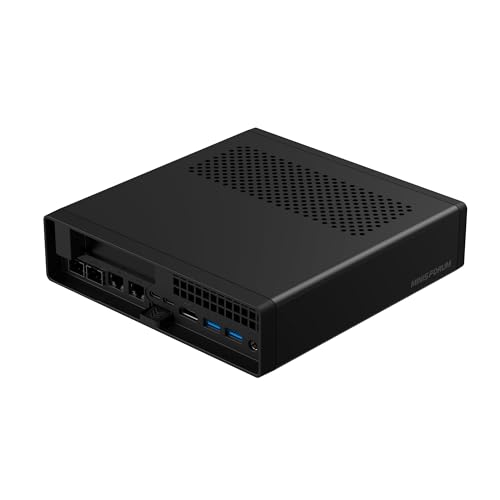
Minisforum MS-A2 Mini Workstation — Ryzen 9 HX, PCIe x16 Slot, Dual 10G SFP+
Who it suits: Homelab builders, virtualization users and professionals who need workstation plumbing — fast networking, real expansion, huge memory — in a box that sits on a shelf instead of under a desk.
The MS-A2 is the machine this entire tier exists to describe. Inside a 1.78-litre case sits a 16-core, 32-thread Zen 5 processor from AMD’s Ryzen 9 HX family, running to 5.4GHz — desktop-class silicon, not the low-power chips that fill cheaper mini PCs. Around it, Minisforum has fitted the connectivity of a small server: a physical PCIe x16 slot (wired for x8 bandwidth, enough for a fast network card, a storage controller or a compact GPU), dual 10-gigabit SFP+ ports on an Intel X710 controller, dual 2.5-gigabit Ethernet, two USB-C outputs capable of 8K displays alongside HDMI, three storage positions spanning M.2 2280, M.2 22110 and U.2, and two DDR5 SO-DIMM slots that accept up to 96GB of memory. For the version configured with 32GB of memory and a 1TB SSD, check price on Amazon. A barebone version without memory, storage or an operating system is also available, and the completion maths only favors the barebone if you already own DDR5 and an SSD — at current memory prices, most buyers should take the configured machine.
The limitations are specific and worth naming. The integrated graphics are AMD’s Radeon 610M, a basic display adapter: fine for consoles, dashboards and desktop work across several monitors, but this is not a gaming or GPU-compute machine unless you add a card to its slot — and the slot’s airflow is limited, so low-power, short cards are the realistic fit. Independent testing has also found the MS-A2 audible under sustained load and comparatively thirsty at idle for a mini PC, which matters if it will run 24/7 in a living space. Neither flaw is hidden by the maker ecosystem; both are the ordinary price of putting 16 full-speed cores in under two litres. Judged on what it is — the most expandable, best-networked mini PC under $1,500 — it has no real rival in this guide.
- 16-core Zen 5 processor with a 96GB DDR5 ceiling — virtualization and compile headroom to spare.
- A real PCIe x16 slot plus dual 10G SFP+ and dual 2.5G Ethernet: homelab networking no cheaper mini matches.
- Three storage positions including U.2, and triple display outputs including two USB-C.
Honest limitation: The Radeon 610M integrated graphics are basic, the fan is audible under load, and idle power draw is high for the class — this is a CPU and networking machine, not a graphics machine.
Choose it if your workload is virtual machines, containers, storage, networking or heavy multitasking. Skip it if you want graphics performance out of the box — that is the AtomMan pair below — or a silent, low-idle-power box.

AtomMan G7 Ti Mini PC — Core i9-14900HX, RTX 4070 Laptop GPU, 32GB, 1TB
Who it suits: Creators and gamers who want the strongest graphics available in a mini PC under $1,500 — video editors, 3D hobbyists, streamers and players who refuse a tower on principle.
Start with the naming, because it decides whether this machine is a bargain or a disappointment: the G7 Ti’s graphics chip is the GeForce RTX 4070 Laptop GPU — the mobile part, with 8GB of memory, running at up to 140 watts in this chassis. It is a genuinely fast mobile GPU, the strongest graphics silicon in any mini PC in this guide, and it brings Nvidia’s CUDA cores, NVENC encoding and DLSS to a box a fraction of a tower’s size. It is not the desktop RTX 4070, and any listing or review that lets you believe otherwise is misleading you. Paired with it is Intel’s Core i9-14900HX — 24 cores, 32 threads, boosting to 5.8GHz — plus 32GB of DDR5-5600 in two SO-DIMM slots (upgradeable to 96GB), a 1TB SSD with a second SSD slot in reserve, HDMI 2.1 and USB4 display outputs, Wi-Fi 7 and Bluetooth 5.4. Check price on Amazon for the configured 32GB/1TB version; a barebone version, without memory, storage or an operating system, is also available.
The gap between the barebone and configured versions is the review’s second honest point: the barebone is poor value unless your parts drawer already holds DDR5 and an NVMe drive, because memory and storage at current prices cost far more than the difference. Buy the configured machine. The remaining caveats are thermal and acoustic reality — a 140-watt GPU and a 24-core CPU in a mini chassis means fans you will hear under full load, and sustained performance is set by the cooling, not the spec sheet — and the structural one shared by every mini on this page: when the GPU ages, there is no replacing it. What you are buying is the most graphics power that fits in this form factor at this budget, with an unusually strong CPU behind it, and for a creator whose desk cannot take a tower, that trade is the whole point.
- RTX 4070 Laptop GPU at up to 140W — CUDA, NVENC and DLSS in a mini PC; the strongest graphics here.
- Core i9-14900HX with 24 cores, plus memory upgradeable to 96GB and a second SSD slot.
- HDMI 2.1 and USB4 outputs, Wi-Fi 7 — current-generation connectivity throughout.
Honest limitation: The GPU is the laptop part, not the desktop RTX 4070, and it can never be upgraded; the barebone version saves too little to make sense without parts already owned.
Choose it if GPU-accelerated creation or high-settings gaming in a mini is the requirement. Skip it if you mostly need CPU and networking (the MS-A2 above), or if fan noise under load in a quiet room is a deal-breaker.

AtomMan G7 Pt Mini PC — Ryzen 9 7945HX, RX 7600M XT, 32GB, 1TB
Who it suits: Buyers who want a discrete GPU and a flagship-class CPU for meaningfully less than the G7 Ti — AMD-platform loyalists, Linux users, and gamers who play at 1080p and 1440p rather than 4K.
The G7 Pt takes the same formula as its sibling and rebalances it toward value. The processor is AMD’s Ryzen 9 7945HX: 16 cores, 32 threads, boosting to 5.4GHz — in multi-threaded work it trades blows with the Intel flagship in the G7 Ti, and it does so with a more value-focused positioning. The graphics are AMD’s Radeon RX 7600M XT, and the naming rule applies again: this is the mobile version of the 7600 XT, with 8GB of GDDR6, run at 120 watts in this machine. Expect strong 1080p gaming and capable 1440p play with sensible settings and upscaling — and expect to do it without Nvidia’s CUDA ecosystem, which is the real dividing line between this machine and the G7 Ti for creators. Memory is 32GB of DDR5-5200 across two SO-DIMM slots with a 96GB ceiling, storage is a 1TB NVMe drive with PCIe 5.0 support in the platform, and the whole machine draws from a 300W external power supply. Check price on Amazon for the configured 32GB/1TB version; a barebone version is also available for buyers who already own the parts needed to complete it.
On that basis, the G7 Pt is the value pick of the discrete-GPU minis: positioned below the G7 Ti, in exchange for a mobile GPU one class down and no CUDA. The barebone maths deserves the same warning as its sibling’s, though less severely — the gap between the barebone and configured versions can genuinely close if you catch memory and storage on sale or already own them, but price the full completion, including a Windows licence, before assuming it wins. Thermals follow the family pattern: 120 watts of GPU plus a 16-core CPU in a small chassis means audible cooling under load and performance governed by the fans, not the brochure. And the upgrade story is the mini PC story: memory and storage yes, graphics never.
- Ryzen 9 7945HX 16-core CPU paired with a discrete RX 7600M XT mobile GPU at 120W.
- Configured version — check price on Amazon; a value-focused route to discrete graphics in this guide.
- Memory to 96GB, PCIe 5.0-class storage platform, dual-mode performance settings.
Honest limitation: The RX 7600M XT is the 8GB mobile part, not the 16GB desktop card, and there is no CUDA — Nvidia-dependent creator software belongs on the G7 Ti.
Choose it if you want discrete-GPU gaming and CPU power with strong value in this tier. Skip it if your creative tools need CUDA or NVENC, or if you will always wonder about the stronger GPU one step up.

Minisforum MS-01 Mini Workstation — Core i9-13900H, Dual 10GbE SFP+, PCIe Slot
Who it suits: Homelab builders and network tinkerers who want 10-gigabit networking, remote management and an expansion slot in the smallest, most server-minded box in this guide.
The MS-01 is the machine that taught this category its current shape, and it remains the homelab default for good reasons. Its networking is the headline: dual 10GbE SFP+ ports on an Intel X710 controller, plus dual 2.5GbE — one of them an Intel i226-LM with vPro remote management, a feature no other pick here offers and one that matters enormously when the machine lives in a closet. Inside, the Core i9-13900H provides 14 cores and 20 threads to 5.4GHz, memory runs in two DDR5 slots to an official ceiling of 64GB, storage spans three M.2 slots with a U.2 adapter included, and there is a physical PCIe x16 slot — wired for x8 bandwidth and limited to half-height, single-slot cards, which suits network cards, storage controllers and low-profile GPUs. Two USB4 ports and HDMI drive up to three displays. Check price on Amazon for the 32GB/1TB configuration before you buy.
Honesty requires three qualifications. The processor is a generation older than the MS-A2’s and sits a class below it in multi-threaded work; the integrated Iris Xe graphics are for desktops and dashboards, not games or GPU compute; and the PCIe slot, while real, is fussy — independent plug-testing found some cards that never initialize, so check your intended card against owner reports before buying around it. Cooling is also working hardware, not silent hardware: measurements put it around 42–45 dB(A) under full CPU load. None of this dethrones it for its actual job. If your mini PC is really a small server — Proxmox, a firewall, a NAS brain, a lab of virtual machines — the MS-01’s combination of vPro, X710 networking and expansion remains the most homelab-complete package here, and its value positioning leaves more of the budget for the drives and SFP+ modules you will inevitably buy next.
- Dual 10GbE SFP+ (Intel X710), dual 2.5GbE and vPro remote management — the homelab checklist, complete.
- PCIe x16 slot (x8 electrical, half-height) and three M.2 positions plus a U.2 adapter.
- Configured version — check price on Amazon; a value-focused, genuinely expandable machine in this guide.
Honest limitation: The CPU is a generation old, Iris Xe graphics are basic, the slot only fits half-height single-slot cards and has documented card-compatibility quirks, and it is audible under full load.
Choose it if the machine is a home server first and a desktop second. Skip it if you need maximum CPU throughput (MS-A2) or any real graphics (the AtomMan pair).

Beelink SER9 Pro AI Mini PC — Ryzen AI 9 HX 370, Radeon 890M, 32GB, 1TB
Who it suits: Buyers who want the premium end of the ordinary mini PC — the fastest integrated graphics, a near-silent small box, modern ports — and who should honestly stop here instead of spending the full $1,500.
The SER9 Pro is this guide’s control pick: the machine that shows what the sane part of this budget buys. Its Ryzen AI 9 HX 370 pairs 12 cores and 24 threads (to 5.1GHz) with AMD’s Radeon 890M, the strongest integrated graphics in any mini PC on this page — capable of genuine 1080p gaming at sensible settings, fast photo work and smooth multi-monitor desktops, without a discrete GPU’s heat or noise. The case is the smallest here at roughly 135 × 135 × 45mm, about 0.82 litres, it runs quietly under load by the standards of this class, and the port selection is current: USB4, 2.5-gigabit Ethernet, Wi-Fi 6 and Bluetooth 5.2, with Windows 11 Pro installed. Check price on Amazon for the 32GB/1TB configuration — it is positioned well under this guide’s ceiling, so if the live price climbs close to the top of the budget, treat that as the shortage talking and wait.
The limitations are the integrated-graphics class limits, and they are structural. The 32GB of LPDDR5X memory is soldered — fast, but frozen forever at 32GB, with no path to 64GB or 96GB. There is no OCuLink port, so the external-GPU escape hatch some rivals offer is absent. Storage expansion is limited, and sources disagree about whether the chassis holds one M.2 slot or two — check the live listing’s specification table before buying around a second drive. Finally, a naming warning that has already caught buyers: a cheaper “SER9 Pro” variant built on AMD’s lesser H 255 processor circulates in marketplace tables; the listing linked here is the HX 370 machine, and the processor line is the spec to verify in the cart. None of these caveats change the verdict for its audience: if your work is a heavy desktop, light creation and integrated-graphics gaming, this is the most machine you need, well under the budget’s ceiling.
- Radeon 890M — the strongest integrated graphics in this guide; real 1080p gaming without a discrete GPU.
- Smallest and among the quietest here: about 0.82 litres, USB4, 2.5GbE, Windows 11 Pro.
- Premium mini performance well under the $1,500 ceiling — check price on Amazon.
Honest limitation: Memory is soldered at 32GB forever, there is no OCuLink and no expansion slot, and a lesser H 255 variant shares the model name — verify the HX 370 in the listing before paying.
Choose it if you want the best small, quiet, integrated-graphics mini and no server features. Skip it if you need more than 32GB of memory ever, 10-gigabit networking, or a discrete GPU.
Apple Mac mini M4 Pro — 24GB Unified Memory, 512GB SSD
Who it suits: Mac-based creators and multi-monitor professionals — video editors in Final Cut or DaVinci Resolve, developers in the Apple ecosystem, audio producers — who want a silent, tiny workstation and are already fluent in macOS.
The Mac mini M4 Pro is the outsider in this guide and, for its audience, possibly the strongest machine in it. The M4 Pro chip in this configuration pairs a 12-core CPU with a 16-core GPU and very fast unified memory, and it brings hardware the Windows minis cannot match: dedicated ProRes and AV1 media engines that make video timelines feel effortless, three Thunderbolt 5 ports alongside HDMI, and Apple’s published support for up to three displays. It is effectively silent in ordinary work, sips power, and its 24GB of unified memory serves both CPU and GPU. The price is the moving part, so check price on Amazon for this 24GB/512GB configuration before you buy. The rule for this guide is therefore strict: it belongs in a $1,500 guide only when the live listing is at or under $1,500. Above that, it is a fine machine in the wrong guide.
The limitations are Apple’s terms, and they are absolute. Nothing inside can be upgraded — not the memory, not the storage, not ever — so the configuration you buy is the machine you retire. The 512GB internal drive is tight for a creator; budget for a fast external Thunderbolt SSD as a planned second purchase rather than a surprise. It runs macOS only: Windows software means virtualization where it is supported at all, and most Windows games are simply not available, so this is a work machine that happens to play a small games library, never the reverse. Buyers who need CUDA, Windows-native tools or any internal expansion should take the hint and choose from the five Windows machines above. Buyers inside Apple’s ecosystem, at the right live price, get the quietest and most media-capable mini in this guide.
- M4 Pro with hardware ProRes/AV1 engines — video work is this machine’s home turf.
- Three Thunderbolt 5 ports plus HDMI; Apple’s published support for up to three displays.
- Near-silent and power-sipping, with 24GB of unified memory for CPU and GPU alike.
Honest limitation: Nothing is upgradeable, the 512GB drive is tight, it runs macOS only — and its Amazon price can move above this budget, so buy only at or under $1,500.
Choose it if your tools and workflow live in macOS and the live price is in budget. Skip it if you need Windows, CUDA, games, or any internal upgrade path.

Comparison Table
| Product | Processor / Graphics | Best use | Link |
|---|---|---|---|
| Minisforum MS-A2 | Ryzen 9 HX 16-core / Radeon 610M + PCIe x16 slot | Workstation and homelab with real expansion and dual 10G networking | Check on Amazon |
| AtomMan G7 Ti | Core i9-14900HX / RTX 4070 Laptop GPU 8GB | Strongest graphics in a mini: creation and gaming without a tower | Check on Amazon |
| AtomMan G7 Pt | Ryzen 9 7945HX / RX 7600M XT mobile GPU 8GB | Discrete-GPU value: flagship CPU, capable 1080p/1440p graphics | Check on Amazon |
| Minisforum MS-01 | Core i9-13900H / Iris Xe + PCIe slot | Home server and networking lab with vPro and dual 10GbE | Check on Amazon |
| Beelink SER9 Pro | Ryzen AI 9 HX 370 / Radeon 890M | Small, quiet premium mini with the best integrated graphics | Check on Amazon |
| Apple Mac mini M4 Pro | M4 Pro 12-core / 16-core GPU, unified memory | Mac creators and multi-monitor professionals | Check on Amazon |
How to Choose a Mini PC Under $1,500
- Start by admitting which buyer you are. This tier serves three: homelab builders (networking, slots, virtualization), creators (GPU or media engines, fast CPU), and multi-monitor professionals (memory ceiling, display outputs). If you are a fourth kind — a general user — the correct choice is a $500–$800 machine and a nicer monitor.
- Buy the expansion you will actually use. A PCIe slot and 10G SFP+ are worth a great deal to a homelab and nothing to a desktop user. Price the accessories too: SFP+ modules, DAC cables and 10G switches are a second budget hiding behind the first.
- Read GPU names like a lawyer. “RTX 4070” in a mini PC means the Laptop GPU; “RX 7600 XT” means the 8GB mobile part. Both are good hardware — at laptop performance levels, with laptop upgrade prospects: none.
- Check the memory ceiling, not just the memory fitted. 32GB today is fine for most; the question is whether the machine can reach 64GB or 96GB when your workload grows. Socketed SO-DIMM machines can; soldered machines — the SER9 Pro and the Mac mini — are finished at purchase.
- Do the barebone maths in full, or not at all. Kit price plus memory plus storage plus an operating system licence, at today’s prices. In a memory shortage the configured machine frequently wins; the MS-A2 and G7 Ti barebones both need parts you already own to make sense.
- Count displays from the port list, never the marketing. Every multi-monitor claim in this guide traces to physical outputs: the MS-A2’s HDMI plus two USB-C, the MS-01’s two USB4 plus HDMI, the Mac mini’s three Thunderbolt 5 plus HDMI (Apple publishes support for up to three displays). If a listing promises four monitors from two ports, walk away.
- Plan for noise and heat as specifications. Sixteen cores and a 140W GPU in under two litres means fans, and fans mean sound: independent measurements in this guide’s research run from near-silent (SER9 Pro, Mac mini) to a plainly audible 42–45 dB(A) under full load (MS-01). Match the machine to the room it will live in.
- Verify the exact configuration in the cart. This category reuses model names across processors and memory sizes — there is an H 255 machine wearing the SER9 Pro name, and MS-A2 listings span two processor generations. The processor line in the listing title is the contract; read it before paying.
What the Step Up to $1,500 Actually Buys
Shoppers reasonably ask whether this tier is real or just the $800 machines in fancier boxes. The step up is real, but it is narrow, and it comes in exactly three forms. The first is expansion: below this tier, no mini PC offers a PCIe slot or 10-gigabit networking; at $1,500, two machines offer both. The second is processor class: the 16-core HX chips in the MS-A2 and G7 Pt and the 24-core 14900HX in the G7 Ti are desktop-replacement silicon with multi-threaded performance the 8-core chips in cheaper minis cannot approach — the difference between a compile or render that takes a coffee break and one that takes a sip. The third is discrete graphics: the two AtomMan machines carry real GPUs with dedicated memory, which no amount of money buys in a conventional mini below this tier.
What the step up does not buy deserves equal clarity. It does not buy a better everyday desktop: documents, browsing, streaming and calls feel identical on the SER9 Pro and on anything else here, because those workloads stopped being demanding years ago. It does not buy future-proofing in the tower sense — the GPU in every Windows pick is soldered to its fate, and the two machines with slots can only accept small, low-power cards. And it does not buy quiet: the most powerful machines in this guide are the loudest under load. Spend the step up on expansion, cores or a GPU you can name a workload for, and it is the best-value move in the category. Spend it because $1,500 was the budget line, and it is the most expensive way to check email ever devised.
The Expansion Divide: Real Slots vs Soldered Ceilings
Every machine in this guide sits somewhere on one spectrum, and where it sits predicts how it will age. At one end are the platform machines: the MS-A2 and MS-01, with PCIe slots, socketed memory, multiple storage positions and networking that can grow with your lab. A platform machine’s second and third years are upgrades — a faster network card, a bigger drive, more memory — and its resale value follows its usefulness. At the other end are the sealed machines: the SER9 Pro with its soldered LPDDR5X and the Mac mini with its fully unified, fully fixed configuration. Sealed machines are not worse machines; they are finished ones. They trade every future option for smallness, silence and efficiency today, and the honest way to buy one is to spec it for the whole of its life at the moment of purchase — which, for the Mac mini especially, means thinking hard about whether 24GB and 512GB are a five-year answer.
The AtomMan pair sits between the poles: socketed memory and a spare SSD slot, wrapped around a GPU that can never change. That middle position suits buyers whose growth is in data and multitasking rather than graphics. The practical rule the divide produces is simple. If your workload is a moving target — a growing homelab, a new creative tool each year — buy from the platform end. If your workload is known and stable, a sealed machine bought correctly the first time is the smaller, quieter, simpler answer. What you must not do is buy a sealed machine at a platform price while telling yourself you will upgrade it later. Later is not coming; the spec sheet in the cart is the whole future of the box.
Common Buying Mistakes
- Spending $1,500 on a general-purpose desktop. The $800 tier — and one pick in this very guide — does ordinary work identically; the surplus buys a monitor, a chair and money left over.
- Reading “RTX 4070” or “RX 7600 XT” as the desktop cards. In mini PCs these are the laptop GPUs: capable, but a class down, with 8GB of memory and no upgrade path.
- Comparing a barebone kit price against configured machines. A kit with no memory, storage or operating system is not a cheaper computer until the completion maths says so — at shortage prices, it usually is not.
- Buying 10-gigabit networking and forgetting the ecosystem: SFP+ modules, cables and a 10G switch can add significantly to the total before the fast ports carry a single packet.
- Trusting a model name instead of the configuration line — the H 255 “SER9 Pro”, the two MS-A2 processor generations, the Mac mini’s several memory tiers. The listing’s processor and memory figures are the product; the badge is decoration.
- Assuming a PCIe slot accepts any card. The slots here are x8 electrical, half-height and single-slot, with limited airflow — and the MS-01 has documented cards that never initialize. Research your exact card.
- Buying a sealed machine one size too small. Soldered memory and fixed storage cannot be corrected later; with the SER9 Pro and the Mac mini, the configuration decision is permanent.
- Ignoring idle power and noise for a 24/7 machine. A homelab box runs 8,760 hours a year; the MS-A2’s higher idle draw and the MS-01’s fan note are operating costs, not trivia.
Final Recommendation
- Most buyers who truly need this tier: Minisforum MS-A2.
- Creators and gamers who need a GPU: AtomMan G7 Ti.
- Discrete graphics on a tighter budget: AtomMan G7 Pt.
- Home server and networking lab: Minisforum MS-01.
- Everyone else — the honest stop: Beelink SER9 Pro.
- Mac-ecosystem professionals: Apple Mac mini M4 Pro, at or under $1,500 only.
Our top two at this budget are the Minisforum MS-A2, for buyers whose mini PC is really a workstation or a lab — nothing else here combines 16 cores, a PCIe slot, dual 10-gigabit networking and a 96GB ceiling — and the AtomMan G7 Ti, for buyers whose work or play is GPU-bound and who accept, eyes open, that its RTX 4070 is the laptop part. Between them they cover the two honest reasons to spend $1,500 on a mini PC. The G7 Pt undercuts the Ti for gaming-first buyers; the MS-01 remains the homelab default where vPro and value matter more than raw cores; and the SER9 Pro is the pick we would hand to most people who arrived at this guide, because most people need a superb small desktop rather than a small server. Mac professionals have their own answer, at the right live price. Readers whose needs top out lower should also see Best Mini PC Under $800 and Best Mini PC Under $1200, and those building from parts can start with Best Barebones Mini PC Under $1500.
Frequently Asked Questions
Is a $1,500 mini PC worth it over an $800 one?
Only for named workloads. The $1,500 tier buys three things the $800 tier cannot: PCIe expansion and 10-gigabit networking, 16-to-24-core processors, and discrete (laptop) GPUs. If your work uses none of those, the machines feel identical in daily use — which is why this guide includes the SER9 Pro, positioned well under this budget, as the honest stop and says so in the introduction.
Who should actually buy a mini PC at this price?
Homelab builders running virtualization with fast networking; creators whose GPU or CPU time is billable; and multi-monitor professionals pushing three or four displays and heavy multitasking. General users, students and home-office workers are better served at $500–$800 — see Best Home Office PC Under $1500 for how that budget stretches, and the lower tiers for the rest.
Are the graphics in these mini PCs the same as desktop cards?
No. The G7 Ti carries the RTX 4070 Laptop GPU and the G7 Pt the mobile RX 7600M XT — mobile parts with 8GB of memory, tuned for a 120–140W power envelope inside a small chassis. They are strong for 1080p and capable at 1440p, but a desktop card of the same name is faster, and neither can be upgraded later.
Can these mini PCs really drive three or four monitors?
Three, on the picks that claim it — and every claim in this guide is counted from physical ports, not marketing. The MS-A2 offers HDMI plus two USB-C display outputs; the MS-01 offers HDMI plus two USB4; the Mac mini M4 Pro’s three-display support is Apple’s own published specification. Gamers wanting a small machine for a multi-monitor desk may also want Best Mini Gaming PC Under $1500.
Barebone or configured: which is the better buy here?
Configured, for most buyers, at current prices. Memory and SSD prices spiked hard in late 2026, so the gaps between barebone and configured versions rarely survive buying the parts new. Barebones win when you already own DDR5 and an NVMe drive, or catch both on sale; run the full sum, licence included, before deciding.
How loud are these machines?
It depends on the class. The SER9 Pro and Mac mini are near-silent in ordinary work. The workstation and GPU machines are cooling serious wattage in small boxes: the MS-01 has been measured around 42–45 dB(A) at full CPU load, and the MS-A2 is reported audible under sustained load. For a bedroom or a quiet studio, weight the sealed picks; for a closet homelab, noise is the point of the closet.
Will a mini PC at this price replace a workstation tower?
For CPU, memory and networking work, the MS-A2 and MS-01 genuinely can — that is the surprise of this tier. For graphics, no: the laptop GPUs here are a class below desktop cards, the PCIe slots take only small low-power cards, and nothing in a mini can be re-gutted the way a tower can. Buyers who need tower-class graphics in a small footprint should compare Best Compact Gaming PC Under $1500 and Best Workstation PC Under $1500 before deciding the mini premium is worth paying.


