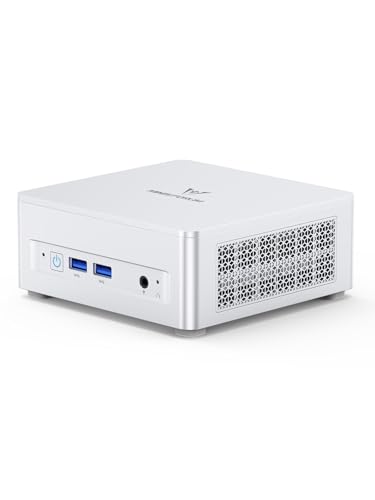
Where to buy
Check the latest price, availability and delivery on Amazon. Orders are placed on Amazon. We may earn a commission from qualifying purchases.
- Best overall: Minisforum UM870 Slim, Ryzen 7 8745H, 32GB RAM, 1TB SSD — Check on Amazon
- Beelink SER8, Ryzen 7 8745HS, 32GB RAM, 1TB SSD — Check on Amazon
- GMKtec NucBox K8 Plus, Ryzen 7 8845HS, 32GB RAM, 1TB SSD, OCuLink — Check on Amazon
- GMKtec NucBox M6 Ultra, Ryzen 5 7640HS, 32GB RAM, 512GB SSD — Check on Amazon
See 2 more Amazon options
- Minisforum UM890 Pro Barebone, Ryzen 9 8945HS (no RAM, SSD or OS) — Check on Amazon
- Apple Mac mini, M4 chip, 16GB memory, 256GB SSD — Check on Amazon
Read the full guide ↓
Disclosure: As an Amazon Associate, reviewstook.com earns from qualifying purchases. Links to Amazon on this page are affiliate links; they cost you nothing extra. Listing details such as price and availability change often, so check the current Amazon listing before you buy.
Eight hundred dollars is where the mini PC stops being a compromise you apologize for. Below this tier you negotiate: 16GB of RAM soldered down forever, a 512GB drive you will fill by spring, an integrated GPU from two generations ago, a single display output where you needed two. At $800 the negotiation ends. The standard specification of this class — the one repeated across this guide — is a Ryzen 7 chip with Radeon 780M graphics, 32GB of RAM in real slots, a 1TB NVMe drive with a second slot waiting, USB4, and enough display outputs for a proper desk. That is not a shrunken office box; it is a full desktop that happens to occupy less than a liter, sips power at idle, and can hide behind the monitor it drives.
Two honesty notes belong at the top, because this tier attracts more marketing fog than any other in the mini PC world. The first is about graphics. Every Windows pick in this guide uses integrated graphics — very good integrated graphics, the 780M class that handles everyday work, media, photo editing and light gaming without breaking a sweat — but integrated all the same. There is no discrete graphics card in a mini PC at this price on Amazon, and the one famous discrete mini, Minisforum’s AtomMan G7 Pt, sits well above this guide’s budget on Amazon. Worse, its card is the Radeon RX 7600M XT — the M stands for mobile, a laptop GPU with 8GB of memory, not the desktop RX 7600 XT with 16GB that the similar name suggests. When a mini PC advertises a graphics name you recognize from desktop cards, read for that M. The second note is about prices: memory and SSD prices are volatile, and this whole class moves with them. This guide therefore does not print fixed prices for individual machines. For any pick with an Amazon link, check price on Amazon and check the current price on Amazon before you buy, and judge the listing against this guide’s budget rather than against a number printed here, because a good mini PC bought at a spiked moment is just an expensive one. Below are the quick picks, detailed reviews of all six machines, a comparison table, a buying checklist, the truth about discrete graphics and barebone math at this tier, who should simply stop at $500 or $700, the mistakes that waste money here, and the questions buyers ask us most.
In this guide
Quick Picks
Short on time, or comparing several options at once? Each row below names a buyer type and the machine that suits it, with a link to the listing.
| Buyer type | Pick | Why it stands out | Link |
|---|---|---|---|
| Best overall | Minisforum UM870 Slim, Ryzen 7 8745H, 32GB/1TB | The tier’s standard spec in 0.82 liters, with USB4 and room to grow | Check on Amazon |
| Best for a quiet desk | Beelink SER8, Ryzen 7 8745HS, 32GB/1TB | Vapor-chamber cooling with a near-silent reputation under load | Check on Amazon |
| Best for expansion | GMKtec NucBox K8 Plus, Ryzen 7 8845HS, 32GB/1TB | OCuLink for an external GPU, dual USB4, dual 2.5GbE — when the price behaves | Check on Amazon |
| Best value under the budget | GMKtec NucBox M6 Ultra, Ryzen 5 7640HS, 32GB/512GB | Socketed 32GB and USB4 — most of the tier for much less; check price on Amazon | Check on Amazon |
| Best for builders with parts on hand | Minisforum UM890 Pro Barebone, Ryzen 9 8945HS | The strongest chip here; completed honestly within budget with new parts — check price on Amazon for the kit | Check on Amazon |
| Best non-Windows option | Apple Mac mini, M4, 16GB/256GB | The best-built mini at any price — if 16GB and 256GB are truly enough | Check on Amazon |
How These Picks Were Chosen
The budget was applied the way a buyer experiences it: as the total cost of a working computer. Five picks are complete machines with RAM, storage and Windows included. The sixth is a barebone kit — no memory, no drive, no operating system — and it is included only because its review and its row in the comparison table carry the completed picture — kit plus the memory and storage it needs — rather than the kit price alone. A barebone price is never a PC price in this guide, and any listing that blurs that line was excluded.
We did not use these machines ourselves. We read the maker listings and specification pages, price-tracker records for each exact listing, and independent review coverage, and compared the things that decide whether a mini PC ages well: whether the RAM sits in slots or is soldered to the board, how many SSD slots exist and of what speed, which display outputs are physically present, whether USB4 or OCuLink offers a way out when the integrated graphics stop being enough, and what the cooling design implies for noise at a desk two feet from your ears. Listings that hide their memory type, ship mystery drives, or advertise a graphics name without the chip behind it were dropped. So were the many near-identical listings from brands with no findable support page — at $800, a warranty you can actually claim is part of the specification.
One filter deserves its own paragraph because it shaped the whole list: memory architecture. The late-2026 memory shortage made soldered RAM a double trap — you pay shortage prices for it today, and you can never fix the decision tomorrow. Every Windows pick below carries its RAM in standard SO-DIMM slots; the single soldered machine in the guide is the Mac mini, included with its eyes open and its limitation stated in the first line of its review, because its build quality and software ecosystem make it the right answer for a specific buyer anyway. Prices for individual picks are deliberately not printed as fixed numbers below: this class’s prices move often, and a hard number printed here would be out of date by the time you read it. Use the Amazon links to check the live listing instead.
The 6 Best Mini PCs Under $800
Minisforum UM870 Slim (Ryzen 7 8745H, 32GB RAM, 1TB SSD)
Who it suits: The buyer who wants the tier’s standard specification without drama — a fast, small, quiet-enough desktop for work, media and light gaming, bought once and not thought about again.
The UM870 Slim is what $800 is supposed to buy. The Ryzen 7 8745H brings eight Zen 4 cores and the Radeon 780M, the strongest integrated graphics class in mainstream mini PCs, and Minisforum fits the memory the way this guide insists on: 32GB of DDR5 in two SO-DIMM slots, expandable to 96GB, next to two M.2 slots with a 1TB PCIe 4.0 drive fitted. The ports match the spec sheet a desk actually needs — USB4 at the rear for a one-cable dock or a fast external drive, HDMI 2.1 and DisplayPort for up to three displays, a 2.5GbE network port, and a VESA mount in the box so the whole 0.82-liter machine can disappear behind a monitor. Windows 11 Pro is included. The cooling uses a phase-change pad and heat pipes, and the maker’s noise claim in performance mode is modest rather than miraculous, which in this industry counts as honesty.
On price, treat this as a check-before-you-buy pick. Its positioning moves around this tier — sometimes comfortably inside the budget, sometimes pushed above it when memory costs spike — so check price on Amazon and check the current price on Amazon before you commit. That spread is the story of this entire tier: the same box is a bargain one week and a bad deal the next, depending on where memory prices wandered. The rule is simple. When the listing sits within this guide’s budget, this is the easiest recommendation in the guide; when it sits above the budget, wait, because its positioning in this class regularly comes back into the tier. One caveat for Linux users: the Wi-Fi 6E module is a MediaTek part with a documented history of driver friction under Linux — wired networking or a USB adapter is the pragmatic answer there. For everyone else, this is the machine the rest of the guide is measured against.
- Radeon 780M graphics and eight Zen 4 cores — the tier’s standard spec, complete.
- 32GB of RAM in two slots (to 96GB) and two M.2 slots: nothing about it is sealed shut.
- USB4, HDMI 2.1 and DisplayPort drive up to three displays; VESA mount included.
Honest limitation: Its pricing is volatile and can sit above the budget — this is a right-week pick where you check the current price on Amazon first — and the MediaTek Wi-Fi is a known friction point for Linux.
Choose it if you want the default answer at this tier and can time the purchase to a sane price. Skip it if the listing is sitting above this guide’s budget when you need a machine today — the SER8 below is the same class with a quieter fan.

Beelink SER8 (Ryzen 7 8745HS, 32GB RAM, 1TB SSD)
Who it suits: Anyone whose mini PC will live on the desk, in the bedroom or beside the TV — buyers for whom fan noise is not a footnote but the deciding feature.
Most mini PCs are loud in a specific, maddening way: a small fan spinning fast under a small load, cycling up and down all day. The SER8 is the machine reviewers consistently single out for not doing that. Its vapor-chamber cooling spreads heat across the whole chassis instead of blasting it through one small heatsink, and the result is a mini PC that stays near-silent through sustained work — the quality you actually live with, eight hours a day, rather than the benchmark number you read once. The specification around that cooling is the tier standard again: Ryzen 7 8745HS with Radeon 780M graphics, 32GB of DDR5 in slots (to 64GB), a 1TB PCIe 4.0 SSD with a second M.2 slot free, USB4, HDMI 2.1 and DisplayPort for up to three displays, 2.5GbE networking and Windows 11 Pro. For a home server or media box that also transcodes video, the 780M’s hardware encoding makes it a genuinely good always-on machine that draws very little power doing it.
The honesty note is the price, and it is the same note as the pick above, played louder. This machine spends much of its life hovering around the top of this guide’s budget, and dips comfortably inside it at better moments, while stretched third-party asks during sold-out periods can push it well beyond the tier. Check price on Amazon and check the current price on Amazon before you buy: when the listing sits within the budget, it is arguably the best-owned machine in this guide; at a spiked asking price, you have paid workstation money for integrated graphics. The other limitation is connectivity modesty: one USB-C-class port means a dock eats your expansion in a single plug, so plan the desk around it. Patience, here, is genuinely valuable.
- The quiet one: vapor-chamber cooling with a near-silent reputation under sustained load.
- Full tier-standard spec — 780M, slotted 32GB to 64GB, 1TB plus a free M.2 slot.
- USB4 and triple-display output; sips power as an always-on home server.
Honest limitation: It hovers just above this guide’s budget as often as below it, and a single USB-C port makes docking a one-plug affair.
Choose it if silence is your top priority and you can buy on a dip. Skip it if you need the machine this week at whatever price the listing demands — or if heavy multi-monitor docking matters more than quiet.

GMKtec NucBox K8 Plus (Ryzen 7 8845HS, 32GB RAM, 1TB SSD)
Who it suits: The buyer thinking two purchases ahead — someone who wants integrated graphics today and a real upgrade path to a desktop graphics card tomorrow, without replacing the computer.
Every other pick in this guide accepts the mini PC bargain: the graphics you buy are the graphics you keep. The K8 Plus is the exception, and the reason is one port. OCuLink carries a direct PCIe connection out of the box, so an external GPU dock turns this mini into a genuine gaming or GPU-compute machine later — not a workaround, but the upgrade path desktop owners take for granted. Around that port, GMKtec builds the most connected machine here: the Ryzen 7 8845HS with Radeon 780M graphics, 32GB of DDR5 in two slots, a 1TB PCIe 4.0 SSD with a second M.2 slot, two USB4 ports, HDMI 2.1 and DisplayPort for up to four displays, and two 2.5GbE network ports — the spec of a small workstation or a serious home-lab node, in a box about five inches square. As a bonus, that dual networking and storage headroom give it a second career as a home server when its desktop days end.
Now the discipline, because this pick lives or dies on price discipline. The configured 32GB/1TB version is one of the most volatile listings in this guide: at its better moments it is the best value in this entire guide, full stop, and at its worst it is pushed well above this guide’s budget by the same memory pressures as everything else, at which point it is simply not an under-$800 computer. The rule is printed here so you can hold us to it: check price on Amazon and check the current price on Amazon, buy the K8 Plus only when the listing sits within this guide’s budget, and above that, walk away and wait, because its pricing pattern says it comes back down. One more honesty item for the eGPU plan: OCuLink docks and a desktop card are a substantial second purchase, and the total for mini-plus-dock usually lands near a small desktop that would have been faster and simpler. The K8 Plus makes sense when the two-stage plan is the point — small and quiet now, graphics later — not as a discount route to a gaming PC.
- OCuLink port: the only real graphics upgrade path in this guide.
- Dual USB4, dual 2.5GbE, two M.2 slots — workstation-grade connectivity.
- Strong value pick of the tier when its listing is priced normally — check price on Amazon.
Honest limitation: Its price is the most volatile here, and the eGPU future it promises costs substantially more when you claim it.
Choose it if you will actually use the expansion — eGPU plans, dual networks, home-lab duty — and you buy while the listing sits within this guide’s budget. Skip it if the listing is spiked, or if you know you will never attach a dock: the UM870 Slim is the same class with less to go wrong.

GMKtec NucBox M6 Ultra (Ryzen 5 7640HS, 32GB RAM, 512GB SSD)
Who it suits: The value hunter who read the picks above, agreed with the logic, and would like most of it while spending well under the ceiling — accepting a step down in graphics and storage rather than in memory or ports.
The M6 Ultra is the proof that the smart money at this tier is not always at the ceiling. It sits in the lower part of this tier — check price on Amazon to confirm its current positioning — and what it offers is more current than that positioning suggests. The Ryzen 5 7640HS is a six-core Zen 4 chip paired with the Radeon 760M: one rung below the 780M in the picks above, still comfortably in the class that handles office work, media, photo editing and light gaming without complaint. Crucially, GMKtec did not cheap out where cheaping out is permanent. The 32GB of DDR5 sits in two slots, in dual channel; USB4 is present for docking and fast external storage; HDMI and DisplayPort outputs drive up to three 4K displays; and there are two 2.5GbE ports, a spec machines twice the price sometimes skip. Windows 11 Pro is included.
The compromises are specific and survivable, and they are storage-shaped. The fitted drive is 512GB and PCIe 3.0 rather than the 1TB PCIe 4.0 drives above — half the room, a generation slower, though further M.2 slots inside include faster ones, so the fix is a drive swap when you outgrow it rather than a new computer. The graphics step down is real too: demanding games and heavier GPU work will feel the 760M where the 780M machines would not, and this is the wrong pick if light gaming is quietly the main event. The listing’s stated warranty is one year, shorter than some rivals here. But judge it as a whole: slotted 32GB, USB4, triple displays and a modern Zen 4 chip at this lower-tier positioning is the strongest price-to-substance ratio in this guide, and it is the pick we would hand to anyone who asked whether they really need to spend the full $800. Most people, honestly, do not.
- Lower-tier positioning — the tier’s substance without the tier’s ceiling price; check price on Amazon.
- 32GB in two slots and USB4: the permanent decisions were made correctly.
- Triple 4K display support and dual 2.5GbE networking.
Honest limitation: The fitted 512GB drive is PCIe 3.0, the 760M is a rung below the 780M picks, and the stated warranty is one year.
Choose it if your work is office, browser, media and light creative tasks and you would rather keep the change. Skip it if gaming or GPU-heavy work is a real part of the plan — that is what the 780M picks above are for.

Minisforum UM890 Pro Barebone (Ryzen 9 8945HS, No RAM, SSD or OS)
Who it suits: Builders with DDR5 and an NVMe drive already on the shelf, or homelab buyers who want the strongest CPU in this guide and would rather choose their own memory and storage anyway.
Read the name carefully: barebone. This listing is a chassis, a motherboard and a Ryzen 9 8945HS — the fastest processor in this guide, eight Zen 4 cores boosting to 5.2GHz with the Radeon 780M at its highest clock — and nothing else. No RAM, no SSD, no Windows. It earns its place here because, completed honestly, it still fits the budget and buys things no complete machine at this price offers: support for up to 96GB of DDR5 across two slots, two M.2 PCIe 4.0 slots, dual USB4, dual 2.5GbE networking, four-display output, and an OCuLink connection for an external GPU. For a virtualization host or a compact workstation, that ceiling is the whole argument. The configured version of this same machine sits in a higher tier altogether — the barebone route, done right, undercuts it substantially.
Here is the done-right way to judge it, without treating the kit as the computer. Check price on Amazon for the kit itself, then add the cost of completing it with 32GB of DDR5-5600 and a 1TB PCIe 4.0 drive — memory and storage are the volatile ingredients, and their pricing moves often, so price the parts on the same day you price the kit. Completed that way with new parts, the hardware still fits under this guide’s budget with room to spare. Two honest additions. An operating system is not in that total: add a Windows licence if you need one and do not already hold a spare key, or nothing at all if the machine is destined for Linux or a hypervisor, which for this pick is a common and sensible plan. And the OCuLink port arrives via an included M.2 adapter plate, which occupies one of the two SSD slots while in use — the expansion and the second drive are a choice, not a combination. Finally, the warning that applies to every barebone: if you are buying all the parts new at shortage prices, price the complete UM870 Slim above before you commit, because the gap between building and buying has narrowed to almost nothing this year.
- The strongest CPU here — 8945HS with the 780M at full clock — and a 96GB RAM ceiling.
- Completed with new parts within this guide’s budget, well under the configured version’s tier.
- Dual USB4, dual 2.5GbE, quad-display output and an OCuLink route to a real GPU.
Honest limitation: It is a kit, not a computer — RAM, SSD and OS are on you — and its OCuLink adapter consumes one of the two M.2 slots while fitted.
Choose it if you have parts on hand or specific memory/storage plans, especially for homelab or virtualization duty. Skip it if you want to unbox a working PC, or if you would be buying every part new at today’s prices without checking the complete machines first.
Apple Mac mini (M4, 16GB Memory, 256GB SSD)
Who it suits: Buyers inside Apple’s ecosystem — iPhone on the desk, Mac software in the workflow — who value build quality, silence and resale value over specification headroom.
Every guide like this one has to answer the Mac in the room, so here it is with its eyes open. The Mac mini with the M4 chip is the best-made mini computer at any price: milled aluminum, effectively silent, idle power draw in single digits, and a chip whose single-core speed embarrasses everything else in this guide while its integrated graphics handle photo and video work that would make the 780M machines think. It drives up to three displays, its three Thunderbolt 4 ports are the fastest connections here, and it sits in the lower part of this tier while out-feeling all of them. If your software lives on macOS, the comparison ends here and the rest of this guide is a curiosity.
The limitations are not hidden; they are architectural, and Apple prints them in the configuration you cannot change. The 16GB of memory and the 256GB SSD are soldered at purchase, forever. Sixteen gigabytes is adequate today and a ceiling tomorrow — there is no slot, no upgrade, no second chance — and 256GB fills fast enough that an external drive becomes furniture. Apple’s own higher configurations exist, but their prices leave this guide’s budget in a hurry. On price, use the same discipline: check price on Amazon and check the current price on Amazon before you buy, prefer Amazon’s own or Apple’s own offer at the machine’s standard positioning within this tier, and never pay a stretched third-party ask above that standard positioning, because Apple itself sells this configuration as the entry point of the line every day. Choose this machine as a finished appliance for a known workload and it is superb. Choose it as a platform to grow into, and the Windows picks above — every one of them slotted, every one expandable — are the honest answer.
- The best-built, quietest mini here, with the fastest single-core performance in the guide.
- Three Thunderbolt 4 ports and three-display support; entry-tier positioning undercuts the field.
- Superb for macOS workflows, media work and as a low-power always-on machine.
Honest limitation: 16GB of memory and 256GB of storage are soldered at purchase with no upgrade path, ever — and third-party sellers sometimes ask above its standard positioning.
Choose it if you live in Apple’s ecosystem and your workload fits 16GB today and tomorrow. Skip it if you run Windows software, want to upgrade anything later, or need real storage room built in.

Comparison Table
| Product | Chip / Graphics | Memory & storage | Best use | Link |
|---|---|---|---|---|
| Minisforum UM870 Slim | Ryzen 7 8745H / Radeon 780M | 32GB slotted (to 96GB), 1TB, 2× M.2 | The default buy at this tier | Check on Amazon |
| Beelink SER8 | Ryzen 7 8745HS / Radeon 780M | 32GB slotted (to 64GB), 1TB, 2× M.2 | Quiet desks, bedrooms, media rooms | Check on Amazon |
| GMKtec NucBox K8 Plus | Ryzen 7 8845HS / Radeon 780M | 32GB slotted, 1TB, 2× M.2, OCuLink | Expansion plans and home-lab duty | Check on Amazon |
| GMKtec NucBox M6 Ultra | Ryzen 5 7640HS / Radeon 760M | 32GB slotted, 512GB fitted | Most of the tier well under the ceiling | Check on Amazon |
| Minisforum UM890 Pro Barebone | Ryzen 9 8945HS / Radeon 780M | None fitted — completed within budget with 32GB/1TB | Builders and virtualization hosts | Check on Amazon |
| Apple Mac mini (M4) | Apple M4 / integrated | 16GB soldered, 256GB soldered | macOS buyers who value build over headroom | Check on Amazon |
How to Choose a Mini PC Under $800
- Start with the memory architecture, not the processor. At this tier every serious chip is fast enough for desktop work. What separates a five-year machine from a two-year one is whether the RAM sits in slots. Slotted DDR5 can grow from 32GB to 64GB or beyond when your workload does; soldered memory is a decision you make once, at shortage prices, forever.
- Treat 32GB and 1TB as the standard spec — because it is. That combination is this tier’s baseline, repeated across this guide. A listing offering 16GB or 512GB at $800 is selling you last tier’s machine at this tier’s price, whatever the processor badge says.
- Count the display outputs your desk actually needs. Two monitors is the modern default and three is common. Verify the physical ports — HDMI, DisplayPort, USB4 with video — on the listing, not the marketing line, and remember a USB4 port spent on a display is a USB4 port your dock cannot use.
- Decide whether an upgrade path matters, honestly. OCuLink and USB4 are escape hatches from integrated graphics. They are worth paying for if you genuinely foresee an external GPU or fast external storage; they are decoration if you do not, and a small tower beats both if a graphics card is in this year’s plan rather than next year’s.
- Check the current price, not a printed price. This class’s prices move often as memory costs shift, so no review above prints a fixed figure to pay. Check price on Amazon for each pick on the day you buy, compare it with this guide’s budget, and let a week’s patience do the work a stale number cannot.
- Price barebones as finished computers. Kit price plus memory, plus storage, plus an operating system if you need one — then compare against complete machines the same day, at the same parts prices. Barebones win when parts are cheap or already on your shelf; in a shortage they often win by almost nothing.
- Check the network port speed. 2.5GbE is this tier’s standard and matters for NAS work, home servers and fast local transfers. A gigabit-only port on an $800 machine is a corner cut where you will feel it daily.
- Buy the warranty you can claim. Prefer listings sold or supported by the maker itself, and check the stated warranty length — it ranges from one year to two among reputable picks here, and effectively to nothing among the no-name listings this guide excluded.
The Discrete Graphics Question, Answered Plainly
Searches like this one often hide a hope: that somewhere near $800 there is a mini PC with a real graphics card. Here is the verified state of that hope. The cheapest discrete-GPU mini PC line on Amazon, Minisforum’s AtomMan series, sits well above this entire budget in the G7 Pt, and its card is the Radeon RX 7600M XT, a mobile GPU with 8GB of memory. Mobile matters: the M-series card shares a name with desktop parts but not their memory or sustained power budget, and every discrete mini PC on the market uses laptop graphics for the same thermal reasons. There is no shame in that trade — it is how the size is possible — but a buyer comparing names rather than chips will overpay for it every time.
So the honest map of this tier is three routes. Route one is this guide: integrated 780M-class graphics, which are genuinely strong for desktop work, media, emulation and light gaming, inside a machine under a liter. Route two is the escape hatch — an OCuLink machine like the K8 Plus above, bought small now and docked to a desktop card later, accepting that the dock and card together cost more than the mini did. Route three is admitting the graphics are the point and buying a small desktop or a gaming laptop instead, where the same money buys a real desktop-class card. None of these is the wrong answer. The wrong answer is the fourth route: a listing at this price implying desktop graphics it does not have. If a mini PC under $800 claims a graphics name without a chip specification behind it, close the tab.
Who Should Stop at $500 or $700
Not everyone reading an $800 guide should spend $800, and the step-down math is unusually kind this year. The $500 tier buys Ryzen 6000 and 7000-class machines with 16GB or 32GB of RAM that handle office work, browsing, media and home-server duty without any drama at all — if your workload is documents, calls and a browser with strong opinions about tabs, the picks in Best Mini PC Under $500 will feel identical to this guide’s machines on your desk, and the money you save by stepping down will feel significant in your account. The $700 tier is closer still: it is where the 780M class itself begins, and a buyer who catches a 780M machine on sale there has captured nearly everything this guide celebrates for noticeably less — see Best Mini PC Under $700 before assuming the ceiling is the target.
Spend the full $800 when the extras map to your actual life: 32GB fitted as standard because your virtual machines or photo library are real, a second M.2 slot because your storage grows, USB4 or OCuLink because a dock or an external GPU is a plan rather than a fantasy, or the SER8’s silence because the machine sleeps in the room you do. Spend it, in other words, on specifications you can name a use for. The buyers who regret mini PC purchases are rarely the ones who bought too little computer — they are the ones who bought a ceiling they never touched, in a form factor whose entire charm is paying only for what fits.
Common Buying Mistakes
- Comparing a barebone kit price against complete machines. The kit is a motherboard with ambition; the finished computer costs the kit plus memory, storage and usually an operating system.
- Reading a mobile GPU name as a desktop GPU. An RX 7600M XT is a laptop card with 8GB; the desktop namesake is a different product. The M is the specification.
- Paying spiked prices in a panic. This class’s pricing moves sharply within weeks. Check the current price on Amazon for every pick here; when a listing sits above this guide’s budget, the correct purchase is patience.
- Buying soldered 16GB to save money today. It is the one saving that cannot be undone, and it converts a five-year machine into a two-year one for a saving you will feel only once.
- Assuming more money means a graphics card. At $800 it does not — it means more memory, more storage, better ports and quieter cooling. Graphics steps live at other price points and in other form factors.
- Ignoring the second M.2 slot. Storage is the thing you will definitely outgrow; a free slot is the difference between a simple drive upgrade and a data migration weekend.
- Trusting a listing’s display count without counting ports. “Supports three monitors” should resolve to three physical video outputs or a USB4 port you are willing to spend on video.
- Forgetting the operating system on barebone and some configured listings. Windows is included in five picks here and not in the sixth — check before the box arrives, not after.
Final Recommendation
- Most buyers: Minisforum UM870 Slim — the tier’s standard spec, bought within this guide’s budget.
- Quiet desks and shared rooms: Beelink SER8.
- Expansion plans, home labs: GMKtec NucBox K8 Plus, strictly when its current listing sits within budget.
- Value first: GMKtec NucBox M6 Ultra — check price on Amazon for its current lower-tier positioning.
- Builders and virtualization: Minisforum UM890 Pro Barebone, completed honestly.
- Apple households: Mac mini M4, bought at its standard entry positioning within the tier — check the current price on Amazon.
Our top two for most buyers are the UM870 Slim, for being the complete expression of what this tier is — 780M graphics, slotted 32GB, twin storage slots, USB4, nothing sealed — and the SER8, for the quality you will notice every single day rather than once: silence. Between them they cover the two shapes this search usually takes, the all-rounder and the quiet companion. If your budget is firm but your workload is light, the M6 Ultra keeps most of the substance and a meaningful amount of your money; if your workload is genuinely heavy, look up a tier to Best Mini PC Under $1200 rather than stretching a pick here past this guide’s budget. New to mini PCs entirely? Start with Best Mini PC For Beginners Under $800; short on desk rather than money, see Best Mini PC For Small Spaces Under $800. Check the current price on Amazon against this guide’s budget, confirm the configuration on the listing matches the one reviewed, and buy once.
Frequently Asked Questions
What does $800 actually buy in a mini PC that $500 does not?
Three concrete things: the Radeon 780M graphics class instead of the 680M and below, 32GB of RAM and 1TB of storage fitted as standard rather than as upgrades, and the ports — USB4, sometimes OCuLink, dual 2.5GbE — that let the machine dock, expand and serve. It does not buy a discrete graphics card at any point in this tier; that step starts in a higher tier altogether.
Can a mini PC under $800 play games?
Light ones, honestly framed. The 780M machines here handle esports titles, older AAA games and indie libraries comfortably at 1080p with sensible settings, and they emulate older consoles well. Current AAA games at high settings are beyond integrated graphics in any mini PC — that workload wants a discrete card, which means a dock, a desktop or a laptop, as the discrete-graphics section above lays out. For gaming-first buyers, Best Mini Gaming PC Under $800 applies a gaming lens to the same budget.
Is a barebone mini PC a good way to save money?
Sometimes, and the arithmetic decides. A barebone wins when you already own DDR5 and an NVMe drive, or when parts are cheap. When parts pricing is elevated, completing the UM890 Pro in this guide with new parts still fits within this guide’s budget — a real saving against its configured version’s higher tier, but close enough to complete machines that you should check the current price on Amazon for both the kit and the parts on the same day before deciding. Never compare a kit price to a complete price; that is the oldest trick in this category.
Why does this guide care so much about soldered RAM?
Because it is the only specification you can never revisit. Processors age gracefully, storage can be swapped or supplemented externally, but soldered memory fixes your ceiling on the day you buy — during a shortage, at shortage prices. Every Windows pick here uses slots for exactly that reason; the one soldered machine, the Mac mini, is included because its other qualities justify the trade for a specific buyer, with the trade stated plainly.
Mini PC or small desktop at this price?
Decide by what the machine must never do. If it must never be heard, never heat the room and never take desk space, the mini wins and this guide is your list. If it must one day hold a desktop graphics card, several drives or a capture card, a small tower is the honest buy at the same money — the mini’s virtues are size, silence and power draw, and paying for them while secretly wanting a tower’s future is the most expensive mistake in this category.
How long should a mini PC at this price last?
Five years is a fair expectation for the slotted picks here, with one storage or memory upgrade along the way — the headroom is designed in: RAM ceilings of 64GB to 96GB, second M.2 slots, USB4 for whatever docks exist in 2030. The soldered pick should be bought as a finished appliance for a known workload, and judged on whether that workload still fits in year four.


