Where to buy
Check the latest price, availability and delivery on Amazon. Orders are placed on Amazon. We may earn a commission from qualifying purchases.
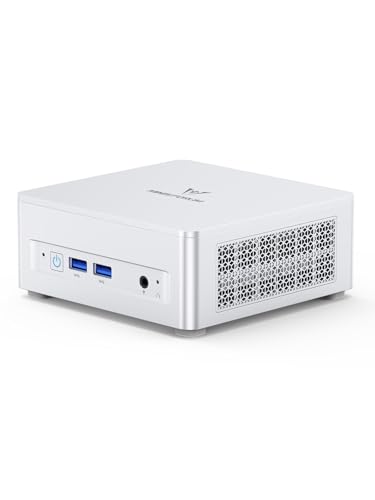
- Best overall for a home office: Minisforum UM870 Slim, Ryzen 7 8745H, 32GB RAM, 1TB SSD — Check on Amazon
- Beelink SER8, Ryzen 7 8745HS, 32GB RAM, 1TB SSD — Check on Amazon
- GMKtec NucBox K8 Plus, Ryzen 7 8845HS, 32GB RAM, 1TB SSD — Check on Amazon
- GMKtec NucBox M6 Ultra, Ryzen 5 7640HS, 32GB RAM, 512GB SSD — Check on Amazon
See 2 more Amazon options
- Apple Mac mini, M4 Chip, 16GB Memory, 256GB SSD — Check on Amazon
- Acer Aspire C27 All-in-One, 27 Inch, Ryzen 5 7430U, 16GB RAM, 512GB SSD — Check on Amazon
Read the full guide ↓
Disclosure: As an Amazon Associate, reviewstook.com earns from qualifying purchases. Links to Amazon on this page are affiliate links; they cost you nothing extra. Listing details such as price and availability change often, so check the current Amazon listing before you buy.
Eight hundred dollars is more than a home office PC needs to cost, and this guide starts by saying so. Documents, email, browser work, video calls and spreadsheets run perfectly well on the machines in our $400 and $500 guides, and nothing in this one will make a Word document open in a way that feels meaningfully better. What the step up to $800 genuinely buys is a different class of machine: eight-core Ryzen processors with Radeon 780M graphics instead of the entry-level chips below, 32GB of RAM and a 1TB SSD fitted as standard rather than as an upgrade you plan for later, USB4 ports that run a whole desk of monitors and peripherals down one cable, and cooling designed to stay near-silent through a full working day instead of merely tolerable. Those are real gains — for the right desks. They matter if you keep forty browser tabs and three monitors alive at once, if you edit photos or cut the occasional video between meetings, if your office PC doubles as the household’s always-on machine, or if you simply want to buy once and not think about the computer again for five years.
One warning belongs at the top this year: memory and SSD prices have risen sharply, and mini PC pricing has swung with them — sometimes sharply on the same listing within a few weeks. Two of the six picks below are machines whose pricing can move around this guide’s budget, so check the current price on Amazon before you buy rather than assuming the budget is met every day. For most home workers we would start with the Minisforum UM870 Slim for its balance of quiet, size and upgrade room, or the GMKtec M6 Ultra if you want the same idea positioned lower in this tier. Below are the quick picks, detailed reviews of all six machines, a comparison table, a section on who should honestly stop at $500, a look at the renewed business desktops that compete with everything here, the mistakes that waste money at this tier, and the questions home workers ask before they buy.
In this guide
Quick Picks
Short on time, or comparing several options at once? Each row below names a home-office type and the machine that suits it, with a link to the listing.
| Buyer type | Pick | Why it stands out | Link |
|---|---|---|---|
| Best overall for a home office | Minisforum UM870 Slim, Ryzen 7 8745H | Quiet, tiny, triple-display, with RAM and storage that can grow to 96GB and beyond | Check on Amazon |
| Best for a silent desk | Beelink SER8, Ryzen 7 8745HS | The premium, near-silent build of this tier — check price on Amazon and buy only when it fits this budget | Check on Amazon |
| Best for ports and expansion | GMKtec NucBox K8 Plus, Ryzen 7 8845HS | OCuLink, dual USB4, dual 2.5GbE and four-display output — check the current price on Amazon and buy only when it fits this budget, not at a spike | Check on Amazon |
| Best value with the full spec sheet | GMKtec NucBox M6 Ultra, Ryzen 5 7640HS | 32GB of socketed DDR5, USB4 and triple 4K displays — check price on Amazon | Check on Amazon |
| Best for Mac households | Apple Mac mini, M4 Chip | Silent, tiny and effortless — if your work lives in macOS or a browser | Check on Amazon |
| Best for a clutter-free desk | Acer Aspire C27 All-in-One, 27 Inch | The screen, webcam, speakers and PC in one box — nothing else on the desk | Check on Amazon |
How These Picks Were Chosen
The budget was applied the way a careful buyer would apply it: every machine below is a real Amazon listing positioned in the under-$800 tier in the United States. Because this category’s prices are unusually volatile right now, two picks are included on an explicit check-before-you-buy basis — they belong to this tier by specification and positioning, and their reviews remind you to check the current price on Amazon and to buy only when it fits the budget. Anything positioned permanently well above this tier was excluded, however good it might be. Check price on Amazon for each pick before you buy, since listings move often.
We did not use these machines ourselves. We read the maker listings and specification pages and compared core counts, memory type and capacity, storage, display outputs, networking and warranty terms, favoring listings and manufacturers that publish their numbers in full. For a home office, three filters sat on top of the raw specifications. The first is the display filter: a modern office runs two monitors, often three, so every pick below drives at least two external displays from its own ports — and where a maker claims three or four, the review names the actual ports involved rather than repeating the headline. The second is the noise filter: a PC that shares a room with your life for eight hours a day has to be quiet at working distance, so cooling design and maker noise figures were weighed heavily, and machines with a reputation for fan whine were marked down. The third is the longevity filter: socketed memory that can grow, a second storage slot, and a warranty with some substance behind it all counted for more than a benchmark lead, because an office PC is bought to be forgotten about.
One more route was researched seriously and appears in this guide as a section rather than as linked picks: renewed business desktops — the off-lease ThinkCentre, OptiPlex and EliteDesk minis that refurbishers sell with Windows 11 Pro for a fraction of these prices. They are a legitimate answer for pure office work, and the comparison below judges them on the two things that decide whether they are a bargain: the warranty standing behind a used machine, and how many years of life are realistically left in the platform. They are discussed honestly in the renewed section further down.
The 6 Best Home Office PCs Under $800
Minisforum UM870 Slim (Ryzen 7 8745H, 32GB RAM, 1TB SSD)
Who it suits: Home workers who want the full $800-tier specification — real multitasking headroom, three monitors, one-cable docking — in the smallest, quietest box that offers it.
The UM870 Slim is the machine this budget exists for. Inside a 0.82-liter case (130 × 127 × 50mm, small enough to VESA-mount behind a monitor and disappear) sits a Ryzen 7 8745H: eight Zen 4 cores and sixteen threads boosting to 4.9GHz, with Radeon 780M integrated graphics. It ships with 32GB of DDR5-5600 across two SO-DIMM slots — socketed, not soldered, and upgradeable to 96GB — and a 1TB PCIe 4.0 SSD in one of two M.2 slots, so both memory and storage can grow instead of forcing a replacement. For an office desk the port that matters most is the rear USB4: it carries data, video and power, so a USB-C monitor or dock can run your screens and peripherals down a single cable. Add HDMI 2.1 and DisplayPort 1.4 and the machine drives three independent displays; networking is 2.5-gigabit Ethernet plus Wi-Fi 6E, and it arrives with Windows 11 Pro installed and a two-year warranty behind it — a longer term than most of this category offers.
The quality home workers will notice daily is the noise, or the absence of it. Minisforum cools the chip with a phase-change thermal layer, three copper heat pipes and a large, slow fan, and rates the machine below 35dB in its performance mode; reviewers consistently describe it as near-silent in normal office use. That makes it the rare mini PC you can leave on the desk, in the open, through a day of calls. The honest debits are about materials and details rather than performance: the chassis is plastic where rivals use aluminium, the single USB-C port sits on the back and there is none on the front, two of the rear USB ports are still USB 2.0, and the fitted Wi-Fi card is a MediaTek part whose driver support under Linux is poor — Windows users are unaffected, but Linux users should budget for swapping in an Intel card. Pricing needs the same honesty: this model sits at the upper end of this tier, so check price on Amazon and check the current price on Amazon again before you buy. When it fits this budget it is the best-balanced home office PC in this guide.
- Eight-core Ryzen 7 8745H with Radeon 780M graphics — the full tier specification, not a cut-down chip.
- 32GB of socketed DDR5 (to 96GB) and two M.2 slots with 1TB fitted — it grows instead of being replaced.
- USB4, HDMI 2.1 and DisplayPort drive three displays; near-silent cooling and a two-year warranty.
Honest limitation: A plastic chassis with one rear USB-C port and no front one, a MediaTek Wi-Fi card that Linux users will want to replace, and pricing that can sit above this budget — check price on Amazon; this is a buy-only-when-it-fits-the-budget machine, not a buy-at-any-cost one.
Choose it if you want one small, quiet machine that covers a three-monitor desk today and can be upgraded for years. Skip it if you check the current price on Amazon and it is positioned well above this tier when you shop — at that point the Beelink below, bought only when it fits the budget, is the better purchase to consider.

Beelink SER8 (Ryzen 7 8745HS, 32GB RAM, 1TB SSD)
Who it suits: Home workers whose office is also a living space — the machine for people who can hear a fan through a whole workday and refuse to.
The SER8 is the premium build of this tier, and the premium is mostly spent on silence. Beelink’s cooling uses a vapor-chamber-style system designed to move heat without spinning a fan hard, and the SER8 has built its reputation on being one of the quietest mini PCs in its class under sustained load — the machine you choose when the desk is in a bedroom, a studio flat or a shared room. The specification matches the UM870 Slim closely: a Ryzen 7 8745HS (eight cores, sixteen threads, to 4.9GHz) with Radeon 780M graphics, 32GB of DDR5 in two slots upgradeable to 64GB, and a 1TB PCIe 4.0 SSD with a second M.2 slot free. Display output runs over HDMI 2.1, DisplayPort 1.4 and a USB4 port — three screens, as a modern office expects — with 2.5-gigabit Ethernet, Wi-Fi 6 and Windows 11 Pro fitted.
Two honest notes decide whether this is your pick. The first is pricing: the SER8 sits at the premium end of this tier and its positioning can move around this guide’s budget. It belongs in an under-$800 guide only as a disciplined purchase: check price on Amazon, wait until it fits this budget, and it is arguably the nicest home office machine here; buy without checking the current price on Amazon and you risk overpaying. The second is that its advantages over the UM870 Slim are about refinement — build, acoustics, a cleaner port layout — not about speed; the two machines’ office performance is effectively the same, so the choice is temperament, not benchmarks. If your work includes light photo editing, the 780M handles it comfortably, and the quiet cooling means long export or rendering sessions stay civilized in a way cheaper boxes do not.
- The quietest machine in this guide under sustained load — built for desks in living spaces.
- Full specification: 8745HS, 32GB upgradeable DDR5, 1TB SSD plus a free second M.2 slot.
- Triple-display output over HDMI 2.1, DisplayPort 1.4 and USB4, with Windows 11 Pro.
Honest limitation: Its pricing can sit at or just beyond the top of this tier, so check price on Amazon and treat it strictly as a buy-only-when-it-fits-this-budget pick — and you are paying for refinement, not extra performance, over the Minisforum above.
Choose it if silence and build quality are worth waiting for a sale. Skip it if you need to buy today at whatever the listing says, or if a plastic-versus-metal distinction means nothing to you — the UM870 Slim does the same work for less.

GMKtec NucBox K8 Plus (Ryzen 7 8845HS, 32GB RAM, 1TB SSD)
Who it suits: The home worker who is also the household’s tinkerer — many monitors, many peripherals, a home network to run, and a possible eGPU in the future.
If the UM870 Slim is the balanced pick, the K8 Plus is the maximal one. Its Ryzen 7 8845HS is the strongest chip in this guide (eight cores to 5.1GHz, Radeon 780M graphics), and the port selection is in another league from the other minis: an OCuLink port that can carry a desktop graphics card in an external dock, two USB4 ports, dual 2.5-gigabit Ethernet, HDMI 2.1 and DisplayPort — enough display outputs for a four-screen desk, and enough networking for the machine to double as a small home server after hours. Memory is 32GB of dual-channel DDR5 in two SO-DIMM slots, storage is a 1TB PCIe 4.0 SSD with a second M.2 slot free, and Windows 11 Pro is installed. For light creative work the 780M is the same capable graphics as the two machines above; for the office itself, the extra ports are the entire argument — docks, drives, a second network, a future graphics card, all without adapters stacked on adapters.
The catch is pricing volatility, and the review has to say so plainly. This listing is known to move sharply, at times positioning well above this tier. The machine is included because its specification and usual positioning belong to this tier; the rule is simple and non-negotiable: check the current price on Amazon and buy only when it fits this budget, and walk away when it is positioned well above it. Judged when it fits the budget it is the most expandable home office PC here — the one pick that can grow a graphics card, a second network and a wall of monitors as your work changes. Judged when it does not, it is a lesson in why this guide asks you to check price on Amazon instead of trusting a printed number.
- OCuLink plus dual USB4: the only pick that can add a desktop graphics card later.
- Dual 2.5GbE, HDMI 2.1 and DisplayPort — four-display desks and home-server duty covered.
- Strongest CPU here, 32GB of socketed DDR5 and a free second M.2 slot.
Honest limitation: Its price is the most volatile in the guide and can sit well over budget. This pick is a price check, not just a product: check price on Amazon — when it fits this budget it is excellent, above that it does not belong in your cart.
Choose it if you will actually use the ports — multiple networks, four screens, an eGPU someday. Skip it if the listing is at a spike, or your desk is a normal two-monitor setup that the cheaper picks serve identically.

GMKtec NucBox M6 Ultra (Ryzen 5 7640HS, 32GB RAM, 512GB SSD)
Who it suits: Home workers who want the $800 tier’s defining features — 32GB of socketed memory, USB4, three 4K displays — without spending the whole $800 to get them.
The M6 Ultra is the value engineering pick of this guide, and its specification reads like a deliberate answer to the question “which parts of the $800 spec actually matter?” It keeps the parts that matter: 32GB of DDR5 in two SO-DIMM slots (dual channel, upgradeable), a USB4 port, triple 4K display output across USB4, HDMI 2.0 and DisplayPort, dual 2.5-gigabit Ethernet, and Windows 11 Pro. Its Ryzen 5 7640HS has six Zen 4 cores and twelve threads to 5.0GHz — two cores fewer than the Ryzen 7 machines above, a difference that office work, browsing and calls will never show you, and that only long rendering or compiling jobs would reveal. Check price on Amazon — this model is positioned in the lower part of this tier, which can leave room in the budget for the second monitor this class of machine deserves. Paired with a screen, the M6 Ultra can make a complete desk while staying in the spirit of this budget.
The savings are visible in two places, and both are stated here rather than discovered later. The fitted SSD is a 512GB PCIe 3.0 drive — half the capacity of the 1TB drives above and a generation slower, though the chassis has further M.2 slots (including a PCIe 4.0 one) so adding fast storage later is easy. And the Radeon 760M graphics are a step below the 780M in the Ryzen 7 picks: still entirely capable of driving three office displays and handling light photo work, but the wrong choice if your side projects include regular video editing or 3D. GMKtec’s warranty on the Amazon listing is one year — the shortest in this guide, and worth weighing against the UM870 Slim’s two. Judged as an office machine rather than a spec-sheet contest, though, this is the pick that proves the tier’s headline features do not require the tier’s headline price.
- 32GB of dual-channel, socketed DDR5 and USB4 positioned lower in this tier — check price on Amazon for the tier’s essentials for less.
- Triple 4K display output and dual 2.5GbE networking.
- Extra M.2 slots make the modest fitted SSD an easy future upgrade.
Honest limitation: The bundled 512GB SSD is PCIe 3.0, the 760M graphics sit a class below the 780M picks, and the Amazon listing’s warranty is one year — the shortest here.
Choose it if you want 32GB, USB4 and three screens and would rather spend the savings on monitors. Skip it if you regularly edit video or need the strongest integrated graphics — that is what the Ryzen 7 picks above charge extra for.

Apple Mac mini (M4 Chip, 16GB Memory, 256GB SSD)
Who it suits: Home workers already living in Apple’s world — iPhone on the desk, work in the browser and Apple’s apps — who value silence and longevity over upgrade paths.
The Mac mini is the odd one out in this guide and earns its place anyway. Apple’s M4 chip (ten CPU cores, ten GPU cores) delivers desktop-class performance in a five-inch-square box that is effectively silent in office use and sips power, and macOS on it is a genuinely low-maintenance working environment: no driver hunts, no fan noise on calls, and a resale value years later that none of the Windows minis will match. Display support is properly verified from Apple’s own specifications: up to three external displays — two at up to 6K over Thunderbolt plus a third at up to 5K over Thunderbolt or 4K over HDMI — through three rear Thunderbolt 4 ports and an HDMI port, with two USB-C ports and a headphone jack on the front, Gigabit Ethernet, Wi-Fi 6E and Bluetooth 5.3. Check price on Amazon before you buy — this model is positioned in the middle of this tier, though seller positioning on the listing can vary, so check the current price on Amazon and buy only when it fits this budget.
The limitations are structural and permanent, and they are the mirror image of the Windows picks. Nothing inside a Mac mini can be upgraded: the 16GB of unified memory and the 256GB SSD are what you will have in year five, and 256GB fills quickly once photo libraries and a few years of files arrive — most buyers should budget for an external SSD from day one, which slightly spoils the one-box elegance. It also runs macOS, full stop: if your employer or your clients depend on Windows-only software, no amount of build quality makes this the right answer, and this guide will not pretend otherwise. But for the browser-based, Apple-ecosystem home worker, it is the machine in this guide least likely to be thought about at all between purchase and replacement — which is, in the end, the highest praise an office PC can earn.
- Effectively silent, tiny and power-sipping, with the strongest resale value in the guide.
- Verified three-display support over Thunderbolt 4 and HDMI, straight from Apple’s specifications.
- Positioned in the middle of this tier — check price on Amazon before you buy.
Honest limitation: Memory and storage are fixed forever at 16GB and 256GB — the thinnest specification in this guide — and it runs macOS only, which rules it out for Windows-dependent work.
Choose it if your work is browser-based or Apple-native and you want a silent machine you will never open. Skip it if you need Windows software, expect to upgrade RAM or storage later, or store large files locally.

Acer Aspire C27 All-in-One (27 Inch, Ryzen 5 7430U, 16GB RAM, 512GB SSD)
Who it suits: Home workers who want the desk to contain exactly one object — screen, computer, webcam and speakers in a single box, with a keyboard and mouse and nothing else.
Every other pick in this guide is a box that still needs a monitor, a webcam and speakers before it is a workstation. The Aspire C27 is the workstation. Its 27-inch Full HD IPS panel runs at 120Hz with a slim-bezel design, and behind it sit a Ryzen 5 7430U processor, 16GB of DDR4 memory, a 512GB NVMe SSD, Wi-Fi 6E, a 2MP webcam with a privacy shutter for calls, and Windows 11 Home; Acer’s configuration includes a wired keyboard and mouse, so the box it arrives in is the whole purchase. Check price on Amazon — Acer positions it at the top end of this tier. For a spare-room desk, a kitchen-counter workstation or anyone whose aesthetic budget matters as much as the hardware one, that completeness is the argument, and it is a good one: no cables to manage, no monitor arm to buy, no webcam perched on top.
The trade is performance per dollar, and it should be understood before buying. The 7430U is a six-core laptop-class chip a clear tier below the eight-core Ryzen 7 machines above, the 16GB of memory and 512GB of storage are the tier below the 32GB/1TB standard the minis set, and the integrated graphics are for office work and media — light photo editing is fine, but this is not the machine for regular video work, and no honest reading of the specification makes it one. An all-in-one also couples the screen’s life to the computer’s: when the PC side ages out, a perfectly good 27-inch display goes with it, and internal upgrades are far more limited than in any mini PC here. Buy it for the desk it creates, after you check price on Amazon and confirm it fits this budget, and it delivers exactly what it promises. Buy it expecting mini-PC performance because the price is similar, and it will disappoint you — the minis above are where the performance lives.
- The complete desk in one box: 27-inch 120Hz screen, webcam with privacy shutter, speakers, keyboard and mouse.
- The full setup positioned at the top end of this tier — check price on Amazon.
- Wi-Fi 6E and a 512GB NVMe SSD keep the basics modern.
Honest limitation: A laptop-class processor, 16GB of RAM and integrated graphics a tier below the mini PCs, and when the computer ages out, the screen goes with it.
Choose it if a clean, single-object desk matters more than raw performance and you need a screen anyway. Skip it if you already own good monitors, edit video regularly, or plan to upgrade components over the machine’s life.

Comparison Table
| Product | Processor / Graphics | Best use | Link |
|---|---|---|---|
| Minisforum UM870 Slim | Ryzen 7 8745H / Radeon 780M, 32GB, 1TB | Quiet all-rounder with room to grow | Check on Amazon |
| Beelink SER8 | Ryzen 7 8745HS / Radeon 780M, 32GB, 1TB | Near-silent premium desk, bought on a dip | Check on Amazon |
| GMKtec NucBox K8 Plus | Ryzen 7 8845HS / Radeon 780M, 32GB, 1TB | Ports, networks and eGPU expansion | Check on Amazon |
| GMKtec NucBox M6 Ultra | Ryzen 5 7640HS / Radeon 760M, 32GB, 512GB | The tier’s essentials positioned lower in this tier — check price on Amazon | Check on Amazon |
| Apple Mac mini | Apple M4, 16GB, 256GB | Silent macOS desk for Apple households | Check on Amazon |
| Acer Aspire C27 All-in-One | Ryzen 5 7430U, 16GB, 512GB, 27″ screen | One-box desk with nothing else to buy | Check on Amazon |
How to Choose a Home Office PC Under $800
- Start with the honesty test. If your work is documents, email, browsing and calls, you do not need this tier — the machines in Best Home Office PC Under $500 do that job completely, and the difference buys monitors, a chair or nothing at all. Spend $800 when you can name what it buys you: more screens, heavier multitasking, creative side work, or years of extra service life.
- Count your monitors, then count ports. Two displays is the modern office minimum and three is increasingly normal. Every pick here drives at least two; the UM870 Slim, SER8, K8 Plus and M6 Ultra drive three or more from named ports (HDMI, DisplayPort, USB4). Verify the ports on the listing, not the headline — “supports triple display” claims should always resolve into physical connectors.
- Treat 32GB of RAM as this tier’s real dividing line. Browser-heavy work with dozens of tabs, large spreadsheets and a video call running is where 16GB machines start to feel their age. At $800, 32GB should be fitted, not promised — and prefer socketed SO-DIMM memory (UM870 Slim, SER8, K8 Plus, M6 Ultra) over soldered, so the machine can grow to 64GB or 96GB instead of being replaced.
- Read the storage line twice. 1TB is the comfortable standard here; 512GB is workable if your files live in cloud storage; 256GB (the Mac mini) means budgeting for an external drive immediately. A free second M.2 slot is worth real money — it turns a storage shortage into a ten-minute upgrade.
- Buy the noise level, not just the spec. An office PC runs eight hours a day in a room you live in. Cooling design decides whether you hear it. The SER8 and UM870 Slim are built and reviewed as near-silent machines; if a listing says nothing about acoustics, assume you will hear it on calls.
- Use USB4 as the docking shortcut. A USB4 port lets one cable from a monitor or dock carry video, data and power. If your desk plan involves a dock, a USB4 machine (four of the six picks) simplifies everything downstream of it.
- Check the current price and keep to the budget. This category’s prices swing sharply with memory costs. The SER8 and K8 Plus are excellent when they fit this budget and poor value when they sit well above it. Decide your limit before you shop, check price on Amazon for each pick, and let a spike pass rather than chasing it.
- Check the warranty as a specification. Terms in this guide range from one year (M6 Ultra’s Amazon listing) to two (UM870 Slim) to Apple’s support ecosystem. On a machine bought to be forgotten for five years, the warranty is the maker’s own estimate of its reliability — read it that way.
- Match the operating system to the job, not the hardware. The Mac mini is superb and entirely wrong if your work needs Windows-only software. Conversely, if your employer is browser-based and you live in Apple’s ecosystem, a Windows mini’s extra ports may be worth less than the mini’s silence and resale value.
- Price the whole desk, not the box. A mini PC needs a monitor, keyboard, mouse, webcam and speakers before it is a workstation; the Acer C27 includes all of them. Compare total desk cost — a mini PC plus the screen and peripherals it needs can work out much like an all-in-one, spent differently. Check price on Amazon for each route before you decide.
What the Step Up to $800 Actually Buys — and Who Should Stop at $500
Shoppers reasonably ask whether this tier is real or just the same computers in more expensive boxes. The honest answer is that the step from $500 to $800 buys four specific things, and whether it is worth it depends entirely on whether you use them. The first is graphics class: the Radeon 780M in the Ryzen 7 picks is the strongest integrated graphics in mainstream mini PCs — it drives three or four high-resolution displays without strain and makes light photo editing and occasional video work genuinely comfortable, where the 680M-class machines below this tier manage the office but feel creative work. The second is memory and storage fitted as standard: 32GB and 1TB on day one, instead of 16GB and 512GB with an upgrade penciled in for later. The third is connectivity: USB4 for one-cable desks, dual 2.5-gigabit networking on the GMKtec picks, and display outputs counted in threes and fours. The fourth is acoustic engineering — the SER8’s and UM870 Slim’s cooling is a designed feature, and in a home office that shares space with your life, it may be the most valuable item on this list.
What the step up does not buy deserves equal clarity. It does not buy a faster experience of ordinary office work: a document, a spreadsheet, a browser and a video call feel the same on a good $500 machine as on anything here, and no one should spend $800 expecting email to feel premium. It does not buy discrete-graphics performance — every pick in this guide uses integrated graphics, and anyone whose work is heavy video production, 3D or serious gaming should be reading a different guide entirely (the K8 Plus’s OCuLink port is the one bridge to that world). And it does not buy immunity from the current market: memory prices have pushed several of these listings around violently, which is why this guide’s check-price discipline matters more than any single pick. If your work is office-standard and your desk has two monitors, stop at $500 with a clear conscience — start with Best Home Office PC Under $500 — and spend the difference on the screen and chair you will actually notice. If your work is heavier, your desk is wider, or your buying horizon is five years, this tier is where the money is honestly spent.
Renewed Business Desktops vs New Mini PCs
Every machine in this guide has a shadow competitor positioned well below it: the renewed business desktop. When companies retire fleets of one-liter office PCs, authorized refurbishers clean, test and resell them with Windows 11 Pro installed — Lenovo’s ThinkCentre M75q Gen 2 is the typical example, a six-core Ryzen 5 PRO machine offered in renewed listings in lower configurations with modest memory and storage and in higher configurations with more RAM and a larger drive fitted by the refurbisher. HP’s EliteDesk and Dell’s OptiPlex minis follow the same pattern. For pure office work — the documents-and-browsers workload — a renewed business mini positioned well below this tier does the job about as well as anything in this guide, and pretending otherwise would be dishonest. If that is your workload and your budget is real, the renewed route is not a compromise; it is the smart buy.
The comparison turns on two questions, and they are the right ones to ask of any renewed listing. The first is warranty: a new mini PC carries a maker’s warranty of one to two years, while a renewed machine’s protection is whatever the refurbisher states — some are Microsoft Authorized Refurbishers with US-based support and a stated warranty term, others are effectively sold as seen. Buy renewed only where the warranty and returns are written down, from a refurbisher who states them. The second is longevity: a business mini from a few years ago has a proven, serviceable design, socketed parts and a platform that will run office software for years — but its processor is a generation or three behind, its remaining life is realistically three to five years rather than five to eight, and its graphics are for office displays, not creative work. Our judgment: renewed wins for a second desk, a spare machine, a tight budget or a pure-office workload with a good refurbisher behind it. New wins when this is your only machine, when you want the 780M’s display and creative headroom, when you value a maker’s warranty over a refurbisher’s, and when the five-to-eight-year horizon matters. The two routes are not rivals so much as answers to different questions — be clear about which question you are asking.
Common Buying Mistakes
- Spending $800 on a pure office workload. Documents and browsers do not use this tier’s hardware; the $500 guides exist because they are the honest answer for most desks.
- Paying a spike price. Several listings in this category swing sharply. Buying a K8 Plus when it is positioned well above this tier — without heeding the check-price guidance in its review — is the single easiest way to waste money here.
- Believing a display headline instead of counting ports. “Quad display” should resolve into named connectors on the listing; if it does not, assume two.
- Buying soldered memory at this tier without noticing. At $800, socketed RAM that can grow is widely available; a soldered 16GB or even 32GB machine is a fixed decision you will live with for the machine’s whole life.
- Forgetting the desk around the box. A mini PC with no monitor, webcam or speakers in the budget is not cheaper than an all-in-one — it is an incomplete purchase.
- Choosing the Mac mini for Windows work. It is an excellent machine that runs no Windows software natively; check your employer’s and clients’ applications before the silence seduces you.
- Ignoring the warranty line. One year versus two is the maker telling you something; on renewed machines, an unstated warranty is the refurbisher telling you something louder.
- Overbuying storage speed and underbuying capacity. Office work will not feel a PCIe generation; it will feel a full drive. Take the terabyte over the benchmark.
Final Recommendation
- Most home workers: Minisforum UM870 Slim.
- Silence above everything: Beelink SER8 — check price on Amazon and buy only when it fits this budget.
- Ports, networks and future expansion: GMKtec NucBox K8 Plus, bought only when it fits this budget, never at a spike.
- The tier’s essentials for less: GMKtec NucBox M6 Ultra.
- Apple households: Apple Mac mini M4 — check price on Amazon before you buy.
- A one-box desk: Acer Aspire C27 All-in-One.
Our top two for a home office at this budget are the Minisforum UM870 Slim, for the complete package — quiet, tiny, three displays, memory and storage that can grow, and a two-year warranty — and the Beelink SER8, for buyers who hear fans and are willing to wait for its price to dip to where it belongs. Between them they cover the two shapes this search usually takes: the balanced Windows all-rounder, and the refined silent desk. If your budget is firm and today is buying day, the GMKtec M6 Ultra delivers the tier’s defining features positioned lower in this band and can leave room for the monitor; if your desk needs a screen anyway, the Acer C27 covers the whole workstation in one box. Home workers setting up for the first time should also see Best Home Office PC For Beginners Under $800, and those whose office is a corner of another room, Best Home Office PC For Small Spaces Under $800. Count your monitors, decide your budget limit before you shop, check the current price on Amazon for each pick — and remember that for a documents-and-browsers workload, stopping at $500 is not settling. It is the correct answer, honestly arrived at.
Frequently Asked Questions
Do I really need an $800 PC for a home office?
For documents, email, browsing and video calls: no. A good $400–$500 machine does that work completely, and this guide says so in its introduction rather than burying it. The $800 tier earns its money when you run three monitors, keep heavy multitasking alive all day, edit photos or video on the side, run the household’s always-on services, or want a five-to-eight-year machine with upgrade room. If none of those describes your desk, buy the cheaper machine and a better monitor.
Can these PCs run three monitors?
Yes — most of them, from their own ports. The UM870 Slim (HDMI 2.1, DisplayPort 1.4, USB4), the SER8 (HDMI 2.1, DisplayPort 1.4, USB4) and the M6 Ultra (USB4, HDMI 2.0, DisplayPort) each drive three displays; the K8 Plus goes to four with its dual USB4 ports; and the Mac mini supports three per Apple’s own specifications — two up to 6K over Thunderbolt plus a third over Thunderbolt or HDMI. The Acer C27 is the exception by design: it is a screen, with its own display built in.
Are any of these suitable for photo or video editing?
For light work, yes — with the right pick. The Radeon 780M in the UM870 Slim, SER8 and K8 Plus is the strongest integrated graphics in this class and handles photo editing and occasional 1080p video projects comfortably. The M6 Ultra’s 760M and the Mac mini’s M4 GPU also manage light photo work. None of these machines replaces a discrete graphics card for heavy video production or 3D, and the Acer C27’s integrated graphics should be considered office-and-media only.
How loud are these machines in a home office?
The two picks bought for silence — the SER8 and the UM870 Slim — are designed and reviewed as near-silent in office use; Minisforum rates the UM870 Slim below 35dB in its performance mode, and the Mac mini is effectively inaudible at desk distance. Under sustained heavy load any small machine’s fan becomes audible; the difference at this tier is that the well-cooled picks stay civilized doing it, which is precisely what the step up from $500 buys.
Should I buy a renewed business desktop instead?
Sometimes — it is a genuinely good route for pure office work. Renewed ThinkCentre, OptiPlex and EliteDesk minis with Windows 11 Pro are positioned well below this tier, varying by configuration, and for documents and browsers they do the job. Buy only from a refurbisher who states the warranty and returns in writing, and expect three to five years of service rather than the five to eight of a new machine. The full comparison is in the renewed section above.
Why does this guide say check price on Amazon instead of giving a price?
Because in this category, prices move too much for a printed number to stay honest. Memory and SSD costs have risen sharply, and the same listing can swing sharply in weeks. A printed price would be wrong by the time you read it. Always check the current price on Amazon, and buy only when a pick fits this budget.
Can I upgrade these machines later?
The four Windows mini PCs with socketed memory — UM870 Slim, SER8, K8 Plus and M6 Ultra — take more RAM and have a second M.2 slot or spare slots for storage, so they grow with you. The Mac mini cannot be upgraded at all: its 16GB and 256GB are permanent. The Acer all-in-one is the most limited of the Windows picks, and its screen’s life is tied to the computer’s. If upgrading matters, that fact alone may decide your pick.


