Where to buy
Check the latest price, availability and delivery on Amazon. Orders are placed on Amazon. We may earn a commission from qualifying purchases.
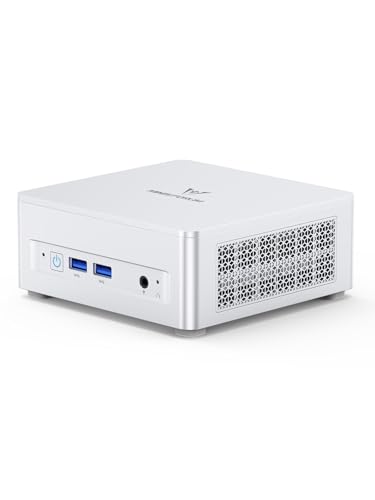
- Best overall for tight spaces: Minisforum UM870 Slim, Ryzen 7 8745H, 32GB RAM, 1TB SSD — Check on Amazon
- Beelink SER8, Ryzen 7 8745HS, 32GB RAM, 1TB SSD — Check on Amazon
- GMKtec NucBox K8 Plus, Ryzen 7 8845HS, 32GB RAM, 1TB SSD, OCuLink — Check on Amazon
- GMKtec NucBox M6 Ultra, Ryzen 5 7640HS, 32GB RAM, 512GB SSD — Check on Amazon
See 2 more Amazon options
- Minisforum UM890 Pro Barebone, Ryzen 9 8945HS (no RAM, SSD or OS) — Check on Amazon
- Apple Mac mini, M4 chip, 16GB memory, 256GB SSD — Check on Amazon
Read the full guide ↓
Disclosure: As an Amazon Associate, reviewstook.com earns from qualifying purchases. Links to Amazon on this page are affiliate links; they cost you nothing extra. Listing details such as price and availability change often, so check the current Amazon listing before you buy.
A small space does not forgive a badly planned computer. In a big room, a tower that turns out deeper than expected just slides sideways; in a studio flat, a dorm room or a desk wedged into a hallway alcove, every centimetre is already spoken for, the power brick has to live somewhere, the cables have to fall somewhere, and the fan has to breathe whatever air the room gives it. That is why this guide grades these six mini PCs as installations first and computers second. The specification work was already done at this tier — a Ryzen 7-class chip with Radeon 780M graphics, 32GB of RAM in real slots and a 1TB drive is the standard here, and five of the six picks meet it — so what separates them for a small room is the physical story: how big the box verifiably is, whether it can mount out of sight, where its cables land, and how much warm air it pushes into a space that may not have much air to spare.
One discipline runs through everything below, and it is worth stating before the picks: we only print a size, weight or noise figure when the research behind this guide actually documents it for that exact machine. Mini PC marketing loves the word “tiny” and hates the tape measure, and several listings in this class never publish dimensions at all. Where a figure is documented, you will see it. Where it is not, the review says so plainly, grades the machine by its form-factor class — these are all sub-litre-to-few-litre desktop minis, not towers — and sends you to the live listing’s specification table for the measurement before you order. What we will not do is borrow a dimension from a different model, a different listing or a review of a sibling machine and dress it up as this pick’s fact. A small-space purchase made on an invented measurement is worse than one made on no measurement, because it fails after the box arrives.
Two more honesty notes before the picks. First, graphics: every machine here uses integrated graphics. There is no discrete-GPU mini PC in this budget range on Amazon — the cheapest discrete line, Minisforum’s AtomMan G7 Pt, sits above this guide’s budget, and its card is the mobile Radeon RX 7600M XT with 8GB, a laptop GPU, not the desktop part its name echoes. Second, prices: memory and storage costs spiked hard in late 2026, dragging this whole class upward, so check the current price on Amazon for every pick before you decide — listings in this class move often, and the live listing is the only reliable figure. Below: the quick picks graded for installation, how they were chosen, a five-step measure-before-you-buy checklist, six detailed reviews, a comparison table, how to choose, the mistakes that waste money and space, and the questions small-space buyers ask most.
In this guide
Quick Picks
Short on time, or comparing several options at once? Each row below names a small-space situation and the machine that suits it, with a link to the listing.
| Your space | Pick | Why it stands out here | Link |
|---|---|---|---|
| Best overall installation | Minisforum UM870 Slim, Ryzen 7 8745H, 32GB/1TB | The only pick with documented dimensions and a VESA mount in the box — it can vanish behind the monitor | Check on Amazon |
| Best for a bedroom desk | Beelink SER8, Ryzen 7 8745HS, 32GB/1TB | Vapor-chamber cooling with a near-silent reputation — the fan you will not hear at night | Check on Amazon |
| Best if the desk may grow | GMKtec NucBox K8 Plus, Ryzen 7 8845HS, 32GB/1TB | OCuLink and dual USB4 — small today, dockable tomorrow | Check on Amazon |
| Best value for the space | GMKtec NucBox M6 Ultra, Ryzen 5 7640HS, 32GB/512GB | Socketed 32GB and USB4 — most of this tier’s substance in a value-tier position | Check on Amazon |
| Best for builders with a shelf nook | Minisforum UM890 Pro Barebone, Ryzen 9 8945HS | The strongest chip here; completed honestly with new parts, it still fits this guide’s budget framing | Check on Amazon |
| Best non-Windows option | Apple Mac mini, M4, 16GB/256GB | The best-built mini in this tier — if 16GB and 256GB are truly enough | Check on Amazon |
How These Picks Were Chosen
The budget was applied the way a buyer experiences it: as the total cost of a working computer. Five of the picks arrive complete, with memory, storage and Windows included. The sixth is a barebone kit — no memory, no drive, no operating system — included only because its review and its comparison-table row treat it as a completed machine, kit plus the memory, drive and operating system it needs, rather than as a kit alone. A barebone on its own is never a working PC in this guide.
On top of that baseline, this angle adds an installation filter, and it changed how the picks are graded rather than which machines qualify. Each pick is assessed on five physical questions. What is its form-factor class, and — only where the research documents it — its measured footprint and volume? Can it mount, and is a bracket actually documented for this listing, or would you be improvising? Where does the power adapter live, because on a small desk the brick is a second object competing for the same surface? How do the cables drop — which ports face the wall, which face you, and how much slack does the run behind the desk need? And how does it breathe: every machine here is fan-cooled, exhausts warm air into the room, and fails the same way if you seal it into a cabinet, so placement clearance is part of the grade, not an afterthought. Where the underlying research documents a noise figure, it is printed and attributed; where it documents only a reputation — one pick below is famous for quiet without a verified number in our sources — the review says exactly that.
The specification filter from the general guide still applies underneath: RAM in standard SO-DIMM slots rather than soldered (the one soldered machine, the Mac mini, is included with the trade stated in its first lines), a second M.2 slot where the class offers one, display outputs you can count on the listing, and a maker with a findable support page and a warranty you could actually claim. Listings that hide their memory type or ship mystery drives were dropped. For every pick, check the current price on Amazon before you buy, because this class moves often and a figure printed here would go stale quickly.
Measure Before You Buy: The Five-Step Checklist
Do these five steps in this order, before any money moves. They take ten minutes and they are the difference between a mini PC that disappears into a small room and one that lives on the floor in the way.
- Step 1 — Measure the spot. Tape-measure the exact place the machine will live: the shelf depth, the gap behind the monitor, the width of the desk corner. Write down depth, width and height clearance, not a vibe. Then compare against the listing’s own specification table for the machine you are buying — for the one pick in this guide whose dimensions our research documents, the figure is printed in its review; for the others, the live listing is the only honest source, and if a listing publishes no dimensions at all, treat that as a reason to choose a machine that does.
- Step 2 — Check the ventilation clearance. Every pick here moves heat with a fan and needs open air on its intake and exhaust sides. Leave a hand’s width of clear space around the vents, never stack anything on top of the box, and refuse the sealed cabinet outright: a closed media cabinet, a drawer, a lidded box — all of them turn a small PC into a slow, loud, short-lived one. If the only available spot is enclosed, the correct purchase is a different spot, not a different PC.
- Step 3 — Give the power brick an address. Mini PCs in this class run from an external adapter, and that adapter is a second object with its own size, its own heat and a cable at each end. Decide now where it sits: on the desk behind the monitor, on a shelf below, on the floor with the cable managed. If the answer is “there is nowhere,” your spot from Step 1 is not actually big enough — the machine’s footprint is the box plus the brick plus the bend radius of its cable.
- Step 4 — Plan the cable drop. Count what will plug in — display, power, network, keyboard, mouse, anything USB — and trace where each cable falls. Rear ports drop neatly behind a desk; front ports are for things you swap often. A wired network run is worth planning even in a small room: it is one more cable, but it removes the Wi-Fi variable entirely, and on two picks here a 2.5GbE port makes that run genuinely fast. Leave slack: a cable pulled taut against a wall is a port waiting to be damaged.
- Step 5 — Then order. Only now, with the spot measured, the air confirmed, the brick housed and the cables traced, place the order — and check the current price on Amazon first, confirming the live listing matches the configuration you planned for and sits within this guide’s budget. When the machine arrives, verify the delivered configuration against the model you ordered before the return window becomes a memory.
The 6 Best Mini PCs for Small Spaces Under $800
Minisforum UM870 Slim (Ryzen 7 8745H, 32GB RAM, 1TB SSD)
Who it suits: The small-space buyer who wants the computer to stop occupying the desk at all — mounted behind the monitor, measured before it was ordered, and never thought about again.
This is the only pick in the guide whose installation can be planned to the millimetre from documented figures, and for a small space that is worth more than any single port. Minisforum documents the chassis at 130 × 127 × 50mm — 0.82 litres — and includes a VESA mount in the box. That combination is the cleanest installation story here: the machine bolts to the back of a monitor or a monitor arm, its desk footprint becomes zero, and the only things left on the surface are the screen, the keyboard and the cables you planned in Step 4. The specification inside the small box is the tier standard, undiminished: a Ryzen 7 8745H with eight Zen 4 cores and Radeon 780M graphics, 32GB of DDR5 in two SO-DIMM slots expandable to 96GB, two M.2 slots with a 1TB PCIe 4.0 drive fitted, USB4 at the rear, HDMI 2.1 and DisplayPort for up to three displays, a 2.5GbE network port and Windows 11 Pro. Cooling is a phase-change pad and heat pipes; the maker’s noise claim is below 35dB in performance mode — a maker claim, printed as one, not a measurement we can stand behind.
The installation caveats are honest ones. Behind a monitor is a warm neighbourhood, so the mount only works if air can still move around the chassis — a monitor tight against a wall with the mini sealed behind it fails Step 2 just as a cabinet does. The power brick still needs its address from Step 3; VESA mounting hides the computer, not its adapter. And one audience should wire rather than wireless: the Wi-Fi 6E module is a MediaTek part with a documented history of driver friction under Linux. On price, check the current price on Amazon before you buy. This model sits in the upper part of this tier and its live listing can move above this guide’s budget, so confirm it sits within budget at the moment you order; if the live listing has moved above the budget, waiting for it to settle back is the patient move, because this class does not stay still for long.
- Documented 130 × 127 × 50mm (0.82L) chassis and a VESA mount in the box — a zero-footprint installation.
- 32GB in two slots (to 96GB) and two M.2 slots: nothing about it is sealed shut.
- USB4, HDMI 2.1 and DisplayPort drive up to three displays; two-year warranty.
Honest limitation: Its live price can move above this guide’s budget and listings in this class swing widely, and a behind-monitor mount still needs moving air around the chassis — hidden is not the same as ventilated.
Choose it if your desk is the constraint and you check the current price on Amazon and find it within this guide’s budget. Skip it if the live listing sits above the budget when you need a machine today, or your monitor setup leaves no ventilated space behind the screen.

Beelink SER8 (Ryzen 7 8745HS, 32GB RAM, 1TB SSD)
Who it suits: Anyone whose mini PC will live within arm’s reach in a quiet room — a bedroom desk, a studio flat, a media corner — where the fan is part of the living environment, not background noise in an office.
Small rooms amplify sound. A fan that would vanish into office hubbub cycles audibly in a quiet flat at midnight, and that lived experience is this machine’s whole case. The SER8’s vapor-chamber cooling spreads heat across the chassis instead of forcing it through one small heatsink, and reviewers consistently single it out as the near-silent mini in its class — a reputation our research documents as a reputation: no verified decibel figure for this listing appears in the sources behind this guide, so none is printed, and you should be suspicious of any roundup that invents one. What is documented is the specification around the cooling, which is the tier standard again: Ryzen 7 8745HS with Radeon 780M graphics, 32GB of DDR5 in slots (to 64GB), a 1TB PCIe 4.0 SSD with a second M.2 slot free, USB4, HDMI 2.1 and DisplayPort for up to three displays, 2.5GbE networking and Windows 11 Pro. For installation grading, two honest gaps matter: this guide’s research documents no dimensions and no mounting bracket for this listing, so the review grades it by form-factor class — a desktop mini that will sit on a shelf or desk surface, not behind a screen unless the live listing shows you a bracket — and Step 1 of the checklist sends you to that listing’s specification table for the measurement before ordering.
On price, check the current price on Amazon before you buy. This machine often sits near the top of this tier and its live listing can hover around or just above this guide’s budget, dipping inside it at times, so timing matters: buy when the live listing sits within budget, and do not pay a spiked premium for integrated graphics. Connectivity is modest in one installation-relevant way: a single USB-C-class port means a dock consumes your expansion in one plug, so plan the desk — and the cable drop from Step 4 — around that.
- Vapor-chamber cooling that reviewers credit for near-silence under sustained load — the quietest ownership story here.
- The full standard spec: 780M graphics, 32GB in slots (to 64GB), 1TB fitted and a second M.2 waiting.
- USB4 plus three-display output, and frugal enough at idle to run as an always-on server.
Honest limitation: Its live price hovers around this guide’s budget ceiling as often as inside it, our research documents no dimensions or mount for this listing, and a single USB-C port makes docking a one-plug affair.
Choose it if the machine will live in a quiet room and the live listing sits within budget when you check the current price on Amazon. Skip it if you need a documented behind-monitor mount — the UM870 Slim above is the pick that ships one — or you need the machine this week regardless of where its live price sits.

GMKtec NucBox K8 Plus (Ryzen 7 8845HS, 32GB RAM, 1TB SSD)
Who it suits: The small-space buyer whose space might grow — or whose ambitions will. Small and complete today, with a documented route to a desktop graphics card tomorrow, without replacing the computer.
Every other pick here accepts the mini PC bargain: the graphics you buy are the graphics you keep. One port makes the K8 Plus the exception to that bargain. OCuLink carries a direct PCIe connection out of the chassis, so an external GPU dock can turn this mini into a genuine gaming or GPU-compute machine later. Graded as an installation, that cuts both ways, and this review grades it both ways. Today, the machine is a desktop mini of the usual class — our research documents no dimensions for this listing, so Step 1 sends you to the live listing for the measurement, and no mount is documented, so plan on a shelf or desk surface. The day you claim the upgrade, though, your installation grows by a dock, the dock’s own power supply and a full-size graphics card: a second footprint roughly the size of the first, which a small room must have a plan for. Around the port, the connectivity is the strongest here: a Ryzen 7 8845HS with Radeon 780M graphics, 32GB of DDR5 in two slots, a 1TB PCIe 4.0 SSD with a second M.2 slot, two USB4 ports, HDMI 2.1 and DisplayPort for up to four displays per the listing family, and two 2.5GbE network ports — the spec of a small workstation or a serious home-lab node, and a machine with a second career as a home server when its desktop days end.
The discipline this pick demands is price discipline. Check the current price on Amazon before you buy: at its usual value positioning within this tier it is one of the strongest value stories in this guide, but during the late-2026 shortage its live listing was pulled well above this guide’s budget, and at that level it stops being an in-budget computer altogether. The rule is simple: buy the K8 Plus only when the live listing sits within this guide’s budget; above that, walk away and wait, because this class settles back down. And count the eGPU future honestly in your space plan as well as your budget: the dock and card together add a substantial second purchase that a small desktop would have handled more simply, so the K8 Plus makes sense when the two-stage plan is genuinely the point — small now, graphics when there is room for them — not as a discount route to a gaming PC.
- An OCuLink port — the one genuine route to desktop graphics in this guide.
- Two USB4 ports, two 2.5GbE ports and two M.2 slots: connectivity at workstation level.
- Value positioning within this tier when its live price sits within budget — check the current price on Amazon.
Honest limitation: Its live price is the most volatile here and can spike above this guide’s budget during shortages, no dimensions or mount are documented for this listing in our research, and the eGPU future adds a second footprint to your room when you claim it.
Choose it if the expansion is real for you — an eGPU on the roadmap, two networks, home-lab work — and the live price sits within this guide’s budget when you check the current price on Amazon. Skip it if the listing is spiked above budget, or if you know you will never attach a dock: the UM870 Slim is the same class with a documented size and a mount in the box.

GMKtec NucBox M6 Ultra (Ryzen 5 7640HS, 32GB RAM, 512GB SSD)
Who it suits: The value hunter with a small desk and a normal workload — office work, browsing, media, light creative tasks — who would like most of this tier’s substance in a value-tier position and the change kept for the room.
The M6 Ultra makes the case that this tier’s smart money does not always sit at its ceiling. Check the current price on Amazon — it is positioned as the value pick in this tier, and what it offers is more current than that positioning suggests. Its processor is the Ryzen 5 7640HS, six Zen 4 cores matched with the Radeon 760M — one rung under the 780M in the picks above, and still squarely in the class that takes office work, media, photo editing and light gaming in its stride. What matters is where GMKtec chose not to save: not on anything permanent. Its 32GB of DDR5 occupies two slots in dual channel; USB4 covers docking and fast external drives; HDMI and DisplayPort together run as many as three 4K screens; and it carries two 2.5GbE ports, a feature machines in higher tiers sometimes omit. Windows 11 Pro is included. Graded as an installation, it is a desktop mini of the standard class: our research documents no dimensions and no mounting bracket for this listing, so it is planned as a shelf-or-desk machine, measured from the live listing at Step 1 — and in a small space that honesty is a workable plan, because a mini of this class asks for a patch of surface and open air, not a cabinet bay.
The trade-offs, when they come, are concrete, survivable and mostly about storage. You get 512GB on a PCIe 3.0 drive instead of the 1TB PCIe 4.0 units above — half the capacity and a generation behind — though faster M.2 slots wait inside, so outgrowing it means swapping a drive, not replacing the machine. The graphics step down is genuine as well: heavier games and GPU work will notice the 760M in places the 780M machines would shrug off, so if light gaming is secretly the main event, look above. The warranty the listing states runs one year, less than some rivals manage. But judge it as a whole: slotted 32GB, USB4, triple displays and a modern Zen 4 chip in a value-tier position is the strongest value-to-substance balance in this guide, and it leaves room in the budget for the things small spaces actually need — a monitor arm, a shelf, cable management — instead of spending it on specification headroom you may never touch.
- Value-tier positioning: most of the tier’s substance without sitting at its ceiling — check the current price on Amazon.
- Slotted 32GB and USB4 — the decisions that cannot be revisited were taken correctly.
- Triple 4K display support and dual 2.5GbE networking.
Honest limitation: The fitted 512GB drive is PCIe 3.0, the 760M is a rung below the 780M picks, the stated warranty is one year, and no dimensions or mount are documented for this listing in our research.
Choose it if your work is office, browser, media and light creative tasks and you would rather keep the change for the room. Skip it if gaming or GPU-heavy work genuinely features in the plan; the 780M picks above exist for that.

Minisforum UM890 Pro Barebone (Ryzen 9 8945HS, No RAM, SSD or OS)
Who it suits: Builders with DDR5 and an NVMe drive already on the shelf, or homelab buyers who want the strongest CPU in this guide and a machine that can anchor a shelf of services in very little space.
Read the name carefully: barebone. What this listing sells is a chassis, a motherboard and a Ryzen 9 8945HS — eight Zen 4 cores boosting to 5.2GHz with the Radeon 780M at its fullest clock, the fastest processor in this guide — and nothing beyond that. No RAM, no SSD, no Windows. It earns its place because, completed honestly, it still fits this guide’s budget framing and buys things no complete machine in this tier offers: support for up to 96GB of DDR5 across two slots, two M.2 PCIe 4.0 slots, dual USB4 with power delivery in, dual 2.5GbE networking, four-display output, and an OCuLink connection for an external GPU. For virtualization hosting or a compact workstation, that headroom is the entire case. Minisforum’s configured version of this chassis sits in a higher tier above this guide’s budget, so a barebone completed properly can undercut that configured route substantially. Its documented physical figures are partial, and this review prints exactly those: a weight of about 3.47 lb and a noise figure of around 43dB in performance mode. Dimensions are not documented in our research for this listing, so Step 1 again routes you to the live listing. The 43dB figure deserves a small-space translation: that is a machine you will hear in a quiet room at full load, so its home is a shelf away from the bed or the microphone, not the desk corner beside your pillow.
Finishing it properly means budgeting for the parts it lacks, and none of those parts should be treated as an afterthought. The kit itself is the starting point — check the current price on Amazon for the barebone listing. You then add DDR5 memory and an NVMe drive; in late 2026 memory was the ingredient that moved most, and its cost shifted within single months, so check the live listings for the exact memory and drive you plan to fit on the day you buy rather than trusting any older figure. Completed with new parts in the configuration described here, the machine is positioned to fit within this guide’s budget framing, with the operating system as the honest extra on top. Two honest additions. No operating system is included: budget for a Windows licence unless a spare key is already yours, or run Linux or a hypervisor at no licence cost — a common and sensible destination for this machine. The OCuLink connection, meanwhile, runs through an included M.2 adapter plate that takes one of the two SSD slots while fitted, so the expansion and the second drive are alternatives, never a combination. One last warning, true of every barebone: when all the parts are being bought new at shortage prices, check the complete UM870 Slim above before committing — this year the building-versus-buying gap has narrowed almost to nothing.
- The guide’s strongest CPU, the 8945HS with its 780M at full clock, plus a 96GB memory ceiling.
- Finished with new parts, it can sit within this guide’s budget — well below the configured version’s higher-tier positioning.
- Two USB4 ports, two 2.5GbE ports, four-display output and an OCuLink path to a genuine GPU.
Honest limitation: It is a kit, not a computer — RAM, SSD and OS are on you — its documented ~43dB at full load rules out quiet-room desk duty, and its OCuLink adapter consumes one of the two M.2 slots while fitted.
Choose it if you have parts on hand or specific memory/storage plans, especially for homelab or virtualization duty on a shelf with air around it. Skip it if you want to unbox a working PC, or the machine must live silently in the room where you sleep.
Apple Mac mini (M4, 16GB Memory, 256GB SSD)
Who it suits: Buyers inside Apple’s ecosystem — iPhone on the desk, Mac software in the workflow — who value build quality, silence and resale value over specification headroom, and whose workload genuinely fits the fixed configuration.
Any guide in this class has a Mac-shaped question to answer, and this one answers it without flinching. The Mac mini with the M4 chip is the best-made mini computer in this tier: milled aluminum, effectively silent in normal use, idle power draw in single digits, and a chip whose single-core speed embarrasses everything else in this guide while its integrated graphics handle photo and video work that would make the 780M machines think. It drives up to three displays — two up to 6K over Thunderbolt and one more over Thunderbolt or HDMI, per Apple’s specification — its three Thunderbolt 4 ports are the fastest connections here, and it is positioned at the accessible end of this tier while out-feeling all of them. Graded as an installation, it is a desktop mini of the standard class that sits on a surface and asks for air like everything else here; one documentation note, stated plainly because this guide’s discipline requires it: the research behind this guide does not document this listing’s dimensions or any mounting bracket, so no figure is printed and no behind-monitor mount is claimed — measure from the live listing or Apple’s specification page at Step 1 if the exact footprint decides your purchase.
The limitations are architectural, and Apple prints them in the configuration you cannot change. Both the 16GB of memory and the 256GB SSD are soldered down at purchase, permanently. Sixteen gigabytes is adequate today and a ceiling tomorrow — there is no slot, no upgrade, no second chance — and 256GB fills fast enough that an external drive becomes a permanent second object on a small desk, which belongs in your Step 3 planning alongside the power adapter. Higher configurations exist in Apple’s own range, but they exit this guide’s budget quickly. On price, check the current price on Amazon before you buy, and favour Amazon’s own offer: third-party sellers on this listing have at times asked well above Apple’s own positioning during shortages. Buy at or below the level Apple itself positions this base configuration at; never pay a third-party premium above it, since Apple itself sells the machine directly. Bought as a finished appliance for a workload you already know, it is superb. Bought as a platform to grow into, it is the wrong tool; the Windows picks above, each one slotted and each one expandable, are the honest answer there.
- The finest build quality and the fastest single-core speed in this guide, and effectively silent with it.
- Three Thunderbolt 4 ports, support for three displays, and an accessible tier positioning that undercuts much of the field — check the current price on Amazon.
- Outstanding for macOS workflows and media work, and cheap to run as an always-on machine.
Honest limitation: 16GB of memory and 256GB of storage are soldered at purchase with no upgrade path, ever; third-party sellers sometimes ask above Apple’s own positioning for this configuration; and no dimensions or mount are documented for this listing in our research.
Choose it if Apple’s ecosystem is home and 16GB fits your workload now and for the machine’s whole life. Skip it if Windows software is part of your life, if anything in it might ever need upgrading, or if serious storage has to live inside the box.

Comparison Table
Installation facts are printed only where this guide’s research documents them. “Not documented” is a finding, not an oversight — it means the listing’s own specification table is your source at Step 1 of the checklist.
| Product | Chip / Graphics | Memory & storage | Installation notes | Link |
|---|---|---|---|---|
| Minisforum UM870 Slim | Ryzen 7 8745H / Radeon 780M | 32GB slotted (to 96GB), 1TB, 2× M.2 | Documented 130 × 127 × 50mm (0.82L); VESA mount in box; maker noise claim below 35dB | Check on Amazon |
| Beelink SER8 | Ryzen 7 8745HS / Radeon 780M | 32GB slotted (to 64GB), 1TB, 2× M.2 | Near-silent reputation (no verified figure documented); dimensions/mount not documented — check the listing | Check on Amazon |
| GMKtec NucBox K8 Plus | Ryzen 7 8845HS / Radeon 780M | 32GB slotted, 1TB, 2× M.2, OCuLink | Dimensions/mount not documented; a future eGPU dock adds a second footprint | Check on Amazon |
| GMKtec NucBox M6 Ultra | Ryzen 5 7640HS / Radeon 760M | 32GB slotted, 512GB fitted | Dimensions/mount not documented; plan a shelf or desk patch with open air | Check on Amazon |
| Minisforum UM890 Pro Barebone | Ryzen 9 8945HS / Radeon 780M | None fitted — completed with 32GB/1TB as a finished machine | Documented ~3.47 lb and ~43dB at full load; dimensions not documented; kit, not a complete PC | Check on Amazon |
| Apple Mac mini (M4) | Apple M4 / integrated | 16GB soldered, 256GB soldered | Dimensions/mount not documented in our research; external drive likely becomes a second desk object | Check on Amazon |
How to Choose a Mini PC for a Small Space
- Decide the installation before the specification. Mounted behind a monitor, sitting on a shelf, or tucked beside the screen are three different purchases. Only one pick here ships a documented mount; the rest are surface machines, and pretending otherwise ends with a mini balanced somewhere it should not be.
- Demand a documented measurement. If the exact footprint decides whether the machine fits, buy a machine whose dimensions are published — in its review here, or on its live listing — and run Step 1 of the checklist with real numbers. A listing that publishes no dimensions is asking you to gamble your shelf on its photography.
- Budget the brick and the cables, not just the box. The adapter needs a home, the display cable needs a drop, and the network cable — worth running, at 2.5GbE on most picks here — needs a path. A spot that fits the chassis but not its wiring does not fit.
- Refuse the sealed cabinet, every time. All six picks are fan-cooled and exhaust into the room. A closed cabinet, drawer or lidded cubby will make any of them slower, louder and shorter-lived. Open air is a specification; treat it as one.
- Match the noise to the room. In a bedroom or studio, fan character is a living condition. The SER8’s quiet reputation and the UM890 Pro’s documented ~43dB at load are opposite ends of that decision — place accordingly, and put distance between any hard-working fan and your pillow or microphone.
- Start with the memory architecture, not the processor. Every serious processor at this level is already fast enough for desktop work. Whether the memory sits in slots is what divides a five-year machine from a two-year one. Slotted DDR5 can grow when your workload does; soldered memory is a decision you make once, at shortage prices, forever.
- Hold the line at 32GB and 1TB. That pairing is this tier’s standard spec and its baseline. A listing offering 16GB or 512GB at this budget is selling you last tier’s machine at this tier’s level, whatever the processor badge says — the one deliberate exception here is the value pick, which says so in its name and its positioning.
- Check the current price on Amazon, every time. Late-2026 memory costs sent this class’s prices swinging widely. Each review above frames where its pick sits within this tier and within this guide’s budget. A week’s patience will serve you better than paying a spiked live price for any of the top picks.
- Judge barebones as finished computers. Add memory, storage and an operating system if you need one to the kit, then set that completed machine against complete machines checked the same day. Barebones pay off when parts are already owned or well positioned; during a shortage the margin often shrinks to nearly nothing.
Common Buying Mistakes
- Measuring the computer and forgetting the brick. The adapter is a second object with cables at both ends; a spot that fits only the chassis does not fit the installation.
- Sealing a mini PC into a cabinet, drawer or lidded box because it fits. It fits, and then it cooks. Every pick here needs open air around its vents.
- Trusting the word “tiny” instead of a measurement. If a listing publishes no dimensions, that absence is information — either measure from a listing that publishes them or choose a machine that does.
- Assuming a mount exists because the machine is small. Only one pick here documents a bracket in the box. Improvised mounting behind a hot monitor, with no airflow, is two mistakes at once.
- Comparing a barebone kit price against complete machines. A kit is a motherboard with ambitions; the working computer costs the kit plus memory, storage and, usually, an operating system.
- Paying shortage prices in a panic. Prices in this class moved widely within weeks during late 2026. Check the current price on Amazon for each pick, and when the live listing sits above this guide’s budget the right purchase is patience.
- Buying soldered 16GB to save money today. It is the one saving that cannot be undone, and in a small space it also guarantees a future external drive joining the desk.
- Forgetting that an upgrade path is also a footprint. An OCuLink dock, its power supply and a desktop card are a second installation the size of the first — plan the room for the machine you will own in two years, not only the one in the box.
Final Recommendation
- Most small-space buyers: Minisforum UM870 Slim — documented size, a mount in the box, bought when its live price sits within this guide’s budget.
- Bedrooms and quiet rooms: Beelink SER8, bought on a dip.
- Rooms that may grow into the hobby: GMKtec NucBox K8 Plus, strictly when its live price sits within budget.
- Value first: GMKtec NucBox M6 Ultra, the tier’s value-positioned pick — check the current price on Amazon.
- Builders and homelabs: Minisforum UM890 Pro Barebone, completed honestly and shelved with air around it.
- Apple households: Mac mini M4, bought from Amazon’s own offer at its standard tier positioning, never at a third-party premium.
Our top two for most small spaces are the UM870 Slim — the only pick whose installation can be planned to the millimetre before it arrives, and the only one that can leave the desk surface entirely — and the SER8, for the quality a small room notices every hour rather than once: quiet. Between them they cover the two shapes this search usually takes, the disappearing computer and the inaudible one. If your budget is firm but your workload is light, the guides at Best Mini PC For Small Spaces Under $500 and Best Mini PC For Small Spaces Under $700 apply this same installation lens lower down the ladder, and Best Mini PC For Small Spaces Under $1200 covers the tier where discrete graphics enter the picture. New to mini PCs entirely? Start with Best Mini PC For Beginners Under $800; buying for a desk that streams, see Best Mini PC For Streaming Under $800. Measure the spot, confirm the air, house the brick, trace the cables — then check the current price on Amazon and buy once.
Frequently Asked Questions
How small is a mini PC, actually?
Smaller than the photographs suggest and bigger than the marketing admits. The one pick in this guide with dimensions documented in our research, the UM870 Slim, measures 130 × 127 × 50mm — 0.82 litres, roughly a thick paperback. The class as a whole lives in that sub-litre-to-few-litre neighbourhood, but “the class” is not a measurement: for any specific machine without a documented figure here, the live listing’s specification table is the only honest source, and Step 1 of the checklist exists precisely for that check.
Can I hide a mini PC inside a cabinet or drawer?
No — not any of these, and not really any fan-cooled mini PC. They exhaust heat into the room by design; a sealed space returns that heat to the intake until the machine throttles, gets loud and ages fast. Hidden is fine — behind a monitor with air moving around it, on an open shelf — but enclosed is not. If the only available spot is a closed cabinet, change the spot, not the computer.
Can these mini PCs mount behind a monitor?
One pick documents it: the UM870 Slim includes a VESA mount in the box. For the other five, our research documents no bracket for their listings, so the honest answer is “not as documented” — check the live listing before assuming, and never improvise a mount that presses a hot chassis flat against the back of a screen with no airflow.
Does the power brick really matter for space?
Yes, and it is the most commonly forgotten object in small-space setups. Machines in this class run from an external adapter, which sits somewhere — desk, shelf or floor — with a cable at each end and its own warmth. Step 3 of the checklist gives it an address before you order. A spot that fits the computer but strands the brick does not fit.
Can a mini PC under $800 play games?
Light ones, honestly framed. The 780M machines here run esports titles, older AAA releases and indie libraries comfortably at 1080p on sensible settings, and handle older-console emulation well. Current AAA games at high settings are beyond integrated graphics in any mini PC — that workload wants a discrete card, which at this budget means the K8 Plus’s OCuLink dock route later, or a different form factor entirely. There is no discrete-GPU mini PC under $800 on Amazon; the cheapest discrete line sits above this budget. Buyers whose first question is gaming should read Best Mini Gaming PC Under $800, which judges the same money through a gaming lens.
Mini PC or small desktop for a small room?
Decide by what the machine must never do. If the machine must never be heard, never warm the room and never claim desk space, the mini wins outright and this guide is your shortlist. If it must one day hold a desktop graphics card, several drives or a capture card, a small tower is the honest buy at the same money — and in a small room, be honest about the tower’s footprint before choosing it, because the mini’s virtues are exactly the ones a tight space cashes in.
- Best Mini PC Under $800
- Best Mini PC Under $500
- Best Mini PC Under $700
- Best Mini PC Under $1200
- Best Mini PC For Small Spaces Under $500
- Best Mini PC For Small Spaces Under $700
- Best Mini PC For Small Spaces Under $1200
- Best Barebones Mini PC Under $800
- Best Home Office PC Under $800
- Best Fanless Mini PC Under $800


