Where to buy
Check the latest price, availability and delivery on Amazon. Orders are placed on Amazon. We may earn a commission from qualifying purchases.
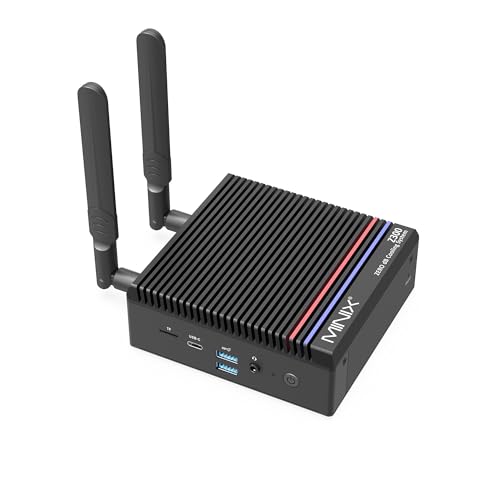
- Best for small spaces: MINIX NEO Z300-0dB Fanless Mini PC, Intel i3-N300, 16GB RAM, 512GB SSD — Check on Amazon
- Beelink EQ14 Mini PC, Intel N150, 16GB RAM, 500GB SSD, Dual 2.5GbE — Check on Amazon
- Beelink SER5 MAX Mini PC, Ryzen 7 7735HS, Radeon 680M, 24GB RAM, 500GB SSD — Check on Amazon
- GMKtec M5 Plus, Ryzen 7 5825U, 32GB RAM, 1TB SSD, Dual 2.5GbE LAN — Check on Amazon
See 2 more Amazon options
- BOSGAME P4 Mini PC, Ryzen 7 5700U, 32GB RAM, 1TB SSD, Triple 4K — Check on Amazon
- GMKtec NucBox K6, Ryzen 7 7840HS, Radeon 780M, 32GB DDR5, 1TB SSD — Check on Amazon
Read the full guide ↓
Disclosure: As an Amazon Associate, reviewstook.com earns from qualifying purchases. Links to Amazon on this page are affiliate links; they cost you nothing extra. Listing details such as price and availability change often, so check the current Amazon listing before you buy.
Every mini PC is small. That is the one thing the product category guarantees, and it is also where the easy part ends. The harder question — the one that decides whether a small computer actually works in a small room — is not the size of the box but the size of the installation: the power adapter that has to live somewhere, the cables that drop from the back of the desk, the heat that has to leave the chassis and enter a room that may already be warm, and the fan noise that, in a studio flat or a bedroom, has nowhere to hide. A tower PC exiled under a desk in a big office can be loud, hot and cabled like a switchboard and nobody minds. A mini PC sitting on the only shelf in a small room is part of the furniture, part of the soundscape and part of the room’s climate, and it should be bought that way.
This guide takes the six machines from our general roundup of this tier — the same verified listings, the same prices, the same silicon — and re-grades every one of them as an installation. What changes is the order and the emphasis. The fanless machine that ranked fifth on performance ranks first here, because in a small room silence is a physical property of the space. The most powerful machine in the set ranks last, because its documented fan behaviour is the one acoustic profile a small room cannot forgive. And throughout, this guide observes a discipline the small-spaces buyer should insist on: our research documents no dimensions, no weights, no mounting brackets and no measured noise figures for these six machines, so none are printed here. Each pick is graded by its form-factor class, its cooling design and its documented ports and power modes — the things that are actually known — and where a measurement would decide your purchase, the guide says so and sends you to the live listing. Measure first, order second: returning a computer that does not fit is a worse use of a week than measuring a shelf.
In this guide
Quick Picks
Short on time, or comparing several options at once? Each row below names a small-space situation and the machine that suits it, with a link to the listing.
| Small-space situation | Pick | Why it stands out as an installation | Link |
|---|---|---|---|
| Best for small spaces overall | MINIX NEO Z300-0dB, Intel i3-N300, 16GB | Genuinely fanless — no fan noise in the room, ever; the chassis is its own heatsink | Check on Amazon |
| Coolest, quietest corner | Beelink EQ14, Intel N150, 16GB/500GB | The lowest-power chip in the set — the least heat tipped into a small room | Check on Amazon |
| Most performance per shelf | Beelink SER5 MAX, Ryzen 7 7735HS, 24GB | Radeon 680M graphics — the strongest game-capable iGPU under $500, in standard mini form | Check on Amazon |
| Lives by the router, not the desk | GMKtec M5 Plus, Ryzen 7 5825U, 32GB/1TB | Dual 2.5GbE lets it work from a ventilated network corner as a home server | Check on Amazon |
| Most capacity, least spend | BOSGAME P4, Ryzen 7 5700U, 32GB/1TB | 32GB and a full terabyte at a budget-tier position — check price on Amazon | Check on Amazon |
| Best silicon, noisiest neighbour | GMKtec NucBox K6, Ryzen 7 7840HS, 32GB | Radeon 780M when its sale pricing lands — check price on Amazon — with a fan you will hear across a small room | Check on Amazon |
How These Picks Were Chosen
The six machines are the six from our main guide to this budget, Best Mini PC Under $500: every pick is a real Amazon listing that includes its memory, storage and a Windows licence, and that sells at or regularly within $500 in the United States. Barebone kits were excluded for the same reason as there — completing one in the current parts market costs far more than its headline, and a half-built computer is a poor answer to a space problem; that route has its own guide at Best Barebones Mini PC Under $500. Prices change often, so check the live price on Amazon before you buy, because memory and storage costs surged through late 2026 and this category reprices weekly. One pick, the GMKtec K6, qualifies only at its recurring sale pricing and is framed that way everywhere it appears.
What is new here is the grading. Each machine was assessed as an installation, on the evidence the research actually documents: its form-factor class (all six are desktop mini PCs of the usual book-sized class — none is a tower, none is a stick), its cooling design (one fanless passive chassis, five fanned machines), its documented heat behaviour (including one independent measurement of a fanless processor at 98°C under sustained load, and one machine with documented 45W quiet and 65W performance power modes), its documented fan behaviour where reviewers recorded it, and its port list, because the ports decide how many cables drop behind the desk and whether a second or third screen is even possible. Memory construction still matters and is still stated for every pick, because a machine you must open in year three needs a workspace and a free afternoon, while a soldered machine never asks for either.
Now the discipline, stated once and applied everywhere below. The research behind this guide documents no dimensions, no volume, no weight and no measured noise level for any of these six machines, and no VESA bracket or mounting hardware for any of them. So this guide prints none, and borrows none from sibling guides: a figure documented for one machine — or for a different configuration of a similar name — is not a fact about the machine in front of you. The practical consequence: no pick below is promised to fit a specific shelf, mount behind a specific monitor, or run at a specific loudness. Each review instead tells you the class of space the machine needs, the placement rules its cooling design imposes, and exactly what to confirm on the live listing — dimensions and any mount — before you pay. That is less convenient than a table of numbers. It is also true, and the listing’s specification section will give you the real figures in two minutes.
The 6 Best Mini PCs for Small Spaces Under $500
MINIX NEO Z300-0dB Fanless Mini PC, Intel i3-N300, 16GB RAM, 512GB SSD
Who it suits: Buyers whose room is the reason for the purchase — bedroom desks, studio flats, recording corners, living-room media shelves — anywhere a fan’s voice would be part of the room’s life.
As an installation: This is the only machine in the set that adds no sound to the room at all. Its finned metal chassis cools an eight-core Intel i3-N300 entirely by passive convection: no fan, no moving parts, nothing to spin up during a film’s quiet scene or a 2 a.m. download. In a small space that is not a luxury feature; it is the difference between a computer you forget is on and one that narrates its workload. The installation rule is the mirror image of that virtue. A fanless chassis is its own heatsink, which means the case needs open air around its fins on every side — a shelf with breathing room, a desktop corner, a media-unit top surface. It is the pick most rewarded by good placement and the pick most punished by bad placement, and the sealed-cabinet refusal in this guide applies to it most strictly of all: a fanless box in a closed cabinet is a heatsink in an oven. Its cable story is tidy — two HDMI ports at 4K@60 plus USB-C carrying power delivery and display output, 2.5-gigabit Ethernet, Wi-Fi 6 — so a one- or two-screen desk drops very few cables, and wired networking is there if the room allows a run to the router.
As a computer it is a respectable small machine rather than a fast one: 16GB of DDR4 in a slot that accepts 32GB, a 512GB PCIe SSD in an M.2 slot that accepts drives up to 4TB, Windows 11 Pro. Check the price on Amazon — this is a premium pick at the ceiling of this budget, its cost spent on the cooling and the build rather than on speed. Media duty, writing, browsing, always-on low-power server work: all genuinely excellent fits, helped by upgradeable memory and storage that are rare in a fanless design. The physics bill arrives under sustained load: independent measurement recorded this processor at 98°C under a long heavy workload — inside its design limits, but the demonstration that a passive box sheds heavy work by slowing down rather than by getting louder. Its Intel UHD graphics are for displays, not games. None of that changes its ranking here: judged as an installation for a small, quiet room, it is the only pick that improves the room it sits in.
- Truly fanless: zero fan noise and no moving parts — the strongest small-room property in this guide.
- Slotted memory (to 32GB) and an M.2 slot (to 4TB) — rare upgrade room in a passive design.
- Dual HDMI 4K@60 plus USB-C with PD and display output keeps the cable drop short.
Honest limitation: The chassis is the heatsink, so it demands open air on every side and refuses sealed furniture outright; sustained heavy loads throttle, and the price buys silence, not speed.
Choose it if the machine will live where you sleep, record or listen, the shelf you have in mind is open, and its work is everyday computing. Skip it if the only available spot is an enclosed cabinet — no placement trick makes that safe for this design — or if you run sustained heavy loads.

Beelink EQ14 Mini PC, Intel N150, 16GB RAM, 500GB SSD
Who it suits: Buyers furnishing a small desk from scratch — a spare-room corner, a student’s shelf, a relative’s first setup — who want the machine that asks the least of the room.
As an installation: The EQ14’s installation virtue is how little it asks. Its Intel N150 is the lowest-power chip class in this set — four cores to 3.6GHz — and the base research describes the machine as cool-running and frugal, which in a small room translates directly: the least heat tipped into the air you sit in, and a fan with the least work to do. Its cable drop is the shortest in the guide for a simple reason: dual HDMI at 4K@60 is the whole display story, so a one- or two-monitor desk needs no adapters and no third cable. Around that simplicity sits a specification more generous than the price suggests — 16GB of DDR4, a 500GB SSD with two M.2 2280 slots in the chassis, dual 2.5-gigabit Ethernet that also makes it a tidy firewall or home-server starter, Wi-Fi 6 and Bluetooth 5.2. Check the price on Amazon — it sits in the budget tier of this set. It is the most affordable complete, new, warrantied machine here in qualitative terms — which matters to a small-space buyer furnishing a whole desk, because the money it saves is the monitor arm, the shelf and the cable channel.
The limitations are structural, and stated cleanly. The 16GB of memory fills the machine’s single slot, and 16GB is the platform’s maximum — no upgrade exists, only replacement. The listing title specifies Windows 11 Home rather than Pro, which matters only if you need Pro’s remote-desktop hosting or drive-encryption policies. The graphics are Intel UHD: video is smooth, games are limited to the lightest and oldest. Stock on this listing was interrupted from late September to mid-November 2026, a reminder that the cheapest listings have the most fragile supply lines — if it is in stock at a fair price on Amazon, that is the moment. None of these is an installation problem; the machine’s footprint on the room is heat, cables and cost, and on all three it is the lightest touch in the guide.
- The lowest-power chip in the set — the least heat added to a small room.
- Dual HDMI only: the simplest possible cable drop for a one- or two-screen desk.
- Budget-tier positioning — check price on Amazon; leaves budget for the shelf, arm and cables the installation needs.
Honest limitation: The fitted 16GB is also the platform’s ceiling, the listing title specifies Windows 11 Home rather than Pro, and the graphics serve video rather than games.
Choose it if your workload is the everyday one — tabs, documents, video, calls — and the room is small enough that heat and clutter are real costs. Skip it if you multitask heavily or expect the machine to grow; its ceiling is where the socketed picks start.

Beelink SER5 MAX Mini PC, Ryzen 7 7735HS, Radeon 680M, 24GB RAM, 500GB SSD
Who it suits: Buyers with one small desk that must do everything — work, media and real gaming at modest settings — and an open shelf or desktop corner to put the machine on.
As an installation: The SER5 MAX is a standard member of this guide’s form-factor class: a book-sized desktop mini with a fan, three display outputs and no documented mounting hardware in our research — so plan it as a machine that sits on a surface, in open air, and confirm any behind-monitor ambitions against the live listing rather than assuming them. Its installation demands are those of the strongest performer in a small box. The Ryzen 7 7735HS — eight cores to 4.75GHz — and its Radeon 680M are the most capable silicon under $500 here, and capability is heat: give the chassis clearance on the sides where its vents breathe, keep it out of enclosed furniture, and do not stack it under books or a monitor stand that traps warm air. In return, its port list is the most desk-friendly of the Ryzen picks: triple 4K output over HDMI 2.0, DisplayPort 1.4 and USB-C means a two- or three-screen corner needs no hub, and 2.5-gigabit Ethernet plus Wi-Fi 6 cover both networking routes. Check the price on Amazon — it lives at the ceiling of this budget.
What the installation never asks of you is a second act with a screwdriver. The 24GB of LPDDR5 memory is soldered to the board — permanent, stated plainly — so there is no upgrade-day teardown on a small desk; the one part that does grow, storage, grows through a second M.2 2280 slot standing empty beside the fitted 500GB PCIe 4.0 drive. Two cautions complete the picture, both from the base research. USB4 is absent: the USB-C port handles data and video but not the 40Gbps standard, which closes the door on external GPU docks in this machine’s future. And the SER5 name is shared with older, weaker Beelink machines, among them a Vega-graphics 5800H model — the listing linked here is the 7735HS/680M build, so give the configuration selector a careful look in the cart before paying. For a small room that games, this is the performance ceiling that still behaves like furniture — provided the furniture is open.
- The Radeon 680M is the most capable game-playing integrated graphics fitted to any complete mini at this price.
- Triple 4K outputs over three port types: multi-screen corners without a hub.
- Soldered memory means no upgrade teardown later; the second M.2 slot covers the growth that matters.
Honest limitation: Its performance silicon is the warmest long-load proposition among the everyday picks — it needs open air and refuses enclosed furniture — and the 24GB memory ceiling is fixed at purchase, with no USB4 for an external GPU later.
Choose it if you want the best all-round mini under $500 and you have an open shelf or desktop corner for it. Skip it if the only spot available is inside a cabinet or media unit with a door — pick the room’s placement first, then the machine.

GMKtec M5 Plus, Ryzen 7 5825U, 32GB RAM, 1TB SSD, Dual 2.5GbE
Who it suits: Buyers whose small space has a network corner — a router shelf, a hall cupboard with ventilation, a spot by the fibre entry point — and who would rather the computer lived there than on the desk.
As an installation: The M5 Plus is the one pick in this guide whose best placement may not be on your desk at all. Two 2.5-gigabit Ethernet ports — a rarity at any mini PC price — make it a natural home server, NAS companion or virtualisation host, and a server does not need your desk: it needs power, airflow and a network cable, all of which a ventilated corner near the router provides. Run one display cable to it for setup, then administer it over the network and reclaim the desk entirely. Even if it does live on the desk, its installation profile is gentle: the Ryzen 7 5825U is a U-class chip, a generation of silicon built for thin laptops, and its heat output belongs to that class rather than to the performance tier above. Triple 4K display output over DisplayPort, HDMI and USB-C, Wi-Fi 6E and Bluetooth 5.2 complete the desk-side story. Check the price on Amazon — on most days the most upgradeable machine here is also one of the more affordable in this tier, which leaves money for the shelf or the longer cables a network-corner placement needs.
The ownership profile suits a small space in a subtler way: everything in it can grow without a replacement purchase. The 32GB of DDR4-3200 sits in two slots and expands to 64GB; the 1TB M.2 2280 NVMe SSD has a second slot beside it, with room for up to 4TB total. A machine that doubles its memory and quadruples its storage in place is a machine that does not generate a second box, a second installation and a second set of cables in year three. The honest debits are generational, not spatial. The 5825U’s graphics — eight compute units of the Vega architecture — are a clear class below the 680M picks: fine for esports, indie games and older titles at 1080p, not a machine bought for current releases. A workload of browser, documents, media and a shelf of background services will never notice the gap. A machine that must game every week will — buy the graphics class above instead and accept the solder.
- Dual 2.5GbE LAN: the only pick that can retire to the router corner and free the desk entirely.
- 32GB of socketed DDR4, expandable to 64GB — growth without a second installation.
- Strong capacity for its tier — check price on Amazon, with change for cabling.
Honest limitation: Its Vega-generation graphics sit a clear class below the 680M picks — capacity and networking are the purchase here, not gaming.
Choose it if your days are heavy multitasking and background services, or you keep a machine five years and improve it as you go. Skip it if gaming performance is the point of the purchase, or if no ventilated spot exists anywhere except a closed cupboard — the cabinet refusal applies to it too.

BOSGAME P4 Mini PC, Ryzen 7 5700U, 32GB RAM, 1TB SSD, Triple 4K
Who it suits: Buyers who want the headline capacities — 32GB of memory and a full terabyte — at a budget-tier position in the guide, installed on an ordinary open shelf, and who will spend ten seconds checking a configuration selector to get them.
As an installation: The P4 belongs to the same form-factor class as the GMKtec above — a book-sized desktop mini — and it is graded the same way: our research documents no dimensions and no mounting hardware for it, so it is planned as a surface-sitting machine in open air, with any tighter fit confirmed against the live listing before purchase. Its thermal class is the same U-series territory as the M5 Plus, so its placement rules are the standard ones for this guide: clearance around the vents, no enclosed furniture, no stacking. Its port list is desk-complete — triple 4K output across HDMI, DisplayPort and USB-C, dual 2.5-gigabit Ethernet, Wi-Fi 6E — so a two-screen desk plus wired networking drops a manageable bundle of cables, and like the M5 Plus it can serve network duty if the desk gets crowded. On paper it is the value shock of the tier: a Ryzen 7 5700U with 32GB of RAM and a 1TB SSD and Windows 11 Pro, positioned in the budget tier for this capacity — check price on Amazon.
One thing this review deliberately does not tell you is how the P4’s memory is fitted. The base research does not document whether its 32GB is socketed or soldered, and a small-spaces guide has no business inventing the answer — it decides whether a year-three upgrade happens on your desk or not at all. Treat it as an open question to resolve on the live listing if upgradeability matters to you; the fitted capacity itself is real and verifiable in the cart. The documented caution is about that cart: this listing family has been sold with both 5700U and 5825U processors under near-identical titles, and mini PC listings generally rotate configurations through a single page — the processor, memory and storage in the cart are the ones you are buying, whatever the headline photo suggests. BOSGAME is also a smaller brand than Beelink or GMKtec, which shows in thinner documentation and a smaller owner community when something odd happens. At a budget-tier price those are fair trades. If its price drifts toward the top of this budget they stop being fair — the M5 Plus above documents the same idea better.
- 32GB with a full terabyte at a budget-tier position — check price on Amazon; no other pick pairs this capacity at this tier.
- Three 4K outputs plus dual 2.5GbE stretch it from desk duty to server duty.
- An eight-core Ryzen 7 leaves years of headroom over anything office and media work will ask.
Honest limitation: The listing family mixes 5700U and 5825U configurations under similar titles — the configuration in the cart is the purchase — and its memory construction is not documented in our research, so no upgrade promise is made for it here.
Choose it if the live price on Amazon still sits in the budget tier and the cart reads 5700U, 32GB and 1TB. Skip it if the price has drifted toward the top of this budget, or if a documented upgrade path matters more than the saving — at that point the GMKtec above is the safer buy.

GMKtec NucBox K6, Ryzen 7 7840HS, Radeon 780M, 32GB DDR5, 1TB SSD
Who it suits: Patient buyers in larger small spaces — a separate desk room rather than a bedside — who can wait for a sale and who value the strongest silicon over acoustic manners.
As an installation: On specification this machine should top a small-spaces guide: the Radeon 780M is the strongest integrated graphics AMD ships in this form factor, the memory is socketed DDR5, there is USB4 for a future external GPU dock, and dual 2.5-gigabit Ethernet plus Wi-Fi 6E cover the networking. It ranks last here on two documented facts. The first is acoustic. Reviewers who measured this model recorded fan noise under sustained load and no fan-profile control in the BIOS to tame it: there are 45W quiet and 65W performance power modes, but the acoustic character is set by GMKtec, not by you. In a large office that is a footnote; in a small room, where the desk is three steps from the bed and the machine’s fan is part of the evening, it is the installation. The 65W performance mode is also the most heat any pick here tips into a room under load. The second fact is price: the 32GB/1TB configuration’s regular pricing sits above this budget, and it only fits this guide when recurring sale pricing brings it into range — check price on Amazon. Everything good about this pick is conditional on that sale pricing, and the condition is not fine print; it is the review.
Placed honestly, the K6 can still work in a modest space: an open shelf as far from the seating as the room allows, the quiet power mode as the default, and the performance mode reserved for the sessions that need it. What it cannot be is the invisible computer — the MINIX and the EQ14 above are that, at lower performance. The ownership profile is otherwise the fullest under $500: 32GB of DDR5-5600 in two SO-DIMM slots accepting 64GB, a 1TB PCIe 4.0 SSD with a second M.2 slot beside it, triple 4K output over HDMI 2.0, DisplayPort and USB4. The model’s review history also holds one verified buyer report of a fitted SSD whose SMART data showed prior power-on hours; the sensible response, with any mini PC, is to read the drive’s health figures during the first week, while a return is still painless. At sale pricing no pick here gives you more computer. At its regular price it is a good machine filed in the wrong guide — and heard across a small room either way.
- The 7840HS and its Radeon 780M outclass everything else here — on the days the sale price lands.
- Socketed DDR5 to 64GB, a spare M.2 slot and USB4: no pick under $500 leaves more doors open.
- 32GB and 1TB fitted at the factory, bought against a parts market that keeps rising.
Honest limitation: It only belongs in this guide at its sale pricing; its regular price is above budget, and its fan is audible under load with no BIOS control to quiet it — the weakest acoustic profile for a small room.
Choose it if you can set a price alert and wait, and your desk sits in a room of its own. Skip it if you need to buy this week at whatever price is showing, or the machine will share a room with sleep, recording or conversation.

Comparison Table
| Product | Chip and graphics | Cooling and placement | Best small-space use | Link |
|---|---|---|---|---|
| MINIX NEO Z300-0dB | Intel i3-N300, UHD graphics | Fanless passive chassis — open air on every side, never enclosed | Silent rooms, media, always-on duty | Check on Amazon |
| Beelink EQ14 | Intel N150, UHD graphics | Lowest-power chip in the set — the least heat into the room | Everyday computing in the smallest corner | Check on Amazon |
| Beelink SER5 MAX (7735HS) | Ryzen 7 7735HS, Radeon 680M | Fanned performance mini — clearance at the vents, open shelf only | One desk that must also game | Check on Amazon |
| GMKtec M5 Plus | Ryzen 7 5825U, Vega graphics | U-class heat; dual LAN lets it live by the router instead | Home server, multitasking, long ownership | Check on Amazon |
| BOSGAME P4 | Ryzen 7 5700U, Vega graphics | U-class heat; standard open-shelf placement | Most capacity in a budget-tier pick | Check on Amazon |
| GMKtec NucBox K6 | Ryzen 7 7840HS, Radeon 780M | Fan audible under load, no BIOS control; 45W quiet / 65W performance modes | Best performance when its sale price lands | Check on Amazon |
Measure Before You Buy: The Five-Step Checklist
Every return story in this category begins the same way: the computer was fine and the space was not. Work through these five steps in order, before ordering, and the machine that arrives will fit the room you actually have.
Step 1 — Measure the spot. Decide where the machine will live and measure that place, not the desk in general: shelf width and depth, the gap between a monitor and the wall, the corner by the router. Then open the live listing of the pick you favour and read its dimensions from the specification section — our research documents no dimensions for these six machines, so the listing is the only honest source, and two minutes there replaces every guess in this guide. Add the depth of the cables that will plug into the back to the machine’s own depth; a box that fits with nothing plugged in does not fit.
Step 2 — Check the ventilation clearance. Every pick in this guide moves heat into the room, and every one of them needs open air to do it. Leave a hand’s width of clear space on the sides where the chassis breathes, keep the top uncovered, and treat enclosed furniture as disqualified — a media unit with a door, a closed cupboard, a drawer — for all six picks, without exception. The rule is strictest for the fanless MINIX, whose case is its heatsink and which needs air around its fins on every side, and it matters most under sustained load for the performance machines. If the only available spot is enclosed, the correct purchase is a different spot, not a different machine.
Step 3 — Give the power adapter an address. Our research documents no power-supply arrangement for any of these six picks, so plan generically and confirm on the live listing: a mini PC’s adapter is a separate object on a cable, and it needs a home that is not dangling by its cord, not buried behind books where its heat cannot escape, and within reach of both the machine and a wall socket. Decide where it will sit — floor, desk rear, a cable tray — while the shelf is still hypothetical. An adapter with an address is invisible; an adapter without one migrates across the desk forever.
Step 4 — Plan the cable drop. Count what will actually be plugged in, using the port lists in the reviews above: power, one to three display cables depending on the pick, Ethernet if you wire it, and whatever USB devices live on the desk permanently. Then look at the route those cables take from the machine to the monitor, the wall and the router. The neatest small-desk installations in this set are the two-display ones — the EQ14’s dual HDMI and the MINIX’s dual HDMI plus USB-C keep the bundle short — while a three-screen corner on a Ryzen pick is entirely possible and simply needs a cable channel and ten minutes of intent. If the router is in another room and no cable run exists, every pick here also has Wi-Fi; wiring is better, wireless is workable, and neither excuses cables draped across a doorway.
Step 5 — Then order. Only now — spot measured against the listing, clearance confirmed, adapter addressed, cable route planned — place the order, and use the wait for delivery to re-check the two things listings are famous for: the configuration in the cart (chip, memory, storage — the SER5 MAX’s same-name 5800H sibling and the BOSGAME family’s 5700U/5825U rotation both live here) and the live price on Amazon. A machine bought this way arrives to a room that is ready for it, which is the whole difference between a small computer and a small problem.
The One Placement Every Pick Refuses: A Sealed Cabinet
It deserves its own short section because it is the most common small-space instinct and the most damaging one. The cabinet, the media unit with the door, the closed cupboard by the router: they hide the computer, and hiding the computer is exactly the problem. A mini PC cools itself by moving room air through or across its chassis and returning that air warmed. Inside a sealed space, the warmed air is the only air there is; temperatures climb until the machine protects itself the only way it can, by slowing down — or, in the fanless MINIX’s case, by leaning on a design limit that independent measurement already recorded at 98°C under sustained load in open conditions. The fanless rule is absolute because the physics is: the case is the heatsink, the fins need the room, and no fan exists to argue. The fanned picks refuse the same placement for the same reason with more noise added — a fan recycling hot air in a box is louder and slower than the same fan in the open. If a cabinet is genuinely the only furniture available, the workable versions are a cabinet with the door removed, a back panel cut for airflow, or a ventilated network corner like the one the M5 Plus’s dual Ethernet was made for. What does not work, for any pick at any price, is closing the door.
How to Choose a Mini PC for a Small Space
- Start with the room’s noise budget, not the spec sheet. In a small space you sit close to the machine and share air with it. One pick here is documented silent (the fanless MINIX), one is documented audible under load with no way to quiet it (the K6), and the rest sit between with no measured figures in our research. Decide how much voice a computer may have in your room before you decide anything else.
- Match the heat to the room. Every watt a mini PC draws becomes heat in the room. The N150 in the EQ14 is the gentlest proposition here; the K6’s 65W performance mode is the strongest. A small, warm, south-facing room argues for the low-power picks in a way no benchmark captures.
- Decide where it lives before which it is. Desk, open shelf, or network corner: the M5 Plus’s dual 2.5GbE makes the third option real, and removing the computer from the desk entirely is the single largest space saving available in this guide — bigger than any difference between chassis.
- Count the displays you will really plug in. Every pick drives at least two 4K screens; the Ryzen picks drive three. More screens means more cables in the drop, so buy the port list your desk actually uses — and remember that a USB-C port carrying video is not automatically USB4, which matters only if an external GPU dock is in your future plans.
- Treat mounting as unconfirmed until the listing confirms it. Our research documents no VESA bracket or mount for any of these six machines. If behind-monitor mounting is the plan, verify it on the live listing for the exact configuration — and if it is not documented there either, plan a shelf instead of discovering the gap on delivery day.
- Decide the memory question before the processor question. Soldered memory (the SER5 MAX’s 24GB LPDDR5) is faster per watt and fine forever if your workload fits it, and it never asks for desk space and a screwdriver later. Socketed memory (the K6 and M5 Plus, both to 64GB; the MINIX to 32GB) is the machine’s only real growth path, and growth in place means no second box in a small room. The EQ14 marks the third case: a single slot already at its platform maximum — bought with both eyes open.
- Read the configuration selector like a contract. One listing page can cycle through several processors, memory sizes and drives. What you are buying is the trio in the cart — chip, RAM, SSD — not the photograph. The oldest trick in this category pairs a strong chip’s photo with a weaker chip’s price, and ten seconds of reading defeats it.
- Price the whole installation, not the box. A mini PC still needs a monitor, keyboard and mouse, and a small-space installation may also need a shelf, a longer cable or a cable channel. The EQ14’s savings can be the difference between a finished corner and a box waiting for furniture; buyers furnishing a whole desk should also weigh the route covered in Best Home Office PC Under $500.
Common Buying Mistakes
- Ordering first and measuring later — then discovering the shelf, the cable depth or the cabinet was never going to work, and spending the return window re-buying the room instead of using the computer.
- Closing the cabinet door. Every pick in this guide refuses a sealed space; the fanless one refuses it on physics, the fanned ones refuse it on physics plus noise.
- Assuming a VESA mount because other mini PCs have one. No mount is documented for any pick here; assuming one is how a monitor-arm plan becomes a delivery-day surprise.
- Importing a dimension from a review of a different model — or a different configuration of the same name — and cutting a shelf to fit it. Measure your spot, then read the figure off the live listing for the exact machine you are buying.
- Buying the K6 at its everyday price because a review praised it, without noticing the praise was addressed to its sale price — or installing it beside a bed and discovering its fan’s opinion of your evenings.
- Believing a fanless machine is a free lunch. Silence is bought with sustained performance; long heavy loads are exactly what passive cooling cannot do, wherever you put it.
- Skipping the cart check on a multi-configuration listing and unboxing the 16GB/512GB build of a machine you researched at 32GB/1TB.
- Spending the whole $500 on the box and leaving nothing for the monitor, the shelf and the cables the installation requires.
Final Recommendation
- Most small rooms: MINIX NEO Z300-0dB — the only pick that adds no sound to the room, on an open shelf where its fins can breathe.
- Smallest budgets, warmest rooms: Beelink EQ14 — the least heat, the shortest cable drop, money left for the furniture.
- One desk that must game: Beelink SER5 MAX (7735HS) — the strongest graphics under the ceiling, in open air.
- Desk-free installations: GMKtec M5 Plus — dual 2.5GbE lets it work from the router corner as a server.
- Capacity hunters: BOSGAME P4 — the 32GB/1TB pairing at a budget-tier position here, once the cart confirms it.
- Patient sale-watchers with a room of their own: GMKtec NucBox K6 — a tier above when its sale pricing is live — check price on Amazon, fan and all.
Our top two for most small spaces are the MINIX NEO Z300-0dB, whose silence is a property of the room and not just the machine, and the Beelink EQ14, whose low-power chip and simple cabling make it the lightest possible footprint on a small desk — one buys quiet, the other buys cool simplicity, and between them they cover most of the rooms this guide was written for. Readers who need real gaming from the same shelf should take the SER5 MAX and its 680M instead; the gaming-first version of this budget lives at Best Mini Gaming PC Under $500, and first-time mini PC owners will find the gentler on-ramp at Best Mini PC For Beginners Under $500. Whichever pick you take: measure the spot, confirm the clearance, give the adapter an address, plan the cable drop — then order.
Frequently Asked Questions
Can I mount one of these mini PCs behind my monitor?
Not on the evidence in this guide. Our research documents no VESA bracket, mounting plate or behind-monitor hardware for any of these six machines, so this guide promises mounting for none of them. Some mini PCs in the wider market do ship with brackets; if that is your plan, check the live listing for the exact configuration you are buying and treat the mount as real only when the listing documents it. Otherwise plan for an open shelf — every pick here is graded for surface placement.
Can I put a mini PC inside my TV unit or cabinet?
No — not with the door closed, and not for any pick in this guide. A mini PC cools itself with room air; a sealed cabinet gives it back its own warmed air until it slows down to protect itself. The fanless MINIX is the strictest case, because its case is its heatsink and it has no fan at all. A cabinet with the door removed or a back panel cut for airflow can work; a closed one cannot.
How much space does a mini PC actually need around it?
The machine’s own size is only the start: it needs its own depth plus the depth of the cables plugged into the back, and clear air on the sides where the chassis breathes — a hand’s width is the working rule used in the checklist above. Our research documents no dimensions for these six, so take the machine’s measurements from the live listing, add the cables, and measure your spot against the total before ordering.
Which of these is quietest in a bedroom?
The MINIX NEO Z300-0dB, and it is not close: it has no fan, so it makes no fan noise at any load, which is why it tops a guide written for small rooms. At the other end, the GMKtec K6 is documented as audible under sustained load with no BIOS fan control. For the remaining picks our research records no measured noise figures, so this guide grades them only as fanned machines of their class — if a specific loudness matters to you, treat it as a live-listing and review check before buying, not a number invented here.
Can a mini PC under $500 really play games?
Yes — with the definition kept honest. On the 680M and 780M picks, esports and indie titles run comfortably at 1080p, older AAA games hold up at medium settings, and current AAA releases become playable at low settings, usually helped by upscaling. Modern AAA at high settings, or anything rendered natively at 1440p, stays on the far side of the line — that is discrete-GPU territory, and the 1440p version of this budget is covered at Best Mini PC For 1440p Gaming Under $500 with the same caveat in larger type. In a small room the mini’s counter-offer to a tower is the point of this guide: size, silence and a power bill measured in light bulbs.
Is 16GB of RAM enough in 2026?
For the everyday load — browsing, documents, media, calls — yes; the EQ14 and MINIX here run exactly that load. The ceiling shows up when work stacks: dozens of tabs alongside office suites, a call and a creative app, or any virtual machine. If you are unsure, buy the configuration with slots: a socketed 16GB machine can grow to 32GB later, in place, without a second installation — while a soldered one is a decision you live with.
Why should I check the live price on Amazon before buying?
Because in late 2026 prices move too fast for a fixed figure to stay honest. Memory and storage costs surged, and a mini PC listing — mostly memory and storage around a laptop chip — can reprice weekly or even daily. Check the live price on Amazon for the exact configuration in your cart before you buy: if the price still fits this budget tier, the deal is in range; if it has drifted well above it, the guide’s own advice is to wait or choose another pick.


