Where to buy
Check the latest price, availability and delivery on Amazon. Orders are placed on Amazon. We may earn a commission from qualifying purchases.
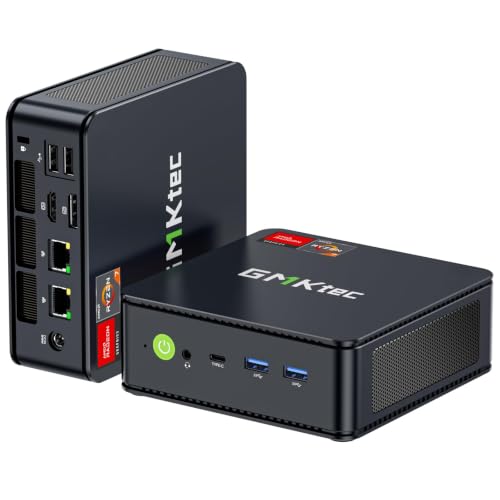
- Best overall: GMKtec M5 Plus Mini PC, Ryzen 7 5825U, 32GB RAM, 1TB SSD — Check on Amazon
- Beelink SER5 MAX Mini PC, Ryzen 7 5800H, 16GB RAM, 500GB SSD — Check on Amazon
- KAMRUI E3B Mini PC, Ryzen 5 7430U, 32GB RAM, 512GB SSD — Check on Amazon
- MeLE Quieter4C Fanless Mini PC, Intel N150, 8GB RAM, 256GB SSD — Check on Amazon
- BOSGAME P4 Mini PC, Ryzen 7 5700U, 32GB RAM, 1TB SSD — Check on Amazon
See 1 more Amazon option
- Dell OptiPlex 7060 SFF Desktop, Core i5-8500, 16GB RAM, 512GB SSD (Renewed) — Check on Amazon
Read the full guide ↓
Disclosure: As an Amazon Associate, reviewstook.com earns from qualifying purchases. Links to Amazon on this page are affiliate links; they cost you nothing extra. Listing details such as price and availability change often, so check the current Amazon listing before you buy.
Four hundred dollars is the budget where a mini PC stops being a novelty and starts being a plausible only computer. Below it, you are mostly choosing which compromise to live with: a chip that idles beautifully but strains under a heavy browser session, memory you can never add, a single lonely video output. At $400 in late 2026, the category splits cleanly in two, and understanding the split matters more than any single product in this guide. On one side sit the Intel N100 and N150 machines — four small, frugal cores in boxes that sip power, sometimes with no fan at all, built for office work, media playback, kiosks and quiet always-on jobs. On the other side sit the Ryzen 5000-class machines — eight-core laptop processors from AMD’s 5700U, 5800H and 5825U families that were never designed to be cheap, now selling in mini PCs at prices that would have been unthinkable when the chips were current. The Ryzen side is where the value story of this tier lives: several picks below carry 32GB of memory and a terabyte of storage while staying within this budget, in a market where memory itself has become the expensive part of any computer.
That last point deserves emphasis, because it shapes every recommendation here. Through late 2026, RAM and SSD prices have climbed hard, and a mini PC bought as a configured whole — memory and storage already fitted by the maker — is often a better deal than the same parts bought separately. It also means the oldest question in this category has sharpened: is the memory soldered down, or does it sit in sockets you can open later? A soldered 8GB machine is finished the day it arrives, however elegant it is. A socketed machine with two SO-DIMM slots can grow from 16GB to 32GB or 64GB when your workload does, and in a category where the processor cannot be changed, memory and storage are the only future the machine has. We have weighted that heavily below, alongside the second thing buyers consistently underestimate: how many monitors the box can actually drive, counted from the ports on the listing rather than the marketing line. Five of the six picks below drive three displays from verified port sets; the sixth — a renewed business desktop included deliberately, because for some buyers it is the smarter $400 — guarantees two and treats the third as a check-the-unit option, and its review says exactly that.
What $400 does not buy also needs saying plainly at the top. It does not buy a gaming machine in any serious sense: the integrated graphics in these processors handle older titles, esports games and indie catalogs at modest settings, and that is the honest ceiling — readers whose main job for the machine is gaming should start with our mini gaming coverage instead. It does not buy a workstation for heavy video editing or 3D work. And it does not buy certainty about prices: mini PC listings move weekly with coupons and Prime pricing, so check the live price on Amazon on the day you order — that listing is the only number that counts. For most buyers we would start with the GMKtec M5 Plus, which pairs the strongest all-round configuration in this guide with the upgrade path to match. Below are the quick picks, detailed reviews of all six, a comparison table, the two chip classes explained, the soldered-versus-socketed question in full, the second careers these machines have after their desk years, the common mistakes, and an FAQ.
In this guide
Quick Picks
Short on time, or comparing several options at once? Each row below names a buyer type and the product that suits it, with a link to the listing.
| Buyer type | Pick | Why it stands out | Link |
|---|---|---|---|
| Best overall | GMKtec M5 Plus, Ryzen 7 5825U | 32GB socketed RAM, 1TB SSD with a second slot, triple 4K, dual 2.5GbE | Check on Amazon |
| Best processor power | Beelink SER5 MAX, Ryzen 7 5800H | The 54W H-series chip is the strongest CPU in this guide | Check on Amazon |
| Best value | KAMRUI E3B, Ryzen 5 7430U | 32GB of RAM and triple 4K output — check price on Amazon | Check on Amazon |
| Best silent pick | MeLE Quieter4C, Intel N150 | Genuinely fanless, near-zero power draw, mounts behind a monitor | Check on Amazon |
| Best for storage and home server duty | BOSGAME P4, Ryzen 7 5700U | 32GB, 1TB and dual 2.5GbE networking in one small box | Check on Amazon |
| Best renewed alternative | Dell OptiPlex 7060 SFF (Renewed) | A serviceable business desktop with keyboard and mouse included | Check on Amazon |
How These Picks Were Chosen
The budget was applied as a ceiling on the machine as configured: every pick below is a real Amazon listing that sells at or regularly within $400 in the United States, in the configuration reviewed. Where a listing family sells several configurations under one page, the review names the configuration it is judging and warns where a cheaper sibling configuration wears a different listing identity, because the gap between a 16GB and a 32GB version of the same box is the single most common way buyers at this tier end up owning the wrong machine. Prices change often on these listings, so check price on Amazon for the current figure for any pick you are considering.
We did not use these products ourselves. We read the maker listings and specification pages, price-tracker records of the Amazon listings, and independent reviews and teardowns, and compared processors, memory type and capacity, storage, port sets and networking. Three filters did most of the work. The first is memory honesty: we favored socketed memory that can be upgraded, and where a pick’s memory is soldered, the review states the ceiling in plain terms and judges the machine as a finished appliance rather than a platform. The second is display honesty: monitor counts below come from the physical ports documented for each listing — HDMI, DisplayPort and USB-C video outputs — not from a maker’s “supports multiple displays” line, and the one pick whose third output was a factory option rather than standard equipment is flagged as such. The third is class honesty about performance: these are integrated-graphics machines, and the reviews describe what each chip class genuinely does — office suites, browser-heavy work, media playback, light photo work, older and lighter games — without benchmark numbers we did not measure and without dressing an efficiency chip up as a performance one.
One structural choice deserves explaining. Five picks are new mini PCs, as the search promises. The sixth is a renewed business desktop, included because a real share of the people searching this keyword are better served by it: buyers who want standard, serviceable parts, a keyboard and mouse in the box, and a machine a local shop can repair. Its review and the dedicated section later in this guide lay out who should take that route — and who should not, since a renewed machine carries a shorter guarantee and a bigger footprint.
The 6 Best Mini PCs Under $400
GMKtec M5 Plus Mini PC — Ryzen 7 5825U, 32GB RAM, 1TB SSD
Who it suits: Buyers who want one mini PC that answers almost every version of this search — heavy browser work, three monitors, a home server later — and who value an upgrade path as much as the opening specification.
The configuration is the argument. The M5 Plus pairs AMD’s Ryzen 7 5825U — an eight-core processor from the mature end of the Ryzen 5000 mobile family — with 32GB of DDR4 memory fitted as two 16GB sticks in sockets, expandable to 64GB, and a 1TB M.2 NVMe solid-state drive in a chassis that has a second M.2 slot, so storage can grow toward the maker’s stated 4TB ceiling without replacing the drive you already own. In a tier where many listings treat 16GB and 512GB as the generous option, that is a configuration with years in it: 32GB is where browser-heavy work — dozens of tabs, office suites, chat and video calls together — stops negotiating with the operating system for memory, and since the integrated Radeon graphics share that memory, the headroom helps everything the machine does. The port set is equally complete: HDMI, DisplayPort and USB-C video outputs drive three 4K displays, there are two 2.5-gigabit Ethernet ports where most rivals fit one gigabit port, and wireless is Wi-Fi 6E with Bluetooth 5.2. Windows 11 Pro is installed.
The dual Ethernet ports deserve a sentence of their own, because they are what give this machine its second career. A mini PC with two fast network ports can retire, years from now, into service as a home server, a network appliance or a router-adjacent box — roles a single-port machine cannot take. Combined with the socketed memory and dual storage slots, the M5 Plus is the pick in this guide least likely to be replaced rather than repurposed. The honest debits are the class debits, plus one of its own. The 5825U is a refined version of an older architecture rather than a current-generation chip, and its integrated graphics are for office work, media and light games, not modern gaming. The machine is actively cooled, so it is quiet rather than silent, and under sustained load you will hear it in a quiet room. Check price on Amazon before you order, as this listing moves with coupons and Prime pricing. Within this budget, it is the strongest all-round answer this tier currently produces.
- 32GB of socketed DDR4 (two 16GB sticks), expandable to 64GB — the memory ceiling is yours to raise.
- 1TB NVMe drive plus a second M.2 slot, so storage grows without replacement.
- Triple 4K display output and dual 2.5GbE networking — the best port set in this guide.
Honest limitation: The processor is a polished older design, not a current-generation chip, and the fan is audible under sustained load — this is a quiet machine, not a silent one.
Choose it if you want the default recommendation: the most complete configuration at this budget, with room to grow. Skip it if silence is the priority — that is the fanless pick below.

Beelink SER5 MAX Mini PC — Ryzen 7 5800H, 16GB RAM, 500GB SSD
Who it suits: Buyers whose work is processor-bound — long spreadsheets, big documents, software compiling, many things at once — and who would rather have the strongest CPU in the guide than the largest opening specification.
Beelink’s SER5 MAX is built around the Ryzen 7 5800H, and the H matters. Where the U-series chips in most mini PCs are tuned for thin laptops and modest power envelopes, the 5800H is a 54-watt part — a processor allowed to draw real power and hold high speeds under sustained load, in a box roughly five inches square and under two inches tall. For the work mini PCs actually do all day, that sustained performance is the difference between a machine that feels quick in bursts and one that stays quick through a compile, a large export or a screen-shared call with forty tabs behind it. The supporting specification is a step down from the pick above, and the review should not pretend otherwise: 16GB of DDR4 memory and a 500GB drive are the configuration this listing is known for — check price on Amazon for the current figure. The saving grace is that both limits are soft ones — the memory can be raised to 64GB and the drive swapped for up to 2TB, because Beelink builds this machine to be opened. Display output is triple, via HDMI, DisplayPort and USB-C, with Wi-Fi 6 and Bluetooth 5.2, and Windows 11 Pro is installed.
The buying logic is deliberate: own the strongest processor and grow memory and storage on your own schedule, rather than paying for a bigger opening configuration on a lesser chip. It only works if you value the CPU — for documents and a browser, the M5 Plus’s 32GB will be felt sooner than the 5800H’s extra pace. Where the H-series chip earns its keep is sustained, heavy, multi-threaded work, and in longevity: processors cannot be upgraded in any machine here, so the strongest chip is the one part of the specification that never becomes the bottleneck you cannot fix. Two cautions. The 54-watt design means a fan that works for a living — expect to hear it under load, as with any performance mini PC. And check the configuration in the cart: the SER5 family spans several processors and memory sizes across Beelink’s listings, and the configuration covered here is the 5800H, 16GB, 500GB machine.
- The 54W Ryzen 7 5800H is the strongest processor in this guide, built for sustained loads.
- Memory upgrades to 64GB and storage to 2TB keep the specification from dating quickly.
- Triple display output over HDMI, DisplayPort and USB-C, in a box under two inches tall.
Honest limitation: The opening 16GB and 500GB are the leanest of the Ryzen picks, and the fan is a working fan — audible when the processor is earning its keep.
Choose it if your workload is genuinely processor-heavy and you are comfortable upgrading memory and storage later. Skip it if you want the big specification on day one and never plan to open the case — the M5 Plus is that machine.

KAMRUI E3B Mini PC — Ryzen 5 7430U, 32GB RAM, 512GB SSD
Who it suits: Value hunters who want the two specifications that matter most at this tier — 32GB of memory and three-monitor output — while staying comfortably within this budget.
The E3B’s proposition is arithmetic. Its Ryzen 5 7430U is a six-core member of the same Ryzen 5000 mobile family as the picks above, a step down in core count and graphics from the 5825U but firmly in the class that handles office work, browsing and media without strain. Around it, KAMRUI fits the specification buyers usually have to pay the tier above for: 32GB of DDR4 in dual channel, which can be raised to 64GB, and a 512GB M.2 drive in a chassis with two M.2 slots — one NVMe, one SATA — so a second drive can join it later. The display set is fully verified from the listing’s own specification table: HDMI 2.0, DisplayPort 1.4 and a USB-C video output, three 4K displays at 60Hz between them. Windows 11 Pro is the operating system per the listing’s product information, wireless is Wi-Fi 6 with Bluetooth 5.2, networking is gigabit Ethernet, and the box includes a VESA plate and an HDMI cable — small inclusions that matter when the machine is destined for the back of a monitor. The value is the headline: this configuration pairs that specification with a budget-tier price — check price on Amazon — making it one of the strongest value propositions in the guide.
The compromises are where a value machine’s compromises usually are. The processor is the weakest of the three Ryzen picks, and buyers running sustained heavy workloads will feel the two missing cores against the SER5 MAX. The network port is gigabit where the M5 Plus and the BOSGAME below offer 2.5-gigabit — irrelevant on most home networks today, relevant if the machine is headed for server duty later. Reviewers of this model have noted the fan becomes audible under sustained heavy load, which is the normal trade in this class but worth knowing if the box will sit on the desk rather than behind the monitor. And one piece of cart discipline is essential: the E3B is also sold in a 16GB configuration under a separate listing, so confirm that the machine in your cart is the 32GB, 512GB, 7430U build this review covers — the entire value case rests on that configuration.
- 32GB of dual-channel DDR4, expandable to 64GB — check price on Amazon.
- Three verified 4K outputs — HDMI 2.0, DisplayPort 1.4 and USB-C — plus a VESA plate in the box.
- Two M.2 slots mean storage can grow without replacing the fitted drive.
Honest limitation: The six-core processor is the least powerful of the Ryzen picks, the Ethernet is gigabit rather than 2.5-gigabit, and the fan is audible under sustained load.
Choose it if you want maximum memory and monitors per dollar and your work is office-shaped rather than render-shaped. Skip it if you need the strongest processor, or dual fast networking for a future server role.
MeLE Quieter4C Fanless Mini PC — Intel N150, 8GB RAM, 256GB SSD
Who it suits: Buyers for whom silence and power draw are the specification — a bedroom or studio desk, a media corner, an always-on box that must never be heard or noticed on a power bill.
The Quieter4C is the Intel side of this tier done properly. There is no fan anywhere in the design: the metal chassis, barely five inches by three and less than an inch thick, is the heatsink, and the machine runs in complete silence while drawing power in the low teens of watts under load, on reviewer measurements of this platform — roughly what a couple of LED bulbs use. Inside is Intel’s N150, a four-core efficiency processor that is a clock-bumped refresh of the well-known N100, and the review should be plain about what that class is: entirely adequate for documents, browsing, email, media playback and light always-on services, and not a substitute for the Ryzen machines above when real multitasking arrives. This Business Grade build pairs it with 8GB of memory and a 256GB NVMe drive, runs Windows 11 Pro, and drives three 4K displays from two HDMI ports and a USB-C output. Wi-Fi 6, Bluetooth 5.2 and gigabit Ethernet are fitted, and a VESA mount is included for behind-monitor fitting. Check price on Amazon for the current figure, as this listing moves over time.
Two limits define this pick, and neither is negotiable after purchase. The first is memory: the 8GB is soldered LPDDR5, fitted at the factory and fixed forever. For the jobs this machine is for — one workload at a time, media, light office, a quiet network service — 8GB is workable; for a browser with forty tabs and a video call on top, it is a ceiling you will meet. Buy it as a finished appliance and it is excellent; buy it hoping to grow it and you have bought the wrong machine. The second limit is thermal honesty: a fanless box sheds heat through its case, the case gets warm to the touch under sustained work, and sustained heavy loads are simply not its brief — the Ryzen picks exist for those. What the Quieter4C offers in exchange is a quality none of them can match: a computer you will never hear, sipping power, that can live behind a monitor or beside a television for years and simply be forgotten. For a media box, a first home server, a kiosk or a silent study machine, that is not a compromise at all — it is the point.
- Genuinely fanless: zero noise, no moving parts, and power draw in the low teens of watts.
- Three 4K outputs from dual HDMI and USB-C, in a chassis under an inch thick with VESA mounting.
- Windows 11 Pro and a proper NVMe drive rather than the eMMC storage cheaper N-class boxes use.
Honest limitation: The 8GB of memory is soldered and can never be upgraded, and the N150 is an efficiency chip — sustained heavy multitasking is beyond its brief.
Choose it if silence, tiny power draw and set-and-forget reliability are what you are buying. Skip it if you need memory headroom or real processing pace — every Ryzen pick above is faster.

BOSGAME P4 Mini PC — Ryzen 7 5700U, 32GB RAM, 1TB SSD
Who it suits: Buyers who want capacity — memory, storage and networking — in a small box: a family computer with years of photos ahead of it, or a home server that starts life on the desk.
The P4’s listing leads with the two numbers that age best: 32GB of memory and a 1TB solid-state drive, wrapped around AMD’s Ryzen 7 5700U, an eight-core processor from the same Ryzen 5000 mobile generation as the other Ryzen picks here. The 5700U is the elder of the three eight-core chips in this guide — a little behind the 5825U in refinement, level with it in the shape of work it does well — and paired with this much memory and storage it makes a machine that asks very little of its owner for years. The port set supports the server-leaning brief: three 4K displays over HDMI, DisplayPort and USB-C, Wi-Fi 6E and Bluetooth 5.2, and two 2.5-gigabit Ethernet ports, the feature that turns a desktop into network infrastructure when its desk years end. Windows 11 Pro is installed. The value makes the case as loudly as the specification — check price on Amazon — with the appeal traded toward capacity and networking rather than a newer processor.
Choosing between the P4 and the M5 Plus at the top of this guide is the tier’s nicest problem. The M5 Plus counters with the 5825U and a spare M.2 slot; the P4 counters with the same dual 2.5GbE and triple-display set. Either is a defensible best overall; the M5 Plus takes the headline here on its upgrade path. One caution is specific to this listing family and worth following exactly: BOSGAME has sold this machine in a 5825U variant under a near-identical title, so confirm the processor and configuration on the live listing — and again on the box when it arrives — before the return window closes. Variant drift of that kind is common across this category, and the two-minute check is the whole defense.
- 32GB of memory and a full 1TB of storage — check price on Amazon.
- Dual 2.5GbE networking and triple 4K output — ready for a home-server second career.
- Eight-core Ryzen 7 processor with Windows 11 Pro, in the same class as the guide’s other Ryzen picks.
Honest limitation: The 5700U is the oldest of the eight-core chips here, and the listing family has been sold in more than one processor variant — verify the configuration on the live page.
Choose it if capacity and networking matter more to you than the newest chip revision. Skip it if you want the spare storage slot and the more refined processor — that is the M5 Plus.

Dell OptiPlex 7060 SFF Desktop (Renewed) — Core i5-8500, 16GB RAM, 512GB SSD
Who it suits: Buyers who do not actually need a mini PC — who need a dependable, serviceable desktop with everything in the box, and who are comfortable trading newness for standard parts and a proper desk-side chassis.
Every guide in this series should contain one honest exit ramp, and this is it. The OptiPlex 7060 is a small-form-factor business desktop from Dell’s corporate line, sold renewed: an Intel Core i5-8500 — a six-core desktop processor, not a laptop chip — with 16GB of DDR4 memory, a 512GB solid-state drive and Windows 11 Pro, with a keyboard and mouse in the box. That processor choice is deliberate on our part: the i5-8500 is an eighth-generation part, the generation floor of Microsoft’s Windows 11 supported-processor list, so this machine runs the current operating system legitimately and in support, which is not true of the cheaper sixth- and seventh-generation renewed stock that fills this price band and should be avoided for exactly that reason. The desktop virtues follow from the form: memory and storage sit in standard slots and bays that any owner or local shop can service, the chassis has room and ports a mini PC cannot offer — ten external USB ports among them — and parts for a corporate Dell are a solved problem everywhere. Check price on Amazon for the current figure, as renewed pricing follows refurbisher stock and moves accordingly.
The trade-offs are equally real, and they are the reason this is the sixth pick rather than the first. It is not mini: at roughly 11.4 by 3.7 by 11.5 inches it is a desktop that sits beside or under a desk, not behind a monitor. Its display guarantee is two monitors, from the platform’s standard dual DisplayPort outputs — a third video port was a factory option on this model and varies by unit, so a three-screen buyer must check the exact machine on the live listing rather than assume it. The integrated graphics are the weakest here, fine for office work and video, behind even the N150 for light gaming. And renewed means renewed: the Amazon Renewed guarantee runs 90 days against the year a new machine typically carries, the individual unit’s cosmetic condition and history vary, and a clean check of the machine in the first week — drive health, fans, the configuration as delivered — is part of the deal you are making. For a buyer who values serviceability and a complete, keyboard-and-mouse, ready-to-work package over size and warranty length, it remains one of the most grown-up options in this guide.
- A real desktop processor and standard, serviceable memory and storage — the easiest machine here to repair or upgrade.
- Keyboard and mouse included, Windows 11 Pro installed, and a processor on Microsoft’s supported list for it.
- A budget-tier renewed option — check price on Amazon — and a direct route in the guide to a complete working desktop.
Honest limitation: It is a desktop-sized box with a 90-day renewed guarantee, only two guaranteed display outputs, and unit-to-unit variation that demands a first-week check.
Choose it if you want serviceability, a complete package and the lowest price, and do not need the machine to disappear behind a monitor. Skip it if size, silence, three guaranteed monitors or a full manufacturer’s warranty matter to you — the new mini PCs above are your list.
Comparison Table
| Product | Processor class | Memory | Best use | Link |
|---|---|---|---|---|
| GMKtec M5 Plus | Ryzen 7 5825U, 8-core | 32GB DDR4, socketed to 64GB | The all-rounder with an upgrade path | Check on Amazon |
| Beelink SER5 MAX | Ryzen 7 5800H, 8-core, 54W | 16GB DDR4, socketed to 64GB | Sustained processor-heavy work | Check on Amazon |
| KAMRUI E3B | Ryzen 5 7430U, 6-core | 32GB DDR4, socketed to 64GB | Maximum memory and monitors per dollar | Check on Amazon |
| MeLE Quieter4C | Intel N150, 4-core, fanless | 8GB LPDDR5, soldered | Silence and near-zero power draw | Check on Amazon |
| BOSGAME P4 | Ryzen 7 5700U, 8-core | 32GB, 1TB fitted | Capacity now, home server later | Check on Amazon |
| Dell OptiPlex 7060 SFF (Renewed) | Core i5-8500, 6-core desktop | 16GB DDR4, standard slots | Serviceable desktop, complete package | Check on Amazon |
Two Chip Classes, Two Different Computers
The most useful thing this guide can tell you is that “mini PC under $400” names two different products sharing a shelf. The Intel N100 and N150 machines are efficiency computers: four small cores designed for low power, adequate — genuinely, not grudgingly — for documents, web browsing in reasonable tab counts, email, media playback, point-of-sale and kiosk work, and light network services that run around the clock. Their virtues are the ones the Ryzen machines cannot offer: tiny power draw, cool running, and in the fanless designs, total silence. Judge them as appliances and they are excellent.
The Ryzen 5000-class machines are something else: laptop processors from a performance family, with six or eight full cores and integrated graphics several times stronger than the Intel chips’. They multitask the way a desktop is expected to — dozens of tabs, office suites, calls and media together — they handle light photo work and older or lighter games credibly, and they hold their pace under sustained load in proportion to their power envelope, which is why the 54-watt 5800H tops this guide’s processor ranking. Their costs are a fan you can hear working and power draw several times the N-class machines’. Neither class is the “real” mini PC. The buyer’s actual workload — and whether the machine must be silent, or merely small — decides which shelf to shop, and every pick above is labeled by its class so the choice is made with open eyes.
Soldered or Socketed: The Memory Question That Decides the Machine’s Future
No specification on a mini PC listing matters more, and none is easier to miss. Processors in this category are soldered in every machine here; the processor you buy is the processor you keep. Memory is where the designs divide. In a socketed machine — the M5 Plus, the SER5 MAX and the E3B in this guide — the memory sits in standard SO-DIMM slots, and a machine bought with 16GB can carry 32GB or 64GB later for the price of a memory kit and ten minutes with a screwdriver. In a soldered machine — the Quieter4C — the memory chips are part of the mainboard, chosen at the factory, and the number on the listing is the number for the life of the product.
This matters more in 2026 than it used to, for two reasons. The first is workload creep: browsers and office software grow heavier every year, and the 8GB that feels fine today is the ceiling owners meet in year three — in a socketed machine that meeting costs a memory kit; in a soldered one it costs a new computer. The second is that integrated graphics borrow system memory, so memory capacity quietly shapes everything from display smoothness to how a light game runs. Our rule is simple. If the machine is a finished appliance for a defined, light job — silent media box, kiosk, single-purpose server — soldered memory in a well-priced machine like the Quieter4C is a fair trade for silence and size. If the machine is your computer, buy sockets, and treat 32GB fitted — or 16GB with a clear path to more — as the floor.
Second Careers: What These Machines Do After the Desk
A mini PC’s small size and low power draw give it a retirement plan no tower can match, and it is worth buying with that plan in mind. The natural second careers are always-on jobs: a home server holding files and backups, a media server feeding the television, a host for home-automation and network services, a download and sync box. The features that matter for that second life are visible on the listing today — dual Ethernet ports for network roles, which the M5 Plus and BOSGAME P4 carry; low idle power, which the fanless N150 machine turns into an art form; a VESA mount and a spare HDMI port for a life behind the television; and enough memory headroom to run services side by side, which is another quiet argument for the 32GB picks. If a second career is already in view, shop backwards: the P4 and M5 Plus for server futures, the Quieter4C for silent always-on duty, and any Ryzen pick as a hand-me-down second desk machine.
Renewed Business Desktop or New Mini PC?
The Dell in this guide raises the question directly, so here is the honest ledger. A renewed business desktop gives you standard parts that anyone can service, a desktop-class processor, room for drives, a complete package with keyboard and mouse. It costs you size — it will never mount behind a monitor — a 90-day renewed guarantee in place of a manufacturer’s warranty, graphics from an older generation, and the small but real risk of unit variation, managed by checking the machine thoroughly in its first week. A new mini PC gives you the warranty, the size, modern ports and wireless, and a machine with no previous life — at a higher price for the same office performance, and with a processor you can never change. Neither answer is the smart one in general; each is the smart one for a specific buyer, and the reviews above are written to tell you which buyer you are.
How to Choose a Mini PC Under $400
- Pick your chip class first. Light, defined jobs and silence point to the Intel N100/N150 class. A general-purpose computer you will multitask on for years points to the Ryzen 5000 class. Every other decision gets easier once the class is settled.
- Buy memory like you mean it. 32GB fitted is the comfortable specification at this tier, and several picks deliver it within this budget. If you buy 16GB, buy it in a socketed machine with a stated path to 32GB or 64GB. Treat soldered 8GB as an appliance specification, suitable only for light, defined jobs.
- Count monitors from ports, not promises. A three-display claim should resolve into three named video outputs — typically HDMI, DisplayPort and USB-C. The picks here were verified that way; apply the same test to anything else you consider, and treat a “third port was optional” platform, like the renewed Dell, as a two-monitor machine until the exact unit proves otherwise.
- Check storage for both size and shape. 512GB is workable, 1TB is comfortable, and a second M.2 slot or a replaceable drive is worth real money in year three. Prefer NVMe drives over eMMC storage, which is slower and is the mark of the cheapest N-class boxes.
- Match networking to the machine’s future. One gigabit port is fine for a desk. Two 2.5-gigabit ports are the doorway to server and network roles later — if a second career is likely, buy the ports now, because they cannot be added.
- Decide how you feel about fan noise before you order. Performance mini PCs are quiet, not silent, and their fans speak up under load. If the machine will live in a bedroom or studio and run while you sleep or record, the fanless pick is not a compromise — it is the correct product.
- Confirm the exact configuration in the cart. This category sells families, not products: the same model name spans processors and memory sizes, sometimes under separate listings. The configuration in your cart — processor, memory, storage — is the machine you are buying, whatever the guide or the headline said.
- Check the live price on Amazon. Prices in this category move with coupons and Prime pricing, so the live listing is the only figure that counts on the day you order, and patience is a specification too.
- Keep the return window sacred. Spend the first week checking what listings get wrong: the configuration as delivered, every port, fan behavior under your real workload, and — on a renewed machine — drive health and condition. Everything here is easier to exchange in week one than to regret in year two.
Common Buying Mistakes
- Buying an N100 or N150 machine for heavy multitasking because the listing called it “powerful.” The efficiency class is excellent at its job and visibly strained outside it; the Ryzen class exists for the heavier brief.
- Buying soldered 8GB memory as a main computer. It is a finished appliance specification; meeting its ceiling in year three means replacing the machine, not upgrading it.
- Paying the 32GB price for the 16GB configuration. Model families span both, sometimes under separate listings — the cart, not the headline, is the contract.
- Assuming three monitors from a marketing line. Count physical video outputs, and on renewed business desktops remember that extra ports were often factory options that vary by unit.
- Judging by the processor name alone. A 54-watt H-series chip and a low-power U-series chip with similar names live in different performance worlds; the power envelope is part of the specification.
- Ignoring the fan until the machine is on the desk. Quiet and silent are different products at this tier, and the difference is decided at purchase, not in settings.
- Buying renewed stock with a processor below Microsoft’s Windows 11 supported list to save a little money. Sixth- and seventh-generation renewed desktops are cheap for a reason; the eighth-generation floor is where the renewed route starts making sense.
- Paying without checking the live price in a coupon-driven category. Prices move often here, so check price on Amazon before you order rather than assuming any earlier figure still holds.
- Forgetting the machine’s second job. Ports, memory headroom and a spare drive slot cost little now and decide whether the box retires into server duty or into a drawer.
Final Recommendation
- Most buyers: GMKtec M5 Plus — the most complete configuration in the guide, with the upgrade path to match.
- Processor-heavy work: Beelink SER5 MAX — the strongest CPU here, with memory and storage you grow yourself.
- Tightest budget: KAMRUI E3B — 32GB and three monitors at a budget-friendly price — check price on Amazon.
- Silence and always-on duty: MeLE Quieter4C — fanless, frugal and finished, for the jobs that suit it.
- Capacity and a server future: BOSGAME P4 — 32GB, 1TB and dual 2.5GbE — check price on Amazon.
- Serviceability over size: Dell OptiPlex 7060 (Renewed) — a complete, repairable desktop at a budget-tier price — check price on Amazon.
Our top two for most readers are the GMKtec M5 Plus and the Beelink SER5 MAX, and the choice between them is a genuine fork rather than a ranking. The M5 Plus is the finished article: 32GB fitted, a terabyte of storage with a spare slot, three displays and dual fast networking, on a processor that handles everything short of heavy sustained work — buy it if you want the machine complete on day one. The SER5 MAX is the engineer’s pick: the strongest processor in the guide in a box built to be opened, bought lean at 16GB and 500GB and grown on your schedule — buy it if sustained processor pace is your workload and upgrading holds no fear. Everyone else is covered by the specialists: the E3B for value, the Quieter4C for silence, the P4 for capacity, and the renewed Dell for buyers whose real search was “a dependable desktop, cheaply.” Readers whose main brief is gaming should continue to Best Mini Gaming PC Under $400, those who need still more room should see Best Mini PC Under $500, and first-time buyers working through the basics will find Best Mini PC For Beginners Under $400 written for them. Check the configuration in the cart, check the live price on Amazon, and give the machine its first-week inspection — at $400, that homework is the difference between a computer and a compromise.
Frequently Asked Questions
Is a mini PC under $400 enough as my only computer?
For the work most people do at a desk — browsing, documents, spreadsheets, email, video calls, media — yes, provided you buy the right class. A Ryzen 5000-class pick with 32GB of memory, like the M5 Plus, BOSGAME P4 or KAMRUI E3B in this guide, is a complete daily computer with years in it. The Intel N-class machines are only-computer material for lighter, single-task-at-a-time use. What no pick here replaces is a gaming rig or a heavy creative workstation.
What is the difference between the Intel N150 and the Ryzen chips in these machines?
Class, not just speed. The N150 is a four-core efficiency processor built for low power and silence — ideal for light work, media and always-on services. The Ryzen 5700U, 5800H and 5825U are six- and eight-core performance processors from AMD’s laptop lines: several times the multitasking headroom, much stronger integrated graphics, and a fan and power draw to match. Buy the class that matches the workload; the sections above lay out the trade in full.
Can I upgrade a mini PC later?
Memory and storage, yes — in the machines built for it. The socketed picks here (M5 Plus, SER5 MAX, E3B) accept more memory and bigger or additional drives, and the renewed Dell takes standard desktop parts. The processor and graphics can never be upgraded in any mini PC, and soldered-memory machines like the Quieter4C cannot be upgraded at all. That is why this guide weighs the opening processor and the memory type so heavily: together they are the machine’s whole future.
How many monitors can a mini PC under $400 run?
Three is the honest norm at this tier, and five of the six picks here do it — from verified sets of HDMI, DisplayPort and USB-C video outputs, typically at up to 4K each. The exception is the renewed Dell, which guarantees two DisplayPort outputs, with a third port that was a factory option varying by unit. Count ports on the listing rather than trusting a headline, whichever machine you buy.
Can these mini PCs play games?
Lightly. The Ryzen machines’ integrated graphics handle older titles, esports games and indie catalogs at modest settings, and the Intel machines are lighter still — neither class has a discrete graphics card, and modern demanding games are beyond them. If gaming is a main job for the machine rather than an occasional one, start with Best Mini Gaming PC Under $400 instead, where the picks are chosen for that brief.
Should I buy a renewed business desktop instead of a new mini PC?
If you value serviceability, a complete keyboard-and-mouse package and the lowest possible price — and you do not need the machine to be tiny, silent or covered by a long warranty — the renewed route is genuinely competitive, and the OptiPlex 7060 in this guide is its strongest form: a supported Windows 11 processor and standard parts — check price on Amazon. If size, warranty, modern ports or three guaranteed monitors matter, buy new. The dedicated section above works through the ledger in full.
Why does this guide tell me to check the price on Amazon instead of giving one price?
Because mini PC pricing moves weekly with coupons, Prime pricing and refurbisher stock, and a single hard number would be wrong more often than right. The live listing is the only price that counts, so check price on Amazon on the day you order.
- Best Mini PC Under $500
- Best Mini PC Under $700
- Best Mini PC For Beginners Under $400
- Best Mini PC For Small Spaces Under $400
- Best Mini PC For Streaming Under $400
- Best Mini PC For 1440p Gaming Under $400
- Best Mini Gaming PC Under $400
- Best Fanless Mini PC Under $400
- Best Home Office PC Under $400
- Best Barebones Mini PC Under $400


