Where to buy
Check the latest price, availability and delivery on Amazon. Orders are placed on Amazon. We may earn a commission from qualifying purchases.
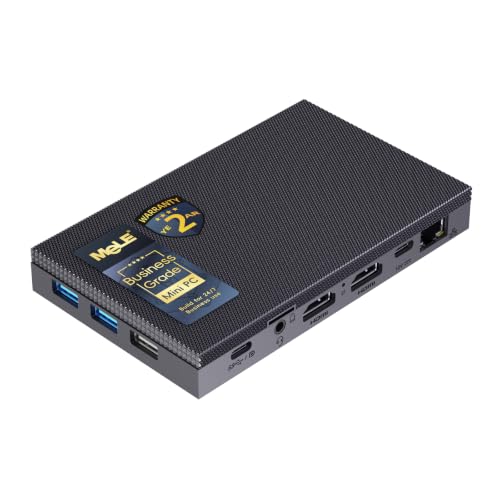
- Best for small spaces: MeLE Quieter4C Fanless Mini PC, Intel N150, 8GB RAM, 256GB SSD — Check on Amazon
- KAMRUI E3B Mini PC, Ryzen 5 7430U, 32GB RAM, 512GB SSD — Check on Amazon
- GMKtec M5 Plus Mini PC, Ryzen 7 5825U, 32GB RAM, 1TB SSD — Check on Amazon
- Beelink SER5 MAX Mini PC, Ryzen 7 5800H, 16GB RAM, 500GB SSD — Check on Amazon
- BOSGAME P4 Mini PC, Ryzen 7 5700U, 32GB RAM, 1TB SSD — Check on Amazon
See 1 more Amazon option
- Dell OptiPlex 7060 SFF Desktop, Core i5-8500, 16GB RAM, 512GB SSD (Renewed) — Check on Amazon
Read the full guide ↓
Disclosure: As an Amazon Associate, reviewstook.com earns from qualifying purchases. Links to Amazon on this page are affiliate links; they cost you nothing extra. Listing details such as price and availability change often, so check the current Amazon listing before you buy.
“Small” is the easiest word in this category to print and the hardest one to mean. Every mini PC under $400 calls itself compact, most product photos are shot to make the box look smaller than the hand holding it, and the dimension line — when a listing bothers to print one at all — never includes the power brick, the cables bending out of the back, or the column of warm air the machine needs above it. This guide is the same six verified picks as our general under-$400 mini PC guide, re-graded on the only question this search really asks: how well does each machine actually install in a small space? That means grading on the physical evidence — the dimensions the research actually documents, the mounting hardware actually in the box, where the power adapter has to live, how the cables leave the chassis, and how much open air each machine needs around it. Where the underlying research documents no dimensions for a pick, this guide says so and grades by form-factor class instead of inventing a number; where a pick’s mounting is not documented, this guide says that too, rather than assuming a bracket exists.
The honest headline is that five of these six machines genuinely earn the word small, and the sixth does not pretend to. The smallest documented footprint here belongs to the MeLE Quieter4C: 5.2 × 3.2 × 0.7 inches, a fanless slab thinner than most paperbacks, with a VESA mount in the box so it can vanish behind a monitor entirely. The Beelink SER5 MAX documents 4.96 × 4.44 × 1.65 inches — a palm-sized square — though its 54-watt processor makes it the most demanding of the true minis about ventilation. The KAMRUI E3B ships with a VESA plate in the box, which is documented fact and the reason it ranks second here. The GMKtec M5 Plus and BOSGAME P4 are graded by class — standard mini PC bricks of the usual sort — because the research behind this guide documents no dimensions for either, and for the BOSGAME it documents no VESA mounting either. And the renewed Dell OptiPlex 7060 SFF documents 11.42 × 3.7 × 11.5 inches: a desktop, included because some small-space problems are solved by relocation — floor, under-desk, a shelf with real depth — rather than by shrinkage, and its review grades it as exactly that.
One rule runs through everything below and is not negotiable: none of these machines goes inside a sealed cabinet, a closed drawer or a tight cubby with a door. A fanless box sheds its heat through its case and suffocates without open air around it; a fanned mini recirculates its own exhaust in a closed space until it throttles or worse. Small spaces reward planning, not stuffing, and the five-step checklist after the quick picks exists to make the planning happen before the box arrives — measure the spot, confirm the ventilation clearance, give the power brick an address, trace the cable drop, and only then order. Check price on Amazon for each pick before you buy, because listings at this tier change often and the live listing is the only price that counts on the day you buy.
In this guide
Quick Picks
Short on time, or comparing several options at once? Each row below names a small-space situation and the product that suits it, with a link to the listing.
| Small-space situation | Pick | Why it installs best | Link |
|---|---|---|---|
| Best for small spaces overall | MeLE Quieter4C, Intel N150 | Smallest documented footprint (5.2 × 3.2 × 0.7 in), VESA mount included, fanless and silent | Check on Amazon |
| Best behind-monitor value | KAMRUI E3B, Ryzen 5 7430U | VESA plate in the box, 32GB of RAM and triple 4K — check price on Amazon | Check on Amazon |
| Best all-rounder that still disappears | GMKtec M5 Plus, Ryzen 7 5825U | The most complete specification in a standard mini chassis; graded by class, no documented dimensions | Check on Amazon |
| Most power per square inch | Beelink SER5 MAX, Ryzen 7 5800H | Documented 4.96 × 4.44 × 1.65 in with the strongest CPU here — but it needs open air | Check on Amazon |
| Best capacity in a small box | BOSGAME P4, Ryzen 7 5700U | 32GB, 1TB and dual 2.5GbE; mounting not documented, so plan a shelf, not a bracket | Check on Amazon |
| Best when the answer is relocation | Dell OptiPlex 7060 SFF (Renewed) | Documented 11.42 × 3.7 × 11.5 in desktop for floor or under-desk duty — not a mini at all | Check on Amazon |
How These Picks Were Chosen
The six machines are exactly the six verified picks of our general mini PC under $400 guide — same listings and same configurations — because a small-space search does not change which computers are worth buying at this budget; it changes the order you should buy them in and the questions you should ask first. Every ASIN and configuration below is carried over from that guide’s research unchanged. What is new here is the grading. Each pick is scored on installation: the form-factor class it belongs to, the dimensions the research actually documents for it, the mounting hardware actually included, where its power adapter must live, how its cables leave the back panel, and how much ventilation clearance its cooling design honestly needs.
That grading follows a strict evidence rule, and it is worth stating plainly because it is where small-space guides usually cheat. Only three of the six picks have dimensions documented in the research behind this guide: the MeLE Quieter4C at 5.2 × 3.2 × 0.7 inches, the Beelink SER5 MAX at 4.96 × 4.44 × 1.65 inches, and the Dell OptiPlex 7060 SFF at 11.42 × 3.7 × 11.5 inches. For the other three — the GMKtec M5 Plus, the KAMRUI E3B and the BOSGAME P4 — no dimensions are documented, so none are printed. Those machines are graded by form-factor class (all three are conventional mini PC bricks of the familiar sort, larger than the MeLE’s slab and smaller than any desktop), and their reviews direct you to the dimension line on the live listing before you commit a shelf to them. The same rule governs mounting: a VESA plate is documented in the box for the KAMRUI E3B and a VESA mount is documented as included with the MeLE Quieter4C, and those are the only two mounting claims this guide makes. For the BOSGAME P4, mounting is explicitly not documented in the research — the review says so and plans a shelf instead. For the remaining picks, assume nothing about brackets until the live listing confirms it.
Two installation facts apply across the whole set. First, every mini PC here is powered by an external adapter, and no listing in this set headlines the adapter’s size — the brick is a second object your small space must house, typically on the floor, on the shelf behind the machine, or in a desk’s cable channel, and it needs air and slack of its own. Second, heat is the tax on smallness. The fanless MeLE uses its entire case as a heatsink and needs open air on every side; the 54-watt SER5 MAX pulls the most power of the true minis and earns the strictest placement rule of the fanned machines; and the renewed Dell, though the largest object here, is paradoxically the easiest to place thermally, because a desktop chassis breathes through generous vents — it just needs a desktop-sized place to do it.
Measure Before You Buy: The Five-Step Checklist
Work through these five steps with a tape measure before ordering any machine in this guide. They take ten minutes, and they are the difference between a computer that disappears into a room and one that lives on the floor in a tangle.
- Step 1 — Measure the spot. Measure the actual shelf, cubby, desk corner or wall area the machine will occupy: width, depth and height, written down. Then compare against documented dimensions where they exist — 5.2 × 3.2 × 0.7 inches for the MeLE, 4.96 × 4.44 × 1.65 inches for the SER5 MAX, 11.42 × 3.7 × 11.5 inches for the Dell — and where they do not (M5 Plus, E3B, P4), take the figures from the live listing’s specification table, never from the product photo. If the spot is behind a monitor, measure the monitor’s back too, and confirm the VESA pattern is free — a stand arm or tilt hinge can occupy the very holes a mount needs.
- Step 2 — Confirm ventilation clearance. Every machine here needs open air, and the fanless MeLE needs it most literally: its case is its heatsink, so it requires clearance on every side and must never be buried under papers, stacked under another device, or sealed into a cabinet. Fanned minis need room at their intake and exhaust vents — a hand’s breadth is a sane minimum — and the 54-watt SER5 MAX needs the most discipline of the set. If your only candidate spot is an enclosed cabinet or a closed drawer, stop here: no pick in this guide is approved for that spot, and the honest options are an open shelf nearby or the Dell relocated to the floor.
- Step 3 — Give the brick an address. Each mini PC’s external power adapter is a separate object roughly the size of a deck of cards or larger, and it will live somewhere: on the floor by the outlet, on the shelf behind the machine, or fixed in a cable tray. Decide where before ordering, confirm the outlet is within the cord’s reach of that address, and leave the brick air of its own — adapters run warm and dislike being buried in a drawer. The Dell is the exception that proves the rule: its power supply is internal, so its “address” is simply the wall socket and a cord’s reach.
- Step 4 — Trace the cable drop. Count what must connect: power, one to three display cables, Ethernet if you wire it (you should, where the machine will serve or stream), keyboard and mouse receivers, any external drives. Each cable needs slack to bend without strain and a path that crosses no walkway. Behind-monitor installs win here — the drop is short and hidden — while a shelf across the room can quietly demand a longer display cable than the one in the box; the KAMRUI E3B includes an HDMI cable, the others generally do not headline one, so check the live listing’s box contents.
- Step 5 — Then order. Only now — spot measured, air confirmed, brick housed, cables traced — place the order, and order the configuration the review actually covers: the 32GB KAMRUI rather than its 16GB sibling listing, the 5800H Beelink rather than another SER5 family member, the 5700U BOSGAME rather than its 5825U listing-family variant. When the machine arrives, repeat Step 1 against the delivered box: confirm the configuration, the ports and any mounting hardware against the listing, because a two-minute check on day one is the whole defense against variant drift in this category.
The 6 Best Mini PCs for Small Spaces Under $400
MeLE Quieter4C Fanless Mini PC — Intel N150, 8GB RAM, 256GB SSD
Who it suits: Buyers whose small space is also a quiet space — a bedroom desk, a studio corner, a media nook — and who want the computer to disappear behind the monitor and be forgotten.
On installation evidence alone, this is the strongest pick in the guide, and it is not close. The Quieter4C’s chassis is documented at 5.2 × 3.2 × 0.7 inches — a metal slab less than an inch thick, smaller in footprint than the paperback it might sit beside — and a VESA mount is included, so the documented install is the cleanest one in this category: bolt it to the back of a monitor and the computer’s entire desk footprint becomes zero. There is no fan anywhere in the design; the case is the heatsink, which buys two small-space virtues no fanned machine can match. The first is silence — nothing to hear at any distance, ever, which matters when the desk is three feet from a bed or a microphone. The second is power: reviewer measurements of this platform put draw in the low teens of watts under load, so it adds almost no heat to a small room and costs almost nothing to leave running. The specification inside is Intel’s N150, a four-core efficiency chip, with 8GB of memory and a 256GB NVMe drive, Windows 11 Pro, and three 4K display outputs from two HDMI ports and a USB-C — a genuinely complete little appliance for documents, browsing, email, media playback and light always-on services. Check price on Amazon for the current listing before you buy.
The installation grading has one strict condition, and it is the fanless rule: a case that is a heatsink must breathe. The Quieter4C needs open air around its surfaces — behind a monitor is ideal precisely because that space is open — and it must never be sealed into a cabinet, buried in a drawer, or stacked under another warm device; under sustained load the case grows warm to the touch, which is the design working, and heavy sustained loads are simply not its brief. The computing limits are the base guide’s, stated plainly. The 8GB of memory is soldered LPDDR5, fixed forever: workable for one workload at a time, a hard ceiling for a forty-tab browser with a video call on top. And the N150 is an efficiency processor — adequate, genuinely, for its intended jobs, and visibly outclassed by every Ryzen pick below when real multitasking arrives. Buy it as a finished, silent appliance and it is the best small-space machine here; buy it hoping to grow it and you have bought the wrong computer.
- Smallest documented footprint in the guide at 5.2 × 3.2 × 0.7 inches, with a VESA mount included for a zero-footprint behind-monitor install.
- Fanless and silent, drawing power in the low teens of watts — no fan noise and almost no heat added to a small room.
- Three 4K outputs from dual HDMI and USB-C, with Windows 11 Pro and a proper NVMe drive.
Honest limitation: The 8GB of memory is soldered and can never be upgraded, the N150 is an efficiency chip rather than a performance one, and the fanless case demands open air on every side — never a sealed cabinet.
Choose it if your space is small, quiet matters, and the job is light and defined. Skip it if you need memory headroom or real processing pace — the Ryzen picks below are faster.

KAMRUI E3B Mini PC — Ryzen 5 7430U, 32GB RAM, 512GB SSD
Who it suits: Buyers who want the behind-monitor install without the fanless machine’s performance ceiling — a real multitasking computer that mounts out of sight.
The E3B earns second place on one documented fact and one strong specification. The fact: the box includes a VESA plate, confirmed from the listing’s own product information, so the behind-monitor installation that the MeLE offers is available here too — the machine mounts to the display’s VESA pattern and the desk stays empty. The specification: 32GB of DDR4 in dual channel (raisable to 64GB) around a six-core Ryzen 5 7430U, a 512GB M.2 drive with a second M.2 slot beside it — one NVMe, one SATA — and a fully verified display set of HDMI 2.0, DisplayPort 1.4 and USB-C video, three 4K displays at 60Hz between them. An HDMI cable is in the box too, which matters when the cable drop is short. Windows 11 Pro, Wi-Fi 6 with Bluetooth 5.2, and gigabit Ethernet complete the listing, and the value is the headline: check price on Amazon for this configuration — it is a strong specification for its tier in the guide, now with the mounting hardware to hide it.
The dimension discipline matters here: the research documents no dimensions for the E3B, so none are printed, and you should take the figures from the live listing’s specification table during Step 1 of the checklist rather than trusting the product photos. It is a conventional mini PC brick by class — a box of the usual few inches in each dimension, not the MeLE’s slab — and its fan becomes audible under sustained heavy load, per reviewers of this model, worth knowing if the mount will place it inches from your ears. Ventilation behind a monitor is normally open and adequate; what the E3B must not get is a sealed media cabinet. The processor is the weakest of the three Ryzen picks, and the Ethernet is gigabit where two rivals offer 2.5-gigabit — irrelevant on most home networks today, relevant to a future server role. One piece of cart discipline is essential and unchanged from the base guide: the E3B is also sold in a 16GB configuration under a separate listing (ASIN B0DXL31KY3), so confirm the machine in your cart is the 32GB, 512GB, 7430U build this review covers — the entire value case, and this ranking, rest on that configuration.
- VESA plate documented in the box — a genuine behind-monitor install, not an assumed one — plus an HDMI cable included.
- 32GB of DDR4 running dual channel — and the ceiling is 64GB if you raise it — check price on Amazon.
- Three verified 4K outputs and two M.2 slots, so storage grows without replacing the fitted drive.
Honest limitation: No dimensions are documented in the research, so measure from the live listing; the six-core processor is the least powerful of the Ryzen picks, and the fan is audible under sustained load — a poor match for a sealed cabinet.
Choose it if you want maximum memory and monitors per dollar, hidden behind the display. Skip it if absolute silence is the requirement — that is the fanless pick above — or your only spot is enclosed.
GMKtec M5 Plus Mini PC — Ryzen 7 5825U, 32GB RAM, 1TB SSD
Who it suits: Buyers who want the most complete computer in this guide and have an ordinary small spot for it — a desk corner, an open shelf — rather than a mounting project.
Judged purely as a computer, the M5 Plus is the base guide’s best overall pick, and nothing about the small-space angle overturns the specification: an eight-core Ryzen 7 5825U with 32GB of DDR4 fitted as two socketed 16GB sticks (expandable to 64GB), a 1TB M.2 NVMe drive with a second M.2 slot for growth toward the maker’s stated 4TB ceiling, triple 4K display output over HDMI, DisplayPort and USB-C, two 2.5-gigabit Ethernet ports where most rivals fit one gigabit port, Wi-Fi 6E with Bluetooth 5.2, and Windows 11 Pro. The dual Ethernet ports are what give this machine its second career as a home server or network appliance, and the socketed memory and dual storage slots make it the pick least likely to be replaced rather than repurposed. Check price on Amazon before you buy, as pricing for this tier changes often.
Its third-place finish here is an evidence story, not a size verdict. The research documents no dimensions for the M5 Plus, and no VESA mounting either, so this guide prints neither and grades by form-factor class: a conventional mini PC brick, small enough for any desk corner or open shelf, larger than the MeLE’s slab. Before ordering, take the dimension line from the live listing for Step 1 of the checklist, and if a behind-monitor install is your plan, confirm there whether a bracket is offered for this model — the two picks above are the ones whose mounting this guide can vouch for. Thermally it behaves like a fanned machine: quiet in ordinary work, audible under sustained load, entitled to the hand’s breadth of clearance at its vents. Its external adapter needs the usual address on the floor or the shelf behind. None of that dents the core case — the most complete specification at this budget, with room to grow — but in a guide graded on documented installation evidence, the machines with documented mounts and dimensions finish ahead of it.
- 32GB of socketed DDR4 expandable to 64GB, and a 1TB drive plus a second M.2 slot — the most growth headroom here.
- Triple 4K output and dual 2.5GbE networking, the best port set in the guide, ready for a server second career.
- A standard mini PC form factor that fits any desk corner or open shelf without drama.
Honest limitation: No dimensions and no mounting are documented in the research for this pick — verify both on the live listing before planning a bracket install — and the fan is audible under sustained load, so it is a quiet machine, not a silent one.
Choose it if you want the default recommendation and your spot is an ordinary open one. Skip it if a verified behind-monitor mount is the whole point — the two picks above document theirs.

Beelink SER5 MAX Mini PC — Ryzen 7 5800H, 16GB RAM, 500GB SSD
Who it suits: Buyers with a genuinely tight footprint but a heavy workload — compiling, big spreadsheets, many things at once — who need the strongest processor that fits in a palm-sized box.
The SER5 MAX is the one fanned mini here with documented dimensions, and they are properly small: 4.96 × 4.44 × 1.65 inches, a square roughly five inches across and under two inches tall. Into that footprint Beelink fits the Ryzen 7 5800H, and the H is the story — a 54-watt H-series processor, allowed to draw real power and hold high speeds under sustained load where the U-series chips in most minis are tuned for thin laptops and modest envelopes. For processor-bound work, that sustained pace is what the machine feels like day to day. The supporting specification is leaner than the picks above and the base guide does not pretend otherwise: 16GB of DDR4 and a 500GB drive — check price on Amazon for the current listing — but both limits are soft, because the memory raises to 64GB and the drive swaps for up to 2TB in a machine built to be opened. Display output is triple, via HDMI, DisplayPort and USB-C, with Wi-Fi 6, Bluetooth 5.2 and Windows 11 Pro.
Installation grading is where this pick pays for its power. A 54-watt chip in a five-inch box concentrates more heat in less volume than anything else among the true minis, so the SER5 MAX carries the strictest placement rule of the fanned machines here: open desk or open shelf, vents unobstructed, a hand’s breadth of clearance as a minimum, and absolutely no sealed cabinet, drawer or stacked-under-anything placement. Its fan is a working fan — expect to hear it when the processor is earning its keep — which rules out the pillow-distance bedroom installs the fanless MeLE handles without a sound. No mounting is documented in the research for this pick, so plan on it sitting on a surface unless the live listing tells you otherwise. And the base guide’s cart caution stands: the SER5 family spans several processors and memory sizes across Beelink’s listings, and the details above belong to the 5800H, 16GB, 500GB machine — confirm that configuration in the cart and again on arrival. Placed with the air it demands, it is the most computing power per square inch in this guide; placed carelessly, it is the pick most likely to punish the placement.
- Documented 4.96 × 4.44 × 1.65 in footprint — genuinely palm-sized, with the strongest processor in the guide inside.
- The 54W 5800H holds its pace under sustained load, where U-series minis taper off.
- Memory upgrades to 64GB and storage to 2TB, with triple display output over HDMI, DisplayPort and USB-C.
Honest limitation: The 54W design makes it the most ventilation-demanding of the true minis — open air only, never enclosed — its fan is audible under load, and the opening 16GB and 500GB are the leanest of the Ryzen picks.
Choose it if your workload is genuinely processor-heavy and your small spot is an open one. Skip it if the only available space is enclosed, or the machine must sit silently beside a bed.

BOSGAME P4 Mini PC — Ryzen 7 5700U, 32GB RAM, 1TB SSD
Who it suits: Buyers who want capacity — memory, storage and networking — in a small box on an open shelf: a family computer with years of photos ahead of it, or a home server that starts life on the desk.
As a specification, the P4 is one of the strongest in the guide: 32GB of memory and a full 1TB solid-state drive around AMD’s Ryzen 7 5700U, an eight-core processor from the same Ryzen 5000 mobile generation as the other Ryzen picks here, with three 4K displays over HDMI, DisplayPort and USB-C, Wi-Fi 6E and Bluetooth 5.2, two 2.5-gigabit Ethernet ports — the feature that turns a desktop into network infrastructure when its desk years end — and Windows 11 Pro installed. The value argues as hard as the hardware: check price on Amazon — it is positioned as a value pick in this tier, traded toward capacity and networking rather than a newer processor.
The small-space grading, though, must be honest about what is not known. The research documents no dimensions for the P4, so it is graded by form-factor class — a conventional mini PC brick — and, more importantly, it documents no VESA mounting for this machine at all. That absence decides the installation: plan the P4 for a shelf, a desk corner or a spot beside the monitor, not behind one, unless the live listing documents a bracket this research did not find. Its adapter takes the standard address, its vents the standard clearance, and as a fanned eight-core machine it gets the standard rule — open air, never a sealed cabinet. One caution belongs to this listing family alone, and it is worth following to the letter: BOSGAME has sold this machine in a 5825U variant under a near-identical title, so confirm the processor and configuration on the live listing — and again on the box when it arrives — before the return window closes. The 5700U is also the oldest of the eight-core chips here, a step behind the 5825U in refinement though level with it in the work it does well. None of that stops the P4 being the capacity pick of the guide; it simply arrives with a shelf-shaped plan rather than a bracket-shaped one.
- 32GB of memory with a terabyte of storage already fitted — check price on Amazon.
- Two 2.5-gigabit Ethernet ports alongside triple 4K output — the kit list of a future home server.
- An eight-core Ryzen 7 with Windows 11 Pro, from the same processor generation as this guide’s other Ryzen picks.
Honest limitation: VESA mounting is not documented for this machine in the research — plan a shelf, not a bracket — and no dimensions are documented either; the listing family has also been sold in more than one processor variant, so verify the configuration on the live page.
Choose it if capacity and networking matter more than a documented mount, and you have an open shelf for it. Skip it if a behind-monitor install is the plan — the MeLE and the KAMRUI document their mounting; this pick does not.

Dell OptiPlex 7060 SFF Desktop (Renewed) — Core i5-8500, 16GB RAM, 512GB SSD
Who it suits: Buyers whose small-space problem is really a placement problem — no room on the desk, but a floor, an under-desk void or a deep shelf available — who value standard, serviceable parts over shrinkage.
Every guide in this series contains one honest exit ramp; here, it is relocation. The OptiPlex 7060 is a small-form-factor business desktop from Dell’s corporate line, sold renewed, and its dimensions are documented precisely because Dell publishes them: 11.42 × 3.7 × 11.5 inches. That is not a mini PC by any honest measure — it will never mount behind a monitor — but it is a slim tower that slides into places a mini cannot usefully go: standing on the floor beside a desk leg, lying in an under-desk void, or upright on a deep shelf, its generous desktop vents breathing freely in any of them. Inside is an Intel Core i5-8500 — a six-core desktop processor, and deliberately an eighth-generation one, the generation floor of Microsoft’s Windows 11 supported-processor list, so this machine runs the current operating system legitimately — with 16GB of DDR4 in standard slots, a 512GB solid-state drive, Windows 11 Pro, ten external USB ports, and a keyboard and mouse in the box. Memory and storage sit in standard bays any owner or local shop can service. Check price on Amazon for the current listing, as renewed pricing and availability follow refurbisher stock.
The trade-offs are the base guide’s, restated in installation terms. Its display guarantee is two monitors, from the platform’s standard dual DisplayPort outputs; a third video port was a factory option on this model and varies by unit, so a three-screen buyer must check the exact machine on the live listing rather than assume it. Its integrated graphics are the weakest here, fine for office work and video. Its power supply is internal, which quietly makes it the easiest install in the guide in one respect: no external brick to house, just a cord to a socket. And renewed means renewed: the Amazon Renewed guarantee runs 90 days against the year a new machine typically carries, unit condition and history vary, and a clean first-week check — drive health, fans, the configuration as delivered — is part of the deal. For a buyer whose room has floor but no desk, it remains the most grown-up value in this guide.
- Documented 11.42 × 3.7 × 11.5 in slim tower that relocates to floor, under-desk or deep-shelf duty a mini cannot use.
- Internal power supply — no brick to house — with standard, serviceable memory and storage and a keyboard and mouse included.
- A desktop processor on Microsoft’s Windows 11 supported list — check price on Amazon for the current renewed listing.
Honest limitation: It is a desktop-sized box that will never hide behind a monitor, with a 90-day renewed guarantee, only two guaranteed display outputs, and unit-to-unit variation that demands a first-week check.
Choose it if your space problem is solved by moving the computer off the desk entirely, and serviceability matters more than size. Skip it if the machine must disappear — every new mini PC above is your list.
Comparison Table
| Product | Size evidence | Mounting | Best small-space use | Link |
|---|---|---|---|---|
| MeLE Quieter4C | 5.2 × 3.2 × 0.7 in (documented) | VESA mount included | Behind the monitor, in silence | Check on Amazon |
| KAMRUI E3B | Not documented — check the live listing | VESA plate in the box | Behind the monitor, with real multitasking power | Check on Amazon |
| GMKtec M5 Plus | Not documented — standard mini class | Not documented — verify on the listing | Desk corner or open shelf, with a server future | Check on Amazon |
| Beelink SER5 MAX | 4.96 × 4.44 × 1.65 in (documented) | Not documented — plan a surface | Open desk, heavy workload, strictest air rule | Check on Amazon |
| BOSGAME P4 | Not documented — standard mini class | Not documented — plan a shelf | Open shelf, capacity and dual networking | Check on Amazon |
| Dell OptiPlex 7060 SFF (Renewed) | 11.42 × 3.7 × 11.5 in (documented) | None — a desktop chassis | Floor, under-desk or deep shelf relocation | Check on Amazon |
The Sealed-Cabinet Rule, and Why It Is Absolute
It is worth one short section of its own, because the closed media cabinet is where small-space installs go to die. Every machine here moves its heat into the room somehow: the fanned minis pull cool air in and push warm air out, and the fanless MeLE conducts heat into its case and radiates it from there. Seal any of them into a cabinet, a drawer or a door-fronted cubby and the loop closes — the fanned machines begin breathing their own exhaust, the fanless case radiates into air that is itself getting hotter, and the outcomes are throttled performance at best and a shortened life at worst. The SER5 MAX, with 54 watts to shed from the smallest fanned footprint here, suffers first and worst; the MeLE simply cooks slowly and silently. If your room’s only candidate home for a computer is enclosed, the honest answers are an open shelf nearby with a short cable run, a behind-monitor mount in open air, or the Dell on the floor beside the cabinet. What you must not do is buy the smallest box and assume smallness makes enclosure safe. It makes it worse: less surface, less air, same heat.
Bricks, Cables and the Space Nobody Photographs
Product photographs show a mini PC alone on a white background. A real install is the machine plus everything attached to it, and in a small space the attachments are usually the problem. The external power adapter is the first unphotographed object: every mini here has one, no listing in this set headlines its size, and it needs a home with air around it — floor by the outlet, shelf behind the machine, or a cable tray — chosen in Step 3 of the checklist rather than discovered on delivery day. The second is the cable bundle. A three-monitor mini carries three display cables plus power and probably Ethernet, each leaving the back panel with a bend radius that adds an inch or more of effective depth — a shelf measured to the box’s exact depth will not fit the box plus its cables. Measure for the install, not the object: box depth, plus cable bend, plus the hand’s breadth of air at the vents. The behind-monitor installs — the MeLE and the E3B, the two picks with documented mounting — win this section outright, because the drop from the monitor’s back is short, vertical and hidden, and the desk stays completely clear. The Dell wins a different way: its internal power supply means one cord and no brick, and a floor install’s cable run is a single tidy drop. Everyone else should budget the shelf behind the machine as working space, not storage.
How to Choose a Mini PC for a Small Space
- Decide the install before the machine. Behind-monitor, open shelf, desk corner and floor relocation are four different products wearing one search term. The documented mounts (MeLE, E3B) serve the first; the documented footprints (MeLE, SER5 MAX) serve the tightest shelves; the Dell serves the floor.
- Trust dimension lines, not photographs. Where the research documents dimensions, they are printed in this guide. Where it does not — M5 Plus, E3B, P4 — take the figures from the live listing’s specification table during the checklist’s first step, and never estimate size from a photo with a hand in it.
- Treat mounting as a documented feature or not at all. A VESA plate is in the E3B’s box and a mount is included with the MeLE; those are claims this guide can make. For the BOSGAME P4, mounting is explicitly not documented — plan a shelf. For the M5 Plus and SER5 MAX, verify on the live listing before promising yourself a bracket install.
- Match the heat to the spot. Fanless means the case is the heatsink: open air on every side, forever. A 54-watt fanned mini like the SER5 MAX needs the strictest clearance of the fanned set. A desktop like the Dell breathes easily but needs a desktop-sized place to do it. No pick here is approved for a sealed cabinet.
- House the brick on paper first. The adapter is a second object with its own size, warmth and cord reach. Give it an address — floor, shelf-back, cable tray — and confirm the outlet reaches it before the order goes in.
- Count the cables as part of the footprint. Display cables, power and Ethernet add depth behind the machine and clutter beside it. Behind-monitor mounts minimize the drop; floor installs simplify it; a shelf across the room may need a longer display cable than the box includes.
- Do not trade the computer away for the install. Smallness is one specification among several. The soldered 8GB in the fanless pick is a permanent ceiling; the socketed 32GB in the shelf picks is years of headroom. Buy the machine your workload needs, then install it properly — not the other way round.
- Confirm the exact configuration in the cart. This category sells families, not products: the 32GB E3B rather than its 16GB sibling listing, the 5800H SER5 MAX rather than another family member, the 5700U BOSGAME rather than its 5825U variant. The configuration in the cart is the machine that arrives in your small space.
Common Buying Mistakes
- Sealing a mini PC into a media cabinet or drawer because it is small. Smallness concentrates heat; enclosure traps it. Every pick here needs open air — the fanless one most of all.
- Assuming a VESA bracket exists because the product photos show the machine behind a monitor. Mounting is documented for exactly two picks here; for the BOSGAME P4 it is explicitly not documented. Check the listing’s box contents, not the lifestyle shots.
- Measuring the shelf to the box’s exact depth and forgetting the cables. Display and power cables bend out of the back panel and add real depth; measure for the install, not the object.
- Stacking the fanless machine under a monitor stand, a book or another device. Its case is its heatsink; anything resting on it is insulation, and insulation is the enemy.
- Buying the renewed desktop for a behind-monitor plan. The Dell is a fine machine and a documented 11.42 × 3.7 × 11.5 inches of it; relocation is its small-space strategy, not concealment.
- Paying the 32GB price for the 16GB configuration. Families span both sizes, sometimes across separate listings — what is in the cart is what you bought, whatever the headline promised.
- Judging fan noise from a specification sheet. Quiet and silent are different products; if the machine will run beside a bed or a microphone, the fanless pick is the correct one, and no setting changes that later.
Final Recommendation
- Smallest, quietest install: MeLE Quieter4C — documented 5.2 × 3.2 × 0.7 inches, mount included, fanless, for light and defined jobs.
- Behind-monitor value: KAMRUI E3B — VESA plate in the box, 32GB and three monitors — check price on Amazon.
- Most complete computer: GMKtec M5 Plus — the specification and upgrade path lead the guide; verify dimensions and mounting on the listing.
- Power in a palm-sized box: Beelink SER5 MAX — documented footprint, strongest CPU, and the strictest ventilation rule to match.
- Capacity on a shelf: BOSGAME P4 — 32GB, 1TB and dual 2.5GbE; plan the shelf, since mounting is not documented.
- Relocation over shrinkage: Dell OptiPlex 7060 (Renewed) — a complete, serviceable desktop for the floor or under-desk void, as a budget relocation option.
Our top two for most small-space readers are the MeLE Quieter4C and the KAMRUI E3B, because they are the two installs this guide can fully vouch for: documented mounting, in the box, ready to put the computer behind the monitor and give the desk back. Between them the fork is workload — the MeLE is the silent, frugal appliance for light jobs, finished the day it arrives; the E3B is the real multitasking computer, with socketed memory and a second drive slot. Beyond them: the M5 Plus for the most complete specification on an ordinary open spot, the SER5 MAX for heavy workloads with open air, and the renewed Dell for readers whose desks have no room but whose floors do. For the general guide to this budget, see Best Mini PC Under $400; first-time buyers should start with Best Mini PC For Beginners Under $400; and readers whose small machine must also stream will find Best Mini PC For Streaming Under $400 written for that brief. Measure the spot, house the brick, trace the cables — then order.
Frequently Asked Questions
What is the smallest mini PC under $400 that I can actually verify?
The MeLE Quieter4C, on documented evidence: its chassis is documented at 5.2 × 3.2 × 0.7 inches, the smallest figures in the research behind this guide, and a VESA mount is included so it can occupy no desk space at all. The Beelink SER5 MAX is the smallest fanned pick with documented dimensions, at 4.96 × 4.44 × 1.65 inches. For the other picks, the research documents no dimensions — check the live listing’s specification table rather than trusting photographs.
Can I put a mini PC inside a TV cabinet or a drawer?
No — not any pick in this guide, and the smaller the machine the firmer the answer. Fanned minis recirculate their own exhaust in an enclosed space, and the fanless MeLE sheds heat through its case into air that must be free to move. An open shelf, a behind-monitor mount in open air, or a floor relocation for the Dell are the honest alternatives; a sealed cabinet is not a placement, it is a slow failure.
Which of these mini PCs can I mount behind a monitor?
Two, on documented evidence: the MeLE Quieter4C, which includes a VESA mount, and the KAMRUI E3B, which includes a VESA plate in the box. For the BOSGAME P4, mounting is not documented in the research — plan a shelf unless the live listing says otherwise — and for the GMKtec M5 Plus and Beelink SER5 MAX you should verify any bracket on the live listing before planning around one. The renewed Dell is a desktop and does not mount.
Where does the power brick go?
Somewhere you chose in advance — floor by the outlet, shelf behind the machine, or a cable tray — with air around it and an outlet within its cord’s reach. No listing here headlines the adapter’s size, so give it an address during the checklist, not on delivery day. The renewed Dell is the exception: its supply is internal, so it needs only a socket.
Why should I check the price on Amazon before buying?
Because prices at this tier change often — coupons, Prime pricing and refurbisher stock all shift them — a single hard figure printed here could be out of date by the time you read it. Check price on Amazon for the live listing; that is the only price that counts on the day you buy.
- Best Mini PC Under $400
- Best Mini PC Under $500
- Best Mini PC Under $700
- Best Mini PC For Beginners Under $400
- Best Mini PC For Streaming Under $400
- Best Mini PC For 1440p Gaming Under $400
- Best Mini PC For Small Spaces Under $500
- Best Mini Gaming PC Under $400
- Best Fanless Mini PC Under $400
- Best Home Office PC Under $400
- Best Barebones Mini PC Under $400


