Where to buy
Check the latest price, availability and delivery on Amazon. Orders are placed on Amazon. We may earn a commission from qualifying purchases.
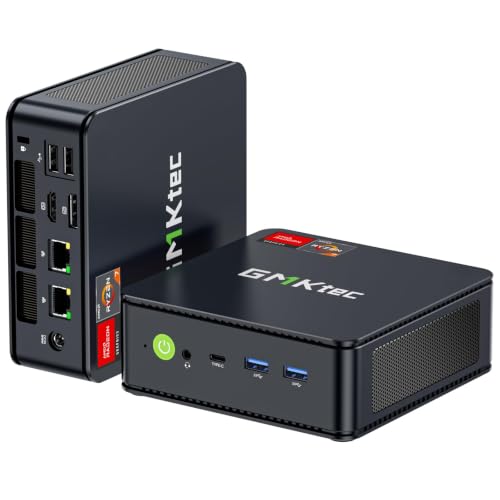
- Best overall: GMKtec M5 Plus Mini PC, Ryzen 7 5825U, 32GB RAM, 1TB SSD — Check on Amazon
- Beelink SER5 MAX Mini PC, Ryzen 7 5800H, 16GB RAM, 500GB SSD — Check on Amazon
- KAMRUI E3B Mini PC, Ryzen 5 7430U, 32GB RAM, 512GB SSD — Check on Amazon
- MeLE Quieter4C Fanless Mini PC, Intel N150, 8GB RAM, 256GB SSD — Check on Amazon
- BOSGAME P4 Mini PC, Ryzen 7 5700U, 32GB RAM, 1TB SSD — Check on Amazon
See 1 more Amazon option
- Dell OptiPlex 7060 SFF Desktop, Core i5-8500, 16GB RAM, 512GB SSD (Renewed) — Check on Amazon
Read the full guide ↓
Disclosure: As an Amazon Associate, reviewstook.com earns from qualifying purchases. Links to Amazon on this page are affiliate links; they cost you nothing extra. Listing details such as price and availability change often, so check the current Amazon listing before you buy.
Pairing a mini PC with a 1440p monitor sounds like one decision, but it is really two, and the listings for machines under $400 work hard to blur them together. The first decision is about display: can the box put a sharp 2560×1440 picture on your screen for desktop work, browsing and video? On that question, this budget does well — every pick in this guide drives a 1440p panel natively, most of them drive several, and their outputs are rated beyond 1440p to 4K. The second decision is about rendering: when a game draws its world, at what resolution is the graphics hardware actually doing the drawing? On that question, this budget needs an honest answer rather than a marketing one. No mini PC under $400 renders modern games natively at 1440p. Not one pick here — not the strongest Ryzen box, not the renewed desktop — has the graphics hardware for that, because every one of them runs integrated graphics and none carries a discrete graphics card. What they can do, and do well, is render a game at 1080p or below and upscale that image to fill your 1440p panel, with the lightest competitive and older titles pushed closer to native at reduced settings on the strongest picks. That is a genuinely good way to play on a 1440p monitor. It is just not the same thing as rendering at 1440p, and this guide will keep the two ideas separate on every page.
That separation shapes everything below. Picks are graded first on rendering honesty — what the documented silicon can actually draw, and how gracefully it upscales — and only then on display quality. Memory gets unusual weight, because integrated graphics have no memory of their own: they borrow from system RAM, so a 32GB machine feeds its graphics a deeper pool than a 16GB one, and a soldered 8GB machine works with the shallowest pool of all. Upscaling gets discussed in plain terms: there is no DLSS anywhere in this guide, because DLSS is NVIDIA RTX technology and no pick here has RTX hardware — indeed no NVIDIA hardware of any kind. AMD’s FSR upscaling is the tool these machines actually have, and it is credited as a generic technology without invented precision. And monitor advice stays inside what each listing documents: outputs are claimed only where the port set is verified, and where a listing does not document its outputs, this guide says so rather than guessing.
What this budget buys, then, is a specific and worthwhile combination: a crisp native 1440p desktop — text, spreadsheets, browser windows and video all rendered by the operating system at the panel’s real resolution, where 1440p earns its keep every day — plus games presented on that same panel from a lower internal render, upscaled. Buyers who understand that split tend to be delighted with these machines. Buyers who were promised “1440p gaming” as a single phrase tend to feel cheated by hardware that was never capable of the thing they imagined. Read the render-versus-display section below before the reviews; it is the spine of the guide, and once it clicks, every pick’s verdict reads plainly. For most buyers the GMKtec M5 Plus is where we would start: the strongest all-round renderer in the set, the deepest memory pool for its graphics to borrow, and a verified triple-display port set for the desk around the panel.
In this guide
Quick Picks
Short on time, or comparing several options at once? Each row below names a buyer type and the product that suits it, with a link to the listing.
| Buyer type | Pick | Why it stands out | Link |
|---|---|---|---|
| Best overall | GMKtec M5 Plus, Ryzen 7 5825U | 32GB for the graphics to borrow, triple 4K outputs, the set’s best upscale feed | Check on Amazon |
| Strongest sustained renderer | Beelink SER5 MAX, Ryzen 7 5800H | The 54W chip holds its pace through long sessions at a 1080p render | Check on Amazon |
| Best value | KAMRUI E3B, Ryzen 5 7430U | 32GB and three verified 4K outputs at a budget-tier positioning — check price on Amazon | Check on Amazon |
| Best silent 1440p desktop | MeLE Quieter4C, Intel N150 | Fanless, drives three 4K displays, renders desktop and video natively | Check on Amazon |
| Best for capacity | BOSGAME P4, Ryzen 7 5700U | 32GB, 1TB and dual 2.5GbE behind the same honest 1080p render | Check on Amazon |
| Best renewed alternative | Dell OptiPlex 7060 SFF (Renewed) | A serviceable desktop driving 1440p over DisplayPort, games a rung lower | Check on Amazon |
How These Picks Were Chosen
The budget was applied as a ceiling on the machine as configured: every pick is a real Amazon listing that sells at or regularly within $400 in the United States, in the configuration reviewed. Where a listing family sells several configurations under one page, the review names the configuration it is judging and warns where a cheaper sibling wears a different listing identity, because the gap between a 16GB and a 32GB version of the same box changes both the desktop experience and — since the graphics borrow system memory — the gaming one. Check price on Amazon for the current figure on the day you order, since prices in this category move often.
We did not use these products ourselves. We read the maker listings and specification pages and independent reviews and teardowns, and graded each machine on the criteria this keyword actually turns on. The first is rendering class: what the documented integrated graphics can draw, stated without benchmark figures we did not measure and without per-game frame-rate claims. The second is the upscale path: every pick here renders games below 1440p and scales them up, so the quality of that story — a clean 1080p render, sensible settings, FSR where a game offers it — matters more than any native-1440p promise, and no such promise is made for any pick. The third is display honesty: monitor claims come from the physical ports documented for each listing, not from a maker’s headline, and the one pick whose third video output was a factory option rather than standard equipment is flagged as such. The fourth is memory, weighted harder than in a general guide because integrated graphics share it: capacity, and whether it is socketed or soldered, both shape how a game at a 1080p render behaves when the rest of the system is busy too.
Two absences deserve stating as method rather than discovering them in the reviews. There is no DLSS in this guide because there is no RTX hardware in this guide; DLSS is not a generic word for upscaling, and it is not credited to any pick, in any form, anywhere below. And there are no 4K gaming recommendations: a 4K panel asks roughly four times the rendering work of 1080p, and pairing one with these machines for games would repeat, larger, the same confusion this guide exists to clear up. A 1440p panel is the honest ceiling for this hardware — superb as a display, fed by a lower render in games — and the picks are graded inside that truth.
Rendering Is Not Displaying: The Distinction This Guide Runs On
Every confusion about 1440p gaming on a mini PC dissolves once two verbs are kept apart. Displaying is what the monitor shows. When your desktop, browser and documents appear at 2560×1440, the operating system is drawing them at that resolution, the cable is carrying that signal, and the panel is lighting that many pixels. All six picks do this natively and well — it is not demanding work, and their documented outputs are rated to 4K, a step above. Rendering is what the graphics hardware computes inside a game, frame by frame: the resolution of the world being drawn before anything reaches the screen. A game can be rendered at 1080p and displayed at 1440p, with the gap bridged by scaling, and on integrated graphics under $400 that is not the exception — it is the universal pattern. When a listing says a machine like these “supports 1440p gaming,” it is almost always describing the display side and letting you assume the render side. This guide grades the render side, because that is where games are won and lost.
Scaling itself comes in two shapes worth knowing. The simple shape is a straight stretch: the finished 1080p picture is enlarged to fill the panel. It costs nothing and looks like what it is — a softer image, because 1080p into 1440p is a non-integer scale of about 1.33× per axis, so pixels do not map evenly and fine detail smears slightly. The smarter shape is temporal upscaling, of which AMD’s FSR is the version available on every machine here: the game renders below the panel resolution, and the upscaler uses information from previous frames to reconstruct a sharper 1440p image than a plain stretch produces. FSR is a real quality gain and the correct way to play on these picks; it is credited throughout this guide as a technology, generically, without internal-resolution figures, because the base research documents none and inventing precision would be its own kind of dishonesty. What FSR never does is make the render native: the world is still drawn at the lower resolution, and textures, effects and geometry are all computed there. Frame generation belongs in the same honest box: it inserts extra displayed frames to make motion look smoother, but smoothness is a display-side property — it adds no rendered detail and no resolution, and it is treated that way here.
Two reference points complete the picture. The first is the integer case: a 720p render scaled to a 1440p panel is an exact 2×2 multiple, each rendered pixel becoming a clean block of four, which is why dropping a demanding game to a 720p render on a 1440p screen often looks tidier than an in-between resolution. The second is cloud gaming, the one route by which a picture genuinely rendered at 1440p can reach one of these panels: a remote server does the rendering and streams the result as video. That makes it a property of a subscription, a connection and a service’s catalogue — with input lag that varies by all three — not a property of any machine in this guide, and no pick is credited with it. Keep the two verbs separate, and the reviews below need no fine print: every pick displays 1440p natively; every pick renders games below it; they differ in how strong the render is, how much memory feeds it, and how good the result looks on the panel.
The 6 Best Mini PCs for a 1440p Monitor Under $400
GMKtec M5 Plus Mini PC — Ryzen 7 5825U, 32GB RAM, 1TB SSD
Who it suits: The buyer whose desk is genuinely built around a 1440p panel — sharp desktop all day, games in the evening — and who wants the strongest version of this budget’s honest pattern: a deep memory pool feeding the graphics, and a render that holds up when upscaled.
Start with the display side, where the M5 Plus is beyond argument. Its documented port set — HDMI, DisplayPort and USB-C video outputs — drives three displays at up to 4K each, so a 1440p monitor is comfortably inside its envelope, with two more screens available beside it. The desktop those ports carry is rendered natively by the operating system at whatever resolution each panel runs, and at 1440p that means text and interface elements drawn at full panel sharpness. The render side is where the configuration earns its first place. The Ryzen 7 5825U’s integrated Radeon graphics are the joint-strongest in this guide, and they draw from the deepest well: 32GB of DDR4 fitted as two socketed 16GB sticks, expandable to 64GB. Integrated graphics borrow system memory, so that capacity is not a luxury — it is the graphics subsystem’s working space alongside the browser, the operating system and the game itself, and at a 1080p render upscaled to the panel, the M5 Plus is the pick least likely to stumble over memory pressure while it plays. Modern demanding games still render at 1080p or below here, with FSR doing the bridging where a title offers it; lighter competitive and older games can be pushed closer to the panel at reduced settings. Nothing about that is native 1440p rendering, and this guide will not call it that — it is simply the best-executed version of what this budget does.
The supporting specification keeps the same standard: a 1TB NVMe drive with a second M.2 slot for growth toward the maker’s stated 4TB ceiling, dual 2.5-gigabit Ethernet where rivals fit one gigabit port, Wi-Fi 6E with Bluetooth 5.2, and Windows 11 Pro installed. The dual networking also gives the machine a second career as a home server or network box when its desk years end. The debits are the class debits plus one of its own. The 5825U is a refined older architecture rather than a current-generation chip; the machine is actively cooled, quiet rather than silent, and audible under sustained load. Check price on Amazon before ordering, since pricing in this tier moves with coupons and promotions. Bought at a fair current price, it is the most complete answer this budget produces for a 1440p desk — native where the desktop is concerned, honestly upscaled where games are, and short of nothing the panel can ask of it.
- 32GB of socketed DDR4 the graphics can borrow from, expandable to 64GB — the deepest pool in this guide.
- Triple 4K-capable outputs over HDMI, DisplayPort and USB-C, so 1440p sits well inside the envelope.
- 1TB NVMe drive plus a second M.2 slot, and dual 2.5GbE networking for a later server career.
Honest limitation: Games render at 1080p or below and are upscaled to the panel — there is no native 1440p game rendering here, and the fan is audible under sustained load.
Choose it if you want the default recommendation for a 1440p desk: the strongest render, the most memory behind it, and outputs to spare. Skip it if silence is the priority — that is the fanless pick below — or if your gaming ambitions are native-1440p ambitions, which no pick in this guide can serve.

Beelink SER5 MAX Mini PC — Ryzen 7 5800H, 16GB RAM, 500GB SSD
Who it suits: Buyers who play for long stretches and care most about the render holding its pace — the sustained-performance pick, for sessions where a chip that fades after ten minutes would show on the panel.
The SER5 MAX is built around the Ryzen 7 5800H, and the letter matters more at this angle than anywhere else. Most mini PC chips are U-series parts tuned for thin laptops and modest power; the 5800H is a 54-watt H-series processor, allowed to draw real power and hold high speeds under sustained load, in a box roughly five inches square and under two inches tall. Sustained pace is exactly what an upscaled render consumes: a chip that holds its clocks keeps the 1080p render feeding the panel steady instead of sagging as the session warms up. Its integrated Radeon graphics match the class of the pick above; the difference is endurance, not kind. The display side is equally settled: HDMI, DisplayPort and USB-C outputs drive three displays, each rated beyond 1440p. Windows 11 Pro is installed, with Wi-Fi 6 and Bluetooth 5.2.
The trade is in the opening specification, and at this angle it deserves a direct look. Sixteen gigabytes of memory and a 500GB drive are the leanest fitted numbers among the Ryzen picks, and because the graphics borrow from that same memory, the pool feeding a game is shallower than the M5 Plus’s 32GB — noticeable when a game, a browser and a call compete. The saving grace is that both limits are soft — the memory can be raised to 64GB and the drive swapped for up to 2TB, because Beelink builds this machine to be opened. Check price on Amazon for the current figure, since pricing for this configuration moves often. Two cautions travel with the pick. The 54-watt design means a fan that works for a living, audible under load as with any performance mini PC. And the SER5 family spans several processors and memory sizes across Beelink’s listings, so confirm the machine in the cart is the 5800H, 16GB, 500GB configuration this review covers.
- The 54W Ryzen 7 5800H is the strongest sustained renderer in this guide — pace that survives a long session.
- Triple display output over HDMI, DisplayPort and USB-C, each rated beyond the 1440p panel.
- Memory to 64GB and storage to 2TB on your own schedule, in a box under two inches tall.
Honest limitation: The opening 16GB is the shallowest memory pool among the Ryzen picks, and the render is still a 1080p-class render upscaled — sustained, but not native.
Choose it if your sessions are long and you are comfortable growing memory and storage later. Skip it if you want the deep memory pool fitted on day one and never plan to open the case — the M5 Plus is that machine.

KAMRUI E3B Mini PC — Ryzen 5 7430U, 32GB RAM, 512GB SSD
Who it suits: Value hunters who want the two specifications this angle rewards — 32GB of memory behind the graphics and a fully verified output set — at a budget-tier positioning in the guide.
The E3B’s case is arithmetic again. Its Ryzen 5 7430U is a six-core member of the same Ryzen 5000 mobile family as the picks above, with Radeon Vega 7 integrated graphics a rung below the eight-core picks’ — firmly in the class that renders lighter games at 1080p and upscales them to the panel, and handles esports and older catalogs with reduced settings pushed closer to native. Around that chip, KAMRUI fits what buyers usually pay the tier above for: 32GB of DDR4 in dual channel, raisable to 64GB, so the graphics borrow from the same deep pool as the guide’s leader; and a 512GB M.2 drive in a chassis with two M.2 slots — one NVMe, one SATA — so a second drive can join later. The display set is the best-documented in this guide, verified from the listing’s own specification table: HDMI 2.0, DisplayPort 1.4 and a USB-C video output, three 4K displays at 60Hz between them, which places a 1440p panel well inside the envelope on any of the three ports. Windows 11 Pro is the operating system per the listing’s product information, wireless is Wi-Fi 6 with Bluetooth 5.2, networking is gigabit Ethernet, and the box includes a VESA plate and an HDMI cable — the plate being the tidy route to mounting the machine behind the very monitor it feeds. Value is the headline here: check price on Amazon for the current figure for this configuration before ordering.
The compromises sit where a value machine’s compromises usually sit. The six-core processor and its graphics are the weakest of the three Ryzen picks for rendering, and buyers whose games are heavier will feel the gap against the SER5 MAX’s sustained pace. The network port is gigabit where the M5 Plus and the BOSGAME below offer 2.5-gigabit — irrelevant to the panel, relevant if the machine later heads for server duty. Reviewers of this model have noted the fan becomes audible under sustained heavy load, the normal trade in this class, worth knowing if the box sits on the desk rather than behind the monitor. And one piece of cart discipline is essential: the E3B is also sold in a 16GB configuration under a separate listing, so confirm the machine in your cart is the 32GB, 512GB, 7430U build this review covers — at this angle the memory is half the value case, and the entire proposition rests on that configuration.
- 32GB of dual-channel DDR4 feeding the graphics, expandable to 64GB, at a budget-tier positioning in this guide.
- Three verified 4K outputs — HDMI 2.0, DisplayPort 1.4 and USB-C — plus a VESA plate for behind-panel mounting.
- A second M.2 slot stands ready, so storage grows by addition rather than replacement.
Honest limitation: The render is the lightest of the Ryzen picks — a 1080p render upscaled, with demanding titles dropping lower — and the fan is audible under sustained load.
Choose it if you want maximum memory and monitors per dollar and your games are esports-shaped or older. Skip it if you want the strongest sustained render, or dual fast networking for a future server role.
MeLE Quieter4C Fanless Mini PC — Intel N150, 8GB RAM, 256GB SSD
Who it suits: Buyers whose 1440p monitor is a workplace and a screen, not an arena — a silent native-1440p desktop for documents, browsing and video, in a bedroom or studio where a fan would be the loudest thing in the room.
Grade this pick on the display verb and it is superb. The Quieter4C drives three 4K displays from two HDMI 2.0 ports and a USB-C output, so a 1440p panel receives a native signal with two screens to spare, and the desktop, text and video it shows are rendered at the panel’s real resolution — the full benefit of 1440p, delivered in complete silence. There is no fan anywhere in the design: the metal chassis, barely five inches by three and less than an inch thick, is the heatsink, and the machine draws power in the low teens of watts under load on reviewer measurements of this platform. A VESA mount is included for fitting behind the monitor, where the machine disappears entirely. Inside is Intel’s N150, a four-core efficiency processor, with Windows 11 Pro, Wi-Fi 6, Bluetooth 5.2 and gigabit Ethernet. Check price on Amazon for the current figure before ordering, since pricing for this model moves over time.
Grade it on the rendering verb and the review must be equally plain. The N150’s integrated graphics are the lightest in this guide: modern games are beyond them at any resolution worth discussing, and the realistic gaming envelope is the oldest and lightest titles rendered low and upscaled — an occasional diversion, not a purpose. If games are even a secondary reason for the purchase, every Ryzen pick above is the better buy, including options positioned in a similar part of the range. The second limit is memory: the 8GB is soldered LPDDR5, fitted at the factory and fixed forever, which caps both multitasking and the pool the graphics can borrow. Neither limit is a flaw in the machine’s own terms. Bought as what it is — a silent, frugal, finished appliance that makes a 1440p monitor a pleasure to work at and a video screen indistinguishable from a far more expensive setup — it is excellent. Bought as a gaming machine of any description, it is the wrong product, and this guide would rather lose the sale than blur that line.
- Genuinely fanless: zero noise and power draw in the low teens of watts, behind a VESA mount in the box.
- Three 4K outputs from dual HDMI and USB-C — a native 1440p desktop with screens to spare.
- A proper NVMe drive and Windows 11 Pro, where cheaper N-class boxes cut corners with eMMC storage.
Honest limitation: The lightest graphics in the guide — games are an occasional low-render diversion, not a use case — and the 8GB of memory is soldered forever.
Choose it if your 1440p panel is for work and video and silence is the specification. Skip it if gaming matters at all — the Ryzen picks render in a different league for similar money.

BOSGAME P4 Mini PC — Ryzen 7 5700U, 32GB RAM, 1TB SSD
Who it suits: Buyers who want capacity behind the same honest pattern — 32GB feeding the graphics, a terabyte of room for a game library, and networking that outlives the desk — positioned a step below the guide’s leader in the range.
The P4 wraps AMD’s Ryzen 7 5700U, an eight-core processor from the same Ryzen 5000 mobile generation as the other Ryzen picks, in the specification that ages best: 32GB of memory and a 1TB solid-state drive. The 5700U is the elder of the three eight-core chips here, a little behind the 5825U in refinement and level with it in the shape of work it does well, and its integrated graphics sit in the same rendering class as the guide leader’s — lighter games rendered at 1080p and upscaled to the panel, esports and older titles pushed closer at reduced settings, modern demanding games out of reach natively and honestly framed that way. The deep memory pool matters here for the same reason as on the M5 Plus: the graphics borrow from it, and 32GB leaves room for everything at once. The display set is complete: three 4K displays over HDMI, DisplayPort and USB-C, so the 1440p panel is one of three the machine can carry. Wi-Fi 6E and Bluetooth 5.2 are fitted, Windows 11 Pro is installed, and two 2.5-gigabit Ethernet ports give the machine the network profile of a future home server. Check price on Amazon for the current figure before ordering, since pricing for this configuration moves often.
Choosing between the P4 and the M5 Plus is this tier’s nicest problem, and at this angle it is close to a coin flip: the same rendering class, the same memory depth, the same triple-display and dual-network set. The M5 Plus takes the headline on its spare M.2 slot and the more refined processor; the P4 counters with competitive positioning in the range and a full terabyte fitted on day one, which a growing game library will feel sooner than a spare slot. One caution belongs to this listing family alone, and it is worth the two minutes it takes: BOSGAME has also sold this machine with a 5825U under a title nearly identical to this one, so check the processor line on the live listing before ordering and on the delivered box before the return window closes. Configuration drift of that kind is common across this category, and that check is the entire defense against it.
- A terabyte of storage fitted from day one and 32GB of memory at a budget-tier positioning — check price on Amazon.
- The same rendering class and triple-4K output as the guide’s leader, for a little less.
- Dual 2.5GbE networking — ready for a home-server second career after the desk.
Honest limitation: The 5700U is the oldest of the eight-core chips here, the listing family has been sold in more than one processor variant, and the render remains an upscaled 1080p-class render.
Choose it if capacity and value matter more than the newest chip revision — check price on Amazon before ordering. Skip it if a spare storage slot and the newer chip revision matter more than the saving — the M5 Plus offers both, for a little more money.

Dell OptiPlex 7060 SFF Desktop (Renewed) — Core i5-8500, 16GB RAM, 512GB SSD
Who it suits: Buyers who do not actually need a mini PC — who need a dependable, serviceable desktop that will drive their 1440p monitor properly for work, with games as an occasional, honestly low-rendered extra.
Consider this pick the guide’s deliberate alternative — the exit ramp for buyers whose search was never really about mini PCs at all. The OptiPlex 7060 is a small-form-factor business desktop from Dell’s corporate line, sold renewed: an Intel Core i5-8500 — a six-core desktop processor, not a laptop chip — with 16GB of DDR4 memory in standard slots, a 512GB solid-state drive and Windows 11 Pro, with a keyboard and mouse in the box. That processor is deliberate on our part: the i5-8500 is an eighth-generation part, the generation floor of Microsoft’s Windows 11 supported-processor list, so the machine runs the current operating system legitimately and in support, unlike the cheaper sixth- and seventh-generation renewed stock that fills this price band. On the display side of this guide’s distinction, it performs properly: the platform’s standard dual DisplayPort outputs drive 1440p panels natively — DisplayPort is the natural cable for this resolution — so desktop, text and video arrive at full panel sharpness. A third video port was a factory option on this model and varies by unit, so a three-screen buyer must check the exact machine on the live listing rather than assume it; two monitors are the guarantee. Check price on Amazon for the current figure, since renewed pricing follows refurbisher stock and moves with availability.
On the rendering side, the review drops a rung, and should. The integrated UHD Graphics 630 is the weakest graphics in this guide for games — behind the Ryzen machines by a wide margin and behind even the N150’s newer media hardware for some duties — and its realistic gaming envelope is older and lightest titles rendered at 720p or low 1080p and upscaled, where the exact 2×2 integer scale from 720p to the 1440p panel at least keeps the picture tidy. Buyers whose evenings are gaming evenings should not start here. What the Dell offers instead is the desktop ledger: standard, serviceable parts any local shop can work on, ten external USB ports, and a budget-tier positioning in the guide. The costs are size — at roughly 11.4 by 3.7 by 11.5 inches it sits beside or under a desk, never behind the monitor — and the renewed terms: a 90-day Amazon Renewed guarantee against the year a new machine typically carries, unit-to-unit variation in condition and history, and a first-week check of drive health, fans and the configuration as delivered as part of the deal you are making.
- Dual DisplayPort outputs drive a 1440p desktop natively, with a real desktop processor behind it.
- Standard, serviceable parts and a complete keyboard-and-mouse package at a budget-tier positioning.
- A processor on Microsoft’s Windows 11 supported list — the floor where the renewed route makes sense.
Honest limitation: The weakest game rendering in the guide — a 720p-to-1080p render upscaled — in a desktop-sized box with a 90-day renewed guarantee and only two guaranteed display outputs.
Choose it if the 1440p panel is a work screen, serviceability matters, and games are an occasional extra. Skip it if gaming is a main job for the machine — every Ryzen pick above renders rings around it.
Comparison Table
| Product | Graphics | Memory | 1440p verdict | Link |
|---|---|---|---|---|
| GMKtec M5 Plus | Radeon, 5825U integrated | 32GB DDR4, socketed to 64GB | Native 1440p desktop; games rendered at 1080p or below, upscaled — the set’s best feed | Check on Amazon |
| Beelink SER5 MAX | Radeon, 5800H integrated, 54W | 16GB DDR4, socketed to 64GB | Native 1440p desktop; the most sustained 1080p-class render in the set | Check on Amazon |
| KAMRUI E3B | Radeon Vega 7, 7430U integrated | 32GB DDR4, socketed to 64GB | Native 1440p desktop; lighter 1080p render upscaled, demanding titles lower | Check on Amazon |
| MeLE Quieter4C | Intel N150 integrated | 8GB LPDDR5, soldered | Native 1440p desktop and video; games only at the lightest, lowest renders | Check on Amazon |
| BOSGAME P4 | Radeon, 5700U integrated | 32GB, 1TB fitted | Native 1440p desktop; games rendered at 1080p or below, upscaled | Check on Amazon |
| Dell OptiPlex 7060 SFF (Renewed) | Intel UHD Graphics 630 | 16GB DDR4, standard slots | Native 1440p desktop over DisplayPort; games at 720p–1080p renders, upscaled | Check on Amazon |
Pairing the Monitor: Outputs, Cables and Settings
A 1440p panel only delivers its sharpness if the chain between machine and screen is set up to carry it, and this section claims outputs only where the base research documents them. Five picks have fully documented port sets, and any of their outputs will drive a 1440p monitor natively: the M5 Plus over HDMI, DisplayPort or USB-C; the SER5 MAX over the same three; the E3B over HDMI 2.0, DisplayPort 1.4 or USB-C, each documented at 4K@60Hz, a rating that leaves 1440p comfortably inside; the Quieter4C over either of its two HDMI 2.0 ports or its USB-C output; and the P4 over HDMI, DisplayPort or USB-C. The renewed Dell is the documented exception in shape rather than capability: its platform’s standard pair of DisplayPort outputs is the guaranteed route, DisplayPort being the natural cable for 1440p, while a third video port was a factory option that varies by unit — check the exact machine on the live listing if a third screen matters. Where a listing for any other machine does not enumerate its outputs, treat the count as unknown and read the live page; a “supports multiple displays” headline is not a port list.
Three setup habits decide whether the pairing feels right. First, once the panel is connected, open the display settings and confirm the operating system is actually running at 2560×1440 and at the highest refresh rate on offer — machines occasionally default to a lower mode on a new display, and a 1440p monitor left at 1080p quietly wastes the entire purchase. Second, use the cable that came with the monitor or a certified one rated for the resolution; the bargain-bin cable drawer is the most common cause of a panel that flickers, drops to a lower refresh rate, or refuses its native resolution outright. Third, keep the two resolutions in your game settings separate in your mind: the display resolution stays at the panel’s native 1440p, while the game’s internal render resolution is the dial you turn — 1080p for most titles on these picks, lower for demanding ones, with FSR enabled where the game offers it so the upscale to the panel is the smart kind rather than a plain stretch. Set that way, the desktop stays razor sharp, the games look as good as this hardware can make them, and nothing in the chain is pretending to be something it is not.
How to Choose a Mini PC for a 1440p Monitor Under $400
- Settle the render question first. Decide whether your games are esports, indie and older catalogs — which these machines render at 1080p and upscale pleasingly — or modern demanding titles you expect to run natively at 1440p, which no machine at this budget, and no pick here, can do. The first buyer is well served below; the second needs a discrete graphics card and a different guide.
- Buy memory like the graphics depend on it — they do. Integrated graphics borrow system RAM, so 32GB fitted is the comfortable specification for a machine that plays as well as works, and several picks deliver it within this budget — check price on Amazon for the current figure. If you buy 16GB, buy it socketed, with a stated path to 32GB or 64GB. Treat soldered 8GB as a desktop-and-video specification only.
- Count outputs from ports, not promises. A multi-display claim should resolve into named video outputs — HDMI, DisplayPort, USB-C. Every pick here was verified that way; apply the same test to anything else you consider, and treat a platform whose extra port was a factory option, like the renewed Dell, as a two-monitor machine until the exact unit proves otherwise.
- Prefer the sustained chip for long sessions. A 54-watt H-series processor holds its render pace through an evening in a way a low-power U-series chip does not. If your sessions are long, that endurance is worth more than a headline specification.
- Use FSR, and know what it is. Where a game offers FSR, enable it: it reconstructs a sharper picture on the panel than a plain stretch of the same render. But file it correctly — it improves the upscale, it does not raise the render, and it is the only upscaling technology these machines have.
- Confirm the exact configuration in the cart. Manufacturers here sell families under one model name: processors and memory sizes vary, sometimes across separate listings entirely. What the cart says — processor, memory, storage — is the machine that will arrive, whatever the headline promised.
- Check the live price before deciding. Prices in this category move often with coupons and promotions, so compare the current Amazon price on the day you order rather than relying on any headline figure — in this category, patience is a specification too.
Common Buying Mistakes
- Reading “supports 1440p” as “renders games at 1440p.” On integrated graphics under $400 the first is true and the second is not; the display and the render are different numbers, and listings profit from the blur.
- Expecting DLSS on a machine with no NVIDIA hardware. DLSS is RTX technology; these picks have AMD or Intel integrated graphics and FSR is their upscaler. Any seller implying DLSS for a machine like these is describing a product that does not exist.
- Pairing a 4K gaming monitor with this class of hardware. The render drops so low to stay playable that the expensive panel is upscaling from further away than a 1440p panel would be — the worse purchase at the higher price.
- Buying soldered 8GB memory for a machine that will play games. The graphics borrow from that same small pool; the ceiling arrives quickly and cannot be raised.
- Paying the 32GB price for the 16GB configuration. The two versions often sit under different listings entirely, and the only specification that counts is the one in your cart.
- Leaving the panel at a default lower resolution or refresh rate. A 1440p monitor running at 1080p because nobody opened the display settings is the quietest waste in the category.
- Assuming three monitors from a marketing line. Count the physical video outputs on the listing; on renewed business desktops, extra ports were frequently factory options, so the unit in front of you may not have the third one.
Final Recommendation
- Most buyers: GMKtec M5 Plus — the deepest memory pool behind the set’s joint-strongest render, and outputs to spare around the panel.
- Long sessions: Beelink SER5 MAX — the 54W chip holds the render’s pace all evening, with memory you grow yourself.
- Tightest budget: KAMRUI E3B — 32GB and three verified outputs at a budget-tier positioning — check price on Amazon.
- Work and video in silence: MeLE Quieter4C — a fanless native-1440p desktop, bought for the display side and honest about the render side.
- Capacity and a server future: BOSGAME P4 — 32GB, 1TB and dual 2.5GbE behind the same honest upscale.
- Serviceability over size: Dell OptiPlex 7060 (Renewed) — a complete desktop that drives the panel properly and renders games a rung lower.
Two picks lead this guide, and choosing between them is a fork, not a ranking. The M5 Plus is the finished article: 32GB fitted behind the graphics, a terabyte of storage with a spare slot, three displays and dual fast networking — buy it if you want the machine complete on day one. The SER5 MAX is the endurance pick: the strongest sustained processor here in a box built to be opened, bought lean at 16GB and 500GB and grown on your schedule — buy it if your sessions are long and upgrading holds no fear. The specialists cover everyone else: the E3B for value, the Quieter4C for a silent work screen, the P4 for capacity, and the renewed Dell for buyers whose real search was a dependable desktop that happens to drive a nice monitor. Readers who want the general picture first should see Best Mini PC Under $400, those stepping up a tier should compare Best Mini PC For 1440p Gaming Under $500, and buyers whose main brief is gaming rather than the panel should start with Best Mini Gaming PC Under $400. Check the configuration in the cart, set the panel to its native resolution when it arrives — and enjoy how sharp a desktop this budget honestly buys.
Frequently Asked Questions
Can a mini PC under $400 really game at 1440p?
It can game on a 1440p monitor, which is a different claim. Every pick here displays 1440p natively for the desktop, and renders games at 1080p or below, upscaled to fill the panel — a good-looking, honest pattern for esports, indie and older titles. None renders modern games natively at 1440p; that requires a discrete graphics card, which no machine at this budget carries. Guides that blur the two claims are selling the blur, not the computer.
Is DLSS available on any of these machines?
No. DLSS is NVIDIA RTX technology, and there is no NVIDIA hardware of any kind in any pick in this guide — the graphics are AMD Radeon or Intel integrated. The upscaling these machines actually have is AMD’s FSR, which works on all of them and is the correct tool to enable in games that offer it. Any listing suggesting DLSS for a machine like these is inaccurate.
Does upscaling to 1440p look noticeably worse than native?
Somewhat softer, honestly — the world is drawn at the lower resolution, and no upscaler invents the missing detail. In practice, a 1080p render with FSR upscaling to a 1440p panel looks good in motion on the lighter titles these machines suit, and the desktop — where you read text all day — is fully native and razor sharp. The trade is real but it is the right trade at this budget, provided it is made knowingly.
How many monitors can these machines run alongside the 1440p panel?
Three in total for the five new mini PCs, each verified from documented port sets rated to 4K per display — so the 1440p panel can sit between two further screens. The renewed Dell guarantees two DisplayPort outputs, with a third port that was a factory option varying by unit. Whichever machine you buy, the listing’s port list outranks its headline.
Should I buy a 4K monitor instead, to grow into?
For desktop work, a 4K panel is within these machines’ display abilities, and text would be sharper still. For games, it is the wrong pairing: 4K asks roughly four times the rendering work of 1080p, so the render drops lower and the upscale travels further than on a 1440p panel. Buy the 1440p monitor for this hardware; if a discrete-graphics machine arrives later, it will thank you for the same panel.
Why does memory matter so much for gaming on these machines?
Because integrated graphics have no memory of their own — they borrow system RAM, sharing it with the game, the operating system and everything else running. A 32GB machine gives the graphics a deep pool and headroom to spare; a soldered 8GB machine gives them a shallow one that cannot be deepened. That is why memory capacity and construction are graded here as gaming specifications, not just desktop ones.
Why does this guide tell me to check the price on Amazon instead of giving one price?
Because prices in this category move weekly — coupons, Prime pricing and refurbisher stock all shift them — and one fixed figure would mislead more often than it helped. On the day you order, the live Amazon listing is the authority, so check price on Amazon for the current figure and availability before you buy.
- Best Mini PC Under $400
- Best Mini PC Under $500
- Best Mini PC Under $700
- Best Mini PC For Beginners Under $400
- Best Mini PC For Small Spaces Under $400
- Best Mini PC For Streaming Under $400
- Best Mini PC For 1440p Gaming Under $500
- Best Mini Gaming PC Under $400
- Best Fanless Mini PC Under $400
- Best Home Office PC Under $400
- Best Barebones Mini PC Under $400


