Where to buy
Check the latest price, availability and delivery on Amazon. Orders are placed on Amazon. We may earn a commission from qualifying purchases.
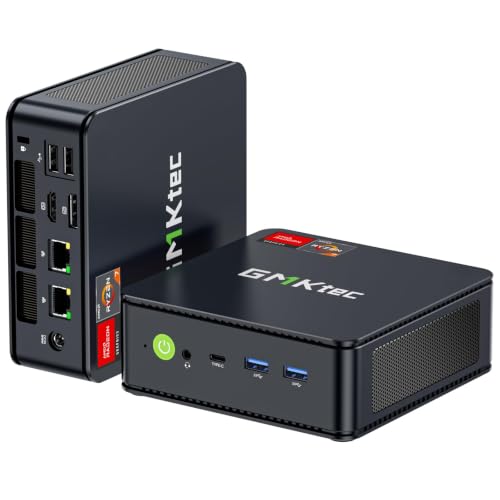
- Best overall stream station: GMKtec M5 Plus Mini PC, Ryzen 7 5825U, 32GB RAM, 1TB SSD — Check on Amazon
- BOSGAME P4 Mini PC, Ryzen 7 5700U, 32GB RAM, 1TB SSD — Check on Amazon
- Beelink SER5 MAX Mini PC, Ryzen 7 5800H, 16GB RAM, 500GB SSD — Check on Amazon
- KAMRUI E3B Mini PC, Ryzen 5 7430U, 32GB RAM, 512GB SSD — Check on Amazon
- MeLE Quieter4C Fanless Mini PC, Intel N150, 8GB RAM, 256GB SSD — Check on Amazon
See 1 more Amazon option
- Dell OptiPlex 7060 SFF Desktop, Core i5-8500, 16GB RAM, 512GB SSD (Renewed) — Check on Amazon
Read the full guide ↓
Disclosure: As an Amazon Associate, reviewstook.com earns from qualifying purchases. Links to Amazon on this page are affiliate links; they cost you nothing extra. Listing details such as price and availability change often, so check the current Amazon listing before you buy.
Streaming asks a computer to do two jobs at once, and it is worth being precise about both before any product names appear. The first job is producing the picture — a game, a desktop, a camera feed, a console coming in over a capture card. The second job is encoding: compressing that picture, sixty times a second, into the stream your platform actually receives. A serious Twitch broadcast runs at roughly 6,000 kbps with constant bitrate and two-second keyframes at 1080p60; YouTube accepts higher bitrates, carries 1440p streams, and takes AV1 live, while Twitch’s AV1 arrives only through its limited Enhanced Broadcasting programme. Streaming in 4K is limited by the platforms, not by your hardware — no purchase in this guide changes that. What a machine under $400 can and cannot do follows from those two jobs, so here is the honest opening: not one pick below has a discrete graphics card, which means there is no NVENC encoder anywhere in this guide, and there is no AV1 encoding anywhere in this guide either. Every encoder here is an integrated one — AMD’s VCN block inside the Ryzen chips, Intel’s Quick Sync inside the two Intel machines — working in H.264, with HEVC available where a platform accepts it.
That sounds like a disqualification, and for one specific job it is: a mini PC under $400 is not a one-box machine for streaming demanding modern games while it also plays them. The integrated graphics that would render the game are the same silicon that would encode the stream, and both jobs together exceed what this class honestly does. But streaming is a wider word than that one job. Talk and podcast streams, desktop and creative streams, console games fed in through a capture card, a dedicated second machine whose only work is encoding a feed sent from a gaming PC — all of these are real streaming, and several are exactly what a small, cheap, always-ready box is good at. The lightest same-box game streams, esports and indie titles at 720p or a modest 1080p, are also within reach when the hardware encoder carries the compression and the settings stay disciplined. This guide grades the six picks on those terms: encoder first, then the simultaneous-load headroom — cores, memory, storage, networking — that decides whether the encoder gets to work in peace.
Two more ground rules before the picks. AMD’s integrated encoders produce a picture that is visibly softer than NVENC at Twitch’s bitrates; that is a property of the silicon class, stated here once and applied in every review rather than discovered later. Pricing for this class moves weekly with coupons and Prime pricing, so check price on Amazon on the day you order — the live listing is the only number that counts. For most streamers we would start with the GMKtec M5 Plus, whose 32GB of memory, terabyte of storage and twin 2.5-gigabit network ports make it the most complete stream station in this guide. Below: the encoder map, the quick picks, reviews of all six, an OBS setup section, the kit you will still need, how to choose, the mistakes, and an FAQ.
In this guide
Quick Picks
Short on time, or comparing several options at once? Each row below names a streaming job and the product that suits it, with a link to the listing.
| Streaming job | Pick | Why it stands out | Link |
|---|---|---|---|
| Best overall stream station | GMKtec M5 Plus, Ryzen 7 5825U | 32GB, 1TB and dual 2.5GbE around an eight-core chip — the most simultaneous-load headroom here | Check on Amazon |
| Best dedicated second stream PC | BOSGAME P4, Ryzen 7 5700U | The same 32GB/1TB/dual-2.5GbE recipe, positioned as a machine that only has to encode | Check on Amazon |
| Best processor headroom | Beelink SER5 MAX, Ryzen 7 5800H | The 54W chip holds its pace under game-plus-OBS load better than any U-series pick | Check on Amazon |
| Best value | KAMRUI E3B, Ryzen 5 7430U | 32GB of memory and a VESA plate — strong value in this guide | Check on Amazon |
| Best silent stream corner | MeLE Quieter4C, Intel N150 | Fanless — no fan noise exists for your microphone to hear — with Quick Sync encoding | Check on Amazon |
| Cheapest encode box | Dell OptiPlex 7060 SFF (Renewed) | Quick Sync in a serviceable desktop at renewed money, keyboard and mouse included | Check on Amazon |
How These Picks Were Chosen
The six machines are the verified set from our general mini PC research at this budget — the same six listings — re-graded here on streaming criteria rather than re-shopped. That grading ran encoder-first. For each pick we identified the encoder its documented silicon actually carries, from the processor named on the listing: the Ryzen machines encode through AMD’s VCN hardware block in H.264 and HEVC, and the two Intel machines encode through Quick Sync in H.264 and HEVC. No pick was credited with an encoder its silicon does not have. AV1 encoding is credited to no pick, because AV1 encode exists only on RTX 40-series Ada graphics and newer, on RDNA 3-generation AMD VCN, and on certain newer Intel media engines — and none of that silicon is in any machine here. The Ryzen chips are Vega-generation integrated graphics, a VCN generation before AV1; the N150’s Quick Sync decodes AV1 but does not encode it; the renewed Dell’s UHD 630 predates AV1 entirely. NVENC is credited to no pick, because NVENC lives on NVIDIA graphics cards and there is no NVIDIA hardware in this guide.
After the encoder, we graded simultaneous load: what else the machine must carry while the encoder works. A stream is never just an encoder — it is the game or capture feed, OBS compositing scenes, a browser of chat and alerts, a voice application, and a local recording if you keep one. Eight processor cores grade above six, and six above four. Thirty-two gigabytes of memory grades above sixteen, because OBS, a browser and a game together will find the bottom of a 16GB machine, and the one 8GB pick is graded as a single-purpose station for exactly that reason. Storage is graded as recording space: a local recording of a long stream is a large file habit, and the 500GB and 512GB picks carry that as a real catch — machine plus a later drive — rather than a footnote. Networking is graded as streaming infrastructure: a wired connection is the rule in this guide, and the two picks with dual 2.5-gigabit ports grade up because a dedicated stream PC that receives a feed from a gaming PC over the network lives or dies by its Ethernet. Fan noise is graded as a microphone specification, because a fan beside a desk microphone is part of your audio whether you planned it or not.
What we did not do matters as much. We did not use these products ourselves; the grading rests on the maker listings and specification pages, listing records for the Amazon listings, and independent reviews documented in the companion research. No frame rates are quoted anywhere; streaming quality at this tier is set by encoder behaviour and load headroom.
The Encoder Map: What Each Pick Actually Encodes With
Everything in this guide follows from one table’s worth of facts, so here they are in prose. The four Ryzen picks — the GMKtec M5 Plus and its 5825U, the BOSGAME P4 and its 5700U, the Beelink SER5 MAX and its 5800H, and the KAMRUI E3B and its 7430U — all encode through the same generation of AMD hardware: the VCN block paired with Vega integrated graphics. In OBS that appears as the AMD hardware encoder, and it produces a competent H.264 stream and an HEVC stream where a platform takes one. Its honest grade at Twitch’s roughly 6,000 kbps is a picture visibly softer than an NVENC picture of the same scene — more smearing in fast motion and fine detail — which is why this guide steers these machines toward talk, desktop, console-capture and lighter game content, where the gap shows least. None of the four has AV1 encoding; that capability arrived with a later AMD encoder generation that none of these chips carries.
The two Intel picks encode through Quick Sync. The MeLE Quieter4C’s N150 carries a modern Quick Sync block: clean H.264 and HEVC encoding at modest power, and AV1 decoding — useful for playback, irrelevant to what your stream sends out. It does not encode AV1, and no setting changes that. The renewed Dell’s Core i5-8500 carries the older UHD 630 generation of Quick Sync: a perfectly serviceable H.264 encoder for a talk or capture-fed stream, a generation behind the N150’s block in refinement, and with no AV1 involvement in either direction. Quick Sync’s virtue in both cases is that it is a fixed-function block — it encodes without borrowing the processor cores your other software is using.
One fallback deserves a plain statement, because beginners reach for it first: software x264 encoding on the processor itself. On the eight-core Ryzen picks, x264 at its faster presets is a workable emergency option for a low-motion stream, and the SER5 MAX’s 54-watt chip holds that up best. On the six-core E3B it is a strain, and on the four-core N150 it is not a plan at all. The hardware encoder is the correct choice on every pick in this guide, and the OBS section below is written on that basis. Readers whose brief is a demanding modern game played and broadcast from one machine should hear it plainly: that brief starts with a discrete graphics card, answered in our wider streaming coverage — Best Streaming PC Under $400 and Best Mini Gaming PC For Streaming Under $400. What follows is for the jobs a $400 mini PC genuinely does.
The 6 Best Mini PCs for Streaming Under $400
GMKtec M5 Plus Mini PC — Ryzen 7 5825U, 32GB RAM, 1TB SSD
Who it suits: The streamer who wants one small box to be the whole station — console capture, talk and desktop content, light same-box game streams — with the headroom to run OBS, chat, a browser and a recording at once.
Start with why this machine tops a streaming guide when its encoder is the same AMD VCN block as three rivals below. Because streaming failure at this tier is rarely the encoder’s fault; it is the machine around the encoder running out of something. The M5 Plus is the pick that runs out last. Its Ryzen 7 5825U brings eight cores to the simultaneous-load problem, so the game or capture feed, the OBS scene composite, the browser of chat and alerts and the voice application are not queuing behind each other. Its 32GB of memory — two socketed 16GB sticks, expandable to 64GB — is where that headroom becomes permanence: 32GB is the capacity at which a streamer’s whole software stack stops negotiating with the operating system mid-broadcast. And its 1TB drive, with a second M.2 slot behind it, treats the local recording habit as a feature rather than a countdown. The encoder itself is set to the AMD hardware option in OBS and left there: H.264 at Twitch’s bitrate discipline, visibly softer than NVENC in fast motion, entirely respectable for the content classes this guide recommends.
The networking is the second half of the case, shared only with the BOSGAME below. Two 2.5-gigabit Ethernet ports mean this machine can be wired to the router for the upload and still have a fast private link to a gaming PC — which makes it the best two-box citizen here as well as the best one-box station: send the game feed across the second port, let the M5 Plus encode it, and the gaming machine never feels OBS at all. Three 4K display outputs over HDMI, DisplayPort and USB-C cover a streamer desk’s monitor habits; Wi-Fi 6E, Bluetooth 5.2 and Windows 11 Pro complete it. Check price on Amazon before you order — pricing for this class moves often, so the live listing is what counts.
- 32GB of socketed memory and eight cores — the most simultaneous-load headroom in this guide.
- Dual 2.5GbE ports: one for the upload, one for a gaming PC’s feed in a two-box setup.
- 1TB fitted with a second M.2 slot, so the recording archive grows instead of expiring.
Honest limitation: The encoder is integrated AMD VCN — softer than NVENC at Twitch bitrates — and the fan is audible under sustained load, so microphone placement needs a thought.
Choose it if you want the default stream station at this budget, in either a one-box or two-box arrangement. Skip it if your brief is demanding games played and streamed from the same machine — no pick here does that, and this one’s honesty about it is in the introduction.

BOSGAME P4 Mini PC — Ryzen 7 5700U, 32GB RAM, 1TB SSD
Who it suits: The streamer who already has a gaming PC and wants a cheap, dedicated second machine to carry OBS — or a console streamer whose capture card needs a quiet, capacious home.
A dedicated stream PC has a liberating property: it does not have to play anything. Its whole processor, memory and encoder exist for one composite and one upload, which is why the P4 — a machine that sits fifth in a general guide — climbs to second here. The recipe mirrors the pick above where it counts for this job: an eight-core Ryzen 7 5700U, 32GB of memory, a full 1TB of storage for the recording archive, and two 2.5-gigabit Ethernet ports, one for the router and one for the direct link to the gaming PC sending the feed. In that arrangement the encoder question simplifies: the AMD VCN block encodes a picture it did not have to render, and the softness-versus-NVENC gap matters least exactly here, because the feed arriving over the network or the capture card is a finished picture being compressed once. For console streaming the same logic applies — the capture card brings the game in, and the console’s own hardware does the hard rendering work.
The value argues as loudly as the specification. As a dedicated encode box, this is a budget-friendly structural upgrade a small streamer can make, because it removes streaming load from the gaming machine entirely rather than asking that machine to be faster — check price on Amazon for the current listing. Two cautions travel with this listing family and both are wired into the first-week check this guide recommends for every pick. BOSGAME has sold this machine in a 5825U variant under a near-identical title, so confirm the processor and configuration on the live listing and again on the box when it arrives. And the base research does not establish how this machine’s memory is fitted, so no upgrade promise is made for it here — buy the 32GB configuration as the finished specification, which for a single-purpose stream box is exactly what it should be. Three 4K outputs over HDMI, DisplayPort and USB-C, Wi-Fi 6E and Bluetooth 5.2, and Windows 11 Pro complete the listing.
- 32GB, 1TB and dual 2.5GbE — the dedicated-stream-box recipe; check price on Amazon.
- Eight cores that never have to render a game, so the encoder works unhurried.
- Triple 4K output covers a multi-monitor streamer desk without adapters.
Honest limitation: The 5700U is the oldest of the eight-core chips here, the listing family has shipped in more than one processor variant, and the memory fitting is undocumented — verify the configuration and treat it as fixed.
Choose it if your streaming plan is two-box or console-capture and you want the encoding off your gaming machine for the least money. Skip it if you need a documented memory upgrade path — that is the M5 Plus above.

Beelink SER5 MAX Mini PC — Ryzen 7 5800H, 16GB RAM, 500GB SSD
Who it suits: The streamer whose content is processor-shaped — software demos, development streams, big desktop multitasking on camera — and who values sustained CPU pace over opening capacity.
The SER5 MAX’s argument is a number: 54 watts. Its Ryzen 7 5800H is an H-series chip in a category of U-series chips, allowed to draw real power and hold high speeds through a long broadcast rather than sprinting and settling. In streaming terms that buys two things. The first is composite headroom: busy OBS scenes — multiple sources, browser overlays, filters — are processor work before they are encoder work, and the 5800H carries the busiest scenes here without the frame-time wobble that shows up as a juddering stream. The second is the guide’s only comfortable software fallback: if a platform or a workflow ever pushes you off the hardware encoder, the eight full-power cores hold x264’s faster presets together for low-motion content better than anything else in this guide. The hardware path remains the recommendation — the same AMD VCN block as the picks above, H.264 with the same honest softness at Twitch bitrates — but this is the machine with the deepest bench behind it. Triple display output over HDMI, DisplayPort and USB-C, Wi-Fi 6, Bluetooth 5.2, Windows 11 Pro, in a box roughly five inches square.
The catches are capacity catches, and for a streamer they are carried as machine plus fix rather than waved past. Sixteen gigabytes of memory is the guide’s tightest fit among the Ryzen picks once a game, OBS and a browser are all resident — workable for talk and desktop content, tight for same-box game streams. Five hundred gigabytes is a recording archive that fills: a streamer who records every broadcast locally should budget the drive swap — the machine is built to be opened, the drive can grow to 2TB, and the memory to 64GB, which is this pick’s quiet bargain. Check price on Amazon — the lean opening specification is a deliberate trade rather than a shortage. Two operational notes: the 54-watt fan works for a living and will be heard under load, so keep the box out of the microphone’s near field; and the SER5 family spans several processors across Beelink’s listings, so confirm the cart holds the 5800H machine described here.
- The 54W 5800H holds sustained pace through long broadcasts and busy OBS scenes.
- The strongest software-encoding fallback in the guide, behind the hardware encoder.
- Memory to 64GB and storage to 2TB keep the lean opening specification from dating.
Honest limitation: The opening 16GB and 500GB are the leanest of the Ryzen picks — a recording habit makes the storage upgrade a planned purchase, not an option.
Choose it if your streams are long, busy and processor-led, and you are happy growing memory and storage yourself. Skip it if you want the capacity fitted on day one — the two picks above are that shape.

KAMRUI E3B Mini PC — Ryzen 5 7430U, 32GB RAM, 512GB SSD
Who it suits: The value-first streamer mounting a talk, podcast or console-capture station behind a monitor, who wants 32GB of memory with strong value in this guide.
The E3B’s streaming case is the same arithmetic as its general case, restated for this brief. Its Ryzen 5 7430U is a six-core chip — two cores down on the picks above — with the same generation of AMD VCN encoder, here paired with the slightly smaller Vega 7 graphics. Around it sit the specifications a stream station actually leans on: 32GB of dual-channel DDR4, raisable to 64GB, which absorbs the OBS-plus-browser-plus-chat stack without drama; two M.2 slots, so the fitted 512GB drive can be joined rather than replaced when the recording archive grows; and a verified output set of HDMI 2.0, DisplayPort 1.4 and USB-C video for three 4K displays. The box includes a VESA plate, which for a stream corner is not a triviality: mounted behind the monitor, the fan sits out of the microphone’s pickup pattern. Value is the headline — check price on Amazon for the current listing.
Grade the compromises in streaming terms and they are specific rather than fatal. Six cores is the simultaneous-load ceiling: fine for talk, desktop and capture-fed content and for the lightest same-box game streams, with less margin when a game, a composite and a browser all peak together — the one-hour rehearsal in the OBS section exists to find that ceiling before an audience does. The encoder’s Vega 7 pairing renders the game side of a same-box stream a step below the Vega 8 picks, which is another way of saying this machine’s centre of gravity is content it does not have to render. Networking is gigabit Ethernet rather than the top two picks’ dual 2.5-gigabit: entirely sufficient for the upload itself — no stream here needs a tenth of it — and a limitation only for a two-box network feed, where it still works with less headroom. Reviewers have noted the fan becomes audible under sustained heavy load; mounted behind a monitor, that is a solved problem. The essential cart discipline stands: the E3B is also sold in a 16GB configuration under a separate listing, so confirm the 32GB, 512GB, 7430U build is the one in the cart — the value case rests on it.
- 32GB of socketed memory with strong value in this guide.
- VESA plate in the box — the behind-monitor stream corner is its natural home.
- A second M.2 slot means the recording archive grows by addition, not replacement.
Honest limitation: Six cores is the tightest simultaneous-load margin among the Ryzen picks, and gigabit networking gives a two-box feed less headroom than the dual-port picks.
Choose it if your content is talk, desktop or console-capture and value is the brief. Skip it if same-box game streaming is the plan — the eight-core picks carry that better.
MeLE Quieter4C Fanless Mini PC — Intel N150, 8GB RAM, 256GB SSD
Who it suits: The talk, podcast, ASMR-adjacent or console-capture streamer recording in a quiet room, for whom the most important streaming specification is that the computer makes no sound at all.
Every other pick in this guide asks you to manage fan noise; this one deletes the problem. The Quieter4C has no fan — its metal chassis, barely five inches by three and under an inch thick, is the heatsink — and in a streaming context that is an audio feature before it is anything else: there is no fan for the microphone to hear, no load-dependent whine creeping into a quiet passage, nothing to gate or filter out later. Its encoder is Intel Quick Sync on the N150, a fixed-function block that produces a clean H.264 stream — and HEVC where a platform takes it — without borrowing the processor cores, and which decodes AV1 for playback while encoding none of it, a distinction this guide has kept exact. For the jobs this machine is for, that is the whole requirement: a talk or podcast stream is a camera, a microphone and a composite, and a console stream arrives finished through a capture card; in both, the encoder works alone and the four efficiency cores are enough. It draws power in the low teens of watts under load, drives three 4K displays from dual HDMI and USB-C, runs Windows 11 Pro, and mounts behind a monitor on its included VESA mount. Check price on Amazon for the current listing — pricing on this model moves, so the live listing is what counts.
The limits are structural and must be bought with open eyes. The 8GB of memory is soldered LPDDR5 — fitted at the factory, fixed forever — and it grades this machine as a single-purpose station: OBS, a camera and a chat browser are its world, and a game on the same box is not. The N150’s four cores are the guide’s thinnest simultaneous-load margin, and software x264 encoding is not a fallback here in any preset worth watching; the hardware encoder is the plan, the whole plan. Storage at 256GB is the smallest in the guide, so a record-everything habit means recordings live elsewhere — streamed to, or moved to, another machine. None of that dents the pick for its actual buyer. A silent, frugal, set-and-forget stream corner is a product no fanned machine here can be — for talk-shaped content it is not the compromise choice, it is the correct one.
- Genuinely fanless: zero fan noise in the microphone, ever — an audio specification, not a comfort one.
- Quick Sync hardware encoding that leaves the small processor alone.
- Low-teens power draw and a VESA mount: an always-ready station that disappears behind the monitor.
Honest limitation: The 8GB of memory is soldered and permanent, the four cores leave no simultaneous-load margin, and there is no software-encoding fallback — this is a single-purpose station.
Choose it if your streams are talk, podcast or console-capture and your room is quiet. Skip it if the same box must also play the game — every Ryzen pick above outclasses it for that.

Dell OptiPlex 7060 SFF Desktop (Renewed) — Core i5-8500, 16GB RAM, 512GB SSD
Who it suits: The streamer on the tightest budget who wants a dedicated encode box with a real desktop processor and standard parts — and who accepts the renewed bargain with its first-week homework.
The cheapest way to take streaming load off a gaming machine is a second machine that costs very little, and this renewed business desktop is that machine in its most defensible form. Its Core i5-8500 is a six-core desktop processor — not a laptop chip — carrying Intel’s UHD 630 Quick Sync encoder: a generation older than the N150’s block in the pick above, and a perfectly serviceable H.264 encoder for a talk stream or a capture-fed console or PC feed, which is the work this pick is graded on. Sixteen gigabytes of memory and a 512GB drive sit in standard slots and bays that any owner or local shop can service, the chassis offers ten external USB ports for the capture cards, interfaces and drives a stream corner accumulates, and a keyboard and mouse are in the box. The processor is also the reason this renewed pick exists in the guide at all: the i5-8500 is eighth-generation, the floor of Microsoft’s Windows 11 supported list, so the machine runs the current system legitimately — unlike the cheaper sixth- and seventh-generation renewed stock, which should be avoided for exactly that reason. As a renewed model, availability follows refurbisher stock — check price on Amazon for the current listing.
The renewed terms are the price of the price, and a streaming guide should state them as operating instructions rather than fine print. The Amazon Renewed guarantee runs 90 days against the year a new machine typically carries, so the first week is a proving week: run the one-hour full-load rehearsal from the OBS section, check drive health, confirm the configuration as delivered, and listen to the fans, because unit condition varies in a way new stock does not. The display guarantee is two monitors from the standard dual DisplayPort outputs — a third video port was a factory option and varies by unit — which is enough for a stream station and should not be assumed beyond that. The integrated graphics are the weakest in the guide, which is irrelevant to encoding a feed and disqualifying only if the same box must render a game. And at roughly 11.4 by 3.7 by 11.5 inches it is a desktop, not a mini: it will sit beside the desk, not behind the monitor. For a buyer who treats those terms as a fair exchange, it remains the least money in this guide that buys a structurally sound stream station.
- A six-core desktop processor and Quick Sync encoding at a budget tier.
- Standard, serviceable memory, storage and ports — the easiest machine here to keep alive.
- Keyboard and mouse included, Windows 11 Pro installed and legitimately supported.
Honest limitation: Renewed means a 90-day guarantee, unit-to-unit variation and a mandatory first-week check; only two display outputs are guaranteed, and the box is desktop-sized.
Choose it if the budget is the brief and a dedicated encode box is the job. Skip it if you want a warranty, a third guaranteed monitor, or a machine that hides behind one — the new picks above are your list.
Comparison Table
| Product | Encoder (from documented silicon) | Memory | Best streaming use | Link |
|---|---|---|---|---|
| GMKtec M5 Plus | AMD VCN (H.264/HEVC), no AV1 | 32GB DDR4, socketed to 64GB | The all-round station, one-box or two-box | Check on Amazon |
| BOSGAME P4 | AMD VCN (H.264/HEVC), no AV1 | 32GB, 1TB fitted | Dedicated second stream PC | Check on Amazon |
| Beelink SER5 MAX | AMD VCN (H.264/HEVC), no AV1 | 16GB DDR4, socketed to 64GB | Long, busy, processor-led streams | Check on Amazon |
| KAMRUI E3B | AMD VCN (H.264/HEVC), no AV1 | 32GB DDR4, socketed to 64GB | Behind-monitor talk/capture station | Check on Amazon |
| MeLE Quieter4C | Intel Quick Sync (H.264/HEVC), AV1 decode only | 8GB LPDDR5, soldered | Silent talk, podcast and console corner | Check on Amazon |
| Dell OptiPlex 7060 SFF (Renewed) | Intel Quick Sync, UHD 630 generation (H.264/HEVC) | 16GB DDR4, standard slots | Cheapest dedicated encode box | Check on Amazon |
Setting Up OBS on a $400 Mini PC
The settings below assume the hardware encoder does the work, the network is wired, and the machine has been rehearsed before it has an audience.
Encoder choice, per pick. On the four Ryzen machines — M5 Plus, BOSGAME P4, SER5 MAX, E3B — select the AMD hardware encoder in OBS and stream H.264. Do not select x264 except as an experiment on the eight-core picks; on the E3B it spends cores the composite needs. On the MeLE Quieter4C and the renewed Dell, select Quick Sync H.264. On no pick is there an AV1 output to select for the stream itself — if a menu or a forum post suggests otherwise for this hardware, it is describing different silicon. YouTube creators can send H.264 at a generous bitrate and let the platform’s own transcoding do the rest; the absence of AV1 encode costs efficiency on YouTube, not access.
Rate control. Use constant bitrate — CBR — with a two-second keyframe interval. For Twitch, roughly 6,000 kbps is the working ceiling for most broadcasters; if your scene is a talking head or a desktop, you can run below it and lose nothing. For YouTube, use the higher bitrate your wired upload comfortably sustains for 1080p; a stable lower bitrate beats an ambitious one that fluctuates. Resolution honesty applies too: a 720p stream from these encoders will look cleaner than a strained 1080p one on fast content, and choosing 720p for a same-box light game stream is good judgement, not defeat.
The three lag counters, and what each one is telling you. OBS reports three distinct kinds of trouble, and each has its own fix — treating one as another is the classic beginner loop. Rendering lag means the machine could not composite your scene in time: the fix is a simpler scene — fewer browser sources, smaller media, filters removed — and on a same-box setup, capping the game’s own load so the compositor gets its share. Encoding lag means the encoder was overcommitted: confirm you are on the hardware encoder, not x264; step the output down from 1080p to 720p; and close the software competing for the graphics block. Network lag — dropped frames with both other counters clean — is the connection, and the fix is never a setting: it is the wired rule below, a router that is not also serving a household’s worth of uploads, and a bitrate your upload sustains at your stream’s hour, not at noon on a quiet day.
The wired-Ethernet rule. Every pick in this guide streams over a cable. Wi-Fi is for the chat monitor and the phone; the upload itself goes over Ethernet, full stop — including on the fanless pick behind the monitor and the renewed Dell beside the desk. This single rule prevents more ruined streams than every other setting in this section combined, and it is why the dual-port picks grade so well as stream stations: one port for the upload, one for the feed, neither sharing air with anyone.
The one-hour rehearsal. Before your first public stream, run a private or unlisted stream for a full hour at your intended settings, with your real scene, your real game or capture feed, and your real recording setting if you record. Watch the three counters. This rehearsal is where a same-box setup confesses whether it can hold both jobs, where the renewed Dell proves its individual unit, and where the E3B’s six-core ceiling announces itself. Do it inside the return window, so a failed rehearsal is a returns decision, not a regret.
The Rest of the Kit — and the Order to Buy It In
A stream station is not only a computer, and the rest of the kit is presented here as an order of priorities — the right choice depends on what you already own, and none of it belongs inside a pick above. Buy in this order. First, the microphone and its interface or USB connection. Viewers forgive a soft picture for an hour; they leave bad audio in a minute, and every pick in this guide — including the fanless one bought for silence — is only as quiet as the microphone chain you plug into it. Second, lighting. A modest, deliberate light on your face does more for perceived picture quality than any encoder setting in this guide, and it flatters exactly the talk and podcast content these machines stream best. Third, the webcam or camera, once the audio and light let it show its best. Fourth, and only for console streamers, a capture card. A capture card is how a console’s picture reaches any pick in this guide; it is a console-only purchase — it does nothing at all for a game played on the same PC, and same-box PC streamers should spend that money nowhere near one. Console players streaming through a two-box setup need one in the stream PC; talk and desktop streamers need one never.
How to Choose a Mini PC for Streaming Under $400
- Name your arrangement first. One-box light streaming, a dedicated second encode PC, and console-via-capture are three different briefs. The M5 Plus answers the first, the BOSGAME P4 and the renewed Dell answer the second, and the MeLE and E3B answer the third in silence and value respectively.
- Grade the encoder you actually get. Every pick here encodes in hardware — AMD VCN on the Ryzen machines, Quick Sync on the Intel ones — and none encodes AV1 or offers NVENC. If a listing or a review implies otherwise for this silicon, it is wrong, and this guide’s encoder map is the correction.
- Count cores and memory as stream capacity. OBS, a browser, chat and a game are a stack, not an app. Eight cores and 32GB (M5 Plus, P4) is the comfortable fit; six cores and 32GB (E3B) is the value fit; 16GB (SER5 MAX, Dell) works for talk and capture with less margin; soldered 8GB (MeLE) is a single-purpose station and should be bought as one.
- Plan for the recording habit. If you record locally, storage is a streaming specification. The 1TB picks absorb it; the 500GB and 512GB picks carry it as machine plus a later drive; the 256GB fanless pick expects recordings to live on another machine.
- Wire it, and count the ports. The stream goes over Ethernet — one port suffices for the upload alone, and the dual 2.5GbE picks (M5 Plus, P4) earn their premium when a second machine’s feed joins the plan.
- Treat fan noise as an audio specification. Decide where the box sits relative to the microphone before you order. A fan you cannot hear in the room can still be loud in the recording; the fanless pick exists because for quiet-room talk content, silence is the feature.
- Confirm the exact configuration in the cart. This category sells families: the E3B’s 32GB build has a 16GB sibling under another listing, the BOSGAME family has shipped two processors under near-identical titles, and the SER5 name spans several chips. The configuration in the cart is the machine you are buying.
Common Streaming Mistakes
- Expecting a $400 mini PC to play and stream a demanding modern game at once. The rendering and the encoding share one small integrated chip; the honest one-box ceiling here is light titles at disciplined settings, and the structural fixes are a capture-fed console or a second encode box.
- Selecting x264 software encoding because a forum called it higher quality. On four and six cores it consumes the machine the stream lives on; the hardware encoder is the correct choice on every pick in this guide.
- Believing an AV1 claim for this hardware. None of these encoders — Vega-generation VCN, N150 Quick Sync, UHD 630 Quick Sync — encodes AV1. AV1 decode on the N150 is a playback feature, not a streaming one.
- Buying the microphone last. The kit order in this guide is audio, light, camera, capture card — and the capture card is console-only. Reversing that order is how small streamers end up with a sharp picture nobody stays to watch.
- Skipping the rehearsal. A setup that has never run an hour at full load in private will run its first real test in public, and on a renewed machine the rehearsal is also the inspection the purchase terms assume.
- Ignoring the recording archive until the drive is full. A 500GB drive and a record-everything habit meet in a few months; plan the second drive or the offload routine when you buy, not when OBS starts complaining.
Final Recommendation
- Most streamers: GMKtec M5 Plus — the most complete station here, one-box or two-box, with headroom in every direction a stream grows.
- Dedicated second stream PC: BOSGAME P4 — 32GB, 1TB and dual 2.5GbE, bought to do one job — check price on Amazon.
- Long, processor-led streams: Beelink SER5 MAX — the 54W chip, with memory and storage grown on your schedule.
- Value talk/capture station: KAMRUI E3B — 32GB behind the monitor with strong value in this guide.
- Silent rooms: MeLE Quieter4C — fanless, Quick Sync, and bought knowingly as a finished single-purpose station.
- Tightest budget: Dell OptiPlex 7060 (Renewed) — a serviceable budget-tier encode box, with the first-week check as part of the deal.
Our top two for most readers are the GMKtec M5 Plus and the BOSGAME P4, and the fork between them is your arrangement rather than a ranking. If the mini PC is the station — capture card in, camera on, light games on the same box — the M5 Plus’s upgrade path and all-round headroom make it the default. If a gaming PC already exists and streaming load needs somewhere else to live, the P4 is the same recipe bought purely as an encoder, and as a value-tier dedicated box it can make the two-box upgrade a budget-friendly alternative to single-part upgrades to the gaming machine itself. Everyone else is covered by the specialists: the SER5 MAX for processor-led marathons, the E3B for value, the Quieter4C for silence, and the renewed Dell for the least money that buys the structure. Readers whose brief is a discrete-graphics streaming machine should continue to Best Streaming PC Under $400; those who want more headroom in the same small shape should see Best Mini PC For Streaming Under $500; and buyers still settling the general mini PC question will find the wider field in Best Mini PC Under $500. Wire the connection, rehearse the hour, buy the microphone first — the rest of streaming is content.
Frequently Asked Questions
Can a mini PC under $400 really stream?
Yes — the streaming jobs it genuinely does. Talk, podcast and desktop streams, console games arriving through a capture card, and service as a dedicated encode box for a gaming PC are all well within these machines, because in each case the encoder works on a picture it did not have to struggle to render. Light same-box game streams at 720p or a modest 1080p are also realistic on the Ryzen picks. Not on the menu: playing a demanding modern game and broadcasting it from the same $400 box.
None of these has NVENC or AV1. Does that matter?
It sets the picture’s ceiling, and this guide has accounted for it rather than hidden it. AMD’s VCN and Intel’s Quick Sync both produce a watchable H.264 stream; at Twitch’s bitrates the AMD picture is visibly softer than NVENC in fast motion, which is why the recommended content here is talk, desktop, capture-fed and light game material. AV1’s absence costs efficiency, mainly on YouTube — it does not lock you out of any platform. If your content is fast, competitive and one-box, the honest answer is a discrete graphics card, and that search starts elsewhere in our streaming coverage.
Is it better to stream from one box or two at this budget?
Two, whenever a gaming machine already exists. A dedicated encode box — the BOSGAME P4 or the renewed Dell in this guide — removes OBS from the gaming PC entirely, which is a bigger quality improvement than any setting change, and as a budget-tier structure it is a cost-effective way to set that up — check price on Amazon for either pick. One-box streaming from these picks is for talk, desktop and light game content, where the shared-chip compromise is a fair trade for simplicity.
Do I need a capture card?
Only if a console is involved. A capture card is how a console’s picture reaches the stream PC; for a game played on the same computer it does nothing, and for talk or desktop content it is irrelevant. It sits fourth in this guide’s kit order — after the microphone, the lighting and the camera — because audio and light decide whether viewers stay long before a capture card decides anything.
Why is wired Ethernet treated as a rule rather than a preference?
Because network dropped frames are the most common stream failure and the least forgivable one: they are entirely prevented by a cable. Every pick here has an Ethernet port, a stream’s upload is a small fraction of even a gigabit connection, and no Wi-Fi arrangement is as boringly reliable as a wire. Run the cable; let Wi-Fi serve the chat monitor.
Should I buy the renewed Dell as a stream PC?
If the job is a dedicated encode box and the budget is the brief, yes — with the renewed discipline as part of the purchase: the 90-day Amazon Renewed guarantee instead of a manufacturer’s year, a first week spent checking drive health, delivered configuration and fan behaviour, and a full-load rehearsal inside the return window. Its Quick Sync encoder and desktop processor are genuinely suited to the work. If you want a warranty, a third guaranteed monitor or a box that hides behind one, buy new instead.
- Best Mini PC Under $500
- Best Mini PC Under $700
- Best Mini PC For Beginners Under $400
- Best Mini PC For Small Spaces Under $400
- Best Mini PC For 1440p Gaming Under $400
- Best Mini Gaming PC Under $400
- Best Mini Gaming PC For Streaming Under $400
- Best Fanless Mini PC Under $400
- Best Home Office PC Under $400
- Best Barebones Mini PC Under $400


