Where to buy
Check the latest price, availability and delivery on Amazon. Orders are placed on Amazon. We may earn a commission from qualifying purchases.
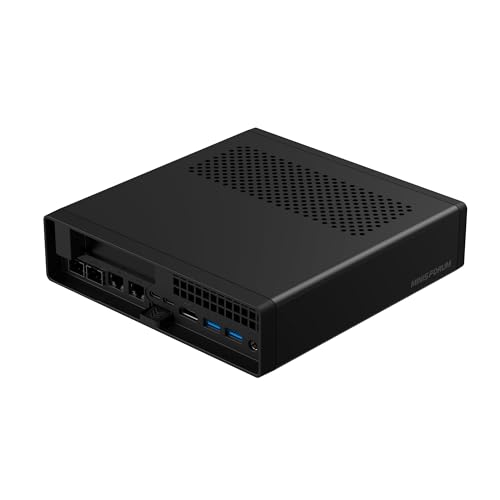
- Best overall workstation platform: Minisforum MS-A2 Mini Workstation, Ryzen 9 HX, PCIe x16 Slot, Dual 10G SFP+ — Check on Amazon
- Skytech Omega Gaming PC, Ryzen 7 7700X, RTX 4070 Super 12GB, 32GB DDR5 — Check on Amazon
- Minisforum MS-01 Mini Workstation, Core i9-13900H, Dual 10GbE SFP+, PCIe Slot — Check on Amazon
- AtomMan G7 Ti Mini PC, Core i9-14900HX, RTX 4070 Laptop GPU, 32GB DDR5 — Check on Amazon
See 2 more Amazon options
- Thermaltake LCGS View i4770, Core i7-14700KF, RTX 4070 12GB, Liquid Cooled — Check on Amazon
- Apple Mac mini M4 Pro, 24GB Unified Memory, 512GB SSD — Check on Amazon
Read the full guide ↓
Disclosure: As an Amazon Associate, reviewstook.com earns from qualifying purchases. Links to Amazon on this page are affiliate links; they cost you nothing extra. Listing details such as price and availability change often, so check the current Amazon listing before you buy.
Fifteen hundred dollars is the budget where a workstation stops being a fast office PC with ambitions and starts being a platform. Cheaper tiers buy you cores and memory. This tier buys you the things professionals actually run out of: a real PCIe slot for a capture card, a faster GPU or a network card; 10-gigabit networking for a NAS that holds your project files; memory ceilings of 64GB and 96GB instead of a soldered 32GB wall; and cooling that holds clock speeds through a four-hour render instead of shining for a four-minute benchmark. The six machines below were chosen on those axes — sustained-load behavior, RAM ceiling, expansion and network speed — not on gaming frame rates, because that is what separates a workstation from a gaming PC wearing a grey case.
The honesty note comes first, because it shapes everything after it: none of these machines is ISV-certified. Certified workstations — the HP Z, Dell Precision and Lenovo ThinkStation lines with professionally certified GPU drivers for SolidWorks, AutoCAD, Creo and their peers — live above this price, and the certification is a large part of what you pay for up there. What $1,500 buys instead is prosumer hardware that reaches surprisingly far: sixteen-core CPUs, a desktop RTX 4070 Super, workstation-style mini PCs with genuine expansion slots, and Apple’s creator-focused silicon. For compiling, photo and video editing, data work, virtualization, homelab duty and most CAD, that is the right purchase. If your employer or your software vendor requires certified drivers, this guide will tell you so plainly and point you at the tier where certification starts. Below are the quick picks, detailed reviews of all six machines, a comparison table, a workstation buying checklist, the mistakes that waste money at this tier, and the questions professionals ask before committing a work machine.
In this guide
Quick Picks
Short on time, or comparing several options at once? Each row below names a professional use case and the machine that suits it, with a link to the listing.
| Buyer type | Pick | Why it stands out | Link |
|---|---|---|---|
| Best overall workstation platform | Minisforum MS-A2 Mini Workstation | PCIe x16 slot, dual 10G SFP+, RAM to 96GB in 1.78 litres | Check on Amazon |
| Best for GPU rendering | Skytech Omega, Ryzen 7 7700X / RTX 4070 Super | Desktop 12GB CUDA card and a published 750W Gold PSU | Check on Amazon |
| Best for NAS and network-heavy work | Minisforum MS-01 Mini Workstation | Dual 10GbE SFP+ plus dual 2.5GbE, one with vPro | Check on Amazon |
| Best compact CUDA machine | AtomMan G7 Ti Mini PC | 24-core CPU and a 140W RTX 4070 Laptop GPU in a mini | Check on Amazon |
| Best sustained multi-core tower | Thermaltake LCGS View i4770 | 20-core i7-14700KF, desktop RTX 4070, liquid cooling | Check on Amazon |
| Best for Mac creators | Apple Mac mini M4 Pro, 24GB / 512GB | Hardware ProRes and AV1 engines, Thunderbolt 5 | Check on Amazon |
How These Picks Were Chosen
The budget was applied as a ceiling for the whole machine: every pick below is a real Amazon listing in the United States. Prices on this tier move often, so check price on Amazon for each pick and confirm the current price fits this budget before you buy.
We did not use these machines ourselves. We read the maker listings, specification pages and independent review coverage, and judged on the four things that decide whether a PC works as a workstation over years rather than weeks. First, sustained-load behavior: a workstation earns its money in hour three of a render, so cooling design and documented load noise count for more than burst specifications. Second, the memory ceiling: every pick’s fitted RAM is stated, and so is the road upward — socketed slots to 64GB or 96GB score; soldered memory is graded as the hard limit it is. Third, expansion: a PCIe slot you can actually use — for a capture card, a second GPU-class accelerator, a faster NIC — is the difference between a platform and an appliance, and slot wiring (physical length versus electrical lanes) is reported as documented, never rounded up. Fourth, networking: dual 10-gigabit ports change what a machine can be in a NAS-centred studio, so they are weighted accordingly. Where a specification could not be verified from a listing or maker source — a port count on an integrator tower whose GPU brand varies by batch, for instance — the copy says so instead of guessing.
One filter sat on top of all of that: honesty about the word “workstation.” Gaming hardware with RGB lighting was not excluded — one pick below is a gaming tower, graded openly as the render alternative — but no pick is allowed to borrow credibility it has not earned. None of these machines carries ISV certification, none ships with professional certified drivers, and where a pick’s graphics are integrated or a laptop part, the review says exactly that and names what the work actually waits on.
The 6 Best Workstation PCs Under $1,500
Minisforum MS-A2 Mini Workstation — Ryzen 9 HX, PCIe x16 Slot, Dual 10G SFP+
Who it suits: Professionals and homelab builders who want a workstation that can change jobs — virtualization host today, capture or GPU machine tomorrow — in a box that sits behind a monitor.
The MS-A2 is the closest thing in this guide to a workstation in the traditional sense, shrunk to about 1.78 litres. The configuration documented on its Amazon listing pairs a 16-core, 32-thread Ryzen 9 HX processor (up to 5.4GHz) with 32GB of DDR5 memory and a 1TB SSD, and the platform around it is what earns the top spot: a physical PCIe x16 slot (wired for x8 bandwidth, as Minisforum documents it — a real slot for a capture card, a low-profile GPU or another NIC, not a decorative one), two 10-gigabit SFP+ ports on an Intel X710 controller plus dual 2.5-gigabit Ethernet, three storage positions across M.2 and U.2, and two DDR5 SO-DIMM slots that take the machine to 96GB. Check price on Amazon for the configured version. A barebone version of the family is also listed — the sensible route only if you already own the DDR5 and storage it needs.
Two honest notes belong in this review. As shipped, the graphics are integrated Radeon 610M: fine for displays, light CAD viewing and encode-free desktop work, but any GPU-heavy workload waits on a card you fit in the slot yourself, and the slot area’s airflow is limited, which argues for a low-profile, modest-power card rather than anything ambitious. Independent review coverage also found the MS-A2 audible under sustained load and relatively thirsty at idle — it is a dense little machine doing a big machine’s job, and it sounds like one when the sixteen cores are all working. Neither point disqualifies it; both are the price of the format, and for a machine bought as a platform it remains the most expandable workstation under $1,500 by a wide margin.
- Physical PCIe x16 slot (x8 electrical) — capture, GPU or NIC upgrades are real.
- Dual 10G SFP+ plus dual 2.5G Ethernet: NAS workflows at wire speed.
- Socketed DDR5 to 96GB and three storage positions.
Honest limitation: Integrated graphics as shipped — GPU work waits on a card you add — and it is audible under full sustained load.
Choose it if expansion and networking matter more than out-of-box GPU power. Skip it if you need CUDA rendering on day one with no further purchases — that is the Skytech below.

Skytech Omega Gaming PC — Ryzen 7 7700X, RTX 4070 Super 12GB, 32GB DDR5
Who it suits: Video editors, 3D artists and CUDA developers who need a desktop-class GPU now, and are willing to buy a gaming tower to get one at this price.
Graded as a workstation, this gaming PC is the render pick, and the reason is a single specification: a desktop GeForce RTX 4070 Super with 12GB of GDDR6X memory. That card is the tier’s serious CUDA and GPU-rendering tool — Blender, DaVinci Resolve, Premiere Pro, Unreal and local AI workloads all run on it at a level no integrated or laptop solution in this guide matches — and it sits in a standard tower with a Ryzen 7 7700X (8 cores, 16 threads), 32GB of DDR5, a 1TB Gen4 NVMe SSD and a published 750W Gold power supply, which matters more than it sounds: Skytech prints the PSU figure, so the upgrade ceiling is known rather than guessed. The tower format is itself the workstation argument — full-size parts, room to add storage and memory, and cooling volume a mini cannot offer during long renders. Check price on Amazon before you buy, and confirm the current price fits this budget.
The caveats are the ones that follow any integrator tower. Skytech’s listings reserve that the fitted GPU brand may vary by batch, which means the exact card — and its display outputs — should be confirmed on the live listing and on delivery day if multi-monitor work matters to you. It ships with Windows 11 Home rather than Pro, which some professional environments will want to upgrade. And it is, unapologetically, a gaming machine in presentation: RGB memory and a showcase case. None of that affects its render throughput, which is what it is graded on here.
- Desktop RTX 4070 Super 12GB — the guide’s strongest CUDA/render GPU.
- Published 750W Gold PSU: the upgrade ceiling is a known number.
- Standard tower serviceability: memory, storage and GPU all replaceable.
Honest limitation: The fitted GPU brand may vary, so confirm outputs on the live listing, and check price on Amazon to confirm it fits this budget.
Choose it if GPU rendering or CUDA development is the workload. Skip it if your work is network- or virtualization-heavy, or you need a machine that disappears on a desk.

Minisforum MS-01 Mini Workstation — Core i9-13900H, Dual 10GbE SFP+, PCIe Slot
Who it suits: Network-heavy professionals — homelab administrators, developers running local infrastructure, studios whose project files live on a fast NAS.
If the MS-A2 is the expansion pick, the MS-01 is the network pick, and its port list reads like a small server’s: two 10-gigabit SFP+ ports on an Intel X710 controller, plus two 2.5-gigabit ports (one of them an Intel i226-LM with vPro remote management), two USB4 ports and an HDMI output — three displays from verified outputs. Inside, a Core i9-13900H (14 cores, 20 threads, up to 5.4GHz) drives three M.2 storage slots with a U.2 option via the included adapter, and there is a PCIe x16 slot wired for x8 — with the physical limits stated plainly, because they decide what the slot is for: it takes half-height, single-slot cards, which means capture cards, extra NICs and modest accelerators, not full-size GPUs. Memory is socketed DDR5 with an official ceiling of 64GB. Check price on Amazon for current pricing on this configuration.
The working caveats are documented ones. ServeTheHome’s extensive testing of this platform found that some PCIe cards never initialize in the slot — the famous plug-fest result — so a specific capture or accelerator card should be checked against owner reports before the machine is bought around it. At full CPU load the MS-01 measures around 42 to 45 dB(A): audible in a quiet studio, ordinary in an office. And its Iris Xe integrated graphics set the same boundary as the MS-A2’s — display and light acceleration work, nothing heavier, until a suitable low-profile card goes in the slot.
- Dual 10GbE SFP+ (X710) plus dual 2.5GbE, one with vPro management.
- Three M.2 slots plus U.2 option — storage-heavy builds fit.
- PCIe slot for capture/NIC duty, within documented half-height limits.
Honest limitation: The slot accepts only half-height single-slot cards, some cards are documented not to initialize, and the official memory ceiling is 64GB.
Choose it if your workstation’s real job is moving data — NAS, virtualization, network services. Skip it if you need a full-size GPU slot or silent running under load.

AtomMan G7 Ti Mini PC — Core i9-14900HX, RTX 4070 Laptop GPU, 32GB DDR5
Who it suits: Creators who need CUDA in the smallest possible footprint — a desk or a location bag — and understand exactly which RTX 4070 they are getting.
The G7 Ti is the compact render pick: a Core i9-14900HX with 24 cores and 32 threads paired with an RTX 4070 Laptop GPU running at up to 140W, 32GB of DDR5-5600 across two SO-DIMM slots (upgradeable to 96GB), a 1TB SSD with a second SSD slot, and outputs documented on the listing as HDMI 2.1 and USB4. Check price on Amazon for the configured 32GB/1TB version. For a creator, the appeal is real: a machine the size of a small book that can drive a Resolve or Blender GPU workflow, with a CPU core count that matches or beats the towers here for compile and encode-adjacent work, and memory headroom that most minis at this price do not offer.
The naming discipline matters more in this review than any other, so here it is without softening: the RTX 4070 in this machine is the laptop part, with 8GB of memory — a clear, material step below the 12GB desktop RTX 4070 and 4070 Super in the two towers in this guide. Scenes that fit in 8GB render well; scenes that do not fit do not render at all, and no driver setting changes that arithmetic. Treat the G7 Ti as a strong 8GB CUDA machine and it will not disappoint you; treat it as a desktop 4070 that happens to be small and it will. The barebone version only makes sense if you already own suitable DDR5 and an SSD, because the memory and storage you would need to add are a substantial purchase on their own.
- 24-core i9-14900HX — the highest core count in this guide.
- RTX 4070 Laptop GPU at up to 140W: real CUDA in a mini footprint.
- Socketed memory to 96GB and a second SSD slot.
Honest limitation: The GPU is the 8GB laptop part, not the 12GB desktop card — large render scenes and heavy AI workloads hit that wall first.
Choose it if desk space is scarce and your GPU workloads fit in 8GB. Skip it if your scenes are large or your work is VRAM-bound — buy the tower.

Thermaltake LCGS View i4770 — Core i7-14700KF, RTX 4070 12GB, Liquid Cooled
Who it suits: Professionals whose bottleneck is sustained multi-core throughput — long renders, big compiles, simulation and encode queues.
The Thermaltake is the sustained-load tower. Its Core i7-14700KF brings 20 cores (8 performance, 12 efficiency) to work that scales across all of them, its RTX 4070 is the desktop 12GB card, and its 32GB of DDR5-5600 and 1TB NVMe are the expected specification at this tier. What distinguishes it from the Skytech is intent: the liquid cooling is there to hold clock speeds through the long middle of a render rather than to win a benchmark screenshot, and a full-size tower’s airflow is the honest way to keep a 20-core CPU fed for hours. For a workstation that will spend its life at high load, that thermal headroom is the specification that matters most and appears on no headline.
Its buying discipline is simple, and the review will not pretend otherwise: check price on Amazon first, and only buy this pick when the current price fits this budget. Pricing for models like this moves often, so if the live price does not fit, either wait or take the Skytech instead. When it does fit the budget, it is arguably the best sustained-load value here.
- 20-core i7-14700KF — the strongest sustained multi-core CPU here alongside the G7 Ti.
- Desktop RTX 4070 12GB with liquid cooling for long renders.
- Full-tower serviceability and thermal headroom.
Honest limitation: Check price on Amazon before buying — this pick only makes sense when its current price fits this budget.
Choose it if your workloads run for hours at high load. Skip it if you need a machine that fits a small desk or runs quietly.

Apple Mac mini M4 Pro — 24GB Unified Memory, 512GB SSD (MCX44LL/A)
Who it suits: Mac-based creators — video editors in Final Cut or Resolve, audio producers, developers in the Apple ecosystem — who want the strongest small Mac under the ceiling.
The Mac mini M4 Pro is the guide’s macOS pick, included because a large share of professional creative work lives on that platform and this machine is genuinely built for it: a 12-core CPU (8 performance, 4 efficiency) and 16-core GPU on Apple’s silicon, 24GB of unified memory with 273GB/s of bandwidth, hardware acceleration for ProRes and AV1, three Thunderbolt 5 ports plus HDMI at the back and two USB-C ports at the front, and Apple’s published support for up to three displays. For timeline work in ProRes codecs, Logic sessions and Xcode builds, the dedicated media engines do work that the x86 machines here handle less elegantly, and they do it quietly and in a box that fits anywhere. Check price on Amazon before you buy: this pick belongs in this guide only when its current price fits the budget, so if the live price is above that line, wait rather than stretch.
The limitations are structural and permanent. Memory and storage are part of the chip package: 24GB and 512GB are what this machine will have on its last day of work, so both figures must fit your workload not just now but for the machine’s life — and 512GB is tight for video work, making an external SSD a planned second purchase rather than an accessory. It runs macOS only: no CUDA, no Windows-only engineering software, no PCIe slot, no 10-gigabit port on this configuration. Judged inside its ecosystem it is excellent; judged as a general workstation platform it is the most closed machine in this guide.
- Hardware ProRes and AV1 engines — media work is its native language.
- Thunderbolt 5 and up to three displays, per Apple’s specification.
- Quiet, tiny and power-efficient under sustained creative loads.
Honest limitation: Memory and storage can never be upgraded, 512GB is tight,
Choose it if your professional software lives on macOS and 24GB fits your projects. Skip it if you need CUDA, Windows software, internal expansion or more memory later.

Comparison Table
| Product | Type | Best use | Link |
|---|---|---|---|
| Minisforum MS-A2 Mini Workstation | Mini workstation, PCIe slot | Expansion platform: GPU/capture/NIC plus dual 10G | Check on Amazon |
| Skytech Omega, 7700X / RTX 4070 Super | Gaming tower, graded as render station | Desktop 12GB CUDA rendering | Check on Amazon |
| Minisforum MS-01 Mini Workstation | Mini workstation, network-first | NAS workflows, virtualization, vPro management | Check on Amazon |
| AtomMan G7 Ti Mini PC | Compact mini with laptop GPU | CUDA and 24-core CPU work in the smallest box | Check on Amazon |
| Thermaltake LCGS View i4770 | Liquid-cooled tower | Sustained 20-core loads | Check on Amazon |
| Apple Mac mini M4 Pro, 24GB / 512GB | macOS mini | ProRes/media creation inside the Apple ecosystem | Check on Amazon |
How to Choose a Workstation PC Under $1,500
- Start with the workload’s real bottleneck, not the badge. GPU rendering wants VRAM and CUDA — that is the towers and the G7 Ti. Virtualization and NAS work want cores, memory ceiling and network speed — that is the two Minisforum minis. Media work on macOS wants the media engines — that is the Mac. A workstation bought for the wrong bottleneck is slow at any price.
- Read the memory ceiling, not just the fitted memory. Every pick here ships 32GB except the Mac’s 24GB. What decides the machine’s working life is the road upward: 96GB on the MS-A2 and G7 Ti, 64GB on the MS-01, standard DIMMs in the towers, and nothing at all on the Mac. If your datasets are growing, buy the ceiling, not the configuration.
- Check slot wiring before planning an upgrade. Both mini workstations describe their slot as PCIe x16; both are wired for x8 bandwidth, and the MS-01’s is physically limited to half-height, single-slot cards. That is plenty for capture cards, NICs and low-profile accelerators — and a hard stop for full-size GPUs. Plan the card you will actually fit.
- Price 10-gigabit networking honestly. If your projects live on a NAS, dual 10G SFP+ ports (MS-A2, MS-01) are not a luxury — they are the difference between editing off the server and copying files locally all day. If everything lives on internal SSDs, the same ports are worth almost nothing to you. Know which professional you are.
- Judge sustained loads, not burst numbers. A workstation’s clock speed in hour three is its real specification. Tower volume and liquid cooling (Thermaltake) hold speeds; dense minis trade some sustained performance and quiet for size, and documented load noise — 42 to 45 dB(A) on the MS-01 — tells you what your studio will hear.
- Name the GPU precisely. “RTX 4070” describes three different parts in this guide: the desktop 4070 Super 12GB, the desktop 4070 12GB, and the laptop 4070 8GB. VRAM decides which render scenes and AI models fit at all. Never buy the name; buy the memory figure and the form factor.
- Decide whether you need certification before you shop. If your CAD or engineering software must run on ISV-certified drivers — a common requirement in firm and client work — none of these machines qualifies, and the correct purchase is a certified line (HP Z, Dell Precision, Lenovo ThinkStation) at a higher budget. If your software is Resolve, Blender, Premiere, code or data, certification buys you little and the hardware here buys you a lot.
- Check price on Amazon before you buy. Workstation-tier prices on Amazon change often; the professional habit is to confirm the current price fits your budget before the listing sets your decision for you. See also Best Workstation PC Under $2500 for the tier where several of these machines normally live.
- Count displays from verified outputs only. The MS-A2’s listing documents HDMI plus two USB-C display outputs; the MS-01 documents two USB4 plus HDMI; Apple publishes up to three displays for the Mac mini. On integrator towers the fitted GPU brand varies by batch, so confirm the exact card’s outputs on the live listing before planning a three-monitor desk around one.
- Budget the second purchase. The MS-A2’s GPU card, the Mac’s external SSD, the MS-01’s SFP+ transceivers and cabling — several picks here are platforms whose full working cost includes one planned addition. A workstation budget that ends at the box is a budget that gets revised in the first month.
What $1,500 Buys a Professional — and What It Still Does Not
The step up to this tier is real, and it comes in four forms. The first is expansion: below $1,000, mini PCs are sealed appliances and towers are gaming machines; at $1,500 you can buy a genuine PCIe slot in a 1.78-litre box and plan a machine’s second and third jobs. The second is networking: dual 10-gigabit Ethernet stops being a server-room feature and becomes something a desk machine can have, which reorganizes how a small studio stores and shares work. The third is memory headroom — ceilings of 64GB and 96GB that let a machine grow into heavier datasets instead of being replaced by them. The fourth is sustained performance: twenty-plus cores with the cooling to hold them, and a desktop 12GB GPU for rendering that does not apologize.
What the tier does not buy deserves the same clarity. It does not buy ISV certification: the certified-driver programs behind SolidWorks, CATIA, Creo and Siemens NX support live on the HP Z, Dell Precision and Lenovo ThinkStation lines, with professional GPUs, at prices that start where this guide ends. It does not buy ECC memory as a documented feature of any pick here, next-day on-site business support contracts, or the validated-component testing that certified lines undergo. Spend this budget on platform, headroom and sustained throughput, and it is the best-value tier in professional computing. Spend it expecting a certified workstation at a discount, and it will disappoint you for reasons that have nothing to do with speed. Readers whose workloads are lighter — documents, browser, calls and light creation — should save the difference and start with Best Workstation PC Under $800 or Best Home Office PC Under $1500 instead.
Sustained Loads: The Specification That Is Never Printed
Every CPU in this guide advertises a boost clock, and no workstation in the world works at its boost clock. Boost is a sprint figure — what a core can reach briefly, while the silicon is cool. Professional work is the opposite shape: a render, a compile farm run, a simulation or an export queue holds most cores near their maximum for tens of minutes or hours, and the speed the machine settles at under that load is set by its cooling and power delivery, not by the number on the box. This is why the guide weighs form factor so heavily. The Thermaltake’s tower volume and liquid cooling exist to move heat away from a 20-core CPU indefinitely. The Skytech’s full-size case does the same job with air. The minis solve a harder problem — the same class of silicon in a fiftieth of the volume — and they solve it by accepting lower sustained power limits and more fan noise, which is why documented figures like the MS-01’s 42 to 45 dB(A) at full CPU load appear in the reviews: they are the audible signature of sustained work in a small box.
The practical reading rule is to match the machine’s thermal design to your load’s duty cycle. If your heavy work arrives in bursts — a photo export here, a short compile there, timeline scrubbing between edits — a dense mini like the MS-A2 or G7 Ti will feel every bit as fast as a tower, because bursts are exactly what boost clocks are for. If your machine will sit at full load through the working day, the towers’ headroom stops being a luxury and becomes the specification you are actually buying, and a mini’s fans become a colleague you did not hire. Neither answer is a compromise; they are different tools. The mistake is buying the sprint figure for a marathon workload — or paying for marathon cooling to run sprints.
Common Buying Mistakes
- Buying a gaming tower for its badge specs when the workload is virtualization or NAS service — the minis with 10G ports and memory ceilings do that work better for less.
- Reading “RTX 4070” as one product. The laptop 8GB part and the desktop 12GB parts share a name and little else; VRAM-bound work fails on the wrong one.
- Planning a full-size GPU upgrade into a mini’s slot without checking the physical limits — half-height and single-slot on the MS-01, x8 wiring on both minis.
- Assuming a PCIe card will work because it fits. The MS-01 has documented cases of cards never initializing; check your specific card against owner reports first.
- Buying without checking the current price first, just because the guide listed the machine. Check price on Amazon and confirm the live price still fits this budget before you commit.
- Buying soldered memory for a growing workload. The Mac’s 24GB is forever; if your projects double in size every two years, a socketed ceiling is the professional choice.
- Forgetting the transceivers. SFP+ ports need modules and cabling that RJ45 ports do not; price them into a 10G plan or choose the 2.5G ports and accept the speed.
- Expecting ISV-certified stability from consumer drivers. If a client or firm requires certified CAD drivers, that requirement decides the purchase before any benchmark does.
- Ignoring load noise in a one-room studio. A mini at 42–45 dB(A) under full load is fine in an office and a genuine problem next to a recording microphone.
Final Recommendation
- Most professionals: Minisforum MS-A2 Mini Workstation.
- GPU rendering and CUDA: Skytech Omega.
- NAS and network-heavy work: Minisforum MS-01 Mini Workstation.
- Smallest desk, real GPU: AtomMan G7 Ti Mini PC.
- Sustained multi-core loads: Thermaltake LCGS View i4770.
- Mac-based creators: Apple Mac mini M4 Pro.
Our top two at this budget are the Minisforum MS-A2, for the platform — slot, ports and memory ceiling that let a workstation change jobs over its life — and the Skytech Omega, for the desktop RTX 4070 Super that makes GPU rendering a solved problem at this tier. Between them they cover the two shapes this search usually takes: a machine bought to grow, and a machine bought to render. If your work moves data more than pixels, the MS-01’s networking is the better spend; if your desk has no room for either tower or dock, the G7 Ti puts an 8GB CUDA card and 24 cores in a book-sized box; and if your studio runs on macOS, the Mac mini M4 Pro is the professional default for that ecosystem. Newer professionals sizing their first dedicated machine should also see Best Workstation PC For Beginners Under $1500, and streamers who create on the same desk can compare Best Workstation PC For Streaming Under $1500. Check price on Amazon for each pick, confirm the exact configuration on the listing, and buy the ceiling your workload will need in three years — not just the specification it needs today.
Frequently Asked Questions
Is a $1,500 PC a real workstation, or a gaming PC in disguise?
Both kinds are in this guide, labeled as what they are. The two Minisforum minis are workstation platforms by design — PCIe expansion, 10-gigabit networking, high memory ceilings. The Skytech and Thermaltake are gaming towers graded on their workstation merits (desktop GPUs, sustained cooling, standard parts). What none of them is, is ISV-certified — that is the honest boundary of this budget.
What is ISV certification, and do I need it?
ISV certification means the GPU maker and the software vendor have tested and support a specific driver for a specific professional application — SolidWorks, AutoCAD, Creo, NX and similar. It lives on professional lines such as HP Z, Dell Precision and Lenovo ThinkStation with professional GPUs, generally above this budget. You need it if your firm, client or support contract requires it. For editing, rendering in Blender or Resolve, development, data work and most CAD viewing and modeling, consumer hardware and drivers are the normal, working choice.
How much RAM does a workstation under $1,500 need?
32GB is the working standard at this tier and every Windows pick here ships it. The more important figure is the ceiling: 96GB on the MS-A2 and G7 Ti, 64GB on the MS-01, standard slots in the towers. Virtualization, large datasets and heavy multitasking grow into memory over a machine’s life — buy a ceiling above your current need. The exception is the Mac mini, whose 24GB is fixed permanently and must fit your workload for the machine’s whole life.
Can these machines run three monitors?
From verified outputs: the MS-A2’s listing documents HDMI plus two USB-C display outputs, the MS-01 documents two USB4 ports plus HDMI, and Apple publishes support for up to three displays on the Mac mini M4 Pro. For the two towers, the fitted GPU brand can vary by batch on integrator listings, so confirm the exact card and its outputs on the live listing before planning a three-screen desk.
Is 10-gigabit Ethernet worth paying for on a workstation?
If your project files live on a NAS or server, yes — it is the difference between working directly off shared storage and maintaining local copies. The MS-A2 and MS-01 both carry dual 10G SFP+ ports. Remember that SFP+ needs transceivers and matching cabling or a DAC cable, which are second purchases; if your network is gigabit or 2.5G end to end, the ports add nothing today.
Why is a laptop GPU in the G7 Ti treated so cautiously?
Because the name is the same and the part is not. The G7 Ti’s RTX 4070 Laptop GPU carries 8GB of memory against the desktop cards’ 12GB, and VRAM is a hard wall for render scenes and AI workloads: work that fits renders well, work that does not fit fails outright. At up to 140W it is a strong implementation of the laptop part — the caution is about the category, not this machine’s execution of it.
Should I buy a mini workstation or a tower?
Buy the tower if the GPU is the workload and might be upgraded, or if sustained multi-core loads run for hours daily — volume is cooling, and cooling is sustained speed. Buy a mini if expansion means network cards and capture rather than full-size GPUs, if desk space is genuinely scarce, or if the machine doubles as a homelab node. The comparison most buyers actually face is laid out in Best Workstation PC Under $1500 alongside the smaller-format options in Best Workstation PC For Small Spaces Under $1500 and the gaming-leaning alternatives in Best Workstation PC For 1440p Gaming Under $1500.


