Where to buy
Check the latest price, availability and delivery on Amazon. Orders are placed on Amazon. We may earn a commission from qualifying purchases.
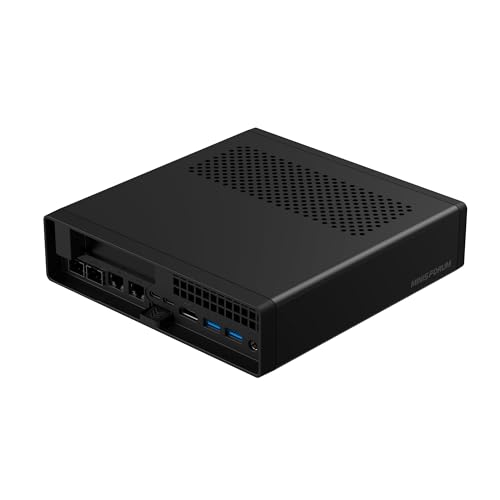
- Best streaming workstation platform: Minisforum MS-A2 Mini Workstation, Ryzen 9 HX, PCIe x16 Slot, Dual 10G SFP+ — Check on Amazon
- Skytech Omega Gaming PC, Ryzen 7 7700X, RTX 4070 Super 12GB, 32GB DDR5 — Check on Amazon
- Minisforum MS-01 Mini Workstation, Core i9-13900H, Dual 10GbE SFP+, PCIe Slot — Check on Amazon
- AtomMan G7 Ti Mini PC, Core i9-14900HX, RTX 4070 Laptop GPU, 32GB DDR5 — Check on Amazon
See 2 more Amazon options
- Thermaltake LCGS View i4770, Core i7-14700KF, RTX 4070 12GB, Liquid Cooled — Check on Amazon
- Apple Mac mini, M4 Pro, 24GB Unified Memory, 512GB SSD — Check on Amazon
Read the full guide ↓
Disclosure: As an Amazon Associate, reviewstook.com earns from qualifying purchases. Links to Amazon on this page are affiliate links; they cost you nothing extra. Listing details such as price and availability change often, so check the current Amazon listing before you buy.
Streaming from a workstation is a different job from streaming a game, and it fails in different places. The typical session is a work application — an IDE, a CAD viewport, a DAW, a photo or video editor — running full-screen while OBS captures it, encodes the picture and pushes it to a platform, with a browser full of chat, alerts and dashboards open beside both. Three loads land on the same silicon at once: the workload itself, the encode, and everything you use to run the show. A machine that renders beautifully but encodes on the same cores the work needs will stutter in both directions, and the audience sees the stutter, not the specification sheet. So this guide grades the six workstations under $1,500 the way a streamer loads them: encoder first, then the cores left over for the work, then the network port the stream leaves by.
The platform rules are worth fixing before any machine is discussed. On Twitch, the practical standard is a constant-bitrate stream at around 6,000 kbps with two-second keyframes, in H.264 — the one codec every viewer device decodes. YouTube accepts higher bitrates, ingests 1440p (which quietly earns your stream better transcoding), and supports HEVC and AV1 uploads on supported setups, so a machine with an AV1 encoder has a genuine second route there. Live 4K streaming remains platform-limited rather than machine-limited: ingest support is narrow, viewer-side delivery is inconsistent, and no purchase here should be made on a 4K-streaming promise. What $1,500 does buy is the hardware to run a heavy work application and a clean, hardware-encoded 1080p or 1440p-ingest stream simultaneously — provided the encoder silicon is actually in the machine, which is exactly where this tier’s listings need reading carefully.
The honesty spine of the wider workstation category applies here unchanged, and one layer is added. None of these machines is ISV-certified, none ships with certified professional drivers, and none is credited with ECC memory, because none of their listings establishes it. The added layer is encoder honesty: an encoder claim is made only where the base research documents the silicon that carries it, at exactly the strength that silicon supports. A desktop RTX 4070-class card carries two NVENC blocks and AV1 encode. A laptop RTX 4070 carries NVENC and AV1 with no encoder count documented, and none is claimed. RDNA 2-generation integrated Radeon encodes H.264 and HEVC and does not encode AV1; Intel’s Iris Xe Quick Sync is a genuinely good H.264 encoder that likewise does not encode AV1. And an F-suffix Intel CPU has no integrated graphics at all — no Quick Sync — which matters for exactly one pick below. Every grading that follows is built from those documented blocks and nothing else.
In this guide
Quick Picks
Short on time? Each row names a streaming situation and the workstation that fits it, with a link to the listing.
| Streamer type | Pick | Why it stands out for streaming | Link |
|---|---|---|---|
| Best streaming platform | Minisforum MS-A2 Mini Workstation | A real PCIe slot for a capture card, 16 cores for software encoding, dual 10G networking | Check on Amazon |
| Best encoder in the guide | Skytech Omega, Ryzen 7 7700X / RTX 4070 Super | Desktop card with dual NVENC and AV1 — stream and record at once, work untouched | Check on Amazon |
| Best for network-heavy studios | Minisforum MS-01 Mini Workstation | Quick Sync encoding plus dual 10GbE for NAS-held project files | Check on Amazon |
| Best compact streaming machine | AtomMan G7 Ti Mini PC | RTX 4070 Laptop GPU’s NVENC with AV1, and 24 CPU cores, in a book-sized box | Check on Amazon |
| Best sustained-load streamer | Thermaltake LCGS View i4770 | Desktop RTX 4070’s dual NVENC and AV1 beside a liquid-cooled 20-core CPU | Check on Amazon |
| Best for Mac creators | Apple Mac mini, M4 Pro, 24GB / 512GB | Hardware H.264/HEVC and ProRes media engines that stream without touching the CPU | Check on Amazon |
How These Picks Were Chosen
The budget was applied as a ceiling for the whole machine: every pick is a real Amazon listing included for this under-$1,500 tier in the United States, and because listing prices change often, each review tells you to check price on Amazon rather than relying on a number printed here. Three of the six are price-conditional in ways their reviews state plainly: the Skytech belongs here only when its live price sits within this guide’s budget, the Thermaltake belongs here only when its live price does the same, and the Mac mini likewise only at or under $1,500. A streaming workstation bought well over its sensible price is a bad purchase however good its encoder is.
On top of the budget sat the streaming filter, applied in a fixed order. First, the encoder: which hardware block turns your screen into a stream, in which codecs, and does using it steal resources from the work being streamed? Dedicated encoder silicon — NVENC on a discrete card, Quick Sync on an Intel iGPU, Apple’s media engines — encodes almost for free, leaving the CPU and GPU render paths to the workload. Software x264 encoding is the fallback, graded honestly per pick by the cores available to feed it. Second, the cores left over: a machine streaming a compile or a heavy editing session needs CPU headroom after OBS takes its share. Third, the exit: a stream is only as stable as its upload path, so wired networking is graded where the base research documents a port, and no port speed is claimed for any pick whose documentation does not state one. Fourth, the workstation fundamentals — memory ceiling, expansion, sustained-load behavior — because the machine has to do the work before it can stream it.
We did not use these machines ourselves. The product facts, prices and specifications come from the verified listing research behind the base guide for this tier, and the streaming grading is derived from the encoder silicon that research documents — nothing was added from outside it. Where a specification could not be verified — an Ethernet speed on an integrator tower, for instance — the copy says so instead of guessing.
The Encoder Map: What Each Machine Actually Streams With
Every encoder claim in this guide is on this page, derived from the documented silicon and nowhere else. Read it before the reviews; it is the difference between a workstation that streams and one that merely has a screen worth capturing.
- Desktop RTX 4070 Super and RTX 4070 (Skytech Omega, Thermaltake View): two eighth-generation NVENC blocks with AV1 encode. This is the strongest encoder arrangement in the guide: one block can carry the live stream while the second records a clean local copy at higher quality, and neither touches the CPU cores your workload is using. Twitch H.264, YouTube AV1 or HEVC, simultaneous recording — all of it is hardware work.
- RTX 4070 Laptop GPU (AtomMan G7 Ti): an Ada-generation NVENC block with AV1 encode, in the laptop implementation. The base research documents no encoder count for this part, so none is claimed — treat it as a single streaming encoder of current generation, which is entirely sufficient for one live stream plus the machine’s CUDA work, with the 24-core CPU behind it as the strongest software fallback in the guide.
- Intel Iris Xe Quick Sync (Minisforum MS-01): a dedicated encode block in the integrated graphics, and a good one — Quick Sync’s H.264 output at Twitch bitrates is clean and costs the CPU almost nothing. Its boundary is AV1: this generation of Quick Sync decodes AV1 but does not encode it, so YouTube’s AV1 route is closed and H.264/HEVC are the streaming codecs. No second encoder is claimed for this pick.
- Radeon 610M integrated graphics (Minisforum MS-A2): AMD’s VCN media block in its RDNA 2 form — H.264 and HEVC encode, and no AV1 encode. AMD’s H.264 output is the softest of the hardware encoders here at Twitch’s bitrate, which is why this machine’s streaming plan leans on its two documented strengths instead: sixteen CPU cores that make x264 a genuine route, and a PCIe slot that accepts a capture card for console, camera or second-machine sources.
- Apple M4 Pro media engines (Mac mini): hardware H.264 and HEVC encode and dedicated ProRes engines, entirely separate from the CPU and GPU — the reason a Mac can stream a timeline session without the timeline noticing. AV1 on this silicon is a decode capability, not an encode one, and no AV1 encode is claimed for it anywhere in this guide.
- What is not in this set: no pick carries a Turing- or Ampere-generation NVENC, so there is no older-encoder grading to do; no integrated AMD graphics is credited with AV1 encode; and the one F-suffix CPU in the guide — the Thermaltake’s i7-14700KF — has no Quick Sync, which costs it nothing because its desktop RTX 4070 carries the encoding. That absence is stated so nobody buys it expecting an Intel encoder that is not there.
The 6 Best Workstation PCs for Streaming Under $1,500
Minisforum MS-A2 Mini Workstation — Ryzen 9 HX, PCIe x16 Slot, Dual 10G SFP+
Who it suits: The professional whose stream is one job among several this machine will hold — a capture source today, a virtualization or NAS role tomorrow — and who wants the platform that can change jobs without being replaced.
Graded as a streaming machine, the MS-A2’s headline is not an encoder; it is a slot. The physical PCIe x16 slot (wired for x8 bandwidth, as Minisforum documents it) is the only internal expansion in this guide that accepts a capture card, which makes this the one pick that can take a console, a camera or a second PC’s output in hardware rather than over a USB dongle — and still have room in its job description for a low-profile GPU or a faster network card later. Around that slot sits a 16-core, 32-thread Ryzen 9 HX processor running to 5.4GHz, 32GB of DDR5 in two SO-DIMM slots that take the machine to 96GB, a 1TB SSD with three storage positions across M.2 and U.2, and networking that no other pick matches: two 10-gigabit SFP+ ports on an Intel X710 controller plus dual 2.5-gigabit Ethernet. For a streamer whose project files, assets and recordings live on a NAS, that is the difference between pulling media at wire speed mid-session and copying files locally before you can start. Check price on Amazon for the configured version; a barebone version of the family is also sold as the lower-cost entry point, sensible only if you already own the DDR5 and storage it needs.
The encoding story needs the plain version. As shipped, graphics are the integrated Radeon 610M, whose VCN block encodes H.264 and HEVC and does not encode AV1 — and AMD’s H.264 at Twitch’s roughly 6,000 kbps is the softest hardware output in this guide, visibly less detailed in fine texture than NVENC or Quick Sync at the same bitrate. The machine’s honest answer is its sixteen cores: x264 software encoding at the faster presets is a genuine, sustainable route here while the workload runs, something no eight-core pick can promise as comfortably. Independent review coverage also found the MS-A2 audible under sustained load and relatively thirsty at idle — in a one-room studio, fan noise is a microphone consideration, not just a comfort one, and this machine should be positioned with that in mind. GPU-heavy work, streamed or not, waits on a card you fit in the slot yourself, and the slot area’s limited airflow argues for a low-profile, modest-power card rather than anything ambitious.
- Physical PCIe x16 slot (x8 electrical) — the guide’s only internal capture-card route.
- Sixteen cores make x264 software encoding a real plan, not a compromise.
- Dual 10G SFP+ plus dual 2.5GbE: stream assets and recordings at NAS wire speed.
- Socketed DDR5 to 96GB and three storage positions.
Honest limitation: The integrated encoder is the softest in the guide and has no AV1 encode; out of the box, GPU-heavy work waits on a card you add.
Choose it if you stream varied sources, may add a capture card, and want one platform for work, stream and storage. Skip it if you want the strongest encoder in the box on day one with no further purchases — that is the Skytech below.

Skytech Omega Gaming PC — Ryzen 7 7700X, RTX 4070 Super 12GB, 32GB DDR5
Who it suits: Creators whose streamed work is GPU work — editing, 3D, AI-assisted production — and who want the encode to disappear entirely as a concern.
This gaming tower is the guide’s encoder pick, and the reason is a single line of its specification: a desktop GeForce RTX 4070 Super with 12GB of GDDR6X memory. The desktop card carries two eighth-generation NVENC blocks with AV1 encode, which in streaming terms means the live stream and a high-quality local recording can run on separate hardware blocks at the same time, in Twitch-ready H.264 or YouTube-ready AV1, while the card’s CUDA cores and the Ryzen 7 7700X’s eight cores do the work being streamed. Nothing else in the guide separates the jobs this completely. The platform around it supports the role: 32GB of DDR5, a 1TB Gen4 NVMe SSD, a standard tower’s cooling volume for long sessions, and a published 750W Gold power supply — Skytech prints the figure, so the upgrade ceiling is known rather than guessed. The buying rule is simple: check price on Amazon, and buy it only when its live price sits at or under this guide’s $1,500 budget — above that line you leave it.
The cautions are the standard integrator-tower ones. Skytech’s listings reserve that the fitted GPU brand may vary by batch, which means the exact card — and its display outputs — should be confirmed on the live listing and on delivery day if a multi-monitor streaming desk matters to you; the encoder generation is a property of the RTX 4070 Super silicon and does not vary with the brand on the cooler. Windows 11 Home is the fitted edition rather than Pro, an upgrade some workplaces will want to budget for. The base research documents no wired Ethernet speed for this pick, so none is claimed here — the wired-Ethernet rule in the OBS section below applies to it in principle, and the port’s speed is a live-listing check, not a number this guide will invent. It is also, unapologetically, a gaming machine in presentation, with RGB memory and a showcase case; none of that affects its encoder, which is what it is graded on.
- Dual NVENC with AV1 — stream and record simultaneously on separate hardware blocks.
- Desktop 12GB CUDA card: the guide’s strongest GPU for the work being streamed, too.
- The 750W Gold PSU is published, so upgrade headroom is a fact rather than a guess.
- Everything a tower should let you swap — memory, storage, graphics card — is swappable.
Honest limitation: The price is deal-dependent — check price on Amazon and buy only when it sits within this guide’s budget — and the fitted GPU brand may vary, so the exact card’s outputs need confirming on the live listing.
Choose it if streaming GPU-heavy work is the job and you can buy when its live price is within budget. Skip it if your stream is network- or capture-led, or you need a machine that disappears on a desk.

Minisforum MS-01 Mini Workstation — Core i9-13900H, Dual 10GbE SFP+, PCIe Slot
Who it suits: The network-first professional — homelab builder, infrastructure streamer, studio whose files live on fast shared storage — who wants a clean hardware encode and server-grade ports in one small box.
The MS-01 streams on Intel Quick Sync, and that is a better sentence than it may sound. The Core i9-13900H’s Iris Xe integrated graphics carry a dedicated encode block whose H.264 output at Twitch bitrates is clean, costs the fourteen CPU cores almost nothing, and leaves all of them for the workload — the exact division of labor a streaming workstation is bought for. Its boundary is stated on the encoder map and repeated here: this Quick Sync generation does not encode AV1, so YouTube’s AV1 route is closed and H.264 or HEVC carry the stream. The platform around the encoder is the network pick of the guide: two 10-gigabit SFP+ ports on an Intel X710 controller, two 2.5-gigabit ports (one an Intel i226-LM with vPro remote management), two USB4 ports and HDMI — three displays from verified outputs — three M.2 storage slots with a U.2 option via the included adapter, and socketed DDR5 with an official ceiling of 64GB. There is also a PCIe x16 slot wired for x8, physically limited to half-height, single-slot cards: capture cards, extra NICs and modest accelerators fit that description. Check price on Amazon for this listing, and confirm its live price still lands inside this guide’s budget before you buy.
The working caveats are documented ones. ServeTheHome’s extensive testing of this platform found that some PCIe cards never initialize in the slot — so a specific capture card should be checked against owner reports before the machine is bought around it. At full CPU load the MS-01 measures around 42 to 45 dB(A): ordinary in an office, audible in a quiet studio, and a real input to microphone placement if you record or stream voice from the same desk. And the Iris Xe graphics set the same work boundary as any integrated solution — display, capture and light acceleration, with GPU-heavy workloads waiting on whatever suitable low-profile card the slot accepts.
- Quick Sync H.264/HEVC encoding that leaves all 14 cores to the workload.
- Two 10GbE SFP+ ports on the X710, two more 2.5GbE ports, and vPro on one of them.
- PCIe slot for capture duty, within documented half-height, single-slot limits.
- Storage-heavy builds fit: three M.2 slots and a U.2 option via the included adapter.
Honest limitation: No AV1 encode, the slot accepts only half-height single-slot cards and some cards are documented not to initialize, and it is the guide’s most audible mini under full load.
Choose it if your stream rides on NAS-held files and you value a free CPU over an AV1 checkbox. Skip it if AV1 upload to YouTube is the point of the purchase, or you need a full-size GPU slot.

AtomMan G7 Ti Mini PC — Core i9-14900HX, RTX 4070 Laptop GPU, 32GB DDR5
Who it suits: The desk-space-poor creator who needs a current-generation hardware encoder and serious CPU depth in the smallest box that can hold both.
The G7 Ti is the compact streaming pick because it is the only mini here whose encoder is a discrete NVIDIA block. Its RTX 4070 Laptop GPU carries an Ada-generation NVENC encoder with AV1 encode — the base research documents no encoder count for the laptop part, so this guide claims none, and for a single live stream none is needed: one hardware encoder handling Twitch H.264 or a YouTube AV1 upload while the card’s CUDA cores assist the work is the whole requirement, met. Behind it sits the highest core count in the guide, a Core i9-14900HX with 24 cores and 32 threads, which makes this the strongest software-encoding fallback here as well — if a workflow ever wants x264 at slower presets for a recording pass, this is the machine that can afford it. The rest of the specification supports long sessions: 32GB of DDR5-5600 across two SO-DIMM slots upgradeable to 96GB, a 1TB SSD with a second SSD slot, and outputs documented on the listing as HDMI 2.1 and USB4. Check price on Amazon for the configured 32GB/1TB style before you buy.
The naming discipline matters in this review as much as in the base guide’s, so here it is without softening: the RTX 4070 in this machine is the laptop part, with 8GB of memory — a clear, material step below the 12GB desktop cards in the two towers. For encoding, that distinction barely matters; the NVENC block does its job identically for a stream. For the work being streamed it matters a great deal: scenes and models that fit in 8GB run well, and work that does not fit does not run at all. The base research documents no wired Ethernet speed for this pick, so the OBS section’s wired rule is stated for it without a number — check the live listing if the port’s speed is a deciding factor. The barebone version is the lower-cost entry in the family, but it only makes sense if you already own suitable DDR5 and an SSD, because buying the memory and storage separately can quickly erase whatever saving it appears to offer.
- Ada NVENC with AV1 encode — a current-generation hardware encoder in a mini.
- 24-core i9-14900HX — the strongest x264 fallback and compile CPU in the guide.
- Memory sits in sockets and climbs to 96GB; a second SSD slot waits empty.
- Real CUDA for the streamed workload, within the 8GB boundary.
Honest limitation: The GPU is the 8GB laptop part, not a 12GB desktop card — VRAM-bound work hits that wall first, however good the encoder is.
Choose it if desk space is scarce and your streamed work fits in 8GB. Skip it if your scenes are large or your stream’s subject is VRAM-bound — buy a tower.

Thermaltake LCGS View i4770 — Core i7-14700KF, RTX 4070 12GB, Liquid Cooled
Who it suits: The long-session streamer — all-day work broadcasts, marathon build or render streams — whose machine sits at high load for hours and who can buy on the sale cycle.
The Thermaltake pairs the guide’s joint-strongest encoder with its strongest sustained-load design. The desktop RTX 4070’s two eighth-generation NVENC blocks with AV1 encode give it the same streaming arrangement as the Skytech: one block for the live stream, one for a clean local recording, neither taxing the CPU. The CPU in question is a Core i7-14700KF with 20 cores (8 performance, 12 efficiency), liquid-cooled in a full-size tower whose thermal headroom exists to hold clock speeds through the long middle of a working stream rather than a benchmark screenshot — for a machine that will broadcast a render queue for six hours, that is the specification that decides whether the last hour looks like the first. Its 32GB of DDR5-5600 and 1TB NVMe are the expected specification at this tier.
Two disciplines from the base guide carry into this one at full strength. The first is the F-suffix fact: the 14700KF has no integrated graphics, which means no Quick Sync exists in this machine — stated plainly because buyers cross-shopping Intel towers often assume one. It costs the streaming role nothing, since the desktop card carries two encoder blocks, but there is no Intel encoder to fall back on and none should be imagined in a buying decision. The second is price. Its live Amazon price often sits above this guide’s entire budget, which makes it the strictest deal-only pick in the guide: check price on Amazon, and buy it only when its live price falls within the $1,500 budget, when it is arguably the best sustained-load streaming value here; above that line, look to a higher-budget guide instead. No PSU wattage is claimed for this pick, because none is published in the verified sources — and no wired Ethernet speed is documented for it either, so the OBS section claims none.
- Dual NVENC with AV1 — stream plus simultaneous local recording, on hardware.
- 20-core CPU under liquid cooling, built for hour-long sustained loads.
- Desktop RTX 4070 12GB for the streamed workload itself.
- Full-tower serviceability and thermal headroom.
Honest limitation: Its live price is often over budget — this pick makes sense only when you check price on Amazon and find it within this guide’s budget — and the F-suffix CPU means no Quick Sync, ever.
Choose it if your streams are long, your workloads run for hours, and you can buy on the sale cycle. Skip it if the purchase cannot wait for the sale rotation.

Apple Mac mini M4 Pro — 24GB Unified Memory, 512GB SSD (MCX44LL/A)
Who it suits: The Mac-based creator — Final Cut or Resolve editor, audio producer, Apple-ecosystem developer — who streams the work to an audience that lives on the same platforms.
The Mac mini M4 Pro streams the way Apple silicon does everything media-shaped: on dedicated engines. Its media hardware encodes H.264 and HEVC without meaningfully involving the 12-core CPU (8 performance, 4 efficiency) or the 16-core GPU, and its ProRes acceleration is the reason timeline work in ProRes codecs feels effortless here — for a streamer broadcasting an editing session, the encode and the edit genuinely do not compete. Around the engines: 24GB of unified memory with 273GB/s of bandwidth, three Thunderbolt 5 ports plus HDMI at the back and two USB-C ports at the front, Apple’s published support for up to three displays, and — the one wired figure the base research documents for this configuration — Gigabit Ethernet. Check price on Amazon, because this pick carries the guide’s strictest rule alongside the Thermaltake’s: it belongs in a $1,500 guide only at or under $1,500, and a live price above that line is a reason to wait, not to stretch.
The limitations are structural and permanent, and two are streaming-specific. Memory and storage are part of the chip package: 24GB and 512GB are what this machine will have on its last day of work, and 512GB fills quickly once recordings accumulate — an external SSD is a planned second purchase, not an accessory. On codecs, AV1 on this silicon is decode-only; there is no AV1 encode, so YouTube uploads ride HEVC or H.264, both of which the media engines handle well. And the platform boundary is real: macOS only means no CUDA, no Windows-only software, and a capture ecosystem that runs through external devices rather than internal cards — there is no PCIe slot here and never will be. Inside its ecosystem it is the quietest, most power-efficient streaming workstation in the guide; as a general platform it is the most closed.
- Hardware H.264/HEVC and ProRes engines — streaming that the workload never feels.
- Up to three displays and Thunderbolt 5, per Apple’s published specification.
- Quiet and power-sipping under sustained creative loads — microphone-friendly by nature.
- Gigabit Ethernet documented on this configuration.
Honest limitation: Memory and storage can never be upgraded, there is no AV1 encode, and its live price can sit above this guide’s budget, so check it on Amazon before you buy.
Choose it if your tools live on macOS and your projects fit inside 24GB. Skip it if you need CUDA, internal capture, AV1 upload or more memory later.

Comparison Table
| Product | Streaming encoder | Best streaming use | Link |
|---|---|---|---|
| Minisforum MS-A2 Mini Workstation | Radeon 610M VCN (H.264/HEVC, no AV1) + 16-core x264 route; PCIe slot for capture | Capture-led and platform streaming: varied sources, NAS-backed media | Check on Amazon |
| Skytech Omega, 7700X / RTX 4070 Super | Dual NVENC (8th-gen Ada) with AV1 | Stream + simultaneous recording while GPU work runs | Check on Amazon |
| Minisforum MS-01 Mini Workstation | Intel Quick Sync (H.264/HEVC, no AV1 encode) | Network-heavy studios: NAS workflows, infrastructure streams | Check on Amazon |
| AtomMan G7 Ti Mini PC | NVENC (Ada laptop GPU) with AV1; no count documented | Compact desk streaming with CUDA work behind it | Check on Amazon |
| Thermaltake LCGS View i4770 | Dual NVENC (8th-gen Ada) with AV1; no Quick Sync (F-suffix CPU) | Long sustained-load streams, when its live price is within budget | Check on Amazon |
| Apple Mac mini M4 Pro, 24GB / 512GB | Apple media engines (H.264/HEVC + ProRes; AV1 decode only) | macOS creative streaming inside the Apple ecosystem | Check on Amazon |
Streaming With OBS on These Machines
OBS is where the encoder map becomes settings, and the settings are mostly the same on all six machines — what changes is which encoder you point them at. Assign per pick: on the Skytech and the Thermaltake, use NVENC and let the second block carry a local recording at a higher quality setting than the stream. On the G7 Ti, use its NVENC for the stream and keep recording on the same encoder at a matched setting, or hand recording to the 24-core CPU. On the MS-01, use Quick Sync H.264. On the Mac mini, use the Apple hardware H.264 encoder. On the MS-A2, make the deliberate choice: the VCN hardware encoder for convenience, or x264 at a faster preset where fine detail matters and the sixteen cores can afford it — and test both before a scheduled stream.
For Twitch, set the output to constant bitrate (CBR) at around 6,000 kbps with a two-second keyframe interval, whatever the encoder. CBR is what the platform’s ingest expects; variable bitrate saves nothing live and costs stability. For YouTube, the same machines can push a higher bitrate, and a 1440p output earns better transcoding — the NVENC picks can additionally send AV1 where the base research documents AV1 encode, which is the two towers and the G7 Ti, and not the MS-01, the MS-A2 or the Mac. Live 4K is platform-limited on every service that matters here; treat any 4K streaming plan as an experiment, not a deliverable.
When a stream degrades, OBS tells you which of three counters is responsible, and each has a different fix. Dropped frames from rendering lag mean the machine could not composite the scene in time — the workload and OBS are fighting over the GPU or CPU; the fix is to lighten the scene, cap the workload’s own frame or render load, or move the encode fully onto hardware so compositing gets its resources back. Dropped frames from encoding lag mean the chosen encoder is saturated — on a hardware block this is rare and points at a second simultaneous encode; on x264 it means the preset is too slow for the cores available, and the fix is a faster preset or a move to the hardware encoder. Dropped frames from network stalls are not the encoder at all: the upload path could not sustain the bitrate, and no setting inside the encoder fixes a path problem — lower the bitrate, or fix the path.
Which brings up the rule that outranks every encoder setting: stream wired. Wi-Fi is a shared, variable medium and a workstation stream is a sustained, unforgiving one. Run an Ethernet cable to the machine for any stream you care about. The speeds this guide can honestly attach to that rule come only from the base research: the MS-A2 documents dual 10-gigabit SFP+ ports plus dual 2.5-gigabit Ethernet; the MS-01 documents dual 10-gigabit SFP+ plus dual 2.5-gigabit ports; the Mac mini’s documented configuration carries Gigabit Ethernet — each far beyond what a 6,000 kbps stream needs, and each equally valuable for pulling project files mid-session. For the Skytech, the G7 Ti and the Thermaltake, no wired speed is documented in the verified sources, so none is claimed: the rule still applies, and the port’s speed is a live-listing check before you buy, not a number invented here.
The Rest of the Streaming Desk, Priced Honestly
The PC is the largest part of a streaming setup and not the whole of it. The remaining pieces are listed in the order they actually matter, without prices — peripheral prices are not part of this guide’s verified research, and a microphone’s cost belongs to its own listing, not to a number invented here.
- A microphone, first. Viewers forgive a soft picture long before they forgive bad audio, and a workstation streamer is usually selling expertise — the voice is the product. It matters doubly here because two of the minis are documented as audible under sustained load; a microphone placed close, with the machine placed away, is the cheapest fix that works.
- Lighting and a camera, second. If you appear on stream — tutorials, consulting, teaching — light decides how professional the picture looks before the camera does. A camera is also the second machine’s worth of input a capture device exists for, which leads to the next point.
- A second monitor, third. Chat, alerts and the OBS preview need somewhere to live that is not the screen being captured. Every pick here drives multiple displays from documented outputs; the second screen is a workflow purchase, not a vanity one.
- A capture card, only for external sources. If everything you stream happens on this PC, you do not need one — OBS captures the screen directly, and a capture card adds cost and latency to a job that does not exist. A capture card is for a console, a camera used as a video source, or a second PC. Where it is needed, the MS-A2’s and MS-01’s PCIe slots accept internal cards within their stated limits (the MS-01’s being half-height, single-slot, with some cards documented not to initialize); every other pick takes the external, USB route.
How to Choose a Workstation PC for Streaming Under $1,500
- Start with the encoder, not the badge. The encoder decides whether streaming costs your workload anything. Dual NVENC (the two towers) is the strongest arrangement; a single current NVENC (G7 Ti) or Quick Sync (MS-01) covers one stream completely; the MS-A2 and the Mac ask you to plan around their blocks’ boundaries. Buy the encoder your platform needs: Twitch is H.264 everywhere, YouTube rewards AV1 where it is documented.
- Count the cores left after the encode. Hardware encoding leaves the CPU to the work; software encoding spends it. If your streamed workload is itself core-hungry — compiles, renders, simulation — either buy a hardware encoder or buy cores in surplus, which in this guide means the MS-A2’s sixteen or the G7 Ti’s twenty-four.
- Decide whether external sources are part of the show. Console, camera or second-PC sources make a capture route a requirement, and only the two Minisforum minis offer an internal one. Everyone else streams external sources over USB capture — workable, but a deliberate choice to make before purchase, not after.
- Wire the stream, and verify the port. A sustained upload wants Ethernet. Three picks document their wired speeds in the verified research; for the other three, confirm the port on the live listing. Do not let a streaming purchase rest on Wi-Fi and optimism.
- Buy the memory ceiling, not the fitted figure. Streaming adds OBS, chat and browser load to a workload that already wanted memory. Every Windows pick here ships 32GB; the ceilings above it are 96GB (MS-A2, G7 Ti), 64GB (MS-01) and standard tower slots. The Mac’s 24GB is fixed forever and must fit the workload and the stream together, for the machine’s whole life.
- Name the GPU precisely. Three different parts answer to “RTX 4070” in this guide — the desktop 4070 Super at 12GB, the desktop 4070 at 12GB, and the laptop part at 8GB. For encoding they are near-equals; for the work being streamed, VRAM decides what runs at all. The name is marketing; the memory figure and the form factor are the product.
- Apply the walk-away rule. Hold the line the reviews set: buy the Skytech, the Thermaltake or the Mac mini only when you check price on Amazon and find the live price at or under this guide’s $1,500 budget. Workstation-tier prices on Amazon swing widely; the professional habit is to know your budget before the listing sets it for you. Streamers weighing a bigger platform should also see Best Workstation PC For Streaming Under $2500.
- Decide whether you need certification before you shop. If your work requires ISV-certified drivers — a common condition in firm and client engineering work — none of these machines qualifies, and the correct purchase is a certified line at a higher budget. If your work is editing, development, data or content, certification buys you little and the encoder buys you a great deal.
Common Buying Mistakes
- Buying a workstation for its CPU and discovering its encoder afterwards. The encode is a separate block with separate limits; a strong CPU beside a weak or absent hardware encoder is a streaming compromise bought at full price.
- Assuming every Intel machine has Quick Sync. The Thermaltake’s F-suffix CPU has no integrated graphics at all — the fact is harmless here because its desktop card encodes, and expensive anywhere it is assumed instead of checked.
- Crediting integrated graphics with AV1 encode they do not have. The RDNA 2-generation VCN in the MS-A2 and the Iris Xe Quick Sync in the MS-01 both stop at H.264/HEVC for encoding; planning a YouTube AV1 workflow around either is planning around a block that is not in the machine.
- Reading “RTX 4070” as one product. The laptop 8GB part and the desktop 12GB parts share a name and little else; the streamed workload fails on the wrong one even when the stream itself is fine.
- Streaming over Wi-Fi because the desk is tidy. Network dropped frames look like encoder failure to the audience and are fixed by a cable, not a setting.
- Paying an over-budget live price for the Thermaltake or the Mac mini on the grounds that a guide listed the model. A pick is a machine at a price that fits the budget; over that line the same box is a worse purchase wearing the same name.
- Buying a capture card to stream the PC’s own screen. OBS captures it directly; the card is for consoles, cameras and second machines, and buying one for a same-PC stream buys latency, not quality.
- Planning a full-size card into a mini’s slot without checking the physical limits — half-height and single-slot on the MS-01, x8 wiring on both minis — or assuming a card will work because it fits, when the MS-01 has documented cases of cards never initializing.
- Ignoring load noise until the first voiced stream. A mini at 42–45 dB(A) under full load is fine in an office and a genuine problem next to a recording microphone; position and microphone choice are part of the purchase.
Final Recommendation
- Most streaming professionals: Skytech Omega, at or under $1,500.
- Capture-led and platform streaming: Minisforum MS-A2 Mini Workstation.
- NAS and network-heavy studios: Minisforum MS-01 Mini Workstation.
- Smallest desk, current encoder: AtomMan G7 Ti Mini PC.
- Sustained multi-hour streams: Thermaltake LCGS View i4770, when its live price is within budget.
- Mac-based creators: the Mac mini M4 Pro, bought at or under $1,500.
Our top two for streaming at this budget are the Skytech Omega, because its dual NVENC blocks make the stream and the recording disappear as costs — the workload gets the whole machine, which is the entire point of a streaming workstation — and the Minisforum MS-A2, because its slot, cores and networking make it the one machine here that can grow into whatever a streaming practice becomes: capture card when the show adds sources, 10-gigabit when the files move to a NAS, memory ceiling when the workload grows. If your files already live on fast shared storage, the MS-01’s Quick Sync and ports are the better spend; if your desk has no room for a tower, the G7 Ti puts a current NVENC and 24 cores in a book-sized box; and if your studio runs on macOS, the Mac mini M4 Pro streams its native workloads more quietly than anything here. Readers setting up their first streaming workstation should also see Best Workstation PC For Beginners Under $1500, and those whose streams are lighter than their workloads can compare the tier below in Best Workstation PC For Streaming Under $1200. Check price on Amazon against this guide’s budget, confirm the exact configuration on the listing, and buy the encoder your platform actually uses — not the one with the longest name.
Frequently Asked Questions
Can a workstation stream and run heavy work at the same time?
Yes — that is what this tier buys, provided the encode sits on dedicated hardware. On the NVENC, Quick Sync and Apple media-engine picks, the stream costs the CPU and GPU render paths almost nothing, so the compile, edit or render proceeds as if unstreamed. The exception is software encoding: x264 spends real cores, which is why the picks graded for it here carry sixteen and twenty-four of them.
Which of these is best for Twitch?
Twitch is an H.264 service at around 6,000 kbps CBR, and every pick in this guide can produce that stream. The difference is what it costs the workload: nothing measurable on the two towers, the G7 Ti, the MS-01 or the Mac; a deliberate core budget on the MS-A2 if you choose its x264 route over its hardware encoder. For a Twitch-first buyer, the Skytech’s dual blocks — one for the stream, one for a recording — are the cleanest arrangement here.
Is AV1 streaming worth choosing a machine over?
Only if YouTube is your primary platform and your workflow uses its AV1 or high-bitrate ingest. AV1 encode is documented for exactly three picks here — the two desktop-card towers and the G7 Ti’s laptop GPU — and denied, explicitly, for the MS-01’s Quick Sync, the MS-A2’s VCN block and the Mac’s media engines, where AV1 is decode-only or absent. On Twitch it earns nothing today. Do not let an AV1 checkbox talk you out of the platform, ports or ceiling your work actually needs.
Do I need a capture card to stream from one of these PCs?
Not for anything that happens on the PC itself — OBS captures the screen directly. You need one for a console, a camera feeding video, or a second computer. In this guide, the MS-A2 and MS-01 can take an internal card in their PCIe slots within the documented limits (the MS-01’s slot is half-height and single-slot, and some cards are documented not to initialize in it, so check your specific card against owner reports). The other four picks use external USB capture.
Why does the Thermaltake’s CPU matter to streaming if its graphics card does the encoding?
Because of what is absent rather than present. Its i7-14700KF is an F-suffix chip with no integrated graphics, so there is no Quick Sync in the machine — no Intel encoder as a second route or a fallback. The desktop RTX 4070’s dual NVENC blocks make that irrelevant for streaming itself, but a buyer comparing Intel towers should know the encoder inventory is the card’s alone.
Can the Mac mini M4 Pro stream professional work?
Inside its ecosystem, very well: OBS on Apple silicon uses the hardware H.264/HEVC encoder, the ProRes engines keep timeline work smooth while it happens, and the machine does it quietly and on little power. Its streaming boundaries are the platform’s — no AV1 encode, no internal capture, no CUDA — and its fixed 24GB of memory must fit the workload and the streaming load together for the machine’s whole life.
How much upload bandwidth does a streaming workstation need?
Far less than these machines’ wired ports provide. A Twitch-standard stream is roughly 6,000 kbps — about six megabits — and even YouTube’s higher-bitrate routes sit far below gigabit. What matters is not the port’s headline speed but the path’s stability, which is why the wired rule exists: every documented port in this guide is, for streaming purposes, infinitely fast and — the actual point — wired.
- Best Workstation PC Under $1500
- Best Workstation PC Under $1200
- Best Workstation PC Under $2500
- Best Workstation PC For Streaming Under $1200
- Best Workstation PC For Streaming Under $2500
- Best Workstation PC For Beginners Under $1500
- Best Workstation PC For Small Spaces Under $1500
- Best Streaming PC Under $1500
- Best Mini PC Under $1500
- Best Home Office PC Under $1500


