Where to buy
Check the latest price, availability and delivery on Amazon. Orders are placed on Amazon. We may earn a commission from qualifying purchases.
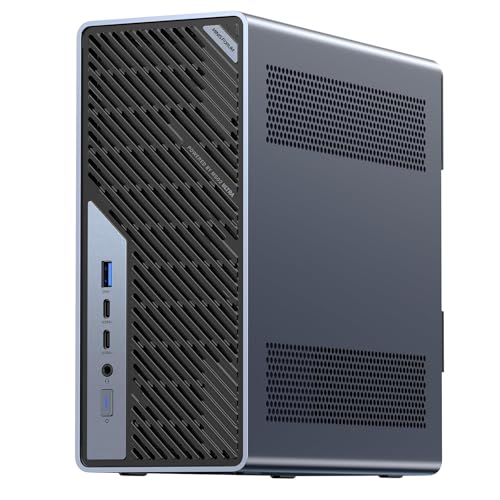
- Best overall: Minisforum MS-02 Ultra Mini Workstation, Core Ultra 9 285HX, 32GB, 1TB, Dual 25GbE — Check on Amazon
- Minisforum MS-A2 Mini Workstation, Ryzen 9 HX, PCIe x16 Slot, Dual 10G SFP+ — Check on Amazon
- AtomMan G7 Ti Mini PC, Core i9-14900HX, RTX 4070 Laptop GPU, 32GB, 1TB — Check on Amazon
- Apple Mac mini M4 Pro, 24GB Unified Memory, 512GB SSD — Check on Amazon
- Minisforum MS-01 Mini Workstation, Core i9-13900H, Dual 10GbE, 32GB, 1TB — Check on Amazon
See 1 more Amazon option
- Beelink SER9 Pro AI Mini PC, Ryzen AI 9 HX 370, Radeon 890M, 32GB, 1TB — Check on Amazon
Read the full guide ↓
Disclosure: As an Amazon Associate, reviewstook.com earns from qualifying purchases. Links to Amazon on this page are affiliate links; they cost you nothing extra. Listing details such as price and availability change often, so check the current Amazon listing before you buy.
Two thousand five hundred dollars is a strange budget for a mini PC, and this guide starts by saying so. The small-box category tops out far below it for most people: the machines that answer ordinary searches — office work, browsing, media, light gaming, a quiet box behind a monitor — are finished, completely, somewhere between $800 and $1,500. Past that point the word “mini” stops describing a cheaper kind of computer and starts describing a smaller kind of workstation. What the verified ceiling of this category actually sells at $2,500 is not speed you can feel in a spreadsheet. It is infrastructure: 25-gigabit networking, error-correcting memory support, full-height expansion slots shrunk into five-litre boxes, memory ceilings of 96GB and beyond, and processors with two dozen cores that idle away most of their lives in a general-purpose machine.
So the honest shape of this guide is different from a normal one. Every pick below is real, verified Amazon stock that sits under the ceiling — even the most expensive machine here leaves real headroom under the full $2,500, so check price on Amazon rather than expecting to spend it all, because nothing in the mini category honestly asks you to. The famous exception proves the rule: AMD’s Strix Halo machines, the ones with 64GB and 128GB of unified memory for local AI work, launched near this budget in 2025 and were then repriced out of it — the 128GB versions were repriced to well above this budget on Amazon, and while the 64GB versions have been seen within it, we could not pin a current Amazon listing for one firmly enough to link it, so it is discussed in the open below rather than slipped into the picks. If your work is documents, calls and a browser, stop reading here and keep most of the budget: the Best Mini PC Under $800 tier does your whole job. This guide is for the narrower crowd whose small box has to earn money or move serious data — homelab builders, creators, developers, and anyone whose “mini PC” is really a server that happens to sit on a desk.
In this guide
Quick Picks
Short on time, or comparing several options at once? Each row below names a buyer type and the product that suits it, with a link to the listing.
| Buyer type | Pick | Why it stands out | Link |
|---|---|---|---|
| Best overall | Minisforum MS-02 Ultra, Core Ultra 9 285HX, 32GB, 1TB | Dual 25GbE, ECC memory support and a PCIe 5.0 x16 slot in under five litres | Check on Amazon |
| Best serviceable workstation | Minisforum MS-A2, Ryzen 9 HX, 32GB, 1TB | A real PCIe x16 slot and dual 10G SFP+ in a 1.78-litre box, in barebone or configured form | Check on Amazon |
| Best with a discrete GPU fitted | AtomMan G7 Ti, i9-14900HX, RTX 4070 Laptop GPU, 32GB, 1TB | The only pick here with a dedicated graphics card already inside — a laptop card, named as one | Check on Amazon |
| Best for Mac creators | Apple Mac mini M4 Pro, 24GB, 512GB | ProRes and AV1 hardware engines and three-display support, if your software lives on macOS | Check on Amazon |
| Best homelab node | Minisforum MS-01, i9-13900H, 32GB, 1TB | Dual 10GbE, Intel vPro remote management and three M.2 slots for virtualisation hosts | Check on Amazon |
| Best reason to spend less | Beelink SER9 Pro, Ryzen AI 9 HX 370, 32GB, 1TB | The strongest ordinary mini PC here at roughly half the budget — the control group | Check on Amazon |
How These Picks Were Chosen
The budget was applied as a ceiling, not a target. Every product below is a real Amazon listing that belongs at or under the $2,500 ceiling in the United States, and where a price moves — and in this tier prices move weekly, because the late-2026 memory and SSD shortage is repricing small computers constantly — the review sends you to the live listing to check the current price on Amazon, rather than printing a hard number you should hold us to. Several picks sit far under the ceiling, and that is deliberate: a guide that spends your whole budget because the keyword named it is not a guide, it is a sales funnel. Where the money buys nothing, we say so and point at the cheaper machine.
We did not use these products ourselves. We read the maker listings, specification pages and independent review coverage, and compared the things that actually separate machines at this level: expansion slots and what electrically fits in them, network interfaces by name and speed, memory ceilings and whether the memory can be changed after purchase, storage positions, and the power supply’s real limits. Two filters did most of the excluding. The first is the pinning filter: a pick needs a current Amazon listing we can identify exactly, configuration and all. That filter is why there is no Strix Halo machine in the table above. The 64GB GMKtec EVO-X2 has been seen on Amazon within this budget in catalog pulls, and its 128GB sibling’s listing is easy to find — priced well over this budget. The 64GB listing itself could not be pinned to a specific current listing firmly enough to send you to it, so the machine is named here, honestly, as the one that got away rather than linked on a guess. The second filter is the purpose filter: at $2,500 a pick must do something a $1,200 mini PC cannot — carry a slot, a network fabric, an ECC road, a memory ceiling — because “the same office box with a faster chip” is not a reason that survives arithmetic.
One more honesty note about graphics. Mini PCs at this level mostly run integrated graphics, and the one discrete card in this guide is a laptop part. Where a pick’s graphics are integrated, the review says what that class of graphics is for — driving displays, accelerating timelines, light gaming — and does not borrow the reputation of desktop cards with similar names. The AtomMan’s RTX 4070 is the laptop GPU, at laptop wattage, and it is described that way every time it appears below.
What $2,500 Actually Buys in a Mini PC
It helps to name what the ceiling of this category is made of, because it is not what the marketing suggests. It is not clock speed: the processors in $1,200 mini PCs are already fast enough that office work, browsing and media cannot tell them apart from the chips here. It is not gaming, either — a tower at this money carries a desktop graphics card that no machine in this guide can answer, and if frames per dollar are the question, the mini category is the wrong place to ask it at any price.
What the top of the mini market sells is density of capability. Networking first: dual 25-gigabit SFP+ ports, dual 10-gigabit ports, quad-LAN layouts — interfaces that on a tower mean a fistful of add-in cards, delivered here on the motherboard of a box smaller than a shoebox, because the buyers are building storage nodes, routers and virtualisation hosts. Expansion second: two machines below carry genuine PCIe slots, which in a mini PC is close to a contradiction — it means the box can become a different machine later (a capture node, a GPU host, a storage controller) instead of being replaced. Memory third: ceilings of 96GB and, on the MS-02 Ultra, four SO-DIMM slots with ECC support up to 256GB, because the workloads that justify this tier — virtual machines, local AI models, big timelines, big datasets — are memory workloads before they are anything else. And support details that never appear in consumer listings: Intel vPro remote management on the MS-01, an internal power supply on the MS-02 Ultra instead of a wall brick.
Hold that list against your actual desk. If none of it names your work — no VMs, no fast network, no slot plans, no memory-hungry models — then the verified ceiling of the mini category has nothing to sell you, and the correct purchase in this guide is its cheapest pick or a machine from the Best Mini PC Under $1500 tier, with the difference kept. That is not a consolation prize; it is the finding.
The 6 Best Mini PCs Under $2,500
Minisforum MS-02 Ultra Mini Workstation — Core Ultra 9 285HX, 32GB, 1TB
Who it suits: Homelab builders and professionals who need server-class networking and a real expansion slot, and who have been waiting for a mini PC that stops apologising for being small.
This is the verified ceiling of the category, and the specification reads like a small server that lost its rack. The Core Ultra 9 285HX brings 24 cores to 5.5GHz. Networking is the headline: dual 25GbE SFP+ ports on an Intel E810 controller, plus 10GbE and 2.5GbE copper — four network interfaces in a chassis of about 4.8 litres. Memory is four DDR5 SO-DIMM slots, up to 256GB, with ECC support on this processor — a combination that simply does not exist elsewhere in the mini market. Storage is four M.2 2280 positions, two on the board and two riding on the network card. There is a PCIe 5.0 x16 slot that takes a low-profile dual-slot card, two USB4 ports at 80Gbps plus a third at 40Gbps, an HDMI 2.1 output — the maker’s listing copy specifies four video outputs in total — Wi-Fi 7, an internal 350W power supply, and Windows 11 Pro. Check the current price on Amazon: it sits comfortably under this budget, which leaves real headroom for the upgrades below.
The honest limitations are structural, and they matter. Out of the box, graphics are the processor’s integrated Intel GPU: fine for displays and desktop work, not a creator’s accelerator. The PCIe slot is the machine’s future, and that future is capped — the card must be low-profile, and reviewer coverage notes the processor’s power limit steps down when a discrete card is installed, because the 350W internal supply is a real ceiling, not a suggestion. Owners and reviewers also report the machine is audible under sustained load, with the power supply fan the component people notice, and homelab coverage has documented Linux and Proxmox driver and PCIe passthrough quirks — Windows and Hyper-V are the smoother road today. Buy it as what it is: the most expandable small computer in this guide, with a graphics purchase still ahead of you if your work needs one.
- Dual 25GbE SFP+ plus 10GbE and 2.5GbE — the fastest networking in this guide, on the board.
- Four SO-DIMM slots to 256GB with ECC support: a memory ceiling no rival here approaches.
- PCIe 5.0 x16 slot and four M.2 positions make it a platform, not an appliance.
Honest limitation: Integrated graphics as shipped, a 350W ceiling on whatever card you add later, and a fan you will hear under sustained load.
Choose it if your small box is really infrastructure — virtualisation, fast storage, a node that must grow. Skip it if you need graphics power on day one, or your workload is a browser and a word processor wearing a workstation’s budget.

Minisforum MS-A2 Mini Workstation — Ryzen 9 HX, 32GB, 1TB
Who it suits: Buyers who want the slot-and-network idea of the MS-02 Ultra in a smaller, cheaper box — and who are comfortable buying a platform in barebone or configured form.
The MS-A2 is the same argument at 1.78 litres. The processor family is AMD’s 16-core Zen 5 HX line, running to 5.4GHz, and the board carries the two things mini PCs almost never carry: a PCIe x16 slot (PCIe 4.0, wired x8 electrically — enough for the low-profile cards and controllers this class of machine actually hosts) and dual 10G SFP+ networking on an Intel X710 controller, backed by dual 2.5GbE. Memory is two DDR5-5600 SO-DIMM slots up to 96GB; storage is three M.2/U.2 positions; displays run from HDMI plus two USB-C outputs. The buying options are a family affair and worth reading carefully: it sells in barebone and configured 32GB/1TB forms, and either way the finished machine lands well under this budget — check price on Amazon for the exact configuration in front of you, which is exactly the point of the pick.
Two limitations define it. The integrated Radeon 610M is display-driving graphics, the weakest in this guide: it runs your monitors and nothing more, so any graphics ambition is a slot purchase, same as its bigger sibling. And independent test coverage of the MS-A2 family notes audible noise under load and relatively high idle power for a mini PC, with limited airflow around the PCIe area — a machine built for capability, not for silence. There is also a listing discipline issue: the MS-A2 sells in several configurations and a barebone under closely related listings, so match the exact configuration on the live page before ordering; a barebone is a starting point, not a computer, and its finished cost depends on the memory and SSD prices of the week you complete it.
- PCIe x16 slot and dual 10G SFP+ in 1.78 litres — the densest expansion story per litre here.
- Memory to 96GB and three storage positions, all owner-serviceable.
- A barebone option lets parts owners finish it for far less than the configured version — check price on Amazon.
Honest limitation: The Radeon 610M is for displays, not workloads; and test coverage reports load noise and idle power that betray its workstation brief.
Choose it if you want a small virtualisation or network node you can open, change and grow. Skip it if you want quiet, or a machine that is finished the day it arrives with graphics already aboard.

AtomMan G7 Ti Mini PC — Core i9-14900HX, RTX 4070 Laptop GPU, 32GB, 1TB
Who it suits: Creators and gamers who need an actual discrete GPU inside the small box — and who understand precisely which GPU they are getting.
Start with the naming, because this guide insists on it: the graphics card in the G7 Ti is the RTX 4070 Laptop GPU — 8GB, running at up to 140W in this machine. It is a genuinely capable card for 1080p and 1440p gaming and for GPU-accelerated creative work, and it is also a clear step below the 12GB desktop RTX 4070 that shares its name in tower listings. Around it sits a desktop-class supporting cast: Intel’s Core i9-14900HX, 24 cores to 5.8GHz, 32GB of DDR5 in two SO-DIMM slots upgradable to 96GB, a 1TB SSD with a second SSD slot, HDMI 2.1 and USB4 display outputs, and Wi-Fi 7. The configured 32GB/1TB machine sits comfortably inside this budget, with a barebone version below it — check the current price on Amazon, because this model’s pricing has historically moved around rather than holding a stable shelf figure.
The limitations follow from the concept. A laptop GPU in a slim chassis is a thermal compromise by design: it will not sustain desktop-card behaviour, and the 8GB of VRAM is the first specification in the machine that will age. The barebone version, meanwhile, is not a shortcut to a cheap finished PC — it needs memory, storage and an operating system, and in the current market those parts can erase the saving entirely; buy the configured version unless you already own the parts. And the price discipline matters more here than for any other pick: if the live listing has drifted well up the tier, the machine’s value argument goes with it, because the MS-A2 above plus a slot card starts to compete.
- The only discrete GPU in this guide, fitted at the factory — no slot purchase required.
- Desktop-class 24-core processor and memory upgradable to 96GB.
- Configured versions sit well inside the budget, leaving much of it unspent — check price on Amazon.
Honest limitation: It is the 8GB laptop RTX 4070, not the desktop card — judge it as a strong mobile GPU in a small box, because that is what it is.
Choose it if your work or play needs CUDA-class graphics in a mini PC today. Skip it if you were picturing desktop 4070 performance, or if the current price on Amazon no longer reflects the value described here.

Apple Mac mini M4 Pro — 24GB Unified Memory, 512GB SSD
Who it suits: Video editors and Mac-first creators whose software already lives on macOS, and who value hardware media engines and silence over expandability.
The Mac mini is the odd machine in this guide — the only one that is not a PC — and it earns its place on the strength of what its silicon does for media work. The M4 Pro configuration linked here carries a 12-core CPU, a 16-core GPU, 24GB of unified memory on a 273GB/s bus, and hardware ProRes and AV1 engines that make timeline work feel effortless in a way specifications undersell. Ports are three Thunderbolt 5 and HDMI at the back, two USB-C and a headphone jack at the front, and Apple’s own published specification gives the M4 Pro mini support for up to three displays — the only monitor-count claim we make for it, because it is Apple’s. Pricing on this configuration moves around: it has sat near Apple’s own starting figure and, on Amazon discount, noticeably below it, so check the current price on Amazon before you buy.
The limitations are Apple’s design philosophy stated plainly. Nothing inside is upgradeable — not the memory, not the storage — so the configuration you buy is the machine you retire, and 24GB with 512GB is a specification to choose with your next five years in mind; an external SSD is a planned purchase, not an accessory. It runs macOS and only macOS, which ends the discussion for Windows software, most games and homelab hypervisors of the x86 kind. And within this guide’s company it is the sealed appliance at the far end of the serviceability scale: the Minisforum machines open with a screwdriver, this one does not open at all. For the right software stack none of that matters. For anyone else’s, it is the whole review.
- Hardware ProRes and AV1 engines make it the strongest media-timeline machine here per watt.
- Thunderbolt 5 and three-display support from a box that is effectively silent in normal use.
- Amazon pricing has run well under Apple’s own starting price at times — check the current price on Amazon.
Honest limitation: Memory and storage are fixed forever at purchase, and it is a Mac — if your tools or games need Windows, this is not a cheaper PC, it is a different platform.
Choose it if your creative stack is macOS-native and your configuration maths is done before you order. Skip it if you need Windows, upgrade paths, or homelab flexibility.

Minisforum MS-01 Mini Workstation — Core i9-13900H, 32GB, 1TB
Who it suits: Homelab builders running virtual machines and containers, who want remote management and fast networking in the smallest credible package.
The MS-01 is the previous generation of the idea the MS-02 Ultra completes, and for homelab duty it remains the value expression of it. The Core i9-13900H gives 14 cores to 5.4GHz; memory is 32GB of DDR5 with an official ceiling of 64GB; storage is three M.2 slots plus a U.2 position via the included adapter. Networking is the reason it exists: dual 10GbE SFP+ on an Intel X710 controller and dual 2.5GbE, one of them an i226-LM with Intel vPro — remote management that lets the box live in a cupboard and be administered like a server. There is a PCIe x16 slot wired x8, physically half-height and single-slot, two USB4 ports and HDMI for three displays, and Wi-Fi 6E. This configuration sits in the lower half of this budget even when shortage-market pricing pushes Amazon’s figure above the maker’s own list — check the current price on Amazon.
Its limitations are documented ones. ServeTheHome’s hands-on coverage of the platform ran a compatibility plug-fest on that PCIe slot and found some cards never initialise — the slot is real, but check your specific card against owner reports before planning around it. Measured noise at full CPU load sits in the low-to-mid 40s dB(A) in review coverage: not loud for a workstation, not silent for a bedroom. The graphics are integrated Iris Xe, which is to say displays and desktop acceleration only. And the pricing above carries the guide’s standard warning in its sharpest form: this machine’s fair position is at the maker’s own list level or below, so a current Amazon premium is a shortage artefact to wait out or shop around, not a new normal to accept quietly.
- Dual 10GbE, vPro remote management and three M.2 slots: a genuine server feature set.
- 14 cores and a 64GB ceiling cover serious virtualisation in a 1.78-litre-class box.
- A modest list position makes even shortage-inflated pricing land in the lower half of this budget.
Honest limitation: Some PCIe cards never initialise in its slot per reviewer testing, and Amazon pricing has sat above the maker’s own list price in a shortage market — check the current price on Amazon.
Choose it if you are building a homelab node and value management features over raw ceiling. Skip it if you need the MS-02’s 25GbE and memory ceiling, or a quiet room.

Beelink SER9 Pro AI Mini PC — Ryzen AI 9 HX 370, Radeon 890M, 32GB, 1TB
Who it suits: Almost everyone who landed on this page by accident — the buyer whose needs are real but ordinary, and who would be better served by the strongest mainstream mini PC than by a workstation.
Every guide needs a control group, and this is it: the machine that shows what the sensible money buys. The SER9 Pro packs AMD’s Ryzen AI 9 HX 370 — 12 cores to 5.1GHz — with the Radeon 890M, the strongest integrated graphics in this guide, 32GB of LPDDR5X memory, a 1TB PCIe 4.0 SSD, USB4, Wi-Fi 6 and 2.5GbE, in a chassis of about 0.82 litres that disappears behind a monitor. It runs Windows 11 Pro. It sits in the lower half of this budget — check the current price on Amazon. That is the whole finding of this guide in one product: the best ordinary mini PC money currently buys costs about half the keyword’s budget, and for office work, development, media, photo editing and the lighter end of gaming, the machines above it add infrastructure, not experience.
Its limitations are the mainstream ones, stated so the comparison is fair. The 32GB of memory is soldered — it is the machine’s lifetime specification, with no road upward, which is precisely what the MS-A2 and MS-02 exist to answer. There is no OCuLink port, so the external-GPU escape hatch some rivals offer is absent, and no PCIe slot of any kind. One documentation wrinkle deserves flagging rather than resolving: Beelink’s listing copy describes two M.2 slots while at least one hands-on review lists a single M.2 2280 — check the live listing if a second drive matters to you, because the sources disagree and we will not guess. None of this stops it being the correct purchase for most readers; it defines what “most readers” means.
- Radeon 890M integrated graphics and a 12-core Zen 5 processor: the strongest all-round specification in its tier.
- About 0.82 litres, USB4 and Windows 11 Pro, at the lower end of this guide’s budget — check price on Amazon.
- The benchmark every other pick in this guide must justify its premium against.
Honest limitation: Soldered 32GB memory is forever, there is no expansion slot or OCuLink, and its own sources disagree on the M.2 slot count — verify on the live listing.
Choose it if your work is the ordinary kind done well — which is most work. Skip it if you genuinely need the slots, fabrics and memory ceilings above; that need, and only that need, justifies them.
Comparison Table
| Product | Type | Best use | Link |
|---|---|---|---|
| Minisforum MS-02 Ultra, 285HX, 32GB, 1TB | Mini workstation | 25GbE networking, ECC memory and a PCIe 5.0 slot | Check on Amazon |
| Minisforum MS-A2, Ryzen 9 HX, 32GB, 1TB | Mini workstation | Slot and dual 10G in 1.78 litres, in barebone or configured form | Check on Amazon |
| AtomMan G7 Ti, 14900HX, RTX 4070 Laptop, 32GB, 1TB | Gaming/creator mini | A discrete GPU already fitted, honestly named as a laptop part | Check on Amazon |
| Apple Mac mini M4 Pro, 24GB, 512GB | Creator desktop | macOS media work with hardware ProRes/AV1 engines | Check on Amazon |
| Minisforum MS-01, 13900H, 32GB, 1TB | Homelab node | Dual 10GbE and vPro management in the lower half of the budget | Check on Amazon |
| Beelink SER9 Pro, HX 370, 32GB, 1TB | Mainstream mini PC | The strongest ordinary mini PC here, at about half the budget | Check on Amazon |
How to Choose a Mini PC Under $2,500
- Interrogate the budget before the listings. Write down what the machine must do that a $1,200 mini PC cannot. If the list comes back empty — and for documents, calls, browsing and media it will — the correct guide is Best Mini PC Under $1500 and the correct purchase leaves four figures unspent. This tier is justified by named capabilities, never by the roundness of the number.
- Buy the interface, not the processor. At this level the processors are all fast. What separates the picks is what they connect to: 25GbE versus 10GbE versus 2.5GbE, a slot versus no slot, four memory slots versus soldered chips. Choose by the fabric your other equipment speaks.
- Decide your memory philosophy now. Soldered memory (the SER9 Pro, the Mac mini, every Strix Halo machine) is a lifetime decision made at checkout. Socketed memory (both Minisforum workstations, the MS-01, the G7 Ti) is a road you can walk later. Memory-hungry work — virtual machines, local models, huge timelines — belongs on the socketed side, or on a soldered machine bought at its final size.
- Treat “barebone” as a bill, not a bargain. A barebone price excludes memory, storage and usually the operating system. In the late-2026 market, where memory and SSD prices have spiked, completing a barebone with new parts can cost more than the configured version of the same machine. Barebone wins when the parts are already on your shelf; do that arithmetic with live prices, not with the kit price alone.
- Read graphics names like a lawyer. A laptop GPU is not its desktop namesake, integrated graphics are not a graphics card, and “RTX 4070” in a mini PC listing means the mobile part at mobile wattage. This guide names the G7 Ti’s card as a laptop GPU every time; apply the same reading to every listing you meet elsewhere.
- Check the power ceiling behind the slot. An expansion slot is a promise the power supply has to keep. The MS-02 Ultra’s 350W internal supply bounds the cards it can host and steps the processor’s power down when one is fitted. A slot plus a small PSU equals a low-profile card, planned in advance — not any card you own.
- Count displays from ports, not from prose. Marketing pages promise “multi-monitor” freely. The claims in this guide come from physical outputs and makers’ published specifications — the MS-02 Ultra’s four video outputs per its listing copy, the Mac mini’s three displays per Apple — and where a source could not be verified, no number was printed. Hold every listing to that standard.
- Price the whole desk, not the box. At this level the machine is rarely the whole purchase: a slot card, a 25GbE switch, memory for the ceiling you bought, an external drive for the sealed machine. A workstation bought with headroom left for the system around it is a plan; a box bought right up to the $2,500 ceiling just to “have the best” is an ornament.
Where the Unspent Money Goes
Notice that this guide’s most expensive pick still sits well under the $2,500 ceiling — check price on Amazon. That gap is not a failure of the category; it is the category’s honest shape in late 2026, with its one over-budget superstar class (the 128GB Strix Halo machines) priced out and its 64GB sibling unpinnable. If you buy at this tier, the remaining money has better jobs than a more expensive badge. It buys the low-profile GPU the MS-02 Ultra’s slot is waiting for. It buys the memory that takes an MS-A2 from 32GB toward its 96GB ceiling — bought when memory prices soften, which is the entire advantage of sockets. It buys the switch that makes 25GbE more than a specification, the NAS drives the fast network exists to feed, and the second MS-01 that turns a homelab node into a cluster. Money spent on the system around the mini PC compounds; money spent pushing a mini PC past its category’s ceiling evaporates. And if none of those purchases name your plans, the finding stands: buy the SER9 Pro or step down a tier, and keep the difference with a clear conscience.
Common Buying Mistakes
- Spending the full $2,500 because the search said “under $2,500”. A ceiling is permission, not instruction; even the most expensive verified pick in this guide leaves headroom under the ceiling, and most readers should spend half the budget or less.
- Buying a workstation mini PC for office work. Dual 25GbE and ECC support do nothing for documents and calls; the lower tiers of this category do the entire office job.
- Reading “RTX 4070” in a mini PC listing as the desktop card. It is the 8GB laptop GPU at laptop wattage — good, and a different product.
- Comparing a barebone price against configured prices. The kit excludes memory, storage and usually Windows; completed with new parts in the current market, it can cost more than the finished machine.
- Buying soldered memory at the size you need today. On the SER9 Pro, the Mac mini and every Strix Halo box, the memory you order is the memory the machine dies with — size it for the work you expect, not the work you have.
- Planning a graphics card around a slot without checking the power supply and the card list. Slots in mini PCs are low-profile, wattage-capped, and — on the MS-01 — documented to refuse some cards entirely.
- Chasing the 128GB Strix Halo headline into a listing priced far over this guide’s ceiling and calling it “the $2,500 guide’s pick”. It is over budget; the repricing is the story, not an excuse to move the ceiling.
- Accepting a shortage premium as a price. When the MS-01’s Amazon price sits above the maker’s own list figure, that premium is a reason to wait or buy the configured sibling, not to pay quietly.
Final Recommendation
- Most buyers who truly need this tier: Minisforum MS-02 Ultra.
- Slot and network in the smallest box: Minisforum MS-A2.
- A discrete GPU, fitted and finished: AtomMan G7 Ti.
- macOS creative work: Apple Mac mini M4 Pro.
- Homelab value: Minisforum MS-01.
- Almost everybody else: Beelink SER9 Pro — and keep the difference.
Our top two at this ceiling are the MS-02 Ultra, the one machine here that behaves like infrastructure — 25-gigabit networking, an ECC memory road to 256GB and a current-generation slot in under five litres — and the MS-A2, which delivers the same idea smaller and cheaper for buyers who can live with integrated graphics until the slot earns its card. Between them they define what $2,500 is actually for in a mini PC. The G7 Ti is the answer when the graphics must arrive fitted; the Mac mini when the software is Apple’s; the MS-01 when the lab matters more than the ceiling. And the SER9 Pro is the guide’s conscience: at roughly half the budget it does everything else most desks will ever ask, which is why it is linked below alongside the machines that out-spec it. If your ambitions run past this tier entirely — bigger slots, desktop cards, rack thinking — the honest next step is not a larger mini PC but a small tower, and the Best Workstation PC Under $2500 guide is where that conversation starts. Readers whose needs are narrower than this ceiling should also see the Best Mini PC Under $3000 tier above and the tier below before deciding where their money stops.
Frequently Asked Questions
Does anyone actually need a $2,500 mini PC?
A narrow slice of buyers does: homelab builders who need 10- or 25-gigabit networking and remote management in a tiny box, professionals whose virtual machines or local AI models eat memory by the tens of gigabytes, and creators who need a slot or a media engine in a machine that fits behind a monitor. For documents, browsing, calls and media, no — the job is finished several tiers down, and this guide’s own value pick at roughly half the budget outperforms the need.
Why is there no Strix Halo machine among the picks?
Because the category repriced itself out of the guide. The 128GB GMKtec EVO-X2 and its siblings launched near this budget in 2025 and were later repriced on Amazon to well over it. The 64GB version has been seen within this budget in Amazon catalog data, which would fit, but we could not pin its current Amazon listing firmly enough to link it responsibly, and this guide does not link on guesses. If you find the 64GB listing live within budget and local AI memory is your workload, it is a legitimate alternative to weigh against the MS-02 Ultra — with soldered memory as its standing caveat.
Is the RTX 4070 in the AtomMan G7 Ti the same as a desktop RTX 4070?
No. It is the RTX 4070 Laptop GPU: 8GB of memory against the desktop card’s 12GB, running at up to 140W in this chassis against the desktop card’s higher power budget. It is a strong card for 1080p and 1440p gaming and GPU-accelerated creative work, and it should be judged as exactly that — a high-end mobile GPU in a small desktop — not by its desktop namesake’s reputation.
Should I buy a barebone workstation and finish it myself?
Only if you already own the parts. A barebone MS-A2 looks like a bargain until memory, an SSD and an operating system join the basket at late-2026 prices, at which point the configured version is frequently the cheaper finished machine — the documented pattern across this category this year. Run the completion arithmetic with live prices for the exact parts, every time; the kit price alone is not a computer price.
How many monitors can these machines drive?
Only where the makers publish it do we print it: the MS-02 Ultra’s listing copy specifies four video outputs (two USB4 v2, one USB4 and HDMI 2.1), Apple’s specification gives the M4 Pro Mac mini up to three displays, the MS-A2’s HDMI plus two USB-C outputs and the MS-01’s two USB4 plus HDMI each make three-display desks, and the G7 Ti offers HDMI 2.1 plus USB4. For any configuration variant, confirm the outputs on the live listing — port mixes change between revisions.
Mini workstation or small tower at this money?
Buy the mini when the smallness itself is load-bearing: the box must live on or behind the desk, travel, sip power as an always-on node, or present a single appliance-like unit. Buy the tower when it is not — at $2,500 a tower answers with a desktop graphics card, a full-size power supply and cheaper memory, and no mini PC in this guide pretends otherwise. The minis here win on density and interfaces per litre, not on raw capability per dollar.
Why is the cheapest pick in a $2,500 guide a mainstream machine?
Because it is the control group that makes the guide honest. The SER9 Pro demonstrates what the sensible money buys — the strongest integrated graphics in the list, a 12-core processor, 32GB and a terabyte, in 0.82 litres — so that every premium above it has to name what it adds: a slot, a fabric, a memory ceiling, a management engine. If a pick cannot name its addition, the SER9 Pro is the recommendation, and the unspent difference is the reader’s to keep.
- Best Mini PC Under $2500
- Best Mini PC Under $1200
- Best Mini PC For Beginners Under $2500
- Best Mini PC For Small Spaces Under $2500
- Best Mini PC For Streaming Under $2500
- Best Mini PC For 1440p Gaming Under $2500
- Best Mini Gaming PC Under $2500
- Best Home Office PC Under $2500
- Best Barebones Mini PC Under $2500


