Where to buy
Check the latest price, availability and delivery on Amazon. Orders are placed on Amazon. We may earn a commission from qualifying purchases.
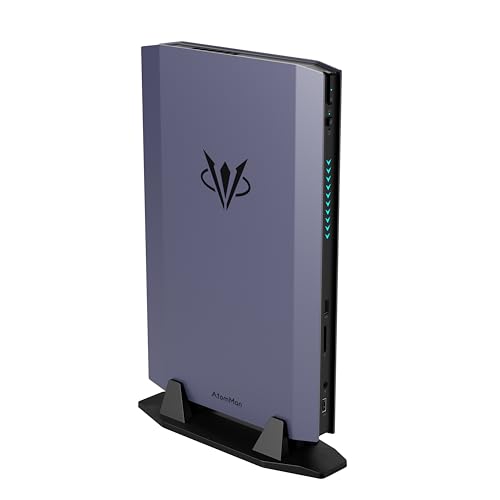
- Best for 1440p gaming: AtomMan G7 Ti Mini PC, Core i9-14900HX, RTX 4070 Laptop GPU, 32GB, 1TB — Check on Amazon
- Beelink SER9 Pro AI Mini PC, Ryzen AI 9 HX 370, Radeon 890M, 32GB, 1TB — Check on Amazon
- Apple Mac mini M4 Pro, 24GB Unified Memory, 512GB SSD — Check on Amazon
- Minisforum MS-02 Ultra Mini Workstation, Core Ultra 9 285HX, 32GB, 1TB, Dual 25GbE — Check on Amazon
- Minisforum MS-A2 Mini Workstation, Ryzen 9 HX, PCIe x16 Slot, Dual 10G SFP+ — Check on Amazon
See 1 more Amazon option
- Minisforum MS-01 Mini Workstation, Core i9-13900H, Dual 10GbE, 32GB, 1TB — Check on Amazon
Read the full guide ↓
Disclosure: As an Amazon Associate, reviewstook.com earns from qualifying purchases. Links to Amazon on this page are affiliate links; they cost you nothing extra. Listing details such as price and availability change often, so check the current Amazon listing before you buy.
A 1440p monitor is the easiest purchase in gaming to misunderstand, because two different jobs hide inside the same resolution number. One job is displaying 1440p: lighting up 2,560 × 1,440 pixels with a desktop, a browser, a video stream. Almost any modern computer does that job without effort, including every machine in this guide. The other job is rendering 1440p: calculating each of those pixels, sixty or more times a second, inside a game. That job is roughly 1.8 times the pixel work of 1080p, and it is the one that separates graphics hardware into classes. A mini PC can be flawless at the first job and hopeless at the second, and a listing page will rarely tell you which one its headline number describes.
That distinction is the whole of this guide, because the $2,500 mini PC tier makes it unusually easy to get wrong. Five of the six verified picks at this ceiling are workstation and homelab machines — boxes built around 25-gigabit networking, error-correcting memory roads, expansion slots and two-dozen-core processors. Their graphics are integrated, sized for driving displays rather than rendering games, and they will present a beautiful 1440p desktop while rendering a demanding game at 1080p or below. Exactly one pick carries a discrete graphics card, and it is a laptop card, named as one every time it appears here. So the rankings below are graded on rendering first and displaying second: what each machine actually draws, at what internal resolution, with which upscaler honestly available to it. If your real question is the general one — which of these boxes to buy, full stop — the parent guide, Best Mini PC Under $2500, grades the same six machines on their broader merits. This page exists for the narrower question of what they do when the panel in front of them is a 1440p gaming monitor.
In this guide
Quick Picks
Short on time, or comparing several options at once? Each row below names a buyer type and the product that suits it, with a link to the listing.
| Buyer type | Pick | Why it stands out | Link |
|---|---|---|---|
| Best for 1440p gaming | AtomMan G7 Ti, i9-14900HX, RTX 4070 Laptop GPU, 32GB, 1TB | The only discrete GPU in the set — the one pick that renders modern games natively at 1440p | Check on Amazon |
| Best integrated route | Beelink SER9 Pro, Ryzen AI 9 HX 370, 32GB, 1TB | The strongest integrated graphics here: esports and lighter titles rendered at 1440p, the rest upscaled honestly | Check on Amazon |
| Best on macOS | Apple Mac mini M4 Pro, 24GB, 512GB | A powerful integrated GPU and three-display support, for the games that exist on macOS | Check on Amazon |
| Best 1440p desk, card later | Minisforum MS-02 Ultra, Core Ultra 9 285HX, 32GB, 1TB | Four video outputs for a 1440p workstation desk today; a PCIe 5.0 slot waiting for a real card | Check on Amazon |
| Slot path in 1.78 litres | Minisforum MS-A2, Ryzen 9 HX, 32GB, 1TB | Drives a 1440p desktop now; its PCIe slot is the documented road to rendering later | Check on Amazon |
| Best 1440p desktop node | Minisforum MS-01, i9-13900H, 32GB, 1TB | A homelab node that runs a three-display 1440p desk — graded as a desktop machine, not a gaming one | Check on Amazon |
How These Picks Were Chosen
The six machines are the verified set from the parent guide at this ceiling — the same Amazon listings, the same deal rules — re-graded here on a single axis: what each one renders when a game asks for 1440p. Nothing was added and nothing was swapped; what changed is the question. In the parent guide the AtomMan G7 Ti ranks third, because most of what $2,500 buys in a mini PC is infrastructure. On this page it ranks first, because it is the only pick whose graphics hardware was built to render games at this resolution. The workstations fall to the bottom not because they are worse computers — several are better computers — but because integrated graphics sized for displays cannot be graded as gaming hardware without lying, and this guide does not borrow reputations across that line.
The budget was applied as a ceiling, not a target, exactly as in the parent guide. Every pick is a real Amazon listing at or under the $2,500 ceiling in the United States — check the current price on Amazon for each pick, because this tier reprices often. One absence needs repeating because it matters more on this page than on any other: AMD’s Strix Halo machines carry the strongest integrated graphics in the category, and the 64GB version — built around the Radeon 8060S — sits in the upper part of this tier on Amazon. Its current listing could not be pinned firmly enough to link responsibly, and its 128GB sibling sits over the $2,500 ceiling. So the strongest integrated 1440p renderer in the class is discussed openly, in the open, and linked nowhere. If local rendering power in a mini PC is your whole question and you find that 64GB listing live, check its current price on Amazon and weigh it against the SER9 Pro below — with its soldered memory as the standing caveat.
Two grading rules run through everything that follows. First, upscaling credit goes only where the silicon earns it: DLSS belongs to NVIDIA RTX hardware, which in this set means exactly one pick, and the internal resolutions quoted for it are NVIDIA’s published scaling figures for that technology — they are never lent to AMD’s FSR, which is credited on the Radeon picks by name and without invented internal numbers. Second, frame generation is treated as what it is: a display-side smoothing technique that interpolates the picture you see. It can make motion look smoother; it does not render a single additional pixel of the game, and no pick below gains rendering credit for it.
Rendering Is Not Displaying: The 1440p Distinction
Start with the arithmetic. A 1440p frame holds 3,686,400 pixels; a 1080p frame holds 2,073,600. The step from one to the other is not the tidy doubling of 720p to 1440p — an exact 2× scale on each axis, four times the pixels — but an awkward ratio of about 1.33× per axis. That awkwardness matters twice. It matters for raw work: rendering natively at 1440p asks the graphics hardware for roughly 78 percent more pixels than 1080p, every frame, forever. And it matters for scaling: because 1080p does not divide evenly into 1440p, a 1080p render stretched onto a 1440p panel softens in a way a 720p render, doubled exactly, does not. The upscalers below exist precisely to hide that softness with reconstruction rather than stretching.
Modern upscaling renders the game at a lower internal resolution and rebuilds a 1440p output from it. The honest way to describe any upscaler is by the resolution it actually renders. For NVIDIA’s DLSS, running on RTX hardware, the published scaling for a 1440p output is: Quality renders internally at about 1707 × 960; Balanced at about 1485 × 836; Performance at about 1280 × 720. Read those numbers plainly. DLSS Quality at 1440p is a render slightly below 1080p, reconstructed well. DLSS Performance at 1440p is a 720p-class render wearing a 1440p output — legitimate, often good-looking, and not native rendering by any definition. In this guide those figures appear in exactly one review, attached to the one RTX machine. AMD’s FSR does the same kind of work on the Radeon picks and is credited there by name; the base research for this set documents no FSR internal figures, so none are printed — FSR is never dressed in DLSS’s numbers, and the two technologies are never blurred into a generic “upscaling” that lets a weak renderer borrow a strong one’s arithmetic.
Frame generation needs the same plain treatment. It inserts interpolated frames between rendered ones, raising the rate your eyes see without raising the rate the game is rendered at. On a pick that renders at 1080p, frame generation gives you smoother-looking 1080p rendering on a 1440p panel. That can be worth having. It is not 1440p rendering, and it changes nothing in the rankings below.
One route does deliver a genuinely 1440p-rendered picture to any of these machines: cloud gaming, where a remote server renders the game and streams the result. Every pick here can display that stream at the panel’s native resolution, and for a buyer whose connection and subscription suit it, that is a real answer to the 1440p question. It is also a property of the service, not of the box — it carries input lag, depends on your connection, and stops when the subscription does — so it is credited to no pick and changes no ranking. What follows grades the silicon in the box, because the silicon is what you are buying.
The 6 Best Mini PCs for 1440p Gaming Under $2,500
AtomMan G7 Ti Mini PC — Core i9-14900HX, RTX 4070 Laptop GPU, 32GB, 1TB
Who it suits: The buyer this page is actually for — someone who wants a mini PC that renders games at 1440p, and who understands exactly which graphics card makes that possible here.
Naming first, because this guide insists on it: the card inside the G7 Ti is the RTX 4070 Laptop GPU, 8GB, running at up to 140W in this chassis. It is not the 12GB desktop card that shares its name, and it is not judged by that card’s reputation anywhere on this page. Judged as what it is — a high-end mobile GPU at a generous wattage for the class — it is the only hardware in this set that renders modern games natively at 1440p as a normal mode: high settings in many current titles, with the panel fed a true 2,560 × 1,440 render rather than a reconstruction. Where a demanding title asks for help, its help is the real thing. DLSS on this RTX hardware renders internally at about 1707 × 960 in Quality mode for a 1440p output, about 1485 × 836 in Balanced, and about 1280 × 720 in Performance — and Performance, to say it once more, is a 720p-class render, a legitimate fallback rather than a headline. The support around the card is desktop-class: a 24-core Core i9-14900HX to 5.8GHz, 32GB of DDR5 in two SO-DIMM slots upgradable to 96GB, a 1TB SSD with a second slot, HDMI 2.1 and USB4 display outputs, and Wi-Fi 7. For the configured 32GB/1TB machine and the barebone version, check the current price on Amazon — the pick’s value argument depends on checking the live listing for the exact configuration before you buy.
The limitations are the concept’s own. Eight gigabytes of VRAM is the binding constraint at this resolution: upscaling can reconstruct pixels, but textures load at the resolution you are playing at, and 8GB is the first specification in this machine that will age. A laptop GPU in a slim chassis is also a thermal compromise — it will not sustain desktop-card behaviour across long sessions the way a tower card does. The barebone version is no shortcut: it needs memory, storage and an operating system, and the configured machine is usually the honest buy. And the price discipline is sharper here than anywhere in the guide — check the current price on Amazon, and if the live listing for the configured version sits high in this tier, the value case weakens with it.
- The only discrete GPU in the set, fitted at the factory — native 1440p rendering with no slot purchase and no reconstruction required.
- Real DLSS on RTX hardware, quoted at its true internal resolutions — Quality is a sub-1080p render, and the guide says so.
- Desktop-class 24-core processor, memory to 96GB, and a configured version positioned well under the ceiling — check price on Amazon.
Honest limitation: It is the 8GB laptop RTX 4070 at laptop wattage — a strong mobile GPU whose texture budget, not its core, is what 1440p will test first.
Choose it if rendering games at 1440p is the reason the mini PC exists. Skip it if you were picturing desktop 4070 performance, or the current price on Amazon no longer fits the value case described here.

Beelink SER9 Pro AI Mini PC — Ryzen AI 9 HX 370, Radeon 890M, 32GB, 1TB
Who it suits: The 1440p buyer whose games are esports titles, indies and older libraries — and who would rather choose a lower-positioned option in this tier than the discrete-GPU pick for rendering that honestly covers that catalogue.
The SER9 Pro carries the Radeon 890M, the strongest integrated graphics in this guide, behind a 12-core Ryzen AI 9 HX 370 running to 5.1GHz, with 32GB of LPDDR5X memory, a 1TB PCIe 4.0 SSD, USB4, Wi-Fi 6 and 2.5GbE in a chassis of about 0.82 litres. On this page’s axis, its honest grading splits its library in two. Esports titles, indie games and older releases: it renders those natively at 1440p at reduced settings, and that is a genuine capability no other integrated pick here matches as comfortably. Current demanding releases: it renders them at 1080p and upscales to the panel, with AMD’s FSR doing the reconstruction — credited by name, with no internal-resolution figures attached, because the research behind this set documents none and FSR does not get to wear DLSS’s arithmetic. There is no DLSS on this machine at all; there is no NVIDIA hardware in it, and any listing or review that implies otherwise is wrong. On price, this configuration sits well under the ceiling as a mainstream option in this tier — check the current price on Amazon before you buy.
The limitations are permanent ones. The 32GB of memory is soldered — the machine’s lifetime specification, shared between system and graphics, with no road upward. There is no OCuLink port and no PCIe slot, so the rendering ceiling you buy is the rendering ceiling you keep; when the 890M stops covering your library, the answer is a different machine, not an upgrade. One documentation wrinkle is flagged rather than resolved: Beelink’s listing copy describes two M.2 slots while at least one hands-on review lists a single M.2 2280, and the sources disagree — check the live listing if a second drive matters to you. None of that changes the shape of the pick: well under the ceiling, it is the strongest integrated answer to the 1440p question that can actually be linked.
- Radeon 890M integrated graphics: native 1440p rendering for esports, indie and older titles, at reduced settings.
- FSR upscaling credited honestly for the demanding end of the library — a 1080p render rebuilt for the panel, described as exactly that.
- About 0.82 litres, USB4 and Windows 11 Pro, positioned well under the ceiling — check price on Amazon.
Honest limitation: Soldered 32GB memory is forever, there is no slot or OCuLink escape hatch, and its own sources disagree on the M.2 slot count — verify on the live listing.
Choose it if your 1440p library is the lighter kind and you want the strongest integrated renderer that exists at a linkable price. Skip it if your library is current AAA releases — those render at 1080p here, and the G7 Ti above is the honest answer.
Apple Mac mini M4 Pro — 24GB Unified Memory, 512GB SSD
Who it suits: The Mac-first gamer-creator whose library already lives on macOS, and who wants one small, quiet box to drive a 1440p desk for work and play alike.
The Mac mini is the only machine here that is not a PC, and on this page’s axis it grades as a strong integrated renderer with a platform asterisk. The M4 Pro configuration linked here pairs a 12-core CPU with a 16-core GPU and 24GB of unified memory on a 273GB/s bus, and adds hardware ProRes and AV1 media engines that make it the strongest timeline machine in the set per watt. For games that exist natively on macOS, that GPU renders lighter and older titles at 1440p and handles the desktop, video and creative side of a 1440p desk without discussion. Two disciplines apply to it exactly as they do to the Radeon picks. There is no DLSS — DLSS is NVIDIA technology and there is no NVIDIA silicon in this box — and no upscaling figures of any flavour are printed for it, because the research behind this set documents none. Apple’s own published specification gives this configuration support for up to three displays, which is the only monitor-count claim made for it on this page, because it is Apple’s. On price, this configuration sits in the upper part of this tier — check the current price on Amazon and check the live listing before you buy.
The asterisk is the platform. Most of the Windows gaming library does not exist on macOS, so the 1440p gaming question on this machine is bounded by its catalogue before its silicon is ever consulted — grade the games you actually play against the Mac catalogue first. Inside the box, nothing is upgradeable: the 24GB of memory and 512GB of storage you buy are the machine you retire with, and 512GB is tight enough that an external SSD is a planned additional purchase to consider alongside the machine, not part of the pick itself. For a macOS-native stack none of that is a flaw. For anyone else’s, it is the whole review.
- A 16-core integrated GPU with 273GB/s of memory bandwidth — the strongest media-and-light-gaming combination here per watt.
- Three-display support on Apple’s own published specification, from a box that is effectively silent in normal use.
- Positioned in the upper part of this tier — check the current price on Amazon.
Honest limitation: The gaming catalogue is the macOS catalogue, memory and storage are fixed forever at purchase, and no DLSS or upscaling figures apply to it — judge it on native rendering and native titles.
Choose it if your games and your creative tools are both macOS-native. Skip it if your library is the Windows library, or you need an upgrade path of any kind.

Minisforum MS-02 Ultra Mini Workstation — Core Ultra 9 285HX, 32GB, 1TB
Who it suits: The buyer building a serious 1440p workstation desk today — multiple high-resolution displays, heavy CPU work — whose gaming plan is a real graphics card in the slot tomorrow.
Grade this machine in the order this page grades everything: display first, render second, and do not confuse the two. As a display machine it is the best in the set. The maker’s listing copy specifies four video outputs — two USB4 ports at 80Gbps, a third USB4 at 40Gbps, and HDMI 2.1 — so a multi-monitor 1440p desk is not a stretch goal here, it is the home turf. Around those outputs sits the verified ceiling of the mini category: a 24-core Core Ultra 9 285HX to 5.5GHz, four DDR5 SO-DIMM slots to 256GB with ECC support, four M.2 positions, dual 25GbE SFP+ networking plus 10GbE and 2.5GbE, Wi-Fi 7, an internal 350W power supply and Windows 11 Pro, in about 4.8 litres. Check the current price on Amazon for this configuration. As a rendering machine, though, the honest sentence is short: as shipped, its graphics are the processor’s integrated Intel GPU, which drives those displays beautifully and renders games at 1080p or below. There is no DLSS on it, no discrete card in it, and no upscaling credit beyond ordinary render scaling changes that.
What changes it is the slot. The PCIe 5.0 x16 slot is the documented route from this box to genuine 1440p rendering — a card purchase made later, considered alongside the machine, not part of this pick itself. The route has documented edges: the card must be low-profile and dual-slot at most, the 350W internal supply is a real ceiling, and reviewer coverage notes the processor’s power limit steps down when a discrete card is installed. Owners and reviewers also report the machine is audible under sustained load, the power supply fan being the component people notice, and homelab coverage has documented Linux and Proxmox driver quirks — Windows and Hyper-V are the smoother road. Buy it as the strongest 1440p desk in the guide with a rendering future in its slot, not as a gaming machine wearing a workstation’s price.
- Four documented video outputs — the only pick whose listing specifies them — for a multi-panel 1440p workstation desk.
- PCIe 5.0 x16 slot, four SO-DIMM slots to 256GB with ECC, and dual 25GbE: the platform the rest of the guide is measured against.
- Positioned in the upper part of this tier, leaving headroom under the ceiling for the card the slot is waiting for — check price on Amazon.
Honest limitation: Integrated graphics as shipped — it displays 1440p superbly and renders games at 1080p or below until the slot earns its card, and the 350W supply caps which card that can be.
Choose it if the desk and the infrastructure are the purchase and gaming arrives by slot. Skip it if you need 1440p rendering on day one — that is the G7 Ti; check the current price on Amazon for both before deciding.

Minisforum MS-A2 Mini Workstation — Ryzen 9 HX, 32GB, 1TB
Who it suits: The space-first buyer who wants a 1440p desktop and a genuine expansion slot in 1.78 litres — and who reads the graphics line of this review before the networking line.
The MS-A2 is the slot-and-network argument at its smallest. The processor family is AMD’s 16-core Zen 5 HX line running to 5.4GHz; the board carries a PCIe x16 slot (PCIe 4.0, wired x8 electrically — enough for the low-profile cards and controllers this class actually hosts) and dual 10G SFP+ networking on an Intel X710 controller backed by dual 2.5GbE. Memory is two DDR5-5600 SO-DIMM slots to 96GB, storage is three M.2/U.2 positions, and displays run from HDMI plus two USB-C outputs — a three-display 1440p desk is a documented arrangement here. Pricing is a family affair: the barebone version sits lower in this tier, and configured 32GB/1TB versions sit higher — check the current price on Amazon for the exact configuration. On this page’s axis, though, the defining fact is the graphics. The integrated Radeon 610M is display-driving hardware — the weakest renderer in this set — and its job is to light your monitors, full stop. It will present a crisp 1440p desktop all day; it will not render a modern game at 1440p, or honestly at 1080p, and FSR cannot rescue a renderer that starts this far back — FSR is credited on the stronger Radeon pick in this guide, and no upscaling claim is made for this one. There is no DLSS either. Any gaming ambition for this box lives where its workstation ambition lives: in the slot, later, as an additional card purchase alongside the machine.
The remaining limitations are documented ones. Independent test coverage of the MS-A2 family notes audible noise under load, relatively high idle power for a mini PC, and limited airflow around the PCIe area — a machine built for capability, not silence. The listing discipline matters too: the MS-A2 sells in several configurations and as a barebone under closely related listings, so match the exact configuration on the live page before ordering; a barebone is a starting point whose finished cost depends on the memory and storage you add to complete it, and the configured version is often the simpler finished machine to compare — check the current price on Amazon for both routes. Buy the MS-A2 for the desk and the slot. Do not buy it for its graphics, because it does not, in any meaningful sense, have any.
- PCIe x16 slot and dual 10G SFP+ in 1.78 litres — the densest expansion story per litre in the guide.
- HDMI plus two USB-C display outputs, memory to 96GB, and three storage positions, all owner-serviceable.
- The barebone route lets parts owners finish it from components they already have — check price on Amazon for both versions.
Honest limitation: The Radeon 610M is for displays, not games — this pick renders nothing at 1440p, and its gaming future is entirely a slot purchase.
Choose it if you want the smallest credible platform with a slot, and your 1440p need today is a desktop. Skip it if any part of the plan involves playing games on the machine as shipped.

Minisforum MS-01 Mini Workstation — Core i9-13900H, 32GB, 1TB
Who it suits: The homelab builder whose 1440p requirement is a three-display desk on a virtualisation node — and who is not asking this box to be a games machine at all.
The MS-01 is graded last on this page and first in its own category, and both rankings are honest. Its graphics are integrated Iris Xe: displays and desktop acceleration, no more. It will run a 1440p desktop across its two USB4 ports and HDMI — a three-display arrangement — without complaint, and for the work this machine exists to do, that is the whole graphics requirement. Game rendering belongs to a different class of hardware: on Iris Xe, a modern title is a 720p or low-1080p render before upscaling is even discussed, there is no DLSS on Intel integrated graphics of this generation to discuss it with, and this guide grades the MS-01 as what it is — a 1440p desktop and homelab node, not a gaming route. What it is, it is superbly. A 14-core Core i9-13900H to 5.4GHz; 32GB of DDR5 with an official ceiling of 64GB; three M.2 slots plus a U.2 position via the included adapter; dual 10GbE SFP+ on an Intel X710 and dual 2.5GbE, one an i226-LM with Intel vPro remote management; Wi-Fi 6E; and a PCIe x16 slot wired x8, half-height and single-slot. Check the current price on Amazon for this configuration — it sits well under the ceiling in this tier.
Its limitations are documented and specific. ServeTheHome’s hands-on coverage ran a compatibility plug-fest on that PCIe slot and found some cards never initialise — the slot is real, but check your specific card against owner reports before planning a graphics purchase around it, because a slot that refuses your card is a desk ornament. Measured noise at full CPU load sits in the low-to-mid 40s dB(A) in review coverage: fine for a workstation, noticeable in a quiet room. And pricing carries this guide’s standard warning: check the current price on Amazon, and if the live listing carries a shortage premium, treat that as a reason to wait rather than a new normal to accept. If a slot card does join it later, that is an additional purchase alongside the machine — the same discipline as its two bigger siblings.
- Dual 10GbE, vPro remote management and three M.2 slots: a genuine server feature set behind a 1440p desk.
- Two USB4 ports plus HDMI documented for a three-display arrangement — the desk is the graphics story, and it is a good one.
- Positioned well under the ceiling in this tier — check the current price on Amazon.
Honest limitation: Iris Xe is desktop graphics — this pick is not a gaming renderer in any configuration, and some PCIe cards never initialise in its slot per reviewer testing.
Choose it if the lab matters and the 1440p ask is a desktop. Skip it if games are any part of the purchase — every other pick on this page answers that question better.

Comparison Table
| Product | Graphics | 1440p verdict | Link |
|---|---|---|---|
| AtomMan G7 Ti, 14900HX, RTX 4070 Laptop, 32GB, 1TB | Discrete RTX 4070 Laptop, 8GB | Renders natively at 1440p; DLSS as headroom, at its true internal resolutions | Check on Amazon |
| Beelink SER9 Pro, HX 370, 32GB, 1TB | Radeon 890M integrated | Native 1440p for esports and lighter titles; 1080p render + FSR for demanding ones | Check on Amazon |
| Apple Mac mini M4 Pro, 24GB, 512GB | M4 Pro integrated, 16-core GPU | Native 1440p in lighter macOS-native titles; the catalogue is the limit | Check on Amazon |
| Minisforum MS-02 Ultra, 285HX, 32GB, 1TB | Intel integrated | Displays 1440p across four outputs; renders games at 1080p or below until the slot is filled | Check on Amazon |
| Minisforum MS-A2, Ryzen 9 HX, 32GB, 1TB | Radeon 610M integrated | 1440p desktop only — display-driving graphics; rendering arrives via the slot | Check on Amazon |
| Minisforum MS-01, 13900H, 32GB, 1TB | Intel Iris Xe integrated | 1440p desktop node — not a gaming renderer in any configuration | Check on Amazon |
Pairing These Machines With a 1440p Monitor
A monitor pairing is a claim about physical outputs, so this section claims only what the base research documents for each pick — port by port — and sends you to the live listing for anything beyond it. No monitor prices appear here, and no refresh-rate ceiling is asserted for any pick whose documentation does not state one.
The AtomMan G7 Ti offers HDMI 2.1 and USB4 display outputs per its listing title — the natural pairing is a single 1440p gaming panel on the HDMI 2.1 port, with the USB4 output as the second-display route. The Beelink SER9 Pro documents USB4; the base research verifies no monitor count for this pick, so no count is claimed — confirm the full output list on the live listing before planning a multi-panel desk around it. The Mac mini M4 Pro carries three Thunderbolt 5 ports and HDMI at the rear, and Apple’s published specification supports up to three displays — the only maker-stated display count in this section. The MS-02 Ultra’s listing copy specifies four video outputs: two USB4 at 80Gbps, one USB4 at 40Gbps and HDMI 2.1, which makes it the documented multi-panel pick of the set. The MS-A2 runs displays from HDMI plus two USB-C outputs, and the MS-01 from two USB4 ports plus HDMI — three-display desks in both cases, as documented in their reviews above. For every pick, the same closing rule applies: port mixes change between revisions, so verify the outputs on the live listing of the exact configuration you are ordering, and remember that a cable rated for the panel is part of the pairing — a 1440p high-refresh panel on a bargain cable is a troubleshooting session, not a setup.
How to Choose a Mini PC for 1440p Gaming Under $2,500
- Ask the rendering question first, in those words. Not “does it support 1440p” — everything here supports 1440p — but “at what resolution does it render my games”. If the answer is a display specification, you are being sold the first job under the second job’s name. This guide’s table answers it pick by pick; hold every other listing to the same standard.
- Match the pick to the library, not the panel. Esports, indie and older titles render natively at 1440p on the SER9 Pro’s 890M, with that pick positioned well under the ceiling — check price on Amazon. Current demanding releases render natively at 1440p on exactly one pick here, the G7 Ti. Buying workstation infrastructure for a light library, or integrated graphics for a heavy one, are the same mistake in opposite directions.
- Read upscaling claims at their internal resolution. DLSS Quality at a 1440p output renders about 1707 × 960; Performance renders about 1280 × 720. Those figures belong to RTX hardware only. Where a listing credits a non-RTX machine with “DLSS-class” results, or prints an internal resolution for FSR that its maker never published, treat the whole listing as ungraded until you find a source that separates the technologies honestly.
- Count VRAM as the texture budget. Upscaling reconstructs pixels; it cannot rebuild textures, which load at the resolution you play at. The G7 Ti’s 8GB is the first wall its 1440p gaming will meet, and the integrated picks share their memory with the system — the SER9 Pro’s 32GB pool is part of why it grades above the other integrated machines at this resolution.
- Treat a slot as a plan with a power ceiling, not a promise. The MS-02 Ultra’s slot is bounded by its 350W internal supply and a documented processor power step-down; the MS-A2’s slot is wired x8; the MS-01’s slot is documented to refuse some cards entirely. A slot plus research equals a future card. A slot plus hope equals a dispute with a returns window.
- Consider the machine and the card together when the card is the plan. If the workstation picks only make sense with a graphics card added, the honest comparison is the workstation plus a separate card purchase against the G7 Ti as a complete machine. Check the current price on Amazon for each option before ordering, not after unboxing.
- Consider whether the tier below answers the question. If your 1440p need is the lighter library, the Best Mini PC For 1440p Gaming Under $1500 tier covers much of it for far less money; if your need is rendering first and mini second, the Best Mini Gaming PC For 1440p Gaming Under $2500 and Best 1440p Gaming PC Under $2500 guides grade machines built for the resolution rather than adapted to it.
- Keep the ceiling a ceiling. Nothing in the verified mini category here requires the full $2,500, and any headroom under the ceiling can go toward a better 1440p panel, a second display, or the slot card — purchases that improve the picture more than a more expensive badge on the box.
Common Buying Mistakes
- Reading “supports 1440p” or “4K output” in a listing as a gaming claim. Output support describes the display job. The rendering job is a different specification, and at this tier five of six picks are honest display machines and light renderers at best.
- Assuming DLSS Quality means the game is rendered at 1440p. It renders at about 1707 × 960 for a 1440p output — well, and reconstructs the rest. Performance mode renders at about 1280 × 720. Know which number you are buying.
- Crediting frame generation as resolution. Interpolated frames smooth the picture you see; they do not raise the resolution the game is rendered at, and they rescue no pick’s rendering grade.
- Reading “RTX 4070” in a mini PC listing as the desktop card. It is the 8GB laptop GPU at laptop wattage — the best renderer in this guide, and a different product from its namesake.
- Buying a workstation mini for its processor benchmark and expecting its graphics to follow. Twenty-four cores do not render games; the integrated GPU beside them is sized for displays, and no CPU figure in any listing changes that.
- Comparing a barebone price against configured prices. The MS-A2’s barebone version excludes memory, storage and usually Windows; completed with new parts, it can end up less attractive than the configured machine — check the current price on Amazon for both.
- Accepting a shortage premium as a price. If the MS-01’s live listing carries a premium, check the current price on Amazon and treat that premium as a reason to wait, not to pay quietly.
- Spending the full $2,500 because the search said “under $2,500”. A ceiling is permission, not instruction — and at this tier the unspent difference is where the monitor, the second display and the slot card live.
Final Recommendation
- Actually gaming at 1440p: AtomMan G7 Ti — the only native renderer in the set.
- Lighter library, integrated budget: Beelink SER9 Pro.
- macOS-native play and work: Apple Mac mini M4 Pro.
- 1440p workstation desk, card later: Minisforum MS-02 Ultra.
- Smallest slot platform: Minisforum MS-A2.
- Homelab node behind a 1440p desk: Minisforum MS-01.
On this page’s single axis the order is not close. The G7 Ti is the one machine here that renders modern games at 1440p as a native mode, with genuine DLSS behind it for the titles that ask — and check its current price on Amazon — it is positioned below the workstation picks in this set. The SER9 Pro is the honest second: a lighter library rendered natively, a heavier one rendered at 1080p and upscaled, well under the ceiling. Below those two, the guide’s remaining picks are excellent computers graded truthfully on a question they were not built to answer — the MS-02 Ultra as the finest 1440p desk with a rendering future in its slot, the Mac mini inside its own platform, the MS-A2 and MS-01 as infrastructure that happens to drive displays. If rendering is the whole of your question and the mini form is negotiable, say so honestly and start from the Best 1440p Gaming PC Under $2500 guide instead; if the box must be small and the rendering must be real, the G7 Ti is where this tier’s money goes, and the panel budget you did not spend is the rest of the setup.
Frequently Asked Questions
Is DLSS Quality actually rendering at 1440p?
No. For a 1440p output, DLSS Quality renders the game internally at about 1707 × 960 and reconstructs the 1440p picture from it. Balanced renders at about 1485 × 836, and Performance at about 1280 × 720 — a 720p-class render. The reconstruction is genuinely good, which is why the technology is worth having on the one RTX pick in this guide. But the rendered resolution is the rendered resolution, and any guide that calls DLSS Quality “native 1440p” is selling you the output number under the rendering number’s name.
Can the integrated picks really not game at 1440p?
They can display at 1440p without exception, and the strongest of them — the SER9 Pro’s Radeon 890M — renders esports, indie and older titles natively at 1440p at reduced settings. What none of the integrated picks does is render current demanding games natively at 1440p: those run at a 1080p render upscaled to the panel, or lower. The workstation picks sit further down the same scale — the MS-A2’s Radeon 610M and the MS-01’s Iris Xe are display hardware, graded on this page as desktop machines rather than gaming ones, because that is what their silicon is.
Why is a workstation ranked first in the parent guide only third-from-top here — and the gaming pick first?
Because the two guides ask different questions of the same six verified machines. The parent guide grades the whole purchase — networking, expansion, memory ceilings, serviceability — and on that grading the MS-02 Ultra’s infrastructure wins. This page grades one thing: what renders at 1440p. On that axis the G7 Ti’s discrete GPU is the only full answer in the set, and the workstations’ integrated graphics cannot be promoted by their processors, their networking or their price. Neither ranking is the correction of the other; they are the same facts under two different questions.
Is the RTX 4070 in the AtomMan G7 Ti the same as a desktop RTX 4070?
No. It is the RTX 4070 Laptop GPU: 8GB of memory against the desktop card’s 12GB, running at up to 140W in this chassis. At 1440p the difference shows up first as texture headroom — the 8GB pool is the constraint upscaling cannot fix, because textures load at play resolution regardless of the render scale. Judged as a high-end mobile GPU, it is the strongest renderer in this guide by a wide margin. Judged by its desktop namesake’s reputation, it will disappoint — which is why this guide names it as a laptop GPU every time it appears.
What about the Strix Halo machines — aren’t they the real integrated answer?
On silicon, largely yes: the Radeon 8060S in AMD’s Strix Halo machines is the strongest integrated renderer in the category, and the 64GB version sits in the upper part of this tier on Amazon, which fits this budget. It is not linked here because its current Amazon listing could not be pinned firmly enough to send you to the exact configuration — and this guide does not link on guesses. Its 128GB sibling is over the ceiling regardless. If you find the 64GB listing live, check its current price and weigh it against the SER9 Pro with two facts in hand: its memory is soldered at purchase, and the pick you can verify today is the one with a listing you can check.
How many monitors can these machines drive?
Only where documentation states it does this guide print it: the MS-02 Ultra’s listing copy specifies four video outputs (two USB4 at 80Gbps, one USB4 at 40Gbps, HDMI 2.1); Apple’s specification gives the M4 Pro Mac mini up to three displays; the MS-A2’s HDMI plus two USB-C outputs and the MS-01’s two USB4 ports plus HDMI each make three-display desks; the G7 Ti offers HDMI 2.1 plus USB4. For the SER9 Pro the base research verifies USB4 but no monitor count, so none is claimed — confirm outputs on the live listing of the exact configuration you are ordering, because port mixes change between revisions.
Should I buy a workstation now and add a graphics card later?
Only with the comparison done first. The route is real — the MS-02 Ultra and MS-A2 carry genuine slots — but it is bounded: low-profile cards, a 350W ceiling and a documented processor power step-down on the MS-02, an x8-wired slot on the MS-A2, and a slot on the MS-01 that reviewer testing found refuses some cards outright. Compare the finished machine — box plus a separate card purchase — against the G7 Ti before committing, checking the current price on Amazon for each. If the G7 Ti gives you the rendering today as the simpler complete option, the later-card plan needs a clear reason. If the workstation route no longer makes sense on that comparison, it is a hope with a receipt.
- Best Mini PC Under $2500
- Best Mini PC Under $1200
- Best Mini PC For 1440p Gaming Under $1500
- Best Mini PC For Beginners Under $2500
- Best Mini PC For Small Spaces Under $2500
- Best Mini PC For Streaming Under $2500
- Best Mini Gaming PC Under $2500
- Best Home Office PC Under $2500
- Best Barebones Mini PC Under $2500


