Where to buy
Check the latest price, availability and delivery on Amazon. Orders are placed on Amazon. We may earn a commission from qualifying purchases.
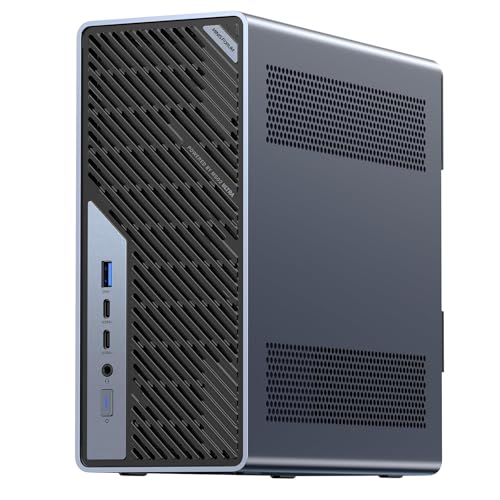
- Best overall: Minisforum MS-02 Ultra Mini Workstation, Core Ultra 9 285HX, 32GB, 1TB, Dual 25GbE — Check on Amazon
- Minisforum MS-A2 Mini Workstation, Ryzen 9 HX, PCIe x16 Slot, Dual 10G SFP+ — Check on Amazon
- AtomMan G7 Ti Mini PC, Core i9-14900HX, RTX 4070 Laptop GPU, 32GB, 1TB — Check on Amazon
- Apple Mac mini M4 Pro, 24GB Unified Memory, 512GB SSD — Check on Amazon
- Minisforum MS-01 Mini Workstation, Core i9-13900H, Dual 10GbE, 32GB, 1TB — Check on Amazon
See 1 more Amazon option
- Beelink SER9 Pro AI Mini PC, Ryzen AI 9 HX 370, Radeon 890M, 32GB, 1TB — Check on Amazon
Read the full guide ↓
Disclosure: As an Amazon Associate, reviewstook.com earns from qualifying purchases. Links to Amazon on this page are affiliate links; they cost you nothing extra. Listing details such as price and availability change often, so check the current Amazon listing before you buy.
If you are new to mini PCs, this guide begins with the sentence most buying guides would bury: $2,500 is more than this kind of computer usually asks for, and a beginner should hear that first. A mini PC is simply a full desktop computer in a box small enough to sit behind a monitor, and the machines handling everyday life — documents, email, calls, browsing, streaming video, light photo work, light gaming — are complete and satisfying between $800 and $1,500. No first-time buyer should spend workstation money to learn lessons a mid-priced box teaches just as well.
So why does this guide exist? Because a small group of beginners arrives with a job already attached: a home server to learn on, a virtualisation lab, a video-editing desk, a small office node moving serious data. Past roughly $1,500, “mini” stops meaning “a cheaper computer” and starts meaning “a smaller workstation,” and the extra money buys not speed you can feel in a spreadsheet but infrastructure: very fast networking, error-correcting memory support, expansion slots shrunk into five-litre boxes, memory ceilings far beyond ordinary needs, and processors with two dozen cores. Every pick below is real, verified Amazon stock priced under the ceiling — check the current price on Amazon for each one — and nothing requires you to spend the full $2,500, because nothing in the mini category honestly asks for all of it.
One famous absence proves the point. AMD’s Strix Halo machines — carrying 64GB and 128GB of unified memory for running AI models at home — launched near this budget in 2025 and were then repriced out of it: the 128GB versions now sit well beyond this budget on Amazon, and the 64GB versions would fit it on price — but no current listing for one could be pinned firmly enough to link, so it is discussed openly below rather than slipped into the picks. If your work is documents, calls and a browser, stop here and keep most of this budget unspent: the Best Mini PC Under $800 tier does your whole job. Read on if your small box has to earn money, move serious data, or teach you how servers work.
Words Worth Knowing Before You Spend Anything
Mini PC listings are written in shorthand; these thirteen terms cover every word that matters below, in plain English.
- Mini PC. A complete desktop computer in a very small case — from under a litre to about five litres here. Not a weaker kind of computer: a smaller package around ordinary desktop jobs, and at this budget, around workstation jobs too.
- Processor (CPU). The chip that does the general thinking; its core count is its worker count. Every processor here has between 12 and 24 cores — far more than office work can use. The surplus exists for running several virtual machines at once, or heavy creative software.
- Integrated graphics. A small graphics unit built into the processor. It draws your desktop, plays video and handles light gaming. Five of the six picks ship with integrated graphics only — genuinely enough for most desks.
- Discrete graphics card (GPU). A separate, stronger graphics chip whose whole job is pictures. Only one pick has one fitted — a laptop graphics card, the smaller, lower-power relative of the desktop card with the same name. That distinction matters throughout this guide.
- Memory (RAM). The machine’s short-term workspace, measured in gigabytes (GB). All six picks carry 24GB or 32GB as sold. Memory-hungry work — virtual machines, AI models, huge timelines — is why this tier exists.
- Socketed memory. Memory fitted in slots (SO-DIMM slots in small machines), removable and replaceable later with bigger sticks. Four picks here work this way, so their memory can grow after purchase.
- Soldered memory. Memory fixed permanently to the board at the factory. It can never be changed, so the size ordered is the size the machine retires with. Two picks here are soldered: the Mac mini (memory and storage both) and the SER9 Pro (memory).
- Storage (SSD). The drive your files and programs live on, measured in gigabytes or terabytes (1TB is roughly 1,000GB). Every pick starts at 512GB or 1TB. On socketed machines a bigger drive can be fitted later; on the Mac mini it cannot, so plan on an external drive there.
- Barebone. A machine sold without some or all of its memory, storage and operating system — a starting point, not a computer, until you supply the missing parts. The MS-A2 sells in a barebone version at the foot of its range alongside finished, configured versions in a clearly higher tier; telling the two apart on the listing page is a first-evening skill this guide teaches.
- Renewed. A used machine checked, cleaned and resold with a guarantee. Plainly: none of the six picks here is renewed — all six are sold new. Renewed business desktops are a legitimate budget route in lower tiers, but nothing here works that way.
- PCIe slot. A socket inside the machine accepting an add-in card — graphics, storage controller, network card. Ordinary mini PCs almost never have one; two picks here do, and a third has a smaller one. That is the biggest reason this tier costs what it costs.
- GbE and SFP+. Networking speeds and connectors. Standard wired networking is 1GbE or 2.5GbE over a cable like a fat phone lead. The workstation picks speak 10GbE and even 25GbE, some over SFP+ ports taking plug-in modules and different cables. If none of that means anything yet, that is useful information about which pick you need.
- Virtual machines and ECC. A virtual machine (VM) is a whole second computer simulated inside yours — the foundation of a homelab. ECC is error-correcting memory that catches its own mistakes, valued in servers that must not corrupt data. Both are workstation ideas, both appear below, and both are optional for a normal desk.
In this guide
Quick Picks
Short on time, or comparing several options at once? Each row below names a buyer type and the product that suits it, with a link to the listing.
| Buyer type | Pick | Why it stands out | Link |
|---|---|---|---|
| Best overall | Minisforum MS-02 Ultra, Core Ultra 9 285HX, 32GB, 1TB | Dual 25GbE, ECC memory support and a PCIe 5.0 x16 slot in under five litres | Check on Amazon |
| Best serviceable workstation | Minisforum MS-A2, Ryzen 9 HX, 32GB, 1TB | A real PCIe x16 slot and dual 10G SFP+ in a 1.78-litre box, with a barebone version at the foot of its range | Check on Amazon |
| Best with a discrete GPU fitted | AtomMan G7 Ti, i9-14900HX, RTX 4070 Laptop GPU, 32GB, 1TB | The only pick here with a dedicated graphics card already inside — a laptop card, named as one | Check on Amazon |
| Best for Mac creators | Apple Mac mini M4 Pro, 24GB, 512GB | ProRes and AV1 hardware engines and three-display support, if your software lives on macOS | Check on Amazon |
| Best homelab node | Minisforum MS-01, i9-13900H, 32GB, 1TB | Dual 10GbE, Intel vPro remote management and three M.2 slots for virtualisation hosts | Check on Amazon |
| Best reason to spend less | Beelink SER9 Pro, Ryzen AI 9 HX 370, 32GB, 1TB | The strongest ordinary mini PC here at roughly half the budget — the control group | Check on Amazon |
How These Picks Were Chosen
The budget was treated as a ceiling, not a target. Every product below is a real Amazon listing priced at or under the $2,500 ceiling — check price on Amazon for the current figure. Prices in this tier move weekly — a late-2026 memory and SSD shortage is repricing small computers — so this guide points to the live listing rather than printing numbers that go stale. Several picks sit far under the ceiling, deliberately: a guide that spends your budget because the search term named it is a sales funnel, not a guide. Where the money buys nothing, this guide says so and points at the cheaper machine.
We have not used these products ourselves. We worked through makers’ listings, specification pages and independent review coverage, comparing what genuinely separates machines at this level: expansion slots and what electrically fits in them, network interfaces by name and speed, memory ceilings and whether memory can change after purchase, storage positions, and power-supply limits. Two filters did most of the excluding. First, pinning: a pick needs a current Amazon listing identifiable exactly, configuration and all. It is why no Strix Halo machine appears above — November 2026 catalog data showed the 64GB GMKtec EVO-X2 priced within this budget, which would fit, but its listing resisted every attempt to pin it firmly enough to link; the 128GB sibling is easy to find, priced well beyond this budget. The 64GB machine is named here as the one that got away, not linked on a guess. Second, purpose: at $2,500 a pick must do something a $1,200 mini PC cannot — a slot, a fast network fabric, an ECC road, a memory ceiling — because “the same office box with a faster chip” is not a reason that survives arithmetic.
One further honesty note concerns graphics — this category’s trap for beginners. Most mini PCs at this level run integrated graphics, and this guide’s single discrete card is a laptop part. Where a pick’s graphics are integrated, its review describes what that class is actually for — driving displays, accelerating timelines, light gaming — and never borrows the reputation of desktop cards with similar names. The AtomMan’s card is the RTX 4070 Laptop GPU at laptop wattage, labelled that way at every appearance below. Read every listing you meet elsewhere with the same suspicion.
Your First Evening: Setup, Step by Step
None of the six machines asks for anything exotic on day one, but the order matters, and two of them have a step zero. Work through this list in sequence and the machine will be correctly set up.
Step 0 — if you bought a barebone, finish building it first. This applies to the MS-A2’s barebone version, the entry point of its range: it arrives without some or all of its memory, storage and operating system, and cannot boot until those are fitted and Windows installed. If that sentence is news to you, you ordered the wrong version — the configured MS-A2 is the same machine finished, in a higher tier of the range.
Step 1 — placement. Put the box where air can move around it: on the desk, or mounted behind the monitor where the design allows, never sealed inside a closed cabinet. These are small machines with small fans, and the workstation picks are documented to be audible under sustained load — the MS-02 Ultra’s power-supply fan is the part owners notice, and review coverage measures the MS-01 in the low-to-mid 40s dB(A) at full load. A cupboard home should be a deliberate homelab decision (the MS-01’s remote management exists for this), not an accident of tidiness.
Step 2 — power. Connect the power supply and switch on. One difference matters at this tier: the MS-02 Ultra has an internal 350W power supply, so its cable runs straight to the wall; the smaller machines use external power bricks, which need a ventilated home of their own.
Step 3 — the monitor cable, and the good news about ports. On a tower PC with a graphics card there is a classic beginner trap: plug the monitor into the motherboard’s sockets instead of the card’s, and the machine silently runs on weak integrated graphics. Mini PCs remove the trap. None of the six processors here is an F-suffix model with its integrated graphics removed — every one has working integrated graphics — and a mini PC presents a single set of display sockets, all live. Plug the monitor into the HDMI or USB-C display output and you have the right port. On the G7 Ti, the display outputs are served by its fitted graphics card, which is the point of buying it.
Step 4 — peripherals and wired internet. Connect keyboard and mouse, then plug in an Ethernet cable rather than relying on Wi-Fi for setup day. Every pick has Wi-Fi for later, but the first evening involves large downloads, and a cable is faster and cannot drop mid-update. On the workstation picks you will see extra network ports, including SFP+ sockets needing plug-in modules: ignore them for now. The ordinary copper Ethernet port talks to your router today; the fast ports are for a later homelab.
Step 5 — let it update, completely. On the five Windows machines, run Windows Update until it reports nothing left, restarting as often as it asks; then install the current graphics driver (Intel, AMD or NVIDIA as the pick dictates) from the maker’s support page. On the Mac mini, the equivalent is macOS Software Update. Do this before judging performance: a machine mid-update feels slower than it is.
Step 6 — set the monitor’s real refresh rate. Windows frequently defaults a fast monitor to a basic refresh rate, making motion look less smooth than the screen you paid for can show. In display settings, select the highest refresh rate your monitor offers. It takes a minute and is the most visible improvement most new owners ever make.
Step 7 — verify the delivered configuration against the model number. Before the return window starts closing, confirm the machine in front of you is the one you ordered: check processor name, memory size and storage size in system settings against the listing. This set has specific checks: on the MS-A2, confirm you received the configuration paid for — barebone and configured versions sell under closely related listings; on the Mac mini, confirm the 24GB and 512GB figures, which can never change later; on the SER9 Pro, check which processor the delivered unit reports and, if a second drive matters, how many M.2 slots it actually has — Beelink’s listing copy describes two while a hands-on review lists one, a disagreement the machine in your hands settles; on the MS-01, check the current price on Amazon against the maker’s own list price: November 2026 listings sat above that figure — a shortage premium, not its correct price.
Step 8 — install your software last. Only now add your applications — and if gaming is part of the plan, your game store. Match expectations to the hardware: the SER9 Pro’s Radeon 890M is the strongest integrated graphics here and handles the lighter end of gaming; the G7 Ti’s laptop RTX 4070 is the one pick built for serious play at 1080p and 1440p; the workstation picks’ integrated graphics are for displays and desktop work, not games, whatever they cost.
The 6 Best Mini PCs Under $2,500
Minisforum MS-02 Ultra Mini Workstation — Core Ultra 9 285HX, 32GB, 1TB
Who it suits: Homelab builders and professionals who need server-class networking and a real expansion slot, in a mini PC that stops apologising for being small.
Beginners should understand what they are looking at: the verified ceiling of the category, specified like a small server that lost its rack, around Intel’s Core Ultra 9 285HX — 24 cores running to 5.5GHz. Networking leads the sheet — dual 25GbE SFP+ ports on an Intel E810 controller, joined by 10GbE and 2.5GbE copper: four network interfaces in a chassis of roughly 4.8 litres. Memory runs to four DDR5 SO-DIMM slots with a 256GB ceiling and ECC support, a combination found nowhere else in the mini market. Storage spreads across four M.2 2280 positions — two on the board, two riding on the network card. A PCIe 5.0 x16 slot accepts a low-profile dual-slot card; two USB4 ports run at 80Gbps with a third at 40Gbps; HDMI 2.1 completes a set the maker’s listing copy totals at four video outputs. Wi-Fi 7, an internal 350W supply and Windows 11 Pro round it out. Check the current price on Amazon: it has sat comfortably under this budget, leaving real headroom for the upgrade described later.
Its limitations are structural, and they matter more to a beginner than to anyone. As shipped, all graphics come from the processor’s integrated Intel GPU: displays and desktop work, yes; a creator’s accelerator, no. The PCIe slot is the machine’s future, and that future has hard edges — any card must be low-profile, and reviewer coverage notes the processor’s power limit steps down once a discrete card is installed, because the internal 350W supply is a genuine ceiling, not a suggestion. Owners and reviewers describe a machine audible under sustained load — the power-supply fan is the part people notice — and homelab coverage has recorded Linux and Proxmox driver and passthrough quirks; Windows and Hyper-V are the smoother road today. Take it on those terms: the most expandable small computer in this guide, priced accordingly, with a graphics purchase still ahead of you if your work needs one.
- The fastest networking in this guide, built in: dual 25GbE SFP+, plus 10GbE and 2.5GbE copper.
- Four SO-DIMM slots reaching 256GB with ECC support — a memory ceiling no rival here approaches.
- A PCIe 5.0 x16 slot and four M.2 positions turn it into a platform rather than an appliance.
Honest limitation: You start on integrated graphics, the 350W supply caps whatever card arrives later, and sustained load brings fan noise you will hear.
Choose it if the small box is really infrastructure — virtualisation, fast storage, a node expected to grow. Skip it if graphics power must be present on day one, or if the workload is a browser and a word processor wearing a workstation’s budget.

Minisforum MS-A2 Mini Workstation — Ryzen 9 HX, 32GB, 1TB
Who it suits: Buyers who want the slot-and-network idea of the MS-02 Ultra in a smaller, cheaper box — and who are comfortable buying a platform in barebone or configured form, and telling the two apart.
The MS-A2 makes the same argument at 1.78 litres. Its processor family is AMD’s 16-core Zen 5 HX line, running to 5.4GHz, and the board carries two things mini PCs almost never carry: a PCIe x16 slot (PCIe 4.0, wired x8 electrically) and dual 10G SFP+ networking on an Intel X710 controller, backed by dual 2.5GbE. Memory is two DDR5-5600 SO-DIMM slots reaching 96GB; storage offers three M.2/U.2 positions; displays leave by HDMI plus two USB-C outputs. Pricing is a family affair, worth reading carefully: the barebone version sits at the foot of the range, while configured 32GB/1TB versions sit in a clearly higher tier — check the current price on Amazon for each. Either way, the finished machine lands well beneath this budget — exactly the point of the pick.
Two limitations define it. First, the integrated Radeon 610M is the weakest graphics in this guide — display-driving and nothing more — so any graphics ambition becomes a slot purchase, just as with its bigger sibling. Second, independent test coverage of the MS-A2 family reports audible noise under load and relatively high idle power for a mini PC, with limited airflow around the PCIe area: a machine built for capability rather than silence. A listing discipline issue also deserves a beginner’s full attention: this model sells in several configurations, and as a barebone under closely related listings, so match the exact configuration on the live page before ordering. A barebone is a starting point, not a computer, and finishing it costs whatever memory and SSD prices are that week.
- A PCIe x16 slot and dual 10G SFP+ inside 1.78 litres — the densest expansion story per litre here.
- Memory reaching 96GB and three storage positions, all owner-serviceable.
- A barebone entry point lets parts owners finish well below the configured version’s tier.
Honest limitation: The Radeon 610M exists to run displays, not workloads, and test coverage reports load noise and idle power that betray the workstation brief.
Choose it if a small virtualisation or network node you can open, change and grow is the goal. Skip it if quiet matters, or if the machine must be finished the day it arrives with graphics already aboard.

AtomMan G7 Ti Mini PC — Core i9-14900HX, RTX 4070 Laptop GPU, 32GB, 1TB
Who it suits: Creators and gamers who need an actual discrete graphics card inside the small box — and who understand precisely which graphics card they are getting.
Start with the naming, because this guide insists on it: the graphics card inside the G7 Ti is the RTX 4070 Laptop GPU — 8GB, running at up to 140W in this machine. For 1080p and 1440p gaming and GPU-accelerated creative work it is genuinely capable, and it is equally genuinely a clear step below the 12GB desktop RTX 4070 carrying the same name in tower listings. The supporting cast is desktop-class: Intel’s Core i9-14900HX with 24 cores to 5.8GHz, 32GB of DDR5 in two SO-DIMM slots upgradable to 96GB, a 1TB SSD with a second SSD slot, HDMI 2.1 and USB4 display outputs, and Wi-Fi 7. The configured 32GB/1TB machine sits in the middle of this budget, with a barebone version below it — inside the ceiling either way, and check the current price on Amazon, since this model’s pricing has historically moved around rather than holding a stable shelf position.
Its limitations follow from the concept. A laptop GPU inside a slim chassis is a thermal compromise by design: desktop-card behaviour will not be sustained, and the 8GB of graphics memory is the first specification in the machine that will age. The barebone version is no shortcut to a cheap finished PC, either — memory, storage and an operating system must join it, and at current market prices those parts can erase the saving entirely; buy configured unless the parts are already yours. Price discipline matters more here than for any other pick: let the live listing drift well above its usual configured tier and the value argument goes with it, because the MS-A2 above plus a slot card begins to compete.
- The one discrete GPU in this guide, fitted at the factory — no slot purchase required.
- A desktop-class 24-core processor, with memory upgradable to 96GB.
- Its configured tier leaves a good share of the budget unspent — check the current price on Amazon.
Honest limitation: The card is the 8GB laptop RTX 4070 rather than the desktop part — judge it as a strong mobile GPU in a small box, because that is what it is.
Choose it if work or play needs CUDA-class graphics inside a mini PC today. Skip it if desktop 4070 performance was the picture in your head, or if the live price has wandered far above its usual tier.

Apple Mac mini M4 Pro — 24GB Unified Memory, 512GB SSD
Who it suits: Video editors and Mac-first creators whose software already lives on macOS, and who value hardware media engines and silence over expandability.
The Mac mini is the odd machine here — the only one that is not a PC — and beginners should register that first: it runs macOS, not Windows, and that fact decides its suitability before any specification does. It earns its place through what its silicon does for media work. The M4 Pro configuration linked here pairs a 12-core CPU with a 16-core GPU, 24GB of unified memory on a 273GB/s bus, and hardware ProRes and AV1 engines that make timeline work feel effortless in a way specifications undersell. Ports run to three Thunderbolt 5 and HDMI at the back, two USB-C and a headphone jack at the front, and Apple’s own published specification credits the M4 Pro mini with support for up to three displays — the only monitor-count claim made for it here, because it is Apple’s. Pricing needs care: Apple raised this line’s starting price during 2026, and Amazon listings for this configuration have moved around beneath it — check the current price on Amazon before comparing it with the Windows picks.
Its limitations are Apple’s design philosophy stated plainly. Nothing inside can be upgraded — neither memory nor storage — so the configuration bought is the machine retired, and 24GB with 512GB is a specification to choose with the next five years in mind; an external SSD is a planned purchase rather than an accessory. It runs macOS only, ending the discussion for Windows software, most games and x86 homelab hypervisors. It is also the sealed appliance at the far end of this guide’s serviceability scale: the Minisforum machines open with a screwdriver; this one does not open at all. With the right software stack, none of that matters. For anyone else’s, it is the whole review.
- Hardware ProRes and AV1 engines make it this guide’s strongest media-timeline machine per watt.
- Thunderbolt 5 and three-display support, from a box effectively silent in normal use.
- Amazon listings have run beneath Apple’s own starting price — check the current price on Amazon.
Honest limitation: Memory and storage are fixed forever at purchase, and it is a Mac — if your tools or games need Windows, this is a different platform, not a cheaper PC.
Choose it if your creative stack is macOS-native and the configuration maths is done before ordering. Skip it if Windows, upgrade paths or homelab flexibility are requirements.

Minisforum MS-01 Mini Workstation — Core i9-13900H, 32GB, 1TB
Who it suits: Homelab builders running virtual machines and containers, who want remote management and fast networking in the smallest credible package.
The MS-01 is the earlier generation of the idea the MS-02 Ultra completes, and for homelab duty it remains that idea’s value expression. Its Core i9-13900H offers 14 cores to 5.4GHz; memory is 32GB of DDR5 with an official ceiling of 64GB; storage runs to three M.2 slots plus a U.2 position via the included adapter. Networking is the reason it exists: dual 10GbE SFP+ on an Intel X710 controller and dual 2.5GbE, one an i226-LM carrying Intel vPro — remote management letting the box live in a cupboard and be administered like a server, why the walkthrough treats a cupboard as a deliberate choice for this machine. A PCIe x16 slot wired x8, physically half-height and single-slot, joins two USB4 ports and HDMI for three displays, plus Wi-Fi 6E. Its maker’s list price sits toward the lower-middle of this tier, yet Amazon listings in mid-November 2026 sat above it in a shortage market — check the current price on Amazon — and even so it remains barely half this budget.
Its limitations are documented ones. ServeTheHome’s hands-on coverage of the platform ran a compatibility plug-fest on that PCIe slot and found certain cards never initialise — the slot is real, but check your specific card against owner reports before planning around it. Review coverage measures its noise at full CPU load in the low-to-mid 40s dB(A): not loud for a workstation, not silent for a bedroom. Graphics are integrated Iris Xe — displays and desktop acceleration only. And the pricing above carries the guide’s standard warning in its sharpest form: this machine’s correct price is its maker’s list figure or below, making the current Amazon premium a shortage artefact to wait out or work around rather than a new normal to accept quietly.
- A genuine server feature set: dual 10GbE, vPro remote management and three M.2 slots.
- Fourteen cores and a 64GB ceiling cover serious virtualisation inside a 1.78-litre-class box.
- A modest list price for the tier makes even inflated listings about half this budget.
Honest limitation: Reviewer testing found some PCIe cards never initialise in its slot, and Amazon’s current listing sits above the maker’s own list price — check the current price on Amazon.
Choose it if a homelab node is the project and management features matter more than raw ceiling. Skip it if the MS-02’s 25GbE and memory ceiling are the requirement, or if the room must stay quiet.

Beelink SER9 Pro AI Mini PC — Ryzen AI 9 HX 370, Radeon 890M, 32GB, 1TB
Who it suits: Almost everyone who landed on this page by accident — the buyer whose needs are real but ordinary, better served by the strongest mainstream mini PC than by a workstation.
Every guide needs a control group, and this is it: the machine demonstrating what the sensible money buys. Inside roughly 0.82 litres, the SER9 Pro packs AMD’s Ryzen AI 9 HX 370 — 12 cores to 5.1GHz — with the Radeon 890M, the strongest integrated graphics in this guide, 32GB of LPDDR5X memory, a 1TB PCIe 4.0 SSD, USB4, Wi-Fi 6 and 2.5GbE. It runs Windows 11 Pro. This configuration sits in the mainstream tier of the mini PC market — check the current price on Amazon. That is this guide’s whole finding in one product: the best ordinary mini PC money currently buys costs about half the keyword’s budget, and for office work, development, media, photo editing and lighter gaming, the machines above it add infrastructure rather than experience.
Its limitations are the mainstream ones, stated so the comparison stays fair. The 32GB of memory is soldered — the machine’s lifetime specification, with no road upward — which is what the MS-A2 and MS-02 exist to answer. No OCuLink port means the external-GPU escape hatch some rivals offer is absent, and there is no PCIe slot of any kind. One documentation wrinkle deserves flagging rather than resolving: Beelink’s listing copy describes two M.2 slots while at least one hands-on review lists a single M.2 2280, so check the live listing, and then the delivered machine, if a second drive matters — the sources disagree, and we will not guess. None of it stops this being the correct purchase for most readers.
- Radeon 890M integrated graphics beside a 12-core Zen 5 processor: the strongest all-round specification in the mainstream tier.
- Roughly 0.82 litres with USB4 and Windows 11 Pro — check the current price on Amazon.
- The benchmark against which every other pick here must justify its premium.
Honest limitation: Soldered 32GB memory is forever, no expansion slot or OCuLink exists, and its own sources disagree on the M.2 slot count — verify on the live listing.
Choose it if the work is the ordinary kind done well — which is most work. Skip it if the slots, fabrics and memory ceilings above are genuinely needed; that need, and only that need, justifies them.
Comparison Table
| Product | Type | Best use | Link |
|---|---|---|---|
| Minisforum MS-02 Ultra, 285HX, 32GB, 1TB | Mini workstation | 25GbE networking, ECC memory and a PCIe 5.0 slot | Check on Amazon |
| Minisforum MS-A2, Ryzen 9 HX, 32GB, 1TB | Mini workstation | Slot and dual 10G in 1.78 litres, with a barebone version at the foot of the range | Check on Amazon |
| AtomMan G7 Ti, 14900HX, RTX 4070 Laptop, 32GB, 1TB | Gaming/creator mini | A discrete GPU already fitted, honestly named as a laptop part | Check on Amazon |
| Apple Mac mini M4 Pro, 24GB, 512GB | Creator desktop | macOS media work with hardware ProRes/AV1 engines | Check on Amazon |
| Minisforum MS-01, 13900H, 32GB, 1TB | Homelab node | Dual 10GbE and vPro management at a modest list price for the tier | Check on Amazon |
| Beelink SER9 Pro, HX 370, 32GB, 1TB | Mainstream mini PC | The strongest ordinary mini PC here, at about half the budget | Check on Amazon |
How to Choose a Mini PC Under $2,500
- Interrogate the budget before the listings. List the jobs the machine must do that a $1,200 mini PC cannot. An empty list — and documents, calls, browsing and media will produce one — means the correct guide is Best Mini PC Under $1500 and the correct purchase leaves four figures unspent. Named capabilities justify this tier; the roundness of the number never does.
- Buy the interface, not the processor. Processors here are all fast. Separation lives in connections: 25GbE against 10GbE against 2.5GbE, a slot against no slot, four memory slots against soldered chips. Choose by the fabric your other equipment speaks.
- Decide your memory philosophy now. Soldered memory (the SER9 Pro, the Mac mini, every Strix Halo machine) is a lifetime decision taken at checkout. Socketed memory (both Minisforum workstations, the MS-01, the G7 Ti) can grow later. Work that eats memory — virtual machines, local models, huge timelines — belongs on the socketed side, or on a soldered machine bought at its final size from day one.
- Treat “barebone” as a bill, not a bargain. The barebone price excludes memory, storage and usually the operating system. With late-2026 memory and SSD prices spiked, completing one from new parts can exceed the configured version of the same machine. Barebone wins when the parts already sit on your shelf; run that arithmetic with live prices, never with the kit price alone.
- Read graphics names like a lawyer. Integrated graphics are not a graphics card, a laptop GPU is not its desktop namesake, and “RTX 4070” in a mini PC listing means the mobile part at mobile wattage. This guide labels the G7 Ti’s card a laptop GPU at every appearance; extend the same reading to every other listing.
- Check the power ceiling behind the slot. An expansion slot is a promise the power supply must keep. The MS-02 Ultra’s internal 350W supply bounds the cards it can host and steps the processor’s power down once one is fitted. Slot plus small PSU means a low-profile card planned ahead — not any card you happen to own.
- Count displays from ports, not from prose. Marketing pages promise “multi-monitor” freely; claims here come from physical outputs and makers’ published specifications — four video outputs for the MS-02 Ultra per its listing copy, three displays for the Mac mini per Apple — and where nothing could be verified, no number was printed. Hold every listing to that standard.
- Price the whole desk, not the box. At this level the machine is rarely the whole purchase: a slot card, a 25GbE switch, memory for the ceiling you bought, an external drive for the sealed machine. A workstation under the ceiling plus a plan is a purchase; spending the full $2,500 just to “have the best” is an ornament.
What Else You Will Spend
The box is not the whole desk, and beginners deserve the full list before checkout rather than after. The first and largest item is the one no mini PC includes: a monitor. Every pick here is a computer only, so an unowned display is a purchase that comes first — this guide quotes no monitor prices, but it refuses to pretend the screen is free. A keyboard and mouse are assumed to be yours already.
Beyond that, each pick carries its own catches, priced honestly as machine plus fix — an addition to the pick’s price, never hidden inside it. On the Mac mini, 512GB of storage is fixed forever, so an external SSD belongs in the plan from day one. On the MS-02 Ultra, the graphics card its slot awaits is a second purchase — low-profile, within the 350W supply’s limits. On the MS-A2 the catch is configuration: buy the barebone by mistake and the fix is the memory, SSD and operating system it needs, at the live rates of the week you buy them. On the MS-01 the catch is timing: its correct price is its maker’s list figure or below, so the fix for an above-list listing is patience, not money. On the SER9 Pro there is no catch to price — which is rather the point of it.
Upgrades, in Plain Terms
Beginners ask one upgrade question more than any other: can I put a graphics card in it later? Here is the honest answer for each pick, using only what the base research documents.
Only one pick supports adding a graphics card later in any straightforward sense: the MS-02 Ultra, whose PCIe 5.0 x16 slot and internal 350W power supply are both documented. Even there the promise is narrow — low-profile, dual-slot cards only, and the processor’s power limit steps down once one is fitted. Plan the specific card before relying on it. The MS-A2 also carries a real PCIe x16 slot (PCIe 4.0, wired x8), and its base documentation frames any graphics ambition as a slot purchase — but no power-supply wattage is documented for it, so no wattage claim is made and nothing is promised beyond the slot’s existence; check the live listing and owner reports for your intended card. The MS-01’s slot is narrower still — half-height, single-slot — and reviewer testing found some cards never initialise in it, so treat it as a network-and-storage slot first, and a graphics route only with a card other owners have verified.
For the other three picks the answer is no, stated plainly. The G7 Ti already contains its graphics card — a factory-fitted laptop GPU — and laptop graphics are not swapped like desktop cards; its documented growth is memory (to 96GB) and a second SSD. The Mac mini upgrades nothing, ever. The SER9 Pro has no slot and no OCuLink port, so its graphics are the Radeon 890M it ships with, for life; its memory is soldered too. What the socketed machines all offer instead is the quieter path beginners actually use: more memory and more storage, fitted later, at the prices of the week you need them.
Common Buying Mistakes
- Spending the full $2,500 because the search said “under $2,500”. A ceiling grants permission; it does not issue instructions. Even the most expensive verified pick here sits well under the ceiling, and most readers should spend half the budget or less.
- Buying a workstation mini PC for office work. Dual 25GbE and ECC support do nothing for documents and calls; the first $800 to $1,000 of this category covers the whole office job.
- Ordering the barebone version by accident. Barebone and configured MS-A2 versions sell under closely related listings, and a barebone cannot even boot until memory, storage and an operating system join it. Check the configuration line before paying, then again on delivery day.
- Taking “RTX 4070” in a mini PC listing to mean the desktop card. The reality is the 8GB laptop GPU at laptop wattage — good, and a different product.
- Comparing a barebone price against configured prices. The kit price leaves out memory, storage and usually Windows; finish one with new parts and the total can pass the finished machine.
- Buying soldered memory at today’s size. On the SER9 Pro, the Mac mini and every Strix Halo box, the memory ordered is the memory the machine dies with — size it for the work you expect, not the work you have.
- Planning a graphics card around a slot without checking power supply and card list. Mini PC slots are low-profile and wattage-capped, and the MS-01’s can refuse some cards entirely.
- Following the 128GB Strix Halo headline into a listing priced far beyond this budget and calling it “the $2,500 guide’s pick”. It overshoots the ceiling by a wide margin; the repricing is the story, not an excuse to move the ceiling.
- Accepting a shortage premium as a price. The MS-01 has been listed on Amazon above its maker’s own list price; listings above that figure argue for waiting — not for paying quietly.
Final Recommendation
- Most buyers who truly need this tier: Minisforum MS-02 Ultra.
- Slot and network in the smallest box: Minisforum MS-A2.
- A discrete GPU, fitted and finished: AtomMan G7 Ti.
- macOS creative work: Apple Mac mini M4 Pro.
- Homelab value: Minisforum MS-01.
- Almost everybody else: Beelink SER9 Pro — and keep the difference.
Two machines define this ceiling. The MS-02 Ultra is the one pick behaving like infrastructure — 25-gigabit networking, an ECC memory road to 256GB and a current-generation slot inside under five litres — while the MS-A2 delivers the same idea smaller and cheaper for buyers content with integrated graphics until the slot earns its card. Between them they state what $2,500 is actually for in a mini PC. The G7 Ti answers when graphics must arrive fitted; the Mac mini when the software is Apple’s; the MS-01 when the lab outranks the ceiling. The SER9 Pro remains the guide’s conscience: at roughly half the budget it handles everything else most desks will ever ask. Ambitions running past this tier — bigger slots, desktop cards, rack thinking — point not at a larger mini PC but at a small tower, and the Best Workstation PC Under $2500 guide is where that conversation starts. Readers whose needs sit narrower should also weigh the Best Mini PC Under $1200 tier before deciding where their money stops.
Frequently Asked Questions
Does anyone actually need a $2,500 mini PC?
A narrow slice of buyers does: homelab builders needing 10- or 25-gigabit networking and remote management in a tiny box, professionals whose virtual machines or local AI models consume memory by the tens of gigabytes, and creators needing a slot or a media engine behind a monitor. For documents, browsing, calls and media, no — several tiers down finish the job, and this guide’s value pick at half the budget outperforms the need.
I am a complete beginner. Which of these should I actually buy?
Start from your job, not the budget. For documents, calls, browsing, media and light gaming, the SER9 Pro is the recommendation — the strongest ordinary mini PC here, arriving finished, leaving roughly half the budget unspent. Buy a workstation pick only if you can already name what it does for you: a homelab, a slot, a fast network, a memory ceiling. “I might need it one day” is how $2,500 becomes an ornament.
Why is there no Strix Halo machine among the picks?
Because the category priced itself out of this guide. The 128GB GMKtec EVO-X2 and its siblings launched within reach of this budget in 2025, then were repriced in the autumn of 2026 to sit well beyond it. The 64GB version has appeared within this budget in November 2026 Amazon catalog data, which would fit, but its current listing could not be pinned firmly enough to link responsibly, and this guide does not link on guesses. Find that 64GB listing live within budget, with local AI memory as your workload, and it becomes a legitimate alternative to weigh against the MS-02 Ultra — soldered memory standing as its caveat.
Is the RTX 4070 in the AtomMan G7 Ti the same as a desktop RTX 4070?
No. The card is the RTX 4070 Laptop GPU: 8GB of memory against the desktop card’s 12GB, running at up to 140W in this chassis against the desktop part’s higher power budget. It remains a strong card for 1080p and 1440p gaming and GPU-accelerated creative work, and should be judged as exactly that — a high-end mobile GPU in a small desktop — never by its desktop namesake’s reputation.
Should I buy a barebone workstation and finish it myself?
Only with parts already owned. A barebone MS-A2 at the foot of its range looks like a bargain until memory, an SSD and an operating system join the basket at late-2026 prices, at which point the configured version is frequently the cheaper finished machine — the documented pattern across this category this year. Run the completion arithmetic with live prices for the exact parts, every time; a kit price alone is not a computer price. Beginners should let the factory finish the machine.


