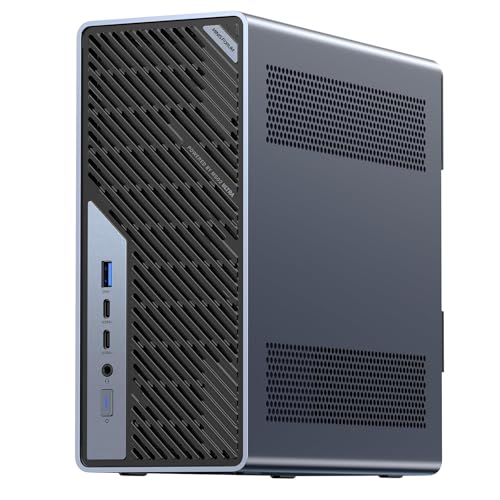
Where to buy
Check the latest price, availability and delivery on Amazon. Orders are placed on Amazon. We may earn a commission from qualifying purchases.
- Best overall mini workstation: Minisforum MS-02 Ultra, Core Ultra 9 285HX, 32GB, 1TB, Dual 25GbE — Check on Amazon
- GMKtec EVO-X2, Ryzen AI Max+ 395, 64GB, 1TB — Check on Amazon
- Minisforum MS-S1 MAX, Ryzen AI Max+ 395, 64GB, 2TB, Dual 10GbE — Check on Amazon
- Minisforum MS-A2 Mini Workstation, Ryzen 9 HX, PCIe x16 — Check on Amazon
See 2 more Amazon options
- Apple Mac mini M4 Pro, 24GB Unified Memory, 512GB SSD — Check on Amazon
- Beelink SER9 Pro, Ryzen AI 9 HX 370, Radeon 890M, 32GB, 1TB — Check on Amazon
Read the full guide ↓
Disclosure: As an Amazon Associate, reviewstook.com earns from qualifying purchases. Links to Amazon on this page are affiliate links; they cost you nothing extra. Listing details such as price and availability change often, so check the current Amazon listing before you buy.
A $3,000 budget is a strange budget for a mini PC, and this guide starts with the fact most roundups bury: for general-purpose computing, much of it cannot be spent on a better ordinary mini at all. The fastest ordinary mini PCs — the machines that make office work, browsing, photo editing, media serving and light gaming feel instant — sit in a much lower tier. Past that point the category changes character completely. What remains is workstation and homelab hardware: mini servers with 25-gigabit networking and ECC memory, virtualization hosts with real PCIe slots, and a new class of local-AI machines built around AMD’s Strix Halo chip, whose entire selling point is a very large pool of memory shared between CPU and graphics. If your work is in one of those three trades, this guide is for you. If it is not, the honest recommendation is to buy from our lower-tier guides, keep the difference, and let this page talk you out of overspending.
The ceiling itself deserves attention. The most expensive mini PC configuration we could verify on Amazon — the 128GB version of the Strix Halo machines — sits above this entire budget, and premium-brand versions of the same chip sit higher still. So even at $3,000 you cannot buy the top of this category; you can buy its 64GB tier, its workstation tier, and its expansion tier, and those are exactly what the six picks below cover. Pricing in this class moved violently through late 2026 as memory and SSD costs shifted, and several of these machines were repriced sharply in a single season. Check price on Amazon before you buy, and treat any pick whose current listing sits far above where this tier normally sits as a pick to wait on.
In this guide
Quick Picks
Short on time, or comparing several options at once? Each row below names a buyer type and the machine that suits it, with a link to the listing.
| Buyer type | Pick | Why it stands out | Link |
|---|---|---|---|
| Best overall mini workstation | Minisforum MS-02 Ultra, Core Ultra 9 285HX | PCIe 5.0 x16 slot, ECC memory to 256GB, dual 25GbE, internal 350W PSU | Check on Amazon |
| Best for local AI and graphics | GMKtec EVO-X2, Ryzen AI Max+ 395, 64GB | Strix Halo’s 8060S integrated graphics with 64GB of unified memory | Check on Amazon |
| Best Strix Halo with networking | Minisforum MS-S1 MAX, 64GB, 2TB | Same chip plus dual 10GbE, a PCIe slot and an internal 320W PSU | Check on Amazon |
| Best serviceable mini | Minisforum MS-A2, Ryzen 9 HX | Socketed RAM to 96GB and a PCIe x16 slot in a 1.78-litre box | Check on Amazon |
| Best general-purpose premium mini | Apple Mac mini M4 Pro, 24GB, 512GB | The strongest ordinary desktop in this guide, if your software runs on macOS | Check on Amazon |
| Best reason to spend less | Beelink SER9 Pro, Ryzen AI 9 HX 370 | 890M graphics and 32GB in 0.82 litres as the spend-less alternative | Check on Amazon |
How These Picks Were Chosen
The budget was applied as a ceiling on real Amazon listings, not on maker-store listings. Every pick below is a machine listed at or under the $3,000 ceiling in the United States — check price on Amazon for the current listing, because prices in this class drift often. That rule excluded some famous hardware. The 128GB Strix Halo machines launched in late 2025 in a tier that would have fitted this guide, but the memory shortage repriced them above the budget: the GMKtec EVO-X2 in 128GB form, the Beelink GTR9 Pro and the other 128GB listings of every brand now sit above this guide’s ceiling. Those machines are landmarks in this guide — they mark where the category’s ceiling actually is — but they are not picks, because a recommendation you cannot buy inside the budget is not a recommendation.
We did not use these machines ourselves. We read the maker listings, specification pages and hands-on reviews, and compared the things that genuinely differ at this altitude: memory architecture (socketed DDR5 you can grow versus LPDDR5X soldered beside the chip forever), expansion (a real PCIe slot versus none), networking (2.5GbE versus 10GbE versus 25GbE), storage positions, power supply design, and the physical volume the machine asks of your desk. Two filters sat on top of that. The first is the honesty filter: any machine whose headline number is a memory figure you cannot upgrade, a graphics claim borrowed from a desktop part with a similar name, or a barebone price presented as a finished computer was either excluded or called out in its review. The second is the audience filter: every pick had to answer for a named professional job — homelab, virtualization, local AI, creation — because at this budget “general use” is not a job, it is a way to overspend.
One structural fact shapes the whole list. The six picks divide into two philosophies. The Minisforum MS-02 Ultra and MS-A2 are platforms: socketed memory, spare drive bays and PCIe slots mean the machine you buy is a starting point. The two Strix Halo machines and the Mac mini are appliances: everything is soldered, the specification you choose on day one is the specification you retire, and what you are buying instead is integration — a huge shared memory pool, or Apple’s silicon and software stack. The SER9 Pro sits underneath both camps as the control group: the strongest conventional mini PC of the previous generation, included so you can see exactly what the extra money does and does not buy.
A note on gaming, because this site’s readers will ask: mini PCs at $3,000 are not $3,000 gaming machines, and the guide refuses to grade them as if they were. The Strix Halo’s 8060S is the strongest integrated graphics available and a real 1080p gaming engine, the SER9 Pro’s 890M is a class below it, and the workstation picks ship with display-grade graphics until you add a card. A gaming tower at this budget carries a discrete GPU from a different performance world entirely — readers whose primary job is gaming belong in Best Gaming PC Under $3000 or Best Mini Gaming PC Under $3000, and this guide’s machines should be bought for the work named in their reviews, with gaming as a dividend rather than the thesis.
The 6 Best Mini PCs Under $3,000
Minisforum MS-02 Ultra — Core Ultra 9 285HX, 32GB, 1TB, Dual 25GbE
Who it suits: Homelab builders and virtualization users who need a small machine that behaves like a small server — fast networking, error-correcting memory, room for a real expansion card — rather than a fast desktop that happens to be tiny.
This is the verified ceiling of the mini PC category, and it earns the title on infrastructure rather than speed. The Core Ultra 9 285HX brings 24 cores, but the spec sheet around it is the story: four DDR5 SO-DIMM slots accepting up to 256GB with ECC support, four M.2 2280 storage positions (two on the board, two riding on the network card), a PCIe 5.0 x16 slot that takes a low-profile dual-slot card, and networking that reads like a switch catalog — dual 25GbE SFP+ on an Intel E810 controller, plus 10GbE and 2.5GbE copper ports. An internal 350W power supply means no brick on the floor, and the maker’s listing copy specifies four video outputs across its USB4 and HDMI ports, so it can drive a desk as well as a rack. Check price on Amazon for the current listing; it is also — oddly — one of the more accessibly positioned machines in this guide, because you are paying for ports and slots rather than for memory capacity in a shortage market.
The limitations are real and worth naming before the strengths seduce you. Out of the box, graphics are the chip’s integrated Intel solution: fine for displays and video decode, not a gaming or GPU-compute engine. The graphics card this machine deserves is a second purchase, capped by the 350W supply and the low-profile slot, and reviewer coverage notes the CPU’s power limit steps down when a discrete card is installed. Owner reports collected by review sites add two more: the power supply fan is the component people hear under sustained load, and Linux and Proxmox users have reported driver and PCIe passthrough quirks that make Windows with Hyper-V the smoother first path. None of that disqualifies it — it defines it. This is a host first and a desktop second.
- PCIe 5.0 x16 slot, four SO-DIMM slots with ECC support, four M.2 positions — the most expandable mini PC we could verify.
- Dual 25GbE SFP+, 10GbE and 2.5GbE networking: homelab infrastructure no ordinary mini offers.
- Internal 350W PSU and a 4.8-litre chassis that still fits on or under a desk.
Honest limitation: Integrated graphics only as shipped; the GPU is a later, wattage-capped purchase, and the PSU fan is audible under sustained load per owner reports.
Choose it if your mini PC is really a server — virtual machines, fast storage networking, a future GPU. Skip it if you want graphics performance on day one; that is the Strix Halo picks below.

GMKtec EVO-X2 — Ryzen AI Max+ 395, 64GB, 1TB
Who it suits: Buyers whose work is memory-bound rather than slot-bound — local AI models, big integrated-graphics workloads, heavy multitasking — and who want the strongest graphics ever integrated into a mini PC without buying a discrete card.
The Ryzen AI Max+ 395, AMD’s Strix Halo, is a genuinely different kind of chip: 16 Zen 5 cores beside a Radeon 8060S integrated GPU with 40 compute units, fed by 64GB of LPDDR5X-8000 that CPU and GPU share as one pool. That shared pool is the entire point. AMD’s own guidance allows the graphics side to address up to 48GB of it, which is more memory than any consumer graphics card offers, and it is why these machines became the default recommendation for running large local language models on a desk. The EVO-X2 is the most accessibly positioned verified way into the platform — check price on Amazon — with 64GB and a 1TB PCIe 4.0 SSD, quad-display output per the listing, Wi-Fi 7 and USB4. As a games machine it sits in the strongest integrated class there is — modern titles at 1080p are its home turf — while remaining, and we will keep saying this, an integrated GPU rather than a discrete one.
The catch is cast in silicon. The memory is soldered beside the chip, so the 64GB you buy is the 64GB you own forever; there is no upgrade path to the 128GB version, only a second machine. And that 128GB version is this guide’s standing warning about the category: the same box with double the memory now sits above this entire budget on Amazon, having launched in a far lower tier a year earlier. If your models genuinely need 128GB, this budget cannot currently buy it in a mini PC, and no review should pretend otherwise. Buy the 64GB machine for what it is — the price-performance center of the Strix Halo class — and size your ambitions to its pool.
- Ryzen AI Max+ 395 with Radeon 8060S graphics: the strongest integrated graphics in any mini PC.
- 64GB of unified LPDDR5X-8000, addressable by the GPU — built for large local AI models.
- Most accessibly positioned verified Strix Halo listing on Amazon, with 1TB fitted — check price on Amazon.
Honest limitation: Memory is soldered and final. If you outgrow 64GB, the replacement is a whole machine — and its 128GB sibling currently sells above this entire budget.
Choose it if local AI or integrated-graphics work is the job and 64GB is enough pool. Skip it if you need expansion slots or fast networking — the two Minisforum machines bracket it on exactly those points.

Minisforum MS-S1 MAX — Ryzen AI Max+ 395, 64GB, 2TB, Dual 10GbE
Who it suits: Strix Halo buyers who also run a real network — a NAS on 10GbE, a home server rack, a small studio — and who want the AI machine and the infrastructure machine to be the same box.
Take the EVO-X2’s chip and memory, then fix its two silences. The MS-S1 MAX carries the same Ryzen AI Max+ 395 and the same 64GB of soldered LPDDR5X-8000, but wraps them in Minisforum’s workstation chassis: a 2TB SSD fitted as standard with a second M.2 position, a PCIe x16 slot per the listing, USB4 V2 at 80Gbps, dual 10GbE RJ45 ports, Wi-Fi 7, and an internal 320W power supply in place of a laptop-style brick. It sits at the premium end of the 64GB Strix Halo tier — check price on Amazon — and the premium over the GMKtec buys storage, slots and networking rather than speed, because the chip and its graphics are identical. For a machine that will spend its life pulling model files and media off network storage at 10 gigabits, that is the correct premium to spend.
Two cautions belong in this review. First, stock: trackers noted the 64GB configuration was at times orderable for a later delivery date rather than sitting in an Amazon warehouse, so check the delivery estimate as carefully as the listing details. Second, the same soldered-memory law applies — 64GB is final — and this model’s own 128GB configuration sits outside this budget entirely. The chassis is also a workstation’s, larger and more industrial than a living-room mini, closer to a small rack unit than to a NUC. Buyers who picture a box hidden behind a monitor should look at the EVO-X2’s footprint first.
Where the MS-S1 MAX quietly outclasses the rest of this guide is as a desk machine for people with many fast things attached. USB4 V2 at 80Gbps is the fastest peripheral connection on any pick here — double the 40Gbps class of the other machines’ USB4 — and paired with dual 10GbE it makes the box a plausible ingest and editing hub: camera cards and SSDs in over the wire or the port at speeds a gigabit-era mini cannot approach. That is a narrow talent, and the review scores it as one; but for a small studio moving large files between a NAS, a capture machine and an AI workstation, it is the talent the whole purchase turns on.
- Strix Halo plus infrastructure: dual 10GbE, USB4 V2 80Gbps and a PCIe x16 slot in one chassis.
- 2TB SSD fitted and an internal 320W PSU — no external brick, no immediate storage upgrade needed.
- Positioned at the premium end of the 64GB Strix Halo tier — check price on Amazon.
Honest limitation: The premium over the EVO-X2 buys ports and storage, not performance — the chip and graphics are the same — and the 64GB memory is soldered for life.
Choose it if the machine must feed on 10GbE networking or host a card later. Skip it if it will live alone on a desk with a single Ethernet cable; the EVO-X2 does that job for less.

Minisforum MS-A2 — Ryzen 9 HX Mini Workstation, PCIe x16, Socketed RAM
Who it suits: Buyers who distrust soldered specifications — homelab and workstation users who want to choose their own memory and storage, grow into the machine, and keep a PCIe slot in reserve, all inside 1.78 litres.
The MS-A2 is the philosophical opposite of the Strix Halo boxes. Its Ryzen 9 HX processor — a 16-core Zen 5 part in the flagship configuration — sits beside two ordinary DDR5-5600 SO-DIMM slots you can fill to 96GB yourself, three M.2/U.2 storage positions, and a PCIe x16 slot (PCIe 4.0, eight lanes electrical) that accepts a real card. Networking is homelab-grade: dual 10G SFP+ on an Intel X710 controller plus dual 2.5GbE, with display output over HDMI and two USB-C ports. The platform point holds on positioning too. The barebone sits at the accessible end of this guide on Amazon, and the configured 32GB/1TB version sits in the mid-range of this guide — check price on Amazon for both styles — for a machine whose ceiling, once you add memory, storage and a card over its life, rivals anything here. In a shortage market where configured memory carries a heavy premium, a box that lets you bring your own SO-DIMMs is a financial feature, not just a technical one.
The honesty note is the graphics. As shipped, the MS-A2’s integrated Radeon 610M is a display engine, not a gaming or AI GPU; anything graphical waits on the card you install in that slot, and the review must not let the slot’s promise blur the machine’s day-one reality. Review coverage of the family also reports audible fan noise under load and relatively high idle power for a mini, plus limited airflow around the PCIe area — the tax a dense 1.78-litre workstation pays. And one buying caution: the Amazon listing family spans barebone and configured styles across two chip variants, so confirm the exact style and configuration on the live page before ordering; the positioning above covers both forms deliberately.
- Socketed DDR5 to 96GB and three storage positions — the only pick here whose memory you choose.
- PCIe x16 slot plus dual 10G SFP+ and dual 2.5GbE: a genuine homelab platform in 1.78 litres.
- Barebone at the accessible end of this guide; configured 32GB/1TB in the mid-range — check price on Amazon.
Honest limitation: Integrated graphics are display-grade only until you buy a card, and the dense chassis runs its fans audibly under load per review coverage.
Choose it if you want a platform to grow — memory, storage, a GPU or accelerator later. Skip it if you want maximum performance the day it arrives, with nothing left to buy.

Apple Mac mini M4 Pro — 24GB Unified Memory, 512GB SSD
Who it suits: Creators and developers inside Apple’s ecosystem who want the most refined general-purpose mini computer in this guide — and whose software has a macOS version.
Every other machine in this guide is a specialist; the Mac mini M4 Pro is the all-rounder, and for ordinary high-end work it may be the best computer here outright. The M4 Pro pairs a 12-core CPU with a 16-core GPU across 273GB/s of unified memory bandwidth, with hardware engines for ProRes video and AV1 decode that make it a disproportionately strong editing machine for its size and silence. Connectivity is modern and simple: three Thunderbolt 5 ports and HDMI at the back, two USB-C ports and a headphone jack at the front, with Apple’s published support for up to three displays. Pricing moved around during 2026, so check price on Amazon and buy when the current listing sits at the accessible end of this premium tier’s usual range.
The constraints are Apple’s eternal ones, stated plainly. Nothing inside is upgradeable: 24GB of memory and 512GB of storage are the lifetime specification, and 512GB fills quickly on a machine bought for media work, so an external SSD is a planned second purchase rather than an optional one. Buyers who know they are memory-bound should check the 48GB configuration before ordering, because there is no road upward afterward. And it runs macOS — which is either the point or the disqualification, depending on your software shelf. Windows-only tools, most games and much homelab convention simply do not apply here.
- M4 Pro performance and hardware ProRes/AV1 engines in a near-silent desktop.
- Thunderbolt 5 throughout and published support for up to three displays.
- Premium general-purpose positioning — check price on Amazon before you buy.
Honest limitation: Memory and storage are fixed forever, the 512GB drive is tight for a creation machine, and macOS excludes Windows-only software and most gaming.
Choose it if your creative and development tools live on macOS and you value polish over expansion. Skip it if you need Windows, a PCIe slot, or any plan to upgrade the machine itself.

Beelink SER9 Pro — Ryzen AI 9 HX 370, Radeon 890M, 32GB, 1TB
Who it suits: Everyone this guide has been politely talking out of spending $3,000 — buyers who want a superb small desktop for work, media and real gaming at 1080p, and would rather keep the change.
The SER9 Pro is the control group, and it is a genuinely excellent machine. Its Ryzen AI 9 HX 370 runs 12 cores beside a Radeon 890M — the strongest integrated graphics of its generation — with 32GB of memory and a 1TB SSD in a chassis measuring about 135 × 135 × 45mm, roughly 0.82 litres, with USB4, 2.5GbE and Windows 11 Pro. It sits in the spend-less tier of this guide — check price on Amazon. For documents, development, photo work, media serving and 1080p gaming, the experiential difference between this box and the far pricier specialist machines above is far smaller than the positioning gap — which is precisely why it closes this guide. The step up from here to the specialists buys specialization, not speed you can feel at a desk.
Its ceilings are the conventional ones. The 32GB of LPDDR5X is soldered, so it is the lifetime memory specification; there is no OCuLink port, which closes the easy external-GPU road some rivals offer; and its own listing copy and hands-on reviews disagree about whether the chassis holds one M.2 slot or two, so check the live listing if a second drive matters to you. None of these are flaws at its spend-less tier — they are the honest boundaries of the conventional mini PC, and the reason the specialist machines above exist for the buyers who truly hit them.
- Radeon 890M graphics and an HX 370 in 0.82 litres — the strongest conventional mini of its generation.
- The spend-less control pick of this guide — check price on Amazon.
- USB4, 2.5GbE and Windows 11 Pro fitted as standard.
Honest limitation: Soldered 32GB memory, no OCuLink for an external GPU, and sources disagree on its M.2 slot count — verify on the live listing.
Choose it if your work is general-purpose, however demanding. Skip it if you need more than 32GB of memory, 10-gigabit networking, or a PCIe slot — the reasons the other five exist.
Comparison Table
| Product | Type | Best use | Link |
|---|---|---|---|
| Minisforum MS-02 Ultra | Mini workstation / homelab host | Virtualization, ECC memory, 25GbE networking, future GPU | Check on Amazon |
| GMKtec EVO-X2 64GB | Strix Halo mini PC | Local AI models and the strongest integrated graphics | Check on Amazon |
| Minisforum MS-S1 MAX 64GB | Strix Halo workstation | Local AI with dual 10GbE and a PCIe slot | Check on Amazon |
| Minisforum MS-A2 | Serviceable mini workstation | Socketed RAM, homelab networking, grow-it-yourself platform | Check on Amazon |
| Apple Mac mini M4 Pro | Premium general-purpose mini | macOS creation and development, up to three displays | Check on Amazon |
| Beelink SER9 Pro | Conventional flagship mini | Demanding general use and 1080p gaming as the spend-less option | Check on Amazon |
How to Choose a Mini PC Under $3,000
- Start by trying to leave this budget. Write down the actual job. If it is office work, browsing, development, photo editing, media serving or 1080p gaming, the lower tiers do it completely — see Best Mini PC Under $1500 and Best Mini PC Under $1200 — and this guide’s remaining value to you is its sixth pick. Stay here only if your job names a number the cheaper tiers cannot reach: more than 32GB of memory, 10-gigabit networking, ECC, a PCIe slot, or a local AI model that needs a 64GB pool.
- Decide your memory architecture before your model. Soldered LPDDR5X (Strix Halo, Mac mini) delivers bandwidth and integration and can never be upgraded — the capacity you choose is the machine’s lifetime capacity. Socketed DDR5 (MS-02 Ultra, MS-A2) is slower per chip but grows: buy 32GB today, 96GB or 256GB when the work demands it. This single decision outranks brand, chip and price.
- Match the graphics to the claim. Integrated graphics come in classes: display-grade (Radeon 610M, Intel integrated), strong (Radeon 890M), and Strix Halo’s 8060S, the strongest integrated graphics sold. None of them is a discrete GPU. If a listing’s graphics name sounds like a desktop card, check whether it is the laptop or integrated part wearing the family name.
- Count the networking like a server buyer. At this altitude the port list is a specification, not a footnote: 2.5GbE is desktop standard, dual 10GbE serves NAS and homelab work, and 25GbE SFP+ is infrastructure. Buy the tier your storage actually runs at — and no higher, because each step is paid for.
- Price the whole machine, not the listing. A barebone listing excludes memory, storage and often the operating system; a configured listing in a shortage market includes a memory premium you can sometimes dodge by bringing your own SO-DIMMs. Check price on Amazon for every missing part before comparing any two listings.
- Check the power supply and the upgrade it permits. An internal PSU (350W in the MS-02 Ultra, 320W in the MS-S1 MAX) is cleaner and more capable than a brick, but it also caps the graphics card the PCIe slot can ever host — low-profile, modest-wattage cards only. The slot is a door, not a promise of a flagship GPU.
- Check the live price before you decide. This category repriced sharply in a single year. Set your walk-away limit before you shop, and if a listing sits far above where this tier normally sits, wait — stock and pricing in this class rotate weekly.
What the Rest of This Budget Is Actually For
Suppose you accept this guide’s arithmetic: a superb general-purpose mini PC sits in a much lower tier, and the specialists above sit at the premium end. What is the remaining money honestly buying, and what should happen to it if you do not spend it here? In the specialist machines it buys three specific things — memory capacity beyond 32GB, networking beyond 2.5 gigabits, and expansion beyond USB. If your work uses none of the three, the money buys nothing at all inside the computer, and it does far more work outside it: a pair of good monitors, a fast external SSD or a NAS to make the networking question moot, a proper backup drive, and the software licences the machine exists to run. A spend-less mini PC in front of two excellent displays is a better workstation than a premium specialist mini PC in front of one tired panel, and it is not close.
There is also a timing argument, and late 2026 makes it loudly. This category’s pricing is being set by a memory shortage, not by the computers: the same 128GB Strix Halo configuration rose sharply within a year of its launch, while barebone and socketed-memory machines were partly insulated because they do not bundle the scarce part. Buying a platform now — socketed RAM, spare slots — and its memory later is a legitimate strategy in a market like this, and it is one more reason the two serviceable Minisforum machines rank where they do. The worst purchase in a shortage is a soldered specification at a shortage price: you pay the premium forever, in a number you can never change.
Finally, hold the size claim itself up to the light. “Mini” at this altitude spans everything from the SER9 Pro’s 0.82 litres to workstation chassis of nearly 5 litres with internal power supplies and rack ambitions — machines that are small next to a tower and enormous next to a NUC. Measure the shelf, the cabinet or the rack space you actually have, and check the dimensions on the listing, because at $3,000 the difference between the smallest and largest pick in this guide is the difference between hiding behind a monitor and needing furniture of its own.
Common Buying Mistakes
- Spending $3,000 on a general-purpose desktop. Office work, browsing and even demanding development saturate in the lower tiers of mini PCs; the surplus buys specialist hardware you may never switch on.
- Buying a soldered-memory machine one size too small. A 64GB Strix Halo or Mac mini cannot become the 128GB or 48GB version — the upgrade is a second computer.
- Assuming the 128GB Strix Halo machines fit this budget because of their launch positioning. They were repriced above this budget during 2026; check price on Amazon, not the launch coverage.
- Reading a barebone listing as a finished computer. Memory, storage and an OS are missing, and with late-2026 shortage pricing on memory the parts can cost more than the configured machine.
- Counting a PCIe slot as a gaming GPU. Mini-workstation slots are low-profile and wattage-capped by 320–350W power supplies; flagship cards do not fit the slot, the case or the budget of watts.
- Paying for networking you do not run. Dual 10GbE and 25GbE are worthless behind a gigabit switch and a 2.5GbE NAS — audit the rest of the chain first.
- Confusing listing families. The MS-A2 and EVO-X2 listings span barebone and configured styles and multiple chip variants under one page; confirm the exact style in the cart before paying.
Final Recommendation
- Homelab and virtualization hosts: Minisforum MS-02 Ultra.
- Local AI and integrated graphics: GMKtec EVO-X2 64GB.
- Local AI on a 10GbE network: Minisforum MS-S1 MAX 64GB.
- Grow-it-yourself platforms: Minisforum MS-A2.
- macOS creators and developers: Apple Mac mini M4 Pro.
- Almost everyone else: Beelink SER9 Pro — and keep the change.
Our top two are the Minisforum MS-02 Ultra, because it is the only machine here that is genuinely a platform — ECC memory to 256GB, a PCIe 5.0 slot, 25-gigabit networking, positioned comparatively accessibly for what it offers — check price on Amazon — and the GMKtec EVO-X2, because it is the most accessible honest route to the Strix Halo’s unified-memory graphics, the one capability in this guide that no lower tier can imitate. Between them they cover the two legitimate reasons to shop at $3,000: infrastructure and memory. If neither reason is yours, the SER9 Pro as the spend-less pick is not a compromise pick; it is the correct one, and the guides at Best Mini PC Under $2500 and Best Mini PC Under $1500 will show you the rest of its tier. Whatever you choose, confirm the exact configuration and the live price on the listing first — in this category, in this year, that check is worth more than any single specification.
Frequently Asked Questions
Can you really buy a mini PC for under $3,000 — or is that tower money?
Both, and the distinction is the guide. Mini PCs exist at $3,000, but they are workstations and homelab hosts — the MS-02 Ultra’s 25GbE networking and ECC memory, the Strix Halo machines’ 64GB unified memory — not faster versions of an office desktop. A tower at $3,000 buys a high-end discrete GPU that no mini can match. Buy the mini when small size plus one of those specialist features is the requirement; buy the tower when raw graphics power is.
Why isn’t there a 128GB mini PC in this guide?
Because we could not verify one inside the budget. The 128GB Strix Halo machines — GMKtec EVO-X2, Bosgame M5, Minisforum MS-S1 MAX, Beelink GTR9 Pro — launched in a lower tier in late 2025 but were repriced during the 2026 memory shortage to above this budget on Amazon. If they fall back under $3,000, they become the top of this category; until then they are landmarks, not picks.
Is 64GB of memory worth the premium?
Only when the memory is the tool. A 64GB unified pool lets the Strix Halo machines hold local AI models that no 32GB machine or consumer graphics card can, and it gives virtualization hosts real headroom. For documents, browsing, development and media work, 32GB is already generous — the SER9 Pro in this guide proves it as the spend-less pick — and the premium above it buys capacity your software never touches.
Mini workstation or small tower at this price?
Decide on the graphics card. If your work will ever need a full-size discrete GPU, buy the tower: mini-workstation PCIe slots are low-profile and capped by 320–350W power supplies. If your work is CPU, memory, storage and networking — virtual machines, containers, local AI on integrated graphics — the mini workstations here deliver it in 2–5 litres with a fraction of the noise and power draw. Readers weighing the tower route should also see Best Workstation PC Under $3000.
Should I buy a barebone and add my own memory?
Run the arithmetic at current prices before assuming it saves money. In late 2026, retail DDR5 SO-DIMMs carry shortage pricing, so a barebone plus the parts to complete it can cost more than the same machine configured — check price on Amazon for both styles before deciding. Barebones win when you already own suitable memory or storage, or when you deliberately want a specific kit. The MS-A2 barebone is attractive precisely because its configured version leaves room for that math to work.
How loud and power-hungry are machines at this level?
Louder and thirstier than the mini PCs below them, and the reviews say where. These are 130W-to-350W-class machines with real cooling work to do: owner reports single out the MS-02 Ultra’s power supply fan under sustained load, and review coverage of the MS-A2 family notes audible fans and relatively high idle draw for a mini. The Mac mini is the exception that proves the rule — near-silent in ordinary work. If the machine will live on a desk in a quiet room rather than in a rack or cabinet, weight the appliance picks’ acoustics heavily, and treat “mini” as a size claim, not a silence claim.
What should a general user actually buy?
The SER9 Pro in this guide, or the tier beneath it. A demanding general-purpose mini PC — fast CPU, strong integrated graphics, 32GB of memory, 1TB of storage — sits in a much lower tier than the specialists in this guide, and the lower tier in Best Mini PC Under $800 covers ordinary use completely. Spend what you save on monitors, storage and backup, where it will be visible every day.


