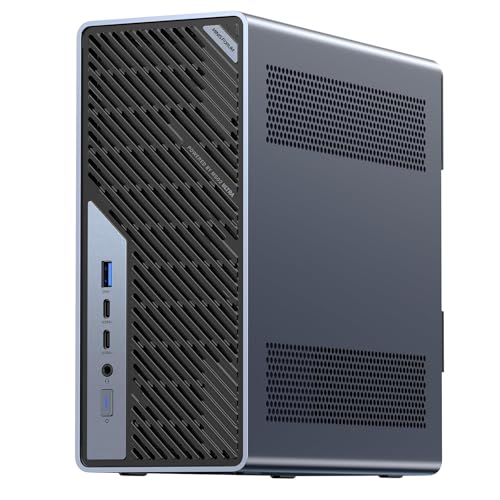
Where to buy
Check the latest price, availability and delivery on Amazon. Orders are placed on Amazon. We may earn a commission from qualifying purchases.
- Best first step into the workstation tier: Minisforum MS-02 Ultra, Core Ultra 9 285HX, 32GB, 1TB, Dual 25GbE — Check on Amazon
- GMKtec EVO-X2, Ryzen AI Max+ 395, 64GB, 1TB — Check on Amazon
- Minisforum MS-S1 MAX, Ryzen AI Max+ 395, 64GB, 2TB, Dual 10GbE — Check on Amazon
- Minisforum MS-A2 Mini Workstation, Ryzen 9 HX, PCIe x16 — Check on Amazon
See 2 more Amazon options
- Apple Mac mini M4 Pro, 24GB Unified Memory, 512GB SSD — Check on Amazon
- Beelink SER9 Pro, Ryzen AI 9 HX 370, Radeon 890M, 32GB, 1TB — Check on Amazon
Read the full guide ↓
Disclosure: As an Amazon Associate, reviewstook.com earns from qualifying purchases. Links to Amazon on this page are affiliate links; they cost you nothing extra. Listing details such as price and availability change often, so check the current Amazon listing before you buy.
If you are new to mini PCs, this page needs to talk you out of something before it talks you into anything: three thousand dollars is far more money than a beginner needs to spend on one of these little boxes. An ordinary mini PC — the kind that handles documents, browsing, video calls, photo sorting and even a fair amount of game playing — costs far less than this tier, and the last pick in this guide, priced well below this budget, is honestly the right answer for most first-time buyers. So why does this guide exist? Because a small number of beginners arrive with a specialist job already in hand — running a home server, experimenting with AI models on their own desk, building a little rack of virtual machines — and for those jobs the extra money buys real, specific things. This guide explains what those things are, which machines provide them, and how to get one running on your first evening.
One warning belongs up front, because it shapes every review below. Even with $3,000 in hand, you cannot buy the very top of this category. The most powerful mini PC configuration we could verify on Amazon — a machine with 128GB of memory built around AMD’s range-topping Strix Halo chip — sells above this entire budget. What $3,000 does buy is the tier just beneath that ceiling: 64GB machines, proper mini workstations with expansion slots, and one very polished Apple desktop. Prices in this category are not promises — memory prices swung wildly through late 2026, and several of these machines moved sharply within a single season. Check the live price on Amazon before you buy, and if a machine sits far above its usual level, the beginner-friendly move is to wait.
In this guide
Quick Picks
Short on time, or comparing several options at once? Each row below names a buyer type and the machine that suits it, with a link to the listing.
| Buyer type | Pick | Why it stands out | Link |
|---|---|---|---|
| Easiest route into a real mini workstation | Minisforum MS-02 Ultra, Core Ultra 9 285HX | Arrives complete, with a spare card slot, room for much more memory, and server-grade networking | Check on Amazon |
| Best for trying local AI | GMKtec EVO-X2, Ryzen AI Max+ 395, 64GB | The strongest built-in graphics in any mini PC, fed by a large shared pool of memory | Check on Amazon |
| Best AI machine that is also a home server | Minisforum MS-S1 MAX, 64GB, 2TB | The same AI chip, plus fast dual networking, a card slot and a bigger drive already fitted | Check on Amazon |
| Best for learning to upgrade | Minisforum MS-A2, Ryzen 9 HX | Memory and storage you fit and grow yourself, in the smallest box here | Check on Amazon |
| Best set-it-and-forget-it premium mini | Apple Mac mini M4 Pro, 24GB, 512GB | The most polished ordinary desktop in this guide, if your programs run on macOS | Check on Amazon |
| Best first mini PC, full stop | Beelink SER9 Pro, Ryzen AI 9 HX 370 | A superb all-round mini priced well below this budget — the sensible starting point | Check on Amazon |
The Jargon, Translated
Listings for machines at this level are written for engineers. Here are the thirteen terms that actually decide whether a mini PC suits you, in the plainest language we can manage — including the three distinctions beginners most often get wrong: what is renewed, what is a barebone, and what is soldered.
- Mini PC. A complete desktop computer in a box small enough to hold in one or two hands. Everything a tower PC does, a mini PC does — the trade is that there is less room inside for big add-on parts.
- Processor (CPU). The chip that does the general thinking. More cores means more separate jobs handled at once — useful for running several programs or virtual machines side by side, mostly invisible in everyday typing and browsing.
- Integrated graphics. The picture-making circuitry built into the processor instead of living on a separate card. Every machine in this guide uses it. The strong versions (AMD’s Radeon 890M and 8060S) can genuinely play games and run AI software; the basic versions (Radeon 610M, Intel’s built-in graphics) are really only for displaying the desktop and video.
- Memory (RAM). The machine’s short-term workspace, measured in gigabytes (GB). Open programs and files live here while you use them. 32GB is comfortable; 64GB matters mainly for AI models and running several virtual machines at once.
- Soldered versus socketed memory. The single most important distinction in this guide. Soldered memory is fixed to the board in the factory and can never be changed — the number you buy is the number you keep for the machine’s whole life. Socketed memory sits in slots (called SO-DIMM slots) and can be swapped or added to later with a screwdriver.
- Storage (SSD). The drive your files and programs live on permanently, also measured in GB — 1TB is 1,000GB. A 512GB drive sounds large and fills surprisingly fast on a machine bought for media or AI models.
- Barebone. A machine sold without some or all of its memory, storage and sometimes its operating system — a kit, not a finished computer. Its price looks wonderfully low because the missing parts are yours to buy and fit. In this guide, only the Minisforum MS-A2 is sold in a barebone version; the other five picks arrive complete and ready to switch on.
- Renewed. A second-hand machine that has been checked, cleaned and resold — “refurbished,” not “new model.” None of the six picks here is renewed; all are sold new.
- PCIe slot. A socket inside the machine that accepts an add-on card — most often a graphics card. In mini PCs these slots are small (“low-profile”) and the power supply limits what they can feed, so the slot is a door to a modest card later, never to a flagship gaming card.
- Networking speeds (GbE). How fast the wired internet port is. 2.5GbE is the current desktop standard; 10GbE and 25GbE are server speeds that only matter if the rest of your home network — switch, storage box, cables — runs that fast too.
- USB4 and Thunderbolt. The fastest all-purpose sockets on these machines. They carry data, video for a monitor, and sometimes power through one cable. Thunderbolt 5 (on the Mac mini) is the newest, fastest version of the same idea.
- ECC memory. Memory that detects and corrects its own small errors. It matters for servers holding files and virtual machines for months; a home user cannot feel the difference. Only the MS-02 Ultra here supports it.
- Operating system. The software the machine wakes up into. Five picks here run Windows 11 Pro; the Mac mini runs Apple’s macOS, which is a different world of programs — check your essential software exists for macOS before choosing it.
Applied to the six picks, plainly: renewed — none of them. Barebone — only the MS-A2, and only if you deliberately choose its barebone version; the same listing family also sells it ready-built. Soldered memory — the EVO-X2, the MS-S1 MAX and the SER9 Pro, plus the Mac mini, whose storage is fixed forever too. Socketed memory you can grow — the MS-02 Ultra and the MS-A2. Keep those four sentences in mind and the reviews below will make sense.
How These Picks Were Chosen
We did not use these machines ourselves. We read the manufacturers’ listings and specification pages, the hands-on reviews, and the price trackers, and we applied the budget as a ceiling on real Amazon listings — a machine only counts if it has actually been seen selling at or under $3,000 in the United States. That rule is why the 128GB machines are discussed but not recommended: they launched at far lower prices in late 2025, but the memory shortage pushed them above this budget during 2026, and a beginners’ guide has no business recommending a computer you cannot buy for the money in the title.
Three beginner-specific filters sat on top of the price rule. First, honesty about completeness: a pick either arrives as a finished computer, or its review says in plain terms what is missing and what finishing it involves — which is why the MS-A2’s barebone version is explained rather than hidden. Second, honesty about permanence: where memory or storage is soldered, the review says so in words a first-time buyer cannot miss, because choosing too small a fixed specification is the most expensive mistake at this level. Third, every pick had to suit a named beginner situation — a first home server, a first local-AI experiment, a first machine to upgrade, a first premium desktop — rather than “general use,” because at this budget general use is served perfectly well by machines costing half as much, and this guide keeps pointing at them.
The six picks split into two families, and understanding the split matters more than any single specification. The MS-02 Ultra and the MS-A2 are platforms: memory in slots, spare drive positions, a card slot in reserve — the machine you buy is a starting point you can grow. The EVO-X2, the MS-S1 MAX and the Mac mini are appliances: everything is soldered, the specification you choose on day one is the specification you retire, and in exchange you get integration — a huge pool of memory shared with the graphics, or Apple’s polished hardware and software. The SER9 Pro sits below both families as the reality check: the strongest ordinary mini PC of its generation, included so you can see exactly what the extra money does and does not buy.
A word about gaming, because many beginners arrive here from gaming guides. These are work machines that can play games, not gaming machines. The EVO-X2’s and MS-S1 MAX’s shared graphics are the strongest built into any mini PC and are genuinely at home with modern games at 1080p; the SER9 Pro sits one class below; the two slot-equipped workstations ship with display-grade graphics until you add a card. If playing games is the main job, the same money in a gaming tower buys graphics power from a different world — see Best Gaming PC Under $3000 and Best Mini Gaming PC Under $3000.
The 6 Best Mini PCs for Beginners Under $3,000
Minisforum MS-02 Ultra — Core Ultra 9 285HX, 32GB, 1TB, Dual 25GbE
Who it suits: The beginner whose “mini PC” is really a first home server — someone who wants to run virtual machines, store files for the household, and learn on hardware that behaves like the equipment in a small office’s server cupboard.
Do not let the word “workstation” frighten you: out of the box, this is a complete Windows 11 Pro computer that you plug in, switch on and use like any other, and it sits at the gentler end of this guide’s price range — check the price on Amazon before you buy. What makes it special is everything waiting inside for later. Its processor has 24 cores for running many jobs at once. Its memory sits in four slots accepting up to 256GB, including error-correcting ECC memory, so the 32GB it ships with is a beginning rather than a destiny. It has four positions for SSD storage drives, an empty PCIe card slot for a future add-on, and networking ports faster than most homes can use: two 25-gigabit ports, plus 10-gigabit and 2.5-gigabit ones. Its power supply is built in, so there is no laptop-style brick to hide, and the maker’s listing specifies four video outputs, so it can run a desk of monitors as happily as a server shelf.
Now the honest part, in beginner terms. The graphics built into this machine are basic — fine for screens and video, not for games or AI work — because Minisforum expects the card slot to provide graphics later. That card is a second purchase, it must be a small low-profile one, and the 350W power supply caps how hungry it can be; reviewer coverage also notes the processor reduces its power draw a little when a card is fitted. Two owner-reported quirks deserve plain statements: the power supply’s fan is the part people hear when the machine works hard for long stretches, and people running the free server systems Linux or Proxmox have reported more driver fiddling than Windows users face. Neither is a reason to avoid it; both are reasons to start on Windows and grow from there.
- Four memory slots (up to 256GB, error-correcting included), four drive positions and an empty card slot — the most growable mini PC we could verify.
- Server-class networking: dual 25-gigabit ports plus 10-gigabit and 2.5-gigabit, for a fast home server.
- Built-in power supply and Windows 11 Pro installed, priced at the gentler end of this guide’s range.
Honest limitation: Built-in graphics are display-grade only; real graphics power is a later, size- and wattage-capped card purchase, and the power supply fan is audible under long heavy loads according to owner reports.
Choose it if you want one box that can start as a desktop and grow into a home server. Skip it if you want strong graphics on day one — that is the next two picks.

GMKtec EVO-X2 — Ryzen AI Max+ 395, 64GB, 1TB
Who it suits: The beginner curious about running AI models on their own machine — no cloud account, no subscription — who wants the strongest built-in graphics in the category and a big pool of memory for those models to live in.
The chip inside, AMD’s Ryzen AI Max+ 395, works differently from an ordinary processor, and the difference is the whole product. Its 16 processor cores share one pool of 64GB of very fast memory with its Radeon 8060S graphics, and AMD’s own guidance lets the graphics side use up to 48GB of that pool — more memory than any separate graphics card offers. That is exactly what large AI models are hungry for, which is why machines like this became the standard recommendation for experimenting with AI at home. It is also, not coincidentally, the strongest graphics ever built into a mini PC, properly at home with modern games at 1080p. The EVO-X2 is the least expensive verified way to buy this chip — check its price on Amazon — with the 64GB memory and a 1TB drive fitted, connections for up to four screens per the listing, Wi-Fi 7 and USB4 sockets. It arrives complete, with Windows ready to go — a beginner can be experimenting on the first evening.
The limitation is absolute, so read it twice: the memory is soldered. The 64GB you buy is the 64GB you will own for the machine’s entire life, and there is no upgrade to anything larger — the larger 128GB version of this same box sells above this whole budget — a standing lesson in how violently this category’s prices moved during the memory shortage. If your ambitions outgrow 64GB one day, the fix is a different computer. Buy this one for what it verifiably is — the centre of the strongest integrated-graphics class there is — and it will not disappoint you; buy it hoping to upgrade it later and it certainly will.
- Ryzen AI Max+ 395 with Radeon 8060S graphics — the strongest built-in graphics in any mini PC, and a real 1080p games engine.
- 64GB of shared memory the graphics can draw on — the feature that makes large local AI models practical on a desk.
- The least expensive verified listing for this chip on Amazon, with 1TB fitted — check the price on Amazon.
Honest limitation: The 64GB memory is soldered and final, and the 128GB version of the same machine currently sells above this entire budget.
Choose it if local AI experiments or integrated-graphics gaming are the job and 64GB is pool enough. Skip it if you want card slots or the fastest networking — the two Minisforum machines either side of it cover exactly those.

Minisforum MS-S1 MAX — Ryzen AI Max+ 395, 64GB, 2TB, Dual 10GbE
Who it suits: The beginner building a small home network with fast storage — a NAS in the cupboard, media and model files flying around — who wants the AI machine and the network machine to be one box.
Start with everything the EVO-X2 just offered: the same Ryzen AI Max+ 395 chip, the same 64GB of shared memory, the same Radeon 8060S graphics. The MS-S1 MAX then adds the infrastructure the GMKtec leaves out. The fitted drive is twice the size at 2TB, with a second drive position spare. There is a PCIe card slot, per the listing, for a future add-on. The wired networking is dual 10-gigabit — ten times the speed of an ordinary home network port, twice over — and the fastest socket, USB4 V2 at 80Gbps, is double the speed of the USB4 on everything else here, which makes this box a genuinely quick place to pour camera cards and portable drives into a network. The power supply is built into the chassis at 320W, so again there is no brick. Check its price on Amazon — it sits at the top of the 64GB price band for this chip — with the premium over the EVO-X2 buying storage, slots and networking rather than speed, because the chip itself is identical.
Three beginner-level cautions. First, availability: trackers noted this 64GB configuration was at times orderable for a later delivery date rather than sitting in stock, so read the delivery estimate as carefully as the price — and a second Amazon listing exists for this machine family, so confirm the page you are on is the 64GB/2TB one. Second, the soldered-memory law applies exactly as with the EVO-X2: 64GB is forever, and this model’s own 128GB version sells well above this budget. Third, the box itself is a workstation’s — larger and more industrial than a living-room mini — so picture it on a shelf or in a network cupboard rather than behind a monitor.
- The AI chip plus infrastructure: dual 10-gigabit networking, the fastest USB4 here, a card slot and 2TB fitted.
- Built-in 320W power supply — no external brick to place.
- The verified top of the 64GB band for this processor — check the price on Amazon.
Honest limitation: The premium over the EVO-X2 buys ports and storage, not speed — the chip and graphics are identical — and the 64GB memory is soldered for life; stock can mean a wait for delivery.
Choose it if your files live on fast network storage and the machine must keep up with it. Skip it if it will sit alone on a desk with one ordinary network cable — the EVO-X2 does that job for noticeably less.

Minisforum MS-A2 — Ryzen 9 HX Mini Workstation, PCIe x16, Socketed RAM
Who it suits: The beginner who likes the idea of learning by doing — choosing parts, fitting memory, growing a machine over time — and wants the smallest serious workstation in this guide at 1.78 litres.
This is the one pick where reading the listing carefully really matters, because the MS-A2 is sold two ways under one listing family. As a barebone — the box, processor and nothing else — it sits in a far lower price tier. Ready-built with 32GB of memory and a 1TB drive, it sits around the middle of this guide’s range; check the price on Amazon for the style you choose. Neither price is a trick; they are two different amounts of computer, and the walkthrough later in this guide explains how to make sure the cart holds the one you meant. What you get either way is a 16-core Zen 5 processor (the flagship configuration runs to 5.4GHz), memory in two ordinary slots you can fill to 96GB yourself, three positions for storage drives, a PCIe card slot (a PCIe 4.0 slot running at eight-lane speed), and homelab networking: dual 10-gigabit SFP+ ports plus dual 2.5-gigabit, with picture output over HDMI and two USB-C sockets. In a year when ready-fitted memory carries a shortage premium, a machine that lets you bring your own memory is a money feature as much as a technical one.
The honesty note concerns graphics. As shipped, the built-in Radeon 610M is a display engine — it puts a picture on the screen and plays video, and that is all. Games and AI graphics wait on the card you eventually install in the slot, and a beginner should buy this machine for its processor, memory and networking, not for pictures it cannot yet make. Review coverage of the family also reports fans that are audible under load, a relatively high power draw when idle for a mini PC, and limited airflow around the card area — the tax a very dense little workstation pays. And the family spans two processor variants as well as the two completeness levels, so the verify step in our walkthrough is not optional with this pick.
- Memory in slots to 96GB and three storage positions — the only pick whose memory you choose and can change.
- A real card slot plus dual 10-gigabit and dual 2.5-gigabit networking in 1.78 litres.
- Sold barebone or ready-built with 32GB/1TB — either way well under the budget, with room to grow.
Honest limitation: Built-in graphics are display-only until you buy a card, the fans are audible under load per review coverage, and the listing family mixes barebone and ready-built versions — confirm exactly what is in the cart.
Choose it if you want a platform to learn on and upgrade piece by piece. Skip it if you want full performance the evening it arrives, with nothing left to buy or fit.

Apple Mac mini M4 Pro — 24GB Unified Memory, 512GB SSD
Who it suits: The beginner who wants the premium option to simply work — creators and programmers whose programs exist on macOS, and who value quiet polish over any thought of opening the case.
Every other machine here is a specialist; this one is the all-rounder, and for ordinary high-end work it may be the finest computer in the guide. Apple’s M4 Pro chip pairs a 12-core processor with a 16-core graphics unit across very fast shared memory, with dedicated hardware for the ProRes video format and AV1 video decoding that makes it a disproportionately strong video-editing machine for something so small and quiet. The connections are simple: three Thunderbolt 5 sockets and an HDMI port at the back, two USB-C sockets and a headphone jack at the front, and Apple’s own published support for up to three displays. Its price wandered during 2026, after Apple raised this configuration’s starting price mid-year — so check the price on Amazon and buy it when it sits at the low end of its own recent range.
The constraints are Apple’s standing ones, and a beginner should meet them before paying. Nothing inside can ever be upgraded: the 24GB of memory and the 512GB drive are the specification for the machine’s whole life. That 512GB fills quickly on a machine bought for media work, so budget for an external drive from the start — the what-else section below frames this as machine plus drive, because that is what it honestly is. If your work is memory-hungry, check the price of the 48GB configuration before ordering; there is no road upward afterwards. And it runs macOS rather than Windows: glorious if your software lives there, disqualifying if it does not.
- M4 Pro speed and dedicated video hardware in a near-silent box — the most refined desktop here.
- Thunderbolt 5 sockets throughout and Apple’s published support for up to three displays.
- Check the price on Amazon — it moved often during 2026, so buy at the low end of its range.
Honest limitation: Memory and storage are fixed forever, 512GB is tight for a creation machine so an external drive is a planned purchase, and macOS excludes Windows-only software and most gaming.
Choose it if your creative and development tools live on macOS and you want polish over expansion. Skip it if you need Windows, a card slot, or any plan to upgrade the machine itself.

Beelink SER9 Pro — Ryzen AI 9 HX 370, Radeon 890M, 32GB, 1TB
Who it suits: Almost every beginner reading this page — anyone who wants an excellent small desktop for work, media and genuine game playing, and would rather keep most of the budget than spend it on specialisation.
Meet the reality check, and do not mistake it for a consolation prize. The SER9 Pro’s Ryzen AI 9 HX 370 processor runs 12 cores beside a Radeon 890M — the strongest built-in graphics of its generation — with 32GB of memory and a 1TB drive in a box measuring about 135 × 135 × 45mm, roughly 0.82 litres: smaller than a hardback book. It has USB4, a 2.5-gigabit network port and Windows 11 Pro, and it arrives complete. It sits in a far lower price tier than the rest of this guide — check the price on Amazon before you buy. For documents, programming, photo work, media serving and games at 1080p, the difference you can actually feel between this box and machines at the top of this budget is far smaller than the price difference — which is the entire reason it belongs in a guide for beginners. The step up to $3,000 buys specialisation, not everyday speed.
Its ceilings are the ordinary ones, stated plainly. The 32GB of memory is soldered, so it is the lifetime specification. There is no OCuLink socket, which closes the easy external-graphics-card road some rival minis offer. And Beelink’s listing copy and hands-on reviews disagree about whether the box holds one storage-drive slot or two, so check the live listing if a second drive matters to you. One more caution from our research notes: cheaper lookalikes of this model name built on a weaker processor (an “H 255” variant) circulate at lower prices — the configuration to confirm at checkout is the HX 370 with Radeon 890M graphics and 32GB, which is what the link here points to.
- Radeon 890M graphics and a 12-core processor in 0.82 litres — the strongest conventional mini of its generation.
- Priced far below the rest of this guide — check the price on Amazon.
- USB4, 2.5-gigabit networking and Windows 11 Pro fitted as standard.
Honest limitation: Soldered 32GB memory with no way to grow it, no OCuLink for an external graphics card, and sources disagree on the drive-slot count — verify on the live listing.
Choose it if your work is general-purpose, however demanding — it is the correct first mini PC for most people. Skip it if you genuinely need more than 32GB of memory, 10-gigabit networking or a card slot — the reasons the other five exist.
Comparison Table
| Product | Type | Best use | Link |
|---|---|---|---|
| Minisforum MS-02 Ultra | Mini workstation / home server | Virtual machines, growable ECC memory, fastest networking, a card later | Check on Amazon |
| GMKtec EVO-X2 64GB | Strix Halo mini PC | Local AI models and the strongest built-in graphics | Check on Amazon |
| Minisforum MS-S1 MAX 64GB | Strix Halo workstation | Local AI with dual 10-gigabit networking and a card slot | Check on Amazon |
| Minisforum MS-A2 | Serviceable mini workstation | Socketed memory, homelab networking, grow-it-yourself platform | Check on Amazon |
| Apple Mac mini M4 Pro | Premium general-purpose mini | macOS creation and development, up to three displays | Check on Amazon |
| Beelink SER9 Pro | Conventional flagship mini | Demanding everyday use and 1080p gaming well under the budget | Check on Amazon |
Your First Evening: Setup, Step by Step
Every complete pick here can be running inside an hour. Work through these steps in order; the two beginners most often skip — updates and verification — save the most trouble later.
- Choose the spot, and keep it breathing. Put the machine on an open desk or shelf with a few centimetres of clear air around its vents. Never seal a mini PC inside a closed cabinet or a drawer: these are small boxes doing real cooling work, and the two slot-equipped workstations in particular run their fans audibly under load — they need the room’s air, not a cupboard’s. If you bought the MS-A2 barebone, this is also the moment to fit your memory sticks and drive; the ready-built version needs nothing opened at all.
- Connect power. The MS-02 Ultra and MS-S1 MAX have their power supplies built in, so a single power cord is the whole job. The other machines use the adapter in their box — place it where air reaches it, not buried behind furniture. Do not switch on yet.
- Plug the monitor in — and relax about which socket. On a gaming tower there is a famous beginner trap: plug the screen into the wrong sockets and the expensive graphics card sits idle. That trap does not exist here. Not one of these six machines ships with a separate graphics card — every picture comes from the processor’s built-in graphics — so every display socket on the box is a live, correct one, including the MS-02 Ultra’s, whose empty card slot is a purchase for another year. Use the HDMI or USB-C display socket; any of them works for a first screen.
- Attach keyboard, mouse and a network cable. Plug in your keyboard and mouse. Then, wherever the machine has a wired network port — all five Windows picks here do — run a cable to your router rather than relying on Wi-Fi for the first night: the updates in the next step are large, and a cable makes them faster and immune to dropouts.
- Switch on and let updates finish completely. On the Windows machines, open Settings, then Windows Update, and keep installing and restarting until it reports you are up to date; then accept any driver and firmware updates the maker’s support page or pre-installed utility offers. On the Mac mini, the same job lives in System Settings under Software Update. This can take a while. Let it. Half of all “my new computer is broken” stories are an update interrupted at this step.
- Set the monitor’s real refresh rate. Many monitors arrive running at a basic 60Hz even though they can do more. On Windows: Settings, System, Display, Advanced display, and choose the highest refresh rate listed. On macOS: System Settings, Displays, and set the refresh rate there. If the higher number is not offered, the cable is usually the limit — try the other display socket or a shorter, better cable.
- Verify you received the configuration you paid for. This step exists because this category’s listings span lookalike versions, and it is written per pick. MS-A2: confirm the cart and the box agree — barebone or ready-built, and which processor variant; the wrong one arriving is a returns conversation, not a setup step. MS-S1 MAX: confirm 64GB of memory and the 2TB drive, and that you ordered from the correct one of the family’s listings. EVO-X2: confirm the 64GB/1TB configuration, not the 128GB listing (a different, over-budget page) and not a smaller sibling. SER9 Pro: confirm the processor reads HX 370 with Radeon 890M graphics — a weaker H 255 namesake circulates under the same model name. Mac mini: confirm the model is the M4 Pro configuration (model MCX44LL/A) with 24GB and 512GB. On Windows, Task Manager’s Performance tab shows processor, memory and drive in one glance; on the Mac, About This Mac does the same.
- Install your software — and a game store, if you like. Finish with your everyday programs. To see what the machine does for fun, install Steam (free) and start with something undemanding: the EVO-X2, MS-S1 MAX and SER9 Pro genuinely play modern games at 1080p, while the MS-02 Ultra and MS-A2, on display graphics, run older and lighter titles only until a card joins them.
What Else You Will Spend
No pick in this guide includes a screen, keyboard or mouse, and none of the picks above quietly includes them either. Budget for these extras separately — and notice how each catch below is framed as the machine plus its fix, never folded into the machine itself.
- A monitor comes first. It is the part you will look at for the machine’s whole life, and a mid-priced mini PC in front of a good screen is a better workstation than a top-tier mini PC in front of a tired one.
- The Mac mini’s external drive. Its 512GB internal drive is a planned catch, not a surprise: treat the real purchase as the Mac mini plus an external SSD for your media and projects, bought at the same time, and the machine’s one fixed weakness is handled on day one.
- Completing the MS-A2 barebone. If you chose the barebone style, the honest purchase is the barebone plus memory sticks plus an SSD plus, if the style ships without it, a Windows licence. Check the price of all of it at today’s retail before comparing against the ready-built version — in a shortage market the parts can add up to more than the finished machine, which is a finding, not a failure.
- A future graphics card for the two slot machines. The MS-02 Ultra’s and MS-S1 MAX’s card slots are later purchases, priced as machine now plus card when you need it. Keep it low-profile and modest in its power appetite, as their reviews explain.
Upgrades, in Plain Terms
Here is exactly what can and cannot grow in each pick, with promises made only where the underlying hardware is documented.
- MS-02 Ultra — the real upgrade path. Its PCIe 5.0 card slot and built-in 350W power supply are both documented, so we can promise this plainly: a small, low-profile graphics card can be added later, inside that wattage cap, and its four memory slots can grow from 32GB toward as much as 256GB. It is the only pick where both promises hold at once.
- MS-S1 MAX — a slot, with the same small-print. The listing documents a PCIe x16 slot and the chassis carries a built-in 320W supply, so a modest low-profile card later is a fair promise — again, a small card within the wattage, never a flagship.
- MS-A2 — memory and storage grow; graphics check first. Its two memory slots (to 96GB) and three drive positions are documented and genuinely yours to fill. Its card slot is documented too, but our research does not publish its power supply’s wattage, so we make no blanket card promise: check any card’s power requirement against the machine’s supply with the maker before buying.
- EVO-X2, Mac mini, SER9 Pro — no graphics upgrade exists. None has a card slot; the SER9 Pro also lacks the OCuLink socket some rivals use for external graphics. Their memory is soldered, so what grows is only external: more drives over USB4, more screens, more network storage. Buy the specification you need on day one, because day one is when you choose it forever.
How to Choose a Mini PC Under $3,000
- Start by trying to leave this budget. Write down the actual job. If it is documents, browsing, programming, photo editing, media serving or 1080p gaming, the tiers in Best Mini PC Under $1500 and Best Mini PC Under $1200 do it completely — and the SER9 Pro in this guide does it well under this budget. Stay here only if your job names something the cheaper tiers cannot reach: more than 32GB of memory, networking faster than 2.5 gigabits, error-correcting memory, a card slot, or an AI model that needs a 64GB pool.
- Decide soldered versus socketed before you decide anything else. Soldered memory (EVO-X2, MS-S1 MAX, SER9 Pro, Mac mini) is fast and can never change; socketed memory (MS-02 Ultra, MS-A2) can grow for years. This one decision outranks brand, processor and price.
- Match the graphics to the claim. Built-in graphics come in classes: display-grade (Radeon 610M, Intel’s), strong (Radeon 890M), and the 8060S, the strongest built into any mini PC. None is a separate graphics card, whatever a listing’s headline implies.
- Count the networking like a server buyer. 2.5-gigabit is the desktop standard; dual 10-gigabit serves a NAS and homelab; 25-gigabit is infrastructure. Buy the tier your storage actually runs at — each step up is paid for, and worthless behind a slow switch.
- Price the whole machine, never the listing. A barebone price excludes memory, storage and sometimes Windows. Add every missing part at today’s prices before comparing any two listings — the MS-A2’s two styles are the standing example.
- Treat every price as temporary. Prices in this category moved sharply within a single year. Check the live price on Amazon, set your walk-away number before you shop, and if a listing sits far above its usual level, wait — stock and prices here rotate weekly.
Common Buying Mistakes
- Spending the full $3,000 on an ordinary desktop job. Everyday work, however demanding, saturates well below this tier in a mini PC; the surplus buys specialist hardware you may never switch on.
- Buying a soldered-memory machine one size too small. A 64GB Strix Halo box or a 24GB Mac mini cannot become the bigger version — the upgrade is a second computer.
- Assuming the 128GB machines fit this budget because they launched at far lower prices. They were repriced above this budget during 2026; check the live price, not the launch coverage.
- Reading a barebone price as a finished-computer price, and discovering the memory, drive and licence are separate purchases.
- Counting a card slot as a gaming graphics card. Mini-workstation slots take small, low-power cards; flagship cards fit neither the slot, the case nor the power budget.
- Skipping the configuration check at checkout. The MS-A2 and EVO-X2 listing families span barebone and ready-built styles and multiple processor variants under one page; the SER9 Pro has a weaker namesake. Confirm the exact style in the cart before paying.
Final Recommendation
- First home server or virtual-machine host: Minisforum MS-02 Ultra.
- First steps in local AI: GMKtec EVO-X2 64GB.
- AI on a fast home network: Minisforum MS-S1 MAX 64GB.
- Learning to build and upgrade: Minisforum MS-A2.
- macOS creators and developers: Apple Mac mini M4 Pro.
- Almost every other beginner: Beelink SER9 Pro — and keep the change.
If you remember one paragraph, make it this one. Our top two are the Minisforum MS-02 Ultra — the only machine here that is genuinely a platform, with growable error-correcting memory, a card slot, 25-gigabit networking and a comparatively sane price — check it on Amazon — and the GMKtec EVO-X2, the cheapest honest route to the shared-memory graphics no cheaper tier can imitate. Between them they cover the two legitimate reasons a beginner should shop at $3,000 at all: infrastructure, and memory for AI. If neither reason is yours, the SER9 Pro, priced well under this budget, is not a compromise; it is the correct first mini PC, and Best Mini PC Under $2500 and Best Mini PC Under $1500 show the rest of its tier. Whichever you choose, run the verify step from the walkthrough the day it arrives — in this category, that check is worth more than any single specification.
Frequently Asked Questions
Is $3,000 a sensible budget for a first mini PC?
For most beginners, honestly, no — and this guide’s own sixth pick is the proof. A superb general-purpose mini PC costs far less than this tier, and the tier in Best Mini PC Under $800 covers ordinary use completely. The $3,000 tier makes sense when a named job — a home server, local AI, virtual machines — needs the memory, networking or expansion that only exists up here.
Why is there no 128GB mini PC in this guide?
Because none could be verified inside the budget. The 128GB machines built on AMD’s top chip launched at far lower prices in late 2025, but the memory shortage repriced them during 2026 to well above this budget on Amazon; the EVO-X2’s own 128GB version sits above it too. If those prices fall back under $3,000, they become the top of this category. Until then they are landmarks, not picks.
What does “barebone” actually mean, and should a beginner buy one?
It means the box and processor arrive without some or all of the memory, storage and sometimes the operating system — a kit you complete yourself. A beginner can absolutely buy one, and the MS-A2’s barebone style is this guide’s example, but only with the arithmetic done first: at current parts prices, completing a barebone can cost more than the same machine ready-built, unless you already own suitable parts. If you do not want to open a case on your first evening, choose the ready-built style of the same machine.
Can these machines play games?
Some can, within honest limits. The EVO-X2 and MS-S1 MAX carry the strongest built-in graphics available and are genuinely at home with modern games at 1080p; the SER9 Pro sits one class below. The MS-02 Ultra and MS-A2 ship with display-grade graphics and play only light or older games until a card is added, and the Mac mini plays the smaller macOS catalogue. If gaming is the main job rather than a dividend, a tower at this money is the right shape — see Best Gaming PC Under $3000.
Mini workstation or small tower at this price?
Decide on the graphics card. If your work will ever need a full-size graphics card, buy the tower: the slots in these minis are low-profile and capped by 320–350W power supplies. If your work is processor, memory, storage and networking — virtual machines, containers, local AI on built-in graphics — the mini workstations deliver it in 2–5 litres with a fraction of a tower’s noise and power draw. If the tower route tempts you, see Best Workstation PC Under $3000 as well.
How loud are machines at this level?
Louder than the mini PCs below them, and the reviews say where. These are machines with real cooling work to do: owner reports single out the MS-02 Ultra’s power supply fan under long loads, and review coverage of the MS-A2 family notes audible fans and relatively high idle power draw for a mini. The Mac mini is the exception — near-silent in ordinary work. If the machine will live on a desk in a quiet room, weight the quieter picks heavily, and never seal any of them in a cabinet to hide the noise; they need open air.
What should a general beginner actually buy?
Start with the SER9 Pro in this guide, or drop to the tier beneath it. A demanding general-purpose mini PC — fast processor, strong built-in graphics, 32GB of memory, 1TB of storage — costs far less than this tier, covers documents, development, photo work, media serving and 1080p gaming completely, and leaves most of a $3,000 budget for the monitor and backup drive that will matter more.


