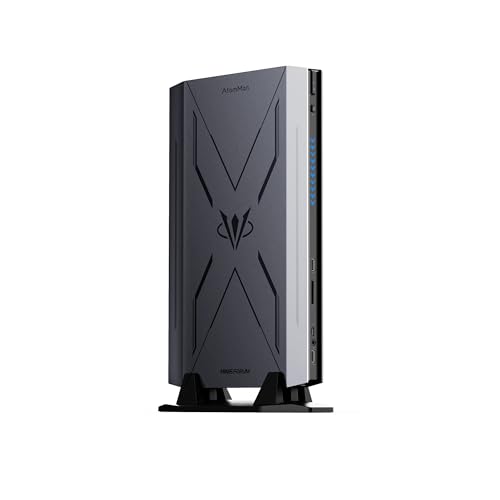
Where to buy
Check the latest price, availability and delivery on Amazon. Orders are placed on Amazon. We may earn a commission from qualifying purchases.
- Best overall barebones kit for 1440p: AtomMan G7 Pro Barebone, Core i9-14900HX, RTX 5070 Laptop GPU — Check on Amazon
- AtomMan G7 Ti, Core i9-14900HX, RTX 4070 Laptop GPU (140W) — Check on Amazon
- Intel NUC 13 Extreme Kit NUC13RNGi9, Core i9-13900K, PCIe x16 slot — Check on Amazon
- AtomMan G7 Pt, Ryzen 9 7945HX, Radeon RX 7600M XT — Check on Amazon
See 2 more Amazon options
- MINISFORUM MS-A2 Barebone, Ryzen 9 9955HX, dual 10G SFP+ — Check on Amazon
- MINISFORUM MS-01 Barebone, Core i9-13900H, dual 10G SFP+ — Check on Amazon
Read the full guide ↓
Disclosure: As an Amazon Associate, reviewstook.com earns from qualifying purchases. Links to Amazon on this page are affiliate links; they cost you nothing extra. Listing details such as price and availability change often, so check the current Amazon listing before you buy.
The word that matters in this guide’s title is not “barebones” and it is not “$3,000” — it is “1440p.” A 2560×1440 monitor is easy to plug into any of the six kits below; every one of them will light up a 1440p desktop, play 1440p video and look sharp doing office work. Gaming at 1440p is a different and much harder promise, and the six kits split into three honest groups when you grade them on it. Three of them — Minisforum’s AtomMan G7 Pro, G7 Ti and G7 Pt — carry real discrete graphics cards and genuinely game at 1440p, with upscaling doing part of the work and an 8GB VRAM ceiling setting the terms. One of them, Intel’s NUC 13 Extreme, has no gaming graphics at all until you buy a desktop card for its PCIe slot, at which point its 1440p ability becomes whatever that card can do. And two of them — the MINISFORUM MS-A2 and MS-01 workstation kits — are integrated-graphics machines that render games far below 1440p and upscale the result; they are in this guide because their PCIe slots offer a real, costed path to a gaming card, not because their built-in graphics can play at this resolution. Each review below grades its pick on exactly that question before it talks about anything else.
Two money facts frame everything that follows, and both are unfashionable enough that most guides skip them. The first: no verified barebones mini PC kit on Amazon costs anywhere near $3,000. The most expensive kit in this guide, the NUC 13 Extreme, is a premium-tier kit — check price on Amazon — and the flagship gaming kits sit well below the budget as barebones. Near the top of the budget there is no verified barebones kit at all — only configured machines wearing a barebone keyword and marketplace sellers marking kits up to fantasy prices. The second fact: a kit price is not a computer price. Every pick here ships without some combination of RAM, storage and operating system, so the kit price alone is never the whole cost: memory, an SSD and an OS still have to be added. That completed cost is the one to hold against your $3,000, and right now it is dominated by memory: 32GB DDR5 SO-DIMM pricing has been hit by a shortage spike that adds a significant completion cost to every DDR5 kit in this guide and, for one pick below, makes buying the configured version the smarter move. Check price on Amazon for each.
So the real question this guide answers is narrower and more useful than its title: given that the budget is not the constraint, which of these six kits should sit under a 1440p monitor — and for the ones that cannot game at 1440p as sold, what exactly does the upgrade path involve? Below: quick picks with an honest 1440p grade for each, a short section on what 1440p gaming actually requires, the six detailed reviews, a comparison table, how to choose, the mistakes that waste money here, and the questions buyers ask once the box arrives.
In this guide
Quick Picks
Short on time? Each row names a buyer type, the kit that suits it, where to check its price, and — the column most guides will not print — an honest grade of what 1440p gaming on it really looks like.
| Buyer type | Pick | Price | Honest 1440p grade | Link |
|---|---|---|---|---|
| Best overall for 1440p | AtomMan G7 Pro Barebone (i9-14900HX, RTX 5070 Laptop) | Check price on Amazon | Native 1440p in many titles; DLSS upscaling and DLSS 4 frame generation carry the demanding ones | Check on Amazon |
| Best proven 1440p kit | AtomMan G7 Ti (i9-14900HX, RTX 4070 Laptop 140W) | Check price on Amazon | Full-power mobile 4070: native 1440p at sensible settings, DLSS 3 upscaling and frame generation beyond that | Check on Amazon |
| Best upgradable 1440p platform | Intel NUC 13 Extreme Kit NUC13RNGi9 (i9-13900K) | Check price on Amazon | No gaming GPU in the box — its 1440p grade is whichever desktop card you fit in the x16 slot | Check on Amazon |
| Best AMD route to 1440p | AtomMan G7 Pt (Ryzen 9 7945HX, RX 7600M XT) | Check price on Amazon | Selected native 1440p at sensible settings; FSR upscaling from a 1080p-class render for the rest | Check on Amazon |
| Best workstation, slot path to 1440p | MINISFORUM MS-A2 Barebone (Ryzen 9 9955HX) | Check price on Amazon | Radeon 610M is a display adapter, not a gaming GPU — 1440p gaming starts when a card goes in the PCIe slot | Check on Amazon |
| Best value workstation, slot path to 1440p | MINISFORUM MS-01 Barebone (Core i9-13900H) | Check price on Amazon | Iris Xe handles light gaming rendered at 1080p or below, upscaled; a low-profile slot card is the real 1440p route | Check on Amazon |
How These Picks Were Chosen
Three filters, applied in order. The first is the barebone filter, stricter than Amazon’s search results: a pick counts only if the kit genuinely ships without some combination of RAM, storage and operating system for the buyer to supply. Complete mini PCs surface constantly under barebone searches because sellers keyword-stuff their titles; they were excluded however good they are, because they answer a different question — finished machines have their own guides, including Best Mini PC Under $3000 and Best Mini Gaming PC Under $3000. Where a pick is sold on one Amazon listing in both barebone and configured styles, the review flags it and tells you which style to select, because clicking the wrong style tile is the most common ordering mistake in this category.
The second filter is verification. Every ASIN below was confirmed against a real Amazon listing — its title and specification table — and prices are never promised here, because they change often — check price on Amazon for the current figure. The same discipline governs the graphics claims: an upscaling technology is credited to a pick only where the underlying silicon is documented in the research behind this guide — DLSS only on the two NVIDIA kits, FSR on the AMD discrete and integrated parts, XeSS on the Intel integrated part — and never transferred from a sibling product or a desktop namesake. One well-known kit was excluded on this filter: Zotac’s Magnus One barebone, a genuinely good desktop-RTX-4070 kit, could not be pinned to a verifiable Amazon US listing in this session, so it is named as an also-consider rather than linked on a guess.
The third filter is total-cost honesty. Each review completes the build on paper: the kit, plus a 32GB DDR5 SO-DIMM kit, plus a 1–2TB NVMe SSD and an operating system — check price on Amazon for each part, because memory pricing in particular moves quickly. For the three kits whose gaming graphics arrive via a slot — the NUC and the two MINISFORUM workstations — the graphics card is treated separately, as its own purchase, never folded into a “completed” total to make the build look finished. Where the completed total makes the barebone a worse buy than the same machine sold configured — true right now for the MS-A2 — the review says so in plain terms and tells you to buy configured instead.
We did not use these kits ourselves. We read maker listings, specification pages and independent reviews, and compared what a buyer receives and can never change later: CPU and GPU silicon, VRAM, memory type and slot count, storage, expansion and cooling — then graded that fixed hardware against one question: what does gaming on a 1440p screen honestly look like on it? The same kits without the 1440p grading live at Best Barebones Mini PC Under $3000; tighter kit budgets are covered at Best Barebones Mini PC For 1440p Gaming Under $1500 and Best Barebones Mini PC For 1440p Gaming Under $2500.
What “1440p Gaming” Honestly Requires
Start with the arithmetic the marketing leaves out. A 1440p frame contains about 78% more pixels than a 1080p frame, and rendering those pixels natively is the single most expensive thing a game does. Modern upscaling exists precisely because native 1440p is a heavy ask for mid-range silicon — and every discrete GPU in this guide is, by desktop standards, mid-range silicon with 8GB of VRAM. Upscaling renders the game at a lower internal resolution and reconstructs a 1440p output; the scale factors are published, and they convert marketing into arithmetic. At a 1440p output, a Quality-mode upscale — DLSS Quality on NVIDIA hardware, FSR Quality on AMD hardware — renders at 0.67× per axis, roughly 1707×960 internally. Performance mode renders at 0.50× per axis, 1280×720 internally — which is why Performance at 1440p looks soft: the reconstruction is working from a 720p image. The same maths explains the tier above: DLSS Quality at a 4K output renders at roughly 2560×1440 internally, which is another way of saying a card that upscales well to 1440p is doing the internal-render work of a native 1440p card at 4K — context worth having before anyone sells you a “4K mini PC.”
Three consequences follow, and the reviews apply all three. First, upscaling quality is a per-vendor feature, not a generic checkbox: DLSS exists only on NVIDIA silicon, FSR on AMD, XeSS on Intel. A kit cannot borrow a rival’s upscaler. Second, frame generation is a multiplier, not a foundation: DLSS frame generation (and its DLSS 4 multi-frame successor on the G7 Pro) inserts generated frames between rendered ones, which raises the displayed rate only when the underlying rendered rate is already healthy — it cannot rescue a game the GPU is failing to render. Third, 8GB of VRAM is the quiet ceiling over this whole guide: at 1440p, texture-heavy games press against 8GB before they press against raw compute, and no upscaling setting adds memory. Every discrete pick here carries 8GB. That is enough for 1440p gaming today with sensible texture settings; it is also the first wall each of them will meet tomorrow.
For the integrated-graphics picks, one more piece of arithmetic decides almost everything: memory bandwidth. An integrated GPU has no VRAM of its own — it renders into system memory, so the memory bus is its lifeline. Both workstation kits take two DDR5 SO-DIMM sticks, and completing one with a matched pair in dual channel roughly doubles the bandwidth available to the integrated GPU versus a single stick. A single-stick completion of an integrated-graphics kit is not a saving; it is a graphics downgrade you paid full price for. The discrete kits are less exposed — their GPUs carry dedicated GDDR memory — but the completion advice is the same: buy the 32GB kit as a matched pair. And one clarification this guide will repeat where it matters: Intel’s Quick Sync, which appears in the MS-01 review, is a video encode and decode block — it accelerates streaming and transcoding, and it does nothing at all for rendering or upscaling a game.
The 6 Best Barebones Mini PCs for 1440p Gaming Under $3,000
AtomMan G7 Pro Barebone — Core i9-14900HX, RTX 5070 Laptop GPU
Who it suits: The 1440p buyer who wants the strongest and longest-lived graphics feature set any barebone mini PC has shipped with — and who already owns, or can hunt down, DDR5 SO-DIMMs and an NVMe drive.
The 1440p grade, first: this is the most capable 1440p machine in the guide. Its RTX 5070 Laptop GPU renders plenty of titles natively at 2560×1440, and where native rendering runs out, it owns the best fallback stack in the category: DLSS upscaling (Quality mode rendering ≈1707×960 internally for a 1440p output) and DLSS 4 with multi frame generation on top, multiplying an already-healthy rendered rate into high-refresh territory on a fast 1440p monitor. The honest ceiling is the same one every discrete pick here shares: 8GB of VRAM, in laptop form — not the 12GB desktop RTX 5070. At 1440p, texture settings in the heaviest current games are where that ceiling shows first, and no DLSS setting moves it. Grade it as a genuine 1440p gaming kit with a known memory limit, not as a small desktop.
The platform around the GPU is the category flagship: a 24-core Intel Core i9-14900HX (up to 5.8GHz), two DDR5 SO-DIMM slots for up to 96GB, two M.2 2280 slots for up to 8TB of storage, six heat pipes with dual fans, HDMI 2.1, USB4 and WiFi 7. The Amazon listing for this exact kit — titled, in Amazon’s own words, “Barebone Version Without Storage/OS” — confirms the RTX 5070 with 8GB of graphics memory and the DDR5 platform, and Minisforum’s regional listings describe the barebone package as shipping without an operating system, memory or storage. One listing caveat rides with this ASIN: some marketplace mirrors of it describe a configured 32GB/1TB unit, so confirm on the live listing that the variant in your cart is genuinely the barebone before you order. The completion picture: this is a premium-tier barebone — check price on Amazon — and a configured version is sold alongside it. Completing the barebone means adding a 32GB DDR5 kit plus storage and an operating system, so hold its completed cost against the configured version honestly: at shortage memory prices the configured unit can be the cheaper route to the identical computer, and the barebone wins when you already own the parts.
- RTX 5070 Laptop GPU with DLSS 4 and multi frame generation — the newest graphics feature set in any barebone mini PC.
- Native 1440p in many titles, DLSS Quality upscaling (≈1707×960 internal) for the demanding ones.
- 24-core i9-14900HX, up to 96GB DDR5 across two SO-DIMM slots, two M.2 slots, HDMI 2.1 and USB4.
Honest limitation: 8GB of VRAM is the first ceiling at 1440p in texture-heavy games; the GPU is the laptop card, not the desktop 5070; the CPU and GPU are soldered and can never be upgraded; and at current memory prices the configured version may undercut your completed total.
Choose it if 1440p is the point of the purchase and you want the longest feature runway in the category. Skip it if your games already strain 8GB of VRAM at 1440p — nothing in this guide offers more — or if the configured version checks out cheaper on Amazon, which makes the barebone the expensive way to buy the same machine.

AtomMan G7 Ti — Core i9-14900HX, RTX 4070 Laptop GPU (140W)
Who it suits: The 1440p buyer who prefers a reviewed, known quantity over a newer badge — and wants the strongest verified implementation of its GPU chip in a mini PC chassis.
The 1440p grade, first: a full-power RTX 4070 Laptop is a legitimate 1440p card, and this is the full-power one — 140W total graphics power, the maximum configuration of the chip, where lesser implementations of the same GPU name run far lower and perform like a different product. Expect native 1440p at sensible settings in a wide range of titles, and DLSS upscaling with frame generation (DLSS 3 generation — one generated frame, not the multi-frame version on the G7 Pro) for the demanding end: DLSS Quality at a 1440p output renders ≈1707×960 internally and reconstructs from there. The ceiling is familiar: 8GB of GDDR6, shared with its newer sibling, and judged against a desktop RTX 4070 with 12GB it gives back memory and some performance, as every pick in this category does. Reviewers characterise the configured machine as a gaming laptop without a screen, and for 1440p purposes that is the right mental model — strong mobile silicon, honestly graded.
The rest of the platform matches the flagship: the same 24-core Core i9-14900HX, dual DDR5-5600 SO-DIMM slots up to 96GB, dual PCIe 4.0 M.2 slots and WiFi 7, in a slim console-like chassis of roughly 2.55 litres designed to stand vertically beside or behind a monitor. Independent reviews of the configured version confirm the 140W figure and the cooling behaviour, which makes this the best-documented pick in the guide. Pricing: this is a premium-tier barebone — check price on Amazon — and a configured 32GB/1TB version is sold alongside it. One caution belongs in bold type: this kit is sold on a shared Amazon listing whose styles include configured versions, and the ASIN captured for this guide belongs to that listing family — confirm the style selector says Barebone (no RAM, no SSD, no OS) before you order, because the same page will happily sell you a finished machine at a different price. Completed with 32GB of DDR5 plus storage and an operating system, its total is in near-identical territory to the G7 Pro build, which frames the real choice between them: proven 140W 4070 with DLSS 3, or the newer 5070 with DLSS 4.
- RTX 4070 Laptop GPU at the full 140W — no stronger version of that chip exists in a mini PC.
- DLSS upscaling and DLSS 3 frame generation: a complete, mature 1440p toolkit.
- The most extensively reviewed pick here; cooling and behaviour are documented quantities, not hopes.
Honest limitation: Also an 8GB card, one generation behind on frame generation, and the shared listing’s style tiles are a genuine ordering trap; the chassis is console-sized, not palm-sized.
Choose it if you value the known quantity, the 140W GPU and the reviewed cooling, and you will double-check the style selector at checkout. Skip it if the G7 Pro completes at the same total — the newer GPU’s DLSS 4 runway is the better long-term hold at equal money.

Intel NUC 13 Extreme Kit NUC13RNGi9 — Core i9-13900K, PCIe x16
Who it suits: The builder who wants to choose — and later replace — the actual graphics card, in the smallest box that accepts a real one, and who reads listings carefully.
The 1440p grade, first: this pick has no 1440p grade until you give it one. As sold, its graphics are the 13900K’s integrated UHD — a desktop and video output, not a gaming GPU — so a NUC completed without a card is a very fast office machine that happens to light up a 1440p monitor. Fit a desktop card in its PCIe 5.0 x16 slot, though, and the grading inverts: this becomes the only pick in the guide whose 1440p ceiling is set by your card choice rather than by a soldered laptop GPU — the only one that can hold more than 8GB of VRAM, the only one whose DLSS (or FSR) version is whatever the card you buy supports, and the only one you can re-grade in three years by swapping the card. That freedom is the entire product. It is also a second, large purchase, and the arithmetic below refuses to hide it inside a “completed” total.
The platform justifying the freedom: a socketed desktop Core i9-13900K — 24 cores, 32 threads, up to 5.8GHz, unlocked, and replaceable, the only CPU in this guide that is — with two DDR5 SO-DIMM slots (up to 64GB), three M.2 slots, WiFi 6E and dual Thunderbolt, in a chassis of roughly 14 litres with an internal 750W power supply feeding a dual-slot card up to about 12 inches long. Call the size what it is: an SFF desktop in mini-PC clothing. Check price on Amazon for the kit — it sits at the premium end of the entire barebones category — and note two seller caveats from the research must travel with it: the listing is sold by a third-party seller (WEELIAO) rather than Intel or ASUS, and the listing’s own copy notes the CPU was swapped from the original i5-13600K configuration. Read that as a buy-carefully signal: verify the exact unit and its return terms on arrival. The money: the kit, plus 32GB of DDR5, plus storage and an operating system, already comes to a substantial total before a graphics card. Add a sensible mid-range desktop GPU as a further, separate purchase and the build can press against the budget; add a high-end card and the budget is gone, at which point a conventional small-form-factor build does the same job for less. This kit makes sense if you already own a suitable card, or deliberately want the one upgradable platform here. As a shortcut to a cheap finished PC, it is the costliest error available in this guide.
- The only pick whose graphics card is your choice — and replaceable later; the only route past 8GB of VRAM in this guide.
- Socketed desktop i9-13900K, a real PCIe 5.0 x16 slot and a 750W internal PSU.
- Three M.2 slots, dual Thunderbolt and WiFi 6E — an expansion set no sealed mini PC comes close to.
Honest limitation: Ships with no GPU worth gaming on, no RAM, no SSD and no OS; at ~14 litres it is not really a mini PC; and current Amazon supply runs through third-party sellers whose listing copy needs reading twice.
Choose it if you own a graphics card already, or want the one kit here that can grow a new one. Skip it if your $3,000 must include the card and leave change — the G7 Pro completes, GPU included, for considerably less overall.

AtomMan G7 Pt — Ryzen 9 7945HX, Radeon RX 7600M XT
Who it suits: The all-AMD buyer, the Linux gamer, and anyone who wants a discrete-GPU kit that honestly plays at 1440p for the least money in this guide.
The 1440p grade, first: the RX 7600M XT is a real discrete GPU — RDNA 3, 8GB of GDDR6, run at up to 120W per review specifications — and the configured machine’s review consensus is consistent: convincing 1080p gaming at high settings, and selected titles at native 1440p with sensible settings. The broader 1440p route on this kit is FSR upscaling: render at a 1080p-class internal resolution and let FSR Quality reconstruct the 1440p output from ≈1707×960 internal. What it does not have is NVIDIA’s ecosystem — no DLSS, no CUDA, and ray tracing that trails the green team’s at this tier. FSR is good and improving, but that feature gap is a fact, not a preference, and at 1440p — where upscaling does the most work — it is the main reason this kit grades a half-step behind the two NVIDIA picks despite costing far less. The VRAM ceiling is the family one: 8GB, with the same texture-setting discipline at 1440p.
The hardware around the GPU earns its own paragraph: the Ryzen 9 7945HX is a 16-core, 32-thread Zen 4 chip (up to 5.4GHz) that embarrasses most desktop CPUs, and this is the first AMD Advantage-certified mini PC — the badge is marketing, but the platform underneath it is not. Two DDR5 SO-DIMM slots (up to 96GB, DDR5-5200), a PCIe 5.0 M.2 slot beside a PCIe 4.0 one — a storage pairing none of the Intel kits above match — in the most compact GPU-equipped chassis in the guide at roughly 2.5–2.6 litres. The value is where this kit shines: it is the most affordable discrete-GPU barebone in this guide — check price on Amazon — and a configured 32GB/1TB version is sold alongside it, also on Amazon. The Amazon link in this guide is that listing family, so the G7 Ti’s style-selector discipline applies unchanged: confirm you are buying the barebone style, at a barebone price. Completed with 32GB of DDR5 plus storage and an OS, it is the cheapest completed discrete-GPU machine here. And the honest flip side: the configured version can undercut the completed barebone outright while memory is expensive, and it arrives with a warranty on the whole machine. Buy the barebone when you already own the parts; buy it configured when you do not.
- Discrete RX 7600M XT 8GB — real 1440p gaming graphics with FSR upscaling, at the lowest completed cost here.
- A 16-core Ryzen 9 7945HX matching the flagship kits for CPU muscle, in the most compact GPU chassis here.
- PCIe 5.0 SSD slot, dual SO-DIMM up to 96GB, and the only AMD Advantage-certified platform in the category.
Honest limitation: No DLSS or CUDA; ray tracing a tier behind the NVIDIA picks; the same 8GB VRAM ceiling as everything else here; and a shared listing where the barebone and configured styles must not be confused.
Choose it if you are team red, run Linux, or want the cheapest honest route to 1440p gaming in a barebone. Skip it if your games lean on DLSS or ray tracing — or if the configured version checks out cheaper on Amazon and you own no parts, in which case take the finished machine.

MINISFORUM MS-A2 Barebone — Ryzen 9 9955HX, Dual 10G SFP+
Who it suits: Homelab and workstation builders who want the strongest mini-PC CPU platform on sale — and who understand that in this guide it is a platform with a gaming upgrade path, not a gaming machine.
The 1440p grade, first, and plainly: as sold, this kit does not game at 1440p. Its integrated Radeon 610M is a display adapter — it renders a crisp 1440p desktop, drives multiple monitors and handles video duties, and that is the honest end of its gaming story. Light or older games can be coaxed along at low internal resolutions with driver-level upscaling (RSR) reconstructing the output, but calling that “1440p gaming” would be exactly the marketing move this guide exists to refuse. The real 1440p route here is the physical PCIe x16 slot (wired x8) that takes a low-profile single-slot card: fit one, and the machine’s gaming grade becomes that card’s grade, at that card’s separate cost. What the kit itself brings to that pairing is the best host platform in the guide — a 16-core Zen 5 Ryzen 9 9955HX (up to 5.4GHz), two DDR5-5600 SO-DIMM slots to 96GB, three M.2 slots that also accept 22110 and U.2 drives, dual 10G SFP+ on an Intel X710 controller, dual 2.5G and WiFi 6E, in 1.8 litres. One completion note matters doubly on an integrated-graphics kit: complete it with a matched dual-channel pair, because the 610M renders through system memory and a single stick halves the bandwidth it lives on.
And now the paragraph that saves you money, carried at full strength from the base guide: at current memory prices, do not complete this barebone from scratch. This is a mid-range to premium-tier barebone — check price on Amazon — and adding a 32GB DDR5-5600 kit at shortage pricing brings the total close to configured money before storage, while the same MS-A2 is sold configured with 32GB and a 1TB SSD. You could pay configured money and still owe an SSD and an OS. The barebone is the right buy in exactly two situations: you already own DDR5 SO-DIMMs and storage, or memory prices have normalised by the time you read this. On paper, the configured version can undercut the completed barebone. If a slot GPU joins the build for 1440p duty, that is a further, separate purchase on top of either route.
- A Zen 5 Ryzen 9 9955HX — 16 cores and the newest CPU architecture in this guide, in a 1.8-litre box.
- A real PCIe slot: the documented door from workstation to a genuine 1440p gaming card.
- Dual 10G SFP+ (Intel X710), dual 2.5G, three M.2/U.2-capable slots — infrastructure-grade I/O.
Honest limitation: The Radeon 610M is not a gaming GPU by any honest grading; the CPU is soldered; and at current memory prices the completed barebone costs more than the configured machine — the sums are above.
Choose it if the workstation is the point, you own DDR5 memory, and a low-profile card for 1440p gaming is a planned second step. Skip it if gaming at 1440p is the primary job — every AtomMan pick above does it out of the box for less completed money — or if you are starting from zero parts today, in which case buy it configured.

MINISFORUM MS-01 Barebone — Core i9-13900H, Dual 10G SFP+
Who it suits: The homelab buyer who wants the proven, community-documented version of the mini-workstation idea for less money — with light gaming today and a slot-card route to more.
The 1440p grade, first: a step above its successor as sold, and still honestly graded as an upscale machine rather than a 1440p gamer. The Core i9-13900H’s Iris Xe integrated graphics are a genuine light-gaming part — older and lighter titles render at 1080p or below and can be upscaled to a 1440p output (XeSS is Intel’s upscaler on this silicon; FSR works too in titles that offer it) — but demanding modern games at a native 1440p render are beyond it, and this guide will not pretend a reconstruction from a low internal resolution is the same thing. Two clarifications belong here because spec sheets blur both: the iGPU renders through system memory, so the dual-channel rule applies with full force — complete this kit with a matched pair of SO-DIMMs or you have halved the graphics bandwidth you paid for; and the chip’s Quick Sync block, genuinely excellent for Plex transcoding and stream encoding, is a video engine, not an upscaler — it contributes nothing to game rendering. The real 1440p route is the same door as its successor’s: a PCIe slot that the listing itself notes supports low-profile discrete cards of the RTX 3050 class, costed separately whenever it is used.
The platform is the machine that defined this subcategory: 14 cores and 20 threads in the same 1.8-litre chassis pattern, two DDR5 SO-DIMM slots, three SSD slots (M.2 2280/22110 and U.2), two 10-gigabit SFP+ ports, two 2.5-gigabit LAN ports and dual USB4. This is the most affordable kit in this guide — check price on Amazon. Against the MS-A2, the trade is explicit: an older Intel platform with two fewer cores and a generation’s efficiency deficit, in exchange for a lower kit price and the deepest well of community documentation in the category — Proxmox clusters, Ceph nodes, router and media-server builds all have public recipes for this exact machine. Completion, same rules as the rest of the guide: the kit plus 32GB of DDR5 plus storage and an operating system adds up to a significant total, with the same milder warning that configured MS-01s can make the from-scratch barebone a convenience rather than a saving — check price on Amazon for both versions. Where it unambiguously wins is the classic homelab pattern: SO-DIMMs and NVMe drives already in a drawer from the last build turn the barebone into a dual-10G node with a flagship-class mobile CPU.
- Dual 10G SFP+ plus dual 2.5G LAN — the homelab standard-setter, at the lowest kit price in this guide.
- Iris Xe for light gaming upscaled to 1440p output, plus a PCIe slot for a low-profile card when you want the real thing.
- The deepest community knowledge base in the category — every quirk already documented by someone.
Honest limitation: A 2023-era platform, two cores down and a generation behind the MS-A2; integrated graphics only until a slot card goes in; and the same memory-shortage completion caveat as its successor.
Choose it if you are building a server or cluster from parts on hand and value proven over newest, with casual gaming on the side. Skip it if 1440p gaming is the primary purpose — buy a gaming kit — or if this is a single do-everything machine bought from zero, where the MS-A2 configured or an AtomMan serves you better.
Comparison Table
| Kit | CPU / GPU | Price | Completed build | 1440p in one line | Link |
|---|---|---|---|---|---|
| AtomMan G7 Pro Barebone | i9-14900HX / RTX 5070 Laptop 8GB | Check price on Amazon | Kit plus memory, storage and OS | Native where it can, DLSS 4 upscaling + multi frame generation where it cannot | Check on Amazon |
| AtomMan G7 Ti | i9-14900HX / RTX 4070 Laptop 8GB (140W) | Check price on Amazon | Kit plus memory, storage and OS | Full-power 4070: native at sensible settings, DLSS 3 beyond | Check on Amazon |
| Intel NUC 13 Extreme Kit | i9-13900K desktop / bring your own GPU | Check price on Amazon | Before GPU — card costed separately | Exactly as good as the desktop card you fit — the only upgradable grade here | Check on Amazon |
| AtomMan G7 Pt | Ryzen 9 7945HX / RX 7600M XT 8GB | Check price on Amazon | Kit plus memory, storage and OS | Selected native 1440p; FSR upscaling from 1080p-class renders otherwise | Check on Amazon |
| MINISFORUM MS-A2 Barebone | Ryzen 9 9955HX / Radeon 610M | Check price on Amazon | Configured version may undercut — check price on Amazon | Display adapter as sold; a slot card is the 1440p purchase | Check on Amazon |
| MINISFORUM MS-01 Barebone | Core i9-13900H / Iris Xe | Check price on Amazon | Kit plus memory, storage and OS | Light gaming rendered at 1080p or below, upscaled; slot card for more | Check on Amazon |
How to Choose a Barebones Mini PC for 1440p Gaming
- Grade the graphics before anything else. At 1440p the GPU decides the experience and almost everything else is supporting cast. Discrete card in the box (the three AtomMan kits), a slot and a card budget (NUC, MS-A2, MS-01), or integrated graphics with an upscaling story (MS-01 only, for light titles) — know which of the three you are buying.
- Read VRAM, not GPU names. Every soldered GPU in this guide carries 8GB, in laptop form. That serves 1440p today with sensible texture settings and is the first wall tomorrow. If your plan is maximum textures at 1440p for five years, your plan is the NUC with a card you choose — or a desktop.
- Convert upscaling claims into internal resolutions. Quality modes at a 1440p output render ≈1707×960 internally; Performance modes render 1280×720. A kit advertised on Performance-mode numbers is a 720p renderer with a good reconstruction — sometimes the right buy, never the same claim.
- Price the completed machine, never the kit. Add the kit, a memory kit at today’s prices, an SSD and an OS before comparing anything — check price on Amazon for each part — and for slot kits, add the graphics card as its own visible line. Memory pricing has been especially volatile; a comparison that ignores it is fiction.
- Benchmark every kit against its own configured twin. Every kit here is also sold finished. If configured ≤ your completed total — true right now for the MS-A2 and arguably the G7 Pt — buy configured and let one warranty cover the whole box.
- Complete integrated-graphics kits in dual channel, always. An iGPU renders through system memory; a single stick halves its bandwidth. Buy the matched 2-stick kit — it is also how the 32GB kits costed in this guide are sold.
- Mind the style selector on shared listings. The AtomMan gaming kits are sold on Amazon listings that mix barebone and configured styles on one page. Check the style tile’s name and price, and the “no RAM/SSD/OS” wording, on the precise variant sitting in your cart.
- Read any kit priced far above its usual range as a markup, not a model line. A listing for a kit in this guide priced well above its normal tier is a third-party seller testing your urgency — wait, buy configured, or pick a different kit.
- Check the memory type before reusing parts. All six picks take DDR5 SO-DIMMs — laptop memory, not the desktop DIMMs in your old tower — at DDR5-5200 to DDR5-5600 depending on the kit. DDR4 from a drawer fits nothing here.
- Plan the OS honestly. No kit here includes Windows. A retail licence, a transferable licence you already own, or Linux (free, and excellent on the AMD kit) — decide before checkout, not at the first boot screen.
Common Buying Mistakes
- Believing “supports a 1440p monitor” means “games at 1440p.” Every kit here drives the display; only three game at the resolution as sold, and they lean on upscaling to do it.
- Comparing kit prices against complete PCs. A barebone and its configured twin can be the same computer; only the completed total says which is cheaper.
- Budgeting older memory prices today. Memory pricing has risen sharply, so a build planned around old, much lower memory prices will be badly underfunded — check the current price on Amazon before you plan.
- Completing an integrated-graphics kit with one memory stick to save money, then blaming the iGPU for performance you throttled yourself.
- Ordering the wrong style on a shared Amazon listing — barebone when you wanted configured, or configured when you already owned the parts.
- Reading “RTX 5070” or “RTX 4070” on a mini PC listing as the desktop card. The silicon inside is the laptop GPU with 8GB — capable hardware, but a different product from the 12GB desktop versions that share the name.
- Paying a marketplace markup in the empty band. Nothing verified in this category sits near the top of the budget, so a listing priced that high for one of these kits is a reseller premium wearing a price tag.
- Buying the NUC 13 Extreme as a “cheap gaming PC,” then discovering the graphics card is a second, large purchase that carries the total well beyond the kit price.
- Expecting to upgrade a soldered kit later. In five of these six picks the CPU and GPU are permanent; only memory, storage — and in the slot kits, an add-in card — can ever change.
Final Recommendation
- Most 1440p buyers: AtomMan G7 Pro Barebone — the strongest 1440p toolkit in the category, completed well within the budget — check price on Amazon.
- Proven over new: AtomMan G7 Ti — the full-power 140W 4070 and the deepest review record here.
- Best value route to 1440p: AtomMan G7 Pt — the cheapest completed discrete-GPU machine in the guide, FSR doing the upscaling.
- Builders who own a graphics card: Intel NUC 13 Extreme Kit — the only pick whose 1440p ceiling you set yourself.
- Workstation first, gaming via the slot: MINISFORUM MS-A2 — bought configured unless you own the memory; MS-01 if proven beats new.
Our top two for this guide’s actual question are the G7 Pro, because DLSS 4 with multi frame generation gives it the longest 1440p runway of any kit that fits in one hand, and the G7 Pt, because it delivers most of the 1440p experience for considerably less overall and its 16-core CPU will outlive its GPU. The NUC 13 Extreme is the connoisseur’s answer — the only kit whose graphics can be replaced when 8GB stops being enough — provided it is bought with open eyes about sellers and totals. The two MINISFORUM workstations are excellent machines graded honestly here as what they are: infrastructure with a slot, not gaming PCs, and the MS-A2 still carries the guide’s clearest instruction — at today’s memory prices, buy it configured. Whichever kit you choose, do the completed-total sum before checkout, confirm the exact style on the listing, and let the rest of the $3,000 stay unspent. Buyers who would rather skip the screwdriver entirely can start with Best Mini Gaming PC Under $3000, and those whose space is as constrained as their resolution is high should see Best Barebones Mini PC For Small Spaces Under $3000; the same kits graded for streaming and for first-time builders live at Best Barebones Mini PC For Streaming Under $3000 and Best Barebones Mini PC For Beginners Under $3000.
Frequently Asked Questions
Can a barebones mini PC really game at 1440p?
Yes — three of the six kits in this guide do it as sold, because they carry discrete laptop GPUs (RTX 5070, RTX 4070 at 140W, RX 7600M XT) that render many titles natively at 2560×1440 and upscale the demanding ones. What no kit here does is desktop-class native 1440p at maximum settings across the board: the shared 8GB VRAM ceiling and laptop power limits see to that. Grade any “1440p mini PC” claim by asking which GPU, how much VRAM, and what internal resolution the upscaler is rendering.
What internal resolution does DLSS Quality use at 1440p?
Roughly 1707×960 — Quality mode scales at 0.67× per axis from the output resolution. DLSS Performance at a 1440p output renders at 1280×720 internally (0.50× per axis), which is why it looks noticeably softer. The same published factors put DLSS Quality at a 4K output at roughly 2560×1440 internal — a useful calibration for what “upscaled 4K” claims on smaller hardware actually mean. FSR’s Quality and Performance modes on AMD hardware use comparable scale factors.
Is there really no barebones mini PC near the top of the $3,000 budget?
None that could be verified on Amazon. Intel’s NUC 13 Extreme is the priciest verified kit here, with the flagship GPU kits clustered well below it — check price on Amazon for each. Anything priced well above its usual range in this category is either a third-party markup of identical hardware or a configured machine borrowing the word “barebone.” Treat the top band as empty and price accordingly.
What does completing a barebone cost on top of the kit?
Completing a barebone means adding a 32GB DDR5 kit plus a 1–2TB NVMe SSD and an OS — check price on Amazon for each part, because memory is the largest, most volatile part of that cost. For the slot kits (NUC, MS-A2, MS-01), a gaming graphics card is a further, separate purchase, which is why the NUC is always discussed here as a before-GPU build.
Why does dual-channel memory matter so much for the integrated-graphics kits?
An integrated GPU has no memory of its own — it renders into system RAM, so the memory bus is its graphics bandwidth. Two matched SO-DIMM sticks in dual channel roughly double that bandwidth versus one stick. On the MS-A2’s Radeon 610M and the MS-01’s Iris Xe, a single-stick completion measurably throttles the graphics you already paid for. The discrete kits are less exposed because their GPUs carry dedicated GDDR memory, but the matched-pair advice stands for CPU performance too.
Is Quick Sync an upscaling technology?
No. Quick Sync is Intel’s video encode and decode block — it accelerates streaming, recording and transcoding (it is why the MS-01 makes a fine media server), and it does nothing for rendering or upscaling a game. Intel’s gaming upscaler is XeSS, a separate feature of the graphics architecture. Any guide that credits Quick Sync with gaming performance is grading a spec sheet rather than a machine.
Which kit should I buy if I already own a desktop graphics card?
The Intel NUC 13 Extreme — it is the only kit here with a full-size PCIe x16 slot and the 750W internal power supply to feed a dual-slot card, and its completed-before-GPU build assumes the card is the one part you are not buying. Verify the third-party listing carefully on arrival, including that the socketed CPU matches the listing.
Can I upgrade these kits later?
Memory and storage can always change — that flexibility is the barebone idea. CPU and GPU, no, in every pick except the NUC 13 Extreme, whose socketed desktop CPU and PCIe x16 slot make it the only genuinely reconfigurable platform here. The MS-A2 and MS-01 sit between the two: soldered CPUs, but a PCIe slot for a low-profile GPU or another card — which is precisely their route from workstation to 1440p gaming machine.
- Best Barebones Mini PC Under $2500
- Best Barebones Mini PC Under $1500
- Best Barebones Mini PC For 1440p Gaming Under $2500
- Best Barebones Mini PC For 1440p Gaming Under $1500
- Best Barebones Mini PC For Small Spaces Under $3000
- Best Barebones Mini PC For Streaming Under $3000
- Best Barebones Mini PC For Beginners Under $3000
- Best Mini PC Under $3000


