Where to buy
Check the latest price, availability and delivery on Amazon. Orders are placed on Amazon. We may earn a commission from qualifying purchases.
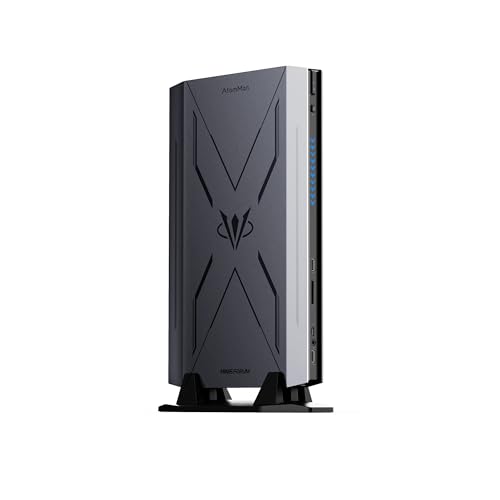
- Best overall barebones kit: AtomMan G7 Pro Barebone, Core i9-14900HX, RTX 5070 Laptop GPU — Check on Amazon
- AtomMan G7 Ti, Core i9-14900HX, RTX 4070 Laptop GPU (140W) — Check on Amazon
- Intel NUC 13 Extreme Kit NUC13RNGi9, Core i9-13900K, PCIe x16 slot — Check on Amazon
- AtomMan G7 Pt, Ryzen 9 7945HX, Radeon RX 7600M XT — Check on Amazon
See 2 more Amazon options
- MINISFORUM MS-A2 Barebone, Ryzen 9 9955HX, dual 10G SFP+ — Check on Amazon
- MINISFORUM MS-01 Barebone, Core i9-13900H, dual 10G SFP+ — Check on Amazon
Read the full guide ↓
Disclosure: As an Amazon Associate, reviewstook.com earns from qualifying purchases. Links to Amazon on this page are affiliate links; they cost you nothing extra. Listing details such as price and availability change often, so check the current Amazon listing before you buy.
Start with two facts. The first is about the word “mini”: every kit below wears it, and the six boxes span roughly 1.8 litres to roughly 14 litres — an eightfold difference hiding behind one adjective. The two Minisforum workstation kits are genuinely tiny slabs. The AtomMan gaming kits are console-sized towers that stand upright beside a monitor. And the Intel NUC 13 Extreme, the most capable kit here, is honestly a small-form-factor desktop in mini-PC clothing: a fine machine, but if your shelf was measured for a palm-sized box, it will not fit, and no product photograph changes that. This guide grades size by documented figures where they exist, chassis class where they do not.
The second fact is about the word “barebones”: a kit price is not a computer price. Every pick here ships without some combination of RAM, storage and OS, so think in terms of a completed total — the kit plus memory, an SSD and an OS — and hold that total against your $3,000. And here is the surprise worth knowing first: no verified barebones mini PC kit on Amazon costs anywhere near $3,000. The most expensive kit we could verify, the NUC 13 Extreme, sits well below that budget, the flagship gaming kits sit lower still in the range, and the upper part of the band is empty except for marketplace markups of cheaper kits. So $3,000 here is not a ceiling to squeeze under — it is headroom, and the real questions are which box fits your space and what the finished machine costs in total — check price on Amazon for each kit before you compare.
Those two facts set this guide’s method. Because you are shopping for a small space, each kit is graded on what actually differs between small boxes: documented chassis volume and class, whether the power supply lives inside the box or in a brick that needs its own home, where the cables land and how much slack they need, how much breathing room the cooling demands, and whether later expansion stays inside the box or arrives as a second box beside it. Our research documents litre figures for five of the six kits, and no VESA bracket or brick dimension for any of them — where one of those would decide your purchase, check the live listing’s spec table rather than guessing. Measure first, order second.
In this guide
Quick Picks
Short on time? Each row names a space situation and the kit that fits it, with a prompt to check the current price on Amazon and the size class that matters.
| Space situation | Pick | Price | Size class | Link |
|---|---|---|---|---|
| Best overall | AtomMan G7 Pro Barebone (i9-14900HX, RTX 5070 Laptop) | Check price on Amazon | Console-class upright mini tower | Check on Amazon |
| Best proven gaming kit | AtomMan G7 Ti (i9-14900HX, RTX 4070 Laptop 140W) | Check price on Amazon | ~2.55L, stands vertically | Check on Amazon |
| Smallest GPU gaming kit | AtomMan G7 Pt (Ryzen 9 7945HX, RX 7600M XT) | Check price on Amazon | ~2.5–2.6L compact tower | Check on Amazon |
| Smallest footprint, workstation grade | MINISFORUM MS-A2 Barebone (Ryzen 9 9955HX) | Check price on Amazon | 1.8L slab | Check on Amazon |
| Smallest footprint, proven value | MINISFORUM MS-01 Barebone (Core i9-13900H) | Check price on Amazon | 1.8L slab | Check on Amazon |
| Needs a real GPU slot | Intel NUC 13 Extreme Kit NUC13RNGi9 (i9-13900K) | Check price on Amazon | ~14L — SFF desktop class, not mini | Check on Amazon |
How These Picks Were Chosen
The first filter is the barebone filter, applied strictly: a pick counts only if the kit genuinely ships without some combination of RAM, storage and operating system for you to supply. Complete mini PCs surface constantly under barebone searches because sellers keyword-stuff their titles; they were excluded however good they are, because they answer a different question. If you would rather skip the screwdriver entirely, those machines have their own guides — start with Best Mini PC Under $3000 or Best Mini Gaming PC Under $3000, and if the finished machine must also be small, Best Mini PC For Small Spaces Under $3000 and Best Mini Gaming PC For Small Spaces Under $3000. Where a kit below is sold on one Amazon listing in both barebone and configured styles, the review flags it and tells you which style to select, because clicking the wrong tile is the most common ordering mistake in this category.
The second filter is verification. Every ASIN was confirmed against a real Amazon listing — its title or specification table — and prices are not quoted in this guide, because listings change often; check the current price on Amazon on the live listing instead. The same discipline governs the size claims: chassis volumes are quoted only where the underlying research documented them (the G7 Ti at roughly 2.55 litres, the G7 Pt at roughly 2.5–2.6 litres, the two Minisforum workstations at 1.8 litres, the NUC at roughly 14 litres), and the G7 Pro — for which no litre figure was documented — is graded by its class as a console-sized upright mini tower, with its exact dimensions left for you to confirm on the live listing. No weight, decibel figure or VESA pattern is stated for any pick, because none was documented.
The third filter is total-cost honesty, unchanged from the base guide. Each review completes the build on paper: the kit, plus a 32GB DDR5 SO-DIMM kit — check the current price on Amazon, because the memory shortage is the defining fact of this buying season and memory pricing moves fast — plus a 1–2TB NVMe SSD and an OS, also priced live before you compare. Where the completed total makes the barebone a worse buy than the same machine sold configured — true right now for one pick — the review says so and tells you to buy configured instead. A guide that only ever recommends the product in its own title is an advertisement; this one would rather send you to a configured MS-A2 than let you pay a shortage premium for fitting your own RAM.
We did not use these kits ourselves; we read maker listings, specification pages and independent reviews, and compared what a buyer receives and can never change later. For this variant we then re-graded the same six kits on placement — size class, power-supply placement, cable reality, airflow and expansion footprint — using only documented facts.
Measure Before You Buy: The Small-Space Checklist
Do these five steps in order, with a tape measure, before any kit goes in a cart. They take ten minutes and prevent the most common small-space failure: a PC that fits the shelf but not the shelf plus its cables, its brick and its own hot air.
- Step 1 — Measure the space, not the product photo. Record the usable depth, width and height of the exact shelf, desk zone or TV-unit bay, minus whatever already lives there. Compare against the kit’s documented class: a 1.8-litre slab (MS-A2, MS-01) fits almost anywhere a hardback book does; a ~2.5-litre upright (G7 Ti, G7 Pt) needs console-like vertical room; the ~14-litre NUC needs a small-form-factor bay, full stop — if your space was planned around a mini PC, pick a different kit.
- Step 2 — Reserve ventilation clearance. Every kit here is actively cooled and exhausts real heat — the gaming kits cool a 24-core CPU and a laptop GPU, and even the 1.8-litre workstations move air for a 16-core chip. Leave open air where the vents are, never seal a kit inside a closed cabinet, and treat a kit wedged between books as a kit being slowly cooked. If the only spot is an enclosed bay, the honest answer is a finished low-power mini PC from the guides linked above, not a flagship barebone.
- Step 3 — Plan the power brick’s home. Five of these six kits use an external power adapter; the exception is the NUC 13 Extreme, whose 750W supply is internal — one reason its box is so much bigger. Brick sizes and wattages were not documented in our research, so check the live listing’s photos and spec table, then decide where the brick lives: on the desk it eats the space you just saved, on the floor it must dodge feet and chair castors, and inside a cabinet it adds heat to step 2’s problem.
- Step 4 — Walk the cable drop. Count what must reach the box: power, display, Ethernet if you wire it, USB for keyboard, mouse and any drives. The workstation kits add a wrinkle — their dual 10G SFP+ ports take modules or DAC cables that are thicker and far less bendable than a patch lead, so a kit pushed flush against a wall may leave its own network cables no room to turn. Leave slack behind and below the box; a PC that fits only when its cables are bent at right angles does not fit.
- Step 5 — Then, and only then, order. With the space measured, the clearance reserved, the brick homed and the cable path walked, the remaining checks are the buying ones: confirm the exact style on shared listings (barebone versus configured), the kit’s exact dimensions on the live listing where this guide graded by class, and check the current price on Amazon on the live listing.
The 6 Best Barebones Mini PCs for Small Spaces Under $3,000
AtomMan G7 Pro Barebone — Core i9-14900HX, RTX 5070 Laptop GPU
Who it suits: The buyer whose small space is a desk or a TV stand with room for one upright console-class box, and who wants the newest graphics silicon any barebone mini PC has shipped with.
On hardware, the G7 Pro is the category flagship: a 24-core Intel Core i9-14900HX (up to 5.8GHz), an NVIDIA GeForce RTX 5070 Laptop GPU with 8GB of GDDR7, two DDR5 SO-DIMM slots for up to 96GB, two M.2 2280 slots for up to 8TB of storage, six heat pipes with dual fans, and a modern port set including HDMI 2.1 and USB4, with WiFi 7. The Amazon listing for this exact kit — titled, in Amazon’s own words, “Barebone Version Without Storage/OS” — confirms the GPU, the 8GB of graphics memory and the DDR5 platform, and Minisforum’s listings describe the package as shipping without OS, memory or storage. What the 5070 generation adds over the 4070 below is features more than raw speed: DLSS 4 with multi frame generation, which multiplies an already-healthy frame rate on a 1080p or 1440p display — it does not rescue a struggling base rate.
On space, grade it by class: an upright mini tower in the games-console class, kin to the G7 Ti below rather than to the palm-sized slabs. Our research documented no litre figure or dimensions for this kit, so read the footprint off the live listing and run it through the checklist above — it needs a console’s worth of vertical room and open air around its cooling, and it is not a hide-behind-the-monitor box. Its power adapter lives outside the chassis, so budget it a home per step 3. GPU and storage live inside the box, and completing this machine adds no second enclosure to your desk — the CPU and GPU are soldered and permanent.
Think about completion in tiers rather than fixed figures. Check the current price on Amazon for the barebone and for the configured 32GB/1TB version, and allow for a 32GB DDR5 SO-DIMM kit, storage and an OS on top if you complete it yourself. One caveat from the base research bears repeating: some marketplace mirrors of this ASIN describe a configured 32GB/1TB unit, so confirm on the listing that the variant in your cart is genuinely the barebone before ordering. Hold the completed total against the configured version honestly: while memory remains expensive, the configured unit can be the cheaper route to the identical computer, and the barebone wins when you already own the RAM and SSD.
- RTX 5070 Laptop GPU with 8GB GDDR7 — the newest GPU generation in any barebone mini PC, with DLSS 4.
- 24-core i9-14900HX, up to 96GB of DDR5 and two M.2 slots — nothing about the build needs a second box.
- HDMI 2.1 and USB4 keep the cable count low for a desk or TV-stand setup.
Honest limitation: Console-class, not palm-class — too big for monitor-back or bookshelf fantasies; the GPU is the 8GB laptop card, not the desktop 5070; and the CPU and GPU can never be upgraded.
Choose it if your space fits an upright console-sized box and you want the longest feature runway. Skip it if your measured space is slab-sized — look at the G7 Pt or the Minisforum pair — or if, after you check the current price on Amazon for the configured version, the barebone looks like the expensive way to buy the same machine.

AtomMan G7 Ti — Core i9-14900HX, RTX 4070 Laptop GPU (140W)
Who it suits: The gaming-first buyer with a console-sized gap beside or behind a TV or monitor, who prefers a reviewed, known quantity over a newer badge.
The G7 Ti pairs the same 24-core Core i9-14900HX with an RTX 4070 Laptop GPU running at a full 140W total graphics power — the maximum configuration of that chip, which matters because laptop GPUs are sold at wildly different power limits under one name, and a 100W 4070 is a measurably slower card. Independent reviews of the configured version confirm the 140W figure, the dual DDR5-5600 SO-DIMM slots up to 96GB, dual PCIe 4.0 M.2 slots and WiFi 7. Reviewers characterise it honestly as a gaming laptop without a screen, and that is the right mental model: mobile silicon, strong judged against laptops, giving back VRAM and some performance judged against a desktop RTX 4070 with 12GB.
Its space story is the best documented of the gaming kits: roughly 2.55 litres, designed to stand vertically beside or behind a monitor, in the footprint class of a games console on end. That vertical stance is a genuine small-space feature — the desk gives up the narrow edge, not the broad face — but do not over-read it: this box is too big to hide behind a monitor, and standing it vertically still leaves a power brick to home and vents to feed with open air. Plan the brick per step 3 and keep the exhaust side out of corners. Like the G7 Pro, everything you add goes inside the one box; no expansion lands a second enclosure on your desk, and no upgrade path exists for the soldered CPU and GPU, ever.
For price, check the current price on Amazon for both the barebone and the configured 32GB/1TB version, because the two sit in different tiers of this guide’s range and the gap between them moves. One warning deserves bold type. Amazon sells this kit on a shared listing that mixes barebone and configured styles, and the ASIN captured for this guide belongs to that listing family — so check that the style selector reads Barebone (no RAM, no SSD, no OS) before ordering, since the same page will cheerfully sell you a finished machine instead. Completed with 32GB of DDR5 at current memory pricing, plus storage and an OS, the G7 Ti lands in a similar completed tier to the G7 Pro build, which frames the real choice: proven 140W 4070 with DLSS 3, or the newer 5070 with DLSS 4.
- A full-power 140W implementation of the RTX 4070 Laptop GPU — no stronger version of that chip exists in a mini PC.
- Roughly 2.55 litres and built to stand vertically — the narrow edge is what your desk actually gives up.
- Reviewed extensively in configured form; cooling and behaviour are documented quantities, not hopes.
Honest limitation: An 8GB card a generation behind on frame generation (DLSS 3, not 4); console-sized rather than mini-sized; and the shared listing’s style tiles are a genuine ordering trap.
Choose it if a vertical console footprint suits your setup and you value the known quantity. Skip it if the G7 Pro completes at the same total — the newer GPU is the better long-term hold — or if your space only fits a flat slab.

AtomMan G7 Pt — Ryzen 9 7945HX, Radeon RX 7600M XT
Who it suits: The all-AMD buyer, the Linux gamer, and anyone who wants a discrete-GPU gaming kit in the smallest GPU-equipped chassis in this guide.
The G7 Pt (originally launched as the HX200G) is the world’s first AMD Advantage-certified mini PC, and the hardware earns the badge: a Ryzen 9 7945HX with 16 Zen 4 cores and 32 threads up to 5.4GHz, a discrete Radeon RX 7600M XT with 8GB of GDDR6 run at up to 120W per review specifications, two DDR5-5200 SO-DIMM slots up to 96GB, and a PCIe 5.0 M.2 slot plus a PCIe 4.0 slot — a storage pairing none of the Intel kits here match. Reviewers of the configured version land in the same place: high-settings 1080p gaming that convinces, chosen 1440p titles with sensible settings and FSR upscaling, and CPU performance that shows up most desktops. What it does not have is NVIDIA’s ecosystem — no DLSS, no CUDA, ray tracing a tier behind.
For small spaces this is the gaming pick to beat: at roughly 2.5–2.6 litres it is the most compact GPU-equipped chassis in the guide, a small tower that asks for console-class room but less of it than its Intel siblings, with the same external-brick homework and the same rule that its vents need open air, not a cabinet. Memory and both SSDs live inside the box; the soldered CPU and GPU mean the footprint you buy is the footprint you keep, with no dock, no second enclosure and no upgrade path. If your measured space fits exactly one small tower and gaming is non-negotiable, this is the shape of the answer.
Value is where this kit shines brightest. Check the current price on Amazon for the barebone style and for the configured 32GB/1TB version — the Amazon link here is that listing family, so apply the same style-selector discipline as the G7 Ti and confirm you are buying the barebone style. Completed with 32GB of DDR5 at current memory pricing, plus storage and an OS, it sits at the lower end of the completed totals in this guide for a machine with discrete graphics. The honest question then flips: while memory is expensive, the configured version can undercut the completed barebone, with one warranty on the whole machine. The barebone is the buy when DDR5 SO-DIMMs and an NVMe drive are already yours; the configured version is the buy when they are not.
- 16-core Ryzen 9 7945HX — the joint-strongest CPU in this guide, in its smallest GPU chassis.
- Discrete RX 7600M XT 8GB with a PCIe 5.0 SSD slot beside it — real gaming in ~2.5–2.6 litres.
- The least expensive path in this guide to a finished PC with discrete graphics.
Honest limitation: No DLSS or CUDA, ray tracing a tier behind the NVIDIA picks, the same 8GB VRAM ceiling as everything else here, and a shared listing where barebone and configured styles must not be confused.
Choose it if your space fits one compact tower and you want maximum CPU performance in a compact tower with honest 1080p gaming. Skip it if your games lean on DLSS or ray tracing, or if the configured version, once you check its current price on Amazon, makes more sense and you own no parts — take the finished machine and save the shelf the parts boxes.

Intel NUC 13 Extreme Kit NUC13RNGi9 — Core i9-13900K, PCIe x16
Who it suits: The builder with a small-form-factor-sized space — a desk bay, a shelf run, a TV-unit section — who wants a desktop CPU and a real graphics-card slot, and accepts that “mini” does not describe what arrives.
Let the size point be made without varnish: inside a case of roughly 13.9–14 litres sits a socketed desktop Core i9-13900K — 24 cores, 32 threads, up to 5.8GHz, unlocked, and the only replaceable CPU in this guide. Around it: two DDR5 SO-DIMM slots up to 64GB, three M.2 slots, WiFi 6E, dual Thunderbolt, and the feature no other pick matches, a full PCIe 5.0 x16 slot that accepts a dual-slot desktop graphics card up to about 12 inches long. By tower standards 14 litres is compact; by the standards of the other five kits here it is a different category — roughly eight MS-A2s — belonging in a space planned for a small desktop, beside the machines in Best Small Form Factor Gaming PC Under $3000, not in a space planned for a mini PC.
And yet the NUC has two genuine small-space virtues no mini kit can copy. The first is that its 750W power supply is internal: there is no brick to home, just one power cable into the back of one box — the cleanest cable story in this guide, bought with litres. The second is that its expansion stays inside the box. The graphics card a mini-PC owner might chase through an external dock — a second enclosure with its own brick and footprint — simply slots into the NUC’s case. Judge the trade honestly: one bigger box, or one small box plus a dock plus two bricks. For a fixed desk with a real bay, the single box is frequently tidier; for a shelf measured in centimetres, it is no answer at all. Two seller caveats from the base research: the Amazon listing is sold by a third-party seller (WEELIAO) rather than Intel or ASUS, which inherited the NUC line, and the listing’s own copy notes the CPU was changed from an i5-13600K — buy carefully, verify the unit on arrival, and prefer return terms you trust. Check the current price on Amazon before you judge this kit against your budget.
The totals for this pick are unlike any other in the guide: it is the sole kit whose completed total can honestly approach the $3,000 line. Start from the kit — check the current price on Amazon — then add 32GB of DDR5 SO-DIMM at current memory pricing, plus storage and an OS, and you are already in the upper tier of this guide before a graphics card — running on integrated graphics fit for a desktop, not for gaming. Add a sensible mid-range desktop GPU and the total can approach the budget; add a high-end one and the budget is blown, at which point a conventional small-form-factor build does the same job for less. The NUC makes sense in exactly two scenarios: you already own a suitable graphics card (then it is the strongest kit here by a distance), or you specifically want this socketed, slotted, upgradeable platform and accept the GPU as a second purchase. As a shortcut to a cheap complete PC, it is the costliest error this guide can steer you into.
- Socketed desktop i9-13900K and a real PCIe x16 slot — the only kit here whose GPU lives inside the box by your choice, and can be replaced later.
- Internal 750W PSU: no power brick to place, hide or ventilate — one box, one power cable.
- Three M.2 slots and dual Thunderbolt — expansion headroom no sealed mini PC approaches.
Honest limitation: Roughly 14 litres wearing a mini-PC badge; ships with no GPU worth gaming on, no RAM, no SSD and no OS; and current Amazon supply runs through third-party sellers with listing copy you should read twice.
Choose it if your space is SFF-sized, you own a graphics card, and you value the one-box, no-brick layout. Skip it if your space is genuinely mini — the G7 Pt gives you a completed gaming machine in a fifth of the volume — or if your $3,000 must include the graphics card and leave change.

MINISFORUM MS-A2 Barebone — Ryzen 9 9955HX, Dual 10G SFP+
Who it suits: Homelab and workstation builders whose space is measured in centimetres — a shelf, a network corner, the back of a desk — and who need the strongest mini-PC CPU platform on sale inside the smallest documented footprint in this guide.
The MS-A2 is the most modern platform here: a Zen 5 Ryzen 9 9955HX with 16 cores and 32 threads up to 5.4GHz, a full generation ahead of everything else in the guide, in a 1.8-litre workstation chassis with two DDR5-5600 SO-DIMM slots up to 96GB, three M.2 slots that also accept 22110 and U.2 drives, two 10-gigabit SFP+ ports on an Intel X710 controller, two 2.5-gigabit ports, WiFi 6E, and a physical PCIe x16 slot wired x8 that takes a low-profile single-slot card. Check the current price on Amazon for the barebone listing for this exact kit. Integrated graphics are a Radeon 610M — a display adapter, not a gaming GPU — judged as what it is — a virtualization node, render and compile box or network services host — nothing in its tier matches its CPU and networking. Judged as a games machine, it needs a low-profile card in the slot, or you need the AtomMan picks.
The space grading is this kit’s headline: 1.8 litres is the joint-smallest documented footprint in the guide, a flat slab class that fits the spaces the console-class towers cannot — a shallow shelf, a rack-adjacent nook, the strip of desk behind a monitor. Two cautions keep the grade real. First, this slab cools a 16-core flagship chip, so the ventilation step applies in full — do not entomb it in a closed cabinet because the box is little. Second, its cabling is the densest in the guide relative to its size: four network ports, and the SFP+ pair take stiff, thick modules or DAC cables, so a 1.8-litre PC with 10-gigabit cabling needs a bend-radius budget behind it. Its expansion costs no footprint either: the slot is internal, so a low-profile GPU or NIC changes nothing outside the box. Our research documents no VESA bracket for this kit, so if monitor-back mounting is your plan, verify the option on the live listing before ordering.
And now the most important point in this review: at current memory prices, completing this barebone from scratch can be a mistake. Check the current price on Amazon for the barebone, then check the current price on Amazon for a 32GB DDR5-5600 SO-DIMM kit, and compare the pair against the same MS-A2 sold configured with 32GB and a 1TB SSD. In a memory shortage the barebone can lose its usual advantage: you can end up paying configured-level money and still owe an SSD and an OS. The barebone is the right buy in exactly two situations — you already own DDR5 SO-DIMMs and storage (then this platform, in this footprint, is superb), or memory prices fall back to earth. In every other case, take the configured MS-A2 and put the difference toward the low-profile GPU or the 10G switch.
- Ryzen 9 9955HX — the only Zen 5 CPU in this guide, 16 cores in a documented 1.8 litres.
- Dual 10G SFP+ (Intel X710), dual 2.5G, three M.2/U.2-capable slots, and a PCIe slot whose upgrades cost no extra space.
- Check price on Amazon for the barebone — an excellent platform for its footprint, if you own the memory.
Honest limitation: Radeon 610M graphics are not for gaming; the CPU is soldered; the dense rear cabling needs more room than the slab’s size implies; and at current SO-DIMM prices the completed barebone costs more than the configured machine.
Choose it if your space is truly small, you are building a homelab or workstation, and you own DDR5 SO-DIMMs or memory prices have normalised. Skip it if you are starting from zero parts today — buy it configured — or if gaming is the point.

MINISFORUM MS-01 Barebone — Core i9-13900H, Dual 10G SFP+
Who it suits: The homelab buyer with the same centimetre-measured space as the MS-A2 reader, who wants the proven, community-tested version of the mini-workstation idea for less money.
The MS-01 defined this subcategory, and two years of homelab use have made it the safest pair of hands in the guide. The barebone in this listing carries a Core i9-13900H — 14 cores, 20 threads — in the same 1.8-litre chassis pattern as its successor: two DDR5 SO-DIMM slots, three SSD slots (M.2 2280/22110 and U.2), two 10-gigabit SFP+ ports, two 2.5-gigabit LAN ports, dual USB4, and a PCIe slot the listing itself notes supports low-profile discrete cards such as an RTX 3050. Check the current price on Amazon for the barebone. Against the MS-A2 the trade is explicit: an older Intel platform, two fewer cores and a generation’s efficiency deficit, and, in return, the deepest well of community documentation in the category, with the kit positioned below the MS-A2 in the range — Proxmox clusters, Ceph nodes, router builds, this machine has public recipes for all of them. Integrated Iris Xe graphics handle displays and Quick Sync transcoding, genuinely useful for a media server, but like the MS-A2 this is not a gaming machine until a low-profile card goes in the slot.
On placement, everything said about the MS-A2’s footprint applies: a 1.8-litre-class slab for shallow shelves and desk-back strips, actively cooled and therefore owed open air, with the same dense network cabling behind it — four ports, SFP+ hardware included — and the same space-free internal expansion through its slot. Where the MS-01 improves on its successor is maturity: a machine this documented has known answers for rack shelves, stacking and ventilation. As with the MS-A2, no VESA bracket was documented in our research — confirm mounting options on the live listing if your plan hangs on one — and its adapter needs the same brick home per step 3.
Completion follows the same rules: start from the kit — check the current price on Amazon — add 32GB of DDR5 at current memory pricing, plus storage and an OS, and compare that total against the configured MS-01, because configured versions can make the from-scratch barebone a convenience rather than a saving. Where it unambiguously wins is the classic homelab pattern: SO-DIMMs and NVMe drives already in a drawer from the last build, turning them into a dual-10G node with a flagship-class mobile CPU in 1.8 litres. It is also the choice for buyers who distrust first-generation anything, since every quirk it owns has already been found and written up by an earlier owner.
- Dual 10G SFP+ plus dual 2.5G LAN — four network ports in 1.8 litres, the homelab standard-setter.
- PCIe slot for a low-profile GPU or storage card — upgrades that add no second box; three SSD slots including U.2.
- Positioned at the lower end of this guide’s range as a barebone — check price on Amazon — and the one with the deepest pool of community documentation.
Honest limitation: A 2023-era CPU platform — two cores down and a generation behind the MS-A2 — with integrated graphics only until you add a slot card, the same stiff SFP+ cabling to accommodate, and the same memory-shortage completion caveat as its successor.
Choose it if you are building a cluster or server from parts on hand, in a space that fits a slab and nothing bigger. Skip it if this is a single do-everything machine bought from zero — the configured MS-A2, or a gaming kit, serves you better.
Comparison Table
| Kit | CPU / GPU | Size class | Price | Completed cost | Link |
|---|---|---|---|---|---|
| AtomMan G7 Pro Barebone | i9-14900HX / RTX 5070 Laptop 8GB | Console-class upright (dimensions not documented — confirm on listing) | Check price on Amazon | Mid-range completed tier once RAM, SSD and OS are added | Check on Amazon |
| AtomMan G7 Ti | i9-14900HX / RTX 4070 Laptop 8GB (140W) | ~2.55L, stands vertically | Check price on Amazon | Mid-range completed tier once RAM, SSD and OS are added | Check on Amazon |
| AtomMan G7 Pt | Ryzen 9 7945HX / RX 7600M XT 8GB | ~2.5–2.6L compact tower | Check price on Amazon | Lower completed tier in this guide once RAM, SSD and OS are added | Check on Amazon |
| MINISFORUM MS-A2 Barebone | Ryzen 9 9955HX / Radeon 610M | 1.8L slab | Check price on Amazon | Completed total can rival the configured version — compare both on Amazon | Check on Amazon |
| MINISFORUM MS-01 Barebone | Core i9-13900H / Iris Xe | 1.8L slab | Check price on Amazon | Lower completed tier once RAM, SSD and OS are added | Check on Amazon |
| Intel NUC 13 Extreme Kit | i9-13900K desktop / bring your own GPU | ~13.9–14L — SFF class, not mini | Check price on Amazon | Highest completed tier here, before a graphics card | Check on Amazon |
How to Choose a Barebones Mini PC for a Small Space
- Classify your space before you classify PCs. Slab space (a shelf, a desk-back strip) fits the 1.8-litre Minisforum pair. Console space (beside a TV, standing room by a monitor) fits the AtomMan towers. SFF space (a desk bay or cabinet section) is what the NUC actually needs. Picking the PC first and the space second is how 14-litre boxes get returned.
- Price the completed machine, never the kit. The kit, memory at current pricing, SSD and OS all go into the sum before anything is compared. Check the current price on Amazon for each part; leaving memory out of the maths makes the whole comparison worthless while DDR5 pricing remains elevated.
- Hold it against the configured version of the same machine. Each kit here is also sold finished. When the configured price sits at or below your completed total — the case right now for the MS-A2, and arguably for the G7 Pt — buy configured and let one warranty cover the whole box.
- Decide where the graphics live. Soldered-GPU kits (both NVIDIA AtomMan models and the G7 Pt) keep everything in one box forever, at 8GB of VRAM. Slot kits (NUC, MS-A2, MS-01) keep add-in cards inside the box too, but ship with integrated graphics that cannot game. The only route that adds a second box is an external GPU dock — no kit here is sold around that plan, and a dock roughly doubles a setup’s footprint, so treat dock-based plans as a different, bigger setup.
- Home the brick before you buy. Five of six kits use an external adapter; the NUC’s internal 750W PSU is the exception and part of why it is big. Brick sizes were not documented in our research — check the live listing, then decide: desk, floor or ventilated shelf, never sealed in with the PC’s exhaust.
- Budget the cable bend, not just the box. SFP+ DAC cables and modules on the Minisforum pair are thick and stiff; display and power leads need slack too. A kit that only fits with its cables folded flat against a wall does not fit.
- Never seal a gaming kit in a cabinet. These boxes cool flagship mobile CPUs and GPUs with heat pipes and fans. Enclosed, unventilated bays throttle them and shorten their lives; if the bay is truly closed, buy a finished low-power mini PC instead.
- Mind the style selector on shared listings. The AtomMan gaming kits are sold on Amazon listings that mix barebone and configured styles on one page. Check the style name, the price and the “no RAM/SSD/OS” wording on the exact variant sitting in your cart.
- Read any kit priced far above its usual tier as a markup, not a model. The verified kits in this category sit well below the top of the $3,000 budget. A listing priced far above a kit’s usual tier is a third-party seller testing your urgency — and your space deserves better arithmetic.
Common Buying Mistakes
- Trusting the word “mini” in a product title. This guide’s six “mini” kits span 1.8 to roughly 14 litres; the NUC 13 Extreme is a small-form-factor desktop, and buyers who skip the tape measure discover that at unboxing.
- Measuring the box and forgetting everything attached to it — the external brick, the cable bend radius, the SFP+ hardware, the ventilation gap. The setup’s footprint is the box plus its support system.
- Comparing kit prices against complete PCs. A barebone and the same machine sold configured may be the same computer in two forms; the completed total is the only figure that reveals the cheaper one.
- Budgeting on old memory prices from before the current shortage, and underfunding the build as a result. Check the current price on Amazon for DDR5 SO-DIMM kits before you set the completion budget.
- Ordering the configured style — or the barebone style — by accident on a shared Amazon listing, then discovering the box has no RAM, or that you paid for RAM you already owned.
- Reading “RTX 5070” or “RTX 4070” on a mini PC as the desktop card. The silicon here is the laptop GPU with 8GB — strong in context, and a different product from the 12GB desktop versions.
- Shoving a flagship kit into a closed TV cabinet because it physically fits, then blaming the kit for the throttling that follows.
- Planning a monitor-back mount around a VESA bracket that was never documented for the kit — check the live listing first.
- Paying a marketplace markup in the empty upper band. No kit in this guide is verified near the top of the $3,000 budget; a listing priced far above its usual tier is a reseller premium.
- Treating the NUC 13 Extreme as a cheap gaming PC. No gaming GPU lives in the box; the card is a second, major purchase that can push the total beyond $3,000.
Final Recommendation
- Console-sized space, gaming first: AtomMan G7 Pro Barebone — check price on Amazon, the newest GPU in the class, one box and done.
- The least space per gaming dollar: AtomMan G7 Pt — the smallest GPU chassis here at ~2.5–2.6 litres, and the cheapest completed discrete-GPU machine in the guide.
- Proven gaming in a vertical footprint: AtomMan G7 Ti — ~2.55 litres standing on its narrow edge.
- Slab-sized space, workstation work: MINISFORUM MS-A2 — configured, unless you own the memory; MS-01 if proven beats new and the budget is tighter.
- SFF-sized space and a GPU already owned: Intel NUC 13 Extreme Kit — the one-box, no-brick layout, bought with open eyes about sellers and totals.
Our top two for small spaces are the G7 Pt, because it delivers a complete discrete-GPU gaming machine in the smallest documented gaming footprint here for a lower completed cost in this guide, and the MS-A2, because 16 Zen 5 cores and dual 10-gigabit networking in 1.8 litres is a combination nothing else here touches — with its standing instruction attached: at today’s memory prices, buy it configured. The G7 Pro is the pick when the space fits a console-class tower; the NUC is the connoisseur’s exception, an excellent machine that must be bought as the small-form-factor desktop it is, not the mini PC it is labelled. Whichever kit you choose, run the five-step checklist before checkout, confirm the exact style on the listing, and let the unspent part of the $3,000 buy what actually improves a small setup — a better monitor arm, the 10G switch the MS-series deserves, a second NVMe drive. Readers working to tighter kit budgets should also see Best Barebones Mini PC For Small Spaces Under $1500 and Best Barebones Mini PC For Small Spaces Under $2500, and readers who would rather not build at all can compare finished machines in Best Compact Gaming PC For Small Spaces Under $3000.
Frequently Asked Questions
How small is “small” for these kits, really?
The spread inside the category is the story: the Minisforum MS-A2 and MS-01 are documented 1.8-litre slabs, the AtomMan G7 Ti and G7 Pt are roughly 2.5–2.6-litre uprights, the G7 Pro is a console-class tower whose dimensions you should confirm on its listing, and the Intel NUC 13 Extreme is roughly 14 litres — a small-form-factor desktop. Measure your space first, then shop inside the class that fits it.
Is there really no barebones mini PC near the top of the $3,000 budget?
None that our research could verify on Amazon. The NUC 13 Extreme tops the verified ladder in this category, with the flagship GPU kits clustered below it in the range. Anything listed well above that tier for a kit in this category is a third-party markup of identical hardware, or a configured machine borrowing “barebone” as a keyword. Treat the upper band as empty and you will not overpay for it.
What is missing from a barebones kit, and what does finishing one cost?
RAM, storage and the operating system, typically. Memory dominates the completion bill while DDR5 remains in shortage — check the current price on Amazon for a 32GB DDR5 SO-DIMM kit — with storage for a 1–2TB NVMe SSD and an OS to allow for on top. Set a meaningful allowance aside above any DDR5 kit in this guide, and check the current price on Amazon for the configured version of the same machine before committing.
Can I mount one of these kits behind my monitor?
Only if the kit actually offers it — and that is a live-listing question, not an assumption. Our research documented no VESA bracket for any of the six picks, so check the exact listing’s specification table and photos for a bundled or optional bracket before building a setup around one. The 1.8-litre Minisforum slabs are the natural candidates by size class; the AtomMan towers and the 14-litre NUC are not monitor-back machines by any stretch.
Where does the power brick go in a small setup?
Anywhere except sealed in with the PC’s exhaust. Five of these kits use external adapters (the NUC’s 750W supply is internal — one reason its box is bigger). Brick dimensions were not documented in our research, so check the listing, then give the brick air: a cable tray under the desk, a shelf corner, or the floor away from feet and castors.
Is a mini PC’s RTX 4070 or 5070 the desktop card?
No — they are the laptop GPUs carrying the same names, with 8GB of VRAM to the desktop cards’ 12GB and laptop power limits; the G7 Ti’s 140W 4070 is the full-power exception that proves the rule. Bank on strong 1080p and upscaled 1440p gaming rather than desktop-class 4K. The NUC 13 Extreme runs the other way: its slot accepts a genuine desktop card, inside the box.
Which kit is best for a homelab in a tight space?
The MS-A2 if you are buying configured or own DDR5 memory — Zen 5 cores, dual 10G SFP+, three SSD slots, 1.8 litres — and the MS-01 if you are building from parts on hand and value two years of community documentation. Budget the space behind them honestly: their SFP+ cabling is thick and stiff, so the nook needs a cable-bend allowance the slab’s dimensions do not suggest. Neither plays games unaided, so plan on a low-profile slot GPU if the node has to double as a games machine.
- Best Barebones Mini PC Under $2500
- Best Barebones Mini PC Under $1500
- Best Barebones Mini PC For Small Spaces Under $2500
- Best Barebones Mini PC For Small Spaces Under $1500
- Best Barebones Mini PC For 1440p Gaming Under $3000
- Best Barebones Mini PC For Streaming Under $3000
- Best Barebones Mini PC For Beginners Under $3000
- Best Mini Gaming PC For Small Spaces Under $3000


