Where to buy
Check the latest price, availability and delivery on Amazon. Orders are placed on Amazon. We may earn a commission from qualifying purchases.
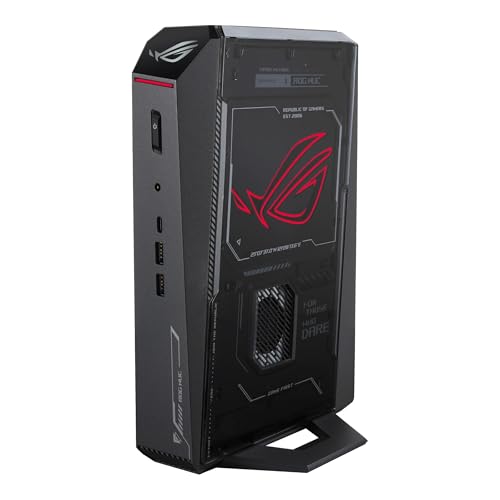
- Best overall small form factor gaming PC: ASUS ROG NUC (2025), Core Ultra 9 275HX, RTX 5070 Laptop GPU, 32GB, 1TB, ~3L — Check on Amazon
- Cooler Master NR2 Pro, Ryzen 7 9800X3D, desktop RTX 5070 Ti 16GB, 32GB, 2TB, 18.25L — Check on Amazon
- ASUS ROG G22CH, Core i7-13700KF, desktop RTX 4070 12GB, 32GB, 1TB, ~10.7L — Check on Amazon
- MINISFORUM AtomMan G7 Pro, Core i9-14900HX, RTX 5070 Laptop GPU, slim vertical mini chassis — Check on Amazon
- MINISFORUM AtomMan G7 Ti, Core i9-14900HX, RTX 4070 Laptop GPU, 32GB, 1TB, ~2.55L — Check on Amazon
- MINISFORUM AtomMan G7 Pt, Ryzen 9 7945HX, Radeon RX 7600M XT, 32GB, 1TB, ~2.7L — Check on Amazon
Read the full guide ↓
Disclosure: As an Amazon Associate, reviewstook.com earns from qualifying purchases. Links to Amazon on this page are affiliate links; they cost you nothing extra. Listing details such as price and availability change often, so check the current Amazon listing before you buy.
Three thousand dollars is a serious gaming budget, and in a tower it buys serious hardware. In a small form factor case it buys something else first: smallness itself. Before the picks, here is the verified ceiling of this category, stated plainly because every listing in it is written to make you forget it. There is no small form factor PC with a desktop RTX 5080 anywhere near $3,000 — the one true-SFF desktop-5080 machine we could verify, Zotac’s Magnus One Ultra at about 11.5 liters, sits far above this budget on Amazon — check the current price on Amazon to see the gap for yourself. The strongest graphics that fit in a genuinely small box at this money are laptop parts: even ASUS’s own ROG NUC only reaches an RTX 5080 Laptop GPU in a configuration positioned above this budget. Meanwhile a full-size tower with a desktop RTX 5080, a card no machine in this guide can match, has been available within this budget on deal — check the current price on Amazon before assuming that still holds. Read that sentence again before you spend anything here.
So what does this guide actually recommend? Six real, verified small machines between roughly 2.5 and 18.25 liters, each with its pricing left to the live listing — check price on Amazon — and each with its size premium described against a tower carrying the same class of graphics. Two of them hold genuine desktop graphics cards — a desktop RTX 5070 Ti 16GB in an 18.25-liter mini-ITX build, and a desktop RTX 4070 12GB in a 10.7-liter console-style case. The other four run laptop GPUs, and every one of those GPUs is named in full in this guide — RTX 5070 Laptop GPU with 8GB, RTX 4070 Laptop GPU with 8GB, Radeon RX 7600M XT with 8GB — because a laptop 5070 is not a desktop 5070, and any guide that lets the shared number blur that difference is selling you the blur. Our honest closing position, argued in detail below: most readers of this search should buy in the $1,200–$1,500 tier, where the best machine in this guide already lives, or buy a tower and keep the change. The $3,000 small form factor PC is a luxury purchase of desk space, and it should be bought with open eyes.
In this guide
Quick Picks
Short on time, or comparing several options at once? Each row below names a buyer type and the machine that suits it, with a link to the listing.
| Buyer type | Pick | Why it stands out | Link |
|---|---|---|---|
| Best overall | ASUS ROG NUC (2025), RTX 5070 Laptop GPU | The strongest laptop GPU in a ~3L box — at its list positioning from ASUS’s storefront, and only there; check price on Amazon | Check on Amazon |
| Best real desktop GPU in SFF | Cooler Master NR2 Pro, desktop RTX 5070 Ti | A desktop 5070 Ti 16GB and a 9800X3D in 18.25 liters, when it is in its deal band | Check on Amazon |
| Best console-style living-room box | ASUS ROG G22CH, desktop RTX 4070 | A desktop 4070 12GB in ~10.7 liters with a published 600W Gold PSU | Check on Amazon |
| Newest laptop GPU, smallest desk footprint | MINISFORUM AtomMan G7 Pro, RTX 5070 Laptop GPU | Current-generation laptop graphics in a slim vertical chassis — mind the barebone listing trap | Check on Amazon |
| Best value — the one most people should buy | MINISFORUM AtomMan G7 Ti, RTX 4070 Laptop GPU | Full 140W laptop 4070 in ~2.55 liters — check price on Amazon | Check on Amazon |
| Best CPU muscle per dollar | MINISFORUM AtomMan G7 Pt, RX 7600M XT | A 16-core desktop-class CPU beside a mobile GPU, in the guide’s lowest entry tier — check price on Amazon | Check on Amazon |
How These Picks Were Chosen
Small form factor is a claim about volume, so volume is where this guide starts. Every pick below carries a size in liters taken from the maker’s published dimensions or the chassis specification — roughly 3 liters for the ROG NUC, 18.25 liters for the NR2 Pro’s NR200P Max chassis, about 10.7 liters for the ROG G22CH, about 2.55 liters for the AtomMan G7 Ti, about 2.7 liters for the G7 Pt. Anything whose “small” turned out to be a marketing adjective rather than a measurable box was excluded, however good the hardware inside it. Machines above roughly 20 liters are towers wearing a costume, and they were judged as towers — which is to say, against tower prices — and left to the tower guides.
Every ASIN and specification in this guide was verified against a real Amazon listing or the maker’s own published data. Prices are not printed as fixed figures, because prices in this category move a great deal between deal events — check the current price on Amazon for every pick. Where a machine is only in budget at a deal positioning, the review says so and gives a walk-away rule. Where a listing family mixes barebone and configured versions under one page, the review names the trap explicitly, because the single most expensive mistake in this category is paying configured money for a box that arrives without RAM, storage or an operating system.
Two honesty rules run through every review. First, laptop GPUs are named as laptop GPUs, in full, with their memory: an RTX 5070 Laptop GPU carries 8GB where the desktop RTX 5070 carries 12GB, and an RTX 4070 Laptop GPU carries 8GB where the desktop card carries 12GB — same badge family, different silicon, different ceiling. Second, each review describes the size premium in qualitative terms: what the same class of graphics represents in a tower, using tower comparisons verified elsewhere in this batch of guides, so you can judge what the liters are worth before you pay for them. We did not use these machines ourselves; we read the listings, the maker specifications and independent review coverage, and where sources conflict — a slot count here, a cooling description there — the review flags the conflict instead of resolving it by guesswork.
The 6 Best Small Form Factor Gaming PCs Under $3,000
ASUS ROG NUC (2025) — Core Ultra 9 275HX, RTX 5070 Laptop GPU, 32GB, 1TB, ~3L
Who it suits: The buyer who wants the most gaming performance that fits in a box the size of a hardback book, from a major brand, and is willing to pay flagship money for the privilege.
This is the ceiling of the small form factor category wearing a price tag. Inside a chassis of roughly three liters — about 11.1 × 7.4 × 2.2 inches — ASUS fits a Core Ultra 9 275HX, 32GB of DDR5 and an RTX 5070 Laptop GPU. Say the GPU’s name in full, because it decides what this machine is: the RTX 5070 Laptop GPU is a mobile part with 8GB of GDDR7, soldered in place, where the desktop RTX 5070 carries 12GB. It is a strong 1080p and capable 1440p-with-upscaling graphics solution; it is not the desktop card its number suggests, and at this price that distinction is the whole review. Around it, the package is genuinely premium: dual Thunderbolt 4, six USB-A ports, dual HDMI plus DisplayPort, Ethernet, and a triple-fan cooling design in a box that disappears behind a monitor or into a media unit. Check the current price on Amazon for this 32GB/1TB configuration; launch coverage recorded it orderable on Amazon US at its list positioning from ASUS’s own storefront.
The size premium, in plain terms: at its list positioning you are in the same budget neighbourhood as a full tower carrying a desktop RTX 5080 on deal — a graphics card a full class above the laptop 5070 in this box, with twice the memory. What the NUC’s money buys instead is the 3-liter footprint, the brand’s support network and a machine that makes no noise about existing. That trade can be worth it. It should never be made by accident. Two further cautions belong in this review. Third-party sellers on this same listing have been recorded asking well above list for this configuration, so the pick is conditional in the strictest sense: buy it at or near list from ASUS’s storefront — check price on Amazon and check the seller — or do not buy it. And owner sentiment on this model is divided — praise from buyers who received good units sits alongside reports of dead-on-arrival and failing machines — so buy from a seller whose return window you trust, and stress-test the machine hard in its first two weeks. The 330W external power adapter also deserves a line: the box is 3 liters, but the brick that feeds it is part of the footprint you will actually live with.
- The strongest laptop GPU available in a ~3L chassis, with a flagship mobile CPU beside it.
- Connectivity most towers would envy: dual Thunderbolt 4, six USB-A, three display outputs plus Ethernet.
- A real brand’s warranty and support behind a very small, very dense machine.
Honest limitation: The RTX 5070 Laptop GPU has 8GB of memory against the desktop 5070’s 12GB, it is soldered with no upgrade path ever, and the configuration is only a sane purchase at or near its list positioning — third-party asks well above list have been recorded on this listing.
Choose it if the desk space is genuinely worth flagship money and you can buy at list from ASUS’s storefront. Skip it if the listing in front of you is a marked-up third-party offer, or if a tower fits your room — the same money buys a desktop RTX 5080 there.

Cooler Master NR2 Pro — Ryzen 7 9800X3D, Desktop RTX 5070 Ti 16GB, 32GB, 2TB, 18.25L
Who it suits: The SFF purist who refuses laptop graphics: this is a real mini-ITX desktop, built from standard parts, that happens to be small.
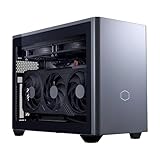
Everything the ROG NUC compromises on, this machine refuses to. The NR2 Pro is built in Cooler Master’s NR200P Max chassis — 18.25 liters, the largest box in this guide and still a fraction of a tower — around a Ryzen 7 9800X3D, the gaming CPU other CPUs are measured against, and a Gigabyte RTX 5070 Ti that is the genuine desktop card: 16GB of GDDR7, socketed in a real PCIe slot, replaceable years from now like any desktop GPU. The rest of the build reads like a parts list a forum would approve: 32GB of DDR5-6000, a 2TB Gen4 SSD, a Gigabyte B850I AORUS PRO mini-ITX board, an 850W SFX Gold power supply, a custom 280mm radiator cooling the CPU, and Windows 11 installed. Because every component is a standard part, this is the only machine in the guide whose graphics you can upgrade, whose storage you can expand without drama, and whose failure modes any competent repair shop already understands.
The catch is the price’s behavior rather than its level. This system’s pricing on Amazon swings widely: it appears in deal coverage at attractive positioning, in Prime Day deal reports lower still, and at a peak that sits over this budget entirely. So the rule is simple and non-negotiable: check the current price on Amazon, and treat this as the best small form factor gaming PC under $3,000 only inside its deal band; at peak pricing it is not in this guide at all, and no urgency justifies paying it. Against towers, the size premium at deal positioning is close to zero — at its best deal positioning this SFF build can actually undercut comparable desktop-5070 Ti towers, a rarity created by the late-2026 component price spike, in which prebuilt and SFF systems bought at deal positioning undercut the cost of the same parts bought separately. Roundup coverage of this exact system adds two honest footnotes: fan noise is reasonable rather than silent, and early units included a dead front USB-C port and a GPU riser cable that needed reseating after shipping — check both on day one, while returns are painless.
- A real desktop RTX 5070 Ti 16GB and a 9800X3D — no laptop parts, no asterisks.
- Standard mini-ITX components throughout: upgradable, repairable, understandable.
- At deal positioning it undercuts comparable towers; the size premium can be zero or negative.
Honest limitation: The price swings violently, and at the top of its range it blows the budget it is being recommended under — check price on Amazon and walk away at peak. It is also the biggest box here, at 18.25 liters.
Choose it if you want desktop-class graphics and upgradeability in the smallest honest package, and you can wait for the deal band. Skip it if the live price is anywhere near its peak, or if sub-11-liter size is the actual point of your search.
ASUS ROG G22CH — Core i7-13700KF, Desktop RTX 4070 12GB, 32GB, 1TB, ~10.7L
Who it suits: The living-room gamer who wants a console-shaped box under the TV with a real desktop graphics card inside it.
The G22CH is the middle path this category needs more of: at roughly 10.7 liters it is far smaller than a tower, shaped to sit horizontally or vertically in media furniture, yet the graphics inside are a desktop RTX 4070 with the full 12GB of memory — not the 8GB laptop part that shares its name in the picks below. The supporting cast is complete and published: a Core i7-13700KF, 32GB of memory, a 1TB SSD, and a 600W Gold-rated power supply whose wattage ASUS actually states, which puts it ahead of several flashier listings in this batch on the simple virtue of disclosure. Check the current price on Amazon; it is at its deal positioning, well below its list tier, that this machine becomes genuinely interesting.
The size premium at that deal positioning is modest and legible: a tower carrying an RTX 4070 SUPER — a faster card — sits in a lower tier, so at deal positioning you are paying a modest premium for a slightly slower graphics card in a box less than a third of a tower’s size. For a machine that has to live in a TV stand, that is a fair trade for the liters, and it is the smallest premium in this guide relative to what you get. At full list the balance sours — the premium grows sharply while the hardware stays the same — so this pick, like the NR2 Pro, carries a buy line: deal positioning good, list positioning only if the form factor is non-negotiable. The honest limitations are generational rather than structural: the 13700KF and the RTX 4070 are previous-generation parts, the case’s compact interior limits future GPU swaps to cards that physically fit its clearance, and 1TB of storage fills quickly with modern game installs — budget for a second drive or ruthless library management. What you are buying is a finished, warrantied, console-sized desktop that plays at 1440p natively today; judged as that, rather than as a forever-upgradable rig, it earns its place.
- A desktop RTX 4070 12GB — the real card, with the real memory — in a ~10.7L console-style case.
- Published 600W Gold PSU and a complete, balanced specification from a major brand.
- At its deal positioning, the size premium over towers is modest — check price on Amazon.
Honest limitation: Previous-generation CPU and GPU, a compact interior that restricts future graphics upgrades by physical clearance, and a list price at which the size premium stops looking reasonable.
Choose it if the PC lives in the living room and must look like it belongs there. Skip it if you are paying full list, or if your upgrade plans assume any graphics card you fancy will fit.

MINISFORUM AtomMan G7 Pro — Core i9-14900HX, RTX 5070 Laptop GPU, Slim Vertical Mini Chassis
Who it suits: The buyer who wants current-generation laptop graphics and a 24-core mobile flagship CPU in a slim, upright mini that takes almost no desk.
The G7 Pro pairs Intel’s Core i9-14900HX — 24 cores, boost clocks to 5.8GHz — with an RTX 5070 Laptop GPU, again named in full: a mobile part with 8GB of graphics memory, a step below the desktop RTX 5070’s 12GB and a different performance class from the desktop 5070 Ti in the NR2 Pro above. The chassis is the slim vertical format Minisforum’s G7 line is built around — a tall, book-sized tower of a few liters that stands on a desk rather than sprawling across it — cooled by six heat pipes and dual fans, with two DDR5 SO-DIMM slots supporting up to 96GB, two M.2 2280 slots, HDMI 2.1, USB4 and WiFi 7. Unlike the soldered ROG NUC, the memory and storage here are socketed and expandable, which gives this little machine a longer useful life than its size suggests. Minisforum’s launch positioning put the configured 32GB/1TB version in a higher tier than the barebone — check price on Amazon for the style you are actually buying.
That last sentence contains this pick’s trap, and it is the most important paragraph in the review: the Amazon listing for this ASIN is titled as the barebone version — “Barebone Version Without Storage/OS” — while some marketplace mirrors of the same ASIN describe a configured unit. A barebone G7 Pro arrives with no RAM, no SSD and no operating system, and completing one at late-2026 component prices is not the saving it appears: 32GB DDR5 SO-DIMM kits alone have carried a substantial cost on Amazon during the memory price spike, before an SSD and a Windows license join the invoice. So the rule for this pick is procedural, not financial: before ordering, confirm on the live listing that the style you are buying is the configured 32GB/1TB machine, and if only the barebone is live, weigh the completion honestly — during the spike the configured machine at its launch positioning can be the better buy even if it looks dearer on the page. Priced as a configured machine — check the current price on Amazon — its size premium over tower money is real but defensible: you are paying for a few-liters footprint and current-generation silicon, and the premium buys the newest laptop GPU in this guide.
- Current-generation RTX 5070 Laptop GPU with a 24-core flagship mobile CPU.
- Socketed memory (to 96GB) and dual M.2 slots — upgrade paths the soldered NUC lacks.
- Slim vertical chassis with USB4, HDMI 2.1 and WiFi 7.
Honest limitation: The Amazon ASIN is titled as the barebone version while mirrors describe configured units — the style-selector trap is live on this exact listing, and completing a barebone at current memory prices can erase its apparent saving entirely.
Choose it if you have confirmed the configured style on the live listing, or you already own the RAM and SSD to complete a barebone. Skip it if you cannot tell which version you are buying — that uncertainty, at this money, is a reason to walk away.

MINISFORUM AtomMan G7 Ti — Core i9-14900HX, RTX 4070 Laptop GPU (140W), 32GB, 1TB, ~2.55L
Who it suits: Almost everyone reading this guide. This is the machine the final recommendation points to, and the one the $3,000 budget should mostly stay in the bank beside.
The G7 Ti takes the previous generation’s laptop flagship and runs it properly: an RTX 4070 Laptop GPU at its full 140W power limit — the fastest version of that mobile part, with 8GB of GDDR6, named as a laptop GPU with a desktop namesake that carries 12GB — beside the same Core i9-14900HX 24-core CPU as the G7 Pro, 32GB of DDR5 in two SO-DIMM slots expandable to 96GB, a 1TB SSD with a second PCIe 4.0 M.2 slot waiting, and WiFi 7, all in a chassis of about 2.55 liters. The configured 32GB/1TB version — check the current price on Amazon — sits well below the top of this guide’s budget, for the smallest box in the guide, with graphics that handle 1440p gaming with upscaling comfortably and 1080p at high refresh without negotiation.
Its size premium is the most interesting in the guide because it is partly negative. A tower with an RTX 4070 SUPER — a faster, desktop card — sits in a similar tier, which means the G7 Ti costs only slightly more than a tower whose graphics are a class up, and in exchange it takes 2.55 liters of desk instead of forty. Measured in frames for the money the tower wins; measured in frames per liter nothing else in this guide is close. What you give up is equally clear: the laptop GPU’s 8GB is a hard ceiling that no setting in a future game will negotiate with, the graphics can never be upgraded, and — the same discipline as its sibling — this ASIN is a shared listing family with barebone styles in a lower tier alongside the configured one, so confirm the “32+1T” style before you pay. None of that dents the conclusion. The premium SFF machines above this one charge a substantial extra amount for improvements that are real but incremental; this one delivers the great majority of the small-box gaming experience at a positioning that leaves much of the budget for a monitor, a GPU-less second machine, or nothing at all. Spend less is a recommendation this guide makes without embarrassment.
- The full-power 140W version of the RTX 4070 Laptop GPU — no detuned mobile compromise.
- About 2.55 liters, socketed RAM to 96GB, a spare M.2 slot, a 24-core CPU.
- Configured version sits well below the top of the budget, with change left over — check price on Amazon.
Honest limitation: The 8GB laptop GPU is a fixed ceiling for the machine’s whole life, and the shared listing family means the barebone style sits one careless click away from the configured one.
Choose it if you want the small form factor experience without the flagship tax — which is most people. Skip it if you know your games will choke on 8GB of VRAM at your resolution, or if desktop-class graphics are the point and the NR2 Pro’s deal band is live.

MINISFORUM AtomMan G7 Pt — Ryzen 9 7945HX, Radeon RX 7600M XT, 32GB, 1TB, ~2.7L
Who it suits: The buyer whose PC works as hard as it plays — renders, compiles, encodes — and wants desktop-class CPU cores in a mini chassis at the lowest price in this guide.
The G7 Pt inverts the usual mini-PC compromise. Its graphics are the modest part: a Radeon RX 7600M XT, named as what it is — AMD’s mobile part with 8GB of GDDR6 running at up to 120W, where the desktop RX 7600 XT carries 16GB — competent for 1080p gaming and honest 1440p-with-upscaling play, and not a frame more. Its CPU is the extravagant part: a Ryzen 9 7945HX, a genuine 16-core, 32-thread desktop-class processor, the kind of chip that in a tower would anchor a workstation. Around them: 32GB of DDR5 in two SO-DIMM slots up to 96GB, one PCIe 5.0 and one PCIe 4.0 M.2 slot, and a chassis of about 2.7 liters (roughly 269 × 155 × 64mm) — the first AMD Advantage-certified mini PC, per its maker. The configured 32GB/1TB version sits in the lowest entry tier in this guide — check the current price on Amazon US.
At that positioning, the size premium question flips into a question about what you value. A tower with a desktop RTX 4060 — faster gaming graphics than the 7600M XT — sits in a lower gaming tier, so on gaming alone the G7 Pt charges a noticeable premium for its size and its CPU. But a tower in that lower tier does not carry a 16-core flagship processor, and for the buyer who renders video, runs virtual machines or compiles code between gaming sessions, the G7 Pt is not a compromised gaming mini but a workstation that happens to game. Judge it by your own workload split and the answer is obvious either way. The familiar Minisforum cautions apply unchanged: this ASIN belongs to a listing family that also carries a barebone style (offered on the maker’s own store, sold out when checked in the underlying research), so confirm the configured style on the live listing; and the maker’s direct-store positioning for the same configuration differs, which makes the live Amazon listing — checked for style and configuration — the one to rely on rather than a figure to assume. As the lowest-priced complete machine in a $3,000 guide, it also makes the guide’s closing argument by itself: the distance between its entry tier and the top of this budget in this category buys refinement and graphics class, not a different kind of computer.
- A true 16-core desktop-class CPU — unmatched muscle for work between games at this size and tier.
- Socketed RAM to 96GB and dual M.2 slots including a PCIe 5.0 slot.
- Configured version is the lowest entry tier in this guide by a wide margin — check price on Amazon.
Honest limitation: The RX 7600M XT is a mobile 8GB part — the weakest gaming graphics in this guide — and the listing family mixes barebone and configured styles that must be confirmed before ordering.
Choose it if your workload is CPU-first and gaming is the second job. Skip it if gaming is the first job — the G7 Ti above is the same idea with the emphasis where you want it.

Comparison Table
| Product | Volume | Graphics (named in full) | Pricing | Link |
|---|---|---|---|---|
| ASUS ROG NUC (2025) | ~3L | RTX 5070 Laptop GPU, 8GB, soldered | Check price on Amazon — buy at or near list from ASUS’s storefront; third-party asks well above list recorded | Check on Amazon |
| Cooler Master NR2 Pro | 18.25L | Desktop RTX 5070 Ti, 16GB, replaceable | Check price on Amazon — buy only in its deal band; peak sits over budget | Check on Amazon |
| ASUS ROG G22CH | ~10.7L | Desktop RTX 4070, 12GB | Check price on Amazon — most interesting at deal positioning | Check on Amazon |
| MINISFORUM AtomMan G7 Pro | Slim vertical, a few liters | RTX 5070 Laptop GPU, 8GB | Check price on Amazon — configured sits above barebone at launch positioning; confirm style | Check on Amazon |
| MINISFORUM AtomMan G7 Ti | ~2.55L | RTX 4070 Laptop GPU, 8GB, full 140W | Check price on Amazon — configured version | Check on Amazon |
| MINISFORUM AtomMan G7 Pt | ~2.7L | Radeon RX 7600M XT (mobile), 8GB | Check price on Amazon — configured version, lowest entry tier | Check on Amazon |
The Size Premium, Pick by Pick
Every small form factor PC charges for its liters; the only question is whether the trade is clear. Here is this guide’s, using tower comparisons verified across this batch of guides as the benchmarks: a desktop RTX 5080 tower available within this budget on deal, a desktop RTX 4070 SUPER tower in a mid tier, and a desktop RTX 4060 tower in a lower tier. Hold those benchmarks against the picks. The ROG NUC at its list positioning sits close to a tower carrying a desktop 5080 on deal — a card with twice the NUC’s graphics memory and a full class more performance — so the NUC’s premium is effectively the entire gap between a laptop 5070 and a desktop 5080, paid for 3 liters and a badge. The NR2 Pro is the exception that proves the market is strange right now: at its deal positioning it can undercut comparable desktop-5070 Ti towers, a negative premium created by deal timing and the component spike; at its peak the same machine charges a steep premium for its 18.25 liters and sits over budget. The G22CH at its deal positioning charges a modest premium over the faster 4070 SUPER tower — the most honest trade in the guide. The G7 Pro, in its configured form, charges a meaningful premium over towers with last-generation desktop cards in exchange for current-generation laptop silicon in a few liters. The G7 Ti charges only a small premium over the 4070 SUPER tower tier and concedes a graphics class for 2.55 liters — a premium measured in silicon rather than cash. The G7 Pt charges a noticeable premium over the RTX 4060 tower tier and repays it in CPU cores rather than frames.
Two lessons fall out of the arithmetic. The first is that the premium is not proportional to smallness: the two smallest machines here are also two of the cheapest, because their makers price laptop parts like laptop parts, while the flagship NUC prices smallness itself as the luxury good. The second is that deal timing moves the premium more than any specification does — the NR2 Pro’s premium swings dramatically depending on the week you buy it. In this category, when you buy is a specification. Treat it as one.
How to Choose a Small Form Factor Gaming PC Under $3,000
- Start with the ceiling, not the listings. No SFF machine under $3,000 carries a desktop RTX 5080 — the verified one sits far above this budget — and none carries a 5090 at any size near this money. If desktop-flagship graphics are the requirement, the answer is a tower within this budget on deal, and this guide is the wrong one.
- Read every GPU name to the end. “RTX 5070” in a small box almost always means the Laptop GPU with 8GB; the desktop card has 12GB and the 5070 Ti desktop card has 16GB. The word after the number is worth a great deal and several years of settings compromises.
- Decide your liter budget from the furniture, not the fantasy. Measure the shelf, the TV stand, the desk corner. Under 3 liters buys laptop graphics only; about 10.7 liters admits a desktop 4070; 18.25 liters admits a desktop 5070 Ti and upgradeability. Each step up in volume is a step up in graphics class.
- Confirm configured versus barebone before anything else. On shared Minisforum listing families the barebone style sits beside the configured one, and the barebone’s lower price excludes RAM, SSD and Windows. At late-2026 memory prices, completing a barebone can cost more than the configured machine.
- Buy the deal band or do not buy. The NR2 Pro swings from its deal band to an over-budget peak; the ROG NUC’s own listing has hosted third-party asks well above its list positioning. Set a walk-away rule per machine — it is in each review above — check the current price on Amazon, and let a missed deal be a missed deal.
- Prefer socketed memory and a spare M.2 slot. In a machine whose graphics can never change, RAM and storage are the only upgrades that exist. The G7 machines’ SO-DIMM slots and second M.2 bays are longevity features; the NUC’s soldered memory is a fixed horizon.
- Count the power brick in the footprint. A 3-liter box fed by a 330W external adapter occupies more real space than its liters claim, and the brick needs air too. Small is a system measurement, not a chassis measurement.
- Stress-test inside the return window. Dense machines fail early or not at all, and owner reports on the flagship pick include dead-on-arrival units. Run the machine hard in week one, check every port, and keep the packaging until week three.
- Ask what the unspent money is for. The gap between the G7 Ti’s tier and the top of this budget is substantial — a high-refresh monitor, a second machine, or savings. If the answer is “nothing in particular,” the flagship premium is buying nothing in particular.
What $3,000 Does Not Buy in a Small Box
It is worth collecting the negatives in one place, because listings are engineered to scatter them. Three thousand dollars in small form factor does not buy a desktop RTX 5080 (the verified SFF example sits far above this budget) or an RTX 5090 system in any size near this money. It does not buy the RTX 5080 Laptop GPU either — that ROG NUC configuration is positioned above this budget. It does not buy an upgradeable graphics card below 18.25 liters, graphics memory above 8GB below 10.7 liters, or silence: every machine here cools desktop-class heat in a fraction of a tower’s air volume, and the honest ones describe their noise as reasonable rather than inaudible. And it does not buy freedom from the memory market — the same late-2026 spike that made 32GB DDR5 kits costly shapes the configured positioning and barebone maths throughout this guide. What the budget does buy, spent well, is a complete, warrantied, genuinely small gaming PC with no assembly required and performance that satisfies at 1440p. Spent at the tier below, it buys that plus most of a monitor. The category is a luxury; luxuries are fine, as long as the invoice is honest.
Common Buying Mistakes
- Reading “RTX 5070” on a mini PC listing and pricing it as the desktop card. The laptop GPU has 8GB against 12GB and a lower ceiling in every game; the name is shared, the silicon is not.
- Paying a third-party markup on a brand-storefront listing — the ROG NUC’s own page has hosted asks well above list for a machine positioned at list from the brand storefront. Check who is selling, and check price on Amazon, before judging what it costs.
- Ordering a barebone style by mistake on a shared listing family, then discovering that RAM, an SSD and Windows at spike prices cost more than the configured machine did.
- Buying the NR2 Pro at its peak. A system whose pricing swings from its deal band to an over-budget peak is two different purchases wearing one name; only one of them belongs in this guide.
- Assuming small means quiet. Dense cooling in small volumes works harder per decibel of heat moved; plan placement and expectations accordingly.
- Spending the whole $3,000 because it is there. The best machine in this guide for most readers — the G7 Ti — sits well below the top of this budget; the unspent difference is not a failure of ambition.
- Ignoring physical clearance for future upgrades in console-style cases — the G22CH’s interior admits only cards that fit it, whatever the spec sheet dreams.
- Forgetting the brick. External adapters on the smallest machines are large, warm and part of the installation, whether the product photos show them or not.
Final Recommendation
- Most readers: MINISFORUM AtomMan G7 Ti — the full experience well below the top of the budget, with the rest unspent — check price on Amazon.
- Desktop graphics or nothing: Cooler Master NR2 Pro, bought inside its deal band and never at peak.
- Living-room console replacement: ASUS ROG G22CH at its deal positioning — check price on Amazon.
- Smallest desk, biggest brand: ASUS ROG NUC (2025), at or near its list positioning from ASUS’s storefront only — check price on Amazon.
- Current-generation laptop silicon: MINISFORUM AtomMan G7 Pro, with the configured style confirmed before payment.
- CPU-first workloads: MINISFORUM AtomMan G7 Pt — workstation cores that also game.
Our top two are the MINISFORUM AtomMan G7 Ti, because it delivers the great majority of what this search is actually for — a tiny, complete, fast gaming PC — at under half the budget, and the Cooler Master NR2 Pro, because it is the one machine here that refuses the category’s central compromise, with a desktop RTX 5070 Ti and standard parts throughout, provided it is bought in its deal band. Between them they frame the honest choice: pay for liters with laptop graphics, or pay a little more volume for desktop graphics. The flagship ROG NUC is a fine machine bought at list and a poor one bought at a markup, and the G22CH and G7 Pt serve their specific rooms and workloads well. Readers whose needs are simpler than this tier should start with Best Small Form Factor Gaming PC Under $1500, and readers who conclude — reasonably — that the tower was the answer all along should see Best Gaming PC Under $3000. Measure your shelf, read every GPU name to the end, confirm configured versus barebone, set your walk-away price, and check the live listing before you order.
Frequently Asked Questions
Can you get a desktop RTX 5080 in a small form factor PC under $3,000?
No — and this is the most important answer in the guide. The one verified true-SFF desktop-5080 machine, Zotac’s Magnus One Ultra at about 11.5 liters, sits far above this budget on Amazon. The strongest graphics under $3,000 in a small box are a desktop RTX 5070 Ti in an 18.25-liter build, or laptop GPUs below that. Desktop 5080 performance at this money exists only in towers, available within this budget on deal — check the current price on Amazon.
Is an RTX 5070 Laptop GPU the same as a desktop RTX 5070?
No. They share a name and a generation, not a specification: the laptop part carries 8GB of memory against the desktop card’s 12GB, runs within a laptop power envelope, and is soldered into machines like the ROG NUC and G7 Pro with no upgrade path. Every review in this guide names laptop GPUs in full for exactly this reason.
What size actually counts as small form factor?
There is no official line, so this guide enforced a measurable one: published volumes from about 2.55 liters to 18.25 liters. The practical ladder matters more than the label — under roughly 3 liters means laptop graphics, around 10.7 liters admits a desktop 4070-class card, and 18.25 liters admits a desktop 5070 Ti with standard, replaceable parts. Measure your furniture first, then shop the ladder.
Is the barebone version of a mini PC a good way to save money?
At the moment, usually not. A barebone excludes RAM, storage and Windows, and during the late-2026 component price spike a single 32GB DDR5 SO-DIMM kit alone can carry a substantial cost on Amazon — before an SSD and an operating system. If you already own the parts, a barebone is rational; if you are buying them, weigh the completion in full and compare it honestly with the configured machine.
Should I just buy a tower instead?
For most people, yes — and this guide says so in its introduction and its recommendations. A tower at this money carries a desktop RTX 5080 on deal, upgradeable everything, and quieter cooling. Small form factor is the right purchase when the space is genuinely unavailable or the machine must live in furniture — a real constraint, honestly priced in the size-premium section above — not as a default.
Why does the guide recommend a lower-tier machine in a $3,000 search?
Because the G7 Ti delivers most of what the extra budget buys elsewhere in the category: the same desk footprint class, a full-power laptop flagship GPU, a 24-core CPU and socketed memory. The flagship picks add graphics class, brand support or desktop silicon — real gains, priced per pick in this guide — but they are refinements on the G7 Ti’s proposition, not a different category of computer. A guide that cannot say “spend less” is a catalog, not a guide.
How much do prices move on these machines?
A great deal, routinely. The NR2 Pro alone swings from its deal band to an over-budget peak, and the ROG NUC’s listing has hosted third-party asks well above its list positioning. That is why this guide prints no fixed product prices: check the current price on Amazon, every pick carries a buy line or a walk-away rule, and the live listing — checked for seller, style and configuration — is the only price that counts.
- Best Small Form Factor Gaming PC Under $3000
- Best Small Form Factor Gaming PC Under $2500
- Best Small Form Factor Gaming PC For 1440p Gaming Under $3000
- Best Small Form Factor Gaming PC For Beginners Under $3000
- Best Small Form Factor Gaming PC For Small Spaces Under $3000
- Best Small Form Factor Gaming PC For Streaming Under $3000
- Best Compact Gaming PC Under $3000
- Best Mini Gaming PC Under $3000


