Where to buy
Check the latest price, availability and delivery on Amazon. Orders are placed on Amazon. We may earn a commission from qualifying purchases.
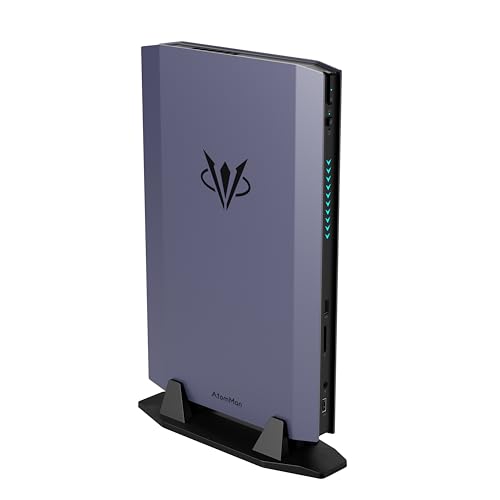
- Best first small PC for most beginners: MINISFORUM AtomMan G7 Ti, Core i9-14900HX, RTX 4070 Laptop GPU, 32GB, 1TB, ~2.55L — Check on Amazon
- ASUS ROG NUC (2025), Core Ultra 9 275HX, RTX 5070 Laptop GPU, 32GB, 1TB, ~3L — Check on Amazon
- Cooler Master NR2 Pro, Ryzen 7 9800X3D, desktop RTX 5070 Ti 16GB, 32GB, 2TB, 18.25L — Check on Amazon
- ASUS ROG G22CH, Core i7-13700KF, desktop RTX 4070 12GB, 32GB, 1TB, ~10.7L — Check on Amazon
- MINISFORUM AtomMan G7 Pro, Core i9-14900HX, RTX 5070 Laptop GPU, slim vertical mini chassis — Check on Amazon
- MINISFORUM AtomMan G7 Pt, Ryzen 9 7945HX, Radeon RX 7600M XT, 32GB, 1TB, ~2.7L — Check on Amazon
Read the full guide ↓
Disclosure: As an Amazon Associate, reviewstook.com earns from qualifying purchases. Links to Amazon on this page are affiliate links; they cost you nothing extra. Listing details such as price and availability change often, so check the current Amazon listing before you buy.
If this is your first gaming PC, welcome — and before anything else, three honest things about the search you just typed. First, $3,000 is a lot of money, and in this corner of the market much of it pays for smallness itself rather than speed. Second, there is a ceiling no listing will volunteer: a desktop RTX 5080 in a genuinely small case sits well above this budget — Zotac’s roughly 11.5-liter Magnus One Ultra is the example, positioned as a premium machine far beyond this tier. Even ASUS’s tiny ROG NUC only reaches an RTX 5080 Laptop GPU — a laptop part, more on that phrase below — in a version positioned above this budget as well. Meanwhile an ordinary full-size tower with a desktop RTX 5080 is a different proposition entirely, and not a small-form-factor machine. Third, and most usefully: the machine this guide ends up recommending to most beginners sits well under half the budget — check the current price on Amazon. The rest of your budget can stay in the bank, and this guide will keep telling you so.
What follows is written for someone who has never owned a gaming PC. Every technical word is explained in plain English before it is asked to carry any weight. The six machines are real and verified, sized between roughly 2.55 and 18.25 liters. Check the current price on Amazon for each pick: prices change often, and a walk-away rule applies wherever a machine is only good value inside the budget. Two of the six hold genuine desktop graphics cards; the other four run laptop graphics chips, always named in full here — RTX 5070 Laptop GPU, RTX 4070 Laptop GPU, Radeon RX 7600M XT — because the laptop and desktop parts share a number and almost nothing else. By the end you will know how to set your machine up, what else you will need, and which upgrades are real.
In this guide
Quick Picks
Short on time, or comparing several options at once? Each row below names a buyer type and the machine that suits it, with a link to the listing.
| Buyer type | Pick | Why it stands out | Link |
|---|---|---|---|
| Best for most beginners | MINISFORUM AtomMan G7 Ti, RTX 4070 Laptop GPU | The smallest box here, a full-power laptop GPU, well under half the budget | Check on Amazon |
| Best if you want a real desktop graphics card | Cooler Master NR2 Pro, desktop RTX 5070 Ti | A replaceable desktop 5070 Ti 16GB and standard parts throughout — only when its current price sits inside its deal band | Check on Amazon |
| Best under the TV | ASUS ROG G22CH, desktop RTX 4070 | A desktop 4070 12GB in a ~10.7L console-style case, with the power supply wattage actually published | Check on Amazon |
| Biggest brand, smallest footprint | ASUS ROG NUC (2025), RTX 5070 Laptop GPU | The strongest laptop GPU in a ~3L box — from ASUS’s own storefront, and only there | Check on Amazon |
| Newest laptop graphics | MINISFORUM AtomMan G7 Pro, RTX 5070 Laptop GPU | Current-generation laptop GPU in a slim upright mini — but read the barebone warning in its review first | Check on Amazon |
| Best if your PC also has a day job | MINISFORUM AtomMan G7 Pt, RX 7600M XT | A 16-core desktop-class CPU for work, a mobile GPU for games, positioned at the accessible end of this guide | Check on Amazon |
How These Picks Were Chosen
“Small form factor” is a claim about size, so size is where the checking started. Every pick carries a volume in liters taken from the maker’s published dimensions or the chassis specification: about 2.55 liters for the AtomMan G7 Ti, about 2.7 liters for the G7 Pt, roughly 3 liters for the ROG NUC, about 10.7 liters for the ROG G22CH, and 18.25 liters for the NR2 Pro’s NR200P Max chassis. One pick, the G7 Pro, gets no liter figure: no exact published volume could be pinned for it, so none is printed rather than invented. Anything whose smallness turned out to be an adjective instead of a measurement was left out.
Every name and specification below was verified against a real Amazon listing or the maker’s published data. Check the current price on Amazon before you buy, because this category swings widely between deal events. Where a machine only makes sense in budget at a particular moment, the review says so and tells you to walk away if the current price sits outside it. Where one Amazon page sells several versions of a machine — some complete, some missing memory, storage and an operating system — the review names that trap in plain language, because it is the easiest way for a first-time buyer here to lose money. Two honesty rules run through everything that follows. Laptop graphics are always named as laptop graphics, with their memory stated, because an RTX 5070 Laptop GPU carries 8GB where the desktop RTX 5070 carries 12GB. Each review also states how the same graphics class is positioned in a tower, so you can see what the smallness costs before you pay it. We did not use these machines ourselves; we read the listings, the maker specifications and independent review coverage, and where sources disagreed, the disagreement is flagged rather than quietly resolved.
The Words on the Listing, in Plain English
PC listings are written in a dialect designed to impress people who already know it. Here is every term this guide uses, translated — including three status words, renewed, barebone and soldered, applied honestly to this exact set of six machines.
- Liter (L). The volume of the case — how much space the box takes up. A liter is roughly a large carton of milk. These machines run from about 2.55 liters (a chunky hardback book) to 18.25 liters (a small microwave). Smaller is not automatically better; it decides which graphics can fit inside.
- Graphics card / GPU. The part that draws the game. It is the single biggest factor in how a gaming PC performs, and the part listings most often describe misleadingly — see the next term.
- Laptop GPU vs desktop GPU. A “5070” in a small box is usually the Laptop GPU: a smaller, lower-power chip with 8GB of memory, where the desktop card of the same name has 12GB and considerably more speed. Same badge, different hardware. This guide always writes the full name.
- VRAM. The graphics chip’s own memory, measured in GB. Games store textures there; when it runs out, settings must drop. Every laptop GPU in this guide has 8GB. The two desktop cards here have 12GB and 16GB.
- Soldered. Attached permanently at the factory — it can never be removed or upgraded. In this set: the ROG NUC’s graphics and memory are both soldered. The three MINISFORUM minis have their graphics fixed in place too, but their memory and storage sit in slots you can open. The NR2 Pro and G22CH hold desktop cards in slots.
- Barebone. A PC sold without memory, storage or Windows — a shell you must complete yourself. None of these six picks is recommended as a barebone, but the trap is live in this set: the G7 Pro’s Amazon listing is literally titled as the barebone version, and the G7 Ti and G7 Pt listings offer barebone versions (“styles”) alongside complete ones on the same page. Always check which style is in your cart.
- Renewed. Amazon’s word for refurbished — a used machine checked and resold. Plainly: none of the six picks in this guide is renewed. All six are sold new.
- SO-DIMM. The small memory sticks used in laptops and mini PCs. The three MINISFORUM machines take two of them, up to 96GB total — that is their upgrade path. Tower memory (DIMM) is a different, larger stick and does not fit.
- M.2 SSD / NVMe. The storage drive — a stick the size of a strip of gum where your games live. 1TB fills faster than beginners expect; a spare M.2 slot, which several picks have, is how you add room later.
- PSU (power supply). The part that feeds electricity to everything else, rated in watts (W). If a maker publishes a generous wattage, a future graphics upgrade is plausible; if the wattage is secret, assume it is not. Only two picks here publish theirs in a way that matters — the NR2 Pro’s 850W unit and the G22CH’s 600W Gold unit.
- Refresh rate (Hz). How many times per second your monitor redraws the picture. A 144Hz monitor can show a much smoother game than a 60Hz one — but Windows often leaves a new monitor at 60Hz until you change it yourself; the walkthrough below includes the fix.
- Integrated graphics / F-suffix. Some processors include a basic built-in graphics chip as a backup. Intel processors whose names end in F have had that backup removed. In this set exactly one pick has such a chip — the G22CH’s Core i7-13700KF — which is why its setup warning below is stricter than the others’.
- Check price / walk-away point. Prices change often, so the live Amazon listing is the only place to confirm what a machine costs today. If the current price pushes a pick outside this budget or out of line with the alternatives, walk away — several picks are only good purchases in a favourable range, as noted in each review.
The 6 Best Small Form Factor Gaming PCs Under $3,000 for Beginners
MINISFORUM AtomMan G7 Ti — Core i9-14900HX, RTX 4070 Laptop GPU (140W), 32GB, 1TB, ~2.55L
Who it suits: Most people reading this guide — the first-time buyer who wants the small-PC experience complete in one box, at under half the budget.
Start with the graphics, named in full: an RTX 4070 Laptop GPU with 8GB of memory. A desktop RTX 4070 carries 12GB, so this is not that card — but Minisforum runs the laptop part at its full 140W power limit, the fastest version of it that exists, rather than the detuned version many thin machines ship. Beside it sits a Core i9-14900HX, a 24-core processor borrowed from flagship gaming laptops, plus 32GB of memory in two SO-DIMM slots you can later raise to 96GB, a 1TB SSD, and a second, empty M.2 slot for later. WiFi 7 is built in. All of it occupies about 2.55 liters. Check the current price on Amazon for the complete 32GB/1TB version.
For a beginner, the shape of the purchase recommends it: nothing to assemble, nothing to choose inside the box, and the two upgrades you might ever want — memory and storage — are the two easiest jobs in PC ownership. What you give up is equally clear: the graphics can never be upgraded, and their 8GB of memory is a ceiling future games will eventually press against, first at 1440p. At 1080p today, and at 1440p with upscaling, this machine plays modern games properly. One warning for this exact listing: the same Amazon page also sells barebone versions of this machine, which arrive with no memory, no storage and no Windows. The version to buy is the style named “G7 Ti(32+1T)” — check those words are attached to your order before you pay.
- The full-power 140W version of the RTX 4070 Laptop GPU — the strongest form of that chip.
- About 2.55 liters, with memory slotted to 96GB and a spare M.2 slot for later.
- Complete version sits well under half of a $3,000 budget.
Honest limitation: The 8GB laptop graphics are fixed for the machine’s life, and the barebone version sits on the same listing page one careless click away from the complete one.
Choose it if you want a tiny, finished, fast first PC and would rather keep a large part of the budget unspent than spend it. Skip it if you already know your games strain 8GB of graphics memory at the resolution you play, or if a replaceable graphics card is the whole point — the next pick exists for you.

Cooler Master NR2 Pro — Ryzen 7 9800X3D, Desktop RTX 5070 Ti 16GB, 32GB, 2TB, 18.25L
Who it suits: The beginner who is really a future enthusiast — someone buying their first PC but already sure they want real desktop parts they can upgrade for years.
Nothing inside this machine is a laptop part. It is built in Cooler Master’s NR200P Max case — 18.25 liters, the biggest box in this guide and still a fraction of a tower’s size — from the same standard components a person building their own PC would buy: a Ryzen 7 9800X3D processor (the gaming CPU everything else is measured against), a Gigabyte RTX 5070 Ti graphics card that is the genuine desktop article with 16GB of memory, sitting in a normal slot, removable years from now. Around them: 32GB of DDR5-6000 memory, a roomy 2TB SSD, a mini-ITX motherboard, an 850W SFX Gold power supply whose wattage is published, a custom 280mm liquid cooler for the processor, and Windows 11 already installed. For a first-time buyer the appeal is that every part is ordinary: any repair shop understands it, and the card can be replaced when games outgrow it — something no other pick here can honestly offer.
The caution is about how its pricing behaves, not the machine. Its current price can move a lot between deal events, and at times it can sit above this guide’s budget entirely. So the rule is strict: it is a recommendation only when the current price on Amazon sits comfortably inside its deal band and inside the $3,000 budget. In that favourable range it is remarkable value — desktop 5070 Ti towers are generally positioned in a similar range, so at its best this small build can cost no more than the tower equivalent. Two honesty notes from roundup coverage: its fan noise is described as reasonable rather than silent, and early owners reported a dead front USB-C port on one unit and a graphics riser cable that needed reseating after shipping on another. Both are quick checks on your first evening, while returns are still painless — the walkthrough below builds them in.
- A real, replaceable desktop RTX 5070 Ti 16GB and the benchmark gaming CPU — no laptop compromises.
- Standard parts throughout, a published 850W power supply, and 2TB of storage from day one.
- When its current price is in its favourable range, it can match or undercut equivalent towers — the smallness can cost nothing.
Honest limitation: Its price can swing widely, and at the top of its range it is not a $3,000-guide machine at all. It is also, at 18.25 liters, small only by desktop standards.
Choose it if you can wait for the deal band and want the one machine here that grows with you. Skip it if the current price on Amazon is near its peak, or if the point of your search is a box that disappears — this one sits on the desk and is seen.
ASUS ROG G22CH — Core i7-13700KF, Desktop RTX 4070 12GB, 32GB, 1TB, ~10.7L
Who it suits: The beginner whose PC will live in the living room, under or beside the TV, and needs to look like it belongs there.
The G22CH is shaped like a games console and sized at about 10.7 liters, to stand upright or lie flat in media furniture. Inside, the key fact is that its graphics are a desktop RTX 4070 with the full 12GB of memory — the real card, not the 8GB laptop part in the machines above and below it. The rest of the specification is complete and, unusually, fully disclosed: a Core i7-13700KF processor, 32GB of memory, a 1TB SSD, and a 600W Gold-rated power supply with its wattage published by ASUS. Check the current price on Amazon — it becomes the interesting buy when its current price sits in its lower, deal-level range. For scale, a tower carrying the slightly faster RTX 4070 SUPER card is generally positioned lower, so in its favourable range you are paying a premium for a marginally slower card in a box a third of a tower’s size. When its current price sits at the higher end of its range, that premium grows and the case for it weakens accordingly.
Two beginner-specific notes. The processor’s name ends in KF, and the F matters: this chip has no built-in backup graphics at all, so the monitor cable rule in the walkthrough — plug into the graphics card’s sockets, never the motherboard’s — is not a performance tip on this machine, it is the difference between a picture and no picture. Second, treat the graphics as effectively fixed when you buy: the card is a real desktop card in a slot and the power supply is honestly rated, but the case is ASUS’s own fixed console-style shell rather than a standard case, and its interior only admits cards that physically fit its clearance. Buy it for what it is on day one, and it is a very good first PC. The 1TB of storage will feel small within a year or two; a second drive later is the fix, not a reason to reject it now.
- A desktop RTX 4070 12GB — full memory, real card — in a ~10.7L console-style case.
- Published 600W Gold power supply and a complete specification from a major brand.
- In its deal-level range, the size premium over a faster tower stays modest.
Honest limitation: Previous-generation processor and graphics, a fixed shell that restricts any future card swap by physical clearance, and a higher-end price position at which the premium stops looking reasonable.
Choose it if the PC lives in the living room and its current price is in its favourable range. Skip it if its current price sits at the top of its range, or your plan assumes swapping in any graphics card you like later.

ASUS ROG NUC (2025) — Core Ultra 9 275HX, RTX 5070 Laptop GPU, 32GB, 1TB, ~3L
Who it suits: The beginner who wants the strongest small machine a major brand sells, in a box the size of a hardback book, and is comfortable paying flagship money for it.
Inside roughly three liters — about 11.1 × 7.4 × 2.2 inches — ASUS packs a Core Ultra 9 275HX processor, 32GB of memory and an RTX 5070 Laptop GPU. Full name, full honesty: that is a mobile graphics chip with 8GB of GDDR7 memory, where the desktop RTX 5070 carries 12GB. It is a strong 1080p chip and a capable 1440p-with-upscaling one; it is not the desktop card its number invites you to imagine, and at this price the difference is the review. The rest of the package is flagship-grade: dual Thunderbolt 4 ports, six USB-A ports, two HDMI outputs plus DisplayPort, wired Ethernet, and triple-fan cooling. This 32GB/1TB configuration (model RNUC15JNK9X489AU) is positioned near the top of this budget — check the current price on Amazon, ideally from ASUS’s own Amazon storefront.
Two conditions attach to this pick, and both are strict. The first is price discipline: third-party sellers on this same listing have been recorded asking well above ASUS’s own positioning for this configuration, so buy from ASUS’s storefront when its current price sits inside the budget, or not at all — never pay a large markup for a famous badge. The second is about what cannot change: in this machine both the graphics and the memory are soldered, so the specification you buy is the specification you retire. Add two practical notes. Owner reports on this model are divided, with dead-on-arrival and early-failure reports alongside the praise — buy from a seller whose returns you trust and stress-test hard in the first two weeks, as the walkthrough describes. And the box is fed by a 330W external power adapter; the brick is part of the real footprint and needs air around it, not a sealed drawer.
- The strongest laptop GPU in this guide, in a ~3-liter box from a major brand’s support network.
- Connectivity most towers would envy: dual Thunderbolt 4, six USB-A, three display outputs, Ethernet.
- It sits close in positioning to tower options carrying a desktop RTX 5080 — know what the money is choosing.
Honest limitation: Soldered graphics and memory with no upgrade path of any kind, a laptop GPU with 8GB against the desktop card’s 12GB, and a listing where third-party asks well above the ASUS storefront position have been recorded.
Choose it if the desk space is worth flagship money and the ASUS storefront price sits inside the budget. Skip it if the offer in front of you is a marked-up third-party one, or if you might ever want to upgrade anything inside your first PC.

MINISFORUM AtomMan G7 Pro — Core i9-14900HX, RTX 5070 Laptop GPU, Slim Vertical Mini Chassis
Who it suits: The beginner who wants the newest laptop graphics generation in a slim upright mini, and who is willing to do one careful piece of checking before ordering.
The G7 Pro pairs the same 24-core Core i9-14900HX processor as the G7 Ti — boost clocks up to 5.8GHz — with the newer RTX 5070 Laptop GPU: again a mobile chip with 8GB of graphics memory, a step below the desktop RTX 5070’s 12GB and a different class from the desktop 5070 Ti in the NR2 Pro. The tall, slim, book-format chassis — a few liters, with no exact published volume pinned, so none is claimed — is cooled by six heat pipes and dual fans. Unlike the ROG NUC, its memory and storage are socketed — two SO-DIMM slots up to 96GB and two M.2 slots — alongside HDMI 2.1, USB4 and WiFi 7. The complete 32GB/1TB machine is positioned in the middle of this budget — check the current price on Amazon.
Now the paragraph that matters most in this review. The Amazon listing for this exact product is titled as the barebone version — its title literally says “Barebone Version Without Storage/OS” — while some marketplace mirrors of the same page describe a complete unit. A barebone arrives with no memory, no storage drive and no Windows, and completing one is not the saving it looks: during the late-2026 component price spike, a single 32GB DDR5 SO-DIMM memory kit was itself a substantial purchase on Amazon, before a storage drive and a Windows license join the bill. So the rule is procedural: before you order, confirm on the live listing that the style selected is the complete 32GB/1TB machine. If only the barebone is available, work out the completion cost in full before deciding — at elevated memory prices the complete machine is usually the better buy. If you already own suitable memory and storage, the barebone becomes rational instead. Over the G7 Ti, the premium buys the newest graphics generation — not more graphics memory, which is 8GB here too.
- Current-generation RTX 5070 Laptop GPU with a 24-core flagship mobile processor.
- Socketed memory to 96GB and dual M.2 slots — real longevity the soldered NUC lacks.
- Slim vertical chassis with USB4, HDMI 2.1 and WiFi 7.
Honest limitation: The Amazon listing is titled as the barebone version while mirrors describe complete units — the style trap is live on this exact page, and completing a barebone at spike memory prices can erase its apparent saving entirely.
Choose it if you have confirmed the complete style on the live listing, or you already own the parts to finish a barebone. Skip it if you cannot tell which version is in your cart — at this money, that uncertainty alone is a reason to walk away.

MINISFORUM AtomMan G7 Pt — Ryzen 9 7945HX, Radeon RX 7600M XT, 32GB, 1TB, ~2.7L
Who it suits: The beginner whose computer works for a living — editing, rendering, compiling, running several heavy programs at once — and games in the evenings.
This machine inverts the usual compromise, so read its two halves separately. The graphics are the modest half: a Radeon RX 7600M XT, named as what it is — AMD’s mobile graphics chip with 8GB of memory, running at up to 120W, where the desktop RX 7600 XT carries 16GB. It is competent for 1080p gaming and honest 1440p-with-upscaling play, and not a frame more. The processor is the extravagant half: a Ryzen 9 7945HX, a genuine 16-core, 32-thread desktop-class chip of the kind that anchors workstations, running at up to 5.4GHz. Around them sit 32GB of memory in two SO-DIMM slots (up to 96GB later), one PCIe 5.0 and one PCIe 4.0 M.2 storage slot, and a chassis of about 2.7 liters — roughly 269 × 155 × 64mm. It was the first AMD Advantage-certified mini PC. Check the current price on Amazon for the complete 32GB/1TB version — it is positioned at the lowest end of this guide by a wide margin.
Whether that is a bargain depends on your workload split — decide it honestly. Judged on gaming alone, a tower with a desktop RTX 4060 — faster gaming graphics — is generally positioned lower, so the G7 Pt carries a premium for its size and its processor. Judged as a work machine that also games, nothing in that lower tower tier carries a 16-core flagship processor, and the comparison flips. The usual listing discipline applies: this page’s family also includes a barebone style, also offered on the maker’s own store, so confirm the complete style before paying; check the current price on Amazon and compare it with the maker’s direct-store positioning rather than assuming either is lower.
- A true 16-core desktop-class processor — unmatched work muscle at this size.
- Socketed memory to 96GB, dual M.2 slots including a fast PCIe 5.0 one.
- Positioned at the gentlest entry point in the guide.
Honest limitation: The RX 7600M XT is a mobile 8GB chip — the weakest gaming graphics here — and the listing family mixes barebone and complete styles that must be confirmed before ordering.
Choose it if your workload is processor-first and gaming is the second job. Skip it if gaming is the first job — the G7 Ti is the same idea with the emphasis where you want it.

Comparison Table
| Product | Volume | Graphics (named in full) | Pricing | Link |
|---|---|---|---|---|
| MINISFORUM AtomMan G7 Ti | ~2.55L | RTX 4070 Laptop GPU, 8GB, full 140W | Check price on Amazon | Check on Amazon |
| Cooler Master NR2 Pro | 18.25L | Desktop RTX 5070 Ti, 16GB, replaceable | Check the current price on Amazon — only inside the budget | Check on Amazon |
| ASUS ROG G22CH | ~10.7L | Desktop RTX 4070, 12GB | Check price on Amazon | Check on Amazon |
| ASUS ROG NUC (2025) | ~3L | RTX 5070 Laptop GPU, 8GB, soldered | Check price on Amazon — ASUS storefront | Check on Amazon |
| MINISFORUM AtomMan G7 Pro | Slim vertical, a few liters | RTX 5070 Laptop GPU, 8GB | Check price on Amazon — confirm style | Check on Amazon |
| MINISFORUM AtomMan G7 Pt | ~2.7L | Radeon RX 7600M XT (mobile), 8GB | Check price on Amazon | Check on Amazon |
How to Choose a Small Form Factor Gaming PC Under $3,000
- Start from the ceiling, not the listings. No small machine under $3,000 carries a desktop RTX 5080 — the verified small example sits well above this budget. If flagship desktop graphics are the requirement, the honest answer is a tower, and a different guide.
- Read every graphics name to the very end. “RTX 5070” in a small box almost always means the Laptop GPU with 8GB; the desktop card has 12GB, and the desktop 5070 Ti has 16GB. The words after the number make a real difference to performance.
- Choose your liters from your furniture. Measure the shelf or desk corner first. Under about 3 liters means laptop graphics; about 10.7 liters admits a desktop 4070; 18.25 liters admits a desktop 5070 Ti and real upgrades. Volume is a graphics decision.
- Confirm complete versus barebone before anything else. On the MINISFORUM listing pages the barebone style sits beside the complete one, and its lower price excludes memory, storage and Windows. At elevated memory prices, completing one can cost more than the complete machine.
- Buy inside the deal band or do not buy. The NR2 Pro’s price can swing from inside this budget to above it; the ROG NUC’s page has hosted asks well above its ASUS storefront position. Check the current price on Amazon for each pick, and walk away if it sits outside the budget. A missed deal is just a missed deal.
- Decide how much “never upgrade” you can accept. If the thought of fixed graphics bothers you, only the NR2 Pro (fully) and the G22CH (within its shell’s clearance) hold desktop cards. Everywhere else, memory and storage slots are the only future you are buying — check they exist.
- Count the power brick in the footprint. The smallest boxes are fed by external adapters, and the brick needs air and a home. Small is a property of the whole setup, not just the case.
- Ask what the unspent money is for. Choosing the G7 Ti leaves a large share of this budget unspent — a good monitor, a second machine, or savings. If a pricier pick cannot say what that money buys, it is buying nothing.
Your First Evening: Setup, Step by Step
Every pick arrives as a finished computer — no building is required. Budget about an hour, most of it waiting for updates.
- Choose the spot before you unbox. Put the machine where air can move around it — on the desk, beside the monitor, or on an open shelf — with a few inches clear at the vents. Never seal a gaming PC inside a closed cabinet; small boxes move real heat and need to breathe.
- Connect the power. The NR2 Pro and the G22CH have their power supplies built in: one cable from the back of the box to the wall. The four mini PCs are fed by an external power brick — the ROG NUC’s is a large 330W unit — so give the brick its own ventilated spot, not a drawer. Find the power button, but do not press it yet.
- Plug the monitor into the graphics card — not the motherboard. On the NR2 Pro and the G22CH, the back of the machine has two clusters of sockets: a vertical cluster belonging to the motherboard, and the graphics card’s own sockets, usually in a horizontal row lower down. Your monitor cable belongs in the card’s sockets. This matters most on the G22CH: its Core i7-13700KF processor has no built-in backup graphics at all — the F at the end of its name means exactly that — so a cable in the motherboard cluster gives you a black screen, full stop. On the four mini PCs there is no separate card to find: every display socket on the box is the right one.
- Add keyboard, mouse and wired internet. Plug in a keyboard and mouse (or their wireless receivers). Then connect an Ethernet cable if the machine can reach your router: the downloads ahead are tens of gigabytes, and wired internet is faster and does not drop. WiFi — built into every pick — is fine afterwards.
- Turn it on and let Windows finish. Follow the on-screen setup, then open Settings → Windows Update and run it, restart, and run it again until it reports you are up to date; a new machine is usually several updates behind. Then install the current graphics driver: the NVIDIA app for the five GeForce machines, AMD’s driver software for the G7 Pt. An out-of-date driver is a common cause of a new PC feeling slower than it should.
- Set your monitor’s real refresh rate. If you bought a gaming monitor, Windows may be running it at a basic 60Hz no matter what the box promised. Go to Settings → System → Display → Advanced display and select the highest refresh rate listed. Skipping this step quietly throws away smoothness you paid for.
- Verify that what arrived is what you ordered. Open Settings → System → About and Task Manager’s Performance tab, and check the processor name, the 32GB of memory and the storage size against your order. This step is not paranoia in this category: on the MINISFORUM listings, confirm the style is the complete one — the G7 Ti’s is named “G7 Ti(32+1T)” — and on the G7 Pro, whose listing is titled as a barebone, confirm the machine actually starts into Windows with memory and storage present. Check the model numbers too: RNUC15JNK9X489AU on the ROG NUC, AYG-M297-N6CGAI32-N1 on the NR2 Pro, G22CH DB779 on the ASUS. On the NR2 Pro, also plug something into the front USB-C port — one early unit’s was dead from the factory. Then play the most demanding game you own for a solid hour: dense small machines that are going to fail usually fail early, so do it now, inside the return window.
- Install a game store and your first game. Download Steam (or the Epic Games Store, or the Xbox app), sign in, and install a game you know well. You are done: everything after this is ordinary use.
What Else You Will Spend
The machine itself is not the whole cost of starting from nothing. Plan for these, in this order; each extra is separate from the machine.
- A monitor, first. No pick here includes a screen. A monitor is the first purchase after the PC itself, and the one that decides how good everything looks; the refresh-rate step in the walkthrough assumes you bought one that offers more than 60Hz. Do not spend the entire $3,000 on the box and leave nothing for the thing you will actually look at.
- Keyboard and mouse, if you do not own any. Any USB or wireless set works; gaming-specific models can come later, or never.
- An Ethernet cable, if your desk is near the router. A trivial purchase that makes setup night and every large game download noticeably calmer.
- More storage, eventually — G22CH owners first. Its 1TB drive fills quickly with modern installs; the fix is the machine plus one more drive, bought then — not a new PC. The minis’ spare M.2 slots make the same job easier.
- Only if you choose the G7 Pro barebone route: the completion. A barebone’s headline positioning excludes memory, storage and Windows. During the late-2026 price spike a 32GB DDR5 SO-DIMM kit alone was a substantial added cost, before a drive and an operating system. That total is machine plus completion parts — compare it, in full, against the complete machine before deciding the barebone is cheaper.
Upgrades, in Plain Terms
Beginners are often sold a first PC on future upgrades, so here is the honest version, machine by machine. A graphics-card swap is promised for exactly one pick: the NR2 Pro. Its power supply is a published 850W SFX Gold unit with headroom to spare, and its case — the NR200P Max — is a standard mini-ITX case built from ordinary parts, with the desktop RTX 5070 Ti sitting in a normal slot. When games outgrow that card, a faster one that fits the case and the power budget can replace it, the way desktop upgrades are supposed to work.
Everywhere else, graphics are fixed, and you should buy on that basis. The G22CH publishes its 600W Gold power supply, but its case is ASUS’s own fixed console-style shell rather than a standard case — so no swap is promised here; the card sits in a slot, yet the shell admits only cards within its physical clearance — assume the desktop 4070 it ships with is the card it retires with. The ROG NUC is the extreme case: graphics and memory are both soldered, so nothing inside it can ever be upgraded. The three MINISFORUM machines fix their graphics in place too — laptop and mobile chips are part of the board — but they offer the two upgrades that matter most in a small machine’s middle age: memory, slotted up to 96GB, and storage, with spare or second M.2 slots. If the idea of never changing the graphics bothers you, that feeling is information: it points you at the NR2 Pro, or at a tower.
Common Buying Mistakes
- Reading “RTX 5070” on a mini PC and pricing it as the desktop card. The laptop GPU has 8GB of memory against 12GB and a lower ceiling in every game; the badge is shared, the silicon is not.
- Ordering a barebone style by mistake on a shared listing page, then discovering that memory, a drive and Windows at spike prices cost more than the complete machine did.
- Paying a third-party markup on a brand’s own listing — the ROG NUC’s page has hosted asks well above the ASUS storefront position for the same machine. Check who is selling before you look at what it costs.
- Buying the NR2 Pro at the wrong moment. Its price can move from inside this budget to well above it — at the top of that range it is not a sub-$3,000 recommendation at all, whatever the listing page implies.
- Plugging the monitor into the motherboard’s sockets. On the G22CH, whose processor has no backup graphics, that is a black screen; on any desktop-card machine it bypasses the hardware you paid for.
- Leaving a new gaming monitor at 60Hz because Windows defaults to it. Thirty seconds in Settings fixes it.
- Assuming small means silent. Dense cooling works harder per unit of heat; plan placement — and expectations — accordingly.
- Spending the whole $3,000 because it is there. The machine this guide recommends to most beginners sits well under half the budget, and the unspent difference is not a failure of ambition.
- Skipping the first-evening checks. Verifying the delivered configuration and stress-testing inside the return window is how a wrong style or a dead port costs you an email instead of a fortune.
Final Recommendation
- Most beginners: MINISFORUM AtomMan G7 Ti — the complete small-PC experience well under half the budget, with the rest of the budget left for a monitor and games.
- If upgrades matter: Cooler Master NR2 Pro, bought inside its deal band and never at peak — the one graphics swap this guide promises.
- Living room: ASUS ROG G22CH when its current price is in its deal-level range — check price on Amazon.
- Smallest desk, biggest badge: ASUS ROG NUC (2025) — only when the ASUS storefront price sits inside the budget, and only from ASUS’s own storefront.
- Newest laptop graphics: MINISFORUM AtomMan G7 Pro, with the complete style confirmed before payment.
- Work first, games second: MINISFORUM AtomMan G7 Pt — sixteen cores that also play.
Our top two are the MINISFORUM AtomMan G7 Ti, because it delivers the great majority of what this search is actually for — a tiny, complete, fast gaming PC — at under half the budget, and the Cooler Master NR2 Pro, because it is the one machine here whose graphics you can replace years from now, provided it is bought when its current price sits in its favourable range. Between them they frame the honest beginner’s choice: pay for smallness with laptop graphics, or accept a bigger box for desktop graphics and a future. If your needs turn out simpler than this tier, start with Best Small Form Factor Gaming PC Under $1500 — and if you conclude, reasonably, that a tower was the answer all along, see Best Gaming PC Under $3000. Read every graphics name to the end, confirm complete versus barebone, and check the current price on Amazon before you order.
Frequently Asked Questions
Can you get a desktop RTX 5080 in a small form factor PC under $3,000?
No — and for a first-time buyer this is the most important answer in the guide. The only verified small machine with a desktop 5080, Zotac’s Magnus One Ultra (~11.5 liters), sits well above this budget. Under $3,000, the best graphics in a small case are the NR2 Pro’s desktop RTX 5070 Ti; below that, everything is a laptop GPU. If you want desktop-5080 speed at this money, it comes in a tower, or not at all.
Is an RTX 5070 Laptop GPU the same as a desktop RTX 5070?
No. They share a name and a generation, not a specification: the laptop part carries 8GB of memory against the desktop card’s 12GB, runs within a laptop power envelope, and is fixed into machines like the ROG NUC and G7 Pro with no upgrade path. That shared name is precisely why this guide writes the full name every single time.
I have never owned a PC. Which pick should I actually buy?
For most beginners, the G7 Ti. It is complete in one box, the smallest machine here, fast enough for 1080p at high refresh and 1440p with upscaling, and positioned well under half the budget, it leaves room for the monitor you will also need. Pick the NR2 Pro instead only if you know you want a replaceable desktop graphics card — and only when its current price is in its favourable range.
What is a barebone, and how do I avoid buying one by accident?
A barebone is a PC sold without memory, storage or Windows — you supply and install those yourself. Avoid the accident by checking the style selected on the listing page before paying: the G7 Pro’s Amazon listing is titled as the barebone version, and the G7 Ti and G7 Pt pages offer barebone styles beside the complete ones. Then verify on arrival, as step 7 of the walkthrough describes.
My new PC shows a black screen. What did I do wrong?
The most likely cause is the monitor cable: on a machine with a separate graphics card, the cable must go into the card’s sockets, not the motherboard’s cluster. On the G22CH this guarantees a black screen, because its Core i7-13700KF has no built-in backup graphics at all. Move the cable to the card’s row of sockets and restart. On the four mini PCs every display socket is correct, so check the cable, the monitor’s input selection and the power brick, in that order.
Can I upgrade the graphics card later?
On one pick, yes — promised plainly: the NR2 Pro, whose published 850W power supply and standard mini-ITX case hold a normal, replaceable desktop card. On the G22CH the card is a desktop card but the fixed shell restricts any swap by physical clearance, so treat its graphics as fixed. On the ROG NUC and the three MINISFORUM minis the graphics are part of the machine for life; their upgrades are memory and storage, which are genuinely useful but different.
Why does a $3,000 guide recommend a machine well under the budget?
Because the G7 Ti delivers most of what the extra money buys elsewhere in this category: the same class of tiny footprint, a full-power laptop flagship GPU, a 24-core processor and slotted memory. The pricier picks add graphics class, brand support or desktop silicon — real gains, described per pick above — but they refine the same proposition rather than replacing it. A beginner’s guide that cannot say “spend less” is a catalog, not a guide.
- Best Small Form Factor Gaming PC Under $3000
- Best Small Form Factor Gaming PC Under $2500
- Best Small Form Factor Gaming PC For 1440p Gaming Under $3000
- Best Small Form Factor Gaming PC For Small Spaces Under $3000
- Best Small Form Factor Gaming PC For Streaming Under $3000
- Best Compact Gaming PC Under $3000
- Best Mini Gaming PC Under $3000


