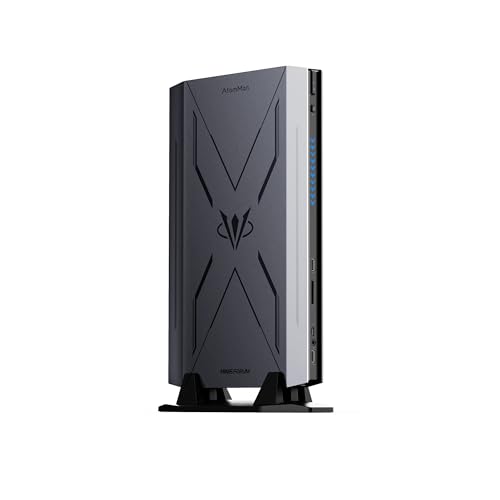
Where to buy
Check the latest price, availability and delivery on Amazon. Orders are placed on Amazon. We may earn a commission from qualifying purchases. Every kit below is a barebone: what you buy is the chassis, board, processor and — where fitted — the graphics chip, but no RAM, no SSD and no operating system unless a review says otherwise, so judge every pick in this guide as a finished machine, never the box alone — check price on Amazon for the current listing.
- Best overall streaming kit: AtomMan G7 Pro Barebone, Core i9-14900HX, RTX 5070 Laptop GPU — Check on Amazon
- AtomMan G7 Ti, Core i9-14900HX, RTX 4070 Laptop GPU (140W) — Check on Amazon
- Intel NUC 13 Extreme Kit NUC13RNGi9, Core i9-13900K, PCIe x16 slot — Check on Amazon
- AtomMan G7 Pt, Ryzen 9 7945HX, Radeon RX 7600M XT — Check on Amazon
See 2 more Amazon options
- MINISFORUM MS-A2 Barebone, Ryzen 9 9955HX, dual 10G SFP+ — Check on Amazon
- MINISFORUM MS-01 Barebone, Core i9-13900H, dual 10G SFP+ — Check on Amazon
Read the full guide ↓
Disclosure: As an Amazon Associate, reviewstook.com earns from qualifying purchases. Links to Amazon on this page are affiliate links; they cost you nothing extra. Listing details such as price and availability change often, so check the current Amazon listing before you buy.
A streaming PC is judged by a component most buying guides treat as a footnote: the encoder, the slice of silicon that turns your gameplay into a broadcast without stealing frames from the game itself. That is the lens this guide uses — and it has to share the page with a second, equally unfashionable truth about barebones kits. No verified barebones mini PC kit on Amazon costs anywhere near $3,000. The most expensive kit we could verify, Intel’s NUC 13 Extreme, sits at the top of the verified barebone range; the flagship gaming kits from Minisforum’s AtomMan line sit below it as barebones — check price on Amazon for each kit’s current listing. Between the top of that verified range and the $3,000 budget there is no honest product to recommend — only marketplace markups on lower-tier kits and configured machines wearing a barebone keyword. A listing priced far above a kit’s usual tier position is not a halo model. It is a reseller testing your patience.
The second truth compounds the first: a barebone is an entry fee, not a computer. Every kit below ships with empty memory slots, an empty drive bay and no operating system, and the missing memory is currently expensive and volatile — check the current price on Amazon for memory as carefully as for the kit itself. Judge each pick by the total cost to complete with memory, storage and an OS added, not by the kit alone. Completed, these builds sit comfortably inside the budget — the NUC is the exception, only because its graphics card is a second purchase you choose yourself. Read the $3,000 in the title as a surplus to allocate: the right kit, finished properly, with room left for the microphone, lighting and recording storage a barebone box never includes.
What the encoder lens does to the ranking is bracing. Two kits carry modern NVIDIA NVENC encoders and can genuinely play and broadcast from the same box. One carries AMD’s current VCN encoder — capable, with AV1, but softer than NVENC at the bitrate Twitch actually gives most streamers. One is an empty PCIe slot whose encoder is whatever card you fit into it. And two are workstation kits whose integrated graphics were never meant to game: one can still earn a streaming role through its Quick Sync encoder, and the other, honestly, cannot stream games until a card goes into its slot. The realistic workflow this guide grades against is specific: one machine playing and streaming at a 1080p output where the hardware honestly allows it, talk and desktop content, and console play fed through a capture card — at Twitch’s roughly 6,000 kbps CBR ceiling for most channels, with YouTube’s higher bitrates and AV1 live streaming available to the kits whose encoders support it.
In this guide
Quick Picks
Short on time? Each row names a streamer type and the kit that suits it. Check price on Amazon, judge every pick as a completed machine rather than a bare box, and let the encoder column — the one that decides how your stream looks — lead the choice.
| Streamer type | Pick | Encoder | Price | Link |
|---|---|---|---|---|
| Best one-box game streamer | AtomMan G7 Pro Barebone (i9-14900HX, RTX 5070 Laptop) | NVENC with AV1 | Check price on Amazon | Check on Amazon |
| Best proven streaming kit | AtomMan G7 Ti (i9-14900HX, RTX 4070 Laptop 140W) | NVENC with AV1 | Check price on Amazon | Check on Amazon |
| Best build-your-own encoder | Intel NUC 13 Extreme Kit NUC13RNGi9 (i9-13900K) | The card you fit | Check price on Amazon | Check on Amazon |
| Best value streaming kit | AtomMan G7 Pt (Ryzen 9 7945HX, RX 7600M XT) | AMD VCN with AV1 | Check price on Amazon | Check on Amazon |
| Best second-PC / capture node | MINISFORUM MS-01 Barebone (Core i9-13900H) | Quick Sync | Check price on Amazon | Check on Amazon |
| Best workstation that streams later | MINISFORUM MS-A2 Barebone (Ryzen 9 9955HX) | Slot card you fit | Check price on Amazon | Check on Amazon |
How These Picks Were Chosen
The first filter is definitional. A pick only counts if the kit genuinely ships without some combination of RAM, storage and operating system for you to supply. Complete mini PCs that surface under barebone searches were excluded, however strong their streaming specs; they live in guides such as Best Mini PC Under $3000 and Best Streaming PC Under $3000. Where one Amazon listing sells both barebone and configured styles of the same machine, the review names the trap and tells you which style to select, because clicking the wrong tile is the most common ordering mistake in this category.
The second filter is verification. Every ASIN here was confirmed against a real Amazon listing — its title and specification table — and prices are never printed as promises in this guide: check price on Amazon for the current figure on the day you buy. One famous kit failed this filter and is named rather than linked: Zotac’s Magnus One barebone could not be pinned to a verifiable Amazon US listing in this research, so it appears as an also-consider in the base guide for this budget rather than as a pick here.
The third filter is total-cost honesty, applied exactly as in the base guide. Each review completes the build on paper: the kit, plus a 32GB DDR5 SO-DIMM kit, plus a 1–2TB NVMe SSD and an operating system — check the current price on Amazon for each part, because memory moves quickly. Where that comparison makes the configured version of the same machine the smarter buy, the review says so and tells you to buy configured. That verdict lands on one pick below with unusual force.
The fourth filter belongs to this angle alone: the encoder audit. Each pick’s streaming grade comes only from the hardware its base research documents — the GPU or integrated graphics named in the listing and maker specifications. Where a kit has no discrete GPU, no encoder is invented for it: the integrated encoder is graded for what it is, and the slot kits are graded as encoder-depends-on-the-card-you-fit. Streaming claims in this guide are therefore conservative by construction, and deliberately so.
The Encoder Is the Streaming Spec
Every other component in a streaming PC is negotiable. A stronger CPU helps; more RAM helps; a faster SSD helps recordings. The encoder is different: it is the one piece of hardware your viewers actually see. Software encoding on the CPU (x264) spends the same processor your game, your browser and your chat overlay are fighting over. A hardware encoder is a separate block of silicon that does the conversion alone, which is why a modest GPU with a modern encoder produces a cleaner stream than a flagship CPU sweating through x264. Grade the encoder first, and the rest of a streaming guide is just budgeting.
NVENC — the G7 Pro and G7 Ti. NVIDIA’s encoder is the streamer default for a reason: at Twitch’s roughly 6,000 kbps, its H.264 output is the sharpest of the three families here, and both AtomMan gaming kits pair it with AV1 encode for YouTube live streaming and high-quality local recordings. The G7 Pro’s RTX 5070 Laptop GPU carries a single NVENC block of the current Blackwell generation — one block, shared between your broadcast and any simultaneous recording, which is ample for a single-stream setup and worth knowing if you planned to record a separate high-bitrate copy at the same time. The G7 Ti’s RTX 4070 Laptop GPU, running at its full 140W, carries the previous Ada-generation NVENC, also with AV1 encode; in practice, at streaming bitrates, the two are far closer than their gaming gap suggests. On either kit, the honest summary is the same: play the game on the GPU’s rendering cores, broadcast from its encoder block, and the two jobs barely touch each other.
AMD VCN — the G7 Pt. The RX 7600M XT’s encoder is RDNA 3-generation VCN, and it does include AV1 encode — a genuine asset for YouTube, which accepts AV1 live streams and higher bitrates than Twitch offers most channels. The honest debit is H.264 at Twitch bitrates: AMD’s encoder output at around 6,000 kbps is visibly softer than NVENC’s on fast-moving, high-detail scenes. It is a good encoder on the friendlier platform and a merely adequate one on the stricter platform, and the review below grades it exactly that way rather than pretending the badge settles the question.
Quick Sync — the MS-01, and the NUC’s stopgap. Intel’s integrated encoder is the quiet overachiever of this guide. The MS-01’s Iris Xe Quick Sync handles H.264 and HEVC encoding with a quality that sits respectably close to NVENC for talk, desktop and console-capture content — it has no AV1 encode, and it was never meant to render the game being streamed, but as a dedicated encode box fed by a capture card it is genuinely good. The same technology, in the UHD graphics of the NUC’s desktop i9-13900K, is that kit’s stopgap: it can carry a talk or desktop stream on day one, before any graphics card arrives.
RDNA 2 VCN — the MS-A2’s limit. The Radeon 610M in the MS-A2 is a display adapter with an encoder attached, and its VCN generation predates AV1 encode entirely. It will drive your monitors and transcode a video file; it will not game, and it should not be asked to broadcast gameplay. That kit’s streaming encoder is the low-profile card its PCIe slot is waiting for — which is a legitimate plan, but it is a plan with a second purchase inside it.
Finally, the platform ceilings, because hardware is only half the contract. Twitch’s standard for most channels is roughly 6,000 kbps CBR at up to 1080p60; YouTube accepts substantially higher bitrates, 1440p ingest and AV1 live streaming, which is where the AV1-capable kits pull ahead. Streaming in 4K is limited by the platforms, not by anything in this guide — no kit here is held back by its encoder at the resolutions the platforms actually reward.
The 6 Best Barebones Mini PCs for Streaming Under $3,000
AtomMan G7 Pro Barebone — Core i9-14900HX, RTX 5070 Laptop GPU
Who it suits: The one-box streamer who wants the newest encoder and the newest upscaling generation in a console-sized kit — and who already owns DDR5 SO-DIMMs and an NVMe drive, or has priced them honestly.
Start with the streaming silicon, because it is the best in this guide. The RTX 5070 Laptop GPU brings the current Blackwell NVENC — a single encoder block with AV1 encode — alongside DLSS 4 with multi frame generation for the game itself. That pairing is precisely what one-box streaming asks for: the rendering cores and the frame generation hold the game’s frame rate up while the encoder block converts it to a broadcast, and neither job meaningfully taxes the other. Behind them sits the 24-core Core i9-14900HX (8 performance cores, 16 efficiency cores, up to 5.8GHz), which matters to a streamer in a specific way: OBS scenes, a browser full of dashboard tabs, chat bots and a Discord call all land on those efficiency cores and stay off the game’s. The platform completes the picture — two DDR5 SO-DIMM slots up to 96GB, two M.2 2280 slots with up to 8TB between them, HDMI 2.1, USB4 and WiFi 7 — and the second M.2 slot deserves a streamer’s attention, because local recordings at archive quality consume roughly 20GB an hour; a dedicated recording drive is the difference between an archive and a full boot disk.
Memory pricing moves too fast for a printed total to stay honest, so judge the completion qualitatively: the barebone sits in the upper tier of this guide, with a configured 32GB/1TB version sold alongside it — check price on Amazon for both. Completed with memory, storage and an OS, the finished machine sits comfortably inside this budget, with room left for the broadcast kit and a second drive. Two cautions travel with the ASIN: the listing is titled “Barebone Version Without Storage/OS”, but some marketplace mirrors of this ASIN describe a configured 32GB/1TB unit, so confirm the barebone variant before ordering; and when memory is expensive the configured version can be better value than a from-scratch completion, which makes this kit the right buy mainly for parts owners.
- Current-generation NVENC with AV1 encode, plus DLSS 4 for the game — the complete one-box streaming pairing.
- 24-core CPU absorbs OBS, browser and chat without touching the game’s cores.
- Two M.2 slots (up to 8TB total) — room for a dedicated recording drive.
Honest limitation: The single NVENC block is shared between broadcast and any simultaneous high-bitrate recording; the GPU is the laptop RTX 5070 with 8GB of VRAM, which is also the game’s ceiling at 1440p in texture-heavy titles; and CPU and GPU are soldered forever.
Choose it if you want the longest streaming feature runway — AV1 today, DLSS 4 for years of games — and are completing it with parts you already own. Skip it if you own no memory and the configured version compares favourably when you check the current price on Amazon: the same machine, finished, without the parts hunt.

AtomMan G7 Ti — Core i9-14900HX, RTX 4070 Laptop GPU (140W)
Who it suits: The streamer who prefers a reviewed, battle-tested machine to a newer badge — and who will read a style selector carefully before paying for it.
The G7 Ti’s streaming case rests on one number: 140W. Laptop GPUs are sold at wildly different power limits under one name, and this kit runs its RTX 4070 Laptop GPU at the full 140W total graphics power — the maximum configuration of the chip, confirmed in independent reviews of the configured version. For a streamer that headroom is stability: the card holds its clocks through a three-hour session instead of throttling into your broadcast. Its Ada-generation NVENC, with AV1 encode, is a half-step behind the G7 Pro’s encoder on paper and effectively its equal at the bitrates Twitch and YouTube actually accept. Around the GPU: the same 24-core i9-14900HX as the flagship, two DDR5-5600 SO-DIMM slots up to 96GB, two PCIe 4.0 M.2 slots, WiFi 7, and a slim console-like chassis of roughly 2.55 litres designed to stand vertically beside a monitor — a footprint that suits a crowded streaming desk.
On positioning, this kit sits just below the flagship in the guide’s upper tier as a barebone, with a configured 32GB/1TB version sold alongside it — check price on Amazon for both and compare them as finished machines. Completed with memory, storage and an OS, it sits comfortably inside this budget. The caution that belongs in bold: this kit is sold on a shared Amazon listing whose styles include configured versions, and the ASIN here is that listing family’s — confirm the style selector says Barebone (no RAM, no SSD, no OS) before you order, because the same page will happily sell you a complete machine instead, and the barebone-specific ASIN could not be isolated in the base research.
- Full-power 140W RTX 4070 Laptop GPU — sustained clocks through long sessions, no throttling surprises mid-stream.
- Ada NVENC with AV1 encode: Twitch-sharp H.264 today, YouTube AV1 when you want it.
- The most thoroughly reviewed machine in this guide; cooling and noise behaviour are documented quantities.
Honest limitation: The 4070 is also an 8GB card, a generation behind on frame generation (DLSS 3, not 4); the shared listing’s style tiles are a genuine ordering trap; and at near-identical completed totals, the G7 Pro’s newer silicon is the better long-term hold.
Choose it if you value the known quantity — check price on Amazon and compare it with the flagship as a completed machine. Skip it if the G7 Pro completes for comparable money on the day you buy, or if you cannot verify the barebone style on the listing — walk away rather than guess.

Intel NUC 13 Extreme Kit NUC13RNGi9 — Core i9-13900K, PCIe x16
Who it suits: The builder-streamer who wants the one thing no sealed mini PC can offer: an encoder that can be replaced. Bring your own graphics card, and this kit’s streaming ceiling is whatever card you choose — this year and again in three years.
Every other pick in this guide has its encoder soldered down at purchase. The NUC 13 Extreme — at roughly 14 litres, “mini” only by tower standards — is built around a socketed desktop Core i9-13900K and a full PCIe 5.0 x16 slot that accepts a dual-slot desktop graphics card up to about 12 inches long, fed by an internal 750W power supply. For streaming, that architecture has a unique shape: fit a current mid-range desktop card and you get a desktop-class NVENC or VCN encoder, desktop VRAM headroom, and a CPU with cores to spare for OBS, all in the smallest box that allows it. Fit nothing yet, and the 13900K’s integrated UHD graphics still give you Quick Sync — enough to carry a talk or desktop stream, or to serve as a capture-and-encode node, while the card is still a plan. Two DDR5 SO-DIMM slots (up to 64GB) and three M.2 slots complete a platform that treats recording storage as an afterthought you can always expand.
Now the completion picture and the seller warnings, both inherited in full from the base guide. The kit sits at the verified ceiling of this category as a barebone — check price on Amazon. Add memory, storage and an OS and this is already the most expensive completion here before a graphics card; add a sensible mid-range desktop GPU and it becomes the only build that honestly stretches the full budget. The Amazon listing is sold by a third-party seller (WEELIAO) rather than Intel or ASUS, and the listing’s own copy contains a strange note about the CPU having been changed from an i5-13600K — treat both as instructions: buy carefully, verify the exact unit on arrival, and prefer return terms you trust.
- The only replaceable encoder in the guide: the PCIe x16 slot takes the desktop card — and the NVENC or VCN — of your choosing.
- Socketed desktop i9-13900K: the strongest CPU here, with Quick Sync as a built-in stopgap encoder.
- Three M.2 slots and a 750W internal PSU — recording archives and card upgrades never hit a wall.
Honest limitation: As shipped it has no gaming GPU and therefore no gaming encoder; the graphics card is a second, large purchase; and the current supply runs through third-party sellers with listing copy you should read twice.
Choose it if you already own a suitable desktop card, or want a streaming rig whose encoder can be re-chosen in three years. Skip it if your $3,000 must include the card and leave change for the broadcast kit — the G7 Pro completes for substantially less and keeps that fund intact.

AtomMan G7 Pt — Ryzen 9 7945HX, Radeon RX 7600M XT
Who it suits: The value-first streamer — especially the YouTube-first or Linux-based one — who wants a discrete-GPU encoder and the strongest CPU-per-dollar in this guide, and who would rather spend the savings on the broadcast kit.
The G7 Pt’s hardware needs no apology: a 16-core Ryzen 9 7945HX (Zen 4, up to 5.4GHz) beside a discrete Radeon RX 7600M XT — RDNA 3, 8GB of GDDR6, up to 120W — in the most compact GPU-equipped chassis here, at roughly 2.6 litres. It was the first AMD Advantage-certified mini PC, and its encoder is the honest centre of this review. The 7600M XT’s VCN block encodes AV1 as well as H.264 and HEVC, which makes this kit a genuinely modern YouTube streaming machine: AV1 live at a healthy bitrate is where AMD’s encoder looks its best. The debit is Twitch. At roughly 6,000 kbps of H.264, VCN output is visibly softer than NVENC’s on fast, detailed scenes — grass, rain, confetti, racing games — and no setting fully closes that gap. Grade it as the platform decides: excellent on YouTube, adequate on Twitch, and for a talk-heavy or turn-based channel the difference may never be visible at all. Memory and storage follow the family pattern — two DDR5-5200 SO-DIMM slots up to 96GB, one PCIe 5.0 M.2 slot and one PCIe 4.0 — so a fast boot drive and a large recording drive coexist easily.
Value is this kit’s loudest argument. The barebone sits in the lower tier of this guide — check price on Amazon, and check Minisforum’s own store as well — and completed with memory, storage and an OS it is the lowest-cost completed discrete-GPU streaming machine here, leaving the largest share of the budget for microphone, lighting, camera and storage. Two warnings stand at full size. The Amazon link is the listing family, so apply the G7 Ti discipline: confirm the barebone style before checkout. And a configured 32GB/1TB version is also sold — when memory is expensive it can be better value than the completed barebone outright, with a whole-machine warranty. Buy the barebone when you own the parts; buy it configured when you do not.
- RDNA 3 VCN with AV1 encode — a modern YouTube streaming encoder as the guide’s best-value completed option.
- 16 Zen 4 cores: OBS, browser, chat and the game never queue for the same silicon.
- PCIe 5.0 plus PCIe 4.0 storage slots — a fast system drive and a big recording drive, side by side.
Honest limitation: H.264 at Twitch bitrates is visibly softer than NVENC; there is no DLSS or CUDA; ray tracing trails the NVIDIA picks; and the same 8GB VRAM ceiling applies to the game itself.
Choose it if you stream mainly to YouTube, run Linux, or want the largest possible kit fund left over. Skip it if Twitch is your platform and your games are fast and detailed — that is NVENC’s home turf — or if the configured version compares favourably when you check the current price on Amazon and you own no parts.

MINISFORUM MS-01 Barebone — Core i9-13900H, Dual 10G SFP+
Who it suits: The two-machine streamer, or the one-machine talk and console streamer: a builder who wants a proven, quiet encode and capture node with flagship networking — not a gaming GPU.
Reframe this kit correctly and it becomes one of the most sensible streaming purchases in the guide. The MS-01’s Iris Xe integrated graphics will not render modern games, and this review will not pretend otherwise. What it carries is Quick Sync — Intel’s hardware encoder, handling H.264 and HEVC — which the base research already documents transcoding media-server duty, and which is genuinely well suited to the second-PC streaming pattern: a capture card brings the console or gaming PC’s picture in, Quick Sync encodes it, and the 14-core i9-13900H runs OBS, scenes and chat without breaking stride. The same machine covers talk, desktop and retro or light-game streaming from its own desktop without help. Around that role sits the homelab hardware this chassis is famous for: two 10-gigabit SFP+ ports, two 2.5-gigabit LAN ports, dual USB4, three SSD slots (M.2 2280/22110 and U.2), and a PCIe slot the listing itself notes supports low-profile discrete cards such as an RTX 3050 — the day this node needs a dedicated hardware encoder, the slot is how it gets one; note that an RTX 3050-class card brings Ampere NVENC for H.264 and HEVC, not AV1 encode, which would take a newer 40-series-class card.
As a barebone this kit sits in the guide’s lower tier — check price on Amazon. Completed with memory, storage and an OS, it is the lowest-cost finished machine here — with the milder version of the configured warning: configured MS-01s can compare so closely that the from-scratch barebone becomes a convenience rather than a saving. Its unambiguous win is the classic homelab pattern, SO-DIMMs and NVMe drives already in a drawer from the last build, and two years of community documentation for every configuration a streamer might attempt.
- Quick Sync encoding for talk, desktop and capture-card workflows — a real streaming encoder, honestly scoped.
- Dual 10G SFP+ plus dual 2.5G LAN and dual USB4: the best-connected node in this guide.
- PCIe slot documented for low-profile cards — an upgrade path to a discrete encoder later.
Honest limitation: No AV1 encode, and no gaming graphics at all until a slot card is fitted; the platform is a 2023 design, a generation behind the MS-A2, with the same memory-shortage completion caveat in milder form.
Choose it if your stream is talk, desktop or console-capture — or you are building the encode half of a two-PC setup from parts on hand. Skip it if you want one box that renders and broadcasts modern games: that is the G7 Ti or G7 Pro, full stop.
MINISFORUM MS-A2 Barebone — Ryzen 9 9955HX, Dual 10G SFP+
Who it suits: The workstation-first builder — virtualisation, compiling, a home lab — whose streaming is a future project that starts with a graphics card in the PCIe slot, and who has read the completion warning below before reaching for a wallet.
As a platform, this is the most modern silicon in the guide: a Zen 5 Ryzen 9 9955HX with 16 cores and 32 threads, two DDR5-5600 SO-DIMM slots up to 96GB, three M.2 slots that also accept 22110 and U.2 drives, dual 10G SFP+ on an Intel X710 controller, dual 2.5G ports, WiFi 6E, and a physical PCIe x16 slot wired x8 for a low-profile single-slot card. As a streaming machine out of the box, it is the weakest pick here, and the reason is one chip: the integrated Radeon 610M is a display adapter. Its RDNA 2-generation VCN has no AV1 encode, and it cannot render games worth broadcasting. The honest streaming description of the MS-A2 is therefore conditional — fit a low-profile card and its encoder becomes that card’s encoder, with 16 Zen 5 cores waiting to run everything else — but as shipped, its streaming role is limited to desktop and talk content at modest expectations, and a media-server transcode here and there.
Then the paragraph the base guide prints in bold, repeated because it saves real money: at current memory prices, do not complete this barebone from scratch. The kit sits in the lower tier of the guide — check price on Amazon — but once a 32GB DDR5-5600 SO-DIMM kit, storage and an OS are added, a from-scratch completion can cost more than the same MS-A2 bought configured with memory and a 1TB SSD fitted, for a box that still cannot stream games. Buy the barebone only if you already own DDR5 SO-DIMMs and storage, or memory pricing settles. Otherwise buy it configured — and if gaming streaming is the goal, buy a different pick entirely.
- Ryzen 9 9955HX — the only Zen 5 CPU here; nothing in the guide runs OBS’s supporting cast faster.
- PCIe x16 (x8) slot: the route to a real encoder, on your schedule and your choice of card class.
- Dual 10G SFP+, three M.2/U.2-capable slots — infrastructure-grade storage and networking for recordings and media.
Honest limitation: Radeon 610M graphics are not for gaming and its encoder has no AV1; the CPU is soldered; and at current SO-DIMM prices the completed barebone costs more than the configured machine — the comparison is set out above.
Choose it if the workstation is the point, you own the memory, and streaming arrives later via the slot. Skip it if streaming games is the point of this purchase, or you are starting from zero parts today — the configured version, or a gaming kit, serves you better.

Comparison Table
| Kit | CPU / GPU | Streaming encoder | Price | Completion note | Link |
|---|---|---|---|---|---|
| AtomMan G7 Pro Barebone | i9-14900HX / RTX 5070 Laptop 8GB | NVENC (Blackwell), AV1 | Check price on Amazon | Completes inside budget, room for broadcast kit | Check on Amazon |
| AtomMan G7 Ti | i9-14900HX / RTX 4070 Laptop 8GB (140W) | NVENC (Ada), AV1 | Check price on Amazon | Completes inside the budget | Check on Amazon |
| Intel NUC 13 Extreme Kit | i9-13900K desktop / bring your own GPU | Your card’s encoder; Quick Sync stopgap | Check price on Amazon | Highest completion once a card is added | Check on Amazon |
| AtomMan G7 Pt | Ryzen 9 7945HX / RX 7600M XT 8GB | AMD VCN (RDNA 3), AV1 | Check price on Amazon | Lowest completed discrete-GPU option | Check on Amazon |
| MINISFORUM MS-01 Barebone | Core i9-13900H / Iris Xe | Quick Sync, no AV1 | Check price on Amazon | Lowest completed option | Check on Amazon |
| MINISFORUM MS-A2 Barebone | Ryzen 9 9955HX / Radeon 610M | RDNA 2 VCN, no AV1; slot card decides | Check price on Amazon | Can cost more than buying configured — see review | Check on Amazon |
Set Up OBS Once, Correctly
Whichever kit you buy, the same afternoon of setup separates a clean broadcast from a week of forum threads. Work through it in this order. Choose the hardware encoder that matches your silicon — NVENC on the two NVIDIA kits and on any NVIDIA card fitted to the NUC or MS-series slots, AMD’s VCN on the G7 Pt, Quick Sync on the MS-01 or the NUC’s integrated graphics — and leave x264 alone while gaming; the big HX CPUs in this guide can CPU-encode a talk stream as a deliberate fallback, but the hardware block exists precisely so the game never has to share. Set CBR with a two-second keyframe interval for Twitch, at or under roughly 6,000 kbps unless your channel’s options say otherwise; on YouTube you can raise the bitrate, push a 1440p output to sharpen the 1080p result, and select AV1 on the three kits whose encoders offer it. Keep the OBS canvas at the resolution you actually output — upscaling a 1080p canvas helps nothing.
Then learn the three counters in OBS’s Stats window, because each one names a different culprit. Frames missed due to rendering lag means the GPU was too busy rendering the game to compose your scenes: cap the game’s frame rate, lower its settings, or stop asking a laptop GPU for unlimited frames it cannot spare. Skipped frames due to encoding lag means the encoder itself is overloaded: drop the output resolution or frame rate, or ease the encoder preset one notch — on a single NVENC block, remember that a simultaneous high-bitrate local recording is sharing the same silicon. Dropped frames are the network, full stop: they are never fixed inside OBS’s video settings. Which leads to the rule that outranks every preset: stream on a wire. Every kit in this guide has wired Ethernet — the MS-series’ 10-gigabit ports are absurd overkill for a 6 Mbps broadcast, and that is fine; what matters is that WiFi, however fast its logo claims, is not invited to a live show. If dropped frames persist on a cable, lower the bitrate before you touch anything else.
Record locally while you stream — a local copy is your highlight reel, your VOD insurance and your diagnostic evidence — but record to the second drive if your kit has one, and budget the space honestly: archive-quality recordings consume roughly 20GB an hour, so a 1TB drive shared with a game library is a few dozen long sessions, not an archive. The G7 Pro’s 8TB ceiling and the NUC’s three slots exist for exactly this habit.
What $3,000 Does Not Include
A barebone kit is a computer with holes in it, and a streaming setup is a computer with furniture around it. The parts that complete the machine — memory, SSD, operating system — are already part of judging each pick as a finished machine above. The broadcast kit is not, and never appears inside any pick’s listing in this guide. Budget it separately, in this order. A microphone comes first (the USB class that transforms a stream): viewers forgive a soft picture for an hour and bad audio for about ninety seconds. Lighting second: one soft light on your face does more for perceived quality than any encoder setting. A webcam third — every kit here is a screenless box with no camera, so if your format shows your face, this is a purchase, not an upgrade. A capture card only if a console enters the picture; a one-box PC setup needs none. Add an Ethernet cable if your desk is not wired, and consider a second, larger SSD for recordings once the habit forms. Budget the broadcast kit as its own modest line on top of the completed machine — this budget’s headroom helps: the value picks complete with that fund intact inside $3,000. The NUC with a card fitted is the one combination that stretches the whole budget on the computer and leaves the microphone for later.
How to Choose a Barebones Mini PC for Streaming Under $3,000
- Grade the encoder before the graphics. For streaming, the encoder block is the product: NVENC for the sharpest Twitch H.264, VCN with AV1 for a YouTube-first channel, Quick Sync for talk and capture duty. The GPU’s gaming benchmarks are the second question, not the first.
- Judge the completed machine, never the kit alone. Kit plus a 32GB DDR5 SO-DIMM kit, plus storage and an OS — check the current price on Amazon for each part. Any comparison that skips the memory is fiction — and in this guide it reverses at least one verdict.
- Hold every kit up against the configured version of the same machine. If configured costs no more than your completed total — true right now for the MS-A2, and arguable for the G7 Pt — buy configured and let one warranty cover the whole streaming rig.
- Decide whether your encoder must be replaceable. Five of these six kits fix their encoder forever at purchase. Only the NUC’s PCIe slot — and, within low-profile limits, the MS-series slots — let you change your mind in three years.
- Buy memory as a matched pair, and buy enough of it. A streamer runs a game, OBS, a browser and chat at once; 32GB across two SO-DIMMs is the sensible floor in this guide, and single-channel memory starves both the game and the integrated graphics in the kits that have them.
- Plan recording storage as its own line. Archive-quality local recordings run to roughly 20GB an hour. A second M.2 drive — supported by every pick here — keeps recordings off the boot disk and out of the game’s way.
- Mind the style selector on shared listings. The G7 Ti and G7 Pt are sold on Amazon listings that mix barebone and configured styles. Confirm the style name and the “no RAM/SSD/OS” wording on the exact variant in your cart.
- Treat any kit priced far above its tier as a markup. No verified barebone kit in this guide sits anywhere near the top of the budget. A listing priced far above a kit’s usual tier position is a reseller premium — wait, buy configured, or choose a different pick.
- Wire the desk before you tune the encoder. Every pick here has Ethernet. Dropped frames are a network symptom; no preset fixes them, and WiFi is not a streaming medium.
- Decide the operating system in advance. No kit includes Windows. A retail licence, a transferable licence you own, or Linux — OBS runs superbly on it, and the AMD kit in particular has a strong Linux streaming story.
Common Buying Mistakes
- Comparing a kit on its own with a complete streaming PC. The completed machine is the only honest comparison, and at current memory prices completing the kit adds a substantial amount on top for every DDR5 pick here.
- Assuming “RTX 5070” or “RTX 4070” in a mini PC means the desktop card and its encoder headroom. These are laptop GPUs with 8GB; excellent in context, different products from the 12GB desktop versions.
- Buying the MS-A2 or MS-01 as a game-streaming machine. One has a display adapter for graphics, the other an encoder without a game renderer; both stream games only after a card goes into the slot.
- Paying a marketplace markup in the empty band. No verified barebone kit sits anywhere near the top of this budget; a listing priced far above its tier for a kit in this guide is a reseller premium, full stop.
- Clicking the wrong style on a shared Amazon listing — configured when you meant barebone, or the reverse — and learning it at unboxing, when the box turns out to hold no RAM, or RAM you already had in a drawer.
- Streaming over WiFi because the speed test looked fast. Live broadcasting is an upload-consistency test, not a download sprint; the cable is the fix.
- Recording to the boot drive until it fills mid-session. Twenty gigabytes an hour is a plan, not a surprise — give recordings their own drive.
- Skipping the BIOS and driver updates on a new kit. Encoder drivers in particular are living software; the version in the box is not the version you want to broadcast on.
Final Recommendation
- Most one-box streamers: AtomMan G7 Pro Barebone — current NVENC with AV1, DLSS 4 for the game, completing comfortably inside the budget with the kit fund intact.
- Proven over new: AtomMan G7 Ti — the 140W 4070’s encoder is effectively the flagship’s equal at streaming bitrates.
- YouTube-first and value: AtomMan G7 Pt — AV1 VCN at the lowest completed total, with the Twitch softness stated plainly.
- Builders who own a graphics card: Intel NUC 13 Extreme Kit — the only replaceable encoder in the guide.
- Two-PC and console streamers: MINISFORUM MS-01 — Quick Sync, flagship networking, the cheapest finished node here.
- Workstation first, streaming later: MINISFORUM MS-A2 — bought configured at today’s memory prices, unless your drawer already holds the SO-DIMMs.
Our top two are the G7 Pro, because it is the only kit that pairs the newest encoder with the newest upscaling generation and still completes with money left for the microphone, and the G7 Pt, because it delivers an AV1-capable discrete encoder and a 16-core CPU as the guide’s best-value completed option — provided your audience lives on YouTube rather than Twitch. The G7 Ti sits between them as the known quantity. The NUC is the builder’s exception, the MS-01 the second-PC specialist, and the MS-A2 a workstation that streams only after its slot is filled. Streamers working to smaller completed budgets should also see Best Barebones Mini PC For Streaming Under $2500 and Best Barebones Mini PC Under $1500, builders who want the general view of this budget can start with Best Barebones Mini PC Under $2500, and anyone who would rather skip the screwdriver entirely belongs in Best Mini Gaming PC For Streaming Under $3000. Whatever you choose: compare each option as a completed machine, confirm the exact style on the listing, check price on Amazon — and let the rest of the $3,000 buy the microphone.
Frequently Asked Questions
Is there really no barebones mini PC kit close to $3,000?
None that we could verify on Amazon. The most expensive verified kit in this guide, Intel’s NUC 13 Extreme, sits at the top of the verified barebone range, and the flagship GPU kits sit below it — check price on Amazon for each kit’s current listing. Anything listed far above that range is either a third-party markup of the same hardware or a configured machine borrowing the word “barebone”. For a streamer the consequence is pleasant: the budget covers the completed machine and the broadcast kit, with the NUC-plus-GPU build the only combination that stretches it fully.
Which of these kits is best for streaming games on Twitch?
The two NVIDIA kits. NVENC produces the sharpest H.264 at Twitch’s roughly 6,000 kbps ceiling, and both the G7 Pro (RTX 5070 Laptop) and G7 Ti (RTX 4070 Laptop at 140W) pair it with AV1 encode for YouTube and local recording. The G7 Pt’s AMD encoder is the value alternative — genuinely good, visibly softer on fast Twitch content — and the remaining picks need a slot card or a capture-card role before they belong in a game-streaming sentence.
What does completing a barebone actually cost in late 2026?
Budget for memory, storage and an operating system on top of any DDR5 kit here — check the current price on Amazon for each part, because memory is the volatile line. A 32GB DDR5 SO-DIMM kit, a 1–2TB NVMe SSD and an OS licence together add a substantial amount to the bare box, so compare the completed machine, not the kit alone — and check the configured version of the same machine first, because when memory is expensive the finished product can be the better-value route to the identical computer.
Can the MS-A2 or MS-01 stream without adding a graphics card?
Talk, desktop and console content, yes — within limits. The MS-01’s Quick Sync encoder is well suited to exactly that work, including encoding a capture card’s feed from a console or a second PC. The MS-A2’s integrated encoder is weaker and has no AV1; treat it as a desktop-and-talk fallback. Neither integrated GPU can render modern games for a game stream; that job waits for a low-profile card in each machine’s PCIe slot.
Does AV1 encoding matter for a streamer today?
On YouTube, increasingly yes: AV1 live streaming at higher bitrates is where the three discrete-GPU kits in this guide pull ahead, and AV1 local recordings are smaller at the same quality. On Twitch, H.264 at roughly 6,000 kbps remains the standard most channels broadcast at, where NVENC’s H.264 quality leads. An AV1-capable kit is a platform hedge, not a universal upgrade — which is why the encoder section grades each family per platform instead of by badge.
How much storage does a streamer need?
More than the game library suggests. Local recordings at archive quality consume roughly 20GB an hour, so the sensible pattern in this guide is a 1–2TB system drive plus a second M.2 for recordings — every pick here has at least two drive slots, and the G7 Pro scales to 8TB total. Running recordings onto a nearly full boot drive is the most common way a good stream ends in a stutter nobody can reproduce afterwards.
I have never built a PC. Is a barebone a reasonable first streaming rig?
It is the gentlest build that exists: two memory sticks, one or two SSDs, a handful of screws and an OS install — and our beginner-focused sibling guide at Best Barebones Mini PC For Beginners Under $3000 walks through the process in plain terms. The streaming-specific homework is the style selector on shared listings and comparing options as completed machines; get those two right and the rest is an afternoon. Space-first streamers, meanwhile, are covered by Best Barebones Mini PC For Small Spaces Under $3000, and the resolution-focused view of these same kits is at Best Barebones Mini PC For 1440p Gaming Under $3000.
- Best Barebones Mini PC Under $2500
- Best Barebones Mini PC Under $1500
- Best Barebones Mini PC Under $1200
- Best Barebones Mini PC For Streaming Under $2500
- Best Barebones Mini PC For Streaming Under $1500
- Best Barebones Mini PC For 1440p Gaming Under $3000
- Best Barebones Mini PC For Small Spaces Under $3000
- Best Barebones Mini PC For Beginners Under $3000
- Best Mini PC Under $3000


